Android based Visitor Authentication System
for Corporates
Kinjal Thakkar1, Anuja Jambhale2, Mitul Shah3, Dhaval Maru4, Nandana Prabhu5, Shweta Chachra6
UG Students, Department of Information Technology, K. J. Somaiya College of Engineering, Mumbai, India.1 2, 3
Chief Technical Officer, OTB Innovtech LLP, Mumbai, India.4
Associate Professor, Department of Information Technology, K. J. Somaiya College of Engineering, Mumbai, India.5
Assistant Professor, Department of Computer Technology, K. J. Somaiya College of Engineering, Mumbai, India.6
ABSTRACT: The security of an organization is always a concern with increasing number of incidents of theft at a
business place. At the same time, though, the underlying corporate authentication systems that support these applications were designed with specific circumstances in mind, rather than being general to the whole System. This paper looks into the development of an Android application which will be accepted globally to avoid long queue and fake identification during the registration process in an organization. Implementing this technology enhances the system by providing more security. This type of Android application can be used in large organizations like Industries. The visitor side application consists of QR (Quick Response) codegenerator which is generated after the visitor enters all his details and uploads/captures his image and a government id proof. The access control side application consists of QR code scannerwhich is used by the security person of the organization to scan the visitor’s generated QR code and authenticate him.
KEYWORDS: Android; Registration; Login; QR code; Id card; Notification; Phone number; Authentication; Visitor;
Uploading/Capturing Image; Government Id proof.
I.INTRODUCTION
Nowadays mobile devices have become more and more advanced and distributive, mobile computing and technology has greatly changed every one’s daily life. As one of the most popular mobile operating systems, Android provides the tools and API for Android developer to develop Android applications [1]. Security is a major issue for any
business model. Every large organization like industries is continuously accessed by the members or the employees of the organization. These large organizations are also a storehouse of various data that are confidential which is controlled and accessed by authorized member who has the respective authority, hence they must be secured. Safety of an organization mainly depends on the various people entering the organization hence anyone who enters the industry needs to undergo the initial registration process at the reception desk to keep the record.
II. RELATED WORK
person visits the same place. Such process may not involve verification of the person's identity and thus any unauthorized person can enter the organization.
III.PROPOSED ALGORITHM
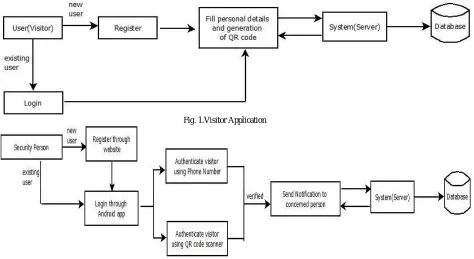
This system describes the design of an Android based security system at the visitor side as shown in Fig.1 and access control system as shown in Fig.2 for use in any organizations to seek entry inside the premises. The system uses the QR code technique and SHA1algoritms to accomplish the required task [2] [3].
When the visitor installs the Android application he enters all the required details (name, email id, phone number) and then captures/uploads his/her image which will be stored in the database [4]. Once this is done the visitor has to
capture/upload any government Id proof which will be again stored in the database. After the registration process is done, OTP will be generated to verify the person’s phone number.
The objective of this project is to propose a real time capturing system for visitor using Quick Response (QR) code in an Android smart phone [5]. Hence after the visitor has done filling all the required details, a unique QR code for each
visitor will be generated which will be displayed along with all the details of the visitor in the form of ID Card[5][6]. Using
Multiplexing and Demultiplexing process, encode and decode the information from single QR code generated on the id card of the visitor which will be scanned using QR code scanner application[5][6][7] .QR Code Scanner Application will be
installed on Access Control Side (Security Person) [7]. This retrieves the information of the visitor. The retrieved
information consists of the Visitors image, personal details entered during registration and image of any government Id proof. The Security person will verify the personal details and image of the person with the government id proof. If this retrieved information belongs to a registered user, access is granted; otherwise it is rejected. Notification will be sent to the concerned person whom the visitor wants to meet in the organization. In this way, Android application helps to keep proper track of all the visitor and the suspicious person can be caught in the organization [8].
Fig. 1.Visitor Application
IV. MODULARDESCRIPTION
A. Visitor Side Application:
The visitor entering the organization must download the android application and must undergo the following steps:
Step 1: User Registration
When a person visits any business place for the first time, he has to register with his personal details (Name, Email Id, Phone Number and Password) [8]. Visitor can also register himself via Facebook or Gmail as shown in Fig.1.
Passwords are stored in the database using SHA1 encryption in order to provide high level of security [2].
Step 2: OTP Generation
As soon as the person registers himself, OTP will be generated to verify the visitor’s phone number. Incorrect OTP will not be accepted. The visitor will be allowed to further access the application when he/she enters the valid OTP that is received on the registered phone number as shown in Fig.2.
Step 3: Uploading or Capturing image
Visitor's image is captured through phone’s camera or uploaded through phone’s gallery as shown in Fig.3 which is be used by the security person of the organization to authenticate him. The visitor will not be allowed to access the application further if image is not uploaded.
Step 4: Uploading or Capturing Government ID proof:
Visitor's ID proof is captured through phone’s camera or uploaded through phone’s gallery as shown in Fig.3 which is used by the security person of the organization to verify all personal details of the visitor which will be displayed when the security person will scan the visitor’s ID card or authenticate the visitor through his/her phone number. The visitor will not be allowed to access the application further if image is not uploaded.
Step 5: Fill other details
The visitor has to fill other details such as date of birth, gender as shown in Fig.4 to complete the registration procedure. As soon as the registration procedure is completed, ID card will generated for visitor displaying the visitor’s name, phone number , email id, date of birth and QR code. QR code will be unique for each visitor as phone number is used to uniquely generate the QR code [5][6].
Step 6: Login
As soon the visitor registers himself with all the required details, visitor must login using the registered phone number/email id and password to access the application as shown in Fig.5 [8]. Whenever the visitor visits any business
Fig.1.Registration Fig.2.OTP Generation Fig.3.Upload Image Fig.4.Other Details Fig.5.Visitor login And Government
ID card
B. Access Control Application(Security Side):
Access Control Side Application is used by the security person to authenticate the visitor at the entrance of the organization in the following steps:
Step 1: Registration
Security Person working in the organization will be registered by the admin through website. Website is created which will be handled by the admin and the organization in order to keep track of all the visitors visiting the organization and has access to all the personal details of the visitor to provide high level of security in the organization. Security person handles the access control side application and scans the QR code of the visitor or authenticates the visitor using its registered phone number before allowing the visitor to enter the organization [5][6][7].
Step 2: Login
Inorder to access the application, the security person needs to first login using its registered email id and password as shown in Fig.1
Step 3: Scanning QR code
Security person authenticates the visitor by scanning the QR code as shown in Fig.2 [5]. Each visitor has a unique QR
code which is displayed in the ID card that is generated after the visitor completes the registration procedure [7]. Other
QR codes will not be scanned because QR codes are generated uniquely using the phone number of the visitor [6]. After
Step 4: Authentication using phone number
If visitor is not carrying his phone, security person can authenticate the visitor through his registered phone number as shown in Fig.3.This is an alternate to QR code which is used if the visitor forgets to carry his cell phone but it can be used only if the visitor is registered with the application. Fake phone numbers or the phone numbers that are not registered will not be accepted. After the successful authentication, all the personal details of the visitor such as name, phone number, email id, visitor’s image and government ID card will be displayed to the security person in the similar way as it appears after scanning the QR code. Security person will verify all the personal details from the government ID card to validate the person to avoid fake identity. The visitor will be allowed to enter the organization only if the verification is successful.
Fig.1.Security Login Fig.2.QR code Scanning Fig.3.Authentication through phone number
C. Tracking through website:
Inorder to keep a systematic track of the android application used by the visitor and the security person, website is created which is handled by the admin and the organization.
1. Admin Side: Admin has access to all information including the website, database and the android application. Following task is performed by the admin.
Organization Registration: The organization that uses this android application will be registered by admin first in order to provide access to the organization.
Visitor Registration: Admin has access to keep record of the number of visitors visiting the particular organization and also has the permission to register the visitor.
Employee Registration: Admin registers all the employee of the organization with their personal details.
Outlet Registration: Organization registers all the outlets (cafe and restaurants) inside the organization’s premises.
Outlet Offers: Offers provided by the outlets are registered.
2. Organization side: Organization once registered by the admin has access to the visitor registration. If the visitor is visiting the organization for the first time and he / she is not carrying cell phone, the security person can register the visitor through the website. The organization can also keep record of the visitors visiting the organization.
V. APPLICATION RESULTS
A. Generation of ID Card:
In the visitor side application when the visitor completes the registration procedure, ID card is generated for each visitor as shown in Fig. 1 which contains all the registered details of the visitor such as name, phone number, date of birth, email id, image of the visitor and the QR code that is generated uniquely for each visitor using the visitor’s phone number [5][6][7]. This ID card serves as the identity card for each visitor visiting any organization which will be used by the
security person to authenticate the visitor to avoid fake identity and provide security in the organization.
B. Notification:
Security person scans the QR code to authenticate the visitor or uses the visitor’s registered phone number if the visitor forgets to carry the cell phone to validate him [7]. After the scan is successful, all the personal details of the visitor will
be displayed to the security person including the name, phone number, email id, image of the visitor and government id proof as shown in Fig.2. The security person will verify all the personal details from the government id proof uploaded to validate the visitor. If the verification is successful, the security person selects the employee name from the list as shown in Fig.2 whom the visitor wants to meet in the organization. After selecting the employee name from the list, respective notification will be sent to the concerned person in the organization which consists of visitor details. If the verification is not successful the visitor will not be allowed to enter the organization. This system helps to provide high level of authentication and verification in order to maintain a systematic way to achieve security in the organization.
Fig.1.ID Card Fig.2.Notification
VI. CONCLUSIONANDFUTUREWORK
the person registers himself, all his details will be verified such as name, phone number, email id, password in the android application. Visitor’s Image proof and government ID card of each visitor will be used to avoid fake identification. OTP generation helps to ensure that no fake phone numbers are used by the visitor. QR code is unique for each visitor which is used to authenticate the visitor by the security person in order to provide entry within the organization and to ensure security. As an alternative if the person forgets to carry his cell phone , visitor’s registered phone number can also be used by the security person to authenticate the visitor.As the proposed system provides authentication using QR code and phone number, in future the performance of the proposed system can be improved by storing the geo location of the organization in the visitor side application when the visitor visits the organization for the first time. Storing of geo location will be helpful when the visitor visits the same organization again; security person will not have to perform the authentication process for the same visitor again and again as directly it can be displayed “Geo Location matched” in the visitor side application indicating the person has already been authenticated earlier. Security person can check this notification and provide entry to the visitor in the organization .Also the in and out timings of visitor can also be stored dynamically. This will help the visitor to have a visitor history in the application to keep track of all the organization the visitor visits.
REFERENCES
1. Reto Meier, Professional Android 2 Application Development, 2nd edition Wiley Publishing Inc., 2010. 2. [online] http://www.flick2know.com/QRCodes
3. Anak Agung, Putri Ratna, Ahmad Shaugi, Prima Dewi Purnamasari and Muhammad Salman, “Analysis and Comparison of MD5 and SHA-1 Algorithm Implementation in Simple-OA Authentication based Security System”, pp. 99-104, 2013.
4. [online] https://developer.android.com/index.html.
5. Trupti Lotlikar, Rohan Kankapurkar, Anand Parekar and Akshay Mohite, “Comparative study of Barcode, QR-code and RFID System”, Rohan Kankapurkar et al, International Journal Computer Technology & Applications, Vol.4 , Issue 5, pp. 817-821, 2013.
6. A. Sankara Narayanan,”QRCodes and Security Solutions”, International Journal of Computer Science and Telecommunications,Vol.3, Issue 7, pp.69-72, 2012.
7. Phaisarn Sutheebanjard and Wichian Premchaiswadi, “QR-Code Generator”, Eighth International Conference on ICT and Knowledge Engineering, 2010.