ABSTRACT
KACHRU, SANDEEP TEJKISHEN. On the relative advantages of teaching Web services in .NET vs. J2EE. (Under the direction of Dr. Edward F. Gehringer.)
.NET and J2EE are currently the two leading technologies in enterprise-level application
development. In the coming years, according to various surveys, these two technologies
will capture an almost equal amount of market share. They are also the platforms of
choice for developing Web services. There is an ongoing debate about the advantage of
developing Web services in one over the other. We look at this question from the
perspective of educators.
We compare and analyze the two platforms using a number of parameters such as
features present in each platform, tools and resources offered by the two and
compatibility with the rest of the curriculum. We study the most significant difference
between the two platforms – the platform independence of J2EE and the language
independence of .NET, and discuss their relative advantages in an academic environment.
We discover that both of the platforms offer equal support for the development of Web
services and teach the concepts equally well. While .NET offers integrated, native
support for various phases of Web services development, Java platform achieves this
with several new libraries. On the other hand, J2EE’s major advantage over .NET is the
popularity of the Java language in academia. Thus, teaching Web services in Java
maintains uniformity in the curriculum. A looming factor is the growth of C# as a
more schools, it will be some time before it can challenge Java as the most popular
language in universities. We finally compare the development process of Web services in
IBM’s Websphere and Microsoft’s Visual Studio .NET and find them remarkably
similar. Both the tools provide comparable features to develop Web services easily.
Thus, the choice of platform will depend on factors other than the relative ease of
teaching Web services. Arguments in favor of J2EE are platform independence, multiple
vendor support, popularity of Java in universities, a greater number of tools and resources
etc. However, it does not allow programming in any other language besides Java and
does not offer native support for Web services. On the other hand, the .NET platform has
support for multiple languages, integrated support for Web services, an excellent
development tool and a language that is becoming more popular in academia. The factors
that go against .NET are inadequate platform independence and single-vendor support.
We conclude that there is no clear winner and the choice of platform will depend on
various local factors. Finally, we provide a road-map that will help the educators in
ON THE RELATIVE ADVANTAGES OF TEACHING WEB
SERVICES IN .NET vs. J2EE
BY
SANDEEP TEJKISHEN KACHRU
A thesis submitted to the Graduate Faculty North Carolina State University
in partial fulfillment of the requirements for the Degree of
Master of Science
Computer Science
Raleigh
August 2003
BIOGRAPHY
Sandeep Kachru was born in the beautiful city of Srinagar in India. He completed his
schooling from Gujarat Law Society in Ahmedabad. Pursuing his dream of becoming a
computer engineer, he joined L. D. College of Engineering. He graduated with distinction in
2001 with a degree of Bachelor in Engineering in Computer Engineering. Sandeep came to
North Carolina State University in the Fall of 2001 to pursue graduate studies in Computer
Science. Here, he worked on his Master’s thesis under Dr. Edward Gehringer. After
ACKNOWLEDGEMENTS
I would like to express my sincere gratitude to my advisor Dr. Edward Gehringer for his
constant support and guidance, without which this work wouldn’t have been possible. I,
especially thank him for his efforts in reviewing and editing my thesis. Special thanks also go
to Randy Miller of Borland, Dr. Munindar Singh and Dr. Laurie Williams for serving in my
committee and for their invaluable suggestions. I also want to thank all my friends for their
encouragement and help. Finally, I would like to thank my parents and my brother for
TABLE OF CONTENTS
LIST OF FIGURES ...VI
LIST OF TABLES...VII
1 INTRODUCTION ... 1
1.1 Research motivation...1
1.2 Introduction to Web services ...2
1.3 Introduction to J2EE ...4
1.4 Introduction to .NET ...8
1.5 Thesis overview...10
2 PLATFORM INDEPENDENCE VS. LANGUAGE INDEPENDENCE... 11
2.1 Platform independence ...11
2.1.1 Platform independence in J2EE...11
2.1.2 Platform independence in .NET ...13
2.2 Language independence...14
2.2.1 Language independence in J2EE...14
2.2.2 Language independence in .NET...16
2.3 Summary...17
3 WHICH PLATFORM TEACHES WEB-SERVICE CONCEPTS BETTER? ... 18
3.1 Web-services stack ...18
3.2 Comparing the development process...21
3.2.1 Developing and deploying a simple Web service...22
3.2.2 Invoking the Amazon Web service ...27
3.2.3 Publishing and discovering Web services ...28
3.3 Which platform teaches the concepts better? ...29
3.4 Performance benchmarks...30
3.5 Which platform will be more useful in the future? ...31
4 COMPARING COMPATIBILITY WITH REST OF THE CURRICULUM... 34
4.1 What do universities teach today? ...34
4.2 Issues related to learning curve...38
4.3 Use of C# in universities...39
4.4 Summary...40
5 COMPARING THE AVAILABLE TOOLS AND RESOURCES ... 42
5.1 Comparing the tools available to develop Web Services...42
5.1.1 Choice of tools available ...42
5.1.2 Comparing IBM Websphere with Visual Studio .NET ...43
5.2 Comparing the resources available for students/developers ...44
5.3 Summary...46
6 CONCLUSION... 47
REFERENCES ... 50
APPENDIX A... 55
APPENDIX B... 56
APPENDIX C... 57
APPENDIX D... 58
APPENDIX E ... 59
APPENDIX F ... 60
LIST OF FIGURES
Figure 1: J2EE Architecture [2]... 5
Figure 2: .NET Architecture [2]... 8
Figure 4: Web services protocol stack [20] ... 18
Figure 5: Invoking a Web Service ... 22
Figure 6: List of deployed Web services in Axis... 23
Figure 7: WSDL file generated by Axis ... 24
Figure 8: List of operations displayed in .NET... 25
Figure 9: Testing the .NET Web service in browser ... 26
LIST OF TABLES
Table 1: Comparing simple .NET and Java programs... 29
Table 2: Performance of .NET-based application vs. J2EE-based application ... 30
Table 3: Results of a survey conducted in June 2002... 31
Table 4 Usage of C/C++ /Java as the primary language in universities ... 35
Table 5 – Language used as introductory programming language in the Top 25 computer science departments. ... 35
1 Introduction
1.1 Research motivation
The topic of Web services has created a lot of excitement in the industry. Not a day goes by without news of some company adopting Web services and saving millions of dollars in the process coming out. A famous example of such process is the partnership between Southwest Airlines and Dollar Rent-A-Car [1]. The research firm IDC predicts that Web services will become the dominant distributed computing architecture in the next 10 years, and also, that Web services will drive software, services and hardware sales of $21 billion in the U.S. by 2007 [2]. This will obviously create a demand for computing professionals with expertise in this field.
1.2 Introduction to Web services
Until recently, the Internet was only used by humans to interact with computers. A simple example would be of a person using the Internet to plan his vacation, say, in 1996. Suppose he wanted to book an airline ticket, a rental car, and a hotel room. The three services were unrelated and accessible through individual Web sites. Now, to put together a vacation package, the consumer would need to try out different combinations of dates on all the three Web sites. This would require going back and forth from one Web site to put together an itinerary. This is a very repetitive and boring task for a human, but very simple for a computer application. Such an application could access the three Web sites, get price quotes for the days specified, compare the results, choose the best combination, and then book the services individually. For this to be possible the three services would have to be accessible to the computer application. Such a service, if accessible through the Internet, would be called a
Web service. Besides providing functionality to their users, exposing the required parts of their system as a Web service would also allow the companies to integrate their systems with partners and vendors cheaply and easily. Today, of course, travel Web sites have integrated these three services. Yet services are proliferating, and there is always room to add value by integration. Indeed, Web services can even exploit legacy systems by making them accessible to new technologies.
There are as many definitions of Web services as there are companies involved in working on them. We will use the definition provided by World Wide Web Consortium (W3C) – the body defining standards for the web. The W3C defines Web Service as “a software system identified by a URI, whose public interfaces and bindings are defined and described using XML. Its definition can be discovered by other software systems. These systems may then interact with the Web service in a manner prescribed by its definition, using XML based messages conveyed by Internet protocols.” URI means Uniform Resource Identifier and is considered to be globally unique. XML is the acronym for eXtensible Markup Language and is a language designed to describe data using custom tags.
to find it. If the client knows the URL of the service then this won’t be a problem. However, if the client doesn’t know the URL of the service, then something like the Yellow Pages would be required. On Internet, this is achieved by using Universal Description, Discovery and Integration (UDDI) [7], a centralized directory service where businesses can register and search for Web services. Currently Microsoft, SAP, NTT and IBM host UDDI registries on the Internet. After “discovering” the service, the client needs to know how to invoke it. This requires knowing the location (address) of the service, parameters to be passed, and the type of value returned. This information is provided by a file the service provider has written in the Web Services Definition Language (WSDL) [8], an XML based language. Generally, the service provider makes the WSDL file available on a publicly accessible Web site and also in the UDDI registry. Now all the client needs to do is invoke the services by sending messages in a format that the server understands. One such format is the Simple Object Access Protocol (SOAP) [9]. The server interprets the SOAP message, calls the appropriate subroutine and returns the result to the client as another SOAP message. Note that a service does not need to use WSDL, UDDI or SOAP to be called a Web services. There are several alternatives available to the above specifications. For example, RPC [10] is a XML-based message format similar to SOAP, Microsoft has its own technology for publishing and discovering Web services called DISCO [11] and Web Interface Definition Language (WIDL) [12] is a specification similar to WSDL used for mapping the constructs of a programming language to XML. Any of these protocols can be used, and as long as description, discovery and invocation takes place using XML based protocols, the service can be called a Web service. But the three protocols described earlier have gained industry-wide acceptance and are now considered to be the de-facto standards for Web services. The protocols used in the various phases of Web services development are described in Chapter 3.
other. Without going into the details of these technologies, we can list the following advantages Web services have over these technologies [13]:
• A Web service is a platform-, language-, and vendor-independent technology.
• Web services use XML as the payload format and for describing the service interface, which is a widely supported and adopted language for describing data.
• The underlying protocol of Web services (in most cases) is HTTP. This ensures that the messages pass through port 80, which is not closed by firewalls. Moreover, HTTP is payload neutral so we can use it to send and receive information in any format including XML.
• Web services have received support from some of the largest software companies in the world today like Microsoft, Sun Microsystems, IBM, HP and BEA. Though these companies are competing with each other for the market share they are also cooperating for the establishment and adoption of Web services standards.
SOAP has gained an enormous amount of support from the software industry and its implementations are available in almost all the major programming languages [14]. Developers can use programming languages like Java, VB, C, C++, C#, Perl, PHP, Smalltalk, and Python to develop and consume Web services. The two most popular Web-services platforms are the Java 2 Platform, Enterprise Edition (J2EE) and Microsoft’s .NET. Before the advent of Web services, J2EE and Microsoft-based technologies (COM, DCOM) were considered the platforms of choice for enterprise-level application development. J2EE has been repositioned as development platform for Web services with the addition of several APIs. Microsoft has created its new platform .NET with inbuilt support for Web services. Now, J2EE and .NET are competing to achieve domination in the Web services market-place.
1.3 Introduction to J2EE
established in 1995 to make Java an open-specification product. Around 500 companies and individuals are member of JCP and contribute towards its cause. Sun Microsystems owns the copyright and trademark to “Java” and is also the founder and leading member of JCP.
J2EE provides a framework for the development of enterprise-level multi-tier applications. Multi-tier applications have evolved from simple client-server technology. In client-server technology, a computer would act as a server providing service to a number of computers on a LAN. However, this solution was not scalable and the performance degraded when the number of clients increased. To solve this problem a middle tier was added between the database server tier and the user-interface tier. This layer can be implemented as an application server or message server, which solves the problem of performance degradation experienced with two-tier architecture. J2EE simplifies the task of developing applications for multi-tier architecture by providing “containers.” Containers provide certain complex functionality so that software developers do not have to worry about that and can concentrate on writing the business logic. For example, Java servlets simplify development of Web-based applications by providing communication and session management.
Figure 1 [2] illustrates the J2EE architecture. Let us now discuss each of the four levels.
Presentation and Access Business Logic Connectivity Runtime JSP/ Servlets Java Foundation/ Swing Web Services Session Enterprise JavaBeans Entity Enterprise JavaBeans Message Driven Beans
JCA JDBC JMS SOAP
1. Presentation and Access.
As shown in figure, J2EE has Java Server Pages (JSP) for building tag oriented dynamic Web pages, servlets for building dynamic pages programmatically and Swing to build interactive and rich GUIs. Web services provide a programmatic access to remote objects.
2. Business Logic.
In J2EE the Enterprise JavaBeans (EJBs) contain the application's business logic. Business logic is the code that implements the functionality of the application. There are three types of EJBs: Session EJB, Entity EJB and Message Driven EJB. A session bean is used by the client to interact with the application on the server. An entity bean represents a business object in a persistent storage mechanism—generally a relational database. A message driven bean allows a J2EE application to process messages asynchronously. Message driven beans use Java Messaging Services (JMS) as the messaging protocol.
3. Connectivity.
J2EE has a standard database protocol—Java Database Connectivity (JDBC) that allows access to various types of tabular data sources. The Java Connector Architecture (JCA) allows J2EE components to access different enterprise information systems, such as enter-prise resource planning (ERP) and non-relational databases. JMS is a messaging standard that allows J2EE components to send and receive messages asynchronously. An extensive Java API for XML is provided for mapping between Java and XML protocols such as SOAP and WSDL.
4. Runtime.
The latest version of the J2EE specification has been augmented with the addition of several libraries to support Web services. The two primary APIs with a brief description are as follows:
• Java API for XML-Based RPC (JAX-RPC) is a set of API that enables developers to develop and deploy Web services. It provides a way for applications to exchange and interpret SOAP messages using standard communication protocols. This saves the applications from having to parse the XML and map the SOAP data types to Java data types and vice versa.
• Java API for XML Registries (JAXR) provides a uniform and standard API to access different kinds of XML registries. It allows developers to write registry client applications that can be ported to different registries including ebXML [15] Registry and Repository and UDDI.
Besides these two there are several other APIs which provide functionalities like sending and receiving XML based messages (JAXM), XML processing (JAXP) and binding Java objects to XML documents (JAXB). The study of these APIs is beyond the scope of this thesis.
J2EE is currently the market leader in enterprise application development. It is an attractive choice as a development platform for the companies. The main benefits of using J2EE are:
• Platform independence: Java technology essentially works independently of any single hardware architecture or operating system. The development platform is available for Windows, Mac and various flavors of Unix including Solaris, Linux, HP-UX.
1.4 Introduction to .NET
.NET is a Microsoft product and therefore tied closely to the Windows operating system. Microsoft describes it as software that connects information, people, systems, and devices. Web services are central to the idea of .NET. Microsoft defines Web services as “small, discrete, building-block applications that connect to each other as well as to other, larger applications over the Internet.” Web services will allow data to be exchanged across the Internet in XML format and this will allow software to communicate among them.
.NET provides a development framework similar to J2EE for multi-tier enterprise application development. It provides a rich and simple to use class library for building components of each layers. The following figure [2] illustrates the .NET development platform. Like J2EE, it too is broken into four major layers.
Figure 2: .NET Architecture [2]
1. Presentation and Access.
For thin-client applications, .NET uses ASP.NET for tag-oriented dynamic HTML pages. ASP.NET, unlike its predecessor ASP, uses compiled code. That along with many other new features makes it more efficient and simple to use. Windows Forms are used for building rich
Presentation and Access Business Logic Connectivity Runtime ASP .NET Pages Windows
Forms Services Web
.NET Managed Components COM+ Queued Components ADO .NET SOAP
and complex GUIs for the desktop. Web Services are used for programmatic access to remote business logic.
2. Business Logic.
.NET provides two major kinds of business components: .NET Managed Components and COM Queued Components. .NET Managed Componets are components made for the .NET environment and differ significantly from the COM components as they are not registered in the registry and their memory is managed by the Common Language Runtime (CLR). COM Queued components are components which work asynchronously. They are useful in scenarios where the server is not online all the time.
3. Connectivity.
ADO.NET, which replaces the ActiveX data object (ADO), is used for accessing relational databases and also provides better integration with XML. An XML API is provided for mapping .NET Components to XML protocols such as SOAP and WSDL.
4. Runtime.
All .NET applications use a single runtime engine, the CLR, to execute business applications. Applications can be written in multiple languages and compiled to Microsoft Intermediate Language byte code and executed in the CLR. Currently, CLR is supported only on Windows platforms.
.NET is a successor to the older Microsoft technologies like COM and DCOM. It has been substantially improved with the addition of several new features. The main benefits of using .NET are as follows:
• Integrated Web services support: .NET has inbuilt support for developing and deploying Web services. Developing, publishing and discovering a Web service is similar to developing any other application in .NET. This is explained in more detail in the third chapter.
1.5 Thesis overview
2 Platform Independence vs. Language Independence
2.1 Platform independence
A technology can be said to be platform independent if it can be ported to different hardware architectures or operating systems without requiring changes. It is of significant importance to those independent software vendors (ISVs) who have clients using different operating systems or computer architectures. Using a technology that is platform independent, ISVs need to write and compile the code only once. The compiled code can then be used on any machine running any operating systems.
2.1.1 Platform independence in J2EE
J2EE, unlike .NET, is a platform-independent technology. It works on number of operating systems including those for embedded devices. Java is based on the “write once, run everywhere” philosophy promulgated by Sun. It means that you write and compile a Java program only once and you should be able to run it on any computer with any operating system. The architecture neutrality comes from the fact that the Java compiler does not generate executable machine code. It generates architecturally neutral byte-code instructions targeting the Java Virtual Machine (JVM) instead of particular computer architecture. JVM is an abstract machine residing inside the actual machine. It is responsible for interpreting the byte code, and translating this into actions or operating system calls. Therefore, any machine or device that has JVM installed on it can execute the compiled Java code. JVM is currently available for a range of hardware devices including handheld computers, cellular phones and operating systems like Windows, UNIX, Mac, Solaris and Linux.
Though, Java is based on the novel goals outlined above, the vision of “write once, run everywhere” has not completely been realized. There are several factors that affect the platform neutrality of a program [16]. Developers need to keep the following factors in mind while coding.
the Java platform needs to be ported to that hardware and operating system. This problem has been solved to a large extent by porting the platform to all the major platforms and operating systems.
2. Another important factor is the Java platform version and edition. Java has three sets of APIs: Java 2 Standard Edition (J2SE) containing the core Java libraries for developing applications and applets, Java 2 Micro Edition (J2ME) containing libraries to develop applications for embedded devices and Java 2 Enterprise Edition (J2EE) containing libraries to develop server-side applications. The developer needs to make sure that the target computer has the correct edition of API installed on his computer/device.
3. Sometimes developers need to use the native methods provided by the operating system to take advantage of a platform-specific functionality. However, this will make the program dependent on that operating system, as the native methods won’t be available in any other operating system.
4. Several vendors provide their own implementation of the Java platform specifications. Generally, the vendors also include non-standard APIs with their implementation, which provide some extra functionality. Using such non-standard APIs makes the program dependent on that vendor’s implementation and cannot be ported to a computer that uses some other implementation.
5. Sometimes the correct execution of a program to be dependent on the implementation of virtual machine. This is because different virtual machines handle certain things like garbage collection and thread prioritization differently. Therefore to achieve platform independence the correctness of the program should not depend upon the timely destruction of an object and prioritization of threads.
Even though it is difficult, writing a platform independent application is possible. Java simplifies the task to a large degree, but the developer needs to take care about the factors outlined above.
2.1.2 Platform independence in .NET
Being a Microsoft product, .NET is considered to be “Windows only.” This is partly true because the commercial releases of the .NET platform have been only for the recent versions of the Windows operating system. However, it is not completely operating system dependent, as will see from the discussion below.
As mentioned in the introduction, developers use .NET Framework for developing and running software applications and Web services. The .NET framework is composed of the common language runtime (CLR) and a unified set of class libraries. CLR is the execution engine for the .NET framework applications. It provides a number of services like code management (compilation and execution), garbage collection, thread management and memory management. To enable these services, compilers of one or more languages compile the source code into an intermediate form called Portable Executable (PE). PE is composed of Microsoft Intermediate Language (MSIL) Code and metadata. MSIL is a CPU-independent set of instructions and metadata is the data that describes to the CLR the types, members and references in the code. When this executable is run, the MSIL is compiled into machine code by a Just-In-Time (JIT) compiler. Thus, CLR does not interpret the IL but instead converts it into native code that can be directly executed. The runtime provides a JIT compiler for each architecture that it supports.
for the implementation of these two fundamental elements of .NET framework in other operating systems besides Windows. Microsoft has provided a shared source implementation of CLI, codenamed Rotor [18], as an implementation of the two standards described above in source code form. Rotor currently can be built and run on Windows XP, Free BSD and Mac OS. Anybody can download Rotor from the Microsoft Web site and use it for non-commercial purposes. In fact, University of Hull is using Rotor as a teaching platform for a Master’s degree in Computer Science [19]. Whereas Rotor is meant only for academic purposes an open-source implementation of .NET is being created by Ximian, a company recently acquired by Novell Inc., for the UNIX environment. This project is called Mono and can be used for commercial purposes. The objective of Mono is to “implement various technologies developed by Microsoft that have now been submitted to the ECMA for standardization.” Besides that, Mono project will also include the class libraries of ASP.NET and ADO.NET, which have not been standardized. We can conclude that though .NET framework is currently not completely platform independent it can be used on various platforms especially for at least academic purposes. In future, more efforts like the Mono project may make the .NET platform operating system independent.
2.2 Language independence
Language independence means that a technology/platform is not dependent on any particular programming language, i.e., a developer can use any of the supported languages to develop applications on that platform. Language independence provides some unique advantages to the developers. It allows them to use the language best suited to solve a given problem. Perhaps the biggest advantage will be that it allows for the reuse of vast libraries of a given language. .NET has been built with language independence as one of the goals. It supports a wide range of languages with many more in development. Though the J2EE platform was not built to support any language other than Java, development is possible in other languages also. We will examine this feature of Java platform in the next section.
2.2.1 Language independence in J2EE
languages also. That makes the platform language independent to some extent. Limited language independence has been achieved in the Java platform using the following approach:
• Using Java Native Interface: Using JNI, we can make calls from Java code to methods written in languages other than Java like C or C++.
• Java as an intermediate language: In this method the source code which is written in some other language is first translated into Java code and written to a file and then compiled using the Java compiler. This method is not considered to be a graceful solution, since translating the program may cause the program to be less efficient. Debugging also becomes very difficult as the problem could be in the original source code or the translated Java code.
• Compiling to Java byte code: Using this method, languages other than Java target the JVM, i.e., on compilation they produce a .class file which can be run on the Java platform. This is considered to be a more sophisticated method than the previous one. Examples of such languages include Kawa [20] – a Scheme-based language and Perljvm [21] – a perl-based language.
Though theoretically it is possible to use different languages with the Java platform, complete language independence has not been achieved. Roger Sessions [22], author of various books on building enterprise software, lists the following features essential for a platform to be language independent.
• The platform must be able to support the development of a class library in one language and be able to invoke methods on it from another.
• The platform must be able to support cross-language polymorphic method resolution, allowing base classes in one language to have methods overridden in other languages.
• The platform must be able to support a language-neutral typing system, allowing parameters to be freely passed from methods written in one language to methods written in another.
• The platform must be able to support cross-language exception handling, allowing exceptions raised in a method in one language to be caught and processed in a calling method written in another language.
Currently, there are very few languages that fulfill all these requirements. Moreover, not many commercial projects have known to use these languages for the Java platform. The main reason behind it being that JVM was designed specifically for the Java language. As language independence was never a goal in the design of JVM, it can support only those features that are present in the Java language. Implementing all the features of a language will not be possible and only a subset can be implemented. Therefore, we can say that achieving language independence in the Java platform is very difficult.
2.2.2 Language independence in .NET
CLR, the execution engine of .NET was built from the ground up to support language independence. Support for certain languages is inbuilt in .NET framework. They are VB.NET, C#, C++ with managed extensions and JScript.NET. Compilers that target the CLR are also available for languages like Cobol, Fortran, Eiffel and Pascal, among many others. These compilers have been developed by different companies, universities and research institutes in collaboration with Microsoft.
.NET takes language independence to a whole new level. It allows for complete language integration. All the languages supported by .NET framework share a common API provided by the framework. A class written in one language can be extended by a class in another language and used in a third language. Also, exceptions raised in a method of a class can be caught by the calling method in another language. In fact, .NET provides all the features described above that are needed for a platform to be language independent. Thus, we can say that the .NET platform is completely language independent.
2.3 Summary
We have compared the most significant feature of J2EE—platform independence with the most significant feature of .NET—language independence. J2EE also supports language independence to some extent while .NET supports platform independence to some extent. The important question remains, how does platform independence or language independence affect the suitability of a platform for educational use? The advantages of each factor are discussed below.
• By using a language-independent platform, students can use the best language to solve a given problem, e.g., use Fortran for scientific computing, C/C++ for systems programming, C# for Web-based programming. They can then in principle integrate their code seamlessly to build a robust system.
• Using a language-independent platform in a Web services course would allow the students to use the language in which they are proficient. Therefore students can concentrate on learning the fundamentals of Web services instead of learning a new language.
• Platform independence is important, as it will allow students to develop applications that will run on more than one platform. This will expose students to different platforms and will help increase their career opportunities.
• Because of being platform independent and standards based, J2EE allows the students to choose between tools and resources provided by many vendors.
3 Which Platform Teaches Web-Service Concepts Better?
In this chapter we will examine the two platforms to determine which of the two allows the students to learn the concepts of Web services better. We will first discuss the protocols that are part of a Web-services stack [23], and then compare the development process of Web services on the two platforms. This chapter can also serve as a guide for developing course material for a Web-services course.
3.1 Web-services stack
The Web-services stack is made up of the technologies required to develop, invoke and publish Web services. Though the stack has not been formally standardized most of the companies agree to its composition. The protocols in the stack include XML, SOAP, WSDL and UDDI.
Figure 3: Web services protocol stack [23]
SOAP is the key messaging protocol used in Web services architecture. Though it is possible to implement Web services using some other XML-based protocol, SOAP has gained industry-wide acceptance. This is because; SOAP is language and platform independent, XML-based, simple and extensible. A SOAP message is an XML document consisting of three parts: a mandatory SOAP envelope, an optional SOAP header, and a mandatory SOAP body. The “envelope” is the top element of the XML document representing the message. The envelope contains two elements:
• An optional header, which can contain entries that provide useful information like authentication, security and encoding of the data.
• A body, which contains information for the last recipient of the message. Appendix A shows an example of a SOAP message.
WSDL defines an XML grammar for describing the technical details of the Web services so that they can be invoked by clients. Web services are described as collections of communication endpoints capable of exchanging messages. The WSDL specification uses the following terms to describe a Web service. To understand these terms we consider a Web service with one subroutine reserveRoom().
• Types: Describes the data types used by the Web services. If reserveRoom() takes a data-type as parameter which cannot be directly mapped to an XML equivalent, it will be listed in this element.
• Message: An abstract, typed definition of the data being communicated. The request message used to invoke reserveRoom() function and the response message used to return the result will be described in this element.
• Operation: An abstract description of an action supported by the service. This element will describe reserveRoom() and list the corresponding messages.
• Port Type: An abstract set of operations supported by one or more endpoints. As our service supports only one operation, only reserveRoom() will be listed here.
• Port: A single endpoint defined as a combination of a binding and a network address. This will describe the physical location (generally a URL) from where our service can be invoked.
• Service: A collection of related endpoints. As our service is not associated with any other service, it will contain only one port.
Appendix B shows an example of a WSDL file.
UDDI solves two problems faced by companies in conducting business online. First is the problem of finding a vendor to satisfy its need. The other problem is of finding a way to communicate with the vendor and conduct business. UDDI solves both these problems, by providing a centralized registry where organizations can register themselves and provide description of the services they offer. The description can also include WSDL files describing the service. Other companies can then search the UDDI registry for the kind of service they require.
Though not included in the stack, communication protocols are also considered to be an important part of Web services. HTTP is the preferred communication protocol because of its ubiquity. Though the protocols described above are sufficient to build a simple Web service, many other protocols come into picture when developing complex Web services. These include protocols defined to make the Web services secure, implementing transactions in Web services and implementing business processes. These protocols are generally not taught in a Web-services course and are beyond the scope of this thesis. Students can be introduced to these advanced concepts through a class project.
developing Web services as simple as developing any other application. .NET provides a complete programming solution for Web services, as it includes a SOAP engine, tools for publishing and discovering the Web services. However, as explained in the previous chapter .NET allows only development of Web services for the Windows platform. JAX-RPC, which is part of J2EE, allows users to develop and deploy Web services on any platform. There are several implementations of JAX-RPC like The Mind Electric’s Glue [24] and Apache Group’s Axis [25] available to programmers. In the next section we will evaluate the development of Web services in Axis against .NET. Another set of J2EE API – JAXR allows programmers to use various XML registries like UDDI and ebXML registry [15]. However, we will be using an API called UDDI4J which is specifically designed to interact with a UDDI registry and comparing it against .NET.
3.2 Comparing the development process
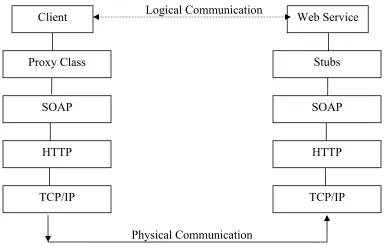
Figure 4: Invoking a Web Service
3.2.1 Developing and deploying a simple Web service
We will develop a simple Web service that is similar to the famous “Hello, World” program used to teach any new programming language. Our Web service would take a name of a person as a parameter and return the greeting “Hello”, appended with the person’s name. For example, if the person calls the service by passing the parameter “David”, he will get the result “Hello, David.” This program is just to illustrate the process of building and deploying a Web service using the two platforms and does not serve any useful purpose. The same process would be used to build and deploy complex, industrial-strength Web services.
To develop this Web service, we will write a Java program that has a function to provide the needed functionality. This is similar to writing any Java program and does not require the use of any special library functions. To deploy the service on the server, we write a descriptor file in XML that lists the methods of the Java class which need to be exposed as Web services. The descriptor file also lists the data structures used in our Web service which are not mapped natively by Axis. This is useful for building complex Web services that take Java Beans or complex data types as parameters. We deploy our Web service on the server by
Physical Communication Logical Communication
Client Web Service
Proxy Class
SOAP
Stubs
SOAP
HTTP HTTP
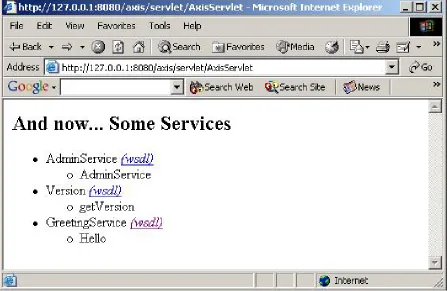
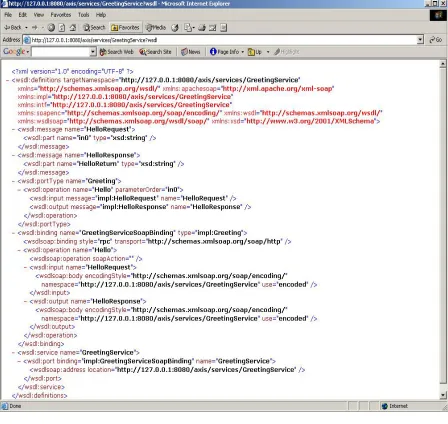
sample Java file and the descriptor file are given in Appendix C. A simple way to deploy the Web service is to change the extension of the Java file from .java to .jws and copy it into the Axis directory. However, with this option, all the public functions of the Java file will be exposed, and there is also no provision for describing the data structures as in the descriptor file. We can see the list of all the deployed services by pointing the browser to a page on the server provided by Axis (Figure 5). The axis engine also generates a WSDL file dynamically which can be accessed from that page (Figure 6). To test the service we need to invoke the service dynamically or by generating stubs. Invoking of a service using stubs has been explained in the next section.
Figure 6: WSDL file generated by Axis
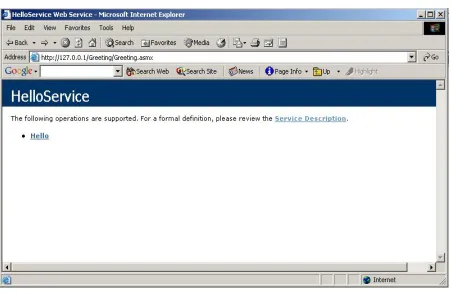
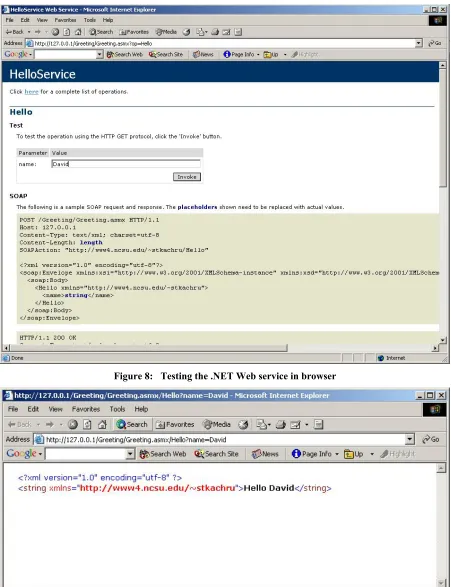
the SOAP and HTTP request and response messages. On clicking the “Submit” button the service is tested using HTTP Get method and the result is displayed in the browser (Figure 9). This feature is very useful to developers in testing the Web service instantly.
Figure 8: Testing the .NET Web service in browser
The development of Web services on the two platforms is very similar. But .NET provides some extra features for deploying and testing the Web service. While Axis requires us to write a deployment descriptor, .NET simplifies the task by using “WebMethod” attribute. Testing of a Web service is also very simple in .NET, and can be done using the browser without writing any program for it. On the contrary, testing a Web service using Axis would involve writing a client program invoking each of the exposed methods.
3.2.2 Invoking the Amazon Web service
Amazon.com provides a Web service that allows developers to create applications that can search its database of books, DVDs, videos, and other products, place them in the shopping cart, and buy them. Developers need to register with Amazon and apply for a developer’s token. There are two ways to invoke the services—statically and dynamically. The static method is to take the WSDL file provided by Amazon and generate stubs. These stubs can then be used to invoke the service. The dynamic method is to send a SOAP request to the Amazon server and get a SOAP response in return. Marshaling and unmarshaling of SOAP messages is taken care of by the Axis and .NET engine.
Axis provides a tool called WDL2Java that takes the WSDL file and generates the stubs. The tool can be invoked as follows:
% java org.apache.axis.wsdl.WSDL2Java WSDL-file-URL
Axis follows certain rules in creating the stubs, which are described in detail in the Axis user guide. The user then needs to compile the classes and make sure that they are “visible” to the client application. To search the Amazon database, we set the properties of an object of a stub class and then call the appropriate method. In response we receive a list of objects, from which we can extract details about the thing we searched. Appendix D shows a simple Java program which uses the stubs generated from the Amazon WSDL file to search its database for books on “Web services.”
The .NET framework has a similar tool that generates stubs from the WSDL file. To invoke it we type the following on the command line:
This will create a C# file called myClass.cs which will have all the necessary proxy classes. As is obvious, the default language for creating the stubs is C#. To create stubs in any other language we need to specify it explicitly using the /language switch. For example to create stubs in VB we will type the following on the command line:
C:\wsdl /language:VB /out:myClass.vb WSDL-file-URL
The process of creating an application in C# which queries the Amazon database and gets a list of books is similar to that in Axis. A sample program is given in Appendix E.
3.2.3 Publishing and discovering Web services
After the Web service has been developed and deployed on the Web server, the next step is to publicize it so that other developers can use it. The most popular way to publicize a Web service is to publish it in a UDDI registry. The users can then search the registry to find a Web service that meets their requirement. The UDDI registry itself is available as a Web service and provides functions to both publish and search for Web services. The .NET technology includes an SDK for interacting with the UDDI registries. As explained earlier, we will use the UDDI4J instead of the JAXR implementation provided with J2EE. There are two basic operations that can be done on the UDDI registry—publishing and discovering. Both of these operations can be done either programmatically or through the interface provided by the service providers. While publishing the user needs to give certain information which will be useful to people searching the registry. This includes information about the business, list of all the services and type of each service. The service types are pre-defined with the UDDI and are called tModels. tModels are equivalent of the interface in object-oriented programming as they define how to invoke a particular type of service. A user interested in finding a particular type of service can search the UDDI registry using the tModel, service name or service description.
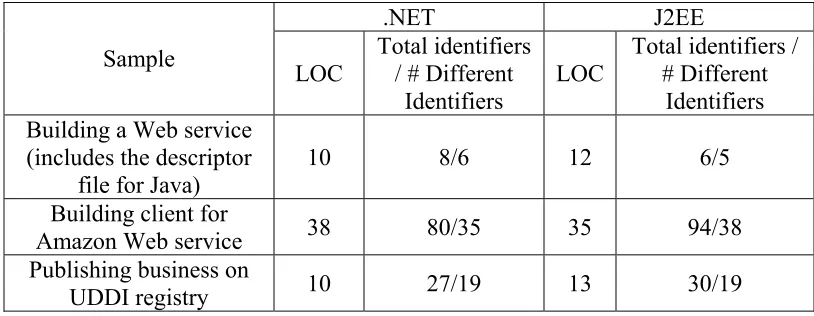
.NET J2EE Sample
LOC Total identifiers / # Different Identifiers
LOC Total identifiers / # Different Identifiers Building a Web service
(includes the descriptor file for Java)
10 8/6 12 6/5 Building client for
Amazon Web service 38 80/35 35 94/38
Publishing business on
UDDI registry 10 27/19 13 30/19
Table 1: Comparing simple .NET and Java programs
3.3 Which platform teaches the concepts better?
As we can see from the above discussion the process of developing and invoking Web services is very similar on both the platforms. We can conclude the following on the basis of our experience with working on the two technologies:
• Both the platforms provide rich libraries that hide the complexity, of working with XML (SOAP messages and WSDL files) and lower level protocols, from the students/developers. Both the platforms also provide tools that can help students learn more about the working of Web services. For example, to view the actual SOAP messages that are exchanged between the client and server, Axis provides a SOAP monitor and .NET provides a SOAP trace utility.
• From section 3.2 we can see that the development process in both the platforms is similar and both teach the concepts related to Web services equally well.
3.4 Performance benchmarks
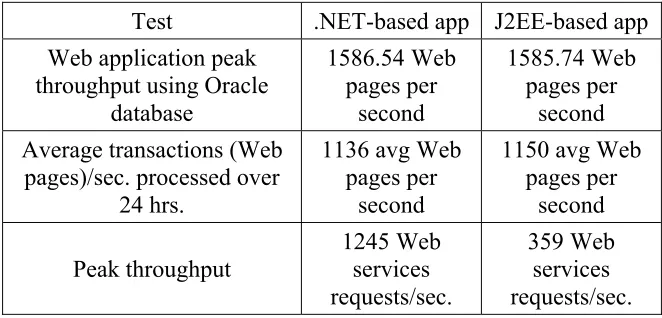
Sun Microsystems introduced the Java Pet Store as a demonstration implementation for J2EE-based Web applications. It illustrates various best practices in application development and is provided as a design pattern for customers to follow when building their own enterprise Web applications. Microsoft re-implemented the Java Pet Store using .NET and C# to demonstrate the superiority of the .NET platform over J2EE. They released benchmark information [26] showing.NET Pet Shop performance to be significantly better under high user loads than the Java equivalent. In October 2002, The Middleware Company, which provides Java training and also maintains online developer resources for the Java community, performed its own benchmarks on the Java Pet Store and .NET PetShop applications. Three tests were performed: a Web application test, a reliability test, and a Web service throughput test. The results [27] showed that .NET based application outperformed J2EE application by a wide margin. Because of the controversy generated by the benchmark tests, the company decided to incorporate suggestions of Java developers and perform another set of tests [28]. Results released in June 2003 showed that the optimized Java Pet Store performed as well as the .NET application in the Web application throughput and reliability test. However, the .NET application still outperformed the J2EE application in the Web services throughput test. Table 1 presents selected results from the case study.
Test .NET-based app J2EE-based app
Web application peak throughput using Oracle
database 1586.54 Web pages per second 1585.74 Web pages per second Average transactions (Web
pages)/sec. processed over 24 hrs.
1136 avg Web pages per
second
1150 avg Web pages per second Peak throughput 1245 Web services requests/sec. 359 Web services requests/sec.
3.5 Which platform will be more useful in the future?
While choosing the platform to teach Web services, educators also need to keep in mind that the choice they make should be useful to students after graduation. They should be able to use the skills and knowledge gained in the class in the real world. For this, the platform should have support of the industry and should be expected to last for some years.
Results of a survey [29] conducted in June 2002 showed some interesting result about the adoption of .NET by software companies. The survey completed by 633 development managers showed that in spite of being a relatively new platform .NET has gained a substantial amount of support from the software industry. The results of the survey are shown in Table 3.
Platform Currently being used in projects (%)
Will use in future projects (%)
.NET 28 52.6
J2SE/J2EE 48.8 51.8
Language
Visual Basic 69.7 39.4
Visual Basic .NET 21.8 39.4
Visual C# .NET 18.8 36.7
Java 56.4 52.6
Table 3: Results of a survey conducted in June 2002
The survey projects the following trends:
• There will be no clear leader in the development-platform market, as both .NET and the Java platform will be used for almost equal numbers of projects.
• As Java is the only language used for development on the Java platform, it will be used in more than 50% of all the projects, thereby replacing Visual Basic as the most popular programming language.
The survey clearly shows that both the platforms will be in used in the future. Another survey [30] conducted in October 2002, asked more than 600 developers about the development platform they are using and will be using in the future. The results were similar to the earlier survey with 63% saying that they will be targeting .NET platform and 61% saying they will be targeting the Java platform. From this, we can infer that jobs involving both platforms will be available.
The Java platform has been going strong for the last few years and is expected to continue to do so, with the backing of many major software companies like IBM, HP, Sun and Oracle. Most of the companies backing the Java initiative are also backing the growth of Web services. At the same time, Microsoft’s .NET has been called “bet-the-company” strategy by its co-founder and chairman Bill Gates. Web services, which are a critical part of this strategy, will have strong backing of Microsoft. Thus, the Web-services initiative is currently receiving plenty of support from both the camps. As the market for Web-services based applications increases, this support is only expected to grow further. As seen from the above discussion both the platforms are expected to do well. We can therefore deduce that both platforms will be used to develop Web services in the future. It is possible that one of the two platforms will be more widely used than the other. However, it is beyond the scope of this thesis to predict which of the two will be able to capture the most market share.
3.6 Summary
4 Comparing Compatibility With Rest Of The Curriculum
An important factor in choosing the platform for teaching Web services is compatibility with the courses already being taught in the department. Computer science departments in most universities have one or two programming languages as their primary teaching languages. These languages are used to teach other courses, like data structures. If the primary language is Java, then it is obvious that students will be more familiar with the Java technology as they would have used it in various courses. Similarly, if students have used .NET based languages like C# or VB.NET in previous courses they will have more familiarity with .NET platform. If a new course is taught using a platform with which students are already familiar then the student does not have to spend time gaining familiarity with the platform and its tool. This allows the student to concentrate on learning the course material rather than learning about the new platform. Because of these reasons, universities strive to maintain homogeneity with respect to language/platform used for teaching. In this chapter we will examine the primary language being used in the computer science degree programs in the universities and determine which platform will be more compatible with it. We will also examine how difficult it will be for students to move to a new platform.
4.1 What do universities teach today?
Year C C++ Java
1998-99 20% 50% 22%
1999-00 19% 54% 22%
2001-02 11% 40% 49%
2002-03 (Projected) 9% 40% 56%
Table 4 Usage of C/C++ /Java as the primary language in universities
From the table we can see that until 2001-02 C++ was the most popular primary language among the surveyed universities, followed by Java. Teaching of Java has kept on increasing and has now exceeded that of C++. The survey also predicted that the usage of Java would rise to 56% in the year 2002-03. Moreover, a study of the undergraduate courses of the top 25 [32] computer science departments reveals the following statistics regarding the programming language used as an introductory language.
Language No. of universities Universities
C 6 5. Illinois; 9. Princeton; 12. Maryland; 17.
Pennsylvania; 20.Columbia, Harvard, Purdue
Java 13
1. CMU, Stanford; 6. Cornell; 7. U.T at Austin; U. Washington; 12. Georgia Tech; 14. Brown, UCLA; 17. Rice; 20. Columbia, Duke, UCSD; 25. U. Mass at Amherst
C++ 4 14. Michigan; 17. UNC-CH, Duke, 20: UCSD
Scheme 3 1. MIT, Berkeley; 10. Caltech
C# 1 Yale
Unknown 1 Wisconsin
Table 5 – Language used as introductory programming language in the Top 25 computer science departments.
popular. The Java platform has an obvious advantage over .NET here as it was introduced around ten years before .NET. Since then it has improved and matured to become an academic as well as industry favorite. Recently, the College Board, a nonprofit educational association, decided that beginning 2003-2004 academic year the programming language for Advanced Placement (AP) Computer Science will be Java. The reasons for the shift from C++ to Java were documented in a report of an ad-hoc committee formed by the College Board to plan for the future of the AP/CS course [33].
The reasons described in the report are:
• Safety: Java is considered to be a safe language. A safe language is described as one in which “Any attempt to misinterpret data is caught at compile time or generates a well-specified error at run time.” The Java compiler catches many common programming errors like unused variables and initializes variables with some default value. Java run-time supports automatic garbage collection so that beginning programmers do not have to worry about memory management or solving problems caused by memory leaks.
• Simplicity: An introductory programming language should be simple enough that it is understood by students with no programming background, but also teach them the fundamentals of programming. Java fulfills this role to a large extent. Automatic garbage collection ensures that students do not get confused by having to learn about allocation and deallocation of memory. Moreover, Java also doesn’t have pointers. Though lack of pointers is considered to be a shortfall by some, it makes things easy for beginners. Java also has a rich set of library providing classes for graphics, database access and networking.
• Object-oriented: Object-oriented programming has gained wide acceptance in industry as well as academia. C++ supports object-oriented programming but it is considered to be syntactically and semantically difficult.
universities with Java as a primary language and universities with other (non-Java) language as a primary language. We will consider the case of the two groups individually and determine the platform they would choose to teach Web services.
It seems natural for universities using Java as the primary language to use J2EE as the teaching platform for Web services. The students will be familiar with the platform and can concentrate on learning the concepts of Web services. But this may not be always true. Some academics may choose to use .NET over J2EE to teach Web services because of various reasons such as integrated support for Web services, rich class library and superior development tools (Section 5.1). .NET supports a number of languages that share a common class library and runtime environment, so students can use a programming language of their choice to program in .NET environment. Moreover, previous familiarity with Java will also be useful since the main language of .NET, C# is fairly similar to Java. A comparison of the two languages [34] reveals that the two languages are similar syntactically and also share certain key concepts.
Some of the similarities are:
• Almost all the keywords of Java have a syntactic and semantic equal in C#.
• Both Java and C# are object-oriented and all the classes are ultimately sub-classes of one class – java.lang.Object and System.Object respectively.
• Exception-handling is done with try-catch-finally blocks in both the languages.
• Inheritance from multiple classes is not allowed but more than one interface can be implemented.
• There are no global methods. All methods are either member functions or static functions.
• Garbage collection is done by the respective virtual machines.
homogeneity in the curriculum. Thus right now, J2EE may have a clear advantage over .NET because of the popularity of the Java language in the academic world.
The choice of platform is not so simple for universities that use languages other than Java as the primary language. As shown in Table-1 and Table-2 about 40% of universities use languages like C, C++, and Scheme as the introductory and primary language. For such universities the language-independence of .NET, as described in Chapter 2, can be very useful. However, J2EE is also an attractive option because of its platform independence, rich class library and many free implementations. These and other concerns that such universities might have are discussed in the next section.
4.2 Issues related to learning curve
In Chapter 3 we discussed the various things that need to be studied in a Web services course. We also described the process of developing Web services using the two platforms. In this section we will try to determine how difficult it is for students with no background in Java and C# to develop Web services in J2EE and .NET respectively.
First of all, we will examine the things that a student will need to know to develop, deploy and publish Web services using the Java platform. The following is a condensed version of the list in the Axis documentation about the things a user should know before starting to develop Web services:
• Core Java data types, classes, exception handling and programming concepts.
• Working of application server, Web applications etc.
• Internet protocols like TCP/IP and HTML.
• Basic knowledge of XML
Similarly, to develop Web services in .NET a user would need to have knowledge about the following things:
• Knowledge of any of the .NET supported languages.
• Working of IIS and deploying application in it.
Thus, the crucial difference in the two platforms is the programming language and the host server. Students with no prior exposure to the Java platform will need to learn somewhat advanced and complex concepts. Besides learning the language, they will also need to learn how to deploy applications in the Java application server. Though not a difficult thing, it can be time consuming. If the universities choose to teach the course using .NET, the students will still need to learn the above concepts. However, because of the support for multiple languages, it is possible that students would be familiar with at least one of them. As all .NET languages share a common class library, development of Web services in any language would only involve getting familiar with the class library. Moreover, as we say in section 3.2 the deployment of services in IIS is also simpler than deployment in Axis. These factors will ease the learning curve for the students. Thus, .NET is a better option for universities whose primary language is not Java.
4.3 Use of C# in universities
type-safe, has automatic garbage-collection, simple to learn and rich set of class libraries. C# also introduces several new concepts that may be of interest to academics. The paper mentions the following:
• Reading from standard input is much simpler in C# than in Java.
• The object model is more consistent. Variables with primitive data type do not need to be boxed and unboxed when the language is expecting an object.
• C# introduces the concept of properties, which removes the need to have get and set methods like in Java.
• C# allows passing of parameter values by reference, which is not possible in Java.
• C# has enums which makes the program more readable.
Looking at these factors we can say that C# will gain popularity in the coming years and more universities will adopt it as the primary teaching language in the computer science degree programs. Though C# offers some advantages over Java, they are not significant enough to justify changing the primary language from Java to C#. Universities which use Java will also be reluctant to move over to C# because of other reasons like availability of free implementations of Java related products, maturity of the language and general goodwill for the open standard of Java. However, universities using languages like C++ and Scheme and wanting to move to a better language now have a choice between Java and C#. They may find C# to be an attractive choice because of the reasons outlined above. In this case also various other factors will affect the choice of primary language similar to those mentioned above. From the above discussion we can predict that the usage of C# as a primary teaching language in universities will increase. This may slow down the rapid growth in the usage of Java in the universities as seen in Table 1.
4.4 Summary
5 Comparing The Available Tools And Resources
In this chapter we will compare the tools and resources available to students to develop Web services in .NET versus in J2EE. Because of the increasing popularity of Web services, there is an abundance of tools, books, articles and tutorials available on the subject. The tools range from simple XML editors and SOAP toolkits to software providing support for development, deployment and publishing of Web services. In this chapter we will try to find if teaching a Web services in one of the two technologies would provide the students with an opportunity to learn better tools.
5.1 Comparing the tools available to develop Web Services
As we saw in section 3.2, building simple Web services in .NET and J2EE is very easy. It can be done using a text editor and command-line tools. However, building complex industrial-strength Web services is not so easy, and would require the use of specialized tools, such as an integrated development environment (IDE). Generally, in industry such IDEs are used to build complex applications, as they improve developer productivity by providing various in-built features that save time. They are especially use for providing context-sensitive help, debugging and testing support. It is important for students to learn about such tools so that they can use them in their job. Introduction to such tools will provide the students important skill that will give a boost to their résumé.
5.1.1 Choice of tools available
In this section we will examine the IDEs available for both the technologies and select one from each for our comparison. The J2EE specification is implemented by a number of vendors – many of whom also provide tools to develop applications in it. Because of this we have a rich choice of tools available for building Web services. Though Microsoft is the main provider of .NET related tools, there are tools available from some other vendors also.
support for developing and testing Web services. We have chosen IBM’s Websphere for our comparison.
The reasons for this choice as well as some of the salient features of WSAD are described as follows:
• IBM’s Websphere application server is considered to be the market leader [39] in the Java application-server market. As its application developer studio is tightly integrated with the server, it is expected to be popular in the market.
• IBM is one of the most important players in the Web services arena. IBM has been and still is a party to many committees that are involved in developing Web-services standards and specifications. It is also at the forefront of research being done on Web services and is developing many new standards, like Web Services Transaction (WSTx) [40] and Business Process Execution Language (BPEL) [41].
• Websphere has won many awards [42] including the “Best J2EE IDE” and “Best team development tool.”
As all the parts of the .NET platform are not standardized and open, not many companies are involved in developing applications for it. However, some language editors and tools are available [43], like Borland’s C# Builder™ and SharpDevelop. We will use Microsoft’s Visual Studio .NET (VS.NET) for comparison with WSAD. Visual Studio is the premier development environment available for the .NET platform. The salient features of the IDE are described as follows:
• VS .NET is the latest version of Microsoft Visual Studio 6, an immensely popular development environment for the Windows platform.
• It is the only .NET-based product that offers a complete and integrated solution for developing desktop and Web-based applications.
5.1.2 Comparing IBM Websphere with Visual Studio .NET
released which provides better support for Web services. We will use metrics from both the comparisons to compare the latest version of WSAD with Visual Studio .NET.
Metric Websphere Studio Application Developer Ver 5.0 Microsoft Visual Studio .NET
Support for creating Web services
Web services can be created from existing Java files, EJB etc. The developer needs to select the functions that is to be exposed as a Web service, and the server on which the service needs to be deployed, and the wizard takes care of rest.
Creating a Web service is similar to creating any other application. A project of type “Web service” is created and deployed on the server. The functions that are to be exposed as Web service are marked with the attribute “Web Method.”
Support for creating Web services client
A wizard to create the proxy files is available in WSAD. The wizard also creates a test client in form of a JSP page from which the Web service can be invoked.
To invoke a Web service, the user needs to add a “Web reference.” The user can then call the Web service functions just like any other function.
Support for publishing Web services and
exploring the UDDI registry
Web services can be published programmatically by using the UDDI library. WSAD also provides an interface to publish the Web service on various registries.
Web services can be published programmatically using the UDDI SDK. Visual Studio .NET does not provide an interface to publish the Web service in different registries.
Support for building database queries
No support for building stored procedures. Requires a separate database tool.
Support for building stored database queries is integrated.
Cost
WSAD is available for evaluation for 60 days. It is also available to faculty members of IBM Scholar Program [46]. The services can be deployed on a free server like JBoss and Tomcat.
Visual Studio .NET is available for free for members of Microsoft Academic Alliance [47] program. The server IIS is integrated with the latest operating systems like
Windows 2000 and Windows XP Pro
Table 6: Comparison of WSAD 5.0 with Visual Studio .NET
We see that the two development environments are very similar to each other, providing similar functionalities and resources to the developers.
![Figure 1 [2] illustrates the J2EE architecture. Let us now discuss each of the four levels](https://thumb-us.123doks.com/thumbv2/123dok_us/1619934.1201303/14.612.144.469.463.681/figure-illustrates-j-ee-architecture-let-discuss-levels.webp)
![Figure 2: .NET Architecture [2]](https://thumb-us.123doks.com/thumbv2/123dok_us/1619934.1201303/17.612.144.470.343.568/figure-net-architecture.webp)
![Figure 3: Web services protocol stack [23]](https://thumb-us.123doks.com/thumbv2/123dok_us/1619934.1201303/27.612.188.442.359.479/figure-web-services-protocol-stack.webp)