A New Approach towards Secure Password
Authentication Based on CARP
Dr. D.Pushpa Ranjini1, Mrs.B. Shanmuga Sundari2 , Mr.S. AbdulKather3, Mrs. N.Deivanayaki4
Professor, Dept of IT, PET Engineering College, Vallioor
2,3
-Assistant Professor, Dept of IT, PET Engineering College, Vallioor
Associate Professor, Dept of CSE, PET Engineering College, Vallioor
Abstract- The Most of the protected resources are based on difficult math issues. How to use hard Artificial Intelligence issues for protection is growing as an exciting new paradigm, but has been under-explored. We apply a new protection resource are based on hard personal Artificial Intelligence issues. CARP also provides a new technique to address the famous image hotspot issue in popular graphical password systems, such as Pass-Points that most often lead to weak password choices. A CARP password scheme can be found only probabilistically by automatic online guessing attacks, also if the password is in the search set. Novel relatives of graphical password systems built on top of the Captcha technology, which we call Captcha As graphical passwords (CARP). CARP is both a Captcha and a graphical password technique. CARP addresses a number of protection issues, such as online guessing attacks, replay attacks, and, in addition, if combined with dual-view technologies, shoulder-surfing attacks. CARP is not a solution, but it also offers reasonable protection and usability and appears to fit well with some practical applications for improving online protection. CARP also provides a new technique to address the famous image hotspot issue in popular graphical password systems, such as Pass-Points that most often lead to weak password choices. A CARP password scheme can be found only probabilistically by automatic online guessing attacks, also if the password is in the search set.
Index Terms — Graphical password, hotspots, Password,
CaRP, Captcha, dictionary attack, password guessing attack.
I. INTRODUCTION
A new security primitive based on hard AI problems, namely, a novel family of graphical password systems integrating Captcha technology, which we call CARP (Captcha As gRaphical Passwords). CaRP is click-based graphical passwords, where a sequence of clicks on an image is used to derive a password. Unlike other click-based graphical passwords, images used in CaRP are Captcha challenges, and a new CaRP image is generated for every login attempt.
Using hard AI (Artificial Intelligence) problems for security, initially proposed in [1], is an exciting new paradigm. Under this paradigm, the most notable primitive invented is Captcha, which distinguishes human users from computers by presenting a challenge, i.e., a puzzle, beyond the capability of computers but easy for humans. Captcha is now a standard Internet security technique to protect online email and other services from being abused by bots. However, this new paradigm has achieved just a limited success as compared with the cryptographic primitives
based on hard math problems and their wide applications. Is it possible to create any new security primitive based on hard
AI problems? This is a challenging and interesting open problem. In this paper, we introduce a new security primitive based on hard AI problems, namely, a novel family of graphical password systems integrating Captcha technology, which we call CaRP (Captcha as gRaphical Passwords). CaRP is click-based graphical passwords, where a sequence of clicks on an image is used to derive a password. Unlike other click-based graphical passwords, images used in CaRP are Captcha challenges, and a new CaRP image is generated for every login attempt. CaRP offers protection against online dictionary attacks on passwords, which have been for long time a major security threat for various online services. This threat is widespread and considered as a top cyber security risk [7].
CaRP also offers protection against relay attacks, an increasing threat to bypass Captcha as protection, wherein Captcha challenges are relayed to humans to solve. Koobface [8] was a relay attack to bypass Facebook’s Captcha in creating new accounts. CaRP is robust to shoulder-surfing attacks if combined with dual-view technologies.
Typical application scenarios for CaRP include:
1) CaRP can be applied on touch-screen devices whereon typing passwords is cumbersome, esp. for secure Internet applications such as e-banks. Many e-banking systems have applied Captchas in user logins . For example, ICBC (www.icbc.com.cn), the largest bank in the world, requires solving a Captcha challenge for every online login attempt. 2) CaRP increases spammer’s operating cost and thus helps reduce spam emails. For an email service provider that deploys CaRP, a spam bot cannot log into an email account even if it knows the password. Instead, human involvement is compulsory to access an account.
to authenticate themselves while avoiding privacy issues that have been raised about biometrics; and have the advantage of portability without, for example, having to carry physical tokens. However, text passwords also suffer from both security and usability disadvantages — for example, passwords are typically difficult to remember, and are predictable if user-choice is allowed [9]. One proposal to reduce problems related to text passwords is to use password managers. These typically require that users remember only a master password. They store (or re-generate) and send on behalf of the user the appropriate passwords to web sites hosting user accounts.
Commonly text passwords are used for registering accounts in websites. People often reuse passwords for their easy remember. These reuse of password causes domino effect. If hacker had compromised any one password it made easy to access all website accounts. [7]. The following figure shows the architectural diagram.
Figure 1. System Architecture
II. BACKGROUND AND RELATED WORK
Graphical Passwords
Various graphical password schemes have alternatives to text-based passwords. Research and experience have shown that text-based passwords are fraught with both usability and security problems that make them less than desirable solutions.
Psychology studies have revealed that the human brain is better at recognizing and recalling images than text; graphical passwords are intended to capitalize on this human characteristic in hopes that by reducing the memory burden on users, coupled with a larger full password space offered by images, more secure passwords can be produced and users will not resort to unsafe practices in order to scope.
Graphical password schemes can be grouped into three general categories based on the type of cognitive activity required to remember the password: recognition, recall, and cued recall. [1] Recognition is the easiest for human memory Whereas pure recall is most difficult since the information must be accessed from memory with no
triggers. Cued recall falls somewhere between these two as it offers a cue which should establish context and trigger the stored memory. Among existing graphical passwords, CCP (Cued Click Points )most closely resembles aspects.
Captcha As Password
This technology is called CAPTCHA, an acronym for Completely Automated Public Turing test to tell Computers and Humans Apart. A CAPTCHA [3] is usually a graphic image with a series of distorted letters on an equally distorted or multicolored background.
The technology is used mostly to block spammers and bots that try to automatically harvest email addresses or try to automatically sign up for or make use of Web sites, blogs or forums. Captcha relies on the gap of capabilities between humans and bots in solving certain hard AI problems. There are two types of visual Captcha: text Captcha and Image-Recognition Captcha (IRC). The former relies on character recognition while the latter relies on recognition of non-character objects. Captcha can be circumvented through relay attacks whereby Captcha challenges are relayed to human solvers, whose answers are fed back to the targeted application.
Captcha Accessibility and Authentication
CAPTCHAs based on reading text or other visual-perception tasks prevent blind or visually impaired users from accessing the protected resource. However, CAPTCHAs do not have to be visual.
Any hard artificial intelligence problem, such as speech recognition, can be used as the basis of a CAPTCHA. Some implementations of CAPTCHAs permit users to opt for an audio CAPTCHA. Other implementations do not require users to enter text, instead asking the user to pick images with common themes from a random selection.
For non-sighted users (for example blind users, or the color blind on a color-using test) visual CAPTCHAs present serious problems. Because CAPTCHAs are designed to be unreadable by machines, common assistive technology tools such as screen readers cannot interpret them. Since sites may use CAPTCHAs as part of the initial registration process or even at every login, this challenge can completely block access. In certain jurisdictions, site owners could become target of litigation if they are using CAPTCHAs that discriminate against certain people with disabilities.
III. CARP BASED SECURE PASSWORD AUTHENTICATION
In this section we present a password selection and user authentication mechanisms in detail.
A. User Authentication using CaRP
Users are having authentication and security to access the detail which is presented in the Image system. Before accessing or searching the details user should have the account in that otherwise they should register first.
CaRP schemes are used with additional protection such as secure channels between clients and the authentication server through Transport Layer Security (TLS). To recover a password successfully, each user-clicked point must belong to a single object or a clickable-point of an object. Objects in a CaRP image may overlap slightly with neighboring objects to resist segmentation. Users should not click inside an overlapping region to avoid ambiguity in identifying the clicked object.
Figure 2. User Authentication
B. Captcha as Password
It was introduced into use both Captcha and password in a user authentication protocol, which we call Captcha-based Password Authentication (CbPA) protocol, to counter online dictionary attacks. The CbPA-protocol in requires solving a Captcha challenge after inputting a valid pair of user ID and password unless a valid browser cookie is received.
For this type of CaRP, a password is a sequence of visual objects in the alphabet. Per view of traditional recognition based graphical passwords, recognition-based CaRP seems to have access to an infinite number of different visual objects.
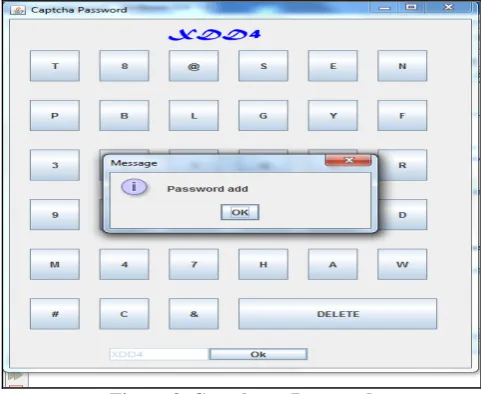
In ClickText images, characters can be arranged randomly on 2D space. This is different from text Captcha challenges in which characters are typically arranged from left to right in order for users to type them sequentially. Fig. 3 shows a ClickText image with an alphabet of characters.
For example, XDD4 means, we have to select each alphabet as X, D, D, 4 and finally enter ok button.
Figure 3. Captcha as Password
C. Pattern Pass points
We developed a graphical password scheme that is similar to Blonder’s scheme but that overcomes some of its main limitations. Our scheme is flexible because it allows any image to be used, e.g. natural images, paintings, etc. CARP also provides a new technique to address the famous image hotspot issue in popular graphical password systems, such as Pass-Points that most often lead to weak password choices.
In Pass Points, salient points should be avoided since they are readily picked up by adversaries to mount dictionary attacks, but avoiding salient points would increase the burden to remember a password. This conflict does not exist in TextPoints. Clickable points in TextPoints are salient points of their characters and thus help remember a password, but cannot be exploited by bots since they are both dynamic (as compared to static points in traditional graphical password schemes) and contextual.
Figure 4 below shows example for pattern pass points scheme in which selected button will be viewed as hidden to show the pattern designed by the user. Here the user selected pattern is “ \ ” which is shown below.
D. Click Image
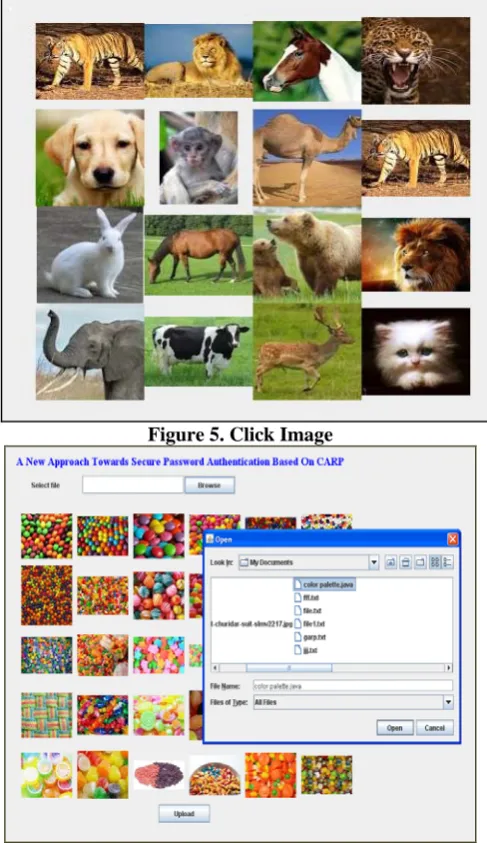
AnimalGrid’s password space can be increased by combining it with a grid-based graphical password, with the grid depending on the size of the selected animal. DAS [3] is a candidate but requires drawing on the grid. To be consistent with ClickAnimal, we change from drawing to clicking: Click-A-Secret (CAS) wherein a user clicks the grid cells in her password. AnimalGrid is a combination of ClickAnimal and CAS. The number of grid-cells in a grid should be much larger than the alphabet size. Unlike DAS, grids in our CAS are object-dependent, as we will see next. It has the advantage that a correct animal should be clicked in order for the clicked grid-cell(s) on the follow-up grid to be correct. If a wrong animal is clicked, the follow-up grid is wrong. A click on the correctly labeled grid-cell of the wrong grid would likely produce a wrong grid-cell at the authentication server side when the correct grid is used. To enter a password, a ClickAnimal image is displayed first. After an animal is selected, an image of n × n grid appears, with the grid-cell size equaling the bounding rectangle of the selected animal.
Figure 5. Click Image
Figure 6. File Uploading
Figure 7. Viewing File
E. File Uploading and Viewing
With this graphical password and animal grid, file can be uploaded and viewed. During file uploading particular image should be selected as password, on the other side it can be received from destination by using the same selected image.
IV. CONCLUSION
We have proposed CaRP, a new security primitive relying on unsolved hard AI problems.
CaRP can also help reduce spam emails sent from a Web email service.
A password of CaRP can be found only probabilistically by automatic online guessing attacks, including brute-force attacks, a desired security property that other graphical password schemes lack.
More importantly, we expect CaRP to inspire new inventions of such AI based security primitives.
V. FUTURE ENCHANCEMENT
REFERENCES
1. Captcha as Graphical Passwords—A New Security Primitive Based on Hard AI Problems Bin B. Zhu, Jeff Yan, Guanbo Bao, Maowei Yang, and Ning Xu
2. R. Biddle, S. Chiasson, and P. C. van Oorschot, “Graphical passwords: Learning from the first twelve years,” ACM Comput. Surveys, vol. 44, no. 4, 2012.
3. H. Tao and C. Adams, “Pass-Go: A proposal to improve the usability of graphical passwords,” Int. J. Netw. Security, vol. 7, no. 2, pp. 273–292, 2008.
4. S. Wiedenbeck, J. Waters, J. C. Birget, A. Brodskiy, and N. Memon, “PassPoints: Design and longitudinal evaluation of a graphical password system,” Int. J. HCI, vol. 63, pp. 102–127, Jul. 2005. 5. P. C. van Oorschot and J. Thorpe, “On predictive models and
userdrawn graphical passwords,” ACM Trans. Inf. Syst. Security, vol. 10, no. 4, pp. 1–33, 2008.
6. J. Thorpe and P. C. van Oorschot, “Human-seeded attacks and exploiting hot spots in graphical passwords,” in Proc. USENIX Security, 2007, pp. 103–118.
7. P. C. van Oorschot, A. Salehi-Abari, and J. Thorpe, “Purely automated attacks on passpoints-style graphical passwords,” IEEE Trans. Inf. Forensics Security, vol. 5, no. 3, pp. 393–405, Sep. 2010. 8. P. C. van Oorschot and J. Thorpe, “Exploiting predictability in
clickbased graphical passwords,” J. Comput. Security, vol. 19, no. 4, pp. 669–702, 2011.
9. B. Pinkas and T. Sander, “Securing passwords against dictionary attacks,” in Proc. ACM CCS, 2002, pp. 161–170
10. S. Chiasson, P. C. van Oorschot, and R. Biddle, “Graphical password authentication using cued click points,” in Proc. ESORICS, 2007, pp. 359–374.
AUTHORS
Dr. D. Pushpa Ranjini : Professor of Information technology in PET Engineering College, Vallioor, Completed PhD in video Data Mining.
Interested areas are Data Mining , Mobile computing, Network Security and Image Procesing
Mrs.B. Shanmuga Sundari : Assistant Professor of Information Technology in PET Engineering College, Vallioor. Interested areas are Network Security, SOA and web Services.
Mr. S. Abdul Kather : A Assistant Professor of Information Technology in PET Engineering College, Vallioor. Interested areas are Web Technology, OOPS and Java Programming