LAN SERVER GUIDE
LAN SERVER GUIDE
Document Number GG24-3338
March 27, J 989
First Edition (March 1989)
This edition applies to the versions of the products listed in the Preface, and to all subsequent releases until otherwise indicated in new editions or Technical Newsletters.
References in this publication to IBM products, programs, or services do not imply that IBM intends to make these available in all countries in which IBM operates. Any reference to an IBM program -product in this document is nbt intended to state or imply that only IBM's program product may be used. Any functionally equivalent program may be used instead.
The information contained in this document has not been submitted to any fo:r:mal IBM test and is distributed on an 'As Is' basis without any warranty either express otimplied. The use of this information or the implementation of any of these techniques is a cus-tomer responsibility and depends on thecuscus-tomer's ability to evaluate and integrate them into the customer's operational environment. While each item may have been reviewed by IBM for accuracy in a specific situation, there is no guarantee that the same or similar results will be obtained elsewhere. Customers attempting to adapt these techniques to their Qwn environments do so at their own risk.
Publications are not stocked at the address given below. Requests for IBM publica-tions should be madetothe IBM branch office serving your locality.
A form for reader's comments is provided at the back of this publication. .If the form has been removed, comments may be addressed to IBM Corporation, International Technical Support Center Raleigh, Dept. 985-G, B657, P. O. Box 12195, Research Triangle Park, North Carolina 27709. IBM may use or distribute whateverinfoqna-tion y,?u supply in any way it believes appropriate without incurring any obligawhateverinfoqna-tion to you.
IBM, NetView, NetView/PC, OS/2, Operating System/2,System/370, AS/400, PS/2, Personal System/2, OS/2 Presentation Manager, Operating System/400, System/36, PROFS, AIX/RT, MVS/XA, VM/XA, PC/AT and System Application Architecture are trademarks of the International Business Machines Corporation.
(c) Copyright International Business Machines Corporation 1989
Abstract
This document positions the IBM Local area network (LAN) server products. It includes a description of the different LAN servers as well as the host gateways and LAN manage-ment options available to the various server environmanage-ments. The intention is to complemanage-ment other LAN documents and to provide a single document containing infonnation on IBM's range of LAN server products.
The document is intended for customers, IBM system engineers, and marketing personnel working in the LAN environment who have the responsibility for planning or designing local area networks.
Acknowledgements
This publication is the result of a residency conducted at the International Technical Sup-port Center in Raleigh.
The author of this document is:
Ben Gosling - ISM Johannesburg, South Africa
Project Advisor:
Guillermo Diaz - ITSC Raleigh, N.C.
Thanks to the following for the invaluable advice and guidance provided in the production of this document:
Preface
Document Purpose and Scope
The purpose of this document is to provide, within a single document, ~ufficient informa-tion about the different IBM Loc31 Area Network (LAN) server products so that the LAN planner, either the customer or IBMsystems engineer, is able to identify the most suitable product or combination of products to meet a specific set of requirements. The document deals with the following server implementations:
• PC LAN Program Version 1.3
• OS/2 LAN Server Version 1.0
• AS / 400 PC Support
• PC Support/36
• Enhanced Connectivity Facilities Version 1.1
• NFS under both TCP /IP and AIX
• Financial Branch System Services Version 2.1.1.
In addition the document evaluates the host gateway options available within the different server environments as well as the management capabilities, both in terms of problem de-termination and administration.
Throughout this document, the term "personal computer" refers to the supported models of IBM Personal Computer and IBM Personal System/2 systems. The term
"workstation" is used interchangeably with the term "personal computer".
Audience
This document is intended for persons who have the responsibility, at an application level, for deciding on, planning or designing local area networks.
• Customers
• DP management
• Network planning staff
• IBM
• Sales representativ.es
• Account system engineers
Document Organization
The document is organized as follows:
• Chapter I Introduction
Chapter 1 looks at the concept of LAN servers and provides background information on LAN management.
• Chapter 2 PC LAN Program Version 1.3
Chapter 2 reviews the IBM PC LAN Program V 1.3 in terms of its capabilities and host connectivity possibilities.
• Chapter 3 OS/2 LAN Server Version 1.0
Chapter 3 reviews the IBM OS/2 LAN Server VI.O in terms of its capabilities and host connectivity possibilities.
• Chapter 4 AS/400 PC Support
Chapter 4 reviews the IBM AS/400 PC Support in terms of its capabilities and host connectivity pos~ibi1ities. It also identifies the differences between AS/400 PCSupport and PC Support/36.
• Chapter 5 Enhanced Connectivity Facilities Version 1.1
Chapter 5 reviews the IBM Enhanced Connectivity Facilities Vl.I in tenns of its ca-pabilities and LAN connectivity possibilities.
• Chapter 6 Network File System
Chapter 6 reviews the different IBM Network File System offerings in terms of their capabilities and connectivity possibilities.
• Chapter 7 Financial Branch System Services Version 2.1.1
Chapter 7 reviews the IBM Financial Branch System Services V2.1.1 in terms of its capabilities and connectivity possibilities.
• Chapter 8 Coexistence
Chapter 8 presents a number of coexistence scenarios.
• Chapter 9 Design Considerations
Chapter 9 reviews some of the factors that are significant in terms of server imple-mentations.
Related Publications
• IBM PC Local Area Network Program Version 1.3 - Getting Started: Installation and Configuration
• IBM PC Local Area Network Program Version 1.3 - Application Programmers Guide • IBM PC Local Area Network Program Version 1.3 - Base Services Network Commands
- Quick Reference
• IBM PC Local Area Network Program Version 1.3 - Online Reference • IBM PC Local Area Network Program Version 1.3 - Online Overview
• IBM PC Local Area Network.Program Version 1.3 - Software Compatibility Reference • IBM Operating System/2 Local Area Network Server Version 1.0 - Getting Started:
Planning and Installation - Release 1 (75X0838)
• IBM Operating System/2 Local Area Network Server Version 1.0 - User's Quick Ref-erence - Release 1 (75X0837)
• IBM Operating System/2 Local Area Network Server Version 1.0 - User's Reference-Release 1 (84X0157)
• IBM Operating System/2 Local Area Network Server Version 1.0 - Network Adminis-trator s Quick Reference - Release 1 (84X0147)
• IBM Operating System/2 Local Area Network Server Version 1.0 - Network Adminis-trator s Reference - Release 1 (75X0968)
• AS/400 PC Support: Installation Guide (SC21-808Q)
• AS/400 PC Support: Operations Reference (SC21-8090) • AS/400 PC Support: Technical Reference (SC21-8091) • AS/400 PC Support: User's Guide (SC21-8092)
• AS/400 PC Support: Messages and Problem Analysis Guide (SC21-8093) • AS/400 Communications: User's Guide (SC21-9601)
• Introduction to IBM System/370 to IBM Personal Computer Enhanced Connectivity Facilities (GC23-0957)
• IBM Enhanced Connectivity Facilities - TSO/E Servers and eMS Servers - Installation Planning and Programmer's Guide (SH20-9677)
• IBM Enhanced Connectivity Facilities - Getting Started with the PC Requesters (SH20-9790)
• IBM Enhanced Connectivity Facilities - PC Requesters Reference (SH20-9678) • IBM Enhanced Connectivity Facilities - PC Requesters Quick Reference Summary
(SH20-9679)
• AIX/370 Network File System: System User's Guide (SC23-2089) • IBM RT PC 1'v1 anaging the AIX Operating System (SC23-0793)
• IB}v/ TCP/IP for VM: Network File System and Remote Procedure Call1vfanual (SC09-1274)
• IBM TCPjIP for VM: Programmer's Manual (GC09-1206)
• IBM Financial Branch System Services Version 2.1 - Programmer's Reference Manual (GA19-5450)
ITSC Publication StrucluJ·e - LANs
The rapid evolution of local area network products has resulted in the availability of a wide variety of doc-uments, including the reference materials available with each product and additional technical planning and support material available from various development and support groups.
To assist users to locate appropriate, up-to-date information the International Technical Support Center is structuring its local area network documentation into a library of publications.
Each publication is produced to address some technical requirements of a specific audience as described in the abstract and preface of the document. Because the ITSC publications are intended, to complement, but not replace reference material available with the products themselves, each document also provides a bibli-ography of related publications.
The International Technical Support Center publications related to local area networks have been planned with the following structure in mind to simplify the problem of locating up-to-date information:
1. Overview manuals which provide tutorial information and cross-product conceptual and planning in-formation.
2. Installation manuals which complement product reference material by describing the experiences of the ITSC in installing particular products within a total system. These documents do not address all in-stallation parameters or options as do the product reference materials, but are intended to highlight those aspects of installation which have the greatest impact on successful use of the product, including the relationship between a specific product and other network or system products.
The current library contains the following publications:
GENERAL CONCEPTS
GG24-317&-1 GG24--3338
LAN Concepts LAN and Server Products Guide
PRODUCT PLANNING AND INSTALLATION
GG24-3291
Installation Guidelines for Token-Ring Network Products
GG24-3227 9370 LAN Vol. 2
IEEE 802.3
Support
GG24-3110-1 3725 NTRI Plarning and Implemen-tation
GG24-3207 S/36
Token-Ring
A Hachmen
t-INS Env i ron.
NETWORK DESIGN AND MANAGEMENT
GG24-3128
IBM LAN Manager and NetView/PC for Token-Ring Network
xii LAN Server Guide
GG24-3164-1
Slbsystem Control Uni t Installation Guide
Table of Contents
1.0 Introduction . . . • . . . I
1.1 Overview . . . . . . '. . . . . . .. 1
1.2 Server Operation . . . 1
1.3 LAN Components . . . 2
1.4 Server Implementation . . . 4
1.5 Server Capacity . . . 5
1.6 Workload Considerations . . . 6
1.7 Sizing the Server . . . 6
1.8 Management . . . 7
1.8.1 LAN Management . . . 8
1.8.2 LAN Administration . . . 10
2.0 PC LAN Program Vl.3 . . . 11
2.1 Overview . . . 11
2.2 Basic Functions . . . 11
2.2.1 Base Services . . . 11
2.2.2 Extended Services . . . 12
2.2.2.1 User and System Administrator ... . . . 13
2.2.2.2 Domain . . . 13
2.2.2.3 File Sets . . . 14
2.2.2.4 Remote Initial Program Load (RIPL) Workstations . . . 14
2.2.2.5 Program Server . . . 14
2.2.2.6 Application Selector . . . 14
2.3 Operating Environment ... , ... , .. "." . . . , . . . 15
2.3.1 Prerequisite Hardware .... , . . . , .. ,., . . . ,.... 15
2.3.2 Prerequisite Software ... , ... ~ ... ' ... , ... , . . . 16
2~4 Connectivity . . . " ... , ... , ... ,' " ... , .... ' . . . 16
2.4.1 LAN Connectivity . . . , . , . . . 16
2.4. 1.1 Typical LAN Configurations . . . .. , . . . , . . . . 17
2.4.2 System/370 Host Connectivity ... ,., ... " .... 17
2.4.2.1 Typical IBM PC 3270 Emulation Program V3 Configurations . . . 19
2.4.2.2 ATypical IBM 3270 Workstation Program V1.1 Configuration ... 24
2.5 Compatibility and Co-existence . . . , ... , ... 24
2.6 Interfaces . . . ; . . . , . . , . . . 25
2.6.1 End- User Interface . . . . . . 25
2.6.2 National Language Support . . . ~ 25
2.7 Security Considerations . . . ~ . . . 26
2.8 Performance Considerations . . . 26
2.9 Management . . . 26.
3.0 OS/2 LAN Server Vl.O . . . 27
3.1 Overview . . . 27
3.2 Basic Functions . . . 27
3.2.1 Resource Sharing . . . 27
3.2.2 Printer Management . . . , . . . 28
3.2.3 Remote Initial Program Load .... ~ . . . ' ... 28
3.2.4 Remote Program Execution . . . 28
3.2.5 Administration and Control . . . 29
3.3.1 Prerequisite Hardware . . . 29
3.3.2 Prerequisite Software . . . • . . . . 30
3.4 Connectivity . . . 30
3.4.1 LAN Connectivity . . . 30
3.4.1.1 A Typical LAN Configuration . . . 32
3.4.2 Host Connectivity . . . 32
3.4.2.1 Typical Configurations Using 3270 Tenninal Emulation . . . 34
3.4.2.2 Typical Configurations Using the APPC Support . . . 37
3.4.2.3 A Typical Configurations Using Asynchronous Terminal Emulation ... 39
3.5 Compatibility and Co-existence . . . ~ ... 39
3.6 Interfaces . . . ~ . . . 39
3.6.1 End-User Interface . . . 39
3.6.2 National Language Support .' . . . 40
3.7 Security Services . . . 40
3.8 Performance Considerations . . . 41
3.9 Management . . . 41
4.0 ASj400 PC Support . . . 43
4.1 Overview . . . 43
4.2 Basic Functions . . . 43
4.2.1 Run DOS Commands . . . 44
4.2.2 Message Function . . . 44
4.2.3 Shared Folders . . . 44
4.2.4 Virtual Print . . . 44
4.2.5 Data Transfer . . . 45
4.2.6 Workstation Function . . . 45
4.2.7 Organizer . . . 45
4.3 Operating Environment . . . 46
4.3.1 Prerequisite Hardware . . . 46
4.3.2 Prerequisite Software . . . 46
4.4 Connectivity . . . 47
4.4.1 LAN Connectivity . . . 47
4.4.1.1 A Typical LAN Configuration . . . ; . . . 47
4.4.2 Host Connectivity . . . 48
4.4.2.1 A Typical Configuration in an APPN Environment . . . 49
4.4.2.2 Typical Configurations Using 3270 Device Emulation . . . 50
4.5 Compatibility and Coexistence . . . 51
4.6 Interfaces . . . 52
4.6.1 End User Interface . . . 52
4.6.2 Programming Interfaces ... ~ . . . 52
4.7 Na-tional Language Support . . . ~ . . . ~ 52
4.8 Security ... ~ ... ' . . . 53
4.9 Performance Considerations '" . . . 53
4.10 Management ... ; ... 54
4.11 PC Support/36 . . . 55
4.11.1 Functional Capabilities . . . 55
4.11.2 Number of Users Supported . . . 55
4.11.3 Operating Environment . . . ,; . . . 55
4.11.3.1 Hardware Requirements . . . -. . . 55
4.11.3.2 Software Requirements . . . 56
4.11.4 Implementation . . . 56
5.0 Enhanced Connectivity Facilities Vl.l . . . 57
5.1 Overview . . . 57
5.2 Basic Functions . . . 57
5.2.1 Data Base Services . . . 58
5.2.2 Virtual Disk . . . 58
5.2.3 Virtual File . . . 58
. 5.2.4 Virtual Print . . . -. . . 58
5.2.5 File Transfer . . . 58
5.2.6 Run Host Commands . . . 59
5.2.7 Routers . . . 59
5.3 Operating Environment . . . 59
5.3.1 Prerequisite Hardware . . . 59
5.3.2 Prerequisite Software . . . 60
5.4 Connectivity . . . 61
5.4.1 Connectivity for LAN-Attached Workstations . . . 61
5.4.1.1 A Typical Configuration Using IBM PC 3270 Emulation Program V3 as a Gateway . . . 62
5.4.1.2 Typical Configurations Using either a 3174 or a 37xx as a Gateway .... 63
504.1.3 A Typical Configuration Using the 9370/s Integrated Token-Ring Support as a Gateway . . . . . . 6S 5.5 Compatibility and Co-existence . . . 65
5.6 Interfaces . . . 65
5.6.1 End-User Interfaces . . . 66
5.6.2 Programming Interfaces . . . 66
5.6.3 National Language Support . . . 66
5.7 Security . . . ·67
5.8 Performance Considerations . . . 67
5.9 Management . . . ; . . . 67
6.0 Network File System . . . 69
6.1 Overview . . . 69
6.2 Basic Functions . . . 69
6.2.1 Transparent Access to Remote Files . . . 70
6.2.2 Yellow Pages . . . 70
6.2.3 Machine Type Independence . . . 70
6.2.3.1 Remote Procedure Call . . . 70
6.2.3.2 External Data Representation . . . 71
6.204 Transmission Control Protocol/Internet Protocol . . . 71
6.3 Operating Environment . . . 72
6.3.1 Prerequisite Hardware . . . 72
6.3.2 Prerequisite Software . . . 72
6.4 Connectivity . . . , . . . 73
6.4.1 TCP lIP Connectivity . . . 73
604.1.1 Typical TCPIIP Configurations . . . 75
604.2 SNA Network Link . . . 76
604.2.1 A Typical SNA Network Link Configuration . . . 77
604.3 System/370 Host Connectivity . . . ~ . . . ; ... 77
604.3.1 A Typical 3270 Configuration . . . 78
6.5 Functional Equivalence . . . 78
6.6 Security . . . 79
6.7 Performance Considerations . . . . . . . . . . . . . . 79
7.0 Financial Branch System Services V2.1.1 . . . 81
7.1 Overview . ~ . . . 81
7.2 Basic Functions . . . 81
7.2.1 Shared File Server . . . 82
7.2.2 Shared DOS Directory Support . . . 82
7.2.3 Financial 1/0 Servers . . . 83
7.2.4 Communication Servers . . . 83
7.2.5 Operator Interface, 3270 Emulators and Trace Facilities . . . 83
7.2.6 Customization Utility . . . ' . . . 84
7.2.7 Remote Change Management Services . . . 84
7.3 Operating Environment . . . 84
7.3.1 Prerequisite Hardware . . . 85
7.3.2 Prerequisite Software . . . 85
7.4 Connectivity . . . 85
704.1 LAN Connectivity . . . 86
7.4.1.1 Typical LAN Configurations . . . 87
7.4.2 Host Connectivity . . . 87
7.5 Financial Branch System Integrator . . . 91
7.6 Management . . . 92
8.0 Coexistence 0 0 0 0 0 0 0 0 0 0 0 0 • 0 0 0 • 0 0 0 0 0 0 0 0 0 0 0 0 0 0 0 0 0 0 0 0 0 0 • 0 0 0 0 0 0 0 0 0 0 93 8.1 Background . . . 93
8.2 Scenarios . . . 94
8.2.1 Scenario # 1 . . . 94
8.2.2 Scenario #2 . . . 95
8.2.3 Scenario #3 . . . 96
8.2.4 Scenario #4 . . . 97
8.2.5 Scenario #5 . . . ; 98
8.2.6 Scenario #6 . . . 99
9.0 Design Considerations 0 0 0 0 0 0 0 0 0 0 • • 0 0 0 0 0 0 0 0 0 0 0 0 0 0 0 0 0 0 0 0 • 0 0 0 0 0 0 0 0 0 101 9.1 General Aspects of LAN Design . . . 101
9.2 Particular Aspects of Designing the Server-Requester Relationship in a LAN Environment ~... 101
9.2.1 Gateway Selection . . . 102
9.2.2 Bridges . . . 104
9.2.3 Location of Servers . . . ' . . 106
9.2.4 Analysis of the Current Environment and Customer Skills . . . 107
9.3 Perfonnance Factors . . . 108
9.3.1 Overhead of Crossing Several Segments . . . ; ... 108
9.3.2 Overhead Created by Heavily Utilized Paths . . . 109
9.3.3 Performance Degradation of a Low Perfonning Component . . . 110
9.3.4 Performance Impact for using 4 Mbps or 16 Mbps . . . 111
9.4 Interoperability and the Future with SAA . . . 112
Acronyms and Abbreviations o. 0 0 0 0 0 0 0 • 0 • • • • 0 • • 0 0 • 0 • • • 0 • 0 • 0 • • • 0 • 0 • • • 0 0 115
Index . . . 0 • • • • • • • • • • • 0 • • • • • • • 0 • • 0 • 0 • • • • • • • 0 • 0 0 0 • 0 • • • 0 • • • • • • • 0 • 117
List of Illustrations
Figure 1. Server- Requester Operation . . . 2
Figure 2. Bus Topology . . . 3
Figure 3. Ring Topology . . . , . . . 3
Figure 4. Open Network Management Architecture . . . 8
Figure 5. PC LAN Program VI.3 Base Services . . . 17
Figure 6. PC LAN Program V 1.3 Extended Services . . . 17
Figure 7. 3270 Host Access Using IBM PC 3270 Emulation Program V3 Configured as a Gateway . . . 19
Figure 8. Local or Remote 3270 Host Access via an IBM PC 3270 Emulation Pro-gram V3 Gateway Station Attached to a 3x74 DFT port . . . 20
Figure 9. Remote 3270 Host Access Using a 3174 or a 37xx as a Gateway ... 21
Figure 10. Local 3270 Host Access Using a 3174 or 37xx for Gateway Services ... 22
Figure 11. Local 3270 Host Access Using the Integrated TRNSC of the 9370 as a Gateway . . . • . . 23
Figure 12. Remote 3270 Host Access Using a 3174 or a 37xx as a Gateway ... 24
Figure 13. An IBM OS/2 LAN Server Vl.O Environment . . . 32
Figure 14. 3270 Host Access Using a Remote 3174 or 37xx as a Gateway . . . 34
Figure 15. 3270 Host Access Using a Local 3174 or 37xx as a a Gateway . . . 35
Figure 16. 3270 Host Access Using the 9370's Integrated Gateway Support . . . 36
Figure 17. Program-to-Program Communication Using a 37xx as a Gateway ... 37
Figure 18. APPC Using a Router as a Gateway . . . 38
Figure 19. ASCII Host Access Using the LAN Servers serial ports . . . 39
Figure 20. AS/400 PC Support . . . 48
Figure 21. AS/400 PC Support Connectivity in an APPN Network . . . 49
Figure 22. AS/400 3270 Device Emulation ... ~ . . . 50
Figure 23. AS/400 3270 Device Emulation . . . , . . . 51
Figure 24. ECF Using IBM PC 3270 Emulation Program V3 Configured as a Gateway 62 Figure 25. ECF Using Either a Remote 3174 or a Remote 37xx as a Gateway ... 63
Figure 26. ECF . . . ; . . . 64
Figure 27. ECF Using the 9370's Integrated TRNSC as a Gateway . . . 65
Figure 28. Logical Representation of an NFS LAN . . . ' . . . 75
Figure 29. Logical Representation of an NFS LAN Connected to an NFS WAN ... 76
Figure 30. LAN Interconnection over an SNA Link . . . ; . . . 77
Figure 31. 3270 Access from an NFS Host . ' . . . 78
Figure 3'2. A Small FBSS LAN with 4700 Printer and Shared File Support . . . 87
Figure 33. Two FBSS LANs Sharing Resources over an X.25 Connection . . . 87
Figure 34. FBSS SNA Server Providing Gateway Support . . . 89
Figure 35. FBSS Native X.25 Gateway Support . . . 90
Figure 36. FBSS 3270 Emulation Gateway Support . . . 91
Figure 37. PC LAN Program VI) and AS/400 PC Support Coexistence . . . 94
Figure 38. PC LAN Program V1.3 and AS/400 PC Support Coexistence . . . 95
Figure 39. PC LAN Program Vl.} and ECF Coexistence . . . 96
, Figure 40. OS/2 Requester and ECF Coexistence .... ; . . . 97
Figure 41. ECF and NFS Coexistence . . . 98
Figure 42. Coexistence of all IBM Server Implementations . . . 99
Figure 43. A bridged LAN Showing Alternate Session Paths . . . 105
Figure 44. Bridging of Remote LANs Using Split Bridges . . . 106
Figure 47. Remote Bridge . . . 111 Figure 48. 16 Mbps Backbone Token-Ring Network . . . 112 Figure 49. SAA .. ; . . . • . . . 113
[image:19.631.53.561.75.756.2]1.0
Introduction
1.1
Overview
Local area networks (LANs) provide a connectivity option for users within one, or more buildings on a single campus. This capability can be used as an alternative to clustering -users who have a requirement for accessing host resources. Local area networks can sup-port both traditional host connections (such as 3270 devices) via gateways and peer-to-peer connections (such as LAN servers and requesters) using intelligent workstations. IBMl supplies a number of different products to meet user requirements in this environment. The choice of product will generally be influenced by factors such as:
• Equipment already installed
• User's application requirements
• Whether an application is available "off the shelf' for one environment and not an-other
• Location of data and ability to distribute it
• Number of users requiring access to the data
• Facilities for host access
• Performance requirements
• Volume of data involved, both from a storage and a tr~sfer point of view
• Need for security
• Ability to administer and manage the environment
• Whether other applications such as office applications are available and required.
This bulletin reviews the different products with regard to the services they provide on the LAN and their communications capabilities, and presents the information in a single doc-ument. The criteria against which the products are reviewed are those criteria that are generally rather than specifically applicable to any particular installation. The information is presented in an attempt to simplify the LAN planner's task of selection.
1.2 Server Operation
The ability to concentrate resources within a single or possibly multiple processors and then make them available to users of other processors, usually personal computers, is based on the implementation of servers and requesters. These servers and requesters may go by other names, such as servers and users or servers and clients, but generally speaking they perform similar functions. Requesters request services while servers respond to those requests.
The following example is based on an implementation using the Server-Requester Pro-gramming Interface (SRPI) and can be followed in Figure I on page 2. Although the SRPI is a specific implementation, the example is useful in explaining the general principles that are employed in this type of environment.
Service requests originating in a requester are passed by a router function, through the SRPI to the communications programs and then via a communications facility to the communi-cations programs in a server host. There the router passes the request via the SRPI to the appropriate server in the server host. The server replies to the service request and the re-sponse is transmitted along the reverse path back to the requester. The application program originating the request is unaware of the communication that has taken place and believes that the request was satisfied locally.
Examples of communications programs in the requester and the server host are IBM PC 3270 Emulation Program V3 and ACF /VT AM respectively.
Personal Computer Host
Requester server
J
i
!
i
Router and Router and server-requester server-requester programming interface programming int~rface
J
i
!
i
Communication < Communication
programs programs
>
Figure 1. Server-Requester Operation
1.3 LAN Components
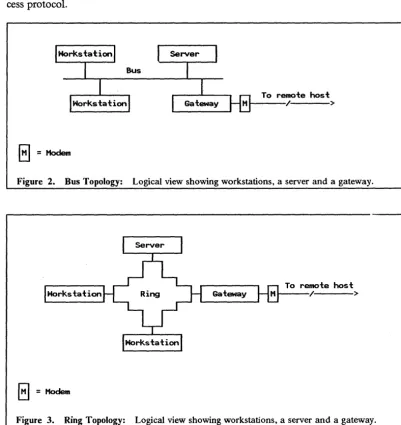
LANs conform to a number of different topologies. Those that are discussed in this docu-ment conform to either a bus topology (see Figure 2 on page 3) or a ring topology (see Figure 3 on page 3). These figures show logical representations which in reality may look completely different. The LANs discussed in this document include:
• IBM PC Network Baseband, a bus topology with a medIa speed of 2 Mbps
• IBM PC Network (Broadband), a bus topology with a media speed of 2 Mbps
• Ethemet2 (IEEE 802.3), a bus topology with a media speed of 10 Mbps
• IBM Token-Ring Network, a physical star/logical ring topology with a media speed of either 4 or 16 Mbps.
The frrst three LAN s employ a bus topology and use Carrier Sense Multiple Access with Collision Detection (CSMA/CD) as a media access protocol while the IBM Token-Ring
[image:21.617.55.495.221.628.2]Network is based on a physical star/logical ring topology and uses token passing as its ac-cess protocol.
To remote host 1 - - - - / >
E]=Modem
Figure 2. Bus Topology: Logical view showing workstations, a server and a gateway.
To remote host Gateway H / >
8=Hodem
Figure 3. Ring Topology: Logical view showing workstations, a server and a gateway.
The components required for the different LANs are listed below. They do not represent the only possibilities and are only provided in order to give the reader an idea of the com-ponents required for the different networks discussed in this document.
• The following is required for an IBM PC Network Baseband:
• PC Network Baseband adapter <;:ard which slots into each workstation
• PC Network Baseband Extender for extending the attachment capability from 8 to 80 workstations
• Cabling and accessories
• One terminator plug and one wrap plug per LAN.
[image:22.623.143.544.78.503.2]• The following is required for an IBM PC Network (Broadband):
• PC Network adapter card which slots into each workstation
• One IBM Translator Unit and Splitter - provides radio frequency signals for transmitting and receiving data
• One IBM Base Expander for every eight workstations (max 72 wotkstations per network)
• Cabling kits (additional splitters allow workstations to be up to 305 meters from the translator unit).
• The following is required for an Ethernet (IEEE 802.3) Network:
• IEEE. 802.3 adapter card which slots into· the workstation • 50 ohm coax bus
• Fly lead (connects to the adapter card at one end and to the transceiver at the other)
• Transceiver per adapter card (in some cases it may be included on the adapter card)
• Vampire taps
• Two terminator plugs, one for each end of the bus.
• The following is required for an IBM Token-Ring Network:
• Multistation Access Unit (MSAU)
• Token-ring network adapter card which slots into the workstation
• Fly lead (connects to the adapter card at one end and to the cabling system or MSAU at the other end)
• Cabling for extending the distances between the workstation and MSA U and for connecting multiple MSA U s. .
1.4 Server Implementation
Servers share their resources on the network while requesters redirect application service requests for resource input/output (I/O) over the network to one of these servers. Re-sponses, returned to the requester, are passed back to the application as though the service requests had been satisfied locally.
Typically servers are implemented either on a personal computer or in a host. In many instances the host can directly attach to the LAN and the user benefits from the perfonn-ance of the LAN and the additional processing capabilities that the host has to offer. Where the host does not attach directly to the LAN, either because it cannot do so or because it is located elsewhere, a gateway and possibly a wide area network must be crossed in order for the requester to communicate with the server. The perfonnance of the gateway and the facility connecting the gateway to the host may affect the type of applications that can be run satisfactorily.
Implementations attempt to address, among others, performance and ease-of-use factors. In general, ease-of-use carries an overhead in tenns of the number of operations that a processor, either the server or the requester, must perfonn. This translates into cycles used and has an impact on perfonnance.
The volume of data to be transferred and the size of the data record (frame) being sent across the LAN can affect server and network perfonnance. The impact on the server can be viewed in tenns of the pathlength overhead on a "per byte" basis. Smaller transfer sizes incur a greater overhead relative to bigger transfer sizes and hence the CPU time for smaller frames is a larger percentage of the total transfer time than it is for bigger transfer sizes.
For some applications the user may wish to transfer portions of a flie from the server to their own machines. Implementations that support a query facility can significantly im-prove network perfonnance by reducing the amount of data that needs to be transferred.
Queries are sent to the server and only the extracted data, and not the entire fue, is returned to the requester.
Implementations that support an intelligent query facility are able to return the extracted data in a specified format. This obviates the need for data manipulation at the requester but increases the workload on the server. This may be significant where the server function resides in a personal computer but is not necessarily so where the server function resides in a host. Benefits to the end user in terms of ease of use may outweigh the cost of the overhead.
Protocol overhead associated with the communication between server and requester may also have an impact on performance. Implementations based on a datagram type service will generally have less communications overhead than implementations based on a connection-oriented service. Users should be aware, however, that a datagram environment is typically less secure than a connection-oriented environment and in times of recovery the delays experienced in the former can be significant due to the fact that recovery must be perfonned by the end nodes. SNA is typically a connection-oriented protocol while the User Datagram Protocol (UDP) of TCPjIP is as the name implies a datagram service.
1.5 Server
Capacity
A frequently asked question when evaluating a LAN server is, "How many users can a server support?" A number of factors influence the answer to this question. These include:
• Workload, as discussed in "Workload Considerations" on page 6.
• Request types. Are they program loads as for spreadsheeting, or fue reads as would be the case for a rue transfer, or possibly fue writes such as record updates or document saves?
• Operating system factors such as fue organization (sequential, index sequential or di-rect) , rue and record sizes, and data base design.
• Processor factors such as internal cycle time, channel speeds and disk seek time.
• Whether or not the processor is dedicated to a specific function.
• The type of LAN being used.
Applications which use fues that are not shared by multiple user workstations, can reduce the server~ s processing load by downloading the rue for local processing. This allows the server to do other work.
For random fue access, the size of the fue can also affect the server's capacity. Small fues can become cache-resident in those servers that implement caching. This makes for fast access and can increase the number of I/Os that the server can perform. File accesses which open and close the fue for each record read will tend to reduce the server's capacity.
Applications that process data sequentially tend to give better throughput than those that perform random processing. Random processing requires the server to send a single record at a time to the requester which results in the greatest overhead and the lowest throughput. As more users access a server and the number of requests increases, a point is reached at which the amount of actual, productive work performed decreases. This is due to queuing delays and the unproductive overhead of managing I/Os incurred at the server.
even if they don't, they will lengthen user response time and may lead to the erroneous conclusion that the server is overloaded.
1.6
Workload Considerations
The number of user workstations ona LAN is per se, a meaningless measure of server ca-pacity. Theoretically there can be an infmite number of user workstations for only one server, providing that none of the users power on their workstations. It is thus necessary to assess users in terms of the functions that they perform on the LAN and their working habits.
We can start by categorizing users according to their job descriptions. For example, some users, such as clerical workers, may spend most of their day performing data capture type operations at their workstations. They frequently transfer fIles and interact with the server. Others, such as secretarial staff, may only spend half their day at their workstations per-forming word processing and document transfer type functions. Professionals will typically spend a large portion of their day at their workstations performing analytical type functions that may have very little dependence on the server . Managerial staff on the other hand will only spend a small percentage of their day at their workstations performing functions such as spreadsheet updates. So, usage type is a very important factor .and it goes without saying that the office clerk will use more server capacity than the manager. "Think time" also plays an important role here. The relative percentage. of think time to key time is generally greater for managers and professionals than it is for secretarial staff, who in turn have a relatively higher percentage than do office clerks.
When reviewing the amount of work done by a user at a workstation, it is important to bear in mind that for a given amount of user effort, certain functions will use more server re-sources than others. Creative functions, such as spread sheeting or word processing, require data to be transferred to the workstation for local processing and then returned to the server when processing is complete. These functions place a relatively light load on the server.
Interactive functions which include inquiries, editing and data entry, generate relatively more flie I/Os than creative functions and hence use more of the server's resources. The heaviest users of server resources are the batch functions. Batch functions typically perform activities such as flie searches, sorts and report generation.
1.7 Sizing the Server
Capacity planning theory states that one should allow for peak loads and application growth. The real issue, though, is how to estimate the base requirement in order to leave sufficient capacity for peak loads and the future. This is especially true when dealing with a number of different-server implementations and their associated hardware.
The process of capacity planning. requires considerable effort, detailed information on the environment and possibly the use of sophisticated simulation models, and is beyond the scope of this document. Separate publications are available which provide this type of in-formation. The following discussion, then, is only provided to give the reader an idea of the complexities involved and is not intended for practical application.
A possible methodology for determining the base requirement would be to reduce functions performed on the server to a common denominator, determine the number of "common denominators" that the server hardware can perform, and then apply the enterprises work-load profIle to this number.
Generally speaking a service request sent by the requester will translate into a number of input/output (I/O) requests at the server location. These could be disk I/O, printer I/O, etc. I/Os therefore provide a suitable common denominator and the question posed in
HServer Capacity" on page 5 can now be restated as: "How many I/O requests can a server support in a given period of time?" I/Os are a particularly appropriate measure of capacity
in that they give credit to techniques, such as caching and reading multiple records with one operation, which have the effect of reducing the number of II0s that must be performed.
In order to determine the enterprises workload proftle it is ftrst necessary to categorize users according to their job descriptions and to determine the number of employees in each cat-egory. It is then necessary to ascertain the average number of imaginative, interactive and batch tasks performed by each category and to multiply these numbers by values previously obtained for the number of I/0s generated by these tasks. By totaling the values so ob-tained we have the number of I/0s performed by a typical user in a particular category. These values can be multiplied by the number of users in a category and the results for all categories totaled to give the enterprise's workload profile.
By applying the workload profile so obtained to the capacity of individual servers we can detennine the number of servers required.
1.8 Management
As LAN s grow in size and function the need for management and control becomes more important. The focus given to management for a given-sized LAN will depend on factors such as the importance of high availability to the end users.
LANs can either be managed independently or as an integrated whole. The quantity and form that LAN management takes will also depend to some extent on whether or not the LAN must interface to an existing network.
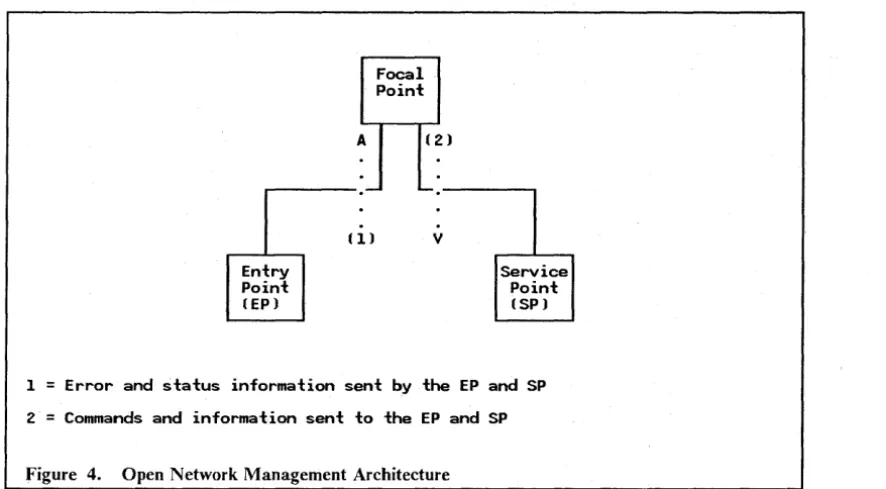
For those enterprises with large installed SNA networks, IBM has a network management strategy, often referred to as Communications and Systems Management (C&SM), which includes management capabilities for LANs. C&SM is based on the IBM Open Network Management Architecture (ONMA) which defmes the concepts of/ocal point, entry point and service point. The focal point is a centralized collection point for all information re-lating to the hygiene of a network. It is also a distribution point for commands and infor-mation being sent out into the network. An example of a focal point implementation is NetView3
• The entry point is typically an SNA product such as an IBM 3174 which is able to perform data transport functions as well as being able to generate error and status in-fonnation which it sends to the focal point. The service point, on the other hand, receives error and status information from non-SNA products and then forwards this information to the focal point. NetView/PC4 provides a service point implementation to the LAN Manager
V.
ersion 1.0 and, depending on the LAN Manager system defmition, either NetView/PC or OS/E EE Communication Services will provide the service-point imple-mentation.A
Focal Point
(2)
...---.-
""-.----..Entry Point (EP)
(1) v
Service Point (SP)
1
=
Error and status information sent by the EP and SP 2 = Commands and information sent to the EP and SPFigure 4. Open Network Management Architecture
Management of the LAN environment can broadly speaking be divided into two categories, LAN management and LAN administration.
1.8.1 LAN Management
LAN management involves all the disciplines necessary to ensure that the network is op-erative at the required time. These disciplines in conjunction with LAN management tools aim to facilitate functions such as:
• Determining when an outage has occurred
• Ascertaining the reason for the outage
• Identifying the failing component
• Translating network addresses into physical locations
• Taking corrective action
• Ensuring that adequate capacity is available.
In a LAN environment, the fIrst level of network management is provided by the individual LAN stations. Each station implements a certain amount of self management and network monitoring.
Most IBM-supplied LAN adapters are able to generate messages that contain information relating to network errors and adapter status. The type of information generated differs according to whether the network is an IBM Token- Ring Network or one of its CSMAICD counterparts. In the case of an IBM Token-Ring Network the information provided is comprehensive while for CSMA/CD networks such as the IBM PC Network Baseband and IBM PC Network (Broadband) it is limited.
Error information generated by the adapter is forwarded to an error monitor functional address. In a CSMAICD network this function is known as the LAN Error Monitor (LEM) while in a token-ring network it is called the Ring Error Monitor (REM). Addition functional. addresses may be present for collecting status information and controlling the LAN.
[image:27.618.69.512.55.299.2]The LAN management products supplied by IBM are able to capture and analyze infor-mation sent by LAN function service rutines such as Ring Error Monitor (REM) or con-figuration report server (CRS).
The following range of LAN management products provide management support for LANs ranging in size from a small, single-segment IBM PC Network Baseband or IBM PC Net-work (Broadband) to large, multi-segment IBM Token-Ring NetNet-works (individual LANs, when connected to one another by bridges are referred to as LAN segments):
• PC Network Analysis Program - is a personal computer DOS-based application that will monitor a single IBM PC Network (Broadband) segment. It has. the ability to capture error and status information on a small, non-host connected IBM PC Network (Broadband).
• IBM PC 3270 Emulation LAN Management Program V1.0 - is a personal computer DOS-based application which runs together with IBM PC 3270 Emulation Program V3 configured as a gateway station. IBM PC 3270 Emulation LAN Management Program Vl.O offers Host Alert Forwarding capability for srp.all IBM PC Network Baseband, IBM PC Network (Broadband) and IBM Token-Ring Networks. Neither local LAN management operator commands nor a user interface are available.
• IBM LAN Manager Entry V1.0 - runs under OS/2 Extended Edition VI. 1. It offers Host Alert Forwarding as well as Alert Transportation Services from LAN applications on small IBM PC Network Baseband, IBM PC Network (Broadband). and IBM Token-Ring Networks. The only communications path to NetView in the host system is offered by the integrated SDLC support included in the Communications Manager of OS/25
•
• IBM LAN Manager Vl.0 - provides LAN management functions for the IBM Token-Ring Network and the IBM PC Network (Broadband). It enables the user to perform problem determination, gather . status information, and to perform control
functions~ In a Token-Ring environment the IBM LAN Manager Vl.O can operate in conjunction with IBM Token-Ring Network Bridge Program Vl.I to provide management support for multiple rings. When running as an application of NetView/PC, alerts can be forwarded to NetView at the host.
• IBM LAN Manager V2.0 - enhances the capabilities of IBM LAN Manager Vl.0 both as a stand-alone LAN manager station as well as when it is running as a NetView/PC application. Enhancements include concurrent management of a mixed LAN envi-ronment including IBM PC Network (Broadband) and IBM Token-Ring Network (4 Mbps and 16 Mbps), an alert transport service for applications to send alerts to the focal point, and monitoring of resources defIned as critical. With the appropriate level of NetView, commands can be issued at the host to execute on the LAN.
• 3174 Gateway Feature - when fItted, models OIL, OIR, SIR, 02R, or 52R support the Ring Error Monitor (REM) function. They can initiate beaconing (a token-ring pro blem isolation procedure) and send network management data relating to a single token-ring segment, to NetView at the host.
• 372x Communication Controller - the 3720,3725, and 3745 do not implement the REM function. However, the token-ring support is able to detect beaconing condi-tions on the ring and can forward this information to NetView as an alert.
• 9370 Integrated Token-Ring Subsystem - implements the REM function. Error in-formation can be displayed locally on the processor console.
• AS/4006 Token-Ring Support - implements the REM function. The AS/400 can act as a focal point or can forward alerts to another focal point.
• IBM Token-Ring Network Trace and Performance Facilities - provide the ability to perfonn trace and perfonnance monitoring functions for the ring to which it is at-tached. It consists of both hardware, in the fonn of an enhanced token-ring adapter card, and software.
1.8.2 LAN Administration
Administration functions will always be required in a LAN environment. Whether they are perfonned Qn a fonnal basis will depend on the characteristics of the enterprise and the skill level of the LAN users. LAN administration deals with the ability to:
• Manage the availability of resources
• ·Control access to resources
• Maintain the latest level of software across the LAN
• Perfonn timeout backups.
The approach to maintaining the latest levels of software and data on the LAN can differ. One approach is to maintain a single set of libraries which all the users access while another is to distribute software to all users on an automated basis. Very often a combination of these approaches will be appropriate.
A key product in this arena is NetView Distribution Manager. It is a focaJ point imple-mentation that can automatically distribute objects to systems that have the requisite ca-pability of receiving these objects. Distribution can commence at a specified time of day or night and an audit trail, specifying whether transfers have been successful or not, is kept for later review.
Some of the features provided by NetView Distribution Manager include:
• Adding fues to a fue system
• Replacing already existing fues
• Deleting fues
• Retrieving fues from a fue system
• Sending a batch fue to a workstation for subsequent execution by the operator
• Sending a message to the workstation operator.
At a LAN level the facilities provided by IBM PC LAN Program V1.3 and IBM OS/2 LAN Server VI.O, in tenns of their remote IPL (RIPL) suppo.rt for personal computer DOS-based workstations, help to ease the task of LAN administration.
6 ASj400 is a trademark of the International Business Machines Corporation.
2.0 PC LAN Program Vl.3
2.1 Overview
The IBM PC LAN Program V1.3 (PCLP 1.3) provides resource sharing of disk and print devices for IBM Personal Computers and IBM Personal Systems/2 on an IBM LAN. It
is a personal computer DOS-based application which offers two modes of operation to the end user, Base Services and Extended Services. The former provides the following:
• Printer and fue sharing
• Support of multiple servers for both printer and flie sharing
• Limited data access protection
• Print queue management
• Messaging functions.
Extended Services extends these capabilities to include the following additional functions:
• User identification and encrypted password security
• Program and data access protection
• LAN resource administration from any workst.ation
• Application selector menu providing access to mUltiple servers
• Messaging as a separate application
• Remote IPL support for medialess workstations
• Online overview, reference and help materials.
IBM PC LAN Program V1.3, when running as an Extended Services mode requester, is able to access resources belonging to an IBM OS/2 LAN Server V 1.0. Please refer to "OS/2 LAN Server V 1.0" on page 27 for further details.
2.2 Basic Functions
Base Services provides a flexible environment for sharing and using resources via the NET SHARE and NET USE commands while Extended Services provides a more formal envi-ronment with tighter security and improved administrative capabilities. The latter mode of operation is optionally selected and provides these improved capabilities to both the ad-ministrator and the users.
2.2.1 Base Services
of other servers. Each server is responsible for providing and maintaining access to its re-sources. The functions provided within Base Services include:
• Printer and fue sharing.
• Support of multiple servers for both printer and ftle sharing.
• Data access protection. The disk access rights that are provided by a Base Services server are different from those provided in Extended Services. The server operator can share disk resources, at a directory level, and limit access to:
• Read only • Write only • Read and write
• Write, create and delete • Read, write, create and delete
• Print queue management
• Messaging functions, including:
• Sending, retrieving and saving messages • Editing and forwarding a received message • Logging messages to a flie.
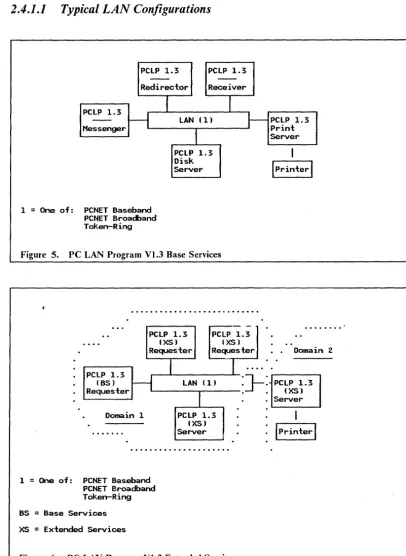
A user workstation, depending on how it has been configured, is· known as either a redi-rector, a receiver, or a messenger. A redirector intercepts application program calls for disk and printer input/output and forwards them across the network to a server. The server re-turns the response to the redirector who passes it back to the application. The application is unaware that its program calls were not satisfied locally.
A receiver has the same capabilities as a redirector plus the ability to. receive and log meS-sages. A messenger further extends the capabilities of the redirector, beyond those. of the receiver, to include advanced messaging capabilities. These capabilities include, among others, the ability to edit and forward messages .. A server includes all of these functions plus, as the name implies, has the ability to share its resources on the network.
The primary difference between these modes of operation, apart from level of function, is the amount of personal computer memory that is required to run them. As can be ex-pected, the greater the level of function, the higher the demand for memory.
2.2.2 Extended Services
Extended Services provides a far more controlled environment than Base Services. In Base Services resources can be shared on an "as required" basis, either by command, batch [ue or via the menu interface. Similarly resources can be used on an "as required" basis. Ex-tended Services on the other hand, requires that an administrator control and administer the resources. Permission must be specifically given in order for a user to access them.
Configuration possibilities include those of redirector, receiver and server. Messaging ca-pabilities, which under.Base Services are dependent on the configuration selected, are im-plemented as a separate application that can be selected from a menu interface by any of the configurations.
In order to provide a more formal environment, Extended Services has introduced a number of new· concepts:
• User and system administrator
• Domain
• Filesets
• Remote Initial Program Load (RIPL) Workstations
• Program Server
• Application Selector.
It should be noted that Extended Services servers are able to issue NET SHARE commands so as to allow Base Services users access to their resources.
2.2.2.1 User and System Administrator
Extended Services makes the distinction between the use of resources and the adminis-tration of those resources. Anyone who uses resources is referred to as a user (also known as a requester) and the system administrator is the function that administers resources by defmllig:
• Who can log on
• What resources can be shared
• Who can access what resources
• The types of access
• System parameters.
Users are assigned user IDs which can optionally have passwords associated with them.
The system administrator is an IBM PC LAN Program V1.3 user 10 that has been assigned special privileges in order to perform the above tasks. As for conventional users, the system administrator may have to supply a password in order to log on.
In addition the system administrator is able to perfonn system functions such as:
• Setting time and date
• View and print the domain control data base
• Perform system shutdown.
The user on the other hand is able to view the network status, view and manipulate his own print queue, and display which users are logged on.
2.2.2.2 Domain
A domain is a logical group of one or more Extended Services servers within a LAN. It
includes a specification of the resources provided by the servers, a set of users who may access those resources and an access mapping of users and the resources that they can ac-cess.
All resources within a domain are managed as a single entity by the system administrator. The system administrator is able to log on from any workstation in order to perform these functions. Resources can either be defIDed as internal resources in which case they are de-fIDed, controlled and used entirely within the domain, or they can be defIDed as external resources and as such they are defined within this domain but can be accessed by users in a different domain.
2.2.2.3 File Sets
Afileset is a directory, including all flies and sub-directories within it, on an Extended Ser-vices server's disk. It is given a name and then shared on the network for read or update use by specified users. The users need not know the intricacies of path and drive desig-nation when accessing a ftleset.
In addition to shared fuesets, each user has a home fileset for their exclusive use. It contains information needed to create the user's environment when he or she logs on.
2.2.2.4 Remote Initial Program Load (RIPL) Workstations
RIPL workstations can be, but are not necessarily, medialess personal computers. Such workstations, instead of IPLing from their own disks, receive an Initial Program Load (IPL) image from one of the servers at power-on time.
In order for a personal computer to be an RIPL workstation, it needs to have the requisite RIPL support installed on its LAN adapter card.
2.2.2.5 Program Server
A program server is a server that provides access to p!,ograms for LAN-attached work-stations. These can be RIPL workstations or any other workstations requiring access to programs that are not resident on their own disks.
2.2.2.6 Application Selector
Mter logging on to a workstation IBM PC LAN Program VI.3 presents the user with an Application Selector menu. The standard menu includt;s the following options:
• LOGOFF - returns the user to the user logon panel.
• PCLP - displays the IBM PC LAN Program VI.3 Extended Services function menu.
• DOS - returns the user to the DOS command prompt without frrst having to log off. Most DOS commands are available in this environment.
• LANMSG - lets the user send, receive, save and recall saved messages.
The menu can be modified by the individual user to include both shared applications, for which the user has been given access, and private applications. The latter will usually reside on the user's own disk.
By selecting PCLP from the standard menu the user is able to perform IBM PC LAN Program VI.3 functions which include:
• Print flies on a local or network printer
• Manage your print queue by viewing, ordering or holding fues that are queued for printing
• Manage fuesets
• Access online reference information.
In addition to the above, the system administrator or a user with administrator privileges
is able to perform functions such as: .
• Set system date and time
• Add users
• Defme and maintain fliesets
• Set up network printerdefmitions
• Defme network applications
• Defme RIPL workstations and create RIPL images for those workstations
• Defme additional servers
• Authorize user access to network resources
• Print domain defmition files showing user, resource and access defmitions
• Shut down the network.
2.3 Operating Environment
This section identifies the minimum hardware and software components that are required by workstations that are to be attached to a LAN and run the IBM PC LAN Program V1.3. It is not intended as an installation guide but instead it is provided to give the reader an indication of what will be required.
The configurations listed below do not include network components, other than the LAN adapter cards, nor do they include additional software that may be required for access to System/3707 host resources.
2.3.1 Prerequisite Hardware
Within the IBM PC LAN Program V1.3 environment at least one workstation must be configured as a server while the others can be confi.gt~r{"ri as users.
Minimum requirements for an Extended Services server:
• A supported IBM Personal Computer or IBM Personal System/2 • Diskette drive
• Fixed disk drive • Keyboard
• Display adapter and monitor • 640KB RAM
e Appropriate LAN adapter.
Other options supported for an IBM PC LAN Program V1.3 server configuration include:
• IBM 3363 Optical Disk Drive • Additional fixed disk drives • Printers.
Minimum requirements for workstations and Base Services servers:
• A supported IBM Personal Computer or IBM Personal System/2 • Keyboard
• Display adapter and monitor • 640KB RAM
• Appropriate LAN adapter.
Either of the above configurations can also include one of the following for use by that workstation:
• SDLC Communications Adapter or PS/28 Multi-Protocol Adapter/A • 3278/9 Emulation Adapter or IBM 3270 connection
• Pointing device.
2.3.2 Prerequisite Software
The IBM PC LAN Program V1.3 requires the following minimum levels of software:
• IBM DOS 3.30 or DOS· 4.00 (DOS 4.0, among other capabilities, supports disks greater than 32 MB)
• The IBM LAN Support Program Vl.02 and later.
2.4 Connectivity
The IBM PC LAN Program V1.3 is able to run on its own in a stand-alone LAN envi-ronment or can run together with other DOS-based applications 9 that provide access to IBM System/370 host and ASCII host resources.
This section deals with communications between LAN -attached workstations and between these same workstations and an IBM System/370 host. The scenarios shown are given as examples and should not be taken to imply that they are the only configuration possibilities.
2.4.1 LAN Connectivity
The IBM PC LAN Program V1.3 provides an equivalent level of function for the following IBM LANs:
• IBM PC Network Baseband
• IBM PC Network (Broadband)
• IBM Token-Ring Network.
Communication between IBM PC LAN Program V1.3 workstations uses the IEEE 802.2 and NETBIOS protocols which are provided as part of the IBM LAN Support Program. Up to 64 workstations, configured as either servers or users, can be part of a single logical LAN. Multiple logical LAN s can co-exist on the same physical LAN.
Figure 5 on page 17 shows the IBM PC LAN Program V1.3 running Base Services while Figure 6 on page 17 shows the IBM PC LAN Program VI.3 running Extended Services.
8 PS/2 is a registered trademark of the International Business Machines Corporation.
9 The IBM PC LAN Program V1.3 on its own has no communication capabilities for accessing
an IBM System/370 host.
2.4.1.1
Typical LAN Configurations
PCLP 1.3 PCLP 1.3
--
--Red i rector Receiver
I
I
PCLP 1.3
H
LAN (1)r-
PCLP 1.3Messenger Print
I
PCLP 1.3
1
=
One of: PCNET Baseband PCNET Broadband Token-RingDisk Server
Figure 5. PC LAN Program V1.3 Base Services
...
, . - - - -.-..
PCLP 1.3 PCLP 1.3....
(XS) (XS)Requester Requester
...
Server
I
Iprinterl
Domain 2
I
PCLP 1.3
H
(BS) Requester
1
LAN (1)
I
J-:
PCLP 1.3 (XS)
[image:36.621.146.552.56.612.2]Domain 1
...
1
=
One of: PCNET Baseband PCNET Broadband Token-Ring BS=
Base Services XS=
Extended ServicesPCLP 1.3
(XS)
Server
Figure 6. PC LAN Program V 1.3 Extended Services
2.4.2 System/370 Host Connectivity
. Server
. Iprinterl
This section only reviews the options that are available for accessing SNA 3270 type ap-plications. Two products are discussed, namely:
• IBM PC 3270 Emulation Program V3 (3270EM)
• IBM 3270 Workstation Program V1.1 (WSP 1.1).
The IBM PC 3270 Emulation Program V3 provides 3270 emulation for personal computer DOS-based workstations wishing to access an IBM System/370 host. It is able to emulate either terminal and printer functions or a gateway function, or both. Emulating terminal and printer functions, the IBM PC 3270 Emulation Program V3 requires the gatewayser-vices of one of the SNA gateways discussed in "Gateway Selection" on page 102. Config-ured as a gateway, it can support up to 32 terminal or printer sessions. More detail on the different configuration options is given below:
• Network Station - this configuration option provides support for one terminal and one printer session and uses 3270EM configured as a gateway for host access. Communi-cation between the network station and the gateway is accomplished using SNA pro-tocols imbedded in NETBIOS propro-tocols.
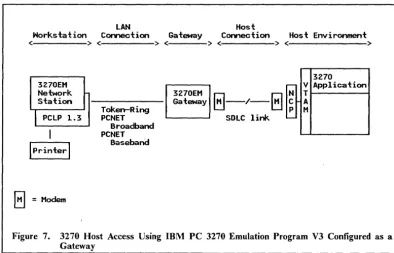
• Gateway Station - this configuration option emulates a 3274 control unit and op-tionally one terminal and one printer session. It provides gateway functions for other workstations configured as network stations as in Figure 7 on page 19. A variation of this example is shown in Figure 8 on page 20 where the 3270EM gateway is con-nected to a 3x74 Distributed Function Terminal (OFT) port and together they provide gateway services for up to five workstations. Communication between the gateway station and the host is accomplished using SNA 3270 protocols.
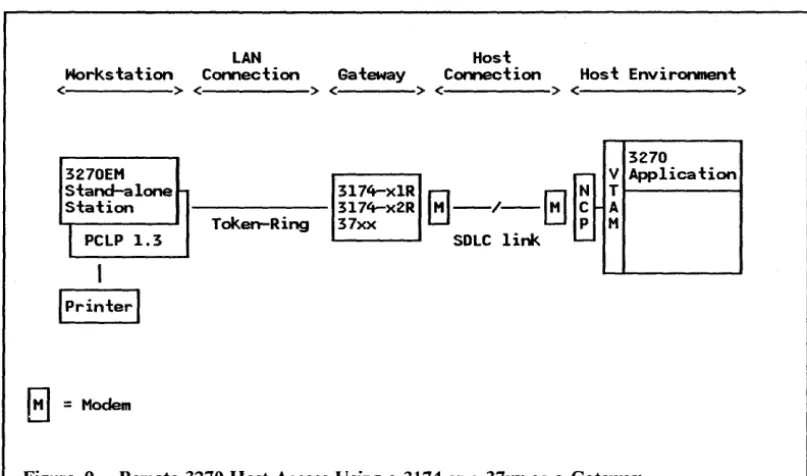
• Stand-alone Station - this configuration option provides emulation for a 3274 control unit with one terminal and one printer attached. It can use either a 3174 Terminal Controller, a 37xx Communications Controller vr the 9370/s integrated Token-Ring Network Subsystem Controller (TRNSC) for gateway services. Communication be-tween a stand-alone station and the host is accomplished using SNA 3270 protocols.
The following scenarios are provided as stand-alone station configuration examples:
• Figure 9 on page 21 shows 3270EM configured as a stand-alone station and using ei-ther a link-attached 3174 or 37xx for accessing 3270 applications running on a remotely located SNA host.
• Figure 10 on page 22 shows 3270EM configured as a stand-alone station and using either a channel-attached 3174 or 37xx for accessing 3270 applications running on a local SNA host.
• Figure lIon page 23 shows 3270EM configured as a stand-alone station and using the 9370's integrated TRNSC to access 3270 applications running on a LAN-attached 9370.
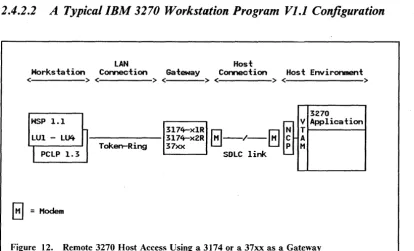
The IBM 3270 Workstation Program V1.1 provides 3270 terminal emulation for up to four host sessions. In addition it provides up to six DOS sessions and up to two notepad ses-sions. A fully configured WSP 1.1 workstation running IBM PC LAN Program V1.3 will require an Expanded Memory Adapter (XMA) card to be installed. WSP 1.1 uses the same gateway options as 3270EM configured as a stand-alone station. An example of a WSP 1.1 workstation using either a link-attached 3174 or 37xx for accessing 3270 applications running on a remotely located SNA host is shown in Figure 12 on page 24.
In a PC LAN Program VI.3 environment APPC support is provided by a separate product (APPC/PC). However, typical APPC configurations would be similar to those shown in the chapter dealing with the IBM OS/2 LAN Server V1.0.
2.4.2.1
Typical IBM PC 3270 Emulation Program V3 Configurations
LAN Host
Horkstation Connection Gateway Connection Host Environment
< >< >< >< >< >
3270EM Network Station
I
PCLP 1.3Iprinterl
E1
=
ModemTokerrRing PCNET
Broadband PCNET
Baseband
3270EM Gateway
3270
r-- V Application
8-/-8
N TC A P M SOLC link
'--Figure 7. 3270 Host Access Using IBM PC 3270 Emulation Program V3 Configured as a Gateway
Notes to the above diagram:
1. The 3270EM network station configuration ca...~ e~ulate two LUs, one tenninal and one printer.
2. The 3270EM gateway configuration can provide gateway services fo