16P-3002-101
October, 1981
INSTRUCTION MANUAL
For service…
NOTE NEW TOLL-FREE
TELEPHONE NUMBERS:
ROM SUMMARY
ROM
PART NO.
DESCRIPTION
STARGATE 1A
A-5343-09700
ROM, 4Kx8
STARGATE 2A
A-5343-09701
ROM, 4Kx8
STARGATE 3A
A-5343-09702
ROM, 4Kx8
STARGATE 4A
A-5343-09703
ROM, 4Kx8
STARGATE 5A
A-5343-09704
ROM, 4Kx8
STARGATE 6A
A-5343-09705
ROM, 4Kx8
STARGATE 7A
A-5343-09706
ROM, 4Kx8
STARGATE 8A
A-5343-09707
ROM, 4Kx8
STARGATE 9A
A-5343-09708
ROM, 4Kx8
STARGATE 10A
A-5343-09709
ROM, 4Kx8
STARGATE 11A
A-5343-09710
ROM, 4Kx8
STARGATE 12A
A-5343-09711
ROM, 4Kx8
Decoder ROM 4
A-5342-09694
ROM, 512x8
(Horizontal)
Decoder ROM 5
A-5342-09695
ROM, 512x8
(Vertical)
INSTALLATION
l. Move the cabinet close to desired location and unlock the upper rear door panel. Remove the door and set it aside.
2. Unlatch and swing open the lower rear door.
3. Check that five fuses on the power supply and two fuses on the Sound Board are securely installed in their fuse clips. Also check that the 3A line fuse on the power panel is secure in its clips.
4. Unlock the coin door. Reach through the coin door opening and unlatch the control panel. Unhook the control panel safety chain and lower the control panel.
5. Check that the following connectors are firmly seated and that no wires are broken or termination pins loose in the connector.
a. Coin door connector. b. Control panel connector.
c. Monitor control 6-pin connector and monitor power connector. d. Transformer connector at the power panel.
e. Three connectors on the Power Supply. f. Four connectors on the Sound Board. g. Five connectors on the CPU/Video Board. h. Three connectors on the ROM Board. i. Two connectors on the Interface Board.
6. Check that the socketed ICs are firmly seated in their sockets (CPU Video Board -3, ROM Board -12, and Sound Board -2).
7. If it is desired to check or change game adjustments, refer to Game Adjustment procedures which follow.
8. Extend the line cord from the game and insert it in the slot in the lower door frame.
9. Swing the lower door closed and latch it.
10. Install and lock the upper rear door.
11. Reconnect the control panel safety chain and latch the control panel in position.
POWER TURN-ON
This game MUST BE PLUGGED INTO A PROPERLY GROUNDED OUTLET to PREVENT SHOCK HAZARD and to ensure PROPER GAME OPERATION. DO NOT use a "cheater" plug to defeat the ground pin on the line cord, and DO NOT cut off the ground pin. The line voltage must agree with that specified on the back of the cabinet or serious damage to the machine could occur. For low-line voltage applications (105v AC or 200v AC), refer to the power wiring diagram.
1. With the game plugged into a properly grounded outlet, locate the POWER ON/OFF switch located at the top right-hand corner of the cabinet rear and switch it ON. General illumination should come on and a scanning pattern should appear on the screen as the game sequences through ROM, RAM, and CMOS RAM data checks.
2. If ROM and RAM tests are successful "0" is first indicated on the ROM Board 7-segment Diagnostic Display. A few seconds later the following message is indicated on the monitor:
INITIAL TEST INDICATES ALL SYSTEMS GO
3. If a RAM error is detected, the 7-segment LED first displays a "1" to indicate a RAM failure. Next, the bank number (1, 2, or 3) and finally the chip of the bank (1 to 8). Then there is a pause and the LED display sequence is repeated. Next, another pause occurs and then the CRT displays a "RAM ERROR XY" where X is the bank number and Y is the chip of that bank.
4. If a ROM error is detected, the 7-segment LED first displays a "2" to indicate that it is a ROM failure. Next, the LED displays two numbers which indicate the ROM chip number (01,02,03,...,12). Then there is a pause and the LED display is repeated. Next, another pause occurs and then the CRT displays a "ROM ERROR X" where X indicates the ROM number.
5. If the CRT display shows any RAM or ROM errors, use the above description to identify the faulty chip and then turn power off and replace the chip.
6. If there is no CRT display at power-up:
a. Open the upper back door to the game.
b. Disengage the latch and open the lower back door.
c. Depress the Reset push-button on the CPU/Video board and observe the 7-segment LED display on the ROM board to identify any faulty chip.
d. After identifying the chip, remove power to the game and replace the faulty chip.
e. As only one chip at a time is indicated by the testing system, repeat steps c & d until there is a CRT display.
7. Extensive CMOS RAM data integrity checks are performed. With "OPEN COIN DOOR" displayed, check that the batteries on the CPU/Video Board are seated in the battery clips, open the coin door, and then turn power OFF and ON. A display of "FACTORY SETTINGS RESTORED" should appear.
8. Depress ADVANCE and turn the power OFF and ON to get to game over.
NOTE:
GAME OPERATION
* Indicates adjustable features.
GAME START - Insert coins - credits are displayed on CRT. With one credit displayed, pressing 1-Player start initiates a *3-ship game. With two credits displayed, pressing 2-Player Start initiates a 2-player, *3-ship game. With two or more credits displayed, pressing 1-Player Start (or four or more credits, pressing 2-Player Start) initiates a *7 ship game.
Player Controls
UP & DOWN Joy Stick - Maneuvers player ship up and down. REVERSE Switch - Reverses player ship direction. THRUST SWITCH - Controls player ship speed. FIRE SWITCH - Activates laser gun.
HYPERSPACE Switch - Warps player ship to another quadrant with chance of possible annihilation. SMART BOMB Switch - Destroys all alien ships on screen.
INVISO Switch - While depressed, the player ship with a shield that renders it invisible and invulnerable.
Game Play
Destroy alien ships and missiles. Rescue humanoids and pick them up to collect bonus. Picking up the first humanoid scores 500 points, the second 1000, the third 1500, and all subsequent score 2000.
BOOKKEEPING AND EVALUATION TOTALS
1. In Game Over mode, open the cashbox and depress the cashbox advance switch. The advance switch located on the coin door can also be used. The CRT should indicate all bookkeeping and evaluation totals. If so, go to step 3, if the CRT display comes up in the ROM test display perform step 2.
2. Continue to depress the cashbox advance switch, stepping the game through test programs for ROMs, RAMs, CMOS RAMs, Color RAMs, Sounds, Switches, and then CRT Test Patterns, of which there are five. The fifth test pattern is a color bar pattern and directly precedes the CRT display of the bookkeeping and evaluation totals.
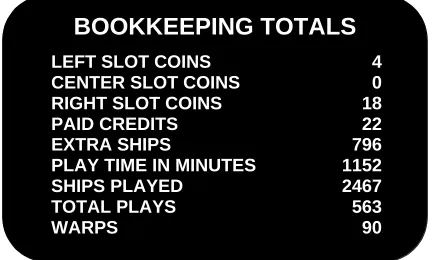
3. The bookkeeping and evaluation totals appear on the display as in Figure 1.
Clearing Bookkeeping Totals
1. Depress ADVANCE to display Game Adjustments, page 1. 2. Hold joystick down to display Game Adjustments, page 2.
3. Operate joystick to position cursor on CLEAR BOOKKEEPING TOTALS. 4. Depress FIRE.
5. Depress ADVANCE.
Figure 1. Bookkeeping Display
BOOKKEEPING TOTALS
LEFT SLOT COINS
4
CENTER SLOT COINS
0
RIGHT SLOT COINS
18
PAID CREDITS
22
EXTRA SHIPS
796
PLAY TIME IN MINUTES
1152
SHIPS PLAYED
2467
TOTAL PLAYS
563
GAME ADJUSTMENTS (Figures 2 and 3)
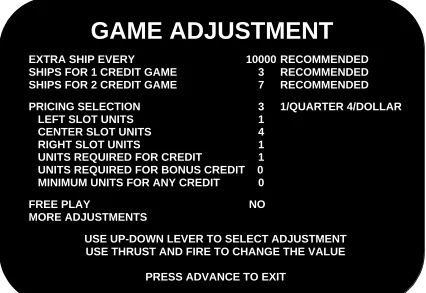
In the Game Over mode open the coin door and depress the coin door advance switch twice to cause a CRT display as shown in Figure 2.
To select and then set functions to the desired values, use the UP-DOWN control lever to select the function that is to be changed and then, making sure the coin door is open, use the THRUST control to reduce, or the FIRE control to increase the value of the selected function. To alternate between adjustments on pages 1 and 2, use the UP-DOWN control.
Extra ships, smart bombs, and inviso time are earned as the score obtained by a player exceeds the listed value for this function. If this function is set to the recommended value of 10,000 points, with a score of 10,000 points a player will receive one more ship to play with. At a score of 20,000 points another ship will be earned, and so on. If this function is set to 0, its lowest setting, no extra ships are ever awarded. This function can be set to any 1,000 point increment from 0 to 50,000 points.
The basic number of ships awarded for a 1 credit game can be set anywhere from 1 to 20. The recommended number of ships for a 1 credit game is 3.
The basic number of ships awarded for a 2 credit game can be set anywhere from 0 (no 2 credit games) to 50. The recommended number of ships for a 2 credit game is 7.
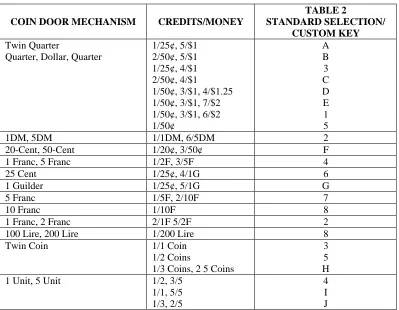
Pricing of the game is selected with standard settings or with custom settings as shown in Tables 1 & 2. Table 1 lists some common pricing schemes with respect to the coin mechanism to be used and directs the reader to the proper entry in Table 2, which shows what the CRT display should look like to accomplish the desired pricing.
For standard settings you need change only the PRICING SELECTION. For custom settings, first set PRICING SELECTION to zero and then set the remaining values according to Table 2.
Figure 2. Game Adjustments, Page 1
GAME ADJUSTMENT
EXTRA SHIP EVERY 10000 RECOMMENDED SHIPS FOR 1 CREDIT GAME 3 RECOMMENDED SHIPS FOR 2 CREDIT GAME 7 RECOMMENDED
PRICING SELECTION 3 1/QUARTER 4/DOLLAR LEFT SLOT UNITS 1
CENTER SLOT UNITS 4 RIGHT SLOT UNITS 1 UNITS REQUIRED FOR CREDIT 1 UNITS REQUIRED FOR BONUS CREDIT 0 MINIMUM UNITS FOR ANY CREDIT 0
FREE PLAY NO
MORE ADJUSTMENTS
USE UP-DOWN LEVER TO SELECT ADJUSTMENT USE THRUST AND FIRE TO CHANGE THE VALUE
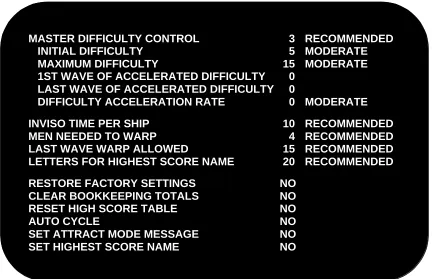
Figure 3. Game Adjustments, Page 2
Free play can be set to either "YES" or "NO".
The master difficulty control is pre-programmed for 4 levels of difficulty and can be custom programmed for 1 as desired. The recommended setting of the master difficulty control is 3. If customized difficulty is desired, set the master control to 0 and with the use of the UP-DOWN control and THRUST and FIRE controls, set each of the 5 variables as desired.
Initial difficulty is the level of play difficulty for the first attack wave of the game and can be set anywhere between 0 (easy) and 30 (most difficult).
Maximum difficulty is the level of difficulty at which difficulty increases between attack waves cease. This can be set anywhere from 0 (very easy) to 99 (very difficult).
The last three adjustments; first wave of accelerated difficulty, last wave of accelerated difficulty, and difficulty acceleration rate; are all inter-related. The first wave of accelerated difficulty is the point at which the standard difficulty increase rate between attack waves is first stepped up. This can be set to any wave from 1 to 20. The last wave of accelerated difficulty is the point at which the stepped up difficulty increase rate is decreased to the standard difficulty increase rate (exactly the same as it was before it was stepped up). This can be set to any wave from 1 to 99. The difficulty acceleration rate can be adjusted anywhere from 1 to 10. When any of these functions are set to 0, there is no accelerated difficulty.
The amount of "INVISO" time allowed per ship is recommended to be 1 second but can be varied from 0.5 to 2 seconds in tenth-second increments.
The number of men needed to "WARP" a ship anywhere is recommended as 4, but can be varied from 1 to 9. The last wave where any "WARPING" of a ship would be allowed can be set anywhere from 1 to 99, but is recommended as 15.
MASTER DIFFICULTY CONTROL 3 RECOMMENDED INITIAL DIFFICULTY 5 MODERATE MAXIMUM DIFFICULTY 15 MODERATE 1ST WAVE OF ACCELERATED DIFFICULTY 0
LAST WAVE OF ACCELERATED DIFFICULTY 0
DIFFICULTY ACCELERATION RATE 0 MODERATE
INVISO TIME PER SHIP 10 RECOMMENDED MEN NEEDED TO WARP 4 RECOMMENDED LAST WAVE WARP ALLOWED 15 RECOMMENDED LETTERS FOR HIGHEST SCORE NAME 20 RECOMMENDED
RESTORE FACTORY SETTINGS NO CLEAR BOOKKEEPING TOTALS NO RESET HIGH SCORE TABLE NO
AUTO CYCLE NO
Table 1. Pricing Schemes
COIN DOOR MECHANISM CREDITS/MONEY
TABLE 2
STANDARD SELECTION/ CUSTOM KEY
Twin Quarter
Quarter, Dollar, Quarter
1/25¢, 5/$1 2/50¢, 5/$1 1/25¢, 4/$1 2/50¢, 4/$1
1/50¢, 3/$1, 4/$1.25 1/50¢, 3/$1, 7/$2 1/50¢, 3/$1, 6/$2 1/50¢ A B 3 C D E 1 5
1DM, 5DM 1/1DM, 6/5DM 2
20-Cent, 50-Cent 1/20¢, 3/50¢ F 1 Franc, 5 Franc 1/2F, 3/5F 4
25 Cent 1/25¢, 4/1G 6
1 Guilder 1/25¢, 5/1G G
5 Franc 1/5F, 2/10F 7
10 Franc 1/10F 8
1 Franc, 2 Franc 2/1F 5/2F 2 100 Lire, 200 Lire 1/200 Lire 8 Twin Coin 1/1 Coin
1/2 Coins
1/3 Coins, 2 5 Coins
3 5 H 1 Unit, 5 Unit 1/2, 3/5
1/1, 5/5 1/3, 2/5
4 I J
Table 2. Pricing Settings
CUSTOM KEY DISPLAY
FUNCTIONS STANDARD SELECTION A B C D E F G H I J
Pricing Selection Left Slot Units Center Slot Units Right Slot Units Units per Credit Units for Bonus Credit Min Units for Credit
Highest Score Signature
The number of letters allowed the highest scoring player to enter their name can be varied from 3 to 20 and is recommended as 20. If objectionable words are entered as the signature name, you can change the lettered entry leaving the highest score the same. See Setting Highest Score Name.
Restoring Factory Settings
1. Position the cursor on RESTORE FACTORY SETT1NGS. 2. Depress FIRE.
3. Depress ADVANCE.
Resetting High Score Table
1. Position the cursor on RESET HIGH SCORE TABLE. 2. Depress FIRE.
3. Depress ADVANCE.
Setting Attract Mode Message
1. Position the cursor on SET ATTRACT MODE MESSAGE. 2. Depress FIRE.
3. Depress ADVANCE.
4. Enter up to two lines of your message following instructions on the screen. 5. Depress ADVANCE to terminate process.
NOTE:
To restore the Williams attract mode message, it is necessary to perform steps 1 through 3 and then turn the game OFF and back ON.
Setting Highest Score Name
1. Position the cursor on SET HIGHEST SCORE NAME 2. Depress FIRE.
3. Depress ADVANCE.
4. Enter new signature, depress ADVANCE to terminate process.
NOTE
DIAGNOSTIC PROCEDURES
Diagnostic procedures are controlled by the AUTO-UP/MANUAL-DOWN and ADVANCE switches on the coin door.
ROM Test
Set the AUTO-UP/MANUAL-DOWN switch to the MANUAL-DOWN position and depress the ADVANCE pushbutton. A ROM test is performed and any ROM failure is first indicated on the ROM Board 7-segment LED display and then on the CRT screen as described in the Power-Up and Reset Tests text.
RAM Test
With ROM test results present on the CRT display, depressing the ADVANCE pushbutton initiates the RAM test. If a RAM failure is detected, it is first indicated on the 7-segment LED display on the ROM board and then on the CRT display as described in the Power-Up and Reset Tests text. Test scanning will continue if no failures are detected; depress the ADVANCE pushbutton to terminate the test and the CRT display will indicate that no failures were detected.
CMOS RAM Test
With RAM test results present on the CRT display, depressing the ADVANCE pushbutton initiates the CMOS RAM test. If the test is passed, the 7-segrnent LED display on the ROM board will read "0" and then the CRT display will read "CMOS RAM TEST PASSED". If a CMOS RAM failure is detected, the 7-segment LED display will read first "3" and then "2". then "3" and then "2", and after these displays the CRT display will read "CMOS RAM FAILURE'. In this case the CPU/Video Board needs to be replaced. If an interlock failure is detected, the 7-segment LED display will read first "3' and then "1', the "3' and then "1" and after these displays the CRT display will read "CMOS INTERLOCK FAILURE'. If there is an interlock failure detected, first check out all connections to and from the interlock switch including the switch itself and if all of these items check out then replace the CPU/Video Board.
SOUND Test
With the CMOS RAM test completed. depressing the ADVANCE pushbutton initiates the Sound test. At this point the 5 basic sounds of the game are cycled through automatically. Each sound is labeled a "SOUND L1NE' by the CRT display. If more than one "SOUND LINE" produces the same sound, check all cable connections to and from the sound board. If all connections check out, replace the sound board and/or the ROM Board and repeat the SOUND test.
SWITCH Test
Color RAM Test
When the SWITCH test has been completed, depress the ADVANCE pushbutton to enter the Color RAM test. At this point the CRT display starts cycling through 8 different colors, dark red, red, light red, dark green, green, light green, dark blue, and blue. If any of these 8 frames have a vertical band through them, this indicates a Color RAM fault. To "clean up" or "get rid of' any vertical bands, replace the CPU/Video board.
Monitor Test Patterns
From the Color RAM test, depressing the ADVANCE pushbutton initiates the MONITOR TEST PATTERNS by placing a form of a CROSS-HATCH pattern on the screen. This pattern can be used to check and adjust the color convergence of the monitor. After the convergence is as desired, depress the ADVANCE pushbutton and the CRT display goes to a red color purity adjustment display. Depress the ADVANCE once more for green purity adjustments and once more for blue purity adjustments. Finally, depress the ADVANCE pushbutton and the CRT display should be a color bar pattern of (from left to right): red, green, blue, black, white, yellow, cyan, and magenta. With the completion of any and all monitor adjustments depressing the ADVANCE pushbutton initiates the transfer to the BOOKKEEPING TOTALS display.
For ease in monitor adjustments, the monitor may be slid back and the screen viewed in a mirror. Remove the two bolts and carefully slide the monitor back in its shelf; secure the monitor in the extended position by inserting the two bolts through holes in the monitor base and monitor shelf provided at the left side of the monitor.
Auto Cycle Mode
1. From the color bar pattern (or from game over with the switch set to AUTO-UP) depress ADVANCE two times to display Game Adjustments page l.
2. Hold the joystick down to advance to the second page of game adjustments.
3. Position the cursor on AUTO CYCLE with the joystick and depress FIRE.
4. Depress ADVANCE.
5. The system will now sequence through ROM, RAM, and CMOS RAM tests repeatedly. The coin door must be open during Auto Cycle test. If an error is detected, the test is terminated and the failure indication is displayed on the CRT.
PARTS LIST
ITEM PART No. DESCRIPTION 1 03-7590 Top Cabinet Molding 2 31-1011-3002-U Marquee Screen Glass 3 03-7594 CRT Bezel
4 16-3002-25 Stargate-U Instructions Card 5 31-1013-3002-U CRT Screen Cover
6 03-7654 Control Panel Molding 7 08-7025-A Leg Adjuster
PARTS LIST
ITEM PART No. DESCRIPTION 1 5792-09395 Connector, 3 Pin Female 1A 5821-09079 Connector Pins
2 01-7005 Light Deflector Panel 3 20-8746 Fluorescent Lamp Holder 4 20-8749-8 Fluorescent Lamp Ballast 5 20-8747 Fluorescent Lamp Starter Fixture 6 20-8745-1 Fluorescent Lamp Starter 7 5555-09382 Speaker, 4 Ohm, 6", 3W 8 24-6597-5 Fluorescent Lamp 9 01-3827 Light Mounting Bracket 10 5791-09111 Connector, 3 Pin Male 10A 5821-09080 Connector Pins
11 5792-09395 Connector, 3 Pin Female 11A 5821-09079 Connector Pins
12 D-8374 Light Reflector Assembly 13 01-6997 Right Speaker Panel Bracket 14 D-8833 Speaker Panel Assembly 15 11-618 Speaker Panel
PARTS LIST
ITEM PART No. DESCRIPTION 1 03-7602 Vent Hole Cover 2 20-9267 6-1/2" Handle
3 01-7228 Toggle Switch Mounting Plate 4 5640-06137 Toggle Switch, SPST,
PARTS LIST
PARTS LIST
ITEM PART No. DESCRIPTION 1 5792-09103 Connector, 4 Pin Female 1A 5822-09076 Connector Pins
1B 5823-09082 Polarizing Key
2 01-6858 Volume Control Mounting Bracket 3 5014-09170 Volume Control Potentiometer, 5K,
1W, 10% 4 03-7653 Coin Chute Tube
5 01-5589 Memory Interlock Switch Bracket 6 5643-09268 Memory Interlock Switch, SPST 7 4004-01005-06 Switch, Pushbutton, SPDT 7A 03-7601-4 Switch Button, Red
8 5641-09369 Switch, Pushbutton, DPDT 8A 03-7601-7 Switch Button, Black
9 01-7174 Switch Bracket
10 5791-09093 Connector, 15 Pin Male 10A 5820-09078 Connector Pins
11 5792-09094 Connector, 15 Pin Female 11A 5821-09079 Connector Pins
PARTS LIST
ITEM PART No. DESCRIPTION 1 20-9254 Joystick Control 2 01-6994 Trunk Latch Bracket 3 20-9266 Trunk Latch 4 01-7170 Control Panel Hinge 5 5791-09132 Connector, 12 Pin Male 6 5820-09078 Connector Pins
7 5792-09133 Connector, 12 Pin Female 8 5821-09079 Connector Pins
PARTS LIST
PARTS LIST
ITEM PART No. DESCRIPTION 1 5675-09516 19" Color Monitor
2 03-7655-08 Monitor Harness Clip, 1/2"
3 01-6869 Interlock Switch Bracket (Not Shown) 4 5643-09556 Interlock Cheat Switch (Not Shown) 5 C-8529 Video Transformer Assembly 6 5791-09316 Connector, 6 Pin Male 6A 5820-09080 Connector Pins
PARTS LIST
PARTS LIST
ITEM PART No. DESCRIPTION 1 5791-09572 Connector, 12 Pin Male 1A 5820-09080 Connector Pins
2 5792-09106 Connector, 12 Pin Female 2A 5822-09076 Connector Pins
2B 5823-09082 Polarizing Key 3 5102-09696 Line Filter 4 5017-09044 Varistor, 130v 5 5851-09184 Service Outlet 6 5731-08633 Fuse, 3ASB, 115v
PARTS LIST
ITEM PART No. DESCRIPTION 1 5792-09336 Connector, 9 Pin Female 1A 5821-09081 Connector Pins
2 5792-09288 Connector, 4 Pin Female 2A 5821-09079 Connector Pins
2B 5823-09360 Polarizing Key
3 5792-09496 Connector, 7 Pin Female 3A 5821-09081 Connector Pins
3B 5823-09360 Polarizing Key 4 D-8730 ROM/PIA Assembly 5 5792-09564 Connector, 4 Pin Female 5A 5821-09081 Connector Pins
5B 5823-09360 Polarizing Key
6 5792-09502 Connector, 10 Pin Female 6A 5821-09079 Connector Pins
6B 5823-09360 Polarizing Key
7 5792-09290 Connector, 9 Pin Female 7A 5821-09079 Connector Pins
7B 5823-09360 Polarizing Key 8 C-8783 Widget Assembly 9 5792-09502 Connector, 10 Pin Female 9A 5821-09079 Connector Pins
9B 5823-09360 Polarizing Key 10 R-8731 CPU/Video Assembly
PARTS LIST
ITEM PART No. DESCRIPTION 1 5792-09290 Connector, 9 Pin Female 1A 5821-09079 Connector Pins
1B 5823-09360 Polarizing Key
2 5792-09288 Connector, 4 Pin Female 2A 5821-09079 Connector Pins
2A 5823-09360 Polarizing Key
3 5792-09336 Connector, 9 Pin Female 3A 5821-09081 Connector Pins
4 5792-09109 Connector, 12 Pin Female 4A 5821-09081 Connector Pins
5 5792-09517 Connector, 6 Pin Female 5A 5821-09081 Connector Pins
5B 5823-09360 Polarizing Key
2800 SERIES COIN DOOR EXPLODED VIEW
25¢ U.S. COIN
PARTS LIST Index
No.
Part
No. Description
Index No.
Part
No. Description 1 404429 Inner Panel With Levers Assembly 17 904710-1 Silver Switch Wire (US - 25¢)
2 400-8 Nut 18 904845 Switch
3 904782 Toggle Switch 19 904701 Coin Chute 4 904706 Test Switch Decal 20 904598 Coin Return Box
5 Custom Harness Assembly 21 404428 Switch and C.R.E.M. Coil Bracket 6 904822 Insulation 22 5301-10 25¢ Acceptor
7 404352 Coin Counter Assembly (6v DC) 23 905115 Bar
8 400-4 Nut 24 110-4-6 Screw
9 904722 Wire Key Holder 25 904717 Mini Bayonet-Base Lamp Socket 10 904762 Switch Cover 26 904716 #47 Lamp (6.3v)
11 100-6-3 Screw 27 404418 Coin Inlet Chute Sub-Assembly 12 404354 C.R.E.M. Coil Assembly (12v DC) 28 904594 Right Half of Coin Inlet Chute 13 904936 Keeper 29 904712 “U” Type Fastener
14 100-4-12 Screw 30 116-4-8 Screw
15 404353 Coin Switch Assembly (US - 25¢) 31 904704 Slam Switch Assembly 16 900651 Retainer
Coin Acceptors, Inc.
APPENDIX A
CMOS RAM Data Test Protocol
The first sub-test of the CMOS RAM data is that of the ATTRACT MODE MESSAGE checksum. If the test does not pass, the factory ATTRACT MODE MESSAGE is restored. Next, the game adjustments are checked and restored to factory settings if an error is found. If game adjustments are found intact, the high score table is checked for any bad entries. Bad entries are replaced with a score of 4,000 points and no initials. If all entries check, the game returns to the Game Over Mode.
If game adjustments are restored to factory settings, the AUDIT TOTALS are checked. If 5 or more audit digits are other than 0-9 (that is hexadecimal A through F) all audit totals are cleared. This is followed by a check of the high score table and the table is reset to factory settings if errors are found. Finally, game adjustments are rechecked and either OPEN COIN DOOR or FACTORY SETTINGS RESTORED is displayed. With the former, open the coin door and turn the game OFF and ON and then FACTORY SETTINGS RESTORED will be displayed. Return to game over by depressing the ADVANCE pushbutton or by turning the game OFF and ON a second time.
POWER ON
ATTRACT MODE MESSAGE? RESTORE FACTORY MESSAGE GAME ADJUSTMENTS? RESTORE FACTORY SETTINGS AUDITS? CLEAR AUDITS HIGH SCORE TABLE? RESET HIGH SCORE TABLE TO FACOTRY SETTINGS GAME ADJUSTMENTS?
"OPEN COIN DOOR" DISPLAYED OPEN COIN DOOR POWER OFF AND ON "FACTORY SETTINGS RESTORED" DISPLAYED POWER ON AND OFF HIGH SCORE ENTRIES? BAD ENTRIES REPLACED WITH
4,000 AND NO INITIALS "INITIAL TESTS INDICATE ALL SYSTEMS GO" DISPLAYED 1 1 1 PASS FAIL PASS FAIL PASS FAIL PASS FAIL
5 OR MORE HEX A-F
PASS FAIL