Zeta: Model-Driven Generation of Graphical Editors in the Cloud
Markus Gerhart1, Felix Lägeler2, Julian Müller3 and Marko Boger4
1, 2, 3, 4
Applied computer science, University of Applied Sciences, Konstanz, 78462, Germany
1[email protected], 2[email protected], 3[email protected], 4[email protected]
ABSTRACT
Domain-specific modeling is increasingly adopted by the software development industry. While textual domain-specific languages (DSLs) already have a wide impact, graphical DSLs still need to live up to their full potential. Textual DSLs are usually generated from a grammar or other short textual notations; their development is often cost-efficient. In this paper, we describe an approach to similarly create graphical DSLs from textual notations. The paper describes an approach to generate a graphical node and edge online editor, using a set of carefully designed textual DSLs to fully describe graphical DSLs. Combined with an adequate metamodel, these textual definitions represent the input for a generator that produces a graphical Editor for the web with features such as collaboration, online storage and being always available. The entire project is made available as open source under the name Zeta. This paper focuses on the overall approach and the description of the textual DSLs that can be used to develop graphical modeling languages and editors.
Keywords: Model-Driven Software Development (MDSD), Domain-Specific Language (DSL), Scala, Metamodel Definition, Model-Driven Architecture (MDA), Graphical Online Editor, JSON, Real-time Collaboration, REST-API, REST (Meta-) Model Interface.
1. INTRODUCTION
The Integrated Development Environments (IDEs) Eclipse (with several projects like the Eclipse Modeling Framework (EMF) [1] and Xtext [2][3]) as well as the Meta Programming System (MPS) have become the tools of choice when it comes to the model-driven creation of editors. But most of the current success of these tools is centered around textual modeling environments. While it is an easy task to develop such environments, Eclipse for instance has a difficult history regarding the creation of graphical modeling tools. Furthermore, using the Eclipse toolchain for building DSLs and editors, it’s not possible to obtain a ready to use cloud-based solution with a web frontend.
In this paper, we present a new generative approach for graphical modeling in the cloud. The Zeta project [4] is
a web-based, collaborative and highly scalable development platform for the model-driven creation of graphical DSLs and editors for the web. Zeta allows the easy creation such graphical DSLs by offering a set of textual DSLs itself – each DSL is used to describe a different aspect of the resulting graphical languages and the corresponding editors. Along with metamodels that are able to properly represent specific domains, these descriptions form the basis for generating web-based editors using techniques of model-driven software development (MDSD).
Additionally, for each created graphical language and editor, it is possible to implement transformation logic that allows the transformation of user-defined models into software artefacts (or any other digital artifacts). The transformation language is based on the programming language Scala [5]. The basis of domain models and transformations is a metamodeling language similar to the Meta Object Facility (MOF) [6] or Ecore [7], and is optimized for collaborative and distributed usage on the web, achieved through a high scalability in terms of the size of serialized models.
Overall, Zeta is a complete and integrated chain of browser-based tools that can be used for model-driven software development. Existing solutions are usually tied to full-blown IDEs like Eclipse, they scale poorly, the support of collaboration is bad and they focus either on textual or graphical DSLs, but barely allow a combination of graphics and text.
“Evaluation” section illustrates the results of our approach from different angles. Finally, we summarize the limitations of our research and draw conclusions in “Conclusion”.
2. BACKGROUND
This section shortly explains the used techniques, libraries and frameworks as well as other related terms. Model-Driven Engineering (MDE) is concerned with the automation of software production. This means that as many artifacts of a software system as possible are derived from formal generative models. (inspired by [8]) Model-Driven Architecture (MDA) is a concrete methodology of the Object Management Group (OMG), which describes the model-driven development of software using its own standards (e.g. UML, MOF, XMI).
A Domain Specific Language (DSL) is a formal language which is exactly tailored to a specific domain, a specific task or problem area.
JavaScript Object Notation (JSON) is an open-standard and language-independent format that uses human-readable text to transmit data objects consisting of attribute–value pairs.
HyperText Markup Language (HTML) is the standard markup language used to create websites.
Cascading Style Sheets (CSS) is a style sheet language used to describe the presentation of a document written in a markup language like HTML.
Extensible Markup Language (XML) is a markup language that defines a set of rules for creating documents in a format which is human and machine readable.
JavaScript (JS) is a multi-paradigm scripting language and one of the core technologies of client side web applications.
Scala is a functional and object oriented general purpose programming language based on the Java Virtual Machine (JVM).
Representational State Transfer (REST) describes an architectural style for distributed systems and is commonly used in the context of web APIs.
A metamodel defines relevant entities of a domain as well as the allowed relationships between those entities. Models are compliant to such a metamodel if they adhere to all rules and constraints designated by the metamodel.
JointJS (Rappid) is a modern HTML 5 JavaScript library for visualization and interaction with diagrams and graphs. It can be used to create either static diagrams or, and more importantly, fully interactive diagramming tools such as workflow editors, process management tools, IVR systems, API integrators, presentational
applications and more. JointJS makes it easy to create visual tools of various kinds. [9]
3. RELATED WORK
There are several projects covering the creation and usage of Domain Specific Modeling Languages (DSMLs) which aim to provide the possibility of fast and easy modeling. Since development processes in most domains start to rely more and more on solutions with higher abstractions, the need for special key features and demands concerning performance and usability slowly illustrate a trend among those applications. Most projects have gone from stand-alone desktop applications or plugins for development environments to web based solutions. While applications like MetaEdit+ [10], Melanee [11], DPF [12], Generic Modeling Environment (GME) [13] or Obeo Designer [14] need to be downloaded and installed, other solutions like Clooca [15], AToMPM [16] and WebGME [17] are accessible over the web and therefore are platform independent and also eradicate the software installation- and updating effort.
Whether desktop- or web application, some useful features like online collaboration are wide spread. Either by shared screen or shared model approach, some platforms allow to manipulate data concurrently (sometimes even in real-time e.g. AToMPM). Therefore, the underlying data is managed in a shared repository, which also allows versioning mechanisms like branching, as realized by e.g. WebGME.
While the applications usually share some ideas about separately creating a DSML and then using said DSML in a dedicated editor, the implementation of the underlying meta model as well as used storage formats differ widely. The metamodel of the Eclipse Modeling Framework (EMF) stores edges as parts of nodes. A reference actually models one end of an edge. This is also true for the Generic Modeling Environment (GME) and WebGME. Unlike in the Zeta project, models are usually stored in the the Extensible Markup Language (XML) format (WebGME, AToMPM). The work that probably comes closest to the Zeta project is WebGME, and AToMPM, all being accessible through the web and sharing features such as multi-paradigm modeling, online collaboration or model versioning.
4. APPROACH
by using Zeta’s browser-based application and are described as follows.
The first step of developing a graphical editor using Zeta is to define the abstract syntax of the graphical modeling language to be created. This is achieved by describing an adequate metamodel, capable of representing all relevant aspects of the domain in question; apart from important entities of a domain, the metamodel also contains information about the allowed relationships between those entities. Each metamodel must be compliant to Concept, Zeta’s meta-metamodel.
Secondly, the concrete syntax is defined. Zeta provides a set of textual DSLs that efficiently allow the description of graphical notations. The final task is to provide a mapping between the graphical notation and the corresponding metamodel definition. The differentiation into multiple DSLs follows the principle of “separation of concerns” - while Shape and Style DSL are used to define the graphical notation itself, the mapping between the notation and the metamodel is accomplished via
Diagram DSL.
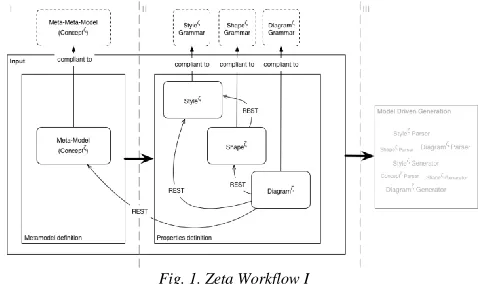
As illustrated in figure 1, the defined components are eventually used as an input of the Zeta generator which subsequently is responsible for producing artefacts of the new graphical editor. This process does not require any further involvement of the user and results in a ready to use editor.
However, at first, several parsing units need to compile the input files that contain the user’s definition for styles, elements and diagrams. The DSLs allow to define rather complex constructs; therefore, it is favorable to derive an object hierarchy from the given input. There are object representations for each DSL that can hold the specific elements. The different parsing units translate the textual user input into the corresponding objects. For maintenance reasons, each single component of a DSL has its own object-pendant - even simple points, merely storing X- and Y-coordinates. The parsing units are independent among each other, but can relate to globally defined parsing rules. This way, individual parsers can reuse common rules and don’t necessarily need to redefine them. Globally defined parsing rules can be changed and affect all parsing units at once. Locally defined parsing rules allow to redefine (override) global rules or to create entirely new rules. This process is completely invisible for the user, though.
The most basic and important separation of concerns is covered by the three most basic parsing units for ζ-Styles, ζ-Shape(element)s and ζ-Diagrams. Each input file, defined by the user, holds information about either visual representation concerns (ζ-Style), basic shape and relational matters (ζ-Element) or (Meta-)Model linking and additional context (ζ-Diagram).
Fig. 1. Zeta Workflow I
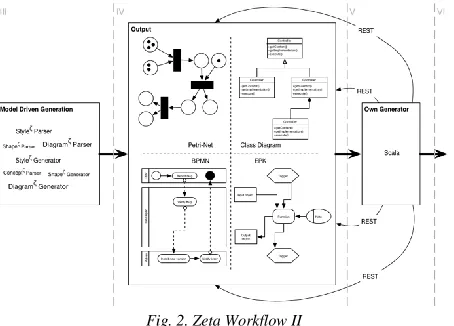
Figure 2 illustrates the preceding description of the basic steps that are required for the editor generation, it can be observed that there is a distinct order. At first, a metamodel definition is required that is capable of representing a specific domain. Based on the metamodel, graphical components can be described as properties, using the given ζ-DSLs. Subsequently, model-driven generation processes generate the foundation of the aspired editor, which mainly results in artifacts of the JointJS framework. These processes make use of the hierarchical object structure that was mentioned in the previous step. The generator components are intentionally separated - just like the parsing units. The aim is a clear separation between layout, structure and content. This separation is luckily an integral part of JointJS.
Just like the parsing units, the generators are separated into several smaller units, dealing with specific parts of either layout or structure. The StyleGenerator for example is responsible for creating a style.js file, which holds information that is retrieved from the many possible styles a model can hold. On the other hand, the
shapeGenerator for example creates several other artifacts, like shape.js or elementAndInlineStyle.js, representing the basic forms of predefined metamodel elements or dealing with style definitions that are occurring inside a shape definition. Eventually, the generated JavaScript files utilize JointJS for visualization.
Fig. 2. Zeta Workflow II
An important feature of this approach is the loose coupling of the involved components. To fulfill this property, all steps are performed via requests to a REST interface. This also enables the development of third-party applications which can extend the functionality of the developed solution significantly.
4.1 The Different Workflow Parts
This section describes the different parts of the Zeta workflow.
I: Definition of the Metamodel
The first step is to define the abstract syntax of the graphical modeling language. This is achieved by defining a metamodel that is suitable to represent the specific domain. All contents of such a metamodel must adhere to Concept, the meta-metamodel provided by Zeta. Eventually, the generated editor allows the creation of models that are compliant to the metamodel. Hence, Zeta makes use of exactly three meta layers. The fixed amount of layers leads to a lightweight meta architecture that can be understood and reasoned about in an easy way, but yet is powerful enough to represent all aspects of a specific domain (Figure 3). When viewed in the context of MOF (Meta Object Facility), a
de-facto standard for meta modeling, the three layers can be seen as counterparts of the MOF layers M0, M1 and M2.
Fig. 3. Zeta Metamodeling architecture with respect to the Meta Object Facility (MOF)
The meta-metamodeling Layer called Concept contains essential elements that are needed in the context of object-oriented modeling, meaning the creation of models that fundamentally are based on nodes and edges. Those elements can be used to define the entities of a specific domain as well as the allowed relationships amongst them. Figure 4 illustrates the elements provided by Concept [18].
The M_OBJ class is an abstract base type that provides a name attribute to most of the other elements of Concept. Within the same metamodel, names must be unique and therefore can be used to identify individual objects (with the exception of M_ATTRIBUTE names). M_BOUNDS is another abstract type that contains attributes for defining lower and upper bound constraints of several relationships. M_CLASS and M_REFERENCE are fundamental types that embody the nodes and edges of a metamodel. Both can contain an arbitrary amount of attributes. Additionally, it is possible to define inheritance relationships among M_CLASS objects in order to enable the concept of specialization and generalization of entities. M_LINKDEF is a supportive element that specifies the connection between a node and an edge. By extending M_BOUNDS, each connection is lower and upper bound. Attributes of nodes and edges are modelled using M_ATTRIBUTE. Each attribute can be of type String, Integer, Double or M_ENUM (see below). Since M_ATTRIBUTE extends M_BOUNDS, it also can be used to represent collections of these types. Furthermore, attributes
Concept metamodel
model(s)
instance of instance of
meta-meta layer
meta layer
model layer
provided by Zeta
defined by the editor developer
created by end-users of the generated editor
M2
M1
M0
contain a set of properties which assure consistency and integrity (such as constant or ordered). Lastly, M_ENUM is used to represent enumeration types. Each enumeration is defined by a set of constant values, represented as M_ENUM_SYMBOLS. Symbols of the same enumeration must be distinguishable, symbols of different enumerations that have the same name are treated as different values. M_ENUM definitions can be used as the type of M_ATTRIBUTE objects.
II: Definition of the Graphical Editor
The Zeta project provides a set of textual DSLs [19] for the graphical representation of metamodel instances. The intention is to enable domain experts to create their own dedicated graphical modeling language in a simple and cost effective way. Therefore, the Zeta project introduces three basic languages to describe the aspired graphical modeling language. Before further explanation of the concept and the functionality of the languages, a quick outline of their naming- and syntax conventions will be presented in the following.
Since the project’s name based on the Greek letter ζ (zeta), the languages are all prefixed by the same letter ζ to express their affiliation to the Zeta project. Besides that, the syntactic rules of the DSLs can be understood easily. The definitions of a style, element or diagram all start with an appropriate keyword “style”, “shape”,
“diagram”, followed by a valid identifier that will be
associated with the particular definition. Except for styles, the definitions allow an optional reference to a style instance whose rules will be applied to the definition. The DSLs are designed to be legible and easy to grasp. Similar to object oriented programming languages like Java or Scala, the usage of braces is well reasoned. Curly braces are used for creating definitions (or blocks) and enclose the “body” of the definition, round braces are used for assigning properties to an instance.
In the following sections, the Style, Element and ζ-Diagram DSLs will be covered more specifically. The languages and their specific components are strictly divided by functionality, yet refer to each other. The underlying intention is the separation of concerns for presentation (style), structure (elements) and the mapping to the metamodel. Simply put, by not defining presentational issues inside the elements language, but rather in a self-contained instance, style concerns can be reused. By referring to an existing style, several elements can share specific traits.
ζ-Style
As mentioned above, the ζ-Style language is a collection of assignments dealing with design concerns. Its functionality is basically a subset of the options offered
by the Cascading Style Sheet (CSS) language. Since style instances can be referred to by many elements, specific sets of attributes can be shared by otherwise unrelated types. However, the most intriguing thing about it is its behavior when applied to existing elements or hierarchies of elements. On the one hand, the applied style affects all (nested) elements within a hierarchy of elements. On the other hand, elements will always ignore their parents’ style related attributes in case the elements redefine these attributes individually. This way, by applying a style to the top-most element of a hierarchy, something called a “Corporate Design” can
be created easily and yet each element remains open for individual changes.
Listing 1 shows the ζ-Style language represented in EBNF.
Lis. 1. EBNF representation of the ζ-style DSL
As already mentioned, the ζ-Style language offers a brief subset of CSS, yet covering all the most important aspects for visual aspects such as sizes, fonts, highlighting, coloring or transparency. Another useful feature is the possibility to extend existing
styles, simply by adding the keyword extends and a
valid identifier for a style to the new style’s definition. A style that is derived from another style will inherit all the information that was assigned to the parent or overwrite them if it declares the very same aspects itself.
There are three ways for an Element to obtain Style attributes. It can either inherit Style attributes from parent Elements, refer to a Style instance in its definition, or define an inline-Style instance next to its other attributes, or even arbitrarily combine the three options.
ζ-Element
different. Both approaches use primitive forms like lines, ellipses, or rectangles to define more complex forms. The focus of the ζ-Element language is to be legible and easy to grasp. Complex structures are created by nesting several primitive forms. Most forms can be nested with other forms (but a line for instance is not able hold another form). The ζ-Element language contains the definition for Shapes, Forms and Connections.
A Shape defines a kind of wrapper, that on one hand defines attributes like boundaries (regarding the size) and on the other hand holds one or more forms, which can again contain an arbitrary amount of forms themselves. Of course a Shape can refer to a Style instance, which applies style attributes for all underlying forms recursively. Listing 2 represents the Element definition as EBNF.
Lis. 2. EBNF representation of the ζ-element DSL
The most important parts of a Shape are the forms it contains, as represented by “geometricFigure” in Listing 2. A more complex geometric Figure is a combination of the primitive forms that can be created, like an ellipse or a polygon. Listing 3 describes the grammar of a polyline, the most flexible and powerful form.
Lis. 3. EBNF representation of a Geometric Figure
Just like styles, shapes also can be derived from other existing shapes, by adding the “extends” keyword and a
valid identifier. This way it is very easy to define hierarchical models, containing similar components, or just to define elements which need to be altered slightly. Imagine creating the basic form of a human and then being able to easily create gender-, profession-, or ethnic group specific variants of that human, while the top most abstraction remains the same.
ζ-Diagram
Finally, the ζ-Diagram language establishes a link between the graphic elements and the underlying metamodel - graphic shapes are mapped to the
corresponding metamodel elements. Diagrams differentiate between nodes and edges, with nodes always being linked to a specific metamodel class (M_Class), while edges refer to metamodel references (M_Reference). Furthermore, the nodes of the diagram must refer to shapes, while the edges refer to connections (a special kind of shapes). Because the Diagram DSL is used to introduce the metamodel to the editor, it offers the keyword “for”, which indicates an
association to a specific element of the metamodel. Besides the “diagram” keyword, the identifier and the
already mentioned style reference, the diagrams definition also needs a reference to a metamodel which is given by the “for” keyword and a valid identifier. The
same principle goes for the nodes and edges, which also need the “for” keyword and an identifier referring to a
M_Class or M_Reference.
A detailed view on the ζ-Diagram language can be seen in Listing 4.
Just like shapes, connections and forms, diagrams can refer to a style instance. Applying style attributes to a diagram results in creating a uniform design, because the diagram’s style traits will also be assigned to all the underlying nodes, edges, shapes and all the forms. Actions can be defined inside a diagram holding user-specific implementations. Bundled in ActionGroups, any node or edge can refer to such actions and define specific behavior.
III: Parser and Generator
The core of the Zeta project is the implemented generator and the associated parser. Both of them are implemented in the programming language Scala, on the one hand for reasons of consistency and on the other hand due to the powerfulness of the still relatively young programming language.With Scala, it is possible to use functional mechanisms which usually facilitate the implementation of a parser using dynamic string evaluation. During the implementation process, it turned out that Scala does not have the power of a pure functional programming language such as Clojure and that the implementation of dynamic string evaluation is not possible. For this reason, the idea was rejected and replaced by the usage of regular expressions.
Lis. 5. Parser Definition
The structure of the DSLs allows the definition of a small number of regular expressions, which the parser uses to create the hierarchical object representation mentioned earlier. Subsequently, these objects can be processed programmatically by the generator. Listing 5 shows such a simple parser rule. With this general pattern definition, it’s possible to process a large part of the language. Listing 6 shows such a regular expression implemented in Scala through the "match" method.
Lis. 6 Scala match
However, there is the problem of nested structures. Elements can be located at different locations and at different levels with different meanings. This problem cannot be solved with regular expressions. For this reason, it’s necessary to implement so called "Parser Combinator" classes. These are used to combine different parser implementations and make it possible to determine the correct context.
The complete object structure which is created by the parser can be seen in Figure 5. This figure shows only the most important classes.
Fig. 5. Simplified Object structure of the important classes
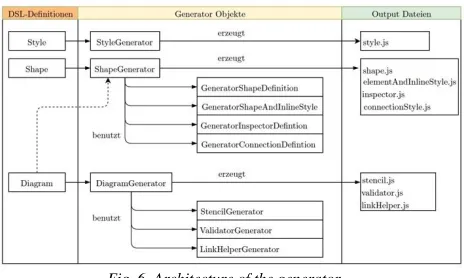
The generator uses the created memory objects by the parser to generate the needed JavaScript Files for the graphical editor. Figure 6 shows the architecture of the generator. The three different languages “Style, Shape” and “Diagram” have their own corresponding generators
(StyleGenerator, ShapeGenerator and
DiagramGenerator). Only the Diagram Generator has a relationship to the Shape Generator. The Shape- and DiagramGenerator are divided into sub generators. This reduces the complexity of the individual components of the generators.
Fig. 6. Architecture of the generator
Lis. 7. Scala match
The complete generators and the entire project can be viewed at [20].
IV: The Generated Graphical Editor
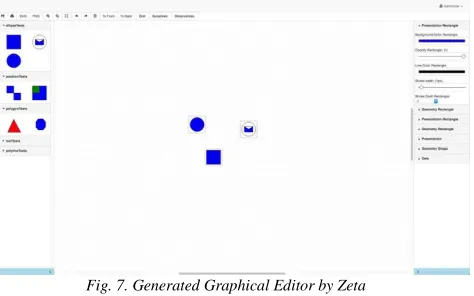
The generated editor is a fully functional domain specific graphical modelling tool. Figure 7 shows the general layout of the generated editor. The editor consists of three sections. The left area contains the elements that were defined in the metamodel and mapped to a graphical representation. The right area contains the property view which displays properties of elements and allows to adjust them. The area in the center is the main area used draw diagrams with the created graphical modeling language. The menu bar contains the standard functions such as “undo”, “redo” and “export” the current diagram as an image. If the user needs more drawing space, it’s possible to hide the left and right area with the light blue toggle buttons at the bottom. A small and red-colored rectangular border around elements indicates that the current state of the defined diagram is not valid according to the specified metamodel. Therefore, it’s not possible to save the current diagram until the errors are fixed.
Fig. 7. Generated Graphical Editor by Zeta
V: Write your own generator for user defined models
After a new graphical language and a corresponding editor was generated, users can start to use the language
by drawing own diagrams – and therefore creating models that are compliant to the metamodel the editor is based on. Additionally, it is possible to define generators that transform such models into any kind of output. The transformation logic itself is written in Scala – a specific interface allows to read all models and their corresponding metamodel and process them programmatically. The Scala types that represent metamodels and models are documented. Since the transformation logic is implemented in Scala, any additional 3rd party libraries (Scala or Java) can be utilized. This is especially helpful for generating artifacts like images, PDFs or other document types.
4.2 Usage of the (meta)-model Data
Using the browser-based Zeta editors is not the only way of creating and modifying models and metamodels. In addition, Zeta provides a RESTful API that can be employed to access model data from other clients as well. For now, the main purpose of the API is to be consumed by the Zeta editors; since the REST paradigm is well understood and the API gives full access to model related data, it also can be seen as an incentive for developers to create useful third party applications (see Figure 8). Possible use cases include the development custom editors or model-driven generators that obtain model data directly from Zeta servers.
Fig. 8. API overview
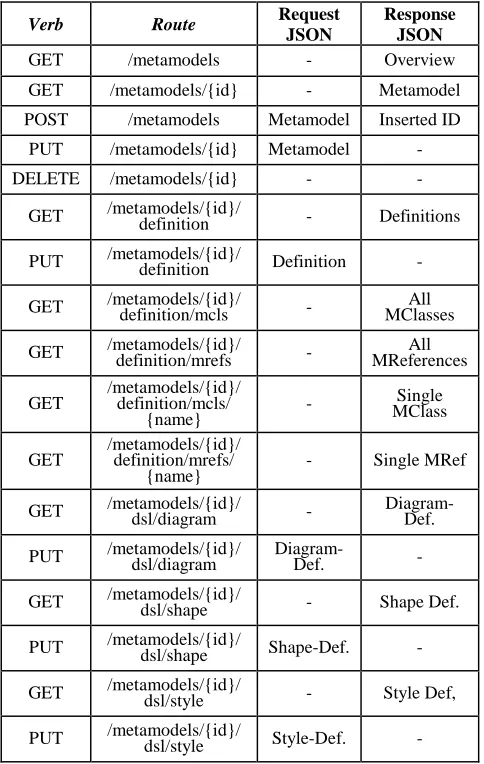
The URIs of concrete metamodel resources that can be obtained and modified using the API are shown in table 1. Apart from accessing the Concept-based definition of a metamodel itself, it is also possible to read and write the DSL-based descriptions of graphical elements. The usage of sub resources with own identifiers allows a fine-grained access to particular parts of the metamodel. Actually, the URIs listed in the table only contribute to a better understanding of the API, but they should not be hardcoded into clients. Instead, the API adheres to a principle called HATEOAS (Hypertext as the engine of application state) that was described by Fielding (the “inventor” of REST, see [21]) as an essential part of the
Zeta Server
Endpoints
Web REST
Zeta Client (Browser) Metamodel
EditorModel Editor
3rd Party Applications App #1
App #2 App #.. CRUD o f models an d
metamodels - static assets
REST paradigm. The goal of HATEOAS is to improve the lose coupling between a RESTful Service and its clients. From the perspective of a client application, this is achieved by not predefining (hardcoding) request URIs of server side resources. Instead, clients should only be aware of a very small set of URIs ("entry points") and explore additional URIs while using the API. Therefore, representations of resources contain a set of specified links whose semantics must be understood by clients. Subsequently, clients can use these URIs to perform further API calls. As a result, the structure of the API's request URIs can be changed without breaking clients.
Table 1: Margin specifications
Verb Route Request
JSON
Response JSON
GET /metamodels - Overview
GET /metamodels/{id} - Metamodel
POST /metamodels Metamodel Inserted ID
PUT /metamodels/{id} Metamodel -
DELETE /metamodels/{id} - -
GET /metamodels/{id}/ definition - Definitions
PUT /metamodels/{id}/ definition Definition -
GET /metamodels/{id}/ definition/mcls - MClasses All
GET /metamodels/{id}/ definition/mrefs - MReferences All
GET /metamodels/{id}/ definition/mcls/ {name}
- MClass Single
GET /metamodels/{id}/ definition/mrefs/
{name} - Single MRef
GET /metamodels/{id}/ dsl/diagram - Diagram-Def.
PUT /metamodels/{id}/ dsl/diagram Diagram-Def. -
GET /metamodels/{id}/ dsl/shape - Shape Def.
PUT /metamodels/{id}/ dsl/shape Shape-Def. -
GET /metamodels/{id}/ dsl/style - Style Def,
PUT /metamodels/{id}/ dsl/style Style-Def. -
In case of Zeta’s REST API, the URIs /metamodels and /models act as entry points. GET calls to both URIs return a concise overview of all (meta-)models belonging to the requesting user. Since clients should not be aware of any URIs beside the entry points, each item of the overview is annotated with additional links (Listing 8). Based on these links, clients can initiate further actions.
Lis. 8. REST API: HATEOS links
The usage of HATEOAS by clients is optional. It's still possible to ignore the links and predefine all request URIs at development time. The Zeta REST API provides HATEOAS capabilities to help reducing maintenance related aspects of clients, but does in no way enforce the implementation of this pattern.
5. IMPLEMENTATION GUIDE
This section illustrates the creation of a concrete graphical editor using Zeta.
5.1 Defining an adequate metamodel
As mentioned before, the underlying metamodel is of crucial importance. Figure 9 illustrates an example definition of such a metamodel. The metamodel is used to describe the entities and relations of a particular domain. In the following case (the family domain), a person entity is created and extended as both a male and a female version. Each of the entities introduce their own features and relationships, yet each person will have a name.
The example also discloses that relationships can be regulated by cardinalities. A male is therefore allowed to father as many children as wished, including zero. On the other hand, it is not possible for a male to be married to more than one partner.
According to the specific steps described in chapter 4, now that there is a metamodel for the family domain, step one is completed. In the subsequent steps, it’s necessary to describe adequate graphical representations for the entities of the metamodel and perform the mapping between metamodel and graphical elements.
5.2 Using the DSLs to create the graphical
representation
In this step, the goal is to create graphical representations of the defined entities, enabling the editor to provide placeable elements for the given domain.
As mentioned in chapter 4, there are three DSLs that can be used to define aspects of visualization. Figure 10 proposes a basic structure via ζ-Element-DSL to illustrate a female, using a Venus symbol. A shape is created (initiated by the keyword shape). The shapes name will simply be woman. Inside the shape’s body, the actual structure is implemented.
The Venus symbol itself consists of three items. A circle and two crossing lines. So all there is to do is at first to create an ellipse, with equal width and height, followed by two lines, each defined by two points. Since each person has a name, a text field is added to the shape to provide an input field to the user.
Fig. 10. Element shape definition
Persons can refer to each other, whether by parent child relation or marriage. To model such a relationship, a simple arrow is created as a ‘connection’, as seen in Figure 11. The arrow itself is described by a polygon, forming a triangle.
Fig. 11. Element connection definition
Last but not least, the created shapes need to be mapped to their corresponding elements in the metamodel. This happens via the diagram definition and is shown in Listing 9.
At first, a diagram is created via ζ-Diagram-DSL by using the keyword diagram. The name familytree will be used to refer to the diagram. The for keyword is used to map the diagram to a specific metamodel (here:
familytreeMM). A diagram consists of nodes and edges.
Lis. 9. Diagram definition
Each of these nodes and edges need to be individually linked to a metamodel entity or relationship. Again, this is done by using the for keyword. In case of a node, a shape needs to be associated by using the shape keyword. In case of an edge, a connection needs to be associated.
The inline style definition which is shown in figure 10 can be moved since it is useful to define common properties as a separate style using the ζ-Style-DSL. Listing 10 describes such a style definition.
5.3 Inserting and Querying (meta)-models
In the previous sections, it was shown how the web interface of Zeta can be used to define a new graphical modeling language and to generate a suitable editor. However, it is also possible to accomplish the same results through the REST API. The general approach remains the same and breaks down to two steps. In a first step, it is necessary to define the abstract and concrete syntax of the modeling language by submitting their JSON representation to the API. The base URI that used for all operations related to the meta layer is
/metamodels. Given an existing meta model, an adhering model can be created by submitting its JSON representation to /models (serving as base URI for operations of the model layer).
The model definition must contain a textual reference to its meta model (otherwise, there is no way to figure out which models belong to which metamodels later on). The request header hints at the OAuth authentication mechanism: any request must contain a valid bearer token.
Lis. 11. Rest authentication
The HTTP response contains status information regarding the outcome of the operation. In case of success, the calling client can obtain the model's unique identification that was assigned by the server.
Lis. 12 Response information
Subsequently, it is possible to modify or delete the model. A GET call to /models/{id} reveals available
options as links.
Lis. 13. REST Model options
6. EVALUATION
The presented approach is still at a very early stage of development. For this reason, is very difficult to provide a concrete comparison. However, the results provide a first indication.
The generative approach reduces the needed effort to develop a graphical modeling tool for the cloud considerably compared to programming it manually in JavaScript using the JointJS Rappid API. In addition, the functionality of a direct connection between the graphical editor and the metamodel is provided. This allows the subsequent programmatic data processing of instance data (within the meaning of different diagram instances). This integration chain, according to the knowledge of the authors, is currently not provided by any other solution. For this reason, a complete evaluation regarding to comparable solutions is not possible.
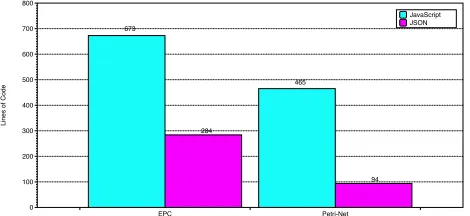
The graphical definition of a metamodel has countless advantages which have already been discussed in other literature. These advantages are reflected especially in complex models. The presented approach generates a JSON structure derived from the graphical metamodel. The generated JSON file has a notable size even for simple metamodels (see Figure 12, in general, the size of the JSON file directly correspondents to the complexity of the metamodel).
Fig. 12. Lines of Code of the generated Files
Furthermore, JavaScript code is generated which also has a considerable number of lines of code, even for small examples (see Figure 12). Apart from not having to define all those lines of code manually, the complexity of the code is also hidden when using the generative approach. At this point, it clearly can be said that the high level of abstraction that is provided by model-driven software development pays off.
The subsequent use of the instance data is, e.g. for the integration into scientific texts with direct reference to specific diagram objects, a decisive advantage. However, this is only one of many conceivable advantages. The direct evaluation of this possibility(s), is very difficult to achieve and may require a manual implementation of such a solution to get a valid comparison between the presented approach and the manual implementation. However, is obvious that this approach provides a wide range of possibilities which can be provided through the use of the generative approach without effort. For the authors is not the direct measurable benefit the important point, but the fact that an advantage can be created by this approach, which has only a small time savings in the worst case.
7. CONCLUSION AND FUTURE WORK
In this paper, we have shown that developing graphical DSLs with the usage of Zeta can be very efficient. We presented concepts for the model driven development of graphical modeling tools in the cloud. The modeling tools can be adapted to the needs of a specific domain, resulting in a ready to use collaborative graphical Editor with a web frontend. In addition, it is possible to process the model instances programmatically by a user-written application or a generator. Furthermore, we described an implementation guide for the domain of a family tree, but the same approach could be used for various domain-specific modeling areas.The presented project is currently not finished and still lacks a number of important features before its use can be recommended in the context of critical applications. The missing features and feature requests will be integrated or enhanced over time. Examples of such
features are the opportunity of the definition of a user manually written generator or application with direct connection to the metamodel (Step III), but with the advantage that the parsing step does not need to be done by the user manual. Further features are the support for context menus and the use of rapid buttons.
More important is the question of the limitations of the approach. In terms of the graphical editor itself, the API offered by JointJS as well as exploiting its capabilities through a model driven approach, we see no serious constraints. In this regard, JointJS provided a lot of features we had expected. Nonetheless we analyzed a few limitations while developing the editor. For example, JointJS currently does not support the definition of complex connection elements or an easy integration of layouting algorithms. Finally, the JointJS API allows a few things that surprisingly have no effect on the generated graphical editor. This makes working with JointJS partially very difficult and is a hindrance. In addition, documentation is incomplete and new releases often result in code breaking API changes. This leads to some workarounds that we used to realize some features.
The presented and referenced DSLs are targeted towards graphical languages based on the notion of nodes and edges. In UML, most diagram types fit into that category, however it includes a few exceptions. The sequence and the timing diagram show time as one dimension and differ in that sense. They cannot be described with the presented DSLs without considerable extensions.
We see more limitations in the parallel execution of the applications respectively generators written by the user. These must be tested, inspected and controlled in terms of resource consumption, possible endless cycle times and safety critical implementations.
REFERENCES
[1] Steinberg, Dave, et al. EMF: eclipse modeling framework. Pearson Education, 2008.
[2] Eysholdt, Moritz, and Heiko Behrens. "Xtext: implement your language faster than the quick and dirty way." Proceedings of the ACM international conference companion on Object oriented programming systems languages and applications companion. ACM, 2010.
[3] Efftinge, Sven, and Markus Völter. "oAW xText: A framework for textual DSLs." Workshop on Modeling Symposium at Eclipse Summit. Vol. 32. 2006. [4] M. Gerhart, and M. Boger, „Zeta-Project“
htttp://www.zeta-project.org
[6] Omg, Q. V. T. "Meta object facility (mof) 2.0 query/view/transformation specification." Final Adopted Specification (November 2005) (2008). [7] Merks, Ed, et al. "The Eclipse Modeling Framework."
retrieved from, total (2003): 37.
[8] Pietrek, Georg, et al. "Modellgetriebene Softwareentwicklung: MDA und MDSD in der Praxis." Software+ Support (2007).
[9] JointJS, http://www.jointjs.com
[10] Tolvanen, Juha-Pekka, and Matti Rossi. "MetaEdit+: defining and using domain-specific modeling languages and code generators." Companion of the 18th annual ACM SIGPLAN conference on Object-oriented programming, systems, languages, and applications. ACM, 2003.
[11] Atkinson, Colin, and Ralph Gerbig. "Melanie: multi-level modeling and ontology engineering environment." Proceedings of the 2nd International Master Class on Model-Driven Engineering: Modeling Wizards. ACM, 2012.
[12] Rabbi, Fazle, et al. "A diagrammatic approach to model completion." 4th Workshop on the Analysis of Model Transformations (AMT)@ MODELS. Vol. 15. 2015.
[13] Ledeczi, Akos, et al. "The generic modeling environment." Workshop on Intelligent Signal Processing, Budapest, Hungary. Vol. 17. 2001. [14] Juliot, Etienne, and Jerôme Benois. "Viewpoints
creation using Obeo Designer or how to build Eclipse DSM without being an expert developer." Obeo Designer Whitepaper (2010).
[15] Hiya, Shuhei, et al. "clooca: Web based tool for
Domain Specific Modeling."
Demos/Posters/StudentResearch@ MoDELS. 2013. [16] Syriani, Eugene, et al. "AToMPM: A Web-based
Modeling Environment."
Demos/Posters/StudentResearch@ MoDELS. 2013. [17] Maróti, Miklós, et al. "Next Generation (Meta)
Modeling: Web-and Cloud-based Collaborative Tool Infrastructure." MPM@ MoDELS. 2014.
[18] Gerhart, Markus, et al. "Approach to Define Highly Scalable Metamodels Based on JSON." BigMDE 2015 (2015): 11.
[19] Gerhart, Markus, and Marko Boger. "Zeta-A Set of Textual DSLs to Define Graphical DSLs." International Journalof Computer Techniques (IJCT) 3: 29-43.
[20] M. Gerhart, and M. Boger, „Zeta-Project Source Code “https://bitbucket.org/mgerhart/modigen-v3.git [21] Fielding, Roy Thomas. Architectural styles and the
design of network-based software architectures. Diss. University of California, Irvine, 2000.
AUTHOR PROFILES:
First Author studied business computer science with a focus on Software Engineering at the University of applied science Konstanz. Then he completed a master's degree in the study program with a focus on business processes modelling and model driven software development and is currently a PhD student of Prof. Dr. Marko Boger in the area of the model-driven software development.
Second Author studied business computer science with a focus on Software Engineering at the University of applied science Konstanz. He is a project member of the Zeta Project with focus of the Rest API.
Third Author studied business computer science with a focus on Software Engineering at the University of applied science Konstanz. He is a project member of the Zeta Project with focus of the core part the generator.