Article
1
A Javascript GIS platform based on invocable
2
geospatial Web services
3
Konstantinos Evangelidis1,* and Theofilos Papadopoulos2
4
1 Technological Educational Institute of Central Macedonia; [email protected]
5
2 Technological Educational Institute of Central Macedonia; [email protected]
6
* Correspondence: [email protected]; Tel.: +30-694-727-8769
7
Abstract: Semantic Web technologies are being increasingly adopted by the geospatial community
8
during last decade through the utilization of open standards for expressing and serving geospatial
9
data. This was also dramatically assisted by an ever increasing access and usage of geographic
10
mapping and location-based services via smart devices in people’s daily activities. In this paper we
11
explore the developmental framework of a pure Javascript client-side GIS platform exclusively
12
based on invocable geospatial Web services. We also extend Javascript utilization on the server side
13
by deploying a node server acting as a bridge between open source WPS libraries and popular
14
geoprocessing engines. The vehicle for such an exploration is a cross platform Web browser
15
capable of interpreting Javascript commands to achieve interaction with geospatial providers. The
16
tool is a generic Web interface providing capabilities of acquiring spatial datasets, composing
17
layouts and applying geospatial processes. In an ideal form the end-user will have to identify those
18
services, which satisfy a geo-related need and put them in the appropriate row. The final output
19
may act as a potential collector of freely available geospatial web services. Its server-side
20
components may exploit geospatial processing suppliers composing that way a light-weight fully
21
transparent open Web GIS platform.
22
Keywords: Open GIS; geospatial Web services; geospatial Web semantics; Web GIS; Node.js;
23
Javascript
24
25
1. Introduction
26
Geospatial functions range from a simple image map acquisition to a complex geoprocess over
27
a Spatial Data Infrastructure (SDI). Nowadays, a wide range of users exploit geospatial functions in
28
their routine activities. Such users are practitioners, scientists and researchers involved in
29
geosciences and engineering disciplines, as well as individuals employing Geographic Information
30
Systems (GIS) [1-2]. In addition, today we face an ever increasing access and usage of geographic
31
mapping and location-based services via smart devices in people’s daily activities [3]. For this
32
reason, emerging computing paradigms show high penetration rates in geospatial developments,
33
with the latest and yet most significant one the Cloud computing [4-5]. As a result, existing systems
34
are transformed from proprietary desktop GIS software applications of the early 80's to free and
35
open source interoperable Cloud GIS solutions built upon geospatial Web services (GWS) [6].
36
GWSs and service-oriented architecture (SOA) are the key components to achieve
37
interoperability in Web GIS applications. GWSs allow self-contained geospatial functions to operate
38
over the Web while SOA facilitates interoperability between these GWSs by establishing
39
communication and data exchange for requesters and providers in a uniform way [7-8]. The
40
dominant GWS standards adopted by the geospatial community are those introduced by the Open
41
Geospatial Consortium (OGC) including the Web map service (WMS) to visualize [9], the Web
42
feature service (WFS) and the Web coverage service (WCS) to acquire [10-11], the catalog service for
43
the Web (CSW) to discover [12], and also the emerging Web processing service (WPS) to process,
44
spatial data [13].
45
In this respect, numerous research projects and business solutions rely on the above standards
46
to achieve geospatial data interoperability between custom applications and to satisfy
47
project-specific needs [14-15]. Furthermore, in European Union (EU) level, project actions have to be
48
aligned with regulation No 1312/2014 [16], implementing INSPIRE directive [17] as regards
49
interoperability of spatial data services. According to this, all geospatial data have to be served
50
under invocable spatial data services. As a result most applications are nowadays based on Web
51
services, use data provided over the Web or generated by users [18], and are executed on
52
cross-platform browser-based interfaces. In the geospatial community, GWSs and XML-based open
53
geospatial data formats, such as Geography MarkUp Language (GML), have become basic
54
components of desktop and Web GIS software solutions. For example the ESRI's ArcGIS commercial
55
product supports WMS connections through its popular 'Add data' interface [19]. On the other side
56
QGIS open solution also supports connection to GWSs through appropriate plug-ins [20]. For
57
individual Web-based applications it is possible to develop a custom GIS capability through open
58
Javascript libraries such as for example Openlayers (http://openlayers.org/) and GeoExt
59
(https://geoext.github.io/geoext2), and have it executed on the client-side without the need of
60
installing anything but an updated Web browser.
61
The development of research and commercial projects that utilize open or proprietary Web
62
services and spatial application frameworks is rapidly growing. [21-28]. Several other Cloud GIS
63
solutions are served as software, as platforms, as infrastructure under the popular service models,
64
SaaS, PaaS and IaaS respectively [4]. However an exclusively service-based application composed of
65
open interoperable Web services could be the ideal case. The developer would have to identify the
66
appropriate GWSs and bind them between each-other in the correct order, same way as it happens
67
in the well-known “ArcGIS model builder” [29]. The final outcome would be a transparent to the
68
user Web interface consisting of an interconnected set of Web services. This case may be extended to
69
a Web GIS platform that gathers available GWSs and acts as a platform for building GIS projects.
70
In this paper we explore the developmental framework for exploiting invocable GWSs, that
71
satisfy routine geospatial needs. A comprehensive and sophisticated implementation might include
72
a Web interface allowing the end user to select between task descriptions composing a GIS project.
73
We demonstrate (212.111.41.209/res/gws) such an implementation which is exclusively based on
74
open standards and services, a light-weight client-side pure JavaScript platform that performs: a)
75
data discovery from public data providers, b) layer-based data view, c) data selection by attributes,
76
d) feature data acquisition and preview, and e) simple geoprocessing tasks. For the last ones, we also
77
explore the applicability of JavaScript, for implementing geoprocesses. Prior to this, the paper
78
explores the effects of semantic Web technologies on fundamental geospatial elements, and
79
discusses critical architectural and development issues.
80
2. The influence of geospatial Web semantics on GIS
81
The major components and principal operations and characteristics of an interface
82
implemented according to geospatial Web semantics technologies, are identified and reviewed
83
throughout GIS timeline from desktop and proprietary Web applications to open service-based GIS
84
systems in the Cloud. The historical point that generally represents the geospatial evolution is when
85
Web semantics technology standards were adopted by the geospatial community. The three major
86
areas briefly discussed in the following are a) Formats, b) Interoperability and c) Automations
87
2.1. Geospatial Data Formats
88
2.1.1. Vector Data
89
Vector data are considered the dominant component of a GIS System, holding the critical
90
properties of the spatial entities that they represent such as their shape and spatial representation
91
and topology. Traditionally, vector data were handled by geographers and GIS experts as the
92
valuable form of spatial data, beyond others, for two reasons: their independence from scale and the
93
data production is expensive and time consuming since they are obtained by digitizing map images
95
or as a result of GPS field data collection.
96
Various forms of vector data were adopted throughout GIS timeline from coverage and
97
shapefile to proprietary and open geographic database formats. Today spatial coordinates of the
98
vertices composing a vector graphic may be easily modeled through XML-based open formats
99
(KML, GML, SVG) and transferred through OGC-WFS service requests.
100
2.1.2. Raster Data
101
Traditionally, raster data in the form of scanned maps (gif, jpeg, tiff etc.) were used as the base
102
for producing vector data through digitization tasks. Therefore, the more detailed and of high
103
resolution, a raster was the more analytical and precise was the digitization process. As a result,
104
raster data were usually heavy-sized and their management in a desktop GIS environment required
105
high efficiency computer hardware resources. Servicing maps and satellite images through static
106
Web pages or through raster data repositories were also tasks dependent to hardware efficiency
107
including internet infrastructures.
108
When the first map servers appeared, raster data were being served over the Web as textures of
109
the ground surface, mainly satisfying navigation experience in earth browsers. Today image
110
compression and tiled rendering techniques along with extremely high wireless internet connections
111
make it possible to employ high quality raster data as the background for location-based services
112
provided to smart device users. Raster data used as cartographic background are transferred
113
through OGC-WMS service requests. Other raster formats like GeoTIFF that are used for coverage
114
purposes (e.g. elevation or results from geoprocessing) are served via OGC WCS standard.
115
2.1.3. Descriptive Data
116
A fundamental structural characteristic of a GIS is the capability of associating the spatial
117
features with descriptive data related to them. That way it is possible to perform sophisticated
118
cartographic representations for decision and policy makers as well as to execute complex processes
119
over descriptive data and produce valuable geoinformation. Descriptive data were normally easy to
120
manage throughout GIS timeline because of the simultaneous emergence of database technologies.
121
The external data sources to be associated with spatial features included a wide range of alternatives
122
from simple comma separated values and single database files to relational geographic databases
123
installed in remote servers.
124
Today the Web of Data and associated semantic technologies, support interoperability and
125
standard formats to model and transfer descriptive data. ISO 191xx series and RDF are XML
126
encoded data standards employed in the geospatial web [30].
127
2.2. Geospatial Interoperability
128
Geospatial interoperability became an issue, when the need for data communication and
129
exchange between diverse geospatial stakeholders became a necessity. Till early ‘90s, GIS vendors
130
used their own proprietary formats, however they agreed to common standards and formats and
131
they established connections to commonly shared repositories. As the technologies that developed
132
by World Wide Web Consortium (W3C) matured, OGC introduced appropriate spatial related
133
technologies to achieve syntactical and semantic interoperability.
134
2.2.1. Syntactical Interoperability
135
Syntactic interoperability assures data transfer between connected systems through Web
136
services. In the geospatial community it is currently achieved through OGC Web Services. For
137
example WFS/GetFeatures request, provides the standard interface and message types for Web
138
services transferring features through XML. In the past, syntactical interoperability could be
139
2.2.2. Semantic Interoperability
141
Semantic interoperability is the ideal situation where the exchanged content is machine
142
understandable. To be such it has to be conceptualized formally and explicitly through appropriate
143
specifications, such as GML, the standard for the exchange of service-based spatial data.
144
Traditionally, semantic interoperability could be only achieved via pre-constructed data formats
145
resulting from predefined domain specific data models (e.g. ArcFM [31], UML data models).
146
2.3. Geospatial Automations
147
A GIS project is usually a composition of single geospatial activities which normally begin with
148
the acquisition of thematic layers, and other data involved and the application of geospatial
149
processes, depending on the exact domain of the geoscientific field of expertise. Automating these
150
activities under a workflow of sequentially executed processes may be achieved by creating
151
specialized batch files, or scripts. Traditionally, geospatial automations are implemented through
152
sophisticated modules of the popular desktop GIS environments offering tools to manage geospatial
153
processes, like for example ModelBuilder [31], or Processing Modeler [32].
154
Now that all types of geospatial activities may be served through geospatial Web services,
155
automation is achieved by 'orchestrating' these Web services. Orchestration “describes collaboration of
156
the Web services in predefined patterns based on local decision about their interactions with one another at the
157
message/execution level” [33]. OGC WPS can be designed to call a sequence of web services [13].
158
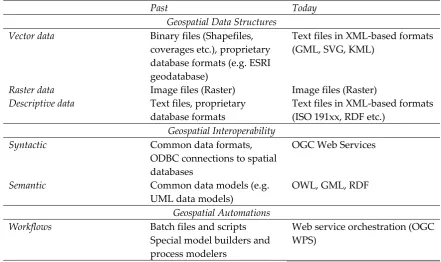
Table 1 collects all related terminology in the above specified sections before and after
159
Geospatial Web Semantics influence.
160
161
Table 1. Impact of Web semantics on geospatial technologies
162
Past Today
Geospatial Data Structures Vector data Binary files (Shapefiles,
coverages etc.), proprietary database formats (e.g. ESRI geodatabase)
Text files in XML-based formats (GML, SVG, KML)
Raster data Image files (Raster) Image files (Raster) Descriptive data Text files, proprietary
database formats
Text files in XML-based formats (ISO 191xx, RDF etc.)
Geospatial Interoperability
Syntactic Common data formats,
ODBC connections to spatial databases
OGC Web Services
Semantic Common data models (e.g.
UML data models)
OWL, GML, RDF
Geospatial Automations Workflows Batch files and scripts
Special model builders and process modelers
Web service orchestration (OGC WPS)
163
3. Software Prototype Design & Development
164
3.1. Functional Architecture
165
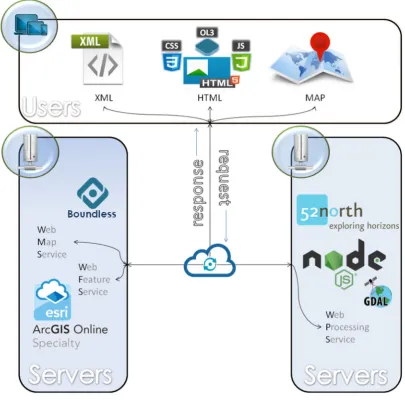
The successful operation of an application based on GWSs prerequisites the existence of
166
available open geospatial Web services for data acquisition and data processing purposes. The end
167
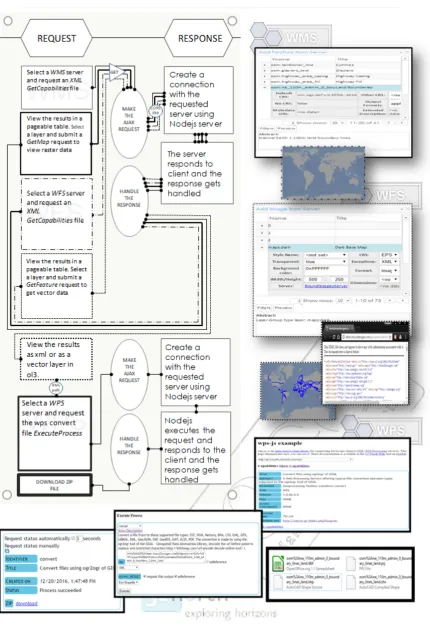
additional software. Figure 1 represents graphically the functional architecture of such an
169
implementation, which includes:
170
• Free WMS and WFS geospatial services provided either by open-source (e.g. Boundless) or
171
commercial (e.g. ESRI) GIS product leaders, satisfy the need of obtaining features and images
172
• Accessible processing platforms like 52o North initiative, or Javascript node servers developed
173
to support custom WPS implementations.
174
• an HTML browser-based interface developed in Javascript, undertakes to serve user needs over
175
a functional GIS-based environment as described below
176
177
Figure 1: Functional architecture of a system exploiting GWSs
178
179
180
181
3.2. Development Issues
182
3.2.1. Raster and Vector Layer Views
183
To get raster and vector layers, WMS and WFS services, respectively, are employed. The user
184
• Requesting for available maps in the form of raster or image views of vectors through a
186
WMS/GetCapabilities request and receiving a list with the offered layers along with further
187
metadata descriptions in XML format
188
• Requesting for available features through a WFS/GetCapabilities request and receiving a list
189
with the offered feature layers along with further metadata descriptions in XML format
190
• Requesting for a specific raster (or image views of a vector) layer through a WMS/GetMap
191
request and receiving an image file
192
• Requesting for a specific vector layer through a WFS/GetFeatures request and receiving an XML
193
file
194
195
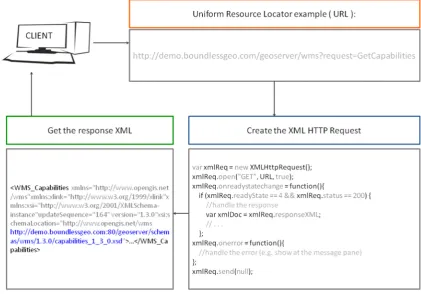
Figure 2, illustrates an example of a WMS/GetCapabilities request coded in Javascript along
196
with the server XML response:
197
• the client makes an AJAX (Asynchronous JavaScript and XML) request using the
198
XMLHttpRequest, either WMS or WFS with a URI parameter ‘request=GetCapabilities’.
199
• the server responds with XML data that will thereafter be parsed to JSON object and finally be
200
viewed by the user as paged table data.
201
Practically, the above interaction takes place, whenever the user declares a potential service
202
provider and checks geospatial data provision.
203
204
Figure 2: Requesting a WMS/GetCapabilities request and receiving the XML response
205
3.2.2. Geospatial Processes
206
Geospatial processes were implemented by employing the 52o North WPS HTML interface
207
freely provided through the wps-js Javascript library. This way an HTML form was generated
208
through which it is possible to encode and parse XML-based WPS requests (GetCapabilities,
209
DescribeProcess, Execute) for the geospatial processes offered by 52o North initiative WPS interface
210
implementation, as well as some other OGC WPS compatible geoprocessing servers (e.g. GeoViQua)
211
[34].
212
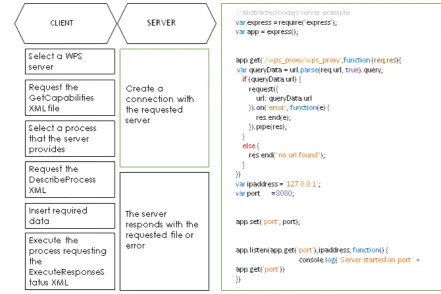
To contribute over the above, a Node.js server was developed in the present work, in order to
213
compliant WPS requests are transmitted through 52o North WPS client interface where the Node.js
215
server was also declared in it.
216
Below is a step by step representation of how interaction between client (WPS Client) –
217
server(Node.js) – Cloud servers (WPS Servers) is taking place to complete a WPS request with wps-js
218
and Node.js server.
219
220
Figure 3: Utilizing Node.js as a Proxy server to achieve cross-origin connections with OGC
221
implementations
222
3.2.3. Descriptive data management
223
Descriptive data involved in OGC Web services are an essential part of the development
224
process because they specify the parameters of any type of request. These parameters are
225
composed/expressed/edited in many ways and four of them are mentioned below. (1) and (2)
226
concern requests submitted to geospatial servers, while (3) and (4) concern handling of the requests
227
on the client-side:
228
229
(1) HTTP GET Requests
230
HTTP is the simplest way to submit a request to an OGC service implementation through the
231
browser’s URL bar and may also be incorporated in a Javascript interface using AJAX requests. The
232
URL expression below represents a WFS request for getting features from a geospatial server
233
234
http://nsidc.org/cgi-bin/atlas_north?
235
service=WFS&
236
version=1.1.0&
237
request=GetFeature&
238
typename=greenland_elevation_contours
239
240
(2) HTTP POST XML requests
241
OGC Web services may support the “POST” method of the HTTP protocol and the request
242
message is formulated as an XML document. XML tags, host the values of the parameters
243
composing a request in a tree structure. In addition, they host the features and attributes of a vector
244
layer. In any case, XML files establish OGC based interoperability acting as the medium for data and
245
which returns to the requester the description of all the geospatial processes offered by a WPS
247
server.
248
249
<?xml version=”1.0” encoding=”UTF-8”?>
250
<wps:DescribeProcess service=”WPS” version=”1.0.0”
251
xmlns:wps=”http://www.opengis.net/wps/1.0.0” xmlns:ows=”http://www.opengis.net/ows/1.1”
252
xmlns:xsi=”http://www.w3.org/2001/XMLSchema-instance”
253
xsi:schemaLocation=”http://www.opengis.net/wps/1.0.0
254
http://schemas.opengis.net/wps/1.0.0/wpsDescibeProcess_request.xsd”>
255
<ows:Identifier>all</ows:Identifier>
256
</wps:DescribeProcess>
257
258
Another example has been presented in Figure 2.
259
260
(3) GeoJSON
261
XML files are transformed to GeoJSON using the new specification RFC 4976 in order to be
262
expressed as native Javascript objects and handled appropriately, in terms of parsing and generating
263
the parameters of OGC service requests. Being JSON objects they may be easily visualized as paged
264
tables, may be modified by the end-user and may be reconstructed in XML code. An example of the
265
bounding box property of a layer coded as properties of a JSON Javascript object is shown below:
266
267
"type": "Feature",
268
"geometry": {
269
"type": "Point",
270
"coordinates": [125.6, 10.1]
271
},
272
"properties": {
273
274
(4) Paged Tables
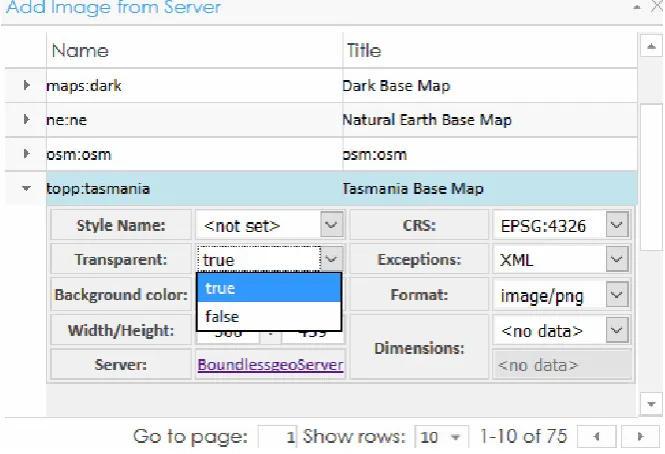
275
A paged table can contain inner tables in its rows and this way of representation is convenient
276
when dealing with layers and their properties (e.g. bounding box, EPSG etc.). In addition it is
277
possible to provide domain values for every attribute assisting further request manipulation to the
278
end-user, as shown in the figure below:
279
280
Figure 4: Setting WMS parameters through a paged table
281
3.3. End-user interface
282
3.3.1. User Interaction
283
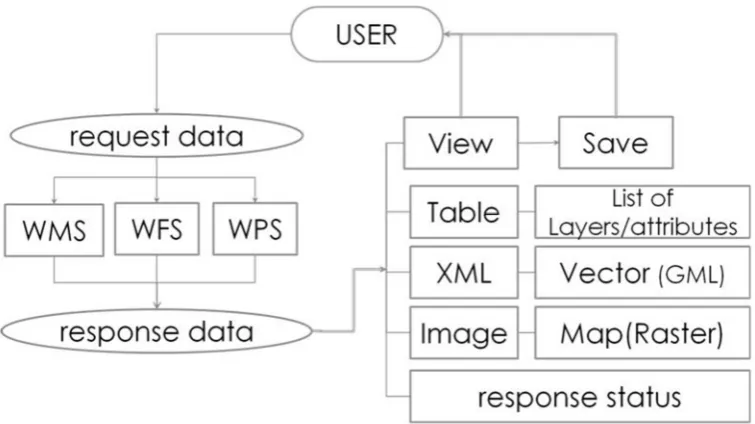
The end-user interface implements request and response interaction with the available OGC
284
Web services (e.g. WMS, WFS, WPS). As already discussed the results of the above interaction may
285
287
Figure 5: User interaction and data type results (Papadopoulos & Evangelidis, 2016)
288
Specifically, user interaction results involve:
289
• Tabular data with a) the available raster or vector layers formed by WMS/WFS GetCapabilities
290
XML-based files and b) attributes of selected layers formed by WFS/GetFeatures XML-based
291
files
292
• Vector data coded in GML, the prevailing XML-based format
293
• Raster data in image file formats representing maps
294
295
3.3.2. Major Operational Areas
296
A prototype service-based end-user interface has been proposed (Papadopoulos & Evangelidis,
297
2016) and is adopted in the present work as the base for the presented implementation. In the
298
presented work this is extended to include geospatial data processing functions. Aim of the final
299
prototype design is to achieve a typical desktop GIS-based 'look and feel' interface, exclusively
300
exploiting geospatial Web services for data retrieval and processing purposes and this is performed
301
with a completely transparent to the simple user way. The following major operational areas for
302
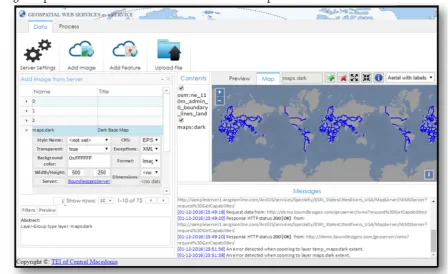
both advanced and simple operations are identified:
303
• Data Management Area
304
At this area it is possible to declare the geospatial service providers. As soon as a server is
305
declared WMS-WFS/GetCapabilities requests are submitted to it, resulting to the development of
306
lists with the available raster and vector data. By selecting a layer from the above lists, either raster
307
or vector it is possible to view and select its parameters, preparing that way the exact WMS/GetMap
308
or WFS/GetFeatures respectively, request for submission. Alternatively, the user is capable of
309
uploading layers to be included in the project.
310
Since, the whole environment is a service-based environment the presented layers are
311
dynamically requested by the servers offering them, whenever the user checks for their visibility. To
312
permanently obtain desired layers, at this area it is possible to clarify which of the requested layers
313
will be cloned to form the GIS project on a local environment.
314
• Content Area
315
As already stated, layers selected in the Data Management Area are requested on a real time
316
basis directly from the service provider. Whenever the end-user performs additional requests
317
according to a desired parameterization, the server responds accordingly and the result is
318
temporarily rendered in the front-end. This area contains the spatial content that has been
319
permanently selected to form the GIS project and is therefore stored locally.
320
This area is charged with visualizing the desired spatial content. Visualization concerns either
322
the results of the service requests individually, such as for example an image returned or an XML file
323
itself, or various themes overlaid to form a GIS project.
324
• Messages Area
325
This area provides feedback to the end-user by presenting messages returned by server
326
responses.
327
• Data Processing Area
328
This area provides the necessary capabilities for declaring a geoprocessing server compatible
329
with OGC/WPS specification and parameterizing a data processing request. The WPS
330
implementation of this area is dynamically formed according to the type and the complexity of the
331
requested geoprocessing job.
332
Figure 6 provides a visualization of the end-user interface operational areas:
333
334
Figure 6: A Web interface implementing geospatial Web services
335
4. Demo Presentation
336
A demonstration case containing routine geospatial activities similar to those performed in a
337
desktop GIS environment is presented, implementing the following scenario:
338
'Create a simple layout of the world overlaid by the country boundaries and export a vector layer of the
339
boundaries in a shapefile format'
340
The scenario is further analyzed to the following geospatial activities:
341
• Import a world map
342
• Import country boundaries
343
• Export the features of the buffer in shapefile format
344
345
Each of the above mentioned geo-activities will be performed by employing respective
346
geospatial services by different servers. In detail:
347
(1) The ArcGIS online sample server (http://sampleserver1.arcgisonline.com/) will be
348
employed to provide the world map through the appropriate WMS service
349
(2) The Boundless demo Geoserver (http://demo.boundlessgeo.com/geoserver/web/) will offer
350
(3) A custom Node.js server was developed for the purposes of the present work and was
352
registered in 52o North WPS HTML interface developed with wps-js Javascript library
353
(https://github.com/52North/wps-js), with the aim to transform the GML file in to shapefile format,
354
by exploiting GDAL/OGR libraries as described in paragraph 3.2.2
355
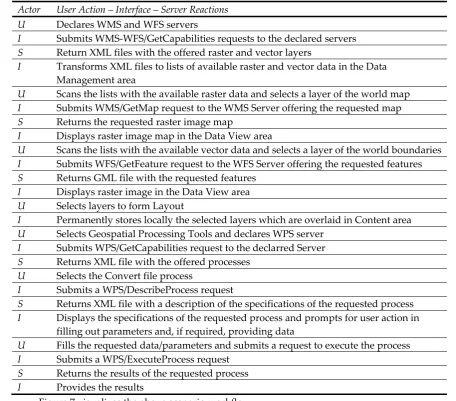
Below are presented the end-user (U) actions and the subsequent server (S) reactions, both
356
handled by the JS interface (I).
357
Table 2: User actions, interface handling and server reactions
358
Actor User Action – Interface – Server Reactions U Declares WMS and WFS servers
I Submits WMS-WFS/GetCapabilities requests to the declared servers S Return XML files with the offered raster and vector layers
I Transforms XML files to lists of available raster and vector data in the Data Management area
U Scans the lists with the available raster data and selects a layer of the world map I Submits WMS/GetMap request to the WMS Server offering the requested map S Returns the requested raster image map
I Displays raster image map in the Data View area
U Scans the lists with the available vector data and selects a layer of the world boundaries I Submits WFS/GetFeature request to the WFS Server offering the requested features S Returns GML file with the requested features
I Displays raster image in the Data View area U Selects layers to form Layout
I Permanently stores locally the selected layers which are overlaid in Content area U Selects Geospatial Processing Tools and declares WPS server
I Submits WPS/GetCapabilities request to the declarred Server S Returns XML file with the offered processes
U Selects the Convert file process
I Submits a WPS/DescribeProcess request
S Returns XML file with a description of the specifications of the requested process I Displays the specifications of the requested process and prompts for user action in
filling out parameters and, if required, providing data
U Fills the requested data/parameters and submits a request to execute the process I Submits a WPS/ExecuteProcess request
S Returns the results of the requested process I Provides the results
360
Figure 7: Scenario workflow diagram
361
362
5. Conclusions
364
The presented work deals with invocable geospatial Web services and explores the potentiality
365
of re-serving them under a fully transparent Web-based cross-platform interface in order to satisfy
366
routine GIS functionalities. As such, the presented solution, is based on Javascript, relies on open
367
standards, is independent of additional software components, add-ins or APIs, and all is needed is
368
an updated Web browser. Even in the case of utilizing a server to implement a custom WPS service
369
to satisfy a specific geo-process, the presented solution remains in Javascript. This way both server
370
and client components are light enough to reside on the client side, making the whole venture highly
371
efficient and unique.
372
An interesting topic worth discussing in the present work is the development of the geospatial
373
processing service provided by Node.js server which is invoked through 52oNorth wps-js interface.
374
This task is subdivided into two discrete subtasks:
375
• the creation of the appropriate XML content modeling the description and execution of an OGC
376
WPS compatible process and,
377
• the employment of a GIS engine performing this geospatial process.
378
The first subtask is a matter of editing the exact parameters of the WPS requests inside the
379
appropriate XML tags. The second subtask requires the existence of GIS engines inside the WPS
380
server and thereafter the establishment of an interaction between the engines and the server. In this
381
respect Node.js was proved to be a convenient solution due to the direct communication with
382
GDAL/OGR libraries command line. Extending this to other GIS APIs is expected to be a quite
383
efficient and easy to implement task due to the capability of calling functionalities in most free and
384
open source projects like those supported by open source geospatial foundation, OSGeo (e.g.
385
GRASS GIS and QGIS). Even more, in the case of ArcGIS the Javascript API may also be employed
386
to facilitate the Node.js communication with its GIS engine. Therefore, building WPS geospatial
387
processes through Node.js may be considered as a great opportunity for further developments and
388
extensions of the presented work.
389
Three of the most representative projects of the geospatial community, dealing exclusively with
390
WPS standard are briefly cited: a) 52oNorth initiative serves a significant number of WPS
391
implementations, and offers wps-js, a Javascript library that makes possible to register WPS
392
implementations and provide Web access for requesting and executing geospatial processes, b)
393
ZOO-Project , an OSGeo incubating project, offers an integrated WPS suite covering all the way from
394
server to client including a server solution with a huge collection of implemented WPS services, a
395
Javascript API for services creation and a Javascript library for Web interaction and c) PyWPS , also
396
an OSGeo incubating project is a server side Python solution assisting the development and
397
exposure of custom geospatial calculations. The presented work is in its very early stage, however it
398
may potentially be enriched with stuff provided by all of the above mentioned. For the time being it
399
adopts wps-js, registers in it a Node.js server and implements a demo WPS service. Thus, it provides
400
a client interface together with a WPS server, that both of them employ Javascript libraries. In
401
addition, the presented work does not focus only on WPS and extends its vision to satisfy a complete
402
geospatial environment offering routine GIS functions.
403
404
Acknowledgments: The authors wish to acknowledge financial support provided by the Research Committee
405
of the Technological Educational Institute of Central Macedonia under grant SAT/GS/170915-169/14.
406
407
408
409
410
References
412
1. Dragicevic, S. (2004). The potential of Web-based GIS. Journal of Geographical Systems, 6(2), 79-81.
413
2. Chow, T. E. (2008). The potential of maps APIs for internet GIS applications. Transactions in GIS,12(2),
414
179-191.
415
3. Oxera, 2013. What is the economic impact of Geoservices? Prepared for Google. Available from:
416
http://www.oxera.com/Latest-Thinking/Publications/Reports/2013/What-is-the-economic-impact-of-Geo-417
services.aspx [Accessed 5 December 2016]
418
4. McKee, L., Reed, C., & Ramage, S. (2011). OGC Standards and Cloud Computing.OGC White Paper.
419
5. Yang, C., Goodchild, M., Huang, Q., Nebert, D., Raskin, R., Xu, Y., Bambacus, M., & Fay, D. (2011). Spatial
420
cloud computing: how can the geospatial sciences use and help shape cloud computing?.International
421
Journal of Digital Earth,4(4), 305-329.
422
6. Evangelidis, K., Ntouros, K., Makridis, S., & Papatheodorou, C. (2014). Geospatial services in the Cloud.
423
Computers & Geosciences, 63, 116-122.
424
7. Aktas, M. S., Aydin, G., Fox, G. C., Gadgil, H., Pierce, M., & Sayar, A. (2005, June). Information Services for
425
Grid/Web Service Oriented Architecture (SOA) Based Geospatial Applications. In Proceedings of 1st
426
International Conference Beijing China November (pp. 27-29).
427
8. Buyya, R., Yeo, C. S., Venugopal, S., Broberg, J., & Brandic, I. (2009). Cloud computing and emerging IT
428
platforms: Vision, hype, and reality for delivering computing as the 5th utility. Future Generation computer
429
systems,25(6), 599-616.
430
9. de la Beaujardiere, J., 2004. Web map service (WMS). Version 1.3. OGC 04-024. Open Geospatial
431
Consortium, Inc., 85pp.
432
10. Evans, J., 2003. Web coverage service (WCS). Version 1.0.0. OGC 03-065r6. Open Geospatial Consortium,
433
Inc., 67pp.
434
11. Vretanos, P., 2005. Web feature service (WFS) implementation specification. Version 1.1.0. OGC 04-094.
435
Open Geospatial Consortium, Inc., 131pp.
436
12. Martell, R., 2004. OGC™ catalogue services—ebRIM(ISO/TS 15000-3) profile of CSW. Version 0.9.1. OGC
437
04-017rl. Open Geospatial Consortium, Inc., 87pp.
438
13. WPS Concepts. Available online: http://geoprocessing.info/wpsdoc/Concepts#chaining (accessed on 26th
439
January 2018)
440
14. Percivall, G. (2010). The application of open standards to enhance the interoperability of geoscience
441
information. International Journal of Digital Earth, 3(S1), 14-30.
442
15. Papadopoulos, T., & Evangelidis, K. (2016). An HTML tool for exploiting geospatial web services. In
443
Geospatial World Forum, 23-26 May 2016, Rotterdam. Geospatial World Forum.
444
16. European Commission, 2014. Commission Regulation (EU) No 1312/2014 of 10 December 2014 amending
445
Regulation (EU) No 1089/2010 implementing Directive 2007/2/EC of the European Parliament and of the
446
Council as regards interoperability of spatial data services Available from:
447
http://data.europa.eu/eli/reg/2014/1312/oj [Accessed 5 December 2016]
448
17. European Commission, 2007. European Commission Directive 2007/2/EC of the European Parliament and
449
of the Council of 14 March 2007 establishing an Infrastructure for Spatial Information in the European
450
Community (INSPIRE). Off. J. Eur. Union, 50 (2007), pp. 1–14
451
18. Haklay, M., & Weber, P. (2008). Openstreetmap: User-generated street maps. Pervasive Computing, IEEE,
452
7(4), 12-18
453
19. Adding WMS services. Available online:
454
http://desktop.arcgis.com/en/arcmap/10.3/map/web-maps-and-services/adding-wms-services.htm
455
(accessed on 26th January 2018)
456
20. QGIS Python Plugins Repository. Available online: https://plugins.qgis.org/plugins/wfsclient/ (accessed
457
on 26th January 2018)
458
21. Granell, C., Díaz, L., & Gould, M. (2010). Service-oriented applications for environmental models:
459
Reusable geospatial services. Environmental Modelling & Software, 25(2), 182-198.
460
22. Stollberg, B. and Zipf, A., 2007, OGC Web Processing Service Interface for Web Service Orchestration –
461
Aggregating Geo-Processing Services in a Bomb Threat Scenario, pp. 239–251 (Cardiff, UK: Springer).
462
23. Lapierre, A., & Cote, P. (2007, October). Using Open Web Services for urban data management: A testbed
463
resulting from an OGC initiative for offering standard CAD/GIS/BIM services. In Urban and Regional
464
24. Meng, X., Xie, Y., & Bian, F. (2010). Distributed Geospatial Analysis through Web Processing Service: A
466
Case Study of Earthquake Disaster Assessment.Journal of Software, 5(6), 671-679.
467
25. Evangelidis, K., Ntouros, K., & Makridis, S. (2012). Geoprocessing Services over the Web. In Proceedings
468
of the 32nd EARSeL Symposium, Mykonos, Greece (pp. 344-349).
469
26. Tzotsos, A., Alexakis, M., Athanasiou, S., & Kouvaras, Y. Towards Open Big Geospatial Data for geodata.
470
gov. gr.(2015).Free and Open Source Software for Geospatial (FOSS4G) (pp. 247-258).
471
27. Sayar, A., Pierce, M., & Fox, G. (2005, November). Developing GIS visualization web services for
472
geophysical applications. In ISPRS 2005 spatial data mining workshop, Ankara, Turkey.
473
28. Sayar, A., Pierce, M., & Fox, G. (2006, February). Integrating AJAX approach into GIS visualization web
474
services. In Telecommunications, 2006. AICT-ICIW'06. International Conference on Internet and Web
475
Applications and Services/Advanced International Conference on (pp. 169-169). IEEE.
476
29. ModelBuilder tutorial. Available online:
477
http://pro.arcgis.com/en/pro-app/help/analysis/geoprocessing/modelbuilder/modelbuilder-tutorial.htm
478
(accessed on 26th January 2018)
479
30. Vockner, B., & Mittlböck, M. (2014). Geo-enrichment and semantic enhancement of metadata sets to
480
augment discovery in geoportals. ISPRS International Journal of Geo-Information, 3(1), 345-367.
481
31. Utility Market Embraces ArcFM GIS Solution. Available online:
482
http://www.esri.com/news/arcnews/spring99articles/05_utilitymkt.html (accessed on 26th January 2018)
483
32. Automating Complex Workflows using Processing Modeler. Available online:
484
http://www.qgistutorials.com/en/docs/processing_graphical_modeler.html (accessed on 26th January
485
2018)
486
33. Sun, J., Liu, Y., Dong, J. S., Pu, G., & Tan, T. H. (2010, November). Model-based methods for linking web
487
service choreography and orchestration. In2010 Asia Pacific Software Engineering Conference(pp. 166-175).
488
IEEE.
489
34. GEO User Feedback System. Available online: http://geoviqua.stcorp.nl/home.html (accessed on 26th
490
January 2018)
491