ISSN 1750-5968
Volume 1 Issue 1
January 2007
Article from practice
Patalong, S. and Llewellyn, O. (2007) “Show
them how to do it: using Macromedia Captivate
to deliver remote demonstrations.” Journal of information literacy, 1(1), 31-34.
Copyright for the article content resides with the authors, and copyright for the publication
layout resides with the Chartered Institute of Library and Information Professionals,
Information Literacy Group. These Copyright holders have agreed that this article should be
available on Open Access.
“By 'open access' to this literature, we mean its free availability on the public internet, permitting any users to read, download, copy, distribute, print, search, or link to the full texts of these articles, crawl them for indexing, pass them as data to software, or use them for any other lawful purpose, without financial, legal, or technical barriers other than those inseparable from gaining access to the internet itself. The only constraint on reproduction and distribution, and the only role for copyright in this domain, should be to give authors control over the integrity of their work and the right to be properly acknowledged and cited.”
Show them how to do it: using Macromedia Captivate to
deliver remote demonstrations
Sally Patalong, Teaching Fellow, Coventry University, UK. Email: [email protected]
(author to whom correspondence should be addressed)
Olivia Llewellyn, Subject Librarian for Business, Coventry University, UK. Email:
[email protected]
Abstract
This paper aims to explore the effectiveness of using Macromedia Captivate to deliver remote information literacy instruction to large groups of students at Coventry University via the virtual learning environment, WebCT. We present the results of a case study based on the use of Captivate tutorials by undergraduate business studies students. Created by library staff for a specific business module, the usage and effectiveness of the tutorials is analysed. We discuss why the take up of the tutorials was not as great as expected and assess the overall usefulness of remote, online tutorials within the information literacy toolkit. The advantages and disadvantages of using Captivate and similar products are discussed. The paper has practical value for library and information professionals seeking to use online tutorials to deliver information literacy instruction. The paper highlights the possible pitfalls of using such a method within a virtual learning environment, such as WebCT.
Keywords
Information literacy; Higher Education; Undergraduate students; Teachers: librarians; Business faculty; Online learning; Blended learning; Teaching methods; Evaluation.
1. Introduction
1.1 Scope
It was in 2000 that library staff at Coventry University first started to look for a solution to the problem of delivering information skills sessions to large numbers of students and began to deliver tutorials through a virtual learning environment, WebCT (Patalong, 2003). These tutorials were always intended to supplement face-to-face teaching and not to replace it. In 2005 library staff were once again faced with a large number of students who needed help, but who, this time, were unlikely to be able to come together for any formal instruction to take place. This article describes the situation with which the staff were faced; the solution to the problem that they chose to take and the reasons for making that choice. Putting the solution into practice, however, proved to be a failure in this instance. The reasons for this are discussed, partly in order that others may avoid making the same mistakes themselves, but also to emphasise that lessons have been learned and that it is important to continue to experiment with new approaches to information literacy, even if they are not always successful at first.
1.2 Background to the problem
It was anticipated that during the academic year 2005-6, up to five hundred students would be enrolling on a first year module, Personal Development for Business, in the Faculty of Business, Environment and Society. The intention was that the students would be asked to thoroughly research all areas of a business start-up, resulting in a detailed business plan that would be submitted to their tutor for moderation. The piece of work would build in stages over the first term. This meant that the students would need to use a number of library resources to help them identify a product or service, establish who their competitors might be, look at potential locations for the business, draw up a business plan and advertise for appropriate staff.
tended to channel their students through the ATHENS website, rather than through the Metalib product which has been branded as The Lanchester Library Portal. Subsequently, however, the tutor changed her mind about how the students should be divided up and timetabled for teaching. Her thinking was that the group which attended the Monday lecture slot would always be nearly a week ahead of the Friday group. Instead, she decided to divide the students up into twelve tutorial groups, meeting two or three times a week. Although, in theory, smaller groups might have allowed training to be delivered in the library, adding an important hands-on element, in practice the decision created a logistical nightmare for library staff in terms of room bookings; repeated sessions and timing. There was concern that those students trained first would have an advantage over those who had to wait a few weeks for their training and that the ethical issue of some students being thus disadvantaged could actually be magnified in this scenario. It became evident that library staff needed to devise a different sort of training. Something more engaging than a demonstration to a large group; something that focused on the online resources that the students might be using from home and something that demonstrated the library staff’s willingness to be flexible in their approach.
2. Proposed solution
Coventry University has a network of Teaching Fellows, one of whom is based in the Library. Teaching Fellows are appointed on three year contracts and are normally 0.5 secondments. The Library Teaching Fellow (LTF) is the most recent addition to the network, the post being created by the Pro Vice Chancellor in charge of the team, who felt that it was necessary in order to ensure co-ordinated support for the Learning and Teaching Strategy. The LTF, amongst other things, explores different ways of producing and delivering teaching material to support Subject Librarians’ information skills teaching as well as attempting to keep colleagues abreast of current good practice.
The LTF suggested that although it might not be possible to give the students face-to-face hands-on training, a software package like Macromedia Captivate might be ideal for delivering good quality database demonstrations to a large number of students, in that it would still give librarians a presence, in the form of a voice. The original idea was also to record a “talking head” video introduction, to give the students a face to put with the voice. This would have added a personal touch to the training which it was felt would be more engaging for the students; but due to time constraints this was not possible. Therefore, in addition to the Captivate tutorials produced, one of the Business Subject Librarians was available for help and consultation on a one-to-one basis, in a training room in the library every Friday afternoon for four weeks. These sessions were announced in the students’ module web in WebCT.
Macromedia Captivate is extremely simple to use. Whatever happens on a computer screen, such as finding and opening up databases, entering keywords and searching for articles, is recorded as a series of slides that build up to form a short film. A commentary can be recorded simultaneously to explain the actions taking place on screen. The slides and their commentary can then be edited. It is possible to add text boxes or arrows, to highlight particular words or areas of the screen and to rerecord the commentary if there are any mistakes. The audio files can also be edited to remove unnecessary pauses or deep intakes of breath before a phrase.
It became evident, during the process of creating the tutorials, that it is very important to write a script first and to practice a tutorial before starting to record. The process of writing the tutorial is useful in itself, as it focuses attention on the most efficient way of demonstrating the database. Knowing that no-one will be there to help the student when they view the tutorial, or when they actually use the database, means that everything must be kept clear, concise and straightforward. The intention was to break everything down into “bite-sized chunks”, each of which could stand alone but which also flowed logically from the easier topics of accessing the catalogue, to the more complex ones of searching the business databases. This idea of building up small elements of instruction in a sequential manner is one that was highlighted in the Birmingham University Integrated Library Development and Electronic Resource (BUILDER) final report (2001) and was an approach adopted at Edinburgh University (Bains, 2003).
As the students were going to be asked to choose a product or service on which to concentrate, library staff decided to do the same and based all the tutorials on the idea of starting a coffee shop in Coventry. Twelve short tutorials were recorded in all, on topics such as linking to the library catalogue; searching the catalogue for books, videos and journal titles; linking to and using the library portal; searching databases such as
of competitors. All of the Captivate tutorials were then made available via the students’ module web in WebCT. At the tutor’s request they were placed in the Resources section of the module.
3. Discussion
3.1 Student response
Initially, verbal feedback from the tutor was good. The students appeared to like the tutorials and were using them. However it quickly became apparent that nobody wanted to take advantage of the Friday afternoon help sessions and the Subject Librarian concerned eventually had to resort to putting a notice up directing students to her office, because this was not making best use of her time. It also became apparent that the tutor was being optimistic about the students’ use of the tutorials when the LTF started to examine the available statistics. The tutor suggested that perhaps she had left it too late in the term to introduce the library material, but an investigation of the module web and use of the tracking facilities suggested other, more obvious reasons why students were not engaging either with the library staff, or the material which they had produced. Table 1 shows how little use was made of the tutorials by the five hundred and thirty nine students registered on the module.
Table 1: Number of times tutorials were accessed
Tutorial Total hits
Linking to the library catalogue from the University homepage
62
Linking to the library catalogue from WebCT 39 Using the catalogue to find a book on a reading list 37 Athens usernames and passwords 37 Accessing Business Source Premier 32 Finding similar business in the area 28 Using Mintel to find market research reports 26 Logging on to the Library Portal 23
3.2 Reasons for lack of uptake
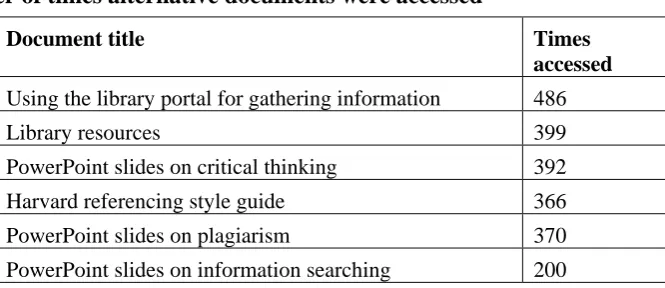
Whilst tracking the use of the library tutorials it was discovered that the students were making much greater use of material that the library staff knew nothing about. Table 2 shows the titles of the documents they were using and the number of times that they were accessed:
Table 2: Number of times alternative documents were accessed
Document title Times
accessed
Using the library portal for gathering information 486
Library resources 399
PowerPoint slides on critical thinking 392 Harvard referencing style guide 366 PowerPoint slides on plagiarism 370 PowerPoint slides on information searching 200
3.3 Lessons learned
All of this material had been listed in the Contents section of the module and so was immediately obvious to the students. The library tutorials were in the Resources section, hidden behind a different icon. This in itself suggests that perhaps the academic/librarian division still exists in some minds. We are not there alongside our academic colleagues, working collaboratively, but take a background role providing additional support. The document which made mention of the library tutorials, appeared in the contents listing for week two of the module. The piece of work that the students had to complete was covered in weeks seven to ten, with no reference back to topics already covered. The library’s best efforts had been inadvertently sabotaged, probably through the best of motives on the tutor’s part and also because it did not occur to the Teaching Fellow, who had access to the module, to check for any conflicting content that might be present. Presumably, it was only the few determined students, therefore, who found their way to the help provided. Although there may not have been a widespread uptake of the tutorials it is still felt that this project was a success, because it provided much on which to reflect and so much has been learnt from it. There was a temptation to question whether the availability of ever more exciting software packages is leading library staff to try to be too clever. However, staff at Texas A&M University Libraries used Camtasia to produce a very similar suite of tutorials and reported that:
“Both colleagues and students were generally favorable and enthusiastic about this tool. Librarians found it to be valuable as an alternative instructional tool; students found it to be valuable for real-time search assistance, teaching review or technical support.” (Xiao et al., 2004: 373).
4. Conclusion
There are advantages and disadvantages to the use of technologies like Captivate or Camtasia. Database training can be delivered to a large number of students at the point of need, which helps to emphasise the importance of information literacy training. Short, concise tutorials may be viewed as many times as the student wants and the use of the Captivate may help to raise the profile of the library as being technologically aware. However, it does mean that there is no face-to-face contact with the students while they are watching the tutorials; there is no opportunity for hands on practice; watching a short film does not suit everyone’s learning style; there is no element of compulsion to watch them and on a practical note, tutorials with sound can require the use of headphones.
The conclusion is that whilst using narrated tutorials may not be the perfect answer, they have their place as one of the answers in a toolkit of different ways of delivering information literacy instruction. The intention at Coventry is to try to bring together a range of options, such as the Informs software developed at the University of Huddersfield which makes use of two frames to allow users to conduct “live” database searches whilst following written instructions at the side; the well written, well illustrated handout that can be adapted to an online format; narrated tutorials; database simulations; animations; interactive activities and possibly library blogs. Subject Librarians will then be able to choose the options that suit their teaching styles, whilst also accommodating a variety of learning styles. However these are presented, the lessons learnt from this project must be kept in mind. Online material must be really obvious, easy to find and easily accessible. If library staff are invited to contribute content to a module web, they must explore all the other material that is being presented to the students in case there is any conflict of ideas or concepts. And finally, as ever, timing is all.
References
Bains, S. & Jones, R. (2003). “Using Macromedia Flash to create online information skills materials at Edinburgh University Library.” Program: electronic library and information systems, 37(4), 242-250. BUILDER. (2001). BUILDER Final report. Birmingham: Birmingham University Library.
http://builder.bham.ac.uk/finalreport/html/contents.asp (Retrieved 24 January 2007)
Patalong, S. (2003). “Using the virtual learning environment WebCT to enhance information skills teaching at Coventry University.” Library review, 52(3), 103-110.