ISSN: 2231-5381
http://www.ijettjournal.org
Page 671A Remotely Secure E-Voting and Social
Governance System Using Android Platform
Pranay R. Pashine1, Dhiraj P. Ninave2, Mahendra R. Kelapure3, Sushil L. Raut4, Rahul S. Rangari5, Kamal O. Hajari6
1, 2, 3, 4, 5, 6
Department of Computer Technology, Yeshwantrao Chavan College of Engineering, Nagpur, Maharashtra, India.
Abstract— The present system of casting votes has resulted in a
number of problems such as low percentage of voting, late results, discomfort to old aged and handicapped people etc. Voting through EVM has not been able to address these problems completely. To overcome these lacunas an attempt has been made to introduce an android application specifically designed for electronic voting that will enable peoples to vote securely from anywhere without moving to a voting machine by using their own Mobile phone or any device running on Android Operating System (From Android 2.2–2.2.3 To Android’s Latest Version). This will provide a new degree of user comfort, security and greater mobility. This will also enable peoples not only to cast their votes securely but also to interact with the electoral candidates throughout the pre-Election as well as post-Election process. A direct interaction between the Election Commission, Candidates & Voters can thus result in making a reliable, Transparent and effectively people oriented Government.
Keywords— Android, Gesture Recognition, Secure Remote Voting, Social Governance, Voice Commands.
I. INTRODUCTION
This paper is going to present a new design of electronic voting application for the Android platform with an aim to provide comfort and security to the voters avoiding long-drawn process which consumes a significant amount of money, time and energy of all the stakeholders of the nation. In the designing of this application the care is taken to provide remote voting, voter secrecy, accuracy, user-friendly interface, reliability to the whole process of Election. The application is also going to implement modern technological improvisations such as gesture recognition, voice commands with an additional feature of regional language support especially for illiterate, handicapped and old age people. This application facilitates specifically those voters who are not present physically at their polling station on the date of voting. The paper will explain the architecture of the system including admin panel, candidate panel and voter panel with their diagrams.
II. PROBLEMS WITH THE CURRENT ELECTORAL
PROCESS
The current electoral process, though with the promises of transparency and reliability of the system, is not without its defects. Following are the observations which call for modification in the way this whole process carries itself:
Low percentage of voting
People’s tendency to bunk voting and celebrate the day of voting even if the government declares holiday.
Long distance between polling booth and the voter.
Voters being out of station in emergency.
III. LITERATURE SURVEY
Kevin Daimi et al. [1] proposed a solution in his paper to tackle the problem of representing stakeholder’s needs for an online voting system. These helped us to ensure a robust, accurate, secure and quality-based design and implementation.
Kirti Autade et al. [2] proposed a novel method that focused on the analysis of development of E-voting application on an android platform. This paper provides the specification and requirements for E-Voting using an Android platform.
Rubin A.D et al. [3] proposed a method that focused on Security using Cryptographic algorithm based on android platform.
Redovan Murin[4] in his thesis described a design, implementation and live testing of the GUI for an Android application.
ISSN: 2231-5381
http://www.ijettjournal.org
Page 672 System with JNI Interface for providingconvenience for the user.
Michael Spreitzenbarth et al. [6] proposed an analysis based Smartphone Mobile Malware for forensic Analysis.
IV. SALIENT FEATURES OF THE APPLICATION
A. Systematized approach of working
The working of the Election will be highly systematized. The data will be stored properly in database server, which will help in faster retrieval as well as storage of information.
B. Accuracy
The level of accuracy in the proposed system will be high as there is a provision of the automated counters for each user. All operations would be done correctly and this ensures that whatever information is coming from the server is accurate.
C. Reliability
The reliability of the proposed system will be high due to the above stated reasons. The reason for the increased reliability of the system is that now there would be proper storage of information.
D.No Redundancy
In the proposed system utmost care would be taken that no information is repeated anywhere, in storage or otherwise. This would ensure economic use of storage space and consistency in the data stored. A voter with the same ID would not be able to cast a vote more than once.
E. Remote Voting
This feature will enable voters to vote securely from anywhere without moving to a voting machine by using their Mobile phone or any device running on Android Operating System.
F. Voter Secrecy
In the proposed system no one would know whom the voter voted. The voter can have his own authentication Id and password. All the data
exchange from android device to web server will be in encrypted form resulting in the greater security.
G.User Friendly Interface
Interface of the application will be easy to use and will save a naive user from complexity of the traditional voting system so that he can get interacted with the system with an ease. Also the UI will be based on the old voting system like EVM (Electronic Voting Machine) so that the voters shouldn’t get confused between both the Old & New system.
H.Voice Commands
This application will use Google Voice feature for recognition of user voice commands and perform voting task according to it, which will enable handicapped people to get involved in voting process without other’s help.
I. Gesture Recognition
Gesture recognition will enable users to communicate with the application easily and interact naturally with the use of touch. Using the concept of gesture recognition, it is possible to offer a friendlier interaction with the user. This will help blind people to get into interaction very easily.
V. SYSTEM ARCHITECTURE
The Fig.1 shows the system architecture of the Application which is partitioned into three panels on the basis of its users as follows:
Admin Panel: This panel will be specifically used
by members of election commission to administer all the electoral processes including registrations of candidates & voters; and monitor all other actions carried out by them.
Candidate Panel: This panel will be specifically
used by electoral candidates to interact with the election commission & voters which will help them to work efficiently not only before the election but also after the election if elected.
ISSN: 2231-5381
http://www.ijettjournal.org
Page 673 These are the main users, for whom the applicationis developed.
As shown in Fig.1 all these three panels will be connected with the database server via internet connection and they will be in communication with each other through the server only. A brief description of these three panels with all the working screen shots is as follows.
A. Admin Panel
This panel is designed for members of election commission to administerall the electoral processes including monitoring on each and every action of candidates & voters. To use this panel, the members of the Election Commission will have an android device with this application installed in it. The device will be connected to the database server using an internet connection from where the actual data will be accessed and stored.Each member will have his own unique user-id & password according to his authorization.
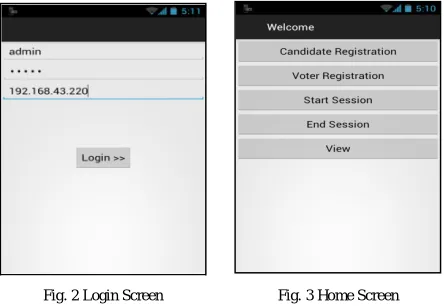
The Admin panel consists of a login screen (Fig.2). After entering login-id & password a new screen called Home screen (Fig.3) will appear which will consist of several buttons to perform the following task:
1)Registration of Candidate: As shown in Fig.4, the members of election commission can register the electoral Candidates by verifying their Identification and Educational Documents as well as their social involvement. As soon as the
candidate is registered, an auto-generated Login-Id
&Password will be sent to the candidate on his mobile number and on his E-mail id as well.
2)Registration of Voter: As shown in Fig.5, the members of Election Commission can register the Voters by verifying their
Identification. As soon as the voter is registered, an auto generated Login-Id & Password will be sent to him on his mobile number and on his E-mail id.
3) Start the Voting Session: On the day of voting the main administrator of election Commission has to start the voting session by clicking the ‘START SESSION’ button to enable the voters to cast their votes during the particular session only. (Refer Fig. 3)
4) End the Voting Session: At the end of the voting session the main administrator of Election Commission has to stop the session by clicking on the END SESSION button.(Refer Fig. 3)
5) View details: The administrator (members of Election Commission) can view details of both Candidate and Voter. The Election Commission has all the rights reserved with it to register, cancel or view the candidature at any time.
6)Generate Result: As soon as the session is stopped by the Admin Panel, a result is generated automatically. The result is displayed on the Voter Panel. The Voter can see the result of voting in his panel.
The Admin Panel is connected with the database server by any Internet connection so that the data can be stored and retrieved through that server. When the registration of candidate or voter is done the server generates a User-id & Password automatically and sends it to voters and candidates. When the session is started the server starts counting the votes which are casted through the voter panel and when the session is stopped the result is generated automatically.
Fig.1 System Architecture
Fig. 2 Login Screen Fig. 3 Home Screen
ISSN: 2231-5381
http://www.ijettjournal.org
Page 674B. Candidate Panel
The Candidate panel is designed for the electoral candidates (Party representatives) for establishing a communication with the voters. The candidate will have an android device with a candidate panel installed in it; as soon as the panel is started a login screen will appear (as shown in Fig. 6). He will have access with his Unique Username & Password which will be available with him after the registration from the admin Panel. After a successful login a home screen will appear (as shown in Fig. 7). This panel will have the facility for the candidate to display his agenda and his electoral commitments; and take feedback from the voters for the work he has done post-election.
From Home screen the Candidate can perform following tasks through panel:
1) Make commitments: The candidate have to Log-in in his panel for making commitments, the declared commitments can be directly seen by the Voters in their voter panel.
2) Convey message: The candidate from his panel can convey message if any to peoples i.e. slogans or any other.
3) Feedback from people: The candidate can take opinion from people for better performance in the form of Feedback of whether he has stood upto his promises, done work for the people. He can also invite suggestions and advices from the people.
C. Voter Panel
This panel is designed for voters. The voter will install the voter panel in his\her smart phone. The
voter can vote from his panel only when the voting
session is started from the Admin Panel. To vote, the voter has to Log-in with his User-Id & Password which was given to him after the registration. In case if the voter forgets the User-Id or Password he can request the election commission for resending it to him.
The working of the panel will be as follows:
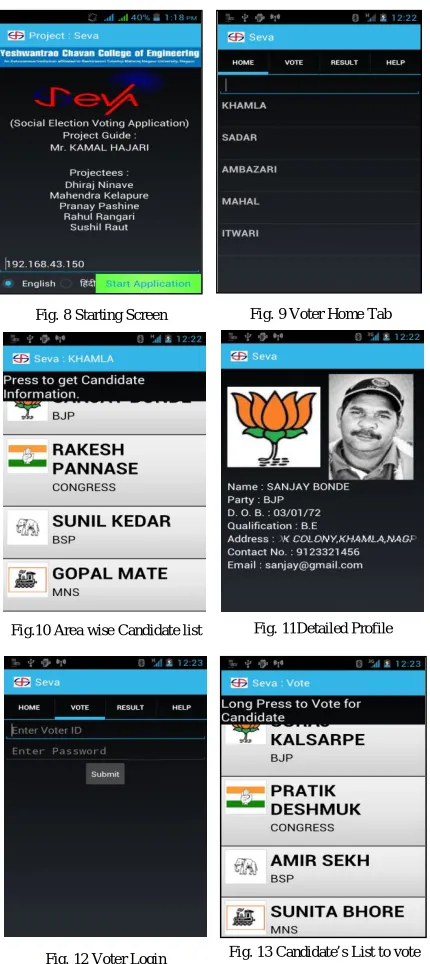
1) On Home screen the voter can view four tabs viz. Home, Vote, Result and Help (Fig. 9).
2) In Home tab a list of polling areas will be displayed out of which the voter will select his own area (Fig. 9)
3) After selecting the area, all the candidates therein will be listed out (Fig.10).
4) The detailed profile of the candidate can be seen by selecting his name (Fig. 11).
5) After viewing the profile, the voter can cast his vote through the next tab i. e. ‘Vote’ (Fig. 12).
6) The Vote tab will ask the voter to fill in his login id and password (Fig. 12).
7) A list of the candidates from voter’s particular area will be displayed (Fig. 13).
8) The voter will have to long press the candidate’s name to finally cast his valuable vote (Fig. 13).
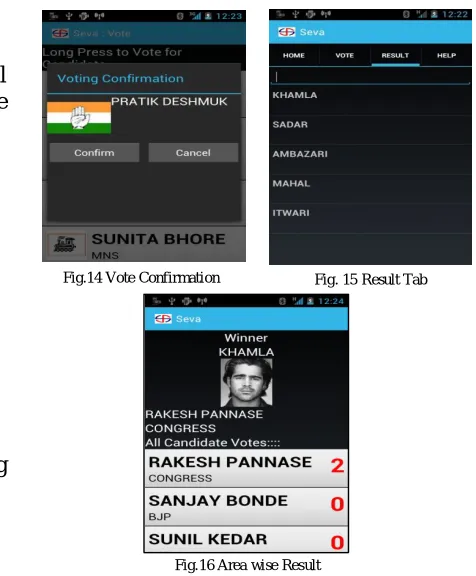
9) A confirmation question will be asked to confirm the selection (Fig. 14).
10) A beep will be heard on successful completion of the voting process.
In addition to the above, the voter panel facilitates following tasks:
1) See the Result: As soon as the Voting Session is stopped the voter is able to see the area wise result of the Voting. In result tab he will get a list of all the areas (Fig. 15), he has to
Fig. 6 Login Screen Fig.7 Home Screen
Fig.14 Vote Confirmation Fig. 15 Result Tab
ISSN: 2231-5381
http://www.ijettjournal.org
Page 6752) click on the particular area and he will see the result of that particular area (Fig.16).
3) Feedback: The voter can give feedback related to the working of Candidate to help him for improving his performance.
4) Statistical Report: The voter can see the Statistical report of the Party wise result in the form of Pie chart.
5) Regional Language Support: The application gives the voter a facility to use the interface in his regional language in addition to English.
6) Gesture Recognition: This is a special feature introduced in this application to provide assistance to blind people. The details regarding this support are given in an independent note in the following part.
VI. TECHNOLOGIES USED
A. Android
Android is a Linux-based operating system for mobile devices such as smartphones and tablet computers. It is developed by the Open Handset Alliance led by Google. As Linux is open source the Android is also became open source and a new project called the Android Open Source Project (AOSP) is tasked with the maintenance and development of Android. According to the project "The goal of the Android Open Source Project is to create a successful real-world product that improves the mobile experience for end users". AOSP also maintains the Android Compatibility Program, defining an "Android compatible" device "as one that can run any application written by third-party developers using the Android SDK and NDK", to prevent incompatible Android implementations.
B. JavaScript Object Notation
JavaScript Object Notation is a text-based open standard designed for human-readable data interchange which is derived from the JavaScript scripting language; it is a language for representing simple data structures and associative arrays, called objects.
Fig. 8 Starting Screen Fig. 9 Voter Home Tab
Fig. 11Detailed Profile Fig.10 Area wise Candidate list
Fig. 12 Voter Login Fig. 13 Candidate’s List to vote
ISSN: 2231-5381
http://www.ijettjournal.org
Page 676 JSON is language-independent, with parsersavailable for many languages. It is used primarily to transmit data between a server and web application, serving as an alternative to XML.
In December 2005, Yahoo! began offering some of its Web services in JSON. Google started offering JSON feeds for its GData web protocol in December 2006.
C. Gesture Recognition Support
A "touch gesture" occurs when a user places one or more fingers on the touch screen, and the application interprets that pattern of touch as a particular gesture.
There are correspondingly two phases to gesture detection:
A. Gathering data about touch events.
B. Interpreting the data to see if it meets the criteria for any of the gestures your app supports.
Android supports gestures. We use this support to help Visually Handicapped People for Voting in Elections, for this they just have to follow the Voice Commands given from their Device. To hear these commands more clearly the voter can use the Ear-phones and when asked for entering the User Name & Password with the Gestures (Fig. 16).
VII. FUTURE SCOPE
The application discussed above is a humble effort to bring more effectiveness to the whole system of Election. Yet there is a scope for modification and upgradation in the future. The entire database of citizens from AADHAR database can be integrated in this system increasing security in identification through iris and thumb scans.
VIII. CONCLUSION
To conclude the present paper has successfully introduced a new design of electronic voting application for the Android platform. It is hoped that this application will provide the desired comfort and security to the voters which will bypass the lengthy process which claims a significant amount of money, time and energy of all concerned. The paper has succinctly explained the designing and working of this application facilitating remote voting, greater privacy, precision,
easy interface, reliability in the whole process of Election. The implementation of modern technological improvisations such as gesture recognition, voice commands with an additional feature of regional language support especially for illiterate, handicapped and old age people makes it more easy-to-operate application.
References
[1] Kevin Daimi and et al., University of Detroit Mercy, Detroit, Michigan
48219, USA.
[2] Kirti Autade and et al., “E-voting on Android System”,
International Journal of Emerging Technology and Advanced Engineering ,Volume 2, Issue 2, PP 242-245, February 2012 .
[3] Rubin A. D. “E-voting Security ”,IEEE conference Security and Privacy,
Standford univarsity, USA,Vol. 2, no.1,pp.22-23,Jan 2004
[4] Radovan Murin, “Mobile Voting for Android” Czech Technical
University in Prague Faculty of Electrical Engineering, - GUI design, implementation and testing”, Thesis, May 6, 2011.
[5] Lingyan Bi, Weining Wang, HaobinZhong, Wenxuan Liu, "Design and Application of Remote Control System Using Mobile Phone with JNI
Interface", The 2008 International Conference of Embedded Software
and Systems Symposia (ICESS2008), ,pp.416-419.2008
[6] Michael Spreitzenbarth, “Tools and Processes for Forensic Analyses of
smartphones and Mobile Malware”, 6. GI FG SIDAR
Graduierten-Workshop ueberReaktiveSicherheit (SPRING), March 22th, 2011.
[7] Beginning Android 4 Application Development.
[8] Android.Application.Development.For.Dummies
[9] Android-a programmer’s guide
[10] Introduction-to-android-845
[11] Android Overview[Online] Available: