WINDOWS PRIVILEGE ESCALATION THROUGH NETWORK
BACKDOOR AND INFORMATION MINING USING USB
HACKTOOL
Hidayat Ul Hazazi Bin Ab Wahab, Jasni Mohamad Zain
Faculty of Computer and Mathematical Sciences, UiTM Shah Alam, Selangor, Malaysia [email protected], [email protected]
ABSTRACT
A privilege escalation in the Windows system can be defined as a method of gaining access to the kernel system and allowing the user to have an administrative access to the local admin account system on the computer. This paper describes the proof of concept attack scheme using Universal Serial Bus (USB) Hacktool. The attack scheme, the same interaction on the physical access to the computer system could be accomplished by the attacker using a little effort on social engineering and specialized USB Hacktool to take over the computer system in full where it will collect valuable information and escalate the administrative privilege to gain unauthorized admin access which further attack can be done like setting up an open port for backdoor access. The evaluation of this paper gives a significant value as for educational purpose for proof of concept security project. The implementation on this project could help the responsible team to take necessary action toward physical security access to their computer or workstation.
Keywords: Attack, Universal Serial Bus, Hacking, Data Mining, Backdoor, Metasploit. 1. Introduction
Computing device, have revolutionary changed from old component architecture to new up-to-date changes that more robust, and secured. However, people becoming savvy, often find the flaw to compromise the computer technology that have been build. Security of the computer system can be breached. Computer systems are prone to many vulnerabilities where a flaw in the system could open to such a serious threat. Security software, firewall and other type of different method have been enforced to safeguard the valuable data in computers. There is no one hundred percent vulnerable-proof system that claim to be most sophisticated computer system ever (David, 2005). Many are not aware that attacks can be accomplished using a commonly used interface: Universal Serial Bus (USB). A compromised physical access to the system can exploit the system into information mining and privilege escalation by allowing the attacker to perform an attack that need an administrative access by invoking the privilege function in the system (Badshah et al. 2016). This Proof-of-Concept (PoC) project is carried out to proof the feasibility of the attack on the computer system.
administrator privilege. It is structured to do the information mining to collect important information of the system and file inside the victim(s) computer automatically as the device is inserted and escalate the admin privileged through network by installing a backdoor. Vulnerability in computer security perspective is a weakness that allows an attacker to lower down system’s security. An attack is an action of exploiting holes inside the system that is has weakness or error in software, a bug in the source code or flaw within the design itself (Hentea, 2005).
A privilege escalation in the Windows system can be defined as a method of gaining access to the kernel system and allowing the user to have an administrative access to the local admin account system on the computer. It is a way to obtain the permission form unprivileged access to the higher level of administrator privilege. In Windows system that is being access into guest account have a restricted features and limitation to certain function. It is include to limit the activity of the guest user to change or going into the system’s programs. Whereby User Account Control (UAC) is a Windows program that has a concept of privilege escalation by means if the guest user is performing a task under administrative level of permission, he/she will prompt to elevate the admin privilege by entering a credential details as a confirmation before the system allowed him/her to proceed the task. UAC is a Windows system protection that provide a layer of security within the system and can be adjust to the certain level of risk elevation by administrator user account.
Almost all computer types for instance laptops, desktop, smartphones or tables take input from human via keyboards or keypads. This is why there is a specification with the presence of standard USB that simply plug into any USB port of computer, masquerade to be a Human Interface Device (HID) keyboard then it will be automatically detected and accepted by most modern operating systems like Windows because operating system will not suspect anything from keyboard input device. In the meantime, with it own scripting language, covert design, this type of USB flash drive does not need to an administrative access, PowerShell to be installed, pre-install Command Prompt (CMD), and with some scripts that require internet access to work. Information security is the main point of this project, where the tricky part is to structure the information mining to collect important information of the system and file inside the victim(s) computer automatically as the device is inserted and escalate the admin privileged through network by installing a backdoor and to simulate the attacked environment the project will use a specific USB device. Crucial system information and file will be mine based on parameter list that have been set. This paper demonstrates the process of collecting system information based on parameter list configured. It search and collect system information that hold valuable info that could be used for fingerprinting task. Underlying that process is to explore and construct the coding scheme to be work with the device in this PoC project. This device is a HID act as an input of a keyboard but the physical shape of the device like a normal USB flash drive.
2. Related Work
According to Lee & Chee Keong (2013), there are different ways to gain access to this valuable information for example, one of the way is through networking since many computers are networked. The attacker not only limited to networks area. They are also be able to have physical access to the computer or targeted machine by social engineering. Most of the devices have safety parts against physical access as such lock or pass code but there are interfaces that can be accessed and often not recognized as threats (Bang, J. et al., 2010). The common interface is USB which is ubiquitous. It is a pathway to attackers to gain root access from the inside to breach the computer. USB device are mostly used to interface with computer (Boukhobza, J., C. Timsit, 2005). Although it is certainly convenient for ease of use as plug-and-play, USB devices have been also responsible for multiple system breaches.
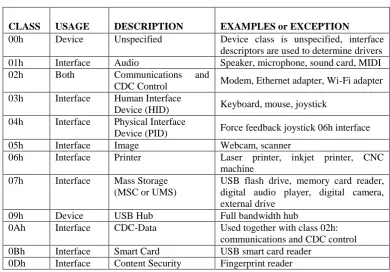
The device class code denotes the functionality of USB devices that included with software driver as shown at Table 1 USB Hardware Device Classes by Lee. C. C. K, 2013. The software will be launched for each connected device. The host able to support new type of devices from different vendors as it allows for device independence and adaptability. The defined device class characteristics are: HID Device Class, Communication Device Class, Mass Storage Device Class, Monitor Device Class, Audio Device Class.
Table 1 USB Hardware Device Classes
CLASS USAGE DESCRIPTION EXAMPLES or EXCEPTION
00h Device Unspecified Device class is unspecified, interface descriptors are used to determine drivers 01h Interface Audio Speaker, microphone, sound card, MIDI 02h Both Communications and
CDC Control Modem, Ethernet adapter, Wi-Fi adapter 03h Interface Human Interface
Device (HID) Keyboard, mouse, joystick 04h Interface Physical Interface
Device (PID) Force feedback joystick 06h interface 05h Interface Image Webcam, scanner
06h Interface Printer Laser printer, inkjet printer, CNC machine
07h Interface Mass Storage (MSC or UMS)
USB flash drive, memory card reader, digital audio player, digital camera, external drive
09h Device USB Hub Full bandwidth hub
0Ah Interface CDC-Data Used together with class 02h: communications and CDC control 0Bh Interface Smart Card USB smart card reader
0Dh Interface Content Security Fingerprint reader
2.1 Tools and Attack Comparison
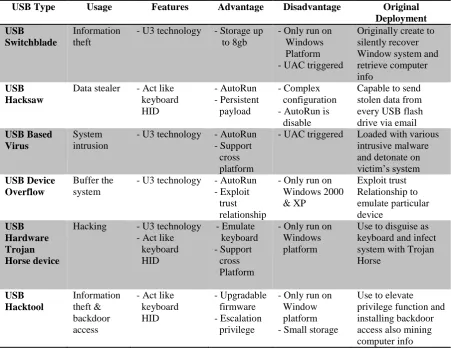
Table 2 Comparison of USB attacking type modules
USB Type Usage Features Advantage Disadvantage Original Deployment USB
Switchblade
Information theft
- U3 technology - Storage up to 8gb
- Only run on Windows Platform - UAC triggered
Originally create to silently recover Window system and retrieve computer info
USB Hacksaw
Data stealer - Act like keyboard HID - AutoRun - Persistent payload - Complex configuration - AutoRun is disable
Capable to send stolen data from every USB flash drive via email
USB Based Virus
System intrusion
- U3 technology - AutoRun - Support cross platform
- UAC triggered Loaded with various intrusive malware and detonate on victim’s system
USB Device Overflow
Buffer the system
- U3 technology - AutoRun - Exploit trust relationship
- Only run on Windows 2000 & XP Exploit trust Relationship to emulate particular device USB Hardware Trojan Horse device
Hacking - U3 technology - Act like keyboard HID - Emulate keyboard - Support cross Platform
- Only run on Windows platform
Use to disguise as keyboard and infect system with Trojan Horse USB Hacktool Information theft & backdoor access
- Act like keyboard HID - Upgradable firmware - Escalation privilege
- Only run on Window platform - Small storage
Use to elevate privilege function and installing backdoor access also mining computer info
However some people use this U3 stick into covert destructible tools. The U3 system is pre-loaded hardcoded on the drives and cannot be copy or add to normal USB flash drive. All of these USB type devices are needed for administrator privilege logon to run the application. Others USB that act like a keyboard have the ability to write the script from the system but first it must be programmed to write what as it should so this type of USB cannot be detect by antivirus or anti malware application because the USB itself do not load the malicious application from the USB but instead writing it on the system and save as a VBS script.
2.2 UAC Windows Privilege
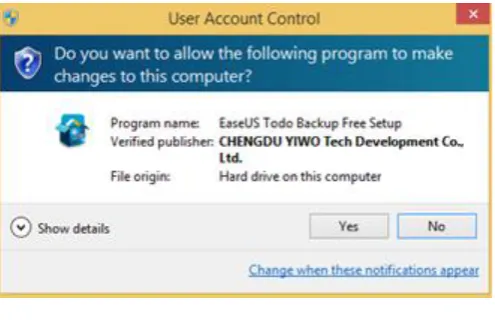
Figure 1 UAC alert box (Source: Ciprian Adrian Rusen., 2017)
In Figure 1, Windows OS will prompt out UAC when some application is executed, the prompt box will look like in the figure above if that Windows account is log in as administrator account which will tell the user to either continue by clicking “Yes” button or cancel the running process by clicking on “No” button.
Figure 2 UAC verification (Source: Ciprian Adrian Rusen., 2017)
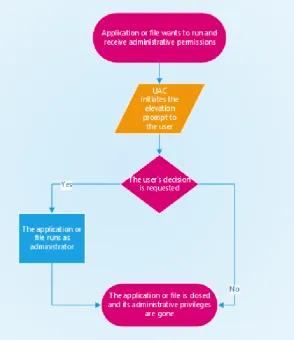
Figure 3 UAC Mechanism (Source: Ciprian Adrian Rusen., 2017)
The flow of UAC is shown in Figure 3, the application is being executed by the user and it will make a system changes on Windows system files or folder. Assume that the UAC is set to the default security level at which to the maximum, UAC alert box will be triggered for permission when user tried to run the application, if the user account already had an administrative role it then has the option to continue without any other verification. In other situation, when the user holds the role for limited operations UAC will then prompt to provide with the password to verify that the user has the authorized access from the administrator to continue for the changes that will be done on user’s files and registry setting from the new installation. If the user does not have any, user will only have to decide to abort the installation and the application will closed and so with the UAC box.
2.3 UAC Privilege Escalation
2.4 UAC Architecture
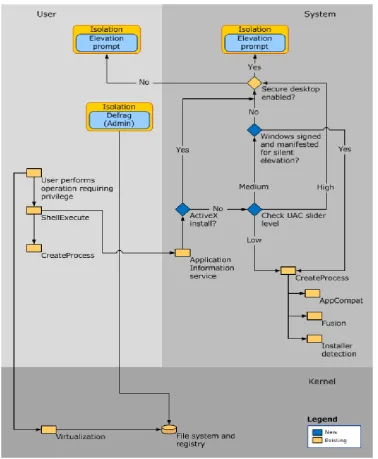
Figure 4 How UAC works (Source: Microsoft Technet., 2012)
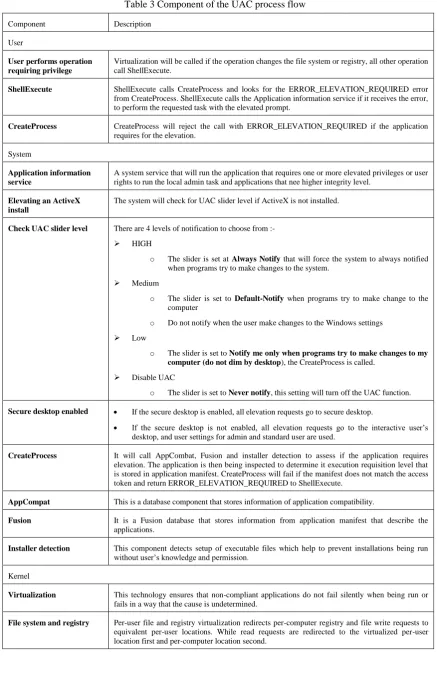
Table 3 Component of the UAC process flow
Component Description
User
User performs operation requiring privilege
Virtualization will be called if the operation changes the file system or registry, all other operation call ShellExecute.
ShellExecute ShellExecute calls CreateProcess and looks for the ERROR_ELEVATION_REQUIRED error from CreateProcess. ShellExecute calls the Application information service if it receives the error, to perform the requested task with the elevated prompt.
CreateProcess CreateProcess will reject the call with ERROR_ELEVATION_REQUIRED if the application requires for the elevation.
System
Application information service
A system service that will run the application that requires one or more elevated privileges or user rights to run the local admin task and applications that nee higher integrity level.
Elevating an ActiveX install
The system will check for UAC slider level if ActiveX is not installed.
Check UAC slider level There are 4 levels of notification to choose from :-
HIGH
o The slider is set at Always Notify that will force the system to always notified when programs try to make changes to the system.
Medium
o The slider is set to Default-Notify when programs try to make change to the computer
o Do not notify when the user make changes to the Windows settings
Low
o The slider is set to Notify me only when programs try to make changes to my computer (do not dim by desktop), the CreateProcess is called.
Disable UAC
o The slider is set to Never notify,this setting will turn off the UAC function.
Secure desktop enabled If the secure desktop is enabled, all elevation requests go to secure desktop.
If the secure desktop is not enabled, all elevation requests go to the interactive user’s desktop, and user settings for admin and standard user are used.
CreateProcess It will call AppCombat, Fusion and installer detection to assess if the application requires elevation. The application is then being inspected to determine it execution requisition level that is stored in application manifest. CreateProcess will fail if the manifest does not match the access token and return ERROR_ELEVATION_REQUIRED to ShellExecute.
AppCompat This is a database component that stores information of application compatibility.
Fusion It is a Fusion database that stores information from application manifest that describe the applications.
Installer detection This component detects setup of executable files which help to prevent installations being run without user’s knowledge and permission.
Kernel
Virtualization This technology ensures that non-compliant applications do not fail silently when being run or fails in a way that the cause is undetermined.
3 Project Approach
The general project structure for the proof of concept research paper that intends to serve the objectives that should be achieved.
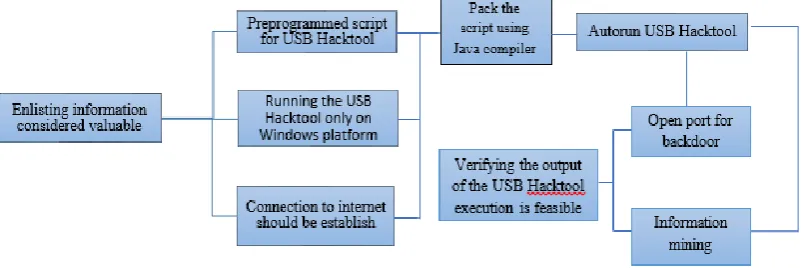
Figure 5 The framework of the project
In the next phase, the implementation and testing will be done on Virtual Machine (VM) as to ensure the safe environment and ethical conduct rather than testing it on the unauthorized machine itself. The backdoor access will be controlled from Kali OS in virtual machine. This is because the Metasploit is built integrated especially for Kali Linux. This method of testing on VM also can be reversed to the original state if there is anything wrong happened during the process.
4 Implementation
The general project structure for the proof of concept research paper that intends to serve the objectives that should be achieved.
4.1 Backdoor Access Configuration
The project is using Reverse Shell programs a type of attack vector where the victim will communicate back to the attacking machine which act as a listener/server that will be configured with port on which it will received and accept the connection from the target. The purpose of using reverse shell instead of bind shell is that reverse shell can purposely establish a connection to a specific victim and communicates back to the attacking machine even if the attacking machine using a private IP address rather than public IP address where the attacker system is not available publicly on the internet for the victim to communicate.
Ngrok will need to be registered first in web portal and token string will be given to authenticate the respective computer with the configuration file saved in it directory as shown in figure 4.1 where the Authtoken is saved to the configuration file with the filename Ngrok.yml.
Figure 7 Tunneling session
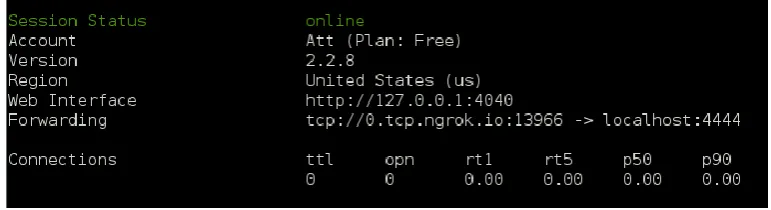
The tunnel is set for the victim to connect to the Localhost with external port 4444. Once the connection is established the tunnel will display Session Status “online” where it is ready to deploy with USB Hacktool’s script for network backdoor access. In figure 7, the 1st row
starting with white fonts indicate the account type of Ngrok application used in this project. The 2nd row is the version of Ngrok tools latest development. 3rd is a region the Ngrok used to
connect to the nearest server. 4th is a web interface along with the port for the computer where
the Ngrok is executing. 5th is the vital details where this forwarding address is the core info
that is used to configure the reverse shell application so when the executable file is run by the victim, the victim’s computer will make a connection to the Ngrok tunnel address which is through specific port provided by Ngrok, 13966 and this port is constantly change every time the application is restart. After the victim established the connection with the tunnel, Ngrok will forward the connection to the localhost of the attacking machine with port 4444 specified at the early process, at this stage the attacking machine will listen to any connection made through this Ngrok application. The 6th row is a traffic statistic for monitoring the inbound
connection.
4.2 Meterpreter Reverse Shell Configuration
Figure 8 Meterpreter Reverse Shell
Figure 8 shows that Msfvenom is create using x86 architecture under Windows platform where reverse_tcp protocol is used together with LHOST (local host) of the tunnel address and LPORT (local port) for the tunnel to be directed to. The final process of generating the payload is to specify the format of file encoding which being encoded into “exe” and saved with the filename “rs.exe” as the output.
Figure 9 Msfconsole
When the command Msfconsole in figure 9 is issued in the command line, it will begin to run into Metasploit console where further instruction can be given to setup the listener on attacking machine as for the figure 10 shows several instructions executed.
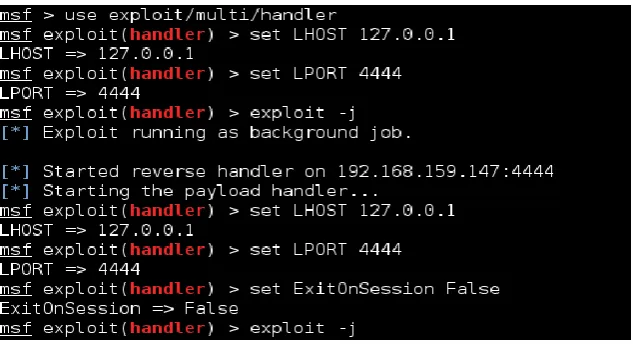
Figure 10 Starting the listener
First command line is to start the multi handler exploit where it function is to utilize the type of exploit for specific task. Loopback IP address (127.0.0.1) and open port (4444) are set for local host (LHOST) and local port (LPORT) respectively for listener interface to connect. This Loopback address is also a tunnel interface on Ngrok application whereby victim will connect to the Ngrok host address and port on public network and being forward to the local loopback address that being listened by the attacker machine. To make the connection persistence even the connection unintentionally close or network is down, “ExitOnSession” is set to false. Listener will start when “exploit –j” is run.
Figure 11 Listener Established
Figure 12 Network Interface
The listener has to be set up first on the attacker machine before any connection from the targeted machine try to establish the session to the attacker. The implication of running the reverse shell connection from the target to the attacker before the listener is ready will only open a waste bandwith resource because there is none of the existing port and host for the targeted machine to connect to.
Figure 13 Ngrok Tunnel – No Open Connection
In the attacker side Ngrok tunnel will show session status ‘online’ (figure 13) with no open connection because there is no connection made by the victim yet. On the victim side, Hacktool device with embedded script need to be plugged onto the USB interface as to perform the backdoor access session.
Assuming for the various scenario on the targeted machine the victim found the USB Hacktool lost on the pavement or being the victim of social engineering or unauthorized physical access where the Hacktool is plug onto the USB port interface. Just for a few second once the computer machine detects the USB, it will soon executing the instruction and opened a Run box (figure 14) with keystroke injection that will type-in Powershell to open up the application.
4.4 Client Side
Figure 15 Hacktool script execution
Client side indicate as a victim side. Once Powershell is opened (figure 15), Hacktool USB will allow the keystroke to write a lengthy of script to execute the attack. This will simultaneously run 2 types of download through system WebClient, firstly it will download a VBS script, secondly it will download an information mining script stored at the web server as shown in the Table 4 below where downloadable URL are provided which have been sanitized to prevent accidental download. The script above will then save those 2 downloaded file into its filenames where in this case ‘uacpayload.vbs’ and ‘config-12345.ps1’ respectively and run those both files at once.
Table 4 Downloadable link
Type URL
Reverse shell hxxps://raw.githubusercontent.com/ulhazazi/hacktool/master/rs.exe
VBS script hxxp://pastebin.com/raw.php?i=y7bnfhxg
Information mining hxxp://pastebin.com/raw.php?i=FhgGPL9d
Within the VBS script contained an instruction to download and execute a reverse shell application (Table 4) and perform a privilege escalation on the system. Concurrently, information mining will also being carry out it task to collect and compile the all information into one specific folder.
4.5 Server Side
Figure 16 Opened Connection
On the Ngrok box status displayed 1 open connection is up as in figure 16. As on the Meterpreter console it will notify a stage session has been made to the server with a session ID followed by the interface and the port it connected with a timestamp as shown in figure 17. This established session verified that backdoor access through reverse shell application is success.
Figure 17 Stage Session
Figure 18 Active session ID
The console can be used to lookup details information of available active session shown in figure 18, where the session Id 1 is the current active session on network. Based on the lookup, the client’s type of system machine can be obtained where it uses a Windows 32-bit operating system with a serial number and type of account that the client currently log on.
Figure 19 Getuid info
Figure 20 Getsystem exploit
Figure 20 shows the ‘getsystem’ command is deployed in the event of taking over the client’s system on the background. It successfully exploits the client’s system via technique 1 – Named Pipe Impersonation. This indicate that client system is now operable in admin mode. Any command will escalate the Windows privilege from normal user to administrative level.
Figure 21 Closed connection
The server can do a variety of offensive task toward the client’s system on the background when the Windows privilege has been escalated. When all the activities on the server are done, server can send and exit command to end the session. Figure 21 shows Time to Live (TTL) is change from 0 to 1 where it indicate the 1 session is closed
5
Conclusion
References
Badshah G, Liew S. C., Jasni Mohamad Zain, Mushtaq Ali (2016), Watermark Compression in Medical Image Watermarking Using Lempel-Ziv-Welch (LZW) Lossless Compression Technique. Journal of Digital Imaging 29(2), pages 216-255.
Bang, J., et al. (2010). "Secure USB bypassing tool." Digital Investigation 7, Supplement(0): S114-S120.
Boukhobza, J. and C. Timsit (2005). On windows file access modes: a performance study. Proceedings of the 4th international symposium on Information and communication technologies. Cape Town, South Africa, Trinity College Dublin: 44-49.
Carvey, H. and C. Altheide (2005). "Tracking USB storage: Analysis of windows artifacts generated by USB storage devices." Digital Investigation 2(2): 94-100.
Carvey, H. (2005). "The Windows Registry as a forensic resource." Digital Investigation 2(3): 201-205.
Ciprian Adrian Rusen (2017, November 7). What is UAC (User Account Control) and why you should never turn it off. Retrieved from https://www.digitalcitizen.life/uac-why-you-should-never-turn-it-off
Gorge, M. (2005). "USB & other portable storage device usage: Be aware of the risks to your corporate data in order to take pre-emptive and/or corrective action." Computer Fraud & Security 2005(8): 15-17.
Lee, C. C. K. (2013). USB Hardware Trojan Horse Device Attack. Ann Arbor, University of California, Irvine. 1539896: 59.
Microsoft Technet (2012, August 31). How User Account Control Works. Retrieved from https://technet.microsoft.com/en-us/library/jj574202(v=ws.11).aspx
NetbiosX (2017, May 2). UAC Bypass – Event Viewer. Retrieved from
https://pentestlab.blog/2017/05/02/uac-bypass-event-viewer/
Trend Micro (2015, January 7). Backdoor attacks: How they work and how to protect against them. Retrieved from http://blog.trendmicro.com/backdoor-attacks-work-protect/
Zain, J M and Malcolm Clarke (2005), “LSB Reversible Watermarking Surviving JPEG Compression”, in The 27th Annual International Conference of the IEEE Engineering in Medicine and Biology Society, Shanghai, China, 1-4 September 2005.