DOI 10.1007/s13173-012-0073-7
W E B M E D I A 2 0 1 0
TAL—Template Authoring Language
Carlos de Salles Soares Neto· Luiz Fernando Gomes Soares· Clarisse Sieckenius de Souza
Received: 30 November 2011 / Accepted: 23 March 2012 / Published online: 12 May 2012 © The Brazilian Computer Society 2012
Abstract This paper presents TAL (Template Authoring Language), an authoring language for hypermedia document templates. Templates describe document families with struc-tural or semantic similarities among them. TAL supports the description of templates independently of the target hyper-media authoring language. The paper also presents a TAL processor that generates complete hypermedia documents taking as input a template specification in TAL and a data file with the information that makes that document particu-lar in its family.
Keywords TAL·Nested context language·Template oriented programming·Hypermedia authoring· Hypermedia design patterns·iDTV
This is a revised and extended version of a previous paper that appeared at WebMedia 2010 (Simpósio Brasileiro de Sistemas Multimídia e Web).
C.S. Soares Neto (
)Department of Informatics, Federal University of Maranhão, Av. dos Portugueses, s/n, Campus do Bacanga, CEP 65080-040, São Luís, MA, Brazil
e-mail:[email protected] L.F.G. Soares·C.S. de Souza
Department of Informatics, Pontifical Catholic University of Rio de Janeiro, Rua Marquês de São Vicente, 225, Gávea, CEP 22453-900, Rio de Janeiro, JR, Brazil
L.F.G. Soares
e-mail:[email protected] C.S. de Souza
e-mail:[email protected]
1 Introduction
Hypermedia documents define presentations of media ob-jects (text, audio, video, images, etc.) spatially and tem-porally related. The creation of such documents is usu-ally achieved by using declarative languages, among which structure-based XML languages, such as NCL [1], SMIL [15], SVG [17], etc.
Some structure-based languages include the concept of hypermedia composition as one of the most important ab-stractions authors can use. Hypermedia compositions in-clude media objects and other hypermedia compositions, re-cursively, in addition to relationships among these elements. Hypermedia compositions may implicitly define relation-ships among their child elements, as is the case of “par” and “seq” SMIL containers with their embedded temporal se-mantics. But they can also have relationships explicitly de-fined, as is the case with NCL links. In either case, hyperme-dia compositions encapsulate semantic relationships among objects. We should note that even with languages that do not support composition abstraction, the whole body of the doc-ument denotes a composition. In other words, the concept of composition still prevails, although not allowing compo-sition nesting.
talking about layout but about document content), so that it can be reused and customized in specific instances. We must define which images we are going to use, and which back-ground music we want to be played. This is because this sort of authoring languages aims at specifyingparticular hyper-media documents and not afamilyof documents.
A family of documents is defined as a set of documents that share the same specification for their compositional structure, which we call atemplate[1].
In this paper we present TAL: Template Authoring Lan-guage. TAL is a modular declarative language that supports the specification of templates:incomplete hypermedia com-positions. TAL defines a family (a set) of compositions, and it is independent of any authoring language used to spec-ify hypermedia applications that benefit from TAL compo-sitions to define a particular member of the template family. In the paper, we also present a TAL processor, developed to instantiate final hypermedia documents (application specifi-cations) from TAL templates.
TAL is an evolution of the XTemplate [11] language. It is also a kind of XML schema having as its main purpose to let expert authors specify templates to be used by other authors (possibly non-experts) in a simple, quick and error-free document creation process.
There are many good reasons for template-based de-velopment. First, templates promote coherent application branding, enabling content producers to define and follow the same hypermedia-application pattern. Second, as a con-sequence of having hypermedia presentations following the same interface patterns, thanks to a common source tem-plate, they can be more usable for those who view and in-teract with different documents of the same family. Third, template-based authoring promotes reuse, allowing authors to concentrate on filling out only the blanks that make a par-ticular document unique within the family to which it be-longs. Finally, templates can also encode domain concepts across related applications, creating a specific vocabulary and defining a set of constraints on this vocabulary, to be followed by all documents of a given family.
In this work, a template is formally described by means of a vocabulary of allowed child-object types, a set of rela-tions allowed between those types, rules that constraint the instantiation of these child-object types and relations, and a set of fixed composition’s components (media or compos-ite objects and relationships). In this sense, a template is an incomplete hypermedia composition that has certain blanks that must be filled out in accordance with rules that constrain the content and relationships that authors can insert.
After this brief introduction, the next sections are struc-tured as follows. Section2 briefly discusses related work. Section3presents TAL; the language concepts are defined, the language elements and attributes are presented, and an example is discussed in detail. Section 4 shows how tem-plates can be extended given rise to other temtem-plates, and how
template definitions can be nested. Finally, Sect.5presents our conclusions and final remarks.
2 Related work
Several hypermedia applications embed common design patterns. Design patterns have been intensively studied and proposed in the literature [3], including those targeting hy-permedia applications [4,10].
In line with design patterns principles, SMIL Timesheets [18] allow for adding temporal behavior to hypermedia ap-plications independent of the language used by the applica-tion. Indeed, SMIL Timesheets, is a temporal counterpart of CSS [16], also developed in W3C recommendation groups. More precisely, SMIL Timesheets aims to allow any lan-guage to incorporate the XML elements and attributes of the SMIL temporal control modules. SMIL Timesheets specify which elements are active at a given time moment and their temporal scope within a document.
Unlike SMIL Timesheets, which allow for embedding temporal aspects in documents written in some timeless specification languages, the TAL language allows for speci-fying temporal semantics to be applied to compositions out-side of them, and as first-class entities. The aim is to in-corporate the defined semantics in hypermedia application specifications that are defined using languages that allow temporal behavior specifications.
TAL allows for defining not only common design pat-terns but also a series of constraints on their uses, as is dis-cussed extensively in the next sections. TAL can be consid-ered as a specification language to a set of high level hyper-media design patterns expressed as a template.
A key basis for TAL development was the composition templates proposed in previous versions of XTemplate lan-guage [9]. The XTemplate model is based on the style and configuration concepts introduced in Architecture Descrip-tion Languages (ADLs) [2]. In ADLs, a style describes the conceptual architecture of a system, and a configuration an instance of the style. There is a clear similarity between the composition template and the architectural style concept, and also between the hypermedia composition and architec-tural configuration concepts. However, the open hyperme-dia composition concept of XTemplate is at the same time a style and a configuration. Open hypermedia compositions define not only a vocabulary of types and restrictions on the instantiations of these types (similar to styles in ADLs) but also enable the definition of resources, which are elements present in all documents based on these compositions (sim-ilar to the purposes of configurations in ADLs).
with a padding document to generate applications in differ-ent target languages, depending only on the specific proces-sor used. TAL specifications can thus be used to generate hypermedia applications in declarative languages such as SMIL [15], SVG [17], HTML/ECMAScript [20], NCL [1], etc.
XTemplate focus on easing the authoring performed by experts. However, all XTemplate users need to have some technical pre-requisites such as XPath and XSLT [11] knowledge, even if they only need to instantiate composition templates. On the contrary, TAL has as one of its goals to re-duce the need for expert authors. TAL avoids the use of ex-ternal notations different from those of the target-language conceptual model, and notations that are beyond the abstrac-tion level of the target language (like XSLT processing in-structions of XTemplate 3.0 do).
In a previous work, we have established the characteris-tics and methods that may govern the template oriented au-thoring process [13]. In that paper two main roles involved in the process are described: (i) the role played by the template author, which is an expert responsible for the identification and design of templates, and (ii) the role played by the docu-ment author, which can usually be a non-expert since he/she only needs to understand how to fill the gaps described in templates (in what we call, in this paper, the padding docu-ment).
One challenge raised in the mentioned work [13] is how to smoothly communicate the template semantics, typically related to the abstraction level of the template authors, to fi-nal document authors to allow them to perform their main task: to instantiate the template in some target language. In the current work, TAL templates are designed to allow the final document author to understand templates, without needing further pre-programming requirements. Ideally, we tried to reduce the cognitive distance between the two roles. Although we know that in some cases a meta language for template semantic description will be necessary, for simple scenarios, this proves to be possible.
3 Template authoring language
TAL is a XML-based language that follows the modular approach. In Sect. 3.1 we present a simple use case, de-fined by the “Button-Text-Image” template, which will be worked out in the remaining subsections. Section3.2 intro-duces TAL language concepts, while Sect.3.3describes the language elements and attributes. Section3.4 presents the syntax for defining the language selectors, and Sect.3.5the syntax for defining constraints. Section3.6deals with how relationships among child objects of a composition must be specified.
3.1 Use case: Button-Text-Image template
Figure 1 shows two authentic examples of hypermedia applications for digital TV. In them, we can recognize the “Button-Text-Image” template used in our examples throughout Sect. 3. In both applications there is a menu (made up by a set of buttons). When a button is selected, by using remote control key navigation, a new text frame and a new image is presented, replacing the display of the pre-vious text frame and image. Text frames and images are al-ways exhibited in the same screen position. This interaction pattern is very common in digital TV applications (as can be seen by browsing the NCL Club public repository [8] of ap-plications developed for the Brazilian Terrestrial Digital TV System) from where the two examples were downloaded.
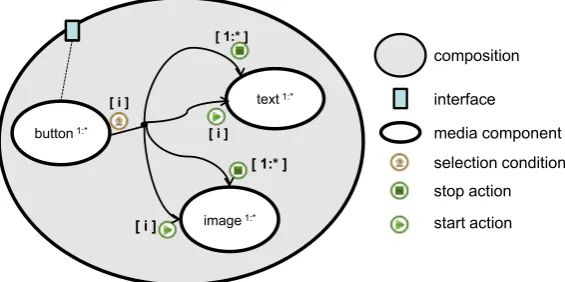
It is very simple, but laborious, to specify these applica-tions as complete hypermedia composiapplica-tions; in these spe-cific cases, using NCL. Figure2presents a structural view of the composition representing the navigational menu for the first application, which has only three buttons. As afore-mentioned, it is not possible, using NCL, to specify a vari-able number of child objects of a composition. That is why we had to repeatedly define three buttons, three images and three text objects, and all the relationships among them, al-though they have the same behavior. Moreover, that is why we cannot reuse the same structure for the second applica-tion that has four selecapplica-tion possibilities instead of three. In Fig.2, three similar NCL <link> elements give the naviga-tional temporal semantics. As for example, the one shown in the figure has the selection of the button 1 as condition. If this condition is satisfied, the presentation of all text frames and images are stopped (ending the presentation of any text frame and image previously selected) and then the presen-tation of the first image and the first text frame is started. The other <link> elements are only partially shown to no pollute the sketch. Also in the figure, three interfaces asso-ciated with the composition indicate that it starts presenting the three buttons. Note how tediously repetitive this spec-ification task could be, especially for a menu with a large number of selection options.
3.2 TAL concepts—overview
In TAL, atemplateis an open-composition (an incomplete composition), or even, a pattern for a composition, whose content is given by:
• Vocabulary: defining the allowed types of child object (the components) of thetemplate, the allowed types of interfaces for these child objects and for the template it-self, and the allowed relations to be used in relationships among child objects.
Fig. 1 Examples of
applications that share the same model, from where we can derive the “Button-Text-Image” template
(a) Health application developed by Proderj
(b) CAIXA®Home-Banking application developed by HxD Interactive Television
Fig. 3 “Button-Text-Image” template
• Resources: instantiated child objects that shall be inher-ited by all compositions that use (follow) the template. • Relationships: relating child-object types and resources.
Child objects of templates can be media objects (any ob-ject whose content is to be processed for exhibition) or other nested compositions. An interface can define part of the con-tent of a media object, or can define a child object property, like its positioning on the screen, etc. Child composite ob-jects and the template itself may also have interfaces that ex-ternalize interfaces of their internal child objects. Note that in defining the vocabulary we are also defining the hierar-chy imputed to the child objects, given by the composition nesting.
It should be stressed that the number of child objects of a template may be left undefined, improving the template expressiveness. The vocabulary allows for defining types. A type for child objects can entail several instantiations.
Constraints are used to verify the correctness of the com-ponent instantiation process of a template. They specify rules on the component types and interface types of tem-plates. They can also define algebraic expressions that cor-relate the cardinality of different types of components and interfaces.
Resources are the unchangeable part of a template. An example of its use is found when an author wants to include a required company logo to all application derived from the template.
Relationships give semantics to a composition. They re-late child object interfaces. Since child objects of a com-position (and their interfaces) can be left undefined by a template, relationships can also be established among child-object types, and among child child-objects types and resources. Therefore, relationships referring to child-object types need also to specify how to iterate on the interfaces of the in-stances of these child objects. As an example, it is possible to create relationships from each instantiated child object of a given type to all other instances of another type.
Interfaces of child objects of a composition may be mapped to interfaces of the composition in order to exter-nalize these internal interfaces to be used in relationships
defined outside the composition. Similarly to relationships, since interfaces of a composition can be left undefined by a template, mappings can be established between interface types of child objects and interface types of the composition. Therefore, mappings must also to specify how to iterate on interface instances.
Turning back to the “Button-Text-Image” template, it could be now represented as shown in Fig.3. In the figure, three component types are defined: “button”, “text” and “im-age”. A cardinality constraint could require at least one in-stance of each type, and that the number of inin-stances of each type is the same. Another constraint could require that the number of interface instances for the template is the same of the number of “button” component type instances. Mapping between each of the template interface instances and each “button” component type instances must be established, in order that applications that follow the template start present-ing the menu (the set of buttons). In TAL, when any compo-sition is started without specifying an interface, all its inter-nal interfaces mapped to interfaces of the composition start. Still in Fig.3, there is a relationship among the “but-ton”, “text” and “image” types. It specifies for each “button” type instance that its selection must result in stopping all in-stances of the “text” and “image” types, and afterwards in starting the presentation of the “text” and “image” instances correlated with the “button” instance.
Once the template is defined, an application author, for example an NCL author, may create a padding document quickly and easily; for example, the document of Listing1
targeting the application of Fig.2. Note that it is not nec-essary to define any NCL interface mappings (mappings to NCL <port> elements) or relationships (NCL <link> ele-ments), since they are already defined in the template, and, as such, they will appear in the resultant (final) NCL doc-ument after the template processing. Note that the template is referred in the padding document by using thetemplate attribute of the <context> element that inherits the template specification, as it is discussed in the next section.
differ-Listing 1 NCL padding-document based on the “Button-Text-Image” template
<context id="myMenu" template="templates.xml\#ButtonTextImage"> <port id="pButton1" ... class="pButton"/>
<port id="pButton2" ... class="pButton"/> <port id="pButton3" ... class="pButton"/> <media id="button1" ... class="button"/> <media id="text1" ... class="text"/> <media id="img1" ... class="image"/> <media id="button2" ... class="button"/> <media id="text2" ... class="text"/> <media id="img2" ... class="image"/> <media id="button3" ... class="button"/> <media id="text3" ... class="text"/> <media id="img3" ... class="image"/> </context>
ent target languages, depending only on the specific TAL Processor used. A specific TAL Processor could use the tem-plate of Fig. 3 and the padding document of Listing 1 to generate the final NCL application; another specific TAL Processor could use the same template and padding docu-ment to generate the final application in SMIL. Moreover, a padding document could be easily defined for the template of Fig.3in SMIL, for example, or in HTML. Other partic-ular TAL Processors could then generate final documents in NCL, SMIL, HTML, etc. based on this SMIL, or HTML, padding document and the template defined in TAL.
3.3 TAL specification
TAL language is composed of eight modules. Two are used in the definition of padding documents1 and the others for template definitions.
TheClassificationmodule and theTemplateBasemodule are used by the padding document to extend its specifica-tion language to support templates. TheClassification mod-ule defines thetemplateattribute and theclassattribute (the last one discussed in Sect.3.4). Thetemplateattribute ex-tends a composition specification in the padding document. It refers to the template to be used together with the open composition specification to generate the target-language fi-nal document. TheTemplateBasemodule defines the <tem-plateBase> element used by the padding language to define a template base. Templates used in the padding document can be imported to the <templateBase> using <importTal> child elements.
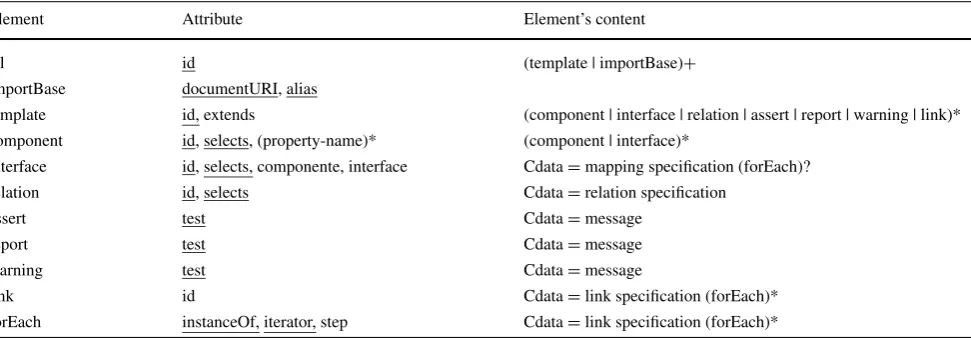
Table1summarizes the hierarchical structure of the el-ements and attributes defined in the other TAL modules. These elements and attributes are used in template defini-tions. Attributes that are required are underlined. Also in the table, the following symbols are used: (?) optional (zero or one occurrence); (|) or; (*) zero or more occurrences; (+)
1A template must be processed together with a padding document given rise to a new document in some specification language, called target language. Usually a specific processor is required for each target language.
one or more occurrences. In some elements the textual con-tent (Cdata) is a relation, or a relationship, or a mapping specification, or even an error message, as explained in what follows.
The Structure module defines the root element, called <tal>. This element has theidattribute. As anyidattribute of TAL, it may receive any string value that begins with a letter or an underscore and that only contains letters, digits, “.” and “_”. Theidattribute univocally identifies an element in a TAL document.
TheImportingmodule allows for importing templates de-fined in other TAL documents. The <importBase> element is used for this purpose. Its documentURI attribute must have the URI of the imported TAL document as value. The aliasattribute specifies a name to be used when referring to the imported template. Imported templates can be used in compositions of the importing template or else to be ex-tended generating new templates, as discussed in Sect.4.
The Template module defines the <template> element and its attributes. More than one template may be specified in a TAL document. A <template> must have theidattribute. The extendsattribute can be used if the template extends another template, referenced by this attribute value. In this case, the template inherits the vocabulary, constraints, re-sources, and relationships defined in the extended template. The Vocabulary module defines entity types of a tem-plate, through the <component>, <interface> and <relation> elements.
Types for child objects of a template are defined by the <component> element. Interface types, both for the template itself and for its child objects, are defined by the <interface> element. A relation type is defined by the <relation> ele-ment. These elements have the requiredidattribute, and the selectsattribute, which establishes to which target padding language elements the corresponding types must be applied. The syntax of allowed values for theselectsattribute is de-scribed in Sect.3.4.
Table 1 XML elements and attributes of TAL Language
Element Attribute Element’s content
tal id (template | importBase)+
importBase documentURI, alias
template id, extends (component | interface | relation | assert | report | warning | link)* component id, selects, (property-name)* (component | interface)*
interface id, selects, componente, interface Cdata=mapping specification (forEach)?
relation id, selects Cdata=relation specification
assert test Cdata=message
report test Cdata=message
warning test Cdata=message
link id Cdata=link specification (forEach)*
forEach instanceOf, iterator, step Cdata=link specification (forEach)*
words, each <component> instance inherits the properties defined in the property-name attributes of the <component> type, whose interpretations are responsibility of the TAL processor. If the padding document declares a property that has already been defined by the template, the value declared by the padding document has precedence.
When an <interface> element defines an interface type for a composition, in particular for the template, it can also define a mapping to an interface of a child object of the com-position, externalizing this mapped interface. As mappings can be established among types, <forEach> child elements can be used to iterate on these type instances.
The content of the <relation> element specifies a sen-tence that defines causal or constraint relation. Relations are used to specify relationships (discussed in Sect.3.6).
TheConstraintmodule establishes constraint rules by us-ing <assert>, <report> and <warnus-ing> elements. Rules are specified similarly to Schematron [6]. In all three elements thetestattribute specifies the logical test to be evaluated, fol-lowing the syntax described in Sect.3.5. The error or warn-ing message is defined in the content of these elements. The <assert> element requires the test evaluation returns “true”, otherwise its error message should be presented. The <re-port> element is similar but requires that the test be evalu-ated as false to not exhibit its error message. The <warning> element requires that the test be evaluated as false to ex-hibit its warning message. When an error message occurs, the template evaluation is aborted and no final document is generated by the template processor. On the other hand, a warning message does not stop the template processing to generate the final document in some target language.
TheRelationshipmodule allows for specifying relation-ships. Relationships are defined by using <link> elements. As relationships can be established among types, <forEach> child elements can be used to iterate on these type instances. More details about relationships are presented in Sect.3.6.
Resources (any target-language element) can be directly inserted in the template using the target-language names-pace when defining them. The template processor interprets each element outside the template namespace as an element to be included in the final (target language) document. List-ing2exemplifies the use of resources including a logo to be exhibited during the template presentation. Listing2 gives the complete specification of the template of Fig. 3 (the “Button-Text-Image” template), including the logo previ-ously mentioned. In this section, only the general template structure is explained, leaving the description of some spe-cific attribute values to the next sections.
In Listing2, line 1 is the standard XML header. Lines 2 to 45 define the template base that, in this case, has only one template: the “Button-Text-Image” template (lines 3 to 44). This template can be applied to padding document compo-sitions whosetemplateattribute has “ButtonTextImage” as value.
Lines 4 and 10 define two resources to be included in the target-language document after the template processing.
Listing 2 The “Button-Text-Image” template specification
1: <?xml version="1.0" encoding="UTF-8"?> 2: <tal:tal id="templateExample">
3: <tal:template id="ButtonTextImage">
4: <port id="pLogo" component="logo"/>
5: <tal:interface id="pButton" selects="port[class=pButton]">
6: <tal:forEach instanceOf="pButton" iterator="i">
7: component="button[i]"
8: </tal:forEach>
9: </tal:interface>
10: <media id="logo" src="../media/telemidia.png" ... />
11: <tal:component id="button" selects="media[class=button]"/>
12: <tal:component id="text" selects="media[class=text]"/>
13: <tal:component id="image" selects="media[class=image]"/>
14: <tal:link id="buttonSelection">
15: <tal:forEach instanceOf="button" iterator="i">
16: onSelection button[i] then
17: <tal:forEach instanceOf="text" iterator="j">
18: stop text[j], stop image[j],
19: </tal:forEach>
20: start text[i], start image[i] end
21: </tal:forEach>
22: </tal:link>
23: <tal:assert test="\#logo<2">
24: It must be only one LOGO element.
25: </tal:assert>
26: <tal:assert test="\#button==\#pButton">
27: The cardinality of BUTTON and the template’s interface must be the same.
28: </tal:assert>
29: <tal:assert test="\#button>0">
30: It must be at least one BUTTON element.
31: </tal:assert>
32: <tal:assert test="\#text>0">
33: It must be at least one TEXT element.
34: </tal:assert>
35: <tal:assert test="\#image>0">
36: It must be at least one IMAGE element.
37: </tal:assert>
38: <tal:assert test="\#button==\#text">
39: The cardinality of BUTTON and TEXT must be the same.
40: </tal:assert>
41: <tal:assert test="\#button==\#image">
42: The cardinality of BUTTON and IMAGE must be the same.
43: </tal:assert>
44: </tal:template>
45: </tal:tal>
Lines 11 to 13 define component types for child ob-jects of the template. The component type “button” selects every <media> element in the padding document whose class attribute has “button” as value. They represent the set of menu buttons to be exhibited. Once more, the first element found in the padding document that agrees with the “media[class=button]” selector is related to the but-ton [1] identifier; the second to the button [2] and so on. This procedure is particularly useful to understand relation-shipandmappingspecifications. Likewise, the component types “text” (for the corresponding text frames) and “im-age” (for the corresponding images) select every <media> element in the padding document whoseclassattribute has “text” and “image” as value, respectively.
Lines 14 to 22 define relationships established among child objects of the template, when any of the buttons is selected. Section3.6presents relationship specifications in more details. Note, however, that the order to apply the ac-tions defined by a relaac-tionship is the order of their definition
in the <link> specification; in this case first “stop” and then “start”.
Cardinality constraints are defined in lines 23 to 43. The first constraint requires at most one “logo” instantiation. The second one requires that the number of “button” components is equal to the number of “pButton” interfaces. The third to fifth constraints require at least one “button”, one “text”, and one “image” component, respectively. The sixth and seventh constraints require that the numbers of “button”, “text”, and “image” instances are the same.
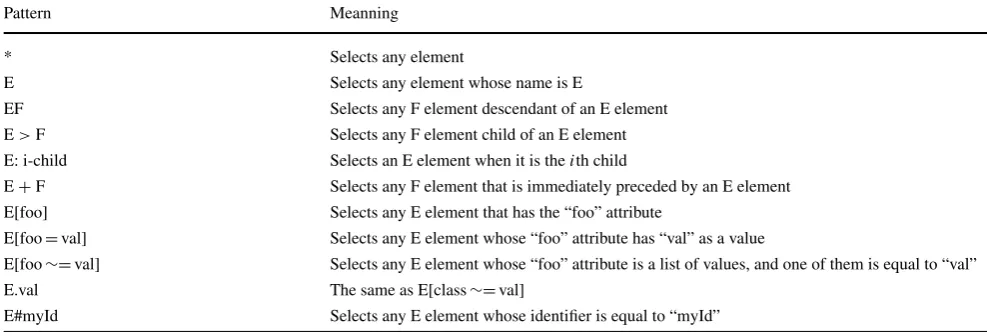
3.4 Selectors of TAL
Table 2 TAL Language selectors
Pattern Meanning
* Selects any element
E Selects any element whose name is E
EF Selects any F element descendant of an E element
E>F Selects any F element child of an E element E: i-child Selects an E element when it is theith child
E+F Selects any F element that is immediately preceded by an E element E[foo] Selects any E element that has the “foo” attribute
E[foo=val] Selects any E element whose “foo” attribute has “val” as a value
E[foo∼=val] Selects any E element whose “foo” attribute is a list of values, and one of them is equal to “val”
E.val The same as E[class∼=val]
E#myId Selects any E element whose identifier is equal to “myId”
Figure 4 EBNF of the constraint language to be embedded in TAL
constraint = exp cmp exp;
exp = term { operand exp };
term = "(" exp ")" |
integer | "#" id |
"#" "{" selector "}";
cmp = "==" | " ==" | "<" | ">" | "<=" | ">=";
integer = [0-9]+;
id = "*" | [a-zA-z_][a-zA-Z0-9_]*;
selector = TAL selector ;
operand = "+" | "-" | "*" | "/" | "ˆ";
Turning back to our example in Listing1, the “myMenu” composition refers the template having itstemplateattribute equal to “templates.xml#ButtonTextImage”. The “button1”, “button2” and “button3” <media> elements, all of them with the class attribute equal to “button”, are associated to the “button” component type (see Listing2) by means of the se-lector “media[class=Button]”. The same happens with the other component types and interface types of the template.
3.5 Constraint language
As previously exemplified, template authors can establish constraints on the use of entity types they define in padding documents.
Constraint rules are defined based on constraint program-ming paradigm [19], in which authors specify properties (the constraints) to be obeyed by a solution, instead of a sequence of algorithmic steps that gives the solution.
The same purpose was pursued in previous TAL version, called XTemplate [9], using XPath [11] and XSLT [11] tech-nologies. However, that proves to be of hard use, especially for non-expert programmers, which led us to this new propo-sition.
Figure 4 gives the EBNF [12] syntax of the new con-straint language embedded in TAL. The terms in brackets and bold are the terminals of the grammar. The braces ({ })
denote an optional section. The | symbol defines an optional list for a grammatical rule.
In Fig.4, note that TAL selectors can be used in defining constraints, which makes the language more versatile. Usu-ally, constraints are defined as logical sentences that result from comparing two expressions (possibly nested between parentheses), which can contain integer constants, cardinal-ity of component and interface types, or the result of a se-lector clause.
3.6 Specifying relationships in TAL
Figure5presents the EBNF syntax for defining relationships in TAL. As usual, the terms in brackets and bold are the ter-minals of the grammar. The braces ({ }) denote an optional section. The | symbol defines an optional list for a grammat-ical rule.
Relationships in TAL are defined by <link> elements that follow the same semantics of causal links of NCL [1], in which conditions must be satisfied to cause the execution of a set of actions. As in NCL, relationships are based on events. The current version of TAL supports the following event types:
Figure 5 Language syntax for defining relationships in TAL
link = condlist "then" actlist "end";
condlist = "(" condlist ")" withparams {lop condlist}?
| condition {lop condlist}?; condition = condname perspective withparams
| assessment withparams; assessmt = assessexpr rop assesexpr;
assesxpr = perspective {"+" string}?
| string {"+" perspective}?;
condname = "onAbort" | "onBegin" | "onEnd"
|"onBeginAttribution" | "onEndAttribution" |"onPause" | "onResume" |"onSelection"; actlist = "(" actlist ")" withparams
{aop actlist}?
| action {aop actlist}?;
action = actnoset perspective withparams
| "set" perspective "=" string withparams | "set" perspective "=" perspective
withparams;
actnoset = "abort" | "pause" | "resume" | "start" | "stop";
perspective = idref {"." idref}?;
withparams ={"with"{parameter,}*parameter{","}?}?;
parameter = idref "=" string;
string = """character sequence"" | "‘"character sequence"’"; aop = "||" | {";"}?;
lop = "and" | "or";
rop = "<" | ">" | "<=" | ">=" | "==" | "=";
idref = XML IDRef
Figure 6 Event state machine
representing the presentation of the information units of any object inside it;
– selection event, which is defined by the selection of a sub-set of the information units of a media object being pre-sented;
– attribution event, which is defined by the attribution of a value to a property of an object.
Each event defines a state machine (see Fig.6). More-over, every event has an associated attribute, named occur-rences, which counts how many times the event transits from occurring to sleeping state during a document presentation. Events of presentation and attribution types also have an at-tribute namedrepetitions, which counts how many times the event shall be automatically restarted (transited from sleep-ing to occurrsleep-ing states). This attribute may contain the “in-definite” value, leading to an endless loop of the event oc-currences until some external interruption.
Link conditions can be simple or compound. Simple con-ditions are associated to event state transitions defined in
Table 3 Reserved condition values associated to event state machines Role Value Transition Value Event Type
OnBegin Starts Presentation
OnEnd Stops Presentation
OnAbort Aborts Presentation
OnPause Pauses Presentation
OnResume Resumes Presentation
OnSelection Stops Selection
OnBeginSelection Starts Selection
OnEndSelection Stops Selection
OnBeginAttribution Starts Attribution
OnEndAttribution Stops Attribution
OnAbortAttribution Aborts Attribution OnPauseAttribution Pauses Attribution OnResumeAttribution Resumes Attribution
Table3. Compound conditions are logical expression (us-ing “and” or “or” operators) between simple and compound conditions.
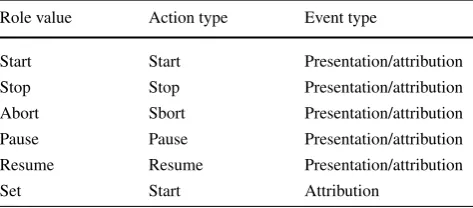
Link actions can also be simple or compound. Simple ac-tions are shown in Table4. Compound actions are made up by simple and compound actions associated by parallel (“||”) or sequential (“;”) operators.
Table 4 Reserved action role values associated to event state ma-chines
Role value Action type Event type
Start Start Presentation/attribution
Stop Stop Presentation/attribution
Abort Sbort Presentation/attribution
Pause Pause Presentation/attribution
Resume Resume Presentation/attribution
Set Start Attribution
A then start B end”. In another example, if an author would like to mute the audio of an audiovisual object “V” when it is resized (property bounds), we would have “onEndAttri-bution V.bounds then set V.soundLevel=‘0’ end”.
Taking back to the “Button-Text-Image” template of Listing 2, lines 14 to 22 specify a relationship among types of components. Since the relationship starts with the <forEach> element, it is translated into several NCL links, when processed targeting the NCL language. These link conditions are given in line 16, in which the selection of any component of “button” type triggers the actions stopping all images and text presentations (line 17 to 19) and starting, in sequence, the presentation of the text and the image corre-sponding to the selected button (line 20).
4 Extending and nesting templates
This section describes two further features of TAL. In Sect. 4.1 we illustrate the extension mechanism for tem-plates, using a slide show as example. In Sect.4.2we show how templates can define component types that follow other template definitions. This template nesting feature is ex-emplified by replacing the “image” component type of the Button-Text-Image template of Sect.3, by a component type that follows the “slideshow” template of Sect.4.1.
4.1 Slide show
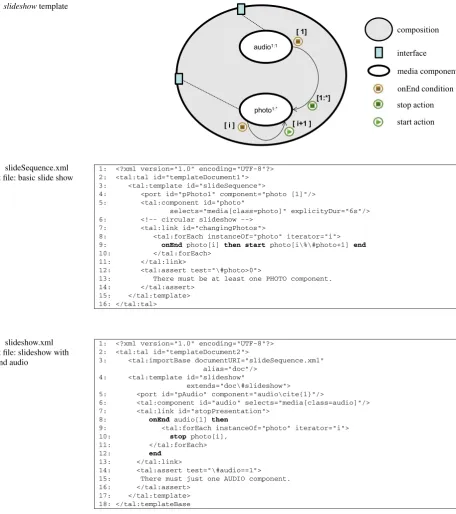
Figure 7 shows an open-composition describing a slide show, a classical example of document family. During the slide show, a background audio is played. The open-composition can be defined by a template with two compo-nent types. One is the audio type, which is constrained to have only one instance. The other is the photo type, which is constrained to have at least one instance, but without limit of instances. Two resources establish the audio component and the first instance of the photo component as starting points of the composition. Two relationships are defined in the template. The first one establishes that the end of the
audio instance must stop the presentation of all photo in-stances, thus ending the slide show. The second one deter-mines that when the presentation of any photo ends the next photo presentation must start.
Next we use this simple example to illustrate how tem-plates can be extended to generate new temtem-plates. So, let us first define a basic TAL template for slide shows specified using NCL language. This template is similar to the one of Fig.7, but without the background audio. In this basic TAL template whose identifier is “slideSequence”, as shown in line 3 of Listing3, the presentation begins starting the first photo component instance, as defined by the NCL <port> resource of line 4. Line 5 defines the photo component type that selects each padding (document) <media> element with classattribute equal to “photo”. Every instance of the photo component inherits the defined explicityDur attribute that must be translated by the TAL processor to an attribute of the targeting language that determines 6 seconds for each photo instance exhibition. Lines 12 to 14 establish that there must be at least one photo instance. The basic template has only one relationship (“changingPhotos”) defined in lines 7 to 11. The relationship determines that the end of each photo in-stance presentation must start the following, with the end of the last instance starting the first one. This circular behavior is created by the line 9 (“i%#photo+1”). The % symbol de-notes the binary operator that calculates the remainder of the division of first operand (i) by the second operand (#photo). This is necessary in order to index the first instance after the last one.
The template of Listing3 can now be extended by the template “slideshow” (line 4 in Listing4) to define the de-sired template of Fig.7. Line 3 of Listing4shows how this new template imports the previous one to be extended. The importing template will inherit the vocabulary, relationships, resources and constraints of the imported one.
In the “slideshow” template, a new audio component type is defined (line 6) with only one instance (constraint in line 14 to 16). A <media> element of the padding docu-ment shall refer to this component through itsclassattribute having “audio” as value. Another NCL <port> resource is also added (line 5) to start the audio component instance when the template starts its presentation. The relationship of lines 7 to 13 establishes that the end of the presentation of the audio instance must stop the presentation of all photo component instances.
Let us now extend the “slideshow” template giving rise to the “controlledSlideshow” template of Listing5. NCL doc-uments following this template allows for moving forward and backward in the slide sequence using the navigational “RIGHT” and “LEFT” keys, respectively, without waiting for the 6 seconds duration of each slide.
Figure 7 slideshowtemplate
Listing 3 slideSequence.xml document file: basic slide show
1: <?xml version="1.0" encoding="UTF-8"?>
2: <tal:tal id="templateDocument1">
3: <tal:template id="slideSequence">
4: <port id="pPhoto1" component="photo [1]"/>
5: <tal:component id="photo"
selects="media[class=photo]" explicityDur="6s"/>
6: <!-- circular slideshow -->
7: <tal:link id="changingPhotos">
8: <tal:forEach instanceOf="photo" iterator="i">
9: onEnd photo[i] then start photo[i\%\#photo+1] end
10: </tal:forEach>
11: </tal:link>
12: <tal:assert test="\#photo>0">
13: There must be at least one PHOTO component.
14: </tal:assert>
15: </tal:template>
16: </tal:tal>
Listing 4 slideshow.xml document file: slideshow with background audio
1: <?xml version="1.0" encoding="UTF-8"?>
2: <tal:tal id="templateDocument2">
3: <tal:importBase documentURI="slideSequence.xml"
alias="doc"/>
4: <tal:template id="slideshow"
extends="doc\#slideshow">
5: <port id="pAudio" component="audio\cite{1}"/>
6: <tal:component id="audio" selects="media[class=audio]"/>
7: <tal:link id="stopPresentation">
8: onEnd audio[1] then
9: <tal:forEach instanceOf="photo" iterator="i">
10: stop photo[i],
11: </tal:forEach>
12: end
13: </tal:link>
14: <tal:assert test="\#audio==1">
15: There must just one AUDIO component.
16: </tal:assert>
17: </tal:template>
18: </tal:templateBase
as an extension to the previous template. Three new relation-ships are added. The first defines the navigation to the next photo exhibition by using the “RIGHT” key (lines 6 to 11). The last two define the circular navigation to the previous photo exhibition by using the “LEFT” key (lines 13 to 22). Note that the “abort” command is used instead of “stop”, since “abort” does not generate notification (onEnd) to trig-ger the link “changingPhotos” inherited from the template of Listing3.
4.2 Button-Text-Slideshow Template
Listing 5
controlledSlideshow.xml document file: including key navigation in a slide show
1: <?xml version="1.0" encoding="UTF-8"?> 2: <tal:tal id="templateDocument3">
3: <tal:importBase documentURI="slideshow.xml" alias="doc"/>
4: <tal:template id="controlledSlideshow"
extends="doc\#slideshow">
5: <!-- RIGHT button -->
6: <tal:link id="nextPhoto">
7: <tal:forEach instanceOf="photo" iterator="i">
8: onSelection photo[i] with {key="RIGHT"} then
9: abort photo[i], start photo[i\%\#photo+1] end
10: </tal:forEach>
11: </tal:link>
12: <!-- LEFT button -->
13: <tal:link id="previousPhoto">
14: <tal:forEach instanceOf="photo" iterator="i">
15: onSelection photo[i] with {key="LEFT"} then
16: abort photo[i], start photo[i-1] end
17: </tal:forEach>
18: </tal:link>
19: <tal:link id="circularPreviousPhoto">
20: onSelection photo [1] with {key="LEFT"} then
21: abort photo [1], start photo[\#photo] end
22: </tal:link>
23: </tal:template>
24: </tal:tal>
Listing 6
buttontextslideshow.xml document file: template “Button-Text-Slideshow”
1: <?xml version="1.0" encoding="ISO-8859-1"?> 2: <tal:tal id="butttontextslideshowTemplateBase">
3: <!-- importing slideshow template base -->
4: <tal:importBase documentURI="temporalSlideshow.xml"
alias="base"/>
5: <tal:template id="ButtonTextSlideshow">
6: <tal:interface id="pButton" selects="port[class=pButton]">
7: <tal:forEach instanceOf="pButton" iterator="i">
8: component="button[i]"
9: </tal:forEach>
10: </tal:interface>
11: <tal:component id="button" selects="media[class=button]"/>
12: <tal:component id="text" selects="media[class=text]"/>
13: <tal:component id="slideshow"
selects="context[class=slideshow]" template="base\#slideshow"/>
14: <tal:link id="buttonSelection">
15: <tal:forEach instanceOf="button" iterator="i">
16: onSelection button[i] then
17: <tal:forEach instanceOf="text" iterator="j">
18: stop text[j], abort slideshow[j],
19: </tal:forEach>
20: start text[i], start slideshow[i] end
21: </tal:forEach>
22: </tal:link>
23: <tal:assert test="\#logo<2">
24: It must be only one LOGO element.
25: </tal:assert>
26: <tal:assert test="\#button==\#pButton">
27: The cardinality of BUTTON and the template’s interface
must be the same.
28: </tal:assert>
29: <tal:assert test="\#button>0">
30: It must be at least one BUTTON element.
31: </tal:assert>
32: <tal:assert test="\#text>0">
33: It must be at least one TEXT element.
34: </tal:assert>
35: <tal:assert test="\#slideshow>0">
36: It must be at least one SLIDESHOW element.
37: </tal:assert>
38: <tal:assert test="\#button==\#text">
39: The cardinality of BUTTON and TEXT must be the same.
40: </tal:assert>
41: <tal:assert test="\#button==\#slideshow">
42: The cardinality of BUTTON and SLIDESHOW must be the same.
43: </tal:assert>
44: </tal:template>
Listing 6 presents this new template in TAL. The sin-gle difference with regards to the template of Sect.3is re-lated with the previous “slideshow” template, which is im-ported in line 4. In this new template, instead of having the definition of the “image” component type, we define the “slideshow” component (line 13). This component repre-sents an imported template referred in thetemplateattribute. From line 14 on of Listing6, the template definition is iden-tical to lines 14 to 45 of Listing2, except from replacing “image” by “slideshow” in all occurrences.
Finishing this section, we should stress that template nesting enhances TAL expressiveness and makes easier the modeling of several scenarios.
5 Conclusions
Templates specified using TAL can be instantiated gener-ating new final documents. As aforementioned, these docu-ments are actually the output of a TALprocessor. In order to do so, a TAL processor takes a template specification along with apadding documentas its input data. This kind of ap-proach enables “expert” authors to create TAL templates to be used by less skilled multimedia document creators (see Listing2). All the latter have to do is to define how features that are specific to the particular document they are about to produce must befilled in. In other words, less skilled au-thors simply produce a padding document for a particular TAL template (see Listing1for a padding document target-ing the NCL language). We should emphasize that this strat-egy promotes reuse of all the semantic structure associated to a template.
The paradigm used to create applications promoted by TAL seems to appropriately answer to the requirements im-posed by emerging interactive digital TV applications. It allows for authors to establish and follow a particular for-mat(orpattern) of presentation, which may be associated to branding, among other things.
A side effect of using TAL, which may come as a handy feature, is that it allows authors to specify explicitly the se-mantics of a given composition type. That is, as we define a template asan open hypermedia composition, new compo-sitions are created as specializations of high-level specifica-tion. Seen from this perspective, a template can be taken as the description of semantic constrains that apply to all rela-tionships pertaining to a given composition type, regardless of the actual compositions that are eventually instantiated by end authors.
The TAL processor for NCL was developed in Lua lan-guage and it is freely distributed in http://www.telemidia. puc-rio.br/tal.
We are currently working on providing use of templates in authoring tools such as NCL Composer [5,7]. Since this
particular tool provides support for plug-ins that may define different authoringviewsfor a document specification (tex-tual, layout, structural, outline, and temporal views, among others), we are working on adding views to help authors cre-ating new documents using TAL templates. This should pro-mote the use of Composer, helping novice authors to create new documents based on pre-existing templates.
As future work we are planning to do empirical tests with (potential) TAL users, in an attempt to understand what is the actual contribution of TAL to the overall usability of NCL-based authoring resources, especially in comparison with other existing template-specification languages (in the same domain). One of the factors that are of particular inter-est and relevance for this research is to assess the scalability of TAL in actual contexts of use.
As another future work we are planning to use ontolo-gies in describing TAL templates. This would bring about better reasoners to check the consistency of templates, sub-templates and instances. Moreover, users could use conven-tional ontology readers and editors in using TAL.
Acknowledgements This research has been partially supported by CNPq and FAPERJ.
References
1. ABNT NBR 15606-2:2007. (September, 2007) Televisão digital terrestre—Codificação de dados e especificações de transmissão para radiodifusão digital—Parte 2: Ginga-NCL para receptores fixos e móveis—Linguagem de aplicação XML para codificação de aplicações (Portuguese)
2. Clements PC (1996) A survey of architecture description lan-guages. In: International workshop on software specifications and design. Proceedings of the 8th international workshop on software specification and design. ISBN:0-8186-7361-3
3. Gamma E et al (1994) Design patterns: elements of reusable object-oriented Software. ISBN 978-0201633610. Addison-Wesley, Reading
4. Germán DM, Cowan DD (2000) Towards a unified catalog of hy-permedia design patterns. In: 33rd Hawaii international confer-ence on system sciconfer-ences
5. Guimarães RL, Costa RMR, Soares LFG (2007) Composer: Am-biente de Autoria de Aplicações Declarativas para TV Digital In-terativa. In: XII Simpósio Brasileiro de Sistemas Multimídia e Web—WebMedia (Portuguese)
6. ISO/IEC Standard. ISO/IEC 19757-3:2006 Information technol-ogy—Document Schema Definition Language (DSDL)—Part 3: Rule-based validation—Schematron
7. Lima BS, Soares LFG, Moreno MF (2011) Considering non-functional aspects in the design of hypermedia authoring tools. In: ACM symposium on applied computing, SAC
8. NCL Club.http://www.clube.ncl.org.br
9. Muchaluat-Saade DC, Rodrigues RF, Soares LFG (2002) XCon-nector: extending XLink to provide multimedia synchronization. In: II ACM symposium on document engineering
11. Santos JAF, Muchaluat-Saade DC (2011) XTemplate 3.0: spatio-temporal semantics and structure. In: Multimedia tools and appli-cations. doi:10.1007/s11042-011-0732-2
12. Scowen RS (1993) Extended BNF—a generic base standard. In: Software engineering standards symposium
13. Soares Neto CS, Soares LFG (2008) Autoria Orientada a Arquéti-pos. In: XXXIV Conferencia Latinoamericana de Informática, CLEI 2008, Santa Fe, Argentina (Portuguese)
14. Soares Neto CS, Soares LFG, Souza CS (2010) The Nested Con-text Language reuse features. J Braz Comput Soc 16, 229–245 15. W3C (2008) Synchronized multimedia integration language
(SMIL 3.0) W3C recommendation. Available in http://www. w3.org/TR/2008/REC-SMIL3-200812
16. W3C (2009) Cascading style sheets level 2 revision 1 (CSS 2.1) specification. Available inhttp://www.w3.org/TR/CSS2/ 17. W3C (2009) Scalabe vector graphics. W3C recommendation.
Available inhttp://www.w3.org/TR/SVG11/
18. W3C SMIL timesheets 1.0. W3C working draft. Available in http://www.w3.org/TR/timesheets/
19. Wallace M (1996) Practical applications of constraint program-ming. In: Constraints, vol 1, pp 139–168