A STUDY ON DESIGN AND ANALYSIS
OF WEB MART MINING AND ITS
RELEVANCE TODAY
Ravikumar G K*
*Dr. MGR University, Chennai, Tamilnadu, INDIA, Manjunath T. N+
+
Bharathiar University, Coimbatore, Tamil Nadu, INDIA, Ravindra S. Hegadi#
#Karnatak University,Dharwad,Karnataka,INDIA, Archana R A++
++SJB Institute of Technology,Bangalore,Karnataka,INDIA, Abstract:
Data warehousing is one of the latest trends in computing environment and information technology applications. A data warehouse is a system that extracts, cleans and delivers source data into dimensional data store and then supports and implements querying and analysis for the purpose of decision making. From a data warehouse, data flows to various departments for their customized decision support systems. These individual departmental components are called data marts. A data mart is a set of dimensional tables supporting a business process. Data marts contain all atomic detail needed to support drilling down to the lowest level. Every company or organization in the world has a website. Beneath each web site are web logs that record every object either posted to or served from the web server. Web logs are important because they reveal the user traffic on the web site. The activity of parsing web logs and storing the results in a data mart to analyze customer activity is known as click stream data warehousing. The web mart - database schema is designed to make the underlying data structure more comprehensible to users and to simplify the query process. The recommended approach for data warehouse data modeling is to follow a Dimensional Modeling approach - Star Schema. We explore the design and analysis of web mart and its relevance today at minute level.
Keywords: Data warehousing, ETL, Web log, Data mart, Web mart.
1. Introduction - Star Schema of the Web Mart
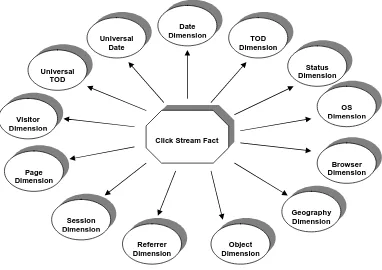
The web mart - database schema is designed to make the underlying data structure more comprehensible to users and to simplify the query process. The recommended approach for data warehouse data modeling is to follow a Dimensional Modeling approach-called Star Schema. The star schema has a central fact table with dimension tables at the points of the star. The single fact table’s composite primary key requires a foreign key field corresponding to the primary key field of each dimension table. The dimension tables are hierarchical and thus highly denormalised [4] .A fact table is a primary table in the web mart that contain the business facts, and dimension tables are companion tables to the fact table that represent the business critical dimensions and contain the attributes for the business critical dimensions. The central fact table provides users the ability to do analysis on business facts, and dimensional tables provide users the ability to do analysis on these business facts in various business critical dimensions[10].
Fig-1: Star Schema of the Web Mart Design -Click Stream Fact and its Associated Dimensions 2. Description -Web Mart Objects
This section explains about the detailed analytical capabilities of the model by giving the listing of the basic fact that the user will be able to analyze and the corresponding dimensions which gives user the capability of drill up and drill down and slicing and dicing on the base fact. Before the design of specific click stream data marts, there is a need to collect together as many dimensions as one can think of that may have relevance in a click stream environment. The unique dimensions of the click stream data warehouses are page, visitor, session and referral. The page dimension describes the page context for a web page event. It contains attributes like page key, page source, page function. The visitor dimension gives the details regarding visitor. The main attributes are userId, CookieId, Operating System and Browser. The session dimension provides one or more levels of diagnosis for the visitor’s session as a whole. For example, the local context of the session might be requesting product information, but the overall session context might be ordering a product. The referral dimension describes how the customer arrived at the current page [9] [11].
2.1 Facts and Dimensions in the Web Mart
The following table-1 presents the objects i.e. fact and dimensions available in the web mart for the analysis purpose.
Table name Fact/Dimension Levels Click Stream Fact Fact -
Universal Date Dimension Year, Quarter, Month, Week, Day Universal TOD Dimension Period of the day, Hour, Minute, Second Date Dimension Year, Quarter, Month, Week, Day TOD Dimension Period of the day, Hour, Minute, Second Visitor Dimension IP Address (or) Visitor Id (or) Cookie Id Page Dimension Object Type, File Type, Page Type, URL (a)
Domain, Site, Directory, URL
Session Dimension Session Type
Click Stream Fact
Object Dimension Universal
Date
TOD Dimension
OS Dimension
Browser Dimension Universal
TOD
Visitor Dimension
Page Dimension
Session Dimension
Referrer Dimension
Date Dimension
Status Dimension
Referrer Dimension Referrer Type, URL (a) Domain, Site, URL
Status Dimension Type of the Status, Status description
Visit Dimension -
Content Page Dimension -
Table-1: Objects of Web Mart 2.2 Click Stream Fact Table
2.3 The Table-2 presents various business measures on which the user will be able to do analysis using the click stream fact table and the associated dimension tables.
Field Name Description
UniversalDatekey Foreign key for the Universal Date dimension
UTODkey Foreign key for the Universal TOD dimension
Datekey Foreign key for the Date dimension
TODkey Foreign key for the TOD dimension
Visitorkey Foreign key for the Visitor dimension
Pagekey Foreign key for the Page dimension
Sessionkey Foreign key for the Session dimension
Referrerkey Foreign key for the Referrer dimension
Statuskey Foreign key for the Status dimension
Visitkey Foreign key for the Visit dimension
ContentPagekey Foreign key for the Content Page dimension
TimeViewed The time spent in seconds, by the Visitor on a particular object like page, file …
BytesTransferred The bytes transferred to the client machine. Table-2: Click Stream Fact Table Description
2.3 Dimensions
The dimension table gives users the ability to analyze the business measures in different dimensions by allowing the users to drill up and drill down and slice and dice with the attributes of the dimensions. Drilling down is adding detailed rows to an existing request and is nothing more than requesting to give more detail. Drilling up is subtracting row headers and is nothing more than looking at the data at more aggregated/consolidated form. Slicing is constraining the data that is displayed on an attribute found in a dimension and dicing is constraining the data that is displayed by attributes in multiple dimensions [4].
2.3.1 Universal Date Dimension
Figure-2: Universal Data Dimension with the hierarchy The following table describes the structure of the Universal date dimension table
Field Name Description Values/Example
UniversalDatekey Primary key for the dimension (Surrogate key) 1,2 …
UniversalDate Date 25/01/2000
UniversalDayOfWeek Day of the week Sunday
UniversalDOWNumber Day of week number 1-7, Sunday being 1
UniversalWeekOfMonth Week number in the month 1-5
UniversalWeekOfYear Week number in the year 1-52
UniversalDayOfMonth Day number in the month 1-31
UniversalMonthNumber Month of the year in number 1-12
UniversalMonth Month of the year January
UniversalQuarter Quarter of the year 1-4
UniversalYear Year 2000
Table-3: Column Description of the Universal Date Dimension 2.3.2 Universal TOD Dimension
The figure-3 presents the universal TOD dimension with all its attributes. This universal TOD dimension facilitates analysis along the time of the day with respect to the Greenwich mean time. The hierarchical attributes of the dimension are represented using the arrow head connections and general attributes are represented using straight-line connections. Seconds is the lowest grain level that the user will be able to drill down to, and period of the day is the highest level that the user will be able to drill up to. Drill down path can be identified by following the arrow headings [10] [1].
Figure-3: Universal TOD Dimension
DATE
DAY NUMBER IN
MONTH NUMBER
YEAR
WEEK NUMBER IN
YEAR
QUARTER
MONTH
WEEK OF THE
DAY OF THE
DAY NUMBER IN WEEK
PERIOD OF THE DAY
HOUR
MINUTE
The table-4 describes the structure of the Universal TOD dimension table.
Field Name Description Values/Example
UTODkey Primary key for the dimension (Surrogate key) 1,2 …
UniversalSecond Second of a Minute 1-60
UniversalMinute Minutes of a hour 1-60
UniversalHour Hours of a day 10-11, 11-12 …
UniversalTODPeriodofDay Collection of hours in a day Morning, Evening … Table-4: Column Description of Universal TOD Dimension
2.3.3 Date Dimension
The figure-4 presents the date dimension with all its attributes. The hierarchical attributes of the dimension are represented using the arrow head connections and general attributes are represented using straight-line connections. Date is the lowest grain level that the user will be able to drill down to, and year is the highest level that the user will be able to drill up to. Drill down path can be identified by following the arrow headings [10] [1].
Figure-4: Date Dimension with the hierarchy The table-5 describes the structure of the date dimension table.
Field Name Description Values/Example
Datekey Primary key for the dimension (Surrogate key) 1,2 …
Date Date 25/01/2000
DayOfWeek Day of the week Sunday
DayOfWeekNumber Day of the week number 1-7, 1 being Sunday
WeekNumber Week number in the month 1-5
Week Week number in the year 1-52
MonthDay Day number in the month 1-31
MonthNumber Month of the year in number 1-12
Month Month of the year January
Quarter Quarter of the year 1-4
Year Year of the date 2000
Table-5: Column Description of Date dimension
DATE
DAY NUMBER IN MONTH
MONTH NUMBER
YEAR
WEEK NUMBER IN YEAR YEAR
QUARTER
MONTH
WEEK OF THE MONTH
DAY OF THE WEEK
2.3.4 TOD Dimension
The figure-5 presents the TOD dimension with all its attributes. The hierarchical attributes of the dimension are represented using the arrow head connections and general attributes are represented using straight-line connections. Seconds is the lowest grain level that the user will be able to drill down to, and period of the day is the highest level that the user will be able to drill up to. Drill down path can be identified by following the arrow headings [10] [1].
Figure-5: TOD dimension with its attributes The table-6 describes the structure of the TOD dimension table.
Field Name Description Values/Example
TODkey Primary key for the dimension (Surrogate key) 1,2 …
Second Second of a Minute 1-60
Minute Minutes of a hour 1-60
Hour Hours of a day 10-11, 11-12 …
TimeOfDay Time of the day 12:00:55;19:15:25
PeriodofDay Collection of hours in a day Morning, Evening …
Table-6: Column description of TOD dimension 2.3.5 Visitor Dimension
The figure-6 presents the Visitor dimension with all its attributes. The hierarchical attributes of the dimension are represented using the arrow head connections and general attributes are represented using straight-line connections. User id/ Cookie id/ Domain name is the lowest grain level that the user will be able to drill down to, and country is the highest level that the user will be able to drill up to. The lowest granularity will be decided at the client site. Drill down path can be identified by following the arrow headings [10] [1].
Figure-6: Visitor Dimension with its attributes
* - Demographics are collection of many fields. It is also possible to form a hierarchy in the demographic information. The table-7 describes the structure of the visitor dimension table.
PERIOD OF THE DAY
HOUR
MINUTE
SECOND
USER ID
OPERATING SYSTEM BROWSER
COOKIE ID
DEMOGRAPHICS * COUNTRY
Field Name Description Values/Example
Visitorkey Primary key for the dimension (Surrogate key) 1,2 … UserId Identification of the Visitor (name or login user
id).
CookieId Value of the Cookie A string
IPAddress IP address of the requesting client 164.164.22.91 Country The country of the visitor. Predicted from the
domain of the visitor
USA, India … OperatingSystem The name of the operating system with version Windows NT 4.0, SCO
Unix 7…
Browser The name of the browser with version Netscape Navigator 4.6, Internet Explorer 5.1 …
*FirstName The first name of the Visitor John, Philip…
*LastName The Last name of the Visitor Smith, Jacob…
*DateOfBirth The Date of birth of the Visitor 12/07/1076
*AgeGroup The age group of the Visitor 18-25, 25-40 …
*Gender The Gender of the Visitor Male, Female
*Occupation The occupation of the Visitor. Limited to a set of categories.
Engineering, Computer related…
*IncomeGroup The income group of the Visitor. The groups are defined by the business.
*ZipCode The Zip code of the place of the visitor
*State The state of the visitor.
*VisitorCountry The country of the Visitor specified by the Visitor.
USA, India …
Table-7: Column Description of Visitor Dimension * Optional fields. Collected from the web site visitor through registration forms. 2.3.6 Page Dimension
The figure-7 presents the page dimension with all its attributes. The hierarchical attributes of the dimension are represented using the arrow head connections and general attributes are represented using straight-line connections. URL is the lowest grain level that the user will be able to drill down to, and the domain and object type are the highest levels that the user will be able to drill up to. Drill down path can be identified by following the arrow headings [10] [1].
Figure-7: Page Dimension with this attributes
URL
FILE NAME
SITE
DIRECTORY DOMAIN OBJECT TYPE
FILE TYPE
PAGE TYPE
The following table-8 describes the various fields of the page dimension.
Field Name Description Values/Example
Pagekey Primary key for the dimension (Surrogate key) 1,2 …
URL Full path of the page in the server C:\..\index.html
PageName Name of the web page Welcome page, Product
info page … PageType Classification of pages in the web site News pages, Jobs &
Career pages …
FileType The file type of the object Gif, au, ra, html …
ObjectType The type of the object Multimedia files,
Application, Content pages
FileName Name of the file being accessed by the user Index.html,
ProductInfo.html … Directory The directory in the server, of the accessed file C:\Inetpub\doc … Site The site where the particular page is available
Domain The domain of the site where the page resides Table-8: Column description of Page Dimension
2.3.7. Session Dimension
The figure-8 presents the session dimension with all its attributes. The general attributes are represented using straight-line connections; the connection with a circle at one end denotes that the specified item is a collection of fields. Session type assigns a meaning to a visit [1]
Figure-8: Session Dimension with its attributes
* - Session parameters are collection of fields, which describes the conditions for characterizing a session type.
The following table-9 describes the various fields of the session dimension.
Field Name Description Values/Example
Sessionkey Primary key for the dimension (Surrogate key) 1,2 … SessionType The type of the user session. Session is defined
bases on the business rules
Quick hit and gone, Product Ordering … SessionDescription The description of a particular session
SessionParameters The parameters that characterize the particular session. It can be split into multiple fields, based on the business rules provided by the customer.
Ex: If Time Spent is in the range of 1-10 min and the pages visited in general info or product info, then it is a ‘Looking for Info’ session.
Table-9: Column Description of Session dimension
SESSION TYPE
2.3.7 Referrer Dimension
The figure-9 presents the session dimension with all its attributes. The hierarchical attributes of the dimension are represented using the arrow head connections and general attributes are represented using straight-line connections. URL is the lowest grain level that the user will be able to drill down to, and the domain and referrer type are the highest levels that the user will be able to drill up to. Drill down path can be identified by following the arrow headings [1].
Figure-8: Session Dimension with its attributes
The following table-10 describes the fields of the referrer dimension.
Field Name Description Values/Example
Referrerkey Primary key for the dimension (Surrogate key) 1,2 …
ReferringURL The URL of the referring page C:\..\index.html
ReferringSite The Site of the referring page ReferringDomain The domain of the referring page
Keyword The keyword given by the user as search criteria to reach the page.
Web mining, warehousing
ReferrerType The type of the referrer Ad banner, Search
engine … Table-10: Column description of referrer dimension
2.3.8 Status Dimension
The figure-9 presents the status dimension with all its attributes. The hierarchical attributes of the dimension are represented using the arrow head connections and general attributes are represented using straight-line connections. Status id is the lowest grain level that the user will be able to drill down to, and the status type is the highest level that the user will be able to drill up to. Status description provides a description for the status id. Drill down path can be identified by following the arrow headings [10] [1].
Figure-9: Status dimension with its attributes
URL
KEY WORD
SITE DOMAIN
REFERRER TYPE
STATUS DESCRIPTION STATUS ID
The following table-11 describes the fields of the status dimension.
Field Name Description Values/Example
Statuskey Primary key for the dimension (Surrogate key) 1,2 …
StatusId The Status Code 101, 201 …
StatusDescription Description of the Status Successful, File not found error …
StatusType Type of the Status File errors …
Table-11: Column Description of Status dimension
2.3.9 Visit Dimension
This dimension has no hierarchy. This dimension is used for identifying the start and end of a visit, it is show in table-12
Field Name Description Values/Example
Visitkey Primary key for the dimension (Surrogate key) 1,2 … Description The value or description. For the start of the visit
it is 'Start' for an end of the visit page 'End'
Start, End …
Table-12: Column description of visit dimension
2.3.10 Content Page Dimension
This dimension has no hierarchy. This dimension is used for identifying a page as a content page or not. it is shown in table-13
Field Name Description Values/Example
ContentPagekey Primary key for the dimension (Surrogate key) 1,2 … Description 'Yes' to indicate a content page. 'No' to indicate
other files
'Yes', 'No' …
Table-13: Column description of content page dimension
3. The Data Modeling-Star Schema
Figure-10: Star Schema model design for Web mart
4. Results
Now we can proceed to the interesting part of our data warehouse: relieving information. 4.1 The average number of minutes from login to order
4.2 The average number of days from first being invited to the site by email to the first order.
5.Conclusions
Understanding the behavior of users on your website is as valuable as following a customer around a store and recording his or her every move. Imagine how much more organized your store can be and how many opportunities you can have to dell merchandise if you know every move customers make while navigating your store. The ETL process in Clickstream data warehousing is significantly different from any other source you are likely to encounter.
References
[1] Ralph Kimball, The Data Warehouse ETL Toolkit, Wiley India Pvt Ltd., 2006 [2] Dr. K.V.K.K Prasad, Data warehouse Development Tools, Dreamtech Press, 2006
[3] White paper by Vivek R Gupta, Senior Consultant, System Services Corporation,“An Introduction to data warehousing”.
[4] Manjunath T.N, Ravindra S Hegadi, Ravikumar G K."Analysis of Data Quality Aspects in DataWarehouse Systems", International Journal of Computer Science and Information Technologies, Vol. 2 (1), 2010, 477-485
[5] Manjunath T.N, Ravindra S Hegadi, Ravikumar G K." A Survey on Multimedia Data Mining and Its Relevance Today", [6] International journal of Computer Science and Network Security. Vol. 10 No. 11 pp. 165-170.
[7] Sanjeevkumar R. Jadhav, and Praveen Kumar Kumbargoudar, “Multimedia Data Mining in Digital Libraries: Standards and [8] Features” in Proc. READIT-2007, p. 54.
ACM SIGKDD International Conference on Knowledge Discovery & Data Mining, pp. 78-85, August 26, 2001, San Francisco, CA, USA.
[10] Valery A. Petrushin and Latifur Khan, “Multimedia Data Mining and Knowledge Discovery”, 2007 - London: Springer-Verlag, pp. [11] 3- 17
[12] S. Kotsiantis, D. Kanellopoulos, P. Pintelas, Multimedia Mining, SEAS Transactions on Systems, Issue 10, Volume 3, December 2004, pp. 3263-3268
[13] Sanjiv Purba “Data Management Handbook” Published by CRC Press, 1999
[14] Bhavani M. Thuraisingham, “Data Management Systems: Evolution and Interoperation”, Published by CRC Press, 1997 [15] Jiawei Han, Micheline Kamber “Data Mining: Concepts and Techniques” Published by Morgan Kaufmann, 2001
[16] Sanjeevkumar R. Jadhav, and Praveen Kumar Kumbargoudar, Multimedia Data Mining in Digital Libraries: Standards and Features, ACVIT- 07, Dr. Babasaheb Ambedkar MarathWada University, Aurangabad,MS-India
[17] Mori Y, Takahashi H, Oka R. Image-to-word transformation based on dividing and vector quantizing images with words. In: MISRM’99 First International Workshop on Multimedia Intelligent Stotage and Retrievel management, 1999.
[18] Ordenoz C, Omiecinski E. Discovering association rules based on image content. In: ADL ’99: Proceedings of the IEEE Forum on Research and Technology Advances in Digital libraries. Washington, DC: IEEE Computer Society; 1999, p.38.
[19] Chakrabarti, S. (2000): Data mining for hypertext: A tutorial survey. SIGKDD explorations, 1(2), pp. 1–11.
[20] Ravikumar G K, Manjunath T. N, Ravindra S. Hegadi, Umesh I.M, Cross Industry Survey on Data mining Applications, International Journal of Computer Science and Information Technologies, Vol. 2 (2) , 2011, 624-628.
Authors Profile
Ravikumar GK. received his Bachelor’s degree from Siddaganga Institute of Technology, Tumkur (Bangalore University) during the year 1996 and M. Tech in Systems Analysis and Computer Application from Karnataka Regional Engineering College Surthakal (NITK) during the year 2000. He is currently working towards his PhD degree in the Area of Data mining. He has published several papers in International and national level conferences. He is having around 14 years of Professional experienced which includes Software Industry and teaching experience. His area of interests are Data Warehouse & Business Intelligence, multimedia and Databases.
Manjunath T N. received his Bachelor’s Degree in computer Science and Engineering from Bangalore University, Bangalore, Karnataka, India during the year 2001 and M. Tech in computer Science and Engineering from VTU, Belgaum, Karnataka, India during the year 2004. Currently pursing Ph.D degree in Bharathiar University, Coimbatore. He is having total 10 years of Industry and teaching experience. His areas of interests are Data Warehouse & Business Intelligence, multimedia and Databases. He has published and presented papers in journals, international and national level conferences.
Dr.Ravindra S Hegadi received his Master of Computer Applications (MCA) & M.Phil and Doctorate of Philosophy (Ph.D). in year 2007 in computer science from Gurbarga University, Karnataka; He is having 15 years of Experience. He has visited overseas to various universities as SME.His area of interests are Image Mining, Image Processing and Databases and business intelligence. He has published and presented papers in journals, international and national level conferences.