University of New Orleans University of New Orleans
ScholarWorks@UNO
ScholarWorks@UNO
University of New Orleans Theses and
Dissertations Dissertations and Theses
12-17-2010
Development of the Web-Based Admissions and Management
Development of the Web-Based Admissions and Management
System for IELP
System for IELP
Luciano Ziegler
University of New Orleans
Follow this and additional works at: https://scholarworks.uno.edu/td
Recommended Citation Recommended Citation
Ziegler, Luciano, "Development of the Web-Based Admissions and Management System for IELP" (2010). University of New Orleans Theses and Dissertations. 104.
https://scholarworks.uno.edu/td/104
This Thesis-Restricted is protected by copyright and/or related rights. It has been brought to you by
ScholarWorks@UNO with permission from the rights-holder(s). You are free to use this Thesis-Restricted in any way that is permitted by the copyright and related rights legislation that applies to your use. For other uses you need to obtain permission from the rights-holder(s) directly, unless additional rights are indicated by a Creative Commons license in the record and/or on the work itself.
Development of the Web-Based Admissions and Management System for IELP
A Thesis
Submitted to the Graduate Faculty of the University of New Orleans
in partial fulfillment of the requirements for the degree of
Master of Science In
Computer Science Information Assurance
by
Luciano Ziegler
B.S. Pontifical Catholic University of Goiás, 2006
ii
iii
Contents
List of Figures ... iv
List of Tables ... v
Abstract ... vi
1. Introduction ... 1
2. Background ... 3
2.1. Unified Process for Software Development ... 3
2.2. The Intensive English Language Program ... 4
2.3. A Spreadsheet Solution to IELP ... 7
2.4. Adobe ColdFusion ... 9
3. System Requirements and Features ... 10
4. The Functional Design ... 15
4.1. Security designs ... 17
4.2. The database schema ... 18
4.3. The system structures ... 20
5. Highlights in Implementations ... 22
5.1. IELP Graphical user interface ... 22
5.2. Security ... 23
5.2.1. Storing Data ... 23
5.2.2. SQL injection ... 25
5.2.3. Captcha ... 28
6. Problem Statement about Data Exchange Issues ... 29
6.1. Manual Data Exchange ... 29
7. Integration of IELP into the University Enterprise Information System ... 31
7.1. Automated Data Exchange ... 31
7.2. Oracle PeopleSoft ... 32
7.3. PeopleSoft Search Service ... 35
7.4. Issues with PeopleSoft Web Service ... 37
7.5. Alternative experiments ... 38
7.5.1. ColdFusion Web Service ... 38
8. Conclusion ... 41
9. References ... 42
iv
List of Figures
Figure 1 Unified Development Process ... 4
Figure 2 Students’ Files ... 8
Figure 3 Student use case ... 11
Figure 4 Teachers use case ... 12
Figure 5 Administrator use case ... 14
Figure 6 Application Process Diagram ... 16
Figure 7 Data base schema ... 20
Figure 8 System Structure ... 21
Figure 9 Administrator Area ... 23
Figure 10 reCaptcha [24] ... 29
Figure 11 Manual Integration between IELP and the University Enterprise Information System ... 31
Figure 12 Integration between IELP and the University Enterprise Information System ... 32
Figure 13 Gateways ... 34
Figure 14 Integration Broker ... 35
v
List of Tables
vi
Abstract
The academic program The Intensive English Language Program (IELP) at the
University of New Orleans (UNO) offers one of the most effective and diverse language programs in the United States. This thesis is to report the development of the Web-based database application that manages admissions, students learning progress, and course offering of this program. The system development followed a simplified Unified Process for Software Development (UP) using the Unified Modeling Language (UML) models such as the requirement catch model – use cases, the analysis model – activity diagrams, and the design model –communication diagrams. The new system has met and exceeded all the business requirements and has been operating to support the further growth of the IELP at UNO. Significant attention has been given to information security; multiple techniques have been applied in addition to the security measures enforced in the hosting environment – the University Computing Center.
1 1. Introduction
The academic program The Intensive English Language Program (IELP)1 at the
University of New Orleans (UNO) offers one of the most effective and diverse language
programs in the United States. The IELP is designed especially for non-native English
speakers who plan to study at an American university or who wish to improve their
English for personal or professional reasons [1].
The program consists of 6 levels divided in 8-weeks sessions. The IELP program
has in average 90 students from 35 different countries in each session. Since 1995,
around 2000 students from over 120 different countries have improved their English
skills at the IELP at UNO.
This thesis is to report the development of the Web-based database application
that manages admissions, students learning progress, and course offering of the IELP.
The necessity of this development was raised by the successful growth of the IELP
business. After 12 years of using a spreadsheet-like information system, the IELP
reached to a point could hardly manage more students. The completion of the
development has effectively facilitated the IELP to grow further. The new IELP web site
has attracted increasing number of applications to the UNO.
The system development followed a simplified Unified Process for Software
Development (UP)2 using the UML models such as use cases – the requirement catch
model –, the use case realization model – activity diagrams and the design model –
communication diagrams. Since the underlying programming language – Adobe
1
Intensive English Langue Program is an ESL program designed for international students (http:// ielp.uno.edu).
2
2
ColdFusion3 – is not object-oriented, class diagrams are not utilized. The new system
has met and exceeded all the business requirements of IELP growth.
For every international student that comes to study English in IELP a new file had
to be created.
At the beginning was simple to locate students’ files. The problem became when
the number of students started increasing. Simple tasks such as searching for a student
file and updating their contacting information to more complexes as statistics reports
containing number of students by year divided by country of citizenship became harder
and time consuming.
A better solution to store students’ files made necessary. IELP was not a rich
division at University of New Orleans and could not afford expensive software. The
primary solution was to create a simple database to store basic students’ information for
every session.
At the beginning this solution worked fine but improvements were necessary:
since most of IELP students come from other countries, the application process had to
be made via fax or email. Students had to ship checks or fax their credit card
information to make payments. Aggravating the application process, students could not
speak English as well.
After 12 years using a simple data base structure to store basic students’
information, a new system started to be developed. The new system was carefully
3
3
designed and developed becoming a great solution for IELP needs. A new website was
developed as well and the IELP program became even more known and the number of
students has increased considerably.
Besides the improvements that the new IELP system brought, it was not a
perfect solution yet. A better data exchange between the IELP system and the
University Enterprise Information System was necessary.
This thesis shows all the steps on IELP system creation and the development of
data exchange between IELP and the University of New Orleans Enterprise Information
System.
2. Background
2.1. Unified Process for Software Development
The Unified Software Development Process, commonly known as UP, is a
standard process for creating software. The UP uses the Unified Modeling Language
(UML) diagrams to define it requirements, such as use cases – the requirement catch
model –, the use case realization model – activity diagrams and the design model –
communication diagrams. The Unified Process divides the project into four phases:
Inception, Elaboration, Construction and Transition.
The inception phase is very basic but important. This phase includes process of
4
The Elaboration phase defines all the diagrams using UML standards. Diagrams
such as use case, activity, package and classes are defined on this phase. On this
phase final project schedule and costs are defined.
Using diagrams created on previous phases, the construction phase is when the
software is developed, that is, write source code and test software’s modules. This
phase uses interactions to develop and test all the classes in a system.
Finally, the transition phase is when the system is deployed to end users. Feedbacks
and bugs that couldn’t be found on the construction phase may result in refinements
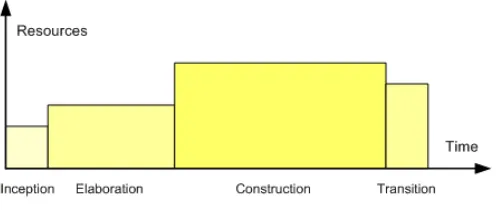
and improvements. The figure 1 shows the resource and size of the four phases.
Figure 1 Unified Development Process
2.2. The Intensive English Language Program
The program consists of 6 levels divided in 8-week sessions. Each level has
grammar, writing, reading, listening, and speaking classes taught by a number of
teachers. Usually grammar and writing are taught by the same teacher; reading,
5
in one level can teach reading, listening and speaking in another level since the classes
have different schedules.
The first step when a student whishes to study English in IELP is to apply and
submit basic personal information such as name, date of birth, country of citizenship,
number of children accompanying, spouse information, and whether they need student
visa or housing.
After the application is received by IELP, the applicant’s information needs to be
processed. As part of the application process, IELP generates a package containing
essential documents for the student to be able to get a student visa if requested. The
student then, set up an appointment at the USA embassy in their home country
requesting a student visa. The whole application process from the day the student
applies to the day the visa is obtained can take up to 120 days depending on the
country they are applying from [1].
IELP needs to keep track on all the prospective students who apply requesting
student visa and whether it was declined or not. This is necessary because on the week
before a session starts, IELP has to estimate the number of new students and then hire
new teachers accordingly.
To guarantee the quality of the IELP program, the class size has been limited to
15 students. In case the number of students is exceeded, the class is split in two or
more and additional teachers are assigned for each class.
6
Teachers at IELP need to report twice per session about their students’
performance. These reports named the Midterm and the Final report had to be manually
written including information such as homework performance, class participation,
grades, number of absences, teacher’s advices and more. On the students’ side, it was
hard to understand their teacher’s handwriting. On the administrative side, all the
reports had to be copied and then filed in the students file. When comparing students’
language improvement between sessions using their reports, it had to be done manually
as well.
By the end of every session, students have to take the Michigan Test. In
average, 50 students take it per session. Once approved the student is allowed to apply
to the University of New Orleans and then become an undergrad or grad student. In
case the student takes the Michigan Test more than once, the best score is kept. The
academic coordinator at IELP was responsible for saving the Michigan scores. The
scores were manually written in paper cards with the student name and the scores.
In case a student had taken the Michigan Test in previous sessions, the
academic coordinator had to find the student’s card and then compare the grades. The
Michigan Scores were also entered on the final report, then by the last day of the
session students could know whether they passed the Michigan Test.
The academic coordinator also had to check all the reports looking for who would
be able to receive the IELP certificate. The certificates are provided only for students
7
certificates, their names had to be manually typed one by one and printed in a special
certificate paper. The certificates were copied and filed to the students’ file.
2.3. A Spreadsheet Solution to IELP
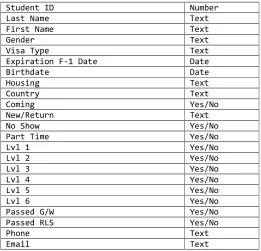
A decade ago, an electronic solution to IELP was developed using database
software, Microsoft Access, however the database was used as a spreadsheet tool. The
fields in the database had just basic application information and some classes’ data. It
could not store detailed information such as which student took which teacher’s class,
neither grades. This solution was in use for 12 years.
An obvious problem was that a new database had to be created for every new
session. Students’ information had to be manually copied from the previous database.
Search for students in different sessions and build reports was extremely difficult.
Table 1 Previous IELP database structure
Student ID Number
Last Name Text
First Name Text
Gender Text
Visa Type Text
Expiration F-1 Date Date
Birthdate Date
Housing Text
Country Text
Coming Yes/No
New/Return Text
No Show Yes/No
Part Time Yes/No
Lvl 1 Yes/No
Lvl 2 Yes/No
Lvl 3 Yes/No
Lvl 4 Yes/No
Lvl 5 Yes/No
Lvl 6 Yes/No
Passed G/W Yes/No
Passed RLS Yes/No
Phone Text
8
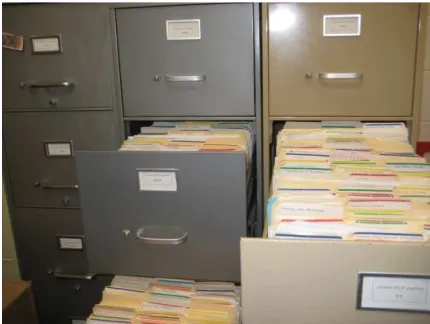
Any other extra students’ information such as passport copy, financial statement,
grades, homework, reports, placement test scores and payments receipt were stored in
paper files saved in the folders shown as Figure 2.
Figure 2 Students’ Files
Reports are extremely important for IELP. The University of New Orleans needs
to keep track of IELP details such as how many students per year, what countries they
come from, how many go to UNO after finishing the program, and how many graduate.
IELP also needs to maintain contact with international institutions, so they can send new
students to study at the University of New Orleans. These institutions ask for numbers,
they need to know how successful IELP is. For this reason, different types of reports
have to be generated all the time for many purposes. Because the database had no
relationships between sessions, reports had to be built manually.
Examples of the most commons reports are: number of unique students by year,
9
University of New Orleans, number of countries students come from, number of
students approved and failed by session and many others.
After 12 years of growth, IELP eventually reached to the point where the old
electronic solution could not sustain the business. The IELP administration wisely hired
a computer science graduate assistantship who had significant knowledge on database
and also gradually understood the IELP work processes. This was the author of this
thesis who successfully developed the system.
2.4. Adobe ColdFusion
The first idea was to create a database and then build an interface where the
administrator and the teachers could have access to all the information they needed in a
friendly and simple way.
Since UNO owns extra software licenses University asked IELP to use Adobe
ColdFusion as programming language and Microsoft SQL 2005 as database.
ColdFusion was created in 1995 by Jeremy and JJ Allaire. Its main goal is to
provide fast and simple development connecting HTML and databases. Adobe owned
the language since 2007 when the version 8 was released. The latest version, Adobe
ColdFusion 9.0.1 was released in July 2010.
The IELP system is entirely developed using Adobe ColdFusion 8. Although
10
excellent Web service support, providing features to consume and develop Web
services easily.
3. System Requirements and Features
The IELP system provides three different level of access: the student, the
teacher and the administrator levels.
Students would not need login credentials because they do not need to have
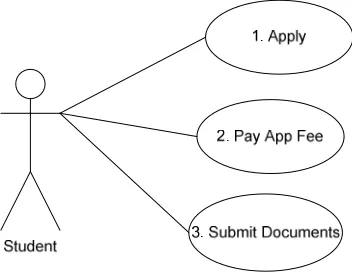
access to the system to change any information. All a student can do are three steps:
filling out an application, paying the application fee, and submitting documents. When
applying, a student needs to fill out the application form by entering student information
such as name, the section for studying, and the student’s email address. Other
information, such as whether the spouse and children would be entering in the country
are important as well, since the immigration documents need to be generated before the
student’s visa is issued as showed on step 1 in Figure 3.
After applying, the student would have the option to pay the application fee at the
application time or later as shown on step 2 Figure 3. Instructions for later payment are
provided via email. In case of late payment, the application stays on hold until the
application fee is processed.
When an application is submitted, the student receives a confirmation email
containing their application’s number. Applications’ numbers are unique numbers
11
credit card with the application number together with first and last name, and the email
address and date of birth. If the information matches with the registered data a form for
credit card information is shown.
Students are also required to send the copies of their documents such as their
passport and the bank statement as showed on step 3 in Figure 3, so IELP can start
processing the application process. A document upload form is provided and the access
is done on the same way the payment process does.
The students’ information is kept on the database for late use. Even if the student
never pays the application fee or submits any document. This information can be used
for marketing or statistics purpose later. However, credit card information is removed
from the database as soon as the payment is processed for security reasons.
Figure 3 Student use case
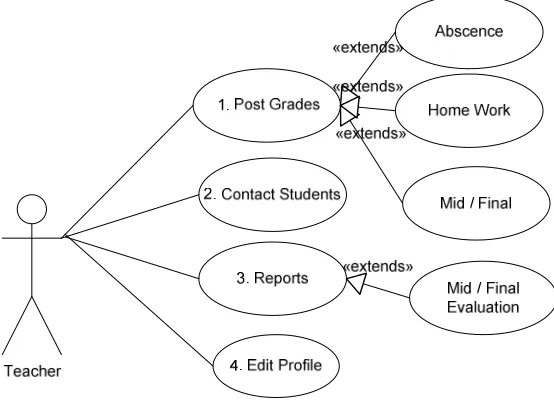
Teachers shall have more interaction with the IELP system than students have.
Each teacher would have a profile with contact information including picture and login
12
When a teacher logs in the system all the sessions which were taught by the specific
teacher are listed including current session. Clicking in any session, teacher should be
able to see a list of all students who are/were taught by the teacher in that session.
The students list would include their pictures, contact information, links to enter
their grades, midterm and final evaluations, as well a link to contact any student when
necessary. Clicking on the option to post the grades, the teacher should see fields to
post number of absences, home work grades, mid term and final grades as shown on
step 1 Figure 4. Teachers are also able to type students evaluation that would be used
later to follow the student performance during the session as shown on step 3 Figure 4.
Figure 4 Teachers use case
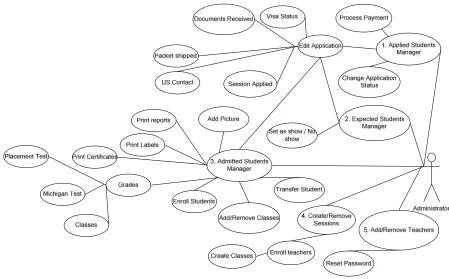
The administrator shall have full access to the system including managing students’
file from application to graduation time. When the administrators log in the system, a
13
administrator has the option to change students’ status depending on their current
application.
Applied student means that the student has applied to study at IELP but neither paid
the application fee nor submitted any documentation yet. The application is kept in the
database and in case the student decides to come in a different session, the
administrator just needs to update the application. The applied category is also used for
marketing purpose; they are prospective students that for one reason or other changed
their mind about studying at IELP. The applied use case diagram is shown on step 1
Figure 4.
As soon as the application fee is received as well the necessary documents, the
administrator confirms that this specific application is ready to become a real student
changing its status from applied to expect. Expect students are students that already
paid fees, send documentation and had their package shipped with necessary
documentation to have a visa issued. The expected use case diagram is shown on step
2 in Figure 5. At this status, even if all the documentation is right, the student has
chance to have the visa declined or delayed or just does not show up at the first day of
class. There’s no way for IELP to know for sure that a student is coming until the
student has showed up.
When a student becomes admitted, then the administrator is able to add classes
to the student depending on his placement test score taken on the first day of class as
14
many students will be in each level and then assign teachers and create classes as
showed on step 5 in Figure 5.
By default, students are allowed to take up to 5 classes with different teachers and
levels depending on their wish and the initial English assessment result. That means
that different teachers should see the same student on their grades list, however
teachers are able to post grades just on their class subject for each student.
Although each IELP session has 8 weeks, the session length can be defined by the
administrator setting start and end date as showed on step 4 in Figure 5. By this
feature, the IELP system can be easily customized to any other program with different
session length.
15 4. The Functional Design
Based on the system requirements, the design of the database and the system
structure were carried out for the IELP system. Each step closely followed the IELP
administrators’ instruction to guarantee consistence with requirements and use cases.
The client participation is very important when a system is being projected. Any later
changes on the database or system structure can significantly hurt the progress of the
project.
The IELP was not completely built at once. Some features had to be added
according to students and staff’s needs that were undetectable at the design process.
16
Figure 6 Application Process Diagram
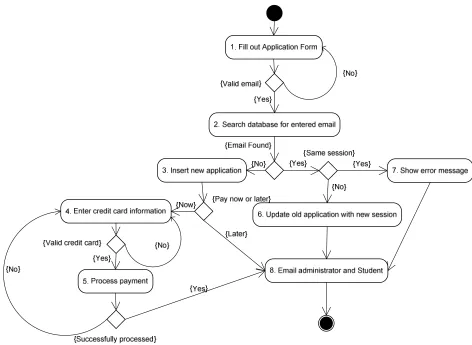
An example of feature undetectable at design time is on step 2 in Figure 6. When
IELP system started being active, students applying for one specific session and
changed their mind on studying in a different session were resubmitting a new
application. Whether the student data was found and the session was different than the
previous application, the system should just keep the previous data and update just the
17
The problem of resubmitting the same student data for different sessions would
generate duplicate records in IELP database. The way to avoid this was to verify
whether the student’s email address was already in the database.
Emailing the administrator on any event related to application, as shown on step 8 in
Figure 6, is one way for the administrator to track recent changes. Whenever any doubt
is raised related to an application, the administrator can easily contact the student just
by replying the email.
When applying, the prospective student had to pay the application fee at the
application time. Because most of the IELP students apply from other countries, their
credit cards could be blocked for international payments or they just prefer paying using
another payment method such as money order. The solution for blocked credit card was
to create an option for later payment. When later payment is selected an email is sent to
the prospective student showing different payment process and that their applications
are processed just after the application fee payment.
4.1. Security designs
Dealing with Web applications also requires special attention on security. Web
applications rely on many layers to provide user access. Just a secure source code is
not secure enough whether the Web server has an outdated, operating system or a
weak firewall [5].
The IELP application relies on the serves of the University of New Orleans; the
18
the other hand, there are many known security flaws on Web applications that need to
be carefully prevented to avoid attacks.
Because the administrator and the teachers’ areas of the IELP management system
are accessed just by IELP staff, these areas are only accessible from the University of
New Orleans campus. Any other sources of connections are blocked.
The student area is the only one opened to the World Wide Web since it needs to be
accessed by any prospective student who wishes to apply to IELP. For this reason, it
requires caution, security structures are applied here.
All data before being sent to the database are verified to avoid SQL injection attacks,
and then encrypted and stored in the database.
Captcha solutions are used to assure that a human is using the application instead
Web robot submitting spam or just random data.
More details on security structure and implementation details are provided in section
5.
4.2. The database schema
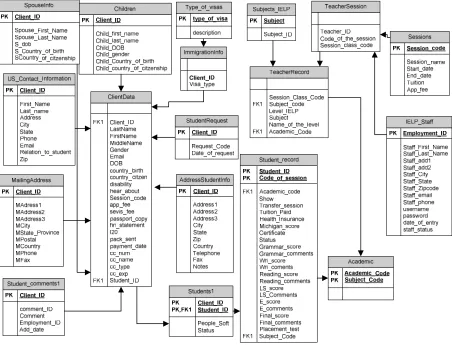
The database schema is shown in Figure 7. There are total of 18 tables related
to each other to provide the information structure for IELP needs.
Among the tables, the ClientData stores the personal data of every application
submitted to IELP. The ClientData table is served with detailed information such as
19
Visa type, addresses and other data related to students are kept in different table
though IELP can keep track of changes on student information such as visa status and
addresses changes.
Applicants that become an enrolled student have detailed information stored on
the StudentRecord table. The StudentRecord table stores students’ class information of
every session, including grades and reports. For example, whenever a student studies
for 5 sessions, there are 5 entries to the StudentRecord table.
The same idea is used for teachers; their session activity is stored on
TeacherRecord table. When a teacher teaches more than one class in one specific
session different entries on TeacherRecord would be used.
The connection between students and teachers are made in the Academic table. It is
easy to find out how many teaches a student has taken or how many students a teacher
20
Figure 7 Data base schema
4.3. The system structures
The system structure was strictly based on the database and system
requirements.
There are three system levels, the administrator, the teacher and the student.
The student applications are divided in three categories:
• Applied: Prospective students who apply but haven’t paid fees or/and submitted
21
• Expected: prospective students who applied, submitted the necessary documents, and
have paid application fees.
• Admitted: Expected students who show up, take the placement test and are enrolled in
classes.
The main system structure is shown on Figure 8.
22 5. Highlights in Implementations
Implementation is a critical step when developing an application. All the system
requirements need to be satisfied. The IELP system development processes followed
strictly the analysis presented in Chapter 4.
5.1. IELP Graphical user interface
Since the IELP system is an application for Web, it needs a Web browser to be
opened and executed. The graphical user interface was developed using standard
HyperText Markup Language (HTML)4 and Cascading Style Sheets (CSS)5. To improve
the Web application performance, client-side data manipulations are done through
Asynchronous JavaScript and XML (AJAX)6. Most of the JavaScript functions are
written using JQuery, a JavaScript library.
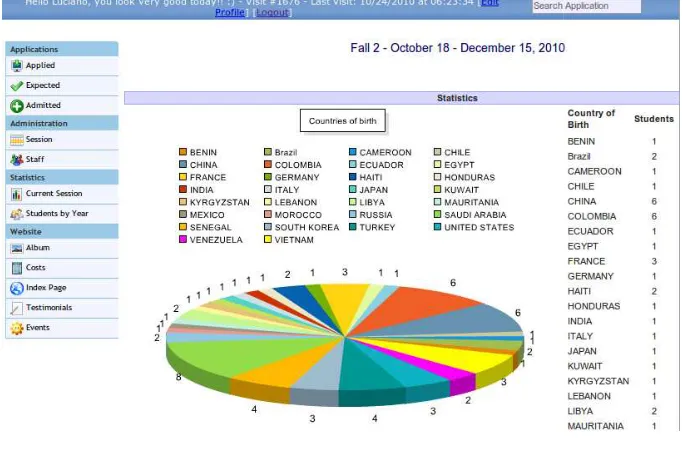
The final result is a simple, fast, and intuitive GUI based on the system structure and
functional designs showed in Figure 9.
4
HTML is the standard language to develop web sites.
5
CSS adds styles (e.g., fonts, colors, spacing) to Web documents.
6
5.2. Security
5.2.1. Storing Data
Handling and storing passwords in a database is not trivial. By default
are stored in plain text and can
common to have data stole
secure enough to avoid attacks
Even whether a password is
there are other ways that hacker
Malwares and all kind of malicious software are
attachment in an email or a programs downloaded from
computers opening doors for hackers to have full access.
software updated is not enough to avoid virus infections
23
Figure 9 Administrator Area
Handling and storing passwords in a database is not trivial. By default
stored in plain text and can be read by anyone with access to it.
common to have data stolen from database when dealing with Web applications
secure enough to avoid attacks [6].
password is considered strong enough for brute force attack
hackers can try to have access to it. Virus, Spywares,
d all kind of malicious software are the potential risks. J
email or a programs downloaded from the Internet can infect
computers opening doors for hackers to have full access. Just keeping an anti virus
enough to avoid virus infections [7].
Handling and storing passwords in a database is not trivial. By default, all data
anyone with access to it. Nowadays is very
eb applications not
enough for brute force attacks,
Virus, Spywares,
Just a simple
Internet can infect
24
The IELP application uses two types of encryption when storing data:
• Advanced Encryption Standard (AES)
ColdFusion provides support to many different encryption type through the native
function encrypt(). A 256 bits key is used to encrypt and decrypt with an AES algorithm
[8].
<cfset EncryptedText = encrypt(“TEXT”, KEY , 'AES' , 'Hex' )>
Where:
EncryptedText: variable that stores the cipher;
Encrypt(): function for encryption;
TEXT: plain text to be encrypted;
KEY: 256 bits key;
AES: the algorithm to use to encrypt the string;
HEX: the key is in hexadecimal format.
The decryption algorithm has the same parameters encrypt() has with the
difference of instead a plain text string it receives an encrypted string. The ColdFusion
function to decrypt a string is Decrypt().
• Cryptographic Hash Function
Hash functions, also known as one-way encryption, are used to store passwords
or any other data that needs to be matched with a user entered data. Besides storing
25
When a user tries to log in the password entered is hashed and the result
compared to the hash code stored in the database; whether they match means the
password entered is valid. Whether users forget the password, there is no way to
recovery it, since hash code are one-way encryption; in this case, the password is reset
and the user is required to define a new one.
ColdFusion provides native hash algorithm functions named Hash(). When using
the hash function, when the type of algorithm is not specified, ColdFusion by default
uses the MD5, known for being breakable. The IELP application uses standard SHA-1
for all hash functions [9].
<cfset hashvalue = Hash(Form.password, "SHA")>
Where:
Hashvalue: variable to store the hash result;
Hash(): calculate the hash from a given string;
Form.password: a password in plain text;
SHA: hash algorithm;
5.2.2. SQL injection
SQL injection is a technique by which a malicious code is inserted into strings
through GET or POST forms altering the SQL statement built on the server side.
Dynamic Web pages use user-input variables that are concatenated into a dynamic
SQL command to build database queries, as for example a search process. Any
vulnerable dynamic pages that access database records to display content can be
26 • Show content that is not expected;
• Delete, update, or add content;
• Redirect users to another website using JavaScript.
SQL injection attacks explore a feature that most of database management
systems have; it allows queries to contain more than a single operation. It is not a bug
or a secure flaw, it is a feature. Developers need to be careful when dealing with data
submit from forms or url parameters to avoid SQL injection attacks [10].
ColdFusion provides a very convenient feature to lock SQL injection attacks. All
data from forms, url parameters and even cookies need to use a feature named
cfparam to filter SQL injection attacks [11].
For example, let’s say a form variable defined as ClientID is submitted trough a
URL parameter. Before building a sql query, cfparam must be used:
<cfparam name="URL.ClientID" type="Integer">
In this example, whether the variable receives any other data that is not an
integer value, ColdFusion would block it and generate an error message. If the variable
has only integers, then the query can be built:
<cfquery>
SELECT * FROM Students
where ClientID = #URL.ClientID#
27
Another workaround to avoid SQL attacks would be to block any special
characters entered in a form. Special characters can be blocked on client side using
JavaScript and/or on server side creating functions to detect it.
The IELP application uses both ways to protect from SQL attacks, JavaScript
and ColdFusion functions. The JavaScript is executed by the client browser, which
means, any user can easily shut down JavaScript from being executed.
On the client side a JavaScript script using JQuery library to block special
characters would be:
<script type="text/javascript">
$(function() {
$("input[type='text'], textarea").keyup(function(event){
var block = $(this).val().replace(/[^@,-._a-zA-Z 0-9]+/g,'');
$(this).val(block);
});
});
</script>
The JavaScript script above, using regular expressions, ignores any other
character not included in [^@,-._a-zA-Z 0-9].
On the client side a ColdFusion function to block any special characters from a
form or an URL parameter would be:
<cfif evaluate(#findoneof("%=<>^*+`[]{}",
TRIM(evaluate("form." & variables.myfieldname)))#) GT 0>
<cfoutput>
28 Try entering only letters or numbers.
</cfoutput>
<cfabort>
</cfif>
The ColdFusion function above looks for the characters: %, =, <, >, ^, *, +, `, [, ],
{, and }. Whether any of these characters are found in the submitted form the
application is aborted.
Blocking these characters there is not side effects when students are applying for
IELP using the application form. Since the application just asks basic information such
as names, emails, date of birth and yes/no questions there is no need for using special
characters.
5.2.3. Captcha
Although blocking special characters is a good workaround for blocking SQL
injection attacks, it cannot prevent Web robots of applying submitting random data
and/or spam. The IELP application have used CAPTCHA solutions on the application
form to prevent robots of applying random data or even spams.
According to Carnegie Mellon University that has studied the CAPTCHA solution,
“A CAPTCHA is a program that protects websites against bots by generating and
grading tests that humans can pass but current computer programs cannot. For
example, humans can read distorted text on the screen, but current computer programs
Since the IELP application needs to be open to any one on
wishes to apply, it can easily
Web forms such as SQL injections or
The IELP uses CAPTCHA on its form provided by a Google ow
named reCAPTCHA. The reCAPTCHA solution is widely used in the World Wide Web
for being free and containing efficient challenges easy to implement by any developer
[13].
6. Problem Statement about Data Exchange Issues
The new IELP system should solve all the problems managing students.
the report and all the managing tasks were now very simple. But there was still a
problem: all the IELP students are also UNO students and their inform
both databases.
6.1. Manual Data Exchange
The University of New Orleans relies on Oracle People
staffs and employees. The University
students from IELP, since IELP is a
29
ication needs to be open to any one on the
easily be detected by Web robots looking for
eb forms such as SQL injections or just to send spam.
The IELP uses CAPTCHA on its form provided by a Google ow
named reCAPTCHA. The reCAPTCHA solution is widely used in the World Wide Web
for being free and containing efficient challenges easy to implement by any developer
Figure 10 reCaptcha [24]
t Data Exchange Issues
The new IELP system should solve all the problems managing students.
report and all the managing tasks were now very simple. But there was still a
problem: all the IELP students are also UNO students and their inform
The University of New Orleans relies on Oracle PeopleSoft to manage students,
The University system just requires basic information of the
since IELP is a non credit program. The University
the Internet who
security flaws on
The IELP uses CAPTCHA on its form provided by a Google owned company
named reCAPTCHA. The reCAPTCHA solution is widely used in the World Wide Web
for being free and containing efficient challenges easy to implement by any developer
The new IELP system should solve all the problems managing students. The search,
report and all the managing tasks were now very simple. But there was still a
problem: all the IELP students are also UNO students and their information should be in
oft to manage students,
just requires basic information of the
30
that they are enrolled in a non credit program but does not need to know the specific
student data such as which English level students are taken nor their grades. To keep
track of all students enrolled in any program at the UNO, students are added to
PeopleSoft, and then PeopleSoft generates a unique student identifier called student ID.
Although the new IELP system should have all the necessary student data, the
student ID would be missing because it had to be generated by PeopleSoft. For a
student ID be generated the University of New Orleans requires: student full name,
gender, visa type, birth date, country, phone number and email. Before any student is
added to the PeopleSoft database, a search is done to guarantee that will not have any
duplicate data. A student can have one and only one entry in the database.
Because IELP currently does not have access to PeopleSoft, the students’ data
have been sent to UNO admissions office by email of spreadsheets.
The IELP spreadsheet contains all the required student information to generate a
student ID. When received, the admissions officer manually entered the information in
PeopleSoft one by one. The new students’ ID generated would then be copied and
pasted in the spreadsheet and sent back to IELP. On the IELP side, when the
spreadsheet was received containing the new students ID, the administrator had to
enter them one by one in the IELP database by copying and pasting.
The complete process of exchanging students ID was human handled and propitious
to errors. Inconsistency on students’ data could generate duplicate records on
PeopleSoft when former IELP students applied to UNO. The manual data exchange
31
Figure 11 Manual Integration between IELP and the University Enterprise Information System
7. Integration of IELP into the University Enterprise Information System
The goal of this phase was to build integration between the IELP system and the
University Enterprise Information System automating the process of transferring
information from one system to another.
7.1. Automated Data Exchange
Developing an interaction between the IELP system and the University
Enterprise Information System was necessary to automate the generation of students’
32
The University Enterprise Information System is based on Oracle PeopleSoft that
provides a set of tools to ease the development of components to interact with third
party applications through Web Services known as PeopleSoft Integration Broker.
The new integration diagram is shown on Figure 12.
Figure 12 Integration between IELP and the University Enterprise Information System
7.2. Oracle PeopleSoft
According to Onuora Amobi from peoplesoft-planet.com, “PeopleSoft is an
integrated software package that provides a wide variety of business applications to
assist in the day-to-day execution and operation of business processes. Each individual
application, such as Financials, Customer Relationship Management and Human
Resources, interacts with others to offer an effective and efficient means of working and
33
The PeopleSoft Integration Broker, a PeopleSoft integrated software, provides
support for:
• Web Services (consume and provide);
• Inbound/outbound synchronous/asynchronous XML messaging, including SOAP
support.
• Variety of communication protocols;
• Advanced Web Service customizations to configure and adequate it to many different
needs.
The communication channel between PeopleSoft and third party application is
provided through gateways. The integration gateway includes a set of listening
connectors. The connectors provide different listening protocols such as HTTP, FTP,
and SMTP [15].
Any programming language with W
through PeopleSoft Integration Broker
connectors.
Figure 14 shows the PeopleSoft Integration Broker main screen.
34 Figure 13 Gateways
Any programming language with Web service support can interact with
through PeopleSoft Integration Broker using the protocols provided by the listening
shows the PeopleSoft Integration Broker main screen.
ervice support can interact with PeopleSoft
using the protocols provided by the listening
7.3. PeopleSoft Search Service
Basically, every action on
responsible for providing operations that work as trigger for an action.
have one or more operations.
already built in and ready to be used. This project needs just one service: External
Search/Match Service (SCC_SM_SERVICE).
Campus Community 9.0 Fundamenta
functionality looks and feels much like the standard search/match that resides in
35
Figure 14 Integration Broker
Service
Basically, every action on PeopleSoft is performed by services
responsible for providing operations that work as trigger for an action.
operations. PeopleSoft comes by default with hundreds of services
already built in and ready to be used. This project needs just one service: External
Search/Match Service (SCC_SM_SERVICE). According to PeopleSoft Enterprise
Campus Community 9.0 Fundamentals PeopleBook [16], the external search/match
functionality looks and feels much like the standard search/match that resides in services. Services are
responsible for providing operations that work as trigger for an action. Each service can
hundreds of services
already built in and ready to be used. This project needs just one service: External
According to PeopleSoft Enterprise
, the external search/match
36
Campus Solutions. However, external search/match integrates with any external
system.
When an external search/match is performed the result is returned in three
different columns: the score, the import and the detail. The score represents a number
to weight the matching candidate. Based on the criteria sent such as, name, date of
birth, gender, address, and city a score is returned to indicate if there is any chance to
have another student with duplicate information. In case there is no match for the
search criteria, that is no score, the data is added to the database and a student ID is
returned on the import column. The detail column shows detailed student information
when the search criteria returns any result [16].
Based on services, web services are generated by a wizard tool provided by
PeopleSoft Integration Broker. To generate a web service is just necessary to select the
service and follow the wizard steps. At the end of the process a WSDL is generated
and an address to access the web service provided. With the WSDL file address, any
7.4. Issues with PeopleSoft Web
Although PeopleSoft provides a wizard to generate web services based on its
services, it is not a simple task. PeopleSoft is a complex system
service requires many settings on handlers, listeners, service, operations
properties and many others
The only documentation provided to auxiliary on PeopleSoft
developments are the People Books.
license owners. Even following People Books instructions, setting up PeopleSoft wasn’t
possible at the time this paper was written.
The University of New Orleans and the University Computer Center (UCC)
worked very close with the IELP system developers to develo
37
Figure 15 Web Service wizard
Issues with PeopleSoft Web Service
Although PeopleSoft provides a wizard to generate web services based on its
services, it is not a simple task. PeopleSoft is a complex system. Generating a web
es many settings on handlers, listeners, service, operations
and many others.
The only documentation provided to auxiliary on PeopleSoft settings and
the People Books. The books are most provided to PeopleSoft
Even following People Books instructions, setting up PeopleSoft wasn’t
possible at the time this paper was written.
The University of New Orleans and the University Computer Center (UCC)
worked very close with the IELP system developers to develop an interaction between Although PeopleSoft provides a wizard to generate web services based on its
enerating a web
es many settings on handlers, listeners, service, operations, gateway
settings and
The books are most provided to PeopleSoft
Even following People Books instructions, setting up PeopleSoft wasn’t
The University of New Orleans and the University Computer Center (UCC)
38
PeopleSoft and IELP. A standalone PeopleSoft instance was created just for tests and
developing purposes, but internal PeopleSoft unexpected errors made the interaction
between PeopleSoft and IELP not possible for now.
The UCC and Oracle are working together to fix PeopleSoft errors and then
provide the web service to not only IELP system but any other third party application
that needs interaction with the University Enterprise System.
7.5. Alternative experiments
Meanwhile UCC was working on a fix for PeopleSoft errors; an alternative web
service was built in ColdFusion to simulate a PeopleSoft instance.
ColdFusion provides great support for both consume and provide web services.
The idea was to create a web service and database in a different web server keeping
the same characteristics and fields PeopleSoft provides in its external search/match
service.
Different from PeopleSoft, ColdFusion web service worked as expected and IELP
system could consume it as well.
39
The web service receives necessary student information, search in the database
to avoid any duplicate records and in case it is not found, add to the database returning the
Client ID. The ColdFusion Web Service source code is shown below.
<cfcomponent>
<cffunction name="PeopleSearch" access="remote" returntype="string" output="no">
<cfargument name="lastname" type="string" required="no"> <cfargument name="firstname" type="string" required="no"> <cfargument name="middlename" type="string" required="no"> <cfargument name="gender" type="string" required="no"> <cfargument name="visa" type="string" required="no"> <cfargument name="Birthdate" type="string" required="no"> <cfargument name="Country" type="string" required="no"> <cfargument name="Phone" type="string" required="no"> <cfargument name="Email" type="string" required="no">
<cfset searchresult=#FindStudent(arguments.lastname, arguments.firstname, arguments.middlename, arguments.gender, arguments.Birthdate)#>
<cfset returnArgument="">
<cfif searchresult EQ "Not Found">
<cfquery name="insert_new" datasource="IELP"> INSERT INTO clientdata
(lastname, firstname, middlename, gender, visa, birthdate, country, phone, email)
VALUES
(#arguments.lastname#, #arguments.firstname#, #arguments.middlename#, #arguments.gender#, #arguments.Birthdate#)
</cfquery>
<cfset returnArgument=#FindStudent(arguments.lastname,
arguments.firstname, arguments.middlename, arguments.gender, arguments.Birthdate)#> <cfelse>
<cfset returnArgument="Error"> </cfif>
<cfreturn returnArgument> </cffunction>
<cffunction name="FindStudent" access="private" returntype="string" output="no">
<cfargument name="lastname" type="string" required="no"> <cfargument name="firstname" type="string" required="no"> <cfargument name="middlename" type="string" required="no"> <cfargument name="gender" type="string" required="no">
<cfargument name="Birthdate" type="string" required="no">
<cfquery name="check_dup" datasource="IELP"> select * from clientdata
where
FirstName = <cfqueryparam value="#arguments.firstname#"> and
LastName = <cfqueryparam value="#arguments.lastname#"> and
MiddleName = <cfqueryparam value="#arguments.middlename#"> and
Gender = <cfqueryparam value="#arguments.gender#"> and
40 <cfset returnString = "">
<cfif check_dup.recordcount EQ 0> <cfset returnString="Not found"> <cfelse>
<cfset returnString="#check_dup.clientID#"> </cfif>
<cfreturn returnString> </cffunction>
</cfcomponent>
With the source code presented above, ColdFusion generates a WSDL file to
provide a Web Service that can interact with any third party application developed in any
41
8. Conclusion
The Intensive English Language Program at the University of New Orleans offers
a language program designed especially for non-native English speakers. The program
was created in 1995, since then 2000 students from over 120 different countries have
improved their English skills.
In this project, to replace a primary outdated database structure, a complete new
management system for the Intensive English Language Program was developed
obeying all the phases in a system development project.
Following the new system requirements, an interaction between the Intensive
English Language Program management system and the University Enterprise
Information System was created using web services technology on exchange data
process.
The University Enterprise Information System is based on Oracle PeopleSoft which
provides support for creating web services to communicate with third party systems.
Providing precarious support and poor documentation, at the time this thesis was
written the data exchange between Oracle People Soft and The Intensive English
Language Program was not completely done. Alternative experiments were used to
42 9. References
[1] IELP - Intensive English Language Program at University of New Orleans. University of New Orleans. Web. 25 May 2010. <http://ielp.uno.edu>.
[2] The University of New Orleans - A Higher Standard of Higher Learning. Web. 12 July 2010. <http://www.uno.edu>.
[3] "Unified Process." Wikipedia, the Free Encyclopedia. Web. 25 Sept. 2010. <http://en.wikipedia.org/wiki/Unified_Process>.
[4] "ColdFusion." Wikipedia, the Free Encyclopedia. Web. 1 Aug. 2010. <http://en.wikipedia.org/wiki/Coldfusion>.
[5] "Application Server." Wikipedia, the Free Encyclopedia. Web. 12 June 2010. <http://en.wikipedia.org/wiki/Application_server>.
[6] "Microsoft SQL Server 2005." Microsoft SQL Server 2005. Web. 4 July 2010. <http://www.microsoft.com/sqlserver/2005/en/us/default.aspx>.
[7] "Antivirus Is Not Enough - Introducing Symantec Protection Suite | Symantec." Symantec - AntiVirus, Anti-Spyware, Endpoint Security, Backup, Storage Solutions. Web. 12 Sept. 2010.
<http://www.symantec.com/en/pr/business/theme.jsp?themeid=web_security_sps>.
[8] "ColdFusion MX 7 Encrypt." ColdFusion Documentation. Web. 17 July 2010.
<http://livedocs.adobe.com/coldfusion/7/htmldocs/wwhelp/wwhimpl/common/html/ wwhelp.htm?context=ColdFusion_Documentation&file=00000457.htm>.
[9] "Hash()." Adobe Coldfusion 8. Web. 30 Aug. 2010.
<http://livedocs.adobe.com/coldfusion/8/htmldocs/help.html?content=functions_h-im_01.html>.
[10] Chickowski, By Ericka. "SQL Injection." Wikipedia, the Free Encyclopedia. Web. 25 Aug. 2010. <http://en.wikipedia.org/wiki/SQL_injection>.
[11] "Cfparam." Adobe. Web. 19 Aug. 2010.
<http://www.adobe.com/livedocs/coldfusion/6.1/htmldocs/tags-b13.htm>.
[12] The Official CAPTCHA Site. Web. 18 June 2010. <http://www.captcha.net/>.
[13] "ReCAPTCHA: Stop Spam, Read Books." Google - ReCaptcha. Web. 22 Sept. 2010. <http://www.google.com/recaptcha>.
43
[15] "Integration Broker - PeopleSoft Wiki." PeopleSoft Wiki. Web. 17 Sept. 2010. <http://peoplesoft.wikidot.com/integration-broker>.
[16] PeopleSoft Enterprise Campus Community 9.0 Fundamentals PeopleBook. Oracle, 2010. SKU Cs9lsfn-b0310. PDF.
44 VITA
Luciano Ziegler was born in Roraima, Brazil. He received his Bachelor of
Engineering from Pontifical Catholic University of Goiás, in fall 2006, with a major in
Computer Engineering. In spring 2007 he moved to New Orleans to study in an
Intensive English Language Program for just 4 months. In summer 2007 he started
working as student worker for the Division of International Education at the
University of New Orleans and his plans to go back to his home country was
postponed.
In spring 2008 he started a Master Degree in Computer Science at the University
of New Orleans. As a graduate assistantship he continued working for the Division of
International Education developing the student manager system shown in this thesis.
In 2010 he received a student leadership recognition award in recognition of his
outstanding leadership skills and service for the University of New Orleans. In fall
2010, he received his Master of Science from the University of New Orleans with a