Design and Implementation of a Portable Name Card
Typesetting System
Chih-Horng Ke
Department of Information Management, Chang Jung
Christian University Taiwan
Chao-Hsien Hsieh
Department of Computer Science and Information Engineering, National Cheng
Kung University
Chiang Lee
Department of Computer Science and Information Engineering, National Cheng
Kung University
ABSTRACT
The goal of this study is to develop a real-time personalized digital name card typesetting system with seamless operability across various platforms. The system includes an authentication module, a template selection module, a text typesetting and merger module, a frame selection and merger module, and a QR code generator and merger module. The system authentication module proposes a potential authentication mechanism between server and client. The template selection module entails making a choice of template from the system-integrated gallery. The text typesetting and merger module proposes the methodology of automatic typesetting that is under fixed font and size restrictions. After it is merged with the last picture, the frame selection and merger module combines one of the pictures from the frame gallery. The QR code generator and merger module is essentially a flowchart of how the QR code is generated. A personalized name card is the end product of these modules. The prototype generation shows that the system works well as a name card typesetting system. Finally, the system shows promising potential for applications to the emerging and proliferating market of smart phones.
Keywords
mobile device, name card, QR code, typesetting, smart phone.
1.
INTRODUCTION
Exchanging name cards is a popular way to get contact information in social and formal gatherings. They provide instantaneous and concise information of a new acquaintance or potential business partner. Personal and company details are easily relayed through this medium. Although rich in information, it is rather easy for name cards to be misplaced or lost. In years past, Rolodex was once a popular way to manage name cards, but for e-generation people it becomes inconvenient because it may not be handy when they need it.
Smart phones are handheld computers integrated with mobile phone interfaces that allow multitasking applications to run on hardware. They combine the functions of a camera phone and a personal digital assistant (PDA). In recent years, as the number of smart phone users has increased dramatically, so have the quantity, quality, and diversity of smart phone applications. The application software recognizes name cards and then stores them into a mobile phone, such as CamCard INTSIG Information Co., Ltd, Milpitas, CA. or WorldCard Mobile PENPOWER Technology Ltd., Hsinchu, Taiwan, R.O.C.
Currently, the disadvantage of the existing mobile software is that it is not able to recognize various types and formats of name cards perfectly and cannot guarantee accuracy. At present, the major types of transmission for mobile phones include Optical Character Recognition (OCR), handwriting, and file forwarding by means of Bluetooth or QR code scanning [1-4]. Each of these techniques has some irreplaceable and nice features. The advantage of OCR is being able to make quick copies. The contribution of using handwriting is to assist memory while going through every name card. The feature of file forwarding is that it is easy to transfer electronic name cards compared to sending files through email or downloading files from data storage. But, the major problem of these electronic name card systems is that they can hardly recognize a card correctly 100% of the time by current apps such as CamCard and WorldCard Mobile. There is a great need for verification before an electronic card in the mobile phone is transmitted. Commercially, some name card applications exist, but these applications are not without shortcomings. Some of them are enumerated as follows: (1) Traditional system of name cards cannot be searched for and dialed or emailed at the same time. (2) Currently, incompatibility issues have been a source of error in electronic name cards. (3) Existing application software cannot make, access, exchange, or encode electronic name cards efficiently. (4) Existing name card systems do not provide encryption and decryption functions for added security. (5) Existing mobile software cannot produce a name card that allows for customizable selection of template, frame, size of QR code, and color of QR code.
will have an interoperability function allowing for the seamless transmission of name cards between PCs and mobile devices.
The rest of the paper is organized as follows: Section 2 provides an overview of the features of the QR code generator, the typesetting system, of name cards with and without QR codes, and of the mobile name card system. Section 3 describes the system architecture of PNCTS, which represents how to precisely calculate the type of text layout and how to operate the storage mechanism of text format. In Section 4 the prototype generation discusses the management and operation of PNCTS. Section 5 contains the experiment and discussion, and Section 6 provides a brief conclusion and future applications that would extend the present study.
2.
RELATED WORKS
This section presents the recent status of name card typesetting systems with and without QR codes, and makes a brief review of previously published systems and methods.
2.1
The QR code and code generator
The QR code is a two-dimensional barcode [5] that can store at most 4,296 alphanumeric characters for devices that have an integrated camera, as in the case of most smart phones [6]. It requires the appropriate software to connect with web-based resources and provide related information for the product or service in question. QR codes can be scanned by mobile phones and, more importantly, are useful to many people. Wakahara et al. (2012) defines QR coding using the dotted picture multiplexing method and evaluates the redundancy characteristics. The QR code is made by the QR Editor, with dotted pictures that are scanned, decoded, and interpreted by the barcode reader of a mobile phone [7].2.2
The typesetting system
Using typesetting software to generate name cards through a smart phone not only helps to give personal details without the necessity of having physical business cards in one’s possession, but also provides for an almost unlimited number of customization possibilities in real-time. Earlier studies of computerized typesetting include a simple overview of the input area, edit functions, information retrieval, correction and make up, and computer programming. Data can be reformatted and composed for a phototypesetter automatically [8, 9]. Subsequently, studies were done to determine methods to integrate non-textual elements such as special characters into the elements to be printed using a computerized typesetting system [10, 11]. Then a typesetting application was created using PAGE-1 language [12]. Continuing to recent studies of computerized typesetting, a series of typesetting commands was developed for TEX documents [13], while typesets such as the Content Management System (CMS) used LATEX typesetting software as a developing tool. Moreover, some system applications were also developed for practical use, such as the LISP macros in the Emacs text editor [14]. This type of system is not limited by its typesetting environment. The implementation of a music processing system that can handle typesetting music, textual descriptions of music pieces and products, voices, etc. was examined [15]. A new method that extracts data from normal documents and transforms them into XML documents with automatic typesetting was presented [17], while a few years earlier another study developed an intellectual automatic
typesetting system (IATS) to solve the bin packing problems [18]. Although typesetting software has existed for many years, the mobile devices have only recently been widely applied through apps.
2.3
The traditional name card systems
without QR code
Most traditional name card software is applied to individual environments. Juicy Business Cards SWGSoft Inc. JuicyBC is a business card design software that can preview some business card templates created with JuicyBC through its web page. It is possible to design one’s own unique business cards in as quickly as a few minutes, with access to quality background images and layouts. Cards can also be printed directly from one’s own computer.
The business card software, LaughingBird Software, creates matching business cards to mix, match, and modify professionally designed letterhead and business card designs. This software includes 95 matching business card templates and letterhead designs.
BusinessCards MX 4.5 of Mojosoft Software helps to design and print a professional business card. The design process is based on ready-to-use elements to be accessible in the program, such as images and backgrounds, while freely shifting them on the prepared product. It uses ready-made templates or, if the individual or company is creatively inclined, independent designs.
In a separate study, a practical business card application model was created using a support system. The system manages aesthetic rules in an XML database and determines the business card layout by using a genetic algorithm. A facility allowing the user to edit the layout interactively is also provided. Because this is an interactive system, it takes time to finish a business card [19].
2.4
The traditional name card system
with QR code
QR4 Europe, Netherlands, talks about the reason for including a QR code on a business card. It is more convenient to transfer contact information into the recipient’s address book on the mobile phone through scanning. The alternative is retyping everything manually or using an OCR scanner. In many situations, these black-and-white blocks are not aesthetically appealing and do not complement the representation of a company as a business card should. After this system generates the QR code, it will be combined with a new name card according to the user’s preferences. WebDesigner Depot has incorporated similar functions with QR4 Europe.
2.5
Mobile name card system
WorldCard Mobile, the first business card scanning application for Android, instantly transfers information from business cards to the user’s native contacts. With a simple click of the camera, you no longer have to manually input contact information from business cards. Available in app stores, WorldCard Mobile has been adopted by over 20 million professionals.
already been downloaded by more than 30 million people worldwide.
3.
SYSTEM ARCHITECTURE
The system flow of the name card typesetting system is presented in Figure 1. The data collection from clients, system authentication, text typesetting, and QR code generation will be explained in the following sections.
3.1
Data collection
To generate a name card in advance, it is necessary to input seven texts into the textbox and select a QR code size, a QR code frame, a template, and a QR code color. Seven text items are required for input: user name, company’s name, company’s address, phone number, title, mobile number, and email address. The security functions of the encoder and decoder can be optionally applied to address and mobile phone number. Row data System Authentication Template Gallery Text Typesetting and
Merger
Frame Gallery QR Code Generator
[image:3.595.330.556.112.265.2]and Merger Name Card Internet Template Picker Frame Picker and Merger Size and Color List
Fig 1: System flow
3.2
System authentication
This section discusses the authentication of the client’s data transmission. In a previous study, the authentication mechanism was done using the HTTP web on the client side. It focuses on two scenarios: namely, the acknowledgment or rejection of the authentication process [20]. In the current study the HTTP web was considered on the server side, and the authentication mechanism suggested by Chung (2012) was reconfigured to match the current requirement. Figure 2 shows authentication success and the type of name card from the target server. When receiving name card requests from an unknown client (smart phone, tablet PC, etc.) authentication is an especially important aspect of picture file transmission. After authentication is approved by the picture server, the requested picture will be sent to the mobile device. The sequence charts of Figure 2 and Figure 3 present the user authentication phase, which is required from the mobile device. This system goes through HTTP protocol that sends data from client to server. Steps (1) and (2) request name card and data to be filled in on the web page. After a request is sent, step (3) HTTP parser requests the picture and sends a text message. Step (4a) requests picture for web server and then name card manager saves text messages through step (4b). If authentication on the web server is successful, steps (5), (6), and (7) will be executed. The left side of step (6) can save text messages and picture into storage. The right side of step (6) will send picture back to web server. Both activities happen at the same moment. Next, step (8) transmits the picture to the network manager. The picture manager receives picture data, sends metadata to a data manager, and outputs the picture to the mobile device’s screen for viewing. Subsequently, the data manager collects
field message and picture metadata through steps (9b) and (10a). Finally, step (11) sends the field of metadata to an event manager. Web Server Data Manager Event Manager Picture Manager HTTP Parser Name Card Manager HTTP Compose r Network Manager
Picture Server Mobile Device
(1) request name card (3) send HTTP message
(2) request name card Storage
(4a) request picture (4b) send text messages (5) request name card (6) save text messages and picture
(6) send picture
(7) send HTTP message (8) send picture
(9a) send picture data (9b) send field message
(10a) send picture meta data Monitor
(10b) output picture
[image:3.595.82.293.263.417.2](11) send field of meta data
Fig 2: Sequence chart for authentication success
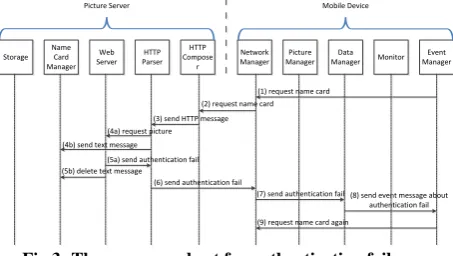
Another scenario is when the user authentication fails. When this situation happens, it can disrupt the normal procedure. As shown in Figure 3, HTTP parser passes two messages, steps 4a and 4b. Step (4a) requests picture for web server before saving text messages in step (4b). If authentication fails, the incident is documented by a web server, which deletes the text message on the name card manager automatically. Steps (5a) and (5b) occur simultaneously. After that, steps (6) and (7) send notice of authentication failure to the network manager and data manager. Finally, the event manager is informed via message about the authentication failure in step (8). Step (9) goes back to request the name card again. That authentication information includes identifier and password from the mobile device of login. Most likely, the app in the smart phone can help this work.
Web Server Data Manager Event Manager Picture Manager HTTP Parser Name Card Manager HTTP Compose r Network Manager
Picture Server Mobile Device
(1) request name card (3) send HTTP message
(2) request name card Storage
(4a) request picture (4b) send text message
(5a) send authentication fail (5b) delete text message
(7) send authentication fail (8) send event message about authentication fail
Monitor
(6) send authentication fail
(9) request name card again
Fig 3: The sequence chart for authentication fails
3.3
Typesetting method
[image:3.595.329.556.456.584.2]T1
T2
T3
X1+W X2
Y1
Y2
Y3
frame
T2
T1
T3
X1+W X2
Y1
Y2
Y3
(a)
(b)
T1
T2 T3
X1+W X2
Y1
Y3
Y2
T2
T1 T3
X1+W X2
Y1
Y3
Y2
(c)
[image:4.595.79.309.70.247.2](d)
Fig 4: Types of text layout
Lemma 1
If given cardlength, d, and k1 as the input, then all other parameters of name card are shown as below.
W=(1/2) cardlength–d (1)
X2=(1/2) cardlength+d (2)
Y2=(1/2) cardwidth+d (3)
X1=d (4)
Y1=d (5)
Y3=k Y2
[image:4.595.80.292.650.765.2]
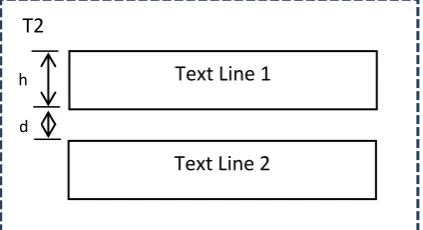
(6) Next, each text block includes a few text lines, as shown in Figure 5. The summary of Lemma 2 implies different text lines and locations. Based on different types, it can calculate different text blocks and the number of text lines of each block. T2 as an example is showing the relationship between text lines. Name cards generally come in four sizes: 9x5.5, 9x5.4, 9x5, or 9x4.5cm. The size used in the present study was 9x5.4cm. Theδof general size for the name card is closer to a width 340 pixels and a height of 204 pixels. Frame size followed by QR code size is the same type of size: large, medium, and small. In order to avoid non-readings from the QR code source figure-scanner, QR codes cannot be too small. This is why this work sets a source figure with three fixed sizes. QR codes can also be adjusted for position. Eventually, both Lemma 1 and Lemma 2 are applied into induction equations, or Lemma 3.
Fig 5: The high and distance of text line
Lemma 2
For each text line in a text block, as long as each di, hi, and number of types has been given by the client, the following formula is shown as the blocks of T1, T2, and T3.
T1:
Y1 + type1 and 3 (7)
Y2 + type2 and 4 (8)
T2:
Y2 + type1 and 3 (9)
Y1 + type2 and 4 (10)
T3:
Y3 + type1 and 3 (11)
Y1 + type2 and 4 (12)
Hi: the height of font size i: the number of text line d: the distance of each text line k: the total number of text line Tj, Yj: text area j, j=1,2,3
Lemma 3
The bound of name card should be understood and presented as follows.
Y1 + <= Y2 (13)
Y2 + <=
~ 204 (14)Y3 + <=
~ 204 (15)Lemma 3 is organized from both Lemma 1 and Lemma 2. After the text strings are received, the XML file is available for layout storage that is easy for updating and querying. Many parameters are used to generate text stored into the XML file for each different text layout. Later, it will show a more detailed description. Then, every XML file can provide information that is convenient for Database through SQL to tracing history data. The schema of XML displays each parameter that locates text layout and text line. The meaning of X1, X2, X3, Y1, Y2, and Y3 is the distance for types of text layout. The purpose of the database is to record the index of each name card without creating extra variables and generating NULL data.
Text Line 2
T2
d
3.4
QR code generator and merger
There are two works in the module of QR code generator and merger. First, even though Wakahara et al. (2012) provides their method to make the QR code with the dotted pictures, this paper reorganizes the flow chart of QR code generator in Figure 6. Two parameters, size and color, are selected by the client. All options are listed in the first sub-module. The base image is created as a background for the QR code. Base images are combinations of back image color and front image color. Colors are selected by the client. Next, pixel point fills the image file based on data set array, followed by the generated rule of QR code. After that, to create a targeted image, this prepares for both base image and targeted image being combined together. Finally, the combined image file has to be resized to a size determined by the client. This paper limits three sizes in QR code because of the consideration of name card size. Storage capacity for text is tremendous; otherwise, it is hard to typesetting when a large size of QR code is chosen.based image creation
back image color
front image color size and
color list
image fill with pixel targeted image
creation
consolidation based image and
targeted image
resized image
Fig 6: QR code generator and expansion flow
Last, this resized image file is merged into an existed semi-finished product. Here, the location of QR code with its frame follows the type of text layout that is set from the client in advance.
4.
PROTOTYPE GENERATION
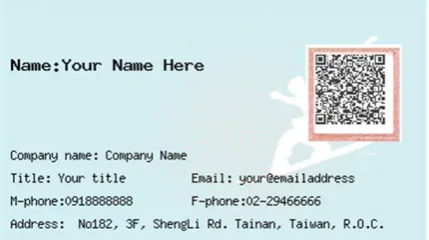
[image:5.595.77.290.279.335.2]The prototype generated by the PNCTS is generated as shown in Figure 7.
Fig 7: Prototype of PNCTS
Some management functions are listed as “preview”, “save”, “query all”, “specific query”, “update”, “delete”, and “exit”. The “preview” button can send all input text to server side. And then, retrieving name card from processing is returned by the server. When the “save” button is pressed, the previewed name card can be saved onto mobile. Also, the total number of name cards is able to be counted and shown on the monitor. Any stored name cards can arbitrarily be updated and/or deleted by the client at any time. The control buttons are “update” and “delete”. This paper proposes two query functions for management. One is “query all” which will retrieve all generated name cards in the mobile device. The client can review those name cards one by one on his or her mobile device. The other function is “specific query,” which mentions an input string—either family name, first name, or other substring
from seven input items. The client can get the related name cards that contain at least one substring. For example, the client types “Alex” and chooses one option of combo box “specific query”. Then, all name cards in mobile phones, which have the same string between each sentence, should be caught up and displayed on the monitor immediately. That means the command “Alex” might result in more than one person being called.
5.
EXPERIMENT RESULTS
The server uses an Apache HTTP server as its engine. The web browser is implemented using PHP, and is used to communicate with either a mobile device or a PC. The HTC Desire was used as the mobile test platform. The hardware specification is 1GHz CPU, 768MB RAM, and uses the Android 2.1 software. Simulation was implemented in an Android platform on Eclipse IDE using Java 6.0. The default setting of the environment is shown in Table 1.
Table 1. The meaning of symbols and their settings
Symbol Meanings Domain Default
M Name of input field 3,4,5,6,7 7
Nc Number of
characters
30,60,90,120 120
5.1
Query time of a name card, as
compared to manual operation and
PNCTS
[image:5.595.78.293.448.568.2]As shown in Table 2, experiments on the use of manual query a to find a name card from a set of 50, 100, 200, 500, and 1000 name cards showed significant time savings. Data in Table 2 is the mean query time after running the test three times consecutively.
Table 2. Query time for one name card under different scenarios
Num-b er of name cards
Manual (sec)
Mobile semi-auto matic (sec)
Mobile automatic (sec)
PC automatic (sec)
50 35 25 1 <<1
100 50 47 1 <<1
200 80 91 2 <<1
500 170 223 3 <<1
1000 320 443 4 <<1
[image:5.595.318.552.503.676.2]PC is far lower than one second. When the number of name cards is over 100, mobile semi-automatic takes more time than manual query. Because semi-automatic query works on a sliding window, it takes time to recognize a name card when switching windows. Mobile semi-automatic is suitable for browsing a small number of name cards but egregiously inefficient for larger quantities.
5.2
PNCTS name card acquisition times
across multiple platforms
There are three phases: the typing phase, the selecting phase, and the card-generating phase. The typing phase includes typing records into the database. The choice of attributes belongs to the selecting phase. And the card-generating phase points to the time required to generate a name card, including pressing the button and waiting for a response from the system. The summary of the processing times is presented in Figure 8, which contains the averages of thirty trials. For the total time, the operating time of the mobile device was almost twice of that of the PC because of the size of keyboard. The key difference is that the size of the mobile device’s keyboard is much smaller than that of the PC.
Fig 8: Graphical representation of the operating time between the two platforms
From Figure 8, it is apparent that the typing phase takes more time than either the selecting or card-generating phases. Specifically, time is directly proportional to the number of characters during the typing phase.
5.3
Effect of the number of variables
between mobile device and PC
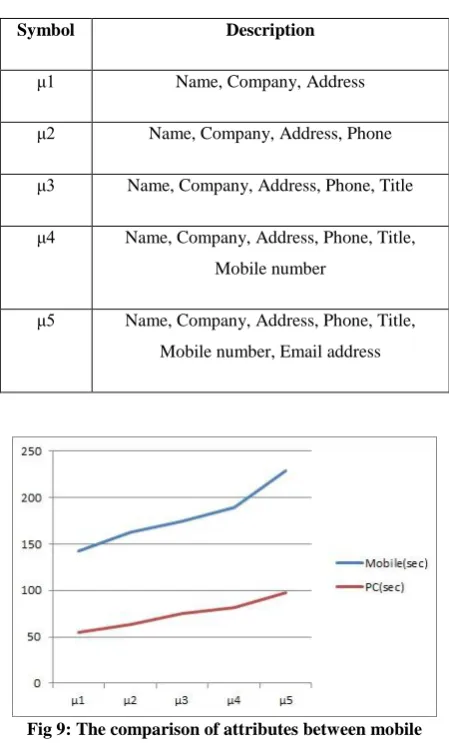
The number of variables varies from 3 to 7 types in each operation. Figure 9 represents the comparison between the two platforms. Both mobile device and PC took more time on the recognition and typing.
[image:6.595.322.547.85.457.2]Each of the symbols contains a different description of specific attributes in order to conveniently remember and compare during the experiments, as shown in Table 3. For example, the user types text in μ1, including Name, Company, and Address fields. The system was tested using 130 characters, and it took an average of 142 seconds over 30 trials using the mobile device. Accordingly, typing text through PC only took 55 seconds.
Table 3. Description of Symbols
Symbol Description
μ1 Name, Company, Address
μ2 Name, Company, Address, Phone
μ3 Name, Company, Address, Phone, Title
μ4 Name, Company, Address, Phone, Title, Mobile number
[image:6.595.78.296.319.463.2]μ5 Name, Company, Address, Phone, Title, Mobile number, Email address
Fig 9: The comparison of attributes between mobile and PC
In Figure 9, as the number of attributes increases, the time cost is higher. Not surprisingly, a PC takes less time than a mobile device. From the result, it can be observed by two things. First, the percentage difference between the mobile device and PC in each symbol is 61.3, 61.3, 56.9, 56.8, and 57.2, respectively. The maximum percentage difference in Table 3 is between symbols μ1 and μ2 and the minimum percentage difference in Table 3 is symbol μ4. Second, the range of the mobile device is 87. And, the range of the PC is 43. The range variation of the symbol in the mobile device is higher than PC. That means a good input tool can affect the input performance of system, not terminal’s business.
5.4
Effect of number of characters
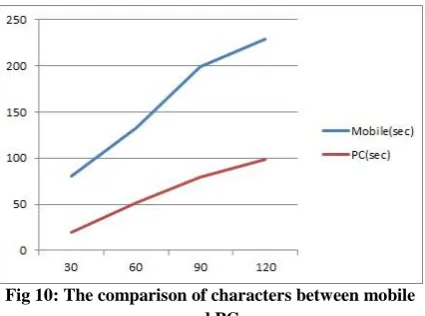
The number of characters typed differs from 30, 60, 90, and 120 characters. Each of the symbols maps a fixed amount of characters this paper called for the experiments as Nc1, Nc2, Nc3, and Nc4. For instance the user types 30 characters in Nc1 and it took an average of 81 seconds for 30 trials using the mobile device, while typing the same text through PC only required 20 seconds.difference of symbol is Nc4. Second, the range of values on the mobile device is 148. The range of the PC is 79. The range of variation of the symbols in the mobile is almost twice that of the PC.
Fig 10: The comparison of characters between mobile and PC
In Figure 10, the trend of the chart is similar to the trend in Figure 9. Then those figures can help everyone to understand the attributes and characters are presented in a directly proportional relationship. In other words, a good typing environment for users can improve the input performance of mobile devices.
6.
CONCLUSIONS AND FUTURE
WORKS
This paper describes the design and implementation of a name card typesetting system in a mobile environment. It not only makes name cards, but also manages them conveniently. The PNCTS assists people who manage personal name cards and helps to keep their relationships organized. Also, people can share name cards with their specific friends through mobile devices in this system. PNCTS is a personal digital name card system that features template, frame, size of QR code, and color of QR code customization options. Flexible layout templates and frames are available to users, who can set a preferred size and color for their QR code. PNCTS is portable and modifiable because it is a mobile device application. The 100% recognition ensures that important records will not be overlooked due to human error. Also, PNCTS can be more easily managed than other electronic name card systems, especially with respect to querying name cards and dialing out from the same mobile device. Lastly, PNCTS can be used from both mobile devices and computers.
From the results of the experiment, mobile semi-automatic takes more time than manual query after one hundred name cards. The application interface helps to manage name cards simply after advance generation. PNCTS automatic queries in both mobile and server side can query specific name cards based on conditional parameters. Typing on a mobile device is more time-consuming than doing so on a PC because of the inherently smaller keyboard size.
In this paper, it limits the text size and length of text lines because of the better layout to display on name card. Therefore, dynamic adjustment for font size, rows of text, and arrangement of text could add a new dimension as far as user customization is concerned. In the future, the authors will find a way to train users and reduce the chance
of missing any data in this system due to improper operation. Another future plan is to replace manual typing with voice typing. However, both things should be investigated further before being implemented in future work. Lastly, the service can provide a mechanism for mobile payment. For instance, if the server supported new templates or frames for users, the latter would be able to pay for what he wants personally and control text layout on the template of his name card arbitrarily. Clearly, a wide range of applications of this research remains to be examined.
7.
ACKNOWLEDGMENTS
Our thanks to experts were supported by NSC under the Grant NSC 100-2221-E-006-250-MY3.
8.
REFERENCES
[1] Yue, L., Y. Ju, and L. Mingjun. Recognition of QR Code with Mobile Phones. in Control and Decision Conference, 2008. CCDC 2008. Chinese. 2008. [2] Yu-Hsuan, C., C. Chung-Hua, and C. Ming-Syan. A
General Scheme for Extracting QR Code from a Non-uniform Background in Camera Phones and Applications. in Multimedia, 2007. ISM 2007. Ninth IEEE International Symposium on. 2007.
[3] Yuan-Cheng, L., et al. A GPS Navigation System with QR Code Decoding and Friend Positioning in Smart Phones. in Education Technology and Computer (ICETC), 2010 2nd International Conference on. 2010. [4] Sun, A., Y. Sun, and C. Liu, The QR-code Reorganization in Illegible Snapshots Taken by Mobile Phones, in Proceedings of the International Conference Computational Science and its Applications. 2007, IEEE Computer Society. p. 532-538.
[5] Sutheebanjard, P. and W. Premchaiswadi. QR-code Generator. in Knowledge Engineering, 2010 8th International Conference on ICT and. 2010.
[6] Linden, G., M. Conover, and J. Robertson, The Netflix Prize, Computer Science Outreach, and Japanese Mobile Phones. Commun. ACM, 2009. 52(10): p. 8-9. [7] Wakahara, T., N. Yamamoto, and H. Ochi, Image Processing of Dotted Picture in QR Code of Cellular Phones. Computer Systems Science and Engineering, 2012. 27(1): p. 73-81.
[8] Boyle, J.J., Automated Typesetting of Existing Computer Tabular Data. IEEE Transactions on Engineering Writing and Speech, 1968. EW11(2): p. 129-&.
[9] Boyle, J.J., Computerized Typesetting - An Overview. IEEE Transactions on Engineering Writing and Speech, 1969. EW12(2): p. 28-&.
[10] Kuney, J.H., Processing Manuscripts for Input to A Computerized Typesetting System for Scientific Journals. IEEE Transactions on Engineering Writing and Speech, 1969. EW12(2): p. 49-&.
[12] Pierson, J.L., Computer Program for Electronic Typesetting. IEEE Transactions on Engineering Writing and Speech, 1971. EW14(2): p. 46-52. [13] Iwasaki, H., Developing a Lisp-based Preprocessor for
TEX Documents. Software-Practice & Experience, 2002. 32(14): p. 1345-1363.
[14] Fernandez-Iglesias, M.J., et al., Generating High Quality Printouts from Content Management Systems: A Cost-Effective Approach. Software-Practice & Experience, 2005. 35(11): p. 1007-1026.
[15] Filgueiras, M., Implementing a Symbolic Music Processing System. Software-Practice & Experience, 1998. 28(5): p. 493-512.
[16] De Vivo, C. and C. Metelli, On The Typeset of A Butler B(2)-GROUP. Houston Journal of Mathematics, 2012. 38(3): p. 653-683.
[17] Yang, Q.C. and J.F. Zhu, Technology of Document Automatic Typesetting Based on XML. 2012 2nd International Conference on Applied Social Science, ed. J. Hu. 2012, Newark: Information Engineering Research Inst, USA. 354-360.
[18] Lee, S.L., A Decision Support System for Luggage Typesetting. Expert Systems with Applications, 2008. 35(4): p. 1620-1627.
[19] Harada, S., K. Morinaga, and M. Hirakawa, Development of an Interactive Business Card Creation Support System Using Genetic Algorithm. Proceedings of the 2005 International Conference on Active Media Technology, ed. H. Tarumi, Y. Li, and T. Yoshida. 2005. 85-88.