HONEYWELL
CP-6
~
SYSTEM
PROGRAMMER
GUIDE
SUBJECT
CONTROL PROGRAM-SIX (CP-6)
SYSTEM PROGRAMMER GUIDE
Description of System Programming Practices and Examples of System Programming Techniques
SOFTWARE SUPPORTED
Software Release B03
ORDER NUMBER
CE62-00 January 1984
Preface
This guide contains descriptions of system programming practices and provides numerous examples of system programming techniques. This guide is intended for readers already familiar with the CP-6 PL-6 Reference Manual (CE44) and the CP-6 Monitor Services Reference ManuaL (CE33). In addition, the HoneyweLL training courses are an important resource for the system programmer.
The Los Angeles DeveLopment Center (LADC) of HoneyweLL Information Information Systems has deveLoped Computer Aided PubLications (CAP). CAP is an advanced text processing system providing automatic tabLe of contents, automatic
indexing, format controL, automatic output of camera-ready masters~ and other features. This manuaL is a product of CP-6 CAP.
Readers of this document may report errors or suggest changes through a STAR on the CP-6 STARLOG system. Prompt response is made to any STAR against a CP-6 manual; changes wiLL be incorporated into subsequent reLeases and/or revisions of the manuaL. If high impact errors are discovered, patches to this manual may be issued and distributed via communication lines.
The information in this pubLication is beLieved to be accurate in aLL
respects. However, HoneyweLL Information Systems cannot assume responsibility
for any consequences resuLting from the use of this document. The information contained in this manuaL is subject to change. New editions of this
publication may be issued to incorporate such changes. The Latest version of this manual may be ordered from
Honeywell Information Systems Inc. National Distribution Operation 47 Harvard Street
Westwood, Massachusetts 02090
Telephones: Customers (617) 392-5235
HoneyweLL (HVN) 273-5215 (HED MA06)
The information and specifications in this document are subject to change without notice. This document contains information about Honeywell products or services that may not be available outside the United States. Consult your Honeywell Marketing Representative.
Section Introduction
Section 2 PL-6 for System Programming.
Section 3 X Account TooLs. X Account PoLicy
X Account Support Mechanisms X Account Naming Conventions Contents of the X Account.
Programmer Aids.
System Programmer Aids Integration Aids
InstaLLation Management Aids Documentation Aids
DeveLopment Management Aids. Support Aids
Microprocessor Support Aids. MisceLLaneous TooLs.
X Account TooL Invocation. HELP for X Account TooLs
X Account Programming ExampLes
Section 4 Processor Conventions.
GeneraL Case of Run Unit Invocation. Command Language Conventions
Automatic FiLe Extension FiLe Type Codes.
Processor Termination Conventions. SampLe Interactive Processor
Prompting and Parsing Command Text Syntax Prompting at Syntax Error DispLaying Error Messages.
Displaying HELP Messages
Section 5 Documenting Source Code. ExtractabLe Commentary
Commentary RuLes Comment Types.
M Comments
P and F Comments D Comments
B Comments I Comments E Comments W Comments S Comments K Comments
CE62-00 TabLe of Contents
Content.
Page 1-1 2-1 3-1 3-1 3-1 3-1 3-2 3-2 3-4 3-6 3-7 3-9 3-10 3-11 3-12 3-12 3-13 3-13 3-14 4-1 4-1 4-2 4-3 4-4 4-5 4-5 4-10 4-10 4-11 4-12 5-1 5-1 5-3 5-4 5-6 5-6 5-7 5-9 5-9 5-10 5-12 5-12 5-13Contents (contI
o
Comments T Comments N Comments X CommentsPlacement of Commentary in a File. Commentary Tools
EDICT.X. EXTRACT.X.
Text Blocking in Extractable Commentary. Sample EXTRACT.X Job
Section 6 Error Message Reporting. Error Message Source
Error Codes.
Layers of Error Messages
Field and Phrase Substitution. Default Error Messages
Examining the Error Code After Monitor Service ALTRET. Creating the Error Message File.
Foreign Language Error Message Files Finding the Error Message Fi le
Section 7 User Documentation/HELP.
$TEXT Facility
File Naming Conventions. Document Assembly.
Summary of Control Words and Macros. Creating Text Source Files
Line Length. Blocking Spacing.
Section and Subsection Headings. Level 0 Head Macro
Level 1-3 Head Macro Level 4 Head Macro Syntax Formats
Tables
Purpose of :MAT Macro. :MAT Macro
Figures. :FIG Macro Figure Symbols Index Entries.
:IDX Macro Ending a Section
Preparing On-line (HELP) Documentation Encoding a Source File
Excluding Topics
Topic Names and Synonyms Encoding Subtopics
Creating Subtopics
Subtopics Within Tables.
Automatic Transformation of Subtopics. :HLP .. acro
Creating a HELP File
CE62-00 TabLe of Contents
Content. (cont)
Section 8 Techniques: Central System • •
Accessing the JIT • • • • •
Accessing the Task Control Block (TCB) Break Handling
Trap Handling. • • • • • • • • • • • • • •
Associating or Linking to Another Program • •
Shared Data Segments • • • • • • • • • • • • • • • Sharing COMMON between M$LINKed Programs • • • • • • • Sharing Data Segment between Independent Programs • • Virtual Data Segments. • • • • • • • • • • • •
How Virtual Segments Work • • • • • • • • Size Limits of Virtual Data Segments • •
Addressing Data within a Virtual Segment • • • • • •
Method 1: Small Virtual Segments • • • • • •
Method 2: 'Divide and Conquer'. • • • • • •
Method 3: Direct Accessing • • • • Performance Considerations • • • • • • Guidelines for Virtual/Real Segment Sizing Accounting Considerations • • • • • • • • •
Restrictions and Programming Considerations • • • • • •
Section 9 Techniques: Communications • • • • • • • • • • • • • • •
Terminal I/O Control • • • • • • • • • • • • • •
Transparent 1/0 for Asynchronous Graphics Terminals • • • • • • •
Transparency and M$WRITE • • • • • • • Transparency and M$READ • • • • • • • •
Performing Transparent/Non-transparent 1/0
Use of Comgroups • • • • • •
Section 10 Shared Run Units.
Advantages of Shared Run Units. Shared Programs • • • • • • • • •
System Configuration to Permit Sharing • Auto-Sharing Process • • • •
Programming Considerations • • • • • Usage Considerations • • • • •
Section 11 Special Shared Processors.
Guidelines for All Special Shared Processors • • Special Shared Processor Initialization • •
Processor Initialization Area (PIA) • • • Initial Entry and Obtaining AUTO Storage. Obtaining DCBs • • • • • • • • • •
Use of Data Segments • • • • • • • • Exceptional Condition Processing. Taking Snapshot Dumps • • • • • • • •
Calling M$SCREECH • • • • • • •
Special Shared Processor Data in Dump Files.
Debugging of Special Shared Processors with XDELTA • • • • • • Using XDELTA • • • • • • • • • • • • • • • • • • • • • •
Operational Considerations When Using XDELTA • • • • •
Addressing with XDELTA - Domain Specification. • • • • •
Control of XDELTA's Input and Output • • Control of Faults • • • • • • • • • • • Inactivation of Breakpoints by XDELTA • • Guidelines for Command Processors • •
Entry to Command Processor • • Command Processor Capabilities. DCBs for Command Processor • • Effecting DCB Assignments • • •
Addressing User Memory from Command Processor.
CE62-00 Table of Contents
Contents (cont)
User's JIT • • • • • • • • • User Parameters for MSYC • •
Exit from a Command Processor. • • • • • • • • • •
Guidelines for Debuggers • • • • • • • • •
Entry to the Debugger. • • • • • • • • •
Debugger CapabiLities.. • • • • • • • • • • • • •
DCBs for Debugger. • • • • • • • • • • • • •
Addressing User Memory from Debugger • • • • • • • •
Data Breakpoints • • • • • • • • • • • • • • • • • • • • • • • • •
Exit from a Debugger. • • • • • • • • • • • • • • • • •
Guidelines for Alternate Shared Libraries. • • • • • • • • • •
Associating an ASL with the User. • • • • • • • • • • • • •
Defining the Function Codes of the ASL • • • • • •
User Calls to an ASL • • • • • • • • • • • • •
Building an ASL System File. • • • • • • • • • • • • • • • • •
Entry to ASL • • • • • • • • • • • • • • • • • •
ASL Capabilities • • • • e • • • • • • • • • • • • •
DCBs for ASL • • • • • • • • • • • • • • • • • • • • • •
Addressing User Memory from ASL. • • • • • • • • • • •
Exit from an ASL • • • • • • • • • • • • • • • • • • • •
ASL Recovery. • • • • • • • • • • • • • • •
Debugging an ASL • • • • •
Section 12 Run-Time Libraries. • • • • • • • • • • • • •
Shared Libraries. • • • • • • • • • • • • • • • • • • • • • ...
Link Time Association of Shared Libraries. • • • • • • • •
Run Time Association of Shared Libraries • • • • • • • • • • •
Building Shared Libraries. • • • • • • • • • • • • •
Subroutines Included in Shared Libraries • • • • • • • • • • • • •
User Installation of Shared Libraries.. • • • • • • • • • • •
Section 13 Library Functions • • • • • •
Input Services • • • • • • • • •
Output Services • • • • • • • • • • • •
Miscellaneous Utilities • •
. . . .
.
.
. . . .
Section 14 Compilers and Language Utilities • • • • • • • • •
Conventions for Language Processors. • • • • • • • • • • • • •
Standard Run Unit Invocation Format for Compilers • •
DCB Usage Conventions. • • • • • • • • • • • • • •
Compiler Options Usages and Conventions. • • • • • • •
Compiler Error Handling. • • • • • • • • • • • • • • • • • • •
Object Unit Conventions. • • • • • • • • • • • • • • •
Compiler Output Control Via IBEX.
Source Update Services • • • • • • • • • •
Section 15 Interlanguage Calling • • • • • • • • • • • • • • • • • • •
Receiving Sequences. • • • • • • • • • •
Registers Used • • • • • • • • • • • • • • • • • • • • •
Return Sequences • • • • • • • • • • • • • •
UNWIND Routines. • • • • • • •
Automatic Storage Layout • • • • • • •
Calling Sequences for ExternaL Routines • • DELTA Interaction with Shared Libraries • •
Calls to the Monitor and ALternate Shared Library. • • • • •
Monitor-User Interface • • • • • • • • •
ASL-User Interface • • • • • • • •
Sample Programs • • • • • •
CE62-00 Table of Contents
Cont.nt. (cont)
Appendix A Job Information Table • • JIT FieLds • • •
Structure Format JIT Structure.
Index • • • • • • •
TABLES
Table 3-1 • X Account Programmer Aids
·
·
·
·
Table 3-2. X Account System Programmer Aids. Table 3-3. X Account Integration Aids.·
· ·
Table 3-4. X Account Installation Management
Table 3-5. X Account Documentation Aids.
·
·
Table 3-6. X Account Development Management Table 3-7. X Account Support Aids.· · · ·
·
Table 3-8. X Account Microprocessor Support Table 3-9. X Account Miscellaneous Tools·
Table 4-1 • F i l e Type Codes· · · ·
·
·
·
Table 5 -1 • Summary of Commentary Types·
Table 7-1 • TEXT Control Word Summary·
Table 7-2. Macro Summary. · · · · ·
·
Table 7-3. Examples of :L4H Transformation
·
Table 11 -1 • ECCs for Debugger.· ·
·
·
·
·
·
·
·
Aids.
Aids
·
· · ·
Aids
·
·
· ·
Table 11-2. ECCs for User Exceptional Condition.
·
Table 13-1 • Input Library Services·
·
· · ·
·
Table 13-2. Output Library Services.· ·
·
·
·
· ·
Table 13-3. Miscellaneous Library Services·
·
·
·
· · ·
· · · ·
·
· ·
·
·
·
·
·
·
· ·
·
·
·
Table 14-1 • Descriptions of Standard Compi ler Options.
· · ·
Table 15 -1 • Procedure Entry Routines·
·
· · ·
· · · ·
Table 15-2. Procedure Return Routines.
Table 15-3. Procedure UNWIND Routines.
Table 15-4. Data Types for Arguments
·
FIGURES
Figure 2-1 • Sample PL-6 Program.
· · · ·
·
·
· ·
Figure 3-1 • Browsing through X Account HELP.· · · · ·
·
· ·
Figure 3-2. Program Sample from :XSI Account-
Part 1 •· · ·
Figure 3-3. Program Sample from :XSI Account-
Part 2.· · ·
Figure 4-1. Command, Error, HELP Processing Source
·
· ·
Figure 4-2. Command Language Definition Nodes.
· · · · ·
Figure 4-3. Command Language Definition EQUs· · · ·
·
·
Figure 4-4. Command, Error, HELP Processing: Sample Session
·
·
·
·
·
·
·
·
·
·
·
·
Figure 4-5. Command, Error, HELP Processing: Associated Jobs.
Figure 5 -1 • Source F i l e Containing EXTRACTable Commentary.
·
Figure 5-2. Placement of Commentary in Source Code F i l e.Figure 5-3. Sample EXTRACT.X Job
· · ·
·
· · · ·
·
·
·
· ·
Figure 5-4. TEXTed Document of EXTRACTed Commentary.· · · ·
Figure 6-1 • Sample Job to Create Error Message F i l e •· ·
· ·
·
Figure 7-1 • COBOL-oriented Syntax Format· · · · ·
·
Figure 7-2. General Syntax Format in a User Document
·
Figure 7-3. Matrix Table. · · · · ·
·
· ·
·
· ·
·
Figure 7-4. Formatted 2-Column Table· ·
·
· · · ·
Figure 7-5. Source for Unformatted Table
·
· · ·
Figure 7-6. Figure Symbols
· · · ·
·
·
·
Figure 8-1 • Accessing the JIT Using PL-6 Subroutine.
· · · ·
Figure 8-2. Accessing thereB
using PL-6 Subroutine.Figure 8-3. Break HandLing Via PL-6 ASYNC Procedure.
· · · · ·
CE62-00 TabLe of Contents
Content. (cont}
Figure 8-4. Figure 8-5. F.igure 8-6. Figure 8-7. Figure 8-8. Figure 8-9. Figure 8-10. Figure 9-1. Figure 9-2. Figure 9-3. Figure 15-1. Figure 15-2. Figure A-1. Figure A-2. Figure A-3.
CE62-00
Trap Handling Via a PL-6 Subroutine • • • • DCBs for Program CaLLed by M$LINK/M$LDTRC • • Associating DELTA to Dump I.C • • • • •
PL-6 Routine to Set up Sub-segments • • • • • • • • • • BMAP UtiLity SampLe Routine 'SHRINK' • •
Accessing Data within a Standard Segment • • • • • • • • • Accessing Data within a Large VirtuaL Segment.
PL-6 Subroutine to ControL Terminal I/O • • • • • • SampLe Use of Comgroups • • • • • • • • • • •
Use of SUPER for Comgroup Definition • • • • • • • • • • •
BMAP Program - Standard Receiving Sequences.
PL-6 Program - Receiving/CaLLing Sequences.
SampLe Structure.. • • • • •
B$JITO Structure.. • • • • • • •
B$JITOX Structure.
Table of Contents
Page
8-6 8-9 8-11 8-18 8-19 8-20 8-20 9-2 9-10 9-14 15-15 15-17 A-28 A-30 A-38
About This
"'anua'
The contents of the manual are grouped into fifteen sections:
Section 1, Introduction, highlights key concepts that are essential to the system programmer.
Section 2, PL-6 for System Programming, includes an annotated example of the use of monitor services in PL-6 programs.
Section 3, X Account Tools, discusses tools available to the system programmer.
Section 4, Processor Conventions, describes guidelines which help to provide consistency in the user interface to the CP-6 system.
Section 5, Source Code Documentation, describes conventions and tools for including extractable commentary in source code files.
Section 6, Error Message Reporting, describes conventions and tools for error reporting and creation of error message files.
Section 7, User Documentation/HELP, describes the $TEXT facility which simplifies and standardizes creation of user manuals and on-line (HELP) documentation.
Section 8, Techniques: Central System, describes interfaces to central system software.
Section 9, Techniques: Communications, describes interfaces to communication
software.
Section 10, Shared Run Units, describes sharing programs and the auto-sharing process.
Section 11, Special Shared Processors, describes guidelines for writing Command Processors, Debuggers, and Alternate Shared Libraries.
Section 12, Run-Time Libraries, describes how to build and associate run-time libraries.
Section 13, Library Functions, describes functions available from the :SHARED_SYSTEM run-time library.
Section 14, Compilers and Language Utilities, describes conventions and tools to aid in writing language processors.
Section 15, Interlanguage Calling, describes calling and receiving sequences and related information.
Appendix A, Job Information Table, describes the JIT information maintained for all active users of the system.
Not.tion Con"entions
The following table gives notation conventions used in this manual to describe commands, statements, directives, and other language elements.
Notation Conventions Table
Notation Description
Lower-case Letters
Lower-case letters indicate that the element is a variable, to be replaced with the desired value.
CAPITAL LETTERS
Capital letters indicate a literal, to be entered as shown.
Special Characters
Numerals
Braces
OR Bar
CE62-QQ
Special characters are literals, to be entered as shown.
Numerals standing alone are literals, to be entered as shown. Numerals embedded in or affixed to a string of capital letters are also literals, to be entered as shown, for example, PL6. Numerals embedded in or affixed to a string of lower case letters are part of the variable name to be replaced with a desired value, for example, fid1.
Elements stacked inside a pair of braces identify a required choice. The braces may be elongated to contain the possible choices, or may be represented by vertically-stacked printed braces.
{shift count}
{R1} means that either a value for shift count or the word R1 must be entered.
Alternatively, the vertical OR bar is used to separate the
choices, thus: {shift countlR1}
The OR bar separates elements in a list from which one element may be, or must be, chosen.
Notation
Notation Conventions Table (cont.)
Description
{R1/shift_count} means that either the word R1 or the value of shift_count must be entered.
Vertical Ellipsis
Blanks
CE62-00
The vertical ellipsis indicates that zero or more commands or instructions have been omitted.
START CCP
END
means that there are zero or more statements omitted between the CCP and END statements.
Where blanks are shown in syntax formats, one or more blanks must be used except inside character literal strings.
Section
1
Introduction
Interfaces and their use and manipulation are major strengths of the CP-6 system. A guiding goal in implementing the CP-6 system was to build a system which did not need to be modified by the users or by Honeywell in order to adapt to special requirements. The system has been successful in this effort as judged by the exceptionally small number of site specific patches to the system and the lack of changes by addition and recompilation of system or processor modules.
System programmers do change the way the system operates, however, largely through use and understanding of the interfaces documented in this guide. There are three major interfaces to the CP-6 system described in this guide:
1. The user interface
2. The compiler output or direct language interface
3. The program calling interface
File management, terminal and device I/O interfaces which are equally
important in using the system are described in the CP-6 Programmer Reference Manual (CE40) and the CP-6 Monitor Services Reference Manual (CE33).
The CP-6 system presents a common, familiar, and consistent interface to the end-user. Standards used throughout the CP-6 system and in all its processors provide a consistent syntax; the same options mean the same thing throughout the system. The CP-6 parsing tools and standards are described here so that newly built processors can present the same consistent user interface. Many of the tools employed in the development of the CP-6 system are made available with the system in account X. A description of the most important and useful of the account X routines are described in Section 3.
The standard object language prov;d~s a form for all compilers to produce loadable code and the debugging schema. Tools useful to compiler writers are also discussed.
Standards for calling between programs allow subprograms in several languages to be combined into a single program with each language being used where it ;s strongest.
CP-6 interfaces are also provided so that a site may create its own command language, its own debugger, or its own database management system. Each of these is a type of shared program called a special shared processor. The rules for their creation and the privileged calls available to them are
described in the sections that follow. User and system libraries form another level of sharing in the CP-6 system. RuLes governing these libraries (which may be amended or recreated by the user) are given together with techniques which, if used, will allow change of the libraries without the need to change, reload or recompile programs which use them.
CP-6 comgroups are a unique method for communicating between programs, and between programs and terminals or devices connected to the system. Comgroups form an internal Message switching network within the CP-6 system.
Examples throughout this volume will help the system programmer to make new
and innovative use of the CP-6 system through its interfaces.
Section
2
PL-8
tor
System Programming
PL-6 is the implementation language for the CP-6 system. The PL-6 language, which is intended for block-structured programming, provides simple syntax and simple data types. See the CP-6 PL-6 Reference Manual (CE44) for a complete definition of the language. The first part of the Reference discusses
concepts of the language and its main features.
PL-6 users must rely on monitor services, as documented in the CP-6 Monitor Services Reference Manual (CE33), for functions which the PL-6 compiler does not provide. The PL-6 CALL statement may be used to transfer control to any monitor service or library service. In addition to the service subroutines, the CP-6 system provides macro definition for related structures which are INCLUDEd for use in the PL-6 program.
To use a monitor service, the PL-6 program simply calls the needed service. Every monitor service has no more than one argument. The argument is the name of the Function Parameter Table, (FPT) which contains parameters specific to each monitor service. The program generates the FPT by using the macro structures supplied in the system macro library. (See the CP-6 Monitor Services Reference, CE33, for more information on the system macro library).
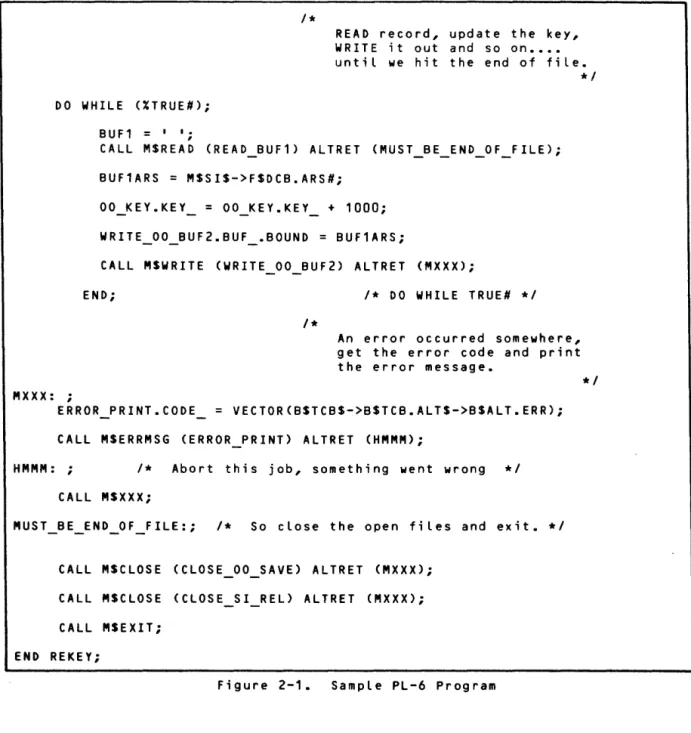
Figure 2-1 illustrates a program which uses several common monitor services and demonstrates the use of the system macros to set up the FPTs for the monitor services. The sample program is purposely brief. A somewhat longer sample program is illustrated in the CP-6 Monitor Services Reference Manual. PL-6 program fragments are shown throughout this handbook. In addition, programs in account .:XSI are a source of examples, as discussed in Section "3.
1*
*1
Program to REKEY a fiLe, starting with a key of 1.000 in increments of 1.000
REKEY: PROC MAIN;
1*
LocaLLy needed substitution strings (XEQUs)
XEQU TRUE#='1'B I*TRUE#*I; XEQU FALSE#='O'B I*FALSE#*I;
1*
*1
INCLUDE all the system macros so we can set up the FPTs for the monitor services.
XINCLUDE CP 6; XINCLUDE CP=6_SUBS;
1*
DCBs defined here
DCL MSSI DCB; DCL MSOO DCB; DCL MSDO DCB;
1*
EXTERNALs
DCL BSTCBS PTR SYMREF;
1*
Local STATIC storage
DCL BUF1 CHAR(256) STATIC INITC' I ) ; DCL BUF1ARS UBIN WORD STATIC;
DCL MSSIS PTR STATIC; DCL MSOOS PTR STATIC;
DCL 1 00 KEY STATIC,
-2 * UBIN BYTE CALIGNED INIT(3), 2 KEY UBIN(27) CALIGNED INITCO);
DCL MY_ERROR_BUF CHAR(255) STATIC CALIGNED;
DCL FPARAM_BUFCO:1025) SBIN STATIC ALIGNED;
1*
Invoke the macros that got INCLUDEd in CP 6 to set up the information needed by the monitor services.
XFPT ERRMSG CFPTN=ERROR PRINT,
BUF=MY-ERROR BUF,
DCB=MSSI,
-OUTDCB1=MSDO, CODE=NIL);
Figure 2-1. Sample PL-6 Program (cont. next page)
CE62-00 PL-6 for System Programming
*1
*1
*1
*1
*1
%FPT OPEN
%FPT OPEN
%FPT READ
XFPT WRITE
XFPT CLOSE
XFPT CLOSE
XFSDCB; XBSTCB;
XBSALT;
XEJECT;
(FPTN=OPEN SI IN, FPARAM=FPARAM_BUF, DCB=MSSl);
(FPTN=OPEN 00 OUT, DCB=MSOO; FUN=CREATE, EXlST=NEWFILE, ASN=FILE, ACS=DIRECT,
IFPARAM=FPARAM_BUF, ORG=KEYED);
(FPTN=READ BUF1, DCB=MSSI, BUF=BUF1, WAIT=YES);
(FPTN=WRITE 00 BUF2, DCB=MSOO,-BUF=BUF1, ONEWKEY=YES, KEY=OO KEY, WAIT=YES);
(FPTN=CLOSE SI REL, DISP=RELEASE, DCB=MSSI);
(FPTN=CLOSE 00 SAVE, DIS P=SAVE; DCB=MSOO);
1*
Invoke the MACROs to generate based structure for accessing data in the TCB, DCB and ALTRET frame.
*1
MSSIS = DCBADDRCDCBNUMCMSSI»; MSOOS = DCBADDRCDCBNUM(MSOO»;
1*
Set up the file name in the OPEN FPT and call the monitor service routines to open the necessary files.
*1
OPEN_OO_OUT.NAME_ = VECTOR(MSSIS->FSDCB.NAME#);
CALL MSOPEN COPEN_SI_IN) ALTRET (MXXX);
CALL MSOPEN (OPEN 00 OUT) ALTRET (MXXX);
Figure 2-1. Sample PL-6 Program Ccont. next page)
1*
READ record, update the key, WRITE it out and so on •••• until we hit the end of file.
DO WHILE (XTRUE#);
BUF1 = I I ;
CALL MSREAD (READ BUF1) ALTRET (MUST_BE_END_OF FILE);
BUF1ARS
=
MSSIS->FSDCB.ARS#;OO_KEY.KEY_
=
OO_KEY.KEY_ + 1000;WRITE_00_BUF2.BUF_.BOUND = BUF1ARS;
CALL MSWRITE (WRITE 00 BUF2) ALTRET (MXXX);
END; 1* DO WHILE TRUE# *1
MXXX: ;
ERROR PRINT.CODE
1*
An error occurred somewhere, get the error code and print the error message.
VECTOR(BSTCBS->BSTCB.ALTS->BSALT.ERR);
CALL MSERRMSG (ERROR_PRINT) ALTRET (HMMM);
HMMM: ; 1* Abort this job, something went wrong *1
CALL MSXXX;
CALL MSCLOSE (CLOSE_OO_SAVE) ALTRET (MXXX);
CALL MSCLOSE (CLOSE SI REL) ALTRET (MXXX);
CALL MSEXIT;
END REKEY;
Figure 2-1. Sample PL-6 Program
CE62-00 PL-6 for System Programming
*1
*1
Section 3
X Account Tool.
X Account Policy
The X Account provides a toolcrib for unsupported tools on the CP-6 system. Tools that are placed in this account may be of use to a small or large number of users. Any tool that is used by more than two individuals is a candidate for inclusion in the X Account.
The X Account tools provide users with programming examples of techniques and standards for using the CP-6 system. There are no access restrictions to the account; most of the source code used to create it is delivered to customer sites.
X Account Support Mechanisms
The X Account contains tools that are not supported through the normal support mechanisms provided with the CP-6 system. However, in the case of deficiency or oversight, or if a new feature is needed, a Severity D STAR may be
submitted to STARlOG with the subject listed as Product X. There is no
guarantee that the suggestion will be implemented in a timely manner, but the tool's originator may be able to provide help and advice through STAR lOG responses.
X Account Naming Conventions
As released, the X Account tools are put in the .:XSI account which contains the source, HELP, JCl and rununits of all the tools. The job SBUIlD X ACCT copies all the essential elements into the X Account. The following-naming conventions are used for the .:XSI account.
•
•
•
•
TOOL SIcn TOOL-HELP TOOl-CRU TOOl=Ccn
(source)
(HERMAN input) (Sample JCl)
(Include, copy files>
where c is a compiler indicator, and n is a digit.
NOTE: If files in the :XSI account appear not to exist, consult the system manager to determine if the account was created with appropriate access permissions granted.
Content. of the X Account
The X Account contains approximately 175 tools; the most frequently used tools are documented in this section. The X Account is constantLy being changed and updated; therefore, tooLs may disappear or appear in the account at the
different releases. The tools may be categorized as follows:
Programmer aids
System Programmer aids Integration aids
Installation Management aids Documentation aids
Support aids
Microprocessor Support aids Miscellaneous tools
Programmer Aids
Programmer aids are tools that are of general use to the application programmer in all languages. These tools cover a wide spectrum of
applications -- from tools that inform the user about the status of the system to tools that list HELP files.
Tool Name
A
BANNER
CALENDAR
DI
DILDEV
EJECT
CE62-00
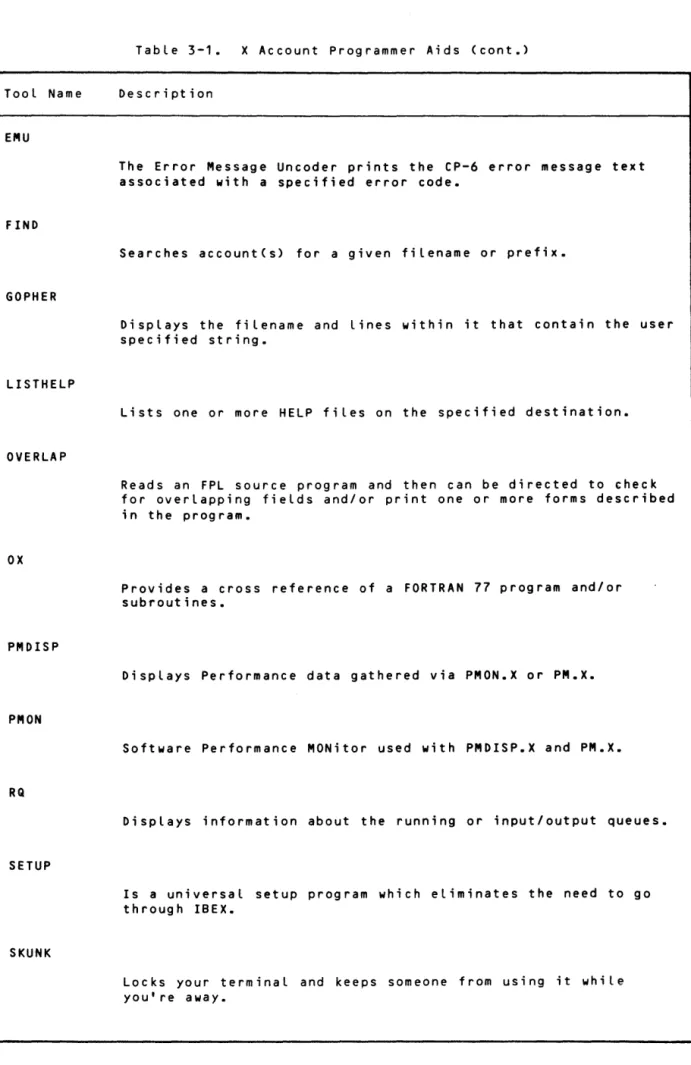
Table 3-1. X Account Programmer Aids
Description
Records and reports the status of batched jobs.
Prints user specified text in block letters on a line printer.
Builds, displays and stores a user's personal calendar.
Displays information about the system such as the number of users, the ETMF and 90% response time.
Displays a user's current Logical DEVices and how much output is queued up for each of them.
Positions output to a new page.
Tool Name
EMU
FIND
GOPHER
LISTHELP
OVERLAP
OX
PMDISP
PMON
RQ
SETUP
SKUNK
CE62-QQ
Table 3-1.
x
Account Programmer Aids (cont.)Description
The Error Message Uncoder prints the CP-6 error message text associated with a specified error code.
Searches account(s) for a given filename or prefix.
Displays the filename and lines within it that contain the user specified string.
Lists one or more HELP files on the specified destination.
Reads an FPL source program and then can be directed to check for overlapping fields and/or print one or more forms described in the program.
Provides a cross reference of a FORTRAN 77 program and/or subroutines.
Displays Performance data gathered via PMON.X or PM.X.
Software Performance MONitor used with PMDISP.X and PM.X.
Displays information about the running or input/output queues.
Is a universal setup program which eliminates the need to go through IBEX.
Locks your terminal and keeps someone from using it while you're away.
TabLe 3-1. X Account Programmer Aids (cont.)
TooL Name Description
Sl
DispLays severity LeveL of rununits and object units.
System Programm'J'~Jds
System programmer aids are tooLs that are of use to programmers working in an environment that maintains a source base. These deveLopment tooLs can be used by a wide range of users on the CP-6 system. Many of these tooLs such as CMPR or lIN are used to maintain and update the source base.
TooL Name
AUTO
BOOKWORM
CMPR
DRAW
EDGEMARK
EDICT
FORMAT
CE62-00
TabLe 3-2. X Account System Programmer Aids
Description
ALLows a user to raise or Lower the batch queue priority of subsequentLy batched jobs.
A program designed to aid in the electronic preparation of tabLe of contents and indexes from TEXT files.
Compares two files and generates update files.
Converts Pl-6 DCl statements to pictures, for use in debugging Pl-6 structures, design specs, technical manuals, etc.
Prints specified text in block letters on the edge of a print-out.
Puts extractable commentary into code.
Formats <i.e., pretty prints) Pl-6 source files, merges updates and inserts copyright notices.
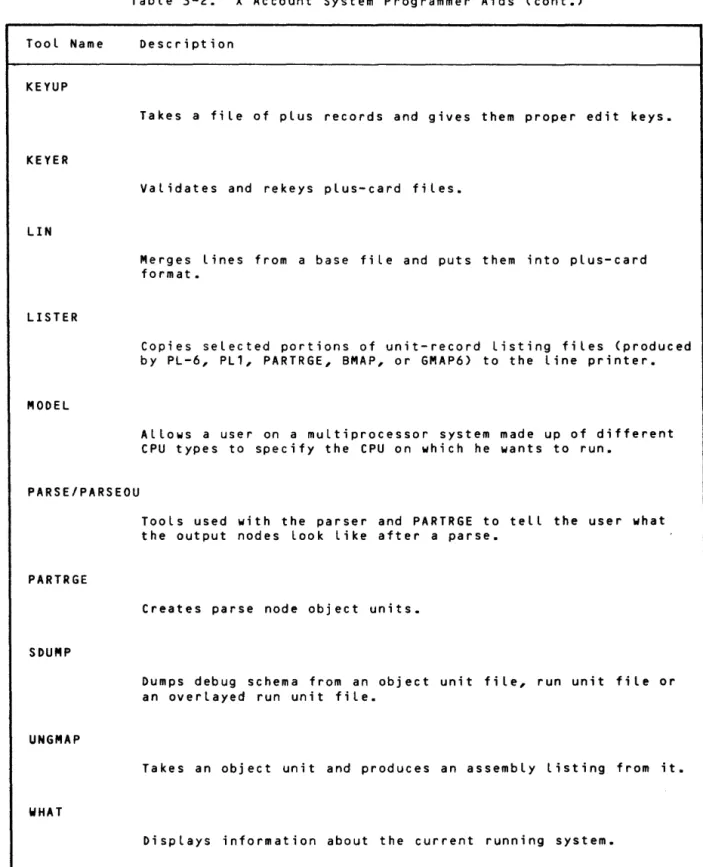
Table 3-2. X Account System Programmer Aids (cont.)
Tool Name
KEYUP
KEYER
LIN
LISTER
MODEL
PARSE/PARSEOU
PARTRGE
SDUMP
UNGMAP
WHAT
CE62-00
Description
Takes a file of plus records and gives them proper edit keys.
Validates and rekeys plus-card files.
Merges lines from a base file and puts them into plus-card format.
Copies selected portions of unit-record listing files (produced by PL-6, PL1, PARTRGE, BMAP, or GMAP6) to the line printer.
Allows a user on a multiprocessor system made up of different CPU types to specify the CPU on which he wants to run.
Tools used with the parser and PARTRGE to tell the user what the output nodes look like after a parse.
Creates parse node object units.
Dumps debug schema from an object unit file, run unit file or an overlayed run unit file.
Takes an object unit and produces an assembly listing from it.
Displays information about the current running system.
I ntegration Aids
CP-6 integration tooLs are tooLs used in integrating and distributing the CP-6 system.
Tool Name
DRAW
DTOR
EDGEMARK
EXTRACT
FICHER
HERMAN
INSREC
LINKMOD
LOOK4
CE62-00
TabLe 3-3. X Account Integration Aids
Description
Converts Pl-6 DCl statements to pictures, for use in debugging Pl-6 programs, design specs, technicaL manuaLs, etc.
Converts files containing Pl6 DCl statements and pre-processor directives into files with corresponding SVMREF and/or BASED DC ls.
Prints specified text in block letters on the edge of a print-out.
Extracts error messages and commentary from source code.
Takes listing and source files and creates a set of tapes for printing on microfiche.
Reads a text file containing HELP and HERMAN commands and creates a HELP database.
Inserts records from a base file into another file based on a control file.
Alters lINK, PCl and/or LEMUR JCL.
Reports on multiple occurrences of update files.
Tool Name
MODMOVE
MPUR
STI
Table 3-3. X Account Integration Aids (cont.)
Description
Controls the manipulation of update files in controlled accounts.
Removes unwanted schema from OBJECT and RUN units.
Places software technical identifiers into released software.
In.tallation Management Aids
Installation management aids are tools that are useful to CP-6 system managers. These tools help manage the machine efficiently by giving
information about the state of the machines such as what users have certain p~;vileges or which remote terminals are connected.
Tool Name
AUTO
COSWEB
EXPIRED
Table 3-4. X Account Installation Management Aids
Description
Allows a user to raise or lower the batch queue priority of subsequently batched jobs.
A tool that installs and deletes shared processors.
Prints the names of files which have expired as of the current date.
fWEDITOR
Builds and edits a customized firmware file from an IFAD tape.
GRAMPS
Watches for disk packs that are running out of space.
TooL Name
MPCDUMP
PRIVCHECK
PRIVDISP
Spy
ST
TERM
USERS
CE62-00
TabLe 3-4. X Account InstalLation Management Aids (cont.) Description
Provides a hexadecimaL dump of an MPC's main memory separated by its memory content headings.
Checks running users priviLeges against the priviLeges for which they were authorized.
Displays the logon id of users who have the requested privileges.
Displays certain information about current users on a CP-6 system.
Aids in analyzing performance by displaying certain fields from the specified users' JIT.
Tells which remote terminals are connected or have output queued.
Converts user authorization files into newer versions.
Documentation Aids
These tools are, to the largest extent, used in documentation preparation along with CP-6 TEXT. They include a proofreading dictionary as well as a tool that creates indices.
Tool Name
BOOKWORM
EDICT
EXTRACT
FIXTEXT
FORMAT
HERMAN
LISTHELP
NOBS
PROOF
CE62-QQ
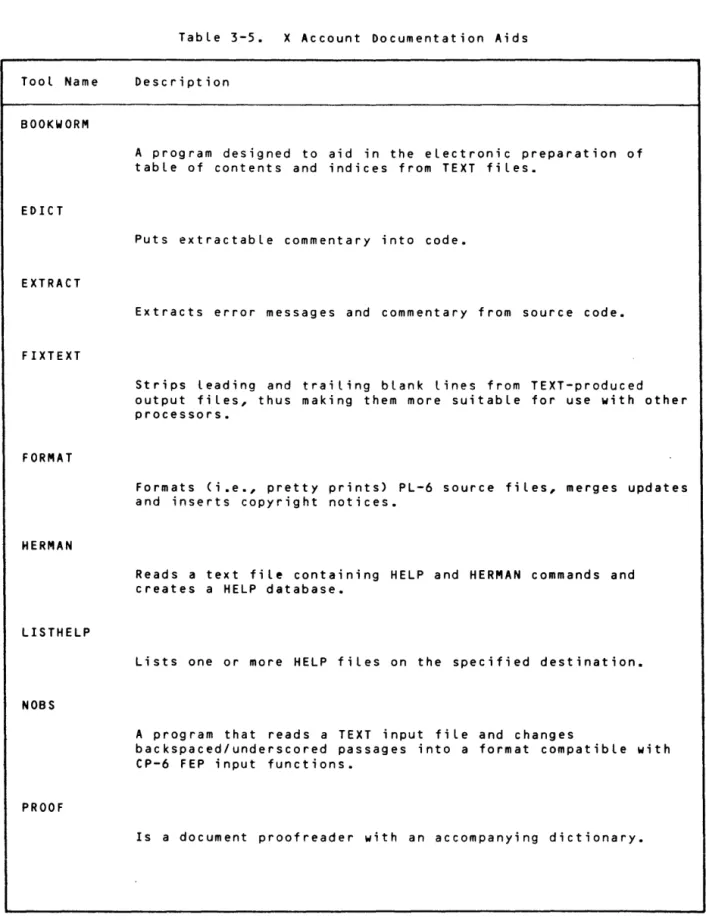
Table 3-5. X Account Documentation Aids
Description
A program designed to aid in the electronic preparation of table of contents and indices from TEXT files.
Puts extractable commentary into code.
Extracts error messages and commentary from source code.
Strips leading and trailing blank lines from TEXT-produced output files, thus making them more suitable for use with other processors.
Formats (i.e., pretty prints) PL-6 source files, merges updates and inserts copyright notices.
Reads a text file containing HELP and HERMAN commands and creates a HELP database.
Lists one or more HELP files on the specified destination.
A program that reads a TEXT input fiLe and changes
backspaced/underscored passages into a format compatible with CP-6 FEP input functions.
Is a document proofreader with an accompanying dictionary.
TooL Name
TUNA
UNPRINT
TabLe 3-5. X Account Documentation Aids (cont.)
Description
A program to TUNe An edit-keyed text input file so that it can be edited on an 80 column CRT screen.
Reads text files and reports on any unprintable characters found.
Development Management Aids
These are tools that support the system design as well as reporting system progress.
Tool Name
CRF
LNCOUNT
CE62-00
Table 3-6. X Account Development Management Aids
Description
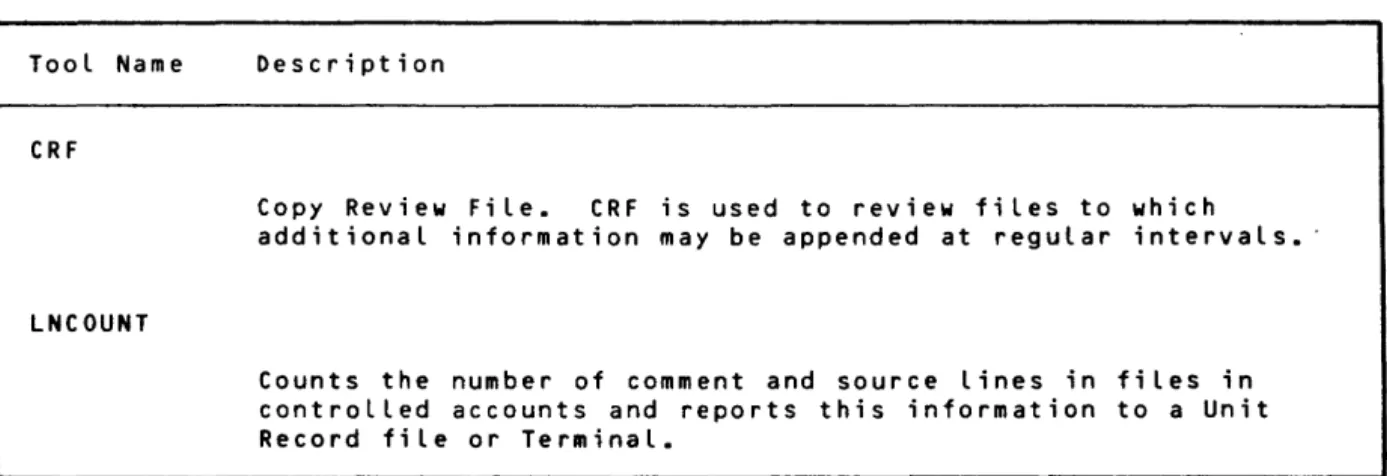
Copy Review File. CRF is used to review files to which additional information may be appended at regular intervals.
Counts the number of comment and source lines in files in controlled accounts and reports this information to a Unit Record file or Terminal.
Support Aids
These tools provide a mechanism for both programmers and support personnel to support the software and customers.
Tool Name
BEAM/MAEB
CGDUMP
ELBBIRD
MOVE/SCOTTY
PATCH
RUMSPLIT
TATTLE
WOODPECKER
CE62-00
Table 3-7. X Account Support Aids
Description
Transports files between CP-6 systems.
Reads a closed comgroup file and any monitor dump file, and creates a dump file that can be used with ANLZ to look at the comgroup tabLes.
Converts fiLes created by the DRIBBLE command from its original form to a form more easiLy used in documentation.
Transports files to and from other CP-6 systems.
Formats patches. Inserts pertinent information such as the date, STAR number, etc.
Takes a file containing RUM directives and splits it into smaller fiLes, each containing a single product's RUMs.
Informs a Honeywell programmer when a test case has arrived in the ZZZTEST account.
Allows a user without the DISPJOB priviLege to display all output destined for his Workstation of Origin.
Microprocessor Support Aids
These tooLs provide the user with severaL types of assembLers.
TabLe 3-8. X Account Microprocessor Support Aids
TooL Name Description
APE
A program that provides the required handshaking for down-line loading of ASMZ80.X and ASM6502.X run units into a
micro-processor.
ASM6502
A 6502 Cross-Assembler for CP-6.
MSA6800
A reverse assembler for 6800-based machine code.
MSA8085
A reverse assembler for 8085-based machine code.
MSAZ80
A reverse assembler for Z80-based machine code.
Miscellaneous Tools
These tools provide programs in the common tool crib which are of common interest and relatively high usage.
Table 3-9. X Account Miscellaneous Tools
Tool Name Description
COPYPGM
Copies records, portions of records, or constant information from one file to another. Records may be copied based on Boolean criteria supplied by the user.
lOOK
Is a cross between EDIT and PCl with some extensions. It works with most file organizations and has no built in restrictions on maximum record lengths.
X Account Tool Invocation
The tool invocation command for tools in the X Account is:
!toolname.X [options]
For those tools that, because of their nature, reside in the :SYS account (i.e., Spy) the tool invocation command is:
!toolname [options]
HELP for X Account Tools
All of the tools that are in the X Account have HELP files. These fiLes can be exercised by the foLLowing command:
!HElP (toolname.X)
for tools in the X Account.
! HELP (tooLname)
for the tooLs that have been moved to the :SYS account.
X Account Programming Examples
The X account, besides being a tooL crib for commonLy used tooLs can provide PL-6 programming exampLes. Figure 3-1 shows a user examining the HELP fiLe
for a tooL caLLed TUNA.X.
!HELP (TUNA.X)
TUNA is a tooL to TUNE A edit-keyed text input fiLe so that it wiLL be RR-EDITabLe on an 80-column CRT screen.
! ?
FuLL command Line syntax:
!TUNA.X text fiLe [{ONIINTOIOVER} scratch fiLe] [(options[)]]
where:
text fiLe is a TEXT input fiLe containing TEXT directives
scratch fiLe is an optionaL fiLe name to be used for scratch area. The defauLt-scratch fiLe is *G. The scratch fiLe is automaticaLLy deLeted upon TUNA exit.
! ?
Options are:
NWA/RN don't print warning messages about unknown macros
NWR/AP don't attempt to wrap text from one Line to the next
NUS/BS don't attempt to change the order of char/backspace/undersco~e
to underscore/backspace/characer
MA/XCOMPRESS try to compress aLL excess spaces out of a line except those around the first word on an input record
LEN/GTH=line length sets the size of the records that TUNA will attempt to produce. The default is 69, which is right for editing on an
80-column CRT. Allowable range is 50 through 132.
MAXCOMPRESS and NWRAP are mutuaLly exclusive options.
Figure 3-1. Browsing through X Account HELP
The source code for the X account is stored in the :XSI account. The two source code files for TUNA can be used as a model for parsing commands input that contains a list of options. Figure 3-2 examines the TUNA program
(TUNA SI6.:XSI) which calls the XSPARSE library service and contains the required DCl statements needed to define structures to be passed to XSPAR5E. Figure 3-3 demonstrates how the parse nodes for TUNA (in TUNA SIN.:XSI) correspond to CASE statements in TUNA 516. In both figures underscoring is used to highlight what the user typed:
!L TUNA?:XSI
TUNA SI6 TUNA SIN
- 2 files listed !E TUNA SI6.:XSI EDIT B03 HERE
* File TUNA SI6.:XSI is open input - cannot update *FTO-9999,IOPTIONS/OR/tionl
58 CONSTANT definitions here
118 (' **** NUSBS option automaticaLly 135
invoked.'); OPTIONS flags 315
350 DO;
400 END;
407 END;
1087 DCL STD ERROR CHAR(O) 1088 DCL ADV ERROR CHAR(O)
* EOF hit after-1127
*TY350
- - 3 5 0 DO;
*TP9
BASED definitions
1* MUST BE OPTIONS ON CMD LINE *1 1* DO IF OPTIONS ON CMD LINE *1 1* DO IF CONFLICTING OPTIONS *1
STATIC INIT (' **** Bad option(s)');
STATIC INIT (' **** Conflicting options');
1* MUST BE OPTIONS ON CMD LINE *1
341 ************************************************************ *1
342
343 M$SI$
=
DCBADDR(DCBNUM(M$SI»;344 M$OU$
=
DCBADDR(DCBNUM(M$OU»;345
346 TUNA_PCB.ROOT$
=
ADDR(TUNA_NODES);347
348 IF B$JIT$->B$JIT.CCARS > B$JIT$->B$JIT.CCDISP
349 THEN
*TY348
---348 IF B$JIT$->B$JIT.CCARS > B$JIT$->B$JIT.CCDISP
*"WHOA ••• THIS IS HOW TO KNOW THERE'RE OPTIONS ON THE COMMAND LINE!" *TN8
*TY352 349 350 351 352 353 354 355 356
THEN
DO; 1* MUST BE OPTIONS ON CMD LINE *1
TUNA PCB.TEXT$
=
PINCRC(ADDR(B$JIT.CCBUF),B$JIT.CCDISP+1);TUNA:PCB.NCHARS
=
B$JIT.CCARS - B$JIT.CCDISP - 1;CALL X$PARSE (TUNA_PCB) ALTRET (XPERR);
---352 TUNA PCB.TEXT$
=
PINCRC(ADDR(B$JIT.CCBUF),B$JIT.CCDISP+1);*"THIS IS HOW TO TELL THE PARSER WHERE TO FIND THE TEXT TO PARSE" *TY353
---353 TUNA PCB.NCHARS
=
B$JIT.CCARS - B$JIT.CCDISP - 1;*"AND THIS IS TO TELL THE PARSER HOW MANY CHARACTERS TO PARSE"
Figure 3-2. Program Sample from :XSI Account - Part
*"WHERE'RE THE PARSE NODES?" *E TUNA SIN. :XSI
* FiLe TUNA SIN.:XSI is open input - cannot update *TY 1 2 3 4 5
I*M* TUNA SIN - Nodes for "TUNA" program. *1
I*T***********************************************************
*T* *
*T* COPYRIGHT, (C) HONEYWELL INFORMATION SYSTEMS INC., 1982 *
*T* *
6 *T***********************************************************1
7 I*X* DMC,DFC *1
8
9 TUNA_NODES(D,OUT)=« ',',TUNA CMDS > [ ' ) ' ] .ENDINULL_CMD [')'] .END) 10
11 TUNA CMOS = 12
13 14 1 5 16
[.B] ( MAXCOMPRESS NWRAP I ; NUSBS I ; SIZE OPT I; NWARN )
17 MAXCOMPRESS(1)='MA/XCOMPRESS' 18
19 NWRAP(2)='NWR/AP' 20
21 NUSBS(3)='NUS/BS' 22
23 NWARN(4)='NWA/RN' 24
25 NULL CMD(5) 26
( .B
I
[.B] )I ;
27 SIZE OPT(6) 'LEN/GTH'
'= '
.DEC3 * EOF hit after 27*"THERE'RE THE PARSE NODES! LOOKS A LOT LIKE THE HELP FILE!"
*
*" GO BACK TO SEE WHAT THE PARSER DOES" *E TUNA SI6.:XSI
* File TUNA SI6.:XSI is open input - cannot update
*TY353
---353 TUNA PCB.NCHARS = B$JIT.CCARS - B$JIT.CCDISP - 1;
*TN23 *TY368 354 355 356 357
358 XPERR: 359 360 361 362 363 364 365 366 367 368 369 370 371 372 373 374 375 376
CALL X$PARSE (TUNA PCB) ALTRET (XPERR);
DO WHILE (FALSE#);
CALL PARSE ERROR(1); GOTO GET_GONE;
END; /* DO WHILE PARSE ERROR */
DO I = 0 TO TUNA PCB.OUT$ -> TUNA$OUTBlK.NSUBlKS - 1; DO CASE (TUNA PCB.OUTS -> TUNA$OUTBlK.SUBlKS(I) ->
TUNASOUTBlK.CODE);
CASE (1);
MAXCOMPRESS
=
TRUE.;CASE (2);
NWRAP
=
TRUE';CASE (3);
NUSBS
=
TRUE#;---368 CASE (1);
*"HMMM ••• THIS CASE(1) MATCHES THE NUMBER ON THE NODE IN THE PARSE NODE FILE!" *TY377-391
Figure 3-3. Program Sample from :XSI Account - Part 2 (cont. next page)
377 378 379 380 381 382 383 384 385 386 387 388 389 390 391 *TY383-385
383 384 385
*"AND IT LOOKS LIKE I *" THE PARSER RETURNS *TN10
386 387 388 389 390 391 392 393 394 395
CASE (4); NWARN
CASE (5);
CASE (6);
TRUE#;
CALL CHARBIN (MAX PER LINE,
TUNA PCB.OUTS ->-TUNA$OUTBLK.SUBLK$(I) -> TUNASOUTBLK.SUBLK$(O) -> TUNA$SYM.TEXT);
IF MAX PER LINE> LEN LARGE#
OR
-MAX PER LINE < LEN SMALL# THEN
DO;
CALL CHARBIN (MAX PER LINE,
TUNA PCB.OUTS ->-TUNA$OUTBLK.SUBLK$(I) -> TUNASOUTBLK.SUBLK$(O) -> TUNA$SYM.TEXT); HAVE TO MANUALLY CONVERT PARSED DECIMAL NUMBERS THAT" INTO INTERNAL FORMAT TO •••• "
IF MAX PER LINE> LEN LARGE#
OR
-MAX PER LINE < LEN SMALL# THEN
DO;
CALL PARSE ERROR(3); GOTO GET_GONE;
END; 1* DO IF NUMBER TOO BIG *1
*"00 INTERNAL COMPARISONS WITH THEM!" *END
Figure 3-3. Program Sample from :XSI Account - Part 2
Section 4
ProcessorConvenUons
Conventions foLLowed in writing HoneyweLL-suppLied processors are discussed in this subsection. See Section 14 for conventions specificaLLy appLying to Language processors.
General Case of Run Unit Invocation
A run unit is invoked via the IBEX command
!rununit [runinformation]
where
rununit appLy.
is the disk fid specifying the run unit. Standard disk fid ruLes
runinformation is additionaL text to be made avaiLabLe to the rununit in the user's JIT (B$JIT.CCBUF). The Length of the text in CCBUF is set in
BSJIT.CCARS. If the command includes options, B$JIT.CCDISP contains the index
of the left parenthesis preceding the options. If there are no options, CCDISP is set to the same vaLue as CCARS. If the command is continued,
B$JIT.CCBUF contains only the first line of the command; the compLete command (with any leading exclamation mark repLaced by a blank) is written record by record to a star fiLe, *CONTINUATION COMMANDS; the fLag
B$JIT.PRFLAGS.CONTINUED is set to indicate continuation. The file contains
the semicoLons entered to show continuation, as weLL as any comments. (At job step, the file is deLeted and the fLag indicating continuation is reset.)
If the command is in the standard format (described in Section 14), the DCBs are set. If the run unit expects non-standard syntax, then it should be linked without the SIDCB, UIDCB, OUDCB, and LODCB Link options.
The run unit is then called. If the run unit was linked with the STDINVOC option and the command is not in standard format, the run unit is aborted. Otherwise, it begins execution.
IBEX does not force the program invocation to be of the standard form; such enforcement would be needlessly restrictive. Rather, a flag
B$JIT.PRFLAGS.NSSYNTAX is set (="'B) if the program invocation is
non-standard. The invocation line is made available to the program. The program may examine this flag and accept or reject the invocation, as desired.
Command Language Conventions
The following command language syntax rules and guidelines are considered
standard. These ruLes are observed by the command Language of IBEX, and by
the command languages of the general use processors suppLied for the CP-6 system by Honeywell, for example, EDIT and PCl.
1. Commands in the CP-6 common command language are not column dependent. Very few CP-6 commands are positional in the sense of having the
significance of a parameter or operand denoted by its position in the command, except that some use is made of commands with a structure like simple conversational English, for example: tlCOPY sourcefile TO
destfile.tI
2. Keywords can be typed in uppercase or lowercase or a combination of both. In CP-6 manuals, keywords are shown in uppercase.
3. Multiple parameters are often organized as Lists, e.g., an optionlist is a parenthesis-delimited list of options, separated by commas.
4. Single parameters are connected to keywords in at Least one of three ways: KEYWORD=parameter
KEYWORD(parameter) KEYWORD=(parameter)
5. A List of more than one parameter is connected to a keyword in one of two ways.
KEYWORD(parameter, parameter) KEYWORD=(parameter,parameter)
6. Comments within command streams are denoted by being encLosed in doubLe quotation marks (tI).
7. Strings that contain delimiters must be encLosed by apostrophes ( I ) ; if an apostrophe is part of a string, it is denoted by adjacent apostrophes
( I I ) •
8. The semicoLon is a continuation indicator for muLtipLe line commands or the command separator for multiple commands on a singLe Line. The
semicoLon cannot be used for continuation inside a keyword or text string.
Automatic File Extension
Under certain circumstances, automatic file extension occurs. File extension means the process of adding data to the end of a non-keyed file, or of merging data into a keyed file. Automatic file extension applies to the situation that an initial step (rununit) of a job or session has created a given fiLe, and subsequent job steps also perform writes to that fiLe. When automatic fiLe extension appLies, the writes to a given file from a subsequent job step are written at the end of the writes to that file from the previous step (or merged with them if it is a keyed file); it is automatic in the sense that there is no need for file management commands intervening between the steps to position the file cursor.
Performance of automatic file extension, at a given subsequent job step, of a particular fiLe (fid) through its associated DCB, takes place under the
foLlowing rules and conditions.
1. The writes to the fiLe take place through an eligible DCB. EligibLe DCBs are:
M$LO M$LL M$DO M$PO
M$SI M$SO M$UI
M$OU M$EI M$EO M$ME
2. After the first rununit is invoked, automatic file extension of a given fid through a given associated eLigible DCB wilL take pLace unless or untiL:
• A SET command is issued for the DCB, specifying a fid. • A RESET is done for this DCB, or a RESET ALL is done.
3. For writes through M$LO, automatic file extension is canceLled if a LIST command that specifies a fid is issued.
4. For writes through M$DO, automatic file extension is canceLled if a COMMENT command that specifies a fid is issued.
Explicit fi Le extension may be used if the "EXIST=oLdfi le" option is used on the SET command, or if the "INTO" preposition on the rununit caLL is used.
File Type Codes
There is a convention concerning identification of the compiler or processor that created the object unit (or any other file) and the type of data
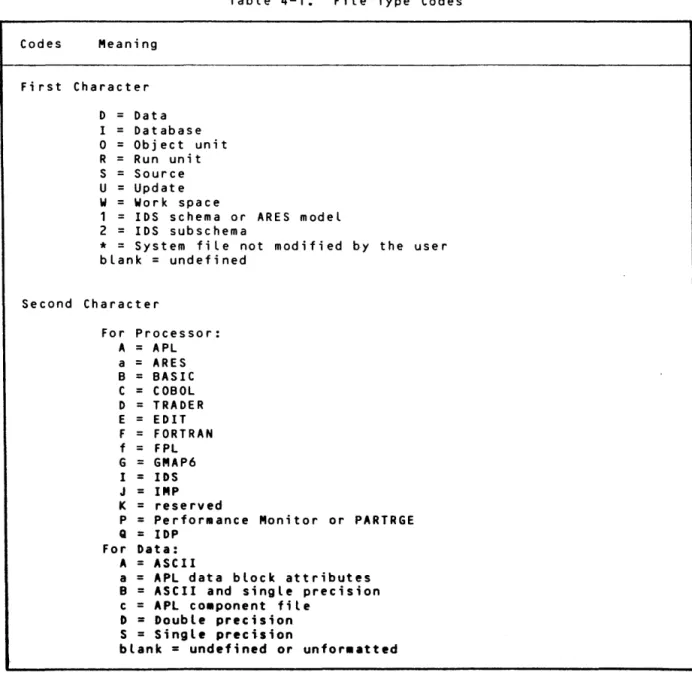
incorporated in the file. The 2-character file type (ft) identifier codes shown in the Table 4-1 should be inserted in the FPT OPEN.V.TYPE# field when the program is creating a file. The type code is provided for convenience and is not required for correct functioning of most system-supplied processors.
Table 4-1. File Type Codes
Codes Meaning
First Character
D Data
I
=
Databaseo
=
Object unit R Run unit S=
Source U=
UpdateW Work space
1 IDS schema or ARES model 2
=
IDS subschema*
=
System file not modified by the user blank=
undefinedSecond Character
CE62-00
For Processor: A
=
APL a=
ARES B=
BASIC C=
COBOL D=
TRADER E=
EDIT F=
FORTRANf
=
FPL G=
GMAP6 I=
IDS J=
IMPK
=
reservedP
=
Performance Monitor or PARTRGEQ
=
IDPFor Data: A
=
ASCIIa
=
APL data block attributes B=
ASCII and single precision c=
APL co.ponent fileD
=
Double precision S=
Single precisionblank
=
undefined or unfor •• ttedProcessor Termination Conventions
Processors which operate by reading and acting on commands input by the user (as opposed to compiLers) shouLd accept the 'END' command as sufficient cause to terminate and return controL to IBEX (by issuing the MSEXIT monitor call).
S.mpl. Int.,.ctive Processor
SeveraL library services are avaiLable to provide a consistent user interface
to interactive processors. To provide a simple, readiLy comprehensibLe
exampLe of these services, Figure 4-1 iLLustrates a sampLe processor that actuaLLy performs no usefuL work. Instead it highLights the mechanics of defining a command Language, sampLe processing command input, providing assistance with command syntax, reporting error messages, and reporting HELP messages.
The sampLe processor, CORNER, consists of two moduLes of procedure. The main moduLe (DEFSCORNER) soLicits and parses commands, and reports syntax error messages and HELP messages. The internaL procedure (DEGSBEAST) receives controL for the CLEAN command, but for the sake of simpLicity its onLy function is to report an error message. In addition, the sampLe processor contains a moduLe of parse nodes (Figure 4-2) and a moduLe of EQUs (Figure 4-3) which together define the command syntax for CORNER.
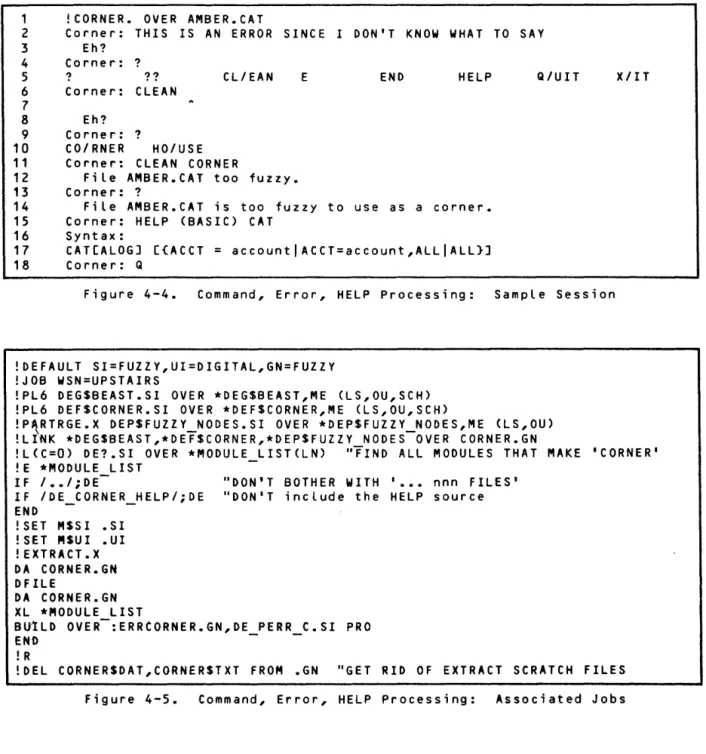
To demonstrate the user interface to the sampLe processor, Figure 4-4 shows an interactive session. Figure 4-5 shows the compiLation, Linking, and other steps necessary to run the sampLe program. The foLLowing subsections d·iscuss various aspects of the sampLe processor.
I*M* DEF$CORNER - Main module for the CORNER processor. CORNER: PROC MAIN;
1**1
I*T***********************************************************
*T* *
*T* COPYRIGHT, (C) HONEYWELL INFORMATION SYSTEMS INC., 1983 *
*T* *
*T***********************************************************1 1**1 XINCLUDE XINCLUDE XINCLUDE XINClUDE XINCLUDE XINCLUDE 1**1
XVLP NAME CP_6;
DEP$FUZZY E; XU MACRO
C;
XUH MACRO C; XUR-ENTRY; XUJlERR_C;(FPTN = ERRF FID, NAME = ':ERRCORNER.', STClASS = CONSTANT);
1* PARSE NODE EQUS
1* XUR MACROS
1* XUH MACROS
1* XUR ENTRY DCLS
1* XUR ERROR EQUS
DCl PROMPT CHAR(O) CONSTANT INIT('Corner:
,
) ;XXUR INIT (NAME=FPT INIT, STClASS=CONSTANT);
1**1
XXUH_PARAM (NAME = XUH PAR AM, STClASS = STATIC); DCl EXITING BIT(1) STATIC; XVlP ERRCODE (FPTN = ERR CODE,
- STClASS = STATIC);
DCl OUTS REDEF ERR CODE PTR;
1**1
-XPARSESOUT (NAME=OUTSBlK, STClASS=BASED); XPARSESSYM (NAME = OUTSSYM,
1**1 STClASS = BASED);
DCL MSDO DCB;
DCl DEGSBEAST ENTRY(1) AlTRET; DCL FUZZY NODES BIT(1) SYMREF;
1**1
XEQU FAlSE# = 'O'B; XEQU TRUE# = '1'B;
1**1
EXITING = XFAlSE#;
CAll XURSINIT(FPT INIT); CAll XURSSETERRMSG(ERRF FID);
1**1
DO WHILE (NOT EXITING);
*1 *1 *1 *1 *1 *1
CAll XURSGETCMD(FUZZY NODES,OUTS,VECTOR(PROMPT» ALTRET(PARSE ERROR);
DO CASE (OUTS -> OUTSBlK.CODE); 1* ON COMMAND TYPE
*1-CASE (XDEPSHElP CMD#);
XUH PARAM.HElPS = OUTS -> OUTSBlK.SUBLKS(O) -> OUTSSYM.TEXTCS; CALL XURSHElP (XUH PARAM);
CASE (XDEPSQUES CMD#T;
CALL XURSMOREMSG (XUH PARAM);
CASE (XDEPSQQ CMD#);
-CALL XURSALIMSG (XUH PARAM); CASE (XDEPSCLEAN CMD#);
CAll DEGSBEAST-(OUTS) AlTRET(ITS_OK); 1* HAVE BEAST CLEAN UP *1
ITS OK: ;
CASE (XDEPSQUIT CMD#); EXITING = XTRUE#;
END; 1* END CASE ON COMMAND TYPE *1
DO WHILE (XFAlSE#); PARSE ERROR: ;
- CALL XURSECHOIF (DCBNUM(MSDO»;
Figure 4-1. Command, Error, HELP Processing Source (cont. next page)