BIROn - Birkbeck Institutional Research Online
Celik, Dilek and Magoulas, George D. (2016) A review, timeline, and
categorization of learning design tools. In: Chiu, D.K.W. and Marenzi, I. and
Nanni, U. and Spaniol, M. (eds.) Advances in Web-Based Learning – ICWL
2016. Lecture Notes in Computer Science 10013. New York, U.S.: Springer,
pp. 3-13. ISBN 9783319474397.
Downloaded from:
Usage Guidelines:
Please refer to usage guidelines at
or alternatively
of Learning Design Tools
Dilek Celik(&)and George D. Magoulas
Knowledge Lab, Birkbeck College, University of London, London, UK
{dilek,gmagoulas}@dcs.bbk.ac.uk
Abstract. Enabling teachers to define or portray efficient teaching ideas for
sharing, reuse or adaptation has attracted the interest of Learning Design researchers and has led to the development of a variety of learning design tools. In this paper, we introduce a multi-dimensional framework for the analysis of learning design tools and use it to review twenty-nine tools currently available to researchers and practitioners. Lastly, we categorise these tools according to the main functionality that they offer.
Keywords: Learning Design
Learning design tools Learning designpractice
Learning analytics1
Introduction
Learning Design (LD) is a researchfield that is concerned with the educational pro-cesses of planning, sequencing and managing learning activities, supporting teachers in delivering and sharing teaching ideas to improve learning of students [1]. In LD, the emphasis is on the pedagogical intent, following high-level design principles posi-tioned in the framework of socio-cultural educational research. In practice this has led researchers to develop various representations to define and document learning design ideas [2], such as the Educational Modelling Language, the IMS Learning Design, Learning Activity Management Systems (LAMS), digital representations, and patterns. Moreover, our literature search identified twenty-nine digital learning design tools: the Integrated Learning Design Environment (ILDE) [1], The Learning Designer [3], CADMOS [4], Reload [5], LD Tool [2], HKU Learning Design Studio [6], LAMS [7], GLUE!PS [8], LdShake [9], ScenEdit [10], CeLS [11], DialogPLUS [12], WebCollage [13], MOT+ [14], exeLearning [15], coppercore [15], GLOMaker [16], Pedagogic Pattern Collector [17], ReCourse [5], CompendiumLD [18], Pedagogical Plan Manager [19], PHOEBE [20], OpenGLM [21], LAMS Activity Planner [22], OpenScenario [23], HEART [24], Cloudworks [25], Map My Programme [26], and LAMS v2 [7].
Even though there have been many attempts to model learning design and develop tools for practitioners, the issue of representation of the learning design remains one of the central concerns of the field [27]. According to Mor et al. [28], representing teaching practice in meaningful ways for teachers to understand, discuss, share ideas remains problematic and requires further investigation. Another relevant concern is the lack of an agreed common language used among the tools developed so far [28].
AQ1
©Springer International Publishing AG 2016
D.K.W. Chiu et al. (Eds.): ICWL 2016, LNCS 10013, pp. 1–11, 2016. DOI: 10.1007/978-3-319-47440-3_1
Although this is understandable due to the complexity of the LD process, creating a common language is an area that needs to be further explored. Additionally, in spite of the richness of the representation tools, practitioners’ adoption of these tools falls behind expectations.
The aim of this paper is to provide an updated view of the area of LD tools to facilitate further work. To this end, we review available LD tools using a new eval-uation framework, create a timeline of LD tools, and organise LD tools according to their functionality. The rest of the paper is organised as follows. Section2introduces a multi-dimensional framework while Sect.3presents an analysis of the tools. Finally, Sect.4provides conclusions and considers future prospects for LD tools.
2
A Multi-dimensional Framework
In the field of LD, there have been studies about specific LD tools illustrating their functionalities and innovative characteristics, compared to the relevant state-of-the-art. There has been a small number of attempts to review the literature, however, as Britain points out, there is a wide range of LD tools, so it is difficult to present a comprehensive evaluation of them [15]. Later in [29] Britain proposed an evaluation framework and reviewed a limited number of LD tools. In another study, Conole [30] reviewed seven learning design tools, whilst later Dalziel et al. [26] presented a wide range of LD tools but was not able to cover all of them.
In terms of organising tools in different categories, Britain [29] categorised tools as authoring environments, run-time environments, and integrated environments. Conole [30] distinguished LD tools into visualisation tools, pedagogical planners, generic tools, and learning design resources. With respect to the learning design representation used in the tools, within the same study, Conole [30] organised the tools in two groups: textual representation and visual representation. More recently, Persico and Pozzi [31] categorised LD tools based on their functionality into reflection tools and pedagogical planners, authoring and sharing tools, repositories, and delivery tools.
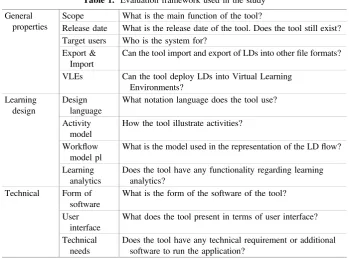
In this paper, we adopt an approach that is based on a reconceptualization of the framework proposed by Britain [29]. One of the distinct differences of our framework from Britain’s is that our framework evaluates the tools in terms of their facilities that consider learning analytics. Another dimensions introduced compared to Britain’s approach is that our framework considers the tools with regards to their ability to deploy learning designs into VLEs, export and import learning designs into different file formats. Like Britain’s framework, our framework also consists of three main sections: general properties, learning design properties, and technical properties. The main sections and their subsections associated with their corresponding meanings are presented in Table1. The general properties section comprises offive subsections, the learning design properties section have four subsections, and there are three subsections in technical properties section.
3
An Analysis of the Tools
Our analysis adopts the key categories suggested in [31], namely authoring and sharing tools¸reflection tools and pedagogical planners, repositories, and delivery tools, with the addition of assessment planners and learning analytics. The analysis covers 29 tools- the number of the tools in each category is graphically presented in Fig.1.
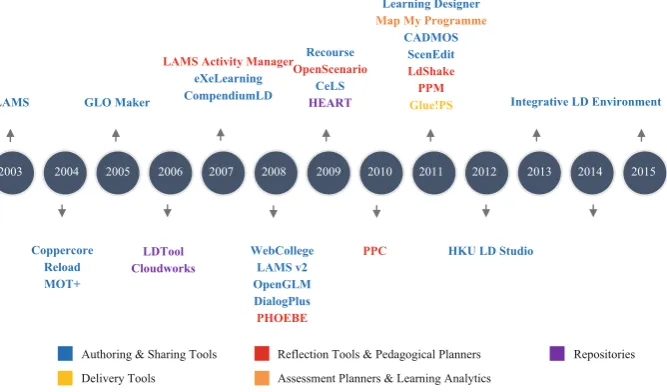
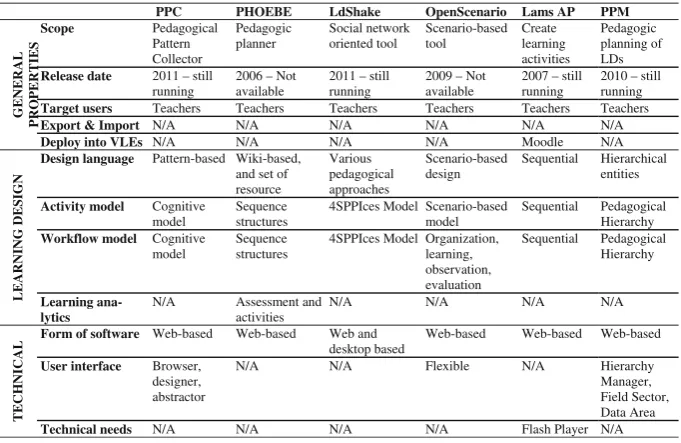
A timeline of the learning design tools is presented in Fig.2. In this timeline, we present approximate dates that the 29 tools were released, and use colours to indicate the category that each belongs. Authoring and sharing tools include LAMS, Copper-core, Reload, MOT+ , GLOMaker, exeLearning, CompendiumLD, WebCollege, LAMS v2, OpenGLM, DialogPlus, Recourse, CeLS, Learning Designer, CADMOS, ScenEdit, HKU Learning Design Studio, and ILDE. LAMS Activity Manager, PHOEBE, OpenScenario, PPM, LdShake, and PPC go into the category of reflection tools and pedagogical planners. Repositories include HEART, LDTool, and Cloud-works. There is only GLUE!PS tool in the category of delivery tools. Lastly, the category of assessment planners & learning analytics includes Map My Programme.
3.1 Authoring and Sharing Tools
[image:4.439.52.402.63.322.2]According to Persico and Pozzi [31], the group of authoring and sharing tools includes tools which “allow the representation of activities and are rooted in specific
Table 1. Evaluation framework used in the study
General properties
Scope What is the main function of the tool?
Release date What is the release date of the tool. Does the tool still exist?
Target users Who is the system for?
Export & Import
Can the tool import and export of LDs into otherfile formats?
VLEs Can the tool deploy LDs into Virtual Learning
Environments? Learning
design
Design language
What notation language does the tool use?
Activity model
How the tool illustrate activities?
Workflow model pl
What is the model used in the representation of the LDflow?
Learning analytics
Does the tool have any functionality regarding learning analytics?
Technical Form of
software
What is the form of the software of the tool?
User interface
What does the tool present in terms of user interface?
Technical needs
Does the tool have any technical requirement or additional software to run the application?
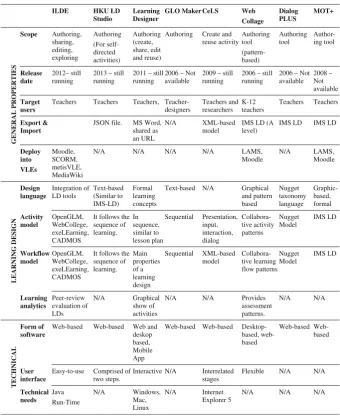
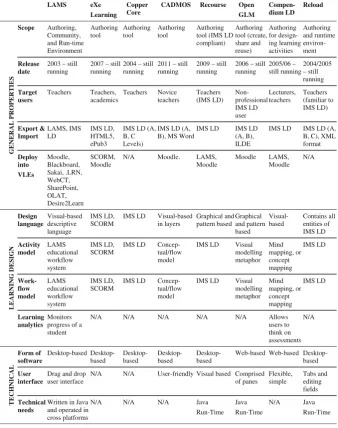
pedagogical models”. As presented in the timeline, eighteen authoring and sharing tools are placed in this category. We present their characteristics in line with the dimensions of the evaluation framework in Tables2 and 3-only tools that are still functioning are included.
1
Authoring and Sharing ToolsReflecon Tools an Pedagogic Planners
Delivery Tools
Repositories
Assessment Planners & Learning Analycs
6
1
3
[image:5.439.73.353.59.254.2]18
Fig. 1. The distribution of the tools according to the categorisation
2003 2004 2005 2006 2007 2008 2009 2010 2011 2012 2013 2014 2015
LAMS GLO Maker
LAMS Activity Manager
eXeLearning CompendiumLD
Recourse
OpenScenario
CeLS
HEART Integrative LD Environment
Coppercore Reload MOT+
WebCollege LAMS v2 OpenGLM DialogPlus
PHOEBE
LDTool Cloudworks
PPC HKU LD Studio
Authoring & Sharing Tools Reflection Tools & Pedagogical Planners Repositories
Delivery Tools Assessment Planners & Learning Analytics Learning Designer
Map My Programme
CADMOS ScenEdit
LdShake PPM
Glue!PS
Fig. 2. The timeline and categorisation of learning design tools
[image:5.439.48.382.296.492.2]3.2 Assessment Planners and Learning Analytics
[image:6.439.56.397.77.497.2]Tools that mainly focus on informing learning in terms of learning analytics are listed in this category, as shown in Table4.
Table 2. An analysis of authoring and sharing tools.
ILDE HKU LD
Studio
Learning Designer
GLO Maker CeLS Web
Collage Dialog PLUS MOT+ GENE RAL P R OPE R T IES Scope Authoring, sharing, editing, exploring Authoring (For self-directed activities) Authoring (create, share, edit and reuse)
Authoring Create and reuse activity Authoring tool (pattern-based) Authoring tool Author-ing tool Release date 2012– still running
2013 – still running
2011 – still running
2006 – Not available
2009 – still running
2006 – still running
2006 – Not available 2008 – Not available Target users
Teachers Teachers Teachers, Teacher-designers Teachers and researchers K-12 teachers Teachers Teachers Export & Import
JSON file. MS Word, shared as an URL
N/A XML-based
model
IMS LD (A level)
IMS LD IMS LD
Deploy into VLEs Moodle, SCORM, metisVLE, MediaWiki
N/A N/A N/A N/A LAMS,
Moodle N/A LAMS, Moodle LEARN IN G D E S IGN Design language Integration of LD tools Text-based (Similar to IMS-LD) Formal learning concepts
Text-based N/A Graphical
and pattern based Nugget taxonomy language Graphic-based, formal Activity model OpenGLM, WebCollege, exeLEarning, CADMOS
It follows the sequence of learning. In sequence, similar to lesson plan Sequential Presentation, input, interaction, dialog Collabora-tive activity patterns Nugget Model IMS LD Workflow model OpenGLM, WebCollege, exeLEarning, CADMOS
It follows the sequence of learning. Main properties of a learning design Sequential XML-based model Collabora-tive learning flow patterns Nugget Model IMS LD Learning analytics Peer-review evaluation of LDs N/A Graphical show of activities
N/A N/A Provides
assessment patterns. N/A N/A TECH N IC AL Form of software
Web-based Web-based Web and deskop based, Mobile App
Web-based Web-based Desktop-based, web-based based Web-based User interface
Easy-to-use Comprised of two steps.
Interactive N/A Interrelated stages
Flexible N/A N/A
Technical needs Java Run-Time N/A Windows, Mac, Linux N/A Internet Explorer 5
N/A N/A N/A
3.3 Reflection Tools and Pedagogical Planners
[image:7.439.44.383.83.512.2]Tools in this category are intended to“help the teacher/designer reflect on the peda-gogical choices to take, thus supporting the process of decision-making”[31]. These are shown in Table5.
Table 3. An analysis of authoring and sharing tools.
LAMS eXe
Learning Copper Core
CADMOS Recourse Open
GLM Compen-dium LD Reload GENE RAL P R OPE R T IES Scope Authoring, Community, and Run-time Environment Authoring tool Authoring tool Authoring tool Authoring tool (IMS LD compliant) Authoring tool (create, share and reuse) Authoring for design-ing learndesign-ing activities Authoring and runtime environ-ment Release date
2003 – still running
2007 – still running
2004 – still running
2011 – still running
2009 – still running
2006 – still running 2005/06 – still running 2004/2005 – still running Target users Teachers Teachers, academics Teachers Novice teachers Teachers (IMS LD) Non-professional IMS LD user Lecturers, teachers Teachers (familiar to IMS LD) Export & Import LAMS, IMS LD IMS LD, HTML5, ePub3
IMS LD (A, B, C Levels)
IMS LD (A, B), MS Word
IMS LD IMS LD
(A, B), ILDE
IMS LD IMS LD (A, B, C), XML format Deploy into VLEs Moodle, Blackboard, Sakai, .LRN, WebCT, SharePoint, OLAT, Desire2Learn SCORM, Moodle
N/A Moodle. LAMS,
Moodle Moodle LAMS, Moodle N/A LEA R NI NG DES IG N Design language Visual-based descriptive language IMS LD, SCORM
IMS LD Visual-based in layers Graphical and pattern based Graphical and pattern based Visual-based Contains all entities of IMS LD Activity model LAMS educational workflow system IMS LD, SCORM
IMS LD Concep-tual/flow model
IMS LD Visual
modelling metaphor Mind mapping, or concept mapping IMS LD Work-flow model LAMS educational workflow system IMS LD, SCORM
IMS LD Concep-tual/flow model
IMS LD Visual
modelling metaphor Mind mapping, or concept mapping IMS LD Learning analytics Monitors progress of a student
N/A N/A N/A N/A N/A Allows
users to think on assessments N/A TECH NICAL Form of software based Desktop-based Desktop-based Desktop-based Desktop-based
Web-based Web-based Desktop-based
User interface
Drag and drop user interface
N/A N/A User-friendly Visual based Comprised of panes Flexible, simple Tabs and editing fields Technical needs
Written in Java and operated in cross platforms
N/A N/A N/A Java
Table 4. An analysis of assessment planners and learning analytics
Map My Programme
General properties
Scope Mapping and planning assessments
Release date 2011–still running
Target users Teachers
Export & Import N/A Deploy into VLEs N/A Learning design Design language Visual-based Activity model N/A
Workflow model
N/A
Learning analytics
The tool provides summative and formative evaluation of the assessments.
Technical Form of
software
Web-based
User interface N/A
Technical needs
Google Account
Table 5. An analysis of reflection tools and pedagogical planners
PPC PHOEBE LdShake OpenScenario Lams AP PPM
GENE R AL PROPERTIE S Scope Pedagogical Pattern Collector Pedagogic planner Social network oriented tool Scenario-based tool Create learning activities Pedagogic planning of LDs
Release date 2011 – still
running
2006 – Not available
2011 – still running
2009 – Not available
2007 – still running
2010 – still running
Target users Teachers Teachers Teachers Teachers Teachers Teachers
Export & Import N/A N/A N/A N/A N/A N/A
Deploy into VLEs N/A N/A N/A N/A Moodle N/A
LEA R NI NG DES IG N
Design language Pattern-based Wiki-based,
and set of resource Various pedagogical approaches Scenario-based design Sequential Hierarchical entities
Activity model Cognitive
model
Sequence structures
4SPPIces Model Scenario-based model
Sequential Pedagogical Hierarchy
Workflow model Cognitive
model
Sequence structures
4SPPIces Model Organization, learning, observation, evaluation Sequential Pedagogical Hierarchy Learning ana-lytics
N/A Assessment and
activities
N/A N/A N/A N/A
TEC
H
NI
CA
L Form of software Web-based Web-based Web and desktop based
Web-based Web-based Web-based
User interface Browser,
designer, abstractor
N/A N/A Flexible N/A Hierarchy
Manager, Field Sector, Data Area
Technical needs N/A N/A N/A N/A Flash Player N/A
[image:8.439.57.398.373.594.2]3.4 Delivery Tools
Delivery tools are specifically designed to support the delivery of the activities and learning design into learning environment. A tool in this category is evaluated in Table6.
3.5 Repositories
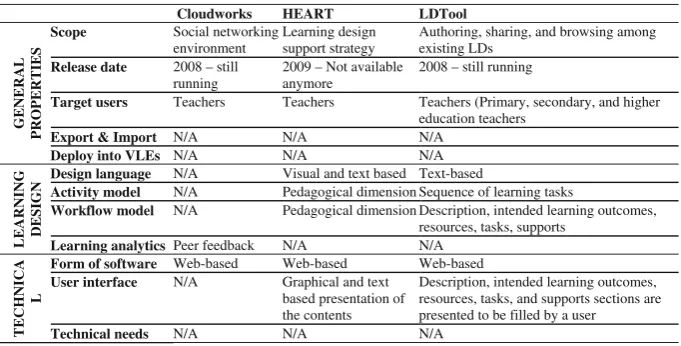
This category defines the tools that provide teachers learning design ideas, sample of practices, and experiences’reports. Tools analysed across the dimensions identified in the framework are presented in Table7.
Table 6. An analysis of delivery tools
GLUE!PS General
properties
Scope It allows integration of existing external tools including
Google Docs, Google Spreadsheets, Google Presentations,
Dabbleboard, Noteflight, Doodle, Wookie Widgets.
Release date
2011–still running
Target users
Teachers, practitioners, researchers
Export & Import
Supports IMS LD specification (Level A equivalent)
Deploy into VLEs
Moodle, MediaWiki, LAMS
Learning design
Design language
N/A
Activity model
N/A
Workflow model
N/A
Learning analytics
N/A
Technical Form of
software
Middleware architecture, Desktop-based
User interface
N/A
Technical needs
N/A
4
Conclusion and Future Works
The purpose of this paper was to present all LD tools in one place and analyse them along the same dimensions. In the paper, we distinguished the tools based on their functionality, and provided a timeline for LD tools. Twenty-nine learning design tools from the literature of the LD field were identified as still functioning. These were categorised according to their functionality, and a timeline of these tools associated with their categorisation was created.
It is worth to highlight that ILDE is the most recent tool developed within thefield. According to Maina et al. [27],“a promising step in this direction is the ILDE”as it focuses on integration of the various tools available rather than creating a new one.
Thefindings of this paper have a number of implications for future practice. First, further research could be conducted to compare teachers’learning design practices of using these tools on the same topic. Second, an analysis of the pedagogical under-pinning behind these tools would be also useful. Finally, usability and user interface characteristics of the LD tools would worth further investigation.
References
1. Hernández-Leo, D., Chacón, J., Prieto, L.P., Asensio-Pérez, J.I., Derntl, M.: Towards an
integrated learning design environment. In: Hernández-Leo, D., Ley, T., Klamma, R.,
[image:10.439.57.398.79.252.2]Harrer, A. (eds.) EC-TEL 2013. LNCS, vol. 8095, pp. 448–453. Springer, Heidelberg (2013) 2. Agostinho, S.: The use of a visual learning design representation to support the design process of teaching in higher education. Australas. J. Educ. Technol.27, 961–978 (2011)
Table 7. An analysis of repositories
Cloudworks HEART LDTool
GENERAL
PROP
ERTIES
Scope Social networking
environment
Learning design support strategy
Authoring, sharing, and browsing among existing LDs
Release date 2008 – still
running
2009 – Not available anymore
2008 – still running
Target users Teachers Teachers Teachers (Primary, secondary, and higher
education teachers
Export & Import N/A N/A N/A
Deploy into VLEs N/A N/A N/A
LEARNING DESIGN
Design language N/A Visual and text based Text-based
Activity model N/A Pedagogical dimension Sequence of learning tasks
Workflow model N/A Pedagogical dimension Description, intended learning outcomes,
resources, tasks, supports
Learning analytics Peer feedback N/A N/A
TECHNICA
L
Form of software Web-based Web-based Web-based
User interface N/A Graphical and text
based presentation of the contents
Description, intended learning outcomes, resources, tasks, and supports sections are presented to be filled by a user
Technical needs N/A N/A N/A
AQ2
3. Laurillard, D., Charlton, P., Craft, B., Dimakopoulos, D., Ljubojevic, D., Magoulas, G., Masterman, E., Pujadas, R., Whitley, E.A., Whittlestone, K.: A constructionist learning environment for teachers to model learning designs. J. Comput. Assist. Learn. 29, 15–30 (2013)
4. Boloudakis, M., Katsamani, M., Retalis, S., Georgiakakis, P.: CADMOS: a learning design tool for Moodle courses CADMOS by example. In: Proceedings of the 1st Moodle Research Conference, pp. 14–15 (2012)
5. Griffiths, D., Beauvoir, P., Liber, O., Barrett-Baxendale, M.: From reload to recourse:
learning from IMS learning design implementations. Distance Educ.30, 201–222 (2009)
6. Mor, Y., Mogilevsky, O.: The learning design studio: collaborative design inquiry as teachers’professional development. Res. Learn. Technol.21, 1–15 (2013)
7. Dalziel, J.R.: Lessons from LAMS for IMS learning design. In: Sixth International
Conference on Advanced Learning Technologies, pp. 1101–1102. IEEE Computer Society,
Los Alamitos (2006)
8. Prieto, L.P., Asensio-Pérez, J.I., Dimitriadis, Y., Gómez-Sánchez, E., Muñoz-Cristóbal, J.A.: GLUE!-PS: a multi-language architecture and data model to deploy TEL designs to multiple learning environments. In: European Conference on Technology Enhanced Learning, pp. 285–298 (2011)
9. Hernandez-Leo, D., Romeo, L., Carralero, M.A., Chacon, J., Carrio, M., Moreno, P., Blat, J.:
LdShake: learning design solutions sharing and co-edition. Comput. Educ.57, 2249–2260
(2011)
10. Emin, V., Pernin, J.-P., Aguirre, J.L.: ScenEdit: an intention-oriented authoring environment to design learning scenarios. In: Wolpers, M., Kirschner, P.A., Scheffel, M., Lindstaedt, S.,
Dimitrova, V. (eds.) EC-TEL 2010. LNCS, vol. 6383, pp. 626–631. Springer, Heidelberg
(2010)
11. Ronen, M., Kohen-vacs, D., Raz-fogel, N.: Adopt & adapt: structuring, sharing and reusing asynchronous collaborative pedagogy. In: International Conference on Learning Sciences
(ICLS), Bloomington, IL, pp. 599–605 (2006)
12. Conole, G., Fill, K.: A learning design toolkit to create pedagogically effective learning activities. J. Interact. Media Educ.8, 1–16 (2005)
13. Villasclaras-Fernández, E., Hernández-Leo, D., Asensio-Pérez, J.I., Dimitriadis, Y.: Web collage: an implementation of support for assessment design in CSCL macro-scripts. Comput. Educ.67, 79–97 (2013)
14. Paquette, G., Lundgren-Cayrol, K., Léonard, M.: The MOT+ visual language for knowledge
based instructional design. Instr. Des. Concepts Methodol. Tools Appl., 697–717 (2008) 15. Britain, S.: A Review of Learning Design: Concept, Specifications and Tools. A report for
the JISC E-learning Pedagogy Programme. Retrieved fromhttp://www.jisc.ac.uk/uploaded_
documents/ACF83C.doc(2004)
16. Khademi, M., Haghshenas, M., Kabir, H.: A review on authoring tools. In: Proceedings of
the 5th International Conference on Distance Learning and Education, IPCSIT, pp. 40–44.
IACSIT Press, Singapore (2011)
17. Prieto, L.P., Muñoz-Cristóbal, J.A., Asensio-Pérez, J.I., Dimitriadis, Y.: Making learning designs happen in distributed learning environments with GLUE!-PS. In: Ravenscroft, A.,
Lindstaedt, S., Kloos, C.D., Hernández-Leo, D. (eds.) EC-TEL 2012. LNCS, vol. 7563,
pp. 489–494. Springer, Heidelberg (2012)
18. Brasher, A., Conole, G., Cross, S., Weller, M., Clark, P., White, J.: CompendiumLD–a tool
for effective, efficient and creative learning design. In: Proceedings of the 2008
European LAMS Conference: Practical Benefits of Learning Design, Cadiz, Spain (2008)
19. Olimpo, G., Bottino, R.M., Earp, J., Ott, M., Pozzi, F., Tavella, M.: Pedagogical plans as
communication oriented objects. Comput. Educ.55, 476–488 (2010)
20. Masterman, L.: Phoebe Pedagogy Planner Project Project: Evaluation Report. Retrieved fromhttps://www.academia.edu/1856696/JISC_Design_for_Learning_Programme_Phoebe_ Pedagogy_Planner_Project_Evaluation_Report. University of Oxford, Oxford (2008) 21. Derntl, M.: OpenGLM : integrating open educational resources in IMS learning design
authoring. In: The Art & Science of Learning Design, pp. 157–168. Sense Publishers, Rotterdam (2015)
22. Cameron, L.: Planner tools-sharing and reusing good practice. Teach. Engl. Technol.1, 40– 49 (2009)
23. Jullien, J.M., Martel, C., Vignollet, L., Wentland, M.: OpenScenario : aflexible integrated environment to develop educational activities based on pedagogical scenarios. In: Proceedings of 9th IEEE International Conference on Advanced Learning Technologies,
ICALT 2009, Riga, Latvia, pp. 509–513 (2009)
24. Donald, C., Blake, A.: Reviewing learning designs with HEART: a learning design support strategy. In: ASCILITE 2009 - Australasian Society for Computers in Learning in Tertiary Education, pp. 1211–1213 (2009)
25. Conole, G., Culver, J.: Cloudworks: social networking for learning design. Australas. J. Educ. Technol.25, 763–782 (2009)
26. Dalziel, J., Conole, G., Wills, S., Walker, S., Bennett, S., Dobozy, E., Cameron, L., Badilescuhbuga, E., Bower, M.: The larnaca declaration on learning design. J. Interact.
Media Educ.1, 7 (2016)
27. Maina, M., Craft, B., Mor, Y.: The Art and Science of Learning Design. Sense Publishers, Rotterdam (2015)
28. Mor, Y., Craft, B.: Learning design: reflections upon the current landscape. Res. Learn. Technol.20, 85–94 (2012)
29. Britain, S.: Learning design systems: current and future developments. In: Rethinking Pedagogy for a Digital Age: Designing and Delivering E-Learning. pp. 103–104. Routledge, Oxford (2007)
30. Conole, G.: Tools and resources to guide practice. In: Rethinking Pedagogy for a Digital
Age: Designing for 21st Century Learning, pp. 78–101. Routledge (2008)
31. Persico, D., Pozzi, F.: Informing learning design with learning analytics to improve teacher inquiry. Br. J. Educ. Technol.46, 230–248 (2015)
AQ3