Forensic Malware Analysis:
The Value of Fuzzy Hashing Algorithms in
Identifying Similarities
Nikolaos Sarantinos
∗, Chafika Benza¨ıd
†, Omar Arabiat
‡and Ameer Al-Nemrat
∗ ∗School of Architecture, Computing & Engineering, UEL, London, UK†Division S´ecurit´e Informatique, CERIST, Alger, Alg´erie ‡AlBalqa Applied University
Abstract—This research aims to examine the effectiveness and efficiency of fuzzing hashing algorithm in the identification of similarities in Malware Analysis. More precisely, it will present the benefit of using fuzzy hashing algorithms, such as ssdeep, sdhash, mvHash and mrsh v2, in identifying similarities in Malware domain. The obtained results will be compared with the traditional and most common Cryptographic Hashes, such as the MD5, SHA-1 and SHA-256. Furthermore, it will highlight the pros and cons of fuzzy and cryptographic hashing, as well as their adoption in real world applications.
I. INTRODUCTION
Anti-virus vendors, researchers and analysts are struggling to keep up and to identify all the new malware types that are created every day. Malware Authors have managed to increase their malware’s sophistication to avoid detection against anti-malware technics by “implementing new features and specific modifications, such as encryption, polymorphism and metamorphism to maximize their resilience.” [1]. How-ever, anti-virus vendors and analysts managed to adapt their identification techniques by relying “on automated analysis methods, and tools in order to distinguish malicious from benign code” [2], such as the traditional static analysis using Cryptographic hashes with the MD5 and SHA256 being “the most commonly used in Malware Research in 2013.” [3]. Be-fore pursuing further the presentation of the relevant literature review, with regards to static analysis and the hashing types, it is worth defining the different malware types and presenting their key characteristics and defense mechanisms used to avoid detection.
II. HASHVALUES
The hash values, which are also called digest or checksum, have been a standard procedure and the main tool used in the traditional static malware analysis, and generally in any digital forensic investigation. They have been used primarily for the purpose of “identification, verification and authentication of file data” [4]. They are widely spread because of their “two basic properties: the compression and ease of computation, where compression means that independent of the input length the output (hash value) is of fixed size.” [5]. The output hash value is “the unique identifier for the acquired data, and is just as a DNA sequence or human fingerprint that identifies
an individual” [4], governed investigation process by its three fundamental forensic hashing rules [6]:
1) You can’t predict the hash value of a file or device; 2) No two-hash values can be the same; (Note: Collisions
have occurred in research using supercomputers.) 3) If anything changes in the file or device, the hash value
must change.
In order for malware analysts and forensics investigators to be able to detect the known malware and the “bad files” they make use of white and black list filters. The Whitelist is mainly a hash database, and it is used to reduce the amount of data that requires further analysis. More precisely, it means that, “if the file is ‘known-to-be good’, the analyst or investigator can fade out the file from further investigation.” [7]. The Blacklist is the opposite of the Whitelist, which means that “if the file is ‘known-to-be-bad’, the analysts look at the file by hand and check, if it actually is illicit.” [7]. However, the downside of using this approach is that any change in a single bit of a file or data means that their hash values will also change.
Finally, before discussing fuzzy hashing and its concept, we must understand the functions and the differences between the categories of hash algorithms, which are the Cryptographic, the Rolling, and Piecewise Hashing.
III. CRYPTOGRAPHICHASHES
Cryptographic hashes have been the traditional tool, for both malware analysis and forensic investigations. According to Dunham [3] the most used Cryptographic Hashes for malware analysis to detect identical known malware signatures are the MD5, SHA-1, and SHA-256. The main difference between these Cryptographic Hashes is their hash value length, despite they share the same concept “to perform known file filtering” [8] by identifying identical matches.
As mentioned earlier, changing a single bit in a
file/document means that its hash value will also change, which makes it impossible- arguably- to find any associations or similarities between two files or to check if they are virtually similar.
A. Rolling Hashes
on the context of the input,” [9]. They are based on the Rabin-Karp algorithm, which is defined as: “Given a string P of length N and a string S of length M to find out all the occurrences of P within S.” [10]. They are popular because they are easy and fast to compute. They are “used to identify similar strings in blocks of data” [11].
B. Piecewise Hashing
The Piecewise Hashing generates a final checksum for the whole document like traditional hashes. They overcome the limitations and the drawbacks of the latter as piecewise hashes separates the whole file into fixed segments/pieces, then generates a hash values for each of these segments. The generated segments values are, at the end, forming the final hash sequence. Furthermore, they were initially created to reduce the potential errors during the forensic imaging, so that the integrity of the data will be absolute, because only one hash segment would be void.
IV. SIMILARITY- FUZZYHASHING
Fuzzy hashing (FH), which is also called Context Triggered Piecewise Hashing (CTPH), is a combination of Cryptographic Hashes (CH), Rolling Hashes (RH) and Piecewise Hashes (PH), and according to [7] it can be perceived as: FH = CTPH = PH + RH. Unlike the traditional hashes, which their hashes (checksum) can be seen more as right or wrong, and as black or white, CTPH is more like the “grey hash type, as it can identify two files that may be near copies of one another that normally may not be located using traditional hashing meth-ods.” [3]. The identification between the two or more files is presented by their syntax similarity using a “score percentage between0 and100, where 0 is low similarity/probability and
100 is high similarity/probability [12].
The first version of CTPH was not initially meant for the use of malware detection. In 1999 Andrew Tridgell created the algorithm as a more effective and efficient way to find updates of files, which was later modified to identify/filter spam mails based on similarities and was called spamsum algorithm. Kornblum [9] in 2006 adjusted the Tridgell’s spamsum “to cope with files and released ssdeep. His main idea was to compute cryptographic hashes not over the entire file, but over parts of it, which are called segments or chunks” [7]. According to Roussev [8], fuzzy hashing was developed due to some limitations of the Cryptographic Hashes and with the purpose of addressing the following boundaries:
Identification of embedded/trace evidence
Given a piece of data, such as a JPEG, an investigator needs to be able to search for (traces of) its existence inside another document, archive, disk image, or network trace.
Identification of code versions
Modern software is dynamically patched and upgraded on a daily basis; it is an infeasible to maintain crypto-hash inventory of all the files for every single version.
Identification of related documents
Many documents undergo changes/transformations as they
are updated. It is often necessary to be able to identify and trace the versions across multiple evidence sources.
Correlation of memory and disk sources
An investigator needs to be able to correlate memory captures and disk images. The run-time layout and content of an executable/document are different from the on-disk representation so conventional hashes fail; however, identi-fiable commonality is clearly present.
Correlation of network and disk sources
Transmitted files are fragmented and interleaved. Currently, correlation requires time-consuming packet flow reconstruc-tion and protocol parsing to extract transmitted files before any hash filtering can be applied.
However, the efficiency of Fuzzy Hashing to identify sim-ilarities between files depends only on one factor; it requires a ‘sample’ that can be “compared to something, and therefore having some sort of malware library greatly increases the ef-fectiveness of using fuzzy hashes to determine if a suspect file is malicious or not” [13]. More precisely, this means that fuzzy hashing is only suitable for static and offline analysis, and the overall process can turned out to be time consuming. However, according to Breitinger [5], fuzzy hashing still remains a good and promising technique against metamorphic malware. The main four and common similarity hashing algorithms will be presented in the following subsections.
A. ssdeep
Kornblum’s ssdeep (similarity digest) fuzzing tool was the first fuzzing algorithm created that resolved some of the margins of the block-bashed hashes. The algorithm follows three steps:
(i) It uses Rolling Hashing to split the document “into a 6
bit value segments” [12] (blocks of variable length, which are depended of the Rolling Hash Algorithm);
(ii) It uses another hash function, such as MD5 or SHA-1, to produce a digest for each segment;
(iii) It links together all hash segments to form the hash signature.
Although ssdeep is quite effective in finding similarities between text files, because it was initially created for spam detection, its detection rate for images and videos is low as an active adversary can exploit it.
B. sdhash
Roussev developed in 2010 the sdhash (Similarity Digest hash), which uses Bloom Filters to encode the output hash features identified with low empirical probability. Its results are based on a “similarity score by calculating a normalized entropy measure between the digests ... which ranges from0to
100, where0is a mismatch and100is a perfect match or a near match” [12]. According to Roussev [8] (2011) and Breitinger and Baier [5], the advantage of sdhash is that the entropy calculation is performed for every 64-byte sequence (from 0
means that the sdhash can identify similarities between files on condition that common features are identified.
C. mvHash
The mvHash (majority vote hash) algorithm is a Similarity Preserving Digest (SPD), which has the “fastest computation time than any other SPH algorithm, and is almost as fast as SHA-1” [14]. The mvHash uses also the Bloom Filters, such as sdhash, and the “inputs are similar if they have similar underlying byte sequences” [14]. The algorithm has three phases: first the majority vote is made on a bit level so that any sequence will be transformed into 0s and 1s. The second phase is the RLE (Run Length Encoding) and “is applied to represent these sequence of0s and1s by its length (in bytes)”. The last phase is the creation of the similarity digest.
D. mrsh v2
Multi-resolution similarity hashing (mrsh) is powerful vari-ation of the ssdeep. The main difference between these two SPHs is that ssdeep is using the rolling hash, and mrsh is using a polynomial hash - djb2. Also, the mrsh uses the MD5 to compute the hashes, and “generates a variable sized similarity digest and adapts a technique from md5bloom that uses Bloom filters to represent the MD5 chunk hashes”.
V. MALWAREDETECTION WITHHASHING
According to Sikorski and Honig [15], the first steps for identifying any malware are to use Anti-virus Scanning soft-ware and then calculate their hash values (i.e., Fingerprint the Malware). Although, Cryptographic Hashes can only be used to identify known malware, which have been already identi-fied, based on their checksum, they are also used “for docu-mentation and future integrity verification” [16]. Furthermore, that way we can also sporadically check the program/malware to see if it has been modified either automatically by itself or manually by any user(s).
For calculating the hash values (MD5, 1 and SHA-256), a self-written bash script will be used, and the checksums will be saved into text file to be compared with the database of VirusTotal.
Below in Table I and Figure 1 are an example for the Malware (504) with its checksums:
MD5 a5ce0c535a4f019a60b5be4a662794dd SHA-1 c593257235490bcd5714016dabce608d3b93429a
SHA-256 39dcc1164c2a330c5dc32fef185287f496cf13219e48651e59010f9127eb6ef0
TABLE I
FILE INFORMATION OFMALWARE(504)
Fig. 1. Detection of Malware (504) via VirusTotal
The overall success rate of all tested cryptographic hashes was 99.88%, as all provided Malware were identified apart
from one. Although, the Anti-Virus scanning software identi-fied the M alware(1).sh as thread/malicious program, when comparing the hash values with the VirusTotal database the result was negative (See Table II and Figure 2).
MD5 53188c1c7adba6058a855e24cec42854 SHA-1 1112808a0c3c783e423d4d9d3e623783eb2a2712
SHA-256 631603fced37bc4da05abbd93d6e1cb76c5e08a1cef129ec3850ae1e495e0e09
TABLE II
FILE INFORMATION OFMALWARE(1).SH
Fig. 2. Detection of Malware (1).sh via VirusTotal
VI. FUZZYHASHINGIMPLEMENTATION
Implementing fuzzy hashing for malware analysis is a similar process to the one used in cryptographic hashes. This means that the fuzzy checksums must be calculated for all 856 understudy malware, and afterwards the checksum of five randomly chosen malwares will be taken and compared with the rest851malwares. Doing so, we can detect other malware and identify their similarities.
A. ssdeep
As mentioned in the literature review the Context Triggered Piecewise Hash (CTPH) or ssdeep calculates a signature (spamsum) for each input file, which can be later used to match these signatures against other file signatures, and to find any possible similarities or matches.
In order to proceed with the comparison we must create the hashes of the 856 Malware using the following command:
ssdeepbrT SP YZBOT.
The command: ssdeepbrT SP YZBOT >
ssdeepHashes.txt enables us to save the hashes on a text file (ssdeepHashes.txt) to be compared with the understudy malware sample.
The hashes of five malwares were randomly chosen and saved into a text to be compared with their signatures in the ssdeepHashes.txt. The malware chosen were: Malware (132), Malware (298), Malware (535), Malware (790), and Malware (803).
After performing the comparison of the signatures between the malwares of the two files, using the command “ssdeep -x ssdeepHashes.t-xt Malware.t-xt”, the following results were received (See Table III):
Malware.txt ssdeepHashes.txt Similarity
Malware Name x matches out of 856 Max 100
Malware (132) 297 (same matches with Malware 535 and 803) 97 - 100
Malware (298) 1 100
Malware (535) 297 (same matches with Malware 132 and 803) 81 - 100
Malware (790) 1 100
Malware (803) 297 Matches (same matches with Malware 132 and 535) 96 - 100
TABLE III
The malware signatures of Malware (298) and (790) were matched only with themselves. The results for the other three-malware signatures that were used to match similarities from the ssdeepHashes.txt ranged a similarity of 96−100%, with a median of98%. This also means that ssdeep is suitable for matching similarities not only from malware that belong to the same family, but also from emerging families, considering that the matched signatures were the same for all3malwares. The only change identified is related to the similarity score. It is worth mentioned here that all matched malware have different Cryptographic Hash value. Below is an example of the first 5
identified similarity matches (See Table IV).
Malware Match Malware Similarity
Malware.txt:Malware (132) matches ssdeepHashes.txt:Malware (504) 97 Malware.txt:Malware (132) matches ssdeepHashes.txt:Malware (249) 97 Malware.txt:Malware (132) matches ssdeepHashes.txt:Malware (629) 97 Malware.txt:Malware (132) matches ssdeepHashes.txt:Malware (340) 97 Malware.txt:Malware (132) matches ssdeepHashes.txt:Malware (844) 97
· · · ·
Malware.txt:Malware (803) matches ssdeepHashes.txt:Malware (504) 97 Malware.txt:Malware (803) matches ssdeepHashes.txt:Malware (249) 97 Malware.txt:Malware (803) matches ssdeepHashes.txt:Malware (629) 97 Malware.txt:Malware (803) matches ssdeepHashes.txt:Malware (340) 97 Malware.txt:Malware (803) matches ssdeepHashes.txt:Malware (844) 97
· · · ·
TABLE IV
MALWARESIMILARITIES WITHIN THREE MALWARE
In order to confirm the above statement, we will use the option “-brp” to recalculate and compare all the spamsums of the malwares provided for this research that belong to same malware family.
Of the 856 Malware identified to belong to the same malware family, only482were identified to have some degree of similarity. 364 Malware did not demonstrate any similar-ity. The similarity among the 482 malware ranged between
30100%, with a median of 67%. Table V shows a sample of the identified similarities:
Malware Match Malware Similarity
Malware (597) matches Malware (180) 30 Malware (546) matches Malware (239) 30 Malware (180) matches Malware (597) 30 Malware (97) matches Malware (55) 30 Malware (239) matches Malware (546) 30
· · · ·
[image:4.612.353.522.218.281.2] [image:4.612.353.521.377.439.2] [image:4.612.92.258.438.538.2]Malware (361) matches Malware (855) 100 Malware (332) matches Malware (639) 100 Malware (399) matches Malware (757) 100 Malware (813) matches Malware (580) 100 Malware (725) matches Malware (623) 100
TABLE V
SAMPLE OF SIMILARITIES BASED ON SSDEEP
The results presented by Table V prove that ssdeep can match similarities from malware that belong to the same malware family, but not necessarily from emerging ones. Furthermore, based on the sample tested, only the malwares with a similarity score of 30% and above were matched. Finally, the 364 malwares that did not score any similarity, were all files smaller than100kb, which actually confirms that ssdeep is only accurate in identifying similarities in files that are bigger than100kb.
B. sdhash
The main difference between sdhash and ssdeep, is that sdhash uses Bloom Filters and compares the files using Ham-ming distance. In order to compare two files with sdhash, , a
list of Bloom Filters (.sdbf) of given Malware folder needs to be created. To this end the following command is executed: sdhash -r ¡Malware folder pathname¿ ¿ sdhashMalwares.sdbf. The same command is used for the five Malwares that were used to find similarities by ssdeep. To compare both files 5Malware.sdbf and sdhashMalwares.sdbf, the “-c” option is used.
After comparing the results of the two files, sdhash has matched more similarities compared to ssdeep. The similarity score has ranged from 1100% (See Table VI). According to Roussev [8], even if the score is 100, it does not necessarily mean that the two files are exactly identical. However, this is not an issue, as we use sdhash to identify/match similarities and not to identify the exact same files.
5Malware.sdbf sdhashMalwares.sdbf Similarity
Malware Name x matches out of 856 Max 100
Malware (132) 755 1 - 100
Malware (298) 515 1 - 100
Malware (535) 765 1 - 100
Malware (790) 506 1 - 100
Malware (803) 757 1 - 100
TABLE VI
SDHASH RESULTS OF COMPARING THE5 MALWARES WITH THE SAMPLE
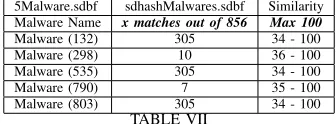
Although the majority of the matched similarities were ranged from 1 to 56%, sdhash has identified similarities. Furthermore, Roussev [8] claims that the results will be more accurate if we use a threshold of 21. Therefore, we run the same test with a threshold of 21. The obtained results are summarized in Table VII.
5Malware.sdbf sdhashMalwares.sdbf Similarity
Malware Name x matches out of 856 Max 100
Malware (132) 305 34 - 100
Malware (298) 10 36 - 100
Malware (535) 305 34 - 100
Malware (790) 7 35 - 100
Malware (803) 305 34 - 100
TABLE VII
SDHASH RESULTS OF COMPARING THE5 MALWARES WITH THRESHOLD21
The identified similarities were less with the threshold 21, but the identified match score was ranged between 99
-100%, which was much higher than before, especially with the Malware (535) and (803). The same test will be conducted now for all Malware. Tables VIII and IX show a sample of the identified similarities without threshold and with a threshold of 21.
Malware Malware Score
Malware (0).sh Malware (10) 1
Malware (10) Malware (100) 1
Malware (100) Malware (106) 35
Malware (101) Malware (107) 9
Malware (11) Malware (147) 18
· · · ·
TABLE VIII
SDHASH RESULTS FROM ALL MALWARE WITHOUT THRESHOLD
Malware Malware Score
Malware (108) Malware (158) 100
Malware (109) Malware (247) 53
Malware (11) Malware (353) 72
Malware (110) Malware (450) 100
Malware (111) Malware (462) 42
· · · ·
TABLE IX
SDHASH RESULTS FROM ALL MALWARE WITH THRESHOLD21
with the cryptographic hashes or the ssdeep. Table X shows a sample of similarity matching between Malware (0).sh and other malwares.
Malware Malware Score
Malware (0).sh Malware (106) 35
Malware (0).sh Malware (189) 58
Malware (0).sh Malware (247) 52
Malware (0).sh Malware (260) 59
Malware (0).sh Malware (353) 73
[image:5.612.106.245.45.110.2] [image:5.612.339.537.82.188.2]· · · ·
TABLE X
SDHASH RESULTS FROM ALL MALWARE WITH THRESHOLD21
C. mvHash
The mvHash is also a similarity preserving hash (SPH), which is based on the compression technique run length, and it is designed to be an approximate matching algorithm.
Following the same comparison scenario as in ssdeep and sdhash, the results summarized in Table XI were obtained.
Chosen malware All malwares Similarity
Malware Name x matches out of 856 Max 100
Malware (132) 315 3 - 100
Malware (298) 0 0
Malware (535) 182 8 - 100
Malware (790) 0 0
[image:5.612.91.258.572.634.2]Malware (803) 33 3 - 100
TABLE XI
MVHASHRESULTS OF COMPARING THE5 MALWARES WITH THE SAMPLE
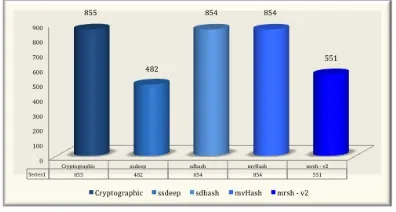
Overall, mvHash has identified and matched854out of856
Malware, with a similarity range score 3100%.
D. mrsh v2
The last SPH that will be tested is the mrsh. The mrsh (multi-resolution similarity hashing) is powerful variation of the ssdeep. The main difference between these two SPHs is that ssdeep is using the rolling hash, and mrsh is using a polynomial hash - djb2.
Following the same comparison scenario as in ssdeep, sdhash and mvHash, the results summarized in Table XII were obtained.
Chosen malware All malwares Similarity
Malware Name x matches out of 856 Max 100
Malware (132) 316 3 - 100
Malware (298) 1 100
Malware (535) 316 3 - 100
Malware (790) 1 100
Malware (803) 316 3 - 100
TABLE XII
MRSH-V2 RESULTS OF COMPARING THE5 MALWARES WITH THE SAMPLE
VII. SUMMARY OFRESULTS
This section will discuss the above results in relation to the identification and similarity rates of each algorithm, as well as the computation time that was required. The results for the
fuzzy hashing algorithms are based on using the option against all comparison.
Fig. 3. Identified Malware (×out of856)
Although, we cannot really compare the functionality of the cryptographic with the fuzzy hashes, it is worth mentioning that the cryptographic hashes have the highest identification rate based on the database of VirusTotal. For fuzzy hashing (see Figure 3), the sdhash and the mvHash have the highest identification rate based on similarities, followed by the mrsh v2 and lastly the ssdeep. A possible explanation for the low ratings of the ssdeep is that the algorithm did not match any malwares that were smaller than 100kb, but its computation time was better compared to sdhash and mrsh v2. Further-more, another explanation for the low results of ssdeep and mrsh v2 is that both of them match similarities only if the digest difference is not too big, and only if they are in the same range.
ssdeep sdhash mvHash mrsh - v2
real 0m18.734s real 1m22.054s real 0m4.433s real 1m17.304s user 0m7.452s user 0m12.050s user 0m1.773s user 0m50.985
sys 0m6.312s sys 0m0.751s sys 0m0.627s sys 0m0.844s
TABLE XIII COMPUTATIONTIME
According to results summarized in Table XIII, mvHash has the fastest computation time from all fuzzing hashes that were tested, but its identification rate was really low, as it matched
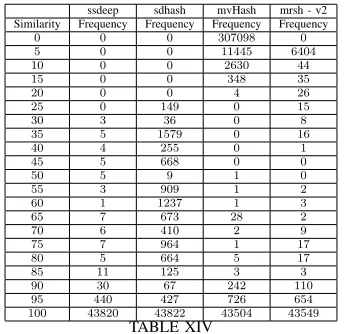
84%of the TSPY ZBOT malwares with zero similarities, and almost0% (0.01%) with a similarity match ranging between
4170. The only other fuzzy hashing algorithm that matched the less similarities between all given malware was sdhash, but without using the suggested threshold (i.e., 21). The ssdeep’s precursor, the mrsh v2 had the second largest running time after sdhash, but it matched similarities between the given malware, even to malware that their size was smaller than 100kb and were not identified by ssdeep.
Fig. 4. Similarity Score from each algorithm using Against-All Comparison option
ssdeep sdhash mvHash mrsh - v2 Similarity Frequency Frequency Frequency Frequency
0 0 0 307098 0
5 0 0 11445 6404
10 0 0 2630 44
15 0 0 348 35
20 0 0 4 26
25 0 149 0 15
30 3 36 0 8
35 5 1579 0 16
40 4 255 0 1
45 5 668 0 0
50 5 9 1 0
55 3 909 1 2
60 1 1237 1 3
65 7 673 28 2
70 6 410 2 9
75 7 964 1 17
80 5 664 5 17
85 11 125 3 3
90 30 67 242 110
95 440 427 726 654 100 43820 43822 43504 43549
TABLE XIV
ALLFUZZYHASHES- FREQUENCY OFSIMILARITIES
VIII. CONCLUSION
The implementation of fuzzy hashing can be considered as a successful one in the identification and matching similarities between the same and/or emerging malware families. How-ever, its success depends solely on two factors: first of all, the fuzzy (SPH) algorithm that we are using to identify and match similarities. Secondly and more importantly the hash sample from one or more malware(s), which is required to enable us to use it and find any other similarities. Although, the use of more than one fuzzy hash for malware analysis is recommended to cross-reference the final results, based on this research results the recommended one is sdhash as its results were more accurate compared to all the others that were tested. Finally, as mentioned above we cannot compare the cryp-tographic with the fuzzy hashes, but the use of both of them is required for the purpose of malware detection and identification. The use of Cryptographic hashes assists in identifying one known malware. On the other hand, fuzzy hashes can find new malware given the matched similarities.
Furthermore, the effectiveness and feasibility of fuzzy hashing in analysing similarities and malware detection has been this researchs primary objective. This objective was met through the the experiment discussed above. According to the results of all tested fuzzy algorithms, all of them have their strengths and limitations. For example mvHash has the fastest
computation time, and its identification rate was similar with the sdhashs. The mrsh-v2 had also a high computation rate, as did the sdhash, and both of them matched a similarity score of71100%in88% of the identified given malware. The only difference was that sdhash identified similarities in885of the
856malwares, but mrsh v2 presented similarities for only551
malwares. The only one that identified almost the half of the given malwares was ssdeep, but it has a fast computation time, and the similarities that identified matched a score71100%.
As a whole fuzzy hashing is the best option for static malware analysis, that does not require a lot of resources, time, and specialist personal. Also with fuzzy hashing it could be possible to identify new malwares, which can be from the same or an emerging malware family, based only on saved fuzzy hashing checksums.
However, fuzzy hashing is weak in identifying similarities in binary packets, and this is a point that requires further research and improvement. Another issue with fuzzy hashing is that at the moment there is no way that we could automatically test if a result is positive or negative, which means that the only safe method is manually. This specific issue could be partially solved, as mentioned above, on condition that a master dataset exists as the one in place for the cryptographic hashes. [17]
REFERENCES
[1] R. Paleari, “Dealing with next-generation malware,” 2011.
[2] M. Lindorfer, C. Kolbitsch, and P. Comparetti, “Detecting environment-sensitive malware,” pp. 338 – 357, 2011.
[3] K. Dunham, “A fuzzy future in malware research,” 2013.
[4] D. L. Lewis, “The hash algorithm dilemma-hash value collisions,” [On-line] Available from: http://www.forensicmag.com/print/235. [Accessed: 02 August 2014].
[5] F. Breitinger and H. Baier, “Properties of a similarity preserving hash function and their realization in sdhash,” pp. 1 – 8, 2012.
[6] B. Nelson, A. Phillips, and S. C, “Guide to computer forensic and investigations,”Boston: Cengage Learning, 2009.
[7] H. Baier and F. Breitinger, “Security aspects of piecewise hashing in computer forensics,”In Proc. of The Sixth International Conference on IT Security Incident Management and IT Forensics (IMF), pp. 21 – 36, May 2011.
[8] V. Roussev, “An evaluation of forensic similarity hashes,”digital inves-tigation, vol. 8, pp. 34 – 41, 2011.
[9] J. Kornblum, “Identifying almost identical files using context triggered piecewise hashing,”Digital investigation, vol. 3, pp. 91 – 97, 2006. [10] C. Negruseri, “Rolling hash, rabin karp, palindromes,
rsync and others,” [Online] infoarena.ro. Available at: http://www.infoarena.ro/blog/rolling-hash [Accessed: 9 August 2014]. [11] K. Candan and M. Sapino, “Data management for multimedia retrieva,”
1st ed. Cambridge University Press, 2010.
[12] J. Oliver, C. Cheng, and Y. Chen, “Tlsh – a locality sensitive hash,” pp. 7 – 13, 2013.
[13] K. Timm, “Malware validation techniques,” [on-line] blogs@Cisco - Cisco Blogs. Available at: http://blogs.cisco.com/security/malware validation techniques/ [Accessed 10 Aug. 2014].
[14] F. Breitinger, K. Astebol, H. Baier, and C. Busch, “mvhash-b - a new approach for similarity preserving hashing,” In Proc. of The Seventh International Conference on IT Security Incident Management and IT Forensics, 2013.
[15] M. Sikorski and A. Honig, “Practical malware analysis,” 1st ed. San Francisco: No Starch Press, 2012.
[16] C. Malin, J. Aquilina, E. Casey, and C. Rose, “Malware forensic field guide for linux systems,”1st ed.
[image:6.612.89.261.225.392.2]