ISBN 978-983-41705-6-1 2007 FEIIC
64
EEE_18
E-PASSPORT SECURITY USING ADVANCED ENCRYPTION
STANDARD (AES)
Nik Shahidah Afifi Mohd Taujuddin, Mohd Helmy Abd Wahab and Christina a/p Hanif
Faculty of Electrical and Electronic Engineering, Tun Hussein Onn University of Malaysia, Johor, Malaysia. Email: [email protected]
ABSTRACT
This paper presents basic design approach for securing the information in the E-passport by using Advanced Encryption Standard (AES) algorithm. AES is a new cryptographic algorithm that can be used to protect electronic data. Furthermore, AES is an iterative; symmetric-key block ciphers that can use keys of 128, 192, and 256 bits, and encrypt and decrypt data in blocks of 128 bits (16 bytes). An algorithm successfully implemented using Visual Basic. The purpose of AES algorithm is to protect the information stored in E-passport. E-passport is the new version of the conventional passport that usually contain the holder's profiles such as photograph, signature, date of birth, nationality, and sometimes other means of individual identification. The E-passport is very similar to the previous passport, but the different only having an embedded microchip in the centre page but for this prototype,, microchip will be replaced with the memory stick.
Keyword: AES, E-Passport, embedded, microchip, data
INTRODUCTION
The Advanced Encryption Standard (AES) is proven by a national Institute of Standards and Technology (NIST) for encryption of electronic data.[1] It is expected to become the accepted means of encrypting digital information, including financial, telecommunications, and government data. In this research, AES used to protect the information in E-passport. This E-passport is the new version of the conventional passport. But in this project a collective passport will be used. The collective passport is used for a purpose of travelling in groups between five to twenty persons to ASEAN country only. The major purpose of doing this application is to secure the data in the E-passport. The security system that has been used nowadays is currently not effective because the data in the E-passport can be hacked or stolen. Below are a few attackers in E-passport:
a) Clandestine scanning b) Clandestine tracking c) Skimming and cloning d) Eavesdropping
e) Biometric data-leakage f) Cryptography weakness
The objectives of the research are as follows:
1 To build an E-passport prototype
2 To enhance the security of the E-passport
3 To ensure the confidentiality of the information in E-passport
ISBN 978-983-41705-6-1 2007 FEIIC 65
RELATED WORK
TRADITIONAL PASSPORT
A passport is a formal identity document or certification issued by a national government that identifies the holder as a national of a particular state, and requests permission, in the name of the sovereign or government of the issuing country, for the bearer to be permitted to enter and pass through other countries. Passports usually contain the holder’s name, photograph, date of birth, nationality, passport number and passport expiry date.
E-PASSPORT
The E-passport is very similar to the previous passport, only differ in having an embedded microchip in the centre page and a gold international E-passport symbol on the front cover. [2] The chip embedded in the centre pages stores the holder's informations same like in the conventional passport
HARDWARE AND SOFTWARE
A 64MB Memory stick and the memory stick reader is used in this project A memory stick is a solid-state electronic flash memory data storage devices used with digital cameras, handheld and laptop computers, telephones, music players, video game consoles, and other electronics. They offer high re-recordability, power-free storage, small form factor, and rugged environmental specifications. The Memory Stick Reader/Writer will allow the Memory Stick cards to be used as portable storage for computers as well as for uploading or downloading data. There are two software that is used in this project. Microsoft Access to build the user’s database and Microsoft Visual Basic 6.0 to build the interface for the system.
CRYPTOGRAPHY
Cryptography is the science of encrypting information. [3] Each of the encryption and decryption process needs the same private key to encrypt and decrypt data. Data input is called plaintext, after going through the encryption process known as cipher text. Data output from the decryption process will be converted back to plaintext.
Advanced Encryption Standard (AES)
AES is an iterative, symmetric-key block cipher that can use keys of 128, 192, and 256 bits, and encrypts and decrypts data in blocks of 128 bits (16 bytes).For Cipher (encryption), each round of AES (except the last round) consists of fours transformations:
a. SubBytes – a non linear substitution step where each byte is replaced with another according to a
lookup table.
b. ShiftRows - a transposition step where each row of the state is shifted cyclically a certain number of
steps.
c. MixColumns – a mixing operation which operates the columns of the state, combining the four bytes in
each column using a linear transformation.
d. AddRoundKey - each byte of the state is combined with the round key; each round key is derived from
the cipher key using a key schedule.
For Inverse Cipher (decryption) there 4 transformations involved:
a. InvSubBytes – transformation in the inverse cipher that is the inverse of SubBytes
b. InShiftRows - transformation in the inverse cipher that is the inverse of ShiftRows
c. MixColumns - transformation in the inverse cipher that is the inverse of MixColumns
ISBN 978-983-41705-6-1 2007 FEIIC
66
METHODOLOGY
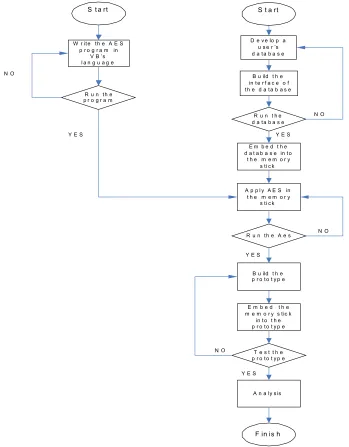
In order to perform the development of E-passport, the following steps were considered (see Fig. 1)
S t a rt
D e v e lo p a u s e r ’s d a ta b a s e
B u ild t h e in t e r f a c e o f th e d a ta b a s e
E m b e d t h e d a t a b a s e in to
t h e m e m o r y s ti c k R u n t h e d a ta b a s e
R u n th e A e s A p p l y A E S in t h e m e m o r y
s ti c k
S t a rt
W r it e th e A E S p r o g r a m in
V B ’s l a n g u a g e
R u n th e p r o g r a m
B u ild t h e p r o to t y p e
E m b e d t h e m e m o r y s tic k
in t o t h e p r o to t y p e
T e s t t h e p r o to t y p e
A n a ly s is
F in is h
Y E S
N O
Y E S Y E S
Y E S N O
N O
[image:3.595.79.428.133.580.2]N O
Figure 1: Framework of the methodology
Generally, methodology of the research is divided into 5 phases. These are the phases to design the system
a) Building the user’s database phase b) Developing the AES algorithm phase
• Encryption phase
• Decryption phase
c) Design and build the prototype phase d) Implementation phase
e) Analyze and testing the prototype phase
ISBN 978-983-41705-6-1 2007 FEIIC 67 P A S P O R T
M A L A Y S IA
Ba ha w as an ya at a s na ma Y an g di-Per tua n Ag on g M ala ys ia se mu a y an g b e r ke na an su pa ya m em b en ar ka n p em b aw a pa spo rt in i la lu d en ga n be ba s t an pa ha la ng a n at au se ka tan d a n m em be ri ap a- ap a j ua p e r to lon ga n da n p er lin du ng an ya ng p e r lu ke pa da ny a Th es e a re re qu es t an d r eq uir e in the n am e of th e Su pre m e He ad of M ala ys ia a ll t ho se w ho m it m a y c on ce rn t o a llo w th e be ar er to pa ss fr ee ly w ith ou t l et or hi nd ran ce , an d t o aff or d t he b ea rer su ch as si st an ce an d pro te ct ion a s m a y be ne ce ss ar y
M AL A YS IA M A LA Y SI AM A L AY SIA M AL A Y SIA M A LA Y SI A MA L A YSIA M A LA YSIA M A LA Y SI AM A L AY SIA M AL A Y SIA M A LA Y SI A MA L A YSIA M A LA Y SI A M AL A YS IA M A LA Y SI AM A L AY SIA M AL A Y SIA M A LA Y SI A MA L A YSIA M A LAP a sp o rt / P a ss p o rt M A L AY S I A
K ad M em ori / M em ory S tic k N o. Pa ss port / P as spor t N o .
N ama / N am e No. P engenalan / Ident ity N o .
J enis / Ty pe K od N egar a / C ountr y Co de
T ar ikh dikelu ark an / D ate Of Is sue T ari kh T am at S ahlak u /
[image:4.595.360.438.72.164.2]D ate of E xp iry
Figure 2: Front cover of the E-Passport’s prototype
DEVELOPMENT
ADMINISTRATOR AUTHENTICATION
The login page is used to authenticate which user can access to the system. In this case, the login page is only applied to the administration because it is used to prevent any unauthorized and suspicious top up process or registration. From the admin system, a person can modify the database. Therefore, only authorized person with the correct password can access the system at administration.
[image:4.595.189.405.371.570.2]DATABASE DESIGN
Figure 3 refer shows the database of the system. 12 Tables has been created while attributes of tables in the database is shown in table 4.
ISBN 978-983-41705-6-1 2007 FEIIC
68
(a) (b)
[image:5.595.104.494.70.319.2](c)
Figure 4: Table properties
INTERFACE DESIGN
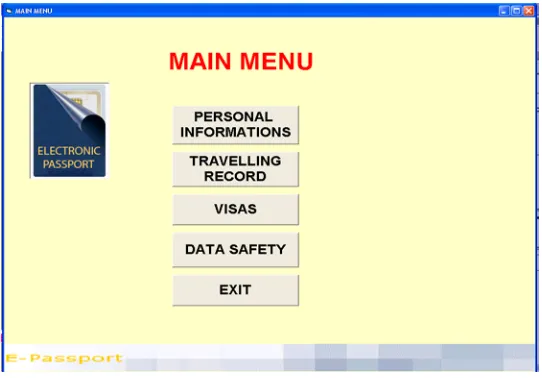
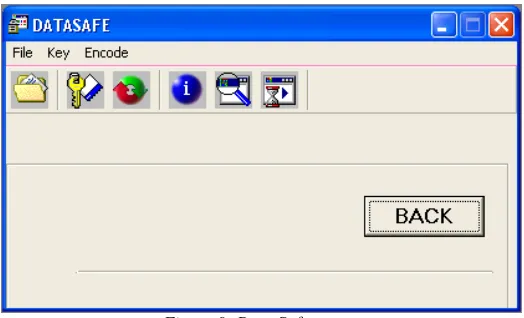
The Project Explorer Window, often called the Project Window, gives a tree-structured view of all the files in the application. It displays forms, modules (files that hold supporting code for the application), classes (advanced modules), and more. Figure 5 shows the main page for administrator. It has five command buttons that is used to select any menus such as to view bearer’s personal information, travelling information, visas, securing the data and to exit the system. Figure 6 shows the page that displays all the bearers’ personal information while Figure 7 shows the page that display all the bearers’ travelling record. The visas information for all bearers are display in the visa’s page as shown in Figure 8 Bearers’ personal information page, traveling page and visas page come out with a Data Bar. The Data Bar is used to view other bearer’s information. Figure 9 showsthe data safety page that contains the program to allow the administrator to encrypt and decrypt the data.
[image:5.595.163.434.520.709.2]ISBN 978-983-41705-6-1 2007 FEIIC 69
[image:6.595.150.446.275.461.2]Figure 6: Personal’s bearer’s information
Figure 7: Bearer’s traveling record
[image:6.595.156.441.490.708.2]ISBN 978-983-41705-6-1 2007 FEIIC
[image:7.595.167.429.70.229.2]70
Figure 9: Data Safety page
AES
The AES algorithm is written in VB’s programming language. This language is fairly simple and uses common English word and phrases for the most part [4] Figure 10 shows the page that contains the interface for AES program. There are five command buttons that allow the user to select the file to be encrypted, to encrypt and decrypt data, to view file properties, to view file and to open or start file. This algorithm provides a progress bar as shown in Figure 4.10 to view the quality of the key inserted.
Figure 10: Key is inserted to the program
IMPLEMENTATION
The system is tested to ensure that interfaces between software and hardware and that the system meet the requirement.
[image:7.595.144.451.356.606.2]ISBN 978-983-41705-6-1 2007 FEIIC 71
[image:8.595.244.345.70.212.2]PASPORT MALAYSIA
[image:8.595.217.385.283.407.2]Figure 11: Front cover of the E-passport’s prototype
Figure 12 shows the first page of the E-passport’s prototype. This page contains the passport holder’s information such as name, passport’s Number, Type, Country Code, Date of Issue and Date of Expiry. 64MB memory stick is embedded at the upper right side of this page.
MALAYSIAMALAYSIAMALAYSIAMALAYSIAMALAYSIAMALAYSIAMALAYSIA MALAYSIAMALAYSIAMALAYSIAMALAYSIAMALAYSIAMALAYSIAMALAYSIA MALAYSIAMALAYSIAMALAYSIAMALAYSIAMALAYSIAMALAYSIAMALAYSIA
Pasport /
Passport MALAYSIA
Kad Memori / Memory Stick
No.Passport / Passport No . A 15554998
No. Pengenalan / Identity No .
Jenis / Type Kod Negara / Country Code
Tarikh dikeluarkan / Date Of Issue
Tarikh Tamat Sahlaku / Date of Expi ry 1. AHMAD B. ISMAIL
2. MAZNAH BT. ABU 3. CHOON SO LING 4. RAJKUMAR A/L SAMY 5. LIM MA FEI 6. MASHITAH BT. DURALIM 7. BUJANG B. SAMAD 8. NUZUL B. IKRAM 9. ASMAH BT. SAARI 10. SUHAILA BT. AHMAD
Nama / Name
571231155221 650101155226 650212145678 660714065431 670321055224 670524055222 760215085447 780103145111 830405145812 830724025688 P MYS
03 MAR 2005
03 DEC 2005
[image:8.595.208.389.479.615.2]Figure 12: First page of the E-passport’s prototype
Figure 13 below shows the second page of the E-passport’s prototype. It has been stated in this page that the passport holder can enter any country freely in the name of the Supreme Head of Malaysia and have a right to be helped and protected.
Bahawasanya atas nama Yang di-Pertuan Agong Malaysia semua yang berkenaan supaya membenarkan pembawa pasport ini lalu dengan bebas tanpa halangan atau sekatan dan memberi apa-apa jua
pertolongan dan perlindungan yang perlu kepadanya
These are request and require in the name of the Supreme Head of Malaysia all those whom it may concern to allow the bearer to pass freely without let or hindrance , and to afford the bearer such assistance and protection as may be necessary
Figure 13: Second page of the E-passport’s prototype
ISBN 978-983-41705-6-1 2007 FEIIC
72
P A S P O R T M A L A Y S IA
M A L A Y S IA P A S S P O R T
A 1 5 5 5 4 9 9 8
P A S P O R T I N I S A H D IG U N A K A N D I SE M U A N E G A R A A S IA
T H I S P A S S P O R T I S V A L I D F O R A L L A S E A N C O U N T R IE S
[image:9.595.242.350.245.389.2]Figure 14: Third page of the E-passport’s prototype
Figure 15 below shows the fourth page which is the observation page of the E-passport’s prototype.
PEMERHATIAN / OBSERVATIONS
[image:9.595.236.363.440.547.2]Figure 15: Fourth page of the E-passport’s prototype
Figure 16 below shows fifth page of the E-passport’s prototype. This page contains the signatures of all passport holders.
T a n d a ta n g a n P e m b a w a / S i g n a tu r e o f B e a r e r
1 . A H M A D B . I S M A I L … … … . 2 . M A Z N A H B T . A B U … … … . 3 . C H O O N S O L I N G … … … . 4 . R A J K U M A R A / L S A M Y … … … . 5 . L I M M A F E I … … … . 6 . M A S H I T A H B T . D U R A L I M … … … . 7 . B U J A N G B . S A M A D … … … . . 8 . N U Z U L B . I K R A M … … … . 9 . A S M A H B T . S A A R I … … … . 1 0 . S U H A I L A B T . A H M A D … … … .
[image:9.595.228.369.618.745.2]Figure 16: Fifth page of the E-passport’s prototype
Figure 17 shows the sixth or the last page of the E-passport’s prototype. This page contains all the rules and regulations that have to follow by the passport holders.
P E R H A T I A N
1 . P a s p o r t in i d ik e lu a r k a n o le h J a b a t a n I m ig r e s e n M a l a y sia a t a u P e r w a k ila n M a la y s ia L u a r N e g e r i .
2 . P a s p o r t in i sa h d i g u n a k a n m e n g i k u t t e m p o h sa h la k u y a n g d il u lu sk a n . P a sp o r t b a r u h e n d a k la h d ip o h o n jik a b a k i t e m p o h k u r a n g d a r ip a d a 1 b u l a n a t a u p a s p o r t r o sa k . 3 . P e m b a w a p a sp o r t y a n g m e la n g g a r sy a r a t a t a u p e r a t u r a n d a la m m a n a -m a n a u n d a n g -u n d a n g y a n g b e r k a it a n t id a k a k a n m e n d a p a t p e r lin d u n g a n a t a u k e m u d a h a n d a r ip a d a m a n a -m a n a P e r w a k ila n M a l a y sia se m a s a b e r a d a d i lu a r n e g e r i. a p a e m b a w a p a sp o r t h e n d a k la h m e m a t u h i p e r a t u r a n- p e r a t u r a n im ig r e s e n n e g a r a d ila w a t i. 4 . P a s p o r t a d a l a h " H a k M i lik K e r a ja a n M a la y si a " y a n g a m a t b e r h a r g a d a n o le h it u p e r lu d ija g a d e n g a n r a p i. I a b o le h d i t a r ik b a lik b ila -b ila m a s a sa h a ja . P a s p o r t in i t i d a k b o le h d i k ir im m e l a lu i p o s d a r i s e s e b u a h n e g e r i k e se se b u a h n e g e r i y a n g la i n , a t a u d a r i s u a t u t e m p a t k e t e m p a t y a n g la in .
5 . P a s p o r t t id a k b o le h d i p i n d a a t a u d i se r a h k e p a d a o r a n g la in a t a u a g e n y a n g t i d a k b e r h a k m e m ili k in y a . K e s a la h a n -k e sa la h a n d e m i-k i a n a t a u s e b a r a n g -k e c u a ia n la i n y a n g m e n y e b a b k a n k e h il a n g a n a t a u k e r o sa k a n b o l e h m e n y e b a b k a n p e n a n g g u h a n p e n g e lu a r a n p a sp o r t b a r u b a g i t e m p o h - t e m p o h t e r t e n t u.
6 . J i k a b e r l a k u k e h il a n g a n , la p o r a n h e n d a k la h d i b u a t se g e r a d i P e j a b a t J a b a t a n I m ig r e s e n y a n g b e r h a m p i r a n a t a u k e P e ja b a t P e r w a k i la n M a la y si a d i lu a r n e g e r i d a n k e p a d a p ih a k p o l is t e m p a t a n .
7 .G a m b a r p e m e g a n g h e n d a k la h d ip e r b a h a r u i s e k ir a n y a b e r l a k u p e r u b a h a n w a ja h d e n g a n m e n g e m u k a k a n p e r m o h o n a n d i m a n a - m a n a P e ja b a t J a b a t a n I m ig r e se n a t a u P e r w a k i la n L u a r N e g e r i y a n g b e r h a m p i r a n
ISBN 978-983-41705-6-1 2007 FEIIC 73
RESULT AND ANALYSIS
This section outlines the result and analysis of the system. It presents the results obtained from processes and testing as a part of this research project. Besides that, analysis regarding the system has been done to verify whether the whole system integrated with hardware is functioning properly or not.
AES PROGRAM INTERFACE
Only authorized person from the administration can encrypt or decrypt the data in the E-passport. There are 3 steps involved in the encryption process.
a) Select the file to be encrypted (Figure 18)
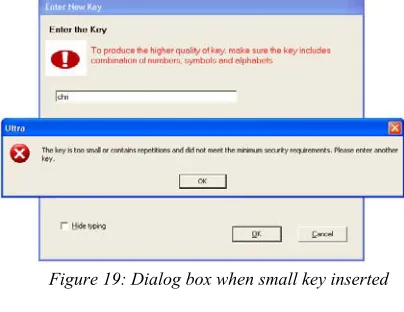
b) Insert the key (Figure 10). If the key entered is too small, the dialog box will appear as shown in Figure 19 c) Response the dialog box to overwrite data in the file (Figure 20) and Figure 21 shows the encryption process
Users are unable to view the interface if the database has been encrypted. Figure 22 shows the dialog box appears after the user try to push command buttons in the main menu page. The program cannot find the encrypted database unless if it been decrypted first. The user still can view the interface but without linked with the database as shown in Figure 23. So the database has to be decrypted first before viewing the page.
There are also 3 steps involved in the decryption process.
a) Select the file to be decrypted (Figure 18)
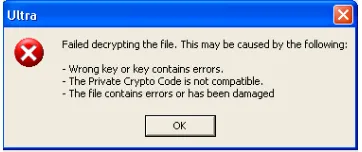
[image:10.595.101.262.391.631.2]b) Insert the key (Figure 24) if the key entered is wrong, the dialog box will appear as shown in Figure 25 c) Response the dialog box to overwrite data in the file (Figure 20) and Figure 26 shows the decryption process.
Figure 18: User selects the file Figure 19: Dialog box when small key inserted
[image:10.595.304.506.399.555.2]ISBN 978-983-41705-6-1 2007 FEIIC
[image:11.595.317.510.71.214.2]74
Figure 22: Dialog box appear after the user try to push command buttons in the main menu page.
[image:11.595.323.504.247.323.2]Figure 23: The interface without linked with the database
Figure 24: Dialog box for key insertion Figure 25: Dialog box for wrong key inserted
Figure 26: Decrypting process
ANALYSIS
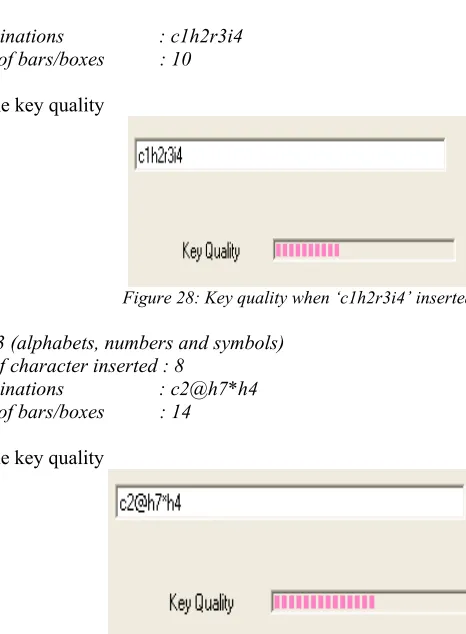
Key plays the most important role in this application due to without key, encryption or decryption process cannot be done. To produce the higher quality of key, user has to ensure the key includes the combination of numbers, symbols and alphabets. Examples below show the differences key quality if user inserts the same number of character but with the different combinations.
a) Example 1 (alphabets only)
[image:11.595.199.395.636.718.2]Number of character inserted : 8 Key combinations : christin Numbers of bars/boxes : 7
Figure 27 shows the key quality
Figure 27: Key quality when ‘christin’ inserted
b) Example 2 (alphabets and numbers)
ISBN 978-983-41705-6-1 2007 FEIIC 75
[image:12.595.148.381.60.377.2]Key combinations : c1h2r3i4 Numbers of bars/boxes : 10
Figure 28 shows the key quality
Figure 28: Key quality when ‘c1h2r3i4’ inserted
c) Example 3 (alphabets, numbers and symbols)
Number of character inserted : 8
Key combinations : c2@h7*h4 Numbers of bars/boxes : 14
Figure 29 shows the key quality
ISBN 978-983-41705-6-1 2007 FEIIC
76
[image:13.595.146.452.95.481.2]Table 1 below shows the comparison of key quality with different characters.
Table 1: Comparison of Key Quality
No. Number of Characters Combinations Key Key Quality (boxes in the Progress Bar)
1. 12 (g8i33@h9#%i9) Alphabets : 4 Numbers : 3 Symbols : 4
21
2. 12 (cfg%g4hu7bh0) Alphabets : 8 Numbers : 3 Symbols : 1
21
3. 14 (n7h9m@10^*nk03) Alphabets : 5 Numbers : 6 Symbols : 3
24
4. 14 (njki56cfdei@ki#) Alphabets : 11 Numbers : 2 Symbols : 1
23
5. 18 (cvgf0nj876bhg@n#8$) Alphabets : 10 Numbers : 5 Symbols : 3
27
6. 18 (6uh6789bfg+yhbjf%6) Alphabets : 11 Numbers : 6 Symbols : 1
27
7. 20
(k#10*3p4ar@%t4b0+b^a)
Alphabets : 8 Numbers : 6 Symbols : 6
27
8. 20
(abcdefghiklm1234*#%+)
Alphabets : 12 Numbers : 4 Symbols : 4
27
9. 24
(*%/acf678+zy367-8379cobt) Alphabets : 9 Numbers : 10 Symbols : 5
27
10. 24 (abcde12345%+^*-a#!ab1<2f)
Alphabets : 9 Numbers : 8 Symbols : 7
27
27 = (highest key quality)
CONCLUSION AND RECOMMENDATION
ISBN 978-983-41705-6-1 2007 FEIIC 77
REFERENCES
[1] Merike Kaeo. (1999). “Designing Network Security.” Worldwide Encryption Policies. Cisco Press pp. 106-112.
[2] Air Juels , David Molnar and David Wagner (2005). “Security and Privacy Issues in E-passports.”
[3] Chey Cobb (2004). “Cryptography for dummies.” Crypto Basics & What You Really Need to Know. Wiley Publishing pp 7-31
[4] Alka R. Harriger, Susan K. Lisack, John K. Gotwals and Kyle D. Lutes (2000). “Introduction to Computer Programming with Visual Basic 6: A Problem-Solving Approach.” Purdue University: Prentice-Hall. [5] Federal Information Processing Standards Publication 197, November 26,2001; Specification for the