SKETCH RECOGNITION ON MOBILE DEVICES
A Thesis by
GEORGE ROBERT LUCCHESE
Submitted to the Office of Graduate Studies of Texas A&M University
in partial fulfillment of the requirements for the degree of MASTER OF SCIENCE
Approved by:
Chair of Committee, Tracy Hammond Committee Members, Frank Shipman
Julie Linsey Department Head, Duncan Walker
December 2012
Major Subject: Computer Science
ABSTRACT
Sketch recognition allows computers to understand and model hand drawn sketches and diagrams. Traditionally sketch recognition systems required a pen based PC in-terface, but powerful mobile devices such as tablets and smartphones can provide a new platform for sketch recognition systems. We describe a new sketch recognition library, Strontium (SrL) that combines several existing sketch recognition libraries modified to run on both personal computers and on the Android platform. We ana-lyzed the recognition speed and accuracy implications of performing low-level shape recognition on smartphones with touch screens. We found that there is a large gap in recognition speed on mobile devices between recognizing simple shapes and more complex ones, suggesting that mobile sketch interface designers limit the complexity of their sketch domains. We also found that a low sampling rate on mobile devices can affect recognition accuracy of complex and curved shapes. Despite this, we found no evidence to suggest that using a finger as an input implement leads to a decrease in simple shape recognition accuracy. These results show that the same geometric shape recognizers developed for pen applications can be used in mobile applications, provided that developers keep shape domains simple and ensure that input sampling rate is kept as high as possible.
ACKNOWLEDGEMENTS
I would like to thank many people for their assistance with this thesis and for their support through my academic career. First and foremost I would like to thank my wife Allyson, for all the support and encouragement she has given me and for keeping me going even in the most stressful times. I would also like to thank my parents, grandparents and the Texas A&M Association of Former Students for their support of my undergraduate and graduate education. Thank you also to my friends and colleagues in the Sketch Recognition Lab for all of their assistance in research, learning and fun. Finally I would like to thank the members of my committee, Dr. Frank Shipman and Dr. Julie Linsey, for their instruction and advice, and my advisor Dr. Tracy Hammond, for her encouragement and endless enthusiasm.
TABLE OF CONTENTS Page ABSTRACT . . . ii ACKNOWLEDGEMENTS . . . iii TABLE OF CONTENTS . . . iv LIST OF FIGURES . . . vi
LIST OF TABLES . . . vii
1. INTRODUCTION . . . 1
1.1 Sketch Recognition Overview . . . 1
1.2 Touch Input and Mobile Devices . . . 2
1.3 Supporting Mobile Sketch Recognition . . . 4
1.3.1 Adjusting for Touch . . . 5
1.3.2 Sketch Recognition Software for Mobile Devices . . . 5
2. RELATED WORK . . . 7
2.1 Pen versus Touch . . . 7
2.2 Low Level Shape Recognition . . . 9
2.3 Distributed Recognition . . . 11
3. IMPLEMENTATION . . . 13
3.1 OpenAWT . . . 13
3.2 Strontium Library . . . 14
3.3 Data and Representation . . . 14
3.4 Sample Android Applications . . . 16
3.4.1 Sketchpad . . . 16
3.4.2 SOUSAPhone . . . 17
3.4.4 Unmanned Aerial System . . . 19
3.5 Distributed Recognition . . . 20
3.5.1 PaleoSketch Online . . . 20
3.5.2 Mechanix Online . . . 21
4. PALEOSKETCH MOBILE PERFORMANCE . . . 24
4.1 Data Collection . . . 24
4.2 PaleoSketch Recognition Accuracy . . . 25
4.2.1 Results . . . 28
4.2.2 Discussion . . . 32
4.3 PaleoSketch Recognition Speed . . . 35
4.3.1 Results . . . 36
4.3.2 Discussion . . . 36
5. CONCLUSIONS . . . 41
LIST OF FIGURES
Figure Page
3.1 SVG+XML Hybrid encoding of a sketch . . . 15
3.2 JSON encoding of a sketch object . . . 15
3.3 Sketchpad Android application user interface . . . 18
3.4 Mobile Mechanix Android application user interface . . . 18
3.5 Unmanned Aerial System Android application user interface . . . 19
3.6 PaleoSketch Online browser-based HTML interface . . . 22
3.7 Mechanix Online browser-based HTML interface . . . 22
3.8 The distributed sketch recognition process . . . 23
4.1 Examples from the original PaleoSketch testing set . . . 26
4.2 Specific complex variable shapes collected in evaluation. . . 27
4.3 Accuracy by Shape . . . 31
4.4 Confusion matrix of raw pen data . . . 33
4.5 Confusion matrix of resampled pen data . . . 33
4.6 Confusion matrix of raw touch data . . . 33
4.7 Recognition time by shape . . . 37
4.8 Recognition time by number of points on Android . . . 37
LIST OF TABLES
Table Page
4.1 Baseline accuracy for PaleoSketch across 9 shapes . . . 26
4.2 Initial accuracy results . . . 29
4.3 Initial comparison results using a two-tailed t-test (α=.05) . . . 29
4.4 Results after resampling . . . 30
4.5 Results of direct comparison with pen baseline using a two-tailed t-test (α=.05) . . . 32
4.6 The recognition time on the Android and PC platforms, both locally on the device and using the distributed sketch recognition system. . . 36
1. INTRODUCTION
1.1 Sketch Recognition Overview
Sketch as a form of computer-human interaction has had a long and varied history. In the early 1960s Ivan Sutherland developed one of the earliest pen-based computer interfaces, with the Sketchpad [26]. Using a light pen as input, Sketchpad functioned as a computer aided design (CAD) system, where the user could use the pen to define the geometry of shapes and more complex structures. This led to many systems using light pens for CAD input, but it wasn’t until the early 1990s that pen and sketch systems would become more general use. The PenPoint OS by the GO corporation was an early attempt to develop a commercial mobile system built around pen-based input. Personal Digital Assistants (PDAs) such as the Apple Newton and PalmPilot were arguably the first pen-based systems to see widespread adoption, with stylus based interfaces providing not only point and click interface capabilities, but gesture and handwriting recognition as well. Microsoft’s Windows for Tablets was somewhat successful at bringing pen computing into the workplace, particularly in niche settings where using a traditional laptop keyboard and mouse is too cumbersome, such as emergency medical workers and military field planners. Wacom also helped expand pen computing, particularly in digital arts and design, through their many inductive digitizer pen systems, from inexpensive input tablets like the Bamboo to the high end Cintiq displays. Just as Wacom has popularized pens in the design community, so has the SMART board popularized the use of digital pen systems in classrooms.
Researchers have used such systems to develop a class of intelligent human com-puter interfaces focused on using drawn sketches as a mode of input. This research, generally known as Sketch Recognition, is focused on deciphering sketches, and trying
to understand the user’s intention. This is particularly useful for specific domains of hand drawn diagrams where there is established and codified meaning behind drawn symbols. This allows the computer to build models from sketches as they are being drawn, providing the user with visual feedback through partial-to-complete drawing beautification, and ultimately storing the sketch in such a way that it can be parsed in a domain specific way.
Despite advances in the sophistication and accuracy of generic and domain recog-nition, sketch recognition as a whole has arguably remained a niche form of computer human interaction, limited to those systems which are capable of supporting true sketch interaction. While true pen devices may still be limited in number, multi-touch displays capable of free hand drawing through multi-touch or capacitive styli have becoming increasingly prevalent. The popularity of these devices, such as the iPad and Android mobile devices, provide an opportunity for sketch interaction to be used in new domains and at a much greater volume than ever before. Many applications on these devices, whether games [18], note taking [36] or painting applications [2], already take advantage of the inherent affordances for drawing on this hardware. Very few, however, have ventured into the use of true intelligent sketch interaction beyond character recognition.
1.2 Touch Input and Mobile Devices
Considering the promise that these devices have as sketch devices it is surprising that they are still relatively unexplored within the context of sketch recognition. Part of this may be due to the challenges that these devices pose when developing sketch recognition applications. The first challenge is the relative difficulty of using fingers for the tasks of sketching and writing. While pens and styli require significant training to use effectively, once sufficient proficiency is achieved they provide a level of
accuracy and speed that is difficult to match with the fingertip. This is mostly due to the precise nature of the tip of the implement, which allows for greater precision and greater movement speed due to a corresponding decrease in surface area and friction. In addition pens provide a greater range of motion with less hand movement due to the increased leverage that they provide.
The relatively large surface area of the finger can also lead to some ambiguity for interpreting user input on touch screen devices. With pixel densities in touch screens continuing to increase, it more difficult to accurately interpret exactly where a user intended to touch the screen at a pixel or sub-pixel level. While this is less of an issue in standard user interfaces where lack of accuracy can be made up for with larger buttons or hit areas, this could be problematic for sketches and drawings where changes in accuracy can lead to a lot of jitter. Poor quality touch sensors can compound these problems, leading to ladder effects when drawing across a screen. Though this is not an issue unique to touch sensors, the effect can be more pronounced than in more expensive and refined pen systems, such as those developed by Wacom.
Despite all of these issues, touch is a compelling form of input and should be considered a practical medium for the use of sketch recognition. There are several reasons why touch enabled devices would benefit from the addition of intelligent sketch interfaces. The first is the noted lack of content authoring tools on touch-based mobile platforms. While the multitouch screen is excellent for viewing and exploring content, the lack of input precision relative to devices like the mouse makes developing effective content authoring tools difficult. Using interactions techniques from sketch recognition could prove more natural for multitouch content authoring, through the use of symbolic drawing, gestural commands, intuitive workspace scaling, and direct manipulation of workspace objects. Such content editing tools are also
necessary to make true ”work” applications built for expert users with niche uses. While such tools are common on established PC environments, the combination of the light-weight power and intuitive touch interface of today’s tablet and smartphones with sophisticated tools could bring mobility and flexibility to working environments.
1.3 Supporting Mobile Sketch Recognition
Given the potential of sketch interaction on modern touch devices, we propose that new and modified tools should be developed to help modern mobile applica-tion developers make sketch-based interfaces. Such tools should be sophisticated to support large sketch domains, but also be simple so that even developers without expertise in sketch recognition could take advantage of them. Just like multitouch development tools and libraries have brought multitouch gestures to many applica-tions, so too should sketch tools encourage the everyday use of sophisticated sketch algorithms without undue effort on the part of developers.
We address this challenge with a combination of sketch libraries, collectively known as the Strontium Sketch Recognition Library (SrL), that we have developed to run on Android as well as on the standard Java platform. This library is available with a BSD license, and provides a collection of open source sketch recognition algorithms and libraries that have been collected and developed over the last half decade at the Sketch Recognition Lab of Texas A&M University. Arguably the most important of these is the PaleoSketch library, which provides easy automatic recognition and beautification of basic shapes.
Before such tools can be released to developers at large, there are a number of challenges that must be addressed, and are indeed currently being addressed in the sketch recognition community at large.
1.3.1 Adjusting for Touch
In order to use touch input effectively for sketch recognition we must consider how input data differs from the pen systems we have already extensively developed for. As mentioned previously, there are several bio-mechanical reasons why pen input might be different from touch input. While these differences may have an impact on user ergonomics and usage patterns, we will focus simply on the end effect of different input implements on recognition accuracy. Recognition accuracy could be affected by any number of changes, such as the speed and length of basic strokes, to the smoothness and size of drawn shapes and strokes. Assumptions about hardware device and screen characteristics could also affect performance, such as expecta-tions of specific pixel densities for stroke lengths measured in pixels, input device sampling rates and, as described before, input device accuracy. To address these problems as they pertain to the performance of the Strontium library, we performed a comparative evaluation of its performance, or more specifically the performance of the PaleoSketch basic shape recognizer. We describe our process in chapter 4, and discuss the implications of our findings.
1.3.2 Sketch Recognition Software for Mobile Devices
In addition to the touch input there are other challenges to using sketch recog-nition on mobile devices, specifically limitations of hardware, storage and practical limitations in porting established sketch recognition libraries to native device appli-cation programming interfaces (APIs).
With the Strontium library we go about solving these issues in two ways. The first way is to port Java based sketch libraries to the Android platform, which is capable of running a certain subset of Java code. This involved removing dependencies on code not available on the Android platform, such as most user interface code and
specific geometry libraries. This process, described later in this paper, provides us with a stable base for native application development on both PCs and Android, so that algorithms refined on traditional pen-based systems and already written in Java can be easily ported. Unfortunately, this does not necessarily address performance issues with lower powered mobile hardware, and it most certainly does not address the highly competitive and divided nature of current mobile platforms.
Our solution to the problem of fractured mobile platforms is to provide a dis-tributed recognition environment, where simple client applications can send sketch data over standard transport protocols to higher-powered and standardized servers. These servers can perform recognition and return results so that recognition system do not need to be developed for each individual mobile platform. This approach has the added benefit of making it easier to update recognition software and add new recognition domains continuously and to collect sample data in a single centralized location. We describe our specific distributed recognition architecture in chapter 3, demonstrate some uses of it and evaluate its performance.
Finally, while we could theorize about how individual device capabilities might ul-timately affect recognition speed, the only practical way to determine this is through direct evaluation. Again we focused on the performance of PaleoSketch, as the ser-vice it provides, basic shape recognition, typically serves as the core of high level sketch recognition systems and must therefore perform at an acceptable level. We evaluated its recognition speed across all three target platforms of the Strontium library: personal computer, Android and distributed. We describe this evaluation and discuss its implications in chapter 4.
2. RELATED WORK
2.1 Pen versus Touch
One of the central purposes of this thesis is to determine the differences in recog-nition accuracy between current pen-based PC systems and touch-based systems such as smartphones and tablets. These differences, if there are differences, most likely come down to the input characteristics of the implement used by the user to draw, as well as the digitizer that is used to capture that physical input and turn it into a digital format. We are interested in two general classes of input device, the inductive digital pen system, typified by those on Wacom tablets [30], and the capacitive multitouch screen, made popular by the original iPhone. While inductive pen systems generally only support one user implement, the pen, capacitive screens support two types, the finger and the capacitive stylus.
From the perspective of sketch recognition, we need to understand the implica-tions of these differences in the context of the geometric features that we use to extract meaning from user-drawn strokes.
MacLean et al. attempt to address this question directly by comparing finger and stylus in the context of mathematical sketch recognition applications [17]. In the study, the authors evaluated the performance of the mathematical equation recog-nition system MathBrush [12], over three distinct user interaction situations: using a stylus on a tablet PC, using a finger on an iPad and using an capacitative stylus on an iPad. The results of the study show a significant difference in accuracy of the math sketch system as a whole between the tablet PC and iPad, with the capacitive stylus and touch interaction being lower than the tablet PC’s electromagnetic dig-itizer. The authors theorize that this is due to the higher sampling resolution and
rate of the PC’s pen versus the iPad, which led to a higher level of individual symbol recognition, thereby improving recognition of the mathematical statement in gen-eral. When comparing between the capacitive stylus and touch input, however, the results become more nuanced. The finger drawn symbols had a higher classification accuracy in isolation, possibly due to the inherently slower and more careful draw-ing process with a fdraw-inger, but the capacitative stylus had a higher accuracy for the drawing as a whole. This contradiction was likely caused by problems in segmenting between shapes caused by difficulties in accurately placing the finger (i.e. The Fat Finger Problem [32]).
The MacLean study also measured differences in the physical characteristics of strokes drawn on the capacitative screen and those drawn with a stylus and electro-magnetic digitizer. The time spent on each stroke, time between strokes and overall time spent drawing an expression was significantly lower in each case on the tablet PC. In addition, the overall size of symbols (measured through average stroke height) proved to be higher for those drawn on the tablet PC.
Tu et. al. have also performed a comparative study between touch and stylus input [27], with a more specific focus on the geometric differences between the two forms of input over hand-drawn gestures of varying degrees of complexity. In their study, they analyzed the effect that input implement had on nine features commonly used in gesture and sketch recognition systems. Out of the nine features compared, four showed significant similarities between pen and finger drawn gestures: stroke articulation time (pen down to pen up), indicative angle difference, axial symmetry and proportional shape distance. The other five features tested, average speed, size ratio, aperture between start and end point, corner shape distance and intersection points deviation were shown to be significantly different.
2.2 Low Level Shape Recognition
As shown by MacLean et. al., implement can have a significant effect on the accuracy of a sketch recognition system as a whole. These effects can be felt at many different levels of the sketch recognition process, from the recognition of individual strokes, to the proper clustering of related strokes and therefore proper classification of higher level shapes and structures. While higher level recognition is key to the performance of a specific sketch recognition system, such systems are highly domain specific and would require a different approach to remedy the differences in each case. Instead we will focus on lower level sketch recognition
Low level sketch recognition is typically achieved using template matching, mo-tion based or geometric recognimo-tion techniques. The $1 gesture recognizer [33] and Li’s derived Protractor [15] are examples of template matching shape and gesture recognizers. To classify an unknown shape, these systems perform some preprocess-ing on the stroke, then calculate a distance metric from template shapes from each possible class of shapes.
Motion based recognizers use sets of numeric features extracted from a stroke’s inherent geometry in order to perform classification. Rubine’s formative work [23] defined a set of features that could be extracted from a stroke which could be used in a linear classifier to perform shape recognition. Long et al. improved on Rubine’s feature set by removing correlated features and adding several new features [16]. These features have since been used in many different gesture and sketch recognition systems [13, 24].
Both template and motion based approaches work well for a known set of gestures, particularly when they are performed in isolation, have a defined shape and well-defined stroke direction and order. These constraints, however, make it difficult to
use template based systems in a free sketching system as users are constrained in the ways in which they can draw shapes. Paulson et al. were able to overcome some of the limitations in motion based recognition by including features that were not feature dependent [21].
Geometric recognitionm on the other hand, attempts to match a shape to a ge-ometric primitive that can best describe the drawn shape. This means that they are not restricted to matching to trained classes of shapes but attempt to be more generally descriptive, meaning that there is more flexibility in the way that a shape may be drawn for it to be classified correctly. There are several low level recogni-tion systems that use geometric techniques, such as CALI [8] and Rata.SSR [4] and PaleoSketch [20].
There are typically two steps to the geometric recognition process, stroke segmen-tation and shape fitting. There are many different techniques for performing stroke segmentation, such as the Douglas Peucker algorithm [7], which identify corners and segmentation points of strokes and split them into component sub-strokes. Once a stroke is properly segmented, the sub-strokes can be classified in isolation and can be used to identify the shape of the original stroke. One such segmentation algorithm, ShortStraw has been proved to be both simple to implement and accurate in all-or-nothing accuracy for finding segment corners [34]. ShortStraw has been extended several times to achieve an overall accuracy of up to 99% [37]. While ShortStraw does not depend on time-dependent features such as speed, it is heavily reliant on the curvature of shapes at their corners, which may be affected by the differences in input device described previously.
The process of fitting strokes to prototypical shapes generally involves building ideal forms of various shapes and calculating error metrics between the idealized fit and the original stroke. PaleoSketch supports fitting up to 19 basic single-stroke
shapes: line, arc, ellipse, circle, curve, helix, spiral, arrow, complex, line, poly-gon, rectangle, square, diamond, dot, wave, gull, blob and infinity. There are many shape-specific fitting metrics, but there are two specific measures that are used across many of these fits and are of particular interest in determining the effect of input device on accuracy. These features are the Direction Change Ratio (DCR) and the Normalized Distance between Direction Extremes (NDDE), and both are described in the original PaleoSketch paper [20]. In simple terms, DCR is the maximum change in stroke direction between points, divided by the average change in direction be-tween points. DCR gives a general measure of how ”pointy” a stroke is, that is does it have sharp corners. A high DCR generally indicates a stroke with multiple line segments, and a low DCR means few corners and a smooth shape. NDDE is the distance between the global maximum and minimum change in direction divided by the overall length of the stroke. NDDE is also a measure indicating the present or absence of sudden direction changes like corners, but a high NDDE indicates a smooth shape and a low NDDE indicates a shape with sharp corners. We monitored these fitting metrics while evaluating the relative recognition performance of pen and touch.
2.3 Distributed Recognition
In the introduction we briefly described the use of a distributed recognition sys-tem to overcome platform and performance limitations of mobile devices. This is a frequently used architecture when the tasks involved require a large amount of data retrieval, heavy processing, or must be able to access numerous recognition domains. Systems such as Apple’s Siri [1] and Google’s Goggles [10] application are good ex-amples of what can be achieved using distributed recognition systems. Avola et al. [3] developed just such a system for sketch recognition, accepting stroke data via
XML over HTTP from client systems. Once the data is received, the server encodes the stroke data and performs basic segmentation, identifying poly-lines and closed shapes, then ovals and lines. Finally the recognition results encoded in the SketchML XML format and sent back to the client system. We used a similar general approach with our distributed recognizer, and evaluated the recognition speed and response time necessary to send and receive sketch and recognition data.
3. IMPLEMENTATION
In order to provide a general use sketch recognition library that would be easy for mobile developers to use we collected and modified several existing sketch recognition libraries. For primitive geometric shape recognition we include PaleoSketch [20]. For appearance base shape recognition we include an implementation of Wobbrocks $1 recognizer [33]. For motion based shape recognition we provide Rubine’s feature extractor [23]. Finally for higher level shape recognition we include portions of the constraint description system of LADDER [11].
3.1 OpenAWT
We used an initial implementation of these algorithms and libraries written in Java, depending on the Java Development Kit (JDK) to provide tools for geomet-ric analysis and user interface visualization. Unfortunately, the Android platform does not provide the complete JDK platform, so much of the code we relied upon for geometry, the java.awt.geom package, was not available. This required that we find an alternative Java geometry library to serve our needs. We investigated the JavaGeom [14] library as well as the Java Topology Suite [29], but neither of them provided a direct porting route for our existing code.
Instead we built our own library, OpenAWT1, by forking code from the OpenJDK project [19] to serve as a self contained version of the java.awt.geom package. This new library contains code for geometry, shapes and colors, and is able to function equally well on both the Android and standard JDK platform. In addition to the java.awt.geom code, we also developed a simple Scalable Vector Graphics [35] imple-mentation that is integrated into OpenAWT. Using SVG we created a separation of
visual representation and geometric model, so that the process of drawing a shape is defined by a well known standard, and functions consistently across different user interfaces.
3.2 Strontium Library
Using OpenAWT we were able to develop a single sketch recognition library that could function across not only the JDK and Android, but also other non-JDK Java platforms, such as Google App Engine. We call this new library the Stron-tium Library (SrL)2. The Strontium Library is composed of 5 major portions: Core, Recognition, Distributed, Swing UI and Android UI.
• Core - Includes essential sketch classes, such as Point, Stroke, Sketch and Shape.
• Recognition - Contains all included sketch recognition libraries, such as Pa-leoSketch, $1 Recognizer and portions of LADDER.
• Distributed - Provides a reference implementation of client/server sketch recognition architecture.
• Swing UI - Provides user interface classes for the JDK platform, such as SketchCanvas and SketchPanel.
• Android UI - Provides user interface classes for the Android platform, such as the SketchView.
3.3 Data and Representation
The Strontium Library supports several different formats for storing sketch data. The primary format we use for storing data on disk is the text-based Extensible
2SrL available from
Figure 3.1: SVG+XML Hybrid encoding of a sketch
Markup Language (XML). Specifically we use a hybrid XML format that stores a visual representation of the sketch as SVG shapes in the same file as the rest of the sketch metadata (Figure 3.1). This means that a sketch file can be viewed using any standard SVG viewing application, while retaining the metadata necessary to edit it and perform recognition using the Strontium library. Since SVG is a specific form of XML, we are able to write and read it using a standard Java XML library, specifically the open source Simple XML [9] library.
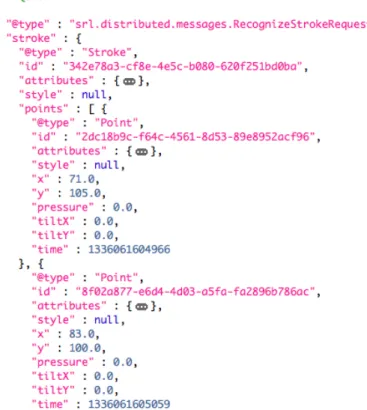
The second data format supported is JavaScript Object Notation (JSON). This is another text-based data representation format that is popular for use with web technology, due to its simple and easy to read syntax, generally compact size and its compatibility with the popular JavaScript language. JSON is well supported by many languages, libraries and platforms beyond the web and JavaScript, and it is because of this that we chose to use JSON for our distributed recognition approach described later in this section. For reading and writing JSON in the Strontium library we use the open source Jackson JSON library [5]. An example of a sketch encoded in JSON is shown in Figure 3.2.
3.4 Sample Android Applications
Using the Strontium Library, we developed a series of applications, where some were simple proofs of concept, and others were more complete applications. We will describe a few of them here.
3.4.1 Sketchpad
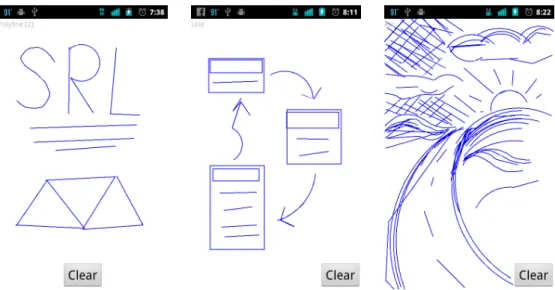
We developed a very simple drawing application called Sketchpad (Figure 3.3). Sketchpad provides a small drawing canvas that beautifies shapes as the user draws them. Sketchpad automatically applies PaleoSketch recognition to each stroke, gets the most probable shape fit and replaces the original stroke with the beautified
version of the matched shape. We used this application to test the recognition time and responsiveness of the application during recognition. The timing performance results for the original set of 9 PaleoSketch shapes is discussed in section 4.3.
3.4.2 SOUSAPhone
SOUSAPhone is a more capable sketch data collection application built using the Strontium library that is integrated with the SOUSA platform [22]. SOUSA is a web-based application that allows researchers to create, modify and run sketch data collection user studies. SOUSAPhone is an implementation of the SOUSA data collection client, thereby allowing Android users to participate in data collection studies and also providing a tool for collecting touch-specific datasets from Android devices. We used this application to collect sketch data the performance evaluation of Strontium, as described in section 4.1.
3.4.3 Mobile Mechanix
To test the practicality of higher level domain sketch recognition on mobile de-vices we developed the Mobile Mechanix application (Figure 3.4). This application recognizes truss diagrams from mechanical engineering, using a recognizer developed for the Mechanix intelligent tutoring system [28]. As the user draws strokes, the strokes are turned into primitive shapes using PaleoSketch and combined together. They are then processed by the Mechanix truss recognizer which builds a model of the drawn truss, complete with axes and applied forces. This application proved to be sluggish, specifically during high-level recognition as the sketch became more complex. This was likely due to the original truss recognition algorithms which are typically order N2 in nature. While these algorithms were sufficiently quick on the PC where they were initially developed, these prove much slower on lower-powered mobile devices. This performance problem provided some of the impetus for
devel-Figure 3.3: Sketchpad Android application user interface
Figure 3.5: Unmanned Aerial System Android application user interface
oping the distributed sketch architecture in section 3.5. 3.4.4 Unmanned Aerial System
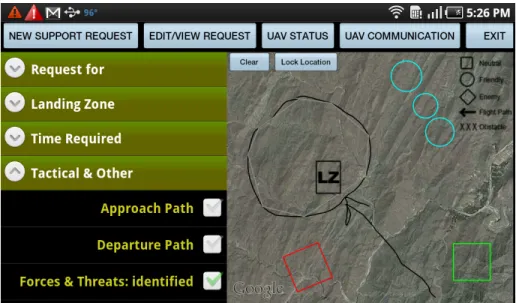
Another application developed using the Strontium Library is the Unmanned Aerial System (UAS) mobile application [6] (Figure 3.5). This application was de-veloped to help non-experts build flight-plans for unmanned aerial resupply vehicles in combat zones. The application walks users through the process of sketching out a flight plan, drawing important features of the flight plan, such as the landing zone, potential obstacles and enemy and friendly forces on a map. This application pri-marily used PaleoSketch shapes and a few simple combined shapes using constraints as its recognition domain. Using this limited domain, recognition performance was fast and more than sufficient for the task. As this application was specifically de-signed for use in the field on lightweight Android tablets, it is a good example of the potential of bringing sketch recognition into a mobile context.
3.5 Distributed Recognition
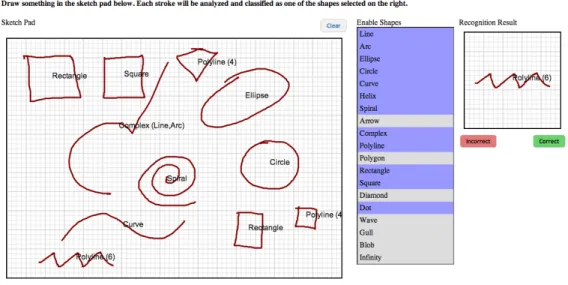
While using OpenAWT makes it possible to bring Java-based sketch recognition libraries to Android, there are still other mobile platforms to consider, many of which cannot run Java code. To address this issue we developed a reference implementa-tion of a light-weight client/server architecture for sketch recogniimplementa-tion. We created a modified and simplified version of the distributed sketch recognition architecture de-scribed by Avola et. al [3], where a client application collects raw stroke data, sends it to a server for recognition and then displays the recognition results. Our architecture uses JavaScript Object Notation (JSON) formatted request and response messages to send data between a client and server using HTTP. The server is a simple Java Enterprise Edition Servlet that reads each JSON message, performs the requested action and returns a response. Since JSON and HTTP are common and well sup-ported by many platforms, this architecture can provide basic and higher level sketch recognition to clients running on systems without any Java support. Using this dis-tributed recognition architecture, we developed two sample applications to show the versatility of our approach, PaleoSketch Online (Figure 3.6) and Mechanix Online (Figure 3.7).
3.5.1 PaleoSketch Online
PaleoSketch Online (Figure 3.6) is a simple HTML application that can run in most modern browsers. Through the use of the HTML Canvas tag [31], we can allow users to draw basic shapes in their browser window. As each stroke is drawn, we then serialize the stroke and send it to the Strontium distributed server running on Google App Engine as a PaleoRecognitionRequest message. On the server we deserialize the request message, process the stroke, run it through PaleoSketch and return the resulting shape with its newly recognized label. When the recognized
shape arrives back at the user’s browser, we are then able to display the label to the user. On a typical PC this whole process takes under a second to perform. No special processing of the sketch happens in the browser (the client), and as such, developing the client application required none of the code from the Strontium library, or any other sketch library. This is particularly important for browser-based applications as they typically are written in JavaScript, a language with little relation to Java.
3.5.2 Mechanix Online
To demonstrate a more complex example of distributed sketch recognition, we developed the Mechanix Online (Figure 3.7) proof of concept application. Just like PaleoSketch Online, Mechanix Online runs in a web browser and uses the HTML Canvas to display shapes that the user draws. Unlike the PaleoSketch application, we want to apply higher-level sketch recognition to the sketches, specifically in the mechanical engineering domain. To do this, we used the truss recognition system of the Mechanix application [28], which was originally written in Java.
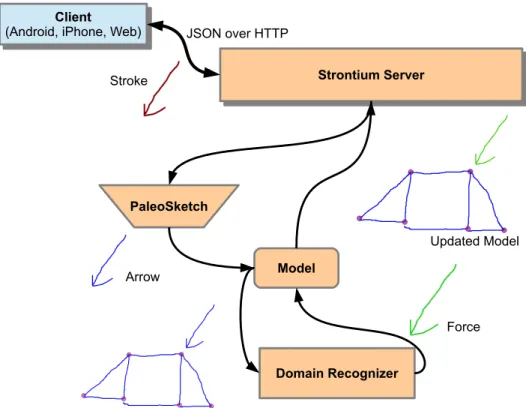
As with PaleoSketch Online, all of the sketch recognition occurs on the Strontium server. As a user draws a truss diagram in the browser client, their strokes are sent to the Strontium server (Figure 3.8). Once the strokes are received, they are processed using PaleoSketch, then combined with all of the user’s previous strokes into a complete model. Using this model the Mechanix truss recognizer is able to identify individual strokes as parts of the diagram. In this case, the drawn arrow is in fact a force applied to a truss. After this domain recognition is complete, the server updates its own model of the user’s sketch and sends the results back to the client browser application. The resulting diagram, complete with colors and additional beautification such as truss node loci, can then be displayed in the browser.
Figure 3.6: PaleoSketch Online browser-based HTML interface
Strontium Server
Strontium Server
Client
(Android, iPhone, Web) Client
(Android, iPhone, Web)
Domain Recognizer JSON over HTTP PaleoSketch Model Arrow Force Stroke Updated Model
Figure 3.8: The distributed sketch recognition process
however, that sending the entire sketch each time the user modified it to be pro-hibitively slow, both due to increase in client and server serialization, as well as the consequent increase in data transmission over the internet. Keeping the sketch in memory on the server proved much more practical, allowing us to send only changes made to the sketch and the resulting changes to the domain model.
4. PALEOSKETCH MOBILE PERFORMANCE
PaleoSketch forms the core of the recognition capabilities of the Strontium sketch library (SrL). Its performance, both in accuracy and in speed, is key to the perfor-mance of any higher level recognition system built on top of it. While the original versions of the PaleoSketch library are fast and accurate, they were designed for use on powerful personal computer hardware as well as using precise Wacom pen systems. This may mean that some assumptions we make about the performance characteris-tics of the library are not valid on the lower powered processors and cheaper touch screens of mobile systems. In order to determine those effects, we performed two par-allel series of studies to evaluate the comparative speed and accuracy of the single Strontium code base on the personal computer and Android platforms. Additionally we evaluate the speed of our PaleoSketch Online distributed recognition, using client applications on both personal computer and Android.
4.1 Data Collection
For both our speed and accuracy evaluation, we collected samples of the 9 basic PaleoSketch shapes using both pen and touch inputs. The 9 shapes were as follows:
• Arcs • Circles • Ellipse • Helix • Spiral
• Line • Polyline • Curves
• Complex shapes, containing curves and line segments in a single stroke
To collect the sketch data we used the SOUSA [22] sketch-data collection platform. Our pen sample data was collected using SOUSA’s built in web-based collection application and using a Wacom 21UX as the pen input device. In order to collect data from mobile devices, we had to develop a companion application for SOUSA that allowed us to collect sketch data on Android, called SOUSAPhone [25]. We then collected the data using SOUSAPhone running on Google Nexus Ones running Android 2.3.3.
We collected a total of 2848 sample shapes, 1605 pen samples and 1243 touch samples, over a series of two studies with a total of 10 users. The whole set was used for comparing accuracy, while an subset of touch shapes from the first study was used to evaluate the speed performance.
4.2 PaleoSketch Recognition Accuracy
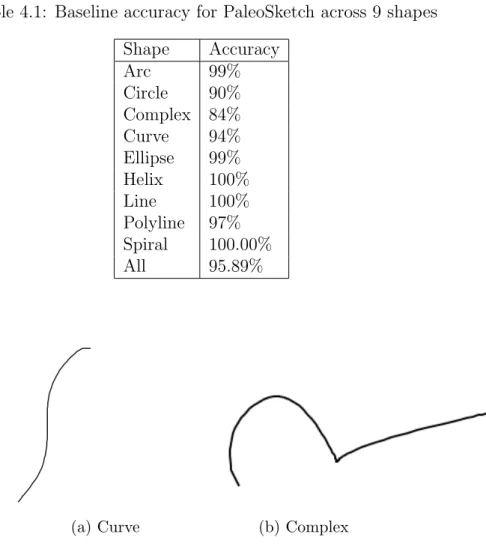
Accuracy is of key importance in primitive shape recognition. If a primitive shape is mis-recognized, then any high-level recognition dependent on that outcome will likely be incorrect as well. Fortunately, PaleoSketch has been shown to be a very accurate recognizer, with accuracy of up to 98% over our study set of 9 shapes [20]. Using the testing data from the original PaleoSketch we performed our own accuracy evaluation and got a high accuracy of 95.89% (Table 4.1). We wanted to reproduce these results for pen and see if they held true when using an input device that PaleoSketch was not optimized for: capacitive touch screens.
Table 4.1: Baseline accuracy for PaleoSketch across 9 shapes Shape Accuracy Arc 99% Circle 90% Complex 84% Curve 94% Ellipse 99% Helix 100% Line 100% Polyline 97% Spiral 100.00% All 95.89%
(a) Curve (b) Complex
Figure 4.1: Examples from the original PaleoSketch testing set
Early on in our evaluation we performed a test comparing a collected set of touch samples against one of the original PaleoSketch test dataset. We noticed that there was a large gap in accuracy between the two datasets, with the original dataset having an average accuracy of 95% versus an accuracy of 82% for the touch sample. The gap in accuracy was particularly high for curve and complex shapes. After comparing the sets of curve and complex shapes we found that there was a qualitative difference in the variance of shapes of both of those classes. While curves and complex shapes are theoretically highly variable and infinitely variable shapes, a majority of the
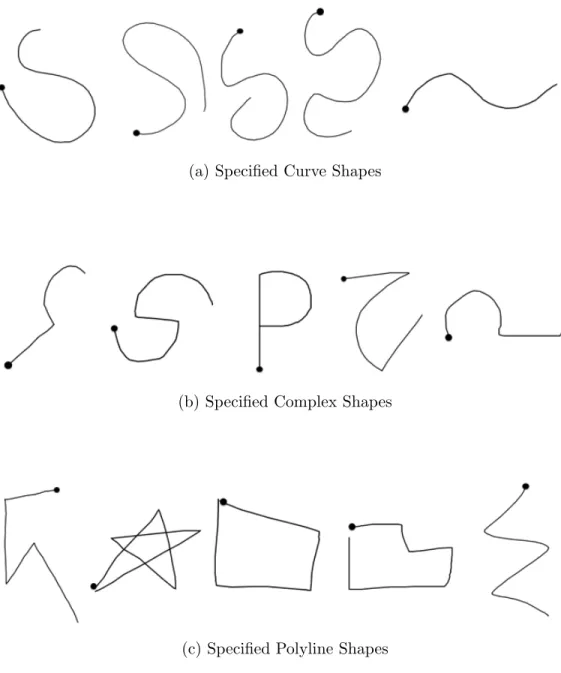
(a) Specified Curve Shapes
(b) Specified Complex Shapes
(c) Specified Polyline Shapes
samples of these two classes in the original test set were variations of one or two shapes (Figure 4.1). On the other hand, when collecting touch samples we gave no indication to our users about what specific complex or curved shapes to draw. While we filtered out some shapes, the two datasets were clearly not comparable.
To address this problem we collected a second set of samples for all 9 shape classes, both on pen and touch. This time we also asked users to draw samples of specific complex, curve and poly-line shapes (Figure 4.2) so that we could perform a more direct comparison. We also asked users to make up or provide additional examples of complex, curve and poly-line shapes, so that we would have both controlled and uncontrolled shapes.
Using this new dataset, we compared the accuracy accross shapes and device, as well the values for a set of common geometric features described in [21]. We were most interested in the values of Direction Change Ratio (DCR) and Normalized Dis-tance between Direction Extremes (NDDE) as they are extremely important for the function of PaleoSketch’s ranking systems in distinguishing between curved shapes and shapes with sharp corners (see section 2.2). Any significant difference between these two over input device type might indicate a difference in how PaleoSketch’s heuristics would react.
4.2.1 Results
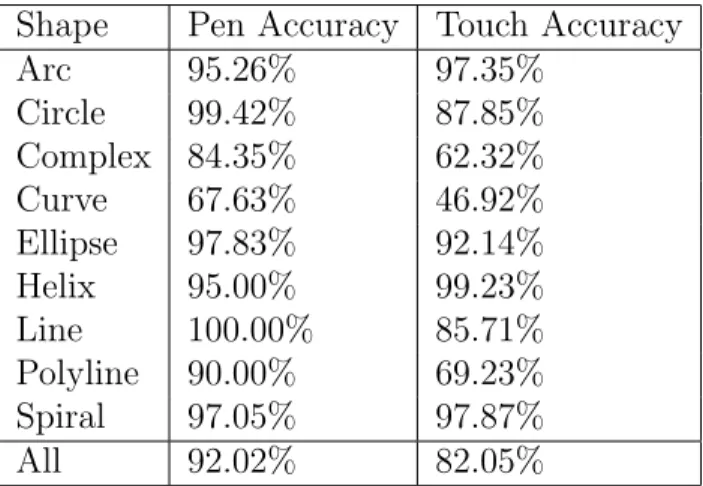
Despite our new sample, there still remained a large difference in accuracy be-tween the two input devices. As seen in Table 4.2, pen accuracy remained at ap-proximately 91% and touch accuracy at 82%, with large gaps in accuracy remaining for the curve and complex shapes. In addition to accuracy we were able to identify several other basic differences between the pen and touch data (Table 4.3). Of par-ticular interest was the difference in implement velocity (pixels per millisecond), the
Table 4.2: Initial accuracy results Shape Pen Accuracy Touch Accuracy
Arc 95.26% 97.35% Circle 99.42% 87.85% Complex 84.35% 62.32% Curve 67.63% 46.92% Ellipse 97.83% 92.14% Helix 95.00% 99.23% Line 100.00% 85.71% Polyline 90.00% 69.23% Spiral 97.05% 97.87% All 92.02% 82.05%
Table 4.3: Initial comparison results using a two-tailed t-test (α=.05)
Measure
Pen
Touch
P Value
Accuracy
91%
82%
~0.000
Length
814 px
860 px
0.0165
Time
1070 ms
1387 ms
~0.000
Velocity
0.6011
px/ms
0.3002
px/ms
~0.000
Sample
Rate
100.638 Hz
29.79 Hz
~0.000
DCR
5.7662
3.9015
~0.000
NDDE
0.764
0.779
0.1658
Table 4.4: Results after resampling
Measure
Pen
Touch
P Value
Accuracy
82.80%
82.10%
0.642
Length
814 px
860 px
0.0165
Time
1070 ms
1387 ms
~0.000
Velocity
0.6011
px/ms
0.3002
px/ms
~0.000
Sample
Rate
30.72 Hz
26.73 Hz
~0.000
DCR
3.587
3.735
0.111
NDDE
0.737
0.779
0.0001
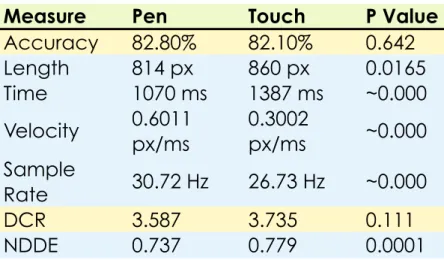
difference in DCR, and the substantial difference in sample rate. The difference in DCR was particularly interesting as it seemed to indicate that touch input produced a generally more ”smooth” stroke. However, the much lower sample rate of touch could be directly responsible, as DCR is calculated from differences from point to point in direction change normalized by the number of points.
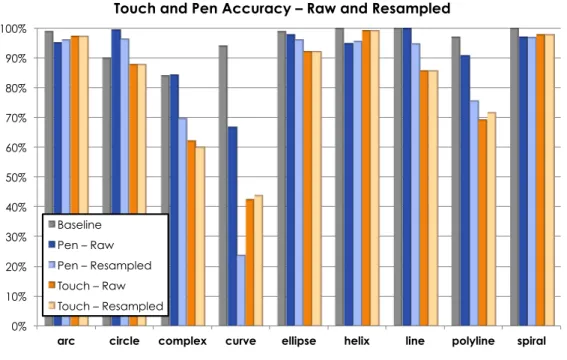
To see what effect sample rate had on DCR and more generally the accuracy rate, we down-sampled both our pen and touch data with a target point frequency of 29 Hz. As shown by the results (Table 4.4), after downsampling, the pen accuracy became equivalent to that of the touch data. Indeed, this drop in accuracy is reflected across several shapes, most specifically complex and curve shapes (Figure 4.3). The difference in DCR is now eliminated as well, so we surmise that it was caused by the difference in sample rate affecting the average change in direction between points.
From our results, we can see that low sample rate when collecting sketches can sig-nificantly affect accuracy across most shapes, particularly complex and curve shapes.
0% 10% 20% 30% 40% 50% 60% 70% 80% 90% 100%
arc circle complex curve ellipse helix line polyline spiral
Touch and Pen Accuracy – Raw and Resampled
Baseline Pen – Raw Pen – Resampled Touch – Raw Touch – Resampled
Figure 4.3: Accuracy by Shape
However, with this study we found no clear indicators of a difference between im-plements in accuracy. Indeed, beyond significant differences in stroke speed, time and length, there were no clear trends that could not be affected by the difference in sample rate. This would seem to agree with the results of Tu et al. [27], who found no significant difference in error measures across implement. Those error measures are a key part of recognition in PaleoSketch, as it calculates the error between each stroke and the ideal version of each shape it is fit against.
Still, our primary goal of this study was to verify that the accuracy when using a finger as implement could be equivalent to the accuracy of using a pen, and the results of our main study cannot show that. To address this we performed a small study to test the maximum accuracy of touch as implement. Since our original
Table 4.5: Results of direct comparison with pen baseline using a two-tailed t-test (α=.05)
Measure Pen Baseline Touch P Value
Accuracy 96.90% 97.80% 0.395 Length 778.7 px 539.1 px 0.037 Time 953 ms 2691 ms ~0.000 Velocity 0.482 px/ms 0.1575 px/ms ~0.000 Sample Rate 113.72 Hz 56.95 Hz ~0.000 DCR 5.775 5.501 0.195 NDDE 0.75 0.766 0.415
SOUSAPhone application produced a low sample rate, we rebuilt the application to focus on high frequency capture. We collected a new dataset with a single user providing 30 samples of each shape, drawing similar shapes to those found in the original PaleoSketch testing data. Since we conducted this study with one user, we do not claim the results to be fully representative. That being said, when comparing the results of this simplified study with those of the original PaleoSketch test dataset, we found no significant difference in accuracy (Table 4.5). Indeed, with the nearly doubled sample rate, we found no significant difference between the DCR or NDDE metrics either. It should be noted, however, that the average drawing time of each stroke using the finger was nearly double that of our original finger study.
4.2.2 Discussion
From the results of these studies we can make several observations.
Figure 4.4: Confusion matrix of raw pen data
Figure 4.5: Confusion matrix of resampled pen data
curved and complex shapes. This trend is evident when comparing the confu-sion matrix of the original sampling rate when using pen (Figure 4.4) and the confusion matrix of the resampled rate when using pen (Figure 4.5). Note that the resampled rate looks similar to the confusion matrix of the non-resampled touch data (Figure 4.6). This means that developers of touch applications must focus specifically on keeping that sample rate has high as possible, by keeping any recognition or computationally intensive task off of the main user interface thread. Additionally, visual niceties such as anti-aliasing sketches or stroke-smoothing should be avoided on less capable systems.
2. There seems to be no clear link between the implement itself and primitive shape recognition accuracy. This means that no large scale changes need to be made to the underlying recognition engine of PaleoSketch to adjust to different input devices. There are still some smaller adjustments that must be made, however, at both the PaleoSketch and application level.
(a) Adjust for pixel density. Mobile devices typically have a much higher pixel density than current pen-displays from Wacom and others, and this is likely only going to get higher with time. In our study we used Nexus One devices that had a pixel density of 254 pixels per inch (ppi), where our Wacom 21UX devices had a screen pixel density of 94 ppi. That is not to say that a higher pixel density means the input device is more precise. What it does mean is that absolute distance measures such as stroke length must be adjusted for this increase in density.
(b) Be aware of speed. From the results of both of our studies we can see that touch input will generally take longer, in some cases 2 times longer, for finger input. Therefore do not use any absolute measures of speed for
performing recognition unless targeting a specific device or user.
(c) Be aware of size. As noted by MacLean et al. [17] and as shown here, shapes drawn with touch tend to be larger than those drawn with pen. In the case of MacLean, the differences in size may have had a detrimental effect on symbol recognition. While we do not see that same detrimen-tal effect here for PaleoSketch, developers of applications and high level recognizers should be aware of the difference. As much space as possible should be given for touch input, particularly in the constrained space of smaller mobile devices.
4.3 PaleoSketch Recognition Speed
Sketching is typically a fast-paced task, therefore sketch recognition systems must be fast enough to keep up with users. Geometric primitive recognition using Pa-leoSketch is at the core of the sketch recognition systems that we describe here. Because of this, PaleoSketch must consistenly perform shape recognition at a rapid pace in order to feed shapes to more complex and slower domain-specific recognition systems. If a sketch system is going to be truly interactive, this must all happen in a very short period of time, otherwise the user will perceive a lag in the system.
To see if PaleoSketch operated with sufficient speed we performed a recognition time evaluation. We used a subset of 896 shapes evenly spread across all 9 shapes and tested the recognition time on each of our target platforms: personal computer, Android and distributed recognizer. Our personal computer test platform was a 2010 Macbook Pro with an Intel 2.4 Ghz Core 2 Duo and 8 GB of RAM running Apple’s implementation of Java 1.6 with 2GB of heap space. The Android device we used for testing was a 2010 HTC G2 with an 800 Mhz Qualcomm S2 processor and 512MB of RAM running Android 2.3.3 (CyanogenMod 7.2) with a VM heap size
Table 4.6: The recognition time on the Android and PC platforms, both locally on the device and using the distributed sketch recognition system.
Device Local Rec µ Local Rec σ Remote Rec µ Remote Rec σ Android 1803.54 ms 3880.15 ms 2831.89 ms 524.87
PC 34.54 ms 61.82 ms 801.83 ms 906.57
of 32 MB. For the distributed recognizer, we used the server from the PaleoSketch Online application (see section 3.5.1) running on Google App Engine F1 instance with equivalent 600Mhz processing speed and 128MB of RAM. We evaluated the recognition time on the personal computer and Android locally, then using the online server with each of them to see how much overhead and time was incurred through that method.
4.3.1 Results
As can be seen in Table 4.6 there is a very large performance gap between the two platforms, both in terms of their local recognition time and remote recognition. The local recognition time varies greatly depending on which shape was drawn, from simple shapes like lines and arcs, to complex shapes such as helixes and spirals (Figure 4.7). This is due to the number of points in the shape, and the recognition time is exponentially related to the number of points in the shape (Figure 4.8).
4.3.2 Discussion
Our results show that recognition speed on Android is generally poor, and that recognition time will need to be considered when designing interactive systems and higher level recognition domains. Despite this, for simpler shapes Android performs relatively quickly, meaning that simple shape domains may work well enough on
1"ms"
10"ms"
100"ms"
1000"ms"
10000"ms"
line
%
arc
%
ell
ips
e%
cir
cle%
polyline
%
co
mp
lex
%
cu
rve%
spir
al%
he
lix
%
Recogni4on%Time%by%Shape%
Android"
Computer"
Figure 4.7: Recognition time by shape
50#ms# 500#ms# 5000#ms# 0# 20# 40# 60# 80# 100# 120# 140# Mi lli se co nd s* Points*in*Shape* Android*Recogni5on*Time*vs*Point*Count* Spiral# Polyline# Line# Helix# Ellipse# Curve# Complex# Circle# Arc#
Android. Indeed this result is not surprising as we qualitatively experienced this when developing the sample applications, particularly in comparing our experience with Mechanix Mobile (Section 3.4.3), where high level recognition bogged down, to our experience with Unmanned Aerial System (Section 3.4.4) which was more responsive with a simpler domain of shapes.
Unlike local recognition, in the remote recognition task, none of the recognition is performed on the local device, meaning that differences in device timing are due solely to the time necessary to serialize and deserialize data being sent to and from the server. Indeed, Figure 4.9 shows that there is no real difference in the timing once the data is being sent to the remote server, but there are massive differences between the Android and personal computer serialization and deserialization time. There are any number of combined reasons for this difference in performance. While the difference in raw processing speed of the two devices may explain some of the result, it is likely that some of the difference in performance is how the JSON serialization library Jackson performs on the two different java virtual machines. Indeed some of the problem may be due to inefficiencies in the less mature Dalvik virtual machine found in Android 2.3.3, which may have been addressed in later versions of Android. Despite the drawbacks of slow serialization on Android, there were some cases where sending shapes to a remote server proved more efficient than performing the recognition locally, specifically for the helix shape. In the case of the helix, the mean recognition time locally was 7852 milliseconds whereas the mean time for total remote recognition was 3083 milliseconds. In the case of a complex domain, it may be worthwhile to use both local and remote recognition, where local primitive shape recognition could be used for intermediate user interface visualization while primitive and high level recognition are being performed on the remote server.
ms 500 ms 1000 ms 1500 ms 2000 ms 2500 ms 3000 ms android computer
Distributed Recognition By Device
Deserialization Transmission Serialization
Figure 4.9: Timing results for remote recognition
of our target systems. While we initially used JSON due to its popularity, readability, flexibility and simplicity, text-based serialization using generic serialization libraries is inherently inefficient. Therefore we may need to develop a binary transmission protocol, or a simpler text protocol, for sending messages between server and client. Still JSON may be the best format we can use if we want to balance the dual goals of ease of use and speed. It is much easier to develop representations of new types of objects in JSON rather than trying to modify an already optimized binary format.
In any case, many of these issues will likely be addressed in the coming years as more and more efficient and powerful mobile processors become available, and as the virtual machine software matures. Additionally, the increasing use of multi-core
processors in mobile devices could make it profitable to parallelize PaleoSketch, as it currently performs all computation in a single thread, but contains many elements that are trivially parallelized. Further investigation would need to be done to de-termine if such parallelization would provide sufficient increases in performance to merit the increased overhead of multi-threaded and parallel programming.
5. CONCLUSIONS
We have presented a new combined sketch recognition library called Strontium that is capable of running on personal computers via the Java Development Kit (JDK), on Android mobile devices and as a distributed web service. We then eval-uated the performance of this library, in both speed and accuracy, on all three plat-forms.
Strontium combines a number of popular gesture and sketch recognition libraries, including the $1 recognizer, PaleoSketch, Rubine’s feature extractor and portions of the LADDER constraint definition language. All of these have been modified to remove dependencies on the JDK through the use of a new open source geometry library called OpenAWT. This allows high-level sketch recognition algorithms writ-ten with this library to be run on many different Java-based platforms, without requiring full support for the JDK, such as Android and Google App Engine. Using OpenAWT we are also able to provide unified shape drawing code, making it easier to build different user interfaces for different platforms without worrying about drawing sketches on the screen. We demonstrated this with several sample applications that use sketch interfaces and sketch recognition in a variety of domains and tasks.
Since PaleoSketch is the heart of the Strontium library, we evaluated its perfor-mance, both in recognition speed and accuracy, to make sure that sufficient per-formance could be achieved using mobile hardware and touch-screens for sketching. Our accuracy evaluation found that a major limiting factor of the touch screen is the sampling rate. When the sampling rate of the touch sensor falls below 50 Hz, whether through hardware or software induced lag, accuracy drops swiftly. However, we found no evidence of any other difference between touch screens and pen-driven
devices as far as the accuracy of PaleoSketch is concerned. This means that with sufficient sample rate, a finger should produce the same recognition accuracy as a pen. Most algorithms developed for pen interfaces should work on touch-screens as well, provided they are not heavily dependent on absolute pixel lengths or drawing velocity, as these were different between pens and touch.
Finally, we evaluated the recognition speed locally on each device and using dis-tributed recognition. We found that there are some performance issues with recogni-tion speeds on Android, but that these are mainly limited to more complex shapes. We also found some problems with the distributed recognition on mobile devices as serialization and deserialization of sketches and recognition results took much longer than we anticipated. Still, distributed recognition worked well when these overhead costs were lower, particularly on the personal computer platform. This means the approach can be useful, both for developing web-based interfaces for PC systems, and in performing distributed high-level recognition for mobile devices where even with the associated overhead, distributed recognition may be faster. In any case, we anticipate that these mobile performance issues will be lessened by the the in-creased processing capabilities of current and future hardware. We will also continue optimizing the software to improve performance.
Our goal with this library is to encourage the development of intelligent sketch-based interfaces by non-expert developers. Ultimately the success of this project will be measured by what impact it has on sketch recognition as an interaction method on mobile devices.
REFERENCES
[1] Apple. Siri. http://www.apple.com/iphone/features/siri.html, Accessed August 2012.
[2] Autodesk. Sketchbook Mobile. http://usa.autodesk.com/adsk/servlet/pc/ item?siteID=123112\&id=13872203, Accessed August 2012.
[3] Avola, D., Buono, A. D., Gianforme, G., and Wang, R. A novel client-server sketch recognition approach for advanced mobile services. In Proceedings of the 2009 IADIS International Conference on WWW/Internet (2009), 400–407. [4] Chang, S., Plimmer, B., and Blagojevic, R. Rata.SSR: data mining for pertinent
stroke recognizers. In Proceedings of the Seventh Sketch-Based Interfaces and Modeling Symposium (2010), 95–102.
[5] Codehause. Jackson JSON library. http://jackson.codehaus.org/, Accessed August 2012.
[6] Cummings, D., Fymat, S., and Hammond, T. Sketch-based interface for interac-tion with unmanned air vehicles. In Proceedings of the 2012 ACM Annual Con-ference Extended Abstracts on Human Factors in Computing Systems (2012), 1511–1516.
[7] Douglas, D., and Peucker, T. Algorithms for the reduction of the number of points required to represent a digitized line or its caricature. Cartographica 10, 2 (1973), 112–122.
[8] Fonseca, M. J., Pimentel, C., and Jorge, J. A. Cali: An online scribble recognizer for calligraphic interfaces. In Proceedings of 2002 AAAI Spring Symposium -Sketch Understanding (2002), 51–58.
[9] Gallagher, N. Java simple xml. http://simple.sourceforge.net/, Accessed August 2012.
[10] Google. Google Goggles. http://www.google.com/mobile/goggles/, Ac-cessed August 2012.
[11] Hammond, T., and Davis, R. Ladder: a language to describe drawing, display, and editing in sketch recognition. In ACM SIGGRAPH 2006 Courses (2006). [12] Labahn, G., Lank, E., MacLean, S., Marzouk, M., and Tausky, D. Mathbrush:
A system for doing math on pen-based devices. In Proceedings of the Eighth IAPR International Workshop on Document Analysis Systems(2008), 599–606. [13] Landay, J., and Myers, B. Interactive sketching for the early stages of user interface design. In Proceedings of the SIGCHI Conference on Human Factors in Computing Systems (1995), 43–50.
[14] Legland, D. Javageom. http://geom-java.sourceforge.net/, Accessed Au-gust 2012.
[15] Li, Y. Protractor: a fast and accurate gesture recognizer. Proceedings of the 28th International Conference on Human Factors in Computing Systems (2010), 2169–2172.
[16] Long, C., Landay, J., Rowe, L., and Michiels, J. Visual similarity of pen gestures. In Proceedings of the SIGCHI Conference on Human Factors in Computing Systems (2000), 360–367.
[17] MacLean, S., Tausky, D., Labahn, G., Lank, E., and Marzouk, M. Is the iPad useful for sketch input?: a comparison with the tablet PC. In Proceedings of the Eighth Eurographics Symposium on Sketch-Based Interfaces and Modeling (2011), 7–14.
[18] OMGPop. Draw Something. http://omgpop.com/drawsomething, Accessed August 2012.
[19] OpenJDK Community. OpenJDK. http://openjdk.java.net/projects/ jdk6/, Accessed August 2012.
[20] Paulson, B., and Hammond, T. Paleosketch: Accurate primitive sketch recog-nition and beautification. In Proceedings of the 13th International Conference on Intelligent User Interfaces (2008), 1–10.
[21] Paulson, B., Rajan, P., Davalops, P., Guttierez-Osuna, R., and Hammond, T. What?! no rubine features?: Using geometric-based features to produce normal-ized confidence values for sketch recognition. In HCC Workshop: Sketch Tools for Diagramming (2008), 57–63.
[22] Paulson, B., Wolin, A., Johnston, J., and Hammond, T. SOUSA: Sketch-based online user study applet. In EUROGRAPHICS Workshop on Sketch-Based In-terfaces and Modeling (2008), 81–88.
[23] Rubine, D. Specifying gestures by example. In Proceedings of the 18th Annual Conference on Computer Graphics and Interactive Techniques.(1991), 329–337. [24] Shilman, M., Paulsa, B., Russell, S., and Newton, R. Statistical visual language models for ink parsing. In Sketch Understanding Papers from the 2002 AAAI Spring Symposium (2002), 126–132.
[25] Sketch Recongition Lab. SOUSA Phone. http://srlweb.cse.tamu.edu/ srlng/sousa/, Accessed August 2012.
[26] Sutherland, I. E. Sketch pad a man-machine graphical communication system. InProceedings of the SHARE Design Automation Workshop(1964), 6.329–6.346. [27] Tu, H., Ren, X., and Zhai, S. A comparative evaluation of finger and pen stroke gestures. InProceedings of the 2012 ACM Annual Conference on Human Factors in Computing Systems (2012), 1287–1296.
[28] Valentine, S., Vides, F., Lucchese, G., Turner, D., Kim, H., Li, W., Linsey, J., and Hammond, T. Mechanix: A sketch-based tutoring system for statics courses. In Proceedings of the Twenty-Fourth Conference on Innovative Applications of Artificial Intelligence (2012).
[29] Vivid Solutions. JTS Topology Suite. http://www.vividsolutions.com/jts/ jtshome.htm, Accessed August 2012.
[30] Wacom. Wacom cintiq. http://www.wacom.com/en/Products/Cintiq.aspx, Accessed August 2012.
[31] Web Hypertext Application Technology Working Group. HTML canvas
tag. http://www.whatwg.org/specs/web-apps/current-work/multipage/
the-canvas-element.html, Accessed August 2012.
[32] Wigdor, D., Forlines, C., Baudisch, P., Barnwell, J., and Shen, C. Lucid touch: a see-through mobile device. In Proceedings of the 20th Annual ACM Symposium on User Interface Software and Technology (2007), 269–278.
[33] Wobbrock, J., Wilson, A., and Li, Y. Gestures without libraries, toolkits or training: a 1 dollar recognizer for user inter- face prototypes. In Proceedings of User Interface Software and Technology (2007), 159–168.
[34] Wolin, A., Eoff, B., and Hammond, T. Shortstraw: A simple and effective corner finder for polylines. In SBIM ’08: Proceedings of the 5th Eurographics Workshop on Sketch-Based Interfaces and Modeling (2008), 33–40.
[35] World Wide Web Consortium. Scalable Vector Graphics. http://www.w3.org/ Graphics/SVG/, Accessed August 2012.
[36] Writepad. Writepad stylus.https://play.google.com/store/apps/details? id=com.writepad\&hl=en, Accessed August 2012.
[37] Xiong, Y., and LaViola Jr., J. J. A shortstraw-based algorithm for corner finding in sketch-based interfaces. Computers and Graphics 34, 5 (Oct. 2010), 513–527.