Degree project
E-Commerce on Android OS
Author:
Mohammd Hossein Malekzadeh Dirin &
Nima Mohammad Hassan Zadeh Khiabani
Date: 2011-09-16
Subject: Computer Sience Level: Master
i
Abstract
Using a smart phone, which has a small screen, for browsing an online store is not an enjoyable experience. Using a device with a very small screen size is not appropriate since the web shop’s functionalities are not optimized to be accessed from these devices.
The solution was to develop both a server side plugin and a client side application. The application which was designed for a mobile device should have used a generic communication in order to connect to the plugin. The plugin was an online store's plugin letting the mobile application do the online shopping experience from a mobile device without using the web browser, which would obviously increase the device performance in browsing a web shop.
The result was that the implemented plugin and the application worked for all of the E-commerce frameworks’ instances, so instead of developing a server side plugin and a client side application for one single web shop, a variety of web shops have been supported with a single plugin and an application.
ii
Acknowledgments
We would like to send out our special thanks to our supervisor, Dr. Rüdiger Lincke for his support and assistance which gave us a bright understanding of the project very soon.
iii
Contents
1 Introduction ... 1
1.1 Problem ... 1
1.2 Motivation ... 1
1.3 Goal and Criteria ... 2
1.4 Overview ... 2
2 Background ... 3
2.1 Selection Criteria ... 3
2.1.1 E-commerce Frameworks ... 3
2.1.2 Mobile Operating Systems ... 5
2.1.3 Android OS Version ... 7
2.2 Special Knowledge ... 7
2.2.1 Android Programming ... 7
2.2.2 HTTP Client ... 13
3 Features and Requirements ... 14
3.1 Use Cases ... 14
3.1.1 Login ... 16
3.1.2 Browse Category ... 16
3.1.3 Search Products ... 17
3.1.4 View Product Description ... 17
3.1.5 Add Products to the Cart ... 18
3.1.6 Remove Product from Cart ... 18
3.1.7 Change Quantity ... 19
3.1.8 Check Item Quantity ... 20
3.1.9 Checkout ... 20
3.1.10 Payment Method ... 21
3.2 Functional and Non-Functional Requirements ... 21
4 Architecture and Design ... 24
4.1 Overall Architecture and Design ... 24
4.1.1 Server Side ... 24
4.1.2 Client Side ... 26
4.2 Details for the PayPal ... 27
5 Implementation ... 29
5.1 Client Side ... 29
iv
5.1.2 Login ... 32
5.1.3 View Product Description ... 32
5.1.4 Add Products to/Remove Product from/Change Quantity of Cart ... 33
5.1.5 Checkout – Payment Method ... 33
5.2 Server Side ... 34
5.2.1 Overview ... 34
5.2.2 Details ... 35
6 Case Study ... 37
7 Conclusion and Future Work ... 40
7.1 Conclusion ... 40
7.2 Future Work ... 40
References ... 41
v
List of Figure
Figure 1.1: Mobile connection to a web shop’s database. ... 2
Figure 2.1: Android OS versions used by smart phones. ... 7
Figure 2.2: Android OS architecture. ... 8
Figure 2.3: Activity states. ... 9
Figure 2.4: Service lifecycle. ... 10
Figure 2.5: Android’s OS user interface view hierarchy. ... 11
Figure 2.6: The Android Hello World program. ... 12
Figure 3.1: Online shopping use case diagram. ... 15
Figure 4.1: Mobile’s client connection to a web shop’s plugin and database. ... 24
Figure 4.2: The framework’s database structure. ... 25
Figure 4.3: Client side class diagram. ... 26
Figure 4.4: PayPal Sandbox test account. ... 27
Figure 4.5: PayPal button in an Android application. ... 28
Figure 5.1: Category view. ... 29
Figure 5.2: Method required for checkout. ... 33
Figure 5.3: PayPal payment user interfaces. ... 34
Figure 6.1: Login on web browser and Android application. ... 38
Figure 6.2: Products list on web browser and Android application. ... 38
Figure 6.3: Product description on web browser and Android application. ... 39
vi
List of Tables
Table 1.1: Abstract framework. ... 1
Table 3.1: Login use case description. ... 16
Table 3.2: Browse category use case description. ... 16
Table 3.3: Search products use case description. ... 17
Table 3.4: View product use case description. ... 17
Table 3.5: Add products to the cart use case description. ... 18
Table 3.6: Remove the product from the cart use case description. ... 19
Table 3.7: Change quantity use case description. ... 19
Table 3.8: Check item quantity use case description. ... 20
Table 3.9: Checkout use case description. ... 20
Table 3.10: Payment method use case description. ... 21
Table 3.11: List of requirement. ... 23
iv
List of Charts
Chart 2.1: Mobile operating systems popularity. ... 5 Chart 2.2: Android Market and App Store popularity. ... 6
1
1
Introduction
E-Commerce has improved business methods by giving the businesses the opportunity of selling goods and services on a universal basis. The Internet provides traders the possibility of spreading out their shops into infinite number of sites [1], and also gave the consumers the advantage of shopping across all borders. To give the customers not only the advantage of buying anytime, but also the advantage of buying anywhere, using a mobile device for E-commerce has become an alternative [2].
Progression of wireless technology made mobile devices more popular. From the customers’ point of view in one hand, it is advantageous to use mobile devices such as smart phones and take advantage of their mobility while surfing an online store, while in the other hand the shop owners benefit from fulfilling the customers desires. This new method of purchasing, which is more convenient for the consumers and more profitable for the shop owners, is called mobile commerce or in abbreviation m-commerce [2].
1.1Problem
The problem of browsing online stores with smart phones is that, these web shops are designed to be used with a device of big size screen and their functionality are
optimized for those kind of devices and in comparison, smart phones have a much smaller screen size. As a result, the navigation process of listing the categories, selecting a product, viewing the details, adding it to the shopping cart and issuing the order on the mobiles web browser is pretty tough, boring and time consuming.
1.2Motivation
The solution could be using the mobile device features in a suitable way for web shops to be optimized for that size of screen. Taking the same functionality and adopting them to be used on a smart phone application could lead to a much better experience than using the native web browsing option.
There are a lot of online stores, but instead of writing an application for each of them which is expensive, one can write a generic client to be compatible with a bunch of them (Table 1.1), this allows to reduce cost significantly.
Operating System Abstract Web shop Mobile OS 1 Mobile OS 2 • • • ▼Framework 1 ►Web Shop 1 ►Web Shop 2 • • • • Listing products • Adding to cart • Purchasing product • • • • Listing products • Adding to cart • Purchasing product • • • ▼Framework 2 ►Web Shop 1 ►Web Shop 2 • • • • Listing products • Adding to cart • Purchasing product • • • • Listing products • Adding to cart • Purchasing product • • • • • •
2
These online stores are usually generic instances of a framework, so the abstract client, which has been written for the abstract web shop, could in the end be specialized and instantiated for different framework instances (actual web shops). The client's instantiating cost would then be, setting the specific web shop's Internet address and branching.
1.3Goal and Criteria
The aim would be duplicating the abstract online store's functionality for the mobile device's client and providing a generic connection, so the application could be easily customized for each of the framework instances. For this to be achieved we need a similar connection to the one shown in Figure 1.1.
Figure 1.1: Mobile connection to a web shop’s database.
Depending on the framework's structure, they usually have some modules accessing the database, for handling all the functionalities required for an online store. The mobile device's client also needs the access to the database behind the framework to be able to reconstruct the normal functionalities of a web shop. This could be done by extending or writing some new modules on the server side and accessing them from the mobile device's client with the aid of Internet.
The goal is reached if the client fulfills the functionalities required in the selected framework and fully duplicates what is happening during the online shopping. 1.4Overview
Chapter 2 describes special knowledge required for this project and discusses about the selection criteria and describes why special frameworks, clients and tools have been chosen. Chapter 3 defines the features and requirements of the system which can solve the problem. Chapter 4 describes the overview of the solution for implementing the requirements and discusses about the project overall architecture and design. Chapter 5 presents both the server side module and the client implementation. Chapter 6 is the proof of concept and shows the test instances and cases attempted to assess the goal's achievement. The final chapter evaluates if the goal criteria has been met and also suggests some directions for the future work.
3
2
Background
First section of this chapter discusses special knowledge required for this project. We assume that the reader has enough knowledge about the modeling, object oriented programming and the Java language for instance.
The Section 2.2 presents special tools, programs and E-commerce frameworks which have been selected for this project, and mainly states why those particular tools have been chosen.
2.1Selection Criteria
This Section discusses about the different selection opportunities for choosing the E-commerce frameworks, the mobile operating system and the possible methods which could have been considered reaching the target.
2.1.1E-commerce Frameworks
There have been some framework's attributes considered before making the final decision.
First of all, we needed to choose open source frameworks. Proprietary frameworks are not appropriate since their codes cannot be accessed. Another reason of using an open source framework was to avoid an additional overhead which was required for buying the license. After that, it was advantageous to find the most popular frameworks.
Another point was the framework's structure or language in which the framework has been written. Apart from some few frameworks using Java, Python, ASP.NET, Perl or some other languages, the most frequently used language for these E-commerce frameworks seems to be PHP. Leaving aside the developer's desire, the web shop owners might find frameworks based on PHP easier to install and use. While trying to install some of these frameworks, it was evident that those frameworks written in PHP, were clearly easier to install and instantiate. No compilation was required and the installation process was basically copying some files, giving the right permissions and associating the framework with the database. While the Java based frameworks in the other hand were sometimes really tricky to get compiled, so the web shop owner might not have an easy time getting it up and running.
Last but not least, was choosing the frameworks of a same structure. It was aimed to handle more than one framework in one single server side module or plugin, so it was almost necessary to find frameworks written in a same language, and it was helpful and easier to implement finding frameworks with similar database structures.
Three different frameworks have been chosen at this step:
osCommerce
Zen Cart
TomatoCart.
The number one choice was osCommerce. It is based on PHP and uses the MySQL database and has a considerable number of users, the osCommerce website states that there are 12,336 registered live shops around the world using this framework, while other websites estimate all the online stores using osCommerce to be over 228,700 [7]. But why is this framework extremely popular?
It is absolutely free and open source under the GNU General Public License.
It is pretty mature since osCommerce was released on March 2000.
It has the most available number of contributions and modifications.
It is easy to setup and maintain.
It is easy for web shop administrators to presents their stores with their own unique requirements.
4
It has an active community where members help each other and take part in development issues.
The standard installation contains all features and facilities to build an online store. [3]
For each E-commerce frameworks, there are of course limitations as well as advantages. The following points could be considered as two of the most important limitations.
Long URL names, cause the web shops using the osCommerce not to be search engine friendly.
There is no customers support apart from the community in which users can exchange ideas. [4]
Comparing the benefits and the limitations list of the osCommerce was convincing evidence for osCommerce to be selected. The osCommerce version which has been used: Online Merchant v2.3.1.
The second choice, Zen Cart, clearly has most of the osCommerce benefits. It is also based on PHP and uses the MySQL database. It has been released on June 2003 and had a rapid development since then. What follows next, could be considered as positive points of Zen Cart.
It is open source and free, so the source code could be modified by developers.
Easy to install.
Easy to customize and manage.
Many add-ons could be used.
Simple and plain user interface. [5]
What follows next are some of the Zen Cart limitations:
No AJAX Usage.
No Template Engine support.
Having favorable points, beside the fact that the Zen Cart in written in PHP and has a similar structure to osCommerce seems to be enough for choosing it. The version which has been used is v1.3.9.
The third and the final choice, Tomato Cart, could be considered as the new generation of frameworks. It has been released on Jan 2009 and is still pretty new. It uses Ajax and Rich Internet applications while interacting with the web interfaces. Tomato Cart team mentioned the following statement about the use of new technologies in this framework.
“We completely rewrite osCommerce 3 administration site based on the qWikiOffice project which is a web desktop implementation of the ExtJS RIA framework. Web desktop application mimics user experience of desktop Operating System, offering features and applications similar to a PC environment. So that users can easily start to work with TomatoCart without any difficulty.”[6]
Below are some of plus points of TomatoCart
Quick to install and easy to learn.
Using modern web 2.0 technology.
A familiar windows operation environment provided as the administration area.
Fast working E-commerce administration. [6] TomatoCart also comes with the following limitations
5
It is still in development stage
Having similar structure as the previous frameworks, using PHP, plus having a user friendly administration area for controlling and monitoring and using new technologies was the actual reasons of selecting TomatoCart. The TomatoCart version which has been used is 1.1.4.
2.1.2Mobile Operating Systems
Different aspects should be considered for choosing the appropriate mobile operating system in this project.
First, it is desirable to find the most popular smart phone OS. According to the surveys of mobile consumers in the United States, mobile users who planned to upgrade to a smartphone were asked about their next phone. The Chart 2.1 shows the results according to Nielsen Company’s data. [9]
Chart 2.1: Mobile operating systems popularity [8].
The Android OS and Apple iOS were the most popular ones from the customer's point of view.
Another interesting point of view could be the developer's attitude. It can be
understood by taking a look at the number of applications that has been written for each market.
6
Chart 2.2: Android Market and App Store popularity [10].
According to the Chart 2.2 above, it has been predicted that the Android Market will surpass the apple's app store in near future, but anyways it again shows that the
competition is close between these two competitors.
Second, the development environment is influential in a developer's decision. That is simply because being more experienced in a programming environment could lead to much better results.
To write an Apple's iOS Application one needs to install the iPhone SDK and developer tools and in particular should write the codes in the Objective-C language which is a simple language designed to enable sophisticated object oriented
programming [11].
Writing an application for Android OS seems to be easier for a normal developer. It is required to install the Android SDK and the coding language is Java which is hugely popular.
To be more specific Java has some benefits over the Objective-C
It comes with garbage collection instead of auto release pool in Objective-C.
There are lots of APIs existing.
There are lots of existing components.
It comes with good exception handling.
Finally the use of an Apple’s hardware is required for compiling a program written in Objective-C. Although there might be some tricks to compile it on Windows operating system by some commands from terminal, but basically it is not something reliable for a developer to start coding. While in the other hand it is absolutely simple to compile a Java program on many different operating systems.
When it comes to integrated development environments, for developing iOS applications, one should use Xcode, Apple’s first-class (IDE) [12]; while Java Eclipse still seems to be more improved.
7 2.1.3Android OS Version
Versioning is a critical component of an Android application. The application's version should be compatible with the device.
“The Android system itself does not ever check the application version information for an application, such as to enforce restrictions on upgrades, compatibility, and so on. Instead, only users or applications themselves are responsible for enforcing any version restrictions for applications themselves.”[14]
Finding the right version which is used in most popular Android devices is an advantageous thing to do. According to Figure 2.1, which was reported on March 18 2011, the mostly used Android OS version on smart phones is Android OS 2.2 while the newer versions still have not grown that much.
Figure 2.1: Android OS versions used by smart phones [13].
With anticipating that an Android OS 2.2 version application would probably be compatible with newer operating system versions such as 2.3.3, version 2.2 has been chosen for this project.
2.2Special Knowledge
This section goes through the special knowledge required for this project and includes Android application fundamentals and connection's method used between client and server.
2.2.1Android Programming
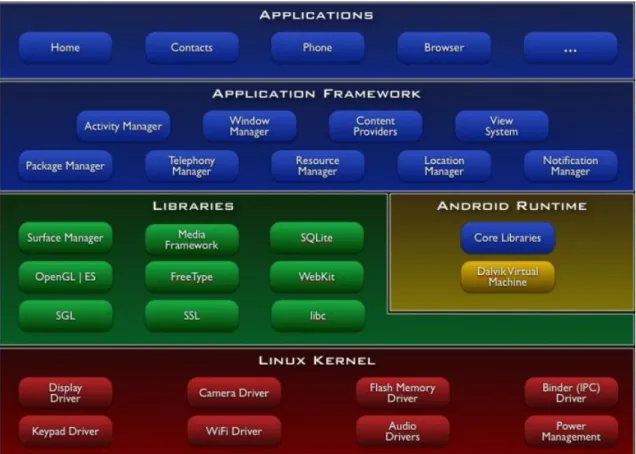
Before describing the Android application fundamentals, the Android OS architecture will be explained.
There are different components in the Android OS.
Applications: There are different core applications based on Java such as email client, maps, browsers, etc.
8
Application Framework: Developers could take advantage of their access to the framework APIs used by the core applications. It makes the components reuse easy.
Libraries: A number of different libraries based on C/C++ will be used by many of the system's components.
Android Runtime: There are a number of core libraries which provide the functionalities of the core libraries of the Java. The Dalvik VM gives the device the ability of running multiple virtual machines. It relies on Linux Kernel for some of the functionalities.
Linux Kernel: It is an abstraction layer between the hardware and the rest of software stack. Some functionalities of the kernel are threading, low-level memory managing, process managing, network stack, etc.
All the mentioned components, with some more examples of each, have been shown on Figure 2.2 [15].
Figure 2.2: Android OS architecture.
After having some information about the system's architecture, the application components could be introduced. They are building blocks which are necessary in the application and are different entry points for system to enter the application.
Below are different types of components and explanation of their exact role in the application's overall behavior.
Activities: Different activities could all work together to improve an
9
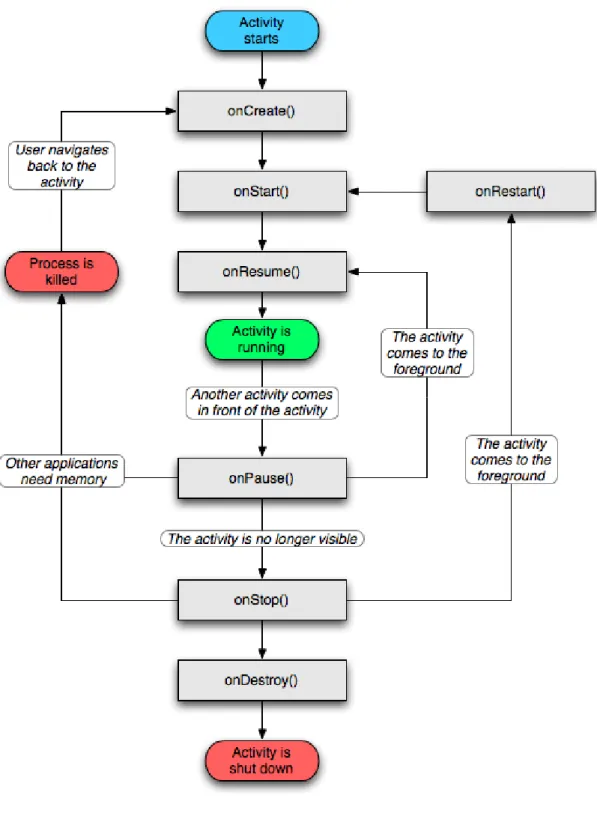
application could start some of other application's activities if it has enough privilege to do so. Each activity is implemented as a subclass of Activity class and comes with a user interface which is basically a single screen.
“The following diagram shows the important state paths of an Activity. The square rectangles represent callback methods you can implement to perform operations when the Activity moves between states. The colored ovals are major states the Activity can be in.” [17]
10
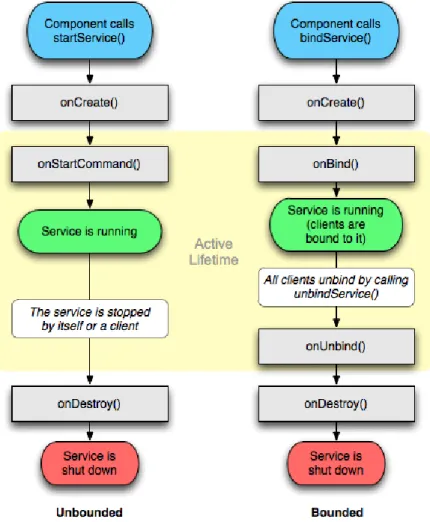
Services: In contrast with activities, a service does not come with a user interface. What instead is happening is that a component like an activity could start a service and let it run in the background, interact with it by binding itself to it or make it perform for remote processes. Each service is implemented as a subclass of Service class and could be either created with startService() or bindService(). In Figure 2.4 different life-cycle of the mentioned services has been shown [18].
Figure 2.4: Service lifecycle.
Content providers: With the help of content providers, applications can access and modify the shared or private stored data in any persistent storage location in which they have enough access privilege to. For instance managing the data stored in the file system, SQLite database or on the web. Each content provider is implemented as a subclass of ContentProvider class and implements a standard bunch of APIs that enable the other applications the ability of performing transactions.
Broadcast receivers: The broadcast receivers are designed to do a very minimal amount of work, and are just a gateway to other components. They respond to system-wide broadcast announcements and in spite of the fact that they do not display a user interface; they might show a status bar notification to inform the user about the broadcast event occurrence. Each broadcast receiver is
11
implemented as a subclass of BroadcastReceiver class and is delivered as an Intent class object. [16]
Another important part of an Android application is an XML file named the “Android Manifest”. It basically contains the application's components and that is mainly because the system needs to know about the existence of a component, before being able to start it. The manifest contains some more information like permissions the application requires, the minimum API Level the application requires, any hardware or software feature the application uses or requires, API libraries needed by the application and so on. [16]
Apart from the source code, there is another part in an Android application, which is known as Application resources. It contains anything which is related to the visual presentation of the application. Separating the resources from the actual source code has two major benefits.
It makes it easier to update different characteristics of the application without modifying the source code. XML files which are designed for different layouts, could be easily changed for instance.
Alternative resources could be used for different device configurations. Several languages could easily be handled by referencing different resources for
instance. [16]
After considering the Android application fundamentals and architecture, a real Android example could be discussed.
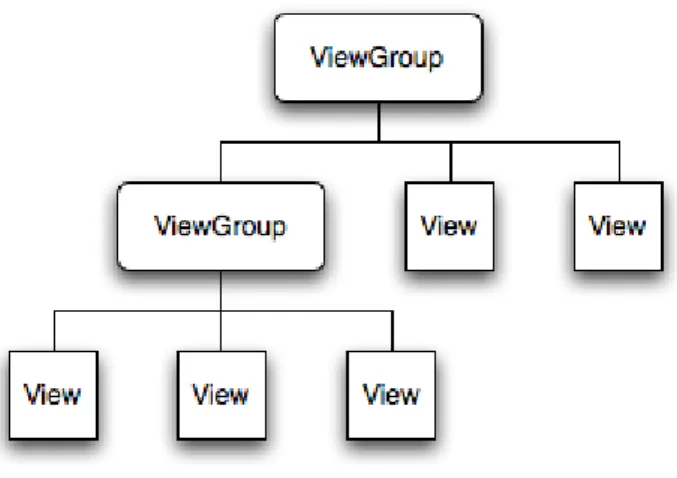
There are two objects in the Android platform called “View” and “ViewGroup”, which are the basic units in an Android OS user interface expression. A “View” object stores the layout parameters and content for a particular area of the screen and also is a point of interaction for the user and the receiver of the interaction events.
Figure 2.5 shows the “View” and “ViewGroup” objects' hierarchy which shows that both the “View” and “ViewGroup” objects could be a child of another “ViewGroup” object, so the “ViewGroup” objects are branches in the tree and “View” objects are leaves. [21]
12
To enclose the view hierarchy tree to the screen, an Activity should call a method named setContentView() and pass a reference to the root node object; this reference will be used for invalidating, measuring and drawing the tree.
An XML layout file is probably the most convenient way of defining the layout and expressing the view hierarchy. It is easily understandable for human and is a simple structure for a layout. XML elements are consisted of “View” or “ViewGroup”.
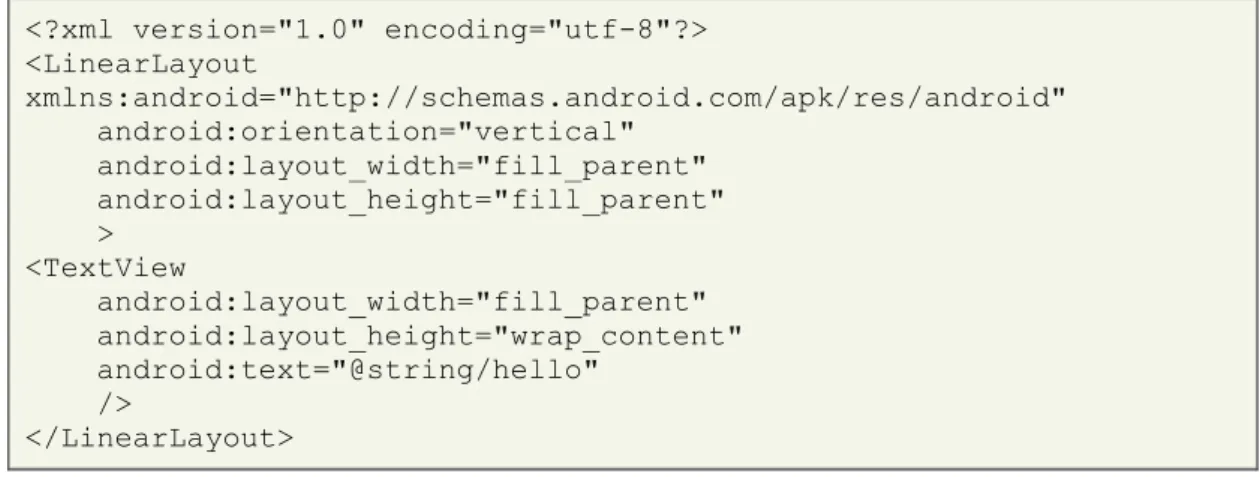
In the XML codes which are provided below, a Hello World example for a simple layout has been created.
<?xml version="1.0" encoding="utf-8"?> <LinearLayout xmlns:android="http://schemas.android.com/apk/res/android" android:orientation="vertical" android:layout_width="fill_parent" android:layout_height="fill_parent" > <TextView android:layout_width="fill_parent" android:layout_height="wrap_content" android:text="@string/hello" /> </LinearLayout>
The example contains a <TextView> element which creates a corresponding object in the user interface. And the <LinearLayout> creates a LinearLayout view. After loading the layout recourses, the Android system initializes the run-time objects related to the elements in the layout. [21]
Figure 2.6 shows the user interface which has been generated by running the provided XML codes.
13 2.2.2HTTP Client
HttpClient provides an effective way to implement the client side with recent HTTP standards. The HTTP protocol's role in today's communication systems could not be overlooked.
“The Hyper-Text Transfer Protocol (HTTP) is perhaps the most significant protocol used on the Internet today. Web services, network-enabled appliances and the growth of network computing continue to expand the role of the HTTP protocol beyond user-driven web browsers, while increasing the number of applications that require HTTP support.” [19]
HttpClient is a HTTP transport library on the client side which does not cache contents, execute JavaScript embedded in HTML pages, guess content type or reformat requests, but transmits and receives HTTP messages. [19]
One of the most important functionalities of HttpClient is executing HTTP methods which usually involve some HTTP request and HTTP response exchanges.
HTTP request consists: method name, request URI and HTTP protocol version. HTTP methods like GET, HEAD, POST, PUT, DELETE, TRACE and OPTIONS are all supported by the HttpClient.
Here is a sample of HTTP request for the Google service: [20]
URI uri = URIUtils.createURI("http", "www.google.com", -1, "/search",
"q=httpclient&btnG=Google+Search&aq=f&oq=", null); HttpGet httpget = new HttpGet(uri);
The HTTP response containing the response to the request will be sent to the client after interpreting the request.
HttpGet httpget = new HttpGet("http://localhost/"); HttpResponse response = httpclient.execute(httpget); HttpEntity entity = response.getEntity();
if (entity != null) {
InputStream instream = entity.getContent(); int byteOne = instream.read();
int byteTwo = instream.read(); // Do not need the rest
httpget.abort(); }
14
3
Features and Requirements
This chapter discusses about features and requirements of the system that can solve the problem. The first section considers how the mobile shopping process looks like in general. In this section, the use case diagram will show required features in detail. In the second section, the functional and non-functional requirements will be addressed for the mentioned features while making it easy in the upcoming sections to reference to
different requirements.
As the choice of development, the waterfall method was chosen since the project's plan or project's requirements were unlikely to change and the testing results or customer's feedback were not supposed to effect the project. So each model's phase (project planning, analysis, design, implementation, etc.) was accomplished before moving on to the next phase.
3.1Use Cases
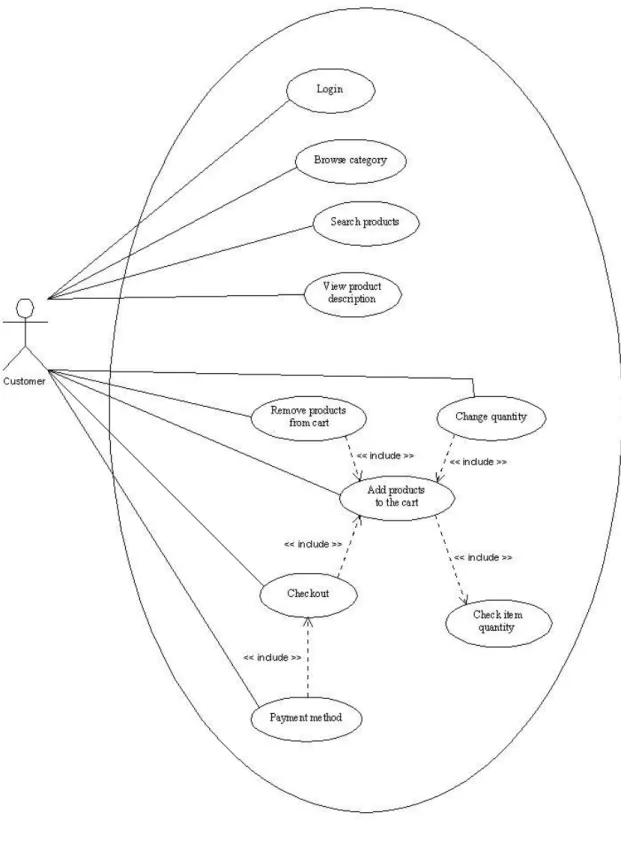
The selected frameworks have been analyzed to discover the required system features. Since the online shopping process is almost always the same in a generic way, it could be generalized.
According to the abstract web shop, the following features are necessary for the whole online shopping process from a mobile device.
Login
Browse category
Search product
View product description
Add product to the cart
Remove product
Change quantity
Checkout receipt
Check item quantity
Paying order
15
Figure 3.1: Online shopping use case diagram.
Figure 3.1 shows the use case diagram for the abstract online store and contains different features of shopping process. In the following sections, a brief description, flow of events, actors, preconditions and post conditions for each feature of the use case diagram has been presented and that will help determining the requirements in the next step.
16 3.1.1Login
Use Case Name Login
Brief Description The login process consists of getting the username and password of the customer and checking the authorization with the system.
Flow Of Events 1.Customer should click the sign in button.
2.The system displays login dialog box. 3.Customer should enter username and
password.
4.Customer should click the login button.
Actors Customer
Preconditions The customer’s account should exist on the system.
Post conditions Customer will be able to use the other functionalities of the system.
Exception conditions If the username and/or password are not correct, the login process is canceled and the customer would be notified.
Table 3.1: Login use case description.
3.1.2Browse Category
Use Case Name Browse category
Brief Description Customer should be able to view the category contents.
Flow Of Events 1.Customer should click on a category name.
2.System displays contents of the selected category.
Actors Customer
Preconditions None
Post conditions Customer would be able to browse other categories or view description of a product inside the selected category.
17 3.1.3Search Products
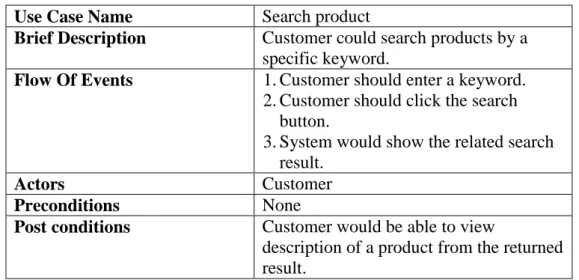
Use Case Name Search product
Brief Description Customer could search products by a specific keyword.
Flow Of Events 1.Customer should enter a keyword. 2.Customer should click the search
button.
3.System would show the related search result.
Actors Customer
Preconditions None
Post conditions Customer would be able to view
description of a product from the returned result.
Table 3.3: Search products use case description.
3.1.4View Product Description
Use Case Name View product description
Brief Description Customer could be able to view the product description such as product name, image, model, price and product details.
Flow Of Events 1.Customer should click on a product name.
2.System displays description of the selected product.
Actors Customer
Preconditions A category’s contents should have been viewed.
Post conditions Customer would be able to add the viewed product to the items on the shopping cart.
18 3.1.5Add Products to the Cart
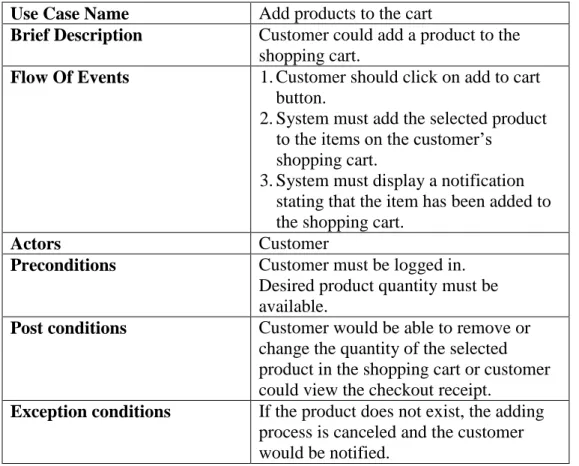
Use Case Name Add products to the cart
Brief Description Customer could add a product to the shopping cart.
Flow Of Events 1.Customer should click on add to cart button.
2.System must add the selected product to the items on the customer’s
shopping cart.
3.System must display a notification stating that the item has been added to the shopping cart.
Actors Customer
Preconditions Customer must be logged in.
Desired product quantity must be available.
Post conditions Customer would be able to remove or change the quantity of the selected product in the shopping cart or customer could view the checkout receipt.
Exception conditions If the product does not exist, the adding process is canceled and the customer would be notified.
Table 3.5: Add products to the cart use case description.
3.1.6Remove Product from Cart
Use Case Name Remove product from cart
Brief Description Customer should be able to remove an already existing product on the shopping cart.
Flow Of Events 1.Customer should click on the shopping cart button.
2.System must display the shopping cart contents.
3.Customer should click on the remove button of a product.
4.System should display a confirmation dialog box.
5.Customer could click on OK button to confirm the product’s removal from the shopping cart.
6.System must remove the product from the shopping cart.
7.System must display an updated shopping cart list.
19
Actors Customer
Preconditions Customer must be logged in.
The product should have been already added to the shopping cart.
Post conditions None
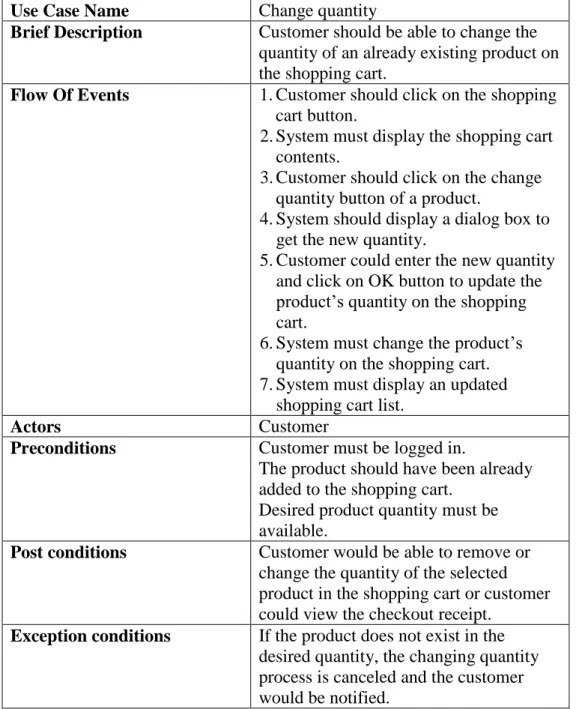
Table 3.6: Remove the product from the cart use case description. 3.1.7Change Quantity
Use Case Name Change quantity
Brief Description Customer should be able to change the quantity of an already existing product on the shopping cart.
Flow Of Events 1.Customer should click on the shopping cart button.
2.System must display the shopping cart contents.
3.Customer should click on the change quantity button of a product.
4.System should display a dialog box to get the new quantity.
5.Customer could enter the new quantity and click on OK button to update the product’s quantity on the shopping cart.
6.System must change the product’s quantity on the shopping cart. 7.System must display an updated
shopping cart list.
Actors Customer
Preconditions Customer must be logged in.
The product should have been already added to the shopping cart.
Desired product quantity must be available.
Post conditions Customer would be able to remove or change the quantity of the selected product in the shopping cart or customer could view the checkout receipt.
Exception conditions If the product does not exist in the desired quantity, the changing quantity process is canceled and the customer would be notified.
20 3.1.8Check Item Quantity
Use Case Name Check item quantity
Brief Description System should be able to check a
product’s quantity on the system to make sure that the desired quantity of a product exists.
Flow Of Events 1.System checks the existing product’s quantity.
Actors None
Preconditions None
Post conditions None
Table 3.8: Check item quantity use case description.
3.1.9Checkout
Use Case Name Checkout
Brief Description Customer should be able to buy the products on the shopping cart.
Flow Of Events 1.Customer should click on the shopping cart button.
2.System must display the shopping cart contents.
3.Customer should click on the checkout button.
4.System must display the checkout receipt.
5.Customer should confirm the order details.
Actors Customer
Preconditions Customer must be logged in.
The customer’s shopping cart should not be empty.
Post conditions The customer would be able to do the payment.
Exception conditions If the shopping cart is empty, the checkout process is canceled and the customer would be notified.
21 3.1.10Payment Method
Use Case Name Payment method
Brief Description Customer should be able to do the payment.
Flow Of Events 1.System must display the payment method’s authentication.
2.Customer should enter credentials require for payment.
3.System must give customer the opportunity to confirm or deny the payment.
4.Customer could confirm the payment. 5.System must display a confirmation
that the order has been completed successfully.
Actors Customer
Preconditions Customer must be logged in.
The customer should have confirmed the order details.
Post conditions None
Exception conditions If the payment credentials are not valid, the payment process is canceled and the customer would be notified.
If the payment is not successful, the payment process is canceled and the customer would be notified.
Table 3.10: Payment method use case description.
3.2Functional and Non-Functional Requirements
According to the discussed use case diagram in Figure 3.1, the requirements for fulfilling those features could be determined. So each feature has been reviewed once more to conclude what requirement is necessary for each feature. Table 3.11 shows each requirement with its specifications.
These requirements' implementations would be presented in Chapter 5 of this report.
No. Requirement Feature SS/
CS F/ NF 1 Client needs to be always connected to the server. All CS F 2 Client should have an interface for the customer
to enter login information.
Login
(Section 3.1.1)
CS NF 3 Client must send login information to the server
to be checked.
Login
(Section 3.1.1)
CS F 4 Server must check the sent login information by
the client and respond to the client.
Login
(Section 3.1.1)
SS F 5 Client should be able to display list of categories
and click on them for browsing.
Browse category
22
(Section 3.1.2) 6 Client must send the clicked category’s
identification to the server.
Browse category (Section 3.1.2)
CS F
7 Server must provide the selected category’s content list for the client.
Browse category (Section 3.1.2)
SS F
8 Client should have an interface for the customer to enter special keywords to search a product.
Search products (Section 3.1.3)
CS NF 9 Client must send the entered keywords to the
server.
Search products (Section 3.1.3)
CS F 10 Server must compare the sent keyword with
products list and respond.
Search products (Section 3.1.3)
SS F 11 Client should be able to display a product’s
description such as name, model, image, price and details.
View products description (Section 3.1.4)
CS NF
12 Server must provide the selected product’s description for the client.
View products description (Section 3.1.4)
SS F
13 Client should have an interface for the customer to add a product to the shopping cart.
Add products to the cart
(Section 3.1.5)
CS NF
14 Client must send the clicked product’s identification to the server.
Add products to the cart
(Section 3.1.5)
CS F
15 Server should add the product to the customer’s shopping cart on the database.
Add products to the cart
(Section 3.1.5)
SS F
16 Server should be able to check a product’s quantity on the database.
Check item quantity (Section 3.1.8)
SS F
17 Client should have an interface for the customer to remove an already added product on the shopping cart.
Remove product from cart
(Section 3.1.6)
CS NF
18 Client must send the removed product’s identification to the server.
Remove product from cart
(Section 3.1.6)
CS F
19 Server should remove the product from customer’s shopping cart on the database.
Remove product from cart
(Section 3.1.6)
SS F
20 Client should have an interface for the customer to change the quantity of an already added product on the shopping cart.
Change quantity (Section 3.1.7)
CS NF
21 Client must send the new quantity and the product’s identification to the server.
Change quantity (Section 3.1.7)
CS F 22 Server must update the customer’s shopping cart
content on the database.
Change quantity (Section 3.1.7)
SS F 23 Client should have an interface for the customer
to checkout and view the checkout receipt.
Checkout (Section 3.1.9)
CS NF 24 Client must send the customer’s identification to
the server.
Checkout (Section 3.1.9)
23 25 Server must provide the customer’s checkout
receipt for the client.
Checkout (Section 3.1.9)
SS F 26 Client should have an interface for the customer
to view the payment method’s authentication and enter required credentials.
Payment method
(Section 3.1.10)
CS NF
27 Client must send the provided credentials to the server.
Payment method
(Section 3.1.10)
CS F
28 Server must perform the money transfer and send back a confirmation.
Payment method
(Section 3.1.10)
SS F
29 Server must update the database with the required checkout processes. Payment method (Section 3.1.10) SS F List of Abbreviations No. Number SS Server side CS Client side F Functional NF Non-Functional
24
4
Architecture and Design
The first section of this chapter describes the overall architecture and design which is the overview of the solution implementing the requirements in the abstract level. The second section includes details for PayPal (the payment method).
4.1Overall Architecture and Design
Different instances of web shops have more or less same functionalities on the abstract level. Dedicated plugins inheriting from an abstract plugin could be used to implement a general communication protocol. Thus a client could communicate with these plugins and could also be easily instantiated in order to match a particular web shop.
The picked up frameworks have similar architectures, and to show the server side architecture and design, the general communication to an abstract web shop would be discussed.
Now Figure 1.1 could be presented more precise as shown in Figure 4.1.
Figure 4.1: Mobile’s client connection to a web shop’s plugin and database.
Instead of the Android's web browser, the Android's dedicated client connects to the Internet as shown in Figure 4.1 (arrow A). Using the HTTP Client methods, the client connects itself to the plugin which is installed on the server side (arrow B). The plugin which is a PHP module in this case, has the required functions to communicate with the MySQL database (arrow C).
4.1.1Server Side
On the server side, what matters the most is the communication between the plugin and the database. The plugin should have functions for running different queries on the database, so it could respond to the client's requests which have been fully explained in the features and requirements chapter. The PHP module will be explained in more details on the next chapter.
What follows next is an abstract web shop's database structure. It has been taken from the osCommerce framework's architecture, but satisfactorily demonstrates the other framework's database structures too.
Client
25
Figure 4.2: The framework’s database structure.
There is usually a configuration table on the framework's database which contains the framework's configuration information. Examples of the data which this table could involve are the basic shop's information, installed modules, current setting's information and a lot more.
A bunch of tables usually belong to categories and a group of tables contain information about different products. These two groups of tables should be accessed during the “Browse category”, “Search product”, “View products description” and some more features.
Another group contains the customer's information, these tables along with the previously mentioned groups should be accessed during the “Add to cart” and some more features.
Tables related to orders, address book, taxes, zones and countries are usually needed to be modified during the “Checkout” processes.
26
Putting the tables in different categories does not necessarily mean that they will not have relation to the tables from another group; it just shows that the tables are more logically connected in a particular group and have more relations to each other as a result.
4.1.2Client Side
The client must connect to the server side for making the connection and sending and getting the required data. These data should be stored in appropriate data structures and be used in shaping the user interface in the next step. The client's class diagram has been shown in Figure 4.3.
27
The class named “DataHandler” basically sends out or requests for data. These flows of data between the client and the server are handled in the “Communication” class which has relations to the “ConvertToDocument” class for getting the data as a well-structured document. According to the “DataHandler” method's requirements, different “Reports” would be generated. These “Reports” also have relation to the “Category” and “Product” classes which are basic data structures.
4.2Details for the PayPal
PayPal is a payment method which helps the online sellers and buyers with the money transfers and it is possible for the customers to connect their debit or credit card to their PayPal account.
For developers and web shop owners it is important to test their payment method before they start doing real transactions. For a developer it is required to test the application making sure that it functions as intended. The PayPal Sandbox is an environment for this purpose where the PayPal features and APIs could be prototyped and tested using the environment.
In the first step a developer needs to create a test account on PayPal developers’ website, and each account could support different test accounts for a person. There is a “Personal” account type which can only send money, and there are two other account types named “Premier” and “Business” which can both send or receive money. When it comes to testing an application's functionality it is required to have two accounts, one for sending money as a buyer and another as receiving the money as a seller.
Figure 4.4 shows a created business test account on the PayPal Sandbox. [22]
Figure 4.4: PayPal Sandbox test account.
For using the PayPal on Android devices, there is a library that lets developers to embed mobile implementation of Express Checkout in mobile applications on the Android OS [23].
28
It is the secure way of doing money transactions from a mobile device.
All the transaction's process could be done within the application and there is no need of a mobile browser.
Payments will be done in real-time.
Using the library is quick and easy to run.
Figure 4.5 shows a sample PayPal button which has been placed in an Android application using the Express Checkout library [24]. The steps required for using and programming the library will be discussed in more details on the next chapter.
Figure 4.5: PayPal button in an Android application.
The final step after testing the implemented application with PayPal is to get a PayPal Application ID. For this to be collected, the mobile application using PayPal should be submitted to the developer's account in the “MyApps” area. PayPal would review the application within 24 hours and respond by sending the Application ID. This ID along with information of the Server and Recipient must be updated in the source code. [23]
29
5
Implementation
In this chapter, the implementation of the client side and the server side plugin will be presented. One of the major parts of the both sides would be presented in high details and the other parts would be presented based on the highlighted part and would be compared with the primary part to deliver the reader, the whole ideas of the implementation.
5.1Client Side
This section considers different features' implementation in the client side and will present the “Browse category” and “Search Products” (the first view of application a user will see after login) in high details.
5.1.1Browse Category - Search Products
It is not possible to separate all the user interfaces of features from each other, as it has been shown on Figure 5.1, on the top there is a search bar, then bellow a navigation bar there are different categories and at the bottom there are two tabs for viewing either the categories list or the shopping cart contents.
Figure 5.1: Category view.
According to the Table 3.11 which has provided the project's requirements, and due to the project's design, two of the requirements has been handled in this part of the user interface.
Table 3.11/ Requirement Number 5: Client should be able to display list of categories and click on them for browsing.
Table 3.11/ Requirement Number 8: Client should have an interface for the customer to enter special keywords to search a product.
30
The following XML codes are the exact implementation of the interface which has been shown on Figure 5.1. Although the navigation bar or the tab bar, which has been placed at the bottom, could not be mentioned as an exact correspondence to a mentioned feature, but they are helpful tools for designing a more user friendly environment in this application. <?xml version="1.0" encoding="utf-8"?> <LinearLayout xmlns:android="http://schemas.android.com/apk/res/android" android:orientation="vertical" android:layout_width="fill_parent" android:layout_height="fill_parent" android:background="#ffffffff" >
<!-- Part 1 Search Bar -->
<LinearLayout xmlns:android="http://schemas.android.com/apk/res/android" android:layout_width="fill_parent" android:layout_height="wrap_content" android:orientation="vertical" android:background="#ff000000" android:paddingBottom="5sp" > <LinearLayout android:layout_width="fill_parent" android:layout_height="wrap_content" android:orientation="horizontal" android:background="@drawable/my_border" android:gravity="center" > <EditText android:id="@+id/categories_search_product_entry" android:layout_width="200sp" android:layout_height="wrap_content" android:singleLine="true" android:background="#ffffffff" android:textColor="#ff000000" android:textSize="20sp" android:paddingLeft="5sp" android:layout_gravity="center" android:layout_weight="1" /> <ImageButton android:id="@+id/categories_search_product_btn" android:layout_width="40sp" android:layout_height="32sp" android:background="@drawable/mag_off" android:layout_gravity="center" android:layout_weight="0" /> </LinearLayout> </LinearLayout>
<!-- Part 2 Navigation Bar--> <RelativeLayout
android:layout_width="fill_parent" android:layout_height="50.0dip"
31 xmlns:android="http://schemas.android.com/apk/res/android" android:visibility="gone"> <HorizontalScrollView android:gravity="fill" android:id="@+id/navbar_scroll" android:background="@drawable/nav_item_gradient" android:scrollbars="none" android:layout_width="fill_parent" android:layout_height="fill_parent"> <LinearLayout android:orientation="horizontal" android:id="@+id/nav_items" android:background="@drawable/nav_item_gradient" android:layout_width="fill_parent" android:layout_height="50.0dip" /> </HorizontalScrollView> <ImageView android:id="@+id/navbar_left_arrow" android:layout_width="wrap_content" android:layout_height="50.0dip" android:src="@drawable/navbar_left_arrow" android:layout_alignParentLeft="true" /> <ImageView android:id="@+id/navbar_right_arrow" android:layout_width="wrap_content" android:layout_height="50.0dip" android:src="@drawable/navbar_right_arrow" android:layout_alignParentRight="true" /> </RelativeLayout>
<!-- Part 3 Categories List-->
<GridView xmlns:android="http://schemas.android.com/apk/res/android" android:id="@+id/Main_Categories" android:layout_width="fill_parent" android:layout_height="wrap_content" android:numColumns="2" android:verticalSpacing="10dp" android:horizontalSpacing="10dp" android:columnWidth="90dp" android:stretchMode="columnWidth" android:gravity="center" /> <ListView xmlns:android="http://schemas.android.com/apk/res/android" android:id="@+id/Main_Products" android:layout_width="fill_parent" android:layout_height="fill_parent" android:drawSelectorOnTop="false" android:cacheColorHint="#00000000" fastScrollEnabled="true" /> </LinearLayout>
32
The first part of the XML code belongs to the search bar interface, providing the customer a special place for searching a keyword.
The second part belongs to the navigation bar which helps the user to browse different categories and products easier.
The third part belongs to the category view and shows a list of categories that the user could click on.
For providing a general connection between the client and the server for fulfilling the following requirements, the HTTP Client (introduced on Section 2.2.2) methods have been used.
Table 3.11/ Requirement Number 6: Client must send the clicked category’s identification to the server.
Table 3.11/ Requirement Number 9: Client must send the entered keywords to the server.
The following piece of code provides a general communication and would be used not only for the mentioned requirements, but also for each time the client sends or receives data from the server.
public static Document downloadData(String address) throws Exception{
HttpResponse httpresponse;
HttpRequestBase httpRequest = null; InputStream instream = null;
DefaultHttpClient defaulthttpclient = new DefaultHttpClient(); httpRequest = new HttpGet(urlAddress+moduleName+address); Document doc = null;
try { httpresponse = defaulthttpclient.execute(httpRequest); instream = httpresponse.getEntity().getContent(); doc = ConvertToDocument.readXml(instream); } catch (Exception e) { System.out.println(e.getMessage()); } return doc; } 5.1.2Login
In fact the login is always occurring before browsing the categories or any other feature of the application. But the reason of putting it after the Section 5.1.1 is that it has a much simpler implementation, and the intention was to provide the details of a more complex part in the beginning.
The login in consisted of Android’s <TextView> objects for getting the username and password and an Android’s <Button> object for sending the entered data to the server side.
5.1.3View Product Description
The interface is consisted of appropriate Android objects for displaying the product's name, model, image, price and details. It also has an Android <Button> object for adding the product to the cart.
This part of the application is always happening as a result of a user click on a product name, so the product's identification must be sent to the server side and the required data should be received from the server side to be displayed.
33
5.1.4Add Products to/Remove Product from/Change Quantity of Cart The shopping cart has an interface for showing the items on the list and also some Android <Button> objects for removing or changing the product's quantity on the shopping cart. It also has an Android <Button> object for checkout.
Each time the content of the shopping cart is manipulated, the customer's
identification that changed the shopping cart contents and the product's information should be sent to the server side. What returns is the customer's updated cart contents to be displayed on the shopping cart.
5.1.5Checkout – Payment Method
In the first part, there should be an appropriate user interface for showing the checkout receipt. The customer's identification that wants to do the checkout should also be sent to the server side.
In the second part, the discussed payment method in the Section 4.3 starts to run, so the interfaces and functionalities of the PayPal in this case is the result of using the PayPal's mobile payment library.
The following steps are the most important phases required for the PayPal to perform the payment process.
The application initializes the library.
The library creates a Pay button to be placed on the application.
When the button is pressed, the library takes the application to the PayPal checkout.
After the payment is completed by the customer, the library returns a callback to the application with the status of the payment and the pay key. In this step the library is still in control of the user interface and has not returned control to the application.
After the completion of the library flow, an activity result will be sent to the application.
Figure 5.2 is the sequence diagram of the methods required to implement the checkout on PayPal. [25]
34
As it has been mentioned earlier on, the user interface of the PayPal is coming from the library, and could not specially be designed for an application. The user interface in which the user could log in to the PayPal account and pay the order has been shown on Figure 5.3.
Figure 5.3: PayPal payment user interfaces.
5.2Server Side
This section describes the server side module implementation, and will include one part of the PHP module; other part's differences would be explained in comparison with the detailed part.
5.2.1Overview
Since the selected frameworks were all written in PHP, a module in PHP should have been the best way of doing the following tasks.
Receiving the data from the client side and executing appropriate queries, on the database, corresponded to the request.
Generating a well-defined document (XML codes in this case) with the data taken from the database to be received by the client.
An example of the first task would be presented in details on the next section, while XML codes as a sample of the second task could look like this:
<Products>
<products_id>28</products_id>
<products_name>Samsung Galaxy Tab</products_name> <products_image>samsung/galaxy_tab.gif</products_image> </Products>
35
The module would be copied on the web shop's host server and be accessed with its address by the client.
5.2.2Details
In this section a piece of code is presented which has been used for all the three frameworks in order to insert the required data in the “customers_basket” table while adding a product to the cart.
This PHP function checks if there is enough quantity of the product on the store by performing a “Select” query, then it updates the data on the customer's cart by
performing an “Insert” query.
function addToCart ( $customer_id, $products_id, $quantity ) {
$check_quantity = mysql_query("SELECT p.products_quantity
FROM $products p
WHERE p.products_id =$products_id");
$check_quantity_row = mysql_fetch_array($check_quantity); if($quantity>$check_quantity_row['products_quantity']) {
outputXMLData("Error_Quantity_Check" ,"This product doesn't exist in desired quantity");
return; }
mysql_query("INSERT INTO $customers_basket (customers_id, products_id, customers_basket_quantity, customers_basket_date_added) VALUES ('$customer_id', '$products_id', '$quantity', '" . date('Ymd') . "')"); }
This corresponds to the following requirements:
Table 3.11/ Requirement Number 15: Server should add the product to the customer’s shopping cart on the database.
Table 3.11/ Requirement Number 16: Server should be able to check a product’s quantity on the database.
The differences between the selected frameworks is in their database schemas, so different PHP module functions fulfilling different requirements should be more or less similar for different frameworks. Data should only be stored or retrieved from different tables or different table's columns depending on the database's design.
What follows next is a brief description about some requirements implementation related to the server side:
36
In the login function the provided login information should be queried and compared with the data on the customers table on the database. Since the password is stored as encrypted on the database, additional functions are required in order to check the validity of the password provided by the client. Finally the authentication result should be generated as an XML document to be received by the client.
This function corresponds to the following requirement:
Table 3.11/ Requirement Number 4: Server must check the sent login information by the client and respond to the client.
In some functions of the module the required data should be queried (Select query) and the result should be stored in the XML document. Browsing category, searching products, viewing products description and viewing the checkout receipt are the functions in which these functionality in required.
These functions correspond to the following requirements:
Table 3.11/ Requirement Number 7: Server must provide the selected category’s content list for the client.
Table 3.11/ Requirement Number 10: Server must compare the sent keyword with products list and respond.
Table 3.11/ Requirement Number 12: Server must provide the selected product’s description for the client.
Table 3.11/ Requirement Number 25: Server must provide the customer’s checkout receipt for the client.
In the corresponding function of the module which removes products from cart, a row from the customer's basket should be affected (Delete query).
This function corresponds to the following requirement:
Table 3.11/ Requirement Number 19: Server should remove the product from customer’s shopping cart on the database.
In the corresponding function of the module which updates product's quantity on the cart, a row from the customer's basket should be affected (Update query).
This function corresponds to the following requirement:
Table 3.11/ Requirement Number 22: Server must update the customer’s shopping cart content on the database.
In the checkout function of the module which is happening after a successful
payment, lots of queries should be performed. This is one of the most complex functions and contains several database query types. A lot of data entries to the data base for saving the order details are required (Insert query), customer's basket content should be removed (Delete query), also the current product's quantity should be edited on the related tables (Update query).
This function corresponds to the following requirement:
Table 3.11/ Requirement Number 29: Server must update the database with the required checkout processes.
37
6
Case Study
Each of the selected frameworks, which are abstract web shops, has their own instances. In fact these web shop instances are the concrete working parts and they are in the end what one would want to have.
What required is to know if it is possible to instantiate the application as it was aimed in the beginning. Basically a general plugin has been created which supposed to support three different framework's instances, so it should have been tested with some instances of each framework to see if it is communicating with all of them in a good way just by changing some configurations.
Prior of reaching to the final mentioned point of testing, the unit testing has been done to confirm that each piece of the program works satisfactorily. It was also essential to test subsystems by input interface which is known as integration test.
To do the system testing, test instances of each framework has been installed on the IIS Server on Windows operating system and they have been tried from a smart phone device using Android OS 2.2 version which had access to the Internet. Table 6.1 shows some test strategies which are common in such system and the result and description which shows specific information in case of this project. [27]
Test Strategy Description Result
Configuration Testing The configuration between client and three different frameworks has been tested.
Android client configured all the frameworks. Installation and
Uninstallation Testing
Installing an uninstalling the application on mobile device has been tested.
Both processes were Successful. Functionality Testing All the required functionalities on both
client and server sides has been tested.
All the application’s functions worked fine.
GUI Testing All the client’s functions which were interacting with user interface have been tested to confirm that they are suitable for the device’s screen size.
User interface was obviously
improved from the browsing version.
Table 6.1: Testing Strategies.
Another test also has been done to check the application's compatibility with different Android OS versions. In the Section 2.1.3 it has been mentioned that the application would probably work with the newer versions too. But this test showed more compatibility for the application. During the test, different framework's instances have been installed on the local host of a laptop using Windows operating system. It was connected to a cable Internet having a valid IP address and an Android Emulator was installed on it. According to different tests, the application worked fine on the Android OS version 2.0 and above.
The following pictures show some functionalities of a demo web shop on
osCommerce framework as a sample. The left image on each picture shows the web shop's function accessed from a regular computer's web browser and the image on the right side shows the correspondence page browsed by the Android application.
38
Figure 6.1: Login on web browser and Android application.
39
Figure 6.3: Product description on web browser and Android application.