Abstract—Rural PC kiosks have become prominent recently as a way to impact socio-economic development through computing technology. Despite the significant backing these projects receive from governments and other large organizations, there are very few rigorous studies which measure their actual impact and utility. We have developed and deployed a software PC logging tool that allows us to gain exact quantitative insight into the usage statistics of kiosks on which the tool is installed. In field trials in Maharashtra and Uttar Pradesh, India, we collected over 120 days of software tool logging data from 13 separate kiosks, while we also questioned the kiosk operators during the same period. We show some evidence that the software based logging tool complements the existing survey based and other ethnographic approaches for data collection. We also show that the tool does a better job in gathering certain usage statistics as compared to questioning the kiosk operator.
Index Terms—kiosk, logging, usage, evaluation, methodology.
I. INTRODUCTION
ural kiosks (henceforth referred to as kiosks) are being set up in developing countries as a tool for supporting socio-economic development [1]. Kiosks are essentially shared-access computers optionally connected to the Internet. These are used by rural users who usually cannot afford to own a personal computer in there homes. The applications and services that are offered in these kiosks vary depending on the agency that is running them as well as the location and demographics of the host village. Typical applications that run in these kiosks are e-government services, agricultural price lookup, computer skills training, and telemedicine [1]. Despite significant interest in these projects by governments, non-profits and private companies there have been surprisingly few critical evaluations of their utility and impact [4].
Manuscript received December 17, 2005
(Corresponding author) Rajesh Veeraraghavan, Kentaro Toyama, Deepak Menon are with Microsoft Research Lab India Private Limited, "Scientia", 196/36, 2nd Main Sadashivnagar, Bangalore -560 080 India
([email protected]; [email protected];[email protected]) Gauravdeep Singh is a student at Birla Institute of Technology & Science, Pilani. ([email protected]).
A few recent studies show qualitative ethnographic evidence that kiosks do not achieve their original goals of social or economic development [17]. Hypotheses for these difficulties include lack of reliable connectivity, lack of power, lack of relevant applications and economies too small to sustain a shared access PC. A better understanding of usage is necessary to tailor solutions and services for users. Some researchers, in a bid to gather good data have begun surveys of kiosk operators and customers [1]. Although surveys are an established way of gathering both quantitative and qualitative data, they have their drawbacks; chief among them that they rely on a subject’sself-reported answers [19]. In this paper, we report the findings of our software-based logging tool which gathers precise usage statistics in thirteen kiosks in two different parts of India.
The paper is organized as follows: In Section II, related work is discussed. Section III describes the technical
implementation of our software logging tool. The deployment details are presented in Section IV; results are discussed in Section V and VI.
II. CURRENT APPROACHES TO EVALUATING KIOSK PROJECTS In the life cycle of a kiosk project, there are many instances when evaluation can help the project [2]. In the initial stages, a needs assessment in the community, together with
background demographic data may be helpful to determine what applications would be best run at the kiosk. During operation, usage statistics of the kiosk will be helpful in fine-tuning the kiosk's offerings. NGOs and others concerned with the social impact of a study will be interested in determining the impact of a kiosk on the community. And, those running kiosks as businesses will be interested in, for example, cash flow of the kiosk.
For each kind of evaluation, some methodologies are more suitable than others. To understand the local economics, for example, a visit to the district administrative office may be required. In gauging the interest of the community, an informal“focusgroup” with community members is useful. Interviews with kiosk users and operators can help glean useful information during the operation of the kiosk. More rigorous methods involve surveys and questionnaires administered to statistically meaningful populations of kiosk operators and customers.
For the purposes of understanding patterns of usage, most
Kiosk Usage Measurement using a Software
Logging Tool
Rajesh Veeraraghavan, Gauravdeep Singh, Kentaro Toyama, and Deepak Menon
studies involve the use of survey instruments and
questionnaires, where a researcher visits kiosks and asks a predetermined set of multiple-choice or open-ended questions to kiosk operators, customers, and in some cases, non-customers[2]. These studies may also involve collection of data by examining records that the kiosk operator keeps to gather information, for example, how many users visit the kiosk.
It is generally accepted that survey based approaches introduce certain biases due to self reporting such as heaping of common numbers, such as multiples of 5 or 10, techniques to“satisfice”whichisessentiallyanattempttoproduceagood enough answer without spending time and effort, dating errors, conflation issues in categorizing similar events, or giving portions of the answer [13] [19].
In addition to human error factors, operators, customers, and non-customers of kiosks may have incentives to misreport. For example, a kiosk operator may choose to over- or
underreport income, in the hopes of gaining some favor with the kiosk agency. In addition, surveys containing technical concepts and jargon [13]. (e.g., "How much do you browse the Internet?") are often difficult to pose for the less computer-literate kiosk customers, who may very well be browsing, but not understand terms such as "browser" or "Internet."
Because abstractions at this level may not be easily comprehended by the survey respondent [2], there have been some attempts to actually study the users in the rural kiosks by physically observing how they use the computer [6]. Others have installed video cameras to watch children interact with a public computer kiosk [3].
These techniques have the drawback that they are immensely time-and resource-intensive, and require either active participation of the researcher or later coding of video. They cannot be easily scaled out or run over long periods.
In this paper, we emphasize the need for using software based logging tools to understand the software use of kiosks. . We have shown, in a pilot study we did how even expert computer users are bad at self-reporting [15].
Software tool approach has been put to extensive use in the usability area; a survey of the various client and server WWW characterizations shows abundance of research in this area [8]. Legitimate monitoring of the software and computer usage has been used in activities from basic asset management and Internet usage to sophisticated usability studies [10].
Automated monitoring can be particularly useful in situations where the data need to be collected for large number of users [16]. Client side mining has been used for personalization of content [9]. Usability information has been extracted from user interface events [10].
Lately, researchers studying kiosks have begun to deploy software-based monitoring systems that, for example, log websites visited in a browser [3]. At one prominent rural-kiosk agency, all transactions happening over their web portal are logged on to a back-end database [12].
We have applied the software-based logging approach to
measure a variety of usage modalities, ranging from application usage to different types of internet traffic. We show results from deploying our software tool in rural kiosks and compared the results with questions administered in parallel to the kiosk operators
We show results from deploying our software tool in rural kiosks and compared the results with questions administered in parallel to the kiosk operators.
III. COMPUTER LOGGING TOOL
We have adapted a software-based monitoring tool called VibeLog [5] to record computer activity at rural kiosks running Microsoft Windows. VibeLog was originally developed to better understand how multiple windows were managed in the Windows operating system (OS). The Windows OS has a window manager which tracks all window activity in the user interface and raises events to public consumers when window changes occur. VibeLog takes advantage of this feature in Windows by programmatically hooking these public window event streams and recording them to file. The main feature of VibeLog is the maintenance of two logs of window system information: events and windows. The log of events contains an entry for every window management activity reported by the OS (opening/closing/activating etc.), and the log of windows contains a series of entries enumerating the on-screen windows each minute that a user is active. Each log entry has a timestamp and contains window attributes and input
information. TABLE 1 shows a sample VibeLog event that the tool collects. Time Stamp Window Activation Window Name Window Class Process Name
7312 SHOW Vibelog ExploreW Explorer
26815 DESTROY Excel XLMain Excel
TABLE1: Sample VibeLog Event
The raw data is then uploaded to a database (SQL Server). This allows SQL queries to be run on the data based on the high-level questions we are interested in answering. The tool functionality has been verified by videotaping user interaction with the computer and comparing every user input with the generated logs [5].
A. Adaptations to the VibeLog tool for the Kiosk Study: We made several kinds of changes to the original tool in order to adapt it for kiosk-usage monitoring.
First, the tool was augmented to collect additional data that the original VibeLog did not. Specifically, we added an option for the tool to log (1) a list of all Internet sites that were visited by a browser and (2) the hardware and software configuration of the machine.
Second, it was made more easily configurable to account for different privacy policies of kiosk agencies. We added fine-grain control by having the tool read a configuration file. The file is a simple text file which has boolean values for the
configuration parameters.
Third, the installation and data-collection processes were engineered to happen by the insertion of USB flash drives, since connectivity in rural kiosks is often poor or non-existent. We ensure that files from the same machine can be identified by appending a randomly generated, globally unique identifier to the data filenames. This also ensures that the same data-collecting USB drive can be used serially on many machines without file naming conflicts.
Fourth, the log data that resides in the computer is encrypted. This is done for both privacy reasons and also to make it tamper resistant.
Finally, similar to the SQL server queries used by the original VibeLog tool, we have generated more SQL queries that analyze the data for our purposes. Six of the analysis queries are as follows:
Email Time
We considered both client based (Microsoft Outlook) and web-based email engines (Gmail, Yahoo mail, Hotmail). For Outlook, the tool looks for process name "OUTLOOK.EXE" and adds time spent in it. Also, if the process is "WINWORD.EXE" and the title is "*Message" or "*Message (*)" or "*Discussion", the time spent in this event is counted as mail time. We looked at the raw data to ensure that we weren't missing any other email clients.
Number of Applications
This involved counting the number of distinct process ids that were in the logs. We count these processes excluding those named are”NULL”,”UNOPENABLE”or ”UNKNOWN”andalsoapplicationswhose cumulative running time is less than two seconds. This is to eliminate intermediate short lived helper processes that are not launched by the user directly.
Internet Searches
To measure this, the script first creates a list of unique urls from the log file. It then looks for string”*/search*”(* implies 0 or more characters) in the unique url entries to see if search through Google, Yahoo or MSN was done.
Number of Distinct URLs Visited
We only look at the hostname part of the URLs to calculate uniqueness. For example, www.hotmail.com/content.html and www.hotmail.com/default.html will be only counted as one unique URL.
Number of Users
Since there are no explicit logons, the method we used to differentiate user sessions is to look at idle time in the computer. If the continuous idle time exceeds ten minutes (a heuristic we used) we assumed that a new user has logged in. We felt comfortable using this metric, as normally the computer would not be left idle for long periods of time especially since the customers pay per time used.
B. Privacy and Security Concerns
Any collection of user data must be done with privacy concerns in mind. Apart from legal waivers, signs posted to indicate that a logging tool is being used, and expectations that data collected will only be published in aggregate form, these adaptations to the tool ensure privacy:
1) The configuration file gives flexibility to the kiosk operator to determine what gets logged. The kiosk operator can turn on/off logging of particular kinds of information easily by editing a configuration file.
2) The only identifying information that can be traced in any way to a specific computer or user is globally unique identifiers. While these ensure consistency of data between data-collection instances, they cannot be linked to a particular individual or PC.
3) The content of the log files is encrypted while stored on the machine.
4) Data collection through the USB flash-drive insertion moves data files from the local machine to the USB, so that older logs of data are not stored indefinitely on the machine.
IV. FIELD DEPLOYMENT
The kiosk logging tool was installed at thirteen rural kiosks - seven in Uttar Pradesh and six in Maharashtra. The kiosks were chosen based on the fact that they were kiosks running for more than a year and they are easily accessible from the district offices of the groups that are running them. We have left the exact names and locations of the kiosks out of this paper for privacy reasons. The installations as well as collection was done with the support of field staff from the service providers who provide content, services, training and technical support to the kiosks.
The tool was installed using an USB drive which had the software tool preloaded and was run for different periods of time – about a month at some kiosks and a week or so at others. This was due to various factors – accessibility of the kiosks, long periods without power at some kiosks, issues with collecting the logs. To account for the differences in the time periods we look at per kiosk per day usage pattern. The data was collected by physically visiting each kiosk and by using the collection script. The data was then imported into a SQL server for further analysis.
Figure1. Typical Rural Kiosk
Manual surveys were also done at each kiosk during the time period for which VibeLog was installed, to collect
self-reported data on hours and patterns of usage. Other than this, some of the kiosks were also part of a broader survey [1], which included collecting information on kiosk operator and customer demographic profiles, kiosk revenues and expenses, and user behavior, attitudes and needs. While the focused questions helps compare parameters tracked by the tool with specific user reported information, the broader survey allows us to put in place an environmental context for the data logged by the tool. The combination of information from the questions and the tools help evaluate the accuracy of user reported information, specifically on usage pattern and help understand the circumstances and reasons for certain observed patterns
For the analysis, we have chosen two different approaches – one is to compare the results from the kiosk with the questions we have administered to the kiosk operator and the other is to highlight salient findings from the logged data itself. In addition we also do a qualitative analysis in attempting to explain some of the findings. The qualitative inputs primarily come from insights which our team has gained through time spent in the field.
V. RESULTS
All the kiosks offer ICT-enabled services; however, the number and type of applications available in the two regions are different since the service providers are different. The services primarily include computer education (involving MS Office and Internet usage), digital photography and browsing, with some use of agriculture portals. Some other important differences between the two regions: The kiosks in
Maharashtra have better connectivity and therefore, show a fair amount of Internet usage while the kiosks in Uttar Pradesh have practically no connectivity. The kiosks in Maharashtra report a higher number of hours of usage per day, since, unlike Uttar Pradesh, the region does not lose power for 8-10 hours in a working day.
In the following analysis, we study each of these parameters, per kiosk as well as average across kiosks and compare results from the tool with the results from questioning the kiosk operator. The results can be broadly categorized as 1) Customer Traffic, 2) Application Usage 3) Internet Usage, 4) Maintenance.
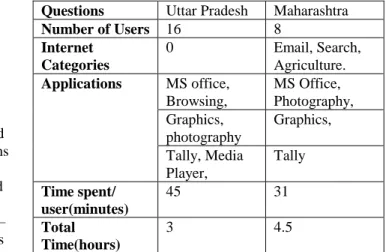
TABLE 2 shows the survey results of average daily usage in the two regions we studied and TABLE 3 shows the events recorded by the tool.
Questions Uttar Pradesh Maharashtra
Number of Users 16 8 Internet Categories 0 Email, Search, Agriculture. Applications MS office, Browsing, MS Office, Photography, Graphics, photography Graphics, Tally, Media Player, Tally Time spent/ user(minutes) 45 31 Total Time(hours) 3 4.5
TABLE 2: Kiosk Survey Results
Questions Uttar Pradesh Maharashtra
Defragments 0 19 Distinct Sites 0 126 Internet Searches 0 231 Logon/Logoff 0 1 Printer Used .09 4 Shutdowns 3 4 Unexpected Failures 5.4 8 Active Time 111 224 CD usage 1.5 34 Idle time 23 12 Chat Time 0 6 Total Time 141 236 Number of Users 2.59 2.21 TABLE 3: Events recorded by the tool per kiosk per day average (time in minutes)
1) Customer Traffic: a) Number of users:
Typically most of these rural kiosks do not have explicit logons; this is confirmed by the results from the tool, the logon/logoff instances are zero. The lack of explicit logons is interesting because the whole concept of logging on makes most sense in shared access scenarios where more than one user uses a particular computer. We differentiate user sessions by looking at the idle time statistics as described earlier.
Figure 3 shows the average customer traffic per kiosk – it indicates that 53% of the kiosks operators dramatically overestimate the customer traffic while the remaining 47% corresponds to what the tool reports.
Figure 2: Students for the Computer Course
Figure 3: Comparison of Customer Traffic
This difference could be partially explained if we account for scenarios where the computer is used by more than one person at a time. Also, several of these kiosk operators run a parallel business on the premises: public call booth, insurances sales, grocery shop etc; it is possible that they include some part of this customer flow as well when answering our questions.
b) Variations in customer visits
We were told during our visits that the customer traffic often increases significantly during particular days of the week: for example, during weekends or on village market days, when the village typically sees an influx of people from neighboring villages. The tool however did not show any consistent bias (increase or decrease) on any particular day of the week.
c) Usage time:
The average usage per day is two hours for Uttar Pradesh and four hours for Maharashtra. Figure4 shows the average usage per kiosk and we see that in 69% of the cases the survey reports overestimate usage and the remaining 31% it
underestimates. In the best case the estimation was off by half an hour per day and the worst case the estimation was off by four hours per day.
Figure 4: Comparison of Usage Time
There were additional differences between our questions and what the tool reported in kiosks. In one kiosk, the operator reported customer traffic of 20 – 30 people while the tool logged only 4. The kiosk operator also claims to conduct computer classes early morning at 3 a.m. to maximize kiosk usage despite power outages. However, data logged by the tool shows that his earliest time of operation to be 8:55 a.m. As such, cases where the survey shows significant over-estimating could be partially explained by the kiosk operator framing his answer in terms of the working hours of the kiosk, rather than actual usage of the computer.
d) Financial viability:
Figure 5: Monthly Revenue Figures in Kiosks.
On an average, the kiosk operator earns revenue of Rs.20 - 30 for an hour of computer usage and Rs.10 per printout. We used the number of hours and the number of printouts logged from the tool and multiplied by the rate/unit of the activity to compute the total monthly revenue as shown in Figure 5. The monthly operating expense of the kiosk ranges from Rs.3000 to Rs.5000 (Rent, Electricity, Bank Loan, and Stationary). It appears that one kiosk is profitable; two others are breaking
even while the rest are losing money. This matches findings from a survey based study conducted in 2004 [18].
2) Patterns of Application Usage:
According to the survey, application usage, is the highest for Microsoft Office, Internet Explorer (Maharashtra kiosks only) and HP Photo Suite.
Graphics, 28% Internet Explorer, 26% Explorer, 18% MS Office, 15% Photography, 9% Multimedia, 4% Graphics Internet Explorer Explorer MS Office Photography Multimedia
Figure 6: Application Usage in Maharashtra
Microsoft Office(MS Office) usage pattern does not correspond with the survey results: the survey indicates that MS office is the most dominant application but we find that usage is 15% and 17% (Figure 6 and 7) respectively in the two regions. The tool showed that the graphics packages (Paint, Photoshop, Corel Draw) had high usage (28% and 19%). Explorer use was high though it was not mentioned as an application by the respondents.
Figure 7: Application Usage in Uttar Pradesh
Digital photography is cited in the survey as one of the most popular services. We see that in Uttar Pradesh this holds true (21%) but in Maharashtra itdoesn’t(9%).A pattern noticed during the surveys is that kiosk operators are increasingly focusing on revenue streams through offline activities such as desktop publishing (wedding cards, printouts etc.) and photography. In Maharashtra, they are also focusing on Internet use. This, taken in combination with the fact that MS Office usage is usually as part of a course, could partially explain low usage of the same. In a typical scenario at these kiosks, a student would probably run only one or two instances
of MS Office apps for duration of an hour or so; sometimes, courses are conducted on alternate days. The rest of the day’s usage would be browsing, photography, or, particularly as seen in kiosks in Maharashtra, desktop publishing.
3) Patterns of Internet Usage:
Figure 8 shows the pattern of internet usage in the Maharashtra kiosks using the tool. Kiosk customers spend 26% of their time surfing the internet. The tool shows extremely low use of agriculture portals (2%). This is despite the fact that the kiosk operators have been specifically trained by the service provider to promote particular agriculture portals.
Online newspapers, 23% Email, 19% Exam results, 15% Pornography, 13% Misc, 9% Sports, 7% Search, 5% Music, 4% Jobsites, 3% Agri, 2% Online newspapers Email Exam results Pornography Misc Sports Search Music Jobsites Agri
Figure 8: Internet Usage Patterns.
Pornography usage as reported by the tool in these kiosks is at 13%. Pornography was measured through looking at the urls logged. This usage is concentrated in one third of the kiosks and the average usage at these kiosks is 54%. During our visits to the kiosk we noticed that the kiosks where we found the pornography use had similar characteristics. The computer was placed in a way which allows maximum privacy; the kiosk operator also periodically takes the computer home. The kiosk operators mentioned that they do spend a lot of time in the computer which suggests that there is some likelihood that majority of these visits were from the kiosk operator himself. Job searches also appear fairly low (3%), despite the fact that kiosk operators report high usage and our survey data indicates that educated unemployed youth do use the kiosk fairly regularly. This may suggest that there may be a need for locally relevant job search sites.
4) Maintenance:
The data logged by the tool records unexpected failures when there is no shutdown event in the log files. These failures could be primarily due to power shutdown or user pressing the power button to switch off as opposed to shutting down the system from the UI. The average as shown in TABLE 3 is about 5 and 8 per day, but the extreme range is as high as 64 in a single day. Clean up tasks (defragmentation, disk cleanup) is negligible though the kiosk operators have received explicit training to use these tools regularly.
The questionnaires have thrown up hardware problems as one of the biggest issues cited by the kiosk operator and the need
for more in-depth technical training as a frequently recurring need
VI. ANALYSIS
The results show that the logging tool can calculate precise usage statistics. The tool has been used to gather information like the number of users, active time used on the computer, number of printouts, internet browsing time, which helps estimate the revenue flow from the computer usage in the kiosk. The tool also provides inputs for content development by specifically tracking internet sites visited and searches done which helps understand the information needs of users. The tool can be used to assess impact of specific interventions (agricultural portals) to see whether people are really using the portal.
The quantitative, objective nature of software logging records information that is both relevant to the task of analyzing kiosk operation as well as in some cases can be significantly different from comparable information obtained from surveys. This suggests that it is important to deploy software logging widely in studying kiosk operations and it calls to question any conclusions drawn purely from survey data.
We show that the tool data corresponds with the information given by the kiosk operator in some cases for example use of graphics applications. It would be interesting to understand the root cause of the differences between survey and software logging in cases where the discrepancies are particularly large for example in customer traffic and in calculating usage time in the computer.
While the accuracy of the software logging approach has been established in [5], software logging leaves out much contextual information that can only be gleaned through surveys (for example the tool data shows a lot of unexpected failure events; the reason for this could be due to power shutdowns or people doing hard reboots as opposed to shutting down the system through the user interface. Thus a
combination of software logging and surveys is recommended. VII. CONCLUSION
We deployed a software-based logging tool in field trials in Maharashtra and Uttar Pradesh, India, where we collected over 120 days of data from 13 separate kiosks, while we questioned the kiosk operators over the same period. We discuss the merits of using the tool and show some preliminary results from deploying the tool. Software logging can precisely calculate certain usage statistics and it complements the survey based approaches. The results also show that for certain type of questions, the tool seems to gather more reliable data than surveys. However, for certain type of information like measuringpeople’ssatisfactionlevels and identifying needs the tool cannot be used.
Work is underway to collect more data to verify the statistical significance of our conclusions.
REFERENCES
[1] K.Toyama, K.Kiri, D.Menon, J.Pal, S.Sethi, and J.Srinivasan,“PCKiosktrendsinruralIndia,2005”, http://www.globaledevelopment.org/papers/PC Kiosk Trends in Rural India.doc, Technical Report, 2005. [2] R.RomanandC.Blattman,“Researchfortelecenter
development: Obstacles and Opportunities”,The Journal of Development Communication, vol. 12(2), pp 745-770, December 2001.
[3] S.Mitra, “Selforganisingsystemsfor mass computer literacy: Findings from the hole in the wall experiments”, International Journal of Development Issues, vol. 4(1), pp 71-81, 2005.
[4] K.Keniston,“Grassroots ICT projects in India: Some preliminary hypothesis”, ASCII Journal of Management, vol. 31(1 and 2), 2002.
[5] D.R.Hutchings, G.Smith, B.Meyers, M.Czerwinski and G.Robertson,“Display space usage and window management operation comparisons between single monitor and multiple monitor users”,inAVI’04: Proceedings of the working conference on Advanced visual interfaces, pp 32-39, New York, NY, USA,ACM Press, 2004.
[6] A.Chand,“DesigningfortheIndianruralpopulation: Interaction design challenges”, URL =
{http://www.thinkcycle.org/tc-filesystem/download/development_by_design_2002/publi cation:_designing_for_the_indian_rural_population:_inter action_design_challenges/dyd_aditya2.pdf?version_id=38 464},2002. [7] M.Good,“Theuseofloggingdatainthedesignofanew text editor”, Proceedings of the SIGCHI conference on Human Factors in computing systems, pp 93-97, New York, NY, USA, ACM Press.
[8] J.E.Pitkow,“SummaryofWWWcharacterizations”, World Wide Web, 2:3-13, June 1999.
[9] K.D.Fenstermacher, and M.Ginsburg,“MiningClient -Side Activity for Personalization”, Proceedings of the 4th International Workshop on Advanced Issues of E-Commerce and Web-based Information Systems, Piscataway, NJ: IEEE Press, 2002.
[10]D.M.Hilbert, and D.F.Redmiles, “Extracting Usability Information from User Interface Events”, in ACM Computing Surveys 32,4, pp 384 – 421, Dec 2000. [11] S.Baron, and M.Spiliopoulou, “Monitoring the evolution
of web usage patterns”,Lecture Notes inComputer Science, 3209, 181.200, 2004.
[12] D.N.Gachhayat, personal correspondence, 2005. [13] N.C.Schaeffer and, S. Presser”, The Science of Asking
Questions,AnnualReviewofSociology”, vol. 29,pp 65-88, August 2003.
[14] MSNBC/Stanford/Duquesne Study, Washington Times, January 26, 2000.
[15] R.Veeraraghavan, G.Singh, B.Pitti, G.Smith, B.Meyers, and K.Toyama, “TowardsAccurateMeasurementof
ComputerUsageinaRuralKiosk”,Asian applied computing conference, December 2005.
[16] D.M.Hilbert, and D.F.Redmiles,“Large-scale collection ofusagedatatoinformdesign”, In M. Hirose(Ed) INTERACT’01:Proceedings of the 8th IFIP conference on human-computer interactions, pp 569-576,Tokyo:IFIP, 2001.
[17] B.Parthasarathy, A. Punathambekar, G.R.K.Guntuku, D. Kumar, J.Srinivasan, and R.Kumar, “Acomparative analysis of impacts and costs from India”,Information and communications technologies for development: India, http://www.iiitb.ac.in/ICTforD/Complete report v2.pdf [18] V.Dhawan,“CriticalSuccessFactorsforRuralICT
Projects in India: A study of n-Logue projects at Pabal andBaramati”, Masters Thesis, IIT-Bombay School of Management, March 2004.
[19] W.R.Shadish,T.D.Cook, D.T.Campbell,“Experimental and Quasi-Experimental Designs for Generalized Causal Inference”,HoughtonMifflinCompany,2002.