
Security and usability in click-based authentication systems
231
0
0
Full text
(2) SECURITY AND USABILITY IN CLICK-BASED AUTHENTICATION SYSTEMS. H. AL-KHATEEB. Abstract. Web applications widely use text passwords to confirm people‟s identity. However, investigations reveal text passwords have many problems and that there is a need for alternative solutions. For instance, users often forget their passwords, choose passwords which are easy-to-guess or vulnerable to cracking tools. Further, people write passwords down and/or share them with others. In addition, phishing attacks (using fraudulent websites to steal users‟ credentials) continue to cost millions of dollars every year. During the second half of 2009, the Anti-Phishing Working Group (APWG) reported 126,697 unique phishing attacks worldwide. As such, one of this research‟s objectives is to investigate public awareness of, and attitude towards, text password security and usability supported by surveying both up-to-date literature and users. The aim of this research is to develop an alternative solution using visual passwords (VPs) to authenticate users on web applications and investigate its security and usability. A VP can be many things: a set of images used as a login portfolio, click-points inside images or a doodle (signature) drawn by a user. Since text passwords are favoured for their usability over tokens and biometrics, the research scope has been set to investigate alternative ideas which do not require resources additional to standard computer devices used to sustain human-computer interactions, such as mouse and keyboard. VPs have the potential to develop an alternative solution within this scope. A comprehensive survey of the VP schemes found in the literature is conducted followed by a security and usability evaluation in which click-based systems are selected as the most suitable approach to achieve the aims and objectives of this research. Clickii.
(3) based systems are VP authentication schemes in which the VP is a sequence of clickpoints performed on one or more images. Further, user perceptions were investigated to study their acceptance of various authentication mechanisms and techniques. A novel click-based scheme is presented and developed throughout the research to introduce and investigate novel ideas to maintain security and usability simultaneously. It can resist multiple phishing and shoulder-surfing attacks without revealing the full user credentials. Further, the layout is designed to prevent MiTM attacks, also known as the second generation of phishing attacks. The VP is hashed to resist database attacks and the password space is extremely large compared to text passwords to resist brute force attacks. It has dual cues to maintain memorability and password recall is easy even when it is system-generated. Usability is considered through observation and laboratory studies to meet the requirements of HCI-Sec (Secure Human-Computer Interactions) aiming to present a secure scheme people can actually use.. iii.
(4) Dedication. I dedicate this thesis to my parent Manahil Hasan and Malik al-Khateeb who have always supported me to continue my education and be the person I am today. They taught me that learning is a lifelong journey and that the largest assignments can be accomplished one step at a time.. iv.
(5) Table of Contents. Abstract ................................................................................................... ii Dedication............................................................................................... iv Table of Contents .................................................................................... v List of Tables ........................................................................................... x List of Figures ...................................................................................... xiii Acknowledgments ............................................................................... xix Declaration ............................................................................................ xx Chapter 1 Introduction ............................................................................ 1 1.1.. Context ........................................................................................................... 1. 1.2.. Problem statement.......................................................................................... 2. 1.3.. Motivation ....................................................................................................... 2. 1.4.. Thesis statement (aims and objectives) ......................................................... 3. 1.5.. Scope .............................................................................................................. 4. 1.6.. Constraints ...................................................................................................... 4. 1.7.. Research methodology ................................................................................... 4. 1.8.. Thesis overview .............................................................................................. 6. 1.9.. Research contributions ................................................................................... 7. 1.10.. Related publications ....................................................................................... 9. Chapter 2 Background and Related Work .......................................... 10 2.1.. Authentication ............................................................................................... 10. 2.2.. Text passwords............................................................................................. 14 2.2.1.. The text password problem ............................................................. 14. 2.2.2.. Countermeasures and guidelines .................................................... 16. v.
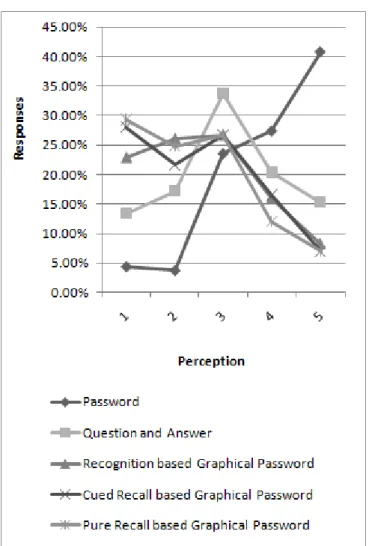
(6) 2.3.. 2.4.. 2.5.. 2.6.. Password strength ........................................................................................ 19 2.3.1.. Password space .............................................................................. 19. 2.3.2.. Entropy (bit strength) ....................................................................... 20. Type of password attack ............................................................................... 20 2.4.1.. Shoulder-surfing .............................................................................. 21. 2.4.2.. Guessing.......................................................................................... 21. 2.4.3.. Dictionary attacks ............................................................................ 22. 2.4.4.. Brute force ....................................................................................... 22. 2.4.5.. Social engineering ........................................................................... 23. 2.4.6.. Phishing ........................................................................................... 23. 2.4.7.. Malware ........................................................................................... 24. Introducing visual passwords (VPs) ............................................................. 25 2.5.1.. Categorisation and listing of VP schemes ....................................... 26. 2.5.2.. Pure-recall ....................................................................................... 26. 2.5.3.. Cued-recall ...................................................................................... 30. 2.5.4.. Recognition ...................................................................................... 37. 2.5.5.. Category-based evaluation .............................................................. 48. 2.5.6.. More insight into click-based systems ............................................. 52. Other proposals ............................................................................................ 53 2.6.1.. Audio passwords ............................................................................. 53. 2.6.2.. Behavioural biometrics .................................................................... 53. 2.7.. HCI-Sec ........................................................................................................ 54. 2.8.. Terminology .................................................................................................. 56. Chapter 3 Survey of User Perceptions ................................................ 58 3.1.. The survey .................................................................................................... 59. 3.2.. Analysis of results ......................................................................................... 60 3.2.1.. General ............................................................................................ 60. 3.2.2.. Level of computer usage ................................................................. 61. 3.2.3.. Text password related questions ..................................................... 62. 3.2.4.. Alternative techniques for initial login .............................................. 66. 3.2.5.. Continuous monitoring ..................................................................... 67. 3.3.. Discussion .................................................................................................... 70. 3.4.. Conclusion .................................................................................................... 73. vi.
(7) Chapter 4 HybridPass – A New VP Scheme ....................................... 75 4.1.. Description of the system ............................................................................. 77. 4.2.. Usability discussion ...................................................................................... 80. 4.3.. Security discussion ....................................................................................... 81. 4.4.. Laboratory study ........................................................................................... 84. 4.5.. Experiment methodology .............................................................................. 84. 4.6.. Analysis of results ......................................................................................... 87 4.6.1.. Training (prototype 1) ...................................................................... 88. 4.6.2.. Registration phase ........................................................................... 89. 4.6.3.. Retention phase .............................................................................. 90. 4.6.4.. Accuracy .......................................................................................... 90. 4.6.5.. Hotspots ........................................................................................... 91. 4.7.. Discussion .................................................................................................... 93. 4.8.. Conclusion .................................................................................................... 96. Chapter 5 True Discretization .............................................................. 97 5.1.. Introduction ................................................................................................... 97. 5.2.. Robust Discretization .................................................................................... 98. 5.3.. Centred Discretization .................................................................................. 99. 5.4.. Occurrence of false accepts ....................................................................... 100. 5.5.. True Discretization ...................................................................................... 102. 5.6.. Security analysis ......................................................................................... 103. 5.7.. Conclusion .................................................................................................. 104. Chapter 6 CCBS – A Method to Maintain Memorability, Accuracy of Password Submission and the Effective Password Space ........ 105 6.1.. Introduction ................................................................................................. 106. 6.2.. The effective password space in click-based VPs ..................................... 108. 6.3.. Accuracy of password submission ............................................................. 111. 6.4.. VP retention in click-based systems ........................................................... 112. 6.5.. Cued Click-Based System (CCBS) ............................................................ 113. 6.6.. Hypotheses ................................................................................................. 114. 6.7.. Experiment methodology ............................................................................ 115 6.7.1.. Experimental design ...................................................................... 115. 6.7.2.. Materials ........................................................................................ 116. 6.7.3.. Procedure ...................................................................................... 117 vii.
(8) 6.7.4. 6.8.. Participants .................................................................................... 119. Analysis of results ....................................................................................... 119 6.8.1.. Registration phase ......................................................................... 119. 6.8.2.. Learning phase .............................................................................. 120. 6.8.3.. Retention phase ............................................................................ 123. 6.8.4.. Click-points .................................................................................... 125. 6.9.. Discussion .................................................................................................. 126. 6.10.. Validation of hypotheses ............................................................................ 128. 6.11.. Potential enhancements (shoulder-surfing and keyboard support) ............ 129. 6.12.. Conclusion .................................................................................................. 130. Chapter 7 Protection against Phishing Attacks ............................... 131 7.1.. 7.2.. Insights into phishing .................................................................................. 132 7.1.1.. The problem................................................................................... 132. 7.1.2.. Sample attacks .............................................................................. 133. 7.1.3.. Key facts of recent phishing attacks .............................................. 135. Analysis of solutions ................................................................................... 136 7.2.1.. SSL/TLS and third-party certification ............................................. 136. 7.2.2.. Anti-phishing tools ......................................................................... 139. 7.2.3.. Extending user authentication mechanisms .................................. 140. 7.3.. Why phishing still works ............................................................................. 142. 7.4.. Towards a better anti-phishing approach ................................................... 143. 7.5.. Developing the PassMark scheme ............................................................. 145 7.5.1.. PassMark recognition .................................................................... 146. 7.5.2.. PassMark protection ...................................................................... 148. 7.6.. Developing the HybridPass/CCBS scheme ............................................... 152. 7.7.. Evaluation and analysis .............................................................................. 154. 7.8.. Man-in-The-Middle (MiTM) phishing attack ................................................ 162. 7.9.. 7.8.1.. Sample attacks .............................................................................. 162. 7.8.2.. Analysis of solutions ...................................................................... 164. 7.8.3.. Proposed scheme to resist MiTM-phishing ................................... 165. Conclusion .................................................................................................. 167. Chapter 8 Conclusion and Future Work ............................................ 169. viii.
(9) 8.1.. Conclusion .................................................................................................. 169. 8.2.. Future work ................................................................................................. 173. Appendix A - Survey of user perceptions (snapshots).................... 175 Appendix B - Experimental data (Chapter 4) .................................... 184 Appendix C – Experimental data (Chapter 6) ................................... 200. ix.
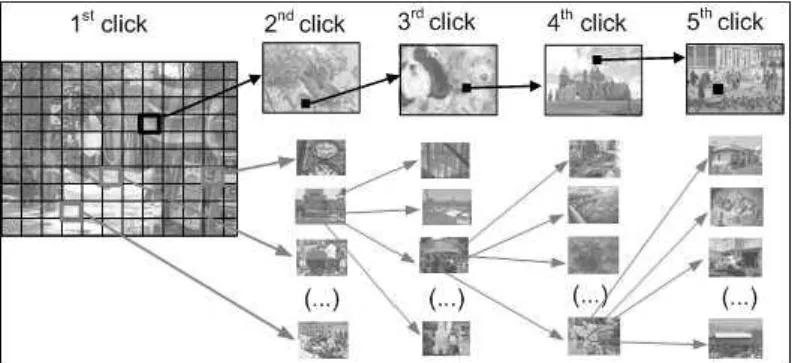
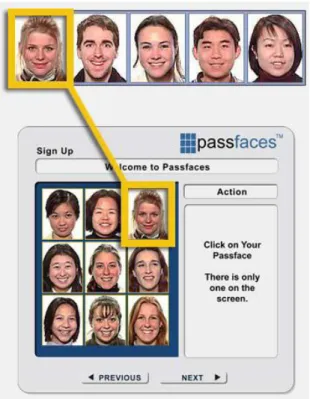
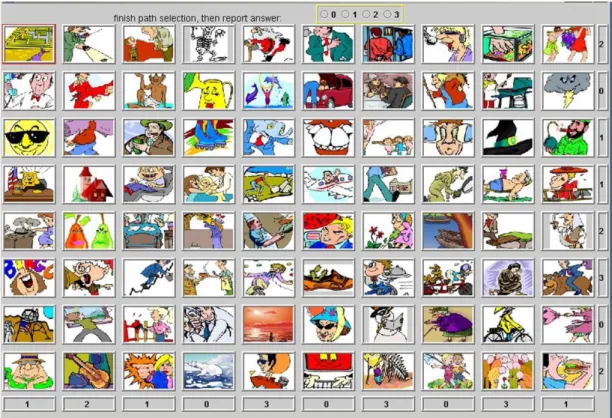
(10) List of Tables. Table 3.1: Results of public acceptability of different initial login techniques, where 1 is very unacceptable and 5 is very acceptable. ................................................................... 66 Table 4.1: Description of prototype parameters (. is the tolerance distance from the. actual click-point). ............................................................................................................ 87 Table 4.2: Calculated data of the total time to register a new account in Prototype 1 (in seconds) and the incorrect password submissions. Confirmation time is the time spent to re-enter the 4 click-points (First trial N = 40, Second trial N = 34). .................................. 88 Table 4.3: Calculated data (in seconds) of the password entry time for those who successfully signed in to the system using Prototype 1 (N = 17). ................................... 89 Table 4.4: Calculated data (in seconds) of the VP creation time for successful registrations, the number of incorrect password submissions, successful rates on the second registration attempt (SR) and the first attempt only (SR-F). (N = 40). ................ 89 Table 4.5: Calculated data (in seconds) of the VP input time for successful signed in attempts. The number of incorrect password submissions and success rates (SR). (Prototype 2: N = 37, Prototype 3: N = 35, prototype 4: N = 39, Prototype 5: N = 37). ... 90 Table 4.6: Means (in seconds), standard deviations (SD) and success rates (after one attempt) for Passpoints (Wiedenbeck et al., 2005c), CCP (Chiasson et al., 2007) and HybridPass (Prototype 4). Registration (Reg.) in this table stands for the time need to successfully create and confirm a new VP. ..................................................................... 95 Table 5.1: The number of false accepts click-points in the Centred Discretization tolerance grid square. .................................................................................................... 101 Table 5.2: The number of possible clicks (N) while using Centred Discretization (CD) and True Discretization (TD) in PassPoints. .................................................................. 103 Table 6.1: Examples of the textual cues used in CCBS with their relevant click-cells. . 114. x.
(11) Table 6.2: Calculated data of the total number of attempts and time to register and confirm (in seconds) a new account. Confirmation time is the time spent to re-enter the 5 click-points. (CCBS N = 20, Passpoints N = 20, Text N = 20). ...................................... 120 Table 6.3: Questions about the registration phase. A Likert-scale of 7-points was used to answer each question with lower numbers indicating strong agreement (CCBS N = 20, Passpoints N = 20, Text N = 20). ................................................................................... 120 Table 6.4: Means and Standard Deviations (SD) of the total practice time (in seconds) and the number of incorrect password submissions in the learning phase. (CCBS N = 20, Passpoints N = 20, Text N = 20). ................................................................................... 121 Table 6.5: Means and Standard Deviations (SD) of questions about the learning phase. A Likert-scale of 7-points was used to answer each question with lower numbers indicating strong agreement (CCBS N = 20, Passpoints N = 20, Text N = 20). ............ 122 Table 6.6: Means and Standard Deviations (SD) of the time for correct submissions (in seconds) and the number of incorrect password submissions in the retention phase. (CCBS N = 20, Passpoints N = 20, Text N = 20). .......................................................... 123 Table 6.7: Means and Standard Deviations (SD) of questions about the retention phase. A Likert-scale of 7-points was used to answer each question with lower numbers indicating strong agreement (CCBS N = 20, Passpoints N = 20, Text N = 20). ............ 125 Table 7.1: Authentication schemes used in different banks. ......................................... 155 Table 7.2: The number of basic phishing attacks required to recover the full user credentials in different authentication schemes. ............................................................ 157 Table 7.3: The number of phishing attacks required to recover the full user credentials in different authentication schemes, assuming the user ID is known and the error-feedbacktrick is implemented. ...................................................................................................... 158 Table 7.4: The authentication schemes resistant to different password attacks. .......... 160 Table B.1: Prototype 1 registration data. (*) is used to highlight data for successful registrations only. ........................................................................................................... 184 Table B.2: Prototype 1 sign-in times and calculation details. Data are from participants who successfully sign-in. (*) is used to highlight data for successful registrations only. 186. xi.
(12) B.3: Prototype 2 and Prototype 3 registration times, success rates and other calculated information. .................................................................................................................... 187 Table B.4: Prototype 4 and Prototype 5 registration times, success rates calculated details. ............................................................................................................................ 189 Table B.5: Sign-in times, success rates and calculation details. ................................... 191 Table B.6: The images used in HybridPass experiments to create user portfolios and their reference codes. .................................................................................................... 193 Table B.7: The VPs (user clicks) collected throughout the experiments from the 5 prototypes. ..................................................................................................................... 195 Table C.1: The images used in the CCBS experiment to create users portfolios accompanied by their reference codes. ......................................................................... 200 Table C.2: The VPs (user clicks) from the CCBS experiment. Each click is represented by two numbers (image coordinates) and an image reference code. Each element is separated by a semicolon. ............................................................................................. 201. xii.
(13) List of Figures. Figure 2.1: Input of a graphical password in DAS (Jermyn et al., 1999). ........................ 27 Figure 2.2: Pass-Go sign-in form. .................................................................................... 29 Figure 2.3: Passlogix, implementation of Blonder‟s scheme. Taken from (Suo et al., 2005). ............................................................................................................................... 31 Figure 2.4: Screenshot of the Inkblot Authentication scheme experiment (Stubblefield and Simon, 2004). ............................................................................................................ 32 Figure 2.5: Randomly generated inkblots used in (Stubblefield and Simon, 2004). ........ 32 Figure 2.6: Snapshot of proof of 3D Password concept. A virtual art gallery hosts 36 pictures and 6 computers. Users can navigate and interact with virtual objects (Alsulaiman and ElSaddik, 2006). .................................................................................... 35 Figure 2.7: In CCP, each click point leads to a different sequence of images (Chiasson et al., 2007). ......................................................................................................................... 36 Figure 2.8: Passfaces (Real User Corporation, 2001). .................................................... 38 Figure 2.9: Déjà Vu, portfolio selection window (Dhamija and Perrig, 2000). ................ 39 Figure 2.10: VIP example (De Angeli et al., 2005). ......................................................... 41 Figure 2.11: VIP example (De Angeli et al., 2005). ......................................................... 41 Figure 2.12: Man's shoulder-surfing resistant scheme (Man et al., 2003). The case where all user icons are on the right hand side of the screen. ................................................... 42 Figure 2.13: Hong‟s spyware resistant scheme, sign-in page (Hong et al., 2004). ......... 43 Figure 2.14: Story, sample of image selection window (Davis et al., 2004). ................... 43 Figure 2.15: Weinshall‟s Cognitive Authentication Scheme Query Panel (Weinshall, 2006). ............................................................................................................................... 45 Figure 2.16: CHC, Illustration of the invisible convex hull with 3 pass-icons (Wiedenbeck et al., 2006) ...................................................................................................................... 46 xiii.
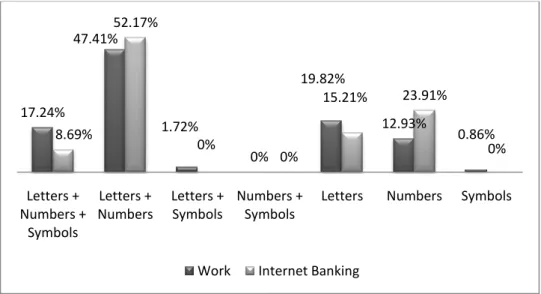
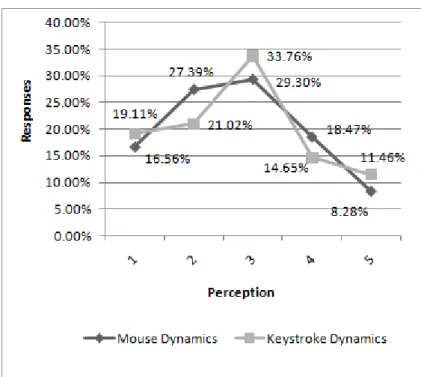
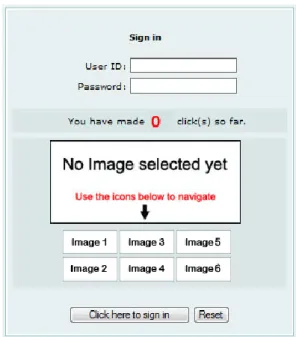
(14) Figure 2.17: DynaHand, example of one of the authentication stages (Renaud and Olsen, 2007) ..................................................................................................................... 47 Figure 2.18: User Your Illusion - Image portfolio assignment. The original images are shown along with their distorted versions (Hayashi et al., 2008) ..................................... 48 Figure 3.1: Demographic information (age) ..................................................................... 61 Figure 3.2: Demographic information (place of residence). ............................................. 61 Figure 3.3: Number of accounts. ...................................................................................... 62 Figure 3.4: How often passwords of critical accounts are changed ................................ 63 Figure 3.5: How often participants avoid simple words available in dictionaries. ............ 63 Figure 3.6: How often a combination of random letters (a,b, c ...), numbers (1, 2, 3...) and symbols (?, !, @...) are used together to create a password ........................................... 64 Figure 3.7: How often a password is written down after creating a new account. ........... 64 Figure 3.8: How often the participants check their new password to be at least 6 characters long when creating a new account. ................................................................ 64 Figure 3.9: Comparison between participants‟ passwords at work and the ones they use for internet banking. ......................................................................................................... 65 Figure 3.10: Comparison of public acceptability of different initial login techniques, where 1 is very unacceptable and 5 is very acceptable. ............................................................ 67 Figure 3.11: Comparison between the public acceptability to mouse and keystroke dynamics to be used for continuous monitoring. ............................................................. 68 Figure 3.12: Acceptable frequency of false rejection. ...................................................... 69 Figure 3.13: Acceptable frequency of automatically logging a user account out after period of inactivity. ........................................................................................................... 69 Figure 3.14: Comparison between the four age groups in the survey regarding the number of accounts they deal with. ................................................................................. 71. xiv.
(15) Figure 3.15: Comparison between students‟ and non-students‟ responses regarding the number of accounts they deal with. ................................................................................. 72 Figure 3.16: Comparison between responses from Europe and Asia regarding the number of accounts they deal with. ................................................................................. 72 Figure 4.1: Illustration of the HybridPass sign-in form. .................................................... 78 Figure 4.2: Schematic view of the sign-in process .......................................................... 79 Figure 4.3: Sign-in form after entering a valid ID and any text password. ....................... 79 Figure 4.4: Phase one in the password retention process, to enter the user ID and Text Password. ........................................................................................................................ 86 Figure 4.5: Phase two in the password retention process, to enter the VP. .................... 86 Figure 4.6: Analysis of the rejected click-points during the retention phase from all prototypes. ....................................................................................................................... 91 Figure 4.7: Scatter chart illustrating 83 clicks on the most employed cartoon image in Prototypes 2 and 4. .......................................................................................................... 92 Figure 4.8: Scatter chart illustrating 87 clicks on the most employed photograph image in Prototypes 3 and 5. .......................................................................................................... 92 Figure 4.9: Line chart illustrating the probability distribution of 83 user clicks on the most employed cartoon image in Prototypes 2 and 4. The „Equal Distribution‟ line represents the case if all clicks are distributed equally (all squares have the same probability). ...... 92 Figure 4.10: Line chart illustrating the probability distribution of 87 user clicks on the most employed Photograph image in prototypes 3 and 5. The „Equal Distribution‟ line represents the case if all clicks are distributed equally (all squares have the same probability). ....................................................................................................................... 93 Figure 5.1: False rejects and false accepts in Robust Discretization (Chiasson et al., 2008c). ............................................................................................................................. 99 Figure 5.2: Centred Discretization. The continuous line L is divided into segments of length 2r+1, where the value of 1 represents the original click-point............................. 100. xv.
(16) Figure 5.3: Occurrence of false accepts. Each square represents a tolerance grid in centred discretization, and the circle inside contains the true tolerance space in a 2-D environment ................................................................................................................... 101 Figure 6.1: The original image used in PassClicks. ....................................................... 109 Figure 6.2: An overlay of 157,090 points. ...................................................................... 109 Figure 6.3: The original image. It was taken from (Wiedenbeck et al., 2005b). ............ 109 Figure 6.4: Hotspots and clustered areas are highlighted. (Thorpe and Oorschot, 2007). ....................................................................................................................................... 109 Figure 6.5: Screenshot of the PCCP Create Password interface with the randomly highlighted area. Taken from (Chiasson et al., 2008b). ................................................. 111 Figure 6.6: Number of participants who failed to submit a valid password on the first attempt. R1 represent instant retention of the VP, R2 represent the retention phase after one week and R3 after 4 weeks from R2. The figure has been taken from (Wiedenbeck et al., 2005c). ................................................................................................................. 113 Figure 6.7: In addition to the visual cues, in CCBS each click-cell has a unique textual cue appearing on „mouse hovering‟. .............................................................................. 113 Figure 6.8: The Sign-in page of the prototype employed in the CCBS experiment. The mouse is highlighting a particular click-point hence the relevant textual cue is displayed: „Tom and Jerry is an animated show watched by children, teenagers and adults‟. ...... 116 Figure 6.9: An illustration of a single click-point. The click-point is visually highlighted inside the image and the textual cue is displayed next to it. .......................................... 118 Figure 6.10: the number of incorrect submissions in the learning phase. ..................... 122 Figure 6.11: The number of participants in each retention trial who failed to submit their correct password on the first attempt. ............................................................................ 124 Figure 6.12: The number of participants in each retention trial who failed to submit their correct password after five attempts. ............................................................................. 124. xvi.
(17) Figure 6.13: Line chart illustrating the probability distribution of 100 clicks. As such, P (p01x) is the Probability of the image: p01x. The „Equal Distribution‟ line represents the case if all clicks are distributed equally (all squares have the same probability). .......... 126 Figure 7.1: Sample of a phishing message targeting PayPal users. ............................. 133 Figure 7.2: Sample of a phishing message targeting HSBC users. .............................. 134 Figure 7.3: Snapshot of HSBC (UK) Internet Banking Personal logon page. ................ 135 Figure 7.4: Snapshot of a spoof page of the HSBC (UK) logon page. .......................... 135 Figure 7.5: In Google Chrome, clicking the „lock‟ icon indicator of SSL/TLS opens a security information window. Details provided include: website identity verification, CA name and encryption type. ............................................................................................. 137 Figure 7.6: In HybridPass, the design of the scheme forces user authentication to fail before recovering the VP during the first attack. ............................................................ 145 Figure 7.7 : In PassMark, users are asked to enter their text passwords only after authenticating the server by recognising a shared secret/image. However, most users are found to submit their passwords anyway (Stone, 2007) as illustrated. ................... 147 Figure 7.8: Bank of America SiteKey challenge questions. .......................................... 150 Figure 7.9: An example of a shared secret, an image and its accompanying title. ....... 150 Figure 7.10: User authentication when the client‟s computer is recognized by the server in the anti-phishing implementation of HybridPass. ....................................................... 153 Figure 7.11: User authentication when the client‟s computer is not recognized by the server in the anti-phishing implementation of HybridPass. ............................................ 153 Figure 7.12: In a MiTM-phishing, the attacker creates two separate connections pretending to be the bank‟s website in the user‟s browser and then interacts with the bank‟s website using the user‟s data. ............................................................................ 162 Figure 7.13: A demonstration of a MiTM-phishing attack against BoA showing the first screen of the sign-in procedure secured with SSL. ....................................................... 163. xvii.
(18) Figure 7.14: A demonstration of a MiTM-phishing attack against BoA. After feeding the forms with correct user details. ...................................................................................... 164 Figure 7.15: Altering HTML code to run Phishing attacks. ............................................ 166 Figure A.1: Snapshot 1/9 showing the welcome page of the online application survey presented in Chapter 3................................................................................................... 175 Figure A.2: Snapshot 2/9 of the online application survey presented in Chapter 3. ...... 176 Figure A.3: Snapshot 3/9 of the online application survey presented in Chapter 3. ...... 177 Figure A.4: Snapshot 4/9 of the online application survey presented in Chapter 3. ...... 178 Figure A.5: Snapshot 5/9 of the online application survey presented in Chapter 3. ...... 179 Figure A.6: Snapshot 6/9 of the online application survey presented in Chapter 3. ...... 180 Figure A.7: Snapshot 7/9 of the online application survey presented in Chapter 3. ...... 181 Figure A.8: Snapshot 8/9 of the online application survey presented in Chapter 3. ...... 182 Figure A.9: Snapshot 9/9 of the online application survey presented in Chapter 3. ...... 183. xviii.
(19) Acknowledgments. First and foremost, I owe my deepest gratitude to my supervisor and Director of Studies, Prof. Carsten Maple, for his insightful criticisms, advice and encouragement. This research was possible due to his ideal guidance and support. I am also very grateful to my second supervisor, Dr. Marc Conrad, for his precious comments and support. My appreciation also goes to my examiners, Prof Tony Solomonides (University of the West of England) and Dr Wei Huang for provided valuable feedback on the content and structure of the thesis. My colleague and friend, Dr. Peter Norrington, for all the valuable discussions and for proof reading my thesis. Furthermore, it is a pleasure to thank my colleagues in the Institute for Research in Applicable Computing (IRAC), at the University of Bedfordshire and all my friends for their company, moral support, comments and participation in some of the experiments. In particular, I would like to mention Hossam Ali, Mudhar al-Najjar, Divya Rao, Zahraa alAttiya, Rua al-Sheikh, Shaima Abukhater, Ghazal Zayad and Dr. Hanin Omar.. xix.
(20) Declaration. I declare that this thesis is my own unaided work. It is being submitted for the degree of Ph.D. at the University of Bedfordshire. It has not been submitted before for any degree or examination in any other University.. Name of candidate: Haider Malik al-Khateeb Date: 18/02/2011. xx.
(21) Chapter 1. Introduction. Technology improvement is challenging the security of current user authentication methods at its best, text passwords in particular. When you select a new password similar to: „h5?2&sj8‟ which is a good randomly mixed string of upper and lower alphanumeric characters and symbols, you expect it to resist cracking tools for years to come, but modern personal computers employing multiple video cards could reach the capacity of searching 1 billion passwords/sec (net-security.org, 2008, whatsmypass.com, 2008) which implies that it could crack its hash in approximately 71 days. In addition, connecting multiple computers to divide the task among them decreases the attack time effectively. For instance, the ongoing project RC5-72 (distributed.net, 2002) employs large number of distributed computers all over the world to break encryption algorithms, reaching a sustained rate of searching 743 billion keys/sec on 3/5/2010. Power like this can recover the same hash in only two to two and a half hours. Other challenges facing text passwords include guessing and dictionary attacks. These issues remain a problem because maintaining text password security collides with the human lack of ability to remember good passwords. Security and usability are hard to balance since what is easy to remember is not safe enough, and a well selected password is hard to remember. This work recognises the major impact of the human factor in user authentication security. It researches the employment of a different type of knowledge-based methods called visual passwords (VPs). Hence, a survey of different VPs is conducted followed by an evaluation of the best approach to develop novel ideas aiming to solve authentication security problems while maintaining usability at the application level. Various prototypes were developed to support the study with empirical evidence. 1.1. Context The human factor is a fundamental reason behind selecting weak text passwords, and since secure user behaviour is hard to maintain, new schemes must be carefully designed to aid and influence users toward better password selection with the least 1.
(22) possible effort on the users‟ part. HCI-Sec is the term emerged to reflect this area of intersection between Human-Computer Interaction (HCI) and computer security. HCI aims to make systems more usable, while computer security in this scenario is concerned with keeping the system and all related data safe against unauthorised access. Hence, HCI-Sec is the research area of investigating and developing new design technologies to produce a system that can maintain both security and usability (Garfinkel, 2005). While early literature shows that security and usability issues were recognised, they were addressed and discussed separately (Reid, 1990) until this research area received more attention during the 1990‟s from a number of researchers such as (Whitten and Tygar, 1999) and (Zurko and Simon, 1996) who introduced „user-centred security‟. 1.2. Problem statement Text passwords are vulnerable to many security attacks due to the insecure practices of end users who select weak passwords as a mechanism to maintain their long term memory. A secure text password should be a long random mixture of characters. These are hard to remember and in addition, they can be easily shared, written on paper or reused on multiple systems. There are no methods for system administrators to guarantee that passwords are not used again for other accounts on other systems. Reusing passwords implies that recovering a particular account‟s password exposes other systems protected by the same password as well. 1.3. Motivation Despite all security challenges to text passwords, they remain ubiquitous and hard to replace due to their usability, hence a potential replacement must provide end users with a comparable level of flexibility and usability in addition to security. What is encouraging about researching VPs is the fact that their implementations can easily adapt to new ideas. For instance, Déjà Vu (Dhamija and Perrig, 2000) and Passfaces (Real User Corporation, 2001) are both recognition-based systems, but one was designed with abstract images to make social engineering hard to succeed and the other one used human faces to maintain a higher level of memorability. Similarly, Passpoints (Wiedenbeck et al., 2005c) was developed based on Blonder‟s patent (Blonder, 1996) to provide a click-based solution with a very large password space in comparison to other implementations such as PassLogix (Boroditsky, 2002).. 2.
(23) VP schemes have the advantage of triggering users‟ memory in different ways to recall their passwords, which implies that they provide aid to end users‟ long term memory, the real problem behind having weak passwords. Much research over the last decades shows that humans can remember visual elements and meaningful pictures better than text. (Madigan, 1983) (Nelson et al., 1976) (Bower et al., 1975) (Paivio et al., 1968) (Shepard, 1967) (Calkins, 1898). It is very critical to take the human factor into consideration and VPs support that. In addition, the environment of VPs gives researchers the opportunity to select and develop schemes to fight different security attacks such as guessing and phishing. 1.4. Thesis statement (aims and objectives) Aims The first aim of the study is to develop a new VP authentication mechanism for web applications. The authentication scheme must be user-friendly, cost-effective and provide novel techniques to resist some of the security threats text passwords are vulnerable to, such as phishing, brute force and dictionary attacks. Nevertheless, and because text passwords remain the de facto approach to user authentication and are still used in the vast majority of systems (DTI, 2006), the study aims secondly to investigate users‟ awareness of, and attitudes toward, text password security and usability and provide an up-to-date information Objectives 1. Investigate users‟ attitudes toward text passwords, their perceptions of other knowledge/secret-based mechanisms and the concept of continuous monitoring. 2. Identify the best VP approach based on a security and usability evaluation to develop a substantial authentication solution suitable for web application. 3. Build the new authentication scheme to be more resistant to brute force and dictionary attacks. 4. Develop an effective anti-phishing technique. 5. Evaluate the scheme against different attacks analysing its strength and weakness to achieve better security and usability.. 3.
(24) 1.5. Scope The scope of this research covers knowledge-based or secret-based authentication schemes, especially VPs. Any technology requiring additional hardware resources to the standard computer input/output devices (monitor, mouse and keyboard) is beyond the scope. A web server will be the host of the developed system prototypes to imitate the environment of a real internet application. Various effective web development technologies will be used to enhance the HCI. For instance, PHP and SQL are used for the server side scripting and JavaScript is employed to perform the required interactivity on the client‟s side. 1.6. Constraints The results of the experiments developed throughout the thesis are based on laboratory studies. Although countermeasures were taken to maintain an environment of real world characteristics, it is possible that long term field studies will challenge these results. Due to time restrictions while performing experiments to analyse the usability of the system, it was not possible to maintain an effective long term field study which could last for months and require hundreds of participants. The scheme‟s behaviour towards different type of security attacks is hypothetically discussed, or tested and evaluated in the laboratory, publishing its design or using it as part of a live system could disclose new vulnerabilities by attackers or by other researchers. This research focuses on developing the system at the application level, hence, low level protection (e.g. using network encryption to resist sniffers) is not discussed in detail, but rather required and expected to exist as part of the infrastructure for any authentication system. In addition, the prototypes are designed and coded to serve the purpose of adding improvements and testing new features for click-based VP systems and may not be used directly in live systems without further enhancements. 1.7. Research methodology To achieve the objectives of this research, the following are constantly used:. 4.
(25) a. Prototyping A vertical prototype approach is adopted to eventually test and evaluate the implementation of the scheme. This helps to implement changes related to usability issues and develop the HCI. The development environment (web hosted) has been registered online where PHP database-driven applications can be hosted. PHP, MySQL, JavaScript, AJAX and other scripting languages are used to develop the new authentication tool. b. Experiments The experiments serve as the point of departure to start the discussion with end users to discover practical problems, gather feedback and subsequently analyse how the application is being used. Participants access the application prototype online, fulfil the requirements of the experiment and answer a short survey. c. Surveys and interviews An open source survey application (limesurvey.org, 2010) has been chosen and developed to meet the research requirements. To collect and control data integrity from a wide range of participants, the online survey system is critical to moderate the data collection process. Question types could be multiple-choice questions, comment box or Likert scale. Responses are date stamped and IP addresses are logged because participants are required to complete the survey online and this helps to put restrictions on how many times a survey can be accepted from a specific party. Cookies are also used for access control so that participants can save partially-finished surveys and finish them at a later time. Surveys and questionnaires are useful to gather feedback at the end of every experiment as well as achieving some of the study‟s objectives, for instance, to understand users‟ perceptions of existing online authentication mechanisms, the concept of continuous monitoring or even their attitudes towards text passwords security.. 5.
(26) d. Exhaustive reviews and literature investigations In. addition. to. performing. surveys. and. experiments,. exhaustive. literature. investigations take place continuously to make use of other research work in the field. Existing research work could save time and effort. For example, it could help to understand a particular problem from different perspectives, analyse the strengths and weaknesses of proposed solutions and support relevant arguments with the necessary evidence. 1.8. Thesis overview The remainder of the thesis is organised into seven further chapters. Chapter 2 introduces user authentication then investigates the text password problem, possible attacks and available countermeasures. It partially addresses Objective 1 through discussing user attitudes towards text passwords, while the remaining sections address Objective 2 with an up-to-date survey of VP schemes available in the literature, where security and usability elements are evaluated to identify the most convenient approach. HCI-Sec is covered in detail. The chapter then concludes with a list of the terminology used throughout this thesis. Chapter 3 is dedicated to addressing Objective 1. It presents analyses of a survey designed to cover the public‟s awareness of, and attitudes toward, password security and usability, different forms of initial user authentication mechanisms and the concept of continuous monitoring. Objective 3 required designing and developing a new VP scheme. The contribution to achieve this objective is presented in Chapter 4 with a new click-based system called HybridPass. Both security and usability issues are theoretically discussed, followed by an analysis of a laboratory study in which a number of issues were covered such as training time, the types of image used, hotspots and dictionary attacks, tolerance, success rates and others. Further, technical solutions are developed to support the application of the system. For instance, discretization is used to accept clicks within an area of tolerance around the original click-point in click-based systems. Proposals from the literature such as (Birget et al., 2003) and (Chiasson et al., 2008c) allowed false accepts and/or false rejects. Chapter 5 discusses these methods in detail and provides an extension method to achieve zero false accepts/rejects to increase the password space.. 6.
(27) Another scheme based on the original HybridPass prototype is then introduced in Chapter 6, called Cued Click-Based System (CCBS). It is developed to achieve a number of objectives. For example, it resists dictionary attacks through giving each element (click) used to create a visual password an equal chance of being selected by the system while maintaining memorability. As such, the scheme was designed to support password retention in the long term. In addition, it provides additional cues during password entry to reduce the number of incorrect password submissions. Phishing attacks against authentication systems are investigated in Chapter 7 where Objective 4 is addressed. The chapter starts with insights to the problem and includes discussions supported by sample attacks followed by a comprehensive analysis of the existing proposals to resist phishing. The analysis helped to develop an anti-phishing approach which was then employed to develop two existing schemes (one of them is the HybridPass/CCBS scheme) to provide better protection against this type of attacks. Nevertheless, a new generation of phishing attacks referred to as Man-in-The-Middle Phishing is also covered with a potential proposal to stop its threat. Objective 5 is addressed in Chapters 4 to 7 with the discussion of different potential attacks. Chapter 8 concludes this research with an evaluation of the usability and security of the scheme in its final prototype (i.e. CCBS with Phishing resistant). Finally, future work is addressed in the same chapter. 1.9. Research contributions The research contributions to the field of HCI-Sec and authentication systems are: 1. A comprehensive survey of visual password schemes with a security and usability discussion supported by up-to-date references from the literature. The schemes were categorized and evaluated based on the type of memory to select the best approach for this work (Chapter 2).. 2. Investigated public attitudes and perceptions towards different forms of visual passwords (Chapter 3).. 3. Investigated public attitudes and perceptions towards implementing continuous monitoring in online authentication systems to maintain security for a logged in session based on user behavioural biometrics (Chapter 3).. 7.
(28) 4. Provide evidence that the number of frequently used password-protected systems is continually increasing (Chapter 3). 5. A flexible scheme (HybridPass) was designed with advantages over older clickbased system such as Passpoints and CCP in terms of flexibility and providing better resistance to security threats such as shoulder-surfing and phishing. In addition, it was designed to eliminate denial of service attach since it replaces the traditional technique of controlling the number of incorrect login attempt to resist guessing with an alternative novel technique (Chapter 4). 6. Identified criteria and addressed challenges applicable to click-based systems such as image types, tolerances, accuracy and dictionary attacks (the hotspots problem) (Chapter 4). 7. A scheme (CCBS) with a novel design to resist dictionary attacks while maintaining the password space, accuracy of password submissions and user memorability for the short and long term (Chapter 6). 8. True Discretization is proposed in Chapter 5, a method to accept clicks within an area of tolerance with zero false accepts/rejects in click-based systems. Older methods from the literature are proved to allow false accepts and/or false rejects if applied with no further modification. 9. An anti-phishing approach is developed and presented in Chapter 7 following an extensive security and usability discussions of various proposals from the literature. 10. Existing schemes such as PassMark (currently used for internet banking) and HybridPass/CCBS were developed. Their superior resistant to phishing attacks was then analysed and evaluated against schemes currently used in various banks including HSBC, Lloyds TSB, Bank of America and others. 11. A new scheme to resist the new generation of phishing attacks (Man-in-TheMiddle phishing) is proposed (Chapter 7).. 8.
(29) 1.10. . Related publications H. al-Khateeb, C. Maple and M. Conrad (2009) HybridPass: Authentication Mechanism for Web Applications- Both Secure and User-Friendly in Proceedings of the IADIS International Conference e-Society 2009, 25-28 February, 2009 Barcelona, Spain.. . H. al-Khateeb, C. Maple and M. Conrad (2010) Enhancing Usability and Security in Click-Based Visual Password Systems, in Proceedings of the IADIS International Conference e-Society 2010, 18-21 March, 2010, Porto, Portugal.. 9.
(30) Chapter 2. Background and Related Work. This chapter introduces user authentication then presents the text password problem, possible attacks and available countermeasures, followed by an up-to-date survey of VP schemes available in the literature where security and usability elements are discussed and evaluated. The results suggest click-based systems to be promising; hence they are covered in further detail to support the following chapters where new techniques and ideas are tested on a number of click-based system prototypes developed for this purpose. HCI-Sec is presented and discussed. The chapter then concludes with a list of the terminology used throughout this thesis. 2.1. Authentication In computer security, authentication is defined and presented as the process of confirming the identity of the originator. This process starts with „identification‟ wherein the originator posts claim to his identity. The process then continues to verify and confirm the claim (e.g. a person proves who he claims to be); if the originator is proved as authentic, he is authorised with access rights to resources. Identity confirmation is achieved based on one authentication factor or more. These factors are generally classified into three main classes: a. Something the user knows or recognises (knowledge factors): This works by sharing a secret which users need to recall, this –for instance– can be a password, passphrase or a personal identification number (PIN) between an access control system and a user. Every time users attempt to gain access, the system asks them to recall the shared secret correctly. Another way is to recognize a secret provided to users during their first enrolment. The secret can be a pre-selected image (as in recognition-based VPs). Then to confirm identity a user must recognise and select the same image or an image associated to it, from a set of images generated by the system.. 10.
(31) Some systems combine both: recall and recognition in what is known as cuedrecall. These systems provide the users with a cue to recall the secret. An example to this is the Question-and-Answer approach. Click-based VP solutions are another example. b. Something the user has (ownership factors): Users provide a unique token they own or associated to them to authenticate. This varies from one system to another, some of these identity confirmation methods are: ID cards, security tokens and cell phones. c. Something the user is or does (biometrics) Users‟ identity can be verified by reading and analysing their biometrics. Biometric characteristics can be divided into two classes: -. Something the user is (physiological characteristics) Also called static biometrics, these include fingerprints, hand geometry, eye features: retina & iris scanning, DNA sequence, face recognition and other biometric identifiers.. -. Something the user does (behavioural characteristics) Also. called. behavioural. biometrics. or. behavioumetrics,. examples. of. behavioumetrics are: voice verification, written signature, mouse dynamics and keystroke dynamics. Unlike other factors, physiological biometrics cannot be forgotten (they are part of the user) but, they require special hardware (readers) to capture these physical or behavioural traits. The UK Border Agency started a biometric data collection for visa applicants. They claim that enrolling fingerprint data helps protect applicants and their families from identity theft, crime and terrorism and gives them fast passage through automatic gates of entry at UK ports and airports (ukvisas.gov.uk). However, from the use of people‟s biometrics arise many privacy and discrimination issues. Misuse of the technology might put owners of important items in danger, for instance, the BBC reported in 2005 that the police in Malaysia were after a violent gang who chopped off a car (a Mercedes S-class) owner's finger to get around the vehicle's hi-tech security system (Kent, 2005).. 11.
(32) In addition to the above, other authentication factors exist and can be grouped into the following additional classes: d. Location-based authentication The system allows access to connections from a specific approved location only. For example, connections to a server from an approved office are accepted, the rest are rejected. Knowing the physical location of a particular user or network node at any instant time can be achieved by relying on a location signature that is created by a „location signature sensor (LSS) from the microwave signals transmitted by twenty-four satellite constellation of the Global Positioning System (GPS)‟. In a hypothetical example, this could prevent a hacker based in Russia to connect to a funds transfer system in the US while pretending to come from a bank located in Argentina (Denning and MacDoran, 1996). e. Time-based authentication The system allows access to resources during a specific scheduled time. Granted privileges can also be terminated after a certain amount of time using a timebased authentication system. f.. Social networking In this approach, to authenticate, the user is expected to successfully respond to a random challenge based on social questions. An example to this is a photobased framework called Lineup, presented by (Yardi et al., 2008). Lineup uses the social network graph in Facebook with additional information such as the „tagged user photos‟ to dynamically build and present social questions (e.g. the system presents a photo and asks the user to identify a subject or a person in it). Hence, these questions are used to authenticate people or verify their membership to certain community groups, but never used to restrict access to sensitive data such as bank accounts. Lineup is discussed more within section 2.5.3.. 12.
(33) g. Web of trust The concept was first introduced by (Zimmermann, 1995) and implemented in Pretty Good Privacy (PGP) to verify whether a certain Public Key (PK) belongs to the originated username or not. The traditional way to do that was to contact the originator directly, verify his identity and then get the properties of his key, but that is exhausting and time consuming. With web of trust, it is possible to authenticate/trust the key when there are enough other trustworthy key-holders who signed the key before. In other words, if A trusts B and C, A doesn‟t know if D is reliable yet, however if B and C trust that D is reliable, then A has a reason to trust D as well. (Caronni, 2000) discusses and evaluates the web of trust in comparison with a centralised hierarchically oriented approach.. Strong authentication The U.S. Government's National Information Assurance Glossary defines strong authentication as: „Layered authentication approach relying on two. or more. authenticators to establish the identity of an originator or receiver of information‟ (CNSS, 2006). Authentication schemes are typically built on one factor. But, to strengthen the authentication mechanism, many solutions combine factors from two of the previously mentioned classes together in what is known as two-factor authentication or strong authentication. An example is Citibank Tokens (WS&T, 2006), where the customers are authenticated with something they know in addition to something they have, a security token in this case.. 13.
(34) 2.2. Text passwords A text password is a secret string of letters, numbers and symbols shared between two parties to establish authenticity between them. Passwords are sometimes called passphrases if formed from multiple words or PINs if it was based on a short number of digits (usually 4 to 6 digits). In computer systems, this is used in combination with a username to control access to resources. 2.2.1. The text password problem Text passwords fall into the first category (something the user knows). No additional hardware is required which makes this solution cost effective and more usable. This feature, in addition to its simplicity, makes it still the preferred approach to control access to web applications and the vast majority of system (DTI, 2006). However, the use of text passwords is problematic and has many drawbacks, which undermine the effectiveness of the approach (Jobusch and Oldenhoeft, 1989). Many problems were revealed and pointed out by previous investigations, for example: (Charoen et al., 2008), (Kessler, 1996), (Adams and Sasse, 1999), (Klein, 1990), (Furnell, 2005) and (Spafford, 1992). These drawbacks are presented bellow: a. Memorability: One of the core problems with text passwords is that users often forget them, and to avoid this, they develop insecure practices (e.g. write them down or select a password that is easy guess).. b. Passwords are badly selected: To overcome memorability problems, users choose passwords which are easy to guess or predict by other people. For example, using personal information such as the name of someone‟s daughter which can be guessed easily or cracked by a dictionary attack (vulnerable to cracking tools). Cheswick and Bellovin pointed out how weak passwords are the most common cause for system break-ins (Cheswick et al., 2003).. c. Users write down their passwords: Users save their passwords written somewhere accessible to overcome a possible memorability problem. This approach could imply that the written password can be found by other people as well.. d. Passwords can be shared: People share them with their colleagues. Furthermore, studies highlighted that office workers are willing to give their 14.
(35) passwords in exchange for simple things such as pens (Leyden, 2003) or sweets (BBC, 2004). Sharing passwords at work should be against companies‟ policies.. e. Social engineering can succeed: Text passwords can easily be shared with other people. An example for this is an employer exploited by an attacker with a convincing ability to recover their password. In this scenario, the attacker can pretend to be a privileged person (e.g. from the company‟s IT department). As such users must be trained well on security policies.. f.. Passwords are infrequently changed: If the password remains the same for a long period of time, then cracked or previously shared passwords will open the system to illegal access for a long time as well.. g. Passwords are reused: The same password is reused in multiple systems. People started to deal with many passwords on different systems as computer driven devices became part of their daily life. A survey of user attitudes in 2000 showed that 26% of respondents claimed to deal with five different systems or more, with 18 people claiming in excess of ten systems (Furnell et al., 2000). Thus people find it more practical for them to use the same password again on other systems. This is dangerous because it means that a breach on one system will cause other systems with the same password to be vulnerable too for that particular attacker.. h. Cost: Rather surprisingly cost is an issue as well. While the use of text passwords is virtually free, many companies encounter costly procedures in relation to password reset and related administrative issues. For example, studies have calculated that every call made to the IT help desks costs an organization approximately $25 (£15) and it has been estimated that up to 80 per cent of the technical support calls made to IT help desks are in relation to forgotten passwords. (Hayday, 2003). More statistics to prove the validity of the points explained above are in a survey on how easy systems based on text passwords can be compromised (Furnell et al., 2000). The survey shows that „in many cases, the respondents themselves were compromising password protection, with 15% admitting to writing them down and 29% willingly sharing them with colleagues. In addition to this, 31 (21%) of the 151 respondents who used computers at work claimed to have used another person‟s password without their 15.
(36) consent or knowledge‟. Further statistics from an up-to-date survey (part of this thesis) are presented in Chapter 3. 2.2.2. Countermeasures and guidelines The following countermeasures have developed over time to keep text password vulnerabilities under control. They fall into the following main categories: 1) Preventative measures That is, taking proactive security measures to identify weak passwords before an attacker can reveal them with a cracking tool. However, this approach is time and resource consuming. Examples of the proactive password techniques are: (Bergadano et al., 1998) and (Blundo et al., 2004). 2) Increase the computational overhead of cracking passwords Utilizes techniques to make cracking passwords harder, for instance, (Manber, 1996) scheme can be used to make guessing passwords based on one-way functions 100 to 1000 times harder. 3) Single sign on solutions This kind of solution appeared to reduce the number of passwords users need to recall for several systems. For example, (Passlogix, 2008) v-go Single Sign-On saves users‟ credentials and then automatically logs the user to password-protected Web sites and applications. 4) User training and strict policies & guidelines Help and direct guidance to end-users is crucial to assure building secure passwords especially with the growing number of online services and their importance, (Adams and Sasse, 1999) and (Furnell, 2007). This can be achieved by adopting strict password policies and educating end users to enhance their security awareness. Proper guidelines can be found online to help adopt good security manners. The following points of advice are discussed in (Furnell, 2003) and (Belgers, 1993) as they are usually given to users with useful short explanation of why is it important to do (or not to do) things:. 16.
(37) a. Do not choose dictionary words: This includes all words of a particular language, derivatives, given names, geographical names and encyclopaedia terms. Reversed dictionary words should also be avoided. Password cracking tools have built-in dictionaries and can match these within seconds.. b. Do not choose patterns: For instance, 123456, 24816, zyxwvu etc. Cracking tools can match these too.. c. Do not choose passwords that can be guessed: Avoid passwords that can be guessed by someone who knows you or by someone prepared to do research about you. Examples here include names of partners, children, pets, the license plate of your car, room number, phone number, elements of your address, etc. Also make sure you do not include a substring of the username or company name in the password.. d. Do not share passwords: Do not share your password(s) with anyone, this includes friends, family and colleagues. Anyone who knows your password can get access rights and privileges on the system using your name.. e. Do not write down passwords: Unless you are storing your password(s) details in a secure location, do not write them down. Someone else could find and use them as well.. f.. Do not use the same password for more than one system: This way if an attacker cracks one password, he doesn‟t get access to more than one of your accounts.. g. Do not choose passwords less than eight characters in length: This is important to increase the password space and protect the password against brute force attacks.. h. Do not choose passwords consisting of alphabetical letters only: To increase the effective password space, it is also critical to include a combination of alphabetic (mixed case is advised), numeric and punctuation symbols all together.. 17.
(38) i.. Do change your password on a regular basis: Changing passwords regularly, once a month for instance, helps to protect your account(s) in case your current password(s) have been obtained without your knowledge. Nevertheless, you should not use a previously used password again to avoid exposing your account to possible illicit access.. j.. Do consider using a technique to recall your passwords more easily: It is advised that a scheme is adopted to help remember text passwords. For example, a user can choose the first letters of a phrase that is easy to remember; thus if the phrase is „Learn from yesterday, live for today, hope for tomorrow‟ then the password is „lfylfthft‟. This is called Mnemonic phrase-based password. However, (Kuo et al., 2006) shows that most users select phrases from music lyrics, movies and television shows which can easily be found on the internet and included in lookup dictionaries, so it will be a good idea to apply some changes such as replacing „for‟ with the digit „4‟. This will change the password to „l4yl4th4t‟. Incorporate a symbol as well somewhere in the string, and you have a random and totally meaningless looking password: „lfylfthft?‟. Formulas to generate personalised passwords have been proposed such as the Simple Formula for Strong Passwords (Thomas, 2005) and Magic Formula for Passwords (Anctil, 2009). They suggest different ways to reform an easy to remember string to make it more random by containing a variable that is logically linked to the username or the name of the website. For example, “u08n05iGversity” is based on the keyword “university”, including a personal date of birth 08/05 after the first and second letter, while G is consequently used after the third letter taken from the word Gmail, because this password is being used in a Google mail account. “G” in this case is a simple example of a logical variable used inside a static string. Nevertheless, some algorithms such as (Lee and Lee, 2007) are implemented within an application to help users generating strong passwords for every account out of a simple user-specific salt. These are called: password stretching algorithms and the word salt is used to refer to any simple string that is insecure if used alone as a password.. All the above classes of solution are critical and important to control the problem, but do not remedy the main cause of text password insecurity, which is the human limitation of memory for secure passwords as shown in this section. Chapter 3 of this thesis presents a survey showing how the majority of end users still do not adopt the majority of. 18.
(39) these guidelines. Nevertheless, these solutions are not convenient at times as a big company with a large number of employees will need to invest time, money and human resources to guide their users into good security practices. After all, even if done properly, this will not guarantee that users are going to comply with security polices at all times. A strict password policy such as the one forcing users to periodically change their passwords could increase the number of users who write them down which oppose another guideline from the same policy. The password problem has been a main research area in computer security since the early use of time-sharing systems (Morris and Thompson, 1979). However, the issue is still a serious security concern because it is part of human nature to choose what is easy and more suitable to one‟s daily use. Hence, people will always prefer usability and convenience over security (Dhamija and Perrig, 2000). 2.3. Password strength Password strength is a measure of a string‟s resistance to guessing, dictionary and brute force attacks. This depends on the length of the password, the number of available symbols to form the password and finally the randomness of selecting these symbols. Some authentication systems force a minimum length of password to maintain an acceptable level of password strength. The number of possible symbols is increased by using symbols from a bigger set such as using ASCII symbols instead of relying on alphanumerical values only. Randomness is achieved if there is a uniform distribution of the available symbols among passwords, which implies that the probability to select each symbol is equal. 2.3.1. Password space The password space is the number of password combinations available for use by users in a system. For instance, the PIN system used in ATM machines consists of 4 Arabic numerals (0-9); hence, the password space is possible symbols used to create the password and. where. is the number of. is the length. Similarly, if this is called „The Theoretical. the password space is. Password Space‟, while in practice these combinations are not equally used by end users (the distribution of symbols is not uniform). For example, assuming that most users will be selecting a combination of letters reflecting an English word (since they are easier to recall), the number of possible symbol combinations will decrease in this scenario 19.
Figure

+7


Related documents