Portland State University
PDXScholar
Electrical and Computer Engineering Faculty
Publications and Presentations Electrical and Computer Engineering
6-2015
Teaching MATLAB and C Programming in First Year Electrical
Engineering Courses Using a Data Acquisition Device
Phillip Wong
Portland State University
Branimir Pejcinovic
Portland State University
Let us know how access to this document benefits you.
Follow this and additional works at:http://pdxscholar.library.pdx.edu/ece_fac
Part of theElectrical and Electronics Commons, and theHigher Education Commons
This Presentation is brought to you for free and open access. It has been accepted for inclusion in Electrical and Computer Engineering Faculty Publications and Presentations by an authorized administrator of PDXScholar. For more information, please [email protected].
Citation Details
Wong, P., & Pejcinovic, B. (2015, June), Teaching MATLAB and C Programming in First-year Electrical Engineering Courses Using a Data Acquisition Device Paper presented at 2015 ASEE Annual Conference and Exposition, Seattle, Washington.
Teaching MATLAB and C Programming in First Year
Electrical Engineering Courses Using a Data Acquisition Device
Our industry partners often voice a complaint that our newly graduated electrical engineering (EE) students do not have sufficient programming skills. This is not a new concern1. In a
traditional undergraduate EE curriculum, one or two programming courses compose the entirety of the student’s training in programming. The courses may be taught by the computer science department without significant emphasis on engineering fundamentals. While the principles of computer science may be well covered, the ability to apply the knowledge to practical
engineering problems is frequently lacking. To compound the problem, teaching novices the basics of programming can be very challenging due to poor preparedness in mathematics, logical and abstract thinking, and problem solving. Students may lack the motivation to program
because of a perceived disconnect between practice exercises and real-world applications. As a remedy, it is possible to incorporate inexpensive microcontrollers into programming courses2,3. These units have digital and analog ports for interfacing sensors and other circuitry, which are controlled by user-written programs. Adding a hardware component offers an opportunity to increase student engagement by reinforcing programming concepts with relevant and fun
hardware projects. Other approaches involve working with robots4, whose popularity has spread from K-12 to higher education. Some schools have opted to develop their own platforms, which are reused within their curriculum5. Even this cursory introduction illustrates the wide variety of hardware options already available. There is also an extensive choice of programming languages that can be taught to freshman engineering students. These range from standard languages such as C, C++, and Java to scripting languages such as Python and MATLAB. The latter has over the years become a large platform for many simulation tasks. In the following sections, we will give our rationale for pursuing our path of using a LabJack data acquisition device for introducing programming to EE students, discussing why it was chosen over other alternatives, and how it has affected our students.
Course Overview
Prior to 2010, our EE program’s first year experience was provided by a pair of general
engineering courses that gave a conventional introduction to engineering analysis and computer programming. Over time, feedback from industry partners indicated that our freshman sequence was becoming outdated and less able to meet the needs of our students and the firms who hired them. With this in mind, we replaced the original courses with EE-specific versions to emphasize electrical engineering and computing topics and to increase student motivation and engagement6. The subject matter from the original two courses was expanded into three new courses: ECE 101 Exploring Electrical Engineering, ECE 102 Engineering Computation, and ECE 103 Engineering Programming. ECE 101 introduces incoming students to the electrical engineering field, its many applications in society, and possible career opportunities. The analysis material was transferred to ECE 102, with most non-EE topics removed to make time for more EE focused material. ECE 103 took on the role of teaching intermediate-level programming in C. Surveys from industry
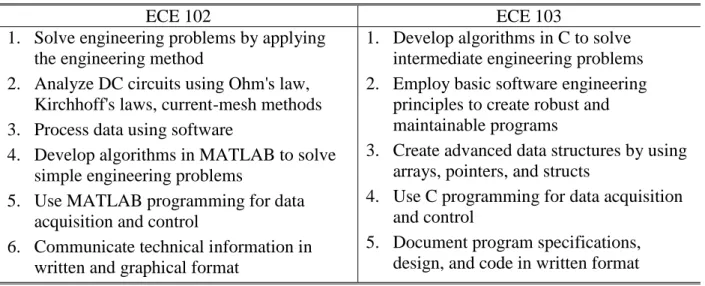
and former students made it clear that the single programming course required of EE students was not meeting the expectations of prospective employers. So, it was decided that ECE 102 would expand the MATLAB portion of the course to include general programming in addition to covering its calculation and graphing tools. Effectively, in our courses MATLAB has become a primer for C due to similarities in syntax. While teaching MATLAB as an introduction to programming is not new7, direct interfacing between MATLAB and hardware still remains non-trivial. For example, using MATLAB to operate an Arduino microcontroller requires Simulink, which adds another layer of complexity. By design, ECE 103 avoids overly theoretical computer science topics to focus on practical techniques that would be of value to electrical engineers. The revised course outcomes for ECE 102 and 103 are shown in Table 1.
Table 1: Course Outcomes – Students have the ability to …
ECE 102 ECE 103
1. Solve engineering problems by applying the engineering method
2. Analyze DC circuits using Ohm's law, Kirchhoff's laws, current-mesh methods 3. Process data using software
4. Develop algorithms in MATLAB to solve simple engineering problems
5. Use MATLAB programming for data acquisition and control
6. Communicate technical information in written and graphical format
1. Develop algorithms in C to solve intermediate engineering problems 2. Employ basic software engineering
principles to create robust and maintainable programs
3. Create advanced data structures by using arrays, pointers, and structs
4. Use C programming for data acquisition and control
5. Document program specifications, design, and code in written format
Hardware Selection
A major justification for changing the curriculum was to improve student engagement and help reinforce their traditional programming assignments with practical hardware applications. To help accomplish this, a final project was added to both ECE 102 and 103 that would involve writing programs to control hardware such as sensors (e.g., photocells), input devices (e.g., switches and keypads), and output devices (e.g., LEDs and motor controllers). The projects would be tailored to the students’ skill level and be made fun and interesting. Another goal would be to utilize simple electronic components and not rely on fancy, off-the-shelf modules, partly to reduce the cost but also to inspire more creativity among students.
While using microcontrollers (MC) or single board computers (SBC) in a freshman engineering sequence is not a revolutionary concept anymore, the reasons for our choosing a particular type of interface device are somewhat unique. In many education scenarios in which an MC (such as the Arduino) or an SBC (like the Raspberry Pi) is used, the interfacing task itself is the ultimate goal. The device used to perform this work is only a secondary consideration. As long as the
MC/SBC has the desired capabilities and software library support, it does not matter if the unit uses its own variant of a programming language or its own development tools.
For our revised courses, however, the teaching of the computing language is the ultimate goal. We wanted a single MC or SBC that could be used to support both MATLAB and C
programming on the same platform. If this were possible, the advantages would include: 1) the ability to use MATLAB in its own integrated development environment (IDE), 2) the same ability to use an industrial-strength C/C++ compiler (e.g., GNU Compiler Collection (GCC) or Microsoft Visual Studio), and 3) a reduced need for students to devote time learning multiple hardware and software systems.
When the courses were being designed, the number of MC/SBC on the market with our desired properties was quite limited. Some single board computers were very capable, but either too expensive or too complicated for beginning engineering students to use. Currently popular boards like the Raspberry Pi or the BeagleBone Black were not available for sale yet. The best microcontroller option at the time was the Arduino. While inexpensive and well-supported, it had drawbacks which precluded its use in our courses. These included having no ability to run MATLAB natively and requiring the user to learn its own version of C++ for programming. After looking at various alternatives, we decided on an uncommon choice, the LabJack U3-LV ($108 from http://labjack.com/u3). The LabJack (Figure 1) is a measurement and automation unit (also known as a data acquisition device, or DAQ) that provides up to 16 analog inputs and 2 analog outputs, up to 20 digital I/O lines, 2 timers/counters, and SPI/I2C support. The unit holds up well to student use due to its robust I/O ports, which have built-in protection and a wide allowed voltage range. However, the U3-LV cannot be used as a standalone system and must be tethered to a host computer via a USB connection to receive control commands and return data.
Figure 1: LabJack U3-LV Data Acquisition Unit
For our objectives, the LabJack’s multi-language support was a key feature that distinguished it from other, similar data acquisition devices. It has a common application programming interface (API) for both MATLAB and C/C++. For ECE 102, this means students can write a script using MATLAB’s built-in editor and call API functions to control the LabJack system. Program execution can also be traced using the native MATLAB debugger. In ECE 103, students can choose either GCC with the NetBeans or CodeBlocks IDE, or they may select Microsoft Visual Studio and its C/C++ compiler. This is important because these languages and tools are identical to the ones the students normally use for homework assignments, thus reinforcing skills they
have already started developing. An extra pedagogical benefit is the relative obscurity of the LabJack, which makes web searching by students for “canned” interfacing code less feasible, thus driving students to develop their own version.
Course Organization
Because our university is based on a quarter system, it was a difficult task to fit all of the
envisioned components into a ten week session. A further complication is that close to two-thirds of the students are transfer students, with most coming from local community colleges.
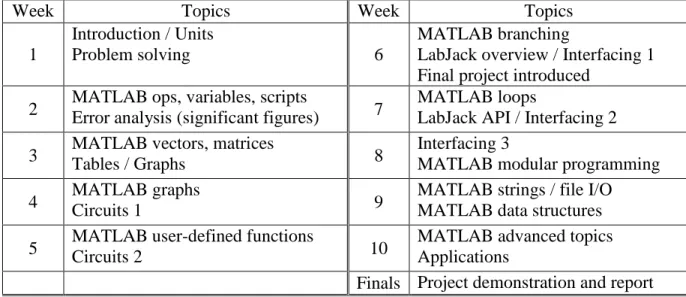
Therefore, our student population has very diverse backgrounds, from experienced programmers to complete novices. Students also have varying degrees of prior college work, anywhere from true freshman to post-bac. For logistical reasons, we do not require ECE 102 as a prerequisite for ECE 103. It is, therefore, challenging to design a course sequence to accommodate all students so that some are not bored while others are overwhelmed with new material. As an illustration, our latest iteration of the ECE 102 schedule is given in Table 2.
Table 2: ECE 102 Course Schedule
Week Topics Week Topics
1
Introduction / Units
Problem solving 6
MATLAB branching
LabJack overview / Interfacing 1 Final project introduced
2 MATLAB ops, variables, scripts Error analysis (significant figures) 7 MATLAB loops LabJack API / Interfacing 2 3 MATLAB vectors, matrices
Tables / Graphs 8
Interfacing 3
MATLAB modular programming 4 MATLAB graphs Circuits 1 9 MATLAB strings / file I/O MATLAB data structures 5 MATLAB user-defined functions Circuits 2 10 MATLAB advanced topics Applications
Finals Project demonstration and report Roughly half of ECE 102 is devoted to MATLAB programming and the other half to
engineering problem solving. As discussed next, the course culminates in a project demonstration during the finals week.
LabJack Use in Class and Projects
The LabJack is first presented in ECE 102 about mid-way through the quarter, once MATLAB’s branching and loop commands have been covered. An orientation session gives students an opportunity to familiarize themselves with the operation of the device, including how to wire a simple circuit to its I/O terminals. In successive weeks, two more hands-on lab sessions are held to introduce API programming functions in MATLAB and to show students how to sense
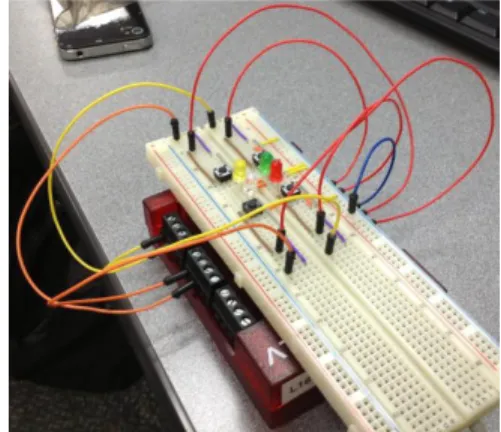
voltages, control LEDs, and read pushbutton switches. Throughout this period, the interfacing exercises are synchronized with the lecture material to provide a “real-world” application of each new programming topic. There is a multi-week final project in which two-person teams program a game that requires a hardware interface. Students are loaned a LabJack and an additional kit which contains electronic parts like resistors, LEDs, switches, jumper wires, and a protoboard. In past years, the ECE 102 final project has been based either on the television game show “Wheel of Fortune” or the 80’s electronic toy “Simon”. At this stage a fair amount of technical assistance and background information is given, since many of the students have not worked on substantial program development or interfacing before. For Wheel of Fortune, students build a circuit using a 3-to-8 decoder chip and eight LEDs to simulate the wheel (Figure 2). A discrete push-button activates the spin. Their MATLAB script monitors the external switch, controls which LED is lit as the wheel “spins”, and provides the game logic, which includes managing multiple players, handling keyboard input, updating the puzzle board, and tracking the scores. In the Simon project, students implement the game with four LEDs and four switches (Figure 3). The MATLAB script generates the ever-increasing, randomized LED sequences, responds to switch presses, and performs the comparisons to see if the input matches the sequence.
Figure 2: Wheel of Fortune (basic) Figure 3: Simon game (basic)
For extra credit, sound effects, music, or more elaborate displays can be added (Figures 4 and 5).
Figure 4: Wheel of Fortune (extra credit) Figure 5: Simon game in a wood box (extra credit)
In the follow-on course ECE 103, students gain intermediate-level experience with classic programming principles using the C language. C was chosen since our department has upper division courses in embedded systems and digital signal processing that still rely on the
language. At this point, those who have taken ECE 102 already have a firm background in basic programming and using the LabJack. Therefore, ECE 103 projects are designed to be more challenging and open-ended. Students may choose from a variety of projects, such as:
a) Music synthesizer using pulse-width modulated signals from the LabJack’s on-board timer to generate tones through a speaker circuit (Figure 6). Song notes are read from an external file. b) Alarm system using a scale-model home with intrusion sensors and a scanned keypad for
entering security passwords and commands to enable/disable protected zones (Figure 7). c) Light position tracker using a single photocell mounted on a DC gearmotor driven by a
program-controlled motor driver chip (Figure 8).
d) Multiplexed 7-segment LED display banks with clock and timer features (Figure 9). Students are also allowed to propose a project of their own, as long as it meets certain
requirements for complexity. ECE 103 teams are given an additional kit with specialized parts that are needed for the chosen project (e.g., an H-bridge chip and motors for the light tracker, or audio amplifier components for the music synthesizer).
Figure 6: Music synthesizer (stereo) Figure 7: Student-built house alarm
In both courses, a full design report with commented source code is required, and each team is expected to demonstrate and discuss their work with the instructor.
Having observed project teams for several years, a common trend is evident in how students schedule their time. The first week or two is minimally productive, as teams initially feel inundated by the amount of design decisions they have to make. However, as the quarter progresses and more topics are covered during class that touch on specific issues related to the project, students begin to narrow their focus and start building the program’s overall
infrastructure. By the third or fourth week, the hardware portion of the project is typically
complete, and the core functionality is in place. This period is the most time and effort intensive, as students iterate through multiple trial and error sessions to write a program that can efficiently control hardware in real-time. During demonstration week, most teams dash to finish their report and add last-minute extra features and “polish” to their program. On average, teams spend between 30 to 40 hours on hardware construction, program design, coding, debugging, and report writing.
Course Assessment
Student performance in these two courses is assessed in multiple ways: in-class exams (quizzes) homework sets, projects, and surveys. Project success among the student teams is typically high, with completion rates in the 95% range, as shown in Table 3 for the ECE 102 Engineering Computation course. We consider a project successfully completed if students can demonstrate its use as a “real” game machine, and if hardware and software satisfied all the requirements listed in the project guide. For example, all lighting and audio signals behave as specified. Students are given extra credit if they improve the game in some fashion, but only if the core program performs as expected.
Table 3: ECE 102 Final Project Success Rates Quarter Year # of Teams % Successful
Winter 2011 31 94
Summer 2011 9 100
Winter 2012 35 94
Winter 2013 37 97
Winter 2014 36 89
In-class exams have proven to be more challenging for students with a much wider variation in scores and are usually the most important contributor to variations in student final grades. We have been trying to identify variables that would explain success and failure in these classes, and math preparation is the usual suspect. However, as our previous work8 has shown, the correlation between previous success in math and grades in ECE 102 is weak. We are currently examining some alternative hypotheses that we hope will be more predictive of student success.
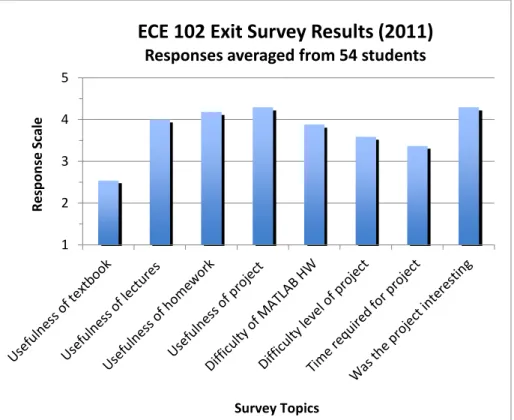
When students were asked in exit surveys if the LabJack project was able to reinforce the programming principles they learned from lectures and homework assignments, a majority agreed strongly that it did, as shown in Figure 10. Many also stated that they enjoyed the practical aspects of the project, which maintained their interest. On the other hand, a common complaint was the significant amount of time it takes to develop and debug code. This often impacted those who already had heavy academic, work, or home responsibilities. For some teams, scheduling issues and personal conflicts also took their toll on productivity.
Conclusions and Current and Future Plans
We have presented the why and how of using a specific DAQ unit in teaching freshman
electrical engineering students programming and problem solving. We have demonstrated that it is possible to expand students programming skills within a two-quarter course sequence, and simultaneously keep them engaged through realistic and complex projects using a DAQ.
1 2 3 4 5 R e sp o n se Sc al e Survey Topics
ECE 102 Exit Survey Results (2011)
Responses averaged from 54 students
Figure 10: Results of a survey asking about the effectiveness of different components of the ECE 102 course.
"usefulness" scale: (1) Not very useful to (5) Very useful “difficulty” scale: (1) Too easy to (5) Too hard
“time required” scale: (1) Not much to (5) Too much “project interest” scale: (1) Boring to (5) Interesting
The ECE 102 and 103 courses have evolved over time in both content and teaching philosophy. This year we are incorporating more active learning paradigms into ECE 102, such as interactive online textbooks and real-time assessment of student responses to questions using the web-based Learning Catalytics9. While we have not opted for a flipped-classroom style yet, these are our first small steps to improve students’ comprehension of the subject material. Our department is considering adding a second-year course that would focus on longer-term projects with more advanced hardware interfacing using C or Python. LabJack already has Python support, thus making such a transition simpler.
One on-going question is whether the LabJack should be replaced by a modern single board computer such as the Raspberry Pi or BeagleBone Black. Our junior year microprocessor courses currently use BeagleBone Black units, so it would seem sensible to standardize on a single platform. However, the needs of an introductory freshmen sequence are different from that of an advanced systems course. The simpler nature of the LabJack is more appropriate for beginning students in ECE 102 and 103. Requiring a single platform across such disparate courses could constrain our ability to select the most suitable SBC for a given class. Finally, although many SBCs are Linux based, have GCC software, and could possibly run MATLAB compatible packages, there are obstacles such as immature programming libraries and limited vendor support. We will re-visit this issue as newer generations of SBC appear on the market.
For now, the inclusion of a data acquisition device and hardware interfacing assignments in the first year electrical engineering sequence has shown positive benefits for our students and justifies its continuing use in our curriculum. It is also a low-cost solution that can easily be adapted by other EE departments.
Bibliography
[1] J. Carter and T. Jenkins, “Gender and Programming: What’s Going on?,” in Proceedings of the 4th Annual SIGCSE/SIGCUE ITiCSE Conference on Innovation and Technology in Computer Science Education, New York, NY, USA, 1999, pp. 1–4.
[2] M. A. Rubio, R. Romero-Zaliz, C. Mañoso, and P. Angel, “Enhancing an introductory programming course with physical computing modules,” in Frontiers in Education, Madrid, 2014, pp. 1019-1026.
[3] G. W. Recktenwald and D. E. Hall, “Using Arduino as a platform for programming, design and measurement in a freshman engineering course,” in ASEE Annual Conference and Exposition, Vancouver, Canada, 2011. [4] A. Alvarez and M. Larranaga, “Using LEGO mindstorms to engage students on algorithm design,” in Frontiers
in Education, pp. 1346–1351, 2013. DOI: 10.1109/FIE.2013.6685052
[5] D. Heer, R. Traylor, and T. S. Fiez, “TekbotsTM: creating excitement for engineering through community, innovation and troubleshooting,” in Frontiers in Education, vol. 2, pp. F1A–7–F1A–12, 2002. DOI: 10.1109/FIE.2002.1158113.
[6] P. Wong, M. Holtzman, B. Pejcinovic, and M. Chrzanowska-Jeske, “Redesign of Freshman Electrical
Engineering Courses for Improved Motivation and Early Introduction of Design,” in ASEE Annual Conference and Exposition, 2011.
[7] S. Attaway, “Using MATLAB to Teach Programming to First-Year Engineering Students at Boston University.” Mathworks, available at
http://www.mathworks.com/tagteam/65082_91847v00_NN10_FA_BU.pdf .
[8] B. Pejcinovic, G. Recktenwald, D. Duncan, P.K. Wong and M. Faust, “Assessment of Student Preparedness for Freshman Engineering Courses Through Assessment of Math Background," Frontiers in Education (FIE) 2014, Madrid, Spain, 2014.