Android Permissions: User Attention,
Comprehension, and Behavior
Adrienne Porter Felt
Elizabeth Ha
Serge Egelman
Ariel Haney
Erika Chin
David Wagner
Electrical Engineering and Computer Sciences
University of California at Berkeley
Technical Report No. UCB/EECS-2012-26
http://www.eecs.berkeley.edu/Pubs/TechRpts/2012/EECS-2012-26.html
Copyright © 2012, by the author(s).
All rights reserved.
Permission to make digital or hard copies of all or part of this work for
personal or classroom use is granted without fee provided that copies are
not made or distributed for profit or commercial advantage and that copies
bear this notice and the full citation on the first page. To copy otherwise, to
republish, to post on servers or to redistribute to lists, requires prior specific
permission.
Acknowledgement
We thank Angie Abbatecola for her help with survey and study logistics,
and Jennifer King for her insightful comments and discussion. This material
is based upon work supported by Facebook and National Science
Foundation Graduate Research Fellowships. Any opinions, findings,
conclusions, or recommendations expressed here are those of the authors
and do not necessarily reflect the views of Facebook or the National
Science Foundation. This work is also partially supported by National
Science Foundation grant CCF-0424422, a gift from Google, and the Intel
Science and Technology Center for Secure Computing.
Android Permissions:
User Attention, Comprehension, and Behavior
Adrienne Porter Felt*, Elizabeth Ha
†, Serge Egelman*,
Ariel Haney
†, Erika Chin*, David Wagner*
*Computer Science Department †School of InformationUniversity of California, Berkeley
{apf,egelman,emc,daw}@cs.berkeley.edu, {lizzy,arielhaney}@ischool.berkeley.edu
ABSTRACT
Android’s permission system is intended to inform users about the risks of installing applications. When a user installs an application, he or she has the opportunity to review the application’s permission requests and cancel the installation if the permissions are excessive or objectionable. We examine whether the Android permission sys-tem is effective at warning users. In particular, we evaluate whether Android users pay attention to, understand, and act on permission information during installation. We performed two usability stud-ies: an Internet survey of 308 Android users, and a laboratory study where we interviewed and observed 25 Android users. Study par-ticipants displayed low attention and comprehension rates: both the Internet survey and laboratory study found that 17% of people paid attention to permissions during installation, and only 3% of Inter-net survey respondents could correctly answer all three permission comprehension questions. This indicates that current Android per-mission warnings do not help most users make correct security de-cisions. However, a notable minority of users demonstrated both awareness of permission warnings and reasonable rates of compre-hension. We present recommendations for improving user attention and comprehension, as well as identify open challenges.
1.
INTRODUCTION
Android supports a booming third-party application market. As of July2011, the Android Market included more than 250,000 applications, which have been downloaded more than six billion times [33]. Unfortunately, the growth in the Android platform has triggered the interest of unscrupulous application developers. An-droid grayware collects excessive amounts of personal information (e.g., for aggressive marketing campaigns), and malware harvests data or sends premium SMS messages for profit. Grayware and malware have both been found in the Android Market, and the rate of new malware is increasing over time [16, 45].
Google does not review or restrict Android applications. Instead, Android usespermissions to alert users to privacy- or security-invasive applications. When a user initiates the process of installing an application, he or she is shown the list of permissions that the application requests. This list identifies all of the phone resources that the application will have access to if it is installed. For exam-ple, an application with theSEND_SMSpermission can send text messages, but an application without that permission cannot. If the user is not comfortable with the application’s permission requests, then he or she can cancel the installation. Users are not shown per-missions at any time other than installation.
Technical Report.University of California, Berkeley.
In this paper, we explore whether Android permissions are us-able security indicators that fulfill their stated purpose: “inform the user of the capabilities [their] applications have” [4]. We base our inquiry on Wogalter’s Communication-Human Information Process-ing (C-HIP) model, which provides a framework for structurProcess-ing warning research [43]. The C-HIP model identifies a set of steps between the delivery of a warning and the user’s final behavior. We connect each step with a research question:
1. Attention switch and maintenance. Do users notice permis-sions before installing an application? A user needs to switch focus from the primary task (i.e., installation) to the per-mission warnings, and she needs to focus on the perper-mission warnings for long enough to read and evaluate them. 2. Comprehension and memory. Do users understand how
per-missions correspond to the risks of applications? Users need to understand the scope and implications of permissions. 3. Attitudes and belief.Do users believe that permissions
accu-rately convey risk? Do users trust the permission system to limit applications’ abilities?
4. Motivation. Are users motivated to consider permissions? Do users care about their phones’ privacy and security and view applications as threats?
5. Behavior. Do permissions influence users’ installation deci-sions? Do users ever cancel installation because of sions? Users should not install applications whose permis-sions exceed their comfort thresholds.
Each step is critical: a failure of usability at any step will render all subsequent steps irrelevant. We focus on the first two steps but also study the end behavior, for an end-to-end assessment of how Android permissions affect user actions.
We performed two usability studies to address the attention, com-prehension, and behavior questions. First, we surveyed308 An-droid users with an Internet questionnaire to collect data about their understanding and use of permissions. Next, we observed and in-terviewed25Android users in a laboratory study to gather nuanced data. The two studies serve to confirm and validate each other.
Our primary findings are:
• Attention. In both the Internet survey and observational lab-oratory study,17%of participants paid attention to permis-sions during a given installation. 42%of laboratory study participants were completely unaware of permissions. • Comprehension.Overall, people demonstrated very low rates
of comprehension. Only3%of Internet survey respondents could correctly answer three comprehension questions. How-ever, 24% of laboratory study participants demonstrated a competent (albeit imperfect) understanding of permissions.
• Behavior.A majority of Internet survey respondents claimed to have decided not to install an application because of its permissions at least once. 20%of our laboratory study par-ticipants were able to provide concrete details about times that permissions caused them to cancel installation.
Our findings indicate that the Android permission system is nei-ther a total success nor a complete failure. Due to low attention and comprehension rates, permissions alone do not protect most users from undesirable applications (i.e., malware or grayware). How-ever, a minority of laboratory study users demonstrated awareness of permissions and reasonable rates of comprehension. This mi-nority could be sufficient to protect others if their opinions about application permissions could be successfully communicated via user reviews. We also found that some people have altered their behavior based on permissions, which demonstrates that users can be receptive to security and privacy warnings during installation.
Contributions.We contribute the following:
• Android permissions are intended to inform users about the risks of installing applications [4]. We evaluate whether An-droid permissions are effective security indicators.
• Researchers have speculated that Android permission warn-ings are ignored by users [17, 14]. We perform two studies to investigate how people use permissions in practice; to our knowledge, we are the first to provide substantive data. • We explore the reasons why users do not pay attention to
or understand Android permissions, and we identify specific problems with the way permissions are presented.
• We provide a set of recommendations for improvement to Android permission warnings and discuss open problems.
2.
BACKGROUND AND RELATED WORK
In this section, we provide an overview of Android permissions and the installation process. We then present some of the relevant literature on smartphone privacy and the effectiveness of warnings.
2.1
Android Permissions
In order to protect Android users, applications’ access to phone resources is restricted withpermissions. An application must ob-tain permissions in order to use sensitive resources like the camera, microphone, or call log. For example, an application must have the
READ_CONTACTSpermission in order to read entries in a user’s phonebook. Android 2.2 defines134permissions.
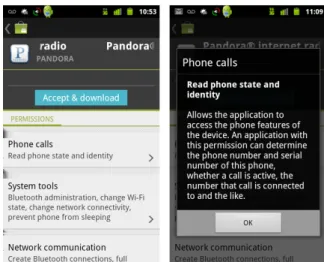
Obtaining permissions is a two-step process. First, an applica-tion developer declares that his or her applicaapplica-tion requires certain permissions in a file that is packaged with the application. Second, the user must approve the permissions requested before installa-tion. Each application has its own set of permissions that reflects its functionality and requirements. Users can weigh the permissions against their trust of the application and personal privacy concerns. The official Android Market provides every application with two installation pages. The first installation page includes a description, user reviews, screenshots, and a “Download” button. After press-ing “Download,” the user arrives at a final installation page that includes the application’s requested permissions (Figure 1). Per-missions are displayed as a three-layer warning: a large heading that states each permission’s general category, a small label that describes the specific permission, and a hidden details dialog. If an application requests multiple permissions in the same category, their labels will be grouped together under that category heading. If a user clicks on a permission, the details dialog opens. The de-tails dialog may include examples of how malicious applications
Figure 1: On the left, a screenshot of the Android Market’s final installation page, displaying the application’s permission requests. On the right, the permission dialog that appears if a user clicks on a permission warning.
can abuse the permission (e.g., “Malicious applications can use this to send your data to other people”). The permission system gives users a binary choice: the user can cancel installation, or the user can accept all of the permissions and proceed with installation.
On most phones, Android users can also download applications from non-Google stores like the Amazon Appstore. When a user selects an application through an unofficial store, that store might not present permission information. However, Android’s installa-tion system will always present the user with a permission page before the application is installed on the phone. Like the final in-stallation page in the Android Market, the installer displays permis-sions as a multi-layer warning. This paper focuses on the Android Market’s installation process because the official Android Market is the primary distributor of Android applications.
2.2
Smartphone Privacy
Past studies on smartphone users’ privacy concerns have primar-ily focused on location tracking and sharing [5, 9, 28, 23, 35]. Al-though location sharing is an important aspect of smartphone pri-vacy, only2of134Android permissions pertain to location. Con-currently, Roesner et al. [34] studied user expectations for loca-tion, copy-and-paste, camera, and SMS security. Our study en-compasses all permissions and focuses on how users perceive the existing permission warnings.
In concurrent and independent work, Kelley et al. [24] performed twenty semi-structured interviews to explore Android users’ feel-ings about and understanding of permissions. However, the scope of our study is much broader: we collected large-scale quantita-tive results, performed an observational study, and experimentally measured comprehension with multiple metrics. Their study ex-clusively reports qualitative data and does not address attention or behavior. Additionally, we designed our study to identify specific problems with the way permissions are presented.
Android privacy researchers have built several tools to help users avoid privacy violations. Most research has focused on identifying malicious behavior [14, 18, 13, 12, 45, 32], without considering how to help users make informed security decisions. However, two sets of researchers have focused on usability. Howell and Schechter proposed the creation of a sensor-access widget, which notifies the user visually when a sensor like the camera is active [21]. Roes-ner et al. proposed user-driven access control; rather than asking users to review warnings, this approach builds permission granting
into existing user actions [34]. We focus on the usability of the existing system, rather than providing new tools or user interfaces. Our results should serve as motivation that research on improving permission usability is warranted.
2.3
Warning Research
Wogalter proposed a model of how humans process warning messages, known as the Communication-Human Information Pro-cessing (C-HIP) model [43]. The model formalizes the steps of a human’s experience between being shown a warning message and deciding whether or not to heed the warning. C-HIP assumes that the user is expected to immediately act upon the warning, which is appropriate for research on computer security dialogs. (Other researchers have focused on situations in which consumers need to recall warnings for later use [29].) Researchers in the area of usable security have begun to use Wogalter’s model to analyze the specific ways in which computer security dialogs can fail users.
Cranor used the C-HIP model as the basis for her “human in the loop” framework, which addresses problems for designers of inter-active systems [10]. Egelman et al. used the C-HIP model to exam-ine the anti-phishing warnings used by two popular web browsers to determine how they could be improved [11]. They recommend differentiating severe warnings from less severe ones, providing recommendations to the user, and eliminating jargon. Sunshine et al. performed a followup study using the C-HIP model to examine web browser certificate warnings [39]. They concluded that warn-ings should be designed based on the severity of the threat model, and that it is important to take context into account when offering suggestions to the user. Some of these lessons could be applied to Android permission warnings to improve them.
The Facebook Platform’s security warnings are similar to An-droid’s. A permission dialog is triggered when a third-party ap-plication requests access to personal data. King et al. asked par-ticipants whether they noticed the permission dialog before enter-ing their survey, and only a minority responded affirmatively [25]. However, this result is not necessarily generalizable; the partici-pants knew the survey application had been created by a privacy researcher, which likely decreased their interest in security indica-tors. They also presented survey participants with general compre-hension questions about the Facebook Platform, such as whether Facebook applications are created by Facebook. Half of partici-pants were able to answer each of these questions correctly.
Technology users’ feelings about privacy are complicated and often contradictory. When asked directly about their privacy pref-erences, most surveys have found that people are very protective of their personal data [2, 8]. However, users’ actions do not al-ways correspond to their professed preferences [22]. This may be because users overestimate their privacy concerns or do not under-stand the ramifications of their actions (i.e., the user does not un-derstand that the action violates his or her privacy preferences). As such, we design our inquiry into Android permissions to be robust to over-reporting of security concerns by directly observing users and asking questions about users’ past actions.
3.
METHODOLOGY
We surveyed308Android users with an Internet survey and in-terviewed25Android users in a laboratory study. The two studies were designed to confirm and validate each other. We recruited Internet survey respondents with AdMob ads and laboratory study participants with Craigslist ads; although both recruitment proce-dures might introduce bias, it is unlikely that the two proceproce-dures in-troduce the same biases. We pre-tested our studies with50 AdMob-recruited Internet respondents and interviews of acquaintances.
3.1
Internet Survey
In September 2011, we recruited Android users to answer an Internet survey about Android permissions. The purpose of this survey was to gauge how widely understood and considered An-droid permissions are. To recruit respondents, we commissioned an advertising campaign using AdMob’s Android advertising ser-vice. Our advertisement was displayed in applications on Android devices in the U.S. and Canada. (The advertisement did not appear on web sites.) As an incentive to participate, each person who com-pleted a survey received a free MP3 download from Amazon.com. The advertisement included our university’s name and said, “Sur-vey for free Amazon MP3.” We recruited people with AdMob advertisements because doing so restricted survey respondents to those using applications on Android devices.
We paid AdMob$0.116per click and received31,984visitors, of which1,994(1%) began and350(17.5%) completed the survey. The rate at which people began the survey was likely influenced by the high rate of accidental clicks on advertisements on mobile de-vices [1] and our request that only people age18and over take the survey. Among people who started the survey, the completion rate was likely influenced by the difficulty of completing a survey on a phone. We ran the advertisement for two hours, and respondents completed it in an average of seven minutes.
We filtered out respondents who (1) stated that they were under 18, (2) had non-Androiduser-agentstrings, or (3) appeared to be duplicates based on their IP addresses anduser-agent
strings. This left us with326unique responses. We designed our survey to make cheating (i.e., false responses for the purpose of receiving the reward) easy and obvious by making every question optional and providing an “I don’t know” option for each question. Survey responses fell into two distinct groups: responses that were complete except for two or three “I don’t know” responses, and responses that were incomplete except for one or two completed questions. Thus, we filtered out responses in the latter group. This resulted in a total of308valid responses.
The308respondents reported that they were50%male and49% female, with the remainder declining to report their gender. Re-spondents indicated that their age distribution was: 28%between the ages of18and28,28%between the ages of29and39,22% between the ages of40and50,15%between the ages of51and 61, and5%over the age of62. This age distribution is in line with Android age demographics [3], although the gender breakdown of our survey is more balanced than overall Android demographics.
The survey was nine pages long and meant to be completed on an Android smartphone. Each page filled a standard phone screen. We used the first three pages to ask respondents about Android usage information: how long they had owned an Android phone, from where they had downloaded Android applications, and the factors they considered when downloading applications. On each of the three subsequent pages, we randomly displayed1of11Android permission warnings and asked respondents to indicate what the permission allows the application to do. We gave respondents four choices, in addition to “none of these” and “I don’t know.” We then asked respondents to complete the three Westin index questions,1 tell us about their past actions relating to Android permissions, and provide demographics information (age and gender).
1
The Westin index is a set of three questions designed to segment users into three groups: Privacy Fundamentalists, Privacy Pragma-tists, and Privacy Unconcerned [41]. The Westin index is widely used in surveys to gauge users’ attitudes towards privacy [26]. Buchanan et al. validated the Westin index for use in a computing context by showing that it correlates with users’ privacy concerns and behavior on the Internet [8].
Figure 2: Screenshot of a quiz question from the Internet survey.
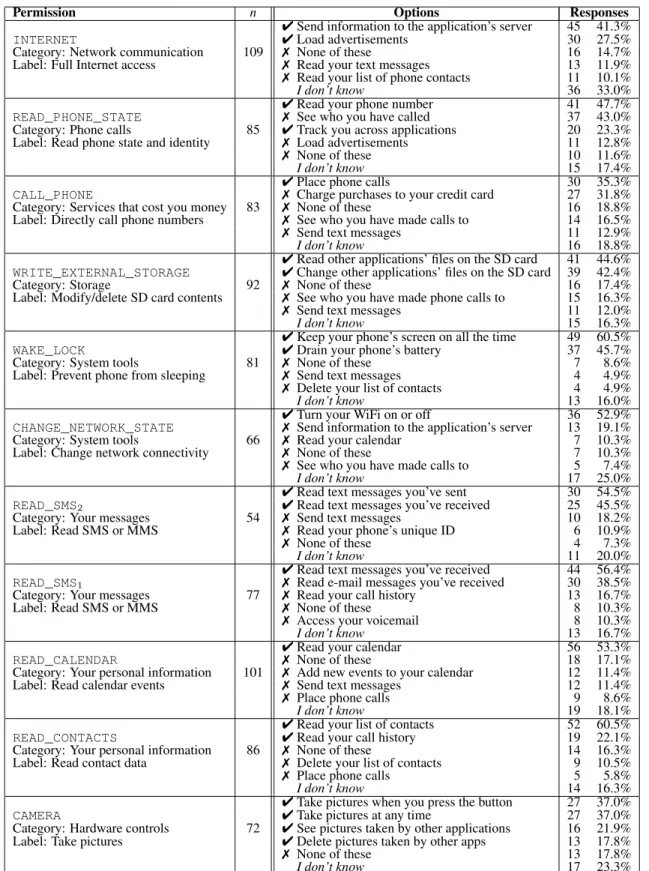
Figure 2 depicts one of the quiz questions from the survey, and Table 3 lists the11quiz questions and choices. We designed the permission quiz questions to include one completely incorrect choice and one choice to test fine-grained comprehension (e.g., whether they understood that a permission to read calendar events does not include the privilege to edit the calendar). The set of11quiz ques-tions included two quesques-tions about theREAD_SMSpermission: one to test the distinction between reading and sending SMS messages, and another to test respondents’ familiarity with the “SMS” acronym. Survey respondents received only one of these two related ques-tions, so scores for these questions were independent of each other.2 All of the quiz questions had one or two correct choices, with the exception of the question about theCAMERApermission. This permission controls the ability to take a new photograph or video recording; it does not control access to the photo library. However, we later discovered that all applications can view or edit the photo library without any permission. Consequently, the correct answer to theCAMERApermission question is to select all four choices.
3.2
Laboratory Study
In October 2011, we recruited25local Android users for a lab-oratory study. The primary purpose of the lablab-oratory study was to supplement the Internet survey with detailed and explanatory data. We also designed the attention and behavior portions of the inter-view to avoid any over-reporting problems that might have influ-enced the Internet survey.
To recruit participants, we posted a Craigslist ad for the San Francisco Bay Area. Our advertisement offered people$60to par-ticipate in an hour-long interview about how they “choose and use Android applications.” In order to be eligible for the laboratory study, we required that participants owned an Android phone and used applications. We also asked study applicants to look at a screenshot and tell us whether they had the new or old version of the Android Market; we then secretly limited eligibility to users with the newer version of the Android Market. Google released a new version of the Market in August 2011, and not all phones had yet been upgraded. We decided to focus on users with the new version of the Market to reduce study variability.
Our Craigslist advertisement yielded112eligible participants. In order to match our participants’ ages to Android demographics [3], we grouped applicants by age and selected a random proportion
2In the remainder of this paper, we refer to these two questions as
READ_SMS1andREAD_SMS2, as depicted in Table 3.
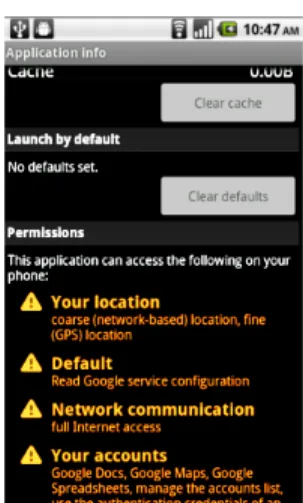
Figure 3: Screenshot of permissions on an application’s Settings page.
of people from each age group. We scheduled interviews with30 participants. Three people failed to attend and two people had tech-nical problems with their phones, leaving us with25completed in-terviews (12women and13men). The age distribution was close to overall Android age demographics by design, with20%of partici-pants between 18 and 24,32%between 25 and 34,20%between 35 and 44,16%between 45 and 54, and12%older than 55. None of the participants were affiliated with our institution, although some of the younger participants were students at other universities.
Each interview took30–60minutes and had six parts:
1. General Android usage questions (e.g., how many applica-tions they have installed).
2. Participants were instructed to find and install an applica-tion from the Android Market, using their own phones. We prompted them to install a “parking finder app that will help [the user] locate your parked car.” This task served to con-firm that participants were familiar with installing applica-tions from the Android Market.
3. Participants were instructed to find and install a second ap-plication from the Android Market using their own phones. We prompted them to:
Pretend you are a little short on cash, so you want to install a coupons app. You want to be able to find coupons and sales for groceries, your fa-vorite electronics, or clothes while you’re out shop-ping. If you already have a coupons app, pretend you don’t like it and want a new one.
All of the top-ranked applications for search terms related to this scenario had multiple permissions. During this appli-cation search process, we asked participants to tell us what they were thinking about while using the Market. We also observed what user interface elements they interacted with. 4. Westin index questions.1
5. We asked participants about an application on their phone that they had installed and recently used. We then opened the application’s information page in Settings (Figure 3) and asked them to describe and explain the permissions.
6. We asked participants for specific details about past permission-related behaviors, such as whether they have ever looked up permissions or decided not to install an application because of its permissions.
Two researchers performed each interview, with one acting as the interviewer and the other acting as a notetaker.
To promote a casual atmosphere, we held the interviews at a cof-fee shop and offered participants cofcof-fee, tea, or water. Participants used their own phones to encourage them to behave as they would in the real world. We made an effort to not prime participants to security or privacy concerns until the fourth task, at which point we specifically asked them about their attitudes towards privacy. We introduced ourselves as computer science students and did not re-veal that we were security researchers until the end of the study. We prevented participants from determining the security focus of the study in advance by posting the Craigslist advertisement in the name of a researcher with no online presence or prior publications.
4.
ATTENTION DURING INSTALLATION
Do users notice Android permissions before installing an appli-cation? Attention is a prerequisite for an effective security indica-tor: a user cannot heed a warning that he or she does not notice. In our Internet survey we asked respondents whether they looked at permissions during installation. To supplement this self-reported statistic, we empirically determined whether laboratory study par-ticipants were aware of permission warnings. We also report users’ attention to user reviews, which are shown during installation.
4.1
Permissions
4.1.1
Internet Survey
In our Internet survey, we asked respondents, “The last time you downloaded an Android application, what did you look at before deciding to download it?” Respondents were able to select multi-ple choices from a set of options that included “Market reviews,” “Internet reviews,” “screenshots,” and “permissions.”
17.5%of308respondents (95%CI: [13.5%,22.3%]) reported looking at permissions during their last application installation. Re-spondents who can be classified as Privacy Fundamentalists using the Westin index were significantly more likely to report looking at permissions than other respondents (p < 0.0005; Fisher’s ex-act test). While statistically significant, the proportion of Privacy Fundamentalists who claimed to look at permissions was still a mi-nority:40.5%of the42Privacy Fundamentalists reported looking at permissions, whereas13.9%of the remaining266respondents reported looking at permissions.
This self-reported question suffers from two limitations: some people over-report security concerns, and others may read permis-sions without knowing the technical term that refers to them. We asked survey respondents specifically about their “last installation” to discourage over-reporting, but people may still guess when they cannot remember. Our laboratory study served to confirm the re-sults of the survey on a second population with a different metric.
4.1.2
Laboratory Study
In the follow-up laboratory study, we performed an experiment to empirically determine whether users noticed permissions during installation. We instructed study participants to talk us through the process of searching for and installing a coupon application. We recorded whether they clicked on or mentioned the permissions on the final Market installation page. To avoid priming participants, we did not mention permissions unless the participant verbally in-dicated that he or she was reading them. After each participant passed through the page with permissions, we asked him or her to describe what had been on the previous page.
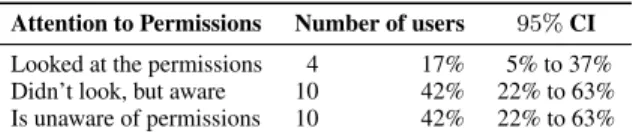
Attention to Permissions Number of users 95%CI
Looked at the permissions 4 17% 5% to 37%
Didn’t look, but aware 10 42% 22% to 63%
Is unaware of permissions 10 42% 22% to 63%
Table 1: Attention to permissions at installation (Lab Study,n= 24)
We categorized participants into three groups:
• Participants who looked at permissions during the installa-tion. These participants either told us that they were looking at permissions while on the page with permissions or they were later able to provide specific details about the contents of that page. They were also able to discuss permissions in general, indicating that the laboratory study was not the first time that they had viewed permissions. For example, one participant opened the page with permissions and stated,
The only thing I started doing recently, is kinda looking at these – is there anything really weird. When questioned, that participant described concern over “the network stuff.”
• Participants who did not look at the permissions for this spe-cific application, but were able to tell us that the final installa-tion page listed permissions. In order to answer our quesinstalla-tion, these participants must have paid attention to permissions at some point in the past. For example, one participant in this category responded,
I’ve seen a lot of them...A lot of ’em have full net-work access, access to your dialer, your call logs, and GPS location also.
• Participants who were unaware that the final installation page included a list of permissions. For example, one participant said, “I don’t remember. I just remember ‘Download and install’.” Another said, “I don’t ever pay attention. I just accept and download it.”
We did not require knowledge of the term “permissions”; partici-pants typically used other phrases (e.g., “little warning things”) to describe what they saw or remembered.
Table 1 shows the number of study participants that fall into each of the three categories. Fourteen participants (58%of24) noticed permissions during the experimental installation or reported paying attention to permissions in the past.3 The remaining participants were unaware of the presence of permissions on the final installa-tion page in the Market. We did not observe a relainstalla-tionship between Westin indices and participants’ attention to permissions.
Of the ten participants who did not look at permissions during the study but were aware of them, three volunteered that they used to look at permissions but no longer do. For example, one participant said, “I used to look...I just stopped doing that.” These participants might have experienced warning fatigue, since users see permission warnings for about90%of applications [17]. One participant said that she used to be concerned about the location permission, but gradually lost her concern because so many of the applications that she installed requested this permission.
Of the ten participants who had never paid attention to permis-sions, two knew that they were accepting an agreement on the final installation page. They both described the page as containing legal terms of use, with one incorrectly elaborating that the text specified
3For this statistic, we omit one participant who had never
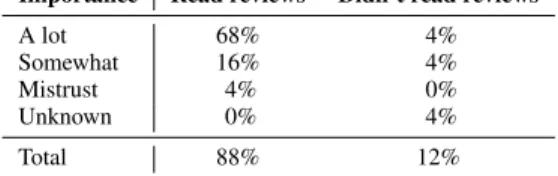
Importance Read reviews Didn’t read reviews A lot 68% 4% Somewhat 16% 4% Mistrust 4% 0% Unknown 0% 4% Total 88% 12%
Table 2: We observed whether users read reviews, and later asked how much importance they place on reviews (Lab Study,n= 25)
legal restrictions on the use of the application. Due to their lack of interest in legal text, neither had ever read the screen so they were unaware that the text pertains to security and privacy.
The self-reported survey and observational study results both suggest that17%of users routinely look at permissions when in-stalling an application. We also find that42%of study partici-pants could not possibly benefit from permission information be-cause they had never noticed it. The remaining42%of participants are aware of permissions but do not always consider them.
4.2
Reviews
Like permissions, user reviews have the ability to convey privacy and security information during installation. User reviews can warn people about undesirable or privacy-invasive applications.
4.2.1
Internet Survey
We asked survey respondents, “The last time you downloaded an Android application, what did you look at before deciding to down-load it?” A total of219survey respondents (71.1%of308;95%CI: [65.5%,76.2%]) reported looking at some type of review before installation. Of these,193respondents (62.7% of308; 95%CI: [57.0%,68.1%]) indicated that they looked at Market reviews dur-ing their last application installation, and42respondents (13.6% of308;95%CI: [10.0%, 18.0%]) stated that they had looked at other reviews on the Internet. Twenty-six respondents (8.4%of 308;95%CI: [5.6%,12.1%]) reported that they had looked at both Internet and Market reviews. We did not find that any age, gender, or Westin group was more or less likely to look at reviews.
4.2.2
Laboratory Study
In our follow-up laboratory study, we observed whether partic-ipants actually considered reviews during application installation. We instructed participants to tell us what they were reading and considering while selecting and installing a coupon application. We did not mention reviews or ratings unless the participant first spoke of or clicked on them. After participants mentioned reviews or rat-ings, we asked them how much importance they placed on reviews and whether they trusted them to be correct. If a participant did not consider reviews during installation, we asked the participant for his or her opinion of reviews after the installation task.
Table 2 shows participants’ opinions of reviews and whether they considered reviews during the installation. All but three par-ticipants mentioned application reviews during installation; of the three that did not read reviews, two later claimed when questioned that they read reviews in some situations. The majority of partici-pants placed a lot of importance on reviews. For example,
[Reviews] let me know if it’s a decent app or not. Be-cause most people will put on there whether it’s a good app or a bad app.
A few participants reported that they read reviews but simply treated them as one factor among many, rather than using them as their pri-mary decision-making factor. One of these participants described
the rating system as “a starting point,” and another said that re-views are “just a place to start.” One of the25participants actively mistrusts positive reviews because she has written reviews for her company’s products on websites. Despite this, she still looks at reviews to identify negative traits of applications.
At the end of the study, we asked participants whether they had ever tried to find out what a permission means or why an appli-cation was asking for it. Eight of the study participants (32%of 25) responded affirmatively, with six (24%of25) people stating that they found this information in some type of review. Three of these participants stated that they had read user reviews to deter-mine whether an application’s permissions were appropriate, and another two said that they had read news articles that reviewed ap-plications’ permissions. Another participant said that he read about permission information in reviews, but that he had never noticed that the same permission information was available on the final in-stallation page. One of the six said,
If I’m not sure about an app I’ll research it and see what other people say about the permissions. Like, ‘It does this,’ ...and, ‘It’s necessary.’ And there will be an argument or a discourse about the permissions that need to be on there or don’t need to be.
This suggests that reviews are an important part of communicating permission information, especially for users who do not understand permission warnings on their own.
5.
COMPREHENSION OF PERMISSIONS
Do users understand how permissions correspond to application privileges? Users can only make correct security decisions based on permissions if they understand what the permission warnings mean. We used three metrics to measure subjects’ understanding of permission warnings. First, we tested Internet survey respon-dents with multiple-choice questions (Section 5.1). Second, we graded laboratory study participants’ ability to describe the per-mission warnings of a familiar application (Section 5.2). Third, we asked study participants whether the application’s set of permis-sions gave it the ability to send text messages (Section 5.3).
5.1
Permission Comprehension Quiz
Internet survey respondents answered three randomly-selected quiz questions from the set of eleven questions in Table 3. Six respondents omitted one or more questions; we filtered those par-ticipants out of this analysis, leaving us with302respondents who answered three quiz questions.
Eight respondents (2.6% of302) answered all three questions correctly. On average, respondents correctly answered21%of the three questions. We considered the relationship between respon-dent scores and demographics:
• We did not observe a correlation between respondent scores and the length of Android phone ownership.
• No significant differences were observed between the gen-ders or with regard to Westin index classifications.
• There was a negative correlation between age and the number of correct answers (r = −0.257, p < 0.0005); younger people were more likely to understand permissions. • We compared the scores of respondents who did and did
not report looking at permissions in a past application in-stallation. Respondents who reported looking at permissions scored higher on average (30.3%vs. 18.6%). The differ-ence was statistically significant (U = 5,293.0,p <0.007, r= 0.16) but small in absolute terms.
Permission n Options Responses
4Send information to the application’s server 45 41.3%
INTERNET 4Load advertisements 30 27.5%
Category: Network communication 109 7 None of these 16 14.7% Label: Full Internet access 7 Read your text messages 13 11.9%
7 Read your list of phone contacts 11 10.1%
I don’t know 36 33.0%
4Read your phone number 41 47.7%
READ_PHONE_STATE 7 See who you have called 37 43.0% Category: Phone calls 85 4Track you across applications 20 23.3% Label: Read phone state and identity 7 Load advertisements 11 12.8%
7 None of these 10 11.6%
I don’t know 15 17.4%
4Place phone calls 30 35.3%
CALL_PHONE 7 Charge purchases to your credit card 27 31.8% Category: Services that cost you money 83 7 None of these 16 18.8% Label: Directly call phone numbers 7 See who you have made calls to 14 16.5%
7 Send text messages 11 12.9%
I don’t know 16 18.8%
4Read other applications’ files on the SD card 41 44.6%
WRITE_EXTERNAL_STORAGE 4Change other applications’ files on the SD card 39 42.4%
Category: Storage 92 7 None of these 16 17.4%
Label: Modify/delete SD card contents 7 See who you have made phone calls to 15 16.3%
7 Send text messages 11 12.0%
I don’t know 15 16.3%
4Keep your phone’s screen on all the time 49 60.5%
WAKE_LOCK 4Drain your phone’s battery 37 45.7%
Category: System tools 81 7 None of these 7 8.6%
Label: Prevent phone from sleeping 7 Send text messages 4 4.9%
7 Delete your list of contacts 4 4.9%
I don’t know 13 16.0%
4Turn your WiFi on or off 36 52.9%
CHANGE_NETWORK_STATE 7 Send information to the application’s server 13 19.1% Category: System tools 66 7 Read your calendar 7 10.3% Label: Change network connectivity 7 None of these 7 10.3%
7 See who you have made calls to 5 7.4%
I don’t know 17 25.0%
4Read text messages you’ve sent 30 54.5%
READ_SMS2 4Read text messages you’ve received 25 45.5% Category: Your messages 54 7 Send text messages 10 18.2% Label: Read SMS or MMS 7 Read your phone’s unique ID 6 10.9%
7 None of these 4 7.3%
I don’t know 11 20.0%
4Read text messages you’ve received 44 56.4%
READ_SMS1 7 Read e-mail messages you’ve received 30 38.5% Category: Your messages 77 7 Read your call history 13 16.7%
Label: Read SMS or MMS 7 None of these 8 10.3%
7 Access your voicemail 8 10.3%
I don’t know 13 16.7%
4Read your calendar 56 53.3%
READ_CALENDAR 7 None of these 18 17.1%
Category: Your personal information 101 7 Add new events to your calendar 12 11.4% Label: Read calendar events 7 Send text messages 12 11.4%
7 Place phone calls 9 8.6%
I don’t know 19 18.1%
4Read your list of contacts 52 60.5%
READ_CONTACTS 4Read your call history 19 22.1% Category: Your personal information 86 7 None of these 14 16.3% Label: Read contact data 7 Delete your list of contacts 9 10.5%
7 Place phone calls 5 5.8%
I don’t know 14 16.3%
4Take pictures when you press the button 27 37.0%
CAMERA 4Take pictures at any time 27 37.0% Category: Hardware controls 72 4See pictures taken by other applications 16 21.9% Label: Take pictures 4Delete pictures taken by other apps 13 17.8%
7 None of these 13 17.8%
I don’t know 17 23.3%
Table 3: Survey respondents were each asked three multiple choice questions, randomly selected from this set. Respondents could select “None,” “I don’t know,” or one or more of the four definitional choices. This table orders the choices by popularity.
Permission n Correct Answers 1 Choice READ_CALENDAR 101 46 45.5% CHANGE_NETWORK_STATE 66 26 39.4% READ_SMS1 77 24 31.2% CALL_PHONE 83 16 19.3% 2 Choices WAKE_LOCK 81 27 33.3% WRITE_EXTERNAL_STORAGE 92 14 15.2% READ_CONTACTS 86 11 12.8% INTERNET 109 12 11.0% READ_PHONE_STATE 85 4 4.7% READ_SMS2 54 0 0% 4 CAMERA 72 7 9.7%
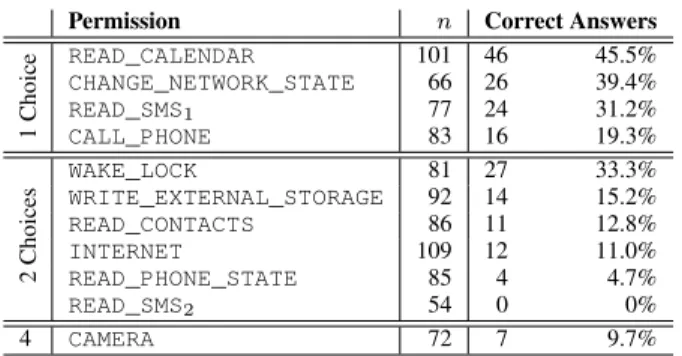
Table 4: The number of people who correctly answered a question. Ques-tions are grouped by the number of correct choices. nis the number of respondents. (Internet Survey,n= 302)
• In the survey, we asked respondents whether they typically used the Android Market or unofficial application stores. Re-spondents who typically used the Android Market were sig-nificantly more likely to understand the permissions (U = 2,474.0,p <0.001,r= 0.20). The28respondents who did not use the Market had an average score of4.7%, whereas the remaining274respondents had an average score of22.3%.
Although we found statistically significant differences between cer-tain groups, no group performed well on an absolute scale.
Table 3 depicts the popularity of each question choice. For each individual question, a plurality of respondents selected at least one correct choice. For six questions, a majority of participants se-lected at least one correct choice. This indicates that survey re-spondents were not randomly guessing, and most had some un-derstanding of the permission warnings. Despite this, respondents still scored poorly overall because they selected too few choices (i.e., the response was incomplete) or too many choices (i.e., the response contained both incorrect and correct choices).
Not every question had a single correct choice: four of the ques-tions had a single correct choice, six had two correct choices, and one had four correct choices due to a design error on our part. We consider an answer correct if that respondent specified all of the correct choices and no incorrect choices. Users performed sig-nificantly worse on questions with multiple correct choices (r =
−0.59,p <0.028; one-tailed), so we can only directly compare permissions with the same number of possible correct choices. Ta-ble 4 depicts the eleven permissions and the number of survey re-spondents who got each one completely correct. The table is sorted by the number of correct choices for each question.
We hypothesize that some respondents made decisions based pri-marily on the category headings, which are featured in a much larger font than the specific permission labels. This may have led respondents to overstate the meanings of permissions (i.e., they se-lected incorrect as well as correct choices). Respondents’ answers to all but one of the permissions seem consistent with this hypoth-esis (Table 3). For example, theCALL_PHONEpermission illus-trates this type of error: the large category heading says “Services that cost you money,” and nearly as many respondents selected the incorrect answer of “Charge purchases to your credit card” as the correct answer of “Place phone calls.” The one question that does not fit this model isREAD_SMS2; most respondents were able to correctly determine that theREAD_SMS2permission grants the ability to read but not send text messages.
5.2
Free-Form Permission Descriptions
We hypothesized that users might understand permission warn-ings better when the permissions are associated with a familiar application. For example, a user who does not understand theINTERNETpermission in isolation might know that the permis-sion is needed to fetch news from the Internet when he or she sees that the permission is associated with a news application. As such, we designed our follow-up laboratory study to ask users about the meaning of permissions in the context of a familiar application.
During the laboratory study, we asked each participant to view the permissions of an application that he or she had recently used on his or her phone. The participant was therefore familiar with the application’s functionality. We asked participants to read each permission aloud and explain what it meant. We gave participants three chances to demonstrate their understanding of the permis-sions: we asked what the permissions meant, why the application had them, and whether each permission was necessary or unneces-sary for the respective application.
To evaluate user understanding, we graded participants’ descrip-tions of permissions. A participant’s free-form explanation of a permission could be:
• Correct. A correct answer completely explains the mean-ing of a permission. For example, one participant correctly stated that theBLUETOOTH_ADMINpermission allowed the application to “create a Bluetooth connection” and “discon-nect Bluetooth to save battery.”
• Correct but overly broad.This type of answer contained cor-rect information, but the participant believed that the permis-sion granted more privileges than it actually does. For ex-ample, one participant understood that theINTERNET per-mission could be used to send or retrieve data, but he also believed it gave the application the ability to “check my GPS or see where I’m going.” (In this example, the application did not have a location permission.)
• Incomplete. Incomplete answers show that the participant had a partial understanding of the permission, but lacked comprehension of an important aspect of the permission’s meaning. For example, one participant understood that the
RECEIVE_SMSpermission was related to text messages but was not sure how.
• Incomplete and overly broad.This type of answer is incom-plete, and the participant also believed that the permission grants more privileges than it actually does. One participant described theREAD_PHONE_STATEpermission as,
Phone calls is probably like the call log or the phone calls that are made. It tells you their names and maybe a picture.
This description is partially correct because the permission relates to call state, but it is incomplete because the permis-sion also provides access to the participant’s own identity. The participant also incorrectly stated that the permission grants access to contacts’ names and pictures.
• Wrong. In a wrong answer, the participant’s statement was incorrect. Rather than omitting information, the participant made a statement that is actively wrong. For example, one participant said that theINTERNETpermission was for “in-stalling” Internet onto a phone.
• Wrong and overly broad. In a wrong and overly broad an-swer, the participant’s incorrect statement included substan-tially more privileges than the truth. For example, several participants stated that theREAD_PHONE_STATE permis-sion gives applications the ability to listen to their phone
0! 1! 2! 3! 4! 5! 6! 0 - 9! 10 - 19! 20 - 29! 30 - 39! 40 - 49! 50 - 59! 60 - 69! 70 - 79! 80 - 89! 90 - 99! Number of Users! % C or re ct !
Figure 4: A histogram of participants’ grades. (Lab Study,n= 25)
calls. This confusion likely occurred because the category heading for that permission is “Phone Calls.”
• Unable to answer.We placed responses in this category when the participant read the permission aloud and then stated that he or she could not describe the permission.
• Omitted. Participants often skipped permissions that were present on the screen, and we were not always able to prompt them to address the skipped permission. In these cases, we have no way of knowing whether the participant would have been able to answer correctly.
Figure 4 depicts each laboratory study participant’s grade, where a person’s grade is the percentage of descriptions that are correct. We calculated this percentage after filtering out permissions that they omitted; omitted permissions are excluded because we do not know why they were omitted. Two participants received grades of 0%, the highest grade was83%, and the average was39%. Con-trary to our initial hypothesis, comprehension rates are still low when permissions are associated with a familiar application.
Six participants received grades of70%or higher. We observed two of the six high scorers looking at permissions during installa-tion (Secinstalla-tion 4.1), and another three indicated that they had looked at permissions in the past. The permission system could potentially help these five participants (20%of25) because they sometimes pay attention to and understand permission warnings. The sixth high scorer expressed some familiarity with permissions but did not know that the Market displayed them prior to installation.
Other participants commonly said that they did not know what the warnings meant: 25%of the times that a participant read a permission, he or she was completely unable to describe it. Several participants mentioned that they understood all of the vocabulary but did not know how that information pertained to their phones. As one participant said,
I think I know what they mean as a person who has zero electronics or programming training, just in terms of what I think the words mean...I know what they mean in terms of the face value of the words. I don’t really know what they mean in terms of complicated, in terms of technicalities...
Participants’ grades are not directly comparable to each other because each participant viewed a different application’s permis-sions. However, a few popular permissions were present in11or more participants’ applications. Table 5 shows how participants performed when describing these permissions. Notably, partici-pants performed better on the three permissions that refer to general
Participant response: Yes No Unsure
Correct 4% 32%
-Incorrect 44% 12%
-Total 48% 44% 8%
Table 6: Can an application send text messages? The correct answer de-pends on the application that the given user selected. (Lab Study,n= 25)
computer concepts: Internet access, hard drive storage, and putting the phone to “sleep.” Participants were less able to describe the two smartphone-specific permissions.
We observed that participants tended to place more emphasis on the category heading than the specific permission text. (Figure 1 shows examples of categories and specific permissions.) One side effect of this behavior was that participants erred in the direction of overstating the privileges associated with permissions. Descrip-tions were overly broad18%of the time, and all but3of the overly-broad responses could be attributed to the category heading. Many of the wrong answers also stem from over-emphasizing the cat-egory heading. For example, theREAD_CONTACTSpermission is under the heading of “Personal Information.” Upon seeing that warning, one participant stated that the permission provided access to his passwords, and another believed that the permission encom-passed all of the data on her phone. Others listed types of personal information that might not be in their list of contacts (such as their own names and addresses). Similarly, theREAD_PHONE_STATE
permission is under the heading of “Phone Calls.” Participants in-ferred that the warning rein-ferred to a wide variety of phone-related behavior, such as giving a company permission to make telemar-keting calls to the participant.
5.3
Specific Permission Comprehension
After each participant described the set of permissions, we asked him or her whether the selected application had the ability to send text messages without his or her knowledge. If the participant asked for clarification, we elaborated that we wanted to know whether the applicationcansend text messages, not whether it does. This privilege is granted with theSEND_SMSpermission, which is in the “Services that cost the user money” category with the specific permission label of “Send SMS messages.” This question was de-signed to gauge whether people can determine the tasks that an ap-plication can do on their phones, given its permissions. We chose theSEND_SMSpermission for this question because we thought that all participants would be familiar with text messages, and the permission is associated with malware [16, 45].Table 6 presents participants’ responses. The correct answer de-pends on the application that the given user selected. Only nine of the participants (36%of25) answered correctly. Participants’ answers were not significantly different from guessing: twelve re-sponded affirmatively and eleven negatively.
Four participants selected applications with theSEND_SMS per-mission, and three of them incorrectly stated that the application could not send text messages. One of these participants had asked us about the meaning of theSEND_SMSpermission during the pre-vious step of the laboratory study, and she correctly repeated our explanation. Despite this, she still responded that the application could not send text messages. She re-examined the permission warning after our question and stated,
Well, I don’t know now. Cause it said that it could – I don’t know. I’m going to say no.
Another participant was aware that her chosen application could send text messages because of her experience with the application,
READ_CONTACTS WAKE_LOCK WRITE_EXTERNAL_STORAGE READ_PHONE_STATE INTERNET
Correct 0% 54% 47% 0% 68%
Correct but overly broad 9% 9% 0% 0% 4%
Incomplete [and overly broad] 18% 0% 18% 45% 9%
Wrong [and overly broad] 45% 0% 23% 20% 9%
Unable to answer 27% 36% 12% 35% 9%
Total number of participants 11 11 17 20 22
Table 5: The grades of free-form participant responses for popular permissions. (Lab Study,n= 25)
but she still believed that it was not capable of sending text mes-sages without her express approval. She seemed to believe that all applications require user approval to send text messages, regardless of the permissions. The third person looked at the category heading (“Services that cost the user money”) and incorrectly decided that it referred to Internet data and phone calls but not text messages.
Twenty-one participants selected applications that do not have theSEND_SMSpermission. Of those, eleven participants incor-rectly thought that their applications could send text messages. When asked why, six participants explained that various other permissions allow this behavior. Two people said that theINTERNET permis-sion (listed under the “Network communication” category heading) allows an application to send a text message. For example,
It has access to my network, so I assume it could send a message if it wanted to.
Four people believed that theREAD_PHONE_STATEpermission (listed under the “Phone calls” category heading) grants the ability to send text messages. For example,
Well, yeah, because of the phone calls. Because of the phone calls, they can read the phone calls, so obvi-ously they can.
A sixth participant believed that the application could combine the personal information, phone calls, and network communication cat-egories together to send a text message.
One of our participants said he had a small amount of experience as an Android developer. He was among the eleven participants who incorrectly stated that an application could send text messages. When asked for an explanation,
I’ve done some programming but I don’t know all the permissions. ... I just don’t know if the permissions are so fine grained that they make texting a special permis-sion that you have to add.
The participant then reasoned that two other permissions likely in-clude that ability. Without knowing the full list of possible Android permissions, it is difficult for a user – even a highly experienced, technically competent user – to determine whether an application cannot perform an action. In other words, users need to know what permissions their application does not have in order to comprehend the scope of the permissions that it does have.
6.
INFLUENCE ON USER BEHAVIOR
Do permissions influence users’ installation decisions? Users are shown permissions on the final installation page of the Market so that they can refrain from downloading an application if they dislike its requested permissions. We asked users whether they have ever decided not to install an application because of its permissions.
6.1
Internet Survey
The survey asked, “Have you ever not installed an app because of permissions?” Respondents were shown the following four choices:
Self-Reported Behavior Respondents
Yes 56.7%
Didn’t like permissions 32.6% Too many permissions 16.0%
Both 8.1%
No/I don’t know 43.3%
Table 7: Respondents who claim they did not install an application due to permissions. (Internet Survey,n= 307)
Self-Reported Behavior Participants
Yes 5 20%
Probably 2 8%
No 18 72%
Table 8: Participants who claim they did not install an application due to permissions, with confirming details. (Lab Study,n= 25)
• Yes, I didn’t like the permissions • Yes, there were too many permissions • No
• I don’t know
A respondent could select both of the affirmative options, and the answers were not randomly ordered.
We received307responses. Table 7 shows the results:56.7%of respondents (95%CI: [52.1%,62.3%]) claim to have decided not to install an application because of its permissions. We find that re-spondents who can be classified as Privacy Fundamentalists using the Westin index are more likely than other respondents to report not installing an application due to its permissions (χ2=5.6161, p = 0.016): 73.8%of the42Privacy Fundamentalists (95%CI: [60.5%,87.1%]) responded affirmatively, compared to53.9%of the265remaining respondents (95%CI: [47.9%,59.9%]).
The number of affirmative responses to this question may be ar-tificially inflated because of position bias; people display a slight preference for the first choice over later choices [7]. Survey respon-dents viewed this question after seeing the permission quiz ques-tions, which also may have increased their likeliness to respond af-firmatively. We asked survey respondents about a past action rather than a preference to mitigate over-reporting, but people may err with a bias when they cannot remember the answer.
6.2
Laboratory Study
In our follow-up laboratory study, we asked participants the same question: “Have you ever not installed an app because of permis-sions?” However, we designed the laboratory study question to avoid over-reporting. If a person responded affirmatively, we asked for detailed information about the application and why he or she ob-jected to the permissions. Although people often over-report their security concerns when asked abstract questions, we feel it is un-likely that a participant would fabricate specific details of his or her application installation history in an in-person interview.
Table 8 shows how study participants responded to this question. Two participants thought that they had chosen not to install an
ap-plication because of its permissions, but they were uncertain and unable to provide details.
We asked the five affirmative participants to explain why and how often they had decided not to install certain applications based on their permissions. Here, we excerpt their concerns:
• One person decided not to install a social networking appli-cation because “with exact loappli-cation then they could post that on my page or something like that.”
• “At least five. I felt it was asking for too much, or it was going to do too much data, and I didn’t feel comfortable.” • One participant became alarmed after reading a Wall Street
Journal article about Android applications’ permissions and privacy policies [42]. “I haven’t really downloaded very many apps since... And there have been a few I haven’t downloaded because they asked for a bunch of accesses.”
• “In the zone of maybe one out of four, roughly. Mostly most of them look fairly benign to me in terms of my concerns, but there are some of them that just look like they’re overkill. I must say that in the beginning of installing apps, I – and I believe most people – are more hesitant about installing apps that reveal your location.”
• Another person was aware of permissions but did not read them on his own. Instead, he would look for reviews about certain permissions pertaining to battery life. “Some of the ones that people say, ‘It runs at startup,’ and, ‘You can’t stop it,’ or something like that...then I won’t download it.”
Two of the five participants who said that they had not installed an application because of permissions scored very poorly on the comprehension study (Section 5.2). One was unable to describe any permissions correctly, and the other described only two of seven permissions correctly. This shows that people may act on permis-sion information even if they do not correctly understand it.
Through our attention and comprehension studies, we identified five participants who were aware of and understood permissions relatively well. Two of those participants said that they had can-celled installation due to permissions in the past. In other words, 8%of25participants paid attention to, understood, and previously acted on permissions. It is unclear why the other three participants who paid attention to and understood permissions have never can-celled installation because of permissions; it is possible that they lack motivation, lack trust in the permission system, or have sim-ply not yet encountered a suspicious application.
7.
IMPLICATIONS
We evaluated whether the Android permission system can help users avoid security- and privacy-invasive applications. We now as-sess the significance of our findings and several recommendations for improving the usability of permissions.
7.1
Effectiveness of Permissions
Our studies demonstrated that the majority of Android users do not pay attention to permissions or understand permission warn-ings. Nearly half of the laboratory study users were completely un-aware that permission warnings are displayed in the Market. Since attention and comprehension are prerequisites for informed secu-rity decisions, our study indicates that the current Android permis-sion system does not help most users make good security decipermis-sions. However, we also find that permissions are effective at convey-ing security information to a minority of users. 24%of the lab-oratory study participants were aware of permissions and demon-strated a reasonable degree of understanding. It is possible that this
is sufficient; a small fraction of expert users could write negative re-views when they encounter troubling permission requests, thereby protecting other consumers. Researchers have found that negative product reviews can influence product sales in other contexts [37, 46], and24%of laboratory study participants (all of whom were non-expert users) said that they had relied on user reviews or news reports to provide them with information about permissions.
7.2
Recommendations
Our studies identified several factors that contribute to the low attention and comprehension rates. We now present a set of design recommendations aimed at addressing these problems.
Categories.We find that category headings widely confused users. As Figure 1 shows, the final installation page uses a multi-layer user interface to convey permissions. The large category headings are short, simple, and non-technical; below them, the smaller text includes more information about the specific permissions. Multi-layer user interfaces are intended to simultaneously satisfy novice, average, and expert users by providing subsequently more infor-mation at each layer of the user interface [38, 27]. However, the category headings are currently so broad that they cause users to overestimate the scope and risk of the requested permissions. Over-estimation undermines the warning system because it causes users to believe that they are granting dangerous permissions to more ap-plications than they are. This likely has a negative impact on the amount of attention that users pay to permissions; there is little rea-son to read individual permission warnings if one believes that all applications receive dangerous privileges.
We recommend re-organizing and re-naming categories to shape user expectations more appropriately. In particular, the “Personal Information” and “Phone Calls” categories misled many of the users in our studies. Although the category headings need to be re-designed, we do not recommend removing them; the categories reduce warning fatigue by decreasing the number of warnings that are shown on the screen. (E.g., a user sees only three warnings for eight permissions if the eight permissions fall into three categories.)
Risks, Not Resources. We find that many users cannot connect permission warnings to risks, even if they understand all of the technical terms in a permission warning. Currently, most of the warnings are resource-centric and value-neutral (e.g., “full Internet access” and “read phone state and identity”). Users are left to de-cide on their own how the resources might be used, which causes them to underestimate or overestimate the risks of permissions. It is important for warnings to clearly convey specific risks [44]. We cannot expect non-expert users to understand the relationship be-tween resources and risks, and users cannot provide informed con-sent if they do not realize the risks. The long explanation dialog specifies the risks for a few permissions, but the majority lack risk information; also, we did not observe any users reading the long dialogs. We recommend that permission warnings focus wholly on risks (i.e., potential negative outcomes) instead of resources. For example, “full Internet access” could be replaced with “use your data plan.” To balance the risks with benefits, developers could be given space in the UI to justify why they need the permissions.
Low-Risk Warnings.We observed evidence of users experiencing warning fatigue. Warning fatigue is exacerbated by unnecessary warnings. To avoid devaluing the warnings, we recommend that permissions without clear risks should not be shown to users. For example, the ability to connect to a Bluetooth device is unlikely to cause a user harm. Warnings that do not convey real risks teach the user that all warnings are unimportant [40, 11], and there are limits on how much information people can process when making
decisions [6, 19]. Currently, some permissions are not displayed to users unless they choose to “See more” because the permissions are considered non-dangerous; we recommend that more permissions should be classified as non-dangerous (and hidden by default).
Absent Permissions.Our SMS comprehension study demonstrated that people cannot reason about the absence of permissions. A user cannot say with certainty that a permission doesnotencompass a privilege unless the user knows that another permission exists to address that privilege or no permission permits the action. Conse-quently, users overestimate the scope and risk of the permissions that are present. Currently, it is infeasible for any user to remem-ber all of the permissions, given that Android has more than100 permissions. We recommend coalescing or paring down the list of permission warnings to a set that is small enough for users to look up and remember with accuracy.
Optional Permissions. Several researchers have suggested that users should be able to grant or deny an application’s permissions individually, rather than as a bundle [31, 32]. This would give users finer-grained control over the resources that applications have ac-cess to. We do not recommend adopting this proposal until user un-derstanding of permissions can be improved with other measures. The low comprehension rates suggest that users cannot currently make informed decisions about individual permissions. Even the users that displayed comprehension competency during the labora-tory study did not receive perfect comprehension scores. As such, individual permission granting would add complexity to the user interface without increasing user control.
7.3
Open Problems
Larger changes are needed to improve the relevance of permis-sion warnings and reach users who are currently unaware of per-mission warnings. We present a set of open problems and future research directions that are motivated by our studies.
Reviews. We identified a small minority of “expert” users who could potentially protect others by sharing their concerns about permissions. One direction is to re-think how a system could sup-port the sharing of privacy and security concerns. How can we incentivize writing reviews about permissions? How can we help interested users determine what applications are doing with per-missions so that they can write useful reviews? How can other readers confirm claims about privacy and security? Currently, An-droid does not provide any way to audit an application’s permission usage, although researchers have developed tools for computer sci-entists [12, 15, 20]. However, users with interests in privacy and security are not necessarily computer scientists, despite some fa-miliarity with smartphone technology; none of our “expert” users had any formal technical education, and we do not expect that they would be able to use any of the existing research tools.
Customization.We hypothesize that different users have different types of privacy and security concerns. For example, a mother told us that she worried a lot about people knowing her daughter’s loca-tion via their shared phone, whereas another user said he was con-cerned only about whether applications will excessively drain his phone’s battery. When users read permissions aloud to us for the comprehension study, they often told us (without prompting) that they did not care about certain permissions. Warnings will likely be more effective if they are relevant to users’ specific concerns about applications. The challenge is to identify users’ concerns without expecting all users to fill out surveys or provide feedback. It might be possible to learn which warnings are likely to be relevant to par-ticular users, classes of users, or users generally.
Timing. Android shows users permission information during in-stallation instead of when they are using the application. This de-sign decision was made because “over-prompting the user causes the user to start saying ‘OK’ to any dialog that is shown” [4]. In-deed, many studies have shown that users click through security dialogs that are presented when the user is trying to perform a task with an application [30, 40, 36]. However, we find that the install-time permission dialog is similarly dismissed by most users. Additionally, install-time permissions lack context; unlike dialogs shown at runtime, there is no way to know what application func-tionality the install-time permissions correspond to. This suggests that completely new solutions that avoid dialogs, such as sensor-access widgets [21] or sensor-access-control gadgets [34], may be needed.
8.
CONCLUSION
This paper represents a first step in understanding the effective-ness of Android permissions. Our two studies indicate that Android permissions fail to inform the majority of users, but permissions are not wholly ineffective despite researchers’ predictions [17, 14]. A minority of users demonstrated awareness and understanding of permissions, and we found that permissions helped some users avoid privacy-invasive applications. This motivates continued ef-fort towards the goal of usable permissions. However, low rates of user attention and comprehension indicate that significant work is needed to make the Android permission system widely accessible. We identified a set of issues that are impeding awareness and comprehension. In particular, category headings are confusing, some users cannot connect resource-based warnings to risks, some users cannot reason about the abse