1
BUILDING A CONTROLLED STATISTICAL PROGRAMMING ENVIRONMENT
Wayne Woo, Novartis Vaccines & Diagnostics, Cambridge, MA
ABSTRACT
Statistical programming in the pharmaceutical industry continues to evolve as we see new data standards and maturation in understanding and application of 21 CFR Part 11. This has led to further moving away from regarding SAS® in isolation as a tool, and more towards an integrated computing environment where SAS is one of the primary components. A controlled programming and analysis environment should include both technical infrastructure and process control. On the technical side, the platform embraces the concepts of the software development life cycle (SDLC) as well as provides the control structures. Tools are put in place that support the phases of activity specified in SDLC models. Increasingly, vendors are offering packaged applications but the implementation and operation of such systems are complex and costly. This paper discusses the pertinent points in constructing a basic technical and process infrastructure to establish a controlled clinical trials programming environment. Topics touched include the promotion of code from development through to production, validation, traceability, audit trails, source control, security, documentation and digital signatures. The technical techniques presented are applicable to a Windows-based SAS environment.
INTRODUCTION
SAS has always been known as a software tool for analyzing and reporting data. In a similar way, Microsoft Word is a tool to create documents. We know that neither is used in a vacuum but rather as part of a larger context. In the pharmaceutical setting, some or all of the following characteristics describe the historical use of SAS in clinical trials data analysis:
Oversight of software by the user community, usually the biostatistics department
Installation of SAS not rigorous – there are installation instructions but no documentation of actual actions Data can come from anywhere, with varying structures and SAS can handle it
Relaxed attitude over applications that complement SAS, for example using an open source text editor File storage is regarded as disk space – there is usually structure, but permissions not strict
Access control to the system and audit trails not important
Programming life cycle not strictly structured – intensive checking but not following a formal flow or process Homegrown systems and supporting utilities
Clinical database is the source of electronic records applicable to 21 CFR Part 11
With the maturation of 21 CFR Part 11 interpretation, the focus of electronic systems compliance (e-compliance) has evolved to cover more systems containing electronic data. For example, in the author’s company, the time keeping system and learning management system are subjected to full validation and contain many control features since these systems are seen to have impact, albeit indirect, on the clinical data in one way or another. It is little wonder that SAS used in clinical trials programming would evolve from being a tool – often installed on a desktop – to being part of a validated environment that includes software, a host platform, supplemental tools, access control, audit trails, data standards, process control, training, and well-defined roles for different people. While this direction has more or less already been adopted by large companies with the resources to construct such an environment, it is now a must for even the smaller shops since the health authorities apply the same standards to all companies.
This paper will present a survey of the elements and issues that comprise a controlled analysis environment, spotlight the SAS program development process by applying the software development life cycle (SDLC) to SAS programming, and present a homegrown solution contrasted to SAS Drug Development (SDD), a vendor-developed solution. We mix high-level and technical level discussion to further reinforce the notion that SAS computing has evolved in the clinical trials setting. It is important to a company’s internal quality assurance e-compliance as well as external regulators that programming adhere to 21 CFR Part 11 requirements by establishing a network of checks and balances, control, and rigorous validation and documentation. The exact implementations of controls can vary, but the common phrase you hear is: “if it’s not documented, it didn’t happen”.
21 CFR PART 11
We set the backdrop by noting that 21 CFR Part 11 (and similarly Annex 11 in the European Union) is the law upon which all of the practices we see in modern SAS clinical trials programming are based. In reality, the statute itself is relatively brief, leading regulatory authorities and practitioners to interpret vague parts in a manner that has ranged
2
from strict to very strict. At its very heart, “Part 11” prescribes the criteria which must be met so that a computerized system and its contents are trusted. Areas of primary focus are validation, audit trails (traceability), access control, qualification of personnel and electronic signatures. Two facets that have been vague and subject to differing interpretation are (a) the types of electronic records in scope; and (b) the acceptable level of validation activities. Even though FDA has advised that it “exercises enforcement discretion”, conservatism among pharmaceutical practitioners have led to a broad definition of electronic records and elaborate approaches to validation. Validation receives the greatest amount of attention when it comes to implementing technical and process infrastructure.
THE SOFTWARE DEVELOPMENT LIFE CYCLE
Usually, we think of large software systems as developed by multi-person teams employing a software development lifecycle (SDLC). In general, the SDLC is a framework specifying a series of activities conducted in an orderly fashion that takes a concept through the steps needed to release an end product. Its goal is to successfully deliver a piece of software, whether it be a large system or something smaller. The sequence of activities can vary depending on the particular SDLC model employed. The various “models” (e.g. waterfall, agile) are beyond the scope of this paper. However, the phases of a SDLC are fairly well defined as:
1. Requirements identification
2. Planning and design to meet the requirements 3. Programming (Coding)
4. Testing
5. Production release and use 6. Maintenance
Documentation is important at each stage. And each phase has its own best practices on achieving deliverables. Following a SDLC is meant to provide structure for a project, facilitate coordination and communication among team members, and minimize mistakes leading to rework. In clinical trials programming, SAS programs tend to be smaller and a SAS “project” might only be worked on by one person. For example, a statistician writes a single-purpose SAS program that processes some data and runs a PROC GLM. It is true that macro systems can contain thousands of lines of code and be worked on by teams of programmers, but for the most part, these systems still are smaller and less complicated than a software product such as Windows or Excel. But a single SAS program meeting a purpose is also considered a "software product". In both cases roughly the same activities are performed to produce a production program. For smaller SAS programs, it happens that the process is often not formalized and may not be readily apparent to the programmer. Larger projects differ only in respect to size and time – more discussions, more planning, more structure, more people, and more money. To manage this process, a team might use commercial “configuration management” systems to enable coordination and control among geographically dispersed, multi-person teams. A discussion of these products is beyond the scope of this paper.
Formalizing the programming process requires integrating the SDLC. The benefits are that programs are developed in a consistent manner, there is traceability between program, data, and output, and there is clear documentation of the path taken to realize a task. To work in a SDLC model, an infrastructure needs to be in place to support the various stages of activity. For example, as code is developed and run, many changes occur. As stable versions are produced, it is desired to permanently archive these versions. When code becomes production, new requirements will necessitate change and the cycle starts over. A technical infrastructure to help control this process can be bought out of the box and a process can be wrapped around it. But this can be expensive or excessively complex.
Regardless of implementation, the infrastructure ensures that teams can work effectively and efficiently with a common understanding among its members.
CLINICAL TRIALS PROGRAMMING
Biometrics programming has a general set of characteristics. It primarily consists of two branches, (a) the creation of analysis datasets and tables, listings, graphs (TLG) and (b) the creation/maintenance of general macros that support the TLG programming. These are both within the domain of SAS programmers within a biometrics department. SAS continues to be the de-facto programming language used for both types of programming. Other statistical
programming languages are gaining traction, notably R. SAS programs vary in size and complexity. They range from short programs written for ad-hoc analyses to big macro systems for producing a whole set of standard output. In addition to analyzing clinical trials data, SAS programs can also be created for a variety of data processing and reporting needs. An example of a SAS “project” is the full analysis of data from a clinical study, but could be as simple as writing a small program to answer a query by a clinician for the mean age of all study participants.
3
Regardless, SAS programming is done on a computing platform using a sequence of steps, whether the programmer is conscious of it or not.
The use of configuration management or source code management software is rare. Biostatistics staff will have expertise in statistical programming and statistical techniques, not code management systems. Particularly with smaller shops, departments cannot afford to hire someone to administer a source control system. There may also be legacy systems which are difficult to transition away from. System maintenance and/or administration might be delegated to the IT department. A SAS program tends to be self-contained, i.e., not many components or modules, unless it is large “black box” macro. The output, including logs and listings, are considered as a unit. The creation of programs might or might not follow a rigorous development process. Documentation standards may or may not be formally established. Quality Assurance e-compliance may or may not closely scrutinize the Biometrics area. Processes may or may not be in place governing programming standards, validation, and archival. Requirements may be as simple as a mock-up table sketched by a statistician or be a more formal document, e.g. analysis plan or requirements document. Design can be as simple as inserting comments within the SAS code or be a more formal specifications document. Unless the organization is larger and mature, change often happens “on the fly”, sometimes with no trail showing what was previously done. This behavior is often driven by the urgency of the request.
For big macro systems, the process may resemble more of what is done for a large software project. There is a planning phase to define requirements for generalized software. Documentation may be extensive, multi-person teams may be employed, and programs thoroughly validated prior to use. For the most part, the SDLC is followed for these projects, using a SDLC model such as the waterfall schema.
With the advent of agile methodologies in software development, new concepts are finding their way into
programming shops. An agile methodology applied to SAS programming involves relaxing the traditional “V model” of programming. There is more iterative development and prototyping, while amassing the necessary documentation and conducting testing as the project proceeds. This is a challenge to the traditional way of validation thinking among the quality organization and forces re-examination of long-held paradigms. However, even Part 11 does not preclude these approaches as long as there is a controlled environment.
STATISTICAL COMPUTING ENVIRONMENT (SCE)
This terminology has only recently gained a common understanding among statistical professionals. For example, reference Dubman (2010). At its core, the statistical computing environment (SCE) is the contextual system in which biometrics programming is performed. A SCE encompasses more than just SAS on a machine where a programmer or user creates a program and runs it. The SCE is a structured environment – both technical and process – where this code development and execution is part of a bigger picture. The environment might also contain standards definitions for data and coding, a repository for standardized data, processes that govern the programming activity, defined technical flows for movement of files, separation of duties for people to ensure proper checks and balances, bells and whistle features enabling team development of software, governance bodies that monitor the system and support for continuous improvement. Of course, at the core is a centralized computing server hosting a programming tool, likely SAS. The server is physically secured and login access is controlled through individual authentication that includes strong passwords that renew periodically.
STANDARDIZATION IS KEY IN CONTROLLED ENVIRONMENT
Standardization is the foundation of a controlled environment. There are data standards, technical standards such as a well-defined programming flow, and standard operating procedures. On the data side, we see the wide adoption of CDISC as the industry wide standard. Data is collected into electronic data capture systems using CDASH file structures. Data is processed into repositories based on SDTM. And analysis datasets used in the reporting of clinical trials follow the ADAM standard. There are extensions of standards beyond the human research area, reaching into areas such animal research, toxicology and diagnostics.
We have standard procedures to accomplish tasks in a consistent and reproducible manner. We have standardized protocols, case report forms, analysis plans, mock tables, documentation templates, etc. Technical standards for SAS program development begin with a standard folder structure and rules dictating where to store what. There should be process and technical restrictions on deviating from the standard folders. There should be monitoring by managers and a mechanism to periodically evaluate conformance to the folder structure standard. To allow for program validation and version control, separate folders for development, testing, and production are needed. There must be a process and mechanism to move files upward from development to testing and ultimately production. This “file promotion” should be recorded. Information to be captured includes the name of the file promoted, where it is
4
promoted, who promoted it, and the date of promotion. When a file is made “production”, it must be versioned so that in the future a particular output can be traced to a particular set of source code. The file in production should be protected to prevent deletion. Each folder should have a defined purpose.
As an example, a multiple level folder hierarchy might begin with the project directory, containing a folder for each clinical study. The third level might name the type of analysis, e.g. Interim, Final, or Ad-hoc. From this level on, folder names would be limited to a pre-approved list. For example, having three areas, i.e. DEVEL, QA, PROD, would model the flow of programs through phases of development (Figure 1).
Figure 1. Sample folder structure supporting a lifecycle
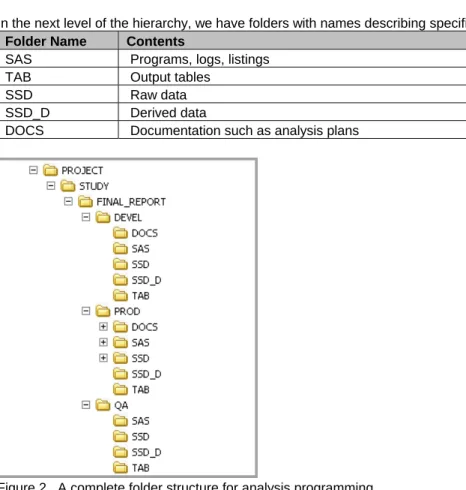
In the next level of the hierarchy, we have folders with names describing specific contents, e.g., Folder Name Contents
SAS Programs, logs, listings TAB Output tables
SSD Raw data
SSD_D Derived data
DOCS Documentation such as analysis plans
Figure 2. A complete folder structure for analysis programming
To make it easier to set up standard folders each time an analysis begins, there needs to be a tool that makes consistent the creation of folders and applying of a correct set of permissions. The appendix of this paper presents a homegrown implementation of such a tool.
DATA STANDARDS
Simply put, a data standard describes a structure and convention for keeping data that enables common
understanding among the various consumers of the data. CDISC is an industry organization that has established data standards adopted by medical products companies and health authorities alike. Many companies, including the author’s, have transitioned from proprietary data standards and embraced CDISC standards. In the statistical programming space, CDISC SDTM and ADAM are the primary data structures that programmers work with. Having data available in a standardized structure allows programmers to save time avoiding shaping data for each project,
5
facilitates the reuse of SAS code, and provides a common foundation for discussion with colleagues from other functions and organizations. The data level becomes less variable and programmers know what to expect and use. This should lead to efficiencies in the SDLC, allowing the programmer to focus on the business logic.
INTEGRATING SDLC AND STANDARDIZING PROGRAM FLOW
To meet Part 11 requirements for program validation, it is necessary to have a controlled programming flow based on the SDLC framework. Protocols, analysis plans, programming specifications and mock tables represent requirements generated from the planning stage and need to be safely stored and versioned. Programmers need a development area where they can efficiently create and test SAS code iteratively to meet the requirements. When the program is producing output satisfactorily, a stable copy should be made available for formal review and validation. When validation is completed, the program should be elevated to a production status and versioned. The run will create summary tables, listings, and graphs that need to be stored together with the input data and SAS program. If changes are needed later, programmers must be able to retrieve the current production version and use it as the basis to make revisions. Programming needs to be performed in an orchestrated manner and documented so that an external auditor will readily be able to verify that a drug sponsor's results are trustworthy. These considerations all point toward the adoption of SDLC processes and workflow tools to ensure robust electronic records.
AUDIT TRAILS AND TRACEABILITY
A controlled environment has checks and balances. To further this aim, it is required to demonstrate the trail between input and output (traceability) and have it documented. The TLG programming process typically sees a programmer read in source datasets, perform processing steps to shape the data, optionally create intermediate or analysis datasets, and then creating an output matching the specifications provided by a statistician. The set of artifacts created in this sequence of activities is viewed together as a package. End-to-end traceability would mean that we can start with the output and work our way backward to the source. We can identify the program and datasets that are used to create the output as well as who did it.
A rudimentary setup might include a run datetime stamp and programmer identification as a footnote in the output, as well as the name of the SAS program creating it. The log and listing associated with the run will have approximately the same datetime stamp as the output. The log and listing will also contain linkage information showing the location and input of datasets and supporting macro files.
The audit trail is a means to record the actions of programmers, ostensibly to be able to reproduce the end point if the sequence of actions is repeated. Also the audit trail provides the ability to verify that process steps were performed in the correct sequence, and to allow pinpointing of problems. In a controlled programming environment and to satisfy Part 11 requirements, this audit trail must be at system and object level.
ACCESS CONTROL
A controlled programming environment must begin with access controls, both to the physical hardware as well as the software system. At the hardware level, there is consideration about locked access to server rooms and connections to other machines. At the software level, there should be a password policy, administration by trained individuals, and a defined access grid on who can do what within the system.
SUPPLEMENTAL SOFTWARE APPLICATIONS
Programming productively in SAS often is helped by using third-party supporting software. For example, a full featured text editor might help with comparing files side-by-side. Microsoft Word is used to display RTF output. Provisioning these software for use should be treated with a similar level of rigor as the SAS software. For example, there should be sufficient testing of co-existence with SAS. They are ideally installed on the same centralized server as SAS, which facilitates support and maintenance of a single image. IT or the biostatistics department must consider licensing terms and control of licenses. Prior to the use of such tools, requirements should be outlined for the software and their role in the SAS computing model. The software should be installed via a formal installation qualification script to document the process and for reproducibility if hardware changes. There should be
maintenance of versions, regression testing when other components are upgraded, support agreements with vendors, and controlled uninstallation when applicable.
MANAGEMENT SUPPORT
Having upper management support is essential to the establishment and maintenance of a controlled programming environment. Management must be informed about the value of the system, its role in the organization, and the need to properly invest in its upkeep. It is not enough to only focus on the technical features or “wow” factors. The
6
system’s champion must demonstrate the link between the system and the company’s success in terminology that upper management can understand. This requires an analysis of the stakeholders and a commitment to keep them aware of needs and successes. Having management support provides a basis of securing the resources needed to build the environment and ensure its continued evolution.
STANDARD OPERATING PROCESSES
A set of standard operating procedures and work processes need to be established to ensure the consistent
operation of the system in multiple facets. When a system is new, even more details may be needed to guide staff in working with some elements of the system. Areas of focus for formal written processes include:
Granting access and periodic review of existing accounts Folder structure operations
Validation of TLG creation and general-use SAS macros Applying and verifying electronic signatures
Training
Programming conventions
TRAINING
Only qualified persons should be given access to the environment and/or be allowed to administer it. Qualification should be based on review of a defined set of training materials and possibly passing a quiz to document
comprehension. Administrators should ensure that training is documented prior to granting an account to the system. Training materials should be well written, easy to read, and kept current. A training plan should accompany the initial establishment of the system.
DIGITAL OR ELECTRONIC SIGNATURES
For environmental and economic reasons, companies have strived to go paperless for a while. However, it seems the pharmaceutical industry is still one of the heaviest users of paper due to need to print things for documentation. Part 11 actually establishes the criteria for use of electronic signatures, and this facilitates a controlled environment with geographically dispersed teams where paper documents are not easily signed and collated. Encryption
advancements and certificate authorities enable digital certificates to guarantee identify. Many software solutions include an electronic signing functionality. Finally, there must be a robust process describing when and where to apply electronic signatures.
SEPARATION OF DUTIES
A controlled environment will need well-defined roles and assigning people to those roles taking into consideration to eliminate conflicts of interest and ensure that checks and balances are established. For example, the statistical programming group should not have full administrative powers to files in order to prevent a programmer from accessing blinded data when he/she should not be able to. To prevent this, someone without any data analysis responsibilities should be administering the system. Another example is in the area of validation. There are separate roles for the developer of a SAS program and the validation programmer, with a robust process specifying that these two individuals work independently. As with governments, distribution of powers and responsibilities reduces the possibility of abuse.
GOVERNANCE
The importance of strong governance within a controlled programming environment cannot be underestimated. Promotion and upkeep of standards and processes requires active discussion and oversight. A flashy new setup can quickly decay if there is not a plan for continual monitoring and maintenance. The system’s validation status must be maintained and strategy and direction established by a key business member. This person would be the owner of the system. Ideally, there is a committee of subject matter experts that is convened to consider changes to the system, examining the pros and cons and making sure updates are aligned with other elements of the business.
INSPECTIONS
Other than complying with Part 11, the goal of having a structured and controlled programming environment is to instill trust in the consumers of the output generated within the environment. This trust is further enhanced through inspections either by internal or external quality organizations. Validation documents and SOPs are usually the focus, but the auditors might also focus on technical controls. It is wise to proactively invite scrutiny by e-compliance professionals and consultants to identify potential weak areas and address these or prepare appropriate responses.
7
OFF-THE-SHELF SOLUTIONS VERSUS HOMEGROWN
As alluded earlier, off-the-shelf solutions exist to provide a basic technical infrastructure needed for a controlled programming environment. The recognition by upper management of need for robust statistical computing
environments has led vendors to develop comprehensive and integrated products for the industry. Among these are SAS Drug Development, the Oracle Waban SCE, and Entimo DARE. They aim to provide companies configurable solutions that move the obligations of system build and sometimes administration to external parties possessing these competencies. They are also expensive and require a large effort to integrate. Retraining traditional SAS
programmers in the new types of applications can also be a challenge.
SAS DRUG DEVELOPMENT (SDD) AS DATA REPOSITORY AND COMPUTING ENVIRONMENT
The author’s company undertook a large project (Miller et. al., 2012) to revamp our data and programmingenvironment by employing SAS Drug Development as the centerpiece. SAS Drug Development is a web-based SAS programming environment in combination with a repository and functionality that meet the requirements of a Part 11-compliant system as well as provide for a structured programming environment. For example, there is access control with strong password requirements, audit trails, versioning, check-in/check-out, electronic signatures, and traceability of input to output. Although the basic system provides out-of-the-box functionality for compliance, a fair degree of planning and customization are needed to architect elements such as a robust folder structure and process for file movement that make up a comprehensive controlled programming environment. The hosted server allows most IT related administration to be handled by the vendor.
In the next version of SDD, more constructs are available to facilitate structured programming. These include workflows, personal development spaces, and improved electronic signature capabilities. The workflow feature (Yang et. al., 2013) shows the potential of a system’s technical features helping to enforce the SDLC on SAS programming. Proper planning and construction of work flows are needed to model the process at a particular company.
CONSISTENCY UNDER GEOGRAPHIC DISPERSION, VIRTUAL TEAMS, AND OFFSHORING
Any programming environment is only as strong as the people who operate within it. The trend of having more virtual programmers who are geographically dispersed, and also the push to use offshore resources poses challenges to keep controls over programming. Building a team culture around consistent and uniform practices is more difficult. Communications is facilitated by technologies but still depends greatly on individuals to possess strong interaction skills, which is not the strong point of many programmers. This results in placing an increased emphasis on technical controls, which means the SCE must have robust features to visually signal to users the correct way to do something and block the path when the programmer goes the wrong direction. Technical features such as the SDD workflows might help enforce a common practice for programmers to use regardless of location.HOMEGROWN SOLUTIONS
Big pharmaceutical companies tend to favor vendor-sourced solutions, but for smaller shops, the homegrown approach offers value, relative simplicity and challenges employees to develop creative solutions. A patchwork of third party tools supplemented by some custom software development can be sewn together to create an
environment addressing most of the elements needed for a structured environment. This approach gives the business more flexibility to create a system tailored to its needs. The downside is that maintenance can be difficult should the original project members move onto new projects and if upkeep of the system is not a core responsibility of the company’s SAS and IT staff.
CONCLUSION
A controlled programming environment is more than just the SAS software. It requires an infrastructure to support a software development life cycle and a package of standard operating processes. Many other issues need to be addressed. The infrastructure can be implemented in a variety of shapes and approaches. Commercial packages exist that costs hundreds of thousands of dollars and provide a full feature set but which may be impractical for the variety of SAS programs (e.g. small, one-time) that are written in a pharmaceutical setting. It is also possible to construct a homegrown environment that addresses the major requirements for control. For example, in a Windows environment, using some operating system elements, SAS, and VBScript, it is possible to construct a basic
infrastructure that addresses key SDLC requirements. But this approach has its own drawbacks. Regardless of choice, the one thing to keep cognizant is that statistical programming evolves and the challenge is to keep up.
8
REFERENCES AND RESOURCES
Williams, Tim. 2002. “A Version Control Kluge for SAS Programs – using SAS!” Proceedings of the
Twenty-seventh Annual SAS Users Group International Conference, Orlando, FL. Paper 95-27.
Woo, Wayne. 2007. “A Software Development Life Cycle Infrastructure Based Upon SAS® And Visual Basic®”
Proceedings of the Pharmaceutical SAS Users Group 2007, Paper AD12
Dubman, Sue. 2010. “Standards-based, Metadata-driven Statistical Computing Environments”. PhUSE Single Day Event, Boston, September 28, 2013.
Miller, Todd; Nacci, Pantaleo; Schepers, Aldo; Woo, Wayne. 2012. “The Clinical Data Repository Initiative at Novartis Vaccines and Diagnostics”, FDA/PhUSE Computation Science Symposium. Poster.
Yang, Peng; Liu, Wei; Maddox, Julie. 2013. “Using Workflows and Metadata Information to Standardize Business Processes in Pharmaceutical Programming” Proceedings of the Pharmaceutical SAS Users Group 2013, Paper MS03.
CONTACT
Your comments and questions are welcome. Wayne Woo
Novartis Vaccines & Diagnostics Cambridge, MA
E-mail: [email protected]
SAS and all other SAS Institute Inc. product or service names are registered trademarks or trademarks of SAS Institute Inc. in the USA and other countries. ® indicates USA registration.
9
APPENDIX.
A HOMEGROWN SDLC IMPLEMENTATION USING SAS AND VISUAL BASIC IN A WINDOWS
SERVER ENVIRONMENT
In my paper “A SOFTWARE DEVELOPMENT LIFE CYCLE INFRASTRUCTURE BASED UPON
SAS© AND VISUAL BASIC©” (Woo, 2007), I described a homegrown implementation of a set of tools to support a rigorous development environment in a Windows Terminal Server setup. At the time of implementation, buying and setting up a commercial system was cost prohibitive. The goal was to build a rudimentary technical infrastructure to facilitate adoption of a SDLC for SAS programming. The implementation consisted of a few SAS programs, Visual Basic scripts, and Windows commands.
To facilitate users’ consistent setup of standard folder structures when beginning an analysis, a tool was built to allow users to create appropriate folders. The tool communicates with a “listener” (a continuously running SAS program) that does the actual work of creating folders and applying access permissions. Due to lack of full-blown audit trail and versioning, we needed access controls on certain folders so that files cannot be accidentally deleted. Once a file is considered production and versioned, it could not be deleted. However, this meant that there must be a means for a user to promote a file into the PROD directories. File promotion is the act of copying a file to the next level, whether QA or PROD. A tool was built to communicate with another listener that does the actual work of copying files and versioning some files (e.g. SAS programs, datasets). The exact nature of the listener is described in the next section. Requirements and design specifications (e.g. analysis plans, functional outlines, etc.) are worked upon in the DEVEL folders and then promoted into PROD. As the coding and testing phase begins, programmers refer to the PROD version of documents. Statisticians work on the DEVEL version and promote them when ready. QA folders are the intermediate level where code is promoted when ready for validation. Validation programmers work in the QA area to test the programs or independently reproduce the results. When validation is complete, programs are promoted to the PROD level and run. Because a user cannot write logs into protected folders, a tool is built to enable execution of SAS programs and utilities in these directories. During the maintenance phase of the SDLC (e.g. change control), production versions of programs can be manually copied back to the DEVEL level and the development process is repeated.
To summarize, the technical implementation includes a standard folder structure and five utilities. (1) A script that guides creation of standardized folders. (2) A listener that creates the folders and applies access permissions based on pre-determined rules (e.g. folder name contains “randomization”). (3) A script that allows promotion of files between different folder levels, i.e. promote tool. (4) A script that allows running of programs and utilities in read-only directories. (5) A listener that copies files or executes them, creates versions, and writes to audit trails. Code samples for the utilities appear in the earlier paper.
EMPLOYING SOCKETS TO BUILD A LISTENER
In order to implement a folder structure consisting of read-only folders and still enable users to promote files from unprotected areas to protected areas and also run programs, we needed to devise a method to "jump the hurdle" between these areas. This is where the socket comes into play. The FILENAME statement supports a SOCKET access method. A socket is a communications link between two applications. Thus, one SAS program can act as a client by using the socket access method. And the other can act as a server – a listener. Since we have two processes going on, each process can run under a different security context.
Our approach to both the file promotion and folder creation listeners utilizes a third-party account that is set up to have read/write access to protected directories. Users do not know this account’s password. When called, the new folder listener creates the requested folders with this account being the owner and permissions allowing read/write in protected areas. In unprotected DEVEL directories, all users have read/write access.
There are two listeners at work, one to support the folder generation, and the other to handle file promotions and running programs. The “New Folder” listener has the following logic flow:
(1) Loops and waits for a client request
(2) Executes the dynamically created program under the third-party account’s security context to create the folders. (3) Examines the root folder and if a special folder (e.g. randomization data), applies added restrictions. If not a special folder, a general set of permissions is applied, i.e. read-only on PROD directories for all users. For this task,
10
regular expressions are used to test each directory path. We use the Windows CACLS command to set access permissions.
The file promotion listener has a similar logical structure to handle functionality such as copying files, creating versions, writing audit trails, and running programs. If files are not successfully promoted, e-mail and pop-up messages get generated. The listener logic follows:
(1) Copies files as part of requested file promotion.
(2) If promoting into a PROD directory, versions file and writes to audit trail in a SAS dataset. (3) Uses the EMAIL access method to send messages to users if file promotion fails. (4) Listens for requests to run programs in protected directories.
The SOCKET server will wait for requests via a %DO loop. The listener continues functioning unless the process is killed. Only one request can be handled at a time, but since file promotions and folder creation happen at modest intervals, there is not a problem with excessive queuing.
CLIENTS WRITTEN WITH VISUAL BASIC SCRIPTING
Visual Basic Scripting Edition (“VBScript”) is a scripting language built into Windows. Scripts written in VBScript get executed by the Windows Script Host that is installed by default on a Windows server. The language is a subset of the full Visual Basic language. Scripts can be developed using any text editor. As with any scripts, they can be simple or complex. Scripting using VBScript is akin to shell scripting in Unix environments.
In our context, we use VBScript to create command-line-based clients (“front ends”) for users to interact with the listeners. These utilities run under the security context of the user invoking them. Thus the scripts themselves cannot write anything within protected directories. Instead, the scripts are code-generators, writing short SAS programs that use the FILENAME SOCKET access method in client mode to communicate with the SAS listeners running under a third-party account.
ADDRESSING KEY SDLC REQUIREMENTS
This approach and architecture addresses basic requirements of a SDLC infrastructure. Shortcomings do exist but there are ideas for improvement. First of all, standard folder structures are enforced by having work processes specifying the use of the New Folder utility to create new directories. Files and documents created by a variety of tools (e.g. SAS, Word, text editors) during the different phases of the lifecycle are placed into these directories. Beginning with the DEVEL-QA-PROD folder level, the New Folder utility locks down the appropriate directories according to business process requirements. The file promotion utility provides the means to transport files between unprotected areas and protected areas. The PROD level is totally read-only to enable safekeeping of production files, versioning, and auditing.
Versioning only occurs at the production level. The reasoning is that when a program has been validated and finalized, it should be versioned. When working in DEVEL directories, it is the programmer’s responsibility to create backup copies of files as necessary. When a file is promoted into PROD directories, versions are created and records added to the audit dataset describing who promoted the file and when.
This approach does not contain a true source control element and making it such would require substantial work. There is no check-in and check-out; and it is possible to overwrite a file in the DEVEL area if two or more people work on it at the same time. But this is mitigated by careful assignment of responsibilities and proactive communication among programmers.
However, it probably is not farfetched to add a source control dimension to this infrastructure. For example, file editing can be initiated by using a VBScript tool which first hides or locks the file upon opening it. Or a tool could copy the file to a different location or name when opening the file for edit and setting the read-only attribute of the original file (Williams, 2002).
In our system, change control is achieved by moving the production version back to the development tree, making revisions, and then promoting back upward until the changes are reflected in a new production version. There is not a feature to automatically rollback to a prior version. This can be done manually by examining the archive folder for the desired file and copying it into DEVEL and then promoting it back to PROD to become the effective production version.