ClearPass 6.3.3
www.arubanetworks.com
1344 Crossman Avenue
Sunnyvale, California 94089
Phone: 408.227.4500
Fax 408.227.4550
ClearPass 6.3.3 | Release Notes 0511217-20 | May 2014
Copyright
© 2014 Aruba Networks, Inc. Aruba Networks trademarks include , Aruba Networks®, Aruba Wireless Networks®, the registered Aruba the Mobile Edge Company logo, Aruba Mobility Management System®, Mobile Edge Architecture®, People Move. Networks Must Follow®, RFProtect®, Green Island®. All rights reserved. All other trademarks are the property of their respective owners. Open Source Code
Certain Aruba products include Open Source software code developed by third parties, including software code subject to the GNU General Public License (GPL), GNU Lesser General Public License (LGPL), or other Open Source Licenses. Includes software from Litech Systems Design. The IF-MAP client library copyright 2011 Infoblox, Inc. All rights reserved. This product includes software developed by Lars Fenneberg et al. The Open Source code used can be found at this site:
http://www.arubanetworks.com/open_source Legal Notice
The use of Aruba Networks, Inc. switching platforms and software, by all individuals or corporations, to terminate other vendors’ VPN client devices constitutes complete acceptance of liability by that individual or corporation for this action and indemnifies, in full, Aruba Networks, Inc. from any and all legal actions that might be taken against it with respect to infringement of copyright on behalf of those vendors.
Warranty
ClearPass 6.3.3 | Release Notes | 3
Contents
Chapter 1
About ClearPass 6.3.3 ... 5
Supported Browsers...5
System Requirements ...5
End of Support ...5
Virtual Appliance Requirements ...6
Supported ESX/ESXi Versions...6
CP-VA-500...6
CP-VA-5K ...6
CP-VA-25K ...6
Evaluation Version ...6
ClearPass OnGuard Unified Agent Requirements ...7
Supported Antivirus and Browser Versions, OnGuard ...7
ClearPass Onboard Requirements ...8
ClearPass Dissolvable Agent Requirements...8
Use of Cookies ...8
Contacting Support ...9
Chapter 2
Upgrade and Update Information ... 11
Upgrading to ClearPass 6.3 from 6.1.x or 6.2.x ...11
Before You Upgrade ...11
After You Upgrade ...12
Restoring the Log DB Through the User Interface ...12
Restoring the Log DB Through the CLI ...13
Updating to 6.3.3 from an Earlier 6.3.x Release...13
Installation Instructions Through the User Interface ...13
Installation Instructions for an Offline Update...14
Chapter 3
What’s New in This Release ... 15
Release Overview ...15
Before You Update ...15
New Features and Enhancements in the 6.3.3 Release ...15
Policy Manager ...15
OnGuard...15
Issues Resolved in the 6.3.3 Release ...16
Policy Manager ...16 Dissolvable Agent ...16 Documentation...17 Guest...17 MDM ...17 OnGuard...17
New Known Issues in the 6.3.3 Release ...18
Policy Manager ...18
4 | ClearPass 6.3.3 | Release Notes
Chapter 4
Enhancements in Previous 6.3.x Releases... 19
Features and Enhancements in Previous 6.3.x Releases...19
Policy Manager ...19 AirGroup ...23 Dissolvable Agent ...24 Guest...24 Insight...25 Onboard ...26 OnGuard...26 OnGuard...27 WorkSpace...29
Chapter 5
Issues Fixed in Previous 6.3.x Releases ... 31
Fixed in 6.3.2 ...31 Policy Manager ...31 Guest...32 Insight...33 Onboard ...33 OnGuard...33 Fixed in 6.3.1 ...33 Policy Manager ...33 AirGroup ...35 CLI...35 Guest...36 Insight...37 Onboard ...37 OnGuard...37 QuickConnect ...37 Fixed in 6.3.0 ...38 Policy Manager ...38 AirGroup ...39 Dissolvable Agent ...39 Guest...39 Insight...41 Onboard ...41 OnGuard...41 QuickConnect ...42 WorkSpace...42
Chapter 6
Known Issues Identified in Previous Releases ... 43
Policy Manager ...43 Dissolvable Agent ...46 Guest ...47 Insight ...47 Onboard...47 OnGuard ...48 QuickConnect...51 WorkSpace ...51
ClearPass 6.3.3 | Release Notes About ClearPass 6.3.3 | 5
Chapter 1
About ClearPass 6.3.3
ClearPass 6.3.3 is a monthly patch release that introduces new features and provides fixes to previously outstanding issues. These release notes contain the following chapters:
Chapter 2, “Upgrade and Update Information” on page 11—Provides considerations and instructions for version upgrades and patch updates.
Chapter 3, “What’s New in This Release” on page 15—Describes new features and issues introduced in this 6.3.3 release as well as issues fixed in this 6.3.3 release.
Chapter 4, “Enhancements in Previous 6.3.x Releases” on page 19—Describes new features introduced in earlier 6.3 releases.
Chapter 5, “Issues Fixed in Previous 6.3.x Releases” on page 31—Lists issues fixed in earlier 6.3 releases. Chapter 6, “Known Issues Identified in Previous Releases” on page 43—Lists currently existing issues
identified in previous releases.
Supported Browsers
For the best user experience, we recommend you update your browser to the latest version available. Supported browsers for ClearPass are:
Mozilla Firefox on Windows XP, Windows Vista, Windows 7, and Mac OS Google Chrome for Mac OS and Windows
Apple Safari 3.x and later on Mac OS Mobile Safari 5.x on iOS
Microsoft Internet Explorer 7.0 and later on Windows XP, Windows Vista, Windows 7, Windows 8, and Windows 8.1
System Requirements
ClearPass Guest and ClearPass Onboard are part of the ClearPass Policy Manager platform. ClearPass comes pre-installed when you purchase an appliance. ClearPass can also be installed on a virtual appliance.
End of Support
Microsoft Internet Explorer 6.0 is now considered a deprecated browser. You might encounter some visual and performance issues when using this browser version.
Please note that Microsoft officially stopped supporting the Windows XP operating system as of April, 2014. Aruba Networks will not remove existing ClearPass features or software agents that are compatible with Windows XP, such as OnGuard. We will not, however, be providing any further bug fixes or feature
enhancements related to supporting the Windows XP operating system. Our TAC organization will not be able to service customer support requests related to Windows XP-based clients. Customers should consider Windows XP an unsupported operating system on ClearPass. (#21679)
6 | About ClearPass 6.3.3 ClearPass 6.3.3 | Release Note
Virtual Appliance Requirements
The following specifications are recommended in order to properly operate Aruba ClearPass Policy Manager in 64-bit VMware ESX or ESXi server environments. To ensure successful deployment and maintain sufficient performance, verify that your hardware meets the following minimum specifications.
Supported ESX/ESXi Versions
4.0 (Recommended minimum version of software for CP-VA-500 and CP-VA-5K. It does not support greater than 8 virtual CPUs required for the CP-VA-25K.)
5.0 5.1 5.5
CP-VA-500
2 Virtual CPUs 500 GB disk space 4 GB RAM 2 Gigabit virtual switched ports (Only one needs to be connected if you do not use separate ports for data and management traffic)
Functional IOP rating for a 40-60 read/write profile for 4K random read/write = 75
CP-VA-5K
8 Virtual CPUs 500 GB disk space 8 GB RAM
2 Gigabit virtual switched ports (Only one needs to be connected if you do not use separate ports for data and management traffic)
Functional IOP rating for a 40-60 read/write profile for 4K random read/write = 105
CP-VA-25K
At least 12 Virtual CPUs (Aruba hardware appliances ship with 24 cores) 1024 GB disk space
At least 24 GB RAM (Aruba hardware appliances ship with 64 GB RAM)
2 Gigabit virtual switched ports (Only one needs to be connected if you do not use separate ports for data and management traffic)
Functional IOP rating for a 40-60 read/write profile for 4K random read/write = 350
Evaluation Version
2 Virtual CPUs 80 GB disk space 4 GB RAM
In order for a CP-VM-25K virtual appliance to properly support up to 25,000 unique authentications with full logging capability, customers should configure additional hardware to match the number of CPUs and RAM that ship in our hardware appliances. If you do not have the VA resources to support a full workload, please consider ordering the ClearPass Policy Manager hardware appliance.
ClearPass 6.3.3 | Release Note About ClearPass 6.3.3 | 7 2 Gigabit virtual switched ports (Only one needs to be connected if you do not use separate ports for
data and management traffic)
An evaluation version can be upgraded to a later evaluation version in a manner similar to a production upgrade.
ClearPass OnGuard Unified Agent Requirements
Be sure that your system meets the following requirements before installing the ClearPass OnGuard Agent: 1 GB RAM recommended, 512 MB RAM minimum
200 MB Disk Space
Mac OS X: Version 10.6 or higher (64-bit only) Windows XP: Service Pack 3 or higher Windows 2003: Service Pack 2 or higher
Windows 7, Windows 8.x Pro, Windows Vista, and Windows Server 2008 are all supported with no Service Pack requirements. OnGuard does not support Windows 8.x RT or Windows 8.x Phone.
Supported Antivirus and Browser Versions, OnGuard
The browser and antivirus software versions shown in the following tables are supported for the ClearPass OnGuard Dissolvable Agent. Due to the large number of products available, this list may change at any time. A complete, current list is also available as an appendix in the CPPM online help.
ClearPass OnGuard Dissolvable Agent Supports the Following Browsers: Firefox: 28 and above
Chrome: 30 and above
Internet Explorer (IE): 7 and above, but CPPM does not currently support IE 10 Safari: 6 and above
In the lab, we use the following antivirus software for our validations. Kaspersky: IS-11 and above
Sophos: 9 and above Avast
COMODO MacAfee
Microsoft Security Essentials
Microsoft Forefront Endpoint Protection-2008 AVG
Trend Micro
Windows Defender Firewall
VMware Player is not supported. Please contact customer support at [email protected] with any further questions or if you need additional assistance.
Installing the Unified Agent will remove an existing VIA installation. To continue using VPN functionality, log in to CPPM as the administrator, go to Administration > Agents and Software Updates > OnGuard Settings, and select Install and enable Aruba VPN component from the Installer Mode drop-down list.
8 | About ClearPass 6.3.3 ClearPass 6.3.3 | Release Note Microsoft Windows Firewall
ClearPass Onboard Requirements
Onboard does not support Windows 8.x RT or Windows 8.x Phone.
ClearPass Dissolvable Agent Requirements
The latest Java version is required in order to perform client health checks using the new Web login flow.
Use of Cookies
Cookies are small text files that are placed on a user’s computer by Web sites the user visits. They are widely used in order to make Web sites work, or work more efficiently, and to provide information to the owners of a site. Session cookies are temporary cookies that last only for the duration of one user session. When a user registers or logs in via an Aruba captive portal, Aruba uses session cookies solely to remember between clicks who a guest or operator is. Aruba uses this information in a way that does not identify any user-specific information, and does not make any attempt to find out the identities of those using its ClearPass products. Aruba does not associate any data gathered by the cookie with any personally identifiable information (PII) from any source. Aruba uses session cookies only during the user’s active session and does not store any permanent cookies on a user’s computer. Session cookies are deleted when the user closes the browser.
Some third-party anti-malware products are not supported by ClearPass OnGuard. For a complete list of supported third-party products, in CPPM go to Administration > Agents and Software Updates > OnGuard Settings, click the Help link, and then click the OnGuard Agent Support Charts link.
ClearPass 6.3.3 | Release Note About ClearPass 6.3.3 | 9
Contacting Support
Table 1 Contact Information
Main Site arubanetworks.com
Support Site support.arubanetworks.com
Airheads Social Forums and Knowledge Base
community.arubanetworks.com
North American Telephone 1-800-943-4526 (Toll Free) 1-408-754-1200
International Telephones http://www.arubanetworks.com/support-services/support-program/ contact-support
Software Licensing Site licensing.arubanetworks.com
End of Support information http://www.arubanetworks.com/support-services/end-of-life-products/ end-of-life-policy/
Wireless Security Incident Response Team (WSIRT)
http://www.arubanetworks.com/support-services/security-bulletins/
Support Email Addresses
Americas and APAC [email protected]
EMEA [email protected]
WSIRT Email
Please email details of any security problem found in an Aruba product.
ClearPass 6.3.3 | Release Notes Upgrade and Update Information | 11
Chapter 2
Upgrade and Update
Information
This chapter provides considerations and instructions for upgrading or updating your ClearPass application:
The term “upgrade” refers to moving from one major release version to another—for example, from 6.2.x to 6.3.x. For information on upgrading from a version prior to 6.3, see “Upgrading to ClearPass 6.3 from 6.1.x or 6.2.x” on page 11.
The term “update” refers to applying a patch release within the same major version—for example, from 6.3.2 to 6.3.3. For information on updating from another 6.3.x release to 6.3.3, see “Updating to 6.3.3 from an Earlier 6.3.x Release” on page 13.
Upgrading to ClearPass 6.3 from 6.1.x or 6.2.x
An upgrade is the process of moving from one major release version to another—for example, from 6.2.x to 6.3. This section describes accessing upgrade images, considerations to be aware of, and instructions for restoring the log database after the upgrade (optional).
You can upgrade to ClearPass 6.3.2 from ClearPass 6.1.x or 6.2.x and then apply the 6.3.3 update. Before you proceed with the upgrade, we recommend that you apply the latest available patch updates to your current release. For information on the patch update procedure, see “Updating to 6.3.3 from an Earlier 6.3.x Release” on page 13.
Upgrade images are available within ClearPass Policy Manager from the Software Updates Portal at
Administration > Agents and Software Updates > Software Updates.
For appliance upgrades from 5.2.0, upgrade to the latest 6.1 or 6.2 before upgrading to 6.3. The 6.1 and 6.2 upgrade images are available for download on the Support site under ClearPass > Policy Manager > Archives.
Direct upgrades from versions prior to ClearPass 6.1.x are not supported. Customers with versions earlier than 6.1.0 must upgrade to the latest 6.1.x, 6.2.x, or 6.2.x VM version first before upgrading to 6.3.
Before You Upgrade
Before you begin the upgrade process, please review the following important items:
Plan downtime accordingly. Upgrades can take longer (several hours) depending on the size of your configuration database. A large number of audit records (hundreds of thousands) due to MDM integration can significantly increase upgrade times.
Review the VMware disk requirements. These are described in “System Requirements” on page 5 of the
About ClearPass 6.3.3 chapter.
MySQL is supported in CPPM 6.0.x and greater. Aruba does not ship drivers for MySQL by default. Customers who require MySQL can contact Aruba support to get the required patch. Users should be aware that this patch does not persist across upgrades, so customers using MySQL should contact support before they upgrade.
12 | Upgrade and Update Information ClearPass 6.3.3 | Release Note Any log settings that were modified prior to the upgrade are not retained, and are reset to the default.
The administrator should configure any custom log settings again after the upgrade.
If you have a custom authentication source configured to use the session log database, additional steps are required after upgrade. You have such an authentication source configured if you have a source of type Generic SQL DB in ClearPass Policy Manager > Configuration > Sources with server name
localhost or 127.0.0.1 and with the database name tipsLogDb. In such cases, manually restoring the session log database is required after the upgrade completes (see “After You Upgrade” on page 12). Please contact Customer Support for configuration recommendations to move away from using the session log database as an authentication source.
VM only: If you have two disks already loaded with previous ClearPass versions—for example, 6.1 on SCSI 0:1 and 6.2 on SCSI 0:2—then drop the inactive disk before upgrading. You must then add a newer disk that is twice the size of the old disk. The ClearPass installation will partition this disk into two logical volumes.
After You Upgrade
To reduce downtime, the default upgrade behavior will now back up Log Database and Access Tracker records but will not restore them as part of the upgrade. If required, you can manually restore them after the upgrade through either the application or the CLI. The session log database contains:
Access Tracker and Accounting records Event Viewer
ClearPass Guest Application Log
Restoring the Log DB Through the User Interface
To restore the Log DB after upgrade through the UI, restore from the auto-generated upgrade-backup.tar.gz file (available at Administration > Server Manager > Local Shared Folders). The restoration process could take several hours, depending on the size of your session log database. All services are accessible and will handle requests during the restoration, but there will be a performance impact while the restoration is in progress. We recommend that you perform this operation during a planned change window.
The restoration process will continue in the background even if the UI is closed or the session times out. A “Restore complete” event is logged in the Event Viewer when the restoration is complete.
This process needs to be repeated on each server in the cluster that should retain the session log database. 1. Go to Administration > Server Manager > Server Configuration and click Restore for the server. 2. In the Restore Policy Manager Database window, select the File is on server option, and select the
upgrade-backup.tar.gz file. 3. Also select the following options:
Restore CPPM session log data (if it exists on the backup)
Log Database and Access Tracker records are not restored as part of the upgrade. If required, you can manually restore them after the upgrade. For more information, please review “After You Upgrade” on page 12.
WARNING
Never remove SCSI 0:0
ClearPass 6.3.3 | Release Note Upgrade and Update Information | 13 Ignore version mismatch and attempt data migration
Do not back up the existing databases before this operation
4. Uncheck the Restore CPPM configuration data option. 5. Click Start.
Restoring the Log DB Through the CLI
To restore the Log Database after the upgrade process is complete, use the restore command. Go to
Administration > Server Manager > Local Shared Folders and download the upgrade-backup.tar.gz
file. Host the file at a scp or http location accessible from the ClearPass server and execute the command
restore <location/upgrade-backup.tar.gz> -l –i –b.
The restoration process could take several hours depending on the size of your session log database. All services are accessible and handling requests during the restoration, but there will be a performance impact while the restoration is in progress. We recommend that you perform this operation during a planned change window.
The restoration process will abort if the CLI session is closed or times out. We recommend that you initiate the restoration from the User Interface, especially if you have a large number of Access Tracker and Accounting records.
This process needs to be repeated on each server in the cluster that should retain the session log database. The restore command syntax is as follows:
Usage:
restore user@hostname:/<backup-filename> [-l] [-i] [-b] [-c] [-r] [-n|-N] [-s] restore http://hostname/<backup-filename>[-l] [-i] [-b] [-c] [-e] [-n|-N] [-s] restore <backup-filename> [-l] [-i] [-b] [-c] [-r] [-n|-N] [-s]
-b -- do not backup current config before restore -c -- restore CPPM configuration data
-l -- restore CPPM session log data as well if it exists in the backup -r -- restore Insight data as well if it exists in the backup
-i -- ignore version mismatch and attempt data migration
-n -- retain local node config like certificates etc. after restore (default) -N -- do not retain local node config after restore
-s -- restore cluster server/node entries from backup. The node entries will be in disabled state on restore
Updating to 6.3.3 from an Earlier 6.3.x Release
An update is the process of applying a minor patch release within the same major version—for example, from 6.3.2 to 6.3.3. Updates are available from the Software Updates page in ClearPass Policy Manager. This section describes how to install a patch update either through the user interface or as an offline update. During a patch update, the log database is migrated. No extra steps are needed to retain the session log history during a patch update.
Installation Instructions Through the User Interface
If access is allowed to the Web service, ClearPass servers will show the latest patch update on the Software Updates portal:
1. In ClearPass Policy Manager, go to Administration > Agents and Software Updates > Software Updates.
14 | Upgrade and Update Information ClearPass 6.3.3 | Release Note
2. In the Firmware and Patch Updates area, find the latest patch update and click the Download button in its row.
3. After the patch is downloaded, click Install.
4. When the installation is complete, if the status is shown as Needs Restart, restart ClearPass. The status for the patch is then shown as Installed.
Installation Instructions for an Offline Update
If ClearPass is not connected to the cloud and you need to do an offline update, you may download the signed patch from the Support site, upload it to the CPPM server, and then install it through the user interface:
1. Download the appropriate patch update from the support site (http://support.arubanetworks.com). 2. Open ClearPass Policy Manager and go to Administration > Agents and Software Updates >
Software Updates.
3. At the bottom of the Firmware and Patch Updates area, click Import Updates and browse to the downloaded patch file.
4. Click Install. When the installation is complete, if the status is shown as Needs Restart, restart ClearPass. The status for the patch is then shown as Installed.
ClearPass 6.3.3 | Release Notes What’s New in This Release | 15
Chapter 3
What’s New in This Release
This chapter provides a summary of the new features and changes in the ClearPass 6.3.3 release. This chapter contains the following sections:
“Release Overview” on page 15
“New Features and Enhancements in the 6.3.3 Release” on page 15
“Issues Resolved in the 6.3.3 Release” on page 16
“New Known Issues in the 6.3.3 Release” on page 18
Release Overview
ClearPass 6.3.3 is a monthly patch release that introduces new features and provides fixes for known issues. The 6.3.3 cumulative patch update is available in Policy Manager under Administration > Agents and Software Updates > Software Updates.
Before You Update
When you install the patch on a cluster, update the Publisher first before applying the update on Subscriber nodes.
When the patch installation is complete, the Needs Restart status is displayed on the Software Updates page. Log out and log in again to restart the system.
New Features and Enhancements in the 6.3.3 Release
Policy Manager
A new configuration option, “Always use NETBIOS name”, was added for the Active Directory authentication source. The default value of this option is false. When this option is enabled, the NETBIOS name configured in the authentication source takes precedence over the domain part of a username (if any) in the authentication request. If this option is not enabled, the domain part of a username in the authentication request takes precedence over the NETBIOS name. (#23816)
OnGuard
The ClearPass OnGuard Unified Agent on Mac OS X is now relaunched automatically if it detects a change in the application mode. (#23295)
Support was added for the following products: (#23560, #22966) Altiris Agent 7.x (Mac)
Kaspersky Endpoint Security for Linux 8.x (Linux)
AVG CloudCare Antivirus 2014.x (Windows_AVG Anti-Virus 13.x (Mac)
If you are installing the patch through the Software Updates portal of the CPPM UI, the update progress indicator might stall. If this happens, refresh the browser window to show the updated progress.
16 | What’s New in This Release ClearPass 6.3.3 | Release Note Comodo Antivirus 7.x (Windows)
McAfee VirusScan Enterprise 8.7.x (Windows) McAfee Endpoint Security Firewall 10.x (Windows) Support was enhanced for the following products: Parallels Desktop 9.x (Mac)
AVG Internet Security 2014.x (Windows) Kaspersky Anti-Virus 8.x (Mac)
BitLocker Drive Encryption 6.x (Windows)
Issues Resolved in the 6.3.3 Release
The following issues have been fixed in the ClearPass 6.3.3 release.
Policy Manager
Dissolvable Agent
Table 2 Policy Manager Issues Fixed in 6.3.3 Bug ID Description
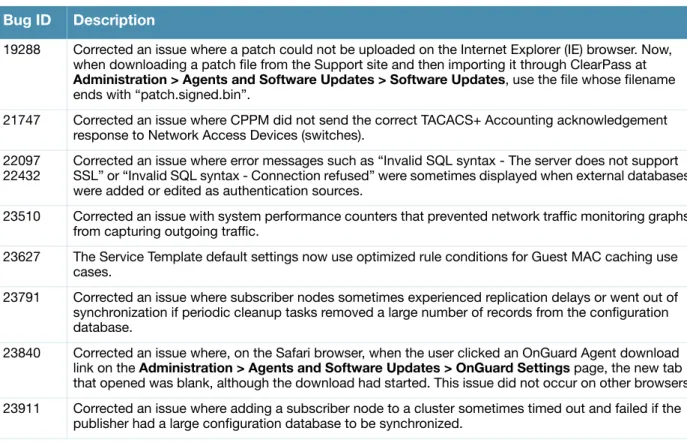
19288 Corrected an issue where a patch could not be uploaded on the Internet Explorer (IE) browser. Now, when downloading a patch file from the Support site and then importing it through ClearPass at
Administration > Agents and Software Updates > Software Updates, use the file whose filename ends with “patch.signed.bin”.
21747 Corrected an issue where CPPM did not send the correct TACACS+ Accounting acknowledgement response to Network Access Devices (switches).
22097 22432
Corrected an issue where error messages such as “Invalid SQL syntax - The server does not support SSL” or “Invalid SQL syntax - Connection refused” were sometimes displayed when external databases were added or edited as authentication sources.
23510 Corrected an issue with system performance counters that prevented network traffic monitoring graphs from capturing outgoing traffic.
23627 The Service Template default settings now use optimized rule conditions for Guest MAC caching use cases.
23791 Corrected an issue where subscriber nodes sometimes experienced replication delays or went out of synchronization if periodic cleanup tasks removed a large number of records from the configuration database.
23840 Corrected an issue where, on the Safari browser, when the user clicked an OnGuard Agent download link on the Administration > Agents and Software Updates > OnGuard Settings page, the new tab that opened was blank, although the download had started. This issue did not occur on other browsers. 23911 Corrected an issue where adding a subscriber node to a cluster sometimes timed out and failed if the
publisher had a large configuration database to be synchronized.
Table 3 Dissolvable Agent Issues Fixed in 6.3.3 Bug ID Description
23650 23654
Corrected an issue where the ClearPass OnGuard Dissolvable Agent failed on Windows 8.1 with JRE7u55.
ClearPass 6.3.3 | Release Note What’s New in This Release | 17
Documentation
Guest
MDM
OnGuard
Table 4 Documentation Issues Fixed in 6.3.3 Bug ID Description
22992 The ClearPass API Guide is updated to include configuration of entity types that are managed by ClearPass Guest.
Table 5 Guest Issues Fixed in 6.3.3 Bug ID Description
21442 23749
If a new guest account was created with the mac field set, a WebAuth request was automatically made, resulting in failed WebAuth logs showing in the Access Tracker.
23748 Corrected an issue where incorrect HTTP proxy server settings could be used if different HTTP proxy server settings were configured on different nodes in the cluster.
Table 6 MDM Issues Fixed in 6.3.3 Bug ID Description
22512 23323
MDM polling would hang if the HTTP call to the MDM server was not completed. This caused endpoint information from Aruba Activate or other MDM vendors to periodically stop synchronizing. Each HTTP GET/POST call is now set to complete within 15 minutes. If the call cannot be completed within 15 minutes, it is terminated and MDM polling continues for the next endpoint for that vendor.
23355 In some cases, MDM polling halted after a few cycles of updates from MDM servers. 23570
23538
Polling Info from JAMF failed from the second cycle onwards if the Fetch Computer check box was enabled.
23571 23569
Corrected an issue with mapping Boolean attributes from XenMobile to CPPM attributes. Since there is no attribute to map to CPPM's Last Check In attribute, the Last Check In attribute is removed.
Table 7 OnGuard Issues Fixed in 6.3.3 Bug ID Description
23381 ClearPass OnGuard now supports bouncing of Juniper Networks Connect VPN connection on Windows OS.
22835 23675
ClearPass OnGuard now supports Stop and Pause remediation actions for Parallels Desktop 9 on Mac OS X.
23361 Corrected an issue where, on Mac OS X, when the enforcement profile was configured to hide the Logout or Retry options, the options were still available to the user in the UI menu.
18 | What’s New in This Release ClearPass 6.3.3 | Release Note
New Known Issues in the 6.3.3 Release
The following known issues were identified in the ClearPass 6.3.3 release.
Policy Manager
OnGuard
Table 8 Policy Manager Known Issues in 6.3.3 Bug ID Description
23309 Symptom/Symptom: The Monitoring > Live Monitoring > System Monitor page does not show any data or graphs on a VM if the Base ESX server BIOS Time settings are not appropriate.
23418 Symptom/Symptom: If a CoA is sent for a device that has been removed from the endpoint repository, the Access Tracker shows errors that are hard to understand. A clear error message to the effect of “Device not present in Endpoint Repository” should be shown instead.
23756 Symptom/Scenario: Trying to restore a 6.3.1 backup on a 6.3.2 system corrupts the Guest Access service template.
23871 Symptom: A local authentication source's password attribute is missing after importing using an XML file with no password attribute.
Scenario: At Configuration > Authentication > Sources, when an authentication source of type “Local” is exported without password protection and then imported back to the server, RADIUS authentications might fail.
Workaround: Save the updated authentication source after the import is complete.
24016 Symptom: Trying to restore a backup configuration fails on the Chrome browser, and the error message “Restore failed. Error: Cannot extract backup file” is displayed.
Scenario: This has been observed on the Chrome and Safari browsers.
Workaround: Use the Firefox or Internet Explorer browser instead, or use “gunzip” to extract the downloaded file.
Table 9 OnGuard Known Issues in 6.3.3 Bug ID Description
23470 Symptom/Scenario: On a Japanese OS, when upgrading from VIA 2.1.1.3 to the ClearPass OnGuard Unified Agent, a known issue with uninstalling VIA launches a popup asking the user to select the VIA driver. This does not occur on an English OS.
23674 Symptom/Scenario: If a new service is added to the Available Services field for the ClearPass Linux Universal System Health Validator at Configuration > Posture > Posture Policies, the default services are removed.
23802 Symptom/Scenario: On Mac OS X, the ClearPass OnGuard Unified Agent’s send logs functionality does not automatically attach the log file to troubleshooting emails.
Workaround: When sending an issue description to Support for troubleshooting, manually attach the log file to the email by following the given path.
ClearPass 6.3.3 | Release Notes Enhancements in Previous 6.3.x Releases | 19
Chapter 4
Enhancements in Previous
6.3.x Releases
This chapter provides a brief summary of the features and enhancements introduced in previous ClearPass 6.3.x releases.
Features and Enhancements in Previous 6.3.x Releases
This section provides detailed information about changes to each functionality area. Issue tracking IDs are included when available.
Policy Manager
Support was added for the ability to add a banner to the ClearPass Policy Manager and ClearPass Guest login pages and the CLI. The banner can be used to notify users of any Web site access restrictions due to government regulations. (#13304)
A Password Type attribute was added to the Generic SQL DB authentication sources to support RADIUS authentications when the authentication source contains passwords in cleartext, SHA, SHA256, NT Hash or LM Hash formats. (#19778)
The Remote Assistance session feature now enables the TAC engineer to view the customer's ClearPass Administration UI as part of being able to login to arubasupport shell.(#20707)
Support was added for redirection to a configured ClearPass Portal landing page when the user goes to https://CPPM-Server. This is in addition to the existing redirect support for http://CPPM-Server. (#20869) The Access Tracker will show an alert if more than two anti-malware products are detected on the
client. (#20900)
Palo Alto integration is now extended to Guest MAC Caching use cases. When the Session Restriction Enforcement Profile for a Palo Alto user ID update is configured with “Session-Check::Username = %{Endpoint:Username}”, PostAuth will send the Guest username instead of the MAC Address in the user ID updates. (#20996)
CPPM 6.x changed the format of the configuration files written when CPPM is joined to an AD Domain. Migration of these files from the 5.x format to the 6.x format is not possible because administrator credentials are required, and these are not stored on CPPM. If you are upgrading from 5.x to 6.3, then you must leave the AD domain and then re-join after the upgrade is complete. (#10516)
End-to-end RADIUS authentication testing capability was added at Configuration > Policy
Simulation to aid in troubleshooting and diagnostics. It includes Basic RADIUS auth via radclient, EAP-TLS RADIUS auth via eapol_test, and Active Directory/MSCHAPv2 tests. (#10571)
The Monitoring > Live Monitoring > System Monitor page now includes additional I/O performance graphs. (#11980)
Added support for ClearPass to act as a SAML identity provider (IdP). (#12195)
A new tab, ClearPass, was added to the Monitoring > Live Monitoring > System Monitor page. The graphs on this tab provide statistics on time taken and counts for service categorization, authentication, authorization, role mapping, posture validation, audit scan, enforcement, and end-to-end request processing. (#12329)
You can now use the Access Tracker to select the node zones as a selection server/domain field and restrict search on the nodes in the zone. At Monitoring > Live Monitoring > Access Tracker, click
20 | Enhancements in Previous 6.3.x Releases ClearPass 6.3.3 | Release Note
the session’s row in the list and click Edit. In the Select Server/Domain field, select the default (2 servers). (#12332)
Separate certificates can now be used for Web logins and RADIUS 802.1x. (#12383)
The system Monitor page is enhanced to provide system monitoring information for various network services and ClearPass performance. The information includes: (#12393)
Authentication and authorization counters Authentication and authorization delays Request processing delays
Network traffic information (RADIUS, TACACS+, Database, SSH, NTP, HTTP/HTTPS, OnGuard, etc.) CPU load information
ClearPass Policy Manager now supports Suite B cryptographic algorithms. (#12635, #17075, #17454) An IETF CoA template was added to allow an IETF profile to be associated with and dispatched from
the CoA module, with no dependencies on the selected NAS vendor. (#12923, #18751)
The Monitoring > Blacklisted Users page allows users to view the list of users who are no longer eligible to access your network. This monitoring page also shows whether the following attributes have been exceeded: - Bandwidth limit - Session count - Session duration. (#13029)
An online/offline status indicator for endpoint devices was added to Configuration > Identity > Endpoints > Edit Endpoint and to Monitoring > Live Monitoring > Access Tracker > Request Details. (#13550)
New templates were added to the Configuration > Service Template page. (#14177)
This version of Policy Manager includes an improved method for fetching data from MDM vendors. The Policy Manager Endpoint Context Server (MDM) integration now includes the following additional support: (#14392)
Data retrieval via paging
Ability to change URLs used for API calls to MDM vendors Refresh data from a specific MDM vendor
Evaluation customers can now convert their evaluation VMs to a production SKU. This migration upgrades using a single disk. In addition, any configurations made during the evaluation period will be retained after converting to a production SKU. (#14509, #16631)
The Event Viewer now includes events related to the RAID controller state. Note that this feature is only available for CP-HW-5K and CP-HW-25K SKUs. (#14706)
An advanced option in the domain joining interface can provide explicit domain controller information to Samba, assisting the user to control what domain controllers CPPM will use for authentications. (#14738)
When editing the Server Configuration page, the Keep Alive Configuration default values now display on the Service Parameters page for the ClearPass system services. (#15018)
CPPM can now disconnect the client from the network when connectivity with OnGuard is lost, and a Change of Authorization (CoA) will be sent. (#14079)
This is accomplished through the Post Auth Session Restriction Enforcement Profile and by adding:
Session-Check::Agent-Connection = Down Post-Auth-Check::Action = Disconnect. This Enforcement Profile should be sent as a part of OnGuard authentication and will take effect when the OnGuard session ends.
Added the ability to verify whether an Active Directory account has expired. (#15552) Usernames are now case-insensitive. (#15809)
A new option was added to the Collect Logs feature in the UI and CLI. When selected, a backup of the configuration without password fields is generated as part of the logs generated. (#15985)
ClearPass 6.3.3 | Release Note Enhancements in Previous 6.3.x Releases | 21 Users can now perform backup and restore operations on just the data within Insight or another
application without affecting other CPPM configurations. (#15987)
CPPM now includes new App Auth templates for ClearPass Onboard and ClearPass Guest (App Auth is now the default for guest Web login pre-authentication checks and Onboard authorization checks). (#16018, #16019)
The Identity > Onboard Devices and Identity > Guest Users pages have been removed from Policy Manager. These features are now exclusively managed through ClearPass Guest. (#16023)
The attributes Aruba-AirGroup-Shared-Group and Aruba-User-Group were added to the Aruba RADIUS dictionary. (#16083)
Time zone settings now account for daylight savings time (DST) changes in Morocco and Israel. Morocco does not observe DST during Ramadan. Therefore, Morocco switches to Western European Time (WET) on July 7, and then reverts to Western European Summer Time (WEST) on August 10. Also, the period of DST in Israel has been extended until the last Sunday in October beginning in 2013. (#16103)
To support more user, group, role, and location attributes, long values (greater than 247 characters) for RADIUS attributes can now be split across multiple consecutive AirGroup vendor-specific attributes. This applies to the following Aruba vendor-specific attributes: (#16116, #16110)
Aruba-Location-Id (string)
Aruba-AirGroup-Shared-User (string) Aruba-AirGroup-Shared-Role (string) Aruba-AirGroup-Shared-Group (string)
Administrators can now control whether Guest account passwords are displayed in CPPM. The Admin privileges supports the allowPasswords setting to be set to either true or false. The default is false, which hides passwords for Guest accounts already configured in the Guest Users UI. This administrator privilege can also create and update Guest accounts with new passwords. (#16122)
Policy Manager now supports receiving device profile information directly from supported Cisco infrastructure. Leveraging the Cisco device sensor technology requires HW running IOS 15.0 (SE1) (#16326
Policy Manager now supports connecting one of its network interfaces into a network SPAN/Mirror port enabling device profiling based on DHCP traffic. (#16328)
Security enhancements ensure that no Admin user can view users’ credentials. Additionally, the Guest Users page has been removed from Policy Manager > Configuration > Identity. (#16337)
Added the ability for administrators to override some attributes of the profiled status of an endpoint. On the Configuration > Identity > Endpoints > Edit Endpoint form, the user can edit the device category, family, and name. This can be used in the occasional situations where multiple device types share the same DHCP fingerprint and might be miscategorized. (#16364)
Support was added for real-time services for asynchronous events in ClearPass, providing users faster access in situations such as integration with third-party firewalls. (#16392)
For Palo Alto Networks Devices, the External Context Servers configuration page includes a new check box to indicate whether the GlobalProtect license is installed on them. If this check box is selected, CPPM sends an HIP report for the logged-in users to the configured Palo Alto Network Devices. (#16455)
As part of support for Single Sign-On (SSO) based on Layer 2 network authentication through AOS, Policy Manager now supports SSO using the Secure Assertions Markup Language (SAML) standard. Integration with AOS version 6.4 is required. In the UI, SSO can be configured from the Configuration > Identity menu. (#16548)
The Virtual IP Settings configuration form now includes an indicator to identify which CPPM node is the active VIP. (#16598)
22 | Enhancements in Previous 6.3.x Releases ClearPass 6.3.3 | Release Note In the Aruba Downloadable Role configuration, support was added for Time Range and Session ACLs.
(#16645)
At Administration > External Servers > Endpoint Context Servers, support was added for validating the identity of the server certificate’s server. The certificate must be uploaded through CPPM’s standard certificate trust list. (#16734)
Since OnGuard health checking through the dissolvable agent is now integrated with the Guest Web login workflows, the user interface at Administration > Agents and Software Updates > OnGuard Portal was removed from the OnGuard health-checking applet. (#16744, #16748, #10139)
Default RADIUS COA enforcement profiles are now available for Aerohive, Motorola, and Trapeze. (#16745)
The Endpoint Context Server Actions form now includes the ability to specify the HTTP
enforcement actions (headers, content, and so on). METHOD types are supported, with allowed values of POST, PUT, GET, and DELETE. (#16827)
A new Aruba vendor-specific attribute, Aruba-AirGroup-Version, was added. This VSA specifies the AirGroup protocol version currently used by the RADIUS client or RADIUS server. Enumerated values are as follows: (#16865)
AirGroup-v1 (1): Indicates the message is AirGroup protocol version 1. This value should not be used; it is included only for completeness.
AirGroup-v2 (2): Indicates the message is AirGroup protocol version 2.
The AirGroup protocol version is now detected and sent in response to an AirGroup authorization request. (#16975, #16981)
Support was added for importing Elliptic Curve (EC) Certificates into CPPM. (#17040, #17047)
A new Details button on the Administration > Certificates > Server Certificate page displays the complete details for the certificate. (#17126)
When viewing a record in the Access Tracker, users now have the ability to scroll to the previous or next records. In prior versions, users had to close the popup window to view another record. (#17221) AirWave was added as an external content server. (#17231)
The Wi-Fi RADIUS dictionary is updated with attributes supporting Hotspot 2.0. (#17247)
The maximum number of database connections can now be set as a Service Parameter. The default values for the different hardware types are: (#17392)
CP-HW-500 = 400 connections CP-HW-5K = 700 connections CP-HW-25K = 1000 connections
ClearPass can now generate Elliptic Curve (EC) cryptography certificate signing requests. An
Algorithm field was added to the Certificate Signing Request and Create Self-Signed Certificate
forms, and includes three types of RSA and two types of EC Private Key algorithms. (#17406) The Access Tracker’s columns can now be customized. The user can now choose columns to add or
remove and change their order. (#17426)
Configuration > Policy Simulation now includes support for Authentication Simulation. Options are available for the Active Directory Authentication, Application Authentication, and RADIUS
Authentication types. (#17574)
New attributes were added to the Onboard dictionary. This is a combined dictionary used for both Onboard and WorkSpace. (#17621)
Support was added for Remote Assistance. This feature enables the ClearPass Policy Manager
administrator to allow an Aruba Networks support engineer to remotely login (via SSH) to the ClearPass Policy Manager server for the purpose of debugging any issues the customer is facing or for any
ClearPass 6.3.3 | Release Note Enhancements in Previous 6.3.x Releases | 23 The following is a typical Remote Assistance flow:
The administrator schedules a Remote Assistance session for a desired duration.
The Aruba Networks support contact receives an email with instructions and credentials to log in. The session is terminated at the end of the stipulated duration.
The Administrator can terminate a session before its stipulated duration from the user interface. The Support contact can terminate the session before its stipulated duration from the logged-in session. This feature is accessible from Administration > Support > Remote Assistance.
The Publisher and the Dedicated Publisher can now be in different subnets for publisher redundancy, accommodating environments where they might be in separate data centers. (#17815)
The Brocade RADIUS dictionary was added. (#18204)
License expiration warning alerts that indicate the number of days remaining for a subscription or evaluation license were added to the Event Viewer. Administrators can also configure notification by email alerts or the Syslog Filter. The alert counter starts at 120 days. (#18305)
Users can configure the default landing page from the Administration > Agents and Software Updates > ClearPass Portal page. (#18635)
The Policy Server now supports distributed AirGroup CoA operations across the publisher and subscribers. (#18838)
Administrators can now use the health status of individual health classes in posture policies to tailor the enforcement profile that will be applied. The value of the attributes will be either Healthy or Unhealthy based on pass/fail checks. These attributes are then added to an internal dictionary and can be used along with Tips:Posture or independently to arrive at the appropriate enforcement profile to be sent to the client. (#18995)
The following new attributes were added in the Certificate namespace, and are populated when clients authenticate using the EAP-TLS authentication method: (#19102)
Public Key Algorithm Public Key Length Signature Algorithm
New system start-rasession and system terminate-rasession commands were added in 6.3. These commands allow administrators to configure and terminate a Remote Assistance session through the CLI. (#19220)
The ClearPass Portal page was moved in the navigation hierarchy, and is now at Administration > ClearPass Portal. (#19363)
Support was added for VMware ESXi 5.5. (#19541)
ClearPass Policy Manager is FIPS 140-2 compliant through incorporation of a FIPS-validated module which provides all cryptography functions for the application. Policy Manager incorporates the OpenSSL FIPS Object Module. The OpenSSL FIPS Object Module has obtained FIPS 140-2 certificate number 1747, listed at:
http://csrc.nist.gov/groups/STM/cmvp/documents/140-1/140val-all.htm#1747(#12634)
AirGroup
Added the ability to create user groups, and to define recurring time-based access schedules for shared devices. The user group can be assigned to users as attributes, who then have access to the shared devices only when the schedule allows access for that group attribute. (#15566)
Limits were set on the lengths of some values. The lengths for shared user, role, location, and group name are limited to 64 characters, count to 100, and total length to 1000. (#16352)
24 | Enhancements in Previous 6.3.x Releases ClearPass 6.3.3 | Release Note Added support for sending AirGroup notification messages from the CPPM server’s virtual IP address, if
one is configured. To enable this feature, select the appropriate network interface under Administration > AirGroup Services > Configuration > Network Interface. (#19938)
Dissolvable Agent
The OnGuard Web Agent help page now includes a section with recommendations and solutions to common problems. (#20751)
Guest
Support was added for the Twilio SMS gateway. (#21304)
Arabic, German, and Dutch translation packs were added. (#21024, #21300, #21301) Support was added for languages that are written right-to-left (rtl). (#21302)
Content Manager now organizes content into a Private Files directory and a Public Files directory. The Private Files directory allows users to upload files that will not be accessible through HTTP or HTTPS. (#8402)
OnGuard dissolvable agent health checking is now integrated with ClearPass Guest’s Web login workflows. (#10139)
ClearPass Guest now includes Advertising Services, letting you deliver marketing promotions and advertisements on a variety of Guest Management registration, receipt, and login pages. To use this feature, go to ClearPass Guest > Configuration > Advertising. (#10613)
User interface changes in the Edit Web Logins page reflect added support for Wired Cisco and for generic ClearPass WebAuth. A Login Method drop-down list lets you select how a user’s network login will be handled. (#15277)
Support was added for secure hash-based verification of parameters passed to the captive portal during user redirection. New options for security hash and the shared secret are available on the Edit Web Logins page. (#15810)
Added support for Web login pages to act as a SAML identity provider (IdP). (#15899)
The default forms for creating guests and devices are improved. MACTrac and AirGroup Operator forms are combined, providing a single place for all user-based device registration. Administrators can now create personal AirGroup devices as well as shared AirGroup devices. (#15900)
Guest Web logins now support Aruba Application Authentication. App Auth is now the default for guest Web login pre-authentication checks and Onboard authorization checks. (#15921, #16005, #16006) FIPS support was added for Guest and Onboard. (#16078)
The PHP version was upgraded to 5.4.20. This includes fixes for 2013-4248, 2013-4113, CVE-2013-2110, CVE-2013-1635, CVE-2013-1643, and CVE-2013-1824. (#16108, #18267)
Added the ability to download a guest receipt as an Apple Passbook pass. The layout and content of the pass is defined by a “pass template”. (#16588)
Guest usernames are now always handled as not case-sensitive. During migration, guest usernames that are identical except for case differences will be renamed. To find these strings after migrating to 6.3, search for the string “-renamed-”. (#16593)
Updated French translations are available. (#16632)
Access is now available to the {$_endpoint} variable on Guest page loads. This variable holds
information about the endpoint and is populated with information taken from ClearPass Profile. You can add {dump var=$_endpoint export=html} to a Web login or other guest-facing page to see the kind of information that is available. (#16648)
Added support for the special keyword _admin in an email CC list. This enables the use of the current operator’s email address as the target of an email receipt. (#17030)
ClearPass 6.3.3 | Release Note Enhancements in Previous 6.3.x Releases | 25 Added built-in support for bypassing the Apple Captive Network Assistant. (#17672)
Provisioning of a device profile without network settings is now supported. (#17758)
The SMS Gateway editor is updated. New capabilities include message URL encoding, HTTP Basic authentication, and support for additional success response codes. (#17936)
Added the ability to specify the flag icon used for a translation pack in the user interface. (#19139) A Dutch translation pack was added. (#19172)
Added the ability to export any overrides made to a translation pack. This file can be shared with Aruba Networks and is compatible with the translation tools. (#19261)
Customers converting from Amigopod can now continue to use their existing page URLs without modification—for example, /guest_register.php does not need to be modified to guest/ guest_register.php. (#19277)
Insight
Insight’s alert emails are enhanced to make it easier to identify event details. At Search > Search Alerts, new columns match the alert conditions to the body of the email message, making it easier to find details such as when the alert was triggered or how many failures were seen within a time window. (#11055)
Insight is enhanced to customize columns when searching records. You can drag and drop the
Available Columns to Selected Columns to get the desired search results. For administrators, the search options selected on each template are saved and can be viewed at the next login. (#11110) The Insight UI is enhanced to provide an option to import a report/alert template on a running system.
This is useful to provide new reports without waiting for CPPM releases. A new Select file to import
parameter is added under the Import Insight Template container in the Administration tab. (#15988) Insight introduced a master-slave cluster model for replicating configuration. If multiple nodes have
Insight enabled, one node can be configured as a master and others can be configured as slaves. If no node is configured as master, replication will be turned off. A new Replicate button is introduced in the
Administration tab to configure across the cluster nodes. Only a single node can be configured as a master. (#16456)
Insight provides the capability to run a search and filter the reports without creating new reports or adding new fields to an existing report. Now you can filter the search results by NAD IP, CPPM node IP, and hostnames. (#16837)
Insight is enhanced to provide search results listed in rows to view additional information that is retrieved from the database for a selected user, device, or session in the popup window. The popup window displays the following information based on the selected template: (#16860)
User Information Device Information Session Information Network Information Policy Information
The Insight Dashboard is enhanced to make it more interactive, and it provides an aggregated view of authentication events for a cluster. New widgets are introduced with the option to select and unselect. Insight stores the widget display settings and location and displays them when the administrator logs in the next time. (#16907)
The Insight Customize widget now allows you to select the graphs that display by default on your Insight Dashboard. (#19221)
26 | Enhancements in Previous 6.3.x Releases ClearPass 6.3.3 | Release Note
Onboard
Two new attributes were added to the Certificate namespace. These attributes will contain the values of the mdpsCustomField and mdpsEmailAddress fields of an Onboard certificate: (20705)
Subject-AltName-DirName-OnboardCustomField Subject-AltName-DirName-OnboardEmailAddress
Support was added for installing multiple network configurations automatically using QuickConnect. (#12399)
Added the ability to send a warning email before a user’s Onboard device credentials expire. This is configured at Onboard > Provisioning Settings > General tab > Actions > Notify users before their credentials expire. (#12625)
The custom fields specified on the Provisioning Settings > Web Logins tab are now also used when QuickConnect is used to perform device provisioning. (#14328)
The QuickConnect client for Android and Windows has been updated to follow a similar workflow to the iOS enrollment process. (#14358)
Implemented generic SCEP server support for Onboard Certificate Authorities. This enables Onboard to be used as a CA with third-party products that use SCEP to enroll certificates; for example, MobileIron, AirWatch, and others. (#16368)
Corrected an issue where Mac OS X “System” profiles did not keep an 802.1x connection alive when no users were logged in. (#17036)
Added support for SHA-384 and SHA-512 signature algorithms. (#18473)
OnGuard
Support was added for the following products: (#17996) McAfee VirusScan 17.x
McAfee Personal Firewall 14.x MacKeeper 2.x
ZoneAlarm Internet Security Suite 12.x Bitdefender Antivirus Free Edition 1.x Trend Micro Endpoint Encryption 5.x McAfee All Access Internet Security 3.x Dr.Web for Mac 9.X
Kaspersky PURE [HD Encryption] 13.x Kaspersky Anti-Virus 14.x
Avira Server Security 14.x
Support was enhanced for the following products: Symantec Endpoint Protection 12.1.x
Trend Micro OfficeScan Client 10.x Microsoft Windows Firewall 8 Kaspersky Anti-Virus 13.x
Symantec Encryption Desktop 10.x BitLocker Drive Encryption 6.x Norton AntiVirus 12.x
ClearPass 6.3.3 | Release Note Enhancements in Previous 6.3.x Releases | 27 AVG Internet Security 13.x
AVG Internet Security 2012.xd on the report.
OnGuard
Windows Event Viewer log entries are now included in OnGuard logs. When the ClearPass Agent Controller is started or stopped, this provides the ability to verify whether it was a manual change or due to an issue. (#21478)
The Retry button can now be hidden on the client. (#21625) Support was added for the following new products: (#22463)
Trend Micro OfficeScan Client 11.x
Support was enhanced for the following products: Parallels Desktop 9 on Mac
Trend Micro Security for Mac 2.x Trend Micro OfficeScan Client 10.x μTorrent 3.x on Windows 8
Symantec Encryption Desktop 10.x Symantec AntiVirus 1.x for Linux
A new Health Check Interval (in hours) attribute was added to the Onguard Agent enforcement profile. Administrators can use this attribute to define different Health Check Quiet Periods for different users, such as students or staff. The ClearPass OnGuard Unified Agent gives preference to the Health Check Quiet Period value received in the enforcement profile over the value configured in Global Agent Settings. If the Health Check Quiet Period value is not configured in the enforcement profile, the Global Agent Settings value is used instead. (#19371)
A new Health Logs option was added under the Diagnostic tab. The health logs display diagnostic logs related to OnGuard health checks and CPPM server reachability on various network interfaces. This option is available on both Windows and Mac OS X. (#19385, #20898)
The following items were added: (#20272)
A new field for Registry Keys to let you specify a custom message for failed Registry Key Checks A Monitor Mode for the Registry Key Health Class
Registry Key Health Class Posture Check results in Access Tracker > Output tab > Posture Evaluation Results section
In previous versions, the OnGuard Agent sent two WebAuth requests if any of the following health classes were configured: (#20896)
Installed Applications Processes
Registry Services
Windows Hotfixes
Now the OnGuard Agent will send two WebAuth requests only the first time after installation. After that, the OnGuard Agent will send only one WebAuth request having information of the health classes listed above, and will do so only in the case of agent restart, machine restart, or user login/logout.
For Mac OS X, this is applicable for the following health classes: Installed Applications
Processes Services
28 | Enhancements in Previous 6.3.x Releases ClearPass 6.3.3 | Release Note OnGuard’s backend service will not collect health if the OnGuard Agent (front end) is not running. This
will reduce OnGuard CPU usage on client machines. (#20945)
The ClearPass OnGuard Unified Agent introduced a new Virtual Machine health class for Mac OS X. (#14027)
The ClearPass OnGuard Unified Agent introduced a new Network Connections health class for Mac OS X that provides configuration to control network connections based on connection type. (#14030) The ClearPass OnGuard Unified Agent introduced a new Installed Applications health class on Mac
OS X and Windows OS. With the introduction of this new health class, an administrator can configure what applications should be present or not present on clients. Auto-remediation is not supported for the Installed Applications health class. (#14033, #14036)
The Enforcement Policy rules now include Per-Application-Based posture enforcement policies, based on the results of the individual Application Posture Tokens (APTs) of the health classes configured in the Internal Posture Policy. (#14080)
The ClearPass OnGuard Unified Agent now supports detection and installation of missing patches for patch management agents such as System Center Configuration Manager (SCCM) or Microsoft Windows Update Agent on Windows. A new option, “Install Level Check,” was added for Patch Management Health Class having the values “No Check,” “All,” “Selected on Server,” and “Security.” Based on the value of the “Install Level Check,” OnGuard Agent checks missing patches and, if auto-remediation is enabled, OnGuard downloads and installs missing patches. Note: This feature is verified with Microsoft Windows Update Agent. (#15737, #12616)
Currently, when a user clicks Retry/Logout, that user stays in a healthy VLAN; however, OnGuard stops monitoring the client health. To avoid this, OnGuard bounces the interface after a default of 5 minutes from when the user quits the OnGuard Agent. Now OnGuard provides the ablility to configure the number of minutes that should elapse before OnGuard bounces interfaces when OnGuard remains disconnected after Logout/Quit. A new parameter, Delay to bounce after Logout (in minutes), is introduced in Global Agent Settings. (#15738)
The ClearPass OnGuard Unified Agent can automatically upgrade when a newer version is available on the CPPM server. A new Agent action is introduced to determine what the OnGuard Agent should perform when an update is available. The options Ignore, Notify User, and Download and Install are available. This feature is only available with OnGuard Agent versions 6.3 and above. (#16756)
Currently, all the configured health classes in a posture policy are evaluated and the evaluation result is used in determining the overall health state of the posture policy. In some cases, the administrator might want to collect information for these health classes but not want the clients to be treated as unhealthy. A new Monitor Mode option is added for the Windows Hotfixes health class to fix this issue. If Monitor Mode is enabled, then the health status of the Windows Hotfixes health class is set to healthy. (#16898) The ClearPass OnGuard Unified Agent provides the ability for an administrator to configure the desired
period (in hours) for OnGuard to avoid health checks after a client is deemed healthy. The roles and client health status are cached separately, ensuring that the client health status is not deleted if RADIUS authentication fails. A new parameter, OnGuard Health Check Interval (in hours), is introduced in Global Agent Settings. The default value is 0 to make sure that the health checks are not avoided. This parameter is supported only by the OnGuard Agent in Health Only mode for wired and wireless interfaces. It is not supported by the dissolvable agent or for VPN-type interfaces. (#17662, #12517) The ClearPass OnGuard Unified Agent for Mac OS X and for Windows is now localized in Japanese. The
OnGuard UI can display text in the language that is selected during installation. (#17899, #13136) The online help now includes links to charts of the third-party software OnGuard supports. Charts are
included for antivirus, antispyware, firewall, disk encryption, peer-to-peer, patch management, and virtual machine products. To access the support charts, go to Administration > Agents and Software Updates > OnGuard Settings, click the Help link to open the OnGuard Settings topic, and then click the right arrow to navigate to the OnGuard Agent Support Charts subtopic. (#18228)
ClearPass 6.3.3 | Release Note Enhancements in Previous 6.3.x Releases | 29
WorkSpace
Added iOS 7 support for ClearPass WorkSpace. (#16416)
The BYOD Self-Service portal supports the following MDM/WorkSpace tasks for end users. End users can perform the following actions when a device is lost or stolen: (#17442, #16271)
Locking a device Unlocking a device Wiping device data
App management actions such as installing or uninstalling an app
Added support for Web apps for WorkSpace in iOS App types. All the Web apps configured in WorkSpace use the Aruba proprietary browser published in the app store. (#16757)
Added an ability to check if a device is actively managed by MDM before allowing access to WorkSpace and WorkSpace managed apps. If the device is not MDM managed, it will be blocked from using
WorkSpace or the WorkSpace managed apps. (#17445)
Added single sign-on (SSO) login support for Enterprise apps in Aruba WorkSpace. With SSO enabled, the user can log in to WorkSpace and gain access to all WorkSpace apps without being prompted to log in again. WorkSpace uses an NTLM/Basic or form-based authentication for SSO. With NTLM/Basic authentication, users can authorize with the servers without using a password. With form-based authentication, users must enter their username, password, and/or domain name in the HTML form. (#18143)
The following preconfigured MDM actions are available on AW and MI devices: (#20056) Send Message
Send Message (Parameterized) Lock Device
Unlock Device Clear Passcode Get Application Get Labels