Subsystem for M/E-learning and Virtual Training
based on IMS NGN Architecture
Pavol Podhradský, Radovan Kadlic, Ondrej Lábaj,
Juraj Londák, and Peter Trúchly
1Abstract
In this paper the possibilities for the implementation of e-learning and m-learning in enhanced networks based on IMS NGN architecture are described. We have defined new elements for the IMS platform to make the learning system useful for end users (teachers, students, trainees). The system and functional architecture with a detailed description of the functional entities is also presented. Proposed M/E-learning architecture is based on the analysis of available Learning Management Systems and deep understanding of IMS architecture. Both areas are described for providing the background of the addressed environment of mobile learning. The paper are also introduces usecases to illustrate the possibilities of the proposed m-learning platform in applications for on-line training, flexible access to various multi-media sources/applications/content, as well as in practical exercises based on remote access to NGNLab.eu, real lab exercises and virtual lab exercises. The results of the multi-device mobile access to M-learning platforms are also presented in this article.
Keywords: IP Multimedia Subsystem, M/E-learning, Mobile end user device, HBB TV. Introduction
To meet the new standards defined by ETSI TISPAN about operator networks, the new networks that replace existing ones will probably be based on Next Generation Networks/IP Multimedia Subsystem (NGN/IMS). These networks can offer a wide portfolio of new services, especially high quality multimedia services that can also be used in the learning sphere.
Learning is a very complex and complicated process. Effective teaching often requires a huge amount of information media. The IMS provides technical solutions for offering multimedia sources like plain text, formatted text, images, audio tracks, video tracks, animations, 3D models and so forth. These sources are only a subset of all available sources. In real life, many more learning resources can exist, but if it is not possible to transfer them to a digital form, they cannot be used in IMS. Multimedia can offer much easier access to learning materials for a wide range of people, independent of age, mobility, place, country, or income.
1Pavol Podhradský, Profesor, Slovak University of Technology, Bratislava, Slovakia, pavol.podhradsky
@stuba.sk
Radovan Kadlic, PhD. student, Slovak University of Technology, Bratislava, Slovakia, radovan.kadlic@ stuba.sk
Ondrej Lábaj, PhD. student, Slovak University of Technology, Bratislava, Slovakia, [email protected] Juraj Londák, PhD. student, Slovak University of Technology, Bratislava, Slovakia, [email protected] Peter Trúchly, scientist, Slovak University of Technology, Bratislava, Slovakia, [email protected]
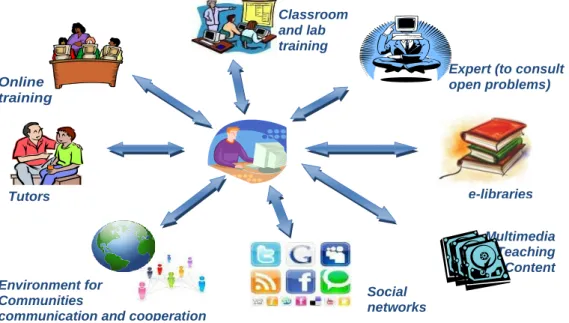
Environment for Communities
communication and cooperation
e-libraries Multimedia Teaching Content databases Social networks
Expert (to consult open problems) Classroom and lab training Online training Tutors
Defining Requirements For Enhanced M/E-Learning System
The concept of the teaching process, where the student is in the center of the teaching/training process, is illustrated in Figure 1. In this model, the student is actively involved in what and how to learn and with whom s/he interacts during the learning process (FP7-ICT-2011-8, Networked Labs for Training in Sciences and Technologies of Information and Communication - FP7 project "NEWTON", 2012; Podhradský, Kadlic, Londák, Lábaj, & Levický, 2011; Čačíková, Londáková, Podhradský, & Londák, 2010). The student can effectively and flexibly use the different types of multimedia content suitable to the learning/training process that is available at m/e-learning platform as well as at several servers of different types of content delivery networks, including social networks.
Figure 1. Student centric teaching/training conception
To support this teaching/training concept, the enhanced m/e-learning platform should meet certain system requirements. It should provide:
access to on-line courses placed on LMS platform,
access to classroom and lab training (including remote access), access to tutors,
access to experts (to consult on open problems), access to multimedia teaching content databases, communication tools,
collaboration platforms, access to social networks.
One of the network architectures which can fulfill all these requirements is the NGN IMS-based architecture.
Enhanced ICT Platform Architectures
In the past ten years the evolution processes in the area of ICT have led to enhanced network architectures, which are based on the idea of the integration of all existing types of networks to one converged network – the NGN (Next Generation Network). Various architecture concepts of the NGN have been defined and have been standardised by working groups of standardisation institutions. The general principle of NGN is its horizontally-oriented architecture, which is practically independent from the point of provided services (van Deventera, Noorena, Kadlic, & Mikóczy, 2010).
The NGN platform is an environment (infrastructure, protocols, etc.) that offers new possibilities and capabilities in the area of service development and service implementation, and provides a wide portfolio of new multimedia services and applications.
When we take into account the customer requirements (actual and expected) in the area of multimedia services and applications (real time and non-real time services, fixed and wireless services), then it is necessary both to use effectively the capabilities provided by the NGN platform, whereby independency of services from the NGN platform is preserved and to develop the appropriate service architecture and interfaces supporting the communication between different segments of the network platform.
One of the advantages of the NGN platform is the comfortable and flexible access to and control of multimedia services. Further advantages are the sharing of multimedia services and applications implemented at the NGN platform application layer and the modular structure of the application layer. At the same time the NGN should provide the effective interface for service development, service provision and management.
IMS Based Architecture
The initiative called the 3rd Generation Partnership Project (3GPP) within the specifications of the Universal Mobile Telecommunication System (UMTS) architecture has also defined the IMS for supporting multimedia services, telephony and IP-based message sending that is designed in the framework of the packet switching domain. The IMS is based on the IP architecture for multimedia and it was placed as a supporting network element to provide standardised and universal services for mobile users. As it was one of the first concepts on which all the standardisation institutions agreed and which conformed to the NGN principles, it is becoming one of the reference concepts for the fixed networks as well (Mikóczy, Schumann, Stokking, van Deventer, & Niamut, 2009). The flexible and modular structure of NGN architectures enables the flexible modifications and extensions of the application layer and modifications and extensions of the IMS core subsystem.
NGNLab.eu Platform Architecture
For educational and research purposes, the NGN laboratory based on IMS architecture was established at the Faculty of Electrical Engineering and Information
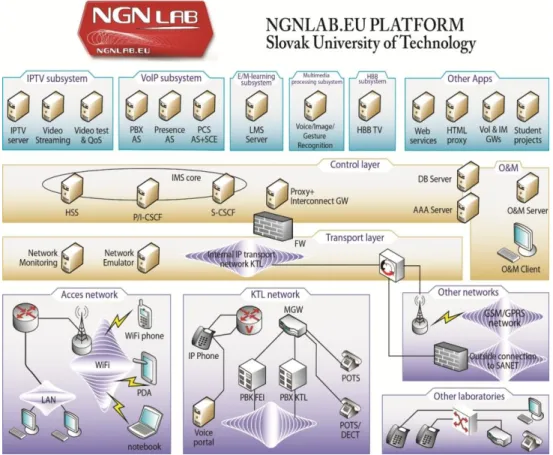
Technology of the Slovak University of Technology in Bratislava (FEI STUBA). The process of building the IMS based NGN Lab at FEI STUBA started in 2006. In 2007 the ngnlab.eu domain was registered by STUBA. This platform has been continually extended by new subsystems supporting the services and applications implemented at the application layer of IMS NGN Lab. The conception of the application layer of this Lab platform consists of a set of services and applications subsystems (Figure 2): The IP Television (IPTV) subsystem, the Hybrid Broadcast Broadband (HBB) subsystem, the Multimedia processing subsystem, the m/e-learning subsystem, the Voice over Internet Protocol subsystem (VoIP), and the Other Applications subsystem (last two subsystems are based on open source hardware and software solutions).
Figure 2. IMS based NGN Lab platform (at FEI STUBA)
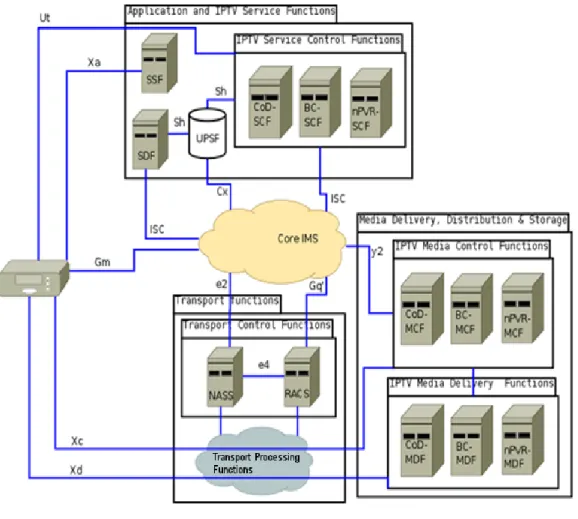
IPTV subsystem of the NGNLab.eu. In the development of the conception of the IPTV subsystem, the IMS-based IPTV functional model was used (Mikóczy, Sivchenko, Bangnan, & Moreno, 2008). In this case, the IMS core subsystem as the control segment of the IMS platform is responsible for all management and control
processes as well as for identity management, personalization, etc., in relation to the IPTV subsystem and IPTV services (as illustrated in the Figure 3). The key functional entities of the IMS based IPTV architecture include:
Figure 3. IMS based IPTV architecture
Service Discovery and Selection Functions (SDF and SSF).The service list available for certain User behind certain User Equipment (UE) is provided by the SDF and the SSF. The main task of the SDF is to provide personalized service discovery while the SSF provides the service selection information, e.g., a list of available services that the UE can browse and select.
Service Control Functions (SCF). The SCF provides the service authorization during session initiation and session modification, which includes checking the IPTV users’ profiles in order to allow or deny access to the service, providing the credit limit and
credit control. The SCF is also responsible for selection of relevant IPTV media functions for a given session.
User Profile Service Functions (UPSF). The UPSF holds the IMS user profile and possibly the IPTV specific profile data. It communicates with IPTV Service Control Functions and with the Core IMS. When multiple instances of a UPSF exist, the Core IMS and the IPTV Service Control Functions may use the services of a Subscription Locator Function (SLF) to fetch the address of the UPSF.
Media Control and Delivery Functions (MCF and MDF). IPTV Media Control Functions are responsible for the controlling of media flow from the MDF to clients. The IPTV Media Delivery Functions are responsible for the delivery of content to the client. The MCF reports the current status to the MDF. The MDF can be used also for transcoding of specific device requirements. The MDF stores frequently used content (cache) and user specific content. MDF is basically the place where network personal video recorder (nPVR) content is stored (Mikóczy & Podhradský, Evolution of IPTV Architecture and Services towards NGN, 2009).
Hybrid Broadcast Broadband Subsystem of the NGNLab.eu. The integration of the HBB subsystem in the NGNLab.eu platform has been evoked by the fact that our STUBA research team participate in the FP7 “HBB-Next” project (2011-2014). STU Bratislava is a member of this FP7 project consortium. The NGNLab.eu will be used as the testbed platform for pilot implementation of the HBB-Next prototype scenarios. The HBB subsystem will be configured during the first phase of the HBB-Next project. Multimedia Processing Subsystem of the NGNLab.eu. In the frame of the HBB-Next FP7 project, Human Computer Interaction (HCI) will be used. Speech, face and gesture recognition will be used for HBB TV services selection, control, personalisation, authentication, identity management, and so forth (Rozinaj, 2010; Treiber, Gruhler, & Rozinaj, 2011; Kačur & Rozinaj, 2011). The multimodal interface for control and navigation of the HBB TV, IPTV and other services will be integrated in the Multimedia Processing Subsystem of the NGNLab.eu within the research of the HBB-Next and Scientific Grant Agency VEGA projects.
Subsystem for m/e-learning based on IMS NGN. The development of the subsystem for m/e-learning and its implementation in the NGNLab.eu platform was evoked by the Leonardo da Vinci (LdV) project M-learning for Young People at Risk (MLARG) activities. The intention was to develop such an m/e-learning architecture, which would enable the deployment and provisioning of a wide portfolio of multimedia content and support the modern conception and approaches in the area of m/e-learning.
Standard e-learning platforms are usually based on the application of a Learning Management System (LMS) which manages the access to training courses (most often based on HTML applications) placed on the LMS platform and supports further processes joined with e-learning. The application of different types of multimedia sources in the training process is also possible, but it is not so easy to manage access to them (e.g. to the lector during an on-line training process).
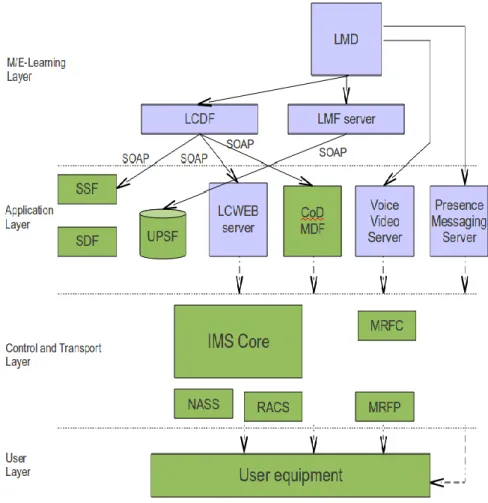
To use and share various multimedia sources effectively in the training process (like high quality multimedia materials storing on the IPTV server, VoIP applications, WEB applications, etc.), the conception of the NGNLab.eu m/e-learning subsystem was proposed on the base of the IMS system and functional architecture. The necessary functional entities mapped in individual m/e-learning subsystem elements are illustrated
in Figure 4 (Podhradský, Londák, & Čačíková, 2010; Kadlic, Lábaj, & Podhradský, E/M-learning in IMS based NGN environment, 2010; Podhradský, Kadlic, Londák, Lábaj, & Levický, 2011). This subsystem configuration provides a complex teaching/training environment for teachers and students.
Entities of the m/e-learning functional model. All components of the functional model support the deployment of the learning content to particular elements of the m/e-learning system architecture and also enable access to content and supporting functions for the end user (student/teacher).
The main target is to develop a unified interface for both teachers and students. This effort must be supported by new elements, which extend the existing IMS architecture.
Learning Content Deployment Functions (LCDF). This is a set of functions needed for deployment of new content to the correct functional and system element of IMS. These functions are responsible for the correct deployment and provisioning setup. LCDF is also responsible for the management of existing content and profiles. Because there is no standardized interface for the management of IMS elements, proprietary management must be used for it. The creation of an open system of management should be based on a Simple Object Access Protocol (SOAP) and shared folders technology (SMB, NFS). All data will be transferred by SOAP. The content will be first uploaded to a shared folder, and afterward processed with a SOAP command. The deployment of content is different for each content type.
Deployment of Content on Demand (CoD). CoD is mostly stored in the big disc arrays in the network of the operator. It is necessary to provide access for CoD MDF (Media Delivery Function) to this storage space. The LCDF must then take content from operator, adapt it to required parameters (codec, bit rate, etc.) and store it. Then it must contact the management interface of CoD MDF and submit information about this content to it. Another place where content must be registered is the SSF (Service Selection Function) and the SDF (Service Discovery Function) database.
Metadata, rights and URLs to content, must be stored in the SSF and the SDF. The LCDF then must contact these elements and put this data and parameters to it. In the IMS network, because there can be a huge number of end user devices with different capabilities and screens, it is necessary to deploy video content in more profiles. It is recommended to define the closed group of profiles at the beginning and then transcode all content in all profiles and deploy it.
Deployment of Live Lectures. Live lectures are organized from a desktop, but first, it is necessary to deploy live streams from camera(s) like new channels to the IPTV system, and arrange permissions for students. CoD, MDF, SSF, SDF elements must all be managed.
Deployment of Images/Text. The text and images can be stored directly in storage, from where it will be served to students by the WEB server. This storage can be internal HDD in the WEB server or external storage outside the WEB server. The text will be stored in HTML format. The LCDF must support all content management functions. The LCDF must also be able to adapt all html formatted text to different formats, which are acceptable by end user devices, e.g. MMS for mobiles images must be adapted to some predefined formats. Here we also need to keep in mind that end user devices can
be different and therefore, images must also be stored in predefined profiles (formats) belonging to the group of similar devices.
In the past, the processor power was not big enough to draw vector graphics, but today devices have no problem in drawing vector graphics; furthermore, these graphic files can be plain text (e.g. Scalable Vector Graphics (SVG)). So the recommendation is to use vector graphics images because they can be adapted to all screen resolutions very easily without losing quality.
Learning Content web server (LCWEB). The LCWEB server has access to text content storage and serves it to students via http or https protocol. Since it is necessary to limit access to this content, the web server requires authentication using SIP account and check access to content, based on the Home Subscriber Server (HSS) profile of the authenticated user. To improve the normal HTML browser for learning purpose it is necessary to extend normal protocol tags in order to link to content, link to bookmarks, link to conferences, link to a shared desktop (only for lectures). The text content can then be read by the student. At any point there can be a link or an embedded object. This link can take a student to the CoD and show him a video. The links can also take a student to a bookmark, which is a time point in certain CoD content.
Lesson Voice&Video server. Focusing on the user view, the main purpose of this server is to provide call features, e.g. voice call or video call, but also educational voice content which can be played to all users during a created session. From the provider perspective the server consists of the following main parts:
SIP Application server. This server concerns conference policy and plays the role of Back-to-Back User Agent (B2BUA), which is necessary for the supervision of live sessions and for the conference features. If a teacher wants to create live session, a call requisition can be sent to all of the required participants. It means that the phones of participants will ring and when the participant answers, a voice announcement will be played. Subsequently, by pressing a chosen key the participant can accept or reject the invitation. For announcements, a short Real-Time Transport Protocol (RTP) stream will be used (see Media Resource Function Processor (MRFP) in Figure 4). This case uses a loosely coupled conference. This means the conference is without coordinated signaling relationships amongst participants. Loosely coupled conferences are used especially for distribution of multicasts to all required parties or participants (Rosenberg, 2006). Users or participants who want to join a session can also use the so-called conference
Universal Resource Identifier (URI). It uses a tightly coupled conference scenario in which a teacher, referred to as a focus, maintains a dialog with each participant in the lesson. The focus plays the role of the centralized manager of the conference.
Media Resource Function Control (MRFC). The MRFC supports procedures for media control of the SIP based conference scenarios and determines media capabilities of the MRFP. The Media Resource Function Control/ Application Server (MRFC/AS) determines which media flows should be used for the session, and which codecs of those media flows should be used for each participant (3GPP, 2009). This server also provides media resource related functions. These functions are logically separated in IMS architecture, but they can also be components of application nodes.
Media Resource Function Processor (MRFP)/RTP mixer. The RTP mixer, consisting of media server features implemented on the MRFP, is responsible for the mixing of RTP streams from all users attending the session and also for playing
announcements to all conference members (e.g. announcing a join). The RTP mixer is not used for the mixing of special sessions such as instant messaging here; rather, a dedicated server is used for that (see Lesson messaging & presence server) as it uses SIP signaling messages, not the media itself.
Conference Bridge. The conference bridge is responsible for delivering of the above-mentioned RTP streams. The conference bridge features are provided by the MRFC. If users have UE with camera devices, then video streams can also be mixed and delivered to all participants.
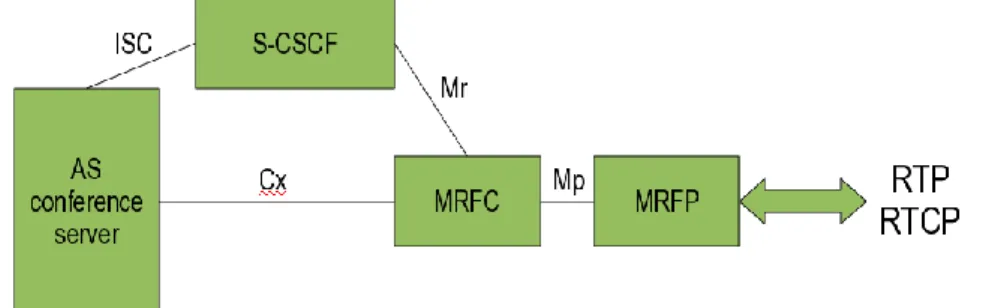
Lecture messaging and presence server. This server is mainly responsible for all features related to messaging services. It allows users to communicate with each other during a session without interrupting a live video or audio stream. The Lecture Management Desktop (LMD) creates group chat preferences and determines who can access it. Messaging services are very useful in putting questions to presenters (teachers) if live streaming is used. The presence service is mainly important for seeing who is online and attending a lecture. Presence features are not required for delivering the content of a lecture but it is comfortable from a usage perspective to see an attendee’s status. In other words, it provides conference notification services, accepts subscriptions from participants, and generates notifications to all of them. For the purpose of learning, only delegated users can have access to the conference, so anonymous users will be not accepted. In IMS architecture a SIP protocol is the preferred solution for a messaging system. It is important that IMS interaction with other services is triggered at that control plane by the Serving-Call Session Control (S-CSCF). There is an IMS based conferencing architecture depicted in Figure 5.
Figure 5. IMS based conferencing architecture
Lecture Management Desktop (LMD). To manage the lecture, the teacher must use some device (PC) for the management of content flow. This device does not invoke all actions directly, but is only the client of the Lecture Management Function (LMF). The LMF is the actor of all commands. The LMD is the only place where the teacher can get information from students during the lecture. If the student wants to pose a question, it
will be shown on the LMD, and it is up to teacher when to respond to the student. The LMD is also the source of the video stream for the shared desktop.
Lecture Management Function (LMF). The Lecture Management Function is a server responsible for managing of all application services that are used in the created lesson. Services are hosted on separate application servers:
Live TV from IPTV subsystem,
Web content server, Voice Video server,
Presence and messaging server.
The LMF is capable of sending commands to these servers for setting up lesson/lecture preferences. According to the preferences indicated, the server will manage the lesson for users who are assigned by the LMD. Note that the server is not communicating with the Home Subscriber Server (HSS) directly because corresponding servers have a direct access to user profiles. All user-related data that are needed for authenticating the user to the service are stored on the HSS only, but the application data related to the specific service can be stored on the server where the service is hosted.
Mobile End User Devices for M-Learning
In the process of the training based on m-learning, it is necessary to take into account the suitable selection of the mobile end user mobile device. In relation with the formats and the multimedia level of the lessons/units of the course as well as the additional supporting training materials and further relevant multimedia sources, it is necessary to select the appropriate end user mobile device. Within the process of the analysis of end user mobile devices, all categories of these devices which can be connected to mobile networks have been tested and evaluated. From each category the set of products was selected for the testing process.
The categorisation of end user mobile devices was created from the point of view of:
supported applications, hardware solution, software support, possible connectivity.
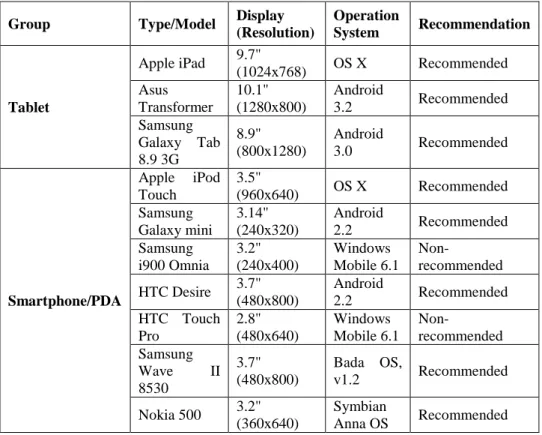
Based on the testing process, the recommendations for the selection of the suitable end user mobile devices for on-line m-learning for the LdV MLARG course were done and the results are introduced in the Table 1.
Use Cases
Use Case 1: Access to Set Of Multimedia Resources from the On-Line Course MLARG M-Learning Platform
In the frame of international LdV project MLARG, the English language course is being developed. One of the main project objectives is to propose and implement the m-learning platform for providing and managing courses. For this purpose the project consortium decided to apply the standard m-learning platform using
the mobile version of an open source LMS Moodle (MLE Moodle), which supports the access to training courses using such end user mobile devices as standard mobile phones, smart phones, PDAs, tablets, MID, and of course, also the UMPC, Netbook, and Notebook.
Table 1. Summary of tested mobile end user devices
Group Type/Model Display (Resolution) Operation System Recommendation Tablet Apple iPad 9.7" (1024x768) OS X Recommended Asus Transformer 10.1" (1280x800) Android 3.2 Recommended Samsung Galaxy Tab 8.9 3G 8.9" (800x1280) Android 3.0 Recommended Smartphone/PDA Apple iPod Touch 3.5" (960x640) OS X Recommended Samsung Galaxy mini 3.14" (240x320) Android 2.2 Recommended Samsung i900 Omnia 3.2" (240x400) Windows Mobile 6.1 Non-recommended HTC Desire 3.7" (480x800) Android 2.2 Recommended HTC Touch Pro 2.8" (480x640) Windows Mobile 6.1 Non-recommended Samsung Wave II 8530 3.7" (480x800) Bada OS, v1.2 Recommended Nokia 500 3.2" (360x640) Symbian Anna OS Recommended
The developed training course (English course units/lessons) incorporate multimedia, where not only text/data content, but also voice and video sequences/streams are used. During the implementation of the developed language units to the MLE Moodle platform and the testing of individual training units, a problem with access to audio and video streams was detected. The MLE Moodle does not support direct access to audio and video streams. To solve this problem we decided to use the NGNLab.eu platform with the m/e-learning subsystem as one of the testing platforms for the MLARG project. For this purpose the standard version of Moodle was implemented on the m/e-learning subsystem. The following elements have to be developed to support access to audio/video files placed on WEB server using the end user mobile devices: a set of functional elements of LCDF function (see Figure 4), streaming pages based on HTML5 standard on an external system and linked to the
Moodle portal, remote access to the m/e-learning subsystem of NGNLab.eu from standard MLE Moodle LMS platforms of the MLARG project partners, encoded audio/video files in correct format for Android, iPhone, Symbiant operational systems used by smart mobile phones.
Figure 4. M/e-learning system and functional model based on IMS architecture
MLARG English Language Course
Each unit in the English language course has the same sections: listening, reading, vocabulary, grammar, communication and self-assessment.
The students/trainees have access to course materials placed on MLARG LMS server through various types of end user mobile devices, like notebooks, netbooks, PDA, tablets, smart phones, and so forth. Students using a mobile device have access to
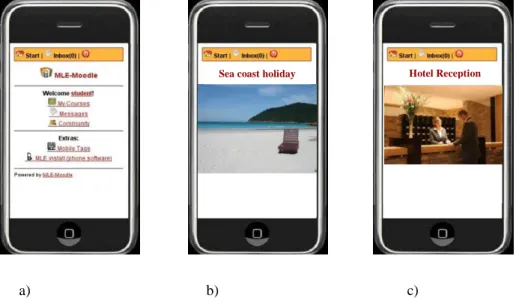
the course (Figure 6a) after logging in. Audio/video files are stored on the WEB servers of the MLARG LMS platform at Bogazici University in Istanbul and Czech Technical University in Prague as well as at the STUBA NGNLab.eu platform. These files are available to students directly from the on-line English course via links. Figure 6b and Figure 6c illustrate the screen shots of the video file.
a) b) c)
Figure 6. Basic page of the MLE Moodle portal
Usecase 2: Multidevice Access to Sets of Multimedia Resources
Crucial to the m/e-learning conception is that the student is in the center of the teaching/training process (see Figure 1). This use case describes the access to different types of multimedia resources/content placed on the application layer of the NGN IMS platform using the selected type of mobile/fixed end user device. In the case of the NGNLab.eu platform (from the point of view of m/e-learning applications), from a given mobile/fix end user device, it is possible to have:
access to on-line courses placed on the platform of m/e-learning subsystem, access to various multimedia content placed on the application layer of the
NGNLab.eu platform, via links from on-line courses,
direct access from the end user device to multimedia content, other applications, communication and collaboration tools placed on application layer of NGNLab.eu platform controlled and managed by IMS core functionalities (see Figures 1 and 3),
standard direct access from the end user device to other resources provided by different content delivery networks, social networks, etc.
At present, all introduced types of access to multimedia content available at NGNLab.eu as well as at other content delivery networks, social networks, and so forth are used in the teaching/training process by STUBA students.
Use case 3: Remote Access to Laboratory Experiments
Virtual and Remote Access Laboratories
Besides the continual process of the upgrading of the NGNLab.eu platform (based on new evolution scenarios), our STUBA research team has concentrated its research activities also on the following: integration of new multimedia services and applications on the Application layer of the NGNLab.eu platform, networking of several NGN Labs (e.g. within Eureka/Celtic “NetLab” project) and creation of the NGN Testbed platform, development of training courses applicable in virtual training based on m/e-learning. This configuration of Labs creates the conditions for providing virtual education/training and realisation of practical exercises based on remote access.
Some Examples
Virtual Training. When we consider networked NGN Labs with integrated LMS
platforms, the students have access to the given training course at the home LMS platform (based on their own profile). But this configuration of networked Labs can offer additional multimedia sources related to the given training course, which are distributed in individual networked Labs. All these multimedia sources can be shared with all training process participants independently of the end user access point. This approach is also used in LdV project MLARG mentioned above.
Practical Exercises Based on Remote Access. Teachers, students and other users can have remote access to NGNLab.eu. Several practical exercises are available for students/teachers at the NGNLab.eu, e.g., training/testing of NGN Lab platform interfaces, testing of selected parameters of NGN protocols, testing of different types of services, etc.
Example: Practical Exercises “Analysis and testing of selected NGN protocols"
The practical exercises based on remote access to NGNLab.eu (at STU in Bratislava) was realised by the group of ICT experts from Portugal Telecom. These practical exercises were focused on the analysis and testing of selected NGN protocols. The tutor in the NGNLab.eu was at the disposal of trainees to help them navigate during the training process. The communication tools (videoconferencing) of the NGNLab.eu were used for communication between the trainees and tutor.
Conclusions
The enhanced ICT and NGN architectures create conditions for providing the wide portfolio of new multimedia services and applications. The NGNLab.eu based on IMS NGN architecture is presented in this paper. Various subsystems like IPTV, HBB TV, multimedia processing as well as m/e-learning subsystems are integrated in this
NGNLab.eu platform. The m/e-learning subsystem and its applications are described in more details in the paper. The topic of m/e-learning has a wide scope. In our work, we have not focused our research activities to define all interfaces regarding management of IPTV in details. We defined entities and protocols between them. It would be good to describe the concrete parameters of the SOAP protocol.
Acknowledgment
This paper presents some of the results and acquired knowledge and experience from the various research and educational projects: VEGA 1/0720/09 and 1/0718/09, 1/1069/12, research projects”HBB-Next” FP7 (ICT-2011-7-287848) and “NEWTON” as well as the international educational projects LdV MLARG and LdV IMProVET. The research and educational activities were supported by the above-mentioned projects.
References
3GPP. (2009). TS 24.147: Conferencing using the IP Multimedia (IM) Core Network (CN) subsystem; Stage 3 (Release 9).
Čačíková, M., Londáková, D., Podhradský, P., & Londák, J. (2010). Application of Multimedia Technology in Pre-School Education Pre-School Education. International Conference ICT for Language Learning (3rd edition). Florence. Heidkamp, B., & HBB-Next consortium members. (2011). FP7-ICT-2011-7,
Next-Generation Hybrid Broadcast Broadband - FP7 project "HBB-Next". Brussels. Kačur, J., & Rozinaj, G. (2011). Building accurate and robust HMM models for
practical ASR systems. Telecommunication Systems.
Kadlic, R., Lábaj, O., & Podhradský, P. (2010). E/M-learning in IMS based NGN environment. International Conference ICT for Language Learning 3rd edition. Florence.
Kadlic, R., Mikóczy, E., & Podhraský, P. (2008). IPTV applications in the NGN environment. Proceedings ELMAR-2008. Zadar.
Mikóczy, E., & Podhradský, P. (2009). Evolution of IPTV Architecture and Services towards NGN. In M. Grgic, K. Delac, & M. Ghanbari (Eds.), Studies in Computational Intelligence (Vol. 231, pp. 315–339). doi:10.1007/978-3-642-02900-4
Mikóczy, E., Schumann, S., Stokking, H., van Deventer, M. O., & Niamut, O. (2009). Combinational services of NGN based IPTV. 5th International Conference on Testbeds and Research Infrastructures for the Development of Networks & Communities and Workshops. TridentCom 2009., (pp. 1–8). Washington, DC. Mikóczy, E., Sivchenko, D., Bangnan, X., & Moreno, J. (2008, May). IPTV Services
over IMS: Architecture and Standardization. IEEE Communications Magazine, 46(5), pp. 128–135.
NA. (2012). FP7-ICT-2011-8, Networked Labs for Training in Sciences and
Technologies of Information and Communication - FP7 project
"NEWTON". Brussels.
Podhradský, P., Kadlic, R., Londák, J., Lábaj, O., & Levický, D. (2011). Enhanced ICT in Virtual Training and m-learning. Proceedings ELMAR 2011, (pp. 281–284). Zadar.
Podhradský, P., Londák, J., & Čačíková, M. (2010). Application of ICT in Pre-school Education. Proceedings ELMAR-2010, (pp. 159–162). Zadar.
Rosenberg, J. (2006). RFC 4353: Framework for Conferencing with the session Initiation Protocol (SIP).
Rozinaj, G. (2010). Towards More Intelligent Speech Interface. IWSSIP 2010–17th International Conference on Systems, Signals and Image Processing, (pp. 49– 59). Rio de Janeiro.
Treiber, A. S., Gruhler, G., & Rozinaj, G. (2011). Improvement of rotary encoders in human-machine-interfaces through optimized acoustic feedback. Journal of the Acoustical Society of America, 130(2), EL57-EL61.
van Deventera, M. O., Noorena, P., Kadlic, R., & Mikóczy, E. (2010). Interconnection of NGN-based IPTV systems. In M. Ilyas, & S. A. Ahson (Eds.), Fixed mobile convergence handbook. CRC Press.