SANbox2
Simple Network Management Protocol
Reference Guide
© 2000–2002 QLogic Corporation First Printed: May 2001 All Rights Reserved Worldwide.
Printed in U.S.A.
QLogic Corporation, 6321 Bury Drive, Eden Prairie, MN 55346
Information furnished in this guide is believed to be accurate and reliable. However, QLogic Corporation assumes no responsibility for its use, nor for any infringements of patents or other rights of third parties which may result from its use. QLogic Corporation reserves the right to change product specifications at any time without notice. Applications described in this document for any of these products are for illustrative purposes only. QLogic Corporation makes no representation nor warranty that such applications are suitable for the specified use without further testing or modification. QLogic Corporation assumes no responsibility for any errors that may appear in this document.
QLogic, SANbox, SANbox2, and SANblade are trademarks or registered trademarks of QLogic Corporation. All other brand and product names are trademarks or registered trademarks of their respective owners.
Document Revision History
Section 1
Introduction
1.1 Intended Audience ... 1-1 1.2 Related Materials ... 1-1 1.3 Technical Support... 1-2 1.3.1 Availability... 1-2 1.3.2 Training... 1-2 1.3.3 Contact Information ... 1-2Section 2
SNMP Overview
2.1 SNMP Interface Objectives ... 2-1 2.2 Manager and Agent... 2-1 2.3 Traps ... 2-2 2.4 Management Information Base ... 2-3 2.5 User Datagram Protocol... 2-3 2.6 Numbering System Conventions... 2-4Section 3
Configuring a Switch
3.1 System Specifications and Requirements... 3-1 3.2 Configuring a Switch Using the Command Line Interface... 3-1 3.3 Configuring a Switch Using SANbox Manager... 3-3 3.4 Disabling SANbox2 Proxy Capabilities... 3-3
Section 4
MIB-II Objects
4.1 Groups in MIB-II ... 4-1 4.2 System Group ... 4-1 4.3 The Interfaces Group ... 4-5 4.4 The Interfaces Table... 4-6 4.5 The Address Translation Group ... 4-13 4.6 The IP Group... 4-15 4.7 The IP Address Table ... 4-21 4.8 The IP Routing Table... 4-23
4.15 The UDP Group... 4-48 4.16 The UDP Listener Table ... 4-49 4.17 The EGP Group... 4-50 4.18 The EGP Neighbor Table ... 4-51 4.19 The Transmission Group ... 4-56 4.20 The SNMP Group... 4-56
Section 5
Fibre Alliance MIB Objects
5.1 FA MIB Definitions... 5-1 5.2 Connectivity Unit Group ... 5-4 5.3 Connectivity Table ... 5-6 5.4 Revision Table ... 5-22 5.5 Sensor Table ... 5-26 5.6 Port Table ... 5-34 5.7 Event Table... 5-49 5.8 Link Table ... 5-54 5.9 Zone Table... 5-61 5.10 Zoning Alias Table ... 5-66 5.11 Port Statistics Table... 5-69 5.12 Simple Name Server Table... 5-91 5.13 Platform Table ... 5-98 5.14 Trap Table ... 5-103 5.15 Related Traps ... 5-107
Section 6
Fabric Element MIB Objects
6.1 Fibre Channel FE MIB Definitions ... 6-1 6.2 Configuration Group ... 6-2 6.3 Module Table ... 6-4 6.4 FxPort Configuration Table... 6-7 6.5 The Status Group ... 6-12 6.6 FxPort Physical Level Table ... 6-14 6.7 Fx Port Fabric Login Table ... 6-17 6.8 The Error Group ... 6-22 6.9 Accounting Groups... 6-26 6.10 Class 2 Accounting Table ... 6-30 6.11 Class 3 Accounting Table ... 6-33 6.12 Capability Group... 6-35
Glossary
List of Figures
Figure Page
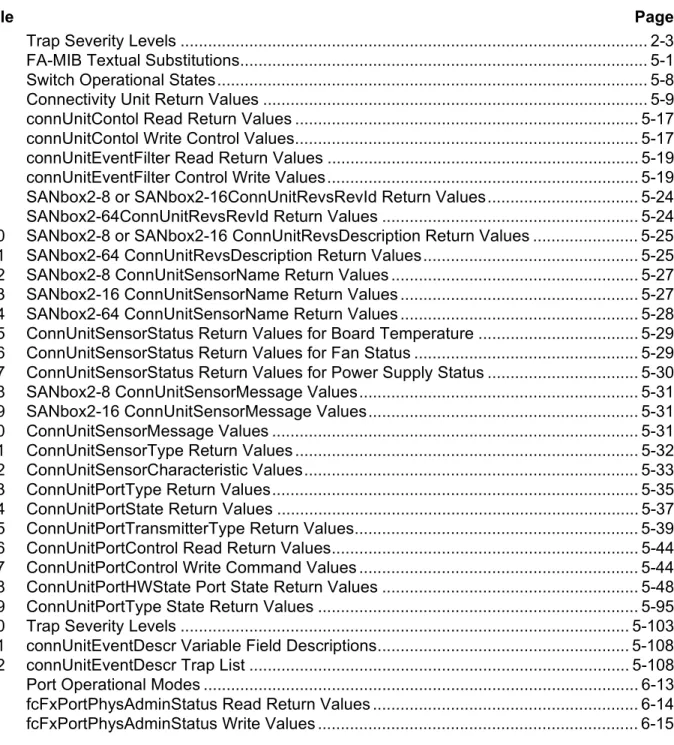
2-1 SNMP Interface Architecture... 2-2 5-1 connUnitEventDescr Variable Format... 5-107
List of Tables
Table Page
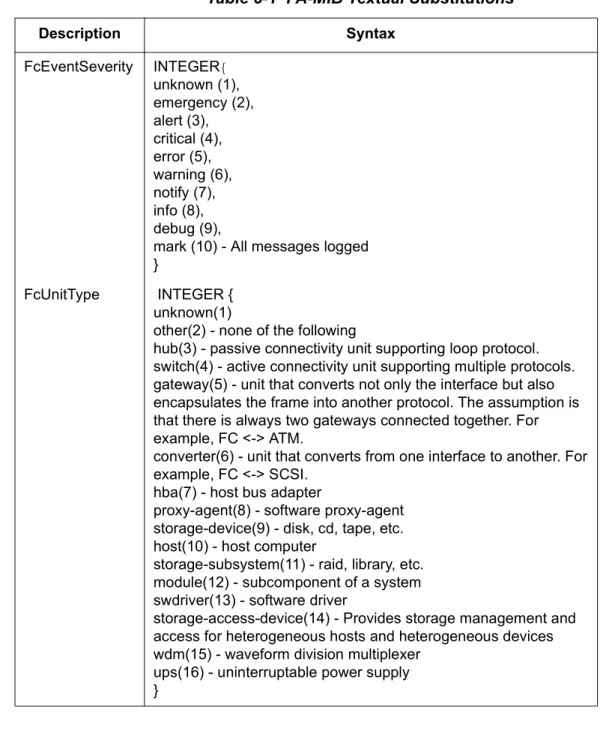
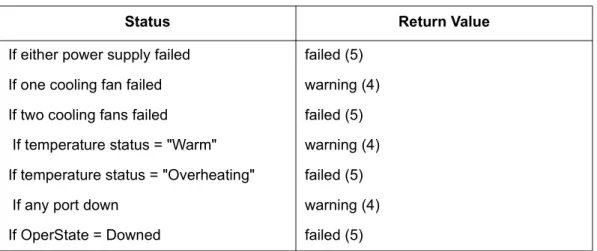
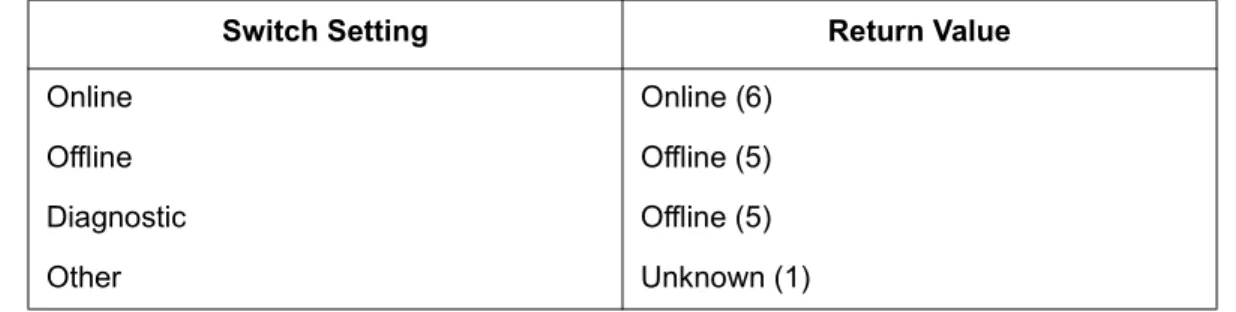
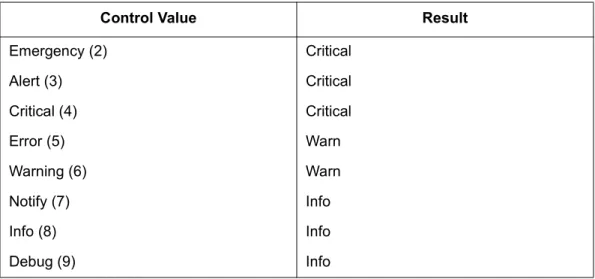
2-1 Trap Severity Levels ... 2-3 5-1 FA-MIB Textual Substitutions... 5-1 5-2 Switch Operational States... 5-8 5-3 Connectivity Unit Return Values ... 5-9 5-4 connUnitContol Read Return Values ... 5-17 5-5 connUnitContol Write Control Values... 5-17 5-6 connUnitEventFilter Read Return Values ... 5-19 5-7 connUnitEventFilter Control Write Values... 5-19 5-8 SANbox2-8 or SANbox2-16ConnUnitRevsRevId Return Values... 5-24 5-9 SANbox2-64ConnUnitRevsRevId Return Values ... 5-24 5-10 SANbox2-8 or SANbox2-16 ConnUnitRevsDescription Return Values ... 5-25 5-11 SANbox2-64 ConnUnitRevsDescription Return Values... 5-25 5-12 SANbox2-8 ConnUnitSensorName Return Values ... 5-27 5-13 SANbox2-16 ConnUnitSensorName Return Values ... 5-27 5-14 SANbox2-64 ConnUnitSensorName Return Values ... 5-28 5-15 ConnUnitSensorStatus Return Values for Board Temperature ... 5-29 5-16 ConnUnitSensorStatus Return Values for Fan Status ... 5-29 5-17 ConnUnitSensorStatus Return Values for Power Supply Status ... 5-30 5-18 SANbox2-8 ConnUnitSensorMessage Values... 5-31 5-19 SANbox2-16 ConnUnitSensorMessage Values... 5-31 5-20 ConnUnitSensorMessage Values ... 5-31 5-21 ConnUnitSensorType Return Values ... 5-32 5-22 ConnUnitSensorCharacteristic Values... 5-33 5-23 ConnUnitPortType Return Values... 5-35 5-24 ConnUnitPortState Return Values ... 5-37 5-25 ConnUnitPortTransmitterType Return Values... 5-39 5-26 ConnUnitPortControl Read Return Values... 5-44 5-27 ConnUnitPortControl Write Command Values ... 5-44 5-28 ConnUnitPortHWState Port State Return Values ... 5-48
This guide describes the support for Simple Network Management Protocol (SNMP) used with SANbox2 switch products. This Simple Network Management Protocol (SNMP) Reference Guide describes how to use SNMP to manage and monitor the SANbox2 switch products.
This guide is organized as follows:
■ Section 2 provides an overview of SNMP objectives, managers and agents, traps, Management Information Bases (MIB), and User Datagram Protocol.
■ Section 3 describes how to configure a SANbox2 switch using Telnet and the SANbox Manager graphical user interface.
■ Section 4 describes the Management Information Database (MIB-II).
■ Section 5 describes the Fabric Alliance - Management Information Database (FA-MIB version 4.0).
■ Section 6 describes the Fibre Element - Management Information Database (FE-MIB).
1.1
Intended Audience
This guide is intended for users responsible for the support of SNMP and SANbox2 switch configurations.
1.2
Related Materials
Refer to the following guide for switch hardware and installation information:
■ SANbox2-16 Fibre Channel Switch Installer’s/User’s Manual, publication number 59021-04.
■ SANbox2 Switch Management User’s Manual, publication number 59022-04.
1.3
Technical Support
Customers should contact their authorized maintenance provider for technical support of their QLogic switch products. QLogic-direct customers may contact QLogic Technical Support; others will be redirected to their authorized
maintenance provider.
Visit the QLogic switch support Web site listed in “Contact Information” for the latest firmware and software updates.
1.3.1
Availability
QLogic Technical Support is available from 7:00 AM to 7:00 PM Central Standard Time, Monday through Friday, excluding QLogic-observed holidays.
1.3.2
Training
QLogic offers the following technical training courses:
■ Switch Certification
■ HBA Certification
Each course is available at the training facility in Eden Prairie, MN or at your local facility. All courses include a Fibre Channel overview and sections on installation, maintenance, and topology solutions. Each student receives a set of guides and a CD-ROM containing course training materials. Upon successful completion of the training, Qlogic awards a certificate identifying the student as a Certified
SANbox™ or SANblade™ Professional.
1.3.3
Contact Information
Address: QLogic Switch Products Inc. 6321 Bury Drive
Eden Prairie, Minnesota 55346 USA Telephone: +1 952-932-4040 Fax: +1 952-932-4018 Email: Technical Service Technical Training [email protected] [email protected] Switch Support Web Site: www.qlogic.com/support/
Simple Network Management Protocol (SNMP) is the protocol governing network management and monitoring of network devices. This Simple Network
Management Protocol Reference Guide describes how to use SNMP to manage and monitor the SANbox2 switch products. Specifically, this guide describes the SNMP agent that resides on the switch.
The following topics are covered in this section:
■ SNMP interface objectives
■ Manager and agent
■ Traps
■ Management information bases (MIBs)
■ User datagram protocol (UDP)
■ Numbering system conventions
2.1
SNMP Interface Objectives
The objectives of the SNMP Interface are as follows:
■ Connect to the SNMP agent that resides on the switch using a management workstation.
■ Support of Fabric Element Management Information Bases (FE-MIB) (rfc2837) and Fibre Alliance Management Information Bases (FA-MIB) draft.
■ Support of version 2 traps.
■ The SNMP agent supports SNMPv1, SNMPv2c, and SNMPv3.
2.2
Manager and Agent
The two primary elements of SNMP are:
■ Manager - the application that runs on the management workstation.
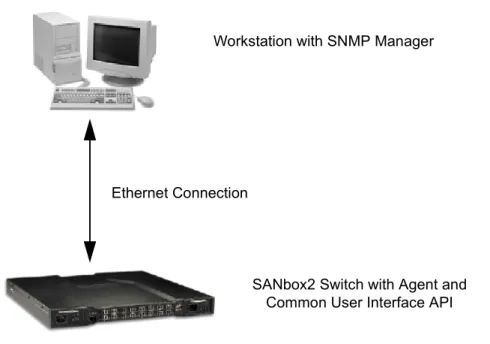
When an SNMP request arrives at the agent, the agent will compose a message and pass it on to Switch Management to process the message and provide a response to the agent. The agent then provides a response to the originator of the SNMP request. The SNMP agent does not have direct access to the internal database of the switch.
Figure 2-1 SNMP Interface Architecture
2.3
Traps
Traps are notification messages sent from the switch to a registered manager when a change of state occurs within the switch. A change of state can be an alarm condition or simply a configuration change.
The Fibre Alliance MIB defines a trap table configurable through SNMP. A trap table may have up to 5 entries, and can be configured using the SNMP Manager or SANbox Manager graphical user interface. The same trap table information is available to both SNMP Manager and SANbox Manager.
A trap event is reported when the incoming error has a severity level less than or equal to the configured severity level. The trap event types and trap severity levels are listed in Table 2-1. Refer to “Trap Table” on page -103 for information on specific traps.
Workstation with SNMP Manager
SANbox2 Switch with Agent and Common User Interface API Ethernet Connection
2.4
Management Information Base
Management information bases (MIBs) define the properties of the managed object within the device to be managed. Every managed device keeps a database of values for each definition written in the MIB. It is not the actual database itself; it is implementation dependant. Definition of the MIB conforms to the Structure of Management Information (SMI) given in Request For Comment (RFC) 1155. The latest Internet MIB is given in RFC 1213, and is sometimes called MIB-II.
2.5
User Datagram Protocol
SANbox2 switches support the following User Datagram Protocol (UDP) settings:
■ Agents “listen” on UDP port 161.
■ Responses are sent back to the originating Network Management Station (NMS) port from a dynamic port, although many agents use port 161 also for this target.
■ The maximum SNMP message size is 65507 octets (maximum UDP
Table 2-1 Trap Severity Levels
Event Type Severity Level
Unknown 1 Emergency 2 Alert 3 Critical 4 Error 5 Warning 6 Notify 7 Info 8 Debug 9 Mark 10
2.6
Numbering System Conventions
The conventions for numbering systems in this guide are as follows:
■ Decimal= 101
■ Hexadecimal= 0x101
This section describes how to configure a SANbox2 switch to support SNMP. The following topics are covered:
■ System specifications and requirements
■ Configuring a switch using the Telnet command line interface
■ Configuring a switch using the SANbox Manager application
3.1
System Specifications and Requirements
■ SANbox2 switches support SNMP versions 1, 2, and 3.
■ Version 2 traps are supported.
■ Hardware - one out-of-band Ethernet connection is required.
■ Software - one switch management software application allows you to:
❑ Monitor and control the switch.
❑ Read, write, and receive trap information, if supported.
■ Ports on the switch reserved for SNMP:
❑ Port 161 is not configurable, and is used for the standard SNMP commands.
❑ Port 162 is configurable and is the default port used for traps.
■ One or more in-band switches can be managed by an out-of-band SANbox2 switch acting as a proxy switch.
■ SANbox2 can only act as a proxy for other SANbox2 switches.
■ SANbox2 proxy capability can be disabled.
3.2
Configuring a Switch Using the Command Line Interface
The Telnet command line interface offers a convenient way to change SNMP parameters. SNMP parameter defaults are preset during manufacturing. For security purposes, these default values should be changed.
To configure a SANbox2 switch using the command line interface, do the following. Press the Enter key to accept the default value for each parameter. cli #> admin start
cli (admin) #> set setup snmp
A list of attributes with formatting and current values will follow.
Enter a new value or simply press the ENTER key to accept the default value.
If you wish to terminate this process before reaching the end of the list
press 'q' or 'Q' and the ENTER key to do so. Trap Severity Options
---unknown, emergency, alert, critical, error, warning, notify, info, debug
Contact (string, max=32 chars) [Customer ] Location (string, max=32 chars) [TheLab ] Trap1Enabled (True / False) [True ]
Trap1Address (dot-notated IP Address) [10.20.71.15 ] Trap1Port (decimal value) [162 ]
Trap1Severity (see allowed options above) [warning ] Trap2Enabled (True / False) [False ] Trap2Address (dot-notated IP Address) [0.0.0.0 ] Trap2Port (decimal value) [162 ] Trap2Severity (see allowed options above) [warning ] Trap3Enabled (True / False) [False ] Trap3Address (dot-notated IP Address) [0.0.0.0 ] Trap3Port (decimal value) [162 ] Trap3Severity (see allowed options above) [warning ] Trap4Enabled (True / False) [False ] Trap4Address (dot-notated IP Address) [0.0.0.0 ] Trap4Port (decimal value) [162 ] Trap4Severity (see allowed options above) [warning ] Trap5Enabled (True / False) [False ] Trap5Address (dot-notated IP Address) [0.0.0.0 ] Trap5Port (decimal value) [162 ] Trap5Severity (see allowed options above) [warning ] ReadCommunity (string, max=32 chars) [public ] WriteCommunity (string, max=32 chars) [private ] TrapCommunity (string, max=32 chars) [public ] AuthFailureTrap (True / False) [False ]
Do you want to save and activate this snmp setup? (y/n) [n] y SNMP setup saved and activated.
3.3
Configuring a Switch Using SANbox Manager
To configure a SANbox2 switch using SANbox Manager, use the Switch
Properties and Network Properties windows. For specific information, refer to the SANbox2 Switch Management User’s Guide, publication number 59022-04.
3.4
Disabling SANbox2 Proxy Capabilities
Below are the steps on how to disable the SANbox2 proxy capabilities. By default, the proxy is enabled (InbandEnabled = True).
SANbox2 #> admin start
SANbox2 (admin) #> config edit
SANbox2 (admin-config) #> set config switch
A list of attributes with formatting and current values will follow. Enter a new value or simply press the ENTER key to accept the current value.
If you wish to terminate this process before reaching the end of the list press 'q' or 'Q' and the ENTER key to do so.
AdminState (1=Online, 2=Offline, 3=Diagnostics)[Online ] BroadcastEnabled True / False)[True ]
InbandEnabled (True / False) [True ] DefaultDomainID (decimal value, 1-239) [101] DomainIDLock (True / False) [True ] SymbolicName (string, max=32 chars) [SANbox2 ] R_T_TOV (decimal value, 1-1000 msec) [100 ] R_A_TOV (decimal value, 100-100000 msec) [10000 ] E_D_TOV (decimal value, 10-20000 msec) [2000 ] FS_TOV (decimal value, 100-100000 msec) [5000 ] DS_TOV (decimal value, 100-100000 msec) [5000 ] PrincipalPriority (decimal value, 1-255) [254 ] ConfigDescription (string, max=64 chars)[QLogicSANbox2 FC Switch] Finished configuring attributes.
This configuration must be saved (see config save command) and activated (see config activate command) before it can take effect. To discard this configuration use the config cancel command. SANbox2 (admin-config) #> config save
SANbox2 (admin) #> config act
The configuration will be activated. Please confirm (y/n): [n] y SANbox2 (admin) #> admin end
This section covers the implementation details for the MIB-II on the SANbox2 switch. A MIB defines the properties of the managed object within the device to be managed. Every managed device keeps a database of values for each definition written in the MIB. It is not the actual database itself; it is implementation
dependant. Definition of the MIB conforms to the SMI given in RFC 1155. The latest Internet MIB is given in RFC 1213, and is sometimes called MIB-II.
4.1
Groups in MIB-II
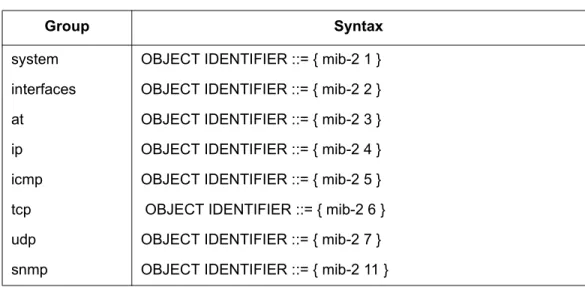
Refer the Table 4-1 for the syntax for MIB-II Groups.
4.2
System Group
Implementation of the System group is mandatory for all systems. If an agent is not configured to have a value for any of these variables, a string of length 0 is returned.
Table 4-1. MIB-II Groups
Group Syntax
system OBJECT IDENTIFIER ::= { mib-2 1 } interfaces OBJECT IDENTIFIER ::= { mib-2 2 } at OBJECT IDENTIFIER ::= { mib-2 3 } ip OBJECT IDENTIFIER ::= { mib-2 4 } icmp OBJECT IDENTIFIER ::= { mib-2 5 } tcp OBJECT IDENTIFIER ::= { mib-2 6 } udp OBJECT IDENTIFIER ::= { mib-2 7 } snmp OBJECT IDENTIFIER ::= { mib-2 11 }
sysDescr (1.3.6.1.2.1.1.1)
A textual description of the entity. This value should include the full name and version identification of the system's hardware type, operating-system, and networking software. It is mandatory that this only contain printable American Standard Code for Information Interchange (ASCII) characters.
Syntax DisplayString (SIZE (0..255)) Access read-only Status Mandatory Return Value
The default for SANbox2-8 and SANbox2-16 is: QLogic SANbox2 FC Switch. The default for SANbox2-64 is: SANbox2-64 FC Switch.
sysObjectID (1.3.6.1.2.1.1.2)
The vendor's authoritative identification of the network management subsystem contained in the entity. This value is allocated within the SMI enterprise subtree (1.3.6.1.4.1) and provides an easy and unambiguous means for determining `what kind of box' is being managed. For example, if vendor `Flintstones, Inc.' was assigned the subtree 1.3.6.1.4.1.4242, it could assign the identifier
1.3.6.1.4.1.4242.1.1 to its `Fred Router'. Syntax OBJECT IDENTIFIER Access read-only Status mandatory Return Value 1.3.6.1.4.1.1663.1.1.1.11
sysUpTime (1.3.6.1.2.1.1.3)
The time, in hundredths of a second, since the network management portion of the system was last reinitialized.
Syntax TimeTicks Access read-only Status mandatory Return Value
The time since last Power On Self Test (POST) was executed (for example, 3 days 21 hours).
sysContact (1.3.6.1.2.1.1.4)
The textual identification of the contact person for this managed Node, together with information on how to contact this person.
Syntax DisplayString (SIZE (0..255)) Access read-write Status mandatory Return Value
sysName (1.3.6.1.2.1.1.5)
An administratively-assigned name for this managed Node. By convention, this is the Node's fully-qualified domain name.
Syntax DisplayString (SIZE (0..255)) Access read-write Status mandatory Return Value
SANbox2-8 returns default SANbox2. SANbox2-16 returns default SANbox2. SANbox2-64 returns default SANbox2-64. Writes not supported.
sysLocation (1.3.6.1.2.1.1.6)
The physical location of this Node, such as telephone closet and 3rd floor. Syntax DisplayString (SIZE (0..255)) Access read-write Status mandatory Return Value
sysServices (1.3.6.1.2.1.1.7)
A value that indicates the set of services that this entity primarily offers.The value is a sum. This sum initially takes the value zero. Then, for each layer L in the range 1 through 7 that this Node performs transactions for, 2 raised to (L - 1) is added to the sum. For example, a Node that performs primarily routing functions would have a value of 4 (2^(3-1)). In contrast, a Node that is a host offering appli-cation services would have a value of 72 (2^(4-1) + 2^(7-1)).
Syntax INTEGER (0..127) Access read-only Status mandatory Return Value
The default is: 2
4.3
The Interfaces Group
Implementation of the Interfaces group is mandatory for all systems.
ifNumber (1.3.6.1.2.1.2.1)
The number of network interfaces (regardless of their current state) present on this system. Syntax INTEGER Access read-only Status mandatory Return Value
4.4
The Interfaces Table
The Interfaces table contains information on the entity's interfaces. Each interface is thought of as being attached to a `subnetwork'. This term should not be
confused with `subnet' which refers to an addressing partitioning scheme used in the Internet suite of protocols.
ifIndex (1.3.6.1.2.1.2.2.1.1)
A unique value for each interface. Its value ranges between 1 and the value of ifNumber. The value for each interface must remain constant at least from one re-initialization of the entity's network management system to the next rere-initialization. Syntax INTEGER Access read-only Status mandatory
ifDescr (1.3.6.1.2.1.2.2.1.2)
A textual string containing information about the interface. This string should include the name of the manufacturer, the product name, and the version of the hardware interface. Syntax DisplayString (SIZE (0..255)) Access read-only Status mandatory
ifType (1.3.6.1.2.1.2.2.1.3)
The type of interface distinguished according to the physical/link protocol(s) immediately `below' the network layer in the protocol stack.
Syntax INTEGER Access read-only Status mandatory
ifMtu (1.3.6.1.2.1.2.2.1.4)
The size of the largest datagram which can be sent/received on the interface, specified in octets. For interfaces that are used for transmitting network
datagrams, this is the size of the largest network datagram that can be sent on the interface. Syntax INTEGER Access read-only Status mandatory
ifSpeed (1.3.6.1.2.1.2.2.1.5)
An estimate of the interface's current bandwidth in bits per second. For interfaces that do not vary in bandwidth or for those where no accurate estimation can be made, this object should contain the nominal bandwidth.
Syntax Gauge Access read-only Status mandatory
ifPhysAddress (1.3.6.1.2.1.2.2.1.6)
The interface's address at the protocol layer immediately “below” the network layer in the protocol stack. For interfaces that do not have such an address, such as a serial line, this object should contain an octet string of zero length.
Syntax
PhysAddress Access
read-only Status
ifAdminStatus (1.3.6.1.2.1.2.2.1.7)
The desired state of the interface. The testing(3) state indicates that no opera-tional packets can be passed.
Syntax INTEGER Access read-write Status mandatory Return Value
Writes not supported.
ifOperStatus (1.3.6.1.2.1.2.2.1.8)
The current operational state of the interface. The testing(3) state indicates that no operational packets can be passed.
Syntax INTEGER Access read-only Status mandatory
ifLastChange (1.3.6.1.2.1.2.2.1.9)
The value of sysUpTime at the time the interface entered its current operational state. If the current state was entered prior to the last reinitialization of the local network management subsystem, then this object contains a zero value.
Syntax TimeTicks Access read-only Status mandatory
ifInOctets (1.3.6.1.2.1.2.2.1.10)
The total number of octets received on the interface, including framing characters. Syntax Counter Access read-only Status mandatory
ifInUcastPkts (1.3.6.1.2.1.2.2.1.11)
The number of subnetwork-unicast packets delivered to a higher-layer protocol. Syntax Counter Access read-only Status mandatory
ifInNUcastPkts (1.3.6.1.2.1.2.2.1.12)
The number of non-unicast (that is, subnetwork- broadcast or subnetwork-multi-cast) packets delivered to a higher-layer protocol.
Syntax Counter Access read-only Status mandatory
ifInDiscards (1.3.6.1.2.1.2.2.1.13)
The number of inbound packets that were chosen to be discarded even though no errors had been detected to prevent their being deliverable to a higher-layer protocol. One possible reason for discarding such a packet could be to free up buffer space. Syntax Counter Access read-only Status mandatory
ifInErrors (1.3.6.1.2.1.2.2.1.14)
The number of inbound packets that contained errors preventing them from being deliverable to a higher-layer protocol.
Syntax Counter Access read-only Status mandatory
ifInUnknownProtos (1.3.6.1.2.1.2.2.1.15)
The number of packets received from the interface that were discarded because of an unknown or unsupported protocol.
Syntax Counter Access read-only Status mandatory
ifOutOctets (1.3.6.1.2.1.2.2.1.16)
The total number of octets transmitted out of the interface, including framing characters. Syntax Counter Access read-only Status mandatory
ifOutUcastPkts (1.3.6.1.2.1.2.2.1.17)
The total number of packets that higher level protocols requested be transmitted to a subnetwork unicast address, including those that were discarded or not sent. Syntax Counter Access read-only Status mandatory
ifOutNUcastPkts (1.3.6.1.2.1.2.2.1.18)
The total number of packets that higher level protocols requested be transmitted to a non-unicast (subnetwork broadcast or subnetwork multicast) address, including those that were discarded or not sent.
Syntax Counter Access read-only Status mandatory
ifOutDiscards (1.3.6.1.2.1.2.2.1.19)
The number of outbound packets that were chosen to be discarded even though no errors had been detected to prevent their being transmitted. One possible reason for discarding such a packet could be to free up buffer space.
Syntax Counter Access read-only Status mandatory
ifOutErrors (1.3.6.1.2.1.2.2.1.20)
The number of outbound packets that could not be transmitted because of errors. Syntax Counter Access read-only Status mandatory
ifOutQLen (1.3.6.1.2.1.2.2.1.21)
The length (in packets) of the output packet queue. Syntax Gauge Access read-only Status mandatory
ifSpecific (1.3.6.1.2.1.2.2.1.22)
A reference to MIB definitions specific to the particular media being used to realize the interface. For example, if the interface is realized by an Ethernet, then the value of this object refers to a document that defines objects specific to Ethernet. If this information is not present, its value should be set to the OBJECT IDENTI-FIER { 0 0 }, which is a syntactically valid object identifier, and any conformant implementation of ASN.1 (Abstract Syntax Notation) and BER must be able to generate and recognize this value.
Syntax OBJECT IDENTIFIER Access read-only Status mandatory 4.5
The Address Translation Group
Implementation of the Address Translation group is mandatory for all systems. However, this group is deprecated by MIB-II. That is, it is being included solely for compatibility with MIB-I Nodes, and will most likely be excluded from MIB-III Nodes. From MIB-II and onwards, each network protocol group contains its own address translation tables.
The Address Translation group contains one table which is the union across all interfaces of the translation tables for converting a NetworkAddress (for example, an IP address) into a subnetwork-specific address. For lack of a better term, this document refers to such a subnetwork-specific address as a `physical' address. Examples of such translation tables are for: broadcast media where ARP is in use, the translation table is equivalent to the ARP cache, or on an X.25 network where non-algorithmic translation to X.121 addresses is required. The translation table contains the NetworkAddress to X.121 address equivalences.
atIfIndex (1.3.6.1.2.1.3.1.1.1)
The interface on which this entry's equivalence is effective. The interface identi-fied by a particular value of this index is the same interface as identiidenti-fied by the same value of ifIndex.
Syntax INTEGER Access read-write Status deprecated
atPhysAddress (1.3.6.1.2.1.3.1.1.2)
The media-dependent “physical” address. Setting this object to a null string (one of zero length) has the effect of invalidating the corresponding entry in the atTable object. That is, it effectively disassociates the interface identified with the entry from the mapping identified with the entry. It is an implementation-specific matter as to whether the agent removes an invalidated entry from the table. Accordingly, management workstations must be prepared to receive tabular information from agents that corresponds to entries not currently in use. Proper interpretation of such entries requires examination of the relevant atPhysAddress object.
Syntax PhysAddress Access read-write Status deprecated
atNetAddress (1.3.6.1.2.1.3.1.1.3)
The NetworkAddress corresponding to the media-dependent `physical' address. Syntax NetworkAddress Access read-write Status deprecated
4.6
The IP Group
Implementation of the IP group is mandatory for all systems.
ipForwarding (1.3.6.1.2.1.4.1)
The indication of whether this entity is acting as an IP Gateway with respect to the forwarding of datagrams received by, but not addressed to, this entity. IP
Gateways forward datagrams; IP hosts do not (except those source-routed from the host).
For some managed Nodes, this object may take on only a subset of the values possible. Accordingly, it is appropriate for an agent to return a “badValue” response if a management station attempts to change this object to an inappropriate value. Syntax INTEGER Access read-write Status mandatory Return Value
Returns not-forwarding (2). Writes not supported.
ipDefaultTTL (1.3.6.1.2.1.4.2)
The default value inserted into the Time-To-Live field of the IP header of
datagrams originated at this entity whenever a TTL value is not supplied by the transport layer protocol.
Syntax INTEGER Access read-write Status mandatory
ipInReceives (1.3.6.1.2.1.4.3)
The total number of input datagrams received from interfaces, including those received in error. Syntax Counter Access read-only Status mandatory
ipInHdrErrors (1.3.6.1.2.1.4.4)
The number of input datagrams discarded due to errors in their IP headers. These include bad checksums, version number mismatch, other format errors, time-to-live exceeded, and errors discovered in processing their IP options.
Syntax Counter Access read-only Status mandatory
ipInAddrErrors (1.3.6.1.2.1.4.5)
The number of input datagrams discarded because the IP address in their IP header's destination field was not a valid address to be received at this entity. This count includes invalid addresses (for example, 0.0.0.0) and addresses of unsup-ported Classes (for example, Class E). For entities which are not IP Gateways and therefore do not forward datagrams, this counter includes datagrams discarded because the destination address was not a local address. Syntax Counter Access read-only Status mandatory
ipForwDatagrams (1.3.6.1.2.1.4.6)
The number of input datagrams for which this entity was not their final IP destina-tion. As a result, an attempt was made to find a route to forward them to that final destination. In entities that do not act as IP Gateways, this counter will include only those packets that were Source Routed from this entity, and the Source Route option processing was successful.
Syntax Counter Access read-only Status mandatory
ipInUnknownProtos (1.3.6.1.2.1.4.7)
The number of locally-addressed datagrams received successfully but discarded because of an unknown or unsupported protocol.
Syntax Counter Access read-only Status mandatory
ipInDiscards (1.3.6.1.2.1.4.8)
The number of input IP datagrams for which no problems were encountered to prevent their continued processing, but which were discarded (for example, for lack of buffer space). This counter does not include any datagrams discarded while awaiting reassembly.
Syntax Counter Access
ipInDelivers (1.3.6.1.2.1.4.9)
The total number of input datagrams successfully delivered to IP user protocols (including ICMP). Syntax Counter Access read-only Status mandatory
ipOutRequests (1.3.6.1.2.1.4.10)
The total number of IP datagrams that local IP user protocols (including ICMP) supplied to IP in requests for transmission. This counter does not include any datagrams counted in ipForwDatagrams.
Syntax Counter Access read-only Status mandatory
ipOutDiscards (1.3.6.1.2.1.4.11)
The number of output IP datagrams for which no problem was encountered to prevent their transmission to their destination, but which were discarded (for example, for lack of buffer space). This counter would include datagrams counted in ipForwDatagrams if any such packets met this (discretionary) discard criterion. Syntax Counter Access read-only Status mandatory
ipOutNoRoutes (1.3.6.1.2.1.4.12)
The number of IP datagrams discarded because no route could be found to transmit them to their destination. This counter includes any packets counted in ipForwDatagrams which meet this “no-route” criterion. This includes any
datagrams that a host cannot route because all of its default gateways are down. Syntax Counter Access read-only Status mandatory
ipReasmTimeout (1.3.6.1.2.1.4.13)
The maximum number of seconds which received fragments are held while they are awaiting reassembly at this entity.
Syntax INTEGER Access read-only Status mandatory
ipReasmReqds (1.3.6.1.2.1.4.14)
The number of IP fragments received that needed to be reassembled at this entity. Syntax Counter Access read-only Status mandatory
ipReasmOKs (1.3.6.1.2.1.4.15)
The number of IP datagrams successfully reassembled. Syntax Counter Access read-only Status mandatory
ipReasmFails (1.3.6.1.2.1.4.16)
The number of failures detected by the IP reassembly algorithm for example, timed out, errors). This is not necessarily a count of discarded IP fragments, since some algorithms (notably the algorithm in RFC 815) can lose track of the number of fragments by combining them as they are received.
Syntax Counter Access read-only Status mandatory
ipFragOKs (1.3.6.1.2.1.4.17)
The number of IP datagrams that have been successfully fragmented at this entity. Syntax Counter Access read-only Status mandatory
ipFragFails (1.3.6.1.2.1.4.18)
The number of IP datagrams that have been discarded because they needed to be fragmented at this entity, but could not because their Don't Fragment flag was set. Syntax Counter Access read-only Status mandatory
ipFragCreates (1.3.6.1.2.1.4.19)
The number of IP datagram fragments that have been generated as a result of fragmentation at this entity.
Syntax Counter Access read-only Status mandatory 4.7
The IP Address Table
The IP address table contains this entity's IP addressing information.
ipAdEntAddr (1.3.6.1.2.1.4.20.1.1)
The IP address to which this entry's addressing information pertains. Syntax
IpAddress Access
read-only Status
ipAdEntIfIndex (1.3.6.1.2.1.4.20.1.2)
The index value which uniquely identifies the interface to which this entry is appli-cable. The interface identified by a particular value of this index is the same inter-face as identified by the same value of ifIndex.
Syntax INTEGER Access read-only Status mandatory
ipAdEntNetMask (1.3.6.1.2.1.4.20.1.3)
The subnet mask associated with the IP address of this entry. The value of the mask is an IP address with all the network bits set to 1 and all the hosts bits set to 0. Syntax IpAddress Access read-only Status mandatory
ipAdEntBcastAddr (1.3.6.1.2.1.4.20.1.4)
The value of the least-significant bit in the IP broadcast address used for sending datagrams on the (logical) interface associated with the IP address of this entry. For example, when the Internet standard all-ones broadcast address is used, the value will be 1. This value applies to both the subnet and network broadcasts addresses used by the entity on this (logical) interface.
Syntax INTEGER Access read-only Status mandatory
ipAdEntReasmMaxSize (1.3.6.1.2.1.4.20.1.5)
The size of the largest IP datagram which this entity can reassemble from incoming IP fragmented datagrams received on this interface.
Syntax INTEGER (0..65535) Access read-only Status mandatory 4.8
The IP Routing Table
The IP routing table contains an entry for each route presently known to this entity.
ipRouteDest (1.3.6.1.2.1.4.21.1.1)
The destination IP address of this route. An entry with a value of 0.0.0.0 is consid-ered a default route. Multiple routes to a single destination can appear in the table, but access to such multiple entries is dependent on the table-access mechanisms defined by the network management protocol in use.
Syntax IpAddress Access read-write Status mandatory Return Value
ipRouteIfIndex (1.3.6.1.2.1.4.21.1.2)
The index value which uniquely identifies the local interface through which the next hop of this route should be reached. The interface identified by a particular value of this index is the same interface as identified by the same value of ifIndex. Syntax INTEGER Access read-write Status mandatory Return Value
Writes not supported.
ipRouteMetric1 (1.3.6.1.2.1.4.21.1.3)
The primary routing metric for this route. The semantics of this metric are deter-mined by the routing protocol specified in the route's ipRouteProto value. If this metric is not used, its value should be set to -1.
Syntax INTEGER Access read-write Status mandatory Return Value
ipRouteMetric2 (1.3.6.1.2.1.4.21.1.4)
An alternate routing metric for this route. The semantics of this metric are deter-mined by the routing protocol specified in the route's ipRouteProto value. If this metric is not used, its value should be set to -1.
Syntax INTEGER Access read-write Status mandatory Return Value
Writes not supported.
ipRouteMetric3 (1.3.6.1.2.1.4.21.1.5)
An alternate routing metric for this route. The semantics of this metric are deter-mined by the routing protocol specified in the route's ipRouteProto value. If this metric is not used, its value should be set to -1.
Syntax INTEGER Access read-write Status mandatory Return Value
ipRouteMetric4 (1.3.6.1.2.1.4.21.1.6)
An alternate routing metric for this route. The semantics of this metric are deter-mined by the routing protocol specified in the route's ipRouteProto value. If this metric is not used, its value should be set to -1.
Syntax INTEGER Access read-write Status mandatory Return Value
Writes not supported.
ipRouteNextHop (1.3.6.1.2.1.4.21.1.7)
The IP address of the next hop of this route. In the case of a route bound to an interface which is realized from a broadcast media, the value of this field is the agent's IP address on that interface.
Syntax IpAddress Access read-write Status mandatory Return Value
ipRouteType (1.3.6.1.2.1.4.21.1.8)
The type of route. The values direct(3) and indirect(4) refer to the notion of direct and indirect routing in the IP architecture. Setting this object to the value invalid(2) has the effect of invalidating the corresponding entry in the ipRouteTable object. That is, it effectively disassociates the destination identified with the entry from the route identified with the entry. It is an implementation-specific matter as to whether the agent removes an invalidated entry from the table. Accordingly, management stations must be prepared to receive tabular information from agents that corre-sponds to entries not currently in use. Proper interpretation of such entries requires examination of the relevant ipRouteType object.
Syntax INTEGER Access read-write Status mandatory Return Value
Writes not supported.
ipRouteProto (1.3.6.1.2.1.4.21.1.9)
The routing mechanism through which this route was learned. Inclusion of values for gateway routing protocols is not intended to imply that hosts should support those protocols. Syntax INTEGER Access read-only Status mandatory
ipRouteAge (1.3.6.1.2.1.4.21.1.10)
The number of seconds since this route was last updated or otherwise determined to be correct. No semantics of `too old' can be implied except through knowledge of the routing protocol by which the route was learned.
Syntax INTEGER Access read-write Status mandatory Return Value
Writes not supported.
ipRouteMask (1.3.6.1.2.1.4.21.1.11)
Indicate the mask to be logical-ANDed with the destination address before being compared to the value in the ipRouteDest field.
Syntax IpAddress Access read-write Status mandatory Return Value
ipRouteMetric5 (1.3.6.1.2.1.4.21.1.12)
An alternate routing metric for this route. The semantics of this metric are deter-mined by the routing-protocol specified in the route's ipRouteProto value. If this metric is not used, its value should be set to -1.
Syntax INTEGER Access read-write Status mandatory Return Value
Writes not supported.
ipRouteInfo (1.3.6.1.2.1.4.21.1.13)
A reference to MIB definitions specific to the particular routing protocol which is responsible for this route, as determined by the value specified in the route's ipRouteProto value. If this information is not present, its value should be set to the OBJECT IDENTIFIER { 0 0 }, which is a syntactically valid object identifier. Any conformant implementation of ASN.1 and BER must be able to generate and recognize this value.
Syntax OBJECT IDENTIFIER Access read-only Status mandatory
4.9
The IP Address Translation Table
The IP address translation table contain the IpAddress to`physical' address equivalences. Some interfaces do not use translation tables for determining address equivalences (for example, DDN-X.25 has an algorithmic method). If all interfaces are of this type, then the Address Translation table is empty, that is, has zero entries.
ipNetToMediaIfIndex (1.3.6.1.2.1.4.22.1.1)
The interface on which this entry's equivalence is effective. The interface identi-fied by a particular value of this index is the same interface as identiidenti-fied by the same value of ifIndex.
Syntax INTEGER Access read-write Status mandatory Return Value
Writes not supported.
ipNetToMediaPhysAddress (1.3.6.1.2.1.4.22.1.2)
The media-dependent `physical' address.Syntax PhysAddress Access read-write Status mandatory Return Value
ipNetToMediaNetAddress (1.3.6.1.2.1.4.22.1.3)
The IpAddress corresponding to the media-dependent `physical' address. Syntax IpAddress Access read-write Status mandatory Return Value
Writes not supported.
ipNetToMediaType (1.3.6.1.2.1.4.22.1.4)
The type of mapping. Setting this object to the value invalid(2) has the effect of invalidating the corresponding entry in the ipNetToMediaTable. That is, it effec-tively disassociates the interface identified with the entry from the mapping identi-fied with the entry. It is an implementation-specific matter as to whether the agent removes an invalidated entry from the table. Accordingly, management stations must be prepared to receive tabular information from agents that corresponds to entries not currently in use. Proper interpretation of such entries requires exami-nation of the relevant ipNetToMediaType object.
Syntax INTEGER Access read-write Status mandatory Return Value
4.10
Additional IP Objects
Following are the additional IP objects.
ipRoutingDiscards (1.3.6.1.2.1.4.23)
The number of routing entries which were chosen to be discarded even though they are valid. One possible reason for discarding such an entry could be to free-up buffer space for other routing entries.
Syntax Counter Access read-only Status mandatory 4.11
The ICMP Group
Implementation of the ICMP group is mandatory for all systems.
icmpInMsgs (1.3.6.1.2.1.5.1)
The total number of ICMP messages received by the entity. This counter includes all those counted by icmpInErrors.
Syntax Counter Access read-only Status mandatory
icmpInErrors (1.3.6.1.2.1.5.2)
The number of ICMP messages received by the entity but were determined as having ICMP-specific errors (such as, bad ICMP checksums, bad length). Syntax Counter Access read-only Status mandatory
icmpInDestUnreachs (1.3.6.1.2.1.5.3)
The number of ICMP Destination Unreachable messages received. Syntax Counter Access read-only Status mandatory
icmpInTimeExcds (1.3.6.1.2.1.5.4)
The number of ICMP Time Exceeded messages received. Syntax Counter Access read-only Status mandatory
icmpInParmProbs (1.3.6.1.2.1.5.5)
The number of ICMP Parameter Problem messages received. Syntax Counter Access read-only Status mandatory
icmpInSrcQuenchs (1.3.6.1.2.1.5.6)
The number of ICMP Source Quench messages received. Syntax Counter Access read-only Status mandatory
icmpInRedirects (1.3.6.1.2.1.5.7)
The number of ICMP Redirect messages received. Syntax Counter Access read-only Status mandatory
icmpInEchos (1.3.6.1.2.1.5.8)
The number of ICMP Echo (request) messages received. Syntax Counter Access read-only Status mandatory
icmpInEchoReps (1.3.6.1.2.1.5.9)
The number of ICMP Echo Reply messages received. Syntax Counter Access read-only Status mandatory
icmpInTimestamps (1.3.6.1.2.1.5.10)
The number of ICMP Timestamp (request) messages received. Syntax Counter Access read-only Status mandatory
icmpInTimestampReps (1.3.6.1.2.1.5.11)
The number of ICMP Timestamp Reply messages received. Syntax Counter Access read-only Status mandatory
icmpInAddrMasks (1.3.6.1.2.1.5.12)
The number of ICMP Address Mask Request messages received. Syntax Counter Access read-only Status mandatory
icmpInAddrMaskReps (1.3.6.1.2.1.5.13)
The number of ICMP Address Mask Reply messages received. Syntax Counter Access read-only Status mandatory
icmpOutMsgs (1.3.6.1.2.1.5.14)
The total number of ICMP messages which this entity attempted to send. This counter includes all those counted by icmpOutErrors.
Syntax Counter Access read-only Status mandatory
icmpOutErrors (1.3.6.1.2.1.5.15)
The number of ICMP messages which this entity did not send due to problems discovered within ICMP, such as a lack of buffers. This value should not include errors discovered outside the ICMP layer such as the inability of IP to route the resultant datagram. In some implementations, there may be no types of errors which contribute to this counter's value.
Syntax Counter Access read-only Status mandatory
icmpOutDestUnreachs (1.3.6.1.2.1.5.16)
The number of ICMP Destination Unreachable messages sent. Syntax Counter Access read-only Status mandatory
icmpOutTimeExcds (1.3.6.1.2.1.5.17)
The number of ICMP Time Exceeded messages sent. Syntax Counter Access read-only Status mandatory
icmpOutParmProbs (1.3.6.1.2.1.5.18)
The number of ICMP Parameter Problem messages sent. Syntax Counter Access read-only Status mandatory
icmpOutSrcQuenchs (1.3.6.1.2.1.5.19)
The number of ICMP Source Quench messages sent. Syntax Counter Access read-only Status mandatory
icmpOutRedirects (1.3.6.1.2.1.5.20)
The number of ICMP Redirect messages sent. For a host, this object will always be zero, since hosts do not send redirects.
Syntax Counter Access read-only Status mandatory
icmpOutEchos (1.3.6.1.2.1.5.21)
The number of ICMP Echo (request) messages sent. Syntax Counter Access read-only Status mandatory
icmpOutEchoReps (1.3.6.1.2.1.5.22)
The number of ICMP Echo Reply messages sent. Syntax Counter Access read-only Status mandatory
icmpOutTimestamps (1.3.6.1.2.1.5.23)
The number of ICMP Timestamp (request) messages sent. Syntax Counter Access read-only Status mandatory
icmpOutTimestampReps (1.3.6.1.2.1.5.24)
The number of ICMP Timestamp Reply messages sent. Syntax
icmpOutAddrMasks (1.3.6.1.2.1.5.25)
The number of ICMP Address Mask Request messages sent. Syntax Counter Access read-only Status mandatory
icmpOutAddrMaskReps (1.3.6.1.2.1.5.26)
The number of ICMP Address Mask Reply messages sent. Syntax Counter Access read-only Status mandatory 4.12
The TCP Group
Implementation of the TCP group is mandatory for all systems that implement the TCP. Instances of object types that represent information about a particular TCP connection are transient; they persist only as long as the connection in question.
tcpRtoAlgorithm (1.3.6.1.2.1.6.1)
The algorithm used to determine the timeout value used for retransmitting unacknowledged octets. Syntax INTEGER Access read-only Status mandatory
tcpRtoMin (1.3.6.1.2.1.6.2)
The minimum value permitted by a TCP implementation for the retransmission timeout, measured in milliseconds. More refined semantics for objects of this type depend upon the algorithm used to determine the retransmission timeout. In particular, when the timeout algorithm is rsre(3), an object of this type has the semantics of the LBOUND quantity described in RFC 793.
Syntax INTEGER Access read-only Status mandatory
tcpRtoMax (1.3.6.1.2.1.6.3)
The maximum value permitted by a TCP implementation for the retransmission timeout, measured in milliseconds. More refined semantics for objects of this type depend upon the algorithm used to determine the retransmission timeout. In particular, when the timeout algorithm is rsre(3), an object of this type has the semantics of the UBOUND quantity described in RFC 793.
Syntax INTEGER Access read-only Status mandatory
tcpMaxConn (1.3.6.1.2.1.6.4)
The limit on the total number of TCP connections the entity can support. In entities where the maximum number of connections is dynamic, this object should contain the value -1.
Syntax INTEGER Access
tcpActiveOpens (1.3.6.1.2.1.6.5)
The number of times TCP connections have made a direct transition to the SYN-SENT state from the CLOSED state.
Syntax Counter Access read-only Status mandatory
tcpPassiveOpens (1.3.6.1.2.1.6.6)
The number of times TCP connections have made a direct transition to the SYN-RCVD state from the LISTEN state.
Syntax Counter Access read-only Status mandatory
tcpAttemptFails (1.3.6.1.2.1.6.7)
The number of times TCP connections have made a direct transition to the CLOSED state from either the SYN-SENT state or the SYN-RCVD state, plus the number of times TCP connections have made a direct transition to the LISTEN state from the SYN-RCVD state.
Syntax Counter Access read-only Status mandatory
tcpEstabResets (1.3.6.1.2.1.6.8)
The number of times TCP connections have made a direct transition to the CLOSED state from either the ESTABLISHED state or the CLOSE-WAIT state. Syntax Counter Access read-only Status mandatory
tcpCurrEstab (1.3.6.1.2.1.6.9)
The number of TCP connections for which the current state is either ESTAB-LISHED or CLOSE-WAIT. Syntax Gauge Access read-only Status mandatory
tcpInSegs (1.3.6.1.2.1.6.10)
The total number of segments received, including those received in error. This count includes segments received on currently established connections. Syntax Counter Access read-only Status mandatory
tcpOutSegs (1.3.6.1.2.1.6.11)
The total number of segments sent including those on current connections, but excluding those containing only retransmitted octets.
Syntax Counter Access read-only Status mandatory
tcpRetransSegs (1.3.6.1.2.1.6.12)
The total number of segments retransmitted. That is, the number of TCP segments transmitted containing one or more previously transmitted octets. Syntax Counter Access read-only Status mandatory
4.13
The TCP Connection Table
The TCP connection table contains information about this entity's existing TCP connections.
tcpConnState (1.3.6.1.2.1.6.13.1.1)
The state of this TCP connection. The only value which may be set by a manage-ment station is deleteTCB(12). Accordingly, it is appropriate for an agent to return a “badValue” response if a management station attempts to set this object to any other value.
If a management station sets this object to the value deleteTCB(12), then this has the effect of deleting the TCB (as defined in RFC 793) of the corresponding connection on the managed Node. The result is an immediate termination of the connection. Syntax INTEGER Access read-write Status mandatory Return Value
Writes not supported.
tcpConnLocalAddress (1.3.6.1.2.1.6.13.1.2)
The local IP address for this TCP connection. In the case of a connection in the listen state which is willing to accept connections for any IP interface associated with the Node, the value 0.0.0.0 is used.
Syntax IpAddress Access read-only Status mandatory
tcpConnLocalPort (1.3.6.1.2.1.6.13.1.3)
The local port number for this TCP connection. Syntax INTEGER (0..65535) Access read-only Status mandatory
tcpConnRemAddress (1.3.6.1.2.1.6.13.1.4)
The remote IP address for this TCP connection. Syntax IpAddress Access read-only Status mandatorytcpConnRemPort (1.3.6.1.2.1.6.13.1.5)
The remote port number for this TCP connection. Syntax INTEGER (0..65535) Access read-only Status mandatory
4.14
Additional TCP Objects
Following are the additional TCP objects.
tcpInErrs (1.3.6.1.2.1.6.14)
The total number of segments received in error (for example, bad TCP check-sums). Syntax Counter Access read-only Status mandatory
tcpOutRsts (1.3.6.1.2.1.6.15)
The number of TCP segments sent containing the RST flag. Syntax Counter Access read-only Status mandatory
4.15
The UDP Group
Implementation of the UDP group is mandatory for all systems which implement the UDP.
udpInDatagrams (1.3.6.1.2.1.7.1)
The total number of UDP datagrams delivered to UDP users. Syntax Counter Access read-only Status mandatory
udpNoPorts (1.3.6.1.2.1.7.2)
The total number of received UDP datagrams for which there was no application at the destination port.
Syntax Counter Access read-only Status mandatory
udpInErrors (1.3.6.1.2.1.7.3)
The number of received UDP datagrams that could not be delivered for reasons other than the lack of an application at the destination port.
Syntax Counter Access read-only Status mandatory
udpOutDatagrams (1.3.6.1.2.1.7.4)
The total number of UDP datagrams sent from this entity. Syntax Counter Access read-only Status mandatory 4.16
The UDP Listener Table
The UDP listener table contains information about this entity's UDP end-points on which a local application is currently accepting datagrams.
udpLocalAddress (1.3.6.1.2.1.7.5.1.1)
The local IP address for this UDP listener. In the case of a UDP listener which is willing to accept datagrams for any IP interface associated with the Node, the value 0.0.0.0 is used. Syntax IpAddress Access read-only Status mandatory
udpLocalPort (1.3.6.1.2.1.7.5.1.2)
The local port number for this UDP listener. Syntax
INTEGER (0..65535) Access
read-only Status
4.17
The EGP Group
Implementation of the EGP group is mandatory for all systems which implement the EGP.
egpInMsgs (1.3.6.1.2.1.8.1)
The number of EGP messages received without error. Syntax Counter Access read-only Status mandatory
egpInErrors (1.3.6.1.2.1.8.2)
The number of EGP messages received that proved to be in error. Syntax Counter Access read-only Status mandatory
egpOutMsgs (1.3.6.1.2.1.8.3)
The total number of locally generated EGP messages. Syntax Counter Access read-only Status mandatory
egpOutErrors (1.3.6.1.2.1.8.4)
The number of locally generated EGP messages not sent due to resource limita-tions within an EGP entity.
Syntax Counter Access read-only Status mandatory 4.18
The EGP Neighbor Table
The EGP neighbor table contains information about this entity's EGP neighbors.
egpNeighState (1.3.6.1.2.1.8.5.1.1)
The EGP state of the local system with respect to this entry's EGP neighbor. Each EGP state is represented by a value that is one greater than the numerical value associated with the state in RFC 904.
Syntax INTEGER Access read-only Status mandatory
egpNeighAddr (1.3.6.1.2.1.8.5.1.2)
The IP address of this entry's EGP neighbor. Syntax
IpAddress Access
read-only Status
egpNeighAs (1.3.6.1.2.1.8.5.1.3)
The autonomous system of this EGP peer. Zero should be specified if the autono-mous system number of the neighbor is not yet known.
Syntax INTEGER Access read-only Status mandatory
egpNeighInMsgs (1.3.6.1.2.1.8.5.1.4)
The number of EGP messages received without error from this EGP peer. Syntax Counter Access read-only Status mandatory
egpNeighInErrs (1.3.6.1.2.1.8.5.1.5)
The number of EGP messages received from this EGP peer that proved to be in error (for example, bad EGP checksum).
Syntax Counter Access read-only Status mandatory
egpNeighOutMsgs (1.3.6.1.2.1.8.5.1.6)
The number of locally generated EGP messages to this EGP peer. Syntax Counter Access read-only Status mandatory
egpNeighOutErrs (1.3.6.1.2.1.8.5.1.7)
The number of locally generated EGP messages not sent to this EGP peer due to resource limitations within an EGP entity.
Syntax Counter Access read-only Status mandatory
egpNeighInErrMsgs (1.3.6.1.2.1.8.5.1.8)
The number of EGP-defined error messages received from this EGP peer. Syntax Counter Access read-only Status mandatory
egpNeighOutErrMsgs (1.3.6.1.2.1.8.5.1.9)
The number of EGP-defined error messages sent to this EGP peer. Syntax Counter Access read-only Status mandatory
egpNeighStateUps (1.3.6.1.2.1.8.5.1.10)
The number of EGP state transitions to the UP state with this EGP peer. Syntax
egpNeighStateDowns (1.3.6.1.2.1.8.5.1.11)
The number of EGP state transitions from the UP state to any other state with this EGP peer. Syntax Counter Access read-only Status mandatory
egpNeighIntervalHello (1.3.6.1.2.1.8.5.1.12)
The interval between EGP Hello command retransmissions, in hundredths of a second. This represents the t1 timer as defined in RFC 904.
Syntax INTEGER Access read-only Status mandatory
egpNeighIntervalPoll (1.3.6.1.2.1.8.5.1.13)
The interval between EGP poll command retransmissions, in hundredths of a second. This represents the t3 timer as defined in RFC 904.
Syntax INTEGER Access read-only Status mandatory
egpNeighMode (1.3.6.1.2.1.8.5.1.14)
The polling mode of this EGP entity, either passive or active. Syntax
INTEGER { active(1), passive(2) } Access
read-only Status
mandatory
egpNeighEventTrigger (1.3.6.1.2.1.8.5.1.15)
A control variable used to trigger operator-initiated Start and Stop events. When read, this variable always returns the most recent value that egpNeighEvent-Trigger was set to. If it has not been set since the last initialization of the network management subsystem on the Node, it returns a value of “stop”.
When set, this variable causes a Start or Stop event on the specified neighbor, as specified on pages 8-10 of RFC 904. Briefly, a Start event causes an Idle peer to begin neighbor acquisition and a non-Idle peer to reinitiate neighbor acquisition. A stop event causes a non-Idle peer to return to the Idle state until a Start event occurs, either by egpNeighEventTrigger or otherwise.
Syntax
INTEGER { start(1), stop(2) } Access
read-write Status
mandatory
egpAs (1.3.6.1.2.1.8.6)
The autonomous system number of this EGP entity. Syntax
INTEGER Access
4.19
The Transmission Group
Based on the transmission media underlying each interface on a system, the corresponding portion of the Transmission group is mandatory for that system. When Internet-standard definitions for managing transmission media are defined, the transmission group is used to provide a prefix for the names of those objects. Typically, such definitions reside in the experimental portion of the MIB until they are "proven", then as a part of the Internet standardization process, the definitions are accordingly elevated and a new object identifier, under the transmission group is defined. By convention, the name assigned is:
type OBJECT IDENTIFIER ::= { transmission number }.
Where "type" is the symbolic value used for the media in the ifType column of the ifTable object, and "number" is the actual integer value corresponding to the symbol.
4.20
The SNMP Group
Implementation of the SNMP group is mandatory for all systems which support an SNMP protocol entity. Some of the objects defined below will be zero-valued in those SNMP implementations that are optimized to support only those functions specific to either a management agent or a management station. In particular, it should be observed that the objects below refer to an SNMP entity, and there may be several SNMP entities residing on a managed Node.
snmpInPkts (1.3.6.1.2.1.11.1)
The total number of messages delivered to the SNMP entity from the transport service. Syntax Counter Access read-only Status mandatory
snmpOutPkts (1.3.6.1.2.1.11.2)
The total number of SNMP messages passed from the SNMP protocol entity to the transport service.
Syntax Counter Access read-only Status mandatory
snmpInBadVersions (1.3.6.1.2.1.11.3)
The total number of SNMP messages delivered to the SNMP protocol entity and were for an unsupported SNMP version.
Syntax Counter Access read-only Status mandatory
snmpInBadCommunityNames (1.3.6.1.2.1.11.4)
The total number of SNMP messages delivered to the SNMP protocol entity which used a SNMP community name not known to the entity.
Syntax Counter Access read-only Status mandatory