Effects of cognitive aptitude on
the initial performance on a
laparoscopic simulator
Thomas Utesch
Bachelor Thesis
Behavioural Sciences
Cognitive Psychology and Ergonomics
Examination Committee
First Supervisor: Dr. M. Noordzij
Second Supervisor: Dr. M. Groenier
Abstract
Aim: Laparoscopic surgery is getting more and more important. Compared with open surgery there are several advantages of laparoscopic surgery for instance fewer complications and a decreased postoperative hospital stay. Especially important during the initial learning phase of surgeons are cognitive abilities. They can be trained and tested on virtual reality simulators for laparoscopic surgery. In the current study the relationship between cognitive abilities and performance on a laparoscopic simulator is examined. It is expected that visuo-spatial ability and spatial memory are the best predictors for initial performance on a laparoscopic simulator. The findings could be used to develop training and assessment for surgeons, which consequently could decrease complications during laparoscopic surgery.
Method: 28 participants had to do cognitive aptitude tests on a computer to measure visuo-spatial ability, spatial memory, reasoning ability and processing speed. After that participants had up to 6 session of 30 minutes time on a virtual reality simulator for laparoscopic surgery. They had to pass two tasks on the simulator (“cutting” and “clip applying”). For the data-analyses different regression analyses were performed.
Results: Processing speed has the highest correlation with performance. On the cutting task there is a significant correlation between processing speed and tissue damage. The correlations between visuo-spatial ability and visuo-spatial memory with the dependent variables of performance are weak.
Discussion: The cognitive abilities had only limited predicting values in this study. The best predictors were processing speed and reasoning ability. The expectations could not be confirmed. Visuo-spatial ability and spatial memory had only weak a relation with performance. It is possible that the results are mediated by technical problems with the simulator. The results show that the relations between cognitive abilities and performance on a simulator are complex. It is necessary to do more research on this topic in order to develop suitable assessment and training for surgeons.
Table of Contents
Abstract...2
Introduction ...4
Method ...9
Materials ...9
Procedure...15
Data-‐analyses ...16
Results... 17
Linear Regression...17
Multiple Regression...23
Discussion ... 25
Referentielijst ...Error! Bookmark not defined. Appendix ... 32
[image:3.595.72.523.144.354.2]
Introduction
Nowadays surgeons use minimally invasive surgery to a greater extent than ever before. In the past ten years there has been a remarkable increase in the usage of minimally invasive surgery and this development is ongoing in the future (Lee-Kong & Feingold, 2013). Therefore research on this kind of surgery is getting more and more important.
One kind of minimally invasive surgery is laparoscopic surgery. In this kind of surgery a small incision near the navel is made for the surgical equipment such as scissors or tools for cauterization as well as a laparoscope with a camera (Zadeh & Daftary, 2004, Luursema, Buzink, Verwey & Jakimowicz, 2012). The pictures made by this camera are displayed on a monitor. Via this monitor the surgeon is getting insight into the tissue and the target area (NICE, 2004). Handling the instruments, camera and display at the same time is difficult and leads to problems with for example the hand-eye coordination and navigation during the surgery (Gallagher & Smith, 2003). Research has shown that learning and training of minimally invasive surgery is more difficult than for open surgery. Additionally research indicates that there could be a relation between the learning curve and the surgeon’s cognitive abilities (Gallagher & Smith, 2003). The results of this study could be very useful in the future as they can be used to develop tools for training or selection and assessment of surgeons in minimally invasive surgery (Carroll, Kennedy, Traynor & Gallagher, 2009).
Minimally invasive surgery differs from open surgery in several ways and it has got some advantages compared to open surgery. The postoperative hospital stay after a laparoscopic surgery is up to 32 percent shorter than after an open surgery. Furthermore there are no special preparations necessary before the operation, for this reason the total stay in the hospital is also shorter. Relating to mortality and morbidity no difference has been detected (Veldkamp, 2005; King, 2006). Using minimally invasive surgery also less postoperative complications and infections arise (Aziz, 2006). Last but not least patients describe laparoscopic surgery as quite acceptable ( King, 2006).
surgery. During laparoscopic surgery complications with the equipment can occur, for example when the camera or the display is not properly working. Furthermore there are perceptual problems which do not occur in open surgery. They arise mainly through the fact that surgeons have to work with the 2D monitor image during the surgery. The surgeons have to interpret this picture made by a single camera source and translate it into 3D information. Usually depth is created by the two different views of the eyes, called binocular information. Missing this depth information, the display contributes to the spatial problems of the surgeon. Furthermore the fact that the surgeon has to view on the monitor which displays the surgery in a different perspective and magnification makes the hand – eye coordination much more difficult, which can lead to complications (Gallagher & Smith, 2003). Besides that, one of the main problems is the fulcrum effect created by the body wall. A movement to the left side is displayed as a movement to the right, which leads to disorientation (Gallagher & Smith, 2003). So a paradoxical movement can occur. In addition tactile and haptic feedback are missing. Those problems are making the surgery more difficult and can lead to complications if they are not handled in a right way (Gallagher & Smith, 2003).
Even though there are spatial problems and difficult circumstances during minimally invasive surgery, surgeons can be trained and get more experienced so that they would make fewer mistakes. Therefore it is important to improve introduction, selection and assessment of surgeons. The aim of this study is to understand the learning processes. From investigation we know that 90% of the complications occur during the first 30 minimally-invasive surgeries of a surgeon (The Southern Surgeons Club, 1995). Training for open operations happens mostly in the operation room. Beginners observe surgeries of professionals. After they have observed for several times, they are allowed to perform surgery on their own (Ahlberg et al., 2007). Ahlberg et.al (2007) stated that this way to train open surgery is inadequate for minimally invasive surgery. This is due to the fact that surgeons cannot learn to handle the special circumstances of minimally invasive surgery through observation, because they only see what is happening on the display. This way they cannot get a sensation about how deal with special problems like the fulcrum effect (Ahlberg et al, 2007).
in a standard way. Additionally the mean number of errors occurring during a surgery is significantly greater when people are trained in the standard way then via the simulator. Using those simulators it can be seen that the learning process and performance times to reach expertise are much faster for open surgery than for laparoscopic surgery (Spaun, Zheng, Martinec, Arnold, Swenstroem, 2010). This can also be seen in the learning curves of surgical trainees. Novice surgeons are getting faster and making fewer mistakes after they have done several training sessions on a simulator (Voitk, 2001). Simulators are a good possibility to train surgeons and they are valid to measure the performance of surgeons. For this reason in this study we also use virtual reality simulators.
Although the simulator gives good guidance to practice laparoscopic surgery there are differences how fast people reach a professional level of minimally invasive surgery (Seymor et al., 2002, Gallagher et al., 2003). One reason for those differences can be personal cognitive abilities (Gallagher et al., 2003). There are several studies performed on this topic. A meta analysis of Maan et al., (2012) shows that the effects of cognitive abilities on surgical performance is not clearly investigated until now. This study will concentrate on four cognitive factors which contribute to the performance on the virtual reality simulator showing laparoscopic surgery to a great extent. These are: visuo-spatial ability, spatial memory, reasoning ability and processing speed. Visuo-spatial ability describes the capability to rotate or change mental representations. There is evidence that the visuo-spatial ability of a person affects the performance on the virtual reality simulator (Luursema, Buzink, Verwey & Jakomiwicz, 2010; Ritter, McClusky, Gallagher, Enochsson & Smith, 2006). Luursema et al. (2010) have shown that the visuo-spatial ability can be a predictor for performance on the simulator. It has influence on the duration of the training, the motion efficacy and the damage. Visuo-spatial ability has different aspects (Luursema et al., 2010).
et al., 2007). Spatial memory is closely associated with spatial relations. Conrad et al. (2006) investigated that the abilities for spatial memories are lower when at the same time abilities of spatial relations are affected. During a laparoscopic surgery this can happen when the camera axes are changing (Conrad et al., 2006). The third cognitive factor is perceptual speed. Perceptual speed means the ability to compare things quickly and to identify if they are equal. Perceptual speed seems to influence the learning process of complex tasks which need a high level of speed and precision (Ackerman & Beier, 2007; Luursema, 2010). Furthermore, reasoning ability is a part of the cognitive abilities affecting the performance during laparoscopic surgery. Beginners seem to be affected by this ability in a greater extend because the influence is decreasing with training (Keehner et al., 2006). Therefore it could be expected that beginners with a lower reasoning ability would make more mistakes. We know from investigation that results on this topic are influenced by whether the different cognitive abilities are analyzed on their own, or the effect is measured while some cognitive abilities are working together.
Some of the cognitive abilities are part of the same construct like visuo-spatial ability and spatial memory (Conrad et al., 2006). Therefore it is necessary to measure that. As we have seen from analyzes, the effect of some of those cognitive abilities decreases with more practice (Keehner et al., 2006). Furthermore we know that most of the errors occurring during laparoscopic surgery are happening during the first sessions of a surgeon (Gallagher & Smith, 2003). For this reason the current study is focusing on the first session on the simulator. This is also important for selection and assessment of surgeons. To predict the performance during this first session on the simulator we know from previous studies that two factors seems to have a high influence. Firstly visuo-spatial ability seems to be a crucial factor for beginners. Proven by a lot of studies, the effect reduces with more practice (Luursema, 2010; Keeher, 2006; Luursema, 2012). Secondly spatial memory is an important factor. Spatial memory seems to correlate with the performance of beginners on the simulator (Luursema, 2010). For this reason the aim of this study is to predict the initial performance on a virtual reality simulator with cognitive ability tests measuring the visuo-spatial and spatial ability.
visuo-spatial ability mediates the results in duration and motion efficacy but not in damage. Another study from Luursema et al. (2012) investigated a relation between visuo-spatial ability in damage and motion efficacy. Different studies searching for influence of spatial memory found same controversial results. Hanluck (2002) found a correlation between visual memory and performance during minimally-invasive surgery. Those results are contradictory to the conclusion of a study from Wenzel (2002) who found no correlations. In recent studies Luursema (2010; 2012) showed a relation between spatial memory and the initial performance on a laparoscopic surgery task. Groenier et al. (2013) confirmed those findings. Corrected for the influence of other cognitive variables, spatial memory seems to influence the damage during a simulated laparoscopic surgery. Due to these controversial findings it is even more important to validate the correlation between cognitive abilities and performance.
speed both studies used the same identical pictures test (Ekstrom et al., 1976; Groenier, 2013, Luursema, 2012), that is why this test is adopted in the current study. The reasoning ability will be measured with the Raven progressives Matrices Advanced (Raven, 1965) used by Groenier (2013).
Knowing the results from former studies, we expect that visuo-spatial ability and spatial memory are the best predictors of initial performance of the first session. Furthermore we expect 1) a correlation between visuo-spatial ability, duration and motion efficacy during the first session and 2) a correlation between spatial memory and the initial performance of damage and motion efficacy.
Method
Participants
28 students of the University of Twente participated in this experiment. 3 were male, 25 were female. The mean age was 22 (range 19-24). Two of them were left-handed and 9 of the participants reported that they had corrected to normal vision. The participants had no prior experience with laparoscopic surgery. 10 participants reported that they had done a cognitive ability test before. All participants signed an informed consent document (appendix A).
Materials1
Cognitive ability tests
The cognitive abilities tests were adapted computer versions of paper and pen tests. All tests are programed in E-Prime 2.0, except the PicSor test that ran in a separate program.
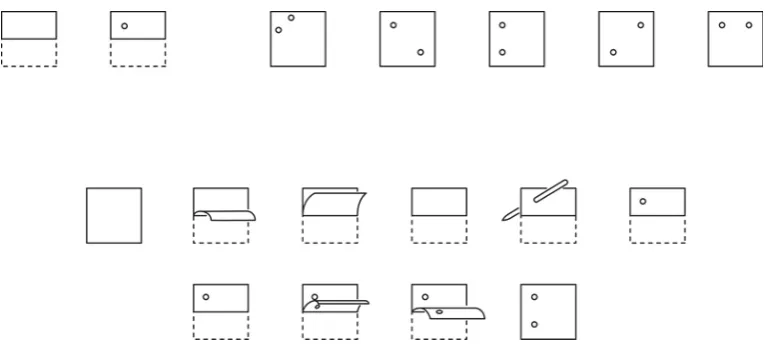
Reasoning ability was measured with Raven’s Progressive Matrices (Raven, 1965). In this case we made use of the advanced version of the test. In every trail of this test there were 8 symbols which differ from each other by an underlined rule. The participants had to understand this rule and choose one of the 8 symbols which would fit according to this rule.
1Manual
First there were two practice exercises, than the actual test run with 18 exercises with a time limit of 60 seconds per trail. An example is given in Figure 1.
[image:10.595.158.382.125.375.2]
Figure 1: Raven’s Progressive Matrices
[image:10.595.106.492.571.747.2]Spatial relations was measured with the Mental Rotation Test (Vandenberg & Kuse, 1978). In this test participants saw two three-dimensional figures consisting of several cubes. The figures are rotated vertically. The participants had to decide whether the figures are identical or whether there exist two different figures. The answer was recorded with a button press on a keyboard, if the figures were different they had to press button v (“verschillend”), if they were equal button z (“zelfde”) had to be pressed. An example is given in Figure 3. The participants had to practice 16 trails with feedback, 96 exercises followed without feedback.
[image:11.595.172.420.293.431.2]
Figure 3: Mental rotation Test
Spatial memory ability was measured with the Corsi Block Tapping Test (Corsi, 1972). During this test participants had to remember a sequence of 4 up to 9 blocks in different positions lighting up, turning their color from grey to red (Figure 4). After the last square lighted up the participants had to click on the squares in the same order they lighted up in the sequence previously. There were 20 sequences.
[image:11.595.210.391.602.744.2]
Perceptual speed was measured with the Identical Pictures tests (Ekstrom et al., 1976). In this test participants had to compare one figure on the left side with 5 figures on the right side and to identify quickly which of those 5 figures is equal to the one on the other side. The figure could be chosen with a click of the mouse cursor on it. The figures were hand drawn and showed for example a face or a house. Participants got 5 practice trails with feedback followed by 96 exercises divided into two blocks. Each block had a total time limit of 90 seconds. An example is given in Figure 5.
Figure 5: Identical Pictures Test
Spatial relations was also measured with the Rotating shape test (Cooper, 1975). In this test participants had to rotate figures mentally, but the figures were only two- dimensional and had random outlines. In the same way like in the Mental Rotation Test participants had to press the keyboard buttons v and z after they had decided whether the figures are equal or not. There were six practice trials, followed by 4 blocks of 32 experimental trials with a time limit of 4 seconds per trail. Figure 6 shows two rotating shapes.
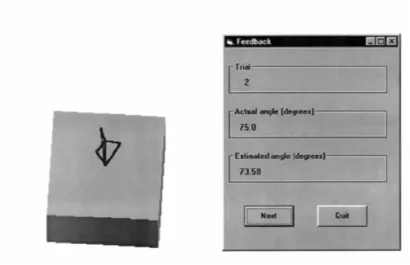
participants had to move the arrowhead with the keys “up” and “down” on the keyboard to adjust the position of the arrowhead until the arrow stood perpendicular to the surface of the rotated cube. They had to confirm the position by pressing “Enter” (Figure 7). After the participants could practice 4 trails with feedback they had to do the exercise version consisting of 35 trails.
Figure 7: PicSor Test
Simulator task
The aim of the cutting task was to grasp a blood vessel, cut different sections of it and release them in a target area. To grasp the vessel the participants had to use a “grasper” with their left hand and to cut different sections of the vessel with “ultrasonic scissors” with the right hand and by pressing a pedal (shown in Figure 8). If this was done successfully the participant was able to move the sections and release them in a target area. The laparoscopic camera was controlled automatically via the computer. When the participant had excised and released 4 sections the task was finished. The participants received feedback of their performance in different categories for example total time, drop failure, stretch damage and whether they had passed the task or not.
Figure 8:Cutting task
Figure 9: Clip applying task
Procedure
questions if something was unclear. He could also assist if something was not properly working.
Data-analyses
Results
For the analyses of the cognitive abilities tests the composite score of the four variables “visuo-spatial ability” (M=0,426, SD =0,19), “spatial memory” (M=0,42, SD=0,16), “reasoning ability” (M=0,37, SD=0,17) and “processing speed” (M=0,88, SD=0,08) were used. It seems to be that the distribution of the values in the sample is an approximation of the normal distribution. For an example of the distribution see appendix B. Nevertheless it has to be mentioned, that the sample is not representative for the whole population, because the study is done only among psychology students.
It was checked if there is a difference between the performance of the people who started with the cutting task and those who started with the clipping task. At first it was thought about a t-test, but this was neglected because the majority (24 people) started with the cutting task. For this reason no correction was done. The regression analyses of the tasks were done with all 28 participants, if nothing different is mentioned. At first there were linear regressions done with only one predictor. Secondly there were multiple regressions performed with all predictors together. I decided to report the most relevant results and numbers according to Field (2009).
Linear Regression
Cutting task
Time
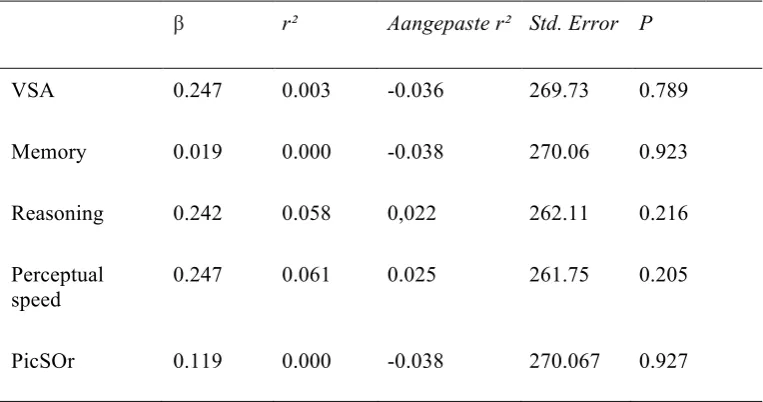
Tabel 1.
Cutting Task – Time
β r² Aangepaste r² Std. Error P
VSA 0.247 0.003 -0.036 269.73 0.789 Memory 0.019 0.000 -0.038 270.06 0.923 Reasoning 0.242 0.058 0,022 262.11 0.216 Perceptual
speed
0.247 0.061 0.025 261.75 0.205 PicSOr 0.119 0.000 -0.038 270.067 0.927
Motion
Tabel 2.
Cutting Task – Motion efficacy
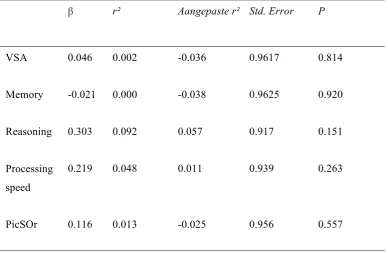
β r² Aangepaste r² Std. Error P
VSA 0.046 0.002 -0.036 0.9617 0.814 Memory -0.021 0.000 -0.038 0.9625 0.920 Reasoning 0.303 0.092 0.057 0.917 0.151 Processing
speed
0.219 0.048 0.011 0.939 0.263
PicSOr 0.116 0.013 -0.025 0.956 0.557
Tissue damage
Tabel 3
Cutting Task – Tissue Damage
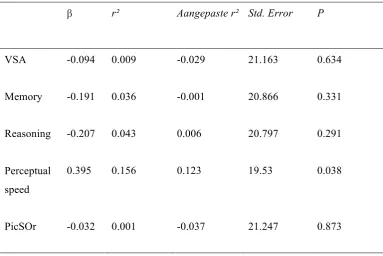
β r² Aangepaste r² Std. Error P
VSA -0.094 0.009 -0.029 21.163 0.634 Memory -0.191 0.036 -0.001 20.866 0.331 Reasoning -0.207 0.043 0.006 20.797 0.291 Perceptual
speed
0.395 0.156 0.123 19.53 0.038
PicSOr -0.032 0.001 -0.037 21.247 0.873
Clip applying task
Time
Tabel 4
Clip Applying Task – Time
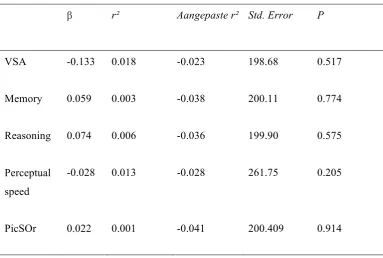
β r² Aangepaste r² Std. Error P
VSA -0.133 0.018 -0.023 198.68 0.517 Memory 0.059 0.003 -0.038 200.11 0.774 Reasoning 0.074 0.006 -0.036 199.90 0.575 Perceptual
speed
-0.028 0.013 -0.028 261.75 0.205
PicSOr 0.022 0.001 -0.041 200.409 0.914
Motion
Tabel 5
Clip Applying Task – motion efficacy
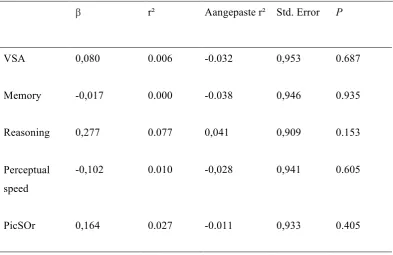
β r² Aangepaste r² Std. Error P
VSA 0,080 0.006 -0.032 0,953 0.687 Memory -0,017 0.000 -0.038 0,946 0.935 Reasoning 0,277 0.077 0,041 0,909 0.153 Perceptual
speed
-0,102 0.010 -0,028 0,941 0.605
PicSOr 0,164 0.027 -0.011 0,933 0.405
Damage (badly dropped clips)
Tabel 6
Clip Applying Task – bad clips
β r² Aangepaste r² Std. Error P
VSA 0.088 0.008 -0.030 1.041 0.657 Memory 0.009 0.000 -0.038 1.046 0.962 Reasoning -0.139 0.019 -0.018 1.036 0.481 Perceptual
speed
0.311 0.097 0.062 0.994 0.188
PicSOr 0.148 0.022 -0.016 1.03 0.453
During the study an error occurred with the LapSim simulator. For this reason it is possible that the data of the first 11 was influenced by this error. Additionally to the analyses mentioned above, the linear regressions for the clip applying task were performed with the participants, who have done the study after this problem was solved (n=15). The results are not as expected better, but even less siginificant. Only one relation showed to increase. This was between Perceptual speed and the amount of bad clips (r²= 0,326, β =-0,051, p =0,052).
Multiple Regression
Tabel 7
Multiple regression Cutting Task - damage
Methode Beta Stand. Beta T P
Enter (Constant) -81.639 -1.798 0.086
VSA -22.352 -0.204 -1.524 0.142
Memory -41.753 -0.315 -0.478 0.637
Reasoning -13.274 -0.108 -0.743 0.465
Perceptual speed 140.452 0.552 2.719 0.013
PicSOr 17.491 0.150 0.656 0.519
Note: R: 0,561
Differencecores
To check whether the results are mediated through problems during the first trail on the simulator the analyses are also with difference scores between the first trail on the first session, and the last trail on the first session. There are again simple and multiple regressions done. The results are often like the results of the values from the first trail. There is only one significant correlation between perceptual speed and damage (b=143,381, β= 0,601 , p=0,043). The R = 0,582, gives the value of the corellation coefficent between all cognitive prerdictors together and the outcome differencesore of damage during the cutting task. The best results gives the multiple regression with all predicting variables and the difference score of damage during the cutting task. There results are given in table 8.
Tabel 8
Multiple regression Differencescores Cutting Task - Damage
Methode Beta Stand. Beta T P
[image:24.595.62.534.629.753.2]Discussion
The purpose of this study was to find out how cognitive aptitude tests can predict the initial performance on a virtual reality simulator for laparscopic surgery. One aim was that this information could be used to develop assessment, selection and training for surgeons. The assumption was that the cognitive aptitude variables visuo-spatial ability and spatial memory were the best predictors of the initial performance (Luursema et al., 2010; Ritteret al., 2006). Especially two strong relations have been expected: between visuo-spatial ability and the dependent variables duration and motion efficiency and between spatial memory and the dependent variables damage and motion efficacy. Those expectations were not confirmed with this study. The analyses show that there are few significant correlations between the cognitive aptitude tests and the dependent variables of initial performance. For the cutting task three dependent variables were measured: duration, motion efficacy and tissue damage. The relation between all the dependent variables with visuo-spatial ability is only weak. This means that visuo-spatial ability had no predicting value in the framework of this study. This is a contrast to the findings of Luursema et al. (2010) who found out that visuo-spatial ability can predict the performance on a virtual reality simulator. From further investigation we now that the effect of visuo-spatial memory decreases with more learning (Conrad et al., 2006). For this reason it was expected that visuo-spatial ability would have a strong influence during the first session.
two variables. In the framework of this study other variables had more predicting values than visuo-spatial ability and spatial memory. This was especially perceptual speed.
Both, duration and tissue damage, have the strongest relation with perceptual speed perceptual. The relation between perceptual speed, measured with the identical pictures test, is the only significant relation in the framework of this study. That means to a limited extend, in this study the result of the identical picture test predicted the tissue damage performance during the cutting task. That is interesting in this respect because the investigation showed that perceptual speed is especially an important factor during the learning process and influences the learning curve (Ackerman & Beier, 2007: Luursema, 2010). For this reason we did not expect that perceptual speed would be the best predictor for the initial performance on the cutting task.
The best predictor for motion efficacy was the score of the reasoning ability test, Raven’s Progressive Matrices. This fact underlines the findings of Keehner et al. (2006), who found a effect of reasoning ability among novice which decreases with more learning. The best predictor for damage, measured with badly dropped clips was the score of the PicSor test.
participants and influenced the results.
References
Ahn, L., Workman J., The role of The role of experience in performance on spatial tests: Comparison of students and professionals. International Journal of Fashion Design, Technology and Education (5), 187-193.
Ahlberg, G., Enochsson, L., Gallagher, A. G., Hedman, L., Hogman, C., McClusky, D. A., et al. (2007). Prociency-based virtual reality training signi?cantly reduces theerror rate for residents during their first 10 laparoscopic cholecystectomies. The American Journal of Surgery, 193 (6), 797–804.
Aziz, O., Constantinides, V., Tekkis, P. P., Athanasiou, T., Purkayastha, S., Paraskeva, P., Heriot, A. (2006). Laparoscopic versus open surgery for rectal cancer: a meta-analysis. Ann Surg Oncol, 13(3), 413-424.
Carroll, S. M., Kennedy, A. M., Traynor, O., & Gallagher, A. G. (2009). Objective assessment of surgicalperformance and its impact on a national selection programme of candidates for higher surgical training in plastic surgery. Journal of Plastic, Reconstructive & Aesthetic Surgery, 62,
1543–1549.
Corsi, P. M. (1972). Human memory and the medial temporal region of the brain. Dissertation Abstracts International, 34, 819B.
Conrad, J., Shah, A. H., Divino, C. M., Schluender, S., Gurland, B., Shlasko, E., & Szold, A. (2006). The role of mental rotation and memory scanning on the performance of laparoscopic skills: a study on the effect of camera rotational angle. Surg Endosc, 20(3), 504-510.
Ekstrom, R. B., French, J. W., Harman, H. H., & Dermen, D. (1976). Manual for kit of factor-referenced cognitive test. Princeton, NJ: Educational Testing Service.
Feldman, L. S., Sherman, V., & Fried, G. M. (2004). Using simulators to assess laparoscopic competence: Ready for widespread use? Surgery, 135, 28–42.
Field, A. P. (2009). Discovering statistics using SPSS: and sex and drugs and rock 'n' roll (3rd edition). London: Sage.
Gallagher, A. G., & Smith, C. D. (2003). Human factors lessons learned from the minimally invasive surgery revolution.Surgical Innovation, 10,127-139.
Groenier, M., Schraagen, J. M., Miedema, H. A., & Broeders, I. A. (2013). The role of cognitive abilities in laparoscopic simulator training. Adv Health Sci Educ Theory Pract.
Van Herzeele I, O’Donoghue KG, Aggarwal R, Vermassen F, Darzi A, Cheshire NJ. (2010). Visuospatial and psychomotor aptitude predicts endovascular performance of inexperienced individuals on a virtual reality simulator. J VascSurg 2010; 51: 1035–1042.
Haluck, R. S., Gallagher, A. G., Satava, R. M., Webster, R., Bass, T. L., & Miller, C. A. (2002). Reliability and validity of Endotower, a virtual reality trainer for angled endoscope navigation.
Studies in Health Technology andInformatics, 85, 179-184.
Keehner, M., Lippa, Y., Montello, D. R., Tendick, F., & Hegarty, M. (2006). Learning a spatial skill or surgery: how the contributions of abilities change with practice. Applied Cognitive Psychology, 20(4), 487-503.
King, P. M., Blazeby, J. M., Ewings, P., Franks, P. J., Longman, R. J., Kendrick, A. H., Kennedy, R. (2006). Randomized clinical trial comparing laparoscopic and open surgery for colorectal cancer within an enhanced recovery programme. Br J Surg, 93(3), 300-308.
Lee-Kong S, Feingold D. (2003) The history of minimally invasive surgery. Seminars in Colon and Rectal Surgery 24(1):3-6.
Luursema, J. M., Buzink, S. N., Verwey, W. B., & Jakomiwicz, J. J. (2010). Visuo-spatial ability in colonoscopy simulator training. Advances in Health Sciences Education, 15 (5), 685–694. Luursema, J.-M., Verwey, W. B., & Burie, R. (2012). Visuospatial ability factors and performance
variables in laparoscopic simulator training. Learning and Individual Differences (5), 147-157.
Maan, Z. N., Maan, I.N., Darzil, A.W., Aggarwal, R., (2012). Systematic review of predictors of surgical performance. British Journal of Surgery 99, 1610-1621.
National institute for clinical excellence (2004) Laparoscopic surgery for inguinal hernia repair.
London
O’neil, R. L., Skeel, R.L., Ustinova, K. L., Cognitive ability predicts motor learning on a virtual reality game in patients with TBI (2013). NeuroRehabilitation (33), 667 - 680.
Raven, J. C. (1965). Advanced Progressive Matrices. Sets I and II. London: H. K. Lewis & Co. San Antonio,Texas.
Ritter, E. M., McClusky, D. A., 3rd, Gallagher, A. G., Enochsson, L., & Smith, C. D. (2006). Perceptual, visuospatial, and psychomotor abilities correlate with duration of training required on a virtual-reality flexible endoscopy simulator. Am J Surg, 192(3), 379-384.
Schijven M.P., Jakimowicz J.J., Broeders I.A.M.J., Tseng L.N.L., (2005).The Eindhoven laparoscopic cholecystectomy training course--improving operating room performance using virtual reality raining: results from the first E.A.E.S. accredited virtual reality trainings curriculum. SURG ENDOSC ;19 (9):1220-1226.
Seymour N.E., Gallagher A.G., Roman S.A., O'Brien M.K., Bansal V.K., Andersen D.K., et al. (2002).Virtual reality training improves operating room performance: results of a randomized, double-blinded study. Ann Surg Oct;236(4):458-63.
Spaun GO, Zheng B, Martinec DV, Arnold BN, Swanstrom LL (2010). A comparison of early learning curves for complex bimanual coordination with open, laparoscopic, and flexible endoscopic instrumentation. Surg Endosc 24:2145–2155.
Stefanidis, D., Scerbo, M. W., Korndorffer, J. R., Jr., & Scott, D. J. (2007). Redefining simulator proficiency using automaticity theory. Am J Surg, 193(4), 502-506.
Vandenberg, S. G., & Kuse, A. R. (1978). Mental rotations, a group test of threedimensional spatial visualization. Perceptual and Motor Skills, 47, 599–601.
van Dongen, K. W., Ahlberg, G., Bonavina, L., Carter, F. J., Grantcharov, T. P., Hyltander, A., . . . Broeders, I. A. (2011). European consensus on a competency-based virtual reality training program for basic endoscopic surgical psychomotor skills. Surg Endosc, 25(1), 166-171. Veldkamp, R. K. E., Kuhry, E., Hop, W.C.J., Jeekel, J., Kazemier, G., Bonjer, H.J., Haglind, E.,
Påhlman, L., Cuesta, M.A., Msika, S., Morino, M., & Lacy, A.M. (2005). Laparoscopic surgery versus open surgery for colon cancer: short-term outcomes of a randomised trial. The Lancet Oncology, 6(7), 477-484.
Voitk, A. J., Tsao, S. G. S., & Ignatius, S. (2001). The tail of the learning curve for laparoscopic c holecystectomy. The American Journal of Surgery, 182(3), 250-253.
Wanzel, K. R., Hamstra, S. J., Anastakis, D. J., Matsumoto, E. D., & Cusimano, M.
D. (2002). Effect of visual-spatial ability on learning of spatially-complex surgical skills. The lancet, 359 (9302), 230-231.
Wanzel KR, Hamstra SJ, Caminiti MF, Anastakis DJ, Grober ED, Reznick RK. (2003). Visual–spatial ability correlates with efficiency of hand motion and successful surgical performance.
Surgery 2003; 134: 750–757.
Yiasemidou M., Glassman D., Vasas P., Badiani S., Patel B. (2011). Faster simu lated laparoscopic cholecystectomy with haptic feedback technology. Open Access Surgery 4; 39-44.
Zadeh H.H.,Daftary F. (2004). Minimally invasive surgery: an alternative approach forperiodontal andimplant reconstruction. JCalifDent Assoc.32(12):1022-103.
Appendix A
Manual for the
‘Validation of the Twente Endsocopic
Skills Test’ study
April 2014
Marleen Groenier1 Patrick Henn2 Simon Smith2 Anthony Gallagher2
1 University of Twente
Department of Technical Medicine
2 University College of Cork
Requirements
Prior to testing make sure that the conditions listed below are satisfied. Make sure that you have reserved the pc room and the lapsim room.
For the demographics questionnaire:
1. Check the internet connection and a web browser (e.g. Internet Explorer).
For the cognitive aptitude test battery:
1. Check that the runtime version of E-‐prime (called E-‐Run) installed on the desktop:
a. If E-‐run is not installed:
b. Click on the Windows logo on the bottom left in the taskbar. c. Select E-‐prime from the list of programs and click once. d. Select E-‐run and right click.
e. Select ‘Send to’.
f. Select ‘Desktop (create shortcut)’.
2. Check that the PiCSor test program is installed on the desktop:
a. If the program is not installed or not working properly: b. Go to the D-‐drive (via Windows logo -‐> Computer). c. Open the folder ‘Validatie TEST’.
d. Open the folder ‘Win9x’. e. Open the folder ‘Dist’.
f. Double click on the ‘setup’ file with the extension ‘Application’. g. The installation program for PicSOr starts:
i. Click on ‘OK’
ii. Click on the setup icon (top left of the setup screen) iii. Click on ‘Yes’
iv. Click on ‘Yes’ v. Click on ‘Ignore’ vi. Click on ‘OK’
For the laparoscopic simulator tasks:
1. Pick up the key to the simulator room from the ECTM desk or ask the assistant to let you in the room. If you get the key, make sure to activate it (ask desk assistant for instructions).
Study Purpose and Design
The purpose of the current study is to examine the relationship between cognitive attributes and performance of basic laparoscopic tasks on a simulator. Participants are: 1) technical-medical students, biotechnical-medical students or psychology students 2) who have no prior
experience in performing laparoscopy or with performing laparoscopic tasks on a simulator. The study consists of two parts across two consecutive days:
1. A cognitive attributes test battery of approximately 45 minutes;
2. Practice of basic laparoscopic tasks on a virtual reality (VR) simulator for a maximum of six sessions lasting 30 minutes each and 5 minute breaks in between.
Timeline of the study
On the first day, the cognitive attributes test battery is administered and there are three
practice sessions on the VR simulator. Together, the cognitive attributes tests and the practice sessions last about 2.5 hours. On the second day, there are the remaining three sessions on the simulator, lasting about 2.5 hours as well. However, if a participant reaches a certain
predefined level on the laparoscopic tasks before the last session, practice is terminated. See the figure below for a schematic representation of the study’s procedure. This means that the exact duration of the study depends on how quickly a participant reaches a certain level on the laparoscopic tasks.
Figure 1. Schematic representation of the study timeline.
Below, you will find more information on the cognitive aptitude test battery and the laparoscopic tasks on the simulator.
[image:38.595.66.424.373.631.2]laparoscopic tasks. Some of these tests require a high level of accuracy, others require a speeded response. Each test has a certain time limit.
Virtual Reality laparoscopic tasks
Two basic laparoscopic tasks are practiced on a virtual reality simulator (the LapSim Surgical Science simulator). The tasks are part of the laparoscopic cholecystectomy procedure,
Running the experiment
Prior to the experiment
Make sure you bring an information leaflet so you are able to answer questions that the participant might have.
Make sure you have enough copies of the informed consent form (see Appendix A) and some extra ones in case someone makes a mistakes and needs to fill out a new form.
Make sure you know which participant number to assign to the current participant(s).
Make sure you are present at least half an hour before the participant starts the experiment to check whether the equipment is working.
Participant anonymity
As soon as a participant agrees to take part in the study, he or she is assigned a participant number. This number will be the linking code between the personal information of each participant and the actual data, such as the scores on the cognitive aptitude tests and
performance measures on the simulator. This code will be used instead of, say, a participants name to guarantee participant anonymity. In data analysis the test scores are combined with the performance scores of each participant through this code.
Make sure that each participant receives a unique number. Keep track which numbers have already been used! This number needs to be filled out by the participant on several occasions:
• The informed consent form • The demographics questionnaire
• The cognitive aptitude test battery. Note: for the PiCSor test participants cannot fill out the
participant number themselves, this has to be saved in the filename of the PiCSor file by the experiment leader (i.e. you).
• The LapSim simulator
Informed consent
First, participants sign an informed consent form. THIS IS VERY IMPORTANT! Every participant needs to sign an informed consent form prior to starting the study. If a student does not want to sign the informed consent form, he or she cannot participate in the study! An example of the informed consent form can be found in Appendix A.
Make sure you have enough copies of the informed consent form available. Also, make sure that you fill out the participant number on each informed consent form.
Demographics questionnaire
Second, participants fill in an online demographics questionnaire. This questionnaire contains questions about:
• Participant number • Gender
• Video gaming experience
• Prior experience with cognitive aptitude testing
The questionnaire is supported by Survey Monkey. You can access the questionnaire as follows:
1. Open a web browser, e.g. Internet Explorer
2. Type in the address: http://www.surveymonkey.com/s/validatieTEST 3. Press Enter
4. The questionnaire starts (check whether it opens in a new window). You should see the screen displayed in figure 2.
Figure 2. Screenshot demographics questionnaire in SurveyMonkey.
After the participant finished the demographics questionnaire, proceed with the cognitive aptitude test battery, see next chapter.
Instructions for the participant
Make sure that the participant is sitting comfortably behind the computer. Adjust chair height or screen position if necessary. Give the following instructions to the participant:
This study consists of several parts, as explained in the information leaflet. First, I need you to sign an informed consent form. [Give informed consent form and make sure that participant signs it. Write down participant number on form.] Next is a demographics questionnaire asking about personal information, such as your age and handedness. This is an online questionnaire and only takes about two minutes to fill in. After that, the TEST battery will start. The TEST battery consists of two parts. The first part will last about 45 minutes, the second part lasts about 5 minutes. You will receive additional instructions as soon as you start the first and second part, either on the screen or from me. Do you have any questions thus far? [Participant starts with the demographics questionnaire.]
[image:41.595.65.527.222.451.2]The Twente Endsocopic Skills Test (TEST)
The TEST battery consists of two parts and each part runs in a separate program. The first part of the TEST battery runs in a program called E-prime. E-prime is a licensed program (see http://www.pstnet.com/eprime.cfm) and specifically developed to design psychological experiments. Once you’ve confirmed that the correct runtime version of E-prime is installed on the pc (see chapter Requirements), you are ready to start the first part of the TEST battery. The first part of the TEST battery lasts about 45 minutes.
1. Start up computer(s).
2. Log in with your own account.
3. Click on the Windows logo in the menu on the left bottom part of the screen. 4. Fill in at Search programs and files: Truecrypt.
5. Open the Truecrypt program 6. Select the drive letter “T:” 7. Click on ‘select file’. 8. Click on the C-drive. 9. Open the “TGfiles” folder. 10.Open the “TG-CVT 2013” folder. 11.Select the file ‘TG-CVT 2013.dmp’. 12.Click on ‘mount’.
13.Select ‘display password’.
14.Fill in the password: =4TG-C0gn1t13v3-V-T3st!
15.Minimalise the TrueCrypt window and close all other windows.
16.Double click on the E-run icon on the desktop.
17.If you get an error message (cannot find file or something like it), just ignore and click it away.
18.Click on ‘browse folder’ (see red square below):
21.Select the file: “pre_TEST V2 UT – NL”. This file has a Script extension. Click on ‘open’.
22. Now give the participant the following instructions:
This TEST battery consists of two parts: the first part lasts about 45 minutes and the second part about 5 minutes. The TEST battery measures several cognitive abilities that are related to learning basic laparoscopic tasks. The abilities measured are: visuo-‐spatial ability, working memory, reasoning, speed of information processing and perceptual ability. The goal of this research is to find out which of these abilities best predicts performance on a laparoscopic simulator. This will help to assess and select surgeons in the future.
The first part of the TEST battery consists of several subtests. Each test starts with instructions on the screen and one or more practice or sample exercises. Each of the tests in the first part of the TEST battery have a certain time limit which will announced in the instruction on the screen. Please read these instructions carefully and if anything is unclear just ask me.
It is important to work as fast and as accurate as possible. Some tests or exercises might be more difficult than others, please try to complete as many exercises as possible. This will increase the reliability of your results and the assessment of your actual ability.
I will be around to assist you if needed.
23. Click on ‘Run’.
24. The start-‐up screen of the cognitive aptitude test battery in E-‐prime should now open asking for the participant number.
25. Make sure the participant fills in the correct participant number (see the informed consent form that was filled in) and continues with the first part of the cognitive aptitude test battery.
You can give technical assistance during the test, however, feedback on a participants performance is not allowed. For example, if a participant asks ‘Is this the correct way to solve the exercise?’ you can reply ‘Try to perform at the best of your abilities.’
After the last exercise of the first part of the TEST battery a ‘thank you’ screen will appear. The participant is asked to call for the assistant and when the spacebar is pressed, the participant leaves the program and the test results are automatically saved.
The PiCSor test
The second part of the TEST battery is the PiCSor test which runs in a programming environment specifically designed for this test.
1. Go to the ‘Desktop’.
2. Double click on the PicSOr icon: 3. Select ‘Practice’ at Run type.
4. Select ‘Cube and arrow’ at Experiment.
5. Now give the following instructions to the participant (see also Appendix C):
This is the second part of the TEST battery. The PicSOr test measures perceptual ability. This test measures your ability to assess depth in a 3-‐dimensional picture. On each exercise, you will see a cube tilted at a certain angle. The point of a spinning arrowhead is touching the surface of the cube. You adjust the arrow until its shaft is perpendicular to the cube’s surface at the point where they touch. The actual angle of the tilted cube is compared to your estimated angle as indicated by the positioning of the arrowhead’s shaft.
You can use the ‘up’ and ‘down’ arrow keys on your keyboard to adjust the shaft of the spinning arrow. You can press ‘Enter’ as soon as you have positioned the arrowhead. You can click on ‘Next’ to continue to the next exercise. It is important that you work as fast and accurate as possible.
First, there are four practice exercises with feedback.
6. Click on ‘Run’.
7. Click on ‘Next’ to continue with the next (practice) exercise.
8. After the participant has completed the fourth practice exercises, you need to click ‘Quit’, otherwise the practice session never ends. You should now automatically return to the main screen of the PicSOr program.
9. Select ‘Experiment’ at ‘Run type’.
10. Now give the following instructions to the participant (see also Appendix C):
The actual test consists of 35 exercises. Work as fast and as accurate as possible! There is no time limit for this test, but speed is important.
b. Open the folder ‘Validatie TEST’. c. Open the folder ‘TEST UT’. d. Open the folder ‘Participants’.
e. Type in the window at ‘File name’ the date followed by the participant number, as follows: date_participant number. For example, if the date is 7 June 2012 and the participant number is 12100 the file name should look like this: 20120607_12100. The date always starts with the year (in this case 2012), then the number of the month (06 for June) and finally the day (07). Make sure you always use 4 digits to indicate the year and always 2 digits for the month and day (so include a 0 for the months January through September and for the first 9 days of the month).
Note: THIS IS VERY IMPORTANT! This filename is the only way to link a participant to the other test scores, such as the other aptitude tests, the performance on the simulator and the demographics questionnaire!
f. Click on ‘Save’.
g. The participant can start with the first exercise of the test.
h. After the last exercise (see the number at the top left of the screen) the program stops and returns to the start-‐up screen.
i. Click on ‘Quit’ to close the program.
Practice sessions on the simulator: participant’s first session
When you have a new participant that will practice on the lapsim simulator for the first time, follow the steps below. If you have a participant that has already done one or more sessions on the lapsim simulator (and now returns for part two), continue with the next chapter “Practice sessions on the simulator”
Make sure that you prepare a first session with a new participant beforehand:
1. Make sure you have fulfilled the requirements described in the chapter “Requirements”. 2. After starting up the computer, double click on the lapsim 2013 icon on the desktop. 3. Log in the lapsim environment as a teacher: User Name = teacher, Password = teacher. 4. Only for the computer on the left: make sure that 3D vision is disabled:
a. After login: go to Settings. b. Click on the tab ‘Graphics’.
c. Select ‘No stereo’ from the drop down menu under the heading ‘Stereoscopic 3D’. d. Click on ‘OK’.
5. Click on the “Student” button at the left bottom part of the screen. 6. Select “Create new student”.
7. Fill in the Login Name (preferable the same participant number used for the cognitive ability tests) and Password (preferably something that is the same for all participants and easy to remember).
8. Select the new participant from the list of participants (blue emphasis). 9. Click on the “Assign courses” button (bottom right of the screen).
10. Select the course “TG difficult” from the list on the left side of the screen. 11. Click on ‘Add’.
12. The course “TG difficult” should now appear on the list on the right side of the screen. 13. Click on “Finish”.
14. Log out using the Logout button at the top of the screen.
15. Log in using the user name and password just assigned for the new participant (see step 6 previously).
16. You should now see an overview of the LapSim system.
17. Place the two instruments into the tracking balls of the simulator (the middle ball, for the camera, is not used).
18. Make sure that the participant is standing in front of the simulator correctly: arms at
approximately a 90 degree angle, loose wrists and loose shoulders. The participant will be in this posture for quite some time, so make sure he or she is comfortable. Adjust table height if necessary. This can be adjusted during practice as well, if necessary.
19. Now give the following instructions:
Sometimes it helps to practice a different exercise for a while. I advise you to practice both exercises at least once during each session. Please try to complete each exercise each time you try it, even if you feel that it is pointless to continue. If you feel that you cannot continue with an exercise no matter how hard you try, you can click on the ‘Exit’ button on the bottom right of your screen. During the exercises you will get instructions from a virtual tutor at the bottom left of the screen. If you don’t remember what to do next, you can always look at the hint currently provided by your virtual tutor. Do you have any questions at this time?
20. The participant can now click on one of the two exercises in the menu on the left.
21. The participant can read the instructions on the screen. N.B. There is more than one screen with instructions. Participants can click on the buttons on the bottom left of the screen to read further instructions.
Practice sessions on the simulator
These instructions are for participants who have already practiced one or more sessions on the simulator. If you have a new participant, please read the previous chapter “Practice sessions on the simulator: participant’s first session”.
1. Make sure you have fulfilled the requirements described in the chapter “Requirements”. 2. After starting up the computer, double click on the lapsim 2013 icon on the desktop.
3. Login with the account you have created previously for this participant (User Name = participant number).
4. Explain the participant that he or she practices the same two tasks (cutting and clip applying) until proficiency is reached (i.e. ‘passed’ the exercises). A session lasts half an hour and each session is followed by a 5 minute break. The experiment will automatically end after 5 sessions (including the sessions performed the first time).
Data processing
Demographic questionnaire
The data from the demographic questionnaire can be accessed through SurveyMonkey (www.surveymonkey.nl). Login = ECTM; password = ECTMTG. The study is called Demografie Validatie TEST. You can export data through ‘Resultaten analyseren’ and ‘Reacties downloaden’.
TEST battery E-prime
1. Save the txt and edat files that were created on the T-‐drive to another location (e.g. a usb-‐stick or drive D).
2. Go to the folder that contains the txt and edat files of the current participant. 3. Double click on the edat file and the E-‐DataAid program should start up. 4. Click on “File”.
5. Click on “Export”. Select: Export to Excel. 6. Click on “OK”.
7. Save the file in the same folder as: Score_[participant number]. For example: Score_12345. 8. A csv or txt file should now be made in this folder.
9. Open the csv or txt file in Excel. 10. Remove the top row.
11. Save file: File -‐> Save as -‐> Save as type: CSV (Comma delimited). 12. Copy all the csv files to a separate folder, preferably on drive C.
13. Open a cmd window: select the folder with all the csv files -‐> click the right mouse button -‐> open command window. Or: click on Windows logo in taskbar -‐> type in Search programs and files cmd -‐> enter -‐> go to the correct folder with the csv using the ‘cd [subdirectory]’ command. 14. Type in: gawk –F; -‐f extract_boxplot_data.awk Score_(file name).csv > XScore_(file name).csv
(XScore_(file name).csv = extractfile, file name should be participant number).
15. Repeat step 14 for every csv file (tip: use tab and arrow up/down to select command lines). 16. Check if there is the right number of XScore files in the folder.
17. Type in the command window: gawk –F; -‐f CVTqqT_out.awk Xscore_(file name).csv.
18. Check that new datafiles were created with the names: all_data.csv en some_data.csv or that new lines were added to these files.
19. Repeat step 18 for each participant.
PicSOr
The data from the PicSOr test are stored as .cae files. These can be read in Excel. 1. Start up Excel.
2. Click on File. 3. Click on Open.
4. Select the PicSOr file you need. 5. Select ‘Fixed width’.
8. Click on ‘Finish’.
9. You should now have a file with 5 columns and 36 rows.
The score on the PicSOr test is the correlation between variables RSSLA and OSSLA. You can calculate this correlation (and transfer it to your own data file) by:
1. Select an empty cell in the Excel worksheet with the PicSOr data. 2. Click on the formula-‐symbol in the formula bar.
3. Type in the search bar: pearson.
4. Select the PEARSON function by clicking on OK. 5. Select the 35 values of RSSLA for array 1. 6. Select the 35 values of OSSLA for array 2. 7. Click on OK.
Troubleshooting
E-prime
E-prime crashes sometimes (for no reason). If E-prime crashes: 1. Close the E-‐prime error report window.
2. Explain to the participant he or she can continue with the experiment. If the participant states that he or she would not like to continue the experiment, explain the options stated at item 8. 3. Write down on a paper with the participant number at which test E-‐prime crashed.
4. Start the E-‐prime program again (through E-‐run).
5. Give the participant a different participant number. Write this number down also, so the two datafiles can be combined afterwards.
6. Click through the cognitive aptitude test battery quickly (!) until you reach the test where E-‐ prime crashed.
7. Ask the participant to continue with the test.
SAMPLE INFORMED CONSENT FORM
CONSENT BY SUBJECT FOR PARTICIPATION IN RESEARCH PROTOCOL Section A
Protocol Number: Participant Name:
Participant Number:
Title of Protocol: Validation of the Twente Endoscopic Skills Test
Doctor(s) Directing Research: dr. Marleen Groenier, dr. Patrick Henn, prof. dr. Anthony G. Gallagher
Phone: +353-21-490-3000 (dr. Henn)
You are being asked to participate in a research study. The researchers at University College Cork study the design and effects of medical education programs. In order to decide whether or not you want to be a part of this research study, you should understand enough about its risks and benefits to make an informed judgment. This process is known as informed consent. This consent form gives detailed information about the research study, which will be discussed with you. Once you understand the study, you will be asked to sign this form if you wish to participate.
Section B
I. NATURE AND DURATION OF PROCEDURE(S):
The purpose of the current study is to examine the relationship between cognitive attributes and performance of basic laparoscopic tasks on a simulator. You can participate if you are: 1) a medical student and 2) have no prior experience in performing laparoscopy or with performing laparoscopic tasks on a simulator.
The study consists of two parts across two consecutive days: 1. A cognitive attributes test of approximately 45 minutes;
2. Practice of basic laparoscopic tasks on a simulator for a maximum of six sessions lasting 30 minutes each.
Timeline of the study
On the first day, the cognitive attributes test is administered and you have three practice sessions on the laparoscopic simulator. Together, the cognitive attributes tests and the practice sessions last about 2.5 hours. On the second day, you have the remaining three sessions on the laparoscopic simulator, lasting about 2.5 hours as well. However, if you reach a certain level on the laparoscopic tasks before the last session, practice is terminated. See the figure below for a schematic representation of the study’s procedure. This means that the exact duration of the study depends on how quickly you reach a certain level on the laparoscopic tasks.