Collaborative Learning
Peter Byrne, M.Sc, B.A (Mod)
A thesis submitted to the University of Dublin, Trinity College
in fulllment of the requirements for the degree of
Doctor of Philosophy (Computer Science)
I, the undersigned, declare that this work has not previously been submitted to this
or any other University, and that unless otherwise stated, it is entirely my own work.
I agree that Trinity College Library may lend or copy this thesis upon request.
Peter Byrne, M.Sc, B.A (Mod)
Acknowledgements
I would like to take this opportunity to thank my supervisor Brendan Tangney for his advice during writing this thesis. The focus of the thesis on the domain of digital video production owes a lot of inspiration to Inmaculada Arnedillo Sánchez and her work on the Mobiledna. Finally I would like to thank Centre for Research in IT and Education (crite) and the Bridge 2 College for providing a setting for the educational and usability evaluations in this thesis.
Summary
Traditionally much research on computer supported collaborative learning, cscl, fo-cused on either learning through distant collaboration or face-to-face collaboration sharing a computer. A new and emergent area within cscl is mobile learning. From a pedagogical perspective, classications of mobile-cscl (mcscl) argue that leveraging o aordances of mobile devices allows the development of learning activities that si-gnicantly dier from desktop-based cscl applications. In parallel there is emerging agreement in the mobile learning community that applications informed by the prin-ciples of constructionism, contextualisation, and collaboration are of particular value for exploiting the ready-at-hand nature of such devices. In the area of collaboration and creativity, there is agreement that digital video production supports collabora-tive learning, encourages creativity, self-expression and deeper thinking, and draws on students' out-of-school interest. However, to date little use has been made of ict to support the collaborative, as distinct from the video production aspect, of the process. The mobile digital narrative approach, mobiledna, is a pedagogical methodology to scaold digital narrative activities and support collaboration with ict.
Yet creating sophisticated applications, encompassing both pcs and mobile devices, raises several technical considerations including: exchanging data between mobile and xed devices; developing appropriate user interfaces for mobile devices; heterogeneity of hardware, software and networking technology. Currently there is a dearth of midd-leware providing generic support for common functions, particularly spanning both xed and mobile contexts. As a result of this lack of middleware support for mo-bile collaboration, application developers must build both the application and a basic middleware from scratch.
the design and development of muse, an mcscl platform for multimedia applications which addresses the technical and pedagogical considerations above. muse uses a service orientated architectural model to facilitate the reuse of loosely-coupled com-ponents, thereby enabling the development of exible and recongurable applications suitable to this heterogeneous environment. The architecture provides a distributed Model-View-Controller paradigm for interacting with shared data. Networking support adapts as users move from reliable lans to less reliable networking technologies for mo-bile devices. In this way, muse provides a transparent network layer to create a reliable communication link over varying networking technologies for example: http, tcp/ip, 3g, and mms. This thesis focuses upon digital narrative production, and inspired by mobiledna, muse provides a toolkit of generic services for application developers to use in this space. Furthermore, two mcscl applications for creating digital narra-tives have been developed over muse - smart, an application to create stop-motion animation on mobile phones, and the Digital Narrative Tool (dnt) an application to support users engaged in the video creation process which uses the mobiledna and runs on both mobile phones and pcs.
The second research question asked in this thesis is: do the functional requirements for a mcscl platform captured in muse, smart and the dnt support constructionist, contextualised, and collaborative activities for learning? To answer this question the evaluation of the software that is the focus of this thesis will involve two parts. In the rst part muse is evaluated in terms of a set of standard performance metrics. In the second part, muse is validated using an authentic learning setting, where the user applications to support digital narrative production (smart and the dnt) are evaluated. These applications are evaluated in usability and learning terms using direct observation, interviews, questionnaires and the artifacts produced in a workshop setting.
Peter Byrne and Brendan Tangney (2009) SMART: Stop-Motion Animation and Reviewing Tool in Multiplatform E-Learning Systems and Technologies: Mobile Devices for Ubiquitous ICT-Based Education (Ed. Dr Tiong-Thye Goh) IGI Global, Chapter 14. (pp 229-242).
Peter Byrne, Inmaculada Arnedillo-Sánchez, and Brendan Tangney (2008). A Mobile Computer Supported Collaborative Learning Tool for Digital Narrative Production. Proceedings of the MLearn 2008 Conference, University of Wolver-hampton, UK. (pp 66-73).
Peter Byrne and Brendan Tangney (2007) Works in Progress: Mobile Learning, Animation on Mobile Phones in IEEE Distributed Systems Online, Vol. 8, No. 7.
Peter Byrne and Brendan Tangney (2007) SMART - An application to support animation on mobile devices (Eds. Sánchez, I. A., et al.) The CSCL Alpine Rendez-Vous, Beyond Mobile Learning Workshop. Villars, Switzerland, Trinity College Dublin Press. (pp 66-67).
Contents
Acknowledgements iv
Abstract iv
Publications Related to this Ph.D. vii
List of Tables xii
List of Figures xiii
Glossary of Terms xv
Chapter 1 Introduction 1
1.1 Motivation . . . 2
1.2 Research Questions . . . 4
1.3 Thesis Contributions . . . 5
1.3.1 Functional Requirements For A mcscl Platform . . . 5
1.3.2 MUSE Conceptual Architecture . . . 6
1.3.3 MUSE Reference Implementation . . . 6
1.3.4 SMART . . . 6
1.3.5 Digital Narrative Tool . . . 7
1.4 Thesis Road Map . . . 7
Chapter 2 Theoretical Foundations 10 2.1 Computer Supported Collaborative Working . . . 11
2.1.1 Workspace Awareness . . . 15
2.3 Mobile Computer Supported Collaborative Learning . . . 21
2.3.1 Pedagogical Foundations . . . 22
2.3.2 Mobile Learning . . . 24
2.3.3 Summary Of Findings In Mobile Learning . . . 28
2.4 Conclusion . . . 29
Chapter 3 State Of The Art 32 3.1 Middleware For Mobile Collaboration . . . 33
3.2 Review of Systems . . . 39
3.3 Performance Evaluation . . . 47
3.4 Conclusion . . . 53
Chapter 4 MUSE: Platform For MCSCL 55 4.1 Mobile Computing Technical Considerations . . . 56
4.2 muse Conceptual Architecture . . . 59
4.2.1 xml Message Formats . . . 63
4.2.2 Design-By-Contract . . . 63
4.2.3 Distributed Model-View-Controller . . . 66
4.2.4 muse Auxiliary-Interface . . . 67
4.3 muse Implementation . . . 68
4.3.1 Application Layer . . . 69
4.3.2 muse Service-Layer . . . 70
4.3.3 muse Networking-Layer . . . 71
4.3.4 muse Application Server . . . 72
4.3.5 Messaging . . . 75
4.3.6 Distribution Model . . . 75
4.3.7 Communication Infrastructure . . . 76
4.3.8 Sharing Model . . . 77
4.3.9 Concurrency Model . . . 78
4.3.10 Synchronisation Model . . . 79
4.3.11 Groupware Support . . . 80
Chapter 5 Services And Applications 89
5.1 Digital Video Production And Animation . . . 90
5.1.1 The Mobile Digital Narrative Approach (mobileDNA) . . . 93
5.1.2 Diculties Encountered With The mobiledna . . . 95
5.2 smart . . . 98
5.2.1 The smart Implementation . . . 98
5.2.2 Future Work . . . 102
5.2.3 Conclusion . . . 104
5.3 Digital Narrative Tool . . . 105
5.3.1 dnt Services . . . 107
5.3.2 dnt Interface . . . 108
5.3.3 DNT Collaboration And mobileDNA Support . . . 120
5.4 Conclusion . . . 124
Chapter 6 MUSE Evaluation 126 6.1 Performance Evaluation . . . 128
6.1.1 Performance Metrics . . . 128
6.1.2 Evaluation Setting . . . 131
6.1.3 Performance Evaluation Results . . . 132
6.2 Usability And Learning Evaluation . . . 143
6.2.1 Usability And Learning Metrics . . . 145
6.2.2 SMART Usability And Learning Evaluation . . . 148
6.2.3 DNT Usability And Learning Evaluation . . . 155
6.3 Conclusion . . . 158
Chapter 7 Conclusion 163 7.1 Thesis Contributions And Findings . . . 165
7.1.1 Functional Requirements For A mcscl Platform . . . 166
7.1.2 MUSE Conceptual Architecture . . . 166
7.1.3 MUSE Reference Implementation . . . 168
7.2 Future Research And Development Work . . . 173
7.3 Concluding Remarks . . . 175
Bibliography 177 Appendix A Survey Forms 197 A.1 smart Evaluation Questionnaire . . . 197
A.2 Digital Narrative Tool Evaluation Questionnaire . . . 198
A.3 System Usability Scale . . . 200
Appendix B muse Message Formats And APIs 201 B.1 Application Programming Interface . . . 201
B.1.1 museServiceLayer api . . . 201
B.1.2 museServiceLayerCallback api . . . 201
B.1.3 museNetworkLayer . . . 201
B.1.4 muse Auxilary-interface apis . . . 202
B.2 Formats . . . 206
B.2.1 InternalMessage . . . 206
B.2.2 MindMapMessage . . . 207
B.2.3 XMLNodeMessage . . . 207
B.2.4 HumanMessage . . . 208
B.2.5 ChatMessage . . . 208
B.2.6 ServiceMessage . . . 208
B.2.7 QueryMessage . . . 209
B.2.8 VideoRendererMessage . . . 209
B.2.9 MediaElementMessage . . . 209
B.2.10 VoteMessage . . . 209
List of Tables
2.1 Space - Time Classication . . . 12
2.2 Activity-Based Categorisation . . . 26
3.1 Summary Of Mobile Challenges . . . 34
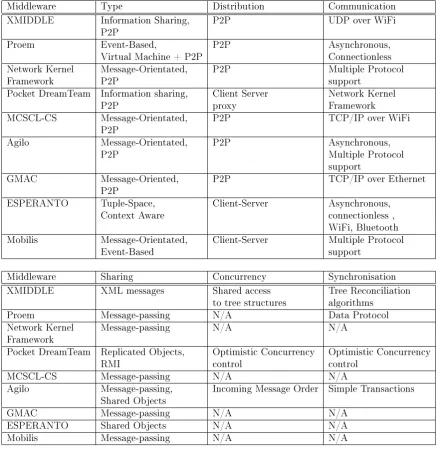
3.2 Related Work . . . 42
3.3 Pocket DreamTeam Implementation Costs . . . 49
4.1 Comparison To Space-Time Classication Requirements . . . 83
4.2 Comparison To Functional Requirements . . . 85
4.3 Comparison To CSCL And Mobile Learning Requirements . . . 86
6.1 Equipment Table . . . 131
6.2 muse Messaging Performance Table . . . 133
6.3 Protocol Overhead . . . 140
6.4 muse Throughput (Kilobits/sec) . . . 141
6.5 muse And Application Implementation Cost . . . 142
List of Figures
3.1 Variation Points And Realisations . . . 38
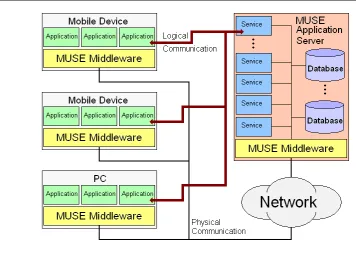
4.1 Overall Architecture . . . 60
4.2 muse Middleware Conceptual Model . . . 61
4.3 Internal Message Format . . . 64
4.4 Service Message Format . . . 65
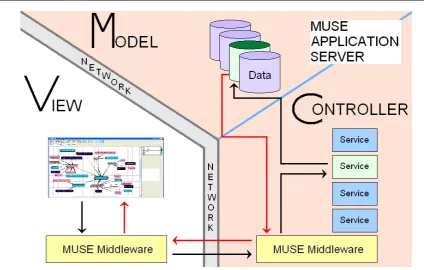
4.5 Model View Controller . . . 66
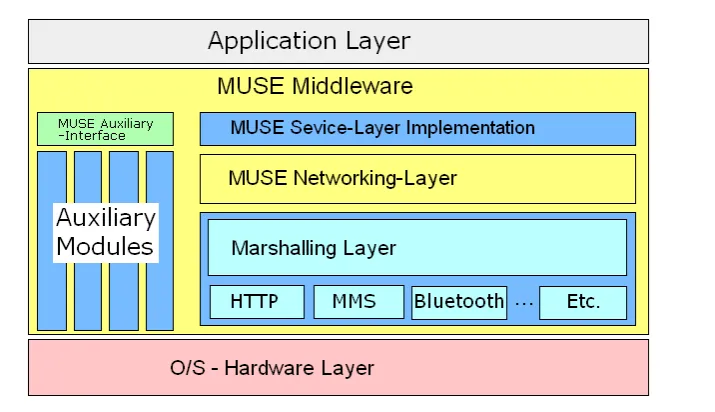
4.6 muse Middleware Details . . . 69
4.7 muse Application Server . . . 73
5.1 Sequential vs. Parallel Process . . . 95
5.2 smart Graphical User Interface . . . 99
5.3 smart Process . . . 100
5.4 Shared Workspace . . . 106
5.5 dnt Mobile Login Interface . . . 110
5.6 dnt Login Screen . . . 110
5.7 dnt Mindmap Screen . . . 111
5.8 dnt Mobile Interface Detail . . . 111
5.9 dnt Storyboard Screen . . . 112
5.10 dnt Storyboard Interface . . . 113
5.11 dnt Timeline Screen . . . 114
5.12 dnt Mobile Media Capture Interface . . . 115
5.13 dnt pc Timeline Detail For Spacial Referencing . . . 115
5.14 Representation Of dnt Mindmap On Mobile And pc clients . . . 116
5.17 dnt Chat Screen . . . 119
5.18 dnt Chat Alert - New Message Received . . . 119
5.19 dnt Media Player Screen . . . 120
6.1 tcp/ip Round-trip Time . . . 134
6.2 tcp/ip Group Latency . . . 134
6.3 tcp/ip Round-trip Time Compared To Group Latency . . . 135
6.4 http Round-trip Time . . . 138
6.5 http Group Latency . . . 138
6.6 http Round-trip Time Compared To Group Latency . . . 139
6.7 http And tcp/ip Protocol Overhead . . . 140
6.8 http and tcp/ip Protocol Overhead Delay Comparison . . . 140
Glossary of Terms
CORBA Common Object Request Broker Architecture
CPU Central Processing Unit
CRITE Center for Research in IT in Education
CSCL Computer Supported Collaborative Learning
CSCW Computer Supported Collaborative Working
DNT Digital Narrative Tool
DVP Digital Video Production
ER Entity Relationship
eVB eMbedded Visual Basic
GSM Global System for Mobile communications
GPS Global Positioning System
GUI Graphical User Interface
HTTP Hyper-Text Transfer Protocol
ICT Information and Communications Technology
I/O Input / Output
IP Internet Protocol
ISO International Organization for Standardization
IT Information Technology
J2SE Jave 2 Standard Edition
KB KiloByte
LIME Linda In Mobile Environments
MANET Mobile Ad hoc NETwork
MCSCL Mobile Computer Supported Collaborative Learning
MMS Multimedia Messaging Service
mobileDNA Mobile Digital Narrative Approach
ms Milliseconds
MST Minimum Spanning Tree
MVC Model - View - Controller
NKF Network Kernal Framework
OS Operating System
OT Operational Transformation
PC Personal Computer
PDA Personal Digital Assistant
QUIS Questionnaire For User Interaction Satisfaction
RDBMS Relation DataBase Management System
RMI Remote Method Invocation
SOA Service Orientated Architecture
SP Service Pack
SQL Structured Query Language
SUMI Software Usability Measurement Inventory
SUS System Usability Scale
TCP/IP Transmission Control Protocol / Internet Protocol
WLAN Wireless LAN
XEP XXMP Extension Protocols
XXMP eXtensible Messaging and Presence Protocol
Chapter 1
Introduction
Traditionally much research on computer supported collaborative learning, cscl, fo-cused on either learning through distant collaboration or face-to-face collaboration sharing a single computer. A new and emergent area within cscl is that of mobile computer supported collaborative learning, mcscl, e.g. [Zurita and Nussbaum, 2007]. From a pedagogical perspective, classications of mcscl argue that leveraging o the aordances of mobile devices allows the development of learning activities that signi-cantly dier from desktop-based cscl application [Roschelle, 2003]. This thesis follows the argument from Patten et al. that the applications that make the best use of mobile technology for learning are informed by constructionist, contextual, and collaborative, learning theories [Patten et al., 2006].
It is well known that the usage of mobile phones is increasing [Gartner, 2007, Mor-gan Stanley Global Technology & Telecom Research, 2009], including devices with built-in cameras and multiple communication options e.g. mms, Bluetooth, and Infra-red (ir) [Gartner, 2005]. More people will access the internet through mobile devices than desktop pcs in ve years [Morgan Stanley Global Technology & Telecom Re-search, 2009]. There is also a trend towards the use of mobile phones by students, which can be exploited in educational situations [Naismith et al., 2004, Bull et al., 2002]. mcscl applications are given further impetuous recently now that processing power on mobile devices, or smart phones, has reached a sucient level to make useful applications feasible, for instance the applications available for the iPhone and the latest Android devices.
raises several technical considerations including: exchanging data between mobile and xed devices; developing appropriate user interfaces for mobile devices; heterogeneity of hardware, software and networking technology. In the mobile environment further diculties encountered include: low memory and processor performance, small screen with reduced gui capabilities and resolution, heterogeneous operating systems, hete-rogeneous networking technologies with varying network bandwidth and latency limits [Cinque et al., 2005, Guicking and Grasse, 2006, Roth, 2002a]. Therefore the above challenges of the mobile computing environment and the current lack of middleware support for developing mcscl applications provide the motivation to create a middle-ware to support application developers in the mobile computing domain.
1.1 Motivation
While there is already a lot of collaborative applications available for mobile devices, typically these are built from scratch and tailored to specic platforms, e.g. Geney [Danesh et al., 2001], Cooties [Soloway et al., 2001] etc. Collaborative applications often contain common functionality, for example, networking support, which would be better provided as part of a more generic solution. Currently there is a lack of middleware providing generic support for such common functions [Springer et al., 2008, Roth, 2002b] particularly spanning both xed and mobile contexts [Farooq et al., 2002]. As a result of this lack of middleware support for mobile collaborative applications developers must build both the application itself and a basic middleware from scratch [Roth, 2002b]. In both the cscw and cscl elds the trend is towards building generic systems and platforms to decrease the development cost of collaborative applications [Lonchamp, 2006, Dimitracopoulou, 2005], allowing developers to focus on application specic details [Roth, 2003].
testing them in practice by developing a middleware to support mcscl applications. It is hoped that answers to these question will contribute to encouraging progress and further development in the mobile middleware domain.
A secondary motivation that underpins the work in this thesis was to provide sup-port for developing mcscl applications to supsup-port digital video production activities. The area of digital video production was initially chosen because digital video produc-tion can support construcproduc-tionist, collaborative and contextualised learning activities. Furthermore, in the area of collaboration and creativity there is agreement that digital video production (dvp) supports collaborative learning and encourages, creativity and self-expression, deeper thinking and draws on students' out-of-school interest e.g. [Reid et al., 2002, Buckingham, 2003, Buckingham et al., 1999]. According to [Hofer and Swan, 2005] digital video presents powerful opportunities to design student-centred, inquirybased projects and supports critical inquiry, problem solving, and critical thinking [Swain et al., 2003]. While for [Kearney and Schuck, 2005] digital video pro-jects encourage development of media literacy, communication and presentations skills. Animation is an analogous process to digital video production that shares many of the potential educational advantages while being a simpler activity [Madden et al., 2008]. The important distinction between live action and animation is that live action records real life events as they occur whereas animation creates the illusion of life and motion from static frames. This allows users to depict scenes not possible with live action [Collins et al., 2000]. Furthermore, digital video production and animation are easily understood as they are familiar [Marsh and Thompson, 2001] and concrete activities [Hamalainen et al., 2004] for the students.
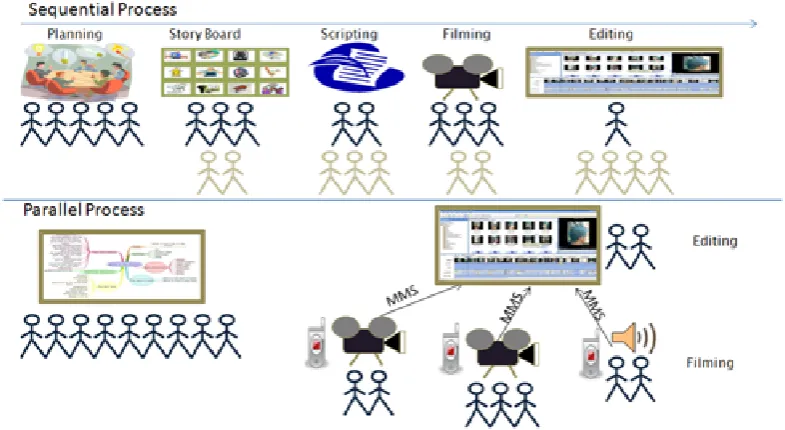
2008, Arnedillo-Sanchez and Tangney, 2006]. The dnt is an application to support users engaged in the video creation process described in mobiledna. The dnt allows users to create mind-maps collaboratively for idea-generation, create a script for the story, and capture images and sounds as the content for the movie. A collaborative timeline editor is included so the users can create the nal movie. It will be shown that the performance and functionality of the dnt degrades gracefully as users move from high performance pcs to mobile devices, replacing the rich graphical and communica-tion support on pcs applicacommunica-tions with alternative communicacommunica-tions tools and simpler graphical user interfaces on mobile devices.
1.2 Research Questions
The previous section highlighted the lack of middleware support for mobile learning and mcscl applications on mobile devices and pcs. In addition it was noted that digital video production activities present valuable opportunities to support constructionist, collaborative and contextualised learning but that there is a lack of ict support for collaboration. Therefore, this thesis investigates two main research questions. The rst question asked in this thesis is: what are the functional requirements for a platform to support mcscl applications on both mobile and pcs?
This rst question is addressed by a review of the literature relevant to cscw, cscl, mcscl, mobile learning, and the pedagogical theories relevant to mobile learning and cscl. In addition, the thesis then examines the previous work on mobile middlewares in terms of these functional requirements. The next step to answering this question is to compare the functionality provided by muse and the other middleware systems described in the thesis with the set of functional requirements identied earlier.
between devices and the server? How many concurrent users can the system support? and secondly from a learning perspective: what is the usability of the applications developed and to what extend to they support constructionist, contextualised and collaborative activities for learning?
To answer the technical questions several performance metrics are collected, these metrics are derived from metrics gathered in related work on mobile collaborative midd-lewares including [Zurita and Nussbaum, 2006, Gotthelf et al., 2007, Cotroneo et al., 2007]. Some of the metrics recorded to answer these questions in this thesis include: typical message size, round-trip time, group latency, protocol overhead, throughput, and implementation cost. Moreover the utility and functionality of the muse platform is further validated by building two collaborative applications for digital narrative pro-duction using the platform.
The sub-questions concerning the usability and educational merits of the appli-cations built using muse include: what is the usability of the mcscl appliappli-cations subsequently developed? And to what extent do they support constructionist, contex-tualised, and collaborative activities for learning? To answer these questions the user applications (smart and the dnt) are evaluated in usability and learning terms using direct observation, interviews, questionnaires and the artifacts produced.
1.3 Thesis Contributions
In short there are ve contributions from this thesis: The set of functional require-ments for a mcscl platform; the muse platform conceptual architecture; the muse platform reference implementation; the smart mobile animation application; and the dnt mobile and pc applications to support the mobiledna.
1.3.1 Functional Requirements For A mcscl Platform
mcscl applications.
1.3.2 MUSE Conceptual Architecture
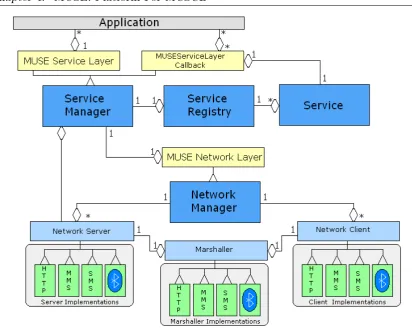
By applying the above set of functional requirements this thesis provides a conceptual model for a mcscl platform to support developers creating applications in this do-main. There are four elements to the conceptual design to increase the exibility of the software in the heterogeneous mobile environments. Firstly communications is via specied xml formats. Secondly the muse service-layer and muse networking-layer are designed according to a design-by-contract approach. Thirdly the muse conceptual ar-chitecture recommends using an mvc arar-chitecture and service orientated arar-chitecture. Finally the muse auxiliary-interface species a set of functions that an application can rely on regardless of os supplied support.
1.3.3 MUSE Reference Implementation
A reference implementation of the muse platform was created during this thesis and tested using a set of performance metrics. These included: message round-trip time; group latency; protocol overhead; throughput; and implementation cost. These metrics uncovered the acceptable range of operation that this middleware can support. For instance the round-trip and group latency gure imply that this muse platform can support up to ve simultaneous pc mcscl client applications, and can support at least four mobile clients.
To provide further validation that the muse platform can support mcscl applica-tions for collaborative digital narrative production two applicaapplica-tions were created using this middleware, smart and the dnt. In addition, these two applications help answer the second research question: do the functional requirements for a mcscl platform captured by muse, smart and the dnt support constructionist, contextualised and collaborative activities for learning?
1.3.4 SMART
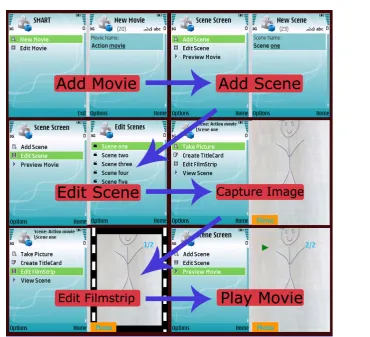
2007a,b, 2009]. This application uses facilities of the muse auxiliary-interface to enable image capture on a mobile phone, and saving images on the device. It uses the service-layer and networking service-layers to send images and xml representing the animation to a service on the muse application server to generate a movie le that the learners can view on any device. This software was evaluated (see Chapter 6) and was found to be usable, and that the learners were able to engage in a constructionist, contextualised, and collaborative approach to this activity.
1.3.5 Digital Narrative Tool
The second application was the digital narrative tool, which is a mobile and pc applica-tion designed to support learners engaged in the mobiledna [Arnedillo-Sanchez, 2008, Arnedillo-Sanchez and Tangney, 2006]. The application provides collaborative tools to create mind-maps, storyboards and edit the movie timeline. Additional services are included for chat communication and video rendering. The dnt was evaluated in a small pilot study and the users were able to follow the mobiledna process and create digital movies by the end of the study. There is initial indicative evidence that the users were able to engage in a constructionist, contextualised, and collaborative approach to this activity. However this is a small study so further studies are needed to support this statement.
1.4 Thesis Road Map
The remainder of this thesis is as follows:
Chapter 2 - Theoretical Foundations: This chapter focuses on a review of the li-terature apposite to the design of a middleware for mcscl. Consequently, four areas of particular relevance to the design and implementation of the middleware are computer supported collaborative working and computer supported collabo-rative learning, mobile learning, pedagogical theories relevant to mobile learning.
Chapter 4 - muse: Middleware For mcscl: This chapter describes the design and implementation of the muse platform for mobile for mcscl. It describes the technical challenges of developing systems in this environment, and describes the characteristics of muse in the distribution model, communications infrastruc-ture, sharing model, concurrency model and synchronisation model. Aspects of muse specic to groupware and multimedia production are also described. Fi-nally muse is compared with the other middleware systems described in Chapter 3.
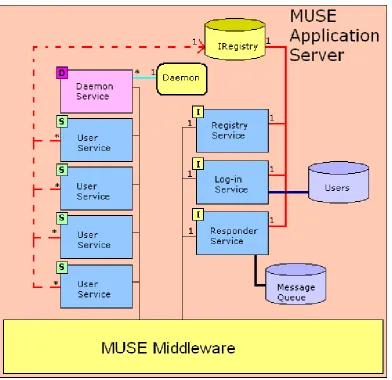
Chapter 5 - Services And Applications: This chapter describes the literature per-tinent to digital media production, with a particular focus on digital video and animation production. The mobiledna process is described and problems en-countered by users are highlighted. This chapter then outlines the generic ser-vices provided by muse to support mcscl digital multimedia applications. The two applications developed to use muse are also described.
Chapter 6 - muse Evaluation: The evaluation of the software that is the focus of this thesis involves two stages. The rst stage of the evaluation of the muse platform uses a set of standard performance metrics. This section addresses the sub-questions including: can we design and build an mcscl middleware to work in a setting containing heterogeneous devices and networks? What is the performance of the middleware on mobile devices and pcs? How many concurrent users can the system support? In the second stage the user applications (smart and the dnt) are evaluated according to the framework described by [Sharples et al., 2007, Vavoula, 2007, Vavoula and Sharples, 2008, Vavoula et al., 2006]. The sub-questions asked examine the usability of the applications and do the applications enable constructionist, contextualised and collaborative activities for learning?
Chapter 7 - Conclusion: This chapter contains the concluding discussion, thesis ndings and restates the thesis contributions. This chapter nishes by conside-ring the future direction of this research.
Chapter 2
Theoretical Foundations
An objective of this thesis is to develop a middleware platform to support mobile computer supported collaborative learning, with a particular focus on digital video production. Therefore, this chapter presents a review of the literature pertinent to the design of such an mcscl platform. Consequently, areas of particular relevance to the design of the middleware are: computer supported collaborative working; computer supported collaborative learning; mobile learning; and pedagogical theories relevant to mobile learning. This chapter then derives a list of functional requirements for a mcscl platform to support such mobile learning activities. These functional requirements are used to inform the literature review, comparison and evaluation of previous related work on mobile middlewares, which is described in the next chapter on the state of the art. The description of aspects related to digital video production and the design of mcscl applications is deferred until Chapter 5
support for cscl activities, which use middlewares that can be tailored to dierent collaborative learning tasks.
The following section then describes mobile computer supported collaborative lear-ning (mcscl) domain, which is more than an extension of cscl to mobile devices. mcscl leverages the dierent aordances provided by mobile devices, rather than tra-ditional cscl based applications which rely on aordances oered by the pc. These aordances enable new learning opportunities, for example, contextualisation in the real environment by exploiting the mobility enabled by the devices. This section also describes the pedagogy that underpins both cscl and mcscl, and recommends that the best use of mobile technology for learning are informed by constructionist, contex-tualised and collaborative learning theories. While related work in mobile learning is described, it is noted that currently most mobile learning applications are one-o designs and are not portable, as currently there is a lack of middleware support for mcscl application [Springer et al., 2008, Roth, 2002b].
2.1 Computer Supported Collaborative Working
Computer supported collaborative work (cscw) is a mature eld that concentrates on developing tools to enable collaborative working. Ellis et al. dene groupware as a computer-based system that support groups of people engaged in a common task (or goal) and that provide an interface to a shared environment [Ellis et al., 1991]. While Mittleman et al. dene groupware technology as a software solution which, if implemented, could help move a group toward its goals in some specic way [Mittleman et al., 2008] and a collaboration product as a collection of collaboration technologies oered as an integrated package [Mittleman et al., 2008]. Grudin reserves the term cscw to refer to the research area and groupware to refer to the technology and applications [Grudin, 1994]. However recent work has noted that the area of cscw has become fragmented Schmidt [2009], Grudin [2010], therefore synthesising this previous work this thesis nds the following useful denitions: cscw to refer to the research area; groupware to refer to collaborative applications, and collaboration technology to refer to the ner-grain functionality of groupware applications.
Same Time Dierent Time Same Place face-to-face interaction asynchronous interaction Dierent Place Synchronous distributed interaction asynchronous distributed interaction
Table 2.1: Space - Time Classication [Ellis et al., 1991]
systems like email or chat, to multi-user editors. However, two important elements in these denitions are the idea of a shared task and a shared environment. A shared task or a common goal are prerequisites for collaboration. A shared environment is relevant to supporting a shared understanding between the collaborators and promoting the ecacy of the collaboration through the use of collaboration technologies. In brief, supporting the development of groupware applications that provide a shared environ-ment to collaborating users engaged in a shared task is an objective of the middleware developed in the course of this thesis.
An initial taxonomy of cscw categorised applications according to a space-time division [Johansen et al., 1991]. Ellis et. al expanded on this taxonomy categorising applications according to a space-time taxonomy and an application level taxonomy [Ellis et al., 1991] (see Table 2.1 on page 12). The space-time taxonomy classied cscw systems according to a space-time division of the participants using the sys-tems, with a spectrum that ranges from same time and place around a computer screen to dierent time and place distributed work. The application level taxonomy of cscw systems categorised cscw system according to their functionality and provi-ded the following classes: message systems, multi-user editors, group decision support systems and electronic meeting rooms, computer conferencing, intelligent agents and coordination systems [Ellis et al., 1991].
use some dierent categories at the application level taxonomy [Rama and Bishop, 2006]. Alternatively Crook represents the space-time distinction as between interaction around a computer and interaction through the computer, over the network (p.189-193) [Crook, 1996].
Mittleman et al. believe that as a result of the proliferation of groupware appli-cations in recent years, particularly with Web 2.0 technologies and social networking, classication of groupware applications is dicult [Mittleman et al., 2008]. Therefore they propose a taxonomy of groupware technologies that focuses on the capabilities of individual components of groupware applications, and then classify the groupware applications as bundles of capabilities [Mittleman et al., 2008]. They identify nine dimensions in groupware systems: Core functionality, content, relationships, session persistence, supported actions, action parameters, access control, alert mechanisms, and awareness indicators. This classication scheme is useful as it captures the set of actions, interactions and functionality one would expect to be present to some extent in any given cscw system. This classication serves as a useful checklist of properties that a generic cscw platform should support. As far back as 1996, Schmidt and Rod-den proposed a similar checklist for designing a cscw platform but concentrated on the interaction mechanisms between the users and state that the platform should support: informal interaction, information sharing and exchange, decision making, coordination and control protocols, and domain directories [Schmidt and Rodden, 1996].
Core Functionality is the primary functionality provided by a groupware applica-tion. There are many overlapping categories in the above application taxonomies that try to classify the core functionality of groupware systems, i.e. [Rodden, 1991, Mittle-man et al., 2008, Rama and Bishop, 2006, Ellis et al., 1991, Crook, 1996, Johansen et al., 1991]. This thesis synthesises these application taxonomies in order to provide a useful framework and so suggests the following application categories: messaging systems, conferencing systems, group decision support systems and collaborative co-authoring systems. To clarify these categories this section describes each with some examples where appropriate.
and retain old messages. Regardless of time, the ability to contact colleagues eciently is needed in any collaboration so this interaction paradigm has been included into almost all groupware systems, for instance, Quilt includes tools for threaded discussion, annotation of edits with text and a private directed messaging system [Fish et al., 1988, Leland et al., 1988]. Cosar [Jaspers et al., 2001], a more recent collaborative text-editor, contains text-chat for communication and feedback.
Conferencing systems include simple real-time tools to sophisticated systems invol-ving integrated phone systems or web cams, the use of shared workspaces, whiteboards and meeting rooms systems. These system can allow users who are either gathered in an electronic meeting room or physically dispersed, to interact synchronously through their workstations or terminals [Ionescu and Marsic, 2003] or through an audio link. Meeting rooms systems are larger scale systems that may contain a physical component e.g. the PlexCenter Planning and decision support laboratory at the University of Ari-zona [Applegate et al., 1986], but can be purely virtual environments e.g. TeamRooms [Roseman and Greenberg, 1996].
Group decision support systems aim to improve the productivity of decision-making meetings, either by speeding up the decision-decision-making process or by improving the quality of the resulting decisions [Cockburn and Jones, 1995]. Other tools in this area are voting tools or tools for issue analysis and idea generation like brains-torming tools. Group decision tools are typically incorporated into other groupware applications to improve the ecacy of collaboration activities.
Collaborative co-authoring systems are tools to support the creation of documents, text, images, or other shared object, by a group of users. These systems can be synchro-nous or asynchrosynchro-nous [Ionescu and Marsic, 2003]. Early inuential examples include Quilt [Fish et al., 1988, Leland et al., 1988], a collaborative tool for cooperative writing and grove a simple text editor designed for use by a group of people simultaneously editing an outline document [Ellis et al., 1991].
Supported actions are the operations the users can perform on the content contri-butions, i.e. add, receive, associate, edit, move, delete, and judge (vote). Action pa-rameters are properties that characterise or modify the supported actions, they are synchronicity and identiability. Synchronicity concerns the expected delay between a user executing an action and other users perceiving the eects of the action. Iden-tiability is the degree to which users can determine who executed an action. Access control manages the users rights and privileges to execute a supported action.
Alert mechanisms are functions in the system that notify the users that something of someone in the system requires their attention. Awareness indicators are a larger set of functions to inform the users about the state of the shared space and provide the users with knowledge of the status and actions of the other users in the shared space.
2.1.1 Workspace Awareness
As awareness information is of particular relevance to synchronous collaboration it justies further explanation in this section. Awareness, as a concept in general, is related to the individual's perception of the workspace, and the participants present in the workspace, which they can use in order to complete a task. The most widely cited denition of awareness is by Dourish and Bellotti which states that awareness is an understanding of the activities of others, which provides a context for your own activity [Dourish and Bellotti, 1992]. However,
while staying aware of others is something that we take for granted in the everyday world, maintaining this awareness has proven to be dicult in real-time distributed systems where information resources are poor and interaction mechanisms are foreign. As a result, working together through a groupware system often seems inecient and clumsy compared to face-to-face work. [Gutwin and Greenberg, 2002].
Under the heading of who is in the system? Gutwin and Greenberg [Gutwin and Greenberg, 2002] ask the following sub-questions: is there anybody else using the workspace? what is their identity?, and who did what? Identity and embodiment awa-reness information help users answer these questions. All actions in the system can be associated with the user who performed the action and in this way the system provides identity. Embodiment is any way of consistently representing a user in the workspace and describes the way in which users are themselves directly represented within the display space [Benford and Fahl, 1994]. In this way embodiment is an element of identiability of actions described in [Mittleman et al., 2008]. In short, embodiment translates identity information into something tangible in the user interface.
Under the heading of what are the users doing? Gutwin and Greenberg [Gutwin and Greenberg, 2002] ask the following sub-questions: what actions are being perfor-med? What are the other users in the system's intentions? And what document or more generally object are the other users interacting with?
Dourish and Bellotti identify two types of awareness information, passive aware-ness mechanisms and active awareaware-ness mechanisms. Similarly Gutwin and Greenberg identied three key ways in which awareness information can be gathered: conse-quential communication, feed-through, and intentional communication [Gutwin and Greenberg, 2002]. Consequential communication and feed-through are passive aware-ness information, while intentional communication is an active awareaware-ness mechanism. Consequential communication, feed-through, and intentional communication can be used to answer the question, what are the users doing?
Consequential communication is awareness information that is conveyed by a user's actions in a system. To take the example from Gutwin and Greenberg [Gutwin and Greenberg, 2002] if a pilot is ying a plane and reaches over to engage the landing gear, the co-pilot will see this and will be informed that the landing gear has been engaged without any explicit communication necessary, he only has to observe the pilot's actions, or interactions in the shared workspace.
example from an air trac control system [Gutwin and Greenberg, 2002], the person controlling the departures may not be able to communicate or see the person who is controlling the arrivals of the planes. By observing the display listing the arrivals he will be able to ascertain that the arrivals controller is landing planes because the entries on the arrivals board change to landed. This can also be seen in collaborative editing environments as writers contribute to the document, the other writers can tell what the others doing by observing the document getting longer and new text appearing etc.
Intentional communication is awareness information that is exchanged by users through explicit communication. For example by sending a message or calling to ano-ther user in the system. There are several dierent options for this explicit communi-cation, including email, fax, instant messaging, telephone call and so on. [Ackerman, 2000] state that cscw systems should have some secondary mechanism or commu-nication back-channel to allow users to negotiate the norms of use, exceptions and breakdowns among themselves, making the system more exible. In one study [Chur-chill et al., 2000] they recommend that chat or instant messaging systems should be situated in the same context of the objects being discussed. They advise that the chat client is built directly into the groupware application and not in a separate window as has traditionally been the case. Intentional communications mechanisms are an obvious way of deliberately informing the other users in the systems what you are doing.
Finally, under the heading of where are the users in the workspace? Gutwin and Greenberg [Gutwin and Greenberg, 2002] ask the following sub-questions: what are the other users current locations in the workspace? what they are currently looking at? and where they can potentially view and interact with?
are a shortcut to locations in the document and can be expressed orally rather than rely on telepointers which might distract from the current task you are performing [Yang and Olson, 2002].
Where users are involved in a joint project of some kind, such as putting together a machine, viewing a shared document, or hunting down a monster, people need not only to see the environment and each other, but also to communicate in order to convey their own intentions, conrm the understanding of each others' intentions, and coordinate their joint actions. [Axelsson et al., 2003]. In an editable document the reference points could be headings or other standout features of the document. In a collaborative programming environment the system used could be line numbers and class names. In a collaborative drawing environment the reference points could be coordinates or standout shapes or objects in the drawing.
2.1.2 Summary Of Findings From CSCW
A large and diverse body of literature informs the eld of cscw. This section concen-trated on dening an appropriate taxonomy to classify groupware applications and in this way decide on a set of operations, interaction mechanisms and support func-tionality to provide in a cscw platform. In summary, a two level classication of groupware systems was identied, with a space - time division of the participants and a classication of the applications according to the level of support for collaboration technologies.
The following collaboration technologies were identied: core functionality; content; relationships; session persistence; supported actions; action parameters; access control; alert mechanisms; and awareness indications. This taxonomy of collaboration techno-logies is useful for categorising the level of support for collaboration provided by group-ware applications, or alternatively to provide a checklist of features that an ideal cscw platform should support. cscl applications, and by extension mcscl applications, build on groupware applications and this cscw research. Therefore it is important to support both users working at all dimensions of the space-time classication and to provide support for these collaboration technologies in cscl and mcscl systems.
questions: Who is present? Where they are working? And what they are doing? The next two sections will ascertain the further requirements derived from cscl and mcscl that inform the design of a platform to support mcscl application development.
2.2 Computer Supported Collaborative Learning
Computer supported collaborative learning, cscl, is a related eld, which develo-ped by applying cscw applications for educational and learning activities. Bricker et al. note that synchronous collaborative software can raise the educational value of computer-based activities [Bricker et al., 1998]. The aim of computer supported collaborative learning is to create new tools and applications to support collaborative learning while exploring the learning processes involved, ultimately developing best-practice and software for educational environments [Dimitracopoulou, 2005]. In such systems collaborative learning is viewed as a pedagogical method that can stimulate students to discuss information and problems from dierent perspectives, to elaborate and rene these in order to re-construct and co-construct (new) knowledge or to solve problems [Dimitracopoulou, 2005]. Discussion of pedagogy is deferred until the next section as it relates to mcscl and mobile computer supported collaborative learning. This section describes a classication of cscl applications and notes the current trends towards generic cscl platforms for cscl application research.
There are several taxonomies for cscl e.g. [Jermann et al., 2001, Dimitracopou-lou, 2005, Lonchamp, 2006, Dillenbourg, 1999]. This study focuses on the taxono-mies described by [Dimitracopoulou, 2005] and [Lonchamp, 2006]. Dimitracopoulou's taxonomy classies cscl systems into two categories, text-production oriented and action-oriented collaborative systems [Dimitracopoulou, 2005]. Text-production orien-ted systems focus on collaboratively creating text documents or dialogues, while action-oriented collaborative systems start from a student's actions in the system, then cap-tures the student's emerging knowledge and nally uses this knowledge-representation as the subject of an artifact-centred discussion.
chat systems. For example, Group Leader Tutor [McManus and Aiken, 1996] and C-Chene [Baker and Lund, 1996], which incorporated rigid turn-taking, built-in sen-tence openings or enforced roles to scaold communication. Augmenting existing ap-plications, for instance word processor applications with chat was a further avenue of research. Churchill et al. investigated embedding or annotating Microsoft Word docu-ments with anchored conversations, embedding chat windows linked to sections of the document, so that scrolling the document view displays the conversations relevant to the displayed section of the document [Churchill et al., 2000]. Extending on this work, shared synchronous collaborative writing systems such as text-editors like Cosar [Jas-pers et al., 2001] contain text-chat for communication and feedback. Coler, an Entity-Relations modelling shared workspace [Constantino-Gonzalez and Suthers, 2002] is an example of an action-oriented application, where users build Entity-Relationship (er) diagrams as solutions to database modelling problems, later using these models as a basis for discussion and ultimately deriving a group er solution. CoolModes [Pinkwart, 2003] a graphical modelling environment is an additional example of an action-oriented system.
Lonchamp divides cscl systems into specic tools or applications and generic model-centred systems [Lonchamp, 2006]. Generic systems have the potential to over-come the limited reuse potential of specic tailored systems and the general trend in cscl is towards generic system [Lonchamp, 2006]. While describing current trends re-lating to the design of collaborative learning systems [Dimitracopoulou, 2005] mentions that it is important to provide exible architectures and customisable tools.
Examples from the cscw eld of the progression from limited functionality appli-cations to generic systems is seen in the development from early systems like grove [Ellis et al., 1991] to later more generic applications like TeamRooms [Roseman and Greenberg, 1996]. grove was an application for collaboratively creating document outlines while TeamRooms is an extensible system to share virtual meeting rooms which allows users to access multiple persistent collaborative applications and widgets, like shared text editors and notice boards.
[Lonchamp, 2006]. The application is focused on text production and creating scaf-folding applications for chatting in particular. The system explicitly species these four aspects in a set of models that serve as parameters for the generic environment. Users can use an administration client to create models to represent and specify the available actions in the collaborative environment. For example, they could specify whether the interaction is through structured chat, free chat, a debating model, or some other custom model.
Action-orientated systems are more complex and support a richer interaction mo-del, so a platform to support cscl should ideally support action-orientated systems be-cause by supporting such systems it is possible to emulate support for text-production systems, as these latter systems require only a subset of the functions available to an action-orientated system. In addition action-orientated systems have at their core col-laboratively constructed common artifacts, which through the users interaction serve as a basis of discussion and creating a shared understanding between the users. Fur-thermore, in this way action-orientated systems more fully support the constructionist, contextualised and collaborative pedagogies advocated in this thesis and described in 2.3.1.
This section was concerned with the classication and trends in computer supported collaborative learning, noting the move towards action-oriented systems and the greater emphasis on generic systems for creating exible cscl applications. The next section outlines the research area of mobile computer supported collaborative learning and includes an overview of the pedagogical foundations of both cscl and mcscl that relevant to this thesis. Furthermore the next section introduces some taxonomies for classifying mcscl and mobile learning applications.
2.3 Mobile Computer Supported Collaborative
Lear-ning
additio-nal communication support with mms, Bluetooth, and Infrared (ir) [Gartner, 2005]. mcscl is an emerging area of cscl that aims to use mobile devices for collaboration and learning, specically because of the level of adoption of mobile technology and the reality that processing power on mobile devices has reached a sucient level to make useful applications feasible. In addition, there is widespread adoption of mobile phones by teenagers in the developed world which can be exploited in educational en-vironments [Naismith et al., 2004] and people are familiar, and feel comfortable, with mobile phones. For example, many people who would not traditionally use computers and other related technologies habitually interact with a mobile phone [Geser, 2004].
The next section outlines the pedagogical foundations relevant to mobile computer supported collaborative learning applications. Then the following section provides a review of the literature in mobile learning in particular and describe related work in the mobile learning eld that informs the design of the mobile learning applications developed on the muse platform.
2.3.1 Pedagogical Foundations
As with all technology to support learning, mcscl software needs a sound pedago-gical basis at its foundation. Several learning theories are relevant to mcscl soft-ware design, particularly social-constructivist theories, encompassing constructivism, constructionism, and collaboration. While situated learning [Lave and Wenger, 1991, Brown et al., 1989] advocates contextualising learning in authentic settings, which is of particular interest from a mobile learning perspective.
(zpd) [Vygotsky, 1978] is dened as the zone between tasks that a learner can perform alone and tasks that they can complete with help from a more knowledgeable peer. Instructional scaolding [Wood et al., 1976] is in a sense a structured application of the zpd theory. Scaolding is the structured assistance provided by a teacher (or more knowledgeable peer) to support a student's learning. Scaolding involves providing sucient support and resources to promote learning when introducing new concepts and then gradually fading this support as the students improve. Instructional scaf-folding as a structured application of the zpd provides a model for the provision of software support for learning. From a mcscl perspective the important aspect is that both theories have an emphasis on the collaborative construction of new knowledge, whether with an instructor or more knowledgeable peer. In addition, the role of more knowledgeable peer can change between the collaborators as dierent participants will have varying levels of expertise when performing specic elements of complex tasks.
The constructivist learning theory lends itself to pedagogic approaches that encou-rage learning by doing or experimental learning, leading to the constructionist theory of Seymour Papert who argued learning is best expressed when learners are actively crea-ting a meaningful artifact, for example, wricrea-ting a computer program, building lego objects etc. An additional benet of the constructionist approach is that learners have a tangible object to show their peers, for example a digital video, which Kearney and Schuck mention as an important part of the learning process and gives the students a chance to further discuss their subject [Kearney and Schuck, 2005]. The ability to use the artifact as a basis for further discussion underlines constructionism as a social activity and is relevant to the design of action-oriented cscl applications.
The act of creating a meaningful product during the construction process has an analogy in situated learning that recommends setting learning in an authentic context. Situated learning [Brown et al., 1989, Lave and Wenger, 1991], advocates setting lear-ning in an authentic context which requires knowledge and involves social interaction and collaboration. The requirement to involve learning in authentic settings is parti-cularly relevant to mobile learning (see section 2.3.2).
demonstrate the collaborative aspect to learning. While Lave et al.'s theory of legi-timate peripheral participation [Lave and Wenger, 1991], or more generally situated learning [Brown et al., 1989], involve social interaction, contextualisation in authentic activities, and collaboration.
This thesis follows the argument from Patten et al that the best use of mobile lear-ning applications are informed by a constructionist, contextualised, and collaborative approach [Patten et al., 2006]. The tools should enable a constructionist approach and allow peers to create tangible artifacts that can form the basis for negotiation of mea-ning and help peers establish a shared understanding. Secondly from contextualised prospective the tools should exploit the mobility of the devices to situate the learners and learning activities in authentic contexts. While the tools should enable collabora-tion, essentially the sine qua non of a socio-constructivist approach, thereby allowing peers to work together during the construction process.
This subsection provided a high-level overview of the pedagogy related to cscl and mcscl. The next subsection introduces the mobile learning eld and describes related work that informs the design of the mcscl applications developed as part of this thesis.
2.3.2 Mobile Learning
The attributes of contemporary mobile devices which include, portability, small screen sizes, diverse input and output functions, and wireless communications facilities, sug-gest several potential aordances [Gibson, 1977, Norman, 1993] for learning. The most obvious aordance of mobile devices is the mobility of the technology. The ability to use mobile devices anytime or anywhere opens new situations and opportunities for de-ploying learning software. Traditional educational tools, books, pen and paper, could claim the same aordance of mobility, but are essentially passive or static technologies. For instance you cannot update a book in real-time, or you cannot access information that is not available in your surroundings when using just a pen and paper. On the other hand, consider that all the informational and communicative power . . . available to any m-learner, at any point in space and time [Alexander, 2004].
2003] so as to provide two levels of participation at the same time and same place, the normal classroom participation and the overlaid technology mediated space. Hence mo-bile learning research has the potential to create applications that use the aordances of mobile technology, which dier from desktop-based cscl [Roschelle and Pea, 2002]. Furthermore, [Chen et al., 2003] identify six unique characteristics of mobile lear-ning environments: urgency of learlear-ning need; initiative of knowledge acquisition; mobi-lity of learning setting; interactivity of the learning process; situating of instructional activity; and integration of instructional content; of which three salient higher-level characteristics are extrapolated in this thesis. Firstly, communications facilities en-able users to ask questions, of peers, experts and query other sources of information. Secondly, mobility enables situating instructional activities in authentic contexts by embedding them in daily life or on eld trips in both an opportunistic or planned fa-shion. Thirdly, the combination of mobility and communications facilities enable users to link situations or contexts involving problem solving scenarios with the ability and knowledge to solve these problems in context, for instance communicating or collabora-ting with knowledgeable peers to solve a new problem encountered in the environment. To this list may be added the media capture facilities on mobile devices, which enables the use of a richer set of information.
Mobile learning is an emerging and growing eld so as with cscw and cscl dierent taxonomies have been put forward for classifying, and developing, mobile learning applications, most notably by [Roschelle, 2003] and [Naismith et al., 2004]. Moreover the functional-pedagogical framework for mobile learning proposed by [Patten et al., 2006] purports that unique attributes of handheld devices support constructionist, contextual and collaborative learning experiences.
Theme Activities
Behaviourist Learning Drill and feedback Classroom response systems Constructivist Learning Participatory Simulations
Situated Learning Problem and case-based learning Context Awareness Collaborative Learning MCSCL
Informal and Lifelong Learning Supporting intentional and accidental learning episodes
Learning and Teaching Support Personal Organisation Support for administrative Duties
Table 2.2: An Activity-Based Categorisation Of Mobile Technologies And Learning [Naismith et al., 2004]
and collaborative data gathering (probeware). Patten et al use seven categories to classify mcscl applications, administrative, referential, interactive, microworld, data-collection, location-aware and collaborative [Patten et al., 2006]. In addition, the categories of data collection, location aware and collaborative present the best use of mobile technology for learning especially when they are informed by constructionist, contextualised and collaborative learning theories [Patten et al., 2006].
Nevertheless there is, as yet, no overarching `theory of mobile learning' [Naismith et al., 2004], however, examining the above taxonomies it is clear that there is signi-cant overlap between them. This thesis agrees with the argument from Patten et al. which is that the applications that make the best use of mobile technology for lear-ning are informed by constructionist, contextualised and collaborative learlear-ning theories [Patten et al., 2006]. Therefore by way of example this section describes some previous mcscl applications under the data-collection, collaborative and location aware cate-gories [Patten et al., 2006].
2.3.2.1 Mobile Learning Applications
In order to provide context by way of example, this section describes some previous mcscl applications under the data-collection, collaborative and location aware cate-gories.
Probeware [Tinker, 2000] is mobile technology augmented with sensors and probes to provide a contextualised and situated learning opportunities, where users can record data from their surroundings and use this as the basis for further enquiries or later reection. Tinker states that the role of probeware is to increase the amount of experimentation students can undertake, and to show the relationship between the experiment and an abstract representation of the data [Tinker, 2000] so in this way connect the user with the experiment under study. For instance, the sense project [Fraser et al., 2005] uses this approach, where users gather environmental data, such as local pollution data, with mobile devices. As the users evaluate and analyse the resulting data, and reect on the data-collection process itself, Fraser et al. state that it impacts on children's understanding of the scientic process [Fraser et al., 2005].
Applications in the collaborative category aim to use the communications facilities on mobile devices to provide collaborative and constructivist applications that build on the notion that learning is socially constructed [Vygotsky, 1978]. From a collabora-tive, constructivist and situated learning perspeccollabora-tive, participatory simulations [Colella et al., 1998], like Geney [Danesh et al., 2001] and Cooties [Soloway et al., 2001] oer useful examples of successful applications for mobile learning. Geney is a collaborative mobile application to help children learn basic genetic concepts using Palm handheld computers, that the authors note enable rich social interactions to take place. Users are able to construct their knowledge of genetics through exchanging and mating digi-tal sh with a simplied genome, and observing the traits of the ospring produced. The goal of the project is to produce digital sh with particular traits so that users have to collaborate to mate digital sh to accomplish this goal. In this manner the application is both constructivist and collaborative. `Cooties' is a mobile application to model the spread of disease. Users beam messages via ir that are either germ-free or germ-laden, later the users study their interaction history to discover patterns in the spread of the disease. Users can view a concept-map representing the people they met, and this exercise enables children to see that meeting one person really means meeting all the people who that person has met previously [Soloway et al., 2001]. As users socialise and engage in the simulation, they grow to understand how disease spreads and experience how easily a disease spreads in a population.
in-formation from sensors in the handheld devices. Applications in this category use positioning systems in the devices to enhance contextual learning activities by en-abling the learner to interact with their environment in a context aware manner. For example presenting appropriate reference information based on location or encouraging the learners to explore their environment. Applications in this area range from mu-seum guides to augmented environments for treasure hunts etc. For example MoULe [Arrigo et al., 2007] is a Mobile and Ubiquitous Learning system, which enables users to edit and share location based digital objects which are concept-maps and wiki pages using pcs and mobile phones with gps and built-in cameras. All these digital objects contain location information. In addition, the system includes a learning management system so that users can access these documents online using moodle software. Am-bient Wood is another example, where users explore a woodland using their handheld devices, which provides appropriate multimedia content to the users based on their location in the woodland [Cole and Stanton, 2003].
2.3.3 Summary Of Findings In Mobile Learning
In review, mobile learning allows new opportunities for learning that are not available using traditional pc based cscl applications as it supports greater contextualisation of learning activities in authentic settings out in the eld. In addition to their anywhere, anytime nature mobile devices are less intrusive than pcs and allow a technology mediated communication or information space to be overlaid on the physical setting.
There have been some attempts to use mcscl to bridge the gap between users on pcs and mobile devices, for instance, StudentPartner [Hwang et al., 2007] is an integrated multimedia forum, which allows users to capture media les with a mobile device and upload them to a shared database that users access through pcs and mobile devices, to create a shared discussion forum. Typically applications are targeted as specically mobile learning or as pc-orientated cscl.
of mobile technology [Patten et al., 2006] so supporting these modes of interaction with mobile technology is an advantage in an mcscl platform. The specic case of data-collection for multimedia capture, and collaboration for digital multimedia production, enabled by mobile technology are of particular interest as together they provide a good example of constructionist, contextualised and collaborative activities.
2.4 Conclusion
This thesis is concerned with designing an platform for mcscl applications, especially for digital narrative production. This chapter presented a review of several areas of research most pertinent to the design of such tools including computer supported collaborative working, computer supported collaborative learning, mobile learning and the pedagogical theories relevant to cscl and mobile learning. This thesis found a set of functional requirements for creating such a platform for mcscl applications.
information sharing and exchange; decision making; coordination and control proto-cols; and supporting domain directories. Mittleman et al. identify nine dimensions in groupware systems: Core functionality, content, relationships, session persistence, supported actions, action parameters, access control, alert mechanisms, and awareness indicators [Mittleman et al., 2008]. The principle aim of this thesis is to design and build a middleware to support mcscl applications. The mcscl middleware must be exible to support as wide a variety of collaborative mobile learning applications as possible, therefore informed by the cscw literature it should support users working in the four dimensions of this cscw taxonomy and provide generic application level cscw functions, e.g. core functionality; content; relationships; session persistence; supported actions; action parameters; access control; alert mechanisms;and awareness indicators [Mittleman et al., 2008]. cscl applications, and by extension mcscl applications, build on groupware applications and this cscw research. So it is important to provide support for these collaboration technologies in cscl and mcscl systems.
Awareness support was described in detail as a necessary feature of collaborative groupware applications and so should be supported by muse. Some concrete awareness mechanisms that were described include the recommendation that groupware systems should include a communication or messaging system and that specic provision for identity and embodiment should be included.
A noted recent trend in cscl application development is towards generic extensible systems that can support several integration mechanisms. Such systems have the ad-vantage of exibility and so are also suited to the mobile technology eld that includes many and various heterogeneous components and systems. From a cscl perspective this section recommended developing applications and tools in the action-oriented [Di-mitracopoulou, 2005] category under Dimitracopoulou's classication and as a generic system [Lonchamp, 2006] according to Lonchamp's classication.
attributes on mobile devices, including, small size, diverse input and out capabilities like media capture facilities, and powerful communications tools aord applications that dier to traditional desktop based cscl.
There is no overarching pedagogical theory of mobile learning but several learning theories are relevant to the eld, particularly social-constructivist theories, encompas-sing constructivism, constructionism, and collaboration. Instructional scaolding is a method of supporting these learning theories in practice. In addition, situated learning advocates contextualising learning in authentic settings, which is of particular inter-est from a mobile learning perspective. This thesis follows Patten et al's taxonomy of mobile learning and agrees that the categories of data collection, location aware and collaborative present the best use of mobile technology for learning especially when they are informed by constructionist, contextualised, and collaborative learning theories [Patten et al., 2006]. Probeware, participatory simulations and multimedia creation applications are examples that would satisfy these criteria.
In conclusion, this chapter found a set of functional requirements for a mcscl platform after reviewing the literature from cscw, cscl, mcscl and mobile learning and related pedagogical theories. The rst requirement is that the mcscl platform should support all four dimensions of the space-time classication of groupware system. Secondly, the platform should support all nine dimensions of groupware technology Mittleman et al. [2008]. Thirdly from a cscl and mobile learning perspective it should support constructionist, contextualised and collaborative activities. Fourthly it should support mobile applications for data collection, location awareness and collaboration. The collaborative aspect is also relevant to the previous ndings from cscw and cscl. To support data-collection it should provide an extensible abstraction over underlying hardware so that additional functionality can be added as new hardware and sensors become available. In order to accommodate location aware applications a similar extensible abstraction over the locations sensors should be included.