This manual was produced in its entirety with
Sprint: The Professional Word Processor,®
available from Borland.
Borland International, Inc. 4585 Scotts Volley Drive Scotts Volley, California 95066
Copyright ©1987
All Rights Reserved. First Printing, 1987 Printed in U.S.A.
Table of Contents
Introduction 1
Volume II: The Reference Guide 0 0 0 0 0 0 0 0 0 0 0 0 0 0 0 0 0 0 0 0 0 0 0 0 0 0 0 0 0 0 0 0 0 0 0 1
Typographic Conventions 0 0 0 0 0 0 0 0 0 0 0 0 0 0 0 0 0 0 0 0 0 0 0 0 0 0 0 0 0 0 0 0 0 0 0 0 0 0 0 0 3
Borland's No-Nonsense License Statement 0 0 0 0 0 0 0 0 0 0 0 0 0 0 0 0 0 0 0 0 0 0 0 0 0 0 3
Acknowledgments 0 0 0 0 0 0 0 0 0 0 0 0 0 0 0 0 0 0 0 0 0 0 0 0 0 0 0 0 0 0 0 0 0 0 0 0 0 0 0 0 0 0 0 0 0 0 0 4
How to Contact Borland 0 0 0 0 0 0 0 0 0 0 0 0 0 0 0 0 0 0 0 0 0 0 0 0 0 0 0 0 0 0 0 0 0 0 0 0 0 0 0 0 0 0 4
Chapter 1. Using Turbo C Library Routines 7
In This Chapter 0 0 0 0 0 0 0 0 0 0 0 0 0 0 0 0 0 0 0 0 0 0 0 0 0 0 0 0 0 0 0 0 0 0 0 0 0 0 0 0 0 0 0 0 0 0 0 0 0 0 7
The Library Routine Lookup Section 0 0 0 0 0 0 0 0 0 0 0 0 0 0 0 0 0 0 0 0 0 0 0 0 0 0 0 0 0 0 0 8
Why You Should License the Turbo C Run-Time Library Source Code 0 0 8
The Turbo C Include Files 0 0 0 0 0 0 0 0 0 0 0 0 0 0 0 0 0 0 0 0 0 0 0 0 0 0 0 0 0 0 0 0 0 . 0 0 0 0 0 0 10
Library Routines by Category 0 0 0 0 0 0 0 0 0 0 0 0 0 0 0 0 0 0 0 0 0 0 0 0 0 0 0 0 0 0 0 0 0 0 0 0 12
The main Function 0 0 0 0 0 0 0 0 0 0 0 0 0 0 0 0 0 0 0 0 0 0 0 0 0 0 0 0 0 0 0 0 0 0 0 0 0 0 0 0 0 0 0 0 0 0 17
The Arguments to main 0 0 0 0 0 0 0 0 0 0 0 0 0 0 0 0 0 0 0 0 0 0 0 0 0 0 0 0 0 0 0 0 0 . 0 0 0 0 0 0 17
An Example Program Using argc, argv and env 0 0 0 0 0 0 0 0 0 0 0 0 0 0 . 0 0 0 0 0 0 18
When You Compile Using -p (Pascal Calling Conventions) 0 0 0 0 0 0 0 0 0 19
The Value main Returns 0 0 0 0 0 0 0 0 0 0 0 0 0 0 0 0 0 0 0 0 0 0 0 0 0 0 0 0 0 0 0 0 0 0 0 0 0 0 0 0 20
Global Variables 0 0 0 0 0 0 0 0 0 0 0 0 0 0 0 0 0 0 0 0 0 0 0 0 0 0 0 0 0 0 0 0 0 0 0 0 0 0 0 0 0 • 0 0 0 0 0 0 21
daylight, timezone 0 0 0 0 0 0 0 0 0 0 0 0 0 0 0 0 0 0 0 0 0 0 0 0 0 0 0 0 0 0 0 0 0 0 0 0 0 • 0 0 0 0 0 0 21
errno, _dosermo, sys_errlist, sys_nerr 0 0 0 0 0 0 0 0 0 0 0 0 0 0 0 0 0 0 0 0 0 • 0 0 0 0 0 0 21
_fmode 0 0 0 0 0 0 0 0 0 0 0 0 0 0 0 0 0 0 0 0 0 0 0 0 0 0 0 0 0 0 0 0 0 0 0 0 0 0 0 0 0 0 0 0 0 0 0 0 0 0 0 0 0 0 24
_psp, environ 0 0 0 0 0 0 0 0 0 0 0 0 0 0 0 0 0 0 0 0 0 0 0 0 0 0 0 0 0 0 0 0 0 0 0 0 0 0 0 0 0 0 • 0 0 0 0 0 0 25
_stklen 0 0 0 0 0 0 0 0 0 0 0 0 0 0 0 0 0 0 0 0 0 0 0 0 0 0 0 0 0 0 0 0 0 0 0 0 0 0 0 0 0 0 0 0 0 0 0 0 . 0 0 0 0 0 0 26
_version, _osmajor, _osminor 0 0 0 0 0 0 0 0 0 0 0 0 0 0 0 0 0 0 0 0 0 0 0 0 0 0 0 0 0 0 0 0 0 0 0 26
_8087 0 0 0 . 0 0 0 0 0 0 0 0 0 0 0 0 0 0 0 0 0 0 0 0 0 0 0 0 0 0 0 0 0 0 0 0 0 0 0 0 0 0 0 0 0 0 0 0 0 0 0 0 0 0 0 0 27
Chapter 2. The Turbo C Library 29
using library routine entries 0 0 0 0 0 0 0 0 0 0 0 0 0 0 0 0 0 0 0 0 0 0 0 0 0 0 0 0 0 0 0 0 0 0 0 0 0 0 29
abort 0 0 0 0 0 0 0 0 0 0 0 0 0 0 0 0 0 0 0 0 0 0 0 0 0 0 0 0 0 0 0 0 0 0 0 0 0 0 0 0 0 0 0 0 0 0 0 0 0 0 0 0 0 0 0 0 0 0 30
abs 0 0 0 0 0 0 0 0 0 0 0 0 0 0 0 0 0 0 0 0 0 0 0 0 0 0 0 0 0 0 0 0 0 0 0 0 0 0 0 0 0 0 0 0 0 0 0 0 0 0 0 0 0 0 0 0 0 0 0 0 30
absread 0 0 0 0 0 0 0 0 0 0 0 0 0 0 0 0 0 0 0 0 0 0 0 0 0 0 0 0 0 0 0 0 0 0 0 0 0 0 0 0 0 0 0 0 0 0 0 0 0 0 0 0 0 0 0 0 32
abswrite 0 0 0 0 0 0 0 0 0 0 0 0 0 0 0 0 0 0 0 0 0 0 0 0 0 0 0 0 0 0 0 0 0 0 0 0 0 0 0 0 0 0 0 0 0 0 0 0 0 0 0 0 0 0 0 33
access 0 0 0 0 0 0 0 0 0 0 0 0 0 0 0 0 0 0 0 0 0 0 0 0 0 0 0 0 0 0 0 0 0 0 0 0 0 0 0 0 0 0 0 0 0 0 0 0 0 0 0 0 0 0 0 0 0 33
allocmem ... 35
asctime ... 36
asin ... 36
assert ... 37
atan ... 38
atan2 ... 38
atexit ... 39
atof ... 40
atoi ... 41
atol ... 41
bdos ... 42
bdosptr ... 43
bioscom ... 44
biosdisk ... 46
biosequip ... 49
bioskey ... 50
biosmemory ... 52
bios print ... 52
bios time ... 53
brk ... 54
bsearch ... 55
cabs ... 58
calloc ... 58
ceil ... 58
cgets ... 59
chdir ... 59
_chmod ... 60
chmod ... 60
_clear87 ... 62
clearerr ... 62
_close ... 63
close ... 63
_control87 ... 64
corel eft ... 65
cos ... 65
cosh ... 65
country ... 66
cprintf ... 67
cputs ... 68
_creat ... 68
creat ... 68
creatnew ... 70
cscanf ... 71
ctime ... 71
ctrlbrk ... 74
difftime ... 75
disable ... 75
dosexterr ... 76
dostounix ... ' .. ' . . . .. 77
dup ... 78
dup2 ... 79
ecvt ... 79
enable ... 80
eof ... 80
exec ... 81
_exit ... 84
exit ... 85
exp ... 85
fabs ... 87
farcalloc ... 88
farcoreleft ... 88
farfree ... 88
farmalloc ... 89
farrealloc ... 91
fclose ... 92
fcloseall ... 93
fcvt ... 93
fdopen ... 93
feof ... 94
ferror ... 94
fflush ... 95
fgetc ... 95
fgetchar ... 96
fgets ... 96
filelength ... 96
file no ... 97
find first ... 97
findnext ... 99
floor ... 100
flushall ... 100
fmod ... 101
fnmerge ... 101
fnsplit ... 104
fopen ... 105
FP _SEG ... 108
_fpreset ... 108
fprintf ... 109
fputc ... 109
fputchar ... 110
fputs ... 110
fread ... 110
free ... 111
freemem ... 111
freopen ... 112
frexp, ; ... 112
fscanf ... 112
fseek ... 113
fstat ... 114
ftell ... 115
fwrite ... 115
gcvt ... 115
geninterrupt ... 116
getc ... 116
getcbrk ... 118
getch ... 118
getchar ... ~ . . . .. 119
getche ... 119
getcurdir ... 119
getcwd ; ~ ... 120
getdate ... 121
getdfree ... 123
getdisk ... 123
getdta ... 124
getenv ... 125
getfat ... 126
getfatd .: ... 127
getftime ... 127
getpass ... 128
getpsp ... 129
gets ... ; ... 129
gettime ... 131
getvect ... 132
getverify ... . . . .. 133
getw ... 133
gmtime ... 134
gSignal ... 134
harderr ... 134
hard resume ... 137
hardretn ... 137
hyperb ... 137
hypot ... 138
inport ... 139
inportb ... 140
int86 ... 140
int86x ... 142
intdos ... 142
intdosx ... 144
intr ... 144
ioctl ... 145
is... . ... 147
isatty ... 149
itoa ... 149
kbhit ... 150
keep ... 150
labs ... 151
ldexp ... 151
lfind ... 151
localtime ... 152
lock ... 152
log ... 153
log10 ... 153
longjmp ... 153
lsearch ... 155
lseek ... 155
ltoa ... 157
malloc ... 157
_matherr ... 159
matherr ... 161
mem ... 164
MK_FP ... 165
mkdir ... 166
mktemp ... 166
modf ... 167
movedata ... 167
movmem ... 168
_open ... 169
open ... 169
outport ... 172
outportb ... 172
peek ... . peekb ... . perror ... . poke ... . pokeb ... . poly ... . pow ... . pow10 ... . ... printf ... . putc ... . putch ... . putchar ... . putenv ... . puts ... , ... . putw ... . qsort ... . rand ... . randbrd ... . randbwr ... . _read ... . read ... . realloc ... . remove
setverify ... 222
sin ... 222
sinh ... 223
sleep ... 223
sopen ... 224
spawn ... 224
sprintf ... 229
sqrt ... 229
srand ... 230
sscanf ... 230
ssignal ... 230
stat ... 232
_status87 ... 233
stime ... 234
stpcpy ... 234
str... . ... 235
strerror ... 244
swab ... 245
system ... 246
tan ... 246
tanh ... 247
tell ... 247
time ... 247
toascii ... 248
_tolower ... 249
tolower ... 249
_toupper ... 250
toupper ... 250
trig ... 250
tzset ... 251
ultoa ... 252
ungetc ... 252
ungetch ... 252
unixtodos ... 253
unlink ... 253
unlock ... 254
va_... . ... 254
va_arg ... 257
va_end ... 257
va_start ... 258
vfprintf ... . . . .. 258
vfscanf ... 258
vscanf ... 259
vsprintf ... 259
vsscanf ... 260
_write ... 260
write ... 260
Appendix A. The Turbo C Interactive Editor 263 Introduction ... 263
Quick In, Quick Out ... 263
The Edit Window Status Line ... 264
Editor Commands ... 265
Basic Cursor Movement Commands ... 267
Quick Cursor Movement Commands ... 267
Insert and Delete Commands ... 268
Block Commands ... 269
Miscellaneous Editing Commands ... 271
The Turbo C Editor V s. WordStar ... 274
Appendix B. Compiler Error Messages 277 Fatal Errors ... 278
Errors ... 279
Warnings ... 292
Appendix C. Command-Line Options 297 Turning Options On and Off ... 299
Syntax ... 299
Compiler Options ... 300
Memory Model ... 301
#defines ... 301
Code Generation Options ... 301
Optimization Options ... 303
Source Options ... 305
Errors Options ... 305
Segment-Naming Control ... 307
Compilation Control Options ... 308
Linker Options ... 308
Environment Options ... 308
Appendix D. Turbo C Utilities
CPP: The Turbo C Preprocessor Utility
viii
311
CPP as a Macro Preprocessor ... 312
An Example ... 313
The Stand-Alone MAKE Utility ... 314
A Quick Example ... 314
Creating a Makefile ... 316
Using a Makefile ... 317
Stepping Through ... " ., 317 Creating Makefiles ... 319
Components of a Makefile ... 319
Explicit Rules ... 320
Special Considerations ... 321
Examples ... 321
Implicit Rules ... 322
Special Considerations ... 324
Examples ... 325
Command Lists ... " .. 325
Prefix ... 325
Command body ... 326
Examples ... , ... " ... 327
Macros ... 327
Defining Macros ... 328
Using Macros ... 329
Special Considerations ... 329
Predefined Macros ... 330
Various File Name Macros ... , .. , ... 330
Directives ... 332
File-Inclusion Directive ... 332
Conditional Directives ... 333
Expressions Allowed in Conditional Directives ... 334
Error Directive ... 336
Undef Directive ... 336
Using MAKE. . . .. 336
Command Line Syntax . . . .. 336
A Note About Stopping MAKE ... 337
The BUlL TINS.MAK File ... , 338
How MAKE Searches for Makefiles ... . . . .. 338
The TOUCH UtiFty . . . .. 338
MAKE ComJ:l}and Line Options ... 339
MAKE Error Messages ... 339
Fatals ... , 340
Errors ... '" ... " ... 340
Turbo Link ... 343
Using Response Files ... 345
Using TLINK with Turbo C Modules ... 346
Initialization Modules ... 346
Libraries . . . .. 347
Using TLINK with TCC ... 347
TLINK Options . . . .. 348
The / x, / m, / s Options ... 348
The /1 Option ... , 350
The / i Option . . . .. 350
The / n Option ... 350
The / c Option ... 350
The / d Option ... 351
Restrictions . . . .. 351
Error Messages ... 352
Warnings ... 352
Non-Fatal Errors ... 353
Fatal Errors ... 354
Appendix E. Language Syntax Summary 357 Lexical Grammar ... 357
Tokens ... 357
Keywords ... 358
Identifiers ... 358
Constants ... 358
String Literals ... 360
Operators ... 361
Punctuators ... 361
Phrase Structure Grammar ... 361
Expressions ... 361
Declarations ... 364
Statements ... 368
External Definitions ... 369
Preprocessing Directives ... 369
Appendix F. Customizing Turbo C 373 Running TCINST ... 374
The Turbo C Directory Option ... 375
The Editor Commands Option ... 375
The Default Edit Modes Option ... 377
The Screen Mode Option ... 378
The Color Customization Option ... 379
The Resize Windows Option ... 380 Quitting the Program ... 380
Appendix G. MicroCa1c
About MicroCalc ... . How to Compile and Run MicroCa1c ... . With TC.EXE ... . With TCC.EXE ... . How to use MicroCa1c
The MicroCa1c Parser
Index
383
383 384 384 384 385 389
N T R
o
o
u
c
To
NThis is the second volume of documentation in the Turbo C package. This
volume, the Turbo C Reference Guide, contains definitions of all the Turbo C
library routines, common variables, and common defined types, along with example program code to illustrate how to use many of these routines, variables, and types.
If you are new to C programming, you should first read the other book in
your Turbo C package-the Turbo C User's Guide. In that book you'll find
instructions on how to install Turbo C on your system, an overview of Turbo C's window and menu system, and tutorial-style chapters designed to get you started programming in Turbo C. The user's guide also summarizes Turbo C's implementation of the C language and discusses some advanced programming techniques. For those of you who are Turbo Pascal and Turbo Prolog programmers, the user's guide provides information to help you integrate your understanding of those languages with your new knowledge of C.
You should refer to the Introduction in the user's guide for information on the Turbo C implementation, a summary of the contents of Volume I, and a short bibliography.
Volume II: The Reference Guide
These are the chapters and appendixes in the programmer's reference guide:
Chapter 1: Using Turbo C Library Routines summarizes Turbo C's
input/ output (I/O) support, and lists and describes the #include (.h) files.
Chapter 2: The Turbo C Library is an alphabetical reference of all Turbo C library functions. Each definition gives syntax, include files, related functions, an operative description, return values, and portability information for the function.
Appendix A: The Turbo C Interactive Editor gives a more thorough explanation of the editor commands-for those who need more
information than that given in Chapter 2 of the Turbo C User's Guide.
Appendix B: Compiler Error Messages lists and explains each of the error messages and summarizes the possible or probable causes of the problem that generated the message.
Appendix C: Options describes each of the Turbo C user-selectable compiler options.
Appendix D: Turbo C Utilities discusses the MAKE utility, CPP, and the Turbo Link Utility. The section on CPP summarizes how the Turbo C preprocessor functions. The section on the stand-alone MAKE utility documents when, where, and how to use MAKE for rebuilding program files. The section on TLINK, the stand-alone Turbo Link Utility, summarizes how to use the command-line version of Turbo C's built-in linker.
Appendix E: Language Syntax Summary uses modified Backus-Naur Forms to detail the syntax of all Turbo C constructs.
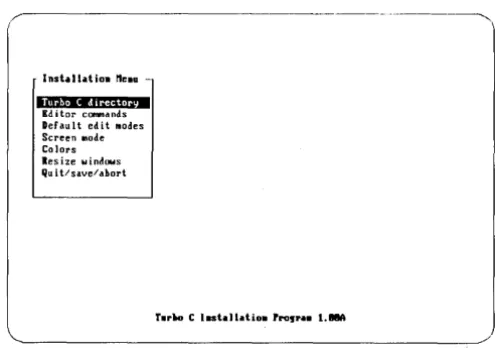
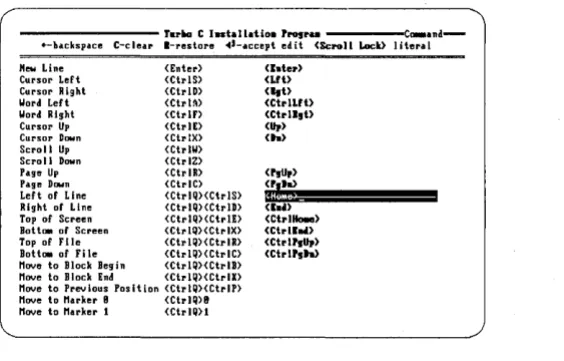
Appendix F: Customizing Turbo C guides you through the installation program (TCINST), which lets you customize your keyboard, modify default values, change your screen colors, resize your Turbo C windows, and more.
Appendix G: MicroCalc introduces the spreadsheet program included with your Turbo C package and gives directions for compiling and running the program.
Typographic Conventions
All typefaces used in this manual were produced by Borland's Sprint: The Professional Word Processor, on an Apple LaserWriter Plus. Their special uses are as follows:
Monospaced type
[ ]
<>
Boldface
Italics
Bold monospaced
Keycaps
This typeface represents text as it appears on the screen or in your program and anything you must type (such as command-line options).
Square brackets in text or DOS command lines enclose optional input or data that depends on your system, whicli should not be typed verbatim.
Angle brackets in the function reference section enclose the names of include files.
Turbo C function names (such as printf) are shown in boldface when mentioned within text (but not in program examples).
Italics indicate variable names (identifiers) within sections of text and to emphasize certain words (especially new terms).
This typeface represents Turbo C keywords (such as char, switch, near, and cdecl.
This special typeface indicates a key on your keyboard. It is often used when describing a
particular key you should type, e.g., "press Esc to
cancel a menu."
Borland's No-Nonsense License Statement
This software is protected by both United States Copyright Law and
International Treaty provisions. Therefore, you must treat this software just
like a book with the following single exception: Borland International authorizes you to make archival copies of Turbo C for the sole purpose of backing up your software and protecting your investment from loss.
the same time, neither can the software be used by two different people in two different places at the same time. (Unless, of course, Borland's copyright has been violated.)
Acknowledgments
In this manual, we refer to several products:
• Turbo Pascal, Turbo Prolog and Sprint: The Professional Word Processor are registered trademarks of Borland International Inc.
• WordStar is a trademark of MicroPro Inc.
• IBM PC, XT, and AT are trademarks of International Business Machines Inc.
• MS-DOS is a registered trademark of Microsoft Corporation.
• UNIX is a registered trademark of American Telephone and Telegraph
How to Contact Borland
If, after reading these manuals and using Turbo C, you would like to
contact Borland with comments, questions, or suggestions, we suggest the following procedures:
The best way to contact Borland is to log on to Borland's Forum on CompuServe: Type GO BOR from the main CompuServe menu and select "Enter Language Products Forum" from the Borland main menu. Leave your questions or comments there for the support staff to process.
If you prefer, write a letter detailing your comments and send it to
Technical Support Department Borland International 4585 Scotts Valley Drive
Scotts Valley, CA 95066, USA
As a last resort, if, for some reason, you cannot write to us, you can
telephone our Technical Support department. If you're calling with a
problem, please have the following information handy before you call:
• product name and version number
c
H A p T E R1
Using Turbo C Library Routines
Turbo C comes equipped with over 300 library routines-functions and macros that you call from within your C programs to perform a wide variety of tasks, including low- and high-level I/O, string and file manipulation, memory allocation, process control, data conversion, mathematical calculations, and much more.
Turbo C's routines are contained in the library files (Cx.LIB and MATHx.LIB). Because Turbo C supports six distinct memory models, each model has its own library file and math file, containing versions of the routines written for that particular model.
Turbo C supports the draft ANSI C standard which, among other things, al!().ws function prototypes to be given for the routines in your C programs. All of Turbo C's library routines are declared with prototypes in one or more header file (these are the .H or "include" files that you copied from the distribution disks into your INCLUDE directory).
In This Chapter ...
This first part of the Turbo C Reference Guide provides an overview of the
In this chapter, we:
• list and describe the include files
• summarize the different categories of tasks performed by the library routines
• describe (in look-up fashion) common global variables implemented in many of the library routines
The Library Routine Lookup Section
The second part of this reference guide is an alphabetical lookup; it contains descriptions for each of the Turbo C routines. Many of the routines are grouped by "family" (such as memory-allocation routines, formatted-output routines, etc.) because they perform similar or related tasks.
However, since you might not intuitively know which family of related routines a particular one belongs to, we have included an individual entry
in the lookup for each and every routine. For instance, if you want to look
up information about the free routine, you would first look under free; there you would find a listing for free that:
• summarizes what free does
• gives the Usage (syntax) for calling free
• tells you which header file contains the prototype for free
• refers you to malloc (the "family" listing) for a detailed description of how free is implemented and how it relates to the other memory-allocation routines
The last part of this reference guide contains several appendices designed to give you detailed reference and usage information about some of Turbo C's special features; the editor, error messages, and the stand-alone utilities.
Why You Should License the Turbo C
Run-Time Library Source Code
The Turbo C Run-Time Library contains over 300 functions, covering a broad range of areas: low-level control of your IBM PC, interfacing with DOS, input/output, process management, string and memory manipulations, math, sorting and searching, and so on.
Using Turbo C, you may find that the particular function you want to write is similar to, but not the same as, a function in the library. With access to the Run-Time Library source code, you can tailor that function to your own needs.
Sometimes, when you have trouble debugging code, you may wish that you knew more about the internals of a library function. This is a time when having the source code to the Run-Time Library would be of great help.
When you can't figure out what a library function is really supposed to do, it is very useful to be able to take a quick look at that function's source code.
You may dislike the underscore convention on C symbols, and wish you had a version of the libraries without leading underscores. Again, access to the source code to the Run-Time Library will let you eliminate leading underscores.
You can also learn a lot from studying tight, professionally written library source code.
The Turbo C Include Files
ALLOC.H
ASSERT.H
BIOS.H
CONIO.H
CTYPE.H
DIR.H
DOS.H
ERRNO.H
FCNTL.H
FLOAT.H
IO.H
LIMITS.H
MATH.H
MEM.H
PROCESS.H
10
Declares memory management functions (allocation, deallocation, etc.).
Defines the assert debugging macro.
Declares various functions used in calling IBM-PC ROM BIOS routines.
Declares various functions used in calling the DOS console I/O routines.
Contains information used by the character classification and character conversion macros (such as is alpha and toascii).
Contains structures, macros and functions for working with directories and path names.
Defines various constants and gives declarations needed for MS-DOS and 8086-specific calls.
Defines constant mnemonics for the error codes.
Defines symbolic constants used in connection with the library routine open.
Contains parameters for floating-point routines.
Contains structures and declarations for low-level Input/Output routines.
Contains environmental parameters, information about compile-time limitations, and ranges of integral quantities.
Declares prototypes for the math functions; also defines the macro HUGE_VAL, and declares the exception structure used by the matherr and _matherr routines.
Declares the memory-manipulation functions. (Many of these are also defined in STRING.H.)
Contains structures and declarations for spawn... and exec ... functions.
SETJMP.H
SHARE.H
SIGNAL.H
STDARG.H
STDDEF.H
STDIO.H
STDLIB.H
STRING.H
SYS\STAT.H
TIME.H
VALUES.H
Defines a type jmp_buf used by the longjmp and setjmp
functions and declares the routines longjmp and setjmp.
Defines parameters used in functions which make use of file-sharing.
Defines the constants SIG_IGN and SIG_DFL, and declares the ssignal and gsignal functions.
Defines macros used for reading the argument list in functions declared to accept a variable number of arguments (such as vprintf, vscanf, etc.).
Defines several common data types and macros.
Defines types and macros needed for the Standard I/O Package defined in Kernighan and Ritchie and extended under UNIX System V. Defines the standard I/O
predefined streams stdin, stdout, and stderr, and declares
stream-level I/O routines.
Declares several commonly used routines; conversion routines, search/sort routines, and other miscellany.
Declares several string-manipulation and memory-manipulation routines.
Defines symbolic constants used for opening and creating files.
Defines a structure filled in by the time-conversion routines asctime, localtime and gmtime, and a type used by the routines ctime, difftime, gmtime, localtime, and stime; also provides prototypes for these routines.
Library Routines by Category
The Turbo C library routines perform a variety of tasks. In this section, we list the routines, and the include files in which they are declared, under several general categories of task performed.
Classification Routines
These routines classify ASCII characters as letters, control characters, punctuation, uppercase, etc.
isalnum isalpha is ascii iscntrl (ctype.h) (ctype. h) (ctype.h) (ctype.h) Conversion Routines isdigit isgraph islower isprint (ctype.h) (ctype.h) (ctype.h) (ctype.h) ispunct isspace isupper isxdigit (ctype. h) (ctype.h) (ctype. h) (ctype.h)
These routines convert characters and strings: from alpha to different numeric representations (floating-point, integers, longs), and vice versa; and from uppercase to lowercase (and vice versa).
atof (stdlib.h) strtod (stdlib.h)
atoi (stdlib.h) strtol (stdlib.h)
atol (stdlib.h) toascii (ctype.h)
ecvt (stdlib.h) tolower (ctype.h)
fcvt (stdlib.h) to lower (ctype.h)
gcvt (stdlib.h) _toupper (ctype.h)
itoa (stdlib.h) toupper (ctype.h)
ltoa (stdlib.h) ultoa (stdlib.h)
Directory Control Routines
These routines manipulate directories and path names.
chdir (dir.h) getdisk (dir.h)
findfirst (dir.h) mkdir (dir.h)
findnext (dir.h) mktemp (dir.h)
fnmerge (dir.h) rmdir (dir.h)
fnsplit (dir.h) searchpath (dir. h)
getcurdir (dir.h) setdisk (dir.h)
getcwd (dir.h)
Diagnostic Routines
These routines provide built-in troubleshooting capability.
assert (assert.h) matherr (math.h) perror (errno.h)
Input/Output Routines
These routines provide stream-level and DOS-level I/O capability.
access (io.h) fputc (stdio.h) puts (stdio.h) cgets (conio.h) fputchar (stdio.h) putw (stdio.h)
chmod (io.h) fputs (stdio.h) read (io.h) chmod (io.h) fread (stdio.h) read (io.h) clearerr (stdio. h) freopen (stdio.h) remove (stdio. h) close (io.h) fscanf (stdio.h) rename (stdio.h) close (io.h) fseek (stdio.h) rewind (stdio.h) cprintf (conio.h) fstat (sys\stat.h) scanf (stdio.h) cputs (conio. h) ftell (stdio.h) setbuf (stdio.h) creat (io.h) fwrite (stdio.h) setftime (io.h)
creat (io.h) getc (stdio.h) setmode (io.h) creatnew (io.h) getch (conio.h) setvbuf (stdio .h) creattemp (io.h) get char (stdio.h) sopen (io.h) cscanf (conio.h) getche (conio.h) sprintf (stdio.h) dup (io.h) getftime (io.h) sscanf (stdio.h) dup2 (io.h) getpass (conio.h) ssiqnal (signal.h) eof (io.h) gets (stdio. h) stat (sys\stat.h) fclose (stdio.h) getw (stdio.h) strerror (stdio .h) fcloseall (stdio.h) gsignal (signal.h) tell (io.h) fdopen (stdio.h) ioctl (io.h) ungetc (stdio.h) feof (stdio.h) isatty (io.h) ungetc (stdio.h) ferror (stdio. h) kbhit (conio.h) ungetch (conio.h) fflush (stdio.h) lock (io.h) unlock (io.h) fgetc (stdio. h) lseek (io.h) vfprintf (stdio .h) fgetchar (stdio. h) _open (io.h) vfscanf (stdio.h) fgets (stdio.h) open (io.h) vprintf (stdio.h)
Interface Routines (DOS, 8086, BIOS)
These routines provide DOS, BIOS and machine-specific capabilities.
absread (dos.h) qeninterrupt (dos.h) keep (dos.h)
abswrite (dos.h) qetcbrk (dos.h) MK FP (dos.h)
bdos (dos.h) qetdfree (dos.h) outport (dos.h)
bdosptr (dos.h) qetdta (dos.h) outportb (dos.h)
bios com (bios.h) qetfat (dos.h) parsfnm (dos.h)
biosdisk (bios .h) qetfatd (dos.h) peek (dos.h)
biosequip (bios .h) qetpsp (dos.h) peekb (dos.h)
bioskey (bios. h) qetvect (dos.h) poke (dos.h)
biosmemory (bios. h) qetverify (dos.h) pokeb (dos.h)
biosprint (bios.h) harderr (dos.h) randbrd (dos.h)
biostime (bios.h) hardresume (dos.h) randbwr (dos.h)
country (dos.h) hardretn (dos.h) seqread (dos.h)
ctrlbrk (dos.h) inport (dos.h) setcbrk (dos.h)
disable (dos.h) inportb (dos.h) setdta (dos.h)
dosexterr (dos.h) int86 (dos.h) setvect (dos.h)
enable (dos.h) int86x (dos.h) setverify (dos.h)
FP OFF (dos.h) intdos (dos.h) sleep (dos.h)
FP-SEG (dos.h) intdosx (dos.h) unlink (dos.h)
freemem (dos.h) intr (dos.h)
Manipulation Routines (String, Memory)
These routines handle strings and blocks of memory; copying, comparing, converting, and searching.
memccpy (mem.h) and (string. h) strcat (string .h) strncpy (string.h)
memchr (mem.h) and (string.h) strchr (string.h) strnicmp (string .h)
memcmp (mem.h) and (string .h) strcmp (string.h) strnset (string. h)
memcpy (mem.h) and (string .h) strcpy (string.h) strpbrk (string .h)
memicmp (mem. h) and (string .h) strcspn (string.h) strrchr (string.h)
memmove (mem.h) and (string.h) strdup (string .h) strrev (string.h)
memset (mem.h) and (string.h) strerror (string .h) strset (string.h)
movebytes (mem. h) stricmp (string .h) strspn (string .h)
movedata (mem.h) and (string .h) strlen (string .h) strstr (string .h)
movmem (mem. h) and (string .h) strlwr (string.h) strtok (string.h)
setmem (mem.h) strncat (string.h) strupr (string .h)
stpcpy (string.h) strncmp (string .h)
Math Routines
These routines perform mathematical calculations and conversions.
abs (stdlib.h) exp (math.h) matherr (math.h)
acos (math.h) fabs (math.h) modf (math.h)
asin (math.h) fcvt (stdlib.h) poly (math.h)
atan (math.h) floor (math.h) pow (math.h)
atan2 (math.h) fmod (math.h) powlO (math.h)
atof (stdlib.h) _fpreset87 (float.h) rand (stdlib.h)
atof (math.h) frexp (math.h) sin (math.h)
atoi (stdlib.h) gcvt (stdlib.h) sinh (math.h)
atol (stdlib.h) hypot (math.h) sqrt (math.h)
cabs (math.h) itoa (stdlib.h) srand (stdlib. h)
ceil (math.h) labs (stdlib.h) status87 (float.h)
clear87 (float .h) ldexp (math.h) strtod (stdlib.h)
-control87 (float .h) log (math.h) strtol (stdlib.h)
cos (math.h) loglO (math.h) tan (math.h)
cosh (math.h) ltoa (stdlib.h) tanh (math.h)
ecvt (stdlib.h) matherr (math.h) ultoa (stdlib.h)
Memory Allocation Routines
These routines provide dynamic memory allocation in the small-data and large-data models.
all 0 cmem (dos.h) farmalloc (alloe.h)
brk (alloe.h) farrealloc (alloe.h)
calloc (alloe.h) free (alloe.h)
coreleft (alloe.h) and (stdlib.h) malloc (alloe. h)
farcalloc (alloe.h) realloc (alloe.h)
farcoreleft (alloe.h) sbrk (alloe. h)
farfree (alloe.h) setblock (dos.h)
Miscellaneous Routines
These routines provide non-local goto capabilities.
setjrnp longjmp
(setjmp.h) (setjmp.h)
Process Control Routines
These routines invoke and terminate new processes from within another.
abort (process. h) exit (process.h) execl (process.h) spawnl (proces s . h) execle (process.h) spawnle (process .h) execlp (process.h) spawnlp (process. h) execlpe (process.h) spawnlpe (process.h) execv (process.h) spawnv (process. h) execve (process.h) spawnve (process. h) execvp (process. h) spawnvp (proces s . h) execvpe (process.h) spawnvpe (process.h) exit (process.h) system (process.h)
Standard Routines
These are standard routines.
abort abs atexit atof atoi atol bsearch calloc ecvt exit exit (stdlib.h) (stdlib.h) (stdlib.h) (stdlib.h) (stdlib.h) (stdlib.h) (stdlib.h) (stdlib.h) (stdlib.h) (stdlib.h) (stdlib.h) fcvt free gcvt getenv itoa labs lfind lsearch ltoa malloc
Time and Date Routines
(stdlib.h) (stdlib.h) (stdlib.h) (stdlib.h) (stdlib.h) (stdlib.h) (stdlib.h) (stdlib.h) (stdlib.h) (stdlib.h) putenv qsort rand realloc srand strtod strtol swab system ultoa (stdlib.h) (stdlib.h) (stdlib.h) (stdlib.h) (stdlib.h) (stdlib.h) (stdlib.h) (stdlib.h) (stdlib.h) (stdlib.h)
These are time-conversion and time-manipulation routines.
asctime ctime difftime dostounix getdate gettime gmtime (time.h) (time.h) (time.h) (dos.h) (dos.h) (dos.h) (time.h) localtime setdate settime stime time tzset unixtodos
Variable Argument List Routines
(time.h) (dos.h) (dos.h) (time.h) (time.h) (time.h) (dos.h)
These routines are for use when accessing variable argument lists (such as
with vprintf, etc). .
va arg va-end va-start 16 (stdarg .h) (stdarg .h) (stdarg .h)
The main Function
Every C program must have a main function; where you place it is a matter of preference. Some programmers place main at the beginning of the file, others at the very end. But regardless of its location, the following points about main always apply.
The Arguments
to
main
Three parameters (arguments) are passed to main by the Turbo C start-up
routine: argc, argv and env.
Il!I argc, an integer, is the number of command-line arguments passed to
main.
IJ argv is an array of strings
under 3.x versions of DOS, argv[O] is defined as the full path name of
the program being run
under versions of DOS before 3.0, argv[O] points to the null string
("11).
argv[l] contains the first string typed on the DOS command line after the program name
argv[2] contains the second string typed after the program name
a rgv [a rgc ] contains NULL
Il env is also an array of strings. Each element of env[] holds a string of the
form ENVVAR=val ue
ENWAR is the name of an environment variable, such as PATH, or 87.
val ue is the value to which an ENVVAR is set, such as
c: \DOSiC\TURBOC (for PATH), or YES (for 87)
The Turbo C start-up routine always passes these three arguments to main:
you declare some (or all) of these arguments to main, they are made available as local variables to your main routine.
Note, however, that if you do declare any of these parameters, you must
declare them exactly in the order given: argc, argv, env.
For example, the following are all valid declarations of main's arguments:
main()
main (int argc) /* legal but very unlikely */
main(int argc, char * argv[])
main(int argc, char * argv[], char * env[])
Note: The declaration main (int argc) is legal, but it's very unlikely that
you would use argc in your program without also using the elements of
argv.
Another Note: The argument env is also available via the global variable
environ. Refer to the environ lookup entry (in this chapter) and the putenv and getenv lookup entries (in Chapter 2) for more information.
An Example Program Using argc, argv and env
Here is an example program, named ARGS.EXE, that demonstrates a simple way of implementing these arguments passed to main.
/* Program name ARGS.EXE */
#include <stdio.h> #include <stdlib.h>
main(int argc, char *argv[), char *env[))
(
int i;
printf("The value of argc is %d \n\n",argc);
printf("These are the %d command-line arguments passed to main:\n\n",argc);
for (i = 0; i <= argc; itt)
printf(" argv[%d): %s\n", i, argv[i));
printf("\nThe environment string(s) on this system are:\n\n");
for (i = 0; env[i) != NULL; itt)
printf(" env[%d): %s\n", i, env[i));
Suppose you run ARGS.EXE at the DOS prompt with the following command line:
> args first_argument "argument with blanks" 3 4 "last but one" stop!
Note that you can pass arguments with embedded blanks by surrounding
the with double quotes, as shown by "argument with blanks" and" last
but one" in this example command line.
The output of ARGS.EXE (assuming that the environment variables are set as shown here) would then be like this:
The value of argc is 7
These are the 7 command-line arguments passed to main:
argv[O]: C:\TURBOC\TESTARGS.EXE argv[l]: first argument argv[2]: argument with blanks argv[3]: 3
argv[4]: 4
argv[5]: last but one argv[6]: stop! argv[7]: (null)
The environment string(s) on this system are:
env[O]: COMSPEC=C:\COMMAND.COM env[l]: PROMPT=$p $g
env[2]: PATH=C:\SPRINT;C:\DOS;C:\TURBOC
Note: The maximum combined length of the command-line arguments passed to main (including the space between adjacent arguments) is 128 characters: this is a DOS limit.
When You Compile Using-p (Pascal Calling
Conventions)
If you compile your program using Pascal calling conventions (which are
described in detail in Chapter 9), you must remember to explicitly declare
main as being a C type.
You do this with the cdecl keyword, like this:
The Value main Returns
In all but two instances, the value returned by main is the status code of the
program: an into If, however, your program uses the routine exit (or _exit)
to terminate, the value returned by main is the argument passed to the call to exit (or to _exit).
For example, if your program contains the call
exit (1)
the status is 1.
If you are using the Integrated Environment version of Turbo C (TC.EXE)
to run your program, you can display the return value from main by
pressing Alt-V when the "Press any key" message appears (after you
run the program).
Global Variables
daylight, timezone
Names
Usage
Declared in
Description
daylight, timezone
extern int daylight;
extern long timezone;
time.h
These variables are used by the time-and-date functions.
daylight: This variable = 1 for Daylight Savings Time, 0 for Standard Time.
timezone: This variable is a calculated value; it is assigned a long value that is the difference, in seconds, between the current local time and Greenwich Mean Time.
errno, _doserrno, sys_errlist, sys_nerr
Names
Usage
Declared in
errno, _doserrno, sys_errlist, sys_nerr
extern int errno;
extern int _doserrno;
extern char
*
sys_errlist[ ];extern int sys_nerr;
errno.h dos.h
Description
22
Three of these variables (errno, sys_errlist, and sys_nerr)
are used by the perror function to print error messages when certain library routines fail to accomplish their
appointed tasks. _doserrno is a variable that maps many
MS-DOS error codes to errno; however, perror does not
use _doserrno directly.
_doserrno: When an MS-DOS system call results in an
error, _doserrno is set to the actual MS-DOS error code.
errno is a parallel error variable inherited from UNIX.
errno: Whenever an error in a system call occurs, errno is
set to indicate the type of error. Sometimes errno and
_doserrno are equivalent. Other times, errno does not contain the actual DOS error code (which is contained in
_doserrno). Still other errors might occur which set only
errno, not _doserrno.
sys_errlist: To provide more control over message formatting, the array of message strings is provided in
sys_errlist. errno can be used as an index into the array to find the string corresponding to the error number. The string does not include any newline character.
sys_nerr: This variable is defined as the number of error
message strings in sys _errlist.
The following table gives mnemonics for the values
stored in sys_errlist and their meanings.
mnemonic E2BIG EACCES EBADF ECONTR ECURDIR EDOM EINVACC EINVAL EINVDAT EINVDRV EINVENV EINVFMT EINVFNC Meaning
Arg list too long Permission denied Bad file number
Memory blocks destroyed Attempt to remove CurDir Domain error
Invalid access code Invalid argument Invalid data
Invalid drive specified Invalid environment Invalid format
Invalid function number
EINVMEM EMFILE ENMFILE ENODEV ENOENT ENOEXEC ENOFILE ENOMEM ENOPATH ENOTSAM ERANGE EXDEV EZERO
Invalid memory block address Too many open files
N a more files N a such device
No such file or directory, Exec format error
N a such file or directory Not enough core
Path not found Not same device Result out of range Cross-device link Error 0
The following list gives mnemonics for the actual DOS
error codes to which _doserrno can be set. (This value of
_doserrno mayor may not be mapped-through
errno-to an equivalent error message string in
sys_errlist.
mnemonic MS-DOS error code
EINVAL Bad function
E2BIG Bad environ
EACCES Access denied
EACCES Bad access
EACCES Is current dir
EBADF Bad handle
EFAULT Reserved
EINVAL Bad data
EMFILE Too many open
ENOENT File not found
ENOENT Path not found
ENOENT N a more files
ENOEXEC Bad format
ENOMEM Mcb destroyed
ENOMEM Out of memory
ENOMEM Bad block
EXDEV Bad drive
Jmode
Name
Usage
Declared in
Description
24
Refer to the Microsoft MS-DOS Programmer's Reference
Manual for more information about MS-DOS error returns.
Jmode - default file-translation mode
extern int Jmode;
fcntl.h
This variable determines in which mode (text or binary)
files will be opened and translated. The value of Jmode
is a_TEXT by default, which specifies that files will be
read in text mode. If Jmode is set to a_BINARY, the files
are opened and read in binary mode. (a_TEXT and a_BINARY are defined in fcntl.h.)
In text mode, on input, carriage-return/line-feed (CR/LF) combinations are translated to a single line-feed character (LF). On output, the reverse is true: LF characters are translated to CR/LF combinations.
In binary mode, no such translation occurs.
You can override the default mode as set by Jmode by
specifying a
t
(for text mode) or b (for binary mode) inthe argument type in the library routines fop en, fdopen,
and freopen. Also, in the routine open, the argument
access can include either a_BINARY or a_TEXT, which will explicitly define the file being opened (given by the
open pathname argument) to be in either binary or text
mode.
·
-PSp,
envtron
Names
Usage
Declared in
Description
-psp, environ
extern unsigned int -psp;
extern char
*
environ[ ];dos.h (-psp)
dos.h (environ)
-psp: This variable contains the segment address of the program segment prefix (PSP) for the current program. The PSP is an MS-DOS process descriptor; it contains initial DOS information about the program.
Refer to the Microsoft MS-DOS Programmer's Reference
Manual for more information on the PSP.
environ: This is an array of strings; it is used to access and alter a process environment. Each string is of the form
envvar
=
varvaluewhere envvar is the name of an environment variable
(such as PATH), and varvalue is the string value to which
envvar is set (such as c: \BIN; C : \008). The string
varvalue may be empty.
When a program begins execution, the MS-DOS environment settings are passed directly to the program.
Note that envp, the third argument to main, is equal to
the initial setting of environ.
The environ array can be accessed by getenv; however, the putenv function is the only routine that should be
used to add, change or delete the environ array entries.
(This is because modification can resize and relocate the
process environment array, but environ is automatically
stklen
Name
Usage
Description
_stklen - stack length variable
int _stklen;
In large data models (compact, large, and huge), _stklen
is the exact stack size in bytes.
In small data models (tiny, small, and medium), the
startup code uses _stklen to compute the minimum size
of the DATA segment. The DATA segment includes initialized global data, uninitialized data, and the stack.
min DATA segment size =
size of DATA segment
+ size of -BSS segment
+
stklen-+ MINSTACK(128 words)
If the memory available is less than this, the startup
aborts the program. The maximum DATA segment size
is, of course, 64K.
.
.
.
_verStOn, _osmaJor, _osmtnOr
Names
Usage
Declared in
26
_version, _osmajor, _osminor
extern unsigned int _version;
extern unsigned char _osmajor;
extern unsigned char _osminor;
dos.h
Description
8087
Name
Usage
Description
_version contains the MS-DOS version number, with the major version number in the low byte and the minor version number in the high byte. (For MS-DOS version
x.y,
thex
is the major version number, andy
is the minor.)The major and minor version numbers are also available
individually through _osmajor and _osminor, where
_osmajor is the major version number and _osminor is the minor version number.
These variables can be useful when you want to write modules that will run on MS-DOS versions 2.x and 3.x. Some library routines behave differently depending on the MS-DOS version number, while others only work under MS-DOS 3.x. (For example, refer to _open, creatnew, and ioctl in the lookup section of this reference guide.)
_8087 - coprocessor chip flag
extern int _8087;
The _8087 variable is set to 1 if the start-up code auto-detection logic detects a floating-point coprocessor (an 8087, 80287, or 80387), or if the 87 environment variable
is set to Y (SET 87
=
Y). The _8087 variable is set to 0otherwise.
(Refer to Chapter 9 in the Turbo C User's Guide for more information about the 87 environment variable.)
c
H A p T E R2
The Turbo C
Library
This sample library look-up entry explains how to use this section of the
Turbo C Reference Guide.
using library routine entries
Name
Usage
Related
routine - summary of what the library routine does
#include <header.h> Only listed if it must be included
routine(modifier parameter[, ... J); Declaration syntax
functions usage routine2(modifier parameter[, ... J );
Prototype in header.h File containing prototype for routine
Description This describes what routine does, the parameters it
takes, and any details you need to use routine and the related routines listed.
Return value The value that routine returns (if any), is given here. If
the global variable errno is set, that's also listed here.
Portability Specifies systems routine is available on.
abort
Name
Usage
Prototype in
Description
Return value
Portability
See also
abs
abort - abnormally terminates a process
void abort(void);
stdlib.h process.h
This function writes a termination message on stderr and
aborts the program via a call to _exit, with an exit code
This function does not return a value.
Available on UNIX systems.
assert, _exit, exec ... , exit, spawn ...
Name abs - absolute value
Usage int abs(int i);
Related
functions usage double cabs(struct complex znum);
double fabs(double x);
long labs (long n);
Prototype in stdlib.h (abs, labs)
math.h (cabs, fabs)
Description abs returns the absolute value of the integer argument i.
30
If abs is called when stdlib.h has been included, abs will
be treated as a macro that expands to in-line code.
If you don't include stdlib.h (or if you do include it and
#undef abs) you will get the abs function rather than a macro.
Return value
cabs is a macro that calculates the absolute value of
znum, a complex number. znum is a structure with type
complex; the structure is defined in math.h as:
struct complex ( double x, y;
);
Calling cabs is equivalent to calling sqrt with the real
and imaginary components of znum, as shown here:
sqrt(znum.x*znum.x + znum.y*znum.y)
If you don't include math.h (or if you do include it and
#unde f cabs) you will get the cabs function rather than a macro.
fabs calculates the absolute value of x, a doubl.e.
labs calculates the absolute value of n, a l.ong integer.
abs returns an integer in the range of 0 to 32767, with the exception that an argument of -32768 is returned as -32768.
cabs returns the absolute value of znum, a doubl.e. On
overflow, cabs returns HUGE_VAL and sets errno to
ERANGE Result out of range
Error handling for cabs can be modified through the function matherr.
fabs returns the absolute value of x. labs returns the
absolute value of n. There are no error returns.
Portability Available on UNIX systems.
absread
Name absread - reads data
Usage int absread(int drive, int nsects, int sectno, void *buffer);
Related
functions usage int abswrite(int drive, int nsects, int sectno, void *buffer);
Prototype in dos.h
Description These functions read and write specific disk sectors.
Return value
Portability
32
They ignore the logical structure of a disk and pay no attention to files, FATs, or directories.
absread reads specific disk sectors via DOS interrupt Ox25; abswrite writes specific disk sectors via DOS interrupt Ox26.
drive
=
drive number to read (0=
A, 1=
B, etc.)nsects = number of sectors to read
sectno = beginning logical sector number
buffer
=
memory address where the data is to be read or writtenThe number of sectors to read is limited to the amount
of memory in the segment above buffer. Thus, 64K bytes
is the largest amount of memory that can be read in a single call to absread or abswrite.
If successful, both routines return O.
On error, the routines return -1 and set errno to the
value of the AX register returned by the system call. See the MS-DOS documentation for the interpretation of
errno.
Unique to MS-DOS.
abswrite
Name
Usage
Prototype in
Description
access
Name
Usage
Prototype in
Description
abswrite - writes data
int abswrite(int drive, int nsects, int sectno, void *buffer);
dos.h
see absread
access - determines accessibility of a file
int access(char *filename, int amode);
io.h
access checks a named file to determine if it exists and
whether it can be read, written to, or executed. filename
points to a string naming the file.
The bit pattern contained in amode is constructed as
follows:
06 Check for read and write permission 04 Check for read permission
02 Check for write permission 01 Execute (ignored)
00 Check for existence of file
Note: Under MS-DOS, all existing files have read access
(amode
=
04), so 00 and 04 give the same result. In thesame vein, amode values of 06 and 02 are equivalent
because under MS-DOS, write access implies read access.
Return value If the requested access is allowed, 0 is returned;
otherwise, a value of -1 is returned and errno is set to
one of the following:
ENOENT EACCES
Path or file name not found Permission denied
Portability
See also
Example
#include <stdia.h> #include <ia.h>
Available on UNIX systems.
chmod
/* returns 1 if filename exists, else 0 */
int file exists (char *filename)
{
-return (access (filename, 0) == 0);
main ()
{
printf("Daes NOTEXIST.FIL exist: %s\n",
file_exists ("NOTEXIST.FIL") ? "YES" "NO");
Program output
Does NOTEXIST.FIL exist: NO
acos
Name
Usage
Prototype in
Description
34
acos - trigonometric function
double acos(double x);
math.h
see trig
allocmem
Name allocmem - allocates DOS memory segment
Usage int allocmem(unsigned size, unsigned *seg);
Related
functions usage int freemem(unsigned seg);
int setblock(int seg, int newsize);
Prototype in dos.h
Description allocmem uses the MS-DOS system call Ox48 to allocate
a block of free memory and returns the segment address of the allocated block.
Return value
size is the desired size in paragraphs. seg is a pointer to a word which will be assigned the segment address of the newly allocated block. No assignment is made to the
word pointed to by seg if not enough room is available.
All allocated blocks are paragraph aligned.
freemem frees a memory block allocated by a previous
call to allocmem. seg is the segment address of that
block.
setblock modifies the size of a memory segment. seg is
the segment address returned by a previous call to
allocmem. newsize is the new, requested size in
paragraphs.
allocmem returns -1 on success. In the event of error, a number (the size of the largest available block) is returned.
freemem returns 0 on success. In the event of error, -1 is
returned and errno is set to
ENOMEM Insufficient memory
Portability
See also
asctime
Name
Usage
Prototype in
Description
•
aSln
Name
Usage
Prototype in
Description
36
An error return from any allocmem or setblock will set
_doserrno and will set the global variable errno to
ENOMEM Not enough core
Unique to MS-DOS.
malloc
asctime - converts date and time to ASCII
#include <time.h>
char *asctime(struct tm *tm);
time.h
see ctime
asin - trigonometric function
double asin(double x);
math.h
see trig
assert
Name
Usage
Prototype in
Description
Return value
Portability
See also
Example
assert - tests a condition and possibly aborts
#include <asssert.h>
void assert(int test);
assert.h
assert is a macro that expands to an i f statement which,
if the test fails, will print a message and abort the program. The message is:
Assertion failed: file filename, line linenum
The filename and linenum listed are the source file name and line number where the assert macro appears. A call to abort is used to abort the program.
If you place the #define NDEBUG directive in the source
code before the #include assert. h directive, the effect
is to "comment out" the assert statement.
None
This macro is available on some UNIX systems including Systems III and V.
abort
/* add an item to a list. verify the item is not NULL. */
*include <assert.h> *include <stdio.h>
struct ITEM { int key; int value;
voidadditem(struct ITEM *itemptr)
{
assert(itemptr != NULL); 1* ... add the item ... *1
main()
{
additem(NULL);
Program output
Assertion failed: file C:\TURBOC\ASSERT.C, line 13
atan
Name
Usage
Prototype in
Description
atan2
Name
Usage
Prototype in
Description
38
atan - trigonometric arctangent function
double atan(double x);
math.h
see trig
at an - trigonometric function
double atan2(double y, double x);
math.h
see trig
atexit
Name
Usage
Prototype in
Description
Return value
See also
Example
#include <stdlib.h> #include <stdio.h> void exit fnl ()
{
-atexit - registers termination function
#include <stdlib.h>
int atexit(atexit_t June)
stdlib.h
atexit registers the function pointed to by June as an
"exit function". Upon normal termination of the
program, exit calls *June (without arguments) just before
returning to the operating system. The called function is
of type atexit_t, which is defined in a typedef in stdlib.h.
Each call to atexit registers another exit function; up to 32 functions can be registered, and they are executed on a last in, first out basis.
atexit returns 0 on success and non-zero on failure (no space left to register the function).
exec ... , exit, spawn ...
printf("Exit Function 1 called\n");
void exit fn2 ()
{
-printf("Exit Function 2 called\n");
main ()
{
-Program output
Main quitting ... Exit Function 2 called Exit Function 1 called
atof
Name
Usage
Related
functions usage
Prototype in
Description
40
atof - converts a string to a floating point number
double atof(char *nptr);
int atoi(char *nptr);
long atoHchar *nptr);
math.h (atof)
stdlib.h (atof, atoi, atol)
atof converts a string pointed to by nptr to double; this
function recognizes
• an optional string of tabs and spaces • an optional sign
• then a string of digits and an optional decimal point
• then an optional e or E followed by an optional
signed integer
atoi converts a string pointed to by nptr to int; atol
converts the string to long. atoi and atol recognize
• an optional string of tabs and spaces • an optional sign
• then a string of digits
In all three of these functions, the first unrecognized character ends the conversion.
There are no provisions for overflow in any of these functions.
Return value
Portability
See also
atoi
Name
Usage
Prototype in
Description
atol
These functions return the converted value of the input
string. If the string cannot be converted to a number of
the corresponding type (double for atof, int for atoi,
long for atol), the return value is O.
Available on UNIX sy?tems.
scanf
atoi - converts a string to an integer
int atoi(char *nptr);
stdlib.h
see atof
Name atol- converts a string to a long
Usage long atol(char *nptr);
Prototype in stdlib.h
bdos
Name bdos - MS-DOS system call
Usage int bdos(int dosfun, unsigned dosdx, unsigned dosal);
Related
functions usage int bdosptr(int dosfun, void *argument, unsigned dosal);
Prototype in dos.h
Description These calls provides direct access to many of the
MS-DOS system calls. Refer to the MS-DOS Programmer's
Reference Manual for details of each system call.
42
Those system calls which require an integer argument use bdos, while those which require a pointer argument use bdosptr.
For the small data models (tiny, small and medium), bdos and bdosptr are similar. In the large data models
(compact, large and huge), it is important to use bdosptr
for system calls that require a pointer as the call argument.
dosfun is defined in the MS-DOS Programmer's Reference Manual.
In the small data models, the argument parameter to
bdosptr specifies DX; in the large data models, it gives the DS:DX values to be used by the system call.
dosdx is the value of register DX for the bdos call.
dosal is the value of register AL.
For an example that demonstrates the use of bdosptr, refer to harderr.
Return value
Portability
Example
#include <stdio.h> #include <dos.h>
The return value of bdos is the value of AX set by the system call.
The return value of bdosptr is the value of AX on success, or -1 on failure. On failure errno and _doserrno
are set.
Unique to MS-DOS.
1* get current drive as 'A', 'B', ... *1 char current drive(void)
{
-char curdrive;
curdrive = bdos(OxI9,0,0); 1* get current disk as 0, 1, ... *1
return ( 'A' + curdrive );
main()
{
printf("The current drive is %c:\n", current_drive());
Program output
The current drive is C:
bdosptr
Name bdosptr - MS-DOS system call
Usage int bdosptr(int dosfun, void *argument, unsigned dosal);