Programmer's Guide
Borland®
C++
Borland may have patents andbr pending patent applications covering subject matter in this document. The furnishing of this document does not give you any license to these patents. COPYRIGHT © 1987, 1994 by Borland International. All rights reserved. All Borland products are trademarks or registered trademarks of Borland International, Inc. Other brand and product names are trademarks or registered trademarks of their respective holders.
Borland International, Inc.
100 Borland Way, Scotts Valley, CA 95066-3249
PRINTED IN THE UNITED STATES OF AMERICA
1 EOR0294
Contents
Introduction 1 Scope ... 27
What's in this book ... 1 Name spaces ... 27
An introduction to the formal definitions ... 2 Visibility ... 28
Syntax and terminology ... 3 Duration ... 28
Chapter 1 Lexical elements 5 Static ... 29 Local ... 29
Whitespace ... 5
Line splicing with \ ... 6 Translation units ... 29 Dynamic ... 29
Comments ... 6
C comments ... 6
C++ comments ... 7
Nested comments ... 7
Linkage ... 30
Name mangling ... 31
Declaration syntax ... 32
Tentative definitions ... 32
Delimiters and whitespace ... 7 Possible declarations ... 32
Tokens ... 8 External declarations and definitions ... 34
Keywords ... 8
Identifiers ... 10
Naming and length restrictions ... 10
Case sensitivity ... 10
Uniqueness and scope ... 11
Constants ... 11
Integer constants ... 11
Type specifiers . . . 36
Type categories ... 36
Type void ... 37
The fundamental types ... 38
Integral types ... 38
Floating-point types ... 39
Standard conversions ... 39
Floating-point constants ... 14
Character constants ... 15 Initialization ... 40 Special char, int, and enum conversions ... 40
String constants ... 17
Enumeration constants ... 18 Declarations and declarators ... 42 Arrays, structures, and unions ... 41
Constants and internal representation ... 19
Constant expressions ... 20 Use of storage class specifiers ... 44 auto ... 44
Punctuators ... 21 extern ... 44
Brackets ... 21
Parentheses ... 21 register ... 44 static ... 44
Braces ... 21
Comma ... 22 Modifiers ... 45 typedef ... ~ 45
Semicolon ... 22 const ... 46
Colon ... 22 volatile ... 47
Ellipsis ... 22
Asterisk (pointer declaration) ... 23 Function modifiers ... 50 Mixed-language calling conventions ... 47
Equal sign (initializer) ... 23 Pointers ... 50
Pound sign (preprocessor directive) ... 24 Pointers to objects ... 51
Chapter 2 Language structure 25 Declarations ... 25
Pointers to functions ... 51
Pointer declarations ... 51
Objects ... 25
lvalues ... 26
Pointer constants ... 52
Pointer arithmetic ... 53
rvalues ... 26 Pointer conversions ... 54
Arrays ... 54 Equality operators ... 87
Functions ... 56 Logical operators ... 89
Declarations and definitions ... 56 Conditional ?: ... 90
Declarations and prototypes ... 57 Assignment operators ... 90
Definitions ... 58 Comma operator ... 91
Formal parameter declarations ... 59 C++ operators ... 92
Function calls and argument conversions .... 60 The size of operator ... 93
Structures ... 61 Statements ... 94
Untagged structures and typedefs ... 61 Blocks ... 95
Structure member declarations ... 62 Labeled statements ... 95
Structures and functions ... 62 Expression statements ... 95
Structure member access ... 63 Selection statements ... 96
Structure word alignment ... 64 if statements ... 96
Structure name spaces ... 65 switch statements ... 97
Incomplete declarations ... 65 Iteration statements ... 98
Bit fields ... 66 while statements ... 98
Unions ... 67 do while statements ... 98
Anonymous unions (C++ only) ... 67 for statement ... 99
Union declarations ... 68 Jump statements ... 99
Enumerations ... 68 break statements ... 100
Expressions ... 71 continue statements ... 100
Expressions and C++ ... 73 goto statements ... 100
Evaluation order ... 74 return statements ... 100
Errors and overflows ... 75
Operator semantics ... 75
Operator descriptions ... 75
Primary expression operators ... 76
Postfix expression operators ... 78
Array subscript operator [] ... 78
Function call operators ( ) ... 78
Member access operators. (dot) ... 79
Member access operator -> ... 79
Increment operator ++ ... 79
Decrement operator - - ... 79
Unary operators ... 79
Address operator & ... 80
Indirection operator * ... 81
Plus operator + ... 81
Minus operator - ... 81
Bitwise complement operator - ... 81
Logical negation operator! ... 81
Increment operator ++ ... 82
Decrement operator - - ... 82
Binary operators ... 82
Additive operators ... 83
Multiplicative operators ... 84
Bitwise logic operators ... 84
Bitwise shift operators ... 86
Relationaloperators ... 86
Chapter 3 C++ specifics 103 New-style typecasting ... 103
const_cast typecast operator ... 103
dynamic_cast typecast operator ... 104
reinterpret_cast typecast operator ... 105
static_cast typecast operator ... 106
Run-time type identification ... 107
The typeid operator ... ~ ... 108
The __ rtti keyword and the -RT option. . .. 109
The -RT option and destructors ... 110
Referencing ... 111
Simple references ... 111
Reference arguments ... 111
Scope resolution operator:: ... 113
The new and delete operators . . . 113
Handling errors ... 114
The operator new with arrays ... 114
The operator delete with arrays ... 116
The ::operator new ... 116
Initializers with the new operator ... 116
Overloading new and delete ... 117
Classes . . . 119
Class names ... 119
Class types ... 119
Class objects ... : ... 120
Class member list ... 121
Member functions ... 121
The keyword this ... 121
Wine functions ... 121
Wine functions and exceptions ... 122
Static members ... 123
Member scope ... 125
Nested types ... 126
Member access control ... 127
Base and derived class access ... 128
Virtual base classes ... 130
Friends of classes ... 130
Constructors and destructors ... 132
Constructors ... 133
Constructor defaults ... 134
The copy constructor ... 135
Overloading constructors ... 135
Order of calling constructors ... 135
Class initialization ... 137
Destructors ... 140
Invoking destructors ... 140
atexit, #pragma exit, and destructors ... 140
exit and destructors ... 140
abort and destructors ... 140
virtual destructors ... 141
Operator overloading ... 142
Overloading operator functions ... 146
Overloaded operators and inheritance ... 146
Unary operators ... 146
Binary operators ... 147
Assignment operator= ... 147
Function call operator() ... 147
Subscript operator[] ... 147
Class member access operator-> ... 148
Polymorphic classes ... 148
virtual functions ... 148
virtual function return types ... 149
Abstract classes ... 150
C++ scope ... 152
Class scope ... 152
Hiding ... 152
C++ scoping rules summary ... 152
Templates ... 153
Function templates ... 154
Overriding a template function ... 155
Template function argument matching ... 156
Class templates ... 157
Arguments ... 159
Angle brackets ... 159
Type-safe generic lists ... 159
Eliminating pointers ... 161
Template compiler switches ... 161
Using template switches ... 162
Chapter 4 Exception handling 165 C++ exception handling ... 165
Exception declarations ... 166
Throwing an exception ... 167
Handling an exception ... 168
Exception specifications ... 169
Constructors and destructors ... 172
Unhandled exceptions ... 172
C-based structured exceptions ... 172
Using C -based exceptions in C++ . . . 173
Handling C-based exceptions ... 174
Chapter 5 The preprocessor 177 Null directive # ... 178
The #define and #undef directives ... 178
Simple #define macros ... 178
The #Undef directive ... 179
The -D and -U options ... 181
The Define option .. " ... 181
Keywords and protected words ... 181
Macros with parameters ... 181
File inclusion with #include . . . 184
Header file search with <header_name> . . . . 185
Header file search with "header_name" .... 185
Conditional compilation ... 185
The #if, #elif, #else, and #endif conditional directives ... 185
The operator defined ... 186
The #ifdef and #ifndef conditional directives ... 187
The #line line control directive ... 188
The #error directive ... 189
The #pragma directive ... 190
#pragma argsused ... 190
#pragma codeseg ... 190
#pragma comment ... 190
#pragma exit and #pragma startup ... 191
#pragma hdrfile ... 191
#pragma hdrstop ... 192
#pragma inline ... 192
#pragma intrinsic ... 192
#pragma option ... 192
__ BCOPT __ ... 194 Container directories ... 217
__ BCPLUSPLUS __ ... 194 The LIBS and BIN directories ... 217
__ BORLANDC __ ... 194 The INCLUDE directory ... 218
__ CDECL __ ... 194 The SOURCE directory ... 218
__ cplusplus ... 194 The EXAMPLES directory ... 218
__ DATE __ ... 194 Debugging containers ... 219
__ DLL_ _ ... 195 The persistent streams class library ... 219
__ FILE __ ... 195 What's new with streaming ... 220
__ LINE __ ... 195 Object versioning ... 220
__ MT __ ... 195 Reading and writing base classes ... 220
__ 052 __ ... 195 Reading and writing integers ... 221
__ PASCAL __ ... 195 Multiple inheritance and virtual base __ STDC_ _ ... 195 support ... 222
__ TCPLUSPLUS __ ... 195 Creating streamable objects ... 222
__ TEMPLATES __ ... 195 Defining streamable classes ... : .... 223
__ TIME __ ... 196 Implementing streamable classes ... 224
__ TURBOC __ ... 196 The nested class Streamer ... 227
Chapter 6 Using C++ streams 197 What is a stream? ... 197
Writing the Read and Write functions .... 227
Object versioning ... 229
The iostream library ... 197 Chapter 8 Dynamic-link libraries 231 The streambuf class ... 197 Dynamic linking ... 231
The ios class ... 198 Creating DLLs ... 232
Stream output ... 199 DLL initialization and termination ... 232
Fundamentaltypes ... 200 DLL option on the command line ... 233
I/O formatting ... 200 The DLL setting in the IDE ... 233
Manipulators ... 200 OS/2 DLL system calls ... 233
Filling and padding ... 202 Loading a DLL ... 234
Stream input ... 203 Freeing a DLL ... 235
I/O of user-defined types ... 204 Getting a DLL name ... 236
Simple file I/O ... 204 Getting a DLL handle ... 236
String stream processing ... 205 Getting a DLL procedure address ... 237
Screen output streams ... 207 Getting a DLL application type ... 237
Chapter 7 Using Borland class libraries 209 Getting a DLL procedure type ... 239
The container class library ... 209 Chapter 9 Building OS/2 applications 241 Containers and templates ... 209 Resource script files ... 243
ADTs and FDSs ... 210 Module definition files ... 243
Choosing an FDS ... 210 Import libraries ... 245
Direct and indirect containers ... 211 Project files ... 245
Sorted containers ... 211 Setting project options ... 246
Memory management ... 212 Building applications within the IDE ... 246
Container naming conventions ... 213 Building the PMHELLO program ... 246
ADT /FDS combinations in the library ... 213 Building a DLL within the IDE ... 247
Container iterators ... 213 Building applications with the command-line Object ownership ... 214 tools ... 248
Using containers ... 214 Building the PMHELLO program ... 248
A sorted array example ... 216 Compiling ... 248
Compiling and binding resources ... 250 Virtual memory and paging ... 261
Compiling and linking a DLL from Using
as /
2 memory services ... 262the command line ... 250 Private memory ... 262
Using MAKE ... 251 Shared memory ... 263
Linking with the Borland DLLs ... 251 Named shared memory ... 263
Linking with the multi-thread libraries ... 252 Give-get shared memory ... 264
Chapter 10 Mathematical operations 255 Chapter 12 Inline assembly 265 Floating-pointI/O ... 255 Inline syntax ... 266
Floating-point options ... 255 Inline assembly references to data and Fast floating-point option ... 256 functions ... 267
Registers and the 80x87 ... 256 Using C structure members ... 268
Disabling floating-point exceptions ... 256 Using jump instructions and labels ... 269
Using complex types ... , ... 257
Using bcd types ... 258
Converting bcd numbers ... 259
Tables
1.1 All Borland C++ keywords ... 9 2.11 Associativity and precedence of Borland C++
1.2 Borland C++ register pseudovariables ... 9 operators ... 71
1.3 Borland C++ keyword extensions ... 9 2.12 Borland C++ expressions ... 72
1.4 Keywords specific to C ... 10 2.13 Unary operators ... 80
1.5 Keywords specific to C++ ... 10 2.14 Binary operators ... 82
1.6 Constants-formal definitions ... 11 2.15 Bitwise operators truth table ... 85
1.7 Borland C++ integer constants without L 2.16 Borland C++ statements ... 94
or U ... 13 5.1 Borland C++ preprocessing directives 1.8 Borland C++ floating constant sizes syntax ... 178
and ranges ... 15 6.1 Stream manipulators ... 201
1.9 Borland C++ escape sequences ... 16 6.2 Console stream manipulators ... 207
2.1 Borland C++ declaration syntax ... 33 7.1 Borland containers and header files ... 210
2.2 Borland C++ declarator syntax ... 34 7.2 Container name abbreviations ... 213
2.3 Borland C++ class declaration syntax (C++ 7.3 ADT /FDS combinations ... 213
only) ... ," ... 35 8.1 DosLoadModule return values ... 234
2.4 Declaring types ... 37 8.2 DosFreeModule return values ... 235
2.5 Integral types ... 38 8.3 DosQueryModule return values ... 236
2.6 Methods used in standard arithmetic 8.4 DosQueryModuleHandle return values ... 236
conversions ... 40 8.5 DosQueryProcAddress return codes ... 237
2.7 Declaration syntax examples ... 43 8.6 pFlags Bits 0-2 ... 238
2.8 Borland C++ modifiers ... 45 8.7 pFlags bits 3-15 ... 238
2.9 Calling conventions ... 48 8.8 DosQuery AppType return values ... 238
2.10 External function definitions ... 59 8.9 DosQueryProcType return values ... 239
Figures
1.1 Internal representations of numerical types. 20 6.1 Class streambuf and its derived classes ... 198
To get an overview of the Borland C++ doc-umentation set, start with the Users Guide. Read the introduction and Chapter 1 in that book for information on how to most effectively use the Borland C++ manuals.
Introduction
This manual contains materials for the advanced programmer. If you already know how to program well (whether in C, C++, or another language), this manual is for you. It is a language reference, and provides you with programming information on C++ streams, object container classes, converting from Microsoft C, floating point, inline assembly, and ANSI implementation.
Typefaces and icons used in these books are described in the User's Guide.
What's in this book
Chapters 1-5: Lexical elements, Language structure, C++ specifics, Exception handling, and The preprocessor describe the Borland C++ lan-guage. Any extensions to the ANSI C standard are noted in these chapters. These chapters provide a formal language definition, reference, and syntax for both the C and C++ aspects of Borland C++. Some overall information about Chapters 1 through 5 is included in the next section of this
introduction.
Chapter 6: Using C++ streams tells you how to program input and output using the C++ stream library.
Chapter 7: Using Borland class libraries tells you how to use the Borland C++ object container classes (including templates) in your programs.
Chapter 8: Dynamic-link libraries discusses DLL libraries and dynamic linking.
Chapter 9: Building OS/2 applications explains how to use the Borland C++ tools to help you get started developing Presentation Manager (PM)
applications.
Chapter 10: Mathematical operations covers issues regarding floating-point computation, and using complex and bcd numerical types.
Chapter 11 : OS/2 memory management describes the
memory-management system used by OS/2 version 2.x where x is greater than or equal to zero.
Appendix A: ANSI implementation-specific standards describes those aspects of the ANSI C standard that have been left loosely defined or undefined by ANSI, and how Borland has chosen to implement them.
An introduction to the formal definitions
Chapters 1-5 describe the C and C++ languages as implemented in Borland C++. Together, they provide a formal language definition, reference, and syntax for both the C++ and C aspects of Borland C++. They do not
provide a language tutorial. We use a modified Backus-Naur form notation to indicate syntax, supplemented where necessary by brief explanations and program examples. The chapters are organized in this manner:
• Chapter 1 : Lexical elements shows how the lexical tokens for Borland C++ are categorized. It covers the different categories of word-like units, known as tokens, recognized by a language.
• Chapter 2: Language structure explains how to use the elements of Borland C++. It details the legal ways in which tokens can be grouped together to form expressions, statements, and other significant units.
• Chapter 3: C++ specifics covers those aspects specific to C++.
• Chapter 4: Exception handling describes the exception-handling mechanisms available to C and C++ programs.
• Chapter 5: The preprocessor covers the preprocessor, including macros, includes, and pragmas, and many other easy yet useful items.
Borland C++ is a full implementation of AT&T's C++ version 3.0 with exception handling, the object-oriented superset of C developed by Bjarne Stroustrup of AT&T Bell Laboratories. This manual refers to AT&T's previous version as C++ 2.1. In addition to offering many new features and capabilities, C++ often veers from C in varying degrees. These differences are noted. All the Borland C++ language features derived from C++ are discussed in greater detail in Chapter 3.
Borland C++ also fully implements the ANSI C standard, with several extensions as indicated in the text. You can set options in the compiler to warn you if any such extensions are encountered. You can also set the compiler to treat the Borland C++ extension keywords as normal identifiers (see Chapter 6, "Command-line compiler," in the User's Guide).
Syntax and terminology
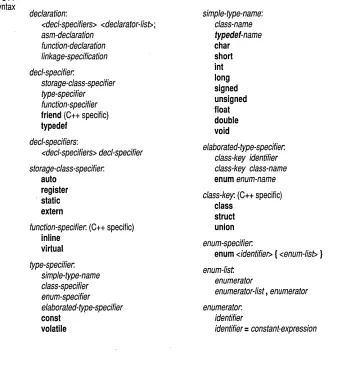
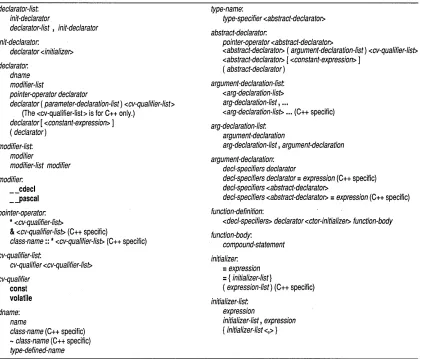
Syntactic definitions consist of the name of the nonterminal token or symbol being defined, followed by a colon (:). Alternatives usually follow on separate lines, but a single line of alternatives can be used if prefixed by the phrase" one of." For example,
external-definition: function-definition
declaration
octal-digit: one of
01234567
Optional elements in a construct are printed within angle brackets:
integer-suffix:
unsigned-suffix <long-suffix>
Whitespace
c
H A p T E RLexical elements
This chapter provides a formal definition of the Borland C++ lexical elements. It describes the different categories of word-like units (tokens)
recognized by a language.
The tokens in Borland C++ are derived from a series of operations per-formed on your programs by the compiler and its built-in preprocessor.
1
A Borland C++ program starts as a sequence of ASCII characters represent-ing the source code, created by keystrokes usrepresent-ing a suitable text editor (such as the Borland C++ editor). The basic program unit in Borland C++ is the file. This usually corresponds to a named file located in RAM or on disk and having the extension.C or .CPP.
The preprocessor first scans the program text for special preprocessor
directives (see the discussion starting on page 177). For example, the
directive #include <incJile> adds (or includes) the contents of the file incJile
to the program before the compilation phase. The preprocessor also expands any macros found in the program and include files.
In the tokenizing phase of compilation, the source code file is parsed (that is, broken down) into tokens and whitespace. Whitespace is the collective name given to spaces (blanks), horizontal and vertical tabs, newline characters, and comments. Whitespace can serve to indicate where tokens start and end, but beyond this function, any surplus whitespace is discarded. For example, the two sequences
int i; float f;
and
int i
float f· I
Line splicing with \
Comments
Ccomments
See page 183 for a description of token
pasting.
• int
.i
.;
• float
.f
••
,
The ASCII characters representing whitespace can occur within literal
strings, in which case they are protected from the normal parsing process
(they remain as part of the string). For example,
char narne[] = "Borland International";
parses to seven tokens, including the single literal-string token "Borland In terna tional" .
A special case occurs if the final newline character encountered is preceded by a backslash (\). The backslash and new line are both discarded, allowing two physical lines of text to be treated as one unit.
"Borland \ International"
is parsed as "Borland International" (see page 17, "String constants," for more information).
Comments are pieces of text used to annotate a program. Comments are for
the programmer's use only; they are stripped from the source text before parsing.
There are two ways to delineate comments: the C method and the C++ method. Both are supported by Borland C++, with an additional, optional extension permitting nested comments. If you are not compiling for ANSI compatibility, you can use any of these kinds of comments in both C and C++ programs.
A C comment is any sequence of characters placed after the symbol pair /*.
The comment terminates at the first occurrence of the pair */ following the initial /*. The entire sequence, including the four comment-delimiter symbols, is replaced by one space after macro expansion. Note that some C implementations remove comments without space replacements.
Borland C++ does not support the nonportable token pasting strategy using
c++ comments
You can also use II to create comments in C
code. This is specific to Borland C++.
Nested comments
Delimiters and whitespace .
#define VAR(i,j) #define VAR(i,j) #define VAR(i,j)
In Borland C++,
(i/**/j)
(i##j) (i ## j)
1* won't work *1
1* OK in Borland ett *1 1* Also OK *1
int 1* declaration *1 i 1* counter *Ii
parses as these three tokens:
int i ;
c++ allows a single-line comment using two adjacent slashes (! j). The comment can start in any position, and extends until the next new line:
class X { II this is a comment
.
..
};ANSI C doesn't allow nested comments. The attempt to comment out a line
1* int 1* declaration *1 i 1* counter *1; *1
fails, because the scope of the first 1* ends at the first *1. This gives
i i *1
which would generate a syntax error.
By default, Borland C++ won't allow nested comments, but you can over-ride this with compiler options. See the User's Guide, Chapter 4, "Settings notebook," and Chapter 6, "Command-line compiler" for a description of code-generation options.
In rare cases, some whitespace before 1* and II, and after *1, although not syntactically mandatory, can avoid portability problems. For example, this C++ code
int i = jll* divide by k*/ki
tID;
parses as int i
=
j tID; not asint i = j/ki
tID;
as expected under the C convention. The more legible
int i = jl 1* divide by k*1 ki tID;
Tokens
Keywords
Borland C++ recognizes six classes of tokens. Here is the formal definition of a token:
token: keyword identifier constant string-literal operator
punctuator (also known as separators)
As the source code is scanned, tokens are extracted in such a way that the longest possible token from the character sequence is selected. For example,
external would be parsed as a single identifier, rather than as the keyword
extern followed by the identifier al.
See page 183 for a description of token pasting.
Keywords are words reserved for special purposes and must not be used as
normal identifier names. The following tables list the Borland C++ words. You can use options to select ANSI keywords only, UNIX key-words, and so on; see the User's Guide, Chapters 2 and 6, for information on these options.
If you use non-ANSI keywords in a program and you want the program to be ANSI compliant, always use the non-ANSI keyword versions that are prefixed with double underscores. Some keywords have a version prefixed with only one underscore; these keywords are provided to facilitate porting code developed with other compilers. For ANSI-specified keywords there is only one version.
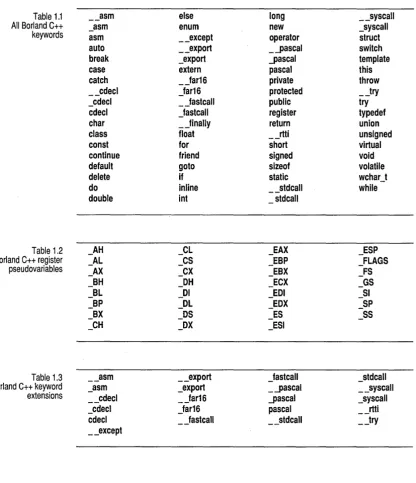
Table 1.1 __ asm else long __ syscalJ
All Borland C++ _asm enum new _syscalJ
keywords asm __ except operator struct
auto __ export _'-pascal switch
break _export '-pascal template
case extern pascal this
catch _Jar16 private throw
__ cdecl Jar16 protected __ try
_cdecl _Jastcall public try
cdecl Jastcall register typedef
char _Jinally return union
class float __ rtti unsigned
const for short virtual
continue friend signed void
default goto sizeof volatile
delete if static wchar_t
do inline __ stdcall while
double int stdcall
Table 1.2
_AH
CL
EAX
ESP
Borland C++ register
_AL
_CS
-
EBP
- FLAGS
pseudovariables
_AX
_CX
- EBX
FS
BH
OH
ECX
GS
-
-
-- BL
-
01- EOI
_51- BP
- OL
-
EOX
_SP
BX
- OS
- ES
_55_CH
_OX
- ESI
Table 1.3 __ asm __ export Jastcall
-
stdcallBorland C++ keyword _asm _export _.-pascal __ syscalJ
extensions __ cdecl _Jar16 '-pascal _syscalJ
_cdecl Jar16 pascal
--
rtticdecl _Jastcall __ stdcall __ try
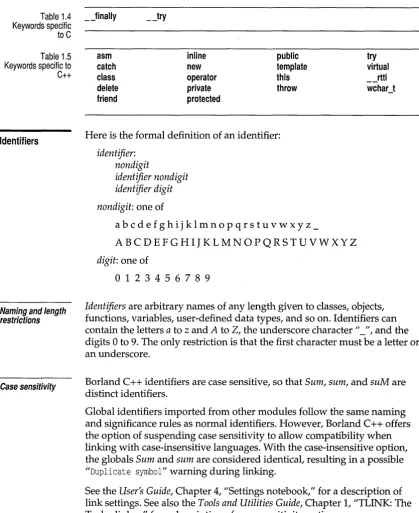
Table 1.4 _Jinally __ try Keywords specific
to C
Table 1.5 Keywords specific to C++
Identifiers
Naming and length restrictions
Case sensitivity
asm catch class delete friend
inline new operator private protected
public template this throw
Here is the formal definition of an identifier:
identifier: non digit
identifier nondigit identifier digit
nondigit: one of
abcdefghijklmnopqrstuvwxyz_
ABC DE F G HIJ K L MNO P QR S TUVW XY Z
digit: one of
o
1 2 3 456 789try
virtual __ rtti wchar_t
Identifiers are arbitrary names of any length given to classes, objects,
functions, variables, user-defined data types, and so on. Identifiers can contain the letters a to z and A to 2, the underscore character 1/_", and the digits 0 to 9. The only restriction is that the first character must be a letter or an underscore.
Borland C++ identifiers are case sensitive, so that Sum, sum, and suM are distinct identifiers.
Global identifiers imported from other modules follow the same naming and significance rules as normal identifiers. However, Borland C++ offers the option of suspending case sensitivity to allow compatibility when linking with case-insensitive languages. With the case-insensitive option, the globals Sum and sum are considered identical, resulting in a possible "Duplicate symbol" warning during linking.
[image:21.507.50.470.55.569.2]Uniqueness and scope
Constants
Integer constants
An exception to these rules is that identifiers of type _ -pascal are always converted to all uppercase for linking purposes.
Although identifier names are arbitrary (within the rules stated), errors result if the same name is used for more than one identifier within the same
scope and sharing the same name space. Duplicate names are legal for
different name spaces regardless of scope. The scope rules are covered on
page 27.
Constants are tokens representing fixed numeric or character values.
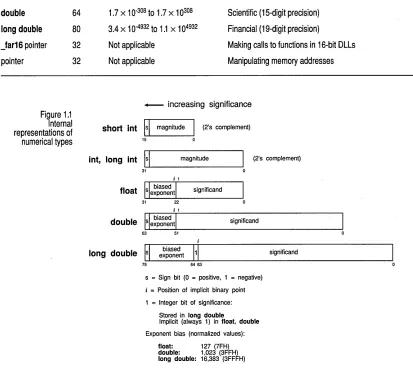
Borland C++ supports four classes of constants: integer, floating point, character (including strings), and enumeration. Figure 1.1 shows how these types are represented internally.
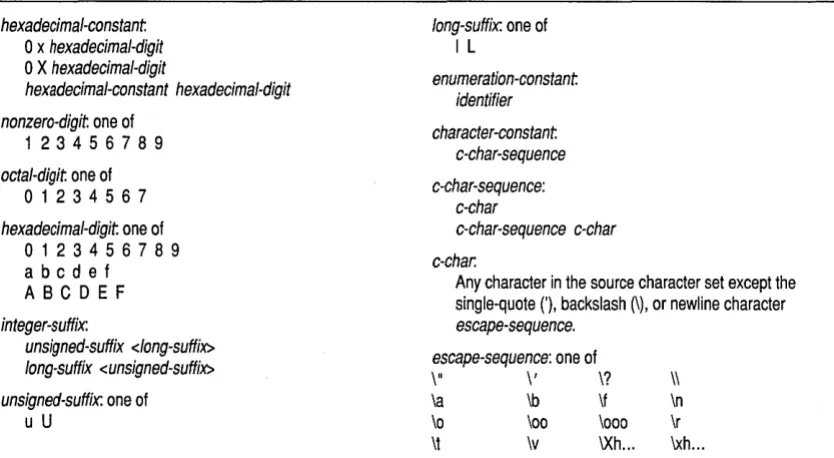
The data type of a constant is deduced by the compiler using such clues as numeric value and the format used in the source code. The formal defini-tion of a constant is shown in Table 1.6.
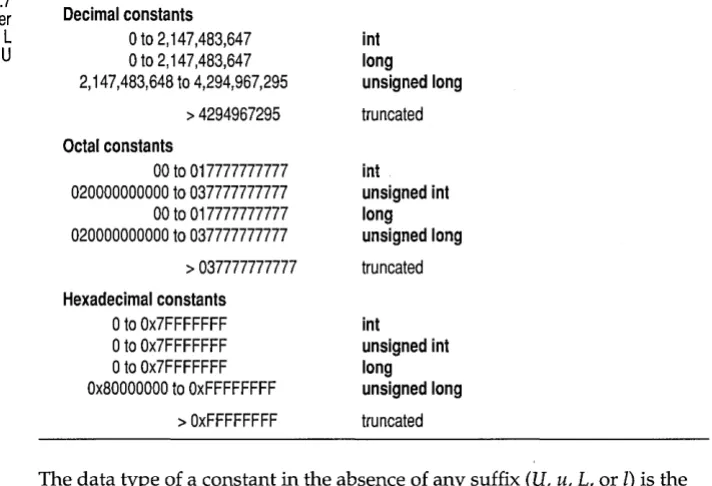
Integer constants can be decimal (base 10), octal (base 8) or hexadecimal
(base 16). In the absence of any overriding suffixes, the data type of an integer constant is derived from its value, as shown in Table 1.7. Note that the rules vary between decimal and nondecimal constants.
Table 1.6: Constants-formal definitions
constant
floating-constant integer-constant enumeration-constant character-constant floating-constant
fractional-constant <exponent-part> <floating-suffix> digit-sequence exponent-part <floating-suffix> fractional-constant
<digit-sequence> . digit-sequence digit-sequence .
exponent-part:
e <sign> digit-sequence
E <sign> digit-sequence sign: one of
+
-digit-sequence: digit
digit-sequence digit floating-suffix: one of
f I F L
integer-constant
decimal-constant <integer-suffix> octal-constant <integer-suffix> hexadecimal-constant <integer-suffix> decimal-constant
nonzero-digit decimal-constant digit octal-constant
o
Table 1.6: Constants-formal definitions (continued)
hexadecimal-constant
a
x hexadecimal-digitlong-suffix: one of
I L
a x
hexadecimal-digithexadecimal-constant hexadecimal-digit enumeration-constant identifier nonzero-digit one of
123 4 5 6 7 8 9
octal-digit one of
a
1 234 5 6 7character-constant c-char-sequence c-char-sequence:
c-char hexadecimal-digit one of
a
1 234 5 6 7 8 9abcdef ABCDEF
c-char-sequence c-char c-char.
Any character in the source character set except the single-quote ('), backslash (\), or newline character
escape-sequence. integer-suffix:
unsigned-suffix <long-suffix>
long-suffix <unsigned-suffix> \" escape-sequence: one of \, \?
\\
unsigned-suffix: one of
u
U\a \b \f
\0 \00 \000
\t \v \Xh ...
Decimal
\n \r
\xh ...
Decimal constants from 0 to 4,294,967,295 are allowed. Constants exceeding
this limit are truncated. Decimal constants must not use an initial zero. An integer constant that has an initial zero is interpreted as an octal constant. Thus,
int i = 10; /*decimal 10 */ int i = 010; /*decimal 8 */
int i = 0; /*decimal 0 = octal 0 */
Octal
All constants with an initial zero are taken to be octal. If an octal constant contains the illegal digits 8 or 9, an error is reported. Octal constants exceeding 037777777777 are truncated.
Hexadecimal
Table 1.7 Borland C++ integer constants without L
or U
long and unsigned suffixes
The suffix L (or I) attached to any constant forces the constant to be repre-sented as a long. Similarly, the suffix U (or u) forces the constant to be unsigned. You can use both Land U suffixes on the same constant in any order or case: ul, lu, UL, and so on.
Decimal constants
o
to 2,147,483,647 into
to 2,147,483,647 long2,147,483,648 to 4,294,967,295 unsigned long
> 4294967295 truncated Octal constants
00 to 017777777777 int
020000000000 to 037777777777 unsigned int
00 to 017777777777 long
020000000000 to 037777777777 unsigned long
> 037777777777 truncated Hexadecimal constants
o
to Ox7FFFFFFF into
to Ox7FFFFFFF unsigned into
to Ox7FFFFFFF longOx80000000 to OxFFFFFFFF unsigned long
> OxFFFFFFFF truncated
The data type of a constant in the absence of any suffix (U, u, L, or 1) is the
first of the following types that can accommodate its value:
Decimal Octal Hexadecimal
int, long int, unsigned long int
int, unsigned int, long int, unsigned long int int, unsigned int, long int, unsigned long int
If the constant has a U or u suffix, its data type will be the first of unsigned int, unsigned long int that can accommodate its value.
If the constant has an L or 1 suffix, its data type will be the first of long int, unsigned long int that can accommodate its value.
[image:24.505.99.455.143.386.2]Floating-point constants
Table 1.7 summarizes the representations of integer constants in all three bases. The data types indicated assume no overriding Lor U suffix has been used.
A floating constant consists of:
• Decimal integer • Decimal point • Decimal fraction
• e or E and a signed integer exponent (optional)
• Type suffix:
f
or F or 1 or L (optional)You can omit either the decimal integer or the decimal fraction (but not both). You can omit either the decimal point or the letter e (or E) and the signed integer exponent (but not both). These rules allow for conventional and scientific (exponent) notations.
Negative floating constants are taken as positive constants with the unary operator minus (-) prefixed.
Here are some examples:
Constant Value
23.45e6 23.45 x 10⁶
.0 0
O. 0
1. 1.0 x 10° = 1.0
-1.23 -1.23
2e-5 2.0 x 10⁻⁵
3E+10 3.0 x 10¹⁰
.09E34 0.09 x 1034
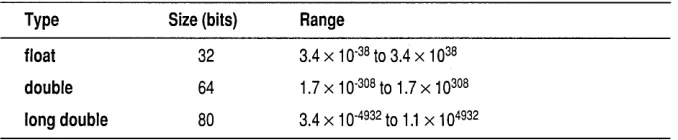
In the absence of any suffixes, floating-point constants are of type double. However, you can coerce a floating constant to be of type float by adding an for F suffix to the constant. Similarly, the suffix 1 or L forces the constant
Table 1.8 Borland C++ floating constant sizes and ranges
Character constants
To retain the old behavior, use the -K2 command-line option and Borland C++ 1.0 header files and libraries.
Type Size (bits) Range
float 32 3.4 x 10.38 to 3.4 x 1038
double 64 1.7 x 10-308 to 1.7 x 10308
long double 80 3.4 x 10-4932 to 1.1 x 104932
A character constant is one or more characters enclosed in single quotes,
such as 'A', '=', or '\n'. In C, single-character constants have data type int. The number of bits used to internally represent a character constant is sizeof(int) with the upper byte is zero or sign-extended. In C++, a character constant has type char. Multicharacter constants in both C and C++ have data type int.
The three char types I
One-character constants, such as 'A', '\t', and' \007', are represented as int values. In this case, the low-order byte is sign extended into the high bit; that is, if the value is greater than 127 (base 10), the upper bit is set to -1 (=OxFF).
The three character types, char, signed char, and unsigned char, require an 8-bit (one byte) storage. In C and Borland C++ programs prior to version Borland C++ 1.5, char is treated the same as signed char. The behavior of C programs is unaffected by the distinction between the three character types.
In a C++ program, a function can be overloaded with arguments of type char, signed char, or unsigned char. For example, the following function prototypes are valid and distinct:
void func(char ch) i
void func(signed char Ch)i void func(unsigned char Ch)i
If only one of the above prototypes exists, it will accept any of the three character types. For example, the following is acceptable:
void func(unsigned char Ch)i void main(void) {
signed char ch = 'X'i
func (ch) i
}
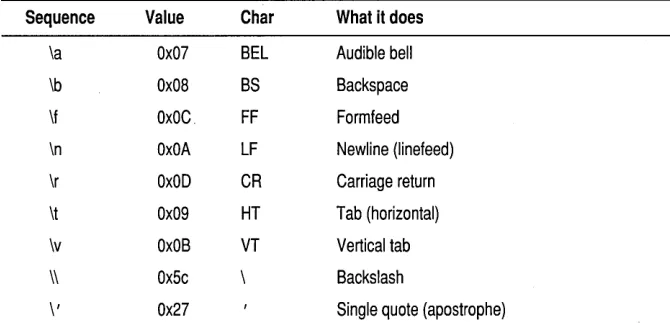
Escape sequences
[image:26.504.115.454.64.134.2]Table 1.9 Borland C++ escape sequences
The \\ must be used to represent a real ASCII backslash, as used in operating system paths.
A backslash is used with octal or hexadecimal numbers to represent the ASCII symbol or control code corresponding to that value; for example, ,\
03 I for Ctrl-C or I \x3F I for the question mark. You can use any string of up
to three octal or any number of hexadecimal numbers in an escape
sequence, provided that the value is within legal range for data type char (0 to Oxff for Borland C++). Larger numbers generate the compiler error Numeric constant too large. For example, the octal number \777 is larger than the maximum value allowed (\377) and will generate an error. The first nonoctal or nonhexadecimal character encountered in an octal or hexadecimal escape sequence marks the end of the sequence.
Originally, Turbo C allowed only three digits in a hexadecimal es~ape
sequence. The ANSI C rules adopted in Borland C++ might cause problems with old code that assumes only the first three characters are converted. For example, using Turbo C l.x to define a string with a bell (ASCII 7) followed by numeric characters, a programmer might write:
printf("\x0072.1A Simple Operating System");
This is intended to be interpreted as \x007 and I/2.lA Simple Operating System". However, Borland C++ compiles it as the hexadecimal number \x0072 and the literal string I/.lA Simple Operating System".
To avoid such problems, rewrite your code like this:
printf (" \x007" "2.1A Simple Operating System");
Ambiguities might also arise if an octal escape sequence is followed by a nonoctal digit. For example, because 8 and 9 are not legal octal digits, the constant \258 would be interpreted as a two-character constant made up of the characters \25 and 8.
The next table shows the available escape sequences.
Sequence Value Char What it does
\a Ox07 BEL Audible bell
\b Ox08 BS Backspace
\f OxOC. FF Formfeed
\n OxOA LF Newline (Iinefeed)
\r OxOD CR Carriage return
\t Ox09 HT Tab (horizontal)
\v OxOB VT Vertical tab
\\ Ox5c \ Backslash
[image:27.504.137.472.416.582.2]Table 1.9: Borland C++ escape sequences (continued)
\" Ox22 Double quote
\?
\0
\XH
\xH
Ox3F
Wide-character constants ?
any any any
Question mark
o
= a string of up to three octal digits H = a string of hex digitsH
=
a string of hex digitsWide-character types can be used to represent a character that does not fit into the storage space allocated for a char type. A wide character is stored in a two-byte space. A character constant preceded immediately by an L is a wide-character constant of data type wch~r _t.
- . . When wchar _t is used in a C program it is a type defined in stddef.h header file. In a C++ program, wchar_t is a keyword that can represent distinct codes for any element of the largest extended character set in any of the supported locales. In C++, wchar_t is the same size, signedness, and alignment requirement as an int type. For example:
String constants
wchar_t ch = L'AB';
A string preceded immediately by an L is a wide-character string. The memory allocation for a string is two bytes per character. For example:
wchar_t str = L"ABCD";
Multi-character constants
Borland C++ also supports multi-character constants. Multi-character constants can consist of as many as four characters. For example, ' An', ' \ n \ t' , and ' \ 006 \ 007\ 008 \ 009' are valid constants. These constants are represented as 32-bit int values. These constants are not portable to other C compilers.
String constants, also known as string literals, form a special category of constants used to handle fixed sequences of characters. A string literal is of data type array-of-char and storage class static, written as a sequence of any number of characters surrounded by double quotes:
"This is literally a string!"
The null (empty) string is written"".
Enumeration constants
"\t\t\"Name\"\\\tAddress\n\n"
prints out like this:
"Name" \ Address
//Name" is preceded by two tabs; Address is preceded by one tab. The line is followed by two new lines. The \ II provides interior double quotes.
If you compile with the -A option for ANSI compatibility, the escape char-acter sequence //\ \//, is translated to //\// by the compiler.
A literal string is stored internally as the given sequence of characters plus a final null character ('\0'). A null string is stored as a single' \0' character.
Adjacent string literals separated only by whitespace are concatenated during the parsing phase. In the following example,
#include <stdio.h>
int main() { char *p;
p = "This is an example of how Borland C++" " will automatically\ndo the concatenation for" " you on very long strings, \nresulting in nicer" " looking programs.";
printf (p); return(O) ; }
The output of the program is:
This is an example of how Borland C++ will automatically do the concatenation for you on very long strings, resulting in nicer looking programs.
You can also use the backslash (\) as a continuation character in order to extend a string constant across line boundaries:
puts("This is really \ a one-line string");
See page 68 for a detailed look at enum declarations.
Constants and internal representation
The values acquired by enumeration constants depend on the format of the enumeration declaration and the presence of optional initializers. In this example,
enum team { giants, cubs, dodgers };
giants, cubs, and dodgers are enumeration constants of type team that can be
assigned to any variables of type team or to any other variable of integer type. The values acquired by the enumeration constants are
giants = 0, cubs = 1, dodgers = 2
in the absence of explicit initializers. In the following example,
enum team { giants, cubs=3, dodgers = giants + 1 };
the constants are set as follows:
giants = 0, cubs = 3, dodgers = 1
The constant values need not be unique:
enum team { giants, cubs = 1, dodgers = cubs - 1 };
ANSI C acknowledges that the size and numeric range of the basic data types (and their various permutations) are implementation-specific and usually derive from the architecture of the host computer. For Borland C++, the target platform is the IBM PC family (and compatibles), so the
architecture of the Intel80x86 (where x >= 3) microprocessors governs the choices of internal representations for the various data types.
The next table lists the sizes and resulting ranges of the data types for Borland C++; see page 38 for more infor~ation on these data types. Figure 1.1 shows how these types are represented internally.
Type Size (bits) Range Sample applications
unsigned char 8
o
to 255 Small numbers and full PC character setchar 8 -128 to 127 Very small numbers and ASCII characters
short int 16 -32,768 to 32,767 Counting, small numbers, loop control
unsigned int 32
o
to 4,294,967,295 Larger numbers and loopsint 32 -2,147,483,648 to 2,147,483,647 Counting, small numbers, loop control
unsigned long 32
o
to 4,294,967,295 Astronomical distancesenum 32 -2,147,483,648 to 2,147,483,647 Ordered sets of values long 32 -2,147,483,648 to 2,147,483,647 Large numbers, populations
double 64 long double 80
Jar16 pointer 32
[image:31.504.51.464.53.429.2]pointer
Figure 1.1 Internal representations of numerical types
Constant expressions
32
1 .7 x 1 0-308 to 1 .7 x 1 0308 Scientific (15-digit precision)
3.4 x 10-4932 to 1.1 x 104932 Financial (19-digit precision)
Not applicable Making calls to functions in 16-bit DLLs
Not applicable Manipulating memory addresses
_ increasing significance
short int
lsi
magnitudeI
(2's complement)15 0
int, long int
lsi
magnitude (2's complement)31
significand
31 22
j 1
II biased I
double UsL-ex..;,.p_on_e_ntL-_ _ _ _ _ S_ig_nif_ic_an_d _ _ _ _ _ _ _ ---l
63 51
significand
d II biased 1'1'
long ouble s exponent~
7·9~~~--~~63---~
s = Sign bit (0 = positive, 1 = negative)
j = Position of implicit binary point 1 = Integer bit of significance:
Stored in long double
Implicit (always 1) in float, double Exponent bias (normalized values):
float: 127 (7FH) double: 1,023 (3FFH) long double: 16,383: (3FFFH)
A constant expression is an expression that always evaluates to a constant (and it must evaluate to a constant that is in the range of representable values for its type). Constant expressions are evaluated just as regular expressions are. You can use a constant expression anywhere that a constant is legal. The syntax for constant expressions is
constant-expression: Conditional-expression
Punctuators
Brackets
Parentheses
Braces
• Assignment
• Comma • Decrement
11 Function call
• Increment
The punctuators (also known as separators) in Borland C++ are defined as follows:
punctuator: one of
[ ] ( ) { } , ; : ... * = #
[] (open and close brackets) indicate single and multidimensional array subscripts:
char ch, str[] int mat[3] [4] i
ch = str[3];
"Stan" ;
/* 3 x 4 matrix */ /* 4th element */
() (open and close parentheses) group expressions, isolate conditional expressions, and indicate function calls and function parameters:
d = c * (a + b) i
if (d == z) ttX;
func()i int (*fptr) () i
fptr = func;
void func2(int n) i
/* override normal precedence */
/* essential with conditional statement */
/* function call, no args */ /* function pointer declaration */ /* no () means func pointer */
/* function declaration with parameters */
Parentheses are recommended in macro definitions to avoid potential precedence problems during expansion:
#define CUBE (x) ((x) * (x) * (x))
The use of parentheses to alter the normal operator precedence and associa-tivity rules is covered in the "Expressions" section starting on page 71.
{ } (open and close braces) indicate the start and end of a compound
Comma
Semicolon
Colon
if (d == z)
ttX; func () ;
The closing brace serves as a terminator for the compound statement, so a ; (semicolon) is not required after the }, except in structure or class
declarations. Often, the semicolon is illegal, as in
if (statement) {}; else
/*illegal semicolon*/
The comma (,) separates the elements of a function argument list:
void func(int n, float f, char ch);
The comma is also used as an operator in comma expressions. Mixing the two uses of comma is legal, but you must use parentheses to distinguish them:
func(i, j); /* call func with two args */
func((expl, exp2), (exp3, exp4, exp5)); /* also calls func with two args! */
The semicolon (;) is a statement terminator. Any legal C or C++ expression (including the empty expression) followed by a semicolon is interpreted as a statement, known as an expression statement. The expression is evaluated and its value is discarded. If the expression statement has no side effects, Borland C++ might ignore it.
a + b; tta;
/* maybe evaluate a + b, but discard value *1
/* side effect on a, but discard value of t+a */ /* empty expression = null statement */
Semicolons are often used to create an empty statement:
for (i = 0; i < n; itt) {
Use the colon (:) to indicate a labeled statement:
start: x=O;
goto start;
Labels are discussed in the "Labeled statements" section on page 95.
Ellipsis
Asterisk (pointer declaration)
Equal sign
(initializer)
The ellipsis ( ... ) is three successive periods with no whitespace intervening. Ellipses are used in the formal argument lists of function prototypes to indicate a variable number of arguments, or arguments with varying types:
void func(int n, char ch, ... );
This declaration indicates that June will be defined in such a way that calls must have at least two arguments, an int and a char, but can also have any number of additional arguments.
In C++, you can omit the comma preceding the ellipsis.
The * (asterisk) in a variable declaration denotes the creation of a pointer to a type:
char *char-ptr; /* a pointer to char is declared */
Pointers with multiple levels of indirection can be declared by indicating a pertinent number of asterisks:
int **int-ptr; /* a pointer to an integer array */ double ***double-ptr; /* a pointer to a matrix of doubles */
You can also use the asterisk as an operator to either dereference a pointer or as the multiplication operator:
i = *int-ptr; a = b * 3.14;
The
=
(equal sign) separates variable declarations from initialization lists:char array[5] = { 1, 2, 3, 4, 5 }; int x = 5;
In C++, declarations of any type can appear (with some restrictions) at any point within the code. In a C function, no code can precede any variable declarations.
In a C++ function argument list, the equal sign indicates the default value for a parameter:
int f(int i = 0) { ... } /* Parameter i has default value of zero */
The equal sign is also used as the assignment operator in expressions:
a = b + c;
Pound sign
(preprocessor directive)
The # (pound sign) indicates a preprocessor directive when it occurs as the first nonwhitespace character on a line. It signifies a compiler action, not necessarily associated with code generation. See page 177 for more on the preprocessor directives.
Declarations
Objects
c
H A p T E RLanguage structure
This chapter provides a formal definition of Borland C++'s language structure. It describes the legal ways in which tokens can be grouped together to form expressions, statements, and other significant units.
2
This section briefly reviews concepts related to declarations: objects, storage classes, types, scope, visibility, duration, and linkage. A general knowledge of these is essential before tackling the full declaration syntax. Scope, visibility, duration, and linkage determine those portions of a program that can make legal references to an identifier in order to access its object.
An object is an identifiable region of memory that can hold a fixed or
variable value (or set of values). (This use of the word object is different from the more general term used in object-oriented languages.) Each value has an associated name and type (also known as a data type). The name is used to access the object. This name can be a simple identifier, or it can be a complex expression that uniquely "points" to the object. The type is used
1\'1 To determine the correct memory allocation required initially .
• To interpret the bit patterns found in the object during subsequent accesses.
II In many type-checking situations, to ensure that illegal assignments are
trapped.
Borland C++ supports many standard (predefined) and user-defined data types, including signed and unsigned integers in various sizes, floating-point numbers in various precisions, structures, unions, arrays, and classes.
Ivalues
rvalues
Storage classes and types
Declarations establish the necessary mapping between identifiers and objects. Each declaration associates an identifier with a data type. Most declarations, known as defining declarations, also establish the creation (where and when) of the object; that is, the allocation of physical memory and its possible initialization. Other declarations, known as referencing
declarations, simply make their identifiers and types known to the compiler.
There can be many referencing declarations for the same identifier,
especially in a multifile program, but only one defining declaration for that identifier is allowed.
Generally speaking, an identifier cannot be legally used in a program before its declaration point in the source code. Legal exceptions to this rule (known as forward references) are labels, calls to undeclared functions, and class, struct, or union tags.
An lvalue is an object locator: an expression that designates an object. An
example of an lvalue expression is *P, where P is any expression evaluating to a non-null pointer. A modifiable lvalue is an identifier or expression that relates to an object that can be accessed and legally changed in memory. A canst pointer to a constant, for example, is not a modifiable lvalue. A pointer to a constant can be changed (but its dereferenced value cannot).
Historically, the I stood for "left," meaning that an lvalue could legally stand on the left (the receiving end) of an assignment statement. Now only modifiable lvalues can legally stand to the left of an assignment statement. For example, if a and bare nonconstant integer identifiers with properly allocated memory storage, they are both modifiable lvalues, and assignments such as a
=
1; and b=
a + b are legal.The expression a + b is not an lvalue: a + b
=
a is illegal because theexpression 'On the left is not related to an object. Such expressions are often called rvalues (short for right values).
Associating identifiers with objects requires each identifier to have at least two attributes: storage class and type (sometimes referred to as data type). The Borland C++ compiler deduces these attributes from implicit or explicit declarations in the source code.
Scope
Name spaces
The type determines how much memory is allocated to an object and how the program will interpret the bit patterns found in the object's storage allocation. A given data type can be viewed as the set of values (often implementation-dependent) that identifiers of that type can assume, together with the set of operations allowed on those values. The compile-time operator, sizeof,lets you determine the size in bytes of any standard or user-defined type; see page 93 for more on this operator.
The scope of an identifier is that part of the program in which the identifier can be used to access its object. There are five categories of scope: block (or
local),junction,junction prototype,file, and class (C++ only). These depend on
how and where identifiers are declared.
• Block. The scope of an identifier with block (or local) scope starts at the declaration point and ends at the end of the block containing the declara-tion (such a block is known as the enclosing block). Parameter declara-tions with a function definition also have block scope, limited to the scope of the block that defines the function.
• Function. The only identifiers having function scope are statement labels. Label names can be used with goto statements anywhere in the function in which the label is declared. Labels are declared implicitly by writing
labeCname: followed by a statement. Label names must be unique within
a function.
• Function prototype. Identifiers declared within the list of parameter declarations in a function prototype (not part of a function definition) have function prototype scope. This scope ends at the end of the function prototype.
• File. File scope identifiers, also known as globals, are declared outside of all blocks and classes; their scope is from the point of declaration to the end of the source file.
• Class (C++). For now, think of a class as a named collection of members, including data structures and functions that act on them. Class scope applies to the names of the members of a particular class. Classes and their objects have many special access and scoping rules; see pages 119-132.
Name space is the scope within which an identifier must be unique. C uses
four distinct classes of identifiers:
Structures, classes, and enumerations are in the same name space in C++.
Visibility
Visibility cannot exceed scope, but scope can exceed visibility.
Duration
• Structure, union, and enumeration tags. These must be unique within the block in which they are defined. Tags declared outside of any function must be unique within all tags defined externally.
• Structure and union member names. These must be unique within the structure or union in which they are defined. There is no restriction on the type or offset of members with the same member name in different structures.
• Variables, typedefs, functions, and enumeration members. These must be . unique within the scope in which they are defined. Externally declared
identifiers must be unique among externally declared variables.
The visibility of an identifier is that region of the program source code from
which legal access can be made to the identifier's associated object.
Scope and visibility usually coincide, though there are circumstances under which an object becomes temporarily hidden by the appearance of a
duplicate identifier: the object still exists but the original identifier cannot be used to access it until the scope of the duplicate identifier is ended.
int ii char Chi i = 3i
double ii i = 3.0e3i
ch = 'A'i
i += 1i
II auto by default
II int i and char ch in scope and visible
II double i in scope and visible
II int i=3 in scope but hidden
II char ch in scope and visible
II double i out of scope
II int i visible and = 4
II char ch still in scope & visible = 'A' }
II int i and char ch out of scope
Again, special rules apply to hidden class names and class member names: C++ operators allow hidden identifiers to be accessed under certain conditions:
Duration, closely related to storage class, defines the period during which
Static
Local
The Borland C++ compiler can ignore requests for register allocation. Register allocation is based on the compilers analysis of how a
variable is used.
Dynamic
Translation units
instance, unlike typedefs and types, have real memory allocated during run time. There are three kinds of duration: static, local, and dynamic.
Memory is allocated to objects with static duration as soon as execution is underway; this storage allocation lasts until the program terminates. Static duration objects usually reside in fixed data segments. All functions, wherever defined, are objects with static duration. All variables with file scope have static duration. Other variables can be given static duration by using the explicit static or extern storage class specifiers.
Static duration objects are initialized to zero (or null) in the absence of any explicit initializer or, in C++, constructor.
Don't confuse static duration with file or global scope. An object can have static duration and local scope. .
Local duration objects, also known as automatic objects, lead a more
precarious existence. They are created on the stack (or in a register) when the enclosing block or function is entered. They are deallocated when the program exits that block or function. Local duration objects must be explicitly initialized; otherwise, their contents are unpredictable. Local duration objects must always have local or function scope. The storage class specifier auto can be used when declaring local duration variables, but is usually redundant, because auto is the default for variables declared within a block. An object with local duration also has local scope, because it does
not exist outside of its enclosing block. The converse is not true: a local
scope object can have static duration.
When declaring variables (for example, int, char, float), the storage class specifier register also implies auto; but a request (or hint) is passed to the compiler that the object be allocated a register if possible. Borland C++ can be set to allocate a register to a local integral or pointer variable, if one is free. If no register is free, the variable is allocated as an auto, local object with no warning or error.
Dynamic duration objects are created and destroyed by specific function calls during a program. They are allocated storage from a special memory reserve known as the heap, using either standard library functions such as
malloc, or by using the C++ operator new. The corresponding deallocations
are made usiI].gfree or delete.
For more details, see "External declarations and definitions" on page 34.
Linkage
directives. Syntactically, a translation unit is defined as a sequence of external declarations:
translation-unit: external-declaration
translation-unit external-declaration
external-declaration function-definition
declaration
The word external has several connotations in C; here it refers to
declarations made outside of any function, and which therefore have file scope. (External linkage is a distinct property; see the following section, "Linkage.") Any declaration that also reserves storage for an object or function is called a definition (or defining declaration).
An executable program is usually created by compiling several indepen-dent translation units, then linking the resulting object files with pre-existing libraries. A problem arises when the same identifier is declared in different scopes (for example, in different files), or declared more than once in the same scope. Linkage is the process that allows each instance of an identifier to be associated correctly with one particular object or function. All identifiers have one of three linkage attributes, closely related to their scope: external linkage, internal linkage, or no linkage. These attributes are determined by the placement and format of your declarations, together with the explicit (or implicit by default) use of the storage class specifier static or extern.
Each instance of a particular identifier with external linkage represents the same object or function throughout the entire set of files and libraries making up the program. Each instance of a particular identifier with
internal linkage represents the same object or function within one file only.
Identifiers with no linkage represent unique entities.
Here are the external and internal linkage rules:
• Any object or file identifier having file scope will have internal linkage if its declaration contains the storage class specifier static.
For C++, if the same identifier appears with both internal and external linkage within the same file, the identifier will have external linkage. In C, it will have internal linkage .
Name mangling
• If a function is declared without a storage class specifier, its linkage is determined as if the storage class specifier extern had been used. • If an object identifier with file scope is declared without a storage class
specifier, the identifier has external linkage.
The following identifiers have no linkage attribute:
• Any identifier declared to be other than an object or a function (for example, a typedef identifier)
II Function parameters
• Block scope identifiers for objects declared without the storage class specifier extern
When a C++ module is compiled, the compiler generates function names that include an encoding of the function's argument types. This is known as name mangling. It makes overloaded functions possible, and helps the linker catch errors in calls to functions in other modules. However, there are times when you won't want name mangling. When compiling a C++ module to be linked with a module that does not have mangled names, the C++ compiler has to be told not to mangle the names of the functions from the other module. This situation typically arises when linking with libraries or .OBJ files compiled with a C compiler.
To tell the C++ compiler not to mangle the name of a function, declare the function as extern "C", like this:
extern "C" void Cfune( int );
This declaration tells the compiler that references to the function Cfunc
should not be mangled.
You can also apply the extern "C" declaration to a block of names:
extern "C" {
};
void Cfune1( int ); void Cfune2( int ); void Cfune3( int );
As with the declaration for a single function, this declaration tells the compiler that references to the functions Cfunc1, Cfunc2, and Cfunc3 should not be mangled. You can also use this form of block declaration when the block of function names is contained in a header file:
extern "e" {
Declaration syntax
Tentative definitions
Possible declarations
All six interrelated attributes (storage classes, types, scope, visibility, duration, and linkage) are determined in diverse ways by declarations.
Declarations can be defining declarations (also known as definitions) or
referencing declarations (sometimes known as nondefining declarations). A
defining declaration, as the name implies, performs both the duties of declaring and defining; the nondefining declarations require a definition to be added somewhere in the program. A referencing declaration introduces one or more identifier names into a program. A definition actually allocates memory to an object and associates an identifier with that object.
The ANSI C standard introduces a new concept: