INTRODUCTION
The purpose of this Application Note is to assist the Quark user in the installation of floppy disk formats compatible with those of many manufacturers of personal computers. This will help the user to gain access to a
wide variety of software and data, and
transfer information between different
computers and the Quark. The Note provides
the specifications for 26 different floppy disk formats.
FLOPPY DISK FORMAT STANDARDS
The industry standard for 8-inch floppy
diskette formats is the IBM 3740 format. All Megatel implementations of CPIM 2.2 and Plus now include the IBM 3740 format as one of
their logical drives. This is beneficial in
that most data can first be written to the IBM 3740 format and then read on the QUARK.
For 5.25-inch disks, there is unfortunately
no industry standard format. All Megatel
implementations ofCPIM 2.2 and Plus now include the OSBORNE I single density format
on one of its logical drives. Nevertheless,
the .information the user needs may not be
available on OSBORNE I format. If this is
the case, then this Application Note will assist the user in selecting and implementing
an alternate interchange format.
USING THIS APPLICATION NOTE
This Application Note can be used as a guide when installing disk format specifications.
Even if the formats described in the
Application Note are not installed they can be used to better understand the flexibility of the QINSTALL installation procedure for disk formats.
The Note has been written with CPIM Plus· in mind, since CPIM Plus provides more system
flexibility than CPIM 2.2. If the user
wishes to install any of the disk formats for CP/M 2.2, then an understanding of the Basic
Input/Output System (SIOS) is required. The
installation procedure for CPIM 2.2 does not allow as much flexibility for diskette format specifications, and thus changes to the BIOS
must be made directly. . A section called
"INSTALLlMi DISK fORMATS FOR CPIM 2.2" can be found later in this Application Note.
e
Megatel Computer Technologi.es, 19851
INSTALLING DISK FORMATS FOR CPIM PLUS
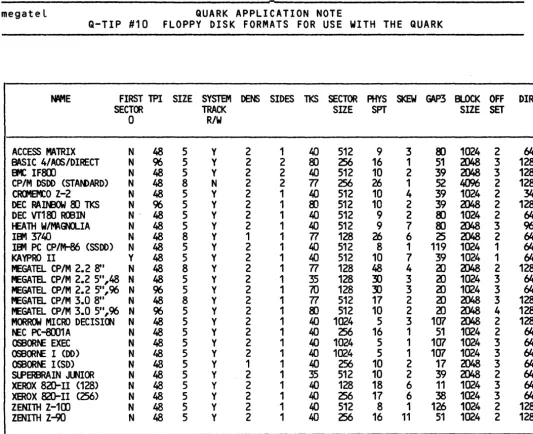
Table 1 provides the specifications for 26
different floppy disk formats. The disk
format definitions in CP/M Plus are flexible enough so that all but one parameter can be
defined through the QINSTALL procedure. That parameter is the label for the first sector
(FIRST SECTOR 0).
Certain parameters will depend on the
characteristics of the disk drive used. An
example of this is the number of tracks per side. Older 5.25-inch 48 tpi drives only had 35 tracks while newer ones have 40 tracks.
COlUMN HEADINGS IN TABLE 1
The following parameters are not part of the
QINSTALL questions. These parameters are
either modified before the QINSTALL procedure is done or they are used as a guide in determining other parameters in the QINSTALL questions.
FIRST SECTOR 0: This parameter defines the
labeling of the first logical sector. The
first logical sector is labeled either 0 or
1. The patch for this parameter will depend
on the logical drive assigned to the specific format. All of the first logical sectors are
assumed to be labeled 1. If a Y appears in
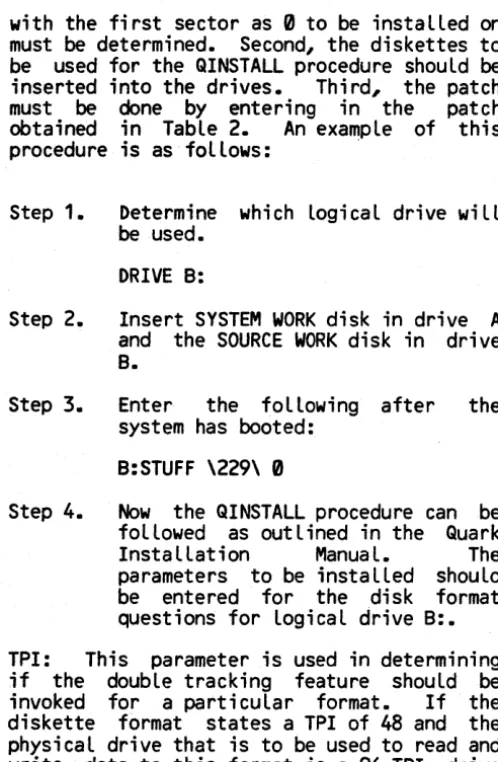
this column for the format desired then the patch IIkJst be made. If a N appears for the format desired then no patch is required. Table 2 shows the patch for each logical drive.
I
Logical Drive Patch
A: STUFF \209\ 0
B: STUFF \229\ 0
C: STUFF \249\ 0
D: STUFF \269\ 0
E: STUFF \289\ 0
TABLE 2. Sector 0 Patch Information
The patch must be made before the QINSTALL
procedure is run. First, the logical drive
(A:,B:,C:,D:,or E:) that the diskette format
be used for the QINSTALL procedure should be
inserted into the drives. Third, the patch
must be done by entering in the patch
obtained in Table 2. An example of this
procedure is as follows: .
Step 1. Determine which logical drive will
be used.
DRIVE B:
Step 2. Insert SYSTEM WORK disk in drive A
and the SOURCE WORK disk in drive B.
Step 3. Enter the following after the
system has booted:
B:STUFF \229\ 0
Step 4. Now the QINSTALL procedure can be
followed as outlined in the Quark
Installation Manual. The
parameters to be installed should be entered for the disk format questions for logical drive B:.
TPI: This parameter is used in determining
if the double tracking feature should be
invoked for a particular format. If the
diskette format states a TPI of 48 and the physical drive that is to be used to read and write data to this format is a 96 TPI drive then the double tracking parameter should be set.
SIZE: This parameter is used to ensure that the format for a 5.25-inch diskette is to be assigned to a physical drive that is 5.25-inch and that an 8-5.25-inch format diskette is assigned to an 8-inch physical drive.
SYSTEM TRACK R/W: Some computers read and
write to the system tracks (reserved tr~cks)
in single density (FM) and to the rest of the
diskette in double density (MFM). The Quark
CP/M operating system requires that the
entire diskette be in either single density
or double density. Therefore if a diskette
format is defined as double density but the the reserved tracks of the diskette are
single density then the reserved tracks
cannot be read or written. If a Y appears in this column then all of the diskette can be read or written on the Quark. If a N appears in this column .then the reserved tracks cannot be read or written on the Quark.
2
format section of QINSTALL. Some of the
QINSTALL questions are not included in Table
1. Those not covered do not affect the
diskette format but depend on the physical configuration of the of the users system. These question deal with the select line the Megatel diskette formats will be on (N:,O:, and P:)and the select line used for each logical drive (A:,B:,C:,D:, and E:).
Brief descriptions of the remaining headings
in Table 1 are provided below. For a
detailed description refer to the Quark
Installation Manual.
DENS: Defines the recording format; either
single density (FM) or double density (MFM).
SIDES: Defines the diskette format as either single or double sided.
TKS: The number of tracks used on each side of the diskette.
SECTOR SIZE: The number of bytes per sector
on the diskette. The only acceptable values for this parameter are 128, 256, 512, and 1024 byte sectors.
PHY SPT: The number of physical sectors that
each track will have. The size of the
sectors is defined by the PHYSICAL SECTOR SIZE.
SKEW: The skew factor, or interlacing, is
the number of physical sectors skipped
between consecutive sectors. The purpose of
this parameter in discussed in greater detail in both the Megatel Quark and CP/M manuals.
GAP: The number of bytes between the end of the data field and the ID mark of the next physical sector.
BLOCK SIZE: A block is the smallest unit of
file storage recognized by CP/M. All data is written in blocks the size of which is defined by this parameter.
OFFSET: The reserved tracks are those
tracks that are set aside for the
operating system. Since the directory track
follows the last reserved track, it is
essential to set aside the reserved tracks even if no data is written to them, if
installing one of the formats in this
[image:2.620.43.292.69.450.2]Nt'IE FIRST TPI SIZE SYSTEM DENS SIDES 11<5 SECTOR PHYS SKEW ~ BLOCK OFF DIR
SECT~ TRACK SIZE SPT SIZE SET
0 R/W
ACCESS MAlRIX N 48 5 Y 2 1 leO 512 9 3 8J 1024 2 64
BASIC 4/AOS/DlRECT N 96 5 Y 2 2 8) 256 16 1 51 aJ48 3 128
IK IF8D N 48 5 Y 2 2 itO 512 10 2 39 2048 3 128
CP/M 0500 (STAN>ARO) N 48 8 N 2 2 Tl 256 26 1 52 /U)6 2 128
CIUel:O Z-2 N 48 5 Y 2 1 itO 512 10 4 39 1024 2 34
DEC RAItmI 8) TKS N 96 5 Y 2 1 8J 512 10 2 39 ZJ48 2 128
DEC VT18J R<BIN N- 48 5 Y 2 1 itO 512 9 2 8J 1024 2 64
J£ATH W/ftV\<HLIA N 48 5 Y 2 1 itO 512 9 7 8J ZJ48 3 96
IEft1 ~t..O N 48 8 Y 1 1 TI 128 26 6 25 2048 2 64
IBt'I PC CP/M-86 (SSOO) N 48 5 Y 2 1 40 512 8 1 119 1024 1 64
KAVPRO II Y 48 5 Y 2 1 40 512 10 7 39 1024 1 64
ft£GATEL CP 1M 2.2 8" N 48 8 Y 2 1 Tl 128 48 4 tD ZJ48 2 128
fEGATEL CP/M 2.2 5",48 N 48 5 Y 2 1 35 128 3) 3 20 1024 3 64
MEGATEL CP/M 2.2 5",96 N 96 5 Y 2 1 70 128 :!) 3 tD 1024 3 64
fEGATEL CP/M 3.0 8" N 48 8 Y 2 1 Tl 512 17 2 aJ 2048 3 128
rEGATEL CP/M 3.0 511,96 N 96 5 Y 2 1 8) 512 10 2 20 2048 4 128
MORfDI MICRO DECISlOO N 48 5 Y 2 1 t..O 1024 5 3 107 2048 2 128
t£C PC-8OO1 A N 48 5 Y 2 1 40 256 16 1 51 1024 2 tit
OSBORN: EXEC N 48 5 Y 2 1 ItO 1024 5 1 107 1024 3 64
0SB~t£ I (00) N 48 5 Y 2 1 ItO 1024 5 1 107 1024 3 tit
OSBORN: I (SO) N 48 5 Y 1 1 ItO 256 10 2 17 2048 3 64
SlPERBRAIN JltJIOR N 48 5 Y 2 1 35 512 10 2 39 ZJ48 2 64
XEROX 820-11 (128) N 48 5 Y 2 1 ItO 128 18 6 11 1024 3 64
XEROX 820-11 (256) N 48 5 Y 2 1 ItO 256 17 6 38 1024 3 64
ZENIlH Z-1CD N 48 5 Y 2 1 ItO 512 8 1 126 1024 2 128
ZENITH Z-90 N 48 5 Y 2 1 40 256 16 11 51 1024 2 128
TABlE 1. Diskette Fonnat SpecificatialS For CP/M Plus QINSTALL QJestioos
install his own defined format, then reserved tracks are only necessary on logical drive A: for booting the operating system.
DIR: The maximum number of directory entries
allowed. This number must be reasonable
because the data area of the disk immediately follows the directory area.
NOTE ON DOUBLE TRACKING
If double tracking is invoked for a
particular logical drive, then two step
pulses will be issued every time the heads are moved in or out one track. This feature should be used if a diskette format for 48 TPI is to be accessed on a 96 TPI drive.
INSTALLING DISK FORMATS FOR CP/M 2.2
To install any of the disk formats described in this Application Note in a CP/M 2.2
system, various parts of the BIOS must be
changed directly. The simplest formats to
install for CP/M 2.2 are those with a
physical sector size of 128 bytes. This is
because no blocking or deblocking is
required. Deblocking is a way of reading in
a sector of a size greater than 128 bytes (256, 512,- or 1024) and then extracting the
logical sector required. Blocking is a way
of writing the logical sector to the proper
place on the proper physical sector. The
blocking and deblocking code is in various
parts of the BIOS and only supports a
physical sector size of 256 bytes. For a
further explanation on blocking and
[image:3.620.46.579.43.477.2]particuLar format. The physicaL sectors per track and the skew factor can be used to
caLculate the interlace of the physicaL
sectors. From this the interLace tabLe for
the LogicaL sectors can be caLculated. The
foLLowing exampLe shows how this is done for the OSBORNE I.
From Table 1:
Physical Sectors per Track Sector Size
Skew Factor
10 256 bytes
2
Since there are 10 physicaL sectors per track and the skew is 2, the physicaL interlace table starts at sector 1 and then skips every other sector but does not exceed the maximum
sector of 10. Therefore the physical sector
interlace table is as foLlows:
1,3,5,7,9,2,4,6,8,10
Since the physical sector size is 256 bytes, each physicaL sector has 2 logical sectors (a
logical sector is 128 bytes). Therefore:
Physical Sector 1 has Logical Sectors 1, 2 Physical Sector 2 has Logical Sectors 3, 4 Physical Sector 3 has Logical Sectors 5, 6 PhysicaL Sector 4 has Logical Sectors 7, 8 . PhysicaL Sector 5 has Logical Sectors 9, 10 PhysicaL Sector 6 has Logical Sectors 11, 12 Physical Sector 7 has LogicaL Sectors 13, 14 Physical Sector 8 has LogicaL Sectors 15, 16 PhysicaL Sector 9 has LogicaL Sectors 17, 18 PhysicaL Sector 10 has LogicaL Sectors 19, 20
By substituting the Logical sector numbers
for the physical sector numbers in the
physicaL interLace tabLe, a LogicaL interLace
tabLe can be created. The LogicaL interlace
tabLe that wiLL be used in the BIOS is:
1,2,5,6,9,10,13,14,17,18, 3,4,7,8,11,12,15,16,19,20
COLUMN HEADINGS IN TABLE 3
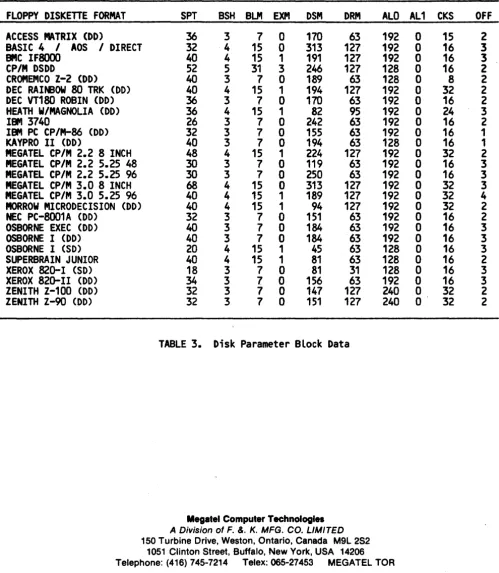
Table 3 contains information for the disk
parameter bLock. This information is only
required if any of the formats in this AppLication Note are to be instaLLed for CP/M
2.2. A brief expLanation of the coLumn
headings is as follows.
SPT: Total number of Logical sectors per
track.
4
aLlocation size.
BLM: The data alLocation block mask.
EXM: The extent mask, which is determined by the data bLock alLocation size and the number of disk bLocks.
DSM: Used to determine the total storage
capacity of the disk drive.
DRM: A number equal to the maximum number of directory entries Less one.
AL0, AL1: Used to determine reserved
directory blocks.
CKS: The size of the directory check vector.
OFF: The number of reserved tracks at the
beginning of the LogicaL disk.
A NOTE ON COMPATIBILITY
FLOPPY DISKETTE FORMAT SPT BSH BLM EXM DSM DRM
ACCESS MATRIX (DO) 36 3 7 0 170 63
BASIC 4 / AOS / DIRECT 32 4 15 0 313 127
BMC IF8000 CP/M DSDD
CROMEMCO Z-2 (DO) DEC RAINBOW 80 TRK (DO) DEC VT180 ROBIN (DO) HEATH W/MAGNOLIA (DO) IBM 3740
IBM PC CP/M-86 (DO) KAYPRO II (DO)
MEGATEL CP/M 2.2 8 INCH MEGATEL CP/M 2.2 5.25 48 MEGATEL CP/M 2.2 5.25 96 MEGATEL CP/M 3.0 8 INCH MEGATEL CP/M 3.0 5.25 96 MORROW MICRODECISION (DO) NEC PC-8001A (DD)
OSBORNE EXEC (DD) OSBORNE I (DD) OSBORNE I (SD) SUPERBRAIN JUNIOR XEROX 820-1 (SD) XEROX 820-11 (DD) ZENITH Z-100 (DD) ZENITH Z-9O (DD)
40 4 15 1 191 127
52 5 31 3 246 127
40 3 7 0 189 63
40 4 15 1 194 127
36 3 7 0 170 63
36 4 15 1 82 95
26 3 7 0 242 63
32 3 7 0 155 63
40 3 7 0 194 63
48 4 15 1 224 127
30 3 7 0 119 63
30 3 7 0 250 63
68 4 15 0 313 127
40 4 15 1 189 127
40 4 15 1 94 127
32 3 7 0 151 63
40 3 7 0 184 63
40 3 7 0 184 63
20 4 15 1 45 63
40 4 15 1 81 63
18 3 7 0 81 31
34 3 7 0 156 63
32 3 7 0 147 127
32 3 7 0 151 127
TABLE 3. Disk Parameter Block Data
Megatel Computer Technologies
A Division of F. &. K. MFG. CO. LIMITED
150 Turbine Drive, Weston, Ontario, Canada M9L 2S2 1051 Clinton Street, Buffalo, New York, USA 14206
ALO 192 192 192 128 128 192 192 192 192 192 128 192 192 192 192 192 192 192 192 192 128 128 128 192 240 240
Telephone: (416) 745-7214 Telex: 065-27453 MEGATEL TOR AL1 0 0 0 0 0 0 0 0 0 0 0 0 0 0 0 0 0 0 0 0 0 0 0 0 0 0
CKS OFF
15 2
16 3
16 3
16 2
8 2
32 2
16 2
24 3
16 2
16 1
16 1
32 2
16 3
16 3
32 3
32 4
32 2
16 2
16 3
16 3
16 3
16 2
16 3
16 3
32 2
32 2
Information furnished by Megatel is believed to be accurate and reliable, however, no responsibility is assumed by Megatel for its use; nor for any infringements of patents or other rights of third parties which might result from its use. No licence is granted by implication or otherwise under any patent, trade mark, or other right of Megatel. Megatel reserves the right to make changes in specifications at any time and without notice. Z80 is a reglster.d trademark of Zitog. Inc. CP/M, CP/M PLUS, MP/M, CP/NET and Soft/Net are trademarks of Digital Research, Inc.
[image:5.617.44.543.93.665.2]