Studying Users’ Adaptation to Android’s Run-time Fine-grained Access
Control System
Panagiotis Andriotisa,∗, Gianluca Stringhinib, Martina Angela Sasseb
aUniversity of the West of England, Department of Computer Science and Creative Technologies, Frenchay Campus, Bristol,
U.K.
bUniversity College London, Department of Computer Science, London, United Kingdom
Abstract
The advent of the sixth Android version brought a significant security and privacy advancement to its users. The platform’s security model has changed dramatically, allowing users to grant or deny access to resources when requested by applications during run-time. This improvement changed the traditional coarse-grained permission system and it was anticipated for a long time by privacy-aware users. In this paper, we present a pilot study that aims to analyze how Android users adapted to the run-time permission model. We gathered anonymous data from 52 participants, who downloaded an application we developed and answered questions related to the run-time permission model. Their answers suggest that most of them positively accepted the new model. We also collected data that describe users’ permission settings for each installed application on their devices. Our analysis shows that individuals make consistent choices regarding the resources they allow to various applications to access. In addition, the results of this pilot study showcase that on a second data collection round (occurred one month after the first phase of our experiments), 50% of the respondents did not change a single permission on their devices and only 2.26% of installed applications (on average) presented altered permission settings.
Keywords: Privacy, Android, Usability, Acceptance, Controls, Permissions
1. Introduction
When Android Developers released the Develop-ers Preview of the Marshmallow vDevelop-ersion (v6.0) dur-ing summer 2015, a major change at the permis-sion system was introduced; the sixth verpermis-sion ini-5
tiated the run-time permission model. The previ-ous versions are listing at instalation time the re-sources that the application to be installed is going to utilize. After reviewing the requested permis-sions (which were presented as groups, e.g. Con-10
tacts) the user can choose to accept or deny the installation. This binary model (accept-reject) has been criticized at the past as being ineffective to provide meaningful information about the way the application to be installed will affect user’s pri-15
vacy [1, 2]. In addition, it limits users’ ability to
∗Corresponding author
Email address: [email protected]
(Panagiotis Andriotis)
URL:www.andrio.eu(Panagiotis Andriotis)
manage the applications’ accessibility to their pri-vate data. Therefore, the transition from this model to a new one, that would allow users to control the resources that applications were allowed to use (fol-20
lowing the iOS paradigm) was anticipated for a long time.
The run-time permission model (aka ask-on-first-use (AOFU) [3]) is based on the principle of least privilege and assumes that applications will be able 25
to function at a basic level, even if the users do not provide access to resources that might affect their privacy. Therefore, applications designed to adhere to this model must request access to sensi-tive resources during run-time. These actions will 30
(in theory) keep users informed about what an ap-plication is trying to do in the background and will provide limited contextual information [4].
According to the official documentation for An-droid Developers1, there are two basic categories of 35
permissions;normalanddangerous. The documen-tation notes that the system automatically grants access to resources that applications requested via
normal permissions, because access to these
re-sources is considered to be of low risk. On the 40
other hand, if an application needs to access users’ private information, or other sensitive data stored on the device, then the associated permissions with these actions are considered as dangerous. Hence, applications designed to function properly under 45
the AOFU permission model, need to request user’s permission during run-time, in order to access sen-sitive information. Therefore, it lies with the users’ discretion if they will accept or deny access to sensi-tive resources. Additionally, Android users are able 50
to revoke access to resources via the Settings ap-plication under this model. Currently, there exist nine groups of dangerous permissions: Calendar, Camera, Contacts, Location, Microphone, Phone, Sensors, SMS, Storage.
55
Recent research work indicated that permission requests are vital in terms of conducting resource usage risk assessment and identifying malicious be-haviors [5]. Permission requests are also used to assess the app’s quality and installation risk, based 60
on patterns identified in high-reputation applica-tions in the Android market place [6]. Therefore, app permissions play a major role in users’ pri-vacy and security. The fact that the number of decisions that smartphone users must make (re-65
garding the acceptance of these permissions) can be unrealistically high [7], urged researchers lately to propose automated permission recommendation schemes. Some systems use crowdsourcing meth-ods [8] and others employ machine learning mod-70
els that incorporate contextual information aiming to predict users’ privacy decisions [3]. In order to achieve that, Wijesekera et al. [3] used modi-fied versions of the Android operating system to acquire application usage data and the Experience 75
Sampling Method (ESM) [9] to collect ground truth data about users’ privacy preferences. Additionally, Liu et al. [7] deployed rooted devices which were modified and enhanced with the Android permis-sion manager “Apps Ops” [2, 10]. Hence, prior work 80
was based on experiments conducted with modified devices, specifically instrumented to gather privacy related data.
Knowing that under the coarse-grained permis-sion model, users are not allowed to intervene with 85
the access control system (since applications can access all resources on a mobile device after the
installation process), we investigate in this paper how Android users adjusted their privacy prefer-ences under the fine-grained run-time permission 90
model (AOFU). We consider the following ques-tions in this pilot study. a) Which are the sensi-tive resources Android users allow more often to be accessed on their phones? b) Are they strict or se-lective when applications request access to specific 95
sensitive data? c) Do they make consistent choices when they grant or deny access to these resources? d) Are these choices time persistent?
To this end, this paper2 presents the results of a pilot study that assesses users’ adaptation to the 100
Android run-time permission model. For the needs of this study we developed and distributed an appli-cation at the official Android marketplace (Google Play) aiming to collect anonymous data related to the permissions that were granted (or denied) by 105
users at that time (‘Permissions snapshot’). We did not monitor users’ actions for a long time because we assumed that this choice would discourage many people to voluntarily download the app and partici-pate to the study. This is a different approach from 110
prior work [3, 4, 7] as we aim to gather permission information from devices that were actually used by participants in their daily lives and were not running a modified version of the operating sys-tem. Our data collection method is not intrusive 115
or pervasive and does not introduce biases related with asking security and privacy questions (privacy nudges). Thus, we chose to obtain snapshots of the permission settings from the participants’ devices. Our application collected permission data twice (in 120
an one-month period) and only when the users were informed and agreed to provide them, according to the ethics approval agreement. The aim of our pilot study is to examine users’ perceptions of the pro-vided security and privacy, and at the same time, 125
to investigate how Android users adapted to the AOFU permission model. This work studies and presents security and privacy preferences of An-droid users of the fine-grained permission model. The contributions of this paper are the following: 130
• We collected data derived from devices that were running the Android Marshmallow oper-ating system, hence the permission data came from a sample of 52 participants who were
ac-2This is an extended version of our work [11] presented
tually using these devices for a considerable pe-135
riod of time3.
• We present comparative views of users’ per-missions settings and other privacy preferences associated to the use of popular social me-dia. Moreover, we showcase which sensitive re-140
sources were used from our participants more frequently.
• We demonstrate that our participants psented a consistent behavior regarding the re-sources they allow to be accessed by social me-145
dia and communication applications. Further-more, this pilot study shows that the granted permissions to installed applications from the same participants after a period of one month were not dramatically altered. This result ver-150
ifies similar findings presented recently [7].
The rest of this paper is organized as follows. The next section discusses the methodology we used to derive data and reconstruct permission settings for each participant. Section 3 presents the acquired 155
results focusing at the beginning on the survey an-swers; then it analyzes our findings from the col-lected permission data. In section 4 we discuss lim-itations of our study, proposing at the same time directions for future work. We review related work 160
in section 5 and conclude this paper in section 6.
2. Methodology
This section presents the methodology we used to collect and analyze data. Data collection was car-ried out in two phases using an application we de-165
veloped, which was distributed via the official An-droid marketplace (Google Play) following the ex-ample of other recent research works [12]. The ap-plication, named “Permissions Snapshot”, initially served as a survey instrument, but it also collected 170
anonymous permission data from the devices that were using it. The participants needed to download the application on their devices, answer six multi-ple choice questions about their experience with the run-time permission model and then send permis-175
sion data to our server. At the second phase (after a period of one month) the same participants were asked to send permission data again, as explained
3The anonymized dataset can be found online at the
fol-lowing address: http://dx.doi.org/10.14324/000.ds.1520825
in more details in the following section. Before we distribute the application on Google Play and pub-180
licize it, we obtained approval to proceed with this project from the UCL Ethics Committee (Project ID Number: 8945/001).
2.1. Survey and Questionnaire Design
The application we developed targeted Android 185
Marshmallow users (SDK 23+) and could not be installed on devices that run an older version of the operating system (OS). This means that the collected data came from participants who were already familiar with the sixth Android version 190
(Marshmallow). During the data collection period (June - August 2016), the most modern version of the OS was the sixth; however, the seventh version (‘Nougat’) was released as a “Developers Preview” version.
195
Our application did not collect personal informa-tion apart from the package names of the installed applications on the device and the requested per-missions. The participants were informed about this action after reading the ‘Information Sheet’, 200
which was provided at the ‘Description’ section of the installation page on Google Play. The ‘Infor-mation Sheet’ was also shown when the application was launched by the user. “Permissions snapshot” did not collect application usage data because that 205
would entail additional effort from users to turn on the usage statistics feature on their phones. This action cannot occur automatically or programmat-ically on modern Android versions. We chose to refrain from engaging users in this action, having 210
in mind that the participants (volunteers) could be discouraged by any additional complexity, or even worse, become sceptical about their involvement with the study and, therefore, quit before answering any questions.
215
In order to avoid duplicate entries from partic-ipants (and devices), “Permission Snapshots” re-quested from the system (during run-time) to get
the ANDROID ID of the device4. This number was
used by our application to compute and return a 220
hashed value that could be used from us to main-tain users’ anonymity and, at the same time, iden-tify possible duplicate entries during analysis. Be-fore releasing the data to the public, we replaced these hexadecimal strings with random numbers to 225
further anonymize them.
4The ANDROID IDis a hexadecimal number granted by
(a) Begin survey (b) Demographics (c) Tutorial (d) Notification (e) Permission Groups
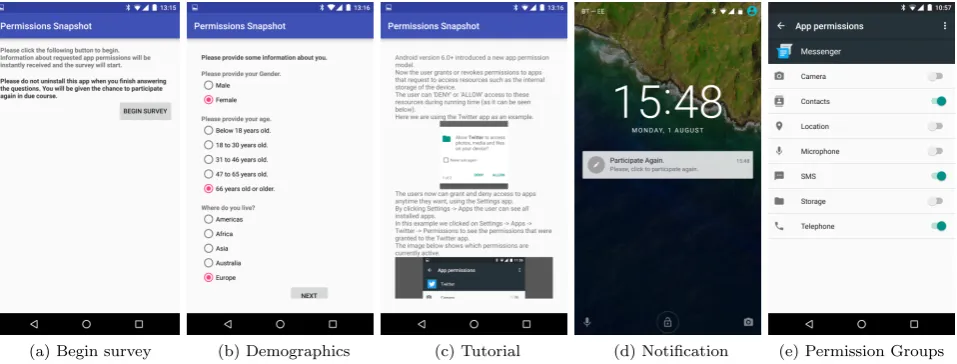
Figure 1: Screenshots Showcasing “Permissions Snapshot” Application and System’s Functionality.
Next, we discuss how participants were interact-ing with our application. At the first phase, when users launched the application, they had to read the ‘Information Sheet’ which described the aim of 230
the study and the steps that would follow. Partic-ipants had to tap on a check box to indicate they gave their consent to share anonymous data and participate to the study. The users were always in-formed about the current and the next step of the 235
process via short texts provided by the application (see figure 1a). After users agreed to provide their consent to share anonymous data, the application received detailed information about the permissions that the system granted (or not) for each installed 240
application at that specific time. In order to achieve that, our application utilized the PackageManager
class and received data via itsgetPackageInfo pub-lic method. This was an instant procedure on con-temporary devices.
245
After permission data were stored locally on the device, the user was able to participate to the sur-vey. Initially we gathered basic demographic data, as figure 1b demonstrates. Then the participants had to answer six multiple choice questions (by 250
clicking on radio buttons). Each question was pre-sented on a single activity and the user had to click the ‘Next’ button to proceed with the next question. It should be noted that all questions had predefined answers in order to make analysis easier 255
for us and distinguish participants who were just skipping questions by clicking the ‘Next’ button. When the six questions were answered, the
par-ticipants sent the responses (along with the demo-graphic and the permissions data) to our server by 260
clicking a button. Respondents were able to with-draw and uninstall the app any time, before they send their data to the server. At the final step of the first phase, the application showed to the par-ticipant a short tutorial that discussed the changes 265
at the permission model (figure 1c). Our applica-tion’s users were told that they could uninstall it at that phase. However, we suggested them to keep the application on their devices, because they would have the chance to participate to the survey again 270
in the near future.
The questionnaire should be short and simple, because according to [13], these types of question-naires usually attract higher response rates than long and complex ones. Also, we needed the com-275
pletion of the survey to be an effortless and pleasant process, given that our participants would volunteer to provide responses. We chose closed format ques-tions because they are easy to fill in. Moreover, it would be easier for users to click on radio buttons 280
instead of typing answers to open questions on their phones. The questions had predefined answers to assist us clean up the data from responses coming from users that where just clicking the “Next” but-ton without reading the questions. However, we 285
provided by the Android Studio (an integrated de-velopment environment for Android developers).
When designing the questionnaire, we followed the conventional wisdom which contains advice about how to optimize question order [14]. We or-295
dered the questions according to the following logic: Early questions should be easy and pleasant to an-swer [15], and questions on the same topic should proceed from general to specific [14, 16]. Hence, participants were first asked how long they were us-300
ing the current OS version and then if they had no-ticed the permission model change. Then we asked the respondents if they believed that the afore-mentioned change affected positively their ability to manage shared data. With the following two 305
questions (number 4 and 5) we intended to see the users’ familiarity with the new model and if popup messages, appearing during run-time, were caus-ing fatigue [17]. Finally, with the last question we intended to validate that users prefer fine-grained 310
permission models as proposed in [18]. The ques-tions are as follows:
1. How long have you been using the current ver-sion of the Android operating system? (An-droid Marshmallow or version 6.0+)
315
Offered answers: a) 0 - 6 months, b) 7 - 12
months, c) More that 1 year, d) Don’t Know. 2. Have you noticed any changes at the current
app permission model, compared to the previ-ous versions of the operating system? (For ex-320
ample, have you ever seen any messages from any app that asks to give it your permission in order to access specific resources, e.g. the Camera?)
Offered answers: a) Yes, b) No, c) Don’t
325
Know.
3. Do you think that now you have more control as a user on the personal data you share? (E.g. Contact list, SMS, etc.)
Offered answers: a) Yes, b) No, c) Don’t
330
Know.
4. Please state if the following quote is Correct or Wrong, or choose “Don’t Know” if you are not sure. “I can revoke or grant any app per-missions anytime from the Settings app of my 335
device.”
Offered answers: a) Correct, b) Wrong, c)
Don’t Know.
5. Please state if you Agree or Disagree with the following quote. “I believe that the new run-340
time permission model is irritating because it
asks me too many questions during running time (such as: Allow APP to take pictures and record video?).”
Offered answers: a) I Agree, b) I Disagree.
345
6. If you have used older versions of the Android operating system (e.g. if this is not your first Android device) you have probably noticed that now some apps request your permission to perform some actions, e.g. to access your SMS. 350
Previously you just downloaded the apps and no more requests were made from the device during runtime. Do you prefer the new per-mission model (runtime perper-mission requests) or the old model?
355
Offered answers: a) I prefer the new runtime
permission model, b) I prefer the old model, c) I don’t have any specific preference.
For the second phase of data collection, the ap-plication generated a notification message after a 360
period of one month. Participants who did not uninstall the application after the completion of the first phase, received a notification on their devices (and wearables) to participate again to the survey (as seen at figure 1d). Hence, there was a chance 365
for participants to upload permission data again, following the same procedure they used at the first phase of data collection, i.e. by clicking a button. Therefore, we could use the second set of data to compare them with the first set. After the second 370
set of data was delivered to our server, the users were gracefully adviced to uninstall the application. Interestingly, taking into account data provided by the Google Play Console5 (and considering also a few pilot trials we ran on various devices prior the 375
release of our application), 15 devices (out of 61 that downloaded our application) appeared to have our application installed four months after we re-leased it for the first time to the Google Play store. This means that approximately 24.6% of the users 380
did not uninstall the application, despite the fact that they were prompted to do so.
2.2. Permission Data Acquisition
This section presents our methodology to acquire permission data from devices. Our intention was to 385
correlate the data in order to provide permission information in a similar fashion with the original system. For example, figure 1e shows permission
information for the application ‘Messenger’. Infor-mation for granted permissions for each application 390
on Android devices can be obtained using the Set-tings application as follows: SetSet-tings → Apps → (application) → Permissions. Using the Settings application, users can grant, deny or revoke permis-sions to the following groups; Calendar, Camera, 395
Contacts, Location, Microphone, Phone, Sensors, SMS, Storage.
Using the flag GET PERMISSIONS when
calling the getPackageInfo method of the
PackageManager, we can get information
400
about the status of each permission for ev-ery application (requestedPermissions and
requestedPermissionsFlags). Note that
“Per-missions Snapshots” did not gather information about system’s applications. After experimenting 405
with these settings during a pilot study conducted prior to the official release of the application, we concluded that for each requested permission, the system returns public arrays of Strings and
ints denoting the current permission settings on 410
the device. In our log files we denoted a granted permission with3 and a denied permission with1. According to the Android Developers’ documen-tation6, the first time an application requests to ac-cess sensitive resources (such as the SMS list on the 415
device, using for example the permissionREAD SMS), it displays to the users a dialogue message in order to get explicitly their permission to do so. How-ever, if users allowed at the past access to a sen-sitive group (e.g. acceptedREAD SMSfrom the SMS 420
group), then when the application requests a differ-ent permission from this group (e.g. SEND SMS), the system willimmediately grant it.
For our analysis we considered these character-istics to reconstruct the permission settings for 425
each application (and each permission group). For example, if for the packageorg.telegram.messenger
(the ‘Telegram’ application) the PackageManager
returned “android.permission.READ CONTACTS, 1” and
430
“android.permission.WRITE CONTACTS, 3”, this
means that the application was granted permission to access the ‘Contacts’ group. Thus, after a user had chosen to see the permission settings of this application from the Settings app on the device, 435
she would see that the Contacts switch would be turned to the ‘On’ position (as figure 1e shows).
6http://bit.ly/2d4AdGH
We treat different versions of the same application uniformly, because we did not expect to see massive changes among various versions, given that data 440
collection was done in a short period of time.
3. Results
The study was publicized at university mailing lists, social media and forums for a short period of time (June - August 2016). We stopped collect-445
ing data after the end of August 2016 and we fi-nally received responses from 52 participants. It should be noted that no compensation or prizes were offered at this campaign. Our respondents contributed to this study as volunteers. In addi-450
tion, during the specific period, the Android De-velopers Dashboards7 reported that only 10% of the Android users that visited Google Play had in-stalled the Marshmallow version on their devices. Therefore, finding volunteers for this study was ex-455
tremely difficult at the given period. Having that in mind we followed a lightweight approach in data collection and decided to apply the snapshots model instead of constantly monitoring users’ devices. We believe that this approach would not discourage 460
participants to provide anonymous data. In addi-tion, we expected that our study would probably attract more tech-savvy users, given that new An-droid versions’ adoption is usually slow and Nexus phone users are getting software updates faster than 465
others.
Three users from our sample provided the prefined answers of the questionnaire, hence their de-mographic data and responses were excluded from the presented results. However, their device data 470
were included in the analysis, because they could not be manipulated or falsified from these users; these are device-dependent data. Also, two partic-ipants stated that they were below 18 years old; therefore, we excluded their data and their re-475
sponses from our dataset and did not take them into account in the analysis. The minimum age for an Android user to participate to our study was set to be the age of 18. Additionally, a particular file contained permission data, but no demograph-480
ics or responses. However, these permission data were included in the analysis. Finally, one file (de-rived from device No 24) contained only permission data of our application and the responses to the
six questions. We included these responses to the 485
demographic data too.
3.1. Demographics and Questionnaire
In total, 46 responses to the six questions were included to the analysis. 85% of the participants were male and 15% were female. More than half of 490
the users were between 18 to 30 years of age (52%), 37% were 31 to 46 years old, 9% were between 47 and 65 years old and 2% were above 66 years old. The majority of the respondents were residents of Europe (74%); the rest were from America-Canada 495
(17%) and 9% of the respondents claimed they were from Asia.
Regarding the responses at the first question, 52% of the participants had been using the An-droid Marshmallow version for 0 - 6 months. 30% 500
of the participants had been using the OS for 7 - 12 months and 11% claimed they had been using the system for more than a year. The latter response may seem inaccurate because Marshmallow was re-leased during the last quarter of 2015. However, 505
this finding might indicate that a few respondents were mobile software developers who were using the Developer Previews of the system; these were re-leased earlier, during summer 2015. This expla-nation is reasonable if we take into consideration 510
that the application was also advertized to Google+ Communities related to Android. The rest of the participants (7%) clicked the “I Don’t Know” op-tion.
Considering the second question, 89% of the par-515
ticipants replied that they had noticed the change at the permission model. 7% said they did not notice any difference and 4% chose the “I Don’t Know” answer. This finding shows that the major-ity of the participants were familiar with the change 520
at the permission model.
The consequent questions were related to the se-curity and usability of the new permission model. At the third question, 65% of the respondents replied positively; they thought that the users could 525
effectively control the personal data they share un-der the run-time permission model. 17% replied negatively and 17% said “I Don’t Know”. The re-sponses at question 4 demonstrated that the partic-ipants of our study were familiar with the new ca-530
pabilities the Settings app provide. 78% chose the “I Agree” response, 7% clicked on “I Disagree” and 15% said “I Don’t Know”. Considering the usabil-ity of the model and the securusabil-ity fatigue that might cause, the responses at the fifth question showed 535
Installed Applications
0 50 100 150 200 250 300
Declared Permissions
0 20 40 60 80 100 120
Dangerous Permissions
[image:7.595.340.499.110.237.2]0 5 10 15 20
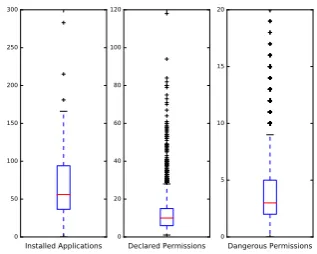
Figure 2: Boxplots Showing Distribution of the Number of Installed Applications, Declared Permissions and Dangerous Permissions per Device.
that Marshmallow users were not overwhelmed by security dialogue messages produced by the system. 89% of the participants replied “I Disagree” and only 11% clicked on the “I Agree” choice.
At the final question the participants were asked 540
if they prefer the run-time permission model or the old one. 78% of them stated they prefer the run-time permission model and 9% said they prefer the previous model. Additionally, 13% clicked the “I don’t have any specific preference” option. The an-545
swers to the last question indicate that users re-acted positively to the changes, confirming previous results [18].
To conclude this section, the answers of the ma-jority of users in our sample suggest that they 550
think they can control the data they share more efficiently under the run-time permissions model. Also the participants in our study were not frus-trated by the dialogue messages the system issues and, finally, they preferred the run-time permis-555
sions model, compared to the previous one.
3.2. Data Analysis
As discussed previously, we received permission data from 52 devices but we finally analyzed data derived from 49 devices. Recall that one device 560
returned permission data only from our application and 2 participants declared they were younger than 18 years old; thus, these permission data were ex-cluded from analysis. The following information is provided to describe our dataset in details.
565
3.2.1. Installed Applications
applica-Table 1: Most Popular Applications in the Dataset.
Applications - Packages Installations %
com.facebook.orca 37 75.5
com.whatsapp 32 65.3
com.twitter.android 31 63.3
com.google.android.apps.translate 23 46.9
com.facebook.katana 22 44.9
com.spotify.music 22 44.9
com.skype.raider 20 40.8
com.ubercab 20 40.8
tions found on a single device was 283 and the min-570
imum was 19. The number of unique applications that were seen in the collected dataset was 1,983 ap-plications. Figure 2 shows the number of installed applications per device (first boxplot). The most popular applications among the participants of our 575
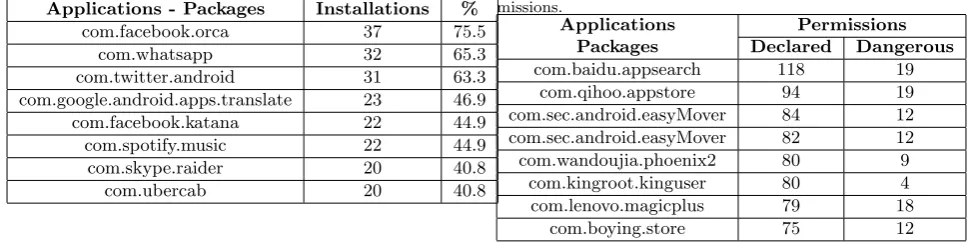
study can be seen at Table 1.
3.2.2. Declared and Dangerous Permissions Android applications contain declared permis-sions in the AndroidManifest.xml file. This
in-formation is available to the PackageManager
dur-580
ing run-time. Using the methodology described in Section 2.2 we gathered the declared permis-sions for each application in our dataset. The average number of permissions declared in the
AndroidManifest.xml file of each application was
585
approximately 12.39 (with standard deviation = 10.94). The average number of dangerous permis-sions per application was approximately 3.85 (with standard deviation = 3.21). Distributions of these data are provided in figure 2.
590
The aforementioned numbers indicate that (on average) 31% of the declared permissions in
the AndroidManifest.xml file of each
applica-tion belonged to dangerous permissions groups. The applicationcom.baidu.appsearch declared 118 595
permissions in its manifest file and 19 of them belonged to dangerous groups. More-over, the application ‘Signal Private Messenger’
(org.thoughtcrime.securesms) declared 20
permis-sions that belonged to dangerous permispermis-sions 600
groups. These applications presented the highest number of declared and dangerous permissions in our dataset, respectively. Table 2 shows applica-tions that declared the highest number of permis-sions and Table 3 those with the highest number 605
of dangerous permissions in our dataset. Note that some applications can be seen more than once, hav-ing different number of declared or dangerous
per-Table 2: Applications that Declared Highest Number of Per-missions.
Applications Permissions Packages Declared Dangerous
com.baidu.appsearch 118 19
com.qihoo.appstore 94 19
com.sec.android.easyMover 84 12
com.sec.android.easyMover 82 12
com.wandoujia.phoenix2 80 9
com.kingroot.kinguser 80 4
com.lenovo.magicplus 79 18
com.boying.store 75 12
Table 3: Applications that Declared Highest Number of Dan-gerous Permissions.
Applications Permissions Packages Declared Dangerous
org.thoughtcrime.securesms 57 20
net.dinglisch.android.taskerm 51 19
com.baidu.appsearch 118 19
com.qihoo.appstore 94 19
com.kms.free 49 18
com.lenovo.magicplus 79 18
com.lenovo.leos.cloud.sync 53 18
com.sec.chaton 58 17
missions, because the dataset contained different versions of them.
610
3.3. Permission Groups
We mentioned previously (in Section 2.2) that we grouped the declared permissions to simulate the user interface of the Settings app when it shows the granted permissions per application (Figure 1e). 615
According to the Android Developers documenta-tion8, there exist 9 groups of dangerous permissions at API level 23 and above (up to API 27 as of Jan-uary 2018): Calendar, Camera, Contacts, Location, Microphone, Phone, Sensors, SMS, Storage. 620
3.3.1. Dangerous Permissions Requests per Device First, we estimated how many applications on average request access to dangerous permissions groups per device. Hence, we measured the appear-ance of dangerous permissions in the manifest file of 625
each application per device. In this step we did not consider if the particular groups were granted access permission by the user. We demonstrate the results
[image:8.595.61.546.130.254.2]1 3 5 7 9 11 13 15 17 19 21 23 25 27 29 31 33 35 37 39 41 43 45 47 49 Participants
0 20 40 60 80 100
Percentage (%)
[image:9.595.66.562.112.274.2]CALENDAR CAMERA CONTACTS LOCATION MICROPHONE PHONE SENSORS SMS STORAGE
Figure 3: Dangerous Permissions Groups Requests per De-vice.
Table 4: Average Use of Dangerous Permission Groups.
Permission Groups Average Use (%) S.D.
Calendar 7.34 5.16
Camera 30.46 9.36
Contacts 58.02 12.78
Location 49.67 12.20
Microphone 21.63 9.37
Phone 40.56 10.56
Sensors 0.93 1.19
SMS 16.51 9.23
Storage 76.64 7.18
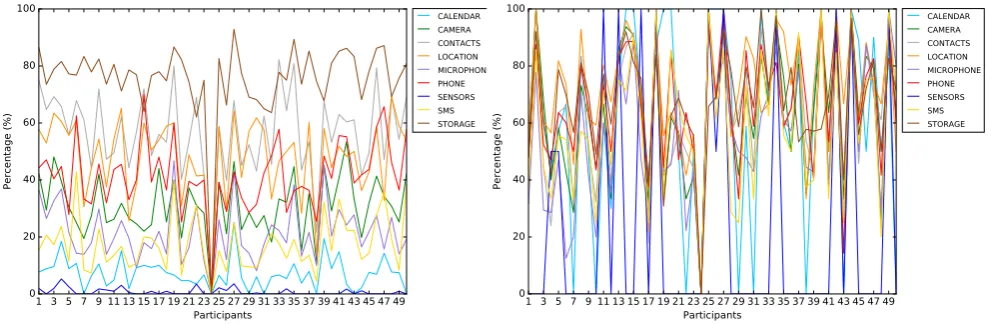
at Figure 3, which presents the average danger-ous permissions requests per device (concatenated 630
as dangerous permissions groups). Figure 3 shows that the Camera, Contacts, Location, Phone and Storage groups were the most requested dangerous groups per device.
In addition, Table 4 presents more generic infor-635
mation, showcasing the average use of dangerous permissions (gathered as groups) and their stan-dard deviations in our dataset. We can see that indeed requests to access the device’s storage were made by almost 77% of the applications in our 640
dataset. Other popular resources for applications were the Contact list and the Location; access to these resources were requested by the half of the applications in our dataset.
3.3.2. Permission Groups’ Accessibility
645
Figure 4 provides a rough representation of the permission groups’ accessibility. This figure demon-strates the percentage of permission groups that appeared to be accessible from the installed
appli-1 3 5 7 9 appli-1appli-1 appli-13 appli-15 appli-17 appli-19 2appli-1 23 25 27 29 3appli-1 33 35 37 39 4appli-1 43 45 47 49 Participants
0 20 40 60 80 100
Percentage (%)
CALENDAR CAMERA CONTACTS LOCATION MICROPHONE PHONE SENSORS SMS STORAGE
Figure 4: Dangerous Permission Groups Accessibility (%) per Device.
cations per device. The methodology described at 650
Section 2.2 was used to estimate these percentages. As figure 4 shows, users tend to have a stable be-havior (considering their security preferences) when dealing with different applications on the same de-vice. For example, more than 80% of the appli-655
cations on device No 34 could access the distinct permission groups.
However, this indication (that users seem to have a stable behavior when granting access to resources on their devices to various applications) might be 660
skewed by the fact that there existed numerous ap-plications per device that were probably not de-signed to adhere to the new permission model. Thus, during the transitional period our experi-ments took place, applications like ‘Snapchat’ ap-665
peared to have access to all dangerous resources, in order to maintain backward compatibility. Such applications can be easily identified if the user tries to revoke access to resources via the Settings app; the system will issue the following message, which 670
is rather preventive in our opinion: “This app was designed for an older version of Android. Denying permission may cause it to no longer function as intended”.
Despite that figure 4 provides probably a noisy 675
representation of the accessibility to sensitive re-sources, it forms an early estimation that users tend to persistently grant access to specific resources and deny it to others. In the next sections we will study closely users’ privacy preferences for popular appli-680
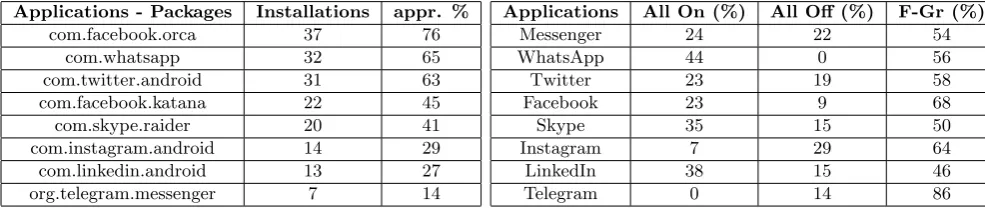
Table 5: Installations of Social Media Applications in our Sample.
Applications - Packages Installations appr. %
com.facebook.orca 37 76
com.whatsapp 32 65
com.twitter.android 31 63
com.facebook.katana 22 45
com.skype.raider 20 41
com.instagram.android 14 29
com.linkedin.android 13 27
org.telegram.messenger 7 14
3.4. Fine-grained Permissions on Social Media and Communication Applications
This Section presents users’ security preferences, considering fine-grained permission settings for 685
popular social media applications. We focused on social media and messaging applications be-cause they were installed by numerous participants. Other application categories (such as business or travel) are not studied here because we did not have 690
adequate data from enough users that would allow us to make safe conclusions.
3.4.1. Users with Fine-Grained Permission Set-tings
Table 1 showed the most popular applications in 695
the dataset. Note that most of them are social me-dia and messaging applications. Thus, we focused our study on eight applications and instant mes-sengers: (Facebook) Messenger (orca), Facebook
(katana), Whatsapp, Twitter, Skype, Instagram,
700
Linkedin and Telegram. We will refer to this set of applications as the ‘social’ setS. Despite Telegram was not among the most installed applications, it was added in this section because it is known for its ‘end-to-end’ encryption capabilities. Hence, it 705
would be interesting to see users’ preferences for this application. Table 5 shows the popularity of the aforementioned applications in our sample (per-centage of installations). Facebook Messenger peared to be more popular than the Facebook ap-710
plication itself, indicating that there exists a con-siderable number of users that prefer to use only the Messenger application.
Table 6 shows the percentage of devices on which applications fromS were allowed (All On) or “de-715
[image:10.595.64.557.138.244.2]nied” (All Off) access toall permission groups, or appeared to have fine-grained settings, respectively (F-Gr). We should note here that in the “denied” category we also included permissions that were
Table 6: Percentage of Devices with Fine-tuned Permission
Settings for Applications in theSset.
Applications All On (%) All Off (%) F-Gr (%)
Messenger 24 22 54
WhatsApp 44 0 56
Twitter 23 19 58
Facebook 23 9 68
Skype 35 15 50
Instagram 7 29 64
LinkedIn 38 15 46
Telegram 0 14 86
never invoked by the apps. According to this ta-720
ble, on average, approximately 60% of devices did not allow access to at least one sensitive resource. However, given that we did not store applications’ usage statistics, we cannot assume that access to this resource was requested and eventually was de-725
nied by the user. Note that the last row on table 6 shows that no participant granted all permissions to the Telegram application. This finding makes sense considering that Telegram’s target group is privacy aware users, which are probably more selective or 730
cautious when dealing with permission settings.
3.4.2. Analysis Based on the F-Gr User Group To avoid misleading conclusions arising from the possibility that participants might not have used a specific application from the social set S, we 735
only considered (in this and the following section) participants with fine-grained permission settings. Indeed, this assumption might exclude permission data from users who denied access to all resources when they ran the specific applications or they did 740
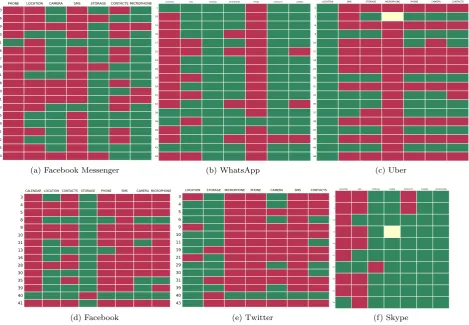
not ever use the app. However, we believe that the F-Gr user group will give us a better understand-ing on how users, who care about permissions, act. Figure 5 (a, b, c) shows graphically how our partic-ipants tuned their permission settings for the Face-745
book Messenger, WhatsApp and Uber applications respectively. Green color indicates that permission was granted to the dangerous group and red color indicates that permission was denied or revoked by the user to the dangerous group. Ochre cells in-750
dicate that permissions for the specific group were not found on the device. For example, user No 3 had probably installed an older version of the Uber application, which did not include the use of the device’s microphone (figure 5c). Results are not 755
be-PHONE LOCATION CAMERA SMS STORAGE CONTACTS MICROPHONE 3
6 9 10 11 16 17 19 21 28 30 31 33 35 39 41 42 45 50
(a) Facebook Messenger
LOCATION SMS STORAGE MICROPHONE PHONE CONTACTS CAMERA
1 10 11 16 17 21 22 26 28 29 31 32 36 38 39 41 43 50
(b) WhatsApp
LOCATION SMS STORAGE MICROPHONE PHONE CAMERA CONTACTS 1
3 6 9 10 11 16 22 30 31 33 35 37 39 42 45 46 48
(c) Uber
CALENDAR LOCATION CONTACTS STORAGE PHONE SMS CAMERA MICROPHONE
3 4 5 8 9 10 11 13 16 28 30 35 39 40 41
(d) Facebook
LOCATION STORAGE MICROPHONE PHONE CAMERA SMS CONTACTS
3 4 5 6 9 10 11 19 21 29 30 31 39 40 43
(e) Twitter
LOCATION SMS STORAGE PHONE CONTACTS CAMERA MICROPHONE
1
4
11
13
14
21
25
30
32
36
[image:11.595.66.536.251.576.2](f) Skype
cause these versions were eventually excluded from the F-Gr group (with 2 exceptions, shown in Fig-ures 5c, 5f).
760
Figure 5 indicates that there exist similarities at users’ settings if we observe each subfigure verti-cally. For example, the majority of Facebook Mes-senger’s users did not provide access to Phone, SMS and Location (94.74%, 89.48% and 73.69%, respec-765
tively). On the other hand, Storage, Microphone and Camera were granted access by a large num-ber of participants (84.21%, 84.21% and 73.69%, respectively).
Similarly, Figures 5d and 5e demonstrate users’ 770
settings for Facebook and Twitter. Figure 5d show-cases that Facebook users did not allow access to Calendar, SMS, Microphone or Phone (93.33%, 93.33%, 80% and 80%, respectively). On the con-trary, Facebook had access to the Storage and Lo-775
cation groups in 93.33% and 60% of the devices, respectively. Analogous numbers can be identified among Twitter users. Storage and Location were accessible in 73.33% and 80% of the devices, but in general users seem to be more rigorous regarding 780
giving access to other dangerous permission groups. Note that we do not suggest here that the same user grants or denies the same permissions on Facebook and Twitter.
WhatsApp users in our sample did not allow ac-785
cess to Location and Phone groups (77.78% and 94.44%) but they were more keen to allow access to the SMS group, compared to Messenger users (66.67% and 10.52%). All Uber users allowed ac-cess to the Location group (100%) and the majority 790
of applications (except Uber) present high accessi-bility of the Storage group (84.21%, 100%, 38.89%, 93.33%, 73.33%, 90% respectively). This is an in-dication that most applications require access to the device’s storage in order to provide their basic 795
functionality; hence, users allow them to access this group. Given that users are keener to permit this request entails security risks, because malicious ap-plications may request access to the Storage group in the right context and then misuse it.
800
Users’ preferences may be also linked with their level of trust to the specific application or they may only indicate how users interact with these appli-cations. For example, the fact that the Camera group is in general marked red in both applications 805
might denote that the majority of our participants did not primarily use Facebook or Twitter to take pictures. Thus, the demonstrated accessibility in Figure 5 could possibly be linked with the level of
functionality of each application and also with the 810
level of trust the users show to them. Further re-search work should be done to investigate this ques-tion. However, visual schemes like those presented in Figure 5 can be read both vertically and horizon-tally and provide insights about the use of applica-815
tions under the run-time model. A vertical view demonstrates how the majority of users tuned their permission settings for each application. A horizon-tal view shows individual users’ preferences. For example, user No 17 seems to have similar behav-820
ior when using Messenger and WhatsApp because Phone, Location and SMS groups are marked with red color in both cases. Common permission set-tings across a number of different applications from the same category can eventually create users’ pri-825
vacy profiles.
3.4.3. A Generic Comparison for Granted Permis-sions per Application
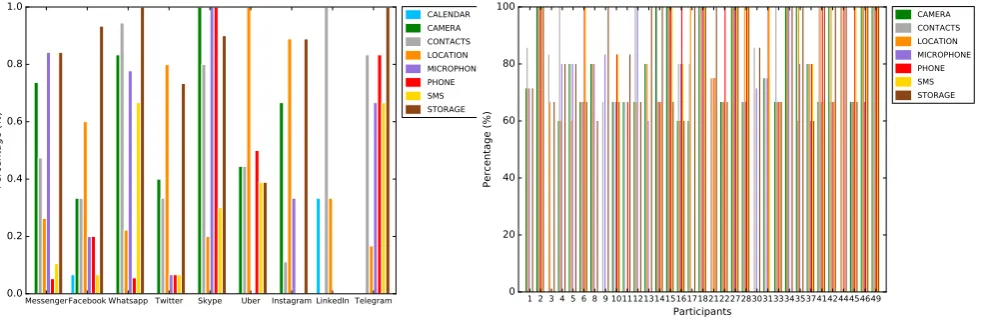
Figure 6 presents in a concise graph the percent-age of users that granted permissions to danger-830
ous groups per application. As previously stated, we only consider participants from the F-Gr group, as seen at Table 6. Figure 6 shows for example that all users allowed the LinkedIn application to access their Contact List (100%). However, appli-835
cations like Messenger and Facebook demonstrate lower rates of accessibility to this permission group (47% and 33%, respectively). Also, users of messag-ing applications like Messenger, WhatsApp, Skype and Telegram seem to be more keen to grant ac-840
cess to the Microphone permission group. At the same time, Facebook, Twitter, Uber and Instagram present high numbers of accessibility to Location services.
We can also extract additional common charac-845
teristics from figure 6 regarding users’ preferences and permission settings. For instance, if we focus on the Storage group we can see that most of the users allow the applications (of our social setS) to access the storage of their devices. However, users’ prefer-850
ences indicate that they are more reluctant to grant storage access to applications like Uber. This find-ing is probably linked with the functionality of each application and the reasons we use them. Another generic observation can be made for the SMS group. 855
MessengerFacebook Whatsapp Twitter Skype Uber Instagram LinkedIn Telegram 0.0
0.2 0.4 0.6 0.8 1.0
Percentage (%)
[image:13.595.71.562.113.273.2]CALENDAR CAMERA CONTACTS LOCATION MICROPHONE PHONE SMS STORAGE
Figure 6: Percentage of Granted Permissions per Application
(fromSset) Considering F-Gr Group Participants.
to their users. In general, these two applications present high levels of accessibility (70% and above) in almost all dangerous groups. Furthermore, one could note that WhatsApp and Telegram’s Loca-tion accessibility is not high (approximately 20%). 865
The gathered data are not sufficient to allow us to explain why this occurred. However, the answer to this phenomenon might be hidden in the interplay of trust and functionality. Trust in this context is not only linked with the use of encryption; trust 870
can be also derived from the developer of the app.
3.5. Users’ Behavioral Consistency
In this section we study if users present a con-sistent behavior when they are using different ap-plications on their devices. In other words, we ex-875
amine if the same participant follows the same be-havioral patterns when using the fine-grained per-mission system on a variety of applications on the same device. In order to do that, we identified the users in our sample who had installed at least 3 of 880
the applications listed at Table 5 on their devices. Note that LinkedIn and Telegram applications were excluded from the analysis for this section, because the former application declares access to only 3 dan-gerous groups and the latter was installed only on 885
7 devices. Thus, we are particularly interested in permission-aggressive applications in this context. We will refer to this set of applications as the ‘pop-ular’ setP. As the goal of this section is to highlight consistent behaviors regarding permission settings 890
preferences, we did not take into consideration the Calendar permissions group, because it is declared only on Facebook. Hence, we evaluate similarities
1 2 3 4 5 6 8 9 10111213141516171821222728303133343537414244454649
Participants 0
20 40 60 80 100
Percentage (%)
CAMERA CONTACTS LOCATION MICROPHONE PHONE SMS STORAGE
Figure 7: Users’ Behavioral Consistency Considering
Appli-cations from theP Set.
to the way users grant or deny access to specific re-sources considering at least 3 popular social media 895
applications installed on the same device.
3.5.1. Behavioral Similarity
We define the term ‘behavioral similarity’ to as-sess common characteristics of user’s behavior re-lated to the permission settings on their devices. 900
Behavioral similarity or behavioral consistency is
defined here as the quality of preserving similar user behavior when various applications (at least 3) re-quest access to a specific permission group. For example, if the user has granted (or denied) access 905
to the Microphone group to at least 60% of social media applications (installed on the same device), then this is considered in this work to indicate be-havioral consistency.
Figure 7 demonstrates the behavioral consistency 910
of 33 users in our sample. Here we did not exclude users from the ‘All On’ and ‘All Off’ groups, in or-der to provide a more generic view. The inclusion of these users will probably result in very high values of consistency in rare occasions where all considered 915
applications belong to the ‘All On’ group. Given that we did not store information that would reveal if installed applications were compiled to abide the new model, we included these users in the analysis. In general, users had installed at least 3 applications 920
from the popular applications set, as discussed pre-viously. The goal of our analysis here is to evaluate if a user who denies (or grants) access to a specific dangerous group for one application, maintains the same behavior, when asked to provide access to the 925
1 2 3 4 5 6 8 9 10111213141516171821222728303133343537414244454649
Devices CAMERA
CONTACTS
LOCATION
MICROPHONE
PHONE
SMS
[image:14.595.80.262.180.319.2]STORAGE
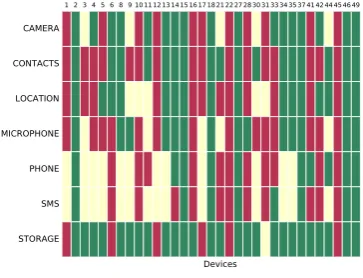
Figure 8: Descriptive Table Showing Participants’
Permis-sion Settings Consistency for Applications from thePSet.
1 3 5 7 9 11 13 15 17 19 21 23 25 27 29 31 33 35 37 39 41 43 45 47 49 Users
0 20 40 60 80 100
[image:14.595.88.265.490.631.2]Concistency (%)
Figure 9: Average Behavioral Consistency of Users (33 Par-ticipants).
The calculation of a user’s behavioral consistency was performed as follows. Considering the num-ber of applications (from the popular set P) found on a single device, we highlighted which of them 930
were granted or denied access to each permission group. For example, user No 5 had installed 5 ap-plications from the popular set. Access to Camera, Contacts and Microphone was denied to 4 applica-tions among them (80%). On the contrary, access 935
to Storage was granted to 4 applications (80%) and access to Location was granted to 3 applications (60%), as figure 7 shows. We consider as consistent behaviour either the persistent denial or the persis-tent permittance to a specific resource. Another ex-940
ample is User No 3, who only presented similarities at the Contacts, Location and Storage groups set-tings (83.3%, 66.67%, 66.67%, respectively). Again, given the lack of usage statistics, we cannot decide if a group was asked to be given access; these per-945
missions are included in the “denied” category. Figure 8 complements figure 7 and shows the per-sistence per user in denying or allowing access to resources when prompted by applications of setP. Ochre cells indicate that the user did not present 950
consistent behavior for the specific dangerous group or the applications did not request access to these resources. Figure 8 can be utilized to extract user profiles according to their privacy and security set-tings. For example, users such as No 13, 34, 35 955
seem to have similar behaviors when granting ac-cess to social media applications. As future work, we aim to identify such privacy profiles.
Finally, we estimated the average values of be-havioral consistency per user and the results can 960
be seen at Figure 9. The overall average behav-ior consistency in our sample is 83.26% and the standard deviation is 10.05. Without a doubt, behavioural consistency seems to be high in our dataset. This probably occurs because the set P 965
consists of a small number of popular applications, basically from the social media and messaging cate-gory. Thus, the elements of similarity in functional-ity and trustfulness are present in this set. Further work should be done in the future to examine if 970
behavioral consistency is maintained when we com-pare applications from different categories and if these high numbers of consistency remain the same when we are dealing with larger groups of users.
To conclude, this section presented our analysis 975
form fashion to resources which are protected with dangerous permissions.
980
3.5.2. Behavioral Consistency over Time
The second phase of experiments aimed to an-alyze if participants’ preferences and permissions settings change after a period of time. The ap-plication we developed set an alarm to the device, 985
which would go off one month after the applica-tion was first launched. In addiapplica-tion, we used the Google Cloud Messaging service to further enhance communication with the devices that still had our application installed (via push notifications). 990
As mentioned at Section 2.1, we indicated the changes of the permission model to the users by showing a small tutorial at the last part of the first phase. Participants were reminded that they could revoke access to sensitive resources using the Set-995
tings application. We suggested the participants to keep the application on their devices after the first phase was completed and participate again, when they see a notification on their phones (or on their Android smartwatches). The notifications were not 1000
persistent; they were designed to be erased (clicking the ‘Clear All’ option on the Notification drawer) if the user did not want to participate for a second time to our experiments. As already noted, our par-ticipants were volunteers and we did not want the 1005
application to be very pervasive and aggressive. The participants sent their data during the sec-ond phase on a voluntary basis; just like the first phase, no compensation was provided. During the second phase, 24.49% of the participants (12 out of 1010
49 participants that constituted the ‘first phase’ set of users) send us their permission data. Note that numerous participants uninstalled our application after the first phase, thus we did not get responses from them. We gathered our findings regarding the 1015
alterations of permission settings during the second phase at Table 7.
Table 7 shows that the respondents during the second phase installed additional applications on their devices. The average number of installed ap-1020
plications is approximately 80 per device. It was 74 at the first phase (rounded in both cases), if we take into account only these 12 devices. This is indeed a rough estimation, but it shows that participants installed additional applications on their phones in 1025
the one-month period between the two phases of our experiments. Hence, they were actually using their devices in this period.
The last row of Table 7 shows the percentage of installed applications having at least one altered 1030
permission setting, compared to the first phase set-tings. On average, we derive that (per device) only 2.26% of the installed applications presented altered permission settings. As a matter of fact, 50% of the respondents’ devices did not present any changes at 1035
their permission settings. We must stress again that at the end of the first phase, all participants saw a tutorial underlining that Marshmallow users were able to change any permission, for any application, anytime they wanted using the Settings application. 1040
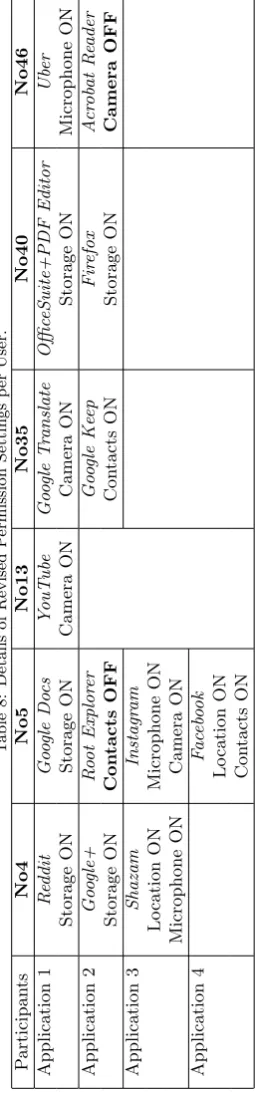
In total, 14 applications were found having al-tered permission settings in our dataset. Among them, user No 5 revoked access to the Contacts group for 1 application and user No 46 revoked ac-cess to the Camera for 1 application (presented in 1045
bold at Table 8). On the contrary, 14 applications presented altered permission settings providing ac-cess to the following dangerous groups: 5 appli-cations were given access to the Storage group, 3 applications were allowed to access the Microphone 1050
and the Camera groups and 2 applications were able to access the Location and the Contacts groups. Details can be seen at Table 8. Table 8 indicates that users at the second phase of our experiments were again more keen to allow access to the Stor-1055
age group. Additionally, note that only users No 5 and No 46 changed permissions to social media and communication applications from setP.
It would be ideal to repeat the experiments more than once in order to make conclusions that are 1060
more robust; hence, we could obtain more than one additional snapshot. A longitudinal study in this context would provide insightful details of users’ ac-tions. However, we believe that this strategy would discourage our volunteers to participate and they 1065
would be disengaged from the beginning of the ex-periments. Thus, we chose to proceed with the less pervasive approach of taking one additional permis-sion snapshot from the participants’ devices. Also, it would be interesting to have the ability to in-1070
terview participants who returned a second set of permission data in order to better understand why users adjusted their apps’ privacy settings a month later or why they did not do that. However, re-ceived data were anonymous, hence we do not have 1075
this opportunity. We recognize that this is a limita-tion of our pilot study but future work will account for that.
did not radically change in the second snapshot. Half of the users from the second snapshot did not change any permission settings for the installed ap-plications. The other users just changed a small part of the initial settings. Also, the results show 1085
that our participants are more willing to provide ac-cess to their devices’ storage, when an application initiates such a request.
3.6. ChatON Tokens
While analyzing collected permission data we 1090
made an interesting observation. Permission data derived from devices having installed the ’ChatON’ application – i.e. devices No 2 and No 40 – included the following permission:
com.sec.spp.permission.TOKEN . This was
fol-1095
lowed by a unique token (a 256 character hexadec-imal number). We downloaded the application on a rooted Nexus 7 (2012) tablet that was running a custom ROM (Marshmallow version) and experi-mented with it. We used this device to send permis-1100
sion data and we marked the (token) number that was attached in thecom.sec.spp.permission.TOKEN
permission for the given device. Then the device was restarted and the ChatON application was re-launched. The token was the same, which means 1105
that this number is persistent. Despite that the ChatON service is no longer available9, this to-ken can be used by third party applications (just like ‘Permissions Snapshot’ did) to identify a de-vice, just by using the publicPackageManagerclass. 1110
This forms an example of bad coding practice which should be avoided, because it introduces vulnerabil-ities related to privacy; these tokens might be used for the identification of a device.
4. Discussion 1115
Android mobile OS introduced a significant en-hancement to its access control system with the advent of the Marshmallow version. Previous work [18] showed that users would prevent permis-sion requests from applications if they had this abil-1120
ity. The former generation of the Android OS did not provide this opportunity to the users. There-fore, all permission requests from an application were accepted by default, if users agreed to install it on their devices. Our work, validates the results 1125
9http://bit.ly/MMG2pP
of [18] using data derived from actual devices run-ning Android 6.0+. In addition, the results we pre-sented in this paper (regarding permission groups’ accessibility rates) were confirmed by another re-search work, which gathered data from a different 1130
group of participants [19].
The current study shows that it is possible to gain information about users’ permission set-tings utilizing publicly accessible classes such as
the PackageManager class. This methodology
al-1135
lows third-party applications to acquire information about how individuals tune their privacy settings in their personal digital ecosystems. Additional data (such as firstInstallTime, lastUpdateTime,
targetSdkVersion) can be acquired using the
1140
PackageManager to enrich our knowledge about
in-stalled applications. Collected information can be assembled to depict users’ privacy profiles, as Fig-ures 5 and 9 demonstrated. Therefore, this work demonstrated that under the run-time permission 1145
model it is possible to create anonymous user pro-files. These profiles could be used by online ven-dors to further personalize their digital application stores. In addition, personal privacy profiles can be used by artificial intelligence agents, which are em-1150
bedded in the most modern mobile operating sys-tems, in order to optimize recommendations to in-dividual users.
The results of our pilot study initiate a discussion about how effective the new model is in providing 1155
additional security to the user. We have seen that most applications request access to device’s stor-age and the majority of users allow them to ac-cess it. However, we have noticed that, on average, 60% of the participants used fine-grained settings 1160
on their devices, which is a positive step towards security and privacy enhancement. On the other hand, data derived from a small set of 12 partici-pants who submitted permission data for a second time, showed that only one permission was revoked 1165
on participants’ No 5 and No 46 devices, respec-tively. This finding complements and validates re-cent work which examines the lack of continuance of secure behavior from users [20].
4.1. Limitations
1170
Although we attracted a considerable number of participants for this pilot study, we did not make extensive use of all collected data. This happened because we did not get detailed information about how often an application is used on the specific de-1175
be-fore data collection occured. Therebe-fore, we included at the second part of our analysis only participants who had used fine-grained settings for their appli-cations, excluding others that might continuously 1180
prevent applications to access sensitive resources. Thus, we could not reliably identify if there exist users that consistently deny access to specific ap-plications. However, in future work we will account for this problem, engaging respondents to provide 1185
usage statistics. This will be achieved by recruiting participants from crowd sourcing platforms, such as Amazon Mechanical Turk or Microworkers. The current work can be considered as a pilot study on real users’ devices that initiates a discussion about 1190
how Android users adjusted to the fine-grained ac-cess control paradigm.
Additionally, although we distributed ‘Permis-sions Snapshot’ via Google Play, our study was con-ducted during a period when the majority of An-1195
droid users owned devices that were running older versions of the OS. Therefore, the participants of this study were mainly males and probably most of them were tech savvy individuals, owning Google Nexus smartphones and tablets. Unsurprisingly, 1200
our sample included users having super user priv-ileges on their devices. However, we also received data from participants with different profiles (e.g. older people or users with limited number of in-stalled applications), hence the behavioral patterns 1205
demonstrated in this paper should not be linked with specific groups of people.
Moreover, we should acknowledge the fact that when it comes to questions related to privacy en-hancement, most of the users would probably agree 1210
that they prefer more privacy. Thus, the reader should take into account that users often lean to-wards utility than privacy [12] and should be careful when making extrapolations from the results. Fur-ther work in the future will include a larger and 1215
more diverse sample of users, given that the run-time permission model is currently utilized in 3 An-droid versions (Marshmallow, Nougat, Oreo). We also plan to assess users’ privacy and security pro-files using frameworks like [21].
1220
5. Related Work
Previous work highlighted privacy- and security-related concerns associated with Android’s install-time application permission system, such as the proliferation of over-privileged applications [22]. In 1225
a recent study, Pearce et al. [23] showed that ap-proximately 49% of the Android applications at the Android Market were over-privileged because of the use of advertising libraries. Moreover, the authors indicate that such pervasive over-privileging consti-1230
tutes a threat to users’ privacy.
Prior work that studies user-defined privacy and security controls on mobile devices showed that users (on average) have to make over a hundred permission decisions per device [7]. In addition, 1235
researchers demonstrated than users are often un-aware of the number (or the context) of permissions they granted to applications at the past [24]. Jeon et al. [25] proposed a framework to address secu-rity issues that arise from the (old) coarse-grained 1240
permission model. They used a taxonomy of four main Android permissions groups and developed a fine-grained permission model to increase the secu-rity of existing apps without affecting functionality and without requiring platform modifications. 1245
A recent paper by Wijesekera et al. [18] showed that during a study, at least 80% of the participants indicated that they would prevent at least one per-mission request of their experimental application if they were aware of its purpose and functional-1250
ity. The participants also stated that they would block over a third of permission requests if they had this choice. However, other studies highlighted that most of the users do not pay attention to system messages related to permission requests [26]. Addi-1255
tionally, researchers demonstrated that users were often surprised by the ability of applications to col-lect personal data in the background and share data with third parties [27]. Advertising libraries for ample have been consistently examined for data ex-1260
posure and leakages; a recent study revealed a trend in advertising networks to become more aggressive in collecting reachable user data [28].
In the previous years, a number of security ex-tension mechanisms have been proposed to over-1265
come privacy constrains of the previous permission model [29]. Some approaches add access control processes to provide the user the ability to choose permissions and reduce run-time constrains for each application [30]. Other methodologies introduce 1270
fine-grained access controls for Android applica-tions aiming to enforce control over the assignment of permissions through explicit policies [31]. More-over, FlaskDroid [29] extended the latter framework to provide a flexible, fine-grained access control 1275