Client Server System for e-Services Providing in
Mobile Communications Networks
Eugen POP, Mihai BARBOS, Razvan LUPU
Abstract E-services providing is a good opportunity for business developing and financial benefits increasing for various economic agents. Using Internet they can efficiently offer the products or services to a large number of clients. Moreover, with the support of mobile communications networks, the clients will benefit of these advantages anywhere and anytime. These considerations are strengthened by the increasing convergence of technological and financial interests of mobile operators, client server software developers, mobile terminals producers and e-content providers. These will lead to a high level of integration of IT&C resources and will facilitate the value added services delivery through the mobile communications networks. In this paper is presented a client server system, based on Smartphones and PDA’s, useful for e-services providing in business environment.
Index Terms— e-services access, mobile communications, PDA, Smartphone
I. INTRODUCTION
Data transmission through mobile networks became very attractive for many business agents, in the purpose of promoting and offering electronic services to their clients. This paper presents a client server architecture, which offers to the mobile users the possibility of GPRS and WLAN access to electronic services, through mobile data terminals like SMARTPHONES and PDA’s. As a representative example of business environment electronic service, installed on the server, the stock market transactions. The client server functionality can be extended for a larger number of information services and applications: e-commerce, mobile-banking, e-health, e-learning, location based services, but also e-government, e-citizen etc.
An informational service is a software application, whose main component is a data base, which can be accessed by the users via Internet or mobile communication networks. The data transmission through mobile telephony networks gives to the users the mobility advantage. The 3G networks offers significant channel bandwidth. The software server applications are hosted at the digital content providers.
Manuscript received March 9, 2008. This work was supported in part by the Romanian National Research Agency under contract 05/05.10.2005, financed by Programs Management National Center (sponsor and financial support acknowledgment goes here). The project deals with IT&C on mobile networks support.
E. Pop (PhD’99) has a PhD in Telecommunications. He is R&D Project Manager and Principal Researcher in the Automation Institute in Bucharest, Romania, and is associated with the “Politehnica” University in Bucharest. Phone: 4021-3180032, Fax 4021-3161620, e-mail: [email protected].
M. Barbos is researcher in the Automation Institute in Bucharest, involved in mobile telephony data transmission data developments. Phone: 4021-3180032, Fax 4021-3181620, e-mail: [email protected].
R. Lupu is researcher in the Automation Institute in Bucharest, involved in databases and WEB applications.
Phone: 4021-3180032, Fax 4021-3181620, e-mail: [email protected].
II. OBJECTIVES
The objective of the activity was to design a client server architecture, using mobile network channels, which would give mobile clients access to information services, through terminals like SMARTPHONE, PDA’s or laptops. The electronic service access is achieved by the client by two types of applications:
-socket to socket type software data transmission applications, suitable for Smartphones and PDA’s which have the advantages of high data rates and reduced costs of
informational traffic;
-embedded web browsers for 3G mobile terminals. Data transfer is achieved using TCP/IP protocols through GPRS and WLAN channels. Suitable graphical user interfaces are provided to the clients.
The server URL site presents multiple access, Smartphones and PDA technologies and terminals, necessary for the clients in order to use the electronic services. It also provides a stock market transactions electronic service to the users. Other e-services can be delivered, directly on the site or by URL links to other addresses. The system architecture can be a distributed one, including various servers and sites for different e-services. The system user is also provided with downloadable software applications for mobile terminals, ready to be installed in the mobile terminal, like an executable file.
The research and development activities objectives consisted of:
-a client server software structure development, adequate for access and electronic services providing, in the business environment, using mobile communications;
-database software application development, installed on the server, which can store adequate e-content, for various e-services,
-to evaluate the electronic services access conditions, using mobile communication networks and 3G terminals;
-identification of stock market transactions particularities, in order to identify the suitable indices, to deliver real time information, useful for interested parties and brokers;
-the possibility of integrating API resources, like e-parlay or NRG platform, and WEB servers modules, in software applications, for e-services development.
III. SYSTEM ARCHITECTURE
GPRS and CDMA channels. The connection between the laptop and modems can be made by USB, serial cable or Bluetooth channels. There is available a WLAN interface for radio Intranet connection. The database, e-content and suitable software applications of the stock market transaction e-service is installed on the server, which is cable connected to the Internet.
The client software applications are resident on laptop, Smartphone PDA. These terminals allow the user to establish mobile telephony or WLAN connections, and to achieve the TCP/IP transmissions, to access the e-service.
A. Hardware structure of the system server
The hardware structure of the server basically consists of: -A IBM PC compatible computer, Pentium IV, 3 GHz, with Windows XP Professional operating system;
-Internet/Intranet fix IP connection, through a hub, switch, router or gateway, of the economic agent’s LAN.
B. Hardware structure for the system’s mobile client
The hardware structure of the client basically consists of: -Laptop, IBM-PC compatible, Pentium IV, 3 GHz, with Windows XP Professional operation system w.
-Ethernet interfaces, for LAN connections, providing the user with the possibility to compare the cabled and mobile channels access to e-services;
-SE P990i Smartphone, with Symbian v. 9.1. operating system [6];
-QTEK 2020i Personal Digital Assistant, with Windows Mobile 2003 operating system;
-GSM/GPRS data transmission modem, for mobile connection of the laptop to the Internet;
-CDMA modem for Internet mobile access using laptop; -WLAN and Bluetooth data interfaces.
C. The software structure and functions of the server
Several server software modules were developed, for laptop, Smartphones and PDA e-service access, as follows;
-Server software applications, for client connections requests serving and TCP/IP data traffic achieving;
-E-services server applications like: stock market transactions, e-commerce, location based services, etc;
-Server database for e-service information storing. At the server side, for the client access using mobile terminals, the following functions are implemented:
-“listening” to the client connections requests, at the suitable logic port;
-allowing the Request Identifier to the client request; -displaying in a GUI of the dynamic IP client address, the client query and transmitted data, server name and IP;
-the message “Connection closed” is displayed, when this event is performed by the client.
The stock market transactions e-service is implemented based on a suitable WEB service. This is efficient especially for client access using Smartphones and PDA’s.
The client software applications are available on the server, for downloading and installing in the adequate mobile terminals of the user: Smartphoens and PDA.
D. The mobile client software structure and functions
The software structure of the mobile client, for e-service access using laptop, Smarphones and PDA’s consists of:
-interfaces for GPRS and CDMA mobile networks attaching, [4];
-data transmission software modules, using TCP/IP or other suitable protocols;
-database query transmission, to the server.
At the client side, the events are happening as it follows: -the IP address of the server computer is introduced in the suitable text field, followed by the Connect command;
-if the connection is accepted by the server, the client is notified by a suitable message on the GUI;
-the requested information, is received from the server and displayed in the adequate text field;
-the events that take place during the data traffic, are displayed at the bases of the GUI: ex. received data, transmitted data etc.
For e-services user access using Smartphones and PDA’s, the WEB service functions were included in suitable software modules, developed for these types of terminals.
IV. TECHNOLOGY DESCRIPTION
A. Server application development
In the following will be presented the technology used for server, Smartphone and PDA software applications development. In order to implement and publish the e-service site on Internet, the HTTP application server IIS 5.1 was used, and a DNS installed on a server of the local network. The site development was realized using the HTML language, including the Get, Head, Post, Push, Put and Patch functions, for data transfer. The database was developed using PhpMyAdmin on a MySQL server, which stores the data in tables. PhpMyAdmin achieves, the graphical interface of MySQL, facilitating the database administration, which otherwise would be done in a MSDOS window or using the MySQL Administrator.
B. The client software applications for Sony Ericsson P990i development tools
The client server system can use various mobile telephony terminals. Adequate tools must be used to develop client applications, according to the SDK GUI platform and the operating system of the mobile phone [1].
In case of SE P990i Smartphone, the following tools, installed on a Windows XP OS PC were used, [2]:
-the UIQ 3.0 SDK GUI platform, for Symbian v9.1, [3]; -the CodeWarrior Professional 3.1 IDE, based on C++ language, for object oriented programming, compatible with UIQ 3.0 SDK, ;
-ActiveSync utility software, for transferring the created SIS file, from PC in the Smartphone internal or card memory, through USB cable or Bluetooth connection.
The UIQ 3.0 SDK software design components are: -a phone emulator, compatible with Windows OS PC; -header files and libraries for running the application on emulator and on the real ARM processor;
-a GCC compiler and tools for developing and transferring the application on the phone;
case, are also included. The WINSCW and GCC-E compilers were used for UREL type build targets [5].
C. The client software applications for QTEK 2020i PDA
To develop client applications and WEB service interfaces for QTEK 2020i, Phone Edition, with Windows for Mobile 2003, the following tools were used: .NET Compact Framework SDK libraries, MS Visual Studio 2005 IDE, installed on Windows XP, Active Sync 4.0 or later.
V. SOFTWARE DEVELOPING
A. Server software application development
The server database was created in the following steps: -starting the IIS service on the Windows XP OS PC. -in PhpMyAdmin folder, the index.php file was opened in a web browser;
-logging as a “root” user and suitable password, for security reasons, to access the application main interface;
-defining a new database using Create new Menu. In the server application, the database contains one table, with the corresponding fields. The information insertion is made by accessing the Insert tab. The scripts are embedded in a php type file and can be accessed directly on the site, as web pages. The database contains several societies, currently listed at the stock’s first category. The database is accessed through PHP scripts, containing the SQL queries. The PHP scripts reside on the same server as the database does, and they are appealed directly using the DNS address of the site, through a web browser. The call has the following general form http://localhost/query.php? parameter=value. The WEB browser is available on the laptop, and on Smartphone or PDA. For Smartphone and PDA, dedicated client software was also developed. These applications achieve direct database queries, without using a WEB browser.
B. Client software application development
The necessary classes, in minimal configuration, used for developing the client application for Smartphone, are:
-Application View which instantiates the main window and acts as a container for other application objects;
-Application UI which instantiates the view of the application and manipulates the commands sent by objects;
-Application Document which handle the application data content;
-Application is the main class of the application, and has the role to start the application by the Application Document class instantiation; also, it sets the UID (universal unique identifier, necessary for each application).
Besides these classes, there were also used Internet access classes, defined in the HTTPEventHandler.h and HTTPClient.h header files.
The client server system allows the access to electronic services links, provided by third party suppliers, in the Services links section of the site.
The client software application diagram is presented in the fig. 8. In the application main screen the user specifies the server IP address and logical port, for connection. After the connection is established, the query data is inserted in an input box. If the connection is stable, the data are transmitted to the server. After receiving the information
stream, the client may close the connection.
VI. RESULTS
The system client software applications functionality was tested as it is presented in the following.
A. Stock market exchange e-service access using a
laptop, on mobile communications channels
The modems were connected at the laptop and configured for GPRS and respectively CDMA networks attachment. The system database was accesed through web browser by
http://localhost/phpmyadmin/index.php;
The username and password, for login was introduced, to access the Database screen. It displays, the service database, associated to the project: transactions_summaries (1). It stores the listed companies quotations, which can be observed through the Browse command.
The companies stock exchange information are available to the service client through the next steps:
-open the browser and enter the system link: http://localhost/query3.php ? symbol= ATB;
-the browser retrieves the information for ATB (in Romanian Antibiotics Iasi Company);
The list of companies whose quotation variation is under the maxim threshold “x” is obtained by:
-open the browser and enter http://localhost/ query1.php?above=x; the browser displays these companies; The list of companies whose quotation variation is above the minim threshold “y” can be obtained by:
-open the browser and enter the address http://localhost/query2.php?sub=y; the browser displays these companies.
B. Stock market exchange e- service access, using the SE P990i Smartphone and QTEK 2020i PDA
The main GUI window of the mobile SE P990i, client application, for stock exchange service access is opened by the Smartphone commands: Main Menu – Tools – Mobacces. The user must perform then the following tasks:
-the client will obtain stock exchange information following application GUI: Main Menu – Info Companies;
-in the Company field, the symbol of the company is introduced, than is clicked Done and Go;
-in the Ready window the status of the server connection, is shown: Connecting, Connected, Data received, Successful transaction;
-requested company information is displayed, fig. 2 a,b. The list of companies whose quotation variation is under the maxim threshold “x” is obtained by the commands:
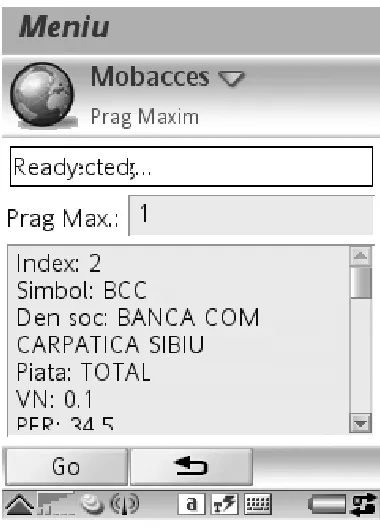
-in the main screen, select Menu – Maxim Threshold; -the cursor is placed in Threshold Maxim window, the virtual keyboard become active and the desired maximum value can be typed, “1” for example; than press Done and Go;
-in the informational field, the companies that had a quotation variation under the introduced value, are displayed, fig. 3.
The list of companies whose quotation variation is above the minim threshold for ex. “0” can be obtained by the commands:
the virtual keyboard is active, and the maximum value, “0” for example, can be typed; than press Done and Go;
-in the information box the companies that had an index variation above the introduced value are displayed, fig. 4
The same applications have been tested on a PDA terminal, QTEK 2020i see fig. 5, 6, 7.
It is important that, based these client applications, the user can efficiently decide to sell or buy shares, having the advantage of the terminal mobility. This will increase his financial benefits.
VII. BUSINESS BENEFITS
The companies that use client server architectures for providing electronic services can have important benefits. They will obtain a superior level in performance, an global market, and the possibility to satisfy the mobile clients through a better communication, by information and market testing, with diversity of offered services and not stop availability. These new business opportunities are increased by the important advantages of the mobile networks. In the context of electronic services development, in business environment, the economic performances of the industrial and commerce companies will be improved, and new IT&C work places will be offered to the specialists.
[image:4.595.105.513.223.476.2]Figure 1 The general block scheme of the client server system using mobile networks
[image:4.595.101.514.503.742.2]
Fig. 3 Providing information for maxim threshold functions Fig. 4 Providing information for maxim threshold functions on SE P990i scrren on SE P990i scrren
[image:5.595.94.284.75.339.2]
Fig. 7. Providing information for minim threshold functions on QTEK 2020i screen
Fig. 8 The diagram of the client software application
VIII. CONCLUSIONS
A client server system for a stock market transactions e-service was realized. The e-e-service can be accessed using laptop, Smartphone or PDA’s, on GSM/GPRS, CDMA or WLAN channels. The server contains the data base which stores the information about companies, regarding the stock transactions indexes. A WEB service is implemented, to provide the answers to the client’s queries:
-selected companies stock transactions information; -the list of companies whose quotation variation is under the maxim threshold, introduced by the user;
-list of companies whose quotation variation is above the minim threshold, introduced by the user.
The stock market information is available to the client by browser, or by direct and dedicated applications, which is significantly reducing the access time and data traffic cost.
The service’s client is able to decide optimally, having the mobility advantages, whether to buy or sell shares. He has the opportunity to increase his financial benefits.
The service’s site offers to the client access applications samples for SE P990i and QTEK 2020i mobile terminals.
These samples, posted on the site, can be downloaded on a PC, and then installed on the mobile phone, using ordinary Sync tools. The executable files can also be directly downloaded on the mobile phone, using a web browser, or can be sent as an email attachment.
The following functions of the client server system have been implemented and tested:
-server software application for stock exchange informational service;
-client software applications for Smartphones and PDA’s, suitable for electronic services access.
The client server system can be extended and updated to develop and provide any kind of electronic service like: e-commerce, e-banking, e-government, etc
REFERENCES
[1] Steve Babin, 2006, Developing Software for Symbian OS, John Wiley & Sons Ltd
[2] List of All Symbian/C++ Tools
http://www.forum.nokia.com/main/resources/tools_and_sdks/listings/symbi an_cpp_tools.html; information about mobile software developing tools [3] http://uiq.com/getting_started_with_uiq3.html; UIQ platform libraries [4] Symbian on GPRS
http://www.symbian.com/symbianos/standards/symbianongprs.html; developing software applications on Symbian platform
[5] Sony Ericsson Developer World
http://developer.sonyericsson.com/site/global/home/p_home.jsp; developers tools for UIQ 3.0 platforms;
[6] Why is a different operating system needed? http://www.symbian.com/files/rx/file6383.pdf
-parameters and characteristics of the Symbian mobile platforms; [7] UIQ C++ and Personal Java for P800/P900, October 2003, www.metrowerks.com; methods for Java programming for UIQ platforms; [8] Comms and Telephony Programming for the Sony Ericsson P800/P900, November 2003 , www. sonyericsson.com; methods for communications software applications development for UIQ Symbian platforms;
[9] An introduction to the Symbian OS platform developers, November 2002, www. sonyericsson.com; syntax, methods, tools for Symbian programming
Application main screen is displayed
Connected at the server IP address and logical port
The server conection is established? No
Yes
The client query data are inserted in the suitable text
The data conection with the server is stable? No
Yes
The query data are transmitted to the server