CiscoWorks LAN Management Solution 3.1
PB477492
Cisco announces the availability of CiscoWorks LAN Management Solution (LMS) 3.1 for
Windows and Solaris. Although this is a minor release, it introduces significant new
features along with continued improvements in reliability, usability, and performance.
CiscoWorks LMS provides network management tools for simplifying the configuration,
performance monitoring, and troubleshooting of Cisco
®networking devices.
New Features
CiscoWorks LMS 3.1 provides significant new features as a bundle and within each specific
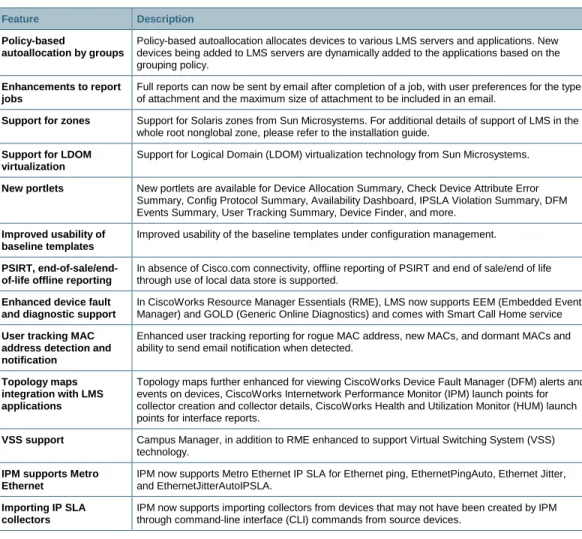
application area. A summary of new features provided in the LMS 3.1 update can be found in
Table 1. For detailed information on the features of CiscoWorks LMS 3.1, please refer to the
respective application data sheet and What’s New section of the user guides.
Table 1.
CiscoWorks LAN Management Solution 3.1 Bundle-Level Features
Feature Description
Policy-based
autoallocation by groups
Policy-based autoallocation allocates devices to various LMS servers and applications. New devices being added to LMS servers are dynamically added to the applications based on the grouping policy.
Enhancements to report jobs
Full reports can now be sent by email after completion of a job, with user preferences for the type of attachment and the maximum size of attachment to be included in an email.
Support for zones Support for Solaris zones from Sun Microsystems. For additional details of support of LMS in the whole root nonglobal zone, please refer to the installation guide.
Support for LDOM virtualization
Support for Logical Domain (LDOM) virtualization technology from Sun Microsystems.
New portlets New portlets are available for Device Allocation Summary, Check Device Attribute Error Summary, Config Protocol Summary, Availability Dashboard, IPSLA Violation Summary, DFM Events Summary, User Tracking Summary, Device Finder, and more.
Improved usability of baseline templates
Improved usability of the baseline templates under configuration management.
PSIRT, end-of-sale/end-of-life offline reporting
In absence of Cisco.com connectivity, offline reporting of PSIRT and end of sale/end of life through use of local data store is supported.
Enhanced device fault and diagnostic support
In CiscoWorks Resource Manager Essentials (RME), LMS now supports EEM (Embedded Event Manager) and GOLD (Generic Online Diagnostics) and comes with Smart Call Home service User tracking MAC
address detection and notification
Enhanced user tracking reporting for rogue MAC address, new MACs, and dormant MACs and ability to send email notification when detected.
Topology maps integration with LMS applications
Topology maps further enhanced for viewing CiscoWorks Device Fault Manager (DFM) alerts and events on devices, CiscoWorks Internetwork Performance Monitor (IPM) launch points for collector creation and collector details, CiscoWorks Health and Utilization Monitor (HUM) launch points for interface reports.
VSS support Campus Manager, in addition to RME enhanced to support Virtual Switching System (VSS) technology.
IPM supports Metro Ethernet
IPM now supports Metro Ethernet IP SLA for Ethernet ping, EthernetPingAuto, Ethernet Jitter, and EthernetJitterAutoIPSLA.
Importing IP SLA collectors
IPM now supports importing collectors from devices that may not have been created by IPM through command-line interface (CLI) commands from source devices.
All CiscoWorks LMS 3.1 applications now ship on a set of two DVDs, one for Solaris installations
and the other for Windows installations. Both Solaris and Windows installation DVDs are provided
in the package so customers can choose which operating system version to install. The
CiscoWorks LMS application versions, once the LMS 3.1 Update is applied, are as follows:
●
CiscoWorks Device Fault Manager 3.1
●
CiscoWorks Campus Manager 5.1
●
CiscoWorks Resource Manager Essentials 4.2
●
CiscoWorks Internetwork Performance Monitor 4.1
●
CiscoWorks CiscoView 6.1.8
●
CiscoWorks Common Services 3.2
●
CiscoWorks LMS Portal 1.1
●
CiscoWorks Assistant 1.1
For more details on each application’s features and functions, please refer to the CiscoWorks LMS
3.1 bundle-level and application-specific data sheets located at
http://www.cisco.com/go/lms
.
CiscoWorks Health and Utilization Monitor 1.1 90-Day Evaluation Software Included
A promotional 90-day evaluation version of the newly announced CiscoWorks Health and
Utilization Monitor 1.1 will be included on the new product, upgrade, minor update, and service
release kit DVDs for customers to evaluate and determine whether they want to add this
functionality to their network management solution. HUM 1.1 seamlessly integrates with LMS 3.1
and provides comprehensive availability, utilization-level monitoring, and historical reporting of
network element MIB attributes such as CPU, memory, interfaces, ports, and links. More
information on HUM 1.1 along with ordering information can be found in the Product Literature
section under Product Bulletins at
http://www.cisco.com/go/hum
.
Data Migration and Upgrade Assistance
Data migration from versions prior to CiscoWorks LMS 2.6 is not supported in LMS 3.1.
For details on migrating device and network information from previous CiscoWorks LMS 2.x and
LMS 3.0/LMS 3.01 versions, please refer to the CiscoWorks LMS 3.1 Data Migration Guide at
http://www.cisco.com/en/US/products/sw/cscowork/ps2425/prod_installation_guides_list.html
.
Product Updates and Availability
Existing LMS 3.0 and 3.0.1 customers with a current Cisco Software Application Support (SAS)
contract can request a physical service release kit through the Cisco Product Upgrade Tool at
http://www.cisco.com/upgrade
. Existing LMS 3.0 and 3.0.1 customers without a current SAS
contract can either purchase the support contract for their LMS version and then request the
no-charge entitlement service release or simply purchase the minor release update kit available
through normal Cisco sales channels.
For LMS 2.x SAS and non-SAS customers, entitlement upgrade kits are not offered for
CiscoWorks LMS 3.1. Customers with LMS 2.0, 2.1, and 2.2 will need to purchase this release as
a new and continued investment in CiscoWorks LMS. For LMS 2.5, 2.5.1, and 2.6 customers,
major upgrade kits are available for purchase through normal Cisco sales channels at a reduced
price.
The announcement of end of sale and end of life of the CiscoWorks LMS 2.6 release was made on
September 26, 2007. Product orderability for the CiscoWorks LMS 2.6 release will be turned off on
June 11, 2008. Support for customer-known defects and device support will continue to be offered
as specified in the Cisco end-of-sale and end-of-life product bulletin.
For more details, please refer to the end-of-sale and end-of-life announcement for CiscoWorks
LMS 2.6 at
http://www.cisco.com/en/US/products/sw/cscowork/ps2425/prod_eol_notices_list.html
.
CiscoWorks LMS 3.1 will begin shipping on July 1, 2008. Customers can order these new products
through normal Cisco sales channels as of June 24, 2008.
Ordering Information
CiscoWorks LMS 3.1 is ordered using a size-based licensing model where customers can order
the CiscoWorks LMS product that best fits their network and device support needs. Whether you
have 100 or 25,000 Cisco devices, ordering CiscoWorks LMS 3.1 to fit your network requirements
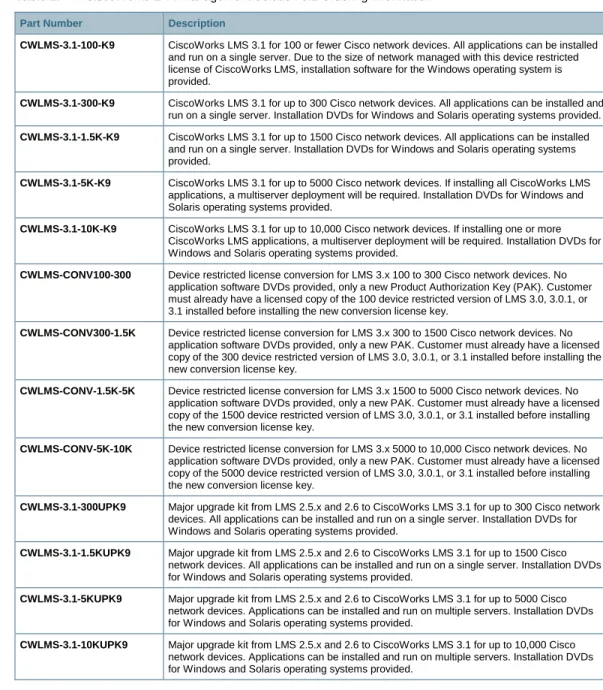
is easy and simple. Order the appropriate part number from Table 2 based on the number of Cisco
devices to be managed.
Table 2.
CiscoWorks LAN Management Solution 3.1 Ordering Information
Part Number Description
CWLMS-3.1-100-K9 CiscoWorks LMS 3.1 for 100 or fewer Cisco network devices. All applications can be installed and run on a single server. Due to the size of network managed with this device restricted license of CiscoWorks LMS, installation software for the Windows operating system is provided.
CWLMS-3.1-300-K9 CiscoWorks LMS 3.1 for up to 300 Cisco network devices. All applications can be installed and run on a single server. Installation DVDs for Windows and Solaris operating systems provided. CWLMS-3.1-1.5K-K9 CiscoWorks LMS 3.1 for up to 1500 Cisco network devices. All applications can be installed
and run on a single server. Installation DVDs for Windows and Solaris operating systems provided.
CWLMS-3.1-5K-K9 CiscoWorks LMS 3.1 for up to 5000 Cisco network devices. If installing all CiscoWorks LMS applications, a multiserver deployment will be required. Installation DVDs for Windows and Solaris operating systems provided.
CWLMS-3.1-10K-K9 CiscoWorks LMS 3.1 for up to 10,000 Cisco network devices. If installing one or more CiscoWorks LMS applications, a multiserver deployment will be required. Installation DVDs for Windows and Solaris operating systems provided.
CWLMS-CONV100-300 Device restricted license conversion for LMS 3.x 100 to 300 Cisco network devices. No application software DVDs provided, only a new Product Authorization Key (PAK). Customer must already have a licensed copy of the 100 device restricted version of LMS 3.0, 3.0.1, or 3.1 installed before installing the new conversion license key.
CWLMS-CONV300-1.5K Device restricted license conversion for LMS 3.x 300 to 1500 Cisco network devices. No application software DVDs provided, only a new PAK. Customer must already have a licensed copy of the 300 device restricted version of LMS 3.0, 3.0.1, or 3.1 installed before installing the new conversion license key.
CWLMS-CONV-1.5K-5K Device restricted license conversion for LMS 3.x 1500 to 5000 Cisco network devices. No application software DVDs provided, only a new PAK. Customer must already have a licensed copy of the 1500 device restricted version of LMS 3.0, 3.0.1, or 3.1 installed before installing the new conversion license key.
CWLMS-CONV-5K-10K Device restricted license conversion for LMS 3.x 5000 to 10,000 Cisco network devices. No application software DVDs provided, only a new PAK. Customer must already have a licensed copy of the 5000 device restricted version of LMS 3.0, 3.0.1, or 3.1 installed before installing the new conversion license key.
CWLMS-3.1-300UPK9 Major upgrade kit from LMS 2.5.x and 2.6 to CiscoWorks LMS 3.1 for up to 300 Cisco network devices. All applications can be installed and run on a single server. Installation DVDs for Windows and Solaris operating systems provided.
CWLMS-3.1-1.5KUPK9 Major upgrade kit from LMS 2.5.x and 2.6 to CiscoWorks LMS 3.1 for up to 1500 Cisco network devices. All applications can be installed and run on a single server. Installation DVDs for Windows and Solaris operating systems provided.
CWLMS-3.1-5KUPK9 Major upgrade kit from LMS 2.5.x and 2.6 to CiscoWorks LMS 3.1 for up to 5000 Cisco network devices. Applications can be installed and run on multiple servers. Installation DVDs for Windows and Solaris operating systems provided.
CWLMS-3.1-10KUPK9 Major upgrade kit from LMS 2.5.x and 2.6 to CiscoWorks LMS 3.1 for up to 10,000 Cisco network devices. Applications can be installed and run on multiple servers. Installation DVDs for Windows and Solaris operating systems provided.
CWLMS-3.1-100MR-K9 Minor release update kit from LMS 3.0 and 3.0.1 to CiscoWorks LMS 3.1 for up to 100 Cisco network devices. All applications can be installed and run on a single server. Installation DVD for Windows only operating system provided. No new PAK is provided in this kit. Customers must use their existing LMS 3.0 and 3.0.1 license key to activate this minor release update. CWLMS-3.1-300MR-K9 Minor release update kit from LMS 3.0 and 3.0.1 to CiscoWorks LMS 3.1 for up to 300 Cisco
network devices. All applications can be installed and run on a single server. Installation DVDs for Windows and Solaris operating systems provided. No new PAK is provided in this kit. Customers must use their existing LMS 3.0 and 3.0.1 license key to activate this minor release update.
CWLMS-3.1-1.5KMRK9 Minor release update kit from LMS 3.0 and 3.0.1 to CiscoWorks LMS 3.1 for up to 1500 Cisco network devices. All applications can be installed and run on a single server. Installation DVDs for Windows and Solaris operating systems provided. No new PAK is provided in this kit. Customers must use their existing LMS 3.0 and 3.0.1 license key to activate this minor release update.
CWLMS-3.1-5KMR-K9 Minor release update kit from LMS 3.0 and 3.0.1 to CiscoWorks LMS 3.1 for up to 5000 Cisco network devices. Applications can be installed and run on multiple servers. Installation DVDs for Windows and Solaris operating systems provided. No new PAK is provided in this kit. Customers must use their existing LMS 3.0 and 3.0.1 license key to activate this minor release update.
CWLMS-3.1-10KMR-K9 Minor release update kit from LMS 3.0 and 3.0.1 to CiscoWorks LMS 3.1 for up to 10,000 Cisco network devices. Applications can be installed and run on multiple servers. Installation DVDs for Windows and Solaris operating systems provided. No new PAK is provided in this kit. Customers must use their existing LMS 3.0 and 3.0.1 license key to activate this minor release update.