Flash Array Storage:
Best Practices, Tips, and
Advice from Real Users
IT Central Station: Reviews of Enterprise Flash Storage and Flash Storage Best Practices
© 2015-2016, IT Central Station Flash Array Storage Best Practices: Real User Experiences
The world of storage is being transformed by the
maturing of flash arrays, an approach to storage
that uses multiple, solid state flash memory drives
instead of spinning hard disk drives. An all-flash array
performs the same functions as traditional spinning
disks but in a fraction of the time required and in more
compact form factors. Given its superior performance
in certain contexts, all-flash arrays are experiencing
strong industry adoption. However, best practices and
a true understanding of key success factors for
all-flash storage are still emerging. This paper is intended
to educate you on best practices based on real user
experience drawn from ITCentralStation.com. We
o
ff
er all-flash user advice in selecting and building the
business case for a flash array storage solution.
© 2015-2016, IT Central Station Flash Array Storage Best Practices: Real User Experiences
Introduction
Unlocking the “Black Box” of the Flash Storage Array
Beyond ROI, What You Can Get From Flash Arrays
Getting ROI from Speed
Protecting Data
Past the Flash Excitement and Hype
Real Users’ Advice for Using Flash Array Storage
Paying Attention
Bespoke is Key
Beware Mileage May Vary
Looking Down the Long Road
Why You Care About Block Size, Compression and De-Duplication
ROBO, the Last (Important) Mile
What You Track Matters
Designing for Failure
About IT Central Station
About HP
1
1
2
3
3
3
4
5
5
5
5
6
6
7
7
8
8
Contents
© 2015-2016, IT Central Station Flash Array Storage Best Practices: Real User Experiences
1
This year marks the 50th anniversary of “Moore’s Law,” the famous prediction made by Intel co-founder Gordon Moore that computing would see capacity double and price cut in half every eighteen months. While Moore’s prediction has essentially been accurate, what’s often not discussed are the many market forces that keep pushing the tech industry to offer more capacity at lower prices. This has certainly been the case in the storage arena. As demand for storage grows, data center space continues to be costly to add. IT professionals debate the economic wisdom of adding more facilities to house an ever-expanding mass of stored data.
Indeed, storage is an area of IT where Moore’s law has been put to the test. While there have been truly remarkable advances in storage capacity and cost, it seems as if it’s never good enough. In 1980, a 20 megabyte hard drive cost $25,000 and was 14 inches in diameter. Today, a 500 gigabyte drive is the size of a small stack of credit cards and costs $39.99. But, it’s not enough. Not even close. Today’s storage demands are so great that industry innovators have labored to devise a new form of storage that utilizes solid state flash memory to take over the role of spinning disks.
A new breed of all-flash storage arrays is having an impact on the storage world. An all-flash array performs the same functions as traditional spinning disks but in a fraction of the time required and in more compact form factors. Given its superior performance in certain contexts, all-flash arrays are experiencing strong industry adoption. However, best practices and a true understanding of key success factors for all-flash storage are still emerging. This paper is intended to educate you on best practices based on real user experience drawn from ITCentralStation.com. We offer all-flash user advice in selecting and building the business case for a flash array storage solution.
Most of us know what flash storage is, but it’s probably worth going through a high level definition because the actual makeup of an all-flash array is more
complex than some people realize. Like many new(ish) technologies, flash storage is really a combination of elements arranged in novel ways, some of which have labels that are not familiar to everyone.
Introduction
Unlocking the “Black Box” of the Flash Storage Array.
F LAS H MEM O RY VO LU ME
FLASH MEMO RY VO LUME
FLASH MEMO RY VO LUM E
F LAS H MEMO RY VO LUM E
F LAS H MEM O RY VO LU ME
FLASH MEMO RY VO LUME
FLASH MEMO RY VO LUM E
F LAS H MEMO RY VO LUM E
F LAS H MEM O RY VO LU ME
FLASH MEMO RY VO LUME
FLASH MEMO RY VO LUM E
F LAS H MEMO RY VO LUM E
HO ST
SSD CONTROLLER
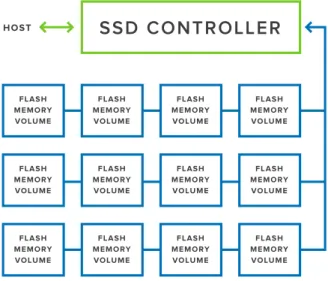
Figure 1 – The architecture of a Flash Storage Array includes an SSD controller, which manages storage amongst numerous flash memory volumes.
© 2015-2016, IT Central Station Flash Array Storage Best Practices: Real User Experiences
2
The benefits and return on investment (ROI) for all-flash arrays emerge through comparisons with traditional spinning HDDs. It’s important to note, though, that it’s not always an “either/or” choice between SSDs and HDDs. While SSDs offers a number of striking benefits and ROI advantages, some use cases are better handled with spinning media. At other times, a “hybrid” array that combines SSD and spinning HDD may offer the best solution. A hybrid array often uses an SSD as a caching device to improve the data access performance of the HDD.
Sales of all-flash arrays are experiencing strong growth, which may seem odd because the cost per unit of the raw storage is notably higher in an all-flash array than it is in a spinning disk. This is true even though the cost is dropping every year. Yet, the buyers must see an ROI justification for the new technology.
What’s going on? How can a storage
medium that costs more create a better
return on investment?
The answer involves going beyond the raw cost per unit of storage and looking at cost of usable capacity based on the effect of compaction that is standard in all-flash arrays.
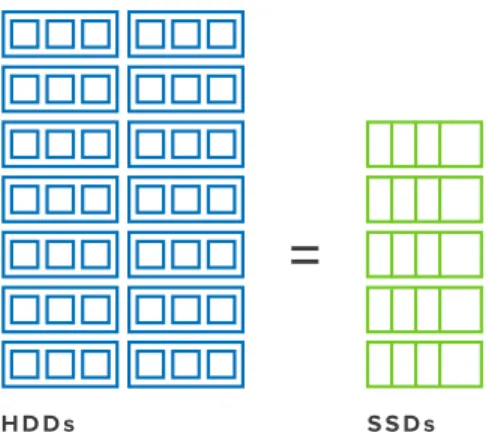
There are two types of benefits with all-flash arrays that equate to higher ROI: All-flash arrays are much faster than spinning media in reading and writing data, All-flash arrays occupy less space per unit of storage than equivalent arrays with HDDs. According to some vendor reports, SSDs can save up to 60% of data center floor space compared to HDDs.1 Given the high costs of data center construction and operation, this gives all-flash a strong financial advantage in many use cases.
Getting ROI from Speed
Speed translates into ROI when all-flash arrays enable applications to function more quickly. With faster I/O times, all-flash storage helps rules-based systems make decisions faster, mobile applications provide a better user experience, and financial systems clear transactions more quickly, just to name a few examples. In each case, the faster performance results in the improvement of metrics that business managers find important. Even though some of these metrics may be subjective, such as customer satisfaction, they are definitely valuable. In the context of improved customer satisfaction, the differential in cost between all-flash and spinning media may seem negligible.
Protecting Data
Data protection is an unwavering mandate for IT managers. With data serving as the DNA of the modern corporation, it must always be protected. Financial transactions, supply chain, personnel records, and so forth need to be safeguarded. While the issue is primarily related to backup, all-flash arrays offer a useful supplemental solution. By giving IT managers the ability to replicate critical data on an extremely rapid basis, they give organizations flexibility in how they utilize backup resources, including network bandwidth.
Beyond ROI, What You Can Get From Flash Arrays
H D D s S S D s
Figure 2 - SSDs can save data center space, at a ratio of approximately 5:2, based on vendor reporting.
1. http://www.intel.com/content/dam/www/public/us/en/documents/ product-briefs/improving-email-application-server-performance-with-in-tel-solid-state-drives.pdf
© 2015-2016, IT Central Station Flash Array Storage Best Practices: Real User Experiences
3
S A N
Good ROI on all-flash arrays is not automatic. It comes with adhering to best practices and understanding the interplay between storage and other elements of business systems. It’s useful to think past the hype and excitement of a technology that offers such high performance. Achieving ROI means being successful on multiple fronts related to storage:
• Your Approach Matters – All-flash storage will work best, from an ROI perspective, when it is considered in terms of an overall approach to storage and infrastructure. It may be possible to save money in one area but add unexpected costs elsewhere if you look at all-flash storage only in a limited context. For instance, data protection is an essential factor to incorporate into any new storage acquisition. How are you backing up your data? Are you securing or encrypting it at rest?
The way you approach data protection
could have an e
ff
ect on how well
all-flash arrays deliver on their promise of
improved performance.
Storage Area Network (SAN) infrastructure also counts. It can be a bottleneck if it’s not configured optimally for All-Flash. There is benefit to
upgrading the SAN to 16Gb/s from 4 or 8 to ensure you are getting the most from the flash storage and its ability to deliver performance to the applications on the hosts in the SAN.
• The role of storage management software – Storage management software plays a major role in the effective performance and ROI advantage you experience with all-flash arrays. This is true at the level of actual I/O performance as well as in terms of administrative costs. For instance, complex, high-level storage software, which requires storage expertise, can potentially add administrative costs to an all-flash storage and diminish its ROI. • Understanding the true cost of a usable gigabyte
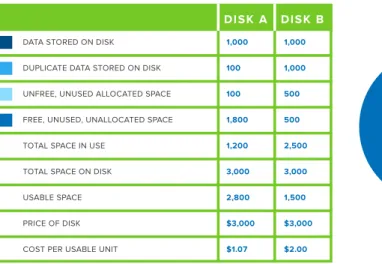
– Cost per usable unit ($/GB) of storage is one reason why ROI can look appealing for all-flash arrays. Different all-flash arrays achieve various levels of data density and capacity utilization. Two same-sized all-flash arrays might be able to store different amounts of data despite being superficially identical. The differences come from deduplication capabilities and data compression. The data has to be comparable, too. If the data in each drive has different potential for deduplication, the “usable gigabytes” cannot be compared. Figure 3 models this assessment, comparing disks with differing amounts of duplicate data and unfree, unused and unallocated space. The disk that uses less space for these two types of storage will cost less on a per-usable storage unit basis.
© 2015-2016, IT Central Station Flash Array Storage Best Practices: Real User Experiences
4
The peer-to-peer discussions on IT Central Station reveal best practices and knowledge about new technologies. The following are some highlights of recent posts on the site that explore ways to get the most out of all-flash arrays:
For me HA is paramount. Our storage
must be NDU [a non-disruptive upgrade]
in all situations.
—Senior IT Manager, Healthcare
Paying Attention
A user of all-flash arrays recommends that prospective owners of the technology look closely at ease of use as it relates to a company’s distinct requirements. There can be a wide variation in storage operating expenses depending how easily daily and weekly tasks be completed. For example, how difficult is it to add or change storage volumes, logical unit numbers (LUNS),
and aggregates? Are aggregates needed? Will the all-flash array meet recovery time objectives (RTOs) and recovery point objectives (RPO)? Will a backup toolset be required? What are the costs of meeting the RTP/ RPO in the solution cost evaluation?
Bespoke is Key
Understanding your particular flash storage requirements is key to selecting the proper storage technology for your environment. This may seem obvious, but end users comment on it because they have gone through the experience of buying first and figuring it out later. Consider performance requirements. If your application requires High Availability (HA), performance is essential. Other workflows may favor large-scale, low-cost storage infrastructure with less emphasis on performance. The dominant software packages, such as SAP, Oracle, and Microsoft SQL Server also each have recommended configurations and optimal storage scenarios. It’s essential that you understand how your particular application will interact with an all-flash array in order to make the right decision. Depending on your needs, the best storage choice might be all-flash or
Real Users’ Advice for Using Flash Array Storage
DATA STORED ON DISK DUPLICATE DATA STORED ON DISK UNFREE, UNUSED ALLOCATED SPACE FREE, UNUSED, UNALLOCATED SPACE TOTAL SPACE IN USE
TOTAL SPACE ON DISK USABLE SPACE PRICE OF DISK COST PER USABLE UNIT
D I SK A D IS K B
1,000 1,000 500 500 2,500 3,000 1,500 $3,000 $2.00 1,000 100 100 1,800 1,200 3,000 2,800 $3,000 $1.07
D I S K A D I S K B
Figure 3 - Comparison of two disk drives with differing amounts of duplicate data and unfree, unallocated space – describing the relative cost per usable storage unit.
© 2015-2016, IT Central Station Flash Array Storage Best Practices: Real User Experiences
5
hybrid flash. For most users, the configuration capabilities of the storage hardware and management software result in what is essentially a bespoke solution. A Senior Storage, Virtualization, and Disaster Recovery Engineer at a legal firm with 1000+ employees described his performance parameters for all-flash by saying, “We have a lot of SQL, so IOPS was important to us. We also wanted tiering to move things in-between tiers easily.” Another user, a senior IT manager in the healthcare industry, commented, “For me, HA is paramount. Our storage must be NDU [a non-disruptive upgrade] in all situations.”
Beware Mileage May Vary
A non-profit organization that manages one petabyte of data recently began to migrate some of its storage from legacy storage with HDDs to all-flash arrays. They saw some immediate benefits. For instance, after migrating 120,000,000 files off of the old system to SSDs, their incremental backup is now 6-8 faster than it had been previously. They are also enjoying lower power costs and the advantage of better data center density. It’s essential, however that the SSD have enough IOPs to ensure the level of performance that is required for the desired level of application performance.
Looking Down the Long Road
An IT Central Station user, who works as a Business Systems Manager at a tech services company, described how his company faced a major decision about its servers and traditional HDD-based storage in his Storage Area Network (SAN) as growth put increasing pressure on existing infrastructure. The business was running ERP software for inventory and finances. It was a critical application. As demand grew, the application and its SAN became overtaxed to the point where the system was at risk of failure and user experience suffered. An incremental upgrade would have simply provided a temporary solution. The problem was guaranteed to reappear in the near future.
We wanted a system with the
flexibility to grow, without having to buy
hardware now that we wouldn’t use for
six or twelve months.
—Business Systems Manager, Tech Services Company
The company decided to replace the entire hardware infrastructure running MomentumPro. They chose a new, more compact server form factor and all-flash arrays for storage. The new hardware, though much more high-performing and high-capacity, takes about one-fourth the physical space in the data center. (The application is now housed on two racks, compared to eight used previously.) With CPU running at 15% of capacity and the SSDs at 70%, there is room to expand the application load and user based without adding costly data center space. “We wanted a system with the flexibility to grow, without having to buy hardware now that we wouldn’t use for six or twelve months,” the user said.
The company also acquired a flexible fabric technology that enables a Software-Defined Network (SDN). With all-flash storage, reduced infrastructure footprint and a flexible fabric SDN, the company has the flexibility to grow without straining data center and administrative resources. When considering all-flash storage, a recommended practice is to map out future needs and make sure that you have the flexibility to grow along with the business. Performance and affordability mean nothing if your system can’t scale. An all-flash array needs to align with your scaling requirements. If it does not, you may find yourself replacing it ahead of schedule as storage demands outpace the solution’s ability to scale.
© 2015-2016, IT Central Station Flash Array Storage Best Practices: Real User Experiences
6
Why You Care About Block Size,
Compression and De-Duplication
Responding to the forum question, “What selection criteria should be considered when researching flash arrays?” an IT Central Station member replied. This member works as a Global Systems Administrator in Biotechnology. “You do need to understand your data.” He continued, advising the prospective all-flash array buyer to pay attention to data reduction and data management, noting that de-duplication and compression help manage storage growth. De-duplication can make an impact on storage growth if you have several Test, Dev, QA databases that are all copies of production. The de-duplication will eliminate the wasted space consumed by the overlap. In particular, he recommended looking at de-duplication “boundaries” and suggested that array-wide or grid-wide de-duplication will be the most effective.
Prospective all-flash buyers also need to establish a block size that provides the needed level of de-duplication without negatively affecting performance. The block size is the amount of data that a storage device reads or writes at one time. Most storage products use a 4-8 kilobyte block size. Each user’s case will be different. Smaller block sizes typically result in better utilization of storage, but they can diminish performance. In general, the bigger the block size, the more effective the compression.
ROBO, the Last (Important) Mile
Storage needs today are far less centralized than they were in earlier generations of corporate IT. In addition to mergers and acquisitions that tend to stitch together widely distributed organization, there has been an increase in remote and branch offices (ROBO) that place storage assets far away from central data centers. Replication of data from ROBO locations is a challenge. The biotech admin manager member of IT Central Station advised, “If this [remote replication] is a requirement, you need to look at this carefully. Each [solution] does it differently. Some products need a separate inline appliance to accommodate replication. Replication with no rehydration of data is preferred as this will reduce WAN Bandwidth requirements and remote storage volumes.”
Replication with no rehydration
of data is preferred as this will reduce
WAN Bandwidth requirements and
remote storage volumes.
—System Administration Manager, Biotech
What You Track Matters
IT Central Station members recommend being proactive in using data and reporting about the use of all-flash arrays to make the best decisions about management and expansion. The biotech system admin manager member also noted, “You need to look at the canned reports. Do they have the reports you need to sufficiently manage your data?” For instance, having accurate insights into how storage is used and reclaimed will help you make the most effective use of storage capacity. Another member suggested making sure that an all-flash array’s reporting features will enable you to track the important ratio of storage seen by the host\storage consumed on the array – or, put another provisioned v. allocated storage.
Reports should also be able to show the business the efficiencies provided by the storage Infrastructure. If you have asserted that the storage solution will cut costs through better de-duplication, the storage product should have the reporting capability to show that this is indeed happening. The same goes for response rates, IOPS, latency, compression and so forth. Basic business reporting, such as charge-back allocations by department, are also essential to most companies. Finally, the solution should have reporting available on the condition of the storage media itself. Sometimes referred to as a “wear gauge,” this reporting function will give you a sense of where the device is in its lifespan. Solid state memory will wear out at some point. An SSD has a lifespan that includes a certain number of reads and writes.
© 2015-2016, IT Central Station Flash Array Storage Best Practices: Real User Experiences
7
Given that all-flash arrays are frequently used in Tier 1 applications, it’s crucial to
understand the resiliency design of a particular flash storage solution.
—System Administration Manager, Biotech
Designing for Failure
Given that all-flash arrays are frequently used with Tier 1 applications, it’s crucial to understand the resiliency design of a particular flash storage solution. How can the solution, in its native form (without add-on software and hardware) handle drive failures? What is the Mean Time between Failures (MTBF), for example? Of course, this goes beyond the product itself. The architecture of an application and its associated storage needs to be set up to react to failure, e.g. avoiding single points of failure, providing remote replication, failover, and so forth. Data portability is another important aspect of the resiliency discussion. All-flash arrays should support replication to and data portability between themselves and non-flash storage devices.
© 2015-2016, IT Central Station Flash Array Storage Best Practices: Real User Experiences
User reviews, candid discussions, and more for enterprise technology professionals.
The Internet has completely changed the way we make buying decisions. We now use ratings and review sites to see what other real users think before we buy electronics, book a hotel, visit a doctor or choose a restaurant. But in the world of enterprise technology, most of the information online and in your inbox comes from vendors but what you re-ally want is objective information from other users. IT Central Station provides technology professionals with a commu-nity platform to share information about enterprise solutions.
IT Central Station is committed to offering user-contributed information that is valuable, objective and relevant. We validate all reviewers with a triple authentication process, and protect your privacy by providing an environment where you can post anonymously and freely express your views. As a result, the community becomes a valuable resource, ensuring you get access to the right information and connect to the right people, whenever you need it.
IT Central Station does not endorse or recommend any products or services. The views and opinions of reviewers quoted in this document, IT Central Station websites, and IT Central Station materials do not reflect the opinions of IT Central Station.
www.itcentralstation.com
HP creates new possibilities for technology to have a meaningful impact on people, businesses, governments and society. With the broadest technology portfolio spanning printing, personal systems, software, services and IT infra-structure, HP delivers solutions for customers’ most complex challenges in every region of the world. More information about HP is available at:
www.hp.com