Dell AppAssure
Local Mount Utility
A light-weight tool for file and folder restorationThe Local Mount Utility (LMU) provides an alternate method to quickly recover files and folders from Dell AppAssure 5 Recovery Points. This method can be used instead of mounting recovery points via the AppAssure console. The LMU may be installed on any Windows system that has a supported operating system and has network access to the Dell AppAssure Core.
The LMU works by mounting a selected AppAssure recovery point as a network share, providing the administrator direct access to the data stored in the archive. This method permits access to the files and folders using the familiar Windows Explorer interface, and allows files to be restored using standard copy/paste operations. The LMU also allows the recovery point to be mounted in read/write mode, permitting files to be added to, modified in place, or removed from the recovery point.
Usage
The LMU has an intuitive, easy-to-use interface that allows you to:
• Select and mount Recovery Points in just a few clicks. Once mounted, the LMU will use Windows Explorer to display files.
• Quickly locate files using the Windows Explorer search function on the Recovery Point share.
• Copy files or directories from the Recovery Point using standard Windows copy/paste methods, whereby the files can be pasted to a user’s home directory or to another location.
Installation
The LMU is distributed as a Windows executable file that mounts on a workstation. It can be downloaded via the Core Console (see Figure 1).
To install the LMU, browse to the AppAssure Core Console and navigate to the Tools tab of the console. Select the Downloads
option and press the Download web Installer link under the Local Mount Utility section to start the installation.
Depending on the configuration of your browser, the installation may automatically start after the LMU is downloaded. Otherwise, the installer will need to be manually started once the download process has completed. A reboot after installation is not necessary.
TechnoLogy spoTLighT
Figure 1: Downloading the LMU from Core Console
The installation may also be automated using a software deployment system such as Dell KACE. The installation package can typically be found on the Core server at:
C:\Program Files\AppRecovery\Core\Installers\LocalMountUtility-Web.exe
Example: File Restore and Exploration
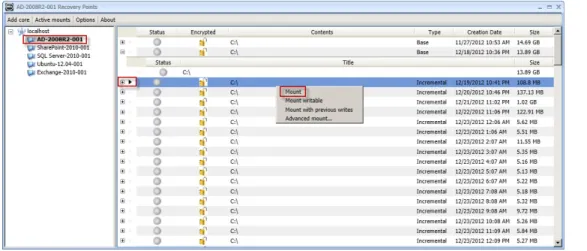
Figure 2 displays an example of the LMU after a Recovery Point for a protected machine has been selected. In this example,
AD-2008R2-001, an Active Directory server, will be viewed using a Recovery Point created on the date 12/19/2012. A popup menu with the Mount option appears after right clicking the Recovery Point.
Select Mount to display the Recovery Point in Windows Explorer.
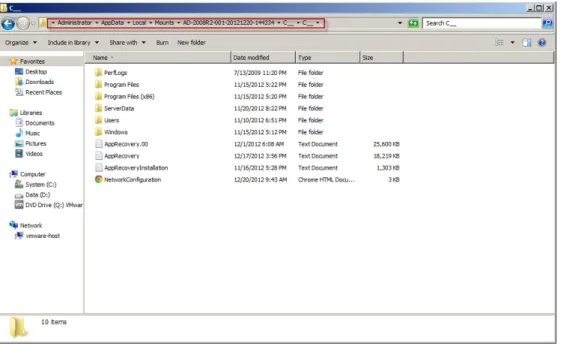
Windows Explorer opens to display the contents of the C:\ drive of AD-2008R2-001 Recovery Point as of the date it was created (see Figure 3).The file location in the share is shown at the top of the Explorer window.
Once mounted, files or directories may be copied directly from this share to the desired location. If the Recovery Point was mounted in read/write mode, files may also be added, modified, or deleted from the archive.
In situations where a file or folder needs to be restored but its whereabouts are unknown, the administrator can mount a Recovery Point and search for missing files using the Windows search tools.
The LMU can be a big help in situations where it may become necessary to modify the contents of an existing Recovery Point, Perhaps you need to add a missing file, making updates to existing files with incorrect content, or removing arbitrary data that doesn’t belong in the archive. Whatever the reason, the AppAssure Local Mount Utility makes it easy to modify, add, or remove data from existing Recovery Points without recreating the backup. It is also important to mention that 3rd party compare/sync utilities can be used to compare the contents of the AppAssure backup and existing data.
Figure 3: AppAssure Recovery Point displayed in Windows Explorer Example: Mailbox Restore for Exchange
Integrated in the LMU is the AppAssure Mailbox Restore for Exchange (MRE) product. The MRE is a separately licensed product and will run in evaluation mode until a license is acquired. Note, if you are evaluating AppAssure the MRE will be limited to five (5) mailbox restores
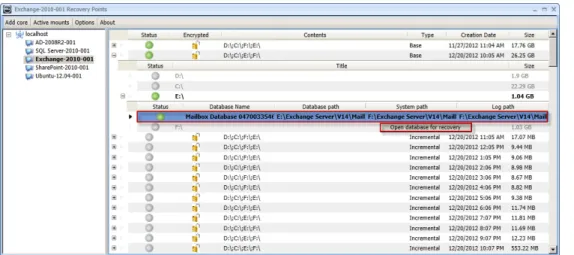
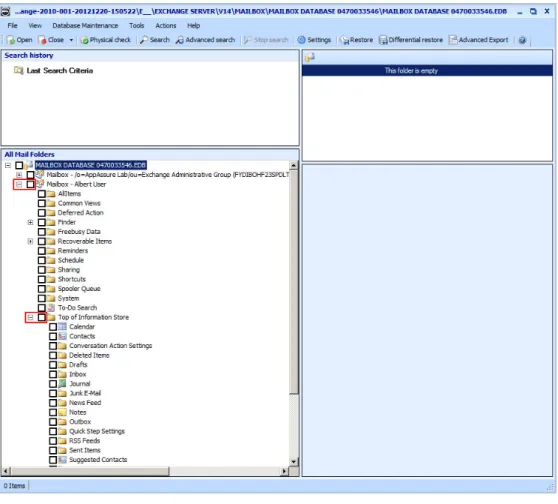
While browsing a Recovery Point (see Figure 5), the LMU will automatically provide the MRE option when an Exchange Mailbox Store is detected. Figure 6 shows the MRE after pressing the “Open database for recovery” button.
If you receive a prompt asking for the location of the ese.dll and exchmem.dll files (Figure 4), browse to the following directory on your exchange server: Program Files\Microsoft\ Exchange Server\V14\Bin
Figure 4: Exchange dll’s
Figure 5: LMU offering the Mailbox Recovery for Exchange tool
Mailbox Restore for Exchange provides both full and granular restore capabilities from Exchange data stores. Whether you need to restore entire Microsoft Exchange mailboxes, or individual items such as messages, mailboxes, appointments, etc, MRE is the right tool for the job. Additionally, MRE also restores the selected items to multiple targets, such as directly to PST files for portability, or back to the original or alternate location on the Exchange Server.
Figure 6: Mail Recovery for Exchange
The power and speed of this utility cannot be appreciated in a static document. A live demonstration will prove the value of this utility to an Exchange administrator. Contact an AppAssure account manager today to schedule a live demo.