ORACLE MOBILE FIELD SERVICE
Oracle® Mobile Field Service is a comprehensive mobile solution that closes
the information gap between the service organization and its field service
technicians. It supports complete field service process from task
receipt/acknowledgement thru status updates to debrief and task closure.
Key features include parts install and recovery, spare parts sourcing and
ordering, receiving, return parts to appropriate warehouse, and knowledge
management access for problem diagnosis. Oracle Mobile Field Service is
part of the Oracle E-Business Field Service suite that includes Teleservice,
Field Service, Advanced Scheduler, and Spares Management.
Oracle Mobile Field Service allows the remote field service technicians to do things online/offline in real time. They can review at service calls as they are coming in from the customer, order parts, and update service calls. This allows them to close calls faster, and if it’s a billable call, have the invoice sent out faster.
KEY BENEFITS
• Best In Class Performance • Increase in workforce productivity
(job completed per day) • Better workforce utilization
• Increase Customer Satisfaction While Reducing Service Costs
• Optimize the entire service delivery process from dispatch to invoicing. • Tighter control of Field Service
Activities
Oracle Mobile Field Service Overview
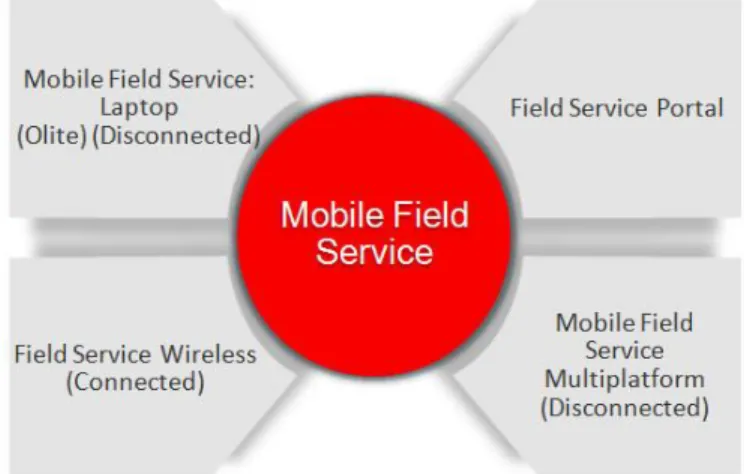
Oracle Mobile Field Service is a complete, easy to use solution offered to Field Service Technicians and Administrators maximize productivity. It provides three modes for flexibility and integration as service providers operate in many different environments: Browser based Field Service Portal support real time access
Wireless Browser Based Solution to support real time access Store and Forward Solution to support offline access (Oracle Lite) Store and Forward Solution to support offline access (MAF)
Figure 1:Tech Facing Applications
Complete Field Service Task Management
Oracle Mobile Field Service supports many best-in-class features to complete field service operations including:
DEVICE SUPPORT
• Laptops, Smart phones, and Tablets • Online Solutions: Smart phones,
Blackberries, iPhone, Android OS devices
• Offline Solutions: Oracle MAF based Smart phones (iPhone, Android) • Cell Phones with a WAP Browser –
Connected Browser Based Wireless Solution
NETWORK SUPPORT
• Any Wireless or Wired Network inclusive GPRS, CDMA, 3G, 4G LTE, Wi-FI
• Browser based wireless loads pages on a cellular wireless network
TECHNOLOGY SUPPORT
• Store and Forward – based on Oracle MAF platform
• Wireless – similar to self service wireless applications architecture • Single Sign-On Support • Configuration support • Controlled Upgrade • UI Personalization • Customization using SDK • Email Interface
Task Receipt and Acknowledgement (accept or reject)
Task Debrief (Parts used, Parts recovered, DOA, Parts unused, Labor, Expenses) Task Closure, Create charge and update Install base and Inventory
Parts Sourcing, Ordering, Receiving, Transfers and Returns Follow-up Task Creation and Scheduling
View Unassigned Tasks and Scheduling Knowledge Base Searches
Mobile Field Service User and Managers Dashboard
(Connected)
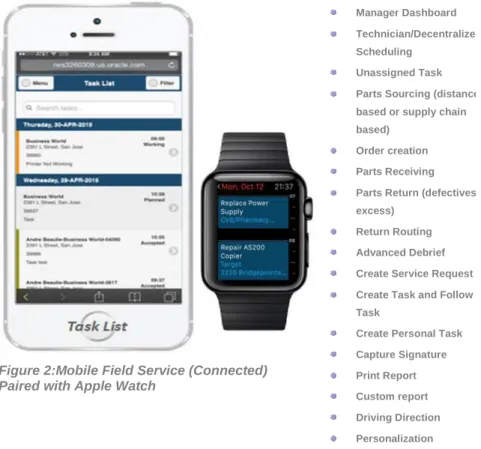
Oracle Mobile Field Service enables technicians to access information to perform work at a customer's site. They can view their daily schedule of tasks and perform functions, such as debrief, ordering parts, receiving parts, return parts to appropriate warehouse, create and schedule follow-up tasks, create service requests, and access the Knowledge repository to search potential solutions to common customer issues. The application runs in connected mode and leverages all fields service functions as well as native device features (Camera, Voice) and touch screen capabilities thereby providing intuitive and user friendly interfaces. The application supports all Smartphones that supports browser (few examples include iOS and Android based smart phones and tablets, Blackberry and Windows based laptops).
Manager Dashboard allows Field Service Managers to view all tasks owned by their group/district as well as all tasks assigned their field technicians. Additionally, managers can perform tasks on behalf of technician when they are not available.
Figure 2:Mobile Field Service (Connected) Paired with Apple Watch
Manager Dashboard Technician/Decentralized Scheduling
Unassigned Task Parts Sourcing (distance based or supply chain based)
Order creation Parts Receiving
Parts Return (defectives and excess)
Return Routing Advanced Debrief Create Service Request Create Task and Follow Up Task
Create Personal Task Capture Signature Print Report Custom report Driving Direction Personalization
FIELD SERVICE TASK MANAGEMENT • Calendar and Dashboard view of
Tasks and Service Requests • Complete Task information including
location, customer, contact, problem and product
• Comprehensive debrief inclusive travel, labor, material and expense • Knowledge Management, Search and
Service History capabilities • Field Service Report • Signature capture
• Create service requests and tasks in the field
• Schedule tasks in the field
VALUE ADDED CAPABILITIES • Third Party Technician Support • Technician/Decentralized Scheduling • Integration with Oracle Time and
Labor
• Automatic synchronization • Field Service Report • Capture Signature
• Contracts, SLA’s and entitlements visibility by the technician onsite • Automatic updates of installed base
and inventory
• Automatic creation of charges • Multi User Laptop
• Configurable Customer /product download
• Mobile Queries
• Real time debrief posting • Labor and Travel Debrief default • Task Scheduling
VERTICAL INTEGRATION
• Integration to capture readings from the flow meter.
• Record the volume as install and recover transactions.
Multi Platform Store & Forward Application (Disconnected)
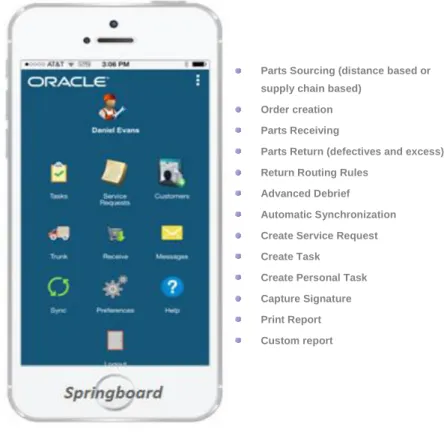
Oracle Multi Platform application allows you to extend enterprise applications to mobile using Oracle’s Mobile Applications Development Framework technology which protects against any technology shift and ensure security at all levels. Its offline capability allows technicians to update tasks, capture materials, time, and expenses, access inventory levels, request parts in offline mode and synchronize when they are online. The application runs in hybrid mode and leverages native device features (Camera, Voice) and touch screen capabilities thereby providing intuitive and user friendly interfaces. The application supports iOS and Android based smart phones and tablets and Windows based laptops. Refer the Data Synchronization section to learn more about synchrinzation.
Figure 3: Mobile Field Service (Disconnected)
Parts Sourcing (distance based or supply chain based)
Order creation Parts Receiving
Parts Return (defectives and excess) Return Routing Rules
Advanced Debrief Automatic Synchronization Create Service Request Create Task
Create Personal Task Capture Signature Print Report Custom report
Email Interface
Oracle Mobile Field Service introduces Mobile Query Framework, an open standard for field service organization to extent their mobile platforms with new capabilities such: Ability to execute standard field service business functions (such as get technician’s
daily task list, update task status, etc.) using email interface.
• Print customer report and collect signature.
RELATED PRODUCTS • Oracle Field Service • Oracle Order Management • Oracle Spares Management • Oracle Inventory
• Oracle TeleService • Oracle iSupport • Knowledge Base
• Oracle Advanced Scheduler • Oracle Application Development
Framework (MAF) • Oracle Time and Labor
RELATED SERVICES
Services available from Oracle Support Services:
• Update Subscription Services • Product Support Services • Online DBA
Key Features
Oracle Time and Labor Integration
Oracle Field Service Portal application allows users to capture and post field service labor time (applied time) and personal time (unapplied time) to Oracle Time and Labor or Third Party Payroll. Additionally, it provides an infrastructure to post time card entries to other third party payroll systems.
Technician/Decentralized Scheduling
Oracle Mobile Field Service allows technicians to take the ownership of unassigned tasks in their group as well as tasks assigned their Co workers. This Improves
technician’s productivity by capturing additional work once they complete their assigned work. The feature also helps to reduce Field Dispatchers work load substantially.
Create Follow-Up Tasks and New Service Request
Oracle Mobile Field Service provides the capability to open service request against any product owned by the customers assigned to a technician. This allows technicians to take on new work while on-site without having to make a call to his/her Dispatcher or CSR. In addition, techs can add a follow-up task to the SR they are working on when they can’t finish the job due to lack of time, parts or skills. Direct access to Scheduler allows the field tech to actually schedule the follow-up task while on-site greatly improving customer service satisfaction
Advanced Debrief:Used, DOA and Unused Parts
To streamline the return parts process, Mobile Field Service provides the ability to support debrief of Defective on Arrival (DOA) and Unused Parts. Additionally, the integration with the Return Routing Engine provides the ability to set flexible return destinations for DOA, Unused, and Defective Parts.
To streamline the debrief process, debrief screens are enhanced to capture barcodes that allows technicians to capture multiple serial numbers and finish debrief real fast and accurate.
Field Service Report and Signature Capture
Oracle Mobile Field Service empowers the field technicians to complete their tasks and generate field service report from their mobile devices. Technicians have the ability to capture customer signature as proof of task completion at the customer site.
Implementers can create their own custom tailored report to suit their requirements.
Parts Sourcing and Ordering
Debrief integrates directly with the Spares Management reverse logistics process to effectively initiate the reverse logistics process. This feature is currently implemented in Field Service Portal, Field Service Wireless, and Store and Forward Multiplatform applications. Here are few highlights:
Ability to source parts from various sources that includes both manned and unmanned warehouse
Ability to send defective or excess parts to any location from any location Advanced routing module to determine the returns destination (covered below)
ABBREVIATIONS
• FSTP: Field Service Third Party Portal • FSAP: Field Service Administrator
Portal
• FS3PAP: Field Service Third Party Admin Portal
• FS3PTP: Field Service Third Party Technician Portal
• MFS: Mobile Field Service Wireless • MFSMD: Mobile Field Service
Manager’s Dashboard • S&F: Store & Forward
• Multi Platform: Device agnostic Store & Forward solution
Covers Return Types for Defective, Excess, DOA and Warranty Excess identification based on max levels
Business rules to focus on high impact excess Execution to create the return order
Display Maps / Driving Directions
Mobile Field Service (Wireless) provides technicians with integrated mapping and turn-by-turn driving directions. The technicians have the ability to pick an address associated with the customer location or specify a new address to view the driving details for their next destination.
Customer, Product and SLA Information
Mobile Field Service keeps field service technicians informed of customer, contact, install base and entitlement details. With this information, technicians have the flexibility to handle any additional customer requests. This ability enables technicians to deliver superior customer service while strengthening customer relations.
Troubleshooting Using Knowledge Management
Mobile Field Service allows technicians to troubleshoot and fix the problems using the extensive capabilities offered by Oracle Service’s Knowledge Management or InQuira modules. These KM modules can search its own knowledge data base as well as any other knowledge or document repository. This helps resolve problems faster especially when technicians have not worked on similar issues before.
Data Synchronization (Automatic Vs Manual)
Mobile Field Service (Store and Forward) uses standard Internet http/https protocol for communicating with mobile server during synchronization. It supports two different approaches for secure communications - by using SSL over http, i.e., https, or by configuring mobile server in a DMZ environment via the reverse-proxy setup.
Automatic synchronization allows technicians to sync the device with server when key attributes such as service request, task, or inventory changes in the mobile device. It supports both server push and client pull modes. Automatic Synchronization can be Instantaneous or Timer based and the synchronization interval can be set based on user preference. Automatic synchronization provides visual notification to alert the technician about various Auto synch status.
In manual synchronization mode, technicians are required to initiate sync by tapping the sync icon.
Store and forward Multi User Laptop (Disconnected)
Oracle Mobile Field Service (Store and Forward) allows multiple users to share a single laptop thereby providing the potential for savings in hardware costs. This sharing also provides flexibility by enabling a group of field service technicians to work together in the field.
In addition, the new customer download feature empowers technicians to open service request against any piece of equipments owned by that customer.
Configuration and Customization Support
Oracle Mobile Field Service provides several capabilities for application extensibility thereby enabling a field service organization to tailor the application to suit their specific business processes. These include,
Support for multiple responsibilities enables functional security to features in the application.
Support for download and upload of attachments allowing additional objects such as spreadsheets, pictures and quality plans to be linked, viewed and edited.
Support for flex fields allows service providers to extend the application without coding.
Support for personalization allowing technicians to see only relevant information with the specific business process. For example, Administrators are able to hide/suppress creation of new service request from the field for a group of technicians.
Support for extending the mobile applications through a customization SDK that enables a customer to add additional screens, information and data to the mobile application effectively making it a composite application.
Feature List by Mobile Field Service Module
The following table provides details around the availability of features by mobile variant
Features FSTP,FSAP
FS3PAP, FS3PTP
MFS Wireless, MFSMD MFS (S&F)
Laptop
Multi Platform Technician Dashboard with Multiple Views (Open
Task, Today’s Task, Search task)
Yes Yes Yes Yes
Administrator Dashboard Yes Yes Yes No
Third Party Administrator Dashboard Yes No No No
View Unassigned Tasks Yes Yes No No
Create/Update Service Request and Tasks Yes Yes Yes Yes
Restrict Service Request Creation Yes No No No
Enforce Cross-Task Validation Yes No No No
Create Follow Up Task Yes Yes Yes Yes
View Service History Yes Yes Yes Yes
Calendar Yes No Yes No
7 | Oracle Corporation | Mobile Field Service
Create/view Personal Task Yes Yes Yes Yes
View Contracts Yes Yes Yes No
View Install Base Configuration Yes Yes Yes No
Counter Yes Yes Yes Yes
Debrief (Travel, Labor, Install, Recovery, Expense) Yes Yes Yes Yes
E-record Yes No No No
Pro Forma Invoice Yes No Yes No
Field Service Report (Task Level) Yes Yes Yes Yes
Field Service Report (SR level) No Yes Yes No
Signature Capture Yes Yes Yes Yes
Bar Code Support No Yes No Yes
Access Maps and Driving Directions Yes Yes No Yes
Trunk Stock Yes Yes Yes Yes
Lot, Locator, Revision Support Yes Yes Yes Yes
Parts Transfer Yes Yes Partial No
Sourcing & Ordering Yes Yes Offline only Yes
Receive Parts Yes Yes No Yes
Notes, Attachments, Descriptive Flexfield Support Yes Yes Yes Yes
Multiple Context Field in DFF Yes No No No
Messaging Support No No Yes Yes
Knowledge management / InQuira Integration Yes Yes No No
Personalization Support Yes Yes Yes No
SDK Customization support N.A N.A Yes No
NLS Language Support Yes Yes Yes No
Automatic Synchronization N.A N.A No Yes
Customer Download N.A N.A No No
Support for Multiple Devices per User N.A N.A No No
Support for multiple users per Device N.A N.A Yes No
C O N T A C T U S
For more information about [insert product name], visit oracle.com or call +1.800.ORACLE1 to speak to an Oracle representative.
C O N N E C T W I T H U S
blogs.oracle.com/oracle facebook.com/oracle twitter.com/oracle oracle.com
Copyright © 2015, Oracle and/or its affiliates. All rights reserved. This document is provided for information purposes only, and the contents hereof are subject to change without notice. This document is not warranted to be error-free, nor subject to any other warranties or conditions, whether expressed orally or implied in law, including implied warranties and conditions of merchantability or fitness for a particular purpose. We specifically disclaim any liability with respect to this document, and no contractual obligations are formed either directly or indirectly by this document. This document may not be reproduced or transmitted in any form or by any means, electronic or mechanical, for any purpose, without our prior written permission.
Oracle and Java are registered trademarks of Oracle and/or its affiliates. Other names may be trademarks of their respective owners. Intel and Intel Xeon are trademarks or registered trademarks of Intel Corporation. All SPARC trademarks are used under license and are trademarks or registered trademarks of SPARC International, Inc. AMD, Opteron, the AMD logo, and the AMD Opteron logo are trademarks or registered trademarks of Advanced Micro Devices. UNIX is a registered trademark of The Open Group. 1015