
JBoss Remoting version 2.5.4.SP3
August 15, 2011
1. Overview ...1
1.1. What is JBoss Remoting? ...1
1.2. Features ...1
1.3. How to get JBoss Remoting ...2
1.4. What's new in version 2.5? ...3
1.4.1. Release 2.5.4.SP3 ...3
1.4.2. Release 2.5.4.SP2 ...3
1.4.3. Release 2.5.4.SP1 ...3
1.4.4. Release 2.5.4 ...3
1.4.5. Release 2.5.3.SP1 ...3
1.4.6. Release 2.5.3 ...3
1.4.7. Release 2.5.2.SP3 ...4
1.4.8. Release 2.5.2.SP2 ...4
1.4.9. Release 2.5.2 ...4
1.4.10. Release 2.5.1 ...4
1.4.11. Release 2.5.0.SP2 ...4
1.4.12. Release 2.5.0.SP1 ...4
1.5. What's new in version 2.4? ...5
1.5.1. Release 2.4.0.SP2 ...5
1.5.2. Release 2.4.0.SP1 ...5
1.5.3. Release 2.4.0.GA ...5
2. Architecture ...6
3. JBoss Remoting Components ...10
3.1. Discovery ...12
3.2. Transports ...13
4. Remoting libraries and thirdparty dependancies ...14
4.1. Third party libraries ...15
5. Configuration ...19
5.1. General transport configuration ...19
5.1.1. Server side configuration ...19
5.1.1.1. Programmatic configuration. ...19
5.1.1.2. Declarative configuration: MBeans ...22
5.1.1.3. Declarative configuration: POJOs ...23
5.1.1.4. Callback client configuration ...25
5.1.2. Client side configuration ...25
5.2. Handlers ...26
5.3. Discovery (Detectors) ...30
5.4. Transports (Invokers) ...32
5.4.1. Features introduced in Remoting version 2.4 ...32
5.4.1.1. Binding to 0.0.0.0 ...32
5.4.1.2. Multihome servers ...32
5.4.1.3. Socket creation listeners ...34
5.4.1.4. Making client IP address available to application ...35
5.4.1.6. Delayed destruction of client invokers ...35
5.4.2. Server Invokers ...36
5.4.3. Configurations affecting the invoker client ...36
5.4.4. How the server bind address and port is determined ...37
5.4.5. Socket transport ...37
5.4.5.1. How the Socket transport works ...38
5.4.5.2. Configuration ...40
5.4.6. SSL Socket transport ...42
5.4.7. RMI transport ...42
5.4.8. SSL RMI Invoker ...43
5.4.9. HTTP transport ...43
5.4.10. HTTPS transport ...45
5.4.11. HTTP(S) Client Invoker - proxy and basic authentication ...45
5.4.12. Servlet transport ...46
5.4.12.1. Configuration ...48
5.4.13. SSL Servlet transport ...48
5.4.14. Exception handling for web based clients ...49
5.4.15. Multiplex transport ...50
5.4.16. SSL Multiplex transport ...50
5.4.17. Bisocket transport ...50
5.4.17.1. Overview ...50
5.4.17.2. Details ...52
5.4.18. SSL Bisocket transport ...55
5.5. Marshalling ...56
5.6. Callbacks ...58
5.6.1. Callback overview ...58
5.6.1.1. Callback connections ...58
5.6.1.2. Transmitting callbacks ...59
5.6.1.3. Callback stores. ...60
5.6.1.4. Callback acknowledgements ...61
5.6.2. Registering callback handlers. ...62
5.6.2.1. Pull callbacks. ...62
5.6.2.2. Push callbacks. ...63
5.6.3. Unregistering callback handlers ...66
5.6.4. Callback store configuration. ...67
5.6.5. Callback Exception Handling ...69
5.7. Socket factories and server socket factories ...69
5.7.1. Server side programmatic configuration ...70
5.7.1.1. Server socket factories. ...70
5.7.1.2. Socket factories ...71
5.7.2. Client side programmatic configuration ...72
5.7.2.1. Server socket factories. ...72
5.7.2.2. Socket factories. ...73
5.7.3. Server side configuration in the JBoss Application Server ...74
5.7.4. Client side configuration from the JBoss Application Server ...76
5.7.5. Socket creation listeners ...76
5.7.6. SSL transports ...77
5.7.7. SSLSocketBuilder ...79
5.7.9. General Security How To ...85
5.7.10. Troubleshooting Tips ...86
5.8. Timeouts ...87
5.8.1. General timeout configuration ...87
5.8.2. Per invocation timeouts ...87
5.8.3. Transport specific timeout handling ...87
5.8.3.1. Socket and bisocket transports ...87
5.8.3.2. HTTP and HTTPS transports ...88
5.8.3.3. RMI and SSLRMI transports ...89
5.8.3.4. Quick client disconnect ...89
5.9. Running with a security manager ...89
5.10. Wire version ...91
5.11. Configuration by properties ...92
5.11.1. org.jboss.remoting.InvokerLocator ...92
5.11.2. org.jboss.remoting.Client ...94
5.11.3. org.jboss.remoting.Remoting ...96
5.11.4. org.jboss.remoting.ServerInvoker ...96
5.11.5. org.jboss.remoting.callback.CallbackPoller ...98
5.11.6. org.jboss.remoting.callback.CallbackStore ...99
5.11.7. org.jboss.remoting.callback.DefaultCallbackErrorHandler ...99
5.11.8. org.jboss.remoting.callback.ServerInvokerCallbackHandler ...99
5.11.9. org.jboss.remoting.detection.jndi.JNDIDetector ...99
5.11.10. org.jboss.remoting.marshal.http.HTTPUnMarshaller ... 100
5.11.11. org.jboss.remoting.transport.bisocket.Bisocket ... 100
5.11.12. org.jboss.remoting.transport.coyote.CoyoteInvoker ... 100
5.11.13. org.jboss.remoting.transport.http.HTTPClientInvoker ... 101
5.11.14. org.jboss.remoting.transport.http.HTTPMetadataConstants ... 101
5.11.15. org.jboss.remoting.transport.http.ssl.HTTPSClientInvoker ... 103
5.11.16. org.jboss.remoting.transport.rmi.RMIServerInvoker ... 103
5.11.17. org.jboss.remoting.transport.servlet.ServletServerInvoker ... 103
5.11.18. org.jboss.remoting.transport.socket.MicroSocketClientInvoker ... 103
5.11.19. org.jboss.remoting.transport.socket.ServerThread ... 104
5.11.20. org.jboss.remoting.transport.socket.SocketServerInvoker ... 104
5.11.21. org.jboss.remoting.transport.socket.SocketWrapper ... 104
6. Adding a New Transport ... 106
7. Sending streams ... 108
7.1. Configuration ... 109
7.2. Issues ... 109
8. Serialization ... 110
9. Remote classloading facility ... 111
9.1. Classloading in client invokers ... 111
9.2. Server side support for remote classloading ... 112
10. Network Connection Monitoring ... 114
10.1. Client side monitoring ... 114
10.2. Server side monitoring ... 115
10.3. Interactions between client side and server side connection monitoring ... 117
11. Transporters - beaming POJOs ... 119
12. How to use it - sample code ... 120
12.2. HTTP invocation ... 121
12.3. Oneway invocation ... 124
12.4. Discovery and invocation ... 125
12.5. Callbacks ... 126
12.6. Bisocket transport ... 128
12.7. Streaming ... 128
12.8. JBoss Serialization ... 129
12.9. Transporters ... 130
12.9.1. Transporters - beaming POJOs ... 130
12.9.2. Transporters sample - simple ... 132
12.9.3. Transporter sample - basic ... 133
12.9.4. Transporter sample - JBoss serialization ... 138
12.9.5. Transporter sample - clustered ... 143
12.9.6. Transporters sample - multiple ... 149
12.9.7. Transporters sample - proxy ... 152
12.9.8. Transporter sample -complex ... 156
13. Client programming model ... 158
14. Compatibility and versioning ... 159
15. Getting the JBossRemoting source and building ... 160
16. Known issues ... 162
17. Future plans ... 163
18. Release Notes ... 164
18.1. Important changes and differences in 2.5.0 release (from 2.4.0 release) ... 164
18.2. Important changes and differences in 2.4.0 release (from 2.2.0 release) ... 164
18.3. Important changes and differences in 2.2.0 release (from 2.0.0 release) ... 164
18.4. Release history ... 165
18.4.1. Version 2.5 ... 165
18.4.2. Version 2.4 ... 173
18.4.3. Version 2.2 ... 182
18.4.4. Version 2.0 ... 187
18.4.5. Version 1.4 ... 194
18.4.6. Version 1.2 ... 199
1
Overview
1.1. What is JBoss Remoting?
The purpose of JBoss Remoting is to provide a single API for most network based invocations and related service that uses pluggable transports and data marshallers. The JBossRemoting API provides the ability for making syn-chronous and asynsyn-chronous remote calls, push and pull callbacks, and automatic discovery of remoting servers. The intention is to allow for the use of different transports to fit different needs, yet still maintain the same API for making the remote invocations and only requiring configuration changes, not code changes.
JBossRemoting is a standalone project, separate from the JBoss Application Server project, but will be the frame-work used for many of the JBoss projects and components when making remote calls. JBossRemoting is included in the recent releases of the JBoss Application Server and can be run as a service within the container as well. Ser-vice configurations are included in the configuration section below.
1.2. Features
The features available with JBoss Remoting are:
• Server identification – a simple url based identifier which allows for remoting servers to be identified and called upon.
• Pluggable transports – can use different protocol transports the same remoting API. Provided transports:
• Socket (SSL Socket) • RMI (SSL RMI) • HTTP(S)
• Servlet (SSL Servlet) • Bisocket (SSL Bisocket)
• Pluggable data marshallers – can use different data marshallers and unmarshallers to convert the invocation payloads into desired data format for wire transfer.
Provided serialization implementations:
• Java serialization • JBoss serialization
• Automatic discovery – can detect remoting servers as they come on and off line. Provided detection implementations:
• Multicast • JNDI
• Server grouping – ability to group servers by logical domains, so only communicate with servers within spe-cified domains.
• Callbacks – can receive server callbacks via push and pull models. Pull model allows for persistent stores and memory management.
• Asynchronous calls – can make asynchronous, or one way, calls to server.
• Local invocation – if making an invocation on a remoting server that is within the same process space, remot-ing will automatically make this call by reference, to improve performance.
• Remote classloading – allows for classes, such as custom marshallers, that do not exist within client to be loaded from server.
• Sending of streams – allows for clients to send input streams to server, which can be read on demand on the server.
• Clustering - seamless client failover for remote invocations.
• Connection failure notification - notification if client or server has failed
• Data Compression - can use compression marshaller and unmarshaller for compresssion of large payloads. All the features within JBoss Remoting were created with ease of use and extensibility in mind. If you have a sug-gestion for a new feature or an improvement to a current feature, please log in our issue tracking system at ht-tp://jira.jboss.com
1.3. How to get JBoss Remoting
The JBossRemoting distribution can be downloaded from http://www.jboss.org/jbossremoting/ [http://www.jboss.org/jbossremoting/] . This distribution contains everything needed to run JBossRemoting stand alone. The distribution includes binaries, source, documentation, javadoc, and sample code.
1.4. What's new in version 2.5?
Version 2.5.0 represents the process of upgrading the jars with which Remoting is tested and shipped. In particular, the jars are now equivalent to the jars found in the JBoss Application Server version 5.0.0.CR2 (as of 9/6/08, before its release). Changes to jbossweb (the JBoss version of Tomcat) have necessitated dropping the use of Apache Tomcat, which means that the "http" transport will no longer function with jdk 1.4.
Other features of Remoting 2.5.0.GA should function with jdk 1.4. However, it is the policy of JBoss, a division of Red Hat, no longer to support jdk 1.4.
1.4.1. Release 2.5.4.SP3
• Two enhancements
1.4.2. Release 2.5.4.SP2
• Ability to increase accept thread priority in socket and bisocket transports • Additional configurability for bisocket transport
• Multiple bug fixes
1.4.3. Release 2.5.4.SP1
• Updated fix for DOS attack on bisocket transport
1.4.4. Release 2.5.4
• New server identity feature
• Multiple enhancements and bug fixes
1.4.5. Release 2.5.3.SP1
• Performance fix to avoid excessive calls to InetAddress.getLocalHost()
1.4.6. Release 2.5.3
• Security update. Calls to state changing methods oforg.jboss.remoting.InvokerRegistryrequire permission java.lang.RuntimePermission("invokerRegistryUpdate")
1.4.7. Release 2.5.2.SP3
• Multiple bug fixes.
1.4.8. Release 2.5.2.SP2
• Multiple bug fixes.
1.4.9. Release 2.5.2
• Introduction of "connection identity" concept • Introduction of write timeout facility;
• improved reliability for callbacks in bisocket transport;
• improved treatment of invocation retries in socket and bisocket transports;
• More flexible configuration (see, for example,org.jboss.remoting.Remoting.CONFIG_OVERRIDES_LOCATOR)
• Added immediate shutdown option for socket transport • Multiple bug fixes.
1.4.10. Release 2.5.1
• Security fix (JBREM-1116 "Remove SecurityUtility")
• More flexible configuration (seeorg.jboss.remoting.Client.USE_ALL_PARAMS)
• Jars updated to conform to Application Server 5.1.0.CR1 • Multiple bug fixes.
1.4.11. Release 2.5.0.SP2
• A few bug fixes.
1.4.12. Release 2.5.0.SP1
• The distribution zip file no longer contains previous versions of jboss-remoting.jar. • A few bug fixes.
1.5. What's new in version 2.4?
1.5.1. Release 2.4.0.SP2
• CoyoteInvokeradds the URL query to theInvocationRequestrequest map.
• A leak in Java serialization output marshalling has been fixed.
1.5.2. Release 2.4.0.SP1
• The remote classloading facility can be configured with lists of classloaders. • Classloading in the client can optionally start with the thread context classloader. • Leasing can be enabled declaratively.
1.5.3. Release 2.4.0.GA
JBossRemoting 2.4.0.GA is an incremental release, with dozens of bug fixes and several new features:
• servers can be bound to multiple IP addresses • can run in the presence of a security manager • greater configurability
• supports IPv6 addresses
• improved connection monitoring • server gets client address in invocations
2
Architecture
The most critical component of the JBoss Remoting architecture is how servers are identified. This is done via an InvokerLocator, which can be represented by a simple String with a URL based format (e.g., sock-et://myhost:5400). This is all that is required to either create a remoting server or to make a call on a remoting serv-er. The remoting framework will then take the information embedded within the InvokerLocator and construct the underlying remoting components needed and build the full stack required for either making or receiving remote in-vocations.
There are several layers to this framework that mirror each other on the client and server side. The outermost layer is the one which the user interacts with. On the client side, this is the Client class upon which the user will make its calls. On the server side, this is the InvocationHandler, which is implemented by the user and is the ultimate receiv-er of invocation requests. Next is the transport, which is controlled by the invokreceiv-er layreceiv-er. Finally, at the lowest layreceiv-er is the marshalling, which converts data type to wire format.
When a user calls on the Client to make an invocation, it will pass this invocation request to the appropriate client invoker, based on the transport specified by the locator url. The client invoker will then use the marshaller to con-vert the invocation request object to the proper data format to send over the network. On the server side, an unmar-shaller will receive this data from the network and convert it back into a standard invocation request object and send it on to the server invoker. The server invoker will then pass this invocation request on to the user’s imple-mentation of the invocation handler. The response from the invocation handler will pass back through the server in-voker and on to the marshaller, which will then convert the invocation response object to the proper data format and send back to the client. The unmarshaller on the client will convert the invocation response from wire data format into standard invocation response object, which will be passed back up through the client invoker and Client to the original caller.
Client
On the client side, there are a few utility class that help in figuring out which client invoker and marshal instances should be used.
For determining which client invoker to use, the Client will pass the InvokerRegistry the locator for the target serv-er it wishes to make invocations on. The Invokserv-erRegistry will return the appropriate client invokserv-er instance based on information contained within the locator, such as transport type. The client invoker will then call upon the Mar-shalFactory to get the appropriate Marshaller and UnMarshaller for converting the invocation objects to the proper data format for wire transfer. All invokers have a default data type that can be used to get the proper marshal in-stances, but can be overridden within the locator specified.
Server
On the server side, there are also a few utility classes for determining the appropriate server invoker and marshal instances that should be used. There is also a server specific class for tying the invocation handler to the server in-voker.
On the server side, it is the Connector class that is used as the external point for configuration and control of the re-moting server. The Connector class will call on the InvokerRegistry with its locator to create a server invoker. Once the server invoker is returned, the Connector will then register the invocation handlers on it. The server in-voker will use the MarshalFactory to obtain the proper marshal instances as is done on the client side.
Detection
To add automatic detection, a remoting Detector will need to be added on both the client and the server side as well as a NetworkRegistry to the client side.
When a Detector on the server side is created and started, it will periodically pull from the InvokerRegistry all the server invokers that it has created. The detector will then use the information to publish a detection message con-taining the locator and subsystems supported by each server invoker. The publishing of this detection message will be either via a multicast broadcast or a binding into a JNDI server. On the client side, the Detector will either re-ceive the multicast broadcast message or poll the JNDI server for detection messages. If the Detector determines a detection message is for a remoting server that just came online it will register it in the NetworkRegistry. The Net-workRegistry houses the detection information for all the discovered remoting servers. The NetNet-workRegistry will also emit a JMX notification upon any change to this registry of remoting servers. The change to the NetworkRe-gistry can also be for when a Detector has discovered that a remoting server is no longer available and removes it from the registry.
3
JBoss Remoting Components
This section covers a few of the main components exposed within the Remoting API with a brief overview.
org.jboss.remoting.Client – is the class the user will create and call on from the client side. This is the main entry point for making all invocations and adding a callback listener. The Client class requires only the InvokerLocator for the server you wish to call upon and that you call connect before use and disconnect after use (which is technic-ally only required for stateful transports and when client leasing is turned on, but good to call in either case). org.jboss.remoting.InvokerLocator – is a class, which can be described as a string URI, for identifying a particu-lar JBossRemoting server JVM and transport protocol. For example, the InvokerLocator string sock-et://192.168.10.1:8080 describes a TCP/IP Socket-based transport, which is listening on port 8080 of the IP ad-dress, 192.168.10.1. Using the string URI, or the InvokerLocator object, JBossRemoting can make a client connec-tion to the remote server. The format of the locator string is the same as the URI type:
[transport]://[host]:<port>/path/?<parameter=value>&<parameter=value>
A few important points to note about the InvokerLocator. The string representation used to construct the Locator may be modified after creation. This can occur if the host supplied is 0.0.0.0, in which case the Invoker-Locator will attempt to replace it with the value of the local host name. This can also occur if the port specified is less than zero or not specified at all (in which case remoting will select a random port to use).
The InvokerLocator will accept host name as is and will not automatically convert to IP address (since 2.0.0 re-lease). There are two comparison operators for InvocatorLocators,equals() and isSameEndpoint(), and neither
resolve a hostname to IP address or vice versa.equals()compares all components of the InvokerLocator,
charac-ter by characcharac-ter, whileisSameEndpoint()uses only protocol, host, and port. The following examples are just some
of the comparisons that can be seen inorg.jboss.test.remoting.locator.InvokerLocatorTestCase: new InvokerLocator("http://localhost:1234/services/uri:Test").equals(
new InvokerLocator("http://localhost:1234"))returnsfalse new InvokerLocator("http://localhost:1234/services/uri:Test").equals(
new InvokerLocator("http://127.0.0.1:1234"))returnsfalse
new InvokerLocator("http://localhost:1234/services/uri:Test").isSameEndpoint( new InvokerLocator("http://localhost:1234"))returnstrue
new InvokerLocator("http://localhost:1234/services/uri:Test").isSameEndpoint( new InvokerLocator("http://127.0.0.1:1234"))returnsfalse
N.B. As of version 2.4,InvokerLocatoruses the classjava.net.URI, rather than its original ad hoc parsing code,
code, it is possible to configure InvokerLocator to use the original parsing code by calling the static method org.jboss.remoting.InvokerLocator.setUseLegacyParsing().
N.B.The syntax of URIs is defined in http://www.ietf.org/rfc/rfc2396.txt. A not unknown error is to give a host-name with the illegal underscore character "_", which confuses thejava.net.URIparsing algorithm, leading to the
hostname being set to null. As of release 2.5.2.SP3,org.jboss.remoting.InvokerLocator will log a warning if
the hostname is set to null. This warning can be disabled by setting the system property InvokerLocat-or.SUPPRESS_HOST_WARNING(actual value "suppressHostWarning") to "true".
org.jboss.remoting.transport.Connector - is an MBean that loads a particular ServerInvoker implementation for a given transport subsystem and one or more ServerInvocationHandler implementations that handle Subsystem in-vocations on the remote server JVM. The Connector is the main user touch point for configuring and managing a remoting server.
org.jboss.remoting.ServerInvocationHandler – is the interface that the remote server will call on with an invoca-tion received from the client. This interface must be implemented by the user. This implementainvoca-tion will also be re-quired to keep track of callback listeners that have been registered by the client as well.
org.jboss.remoting.InvocationRequest – is the actual remoting payload of an invocation. This class wraps the caller’s request and provides extra information about the invocation, such as the caller’s session id and its callback locator (if one exists). This will be object passed to the ServerInvocationHandler.
org.jboss.remoting.stream.StreamInvocationHandler – extends the ServerInvocationHandler interface and should be implemented if expecting to receive invocations containing an input stream.
org.jboss.remoting.callback.InvokerCallbackHandler – the interface for any callback listener to implement. Upon receiving callbacks, the remoting client will call on this interface if registered as a listener.
org.jboss.remoting.callback.Callback – the callback object passed to the InvokerCallbackHandler. It contains the callback payload supplied by the invocation handler, any handle object specified when callback listener was re-gistered, and the locator from which the callback came.
org.jboss.remoting.network.NetworkRegistry – this is a singleton class that will keep track of remoting servers as new ones are detected and dead ones are detected. Upon a change in the registry, the NetworkRegistry fires a NetworkNotification.
org.jboss.remoting.network.NetworkNotification – a JMX Notification containing information about a remoting server change on the network. The notification contains information in regards to the server’s identity and all its locators.
org.jboss.remoting.detection.Detection – is the detection message fired by the Detectors. Contains the locator and subsystems for the server invokers of a remoting server as well as the remoting server’s identity.
org.jboss.remoting.ident.Identity – is one of the main components remoting uses during discovery to identify re-moting server instances (is actually the way it guarantees uniqueness). If have two rere-moting servers running on the same server, they can be uniquely identified. The reason the identity is persisted (currently only able to do this to the file system) is so if a server crashes and then restarts, can identify it when it restarts as the one that crashed (instead of being a completely new instance that is being started). This may be important from a monitoring point as would want to know that the crashed server is back online.
When creating the identity to be presisted, remoting will first look to see if a system property for 'jboss.identity' has been set already. If it has, will use that one. If not, will get the value for the 'ServerDataDir' attribute of the
'jboss.system:type=ServerConfig' mbean. If can retrieve this value, will use this as the directory to write out the 'jboss.identity' file. If not, will look to see if a system property has been set for 'jboss.identity.dir'. If it has, will use this as the directory to write the 'jboss.identity' file to, otherwise, will default to '.'. If for some reason the file can not be written to, will throw a RuntimeException, which will cause the detector to error during startup. For more details on how and where the identity is persisted, can refer to org.jboss.remoting.ident.Identity.createId().
org.jboss.remoting.detection.multicast.MulticastDetector – is the detector implementation that broadcasts its Detection message to other detectors using multicast.
org.jboss.remoting.detection.jndi.JNDIDetector – is the detector implementation that registers its Detection message to other detectors in a specified JNDI server.
There are a few other components that are not represented as a class, but important to understand.
Subsystem – a sub-system is an identifier for what higher level system an invocation handler is associated with. The sub-system is declared as any String value. The reason for identifying sub-systems is that a remoting Connect-or’s server invoker may handle invocations for multiple invocation handlers, which need to be routed based on sub-system. For example, a particular socket based server invoker may handle invocations for both customer processing and order processing. The client making the invocation would then need to identify the intended sub-system to handle the invocation based on this identifier. If only one handler is added to a Connector, the client does not need to specify a sub-system when making an invocation.
Domain – a logical name for a group to which a remoting server can belong. The detectors can discriminate as to which detection messages they are interested based on their specified domain. The domain to which a remoting server belongs is stored within the Identity of that remoting server, which is included within the detection mes-sages. Detectors can be configured to accept detection messages from one, many or all domains.
3.1. Discovery
One of the features of JBoss Remoting is to be able to dynamically discover remoting servers. This is done through the use of what remoting calls detectors. These detectors run in same instance as the servers and the clients. The tectors that run within the server instance automatically gets list of remoting servers running locally and emits a de-tection message contain information about those servers, such as their locator url and subsystems supported. The detector running within the client instance will receive these detection messages and update a local registry, called the network registry, with this information. The client detector will also monitor the remoting servers it has dis-covered in case one were to fail, in which case, will notify the network registry of the failure The network registry will then fire events to registered listeners (via JMX notifications), to include events such as new server added or server failure.
There are currently two types of detector implementations; multicast and JNDI. The multicast detectors use multic-ast channel to send and receive detection messages. The JNDI detectors use a well known JNDI server to bind and lookup detection messages.
The standard approach for detecting remoting servers happens in a passive manner, in that as detection messages are received by the client detector, they will cause an event to fire. In some cases, will need ability to synchron-ously discover the remoting servers that exist upon startup. This can be done by calling the forceDetection() meth-od on the detector. This will return an array of NetworkInstances which contains the server information. Note, this method can take a few seconds to return (at least in multicast implementation).
3.2. Transports
Service provider interface
The transport implementations within remoting, called invokers, are responsible for handling the wire protocol to be used by remoting clients and servers. Remoting will load client and server invoker (transport) implementations (within the InvokerRegistry) using factories. The factory class to be loaded will always be either TransportClient-Factory (for loading client invoker) or TransportServerTransportClient-Factory (for loading server invoker). These classes must im-plement org.jboss.remoting.transport.ClientFactory and org.jboss.remoting.transport.ServerFactory
interfaces respectively. The package under which the TransportClientFactory and TransportServerFactory will al-ways start withorg.jboss.test.remoting.transport, then the transport protocol type. For example, the 'socket'
transport factories are org.jboss.remoting.transport.socket.TransportClientFactory and org.jboss.remoting.transport.socket.TransportServerFactory. The API for
org.jboss.remoting.transport.ClientFactory is:
public ClientInvoker createClientInvoker(InvokerLocator locator, Map config) throws IOException; public boolean supportsSSL();
The API for org.jboss.remoting.transport.ServerFactory is:
public ServerInvoker createServerInvoker(InvokerLocator locator, Map config) throws IOException; public boolean supportsSSL();
An example of a transport client factory for the socket transport (org.jboss.remoting.transport.socket.TransportClientFactory) is:
public class TransportClientFactory implements ClientFactory {
public ClientInvoker createClientInvoker(InvokerLocator locator, Map config) throws IOException
{
return new SocketClientInvoker(locator, config); }
public boolean supportsSSL() {
return false; }
}
The packages used within the factory does not matter as long as they are on the classpath. Note that the transport factories are only loaded upon request for that protocol. Also, the client and server factories have been separated so that only the one requested is loaded (and thus the corresponding classes needed for that invoker implementation). So if only ask for a particular client transport invoker, only those classes are loaded and the ones needed for the server are not required to be on the classpath.
The biggest reason for taking this approach is allows users ability to plugin custom transport implementation with zero config. Remoting comes with the following transports: socket, sslsocket, bisocket, sslbisocket, http, https, multiplex, sslmultiplex, servlet, sslservlet, rmi, sslrmi.
4
Remoting libraries and thirdparty dependancies
Remoting partitions its functionality into several different libraries to allow the size of the footprint to be controlled according to the features that will be used. Remoting distribution will include the following remoting binaries (found in the lib directory of the distribution).
jboss-remoting.jar - this binary contains all the remoting classes. This is the only remoting jar that is needed to perform any remoting function within JBoss Remoting. Of course, third party jars will be required.
Since some may want to better control size of the binary footprint needed to use remoting, the remoting classes have been broken out into multiple remoting binaries based on their function. There are four categories of these binaries; core, detection, transport, and other.
core
jboss-remoting-core.jar - contains all the core remoting classes needed for remoting to function. If not using jboss-remoting.jar, then jboss-remoting.core.jar will be required.
detection
jboss-remoting-detection - contains all the remoting classes needed to perform automatic discovery of remoting servers. It includes both the jndi and multicast detector classes as well as the network registry classes.
transport
jboss-remoting-socket.jar - contains all the classes needed for the socket and sslsocket transports to function as both a client and a server.
jboss-remoting-socket-client.jar - contains all the classes needed for the socket and sslsocket transports to func-tion as a client only. This means will not be able to perform any push callbacks or sending of streams using this jar. jboss-remoting-http.jar - contains all the classes needed for the http and https transports to function as a client and a server.
jboss-remoting-http-client.jar - contains all the classes needed for the http, https, servlet, and sslservlet transports to function as a client only. This means will not be able to perform any push callbacks or sending of streams using this jar.
jboss-remoting-servlet.jar - contains all the classes needed for the servlet or sslservlet transports to function as a server only (also requires servlet-invoker.war be deployed within web container as well).
and a server.
jboss-remoting-bisocket.jar - contains all the classes needed for the bisocket and sslbisocket transports to function as both a client and a server.
jboss-remoting-bisocket-client.jar - contains all the classes needed for the bisocket and sslbisocket transports to function as a client only. This means will not be able to perform any push callbacks or sending of streams using this jar.
other
jboss-remoting-serialization.jar - contains just the remoting serialization classes (and serialization manager im-plementations for java and jboss).
jboss-remoting-samples.jar - all the remoting samples showing example code for different remotng functions.
4.1. Third party libraries
This section covers which thirdparty jars are required based on the feature or transport to be used. Remember, any jboss-remoting-XXX.jar can be replaced with just the jboss-remoting.jar.
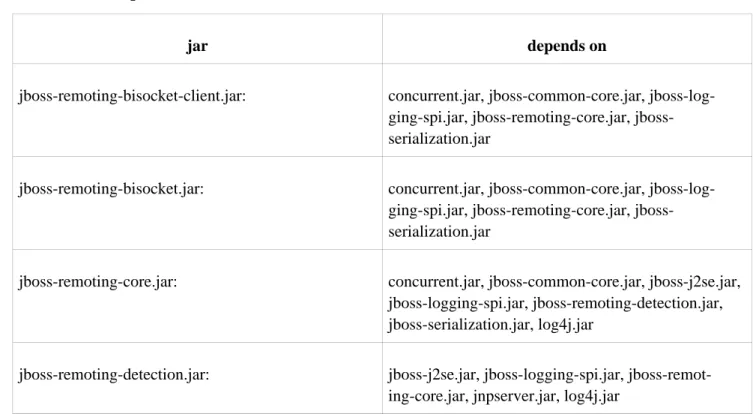
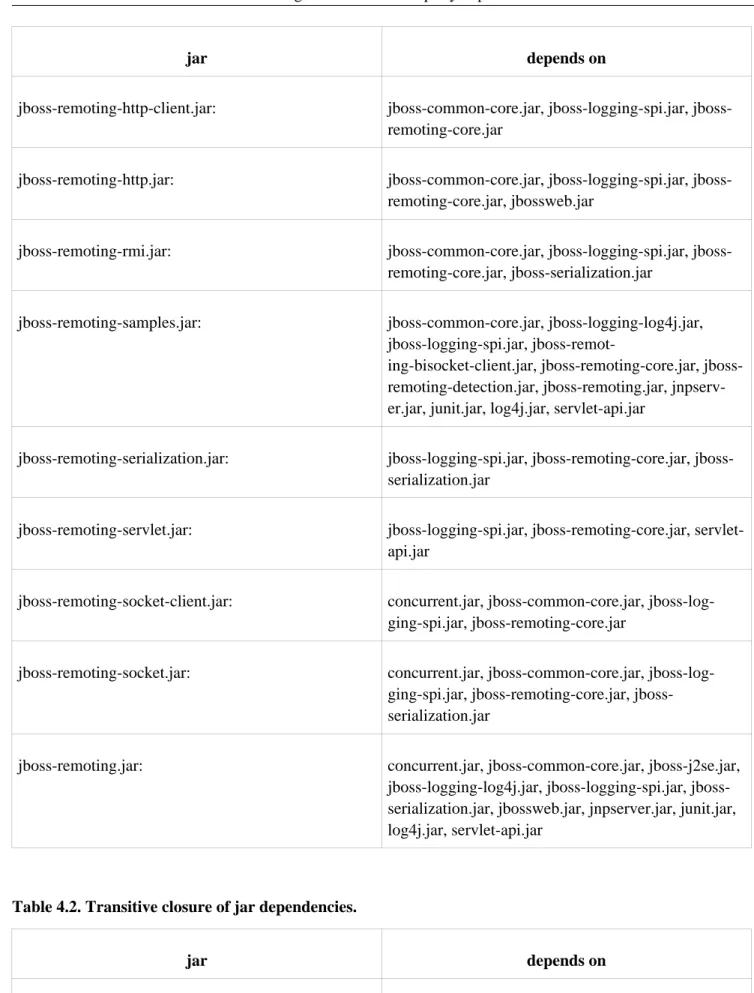
Table 1 gives the direct dependencies of the Remoting jars on third party jars (and jboss-remoting-core.jar, in most cases). Table 2 gives the transitive closure of Table 1.
The information in Tables 1 and 2 was derived with the use of the extremely useful Tattletale tool, available on the jboss.org website: http://www.jboss.org/tattletale [http://www.jboss.org/tattletale]
Table 4.1. Jar dependencies.
jar depends on
jboss-remoting-bisocket-client.jar: concurrent.jar, jboss-common-core.jar, log-ging-spi.jar, remoting-core.jar, jboss-serialization.jar
jboss-remoting-bisocket.jar: concurrent.jar, jboss-common-core.jar, log-ging-spi.jar, remoting-core.jar, jboss-serialization.jar
jboss-remoting-core.jar: concurrent.jar, jboss-common-core.jar, jboss-j2se.jar, jboss-logging-spi.jar, jboss-remoting-detection.jar, jboss-serialization.jar, log4j.jar
jboss-remoting-detection.jar: jboss-j2se.jar, jboss-logging-spi.jar, jboss-remot-ing-core.jar, jnpserver.jar, log4j.jar
jar depends on
jboss-remoting-http-client.jar: common-core.jar, logging-spi.jar, jboss-remoting-core.jar
jboss-remoting-http.jar: common-core.jar, logging-spi.jar, jboss-remoting-core.jar, jbossweb.jar
jboss-remoting-rmi.jar: common-core.jar, logging-spi.jar, jboss-remoting-core.jar, jboss-serialization.jar
jboss-remoting-samples.jar: jboss-common-core.jar, jboss-logging-log4j.jar, jboss-logging-spi.jar,
remot-ing-bisocket-client.jar, remoting-core.jar, jboss-remoting-detection.jar, jboss-remoting.jar, jnpserv-er.jar, junit.jar, log4j.jar, servlet-api.jar
jboss-remoting-serialization.jar: logging-spi.jar, remoting-core.jar, jboss-serialization.jar
jboss-remoting-servlet.jar: jboss-logging-spi.jar, jboss-remoting-core.jar, servlet-api.jar
jboss-remoting-socket-client.jar: concurrent.jar, jboss-common-core.jar, jboss-log-ging-spi.jar, jboss-remoting-core.jar
jboss-remoting-socket.jar: concurrent.jar, jboss-common-core.jar, log-ging-spi.jar, remoting-core.jar, jboss-serialization.jar
jboss-remoting.jar: concurrent.jar, jboss-common-core.jar, jboss-j2se.jar, logging-log4j.jar, logging-spi.jar, jboss-serialization.jar, jbossweb.jar, jnpserver.jar, junit.jar, log4j.jar, servlet-api.jar
Table 4.2. Transitive closure of jar dependencies.
jar depends on
jboss-remoting-bisocket-client.jar: concurrent.jar, jboss-common-core.jar, jboss-j2se.jar, jboss-logging-spi.jar, jboss-remoting-core.jar, [jboss-remoting-detection.jar], jboss-serialization.jar, [jnpserver.jar], log4j.jar, trove.jar
jar depends on
jboss-remoting-bisocket.jar: concurrent.jar, jboss-common-core.jar, jboss-j2se.jar, jboss-logging-spi.jar, jboss-remoting-core.jar, [jboss-remoting-detection.jar], jboss-serialization.jar, [jnpserver.jar], log4j.jar, trove.jar
jboss-remoting-core.jar: concurrent.jar, jboss-common-core.jar, jboss-j2se.jar, jboss-logging-spi.jar, [jboss-remoting-detection.jar], jboss-serialization.jar, [jnpserver.jar], log4j.jar, trove.jar
jboss-remoting-detection.jar: concurrent.jar, jboss-common-core.jar, jboss-j2se.jar, logging-spi.jar, remoting-core.jar, jboss-serialization.jar, jnpserver.jar, log4j.jar, trove.jar
jboss-remoting-http-client.jar: concurrent.jar, jboss-common-core.jar, jboss-j2se.jar, jboss-logging-spi.jar, jboss-remoting-core.jar, [jboss-remoting-detection.jar], jboss-serialization.jar, [jnpserver.jar], log4j.jar, trove.jar
jboss-remoting-http.jar: concurrent.jar, jboss-common-core.jar, jboss-j2se.jar, jboss-logging-spi.jar, jboss-remoting-core.jar, [jboss-remoting-detection.jar], jboss-serialization.jar, jbossweb.jar, [jnpserver.jar], log4j.jar, servlet-api.jar, trove.jar
jboss-remoting-rmi.jar: concurrent.jar, jboss-common-core.jar, jboss-j2se.jar, jboss-logging-spi.jar, jboss-remoting-core.jar, [jboss-remoting-detection.jar], jboss-serialization.jar, [jnpserver.jar], log4j.jar, trove.jar
jboss-remoting-samples.jar: concurrent.jar, jboss-common-core.jar, jboss-j2se.jar, logging-log4j.jar, logging-spi.jar, jboss-remoting-bisocket-client.jar, jboss-remoting-core.jar, [jboss-remoting-detection.jar], jboss-serialization.jar, [jnpserver.jar], junit.jar, log4j.jar, servlet-api.jar, trove.jar
jboss-remoting-serialization.jar: concurrent.jar, jboss-common-core.jar, jboss-j2se.jar, jboss-logging-spi.jar, jboss-remoting-core.jar, [jboss-remoting-detection.jar], jboss-serialization.jar, [jnpserver.jar], log4j.jar, trove.jar
jar depends on
jboss-logging-spi.jar, jboss-remoting-core.jar, [jboss-remoting-detection.jar], jboss-serialization.jar, [jnpserver.jar], log4j.jar, servlet-api.jar, trove.jar
jboss-remoting-socket-client.jar: concurrent.jar, jboss-common-core.jar, jboss-j2se.jar, jboss-logging-spi.jar, jboss-remoting-core.jar, [jboss-remoting-detection.jar], jboss-serialization.jar, [jnpserver.jar], log4j.jar, trove.jar
jboss-remoting-socket.jar: concurrent.jar, jboss-common-core.jar, jboss-j2se.jar, jboss-logging-spi.jar, jboss-remoting-core.jar, [jboss-remoting-detection.jar], jboss-serialization.jar, [jnpserver.jar], log4j.jar, trove.jar
jboss-remoting.jar: concurrent.jar, jboss-common-core.jar, jboss-j2se.jar, logging-log4j.jar, logging-spi.jar, jboss-serialization.jar, jbossweb.jar, jnpserver.jar, junit.jar, log4j.jar, servlet-api.jar, trove.jar
Notes.
1. jboss-remoting-core contains the transporter classes, and some of those need jboss-remoting-detection.jar, which explains the proliferation of jboss-remoting-detection.jar in Table 2. If transporters are not used, then jboss-re-moting-detection.jar can be omitted. Moreover, JNDI detection requires jnpserver.jar, so that, if transporters are not used, jnpserver.jar can be omitted.
5
Configuration
This covers the configuration for JBoss Remoting discovery, connectors, marshallers, and transports. All the con-figuration properties specified can be set either via calls to the object itself, including via JMX (so can be done via the JMX or Web console), via a JBoss AS service xml file. Examples of service xml configurations can be seen with each of the sections below. There is also an example-service.xml file included in the remoting distribution that shows full examples of all the remoting configurations. In the presence of the JBoss Microcontainer, Remoting servers may be configured by the injection of anorg.jboss.remoting.ServerConfiguration object specified in
an *-beans.xml file.
5.1. General transport configuration
Remoting offers a variety of ways of configuring transports on the server side and client side. This section presents an overview, and the rest of the chapter elaborates the material presented here. For easy reference the configuration parameters discussed throughout the chapter are gathered together at the end of the chapter in section Configuration by properties
5.1.1. Server side configuration
The heart of the server side is theConnector, and it is through theConnectorthat the server side of a transport is
configured. The central goals of configuration on the server side are to establish a server invoker and supply it with a set of invocation handlers. Only one invoker can be declared perConnector. Although declaring an invocation
handler is not required, it should only be omitted in the case of declaring a callback server that will not receive dir-ect invocations, but only callback messages. Otherwise client invocations can not be processed. The invocation handler is the only interface that is required by the remoting framework for a user to implement and will be what the remoting framework calls upon when receiving invocations.
There are two general approaches to server side configuration: programmatic and declarative. A variety of pro-grammatic techniques work in any environment, including the JBoss Application Server (JBossAS). Moreover, JBossAS adds the option of declarative configuration. In particular, the SARDeployer (see The JBoss 4 Application Server Guide on the labs.jboss.org web site) can read information from a *-service.xml file and use it to configure MBeans such asConnectors.
5.1.1.1. Programmatic configuration.
The simplest way to configure aConnectoris to pass anInvokerLocatorto aConnectorconstructor. For example,
the code fragment
String locatorURI = "socket://test.somedomain.com:8084"; String params = "/?clientLeasePeriod=10000&timeout=120000"; locatorURI += params;
Connector connector = new Connector(locator); connector.create();
SampleInvocationHandler invocationHandler = new SampleInvocationHandler(); connector.addInvocationHandler("sample", invocationHandler);
connector.start();
creates a server invoker based on the socket transport, directs it to listen for invocations on port 8084 of host test.somedomain.com, and passes two configuration parameters, "clientLeasePeriod" and "timeout". It also supplies the server invoker with an invocation handler.
One limitation of theInvokerLocatoris that it can only represent string values. An alternative that overcomes this
limitation is to pass some or all of the parameters to theConnectorby way of a configuration map. The following
code fragment accomplishes all that the previous fragment does, but it passes one parameter by way of the In-vokerLocatorand passes the other by way of a configuration map. It also passes in a non-string object, a Server-SocketFactory:
String locatorURI = "socket://test.somedomain.com:8084"; String params = "/?clientLeasePeriod=10000";
locatorURI += params;
InvokerLocator locator = new InvokerLocator(locatorURI); HashMap config = new HashMap();
config.put(ServerInvoker.TIMEOUT, "120000");
config.put(ServerInvoker.SERVER_SOCKET_FACTORY, new MyServerSocketFactory()); Connector connector = new Connector(locator, config);
connector.create();
SampleInvocationHandler invocationHandler = new SampleInvocationHandler(); connector.addInvocationHandler("sample", invocationHandler);
connector.start();
Note that the value of ServerInvoker.TIMEOUT is "timeout", and the value of ServerIn-voker.SERVER_SOCKET_FACTORYis "serverSocketFactory". These configuration map keys are discussed throughout
the chapter and accumulated in section Configuration by properties. Also, server socket factory configuration is covered in Socket factories and server socket factories.
A third programmatic option is available for those configuration properties which happen to be server invoker MBean properties. In the following fragment, the server invoker is obtained from the Connector and a Server-SocketFactoryis passed to it by way of a setter method:
String locatorURI = "socket://test.somedomain.com:8084"; String params = "/?clientLeasePeriod=10000";
locatorURI += params;
InvokerLocator locator = new InvokerLocator(locatorURI); HashMap config = new HashMap();
config.put(ServerInvoker.TIMEOUT, "120000");
Connector connector = new Connector(locator, config); connector.create();
ServerInvoker serverInvoker = connector.getServerInvoker(); ServerSocketFactory ssf = new MyServerSocketFactory(); serverInvoker.setServerSocketFactory(ssf);
SampleInvocationHandler invocationHandler = new SampleInvocationHandler(); connector.addInvocationHandler("sample", invocationHandler);
connector.start();
Note. TheConnectorcreates the server invoker during the call toConnector.create(), so this option only works
after that method has been called. Also, depending on the parameter and the transport, this option may or may not be effective after the call toConnector.start(), which callsstart()on the server invoker.
A fourth option, which exists primarily to support the declarative mode of configuration presented below, is to pass an XML document to theConnector. The following fragment duplicates the behavior of the first and second
ex-amples above.
HashMap config = new HashMap();
config.put(ServerInvoker.TIMEOUT, "120000"); Connector connector = new Connector(config); // Set xml configuration element.
StringBuffer buf = new StringBuffer(); buf.append("<?xml version=\"1.0\"?>\n"); buf.append("<config>");
buf.append(" <invoker transport=\"socket\">");
buf.append(" <attribute name=\"serverBindAddress\">test.somedomain.com</attribute>"); buf.append(" <attribute name=\"serverBindPort\">8084</attribute>");
buf.append(" <attribute name=\"clientLeasePeriod\">10000</attribute>"); buf.append(" </invoker>");
buf.append(" <handlers>");
buf.append(" <handler subsystem=\"mock\">");
buf.append(" org.jboss.remoting.transport.mock.SampleInvocationHandler"); buf.append(" </handler>");
buf.append(" </handlers>"); buf.append("</config>");
ByteArrayInputStream bais = new ByteArrayInputStream(buf.toString().getBytes()); Document xml = DocumentBuilderFactory.newInstance().newDocumentBuilder().parse(bais); connector.setConfiguration(xml.getDocumentElement());
connector.create(); connector.start();
Note that there is no InvokerLocator in this example. If the Connector gets an InvokerLocator, it ignores the
presence of the xml document. Note also that this method only supports the use of string values, so it is necessary to include the fully qualified name of the invocation handler, from which the handler is created by calling the de-fault constructor.
An example of this option in use can be found in
org.jboss.test.remoting.configuration.SocketClientConfigurationTestCase.
A fifth option, which exists primarily to support the injection of POJOs in the presence of the JBoss Microcontain-er, is to pass an org.jboss.remoting.ServerConfiguration object to the Connect-or.setServerConfiguration()method. The following fragment duplicates the behavior of the first and second
examples above.
HashMap config = new HashMap();
config.put(ServerInvoker.TIMEOUT, "120000"); Connector connector = new Connector(config);
// Create ServerConfiguration object for socket transport
ServerConfiguration serverConfig = new ServerConfiguration("socket"); // Add invokerLocatorParameters (applicable to client and server) Map locatorConfig = new HashMap();
locatorConfig.put("serverBindAddress", "test.somedomain.com"); locatorConfig.put("serverBindPort", "8084");
serverConfig.setInvokerLocatorParameters(locatorConfig); // Add serverParameters (applicable to server)
Map serverParameters = new HashMap();
serverConfig.setServerParameters(serverParameters); // Add invocation handlers
Map handlers = new HashMap();
handlers.put("mock", "org.jboss.remoting.transport.mock.SampleInvocationHandler"); serverConfig.setInvocationHandlers(handlers);
connector.setServerConfiguration(serverConfig); connector.create();
connector.start();
For more information aboutServerConfiguration, see the section "Declarative configuration: POJOs".
5.1.1.2. Declarative configuration: MBeans
One configuration option discussed in Section Programmatic configuration, passing an XML document to the Con-nector, works in conjunction with the service archive deployer (SARDeployer) inside the JBoss Application
Serv-er to allow declarative configuration on the sServ-ervServ-er side. In particular, the SARDeployServ-er reads XMl documents con-taining MBean descriptors from files whose name has the form "*-service.xml". When it sees a descriptor for a
ConnectorMBean, it passes the descriptor's<config>element to a newly createdConnector.
There are two ways in which to specify the server invoker configuration via a service xml file. The first is to spe-cify just the InvokerLocator attribute as a sub-element of the Connector MBean. For example, a possible configura-tion for a Connector using a socket invoker that is listening on port 8084 on the test.somedomain.com address would be:
<mbean code="org.jboss.remoting.transport.Connector"
name="jboss.remoting:service=Connector,transport=Socket" display-name="Socket transport Connector">
<attribute name="InvokerLocator">
<![CDATA[socket://test.somedomain.com:8084]]> </attribute>
<attribute name="Configuration"> <config>
<handlers>
<handler subsystem="mock">
org.jboss.remoting.transport.mock.MockServerInvocationHandler
</handler> </handlers> </config> </attribute> </mbean>
Note that all the server side socket invoker configurations will be set to their default values in this case. Also, it is important to add CDATA to any locator uri that contains more than one parameter.
The other way to configure the Connector and its server invoker in greater detail is to provide an invoker
sub-element within the config sub-element of the Configuration attribute. The only attribute of invoker sub-element is transport, which will specify which transport type to use (e.g.. socket, rmi, or http). All the sub-elements of the invoker ele-ment will be attribute eleele-ments with a name attribute specifying the configuration property name and then the value. AnisParamattribute can also be added to indicate that the attribute should be added to the locator uri, in the
case the attribute needs to be used by the client. An example using this form of configuration is as follows:
<mbean code="org.jboss.remoting.transport.Connector"
name="jboss.remoting:service=Connector,transport=Socket" display-name="Socket transport Connector">
<attribute name="Configuration"> <config>
<invoker transport="socket">
<attribute name="numAcceptThreads">1</attribute> <attribute name="maxPoolSize">303</attribute>
<attribute name="clientMaxPoolSize" isParam="true">304</attribute> <attribute name="socketTimeout">60000</attribute>
<attribute name="serverBindAddress">192.168.0.82</attribute> <attribute name="serverBindPort">6666</attribute>
<attribute name="clientConnectAddress">216.23.33.2</attribute> <attribute name="clientConnectPort">7777</attribute>
<attribute name="enableTcpNoDelay" isParam="true">false</attribute> <attribute name="backlog">200</attribute>
</invoker>
<handlers>
<handler subsystem="mock">
org.jboss.remoting.transport.mock.MockServerInvocationHandler </handler>
</handlers> </config> </attribute> </mbean>
Also note that${jboss.bind.address} can be used for any of the bind address properties, which will be replaced
with the bind address specified to JBoss when starting (i.e. via the -b option).
All the attributes set in this configuration could be set directly in the locator uri of the InvokerLocator attribute value, but would be much more difficult to decipher visually and is more prone to editing mistakes.
One of the components of a locator uri that can be expressed within the InvokerLocator attribute is the path. For ex-ample, can express a locator uri path of 'foo/bar' via the InvokerLocator attribute as:
<attribute name="InvokerLocator">
<![CDATA[socket://test.somedomain.com:8084/foo/bar]]> </attribute>
To include the path using the Configuration attribute, can include a specific 'path' attribute. So the same Invoker-Locator can be expressed as follows with the Configuration attribute:
<attribute name="Configuration"> <config>
<invoker transport="socket">
<attribute name="serverBindAddress">test.somedomain.com</attribute> <attribute name="serverBindPort">8084</attribute>
<attribute name="path">foo/bar</attribute>
</invoker> ...
Note: The value for the 'path' attribute should NOT start or end with a / (slash).
5.1.1.3. Declarative configuration: POJOs
The last configuration option discussed in Section Programmatic configuration, passing an
org.jboss.remoting.ServerConfigurationobject to theConnector.setServerConfiguration()method, works
Microcon-tainer reads XML documents containing POJO descriptors from files whose name has the form "*-beans.xml". AServerConfigurationobject holds four components:
• transport (supplied by constructor)
• invokerLocatorParameters: this is a map of all parameter names and values that will go into the org.jboss.remoting.InvokerLocator
• serverParameters: this is a map of parameter names and values that will be used by the server but will not go in-to the InvokerLocain-tor
• invocationHandlers: this is a map of invocation handlers. The key is the subsystem, or comma separated list of subsystems.
A sample remoting-beans.xml file which duplicates the example in the previous sections is:
<?xml version="1.0" encoding="UTF-8"?>
<deployment xmlns="urn:jboss:bean-deployer:2.0"> <bean name="remoting:invocationHandler"
class="org.jboss.remoting.transport.mock.SampleInvocationHandler"/> <bean name="remoting:serverConfiguration"
class="org.jboss.remoting.ServerConfiguration"> <constructor>
<parameter>socket</parameter> </constructor>
<property name="invokerLocatorParameters">
<map keyClass="java.lang.String" valueClass="java.lang.String"> <entry>
<key>serverBindAddress</key> <value>test.somedomain.com</value> </entry>
<entry>
<key>serverBindPort</key> <value>8084</value> </entry>
</map> </property>
<property name="serverParameters">
<map keyClass="java.lang.String" valueClass="java.lang.String"> <entry>
<key>clientLeasePeriod</key> <value>10000</value>
</entry> </map> </property>
<property name="invocationHandlers"> <map keyClass="java.lang.String"
valueClass="org.jboss.remoting.ServerInvocationHandler"> <entry>
<key>mock</key>
<value><inject bean="remoting:invocationHandler"/></value> </entry>
</map> </property> </bean>
<bean name="remoting:connector" class="org.jboss.remoting.transport.Connector"> <property name="serverConfiguration">
</property> </bean>
</deployment>
For more information about using the JBoss Microcontainer, see http://www.jboss.org/jbossmc/ [http://www.jboss.org/jbossmc/].
5.1.1.4. Callback client configuration
Remoting supports asynchronous computation and delivery of results through a callback mechanism, as described in Section Callbacks. Callbacks are sent from the server side to the client side on a callback connection which is the reverse of the usual client to server connection. That is, a client invoker on the server side communicates with a server invoker on the client side (in the case of push callbacks - again, see Section Callbacks). When a callback connection is created, all of the configuration information passed to the server sideConnectoris passed on to the
server side callback client invoker. It follows that callback client invokers are configured by way of the server side
Connector.
5.1.2. Client side configuration
Invoker configuration on the client side parallels configuration on the server side, with the exception that (1) it op-erates in a simpler environment (in particular, it does not assume the presence of an MBeanServer) and (2) it does not support a declarative option. However, it does support versions of the first three server side programmatic op-tions, with theClientclass playing the central role played by theConnectorclass on the server side.
Again, the most straightforward form of configuration is to put the configuration parameters on the InvokerLocat-or. For example, the fragment
String locatorURI = "socket://test.somedomain.com:8084"; String params = "/?clientMaxPoolSize=10&timeout=360000"; locatorURI += params;
InvokerLocator locator = new InvokerLocator(locatorURI); Client client = new Client(locator);
client.connect();
creates aClientusing the socket transport to connect to a server on host test.somedomain.com, listening on port
8084. It also passes in two parameters, "clientMaxPoolSize" and "timeout", that will be used by the client invoker. It is also possible to use configuration maps on the client side. The following code fragment accomplishes all that the previous fragment does, but it passes one parameter by way of theInvokerLocatorand passes the other by way
of a configuration map. It also passes in a non-string object, aSocketFactory: String locatorURI = "socket://test.somedomain.com:8084";
String params = "/?clientMaxPoolSize=10"; locatorURI += params;
InvokerLocator locator = new InvokerLocator(locatorURI); HashMap config = new HashMap();
config.put(ServerInvoker.TIMEOUT, "360000");
config.put(Remoting.CUSTOM_SOCKET_FACTORY, new MySocketFactory()); Client client = new Client(locator, config);
client.connect();
is "customSocketFactory". These configuration map keys are discussed throughout the chapter and accumulated in section Configuration by properties. Also, socket factory configuration is covered in Socket factories and server socket factories.
Finally, a third programmatic option is available for those configuration properties which happen to be settable cli-ent invoker properties. In the following fragmcli-ent, the clicli-ent invoker is obtained from the Clientand a Socket-Factoryis passed to it by way of a setter method:
String locatorURI = "socket://test.somedomain.com:8084"; String params = "/?clientMaxPoolSize=10";
locatorURI += params;
InvokerLocator locator = new InvokerLocator(locatorURI); HashMap config = new HashMap();
config.put(ServerInvoker.TIMEOUT, "360000"); Client client = new Client(locator, config); client.connect();
SocketFactory sf = new MySocketFactory();
ClientInvoker clientInvoker = client.getInvoker(); clientInvoker.setSocketFactory(sf);
Note. TheClientcreates the client invoker during the call toClient.connect(), so this option only works after
that method has been called.
Note. Preference is given to values in theInvokerLocator. For example, in
String locatorURI = "socket://test.somedomain.com:8084/?clientMaxPoolSize=10"; InvokerLocator locator = new InvokerLocator(locatorURI);
HashMap config = new HashMap();
config.put("clientMaxPoolSize", "20"); Client client = new Client(locator, config);
the value of the variableclientMaxPoolSizewould be set to 10. As of release 2.5.2, that behavior can be reversed
by setting the parameterorg.jboss.remoting.Remoting.CONFIG_OVERRIDES_LOCATOR(actual value
"configOver-ridesLocator") to true. As always, in determining the value of the variableconfigOverridesLocator, preference is
given to theInvokerLocator. But if the value of "configOverridesLocator" is set to true in theInvokerLocator, or
if "configOverridesLocator" is absent from theInvokerLocatorbut it is set to "true" in the configuration map, then
preference will be given to values in the configuration map. For example, in
String locatorURI = "socket://test.somedomain.com:8084/?clientMaxPoolSize=10"; InvokerLocator locator = new InvokerLocator(locatorURI);
HashMap config = new HashMap();
config.put("clientMaxPoolSize", "20");
config.put("configOverridesLocator", "true"); Client client = new Client(locator, config);
the value of the variableclientMaxPoolSizewould be set to 20.
5.2. Handlers
Handlers are classes that the invocation is given to on the server side (the final target for remoting invocations). To implement a handler, all that is needed is to implement theorg.jboss.remoting.ServerInvocationHandler
The second is via service configuration. For registering programmatically, can either pass the ServerInvocation-Handler reference itself or an ObjectName for the ServerInvocationServerInvocation-Handler (in the case that it is an MBean). To pass the handler reference directly, callConnector::addInvocationHandler(String subsystem, ServerInvoca-tionHandler handler). For example (fromorg.jboss.remoting.samples.simple.SimpleServer):
InvokerLocator locator = new InvokerLocator(locatorURI); Connector connector = new Connector();
connector.setInvokerLocator(locator.getLocatorURI()); connector.create();
SampleInvocationHandler invocationHandler = new SampleInvocationHandler(); // first parameter is sub-system name. can be any String value.
connector.addInvocationHandler("sample", invocationHandler); connector.start();
To pass the handler by ObjectName, call Connector::addInvocationHandler(String subsystem, ObjectName handlerObjectName). For example (fromorg.jboss.test.remoting.handler.mbean.ServerTest):
MBeanServer server = MBeanServerFactory.createMBeanServer(); InvokerLocator locator = new InvokerLocator(locatorURI); Connector connector = new Connector();
connector.setInvokerLocator(locator.getLocatorURI()); connector.start();
server.registerMBean(connector, new ObjectName("test:type=connector,transport=socket")); // now create Mbean handler and register with mbean server
MBeanHandler handler = new MBeanHandler();
ObjectName objName = new ObjectName("test:type=handler"); server.registerMBean(handler, objName);
connector.addInvocationHandler("test", objName);
Is important to note that if not starting the Connector via the service configuration, will need to explicitly register it with the MBeanServer (will throw exception otherwise).
If using a service configuration for starting the Connector and registering handlers, can either specify the fully qualified class name for the handler, which will instantiate the handler instance upon startup (which requires there be a void parameter constructor), such as:
<handlers>
<handler subsystem="mock">
org.jboss.remoting.transport.mock.MockServerInvocationHandler </handler>
</handlers>
where MockServerInvocationHandler will be constructed upon startup and registered with the Connector as a hand-ler.
Can also use an ObjectName to specify the handler. The configuration is the same, but instead of specifying a fully qualified class name, you specify the ObjectName for the handler, such as (can seembeanhandler-service.xml
under remoting tests for full example):
<handlers>
<handler subsystem="mock">test:type=handler</handler> </handlers>
The only requirement for this configuration is that the handler MBean must already be created and registered with the MBeanServer at the point the Connector is started.
Handler implementations
The Connectors will maintain a reference to the handler instances provided (either indirectly via the MBean proxy or directly via the instance object reference). For each request to the server invoker, the handler will be called upon. Since the server invokers can be multi-threaded (and in most cases would be), this means that the handler may re-ceive concurrent calls to handle invocations. Therefore, handler implementations should take care to be thread safe in their implementations.
Stream handler
There is also an invocation handler interface that extends the ServerInvocationHandler interface specifically for handling of input streams as well as normal invocations. See the section on sending streams for further details. As for Connector configuration, it is the same.
HTTP handlers
Since there is extra information needed when dealing with the http transport, such as headers and response codes, special consideration is needed by handlers. The handlers receiving http invocations can get and set this extra in-formation via the InvocationRequest that is passed to the handler.
Server invoker for the http transport will add the following to the InvocationRequest's request payload map:
MethodType - the http request type (i.e., GET, POST, PUT, HEADER, OPTIONS). Can use the contant value HT-TPMetadataConstants.METHODTYPE, if don't want to use the actual string 'MethodType' as the key to the request payload map.
Path - the url path. Can use the contant value HTTPMetadataConstants.PATH, if don't want to use the actual string 'Path' as the key to the request payload map.
HttpVersion - the client's http version. Can use the contant value HTTPMetadataConstants.HTTPVERSION, if don't want to use the actual string 'HttpVersion' as the key to the request payload map.
Other properties from the original http request will also be included in the request payload map, such as request headers. Can reference org.jboss.test.remoting.transport.http.method.MethodInvocationHandler as an example for pulling request properties from the InvocationRequest.
The only time this will not be added is a POST request where an InvocationRequest is passed and is not binary con-tent type (application/octet-stream).
The handlers receiving http invocations can also set the response code, response message, response headers, and content-type. To do this, will need to get the return payload map from the InvocationRequest passed (via its getRe-turnPayload() method). Then populate this map with whatever properties needed. For response code and message, will need to use the following keys for the map:

![[Z905.Ebook] Download PDF Workkeys Secrets Study Guide Workkeys Practice Questions Review For The Acts Workkeys Assessments By Workkeys Exam Secrets Test Prep.pdf](data:image/gif;base64,R0lGODlhAQABAIAAAP///wAAACH5BAEAAAAALAAAAAABAAEAAAICRAEAOw==)