GiantLoop Testing and
Certification (GTAC) Lab
Benchmark Test Results:
VERITAS Foundation Suite
and
VERITAS Database Edition
Prepared For:
November 2002
Project Lead:
Mike Schwarm, Director, GiantLoop Testing and Certification Lab
Table of Contents
Table of Contents ... ii
List of Figures ... ii
List of Tables... iii
I. Executive Summary ... 1
II. Test Environment ... 3
A. Host & Software Packages ... 3
B. Storage ... 3 C. File System ... 4 III. Usability... 5 A. Overview ... 5 B. Test Description... 5 C. Test Results... 5 IV. Availability ... 6 A. Overview ... 6 B. Test Description... 6 C. Test Results... 6
V. Internet File Server Performance & Scalability ... 8
A. Overview ... 8
B. Test Description... 8
C. Test Results... 9
VI. Database/OLTP Performance & Scalability ... 13
A. Overview ... 13
B. Test Description... 13
C. Test Results... 14
VII. About the GTAC Lab... 18
List of Figures
Figure 1: File System Recovery Time – VERITAS Foundation Suite (VxFS), Sun Solaris UFS with Logging (UFS + Logging), and Sun Solaris UFS without Logging (UFS)... 7Figure 2: PostMark Performance – VERITAS Foundation Suite and Sun Solaris UFS with Logging (JBOD Storage) ... 9
Figure 3: PostMark Performance – VERITAS Foundation Suite and Sun Solaris UFS with Logging (Symmetrix Storage) ... 10
Figure 4: Transaction Execution Times – VERITAS Foundation Suite and Sun Solaris UFS with Logging (JBOD Storage)... 11
Figure 5: Comparative CPU Utilization – VERITAS Foundation Suite and Sun Solaris UFS with Logging (JBOD Storage)... 12
Figure 6: OLTP Performance – VERITAS Database Edition and Sun Solaris UFS (Transactions Per Second) ... 15 Figure 7: Oracle Read Performance (Statpack Report) – VERITAS Database Edition and Sun
Solaris UFS... 16 Figure 8: Oracle Read Time (V$filestat Output) – VERITAS Database Edition and Sun Solaris
UFS ... 17 Figure 9: Oracle Log Write Time (V$filestat Output) – VERITAS Database Edition and Sun
Solaris UFS... 17
List of Tables
Table 1: Summary of VERITAS Foundation Suite, VERITAS Database Edition, and Sun Solaris UFS Test Results... 1 Table 2: File System Recovery Time – VERITAS Foundation Suite (VxFS), Sun Solaris UFS with
Logging (UFS with Logging), and Sun Solaris UFS without Logging (UFS) ... 6 Table 3: PostMark Performance – VERITAS Foundation Suite and Sun Solaris UFS with Logging
(JBOD Storage) ... 9 Table 4: PostMark Performance – VERITAS Foundation Suite and Sun Solaris UFS with Logging
(Symmetrix Storage) ... 10 Table 5: Transaction Execution Times – VERITAS Foundation Suite and Sun Solaris UFS with
Logging (JBOD Storage)... 11 Table 6: OLTP Performance – VERITAS Database Edition QIO (DBED – QIO) and Sun Solaris
UFS CDIO (UFS – CDIO) (Transactions Per Second) ... 14 Table 7: OLTP Performance – VERITAS Database Edition BIO (DBED – BIO) and Sun Solaris
UFS BIO (UFS – BIO) (Transactions Per Second)... 14 Table 8: Oracle Read Performance (Statpack Report) – VERITAS Database Edition QIO (DBED
– QIO) and Sun Solaris UFS CDIO (UFS – CDIO)... 15 Table 9: Oracle Read Time and Log Write Time (V$filestat Output) – VERITAS Database Edition
I. Executive Summary
The GiantLoop Testing and Certification (GTAC) Lab was contracted by VERITAS Software Corporation to compare and contrast the performance of VERITAS Foundation Suite and VERITAS Database Edition -- which include VERITAS File System, VERITAS Volume Manager, and various other features -- with the Sun Microsystems Solaris UNIX File System (UFS) with Solaris Volume Manager (SVM -- formerly known as Solstice Disk Suite) in a variety of specified configurations. The suite of tests described in this paper focused primarily on assessing the performance of the VERITAS File System product in comparison to Sun’s Solaris UFS file system in a Solaris 9 operating environment.
This comparative analysis included the following four test areas:
• Usability: To help assess the fundamental usability of each file system, GiantLoop measured the time it took to configure a new file system with each product, an important property when creating -- or recreating -- large, mission-critical file systems.
• Availability: GiantLoop performed a suite of tests to quantify how quickly each file system recovered to a usable state after unexpected events such as a major system failure.
• Internet File Server Performance & Scalability: To test the performance and scalability of the two file systems in environments characterized by a high volume of Internet transactions, GiantLoop conducted a suite of tests for each product based on the PostMark benchmark, a performance analysis tool geared towards small file systems characteristic of Web, e-mail, and other Internet servers. This area of testing also included a measurement of how well each file system scaled under the challenge of adverse load conditions.
• Database/OLTP Performance & Scalability: GiantLoop assessed the performance and scalability of each file system in OLTP (on-line transaction processing) environments utilizing Benchmark Factory from Quest Software, Inc., which generates non-uniform, on-line and deferred warehouse type transactions, applied to an Oracle database. This area of testing also included a measurement of how well each file system scaled under the challenge of adverse load conditions.
Table 1 summarizes the high-level findings from each area of testing. Details for each test are described in detail in the body of this paper.
Table 1: Summary of VERITAS Foundation Suite, VERITAS Database Edition, and Sun Solaris UFS Test Results
Test Findings
Usability Based on the total execution time to mount all of the volumes used in GiantLoop’s tests, VERITAS Foundation Suite was 6 times faster to create a 144 GB file system than the Sun stack including Solaris UFS.
Availability In tests to determine file system availability -- measured by the time it took each product to recover after a system failure -- VERITAS Foundation Suite execution time was nearly 7 times faster than the Sun stack including Solaris UFS with Logging and 9 times faster than UFS without logging.
Internet File Server Performance & Scalability
VERITAS Foundation Suite performance -- measured in operations per second -- was up to 15.2 times faster than Sun Solaris UFS in JBOD (just a bunch of disks) storage environments, and up to 5.4 times faster in EMC Symmetrix environments. In addition, VERITAS Foundation Suite proved
significantly more scalable than Sun Solaris UFS in this group of tests. For example, as user loads were gradually increased, VERITAS Foundation Suite was up to 10.2 times faster than Sun Solaris UFS to execute an identical number of PostMark transactions. Finally, a resource utilization comparison of both products showed that VERITAS Foundation Suite consistently used less CPU resources than Sun Solaris UFS during the PostMark testing -- including 64% less at the maximum transaction volume tested.
Database/OLTP Performance & Scalability
In GiantLoop’s OLTP testing, VERITAS Database Edition for Oracle -- which includes VERITAS Foundation Suite technology -- outperformed Sun Solaris UFS by achieving higher database throughput of up to 29% (VERITAS Database Edition for Oracle with Quick I/O versus Sun Solaris UFS CDIO measured in transactions per second) and 20% (VERITAS Database Edition for Oracle with Buffered I/O versus Sun Solaris UFS Buffered I/O measured in transactions per second). VERITAS Database Edition for Oracle with Quick I/O also demonstrated a 65% improvement in Oracle database read time over Solaris UFS CDIO and up to a 165% improvement in Oracle log write time. In addition, VERITAS Quick I/O consistently demonstrated equivalent
II. Test Environment
The GiantLoop Testing and Certification (GTAC) Lab was contracted by VERITAS Software Corporation to compare and contrast the performance of VERITAS Foundation Suite and VERITAS Database Edition -- which include VERITAS File System, VERITAS Volume Manager, and various other features -- with the Sun Microsystems Solaris UNIX File System (UFS) with Solaris Volume Manager (SVM -- formerly known as Solstice Disk Suite) in a variety of specified configurations. All testing was conducted at the GTAC Lab facility in Waltham, MA between September 2002 and November 2002. The test environment used in each of the tests described in this paper is outlined below.
A. Host & Software Packages
A Sun Microsystems Sun Fire 4810 server with 8 CPUs and 8 GB of memory was used for all tests described in this paper. The OLTP data was staged in an Oracle database on a 26-column file system, striped on an EMC Symmetrix 8730 enterprise storage array.
The I/O subsystem for the benchmark configuration consisted of a host-attached Sun
Microsystems D240 disk subsystem with 2x18 GB drives as well as 8x72 GB and 11x36 GB EMC Symmetrix based disks.
Other parameters of interest are listed below.
• Server: Sun Fire 4810 rack mount
• CPU: UltraSPARC III v9
• Processor Speed: 750MHz
• Number of CPUs: 8
• Physical Memory: 8 GB
• Operating System: Solaris 9 (SunOS 5.9, generic 11223-01 patch)
• Database: Oracle9i Release 9.2.0.2
• VERITAS Foundation Suite: Release 3.5
• PostMark: Version 1.5
• Quest BenchMark Factory Version 3.3, Patch 021311
B. Storage
The EMC Symmetrix 8730 was configured with 4 GB of buffer cache and approximately 1 TB of storage, RAID 0.
• EMC Symmetrix 8730, microcode version 5566 with Fibre Channel adapter ports • 8x72 GB (8:1 split) and 7x36 GB (4:1 split) drives allocated to test
• 144 GB allocated to File System (striped across [8] 72 GB disks; 2 hypervolumes concatenated per disk -- specific configuration detailed in the OLTP section) • 2 HBAs (host bus adapters) connected to 2 separate FA ports on the Symmetrix
through a McDATA switch fabric
• VERITAS Volume Manager Dynamic Multipathing (DMP) enabled on the host • VERITAS QuickLog1 located on a separate disk
The Eurologic SANbloc JBOD used for the PostMark testing was configured as follows: • 28x18 GB drives total (14 per enclosure)
1 VERITAS QuickLog is a feature that comes with VERITAS Foundation Suite and enhances file system performance by
eliminating the time that a disk spends seeking between the log and data areas of VxFS. This is accomplished by exporting the file system intent log to a separate physical volume called a QuickLog device.
• 10,000 RPM
• 144 GB allocated to File System
• 4 HBAs directly connected to Fibre Channel adapter ports on enclosures (2 per enclosure) through a Brocade switch fabric
• The bus on each enclosure was split into 7 drives per adapter port, 6 disks of 7 disks in each split for File System Volume, File System striped across 4x6 disks (total of 24 stripe columns)
• VERITAS QuickLog located on a separate disk
C. File System
All file systems were configured with default parameters. Although testing primarily focused on a “stack to stack” comparison between VERITAS Foundation Suite and Sun Solaris UFS with Solaris Volume Manager, tests were run using a variety of file system/volume manager configurations.
The following commands were used in creation of the volumes and file systems.
Command VERITAS SOLARIS
Volume Creation # vxassist –g datadg make v02 28250880 layout=stripe stwidth=256 datadg38 datadg42 datadg39 datadg43
# metainit d100 1 12 c0t21d0s2
c0t21d1s2 c0t21d2s2 c0t21d3s2 …. –I 256k
File System
Creation # mkfs –F vxfs –0 largefiles /dev/vx/rdsk/datadg/v02
# newfs /dev/md/rdsk/d100
Directory
Creation # mkdir /v02 mkdir /u05
Mount # mount -F vxfs /dev/vx/dsk/datadg/v02
III. Usability
A. Overview
To help assess the fundamental usability of each file system, GiantLoop measured the time it took to configure a new file system with each product, an important property when creating -- or recreating -- large, mission-critical file systems.
B. Test Description
GiantLoop created identical 144 GB file systems using the “mkfs” (“Make File System”) command in VERITAS File System and the “newfs” (“New File System”) command in Sun Solaris UFS.
C. Test Results
In a direct comparison of VERITAS File System and Sun Solaris UFS, testing showed that the VERITAS “mkfs” (“Make File System”) command used to create a 144 GB file system was significantly faster to execute than the Sun “newfs” (“New File System”) command used to create a Solaris UFS file system of equal size.
For example, the VERITAS File System “mkfs” command executed almost instantaneously as opposed to the Solaris UFS “newfs” command, which took approximately 30 seconds to create the equivalent file system. The total execution time to mount all of the volumes used in
GiantLoop’s tests ranged from 5 minutes with VERITAS File System to greater than 30 minutes with Solaris UFS.
The difference in execution time for file system ‘make’ commands can change depending on the size of the file system and the volumes being mounted. During testing of both file systems, the VERITAS File System make times were observed to remain constant as the size of the file system and/or volumes increased, while the Solaris UFS make times increased with the size of the file system.
IV. Availability
A. Overview
The GTAC Lab performed a suite of tests to quantify the relative availability of VERITAS
Foundation Suite and Sun Solaris UFS. The objective of these tests was to quantify how quickly each file system returned to a mountable and consequently usable state after an unexpected system failure.
B. Test Description
For these tests, GiantLoop evaluated VERITAS File System (with default intent log/logging settings), Solaris UFS with Logging, and the native Solaris UFS file system. The two major test methods employed were to force a full “fsck” (“File System Check”) command and to purposefully induce a power failure while the system was under heavy load. All “fsck” tests were based on a volume of 163,000 files, with files ranging from 1 KB to 68 MB in size. Total file system size was 144 GB. Approximately 1000 files were open at the time of the simulated power failure.
C. Test Results
The results in Table 2 below show the comparative times to execute a full “fsck” for VERITAS File System, Solaris UFS with Logging, and the Solaris UFS native file system. “Execution Time” is defined simply as the duration of the test – that is, how long it took each file system to execute the “fsck” command, an important gauge of how quickly each product will enable the restoration of critical business systems in the event of a failure. “User Time” and “System Time” are also included to illustrate relative CPU utilization by each product during the recovery process.
Table 2: File System Recovery Time – VERITAS Foundation Suite (VxFS), Sun Solaris UFS with Logging (UFS with Logging), and Sun Solaris UFS without Logging (UFS)
VxFS UFS with Logging UFS
% Increase in Recovery Time Speed: VxFS versus UFS with Logging x Faster: VxFS versus UFS with Logging % Increase in Recovery Time Speed: VxFS versus UFS x Faster: VxFS versus UFS Execution Time (seconds) 39.40 274.71 362.71 597% 6.9x 821% 9.2x User Time (seconds) 5.46 20.28 19.36 System Time (seconds) 1.65 24.28 25.65
Figure 1 on the following page graphically illustrates the difference between the time to complete a file system check for VERITAS File System, Solaris UFS with Logging, and the native Solaris UFS file system.
Figure 1: File System Recovery Time – VERITAS Foundation Suite (VxFS), Sun Solaris UFS with Logging (UFS + Logging), and Sun Solaris UFS without Logging (UFS)
0.00 50.00 100.00 150.00 200.00 250.00 300.00 350.00 400.00 VxFS UFS+ Logging UFS Seconds Execution Time User Time System Time
V. Internet File Server Performance & Scalability
A. Overview
To test the performance and scalability of VERITAS Foundation Suite and Sun Solaris UFS in environments characterized by high-volumes of Internet transactions, GiantLoop conducted a suite of tests for each file system based on the PostMark benchmark. The PostMark benchmark, developed by Network Appliance, Inc., tests performance in the small-file regime used by
mission-critical Internet applications such as electronic mail and Web-based commerce applications.
Many file servers provide services such as electronic mail and Internet commerce, which depend on enormous numbers of relatively short-lived files. PostMark was designed to create a large pool of continually changing files and to measure the transaction rates for a workload
approximating a large Internet electronic mail server. PostMark generates an initial pool of random text files ranging in size from a configurable low bound to a configurable high bound. This file pool is of configurable size and can be located on any accessible file system. Once the pool has been created (also producing statistics on continuous small file creation performance), a specified number of transactions occurs. Each transaction consists of a pair of smaller
transactions:
• Create file or Delete file • Read file or Append file
The incidence of each transaction type and its affected files are chosen randomly to minimize the influence of file system caching, file read ahead, and disk level caching and track buffering. This incidence can be tuned by setting either the read or create bias parameters to produce the desired results.
Additional information regarding the PostMark benchmark can be found at: http://www.netapp.com/tech_library/3022.html
B. Test Description
The major parameters chosen for this test, besides the two file systems, were the number of subdirectories, the number of files in those directories, and the number of PostMark processes (representing the number of users) executing against the file system. Specific parameters used for these tests include:
Number of Subdirectories 1,000
Number of Files per
Subdirectory 20,000
Number of PostMark Processes
1, 4, 8, 12, and 16
File System VERITAS Foundation Suite (including VERITAS File System and the QuickLog feature), Solaris UFS native, and Solaris UFS with Logging were tested. As noted in section II, all file systems were configured with default parameters.
C. Test Results
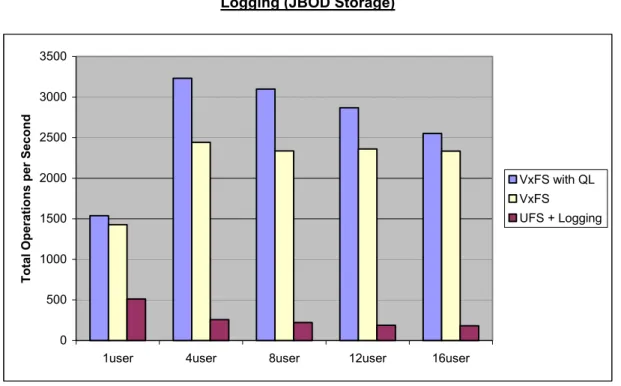
Table 3 and Figure 2 below illustrate the difference in performance (measured in total operations per second) between VERITAS Foundation Suite and UFS. For the JBOD configuration, which was made up of 24 striped columns (144 GB total), VERITAS Foundation Suite performance exceeded Solaris UFS by as much as 1418%.
Table 3: PostMark Performance – VERITAS Foundation Suite and Sun Solaris UFS with Logging (JBOD Storage)
Number of Users VxFS with QuickLog (operations per second) VxFS (operations per second) UFS with Logging (operations per second) % Increase in Operations/ Second: VxFS with QuickLog versus UFS with Logging x Faster: VxFS with QuickLog versus UFS with Logging % Increase in Operations/ Second: VxFS versus UFS with Logging x Faster: VxFS versus UFS with Logging 1 user 1538 1429 513 200% 3.0x 179% 2.8x 4 users 3232 2443 258 1153% 12.5x 847% 9.5x 8 users 3099 2336 221 1302% 14.0x 957% 10.6x 12 users 2869 2361 189 1418% 15.2x 1149% 12.5x 16 users 2552 2334 181 1310% 14.1x 1190% 12.9x
Figure 2: PostMark Performance – VERITAS Foundation Suite and Sun Solaris UFS with Logging (JBOD Storage)
0 500 1000 1500 2000 2500 3000 3500
1user 4user 8user 12user 16user
Total O
p
erations per Second
VxFS with QL VxFS
As illustrated in Table 4 and Figure 3, PostMark benchmark testing of VERITAS Foundation Suite versus Solaris UFS with Logging in Symmetrix environments also produced significant
performance deltas between the two file systems.
Table 4: PostMark Performance – VERITAS Foundation Suite and Sun Solaris UFS with Logging (Symmetrix Storage)
Number of Users VxFS with QuickLog (operations per second) VxFS (operations per second) UFS with Logging (operations per second) % Increase in Operations/ Second: VxFS with QuickLog versus UFS with Logging
x Faster: VxFS with QuickLog versus UFS with Logging % Increase in Operations/ Second: VxFS versus UFS with Logging x Faster: VxFS versus UFS with Logging 1 user 1333.3 1428.6 1052.6 27% 1.3x 36% 1.4x 4 users 2038.2 2269.5 463.8 339% 4.4x 389% 4.9x 8 users 1732.1 1713.5 359.2 382% 4.8x 377% 4.8x 12 users 1445.8 1531.9 333.2 334% 4.3x 358% 4.6x 16 users 1640.0 1515.7 302.4 442% 5.4x 401% 5.0x
It should be noted that disks in the Symmetrix configuration (striped across 8 disks) were observed to be operating at nearly 100% busy levels. Disks in the JBOD configuration (striped across 24 disks) were observed to operate at 30% busy levels, evenly distributed. Therefore, it is logical to conclude that maximum file system performance was being held back in the Symmetrix configuration.
Figure 3: PostMark Performance – VERITAS Foundation Suite and Sun Solaris UFS with Logging (Symmetrix Storage)
0.0 500.0 1000.0 1500.0 2000.0 2500.0
1user 4user 8user 12user 16user
T o ta l O p er at io n s p er S eco n d VxFS-QL VxFS UFS+L
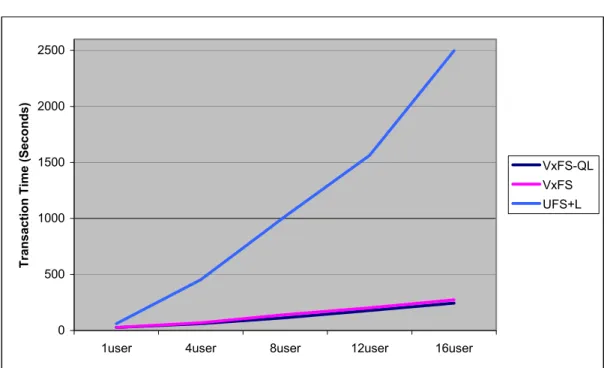
Table 5 and Figure 4 below illustrate the relative scalability of VERITAS Foundation Suite and Sun Solaris UFS by measuring the total time it took each product to execute an increasing number of PostMark transactions (created by increasing the number of users at 20,000
transactions per user). Note that as the number of users/transactions was increased, VERITAS Foundation Suite was significantly faster to execute all transactions than Solaris UFS.
Table 5: Transaction Execution Times – VERITAS Foundation Suite and Sun Solaris UFS with Logging (JBOD Storage)
Number of Users VxFS with QuickLog (seconds to execute all transactions) VxFS (seconds to execute all transactions) UFS with Logging (seconds to execute all transactions) % Increase in Transaction Time: UFS with Logging versus VxFS with QuickLog x Faster: VxFS with QuickLog versus UFS with Logging % Increase in Transaction Time: UFS with Logging versus VxFS x Faster: VxFS versus UFS with Logging 1 user 27.1 26.6 61.8 128% 2.3x 132% 2.3x 4 users 61.8 68.9 453.3 633% 7.3x 558% 6.6x 8 users 114.9 141.8 1020.4 788% 8.9x 620% 7.2x 12 users 178.0 203.1 1563.1 778% 8.8x 670% 7.7x 16 users 244.7 273.4 2497.3 921% 10.2x 813% 9.1x
Figure 4: Transaction Execution Times – VERITAS Foundation Suite and Sun Solaris UFS with Logging (JBOD Storage)
0 500 1000 1500 2000 2500
1user 4user 8user 12user 16user
Tr
ansaction Time (Seconds)
VxFS-QL VxFS UFS+L
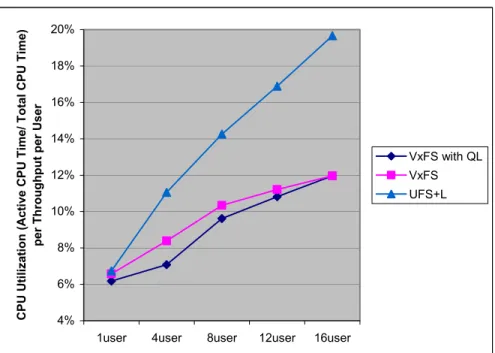
The GTAC Lab also assessed the relative burden placed on CPU resources by each file system during the PostMark benchmark testing. Both VERITAS File System and VERITAS File System with QuickLog consistently used less CPU resources than Solaris UFS during the PostMark testing. In the case of VERITAS File System with QuickLog, there was a 64% improvement in CPU utilization at the maximum transaction volume tested. Complete test results are displayed in Figure 5 below.
Figure 5: Comparative CPU Utilization – VERITAS Foundation Suite and Sun Solaris UFS with Logging (JBOD Storage)
4% 6% 8% 10% 12% 14% 16% 18% 20%
1user 4user 8user 12user 16user
C P U U tiliza tion ( A ct iv e C P U Time / Tot al C P U Time ) per Throughput per U ser VxFS with QL VxFS UFS+L
VI. Database/OLTP Performance & Scalability
A. Overview
Database performance in enterprise environments is critical to many business operations. With potentially hundreds of users utilizing a database application, understanding file system
performance as it applies to overall database performance from the user’s perspective becomes very important to business success.
To assist in the execution of this benchmark testing, GiantLoop utilized an industry standard OLTP (on-line transaction processing) benchmark from Quest Software called Benchmark Factory. This tool is capable of generating both online and deferred warehouse type transactions, non-uniform in nature, applied to an Oracle database. The tool can create benchmark projects that:
• Effectively stress CPU, memory, bus, and disk
• Allow the user to define parameters such as database size and number of users • Measure transactions per second and load time
• Run tests and observe the results in real time
For this test, the Benchmark Factory transaction workload was based on the standard “out of the box” mix of New Order, Payment, Order Status, Delivery, and Stock Level transactions. Think Times and Keying Times were set to 100ms in order to generate an increased load for the test. Additional information regarding the Benchmark Factory test can be found at:
http://www.benchmarkfactory.com
B. Test Description
For this area of testing, GiantLoop deployed a typical customer configuration, which consisted of multiple users, enterprise servers (Sun Fire 4810) and storage (EMC Symmetrix 8730) running an Oracle9i database. The virtual user load represented a user load of 8,000. In this environment, GiantLoop tested the relative performance of VERITAS Database Edition for Oracle2-- which includes VERITAS Foundation Suite technology --
with the Quick I/O (QIO) and Buffered I/O
(BIO) features and Sun Solaris UFS with Concurrent Direct I/O (CDIO) and Buffered I/O (BIO). Both of the file systems (VERITAS File System and Sun Solaris UFS) used to host the Oracle data files were built on a 26-column striped volume. The volume consisted of 26x8G EMC LUNs from 13 physical disk drives of 72 GB and 36GB in size. All VERITAS File System test volumes were built using VERITAS Volume Manager, while all Sun UFS file system test volumes were built using Solaris Volume Manager (SVM)-- formerly known as Solstice Disk Suite (SDS). The Oracle redo logs were put on a simple volume using a dedicated EMC LUN. The size of the database was over 50 GB and correlated to a Benchmark Factory warehouse scale of 800. The Oracle block size used was 2 KB.Oracle Buffer Cache settings of varying sizes were used for each file system benchmark. A virtual user load of 100 users was utilized for these tests.
During the test runs, database, CPU, and disk performance were measured using custom scripts as well as Quest Central for Oracle (QCO).
2 Please note that VERITAS Database Edition
3.5 for Oracle was utilized for these tests. VERITAS Database Edition for Oracle is a VERITAS product suite designed to deliver optimal performance, manageability, and continuous database access for Oracle database servers. It includes VERITAS Volume Manager and VERITAS File System with Quick I/O.
C. Test Results
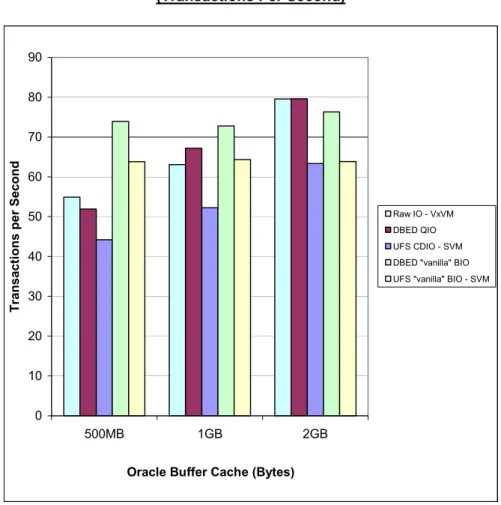
Database throughput for the tests performed at 100 virtual users (equivalent to an 8,000 user load using Benchmark Factory) is shown below. The results compare the transactions per second generated when using VERITAS Database Edition for Oracle with QIO and Sun Solaris UFS with CDIO. All tests were performed under the same initial conditions (vxtunfs set to read_nstream = 1) and the same test parameters (user load, buffer cache, transaction mix, database, server, and storage configuration). The results in Table 6 and Figure 6 illustrate that VERITAS Database Edition for Oracle outperformed Solaris UFS by achieving up to 29% higher database throughput. Each data point was performed with a minute ramp up time and a 30-minute sample time.
Table 6: OLTP Performance – VERITAS Database Edition QIO (DBED – QIO) and Sun Solaris UFS CDIO (UFS – CDIO) (Transactions Per Second)
Oracle Buffer
Cache Size Raw I/O
DBED – QIO (transactions per second) UFS – CDIO (transactions per second) % Increase in Performance - DBED vs. UFS 0.5 GB 54.93 51.90 44.17 17% 1.0 GB 63.1 67.16 52.23 29% 2.0 GB 79.56 79.60 63.31 26%
Tests were also performed (under the same test conditions described above) with VERITAS Database Edition and Sun Solaris UFS in Buffered I/O (BIO) mode. Table 7 illustrates that VERITAS Foundation Suite outperformed Solaris UFS by as much as 20% in these tests.
Table 7: OLTP Performance – VERITAS Database Edition BIO (DBED – BIO) and Sun Solaris UFS BIO (UFS – BIO) (Transactions Per Second)
Oracle Buffer
Cache Size Raw I/O
DBED – BIO (transactions per second) UFS – BIO (transactions per second) % Increase in Performance - DBED vs. UFS 0.5 GB 54.93 73.90 63.79 16% 1.0 GB 63.1 72.76 64.31 13% 2.0 GB 79.56 76.30 63.81 20%
As a point of comparison, it should also be noted that GiantLoop also performed these tests with raw I/O (i.e. no file system) using VERITAS Volume Manager as the volume manager, as shown in the second column of Table 7. In these tests, VERITAS Database Edition -- in QIO mode -- consistently showed equivalent performance to raw I/O.
Figure 6: OLTP Performance – VERITAS Database Edition and Sun Solaris UFS (Transactions Per Second)
0 10 20 30 40 50 60 70 80 90 500MB 1GB 2GB
Oracle Buffer Cache (Bytes)
Tr ansact io ns per Second Raw IO - VxVM DBED QIO UFS CDIO - SVM DBED "vanilla" BIO UFS "vanilla" BIO - SVM
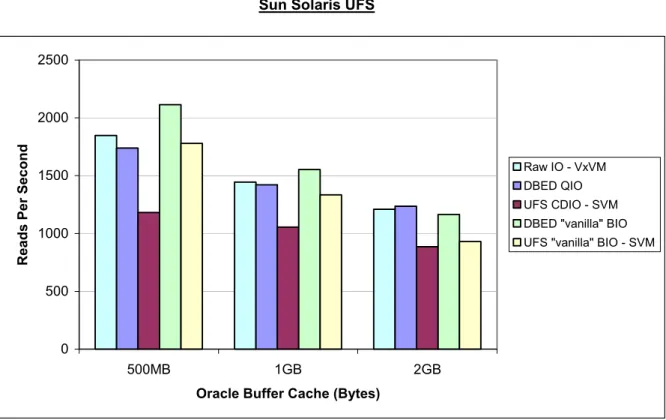
Table 8 and Figure 7 illustrate that VERITAS Database Edition database reads were found to be more efficient than comparable Solaris UFS reads by as much as 47%. This increase in read efficiency accounts for the higher database throughput observed in the previous set of data.
Table 8: Oracle Read Performance (Statpack Report) – VERITAS Database Edition QIO (DBED – QIO) and Sun Solaris UFS CDIO (UFS – CDIO)
Oracle Buffer Cache Size
DBED – QIO
(reads per second)
UFS – CDIO
(reads per second)
% Increase in Reads per Second - DBED
vs. UFS
0.5 GB 1738.04 1181.02 47%
1.0 GB 1420.70 1055.34 35%
Figure 7: Oracle Read Performance (Statpack Report) – VERITAS Database Edition and Sun Solaris UFS
0 500 1000 1500 2000 2500 500MB 1GB 2GB
Oracle Buffer Cache (Bytes)
Reads P
e
r S
econd Raw IO - VxVMDBED QIO
UFS CDIO - SVM DBED "vanilla" BIO UFS "vanilla" BIO - SVM
Oracle data file read times and redo log write times are key to the performance of OLTP applications. Table 9 and Figures 8 and 9 illustrate again that VERITAS Database Edition with QIO is more efficient than Sun Solaris UFS with CDIO in Oracle data file reads, with VERITAS measuring as much as 65% faster than Solaris UFS in read time. In addition, the redo log times are significantly higher with Solaris UFS than with VERITAS Database Edition, which would result in slower transaction commits and poorer application performance.
Table 9: Oracle Read Time and Log Write Time (V$filestat Output) – VERITAS Database Edition and Sun Solaris UFS
Oracle Buffer Cache Size Oracle Read Time – UFS w/ CDIO (seconds)
Oracle Log Write Time – UFS w/ CDIO (seconds) Oracle Read Time – DBED w/ QIO (seconds)
Oracle Log Write Time – DBED w/ QIO (seconds) % Improvement in Oracle Read Time – DBED vs. UFS % Improvement in Oracle Log Write Time – DBED vs. UFS 0.5 GB 72.93 5.69 44.33 2.34 65% 143% 1.0 GB 76.88 6.37 55.7 2.56 38% 149% 2.0 GB 83.91 7.78 58.32 2.94 44% 165%
Figure 8: Oracle Read Time (V$filestat Output) – VERITAS Database Edition and Sun Solaris UFS 0 10 20 30 40 50 60 70 80 90 500MB 1GB 2GB
Oracle Buffer Cache (Bytes)
O racle R ead Time Raw IO - VxVM DBED QIO UFS CDIO - SVM DBED "vanilla" BIO UFS "vanilla" BIO - SVM
Figure 9: Oracle Log Write Time (V$filestat Output) – VERITAS Database Edition and Sun Solaris UFS
0 1 2 3 4 5 6 7 8 9 500MB 1GB 2GB
Oracle Buffer Cache (Bytes)
O ra cl e Log Tim e Raw IO - VxVM DBED QIO UFS CDIO - SVM DBED "vanilla" BIO UFS "vanilla" BIO - SVM
VII. About the GTAC Lab
The GiantLoop Testing and Certification (GTAC) Lab, located in Waltham, MA, is an independent, vendor-neutral testing facility that provides unbiased evaluations of data movement technologies, products, and solutions. The GTAC lab focuses primarily on both product evaluation and
performance and interoperability testing for multi-vendor, multi-domain, data movement
configurations. The lab is staffed by an experienced engineering team with extensive experience in:
• DWDM, SONET and IP networking technologies
• Storage, SAN, and SAN extension products such as iSCSI, FCIP, and Fibre channel-over-SONET
• Benchmarking and characterization of complete inter-data-center storage replication solutions based on leading hardware and software
• Benchmarking and characterization of host and file system technologies for Microsoft, Sun Solaris, HP-UX, and IBM AIX environments
The GTAC Lab offers services for both enterprise customers and technology vendors. For more information, please visit www.giantloop.com/solutions_gtaclab.shtml
About GiantLoop
GiantLoop is a leading provider of data movement solutions for Global 2,000 businesses. GiantLoop offers a suite of services that help companies assess, design, test, implement, and manage data movement infrastructures encompassing enterprise storage networks, public and private data transport networks, and data mirroring, replication, and backup technologies. To ensure high-performance solutions, GiantLoop tests and qualifies complex infrastructure configurations in its multi-vendor testing facility, the GiantLoop Testing and Certification (GTAC) Lab. GiantLoop solutions enable companies to ensure business continuity and disaster recovery readiness, consolidate technology resources for increased efficiencies, and deploy new productivity-enhancing applications. GiantLoop is based in Waltham, Mass., and has additional offices in the United States and the United Kingdom. For additional information, please visit www.giantloop.com.
GiantLoop Network, Inc. 265 Winter Street Waltham, MA 02451 781-902-5100 [email protected] à à à à www.giantloop.com
Copyright 2002, GiantLoop Network, Inc.
Trademark Notice:
GiantLoop and the GiantLoop logo are trademarks of GiantLoop Network, Inc.
VERITAS, VERITAS Foundation Suite, VERITAS File System, VERITAS Volume Manager, VERITAS Database Edition, and QuickLog are trademarks of VERITAS Software Corporation.
Sun, Sun Microsystems, Solaris, Sun Fire, and UltraSPARC are trademarks of Sun Microsystems, Inc. EMC and Symmetrix are registered trademarks of EMC Corporation.
Eurologic is a registered trademark and SANbloc is a trademark of Eurologic Systems.
Benchmark Factory is a registered trademark and Quest and Quest Central are trademarks of Quest Software, Inc. Oracle is a registered trademark and Oracle9i is a trademark of Oracle Corporation.