Amy Nicole Roberson.A Usability Study of a Website for Digitized Oral Histories.A Master’s Paper for the M.S. in L.S. degree. April, 2009. 60 pages.Advisor: Dr. Deborah Barreau
This study tested the usability of the Advanced Search, Browse Theme by Collection, and Excerpt View pages of the Oral Histories of the American South website. These pages allow users to access audio and transcripts for over 500 oral histories from the Southern Oral History Program from the University of North Carolina at Chapel Hill Libraries. The study found that participants were satisfied with the search and browse options available via the site. The results also suggest a few minor changes to the layout of the pages to improve usability and satisfaction.
Headings:
Information needs/Evaluation
Internet/College and University Libraries
Oral history
University of North Carolina at Chapel Hill
by
Amy Nicole Roberson
A Master’s paper submitted to the faculty of the School of Information and Library Science of the University of North Carolina at Chapel Hill
in partial fulfillment of the requirements for the degree of Master of Science in
Library Science.
Chapel Hill, North Carolina
April 2009
Approved by
Table of Contents
List of Figures 2
Chapter 1: Introduction 4
Chapter 2: Literature Review 7
Chapter 3: Methodology 12
Chapter 4: Results 19
Chapter 5: Discussion 46
Chapter 6: Conclusion 51
Chapter 7: Works Cited 52
Appendix A: Demographic Questionnaire 55
Appendix B: Usability Observation 56
List of Figures
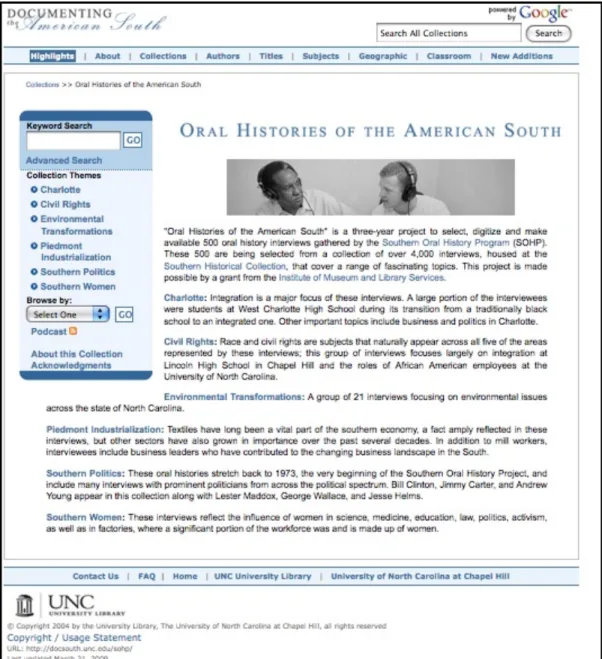
Figure 1: OHAS. Available at http://www.lib.unc.edu/sohp 6
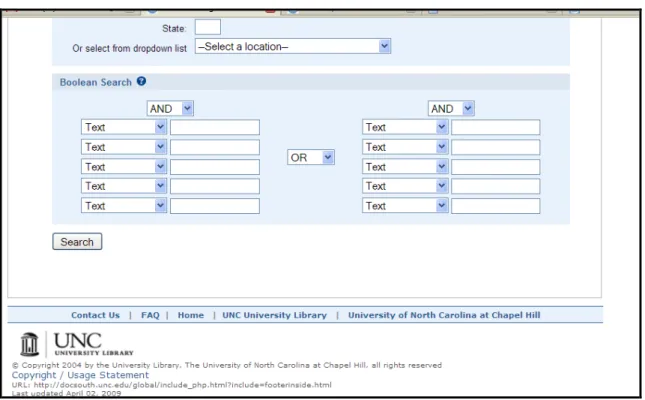
Figure 2a: OHAS advanced search page, part 1 of 3. http://docsouth.unc.edu/ 15
cgi-bin/sohp/search_form.py Figure 2b: OHAS advanced search page, part 2 of 3. http://docsouth.unc.edu/ 16
cgi-bin/sohp/search_form.py Figure 2c: OHAS advanced search page, part 3 of 3. http://docsouth.unc.edu/ 16
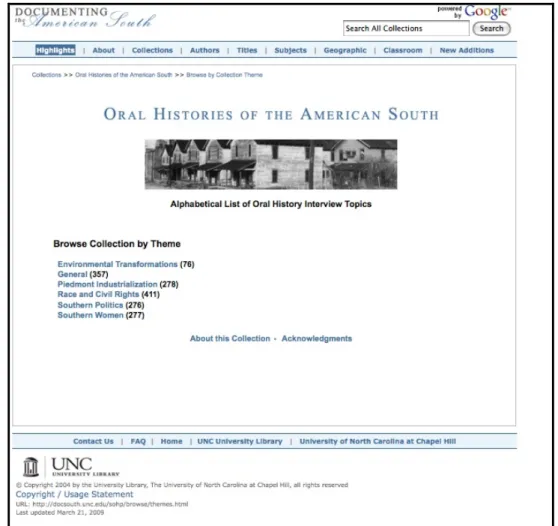
cgi-bin/sohp/search_form.py Figure 3: OHAS browse page 17
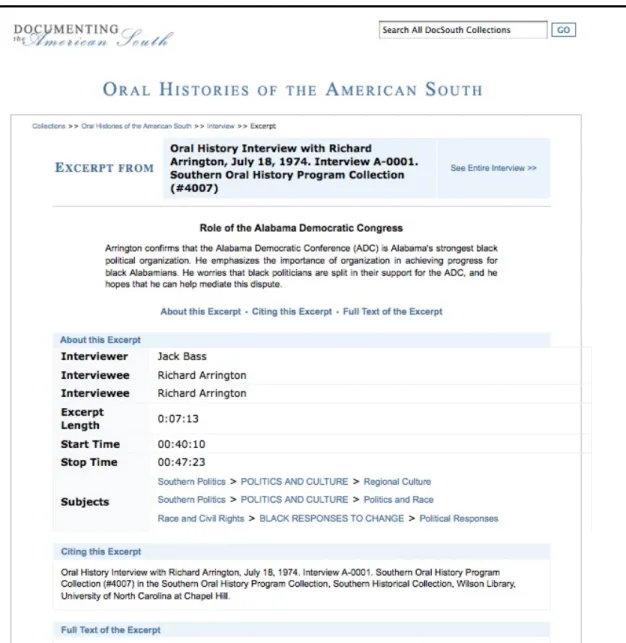
Figure 4: OHAS sample “Excerpt View” page 18
Figure 5: Results from Advanced Search tasks 20
Figure 6: Oral History audio and text options 21
Figure 7: Example of two scroll-bars on “Listen Online with Audio Transcript” page 22
Figure 8: Interview ID field 23
Figure 9: Subject Place search box 24
Figure 10: Keyword Search box 25
Figure 11: Boolean Search “Jimmy Carter OR Bill Clinton” for Task 6, example 1 26
Figure 12: Boolean Search “Jimmy Carter OR Bill Clinton” for Task 6, example 2 26
Figure 13: Boolean Search “Jimmy Carter OR Bill Clinton” with OR selected 27
Figure 14: Boolean Search “frank porter graham AND anne queen” for Task 7 28
Figure 15: Boolean Search with multiple instances of names for Task 7 28
Figure 16: Boolean Search “frank porter graham OR anne queen” for Task 7 29
Figure 17: Keyword Search “William C. Friday” and Subject Date “1965” for Task 8 30 Figure 18a: Boolean Search for “William C. Friday” and various instances of name 30
Figure 18b: Boolean Search for “William C. Friday” and various instances of name 31
Figure 19: Boolean Search “William C. Friday AND 1965” for Task 8 31
Figure 20: Browse Theme page 34
Figure 21: Results from Browse Theme by Collection tasks 35
Figure 22: Audio and Text with emphasis added 36
Figure 23: Women’s Movements and Women’s Activism themes 37
Figure 24: Search for “Pollution” on Browse Theme page 38
Figure 25: Excerpt View page 39
Figure 26: Interview breadcrumb 40
Figure 27a: Suggested location of See Entire Interview link 40
Figure 27b: Suggested location of See Entire Interview link 41
Figure 28: Suggested wording of Headings and Links relating to listening and 41
Chapter 1: Introduction
Archivists have been concerned with the preservation of archival materials as
their collections have continued to age. Digitization has created a new format to preserve
and access these materials. The next step, for many institutions, is to provide online
access, moving away from the traditional model of visiting the archives for unique
material. By doing so, archival materials are increasingly available via the Internet, many
free of charge. As a result, the community of users has grown and materials, once only
available to users with the means to travel to a special collection or hire an independent
researcher to photocopy materials, are accessible to a larger group of people.
Furthermore, these materials are available around the clock via the Internet and users
have come to expect this ubiquitous access.
As early as the 1990s, archives were beginning to use computer technology to
preserve and provide access to oral histories, many of which were recorded on audio
media that is becoming obsolete.1 The Southern Oral History Program (SOHP), for example, at the University of North Carolina at Chapel Hill (UNC) was created in 1973
“to foster a critical yet democratic understanding of the South - its history, culture,
problems, and prospects”2 and used many of these now obsolete media. In response to the mass digitization of archival materials, the University of North Carolina at Chapel
1 Chen, C., "Computer Technology to Preserve and Access Endangered Oral History Recordings in
Alaska," Microcomputers for Information Management 9.3 (1992): 191-5.
2 Southern Oral History Program, “Mission,” Southern Oral History Program Center for the study of the
Hill Libraries (UNC Libraries) applied for a grant through the Institute of Museum and
Library Services. The three-year project’s goal is to
Select, digitize and make available 500 oral history interviews gathered by the Southern Oral History Program (SOHP). These 500 are being selected from a collection of over 4,000 interviews, housed at the Southern Historical Collection, that cover a range of fascinating topics.3
This study is concerned with the usability of the Oral Histories of the American South (OHAS)collection, created by the grant described above and located within the larger Documenting the American South (DocSouth)digital collection at the UNC Libraries (see Figure 1). This collection is preserving fragile oral histories while
expanding access to users. The site allows users with Internet, anywhere in the world, to
access these valuable histories. Moreover, these efforts and others have expanded access
to archival materials, including oral histories, through increasingly sophisticated web
interfaces. Because archivists and librarians may not be readily available to address the
needs of distance users, the web interface must be intuitive for those who may not be able
to speak immediately with an archivist or librarian about the collection.
This study will test users’ satisfaction and use of the “Advanced Search” (Figure
2), “Browse Collection by Theme” (Figure 3), and “Excerpt View” (Figure 4) pages.
Doing so will allow designers to create more usable interfaces that will increase the
efficiency and satisfaction of those using the site. Furthermore, the study will provide a
better understanding of human-computer interaction in practice, influencing future
interface design.
3 UNC University Libraries, “Oral Histories of the American South,” UNC University Libraries,
Chapter 2: Literature Review
Oral histories are powerful representations of specific historical times and events.
As Jacquelyn Dowd Hall, director of the Southern Oral History Program, wrote,
The use of personal recollections as historical evidence is scarcely a
recent or startling innovation. On the contrary, history itself is-in its broadest definition-our collective memory of the past. Interviews provide a means of conveying the uniqueness and integrity of individual lives, while at the same time broadening the research base upon which our understanding of general patterns is predicated.4
Thus, oral histories are invaluable tools for researchers. Oral histories have become
increasingly popular as technology allowed for easy recording of these voices. In
addition, those interested in social history find that oral histories capture the intricacies of
average people and their everyday lives. As Hall goes on to explain,
Neither individuals who have led essentially private lives, nor grass roots politicians, nor those who have built the infrastructure of institutions and communications networks which sustain both female and ethnic subcultures ordinarily leave behind written records. Records which are created are seldom preserved. Interviews, then, may often serve as an indispensable avenue into the lives of those who are otherwise hidden from history.5
So, “the erosion of written forms of evidence, the growth of social history, the
multi-disciplinary nature of modern scholarship, and the search for teaching methods
appropriate to changing times,” have fostered a stronger interest in oral histories.
4 Jacquelyn Dowd Hall, "Documenting Diversity: The Southern Experience," The Oral History Review 4
(1976): 19.
OHAS allows users at any location or time to access these important materials. Visitors to the archives are able to consult archivists about finding, playing, and using
oral histories. This is not the case for materials via the Internet. A patron may access the
site at a time when the library is closed. So, usability is a central concern for this project
as well as any digital collection or library.
Many academic libraries have utilized usability testing in order to better serve
users in response to a focus on user-centered design.6 Automated systems, like digital libraries and collections, lack human assistance to guide patrons through the search
process, yet “information systems will achieve wide acceptance only if they are easy to
learn and use relative to perceived benefits.”7 In addition, studying digital libraries and collections provides a great opportunity for the information science field to “advance
both theory and practice.”8 This is especially true as the literature involving research on the usability of sites housing oral histories is limited, yet there are many articles written
about the technical aspects of digitizing oral histories.9
6 See Brenda Battleson, Austin Booth, and Jane Weintrop, “Usability Testing of an Academic Library Web
Site: A Case Study,” Journal of Academic Librarianship 27.3 (2001): 188-98; Carole A. George, “Usability Testing and Design of a Library Website: An Iterative Approach,” OCLC Systems & Services 21.3 (2005): 167-80; Dominique Turnbow, et al., “Usability Testing for Web Redesign: A UCLA Case Study,” OCLC Systems & Services 21.3 (2005): 226-34; Leanne M. VandeCreek, “Usability Analysis of Northern Illinois University Libraries’ Website: A Case Study,” OCLC Systems & Services 21.3 (2005): 181-92.
7 Christine L. Borgman, "Psychological Research in Human-Computer Interaction," in Annual Review of Information Science and Technology, Volume 19, ed. Martha E. Williams, 33-64 (New York: Knowledge Industry Publications, Inc., for American Society for Information Science, 1984).
8 Gary Marchionini, Catherine Plaisant, and Anita Komlodi, “The People in Digital Libraries: Multifaceted
Approaches to Assessing Needs and Impact,” in Digital Library Use: Social Practice in Design and Evaluation, ed. Ann P. Bishop, Nancy A. Van House, and Barbara Pfeil Buttenfield, 123 (Cambridge: MIT Press, 2003).
9 See Trevor James Bond and Michael Walpole, "Streaming Audio with Synchronized Transcripts Utilizing
Despite the scholarship on usability, issues raised in the 1980s still persist.10 Borgman explains that “technology-oriented” individuals eventually learn systems “no
matter how poorly designed.” However,
The situation is different with the new community of users. Most of them lack both a technological orientation and the motivation to invest in extensive training. The new class of users sees a computer as a tool to accomplish some other task, for them, the computer is not an end in itself. This new generation of users is much less tolerant of “unfriendly” and poorly designed systems. They have come to expect better systems and rightly so.
…Indeed, an important issue is whether the user should adapt to the computer or the computer adapt to the user. Computers have turned out to be much harder than we had expected, and design and training problems have resulted. We have had many calls for more “user friendly” systems, but we don’t understand human-computer compatibility well enough even to agree on what “user friendly” means. Thus we are left with several distinct challenges 1) we need to determine what factors make computers difficult to learn and use; 2) we need to define a set of characteristics for “user friendly” systems; and 3) we need to apply the research to design.11
As Borgman continues to explain, these challenges remain but other aspects of design are
a concern, such as how users carry out tasks, the motivation behind those decisions, and
the interplay between the computer and the task. “Today people have higher expectations
of information systems. Digital libraries should be easy to learn, to use, and to relearn.
They should be flexible in adapting to a more diverse user population”12 Also, Greenstein identifies five key challenges facing digital libraries in the future, one of which is
connecting and mobilizing user groups. As Greenstein writes,
To re-engage its user communities, the digital library will work on several levels and in ways that are dictated by purely local circumstance. Work in at least one area may benefit from some greater community-wide attention, notably in the development and application of quantitative and qualitative methods that help
10 Christine L. Borgman, “Designing Digital Libraries for Usability,” in Digital Library Use: Social Practice in Design and Evaluation, ed. Ann P. Bishop, Nancy A. Van House, and Barbara Pfeil Buttenfield, 88 (Cambridge: MIT Press, 2003).
assess users' needs and interests in light of their behavior in, and use of, contemporary online environments.13
So, usability studies are an important step in facing the challenges set out by
Borgman and Greenstein. According to Dillon and ISO 9241, usability is the
“effectiveness, efficiency, and satisfaction with which the specified user can achieve
specified goals in particular environments.”14 Jakob Nielsen outlines five facets of a usable system. They are Learnability, Efficiency, Memorability, Errors, and Satisfaction.
Each is described below.
Learnability: The system is “easy to learn so that the user can rapidly start getting
some work done with the system.”
Efficiency: “Once the user has learned the system, a high level of productivity is
possible.”
Memorability: “The system should be easy to remember, so that the casual user is
able to return to the system after some period of not having used it, without having to
learn everything all over again.”
Errors: A system should have a low error rate. “If [users] do make errors they can
easily recover from them.”
Satisfaction: The system is “pleasant to use.”15
Because each community of users has unique needs and may react to an application
differently, system specific usability testing, based on these attributes, should be
conducted in each case.16 Marchionini, Plaisant, and Komlodi also write that institutions
13 Daniel Greenstein, "Digital Libraries and their Challenges," Library Trends 49.2 (2000): 297. 14 A. Dillon, "Beyond Usability: Process, Outcome, and Affect in Human Computer Interactions," Canadian Journal of Information and Library Science 26.4 (2001): 58.
must customize design and evaluation for each digital library because each community is
unique.17
Designers and evaluators must be alert to new applications and goals, new user communities that may emerge, changing needs and abilities of existing user communities, new technological development, changing information processes and capabilities, and new possibilities for data collection and manipulation.18
Because usability studies strive to address user needs and concerns earlier in the
development stage, they may allow institutions to save valuable time and resources in the
long run.
Notes and audio recordings have been successful tools in assessing the usability
of digital libraries.19 Dillon notes that traditional usability studies, derived from the
definition supplied by ISO 9241 (effectiveness, efficiency, and satisfaction), focus too
heavily on the speed and accuracy of task completion. He offers another method, POA
(Process, Outcome, Affect), that aims to “identify what makes interactive experience
more interesting or appealing to the user” and includes “Aesthetics, Perceived usability, Learning over time, Cognitive effort, Perception of information shapes, Intention to use,
and Self-efficacy.”20 Thus, traditional measures of usability, i.e. time spent per task, number of mouse clicks, etc., were not as effective in evaluating this site. As Dillon goes
on to write, “[We] must learn to look at the processes, outcomes, and affect beyond
simple task measures of efficiency, effectiveness, and satisfaction” to reflect the whole of
the user experience.21
17 Marchionini, “The People in Digital Libraries,” 124. 18 Ibid.
19 Ibid, 125-126.
Chapter 3: Methodology
This study tested the usability of the “Advanced Search” (Figure 2), “Browse
Collection by Theme” (Figure 3), and “Excerpt View” (Figure 4) pages. The purpose was
to uncover any usability and design issues associated with OHAS. Although usability tests are typically conducted in a laboratory setting, an observational strategy was
employed here to allow the researcher to explore participant interactions in greater depth.
In general, the study provided a better understanding of human-computer interaction in
practice and will hopefully influence future interface design, especially for digitized oral
history websites.
A recruitment email was sent to faculty members in the American Studies and
History departments at UNC-Chapel Hill. Potential research participants were asked to
communicate via email or phone with the Principal Investigator (PI) to set up an
individual appointment to take part in the usability study. The letter also asked potential
participants to forward the email along to other faculty and students in their departments.
Thus, two users groups, faculty and undergraduates, were recruited for this study. Faculty
are often studied in tests such as this, to determine the usefulness of a library resource for
personal research as well as course planning.22 Furthermore, undergraduates are a
22 See Elsa F. Kramer, "IUPUI Image Collection: A Usability Survey," OCLC Systems and Services 21.4
common user group in studies focused on library web resources. As the current
undergraduate was around two to five years old when the Internet came into existence,
many assume they are comfortable using the web to search for information. However,
studies have shown they are not necessarily adept at searching for scholarly resources
available via library web pages.23 Thus, it is important to observe undergraduates’ ability to use library resources in hopes that these systems are usable to this population group.
The study sessions lasted thirty to forty-five minutes and consisted of three
sections: a brief demographic questionnaire (Appendix A), usability observation
(Appendix B), and a follow-up questionnaire (Appendix C). The demographic
questionnaire ensured participants were eligible to participate in the study (participants
must be 18 years of age or older). Moreover, the questionnaire provided context by which
to understand the results, including occupation, faculty or undergraduate status, and
experience with OHAS and DocSouth.
The usability tasks focused on three pages from OHAS, the “Advanced Search” (Figure 2), “Browse Collection by Theme” (Figure 3), and “Excerpt View” (Figure 4)
pages. The PI and OHAS designers chose tasks for each section. There were a number of ways to complete each task but for the purposes of this study, users were expected to use
a particular page to complete a task. For the “Advanced Search” page, participants were
expected to use two or more search parameters to complete the task. First of all,
participants were expected to set the “Scope” of their query by selecting either
23
A. J. Head, “Beyond Google: How Do Students Conduct Academic Research?” First Monday 12.8 (2007); W. Holliday and Q. Li, “Understanding the Millennials: Updating Our Knowledge About Students,” Reference Services Review 32.4 (2004): 356-366; S. V. Lombardo, & K.S. Condic,
“Interview” or “Excerpt” from the “Search Scope” drop-down menu and an appropriate
“Cluster,” both found in the first set of search parameters located on the “Advanced
Search” page. Next, other terms should be entered, using options such as “Interviewee,”
“Subject Date,” “Subject Location,” or a combination of the above using the “Boolean
Search” option. For the “Browse Collection by Theme,” participants were expected to
browse for a particular subcategory through a hierarchy of terms. Next, participants were
asked to complete a task associated with the “Excerpt View” page. The final portion of
the study consisted of a follow-up questionnaire designed to gauge the participants’
overall perceptions of the site.
During the study, both quantitative and qualitative data were collected. However,
the qualitative data was more helpful in observing the usability of the site. As discussed
in the literature review, usability and satisfaction of a system go beyond the accuracy and
speed at which tasks are completed. Oral feedback offered a better understanding of use
and satisfaction as participants often explained their paths, intentions, and feelings while
completing the tasks.
The participants met with the PI in Davis Library room 245 which contained two
laptop computers equipped with Morae, usability software that recorded on-screen
activity and audio while allowing for live observation. The participant was greeted by the
PI and provided with a consent form that he/she was asked to read carefully (Appendix
A). The PI was available to answer any questions the participant had. If the participant
chose to take part in the study, he/she was asked to the sign the form. The PI also signed
Next, the PI asked participants to fill out a brief demographic questionnaire
(Appendix C), completed on paper. Upon completion of the demographic questionnaire,
the usability observation began. The PI sat beside the participant to guide the study. Once
the Morae recorder was enabled, onscreen activity was recorded and time-stamped. In
addition, the verbal responses were recorded but video recording was disabled for this
study to protect the privacy of the participant.
The participant was shown the homepage for OHAS and given a brief history of the project by the PI as well as an explanation of the study. The participant was then
asked to navigate to the “Advanced Search” page, shown in Figures 2a-c.24
Figure 2a: OHAS advanced search page, part 1 of 3. http://docsouth.unc.edu/cgi-bin/sohp/search_form.py
24 To depict the image of the Advanced Search page clearly, it has been divided in three sections. It exists
Figure 2b: OHAS advanced search page, part 2 of 3. http://docsouth.unc.edu/cgi-bin/sohp/search_form.py
The PI asked the participant to discuss his or her impressions of the web page.
Following these verbal responses, the PI asked the participant to complete a number of
tasks. The PI read each task to be completed, allowed the participant to complete and
discuss the task, and then moved to the next. The PI also asked participants to elaborate
on his/her interactions with the site. Questions varied depending upon individual
experiences with the web page so a script was not used, as each possible scenario could
not be determined beforehand. A hard copy of the tasks was also provided to the
participant for reference (Appendix B). The same technique was applied to the “Browse
Collection by Theme” (Figure 3) and “Excerpt View” (Figure 4) pages.
Figure 4: OHAS sample “Excerpt View” page
Upon completion of the tasks, participants were asked to complete a brief
follow-up questionnaire about their experiences with the site, in a Word document (Appendix
C). The participant was provided with a copy of the consent form and given ten dollars
Chapter 4: Results
Participant Demographics
A total of ten individuals participated in this study, eight females and two males.
Eight participants were undergraduates and two were faculty members. Of the ten
participants, three had experience with either OHAS or DocSouth. One faculty member noted using DocSouth for slave narratives but never OHAS. Another faculty member noted using OHAS in class instruction and SOHP for interviews related to academic research. One student had used OHAS briefly for an American Studies assignment.
Usability: Advanced Search Page
General Impressions
The initial impressions of the advanced search page were positive. Four
participants noted the clean, organized look of the site. In addition, three participants
commented on the appropriateness of the website’s color. Carolina Blue is a color very
familiar to those with ties to UNC-Chapel Hill.
Although mostly positive, some participants expressed confusion about certain
aspects of the page. While six of the ten participants were unsure as to the meaning of
“Cluster” in the “Search Scope” box, one noted that reading over the terms in the
drop-down list explained this concept and two found the clusters helpful. Another participant
the options available in the “Search Scope” drop-down menu. Two of the participants
immediately commented on the “Subject Date” field and thought it would be useful in
refining searches. Although the amount of information was overwhelming for one
participant, most noted that having many parameters to search by would be helpful.
While six of the ten participants did not understand “Boolean Search,” two found the help
button useful in exploring the concept, and one found “Boolean Search” to be helpful.
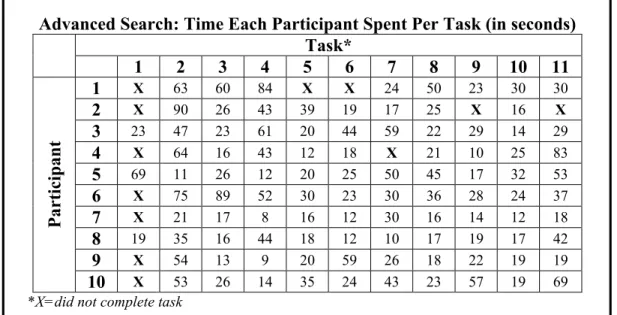
Advanced Search: Time Each Participant Spent Per Task (in seconds) Task*
1 2 3 4 5 6 7 8 9 10 11
1 X 63 60 84 X X 24 50 23 30 30
2 X 90 26 43 39 19 17 25 X 16 X
3 23 47 23 61 20 44 59 22 29 14 29
4 X 64 16 43 12 18 X 21 10 25 83
5 69 11 26 12 20 25 50 45 17 32 53
6 X 75 89 52 30 23 30 36 28 24 37
7 X 21 17 8 16 12 30 16 14 12 18
8 19 35 16 44 18 12 10 17 19 17 42
9 X 54 13 9 20 59 26 18 22 19 19
Participant
10 X 53 26 14 35 24 43 23 57 19 69
*X=did not complete task
Figure 5: Results from Advanced Search tasks
Task 1: Search for all interviews relating to “Civil Rights.”
As seen in Figure 5, the majority of participants did not complete this task as they
chose “Civil Rights” from the “Cluster” list under the “General” heading (see Figure 2a).
Choosing “Scope” or “Cluster” alone yields no results but the participants perceived this
as the most effective way to retrieve interviews related to “Civil Rights.” They thought
this was a system error and proceeded to the next task. Of the three participants who
entered “Civil Rights”25 in the “Keyword search” box. Another participant left the default value for “Search Scope” as “Excerpt,” chose “All” from the “Search in cluster” list, and
entered “Civil Rights” in the “Keyword search” box. Overwhelmed by the results, 1,127
excerpts, he/she clicked on “Refine your search” to explore ways of narrowing the
retrieval set.
In addition, one of the participants who completed the task played the audio file
for an interview in the results list. The participant chose “Listen Online with Text
Transcript,” as depicted in Figure 6, because it was the first link on the page, after
selecting the interview.
Figure 6: Oral History audio and text options
Although the participant expected the audio to automatically start, he/she liked the fact
that it did not, allowing him/her to read ahead, especially since the audio is somewhat
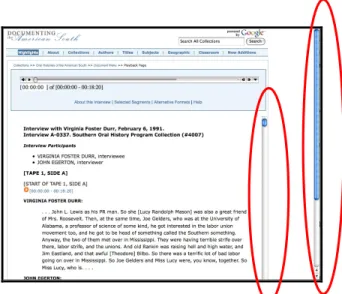
fuzzy. One participant found the page to be confusing as it contained two scroll bars, as
seen in Figure 7.
Figure 7: Example of two scroll-bars on “Listen Online with Audio Transcript” page
Task 2: Search for an interview with an ID number of C-0016.
Four participants did not search specifically for interviews by selecting
“Interview” from the “Search Scope” drop-down menu and retrieved fifteen excerpts
instead. However, one participant did refine the search, choosing “Interview” from the
drop-down menu after noticing the results did not include interviews. One difficulty
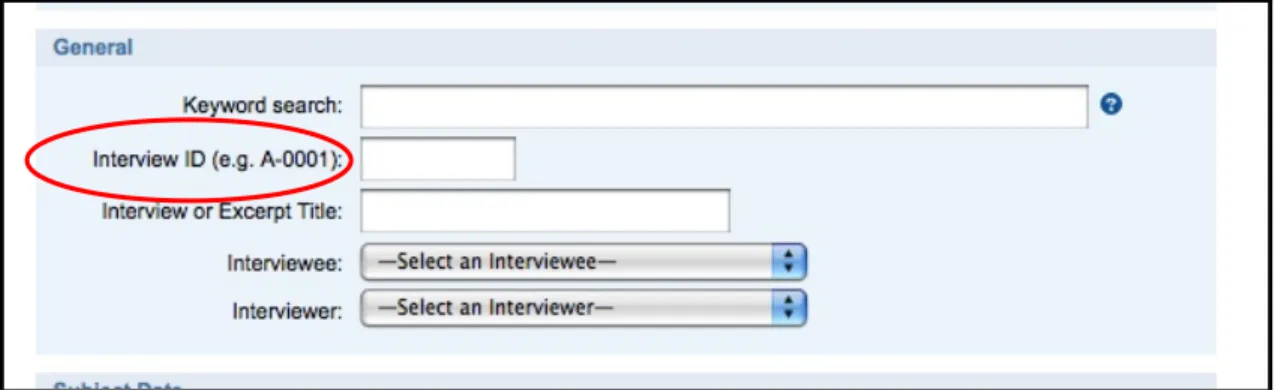
many of the participants encountered was the correct format for entering “Interview ID.”
The “Interview ID” must be typed in a particular format and an example is included to
the left of the search box as shown in Figure 8. One participant expected the format
example to be on the right. Although six participants did not initially enter this
information correctly, five noted that the example was helpful. In addition, one
participant suggested adding an error message to let the user know that the information
was entered incorrectly. Participants eventually discovered the proper way to format the
Figure 8: Interview ID field
Task 3: Search for all interviews containing information about the 1930s.
The most common method to complete this task was using the “Subject Date”
field and entering “1930” to “1939.” There was some confusion about how to enter date
ranges as one participant noted that a search from “1929” to “1940” may be best while
another preferred to search a broader range of dates, “1925” to “1945,” thinking that
events that take place in one decade are not necessarily isolated to that particular time
period. Again, six participants overlooked the “Search Scope” field and did not select
“Interview” from the drop-down menu, retrieving excerpts instead.
Task 4: Search for all interviews containing information about the place, Macon Georgia.
While all participants retrieved results for this task, six did not select “Interview”
from the drop-down “Search Scope” menu and retrieved only excerpts. One participant
spelled out “Georgia” in the “State” box, retrieved no results, and refined the search,
typing “GA” instead. All other participants entered the postal abbreviation for Georgia,
“GA,” explaining that the small box indicated this was the correct format. Many of the
from, rather than remembering the postal abbreviation or using the location drop-down
menu. Three participants suggested adding a drop-down menu for the state abbreviations.
Furthermore, one participant said that he/she would search Google for state abbreviations
if not known. While there is a location drop-down menu, it is not formatted consistently,
as seen in Figure 9. For example, “AL” appears at the beginning of all locations for
Alabama but the same is not true for California and many other states. In addition, it is
not alphabetized by the city name, creating some confusion for participants.
Figure 9: Subject Place search box
Task 5: Search for all selected segments from interviews dealing with the Great Depression.
Due to an oversight, one participant was not asked to complete this task. Six
excerpts. One of these participants then decided to use the “Boolean Search,” entering
“great” AND “depression,” retrieving 106 excerpts. Similarly, one participant searched
for “Great Depression” using both the keyword and “Boolean search” boxes, returning
103 excerpts. Another participant decided to search by years, “1920” to “1929,”
retrieving 328 excerpts and another entered only “depression” into the “Keyword search”
box with 163 excerpts.
Task 6: Search for all selected segments from interviews dealing with either Jimmy Carter or Bill Clinton.
One participant spent an extended length of time on this task and did not retrieve
any results while other participants used a variety of methods to retrieve excerpts dealing
with Jimmy Carter or Bill Clinton. Three participants utilized the “Keyword search” box
to conduct this search. One participant used the terms “jimmy carter or bill clinton” and
another “jimmy carter bill clinton.” Another participant utilized the help button, shown in
Figure 10, to learn more about the “Keyword search” box.
Figure 10: Keyword Search box
The help menu directed the participant to an outside page. From here, the
participant discovered the OR operator and entered “‘jimmy carter’ or bill clinton.” One
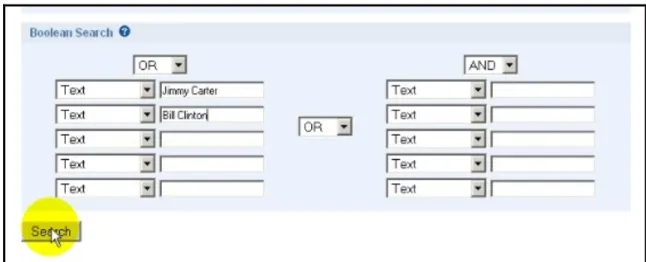
participant searched “Excerpt” and then used the “Boolean Search” box to enter “Jimmy
Figure 11: Boolean Search “Jimmy Carter OR Bill Clinton for Task 6, example 1
Two participants also used the strategy in Figure 11, returning 36 excerpts. One of
the participants who initially used a keyword search went back and used the strategy
depicted in Figure 11, also returning 36 excerpts. Two participants utilized the “Boolean
Search” but entered the search terms as shown in Figure 12, finding 36 excerpts.
Figure 12: Boolean Search “Jimmy Carter OR Bill Clinton” for Task 6, example 2
Figure 13: Boolean Search “Jimmy Carter OR Bill Clinton” with OR selected
at the top of each column for Task 6
Thus, there was little consistency in how the participants utilized the “Boolean Search”
box, yet they felt it to be useful and appropriate for this type of query.
Task 7: Search for all interviews that William C. Friday gave.
Due to an oversight, one participant was not asked to complete this task. Of the
nine asked to complete the task, four participants used the “Keyword search” to find
excerpts rather than interviews, neglecting to select “Interview” from the “Search Scope”
drop-down menu. Another participant did a keyword search on “William C. Friday” and
selected “Interview.” Three participants chose “Interview” from the “Search Scope”
drop-down menu and used the “Interviewee” menu to find William C. Friday. Finally,
one participant did a keyword search for William Friday and limited the search to
“Interview”. Noting the large number of results, the participant clicked on “Refine your
search” and selected “William C. Friday” from the “Interviewee” drop-down menu.
Many of the participants were unsure as to how the list of interviewees was arranged but
Task 8: Search for all selected excerpts from interviews that deal with Frank Porter Graham and Anne Queen.
Seven participants utilized the “Boolean Search” box to complete this task and
five of these used the technique shown in Figure 14.
Figure 14: Boolean Search “frank porter graham AND anne queen” for Task 7
One participant, knowing that Graham went by many names and recognizing that “Anne”
may be spelled in multiple ways, used the “Boolean Search” depicted in Figure 15.
Figure 15: Boolean Search with multiple instances of names for Task 7
Finally, another participant who used this search box completed the task as shown in
Figure 16: Boolean Search “frank porter graham OR anne queen” for Task 7
Three participants utilized the “Keyword search” box, searching “frank porter graham
anne queen,” ‘frank porter graham or anne queen,” or “frank porter graham + anne
queen.” Participants who used the “Boolean Search” box for this task had more consistent
results.
Task 9: Search for all selected excerpts from interviews dealing with William C. Friday and the year 1965.
Three participants entered “William C. Friday” in the “Keyword search” box and
“1965” to “1965” in the “Subject Date” field while two participants selected “William C.
Friday” from the “Interviewee” drop-down menu and searched “1965” to “1965.” The
former returned 13 excerpts and the latter 11 excerpts. Another participant utilized the
“Keyword search” and “Subject Date” fields, entering “1965” only in the first field,
Figure 17: Keyword Search “William C. Friday” and Subject Date “1965” for Task 8
Another participant familiar with the variations of William C. Friday’s name, used the
search techniques depicted in 18a and 18b, completing the former and refining the search
with the latter.
Figure 18b: Boolean Search for “William C. Friday” and various instances of name
Another entered “1965” to “1965” in the subject date and decided to enter “William C.
Friday” in one of the text field boxes in the “Boolean Search,” returning the same number
of results as those entering “William C. Friday” in the “Keyword search” box. Finally,
another participant used the “Boolean Search” for both the name and year, as seen in
Figure 19, returning 0 results.
Figure 19: Boolean Search “William C. Friday AND 1965” for Task 8
Task 10: Search for all interviews containing the term “women’s liberation.”
Six participants found 221 interviews by entering “women’s liberation” in the
participants retrieved 907 excerpts with a similar search but did not choose “Interview”
from the “Search Scope” drop-down menu. Another participant selected “Interview”
from the “Scope Search” menu but used the “Boolean Search” box to type in “women’s
liberation,” retrieving 7 interviews. This participant chose the “Boolean Search” box
rather than the “Keyword search” box, believing the former searched the full-text of the
interview while the latter only the abstract on the results page.
Task 11: Search for all interviews given by William C. Friday in which he discusses desegregation.
Five participants retrieved two interviews by selecting William C. Friday from the
“Interviewee” drop-down menu and entering “desegregation” in the “Keyword search”
box. Three participants completed the above search but did not select “Interview” from
the “Search Scope” menu. Another participant selected “William C. Friday” from the
“Interviewee” drop-down menu and entered “desegregation” in the “Boolean Search”
box, retrieving two results. This was the participant who, as mentioned earlier, believed
the “Boolean Search” would find the terms in the full-text of the interview whereas the
keyword search only queried the abstract found on the results page. Finally, one
participant used the “Keyword search” box to enter “desegregation and William C.
Browse Collection by Theme Page
General Impressions
The image of the “Shotgun Houses “located on the “Browse Collection by
Theme” page was very well received. For one participant, the “simple image” would help
them remember the page. Two participants eventually clicked on the picture to learn
more about the image. Other participants commented on the clean, simple look of the
page. A few participants suggested adding more images or changing the background
color to make the page more inviting. Furthermore, participants were drawn to the
numbers beside each theme and liked knowing where the bulk of the information was
located. Others, looking at the number of interviews for each, were overwhelmed by the
larger number and said they would be more likely to use the search page as they can
refine and narrow the search to their liking. However, one participant was “stunned by
the limited number of topics.” After browsing the themes, this participant said, “[The]
homepage is so simple it doesn’t appear to be that many topics but I actually think there
are a lot of topics.” The participant suggested, as did others later in this section of the
study, an expandable menu at either the first or second level of browsing so topics of
potential interest are not overlooked. An expandable menu might also help participants
who felt overwhelmed by the larger number of interviews in each category, explained one
participant. It seems that many of the participants were unaware that the categories
Browse Theme By Collection: Time Each Participant Spent Per Task (in seconds) Task*
1 2 3
1 36 37 26
2 41 26 19
3 11 38 10
4 86 46 14
5 36 38 15
6 45 75 22
7 18 13 8
8 49 30 15
9 34 X 38
Participant
10 32 40 38
*X=did not complete task
Figure 21: Results from Browse Theme by Collection tasks
Task 1: Find all interviews that relate to Southern Politics and the Democratic Party. Play the audio for one of these interviews.
Each of the ten participants located interviews about the Democratic Party. The
second and third levels of themes are not ordered alphabetically or by number of
interviews, creating some confusion for the participants. As mentioned above in the
general impressions of the page, five participants noted they would like to see
subcategories without advancing to the next screen and again suggested including
expandable menus. A few even expected to find a search box to narrow the results.
When asked to play the audio for one of the interviews, each participant was able
to do so. Nine participants chose “Listen Online with Text Transcript” although they
initially hovered over “MP3,” noting it was a familiar term. For those who had chosen
“MP3” earlier in the usability study, they actually preferred listing to the audio online
because they did not have to download a file to the computer and the audio was
automatically start; participants must click on the play button. Although most expected
the player to start automatically, they preferred that it did not, citing frustrating
experiences on sites such as YouTube and MySpace where audio and video clips do so.
One participant made an important note about the presence of the audio and transcript on
the same screen. In the example shown in Figure 22, Jimmy Carter is discussing racism
and politics. Reading the transcript, you would not notice the emphasis Carter placed on
“a” in the sentence circled below. This format, according to the participant, is great for
fully understanding the interviewee’s tone and meaning.
Figure 22: Audio and Text with emphasis added
Task 2: Find all interviews relating to Women’s Suffrage.
This task was especially problematic for participants in terms of which
subcategory to choose. After selecting “Southern Women” from the first screen, nine
participants were unsure which category to choose, “Women’s Movements” or
“Women’s Activism,” depicted in Figure 23. One participant browsed interviews under
WomenWomen’s MovementsSuffrage. Three participants were expecting a search
box to help them narrow the results.
Figure 23: Women’s Movements and Women’s Activism themes
Task 3: Find all interviews dealing with pollution.
This task was also troublesome for many participants. Seven participants believed
interviews relating to “Pollution” could be under a number of categories. One participant
also noted that the themes are not listed alphabetically, thus making it harder to locate the
appropriate heading. One participant worried that some interviews may be overlooked
worrying about how it got cataloged and I start liking your Boolean search engine…” For
this participant, and others, the search engine becomes the preferred method of retrieving
results. For example, one participant chose to use the “Search All Collections” search box
to complete the query, depicted in Figure 24. Search terms entered in this box retrieve
results from the entire DocSouth collection, not just the current collection.
Figure 24: Search for “Pollution” on Browse Theme page
Excerpt View Page
General Impressions
The participants were especially appreciative of the citation information for the
excerpt. One participant noted “Sometimes they stick this kind of stuff in the corner.”
to the audio if this information was provided, in order to save time. The “Subjects” were
also helpful, according to many participants, so they may find similar excerpts.
Furthermore, the quick links, “About this Excerpt,” “Citing this Excerpt,” and “Full Text
of the Excerpt,” were helpful for the participants. It should be noted that Richard
Arrington is listed twice in “About this Excerpt” section of the page. In addition,
Arrington is listed twice in the “Interviewee” drop-down list on the “Advanced Search”
page.
Task 1: Find the link to navigate back to the full interview.
Although the participants liked the information displayed on this page, many had
difficulties finding the audio clip for the interview. Two participants utilized the
“Interview” link in the breadcrumb, shown in Figure 26, to navigate to the entire
interview and audio.
Figure 26: Interview breadcrumb
One participant suggested moving the “See Entire Interview” link below the excerpt title
as depicted in Figure 27a.
Figure 27a: Suggested location of See Entire Interview link
Others expected the “See Entire Interview” link to appear with the other links on the page
Figure 27b: Suggested location of See Entire Interview link
Once participants navigated to the interview page they started playing the audio
from the beginning of the interview, rather than playing the audio from the excerpt.
Given more time, some may have found this particular audio clip, as some recognized the
start and stop time on the excerpt page, as well as the segments in the online text
transcript. One participant, in particular, would like to have played the audio from the
excerpt page. Also, participants suggested changing the terminology on the “Excerpt
View” and “Interview” pages to be more simplistic, such as “Audio,” “Transcript,” or
“Both,” shown in Figure 28.
Figure 28: Suggested wording of Headings and Links relating to listening and viewing audio
Both
Text
Follow-up Questionnaire
1. What is your overall experience with the site?
The participants reported a high level of satisfaction with the site in the follow-up
questionnaire. The participants found the site to be clean and appropriate for general or
specific searches. One participant noted that it was a useful place to find oral history
interviews and would consider it among all of the possible resources for class projects.
Some things about layout of site should change “but compared to other library sites, it
was easy to use.” Others noted that a few “glitches” need to be worked on, such as the
alphabetization of various lists and drop-down menus, but were pleased nonetheless.
Referring to the “Browse Collection by Theme” page, one participant wrote, “The links
were a bit difficult to anticipate where it would navigate me.”
2. Would you be more likely to use the search or browse page to identify oral histories related to your projects? Please explain.
Participants would use the browse page if looking for background information or
researching an area with which they were unfamiliar. However, most participants
reported they would use the search page more often. For example, “I would be more
likely to use the search page since most of the time I would be writing about a pretty
specific topic. The browse page was not all that intuitive and so wouldn’t be as helpful
for me personally.” Another participant wrote,
So, for many participants, the search page provided “more control over the search
results.” One participant did prefer the browsing page for retrieving interviews.
3. Do you find the searching and browsing pages helpful? Please explain.
Answers for this question were similar to those for Question 2 of the follow-up
1uestionnaire. Participants found both pages helpful as they complement each other.
Again, the search page was preferred as it was “more specific and direct” but one
participant suggested making the “Boolean Search” option clearer. Furthermore, the
browse page was not as helpful to some. As one participant noted, “I didn’t like the
browse pages because I had to go through several pages to get to what I wanted and then
had to search that last page to find it.” According to one participant, “A full listing of all
of the subcategories would make [the browse page] more helpful.” He/she suggested
adding expandable menus for the categories on the browse pge.
4. What do you think of the navigation of these web pages?
Participants reported that the site was fairly simple to navigate, noting that it was
similar to other web pages used in the past. One participant wrote,
The navigation is pretty simple. Again, nothing too hard. I would relocate the link for ‘view entire interview’ so that I am not confused on what it actually means of what information can be viewed from the link. You want to make sure that the search is as easy as possible. I want to spend time dissecting the interview, not the actual search.”
A few participants suggested adding clearer links to the homepage but others felt the
breadcrumbs allowed for easy navigation. Overall, the participants were satisfied with the
5. If you were doing research or covering a topic in a course, would you be likely to use these web pages to inform your research? Why or why not?
Eight of ten participants reported that they would use the OHAS site for research. “I would be likely to use them because they include good primary resources. It is
especially helpful that the interviews are presented in audio format and in transcriptions.”
Two participants reported they would not likely use OHAS. One participant wrote, “It probably would not be the first place I went for information because other sources would
be my first choice.” One barrier to the use of oral histories was time. “I would probably
look first to other print materials just because it takes a lot of time to listen to interviews.
If the class called for it specifically, then I would use these web pages.” Some
participants perceived even the excerpts as “too long.”
6. Would you prefer to access oral histories via the Internet or by visiting a library? Please explain.
All ten participants wrote that they would prefer accessing oral histories via the
Internet as this was most convenient and time efficient. For example, “I love going to
libraries, but when on a deadline, I much prefer to access information as quickly as
possible.” Another participant, a professor, wrote,
Another participant also noted, “I think that most people will access these online just
because it is so easy. I think they will be more listened to, as in, more people will think of
Chapter 5: Discussion
Overall, participants were pleased with OHAS and found it to be a usable site. Interestingly, the undergraduates and faculty had similar reactions and experiences with
the site. As noted above, most would use OHAS if an assignment or research project warranted use of oral histories. As expected, participants preferred accessing these
materials online as it saves time and can be done from any location, at any hour of the
day. The participants used these search and browse options because the study was
focused on testing the usability of these pages. However, many participants, and users in
general, may prefer the simple keyword search on the front page of the OHAS site. Thus, the study may have altered the way participants would have normally searched for
information on the site as they were asked to specifically use the “Advanced Search” and
“Browse Collection by Theme” pages. Although the amount of time spent per task was
collected, it was not useful in determining the usability of the pages as many participants
explored the pages and discussed their experiences with OHAS, creating an inaccurate depiction of the amount of time spent on each task.
Although participants felt the site easy to navigate, a few changes will make the
site more easily accessible. Participants often overlooked “Search Scope” when searching
for interviews, retrieving excerpts instead (see Figure 2a). The term “Search Scope” was
not well defined for participants. At the very least, the default search should be
“Interview,” rather than “Excerpt” to more closely resemble the results retrieved from the
this is not possible, a radio button setup may be used so users see both the “Interview”
and “Excerpt” options at once, rather than having to select from a drop-down menu. In
addition, the “Search in cluster” field was confusing to many participants (see Figure 2a).
For examples, the first task for the “Advanced Search” page asked participants to find all
interviews relating to “Civil Rights.” Only three participants were able to complete this
task. The participants believed that choosing “Civil Rights” from the “Search in cluster”
list would complete the task. Instead, the search returned zero results. Additional help
information may allow users to better understand this functionality. It may also be
possible to allow researchers to select only from the cluster list and still retrieve results.
Another option may be including an error message for this type of search.
Because of the “Advanced Search” page’s layout, many participants were unclear
as to how many search parameters should be used. The breaks in the different search
boxes added to this confusion. Rather than creating separate boxes for “Scope,”
“General,” “Subject Date,” “Subject Location,” and “Boolean Search,” suggested one
participant, designers may consider eliminating the white space between each.
Because participants had difficulty identifying the best way to use the “Boolean
Search” box, this option should be streamlined. One of the possibilities would be to
create a single column, much like that used in Ebsco and other article databases. In
addition, an example might be useful. This information could be included under a help
menu to maintain the clean look of the page. As is, the “Help” button is not particularly
useful in assisting users with the “Boolean Search” box. In addition, the “Help” button
for the “Keyword search” box should include a few examples of common search syntax
“Subject Date” may give users a better understanding of how to enter single and multiple
years under this search parameter as this was unclear for some participants.
Another suggestion for the “Boolean Search” box is to re-label “Text” as
“Keyword.” One user, a professor, perceived the “Boolean Search” to search the entire
interview while the keyword search only searches the blurb located on the results page.
This may be attributed to the fact that older systems offered a “keyword” search but this
only searched one aspect of the metadata, for example, title. Consistency in wording may
clear up this misconception and allow users to better understand what they are searching when utilizing the “Boolean Search” option.
The information in some of the lists, including the “Interviewee” and
“Interviewer” drop-down menu, as well as the themes on the “Browse Collection by
Theme” page, should be reorganized. As seen in Figure 29, for example, interviewees are
listed alphabetically by last name but this is not easily noticeable for those reading from
left to right. Reorganizing the list so it appears “Last Name, First Name” may save users
time. Also, the themes should be listed alphabetically on each “Browse Collection by
Theme” page to better assist users.
The “Excerpt View” page lists Arrington twice as the “Interviewee” and Carrie
Lee Gerringer, as seen in Figure 29, has two entries. A system error, possibly a special
character in these names, may account for the double listing. Further research may
Figure 29: Interviewee drop-down menu
A drop-down menu for the “State” may assist users in selecting the appropriate
postal abbreviation. Also, this will require users submit a postal abbreviation rather than
typing out the state name, reducing the number of system errors. In addition, the
“Location” drop-down menu shows some inconsistency. For example, “AL” appears at
the beginning of all locations for Alabama but the same is not true for California and
many other states. Verifying the appearance of headings for each cluster of states may
help users more easily find the location they wish to search.
Many participants also suggested including expandable menus for the “Browse
Theme by Collection” page. Doing so will allow users to access subcategories for a
number of topics on one screen. This is especially helpful as many users were uncertain
which category might contain the information they were tasked to find. Others users were
unaware that subcategories even existed. Thus, expandable menus on the “Browse Theme
by Collection” page will assist users in selecting appropriate categories and subcategories
consistently. On the second level of the category hierarchy, the numbers are not in bold.
This simple edit will create more consistency in the interface.
Finally, the listening options may be streamlined to better assist users. One
participant suggested adding a direct link from the “Excerpt View” page to the
appropriate audio segment may eliminate some of the confusion in navigation.
Re-aligning links on the “Excerpt View” page, as shown in Figures 27a and 27b may also
allow users to better locate the entire interview. Another possibility, depicted in Figure
28, recommends altering the language on the interview page to make the various listening
and viewing options more apparent.
As noted by some participants in the follow-up questionnaire, not all research
projects or assignments necessitate the use of oral histories. Outreach to those who may
benefit from the use of oral histories may increase the use of the collection. Also, these
implementations will hopefully increase use of the site. Future usability studies will allow
designers to assess the usefulness of these changes. In addition, other user groups may be
studied, including graduate students as well as primary and secondary educators to ensure
Chapter 6: Conclusion
The purpose of this study was to test the usability of the OHAS “Advanced Search,” “Browse Theme by Collection,” and “Excerpt View” pages. This study found
that the pages were generally useable and effective for retrieving oral histories on the
Internet. The participants liked the clean look of the pages and the rich content, especially
the citation information and transcripts.
Despite the overall satisfaction with the site, a few changes should be
implemented to ensure users are able to easily locate information. More examples of how
to use particular aspects of the “Advanced Search” page, better layout of drop-down
menus, and expandable menus on the “Browse Theme by Collection” page will go far in
creating a better experience for users.
This study is an important first step in ensuring the usability of this invaluable
resource. As little research has been conducted on the usability of search interfaces for
digitized oral history sites, it was important to test the site. Also, because each user group
differs, future usability studies on this system and others will enable designers to build
Chapter 7: Bibliography
Battleson, Brenda, Austin Booth, and Jane Weintrop. “Usability Testing of an Academic Library Web Site: A Case Study.” Journal of Academic Librarianship 27.3 (2001): 188-98.
Bishop, Ann P., Nancy A. Van House, and Barbara Pfeil Buttenfield. Digital Library Use: Social Practice in Design and Evaluation. Cambridge, Mass.: MIT Press, 2003.
Bond, Trevor James and Michael Walpole. "Streaming Audio with Synchronized Transcripts Utilizing SMIL." Library Hi Tech 24.3 (2006): 452-462. http://www.emeraldinsight.com (Accessed March 16, 2009).
Borgman, Christine L. "Psychological Research in Human-Computer Interaction." In
Annual Review of Information Science and Technology, Volume 19, edited by Martha E. Wliams, 33-64. New York: Knowledge Industry Publications, Inc., for American Society for Information Science, 1984.
Chen, C. "Computer Technology to Preserve and Access Endangered Oral History Recordings in Alaska." Microcomputers for Information Management 9.3 (1992): 191-5.
Dickson, Maggie. "CONTENTdm Digital Collection Management Software and End-User Efficacy." Journal of Web Librarianship 2.2-3 (2008): 339-379.
Dillon, A. "Beyond Usability: Process, Outcome, and Affect in Human Computer Interactions." Canadian Journal of Information and Library Science 26.4 (2001): 57-69.
George, Carole A. “Usability Testing and Design of a Library Website: An Iterative Approach.” OCLC Systems & Services 21.3 (2005): 167-80.
Greenstein, Daniel. "Digital Libraries and their Challenges." Library Trends 49.2 (2000): 290. http://search.ebscohost.com/login.aspx?direct=true &db=aph&AN=4110989&site=ehost-live (Accessed March 16, 2009).
Hall, W. "Oral History Fast Forward: From Audiocassette to Digital Archive." Colorado Libraries 26.4 (2000): 9-10.
Head, A. J. “Beyond Google: How Do Students Conduct Academic Research?” First Monday 12.8 (2007).
Holliday, W., and Q. Li “Understanding the Millennials: Updating Our Knowledge About Students.” Reference Services Review 32.4 (2004): 356-366.
Kitalong, Karla Saari, Athena Hoeppner, and Meg Scharf. “Making Sense of an Academic Library Web Site: Toward a More Usable Interface for University Researchers.” Journal of Web Librarianship 2 (2008): 177-204.
Kramer, Elsa F. "IUPUI Image Collection: A Usability Survey." OCLC Systems and Services 21.4 (2005): 346-359.
Lombardo, S. V., & K.S. Condic. “Convenience or Content: A Study of Undergraduate Periodical Use.” Reference Services Review 29.4 (2001): 327-337.
Marchionini, Gary, Catherine Plaisant, and Anita Komlodi. “The People in Digital Libraries: Multifaceted Approaches to Assessing Needs and Impact.” In Digital Library Use: Social Practice in Design andEvaluation, edited by Ann P. Bishop, Nancy A. Van House, and Barbara Pfeil Buttenfield, 119-160. Cambridge: MIT Press, 2003.
Nielsen, Jakob. Usability Engineering. Boston: AP Professional, 1993.
Oblinger, Diana, and James L. Oblinger. Educating the Net Generation. Boulder, CO: EDUCAUSE, 2005. http://www.educause.edu/educatingthenetgen (Accessed March 1, 2009).
Oldham, Bonnie W. “Focus Groups and Usability Testing in Redesigning an Academic Library's Web Site.” Journal of Web Librarianship 2 (2008): 219-246.
Parker-Gibson, N. “Library Assignments: Challenges That Students Face and How to Help.” College Teaching 49.2 (2001): 65-70
Southern Oral History Program. “Mission.” Southern Oral History Program Center for the study of the American South. http://sohp_wp.unccsas.webfactional.com/ about/our-mission/ (accessed March 2, 2009).
Turnbow, Dominique, et al. “Usability Testing for Web Redesign: A UCLA Case Study.” OCLC Systems & Services 21.3 (2005): 226-34.
VandeCreek, Leanne M. “Usability Analysis of Northern Illinois University Libraries’ Website: A Case Study.” OCLC Systems & Services 21.3 (2005): 181-92. Weig, Eric, Kopana Terry, and Kathryn Lybarger. "Large Scale Digitization of Oral
History: A Case Study." D-Lib Magazine 13.5-6 (Apr, 2007). http://www.dlib.org (Accessed March 2, 2009).
Appendix A
Demographic Questionnaire
1. Are you 18 years of age or older?
Yes____ No____
2. What is your status/occupation?
Undergraduate Student ______
Graduate Student ______
Middle/High School Teacher ______
University Professor ______
Other ______
3. Are you male or female?
Male____ Female____ Prefer not to answer____
4. Have you used Documenting the American South or Oral Histories of the American South before?
Yes____ No____ Unsure____
Appendix B
Usability Observation
Web Page 1: Searching
Questions:
1. What are you initial impressions of the web page? What do you like? What do you dislike? (Please answer verbally).
Tasks:
1. Search for all interviews relating to “Civil Rights.”
Play the audio for one of these interviews.
2. Search for an interview with an ID number of C-0016.
Play the audio for this interview.
3. Search for all interviews containing information about the 1930s.
4. Search for all interviews containing information about the place Macon, Georgia.
5. Search for all selected segments from interviews dealing with the great depression.
Play the audio for one of these interviews.
6. Search for all selected segments from interviews dealing with either Jimmy Carter or Bill Clinton.
7. Search for all interviews that William C. Friday gave.
8. Search for all selected excerpts from interviews that deal with Frank Porter Graham AND Anne Queen.