LOCAL AREA NETWORKS:
TRACKING THE PHYSICAL LAYER
VIA A WEB DATABASE
by
L. Scott King
A Master’s paper submitted to the faculty
of the School of Information and Library Science
of the University of North Carolina at Chapel Hill
in partial fulfillment of the requirements
for the degree of Master of Science in
Information Science
Chapel Hill, North Carolina
November, 2001
Approved by:
L. Scott King. Local Area Networks: Tracking the Physical Layer via a Web Database. A Master’s paper
for the M.S. in I.S. degree. November 2001. 43 pages. Advisor: Gregory B. Newby.
This project analyzes the computer networking information system at the Kenan-Flagler Business School
(KFBS) at the University of North Carolina at Chapel Hill. The goal of this project is to optimize the
information system in order to facilitate network troubleshooting and network provisioning. The Local
Area Network at KFBS is comprised of over 100 Ethernet network switches and provides data network
connectivity to over 2500 data ports and 2000 users. The purpose of a network information system is to
track the various components of the system, which include items such as client IP addresses, data ports,
room numbers, usernames, switch IP addresses, switch ports, telecommunication closets, MAC addresses,
and computer names. The current system used to track and administer the computer data network at KFBS
is incomplete and ineffective, mainly because it uses several sources to store the data. These sources
include a DHCP database containing limited information such as IP addresses, usernames, and MAC
addresses and several additional spreadsheets. This project proposes a single relational database
management system to replace the current system. A comprehensive database is designed in Microsoft
Access and a detailed discussion of the development process includes an entity relationship diagram,
database schema, and data dictionary. Lastly, a password-protected Web interface is designed and
implemented in Cold Fusion. This database-driven Web site provides simple, secure access to dynamic and
searchable network information via the Internet.
Headings:
Database design
Database management
TABLE OF CONTENTS
ABSTRACT……….………i
TABLE OF CONTENTS..………….……….…...……….ii
INTRODUCTION……….………..1
Project purpose & Overview…...………1
Background………..1
Current system……….2
User groups………..5
Problems with current system………...……….………..5
PROPOSED INFORMATION SYSTEM……….……..………...…….…………...7
Proposed solution………...……….…..7
Technology decision……….…….9
DEVELOPMENT PROCESS………..……….10
Information collection………...………10
Database design………...……….……….11
Web Interface……….12
Security………...………...15
CONCLUSION………...……….……….…....15
FUTURE..……….……… ………16
REFERENCES………..17
APPENDICIES
Appendix A: Entity relationship diagram.………...………18
Appendix B: Database schema……….………20
Appendix C: Data dictionary ...………...………23
INTRODUCTION
Project Purpose & Overview
This project analyzes the computer networking information system at the Kenan-Flagler Business
School (KFBS) at the University of North Carolina at Chapel Hill. The goal of this project is to optimize
the information system in order to facilitate network troubleshooting and network provisioning. The
purpose of a network information system is to track the various components of the system: client IP
addresses, usernames, data ports, room numbers, usernames, switch IP addresses, switch ports,
telecommunication closets, mac addresses, computer names, etc. The current system used to track and
administer the computer data network at the KFBS is incomplete and ineffective. This project will discuss
the current system and provide recommendations for a new system, a relational database. The details of the
design and implementation of the database and its accompanying Web site will be examined.
Background
The typical network in this project is the local area network that encompasses the McColl Building
of the KFBS at the University of North Carolina at Chapel Hill. The data network is the primary means of
satisfying the information needs of the more than 2000 members of the KFBS community - faculty, staff,
and students. The network is entirely TCP/IP over switched Ethernet, with switching equipment from a
single vendor, Enterasys (formerly Cabletron).
building was designed with telecommunications and computer networking closets on the north and south
end of each floor. This design dictated that the North side of the building was the “A” side and the South
side was the “B” side. This logical separation introduced the nomenclature for the telecommunications
closets on each floor as 1A, 1B, 2A, 2B, 3A, 3B, 4A and 4B.
The physical wiring in the building complies with the structured cabling interoperability standard
set by the Electronic Industries Association and Telecommunications Industry Association (EIA/TIA).
This standard is known as EIA/TIA 568, also referred to as “568” (Brown, 2000). At the center of “568”
is the notion that any data stream may be accessed from any data port, which means that more data ports
must be installed than can be used at any one time. Typically, a desktop network interface card (NIC) is
patched to a data port that is hard wired to a telecommunications closet. Once in the closet, the data port is
then patched thorough to a network switch port. From there, the switch in each closet is connected to a
fiber or high-speed copper backbone to a switch or router in the main telecommunications closet. The
closets at the KFBS contain the totality of network switching equipment in the building. Each closet has
one or more chassis that then contain one or more switches. One to 48 RJ-45 interfaced switch ports are
built into the switch hardware for the current switches at the KFBS.
Internet Protocol (IP) addresses are both statically and dynamically assigned on the network. The
IP addresses assigned to network devices are statically configured for servers, network printers, and
Wireless Access Points, and are dynamically allocated to staff and faculty computers via a DHCP server at
the KFBS. On the other hand, student IP addresses, used typically for notebook computers, are
dynamically assigned through the University of North Carolina (UNC) main campus DHCP server. While
the network is part of the larger, logically flat UNC network, the KFBS is responsible for organizing and
tracking all of the network components comprising its VLAN.
Current System
layer three (network layer) networking components. It uses the Simple Network Management Protocol
(SNMP) to build a Management Information Database (MIB) that tracks all network switches in the KFBS
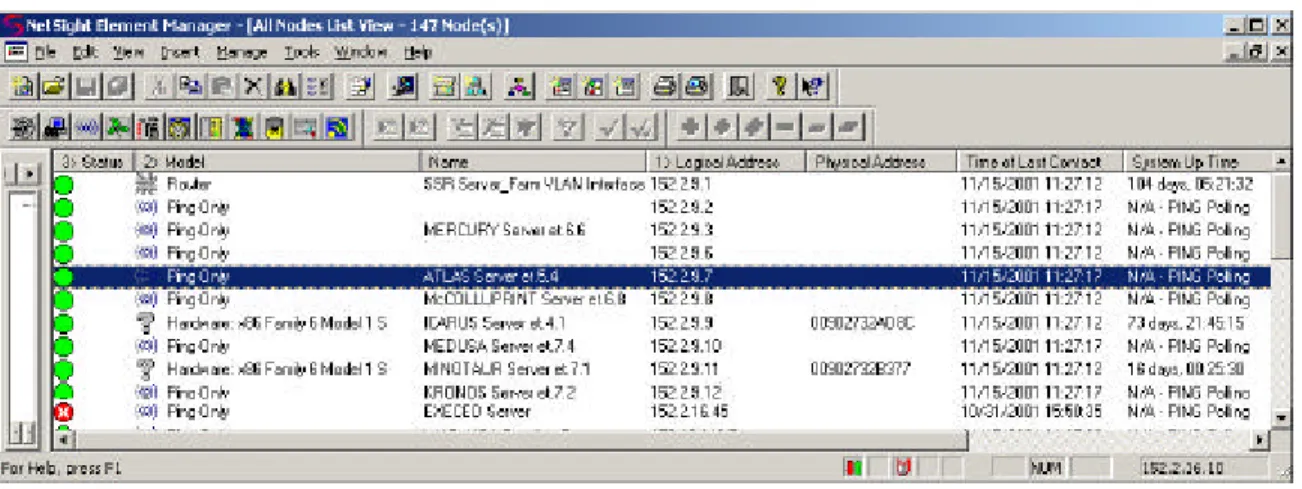
VLAN. The NetSight Element Manager user interface typically displays the following parameters: switch
status (up or down), switch model, name, logical address (IP address), time of last contact, and system
uptime. Figure 1 below is a sample display from the “All Nodes List View” in NetSight Element
Manager:
Figure 1 – NetSight Element Manager screen capture
While NetSight Element Manager and other network management applications do an excellent job of
tracking the network switches (layers 2 and 3), they only touch on layer one components, or the physical
layer of the network. The figures below emphasize the differences between what a typical network
management software sees (figure 2) and what the reality is when it comes to the true network connection
components (figure 3).
Figure 2 - Simplified schema
Figure 3 – Actual schema
NetSight will allow a user to see traffic between a client network device and a network switch, if the user
knows what switch and switch port that user is connected. But to find the switch IP and port number of a
client IP address bound to a NIC on the KFBS VLAN, a separate software package that polls the source
allocation tables (SAT) of the switches is employed. To discover a client IP’s h ome switch, a dirgrep
utility is used. This utility polls every switch on the network in order to discover what switches have the
requested IP in their SAT. The switch that has the IP as a node state of local to the IP is the switch that is
actually connected to that IP address. This process involves takes approximately five minutes because each
of the over 500 switches in the network are polled, and often does not return the home switch. Then a
manual investigation must be made to discover the switch connection by inspecting the telecommunications
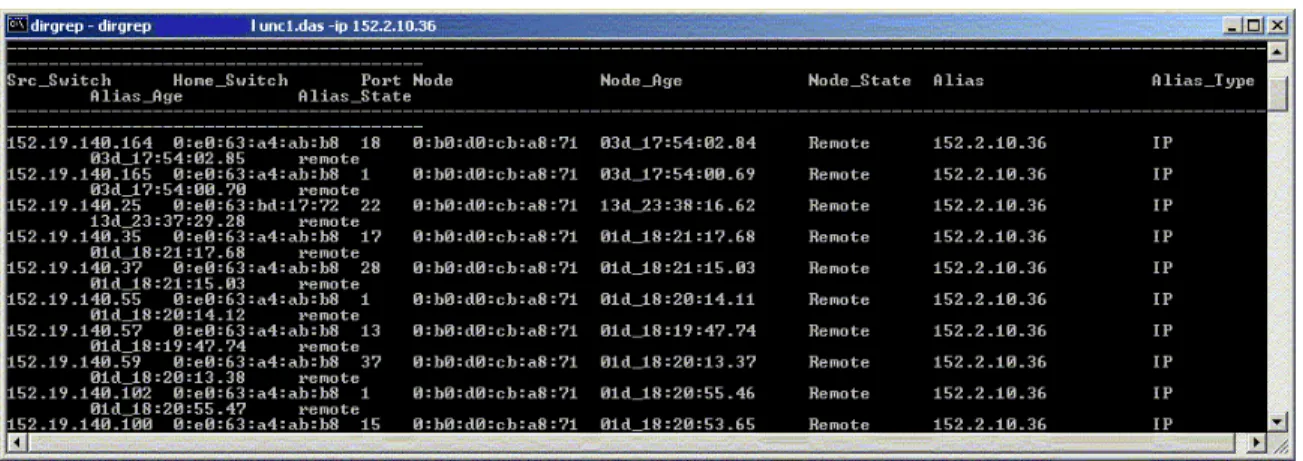
closet connections. Below is a sample output of the dirgrep utility on a client IP address:
Figure 4 – Dirgrep screen capture
then used, Microsoft Outlook, to find the phone number and email address of the client in the glo bal
contact list.
User Groups
The current system has two groups of users. The first group contains the Network Administrator
and the IT director. These two individuals use the network information to assist in troubleshooting and to
provide input for network provisioning decisions. The Network Administrator is primarily responsible for
maintaining the data while the IT director makes the decisions for longer term provisioning. The other
group that uses the system is the IT technicians. They need to access the information primarily in order to
troubleshoot user connectivity problems. The distinction between the two groups is that the technicians
only need to view portions of the data while the Network Administrator and IT Director need to maintain
the data.
Problems with Current System
The current system is grossly ineffective in providing an efficient means to administer and
troubleshoot the local area network. The network information is in many different places and there is no
tool or procedure in place that ties all of the information together. From a troubleshooting perspective, one
must go from one application to another and then possibly a spreadsheet and back to a separate database to
find IP, switch and user information. If the information is not found, one must physically go to the troubled
office computer and manually check the data port number patched to the client NIC. Often this data port
number is concealed behind a desk or shelf, which requires and additional technician to assist in moving
the object to reveal the data port number. From that point, the troubleshooter must go to the
From a general administration perspective, the network information is incomplete and fails to
represent the logical relationships between the data. For exa mple, a recent manual survey of all the
telecommunications closets was mandated in order to acquire data to make decisions on what chassis
needed to be upgraded and what port capacity was necessary to satisfy the user networking port demands
originating from each telecommunications closet. This information should be readily available for a
network administrator. The current network information does not indicate how many ports and which ports
are wired to each office or classroom. It also does not diffe rentiate between the switch port capacity of
each telecommunications closet and what ports are activate or inactive.
The lack of complete and accurate network information is costing the KFBS financial resources
that could be spent elsewhere. For example , a manual survey of a single telecommunications closet
discovered that 12 switch ports were patched through to data ports that were used in the past, but were
currently unnecessary. Network Computing magazine lists a price per port of $368 for switches in the
Cabletron (now Enterasys) 6000 chassis, commonly used at the KFBS (Network Computing Interactive
Buyers Guide, 1998). This translates to 12-port X 368 price-per-port, or $4416 in costs that would be
avoided in a chassis upgrade. Hypothetically, if as few as 10 ports were patched through unnecessarily in
each telecommunications closet, this translates into 8 X 10 X $368, or almost $30,000 worth of switching
equipment that appears to be in use. This false appearance of higher than actual port utilization will lead to
unnecessary over provisioning or premature switch capacity upgrades.
A recent article in
Computer Telephony
emphasizes that documenting all cable connections is vital
to prolonging the life of the wiring infrastructure, containing the cost of managing daily changes, and
recovering in minimal time from network outages (Grigonis, 2000). Moreover, a properly designed cable
information management system will assist IT staff in planning, budgeting, and daily maintenance.
Many network administration questions remain unanswered or require extensive manual
investigation to be answered under the current system. A sample of these questions is as follows:
•
How many data ports in the building are activate and inactive?
•
How many users have more than on activate data port?
•
Where are the legacy 9000 chassis in the building that need to be upgraded?
•
How many and what are the spare switch ports in telecommunications closet 1A?
•
In what office or classroom does data port AD-252 out of telecommunications 1A closet
terminate?
•
How many data ports are activate in the building for roaming (laptop) users?
•
What data ports were patched through in the past, but should be inactivate?
•
What telecommunications closet, switch port, and data port is connected to IP 152.2.10.6?
•
What client IP, data port, and office or classroom location is connected to switch 152.19.140.204,
port 6?
PROPOSED INFORMATION SYSTEM
Proposed Solution
The current system fails to provide an efficient, complete, and accurate means for the network
administrator to characterize, maintain, and troubleshoot the local area network. The goal of the new
system is to correct the shortcomings of the current system. The aforementioned and many other network
administration questions may be readily answered if complete network data is stored in a single repository
and the totality of network component relationships are represented.
Two alternatives were investigated that would provide a solution that would correct the
need to spend at least $124 X 3000/24, or $15,500 for new patch panels. With the PatchView software, and
excluding installation cost, this totals $22,495. An alternate solution is to create a simple relational
database.
A simple relational database management system (RDBMS) can be a single repository of
information for the network. The advantages of a database are clear. A properly designed database
controls redundancy of data. It follows that a single logical update can be cascaded to the same field in
other tables. This eliminates duplication of effort with multiple entries, minimizes wasted storage space,
and assists in preventing the data from becoming inconsistent. A database can also restrict unauthorized
access and can limit actions executed in the database, depending on the user. A database also provides
multiple views, based on users rights. This security feature allows users to only view portions of the
database that are approved for their use by the database admin istrator. Complex relationships among the
data can also be represented in a database. The representation of these relationships, in tandem with the
SQL standard, allows for complex querying on the data. A RDMS also enforces integrity restraints on
tables in the database and provides a means for backup and recovery of data (Elmasari & Navathe, 2000).
Another advantage of the database solution is that there are many inexpensive off the shelf database
applications that may be personalized for any environment. A database may also be viewed via the WWW,
which is not an option with PatchView.
Technology Decision
Now that a Web-enabled database is the goal of the new system, we must choose which
implementation technologies that will be used to realize this goal. This means that we must choose a
database technology and a Web server application technology that integrates with our database. The
database possibilities commonly employed are Oracle, Microsoft Access, Microsoft SQL Server, and
mySQL. The UNC campus and the KFBS have a license for Oracle, but the scope of this project, a few
thousand records, does not require the power of such a high-end database. The open-source mySQL is also
a reasonable choice, but the command line interface is not easy to learn or use for whoever may maintain
this database in the future. Microsoft SQL and Microsoft Access are the most obvious choices for
implementation because all of the current databases at the KFBS use these applications and it is wise to
remain consistent with the technologies. SQL server is much more powerful than Access, but it is also
more complex to learn and administer. Given that this database will only have a few thousand records and
it will not be under a heavy load, a mandate for SQL server is not warranted. This leaves Microsoft
Access.
Microsoft Access has a functionality, look and feel that most users are familiar. The UNC and the
KFBS have a license for this software and it is already installed on every computer in the KFBS, as part of
the Office 2000 Professional suite. There are limits to Access’s functionality because it was never designed
to be under a high stress and heavy load environment. Microsoft states that Access, or actually the MS Jet
database engine, can have up to 255 concurrent users (Microsoft, 2001). But this number drops drastically
when used via an ODBC connection. In fact, Web developers at the KFBS have stated that Microsoft
Access hangs with anything over 5 concurrent users via ODBC and this statement has been confirmed from
other resources on the Web (Xhost, 2001). The proposed database to be designed will not be affected by
these limitations in Access. The IT staff at the KFBS is fewer than 20, and the database is not at any risk to
be accessed simultaneously. Only one or two users should ever access the database concurrently. The
administrative interface (updates, deletes, and inserts) will be in Access, through forms, but the users of the
database want the additional feature of having WWW searchable functionality. In order to port the
The two options currently in use at the KFBS are Microsoft Active Server Pages (ASP) and
Allaire Cold Fusion. While both products are already licensed by the KFBS, Cold Fusion powers the
majority of the WWW database driven solutions. ASP is only supported on IIS while Cold Fusion is
supported on IIS, Netscape, Website, and Apache web servers. Both alternatives are s upported on
Windows NT, but Cold Fusion is additionally supported on Unix, Solaris, Linux, and HPUX. Cold
Fusion’s many OS and Web Server alternatives make it a more scalable solution than ASP. The number
one reason why Cold Fusion (CF) is used so ubiquitously at the KFBS is because it is far easier to code in
than in ASP. While CF is not a true language, it does have built in looping and function procedures that
make it easier to develop in and easier to maintain Web pages.
DEVELOPMENT PROCESS
Information collection
The first step in the development process was to meet with the IT director of the KFBS. The
result of this meeting indicated that there needed to be a mechanism in place in order to better track
network data connections in the building. After meeting with the Network Administrator, this objective
was confirmed and a characterization of the data and how it needs to be used was synthesized. It
essentially would be used to assist IT technicians in troubleshooting and to provide a complete p icture of
the switch and data port connection inventory comprising the McColl building of the KFBS. The most
intensive part of the process was the man-hours involved in collecting the data for the network. Myself,
along with another student were given the monumental task of collecting the data.
constructed, and did not include any addition or deletions of data ports since 1977. In addition, we had to
discover every computer to data port connection in every room. A physical inspection of each room was
required in order to obtain the data port number and to which closet the data port was hard wired. This is
the current stage of the data collection process. The next stage will be to find the computer and user
contact data for each computer or network device in the building.
The user data inquiry will involve finding each username, first and last name, room number, and
contact number for each user. This will be accomplished using an exported Excel spreadsheet from the
DHCP database. A computer information inquiry will follow and involve finding the computer host name,
client IP address, and MAC address. This information may be derived from the aforementioned DHCP
Excel spreadsheet and from the additional spreadsheets for the statically assigned IP addresses of network
printers, wireless access points, and servers. The entire data collection has consumed more than 100
man-hours and continues.
Database Design
The database was designed using eight table s to encapsulate the required information in the
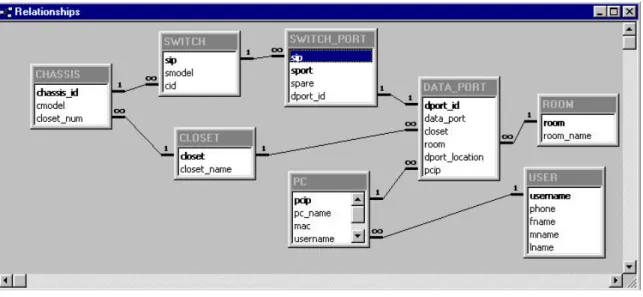
network. The system is represented in an Entity Relationship (ER) diagram (Appendix A). This ER
diagram lists the CLOSET, CHASSIS, SWITCH, SWITCH, SWITCH_PORT, DATA_PORT, ROOM, PC,
and USER entities, and shows how the entities relate to each other. A CLOSET has many CHASSIS and
contains many DATA_PORTs. A CHASSIS can have one or more SWITCHes and a SWITCH contains
one or more SWITCH_PORTs. A SWITCH_PORT is a weak entity because it requires the SWITCH
entity in order to have any significance. A SWITCH_PORT may be connected to one or zero
DATA_PORTs and a DATA_PORT may be connected to one or zero SWITCH_PORTs. A ROOM has
one or more DATA_PORTs and a DATA_PORT while a DATA_PORT may exist in only one room. A
USER may have one or more PC’s and a PC may be connected to many DATA_PORTS, or a
These entities were translated into tables in Access and the attributes attached to those entities
were entered as fields in those tables. The relationships between each entity and the referential integrity
constraints were modeled in the Access relationships window. Figure 5 is a screen shot of the
aforementioned database relationships as represented in Access.
Figure 5 – Microsoft Access entity relationships screen capture
The tables, primary keys, foreign keys and other attributes of each table are represented in a database
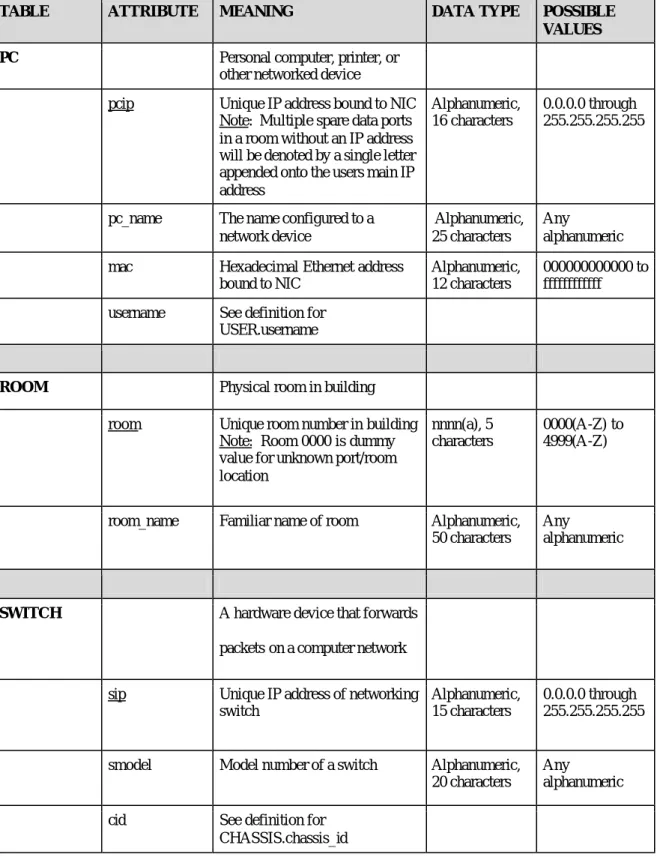
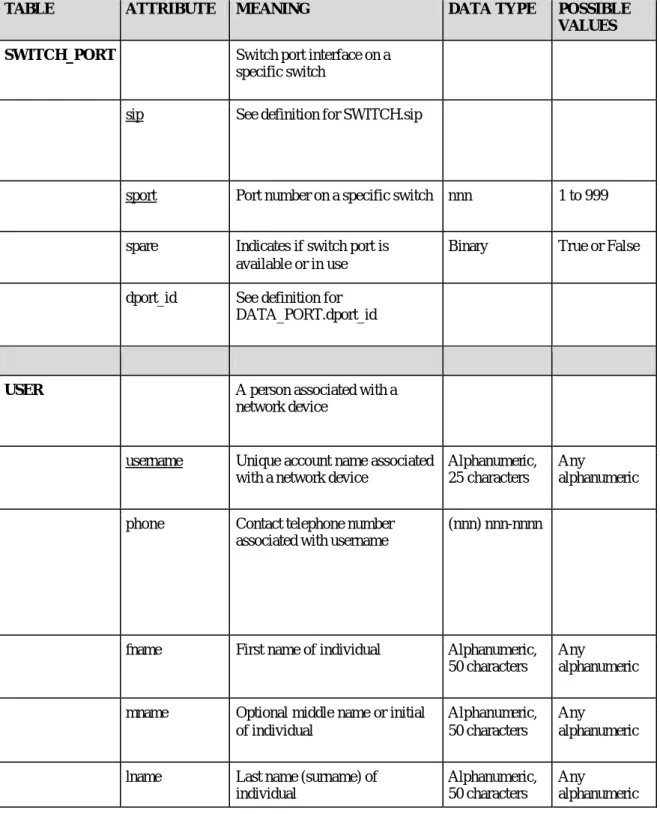
schema (Appendix B). For a further explanation of the database structure, a data dictionary is provided
(Appendix C). The data dictionary provides a detailed explanation of the meaning of each table and
attribute. It also provides the data types and possible values of each attribute.
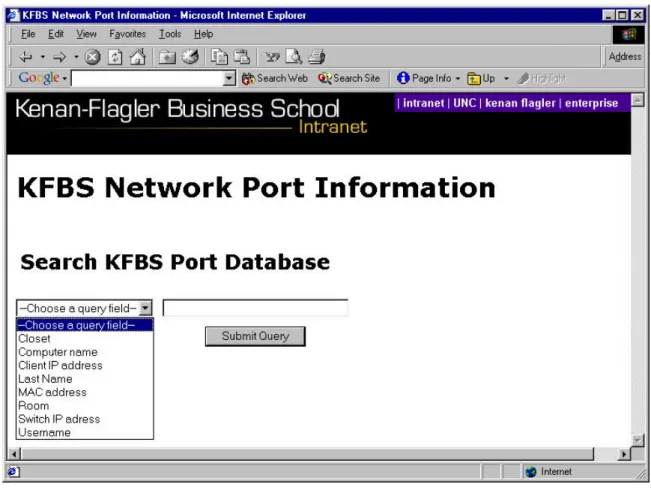
Web Interface: http://intranet.kenan-flagler.unc.edu/ports/index.cfm
Figure 6 – Query Web page screen capture
For example, a user who knows a Clients IP address or a portion of the IP address will select “Client IP
address” from the pull-down menu and enter an address such as 152.2.11.36 in the text box. After the
“submit query” button is clicked then the following is displayed:
This search scenario is particularly useful because the query is made on a string-matching basis. This
means that a user does not have to know the exact Client IP address, Username, Computer name, Switch IP
address, MAC address, or Last name. For example, querying only on the first letter of a last name will
return all the users will the last name beginning with that letter. A user will get exact results with exact
input to the form, but exact data is often not available. This feature is particularly useful for usernames and
computer names that often are some version of a client’s last name appended with one or two initials of
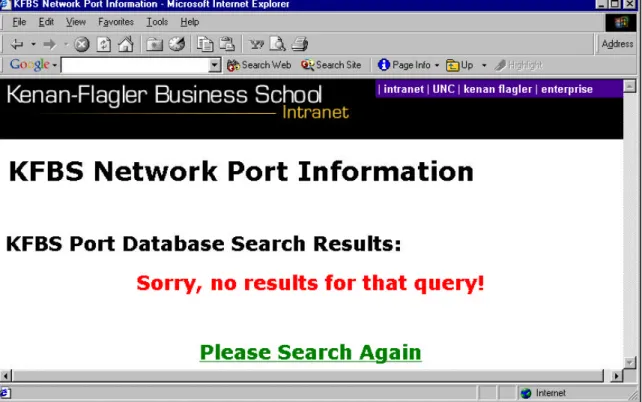
their first name. If a query is not satisfied by any information in the database, a user is redirected to a Web
site that indicates that no results were found. A figure indicating this page is below:
Figure 8 – Unsuccessful query Web page
Security
The database itself is in a restricted directory and may only be accessed by the network
administrator. The NTFS permissions do not allow any other individual the right to view, modify, or delete
any information from the database.
The Web interface allows read-only access to restricted information in the database. IP addresses
and other network information may be used unethically if compromised. Given this possibility, the Web
site itself is also secured through NTFS permissions. A single username and password will be used to
authenticate KFBS troubleshooters that need to access and search network information.
CONCLUSION
This project has been and continues to be a monumental undertaking. The database design has
been refined a number of times in order to represent the true information needs and entity relationships in
existence at KFBS. The final implementation of the database provides a single repository of information
for network information at KFBS. In addition, the accompanying Web page provides an invaluable tool as
an instant source of information for network troubleshooters to efficiently and effectively resolve network
connectivity problems at KFBS. The database solution also provides a necessary information source for
the Network Administrator and IT Director to acquire aggregate statistics on the network such as number of
data ports and number of spare switch port connections in a telecommunications closet. This solution has
provided many of the answers to network information questions posed in this project, but a number of
design problems were encountered along the way.
a letter to the final octet of their static IP address. While this solution is not optimal, it prevents t he need
for creating a totally random dummy IP address, while still providing a connection back to the user.
Another lesson learned is that it is wise to conduct lengthy experiments with dummy data when trying to
test the functionality of the database design. The added testing time at the front-end of the project will save
large amounts of time if a problem is encountered after a significant amount of data has been entered.
FUTURE
REFERENCES
Bro wn, B. (2000).
EIA/TIA-568 Wiring Standard.
Retrieved November 16, 2001, from Wellington
Institute of Technology Web site:
http://www.cit.ac.nz/smac/winnt/pt1_3.htm
Network Computing Interactive Buyers Guide. (1998). Retrieved November 15, 2001, from
http://www.networkcomputing.com/ibg/ProductInfo?product_id=23118
Grigonis, R. (2000). Wiring the Next Gen Office.
Computer Telephony.
Retrieved November 15, 2001
from
http://www.cconvergence.com/article/74550
Connolly, P. (2000). Enterprise Toolbox.
Info World.
Retrieved November 13, 2001, fro m
http://www.infoworld.com/articles/op/xml/00/08/21/000821opbiggs.xml
Sturdevant, C. (2000). Bringing Order in Datacenters.
eWEEK.
Retrieved November 15, 2001, from
http://www.zdnet.com/products/stories/reviews/0,4161,2618800,00.html
Elmasari, R., & Navathe, S. (2000). Fundamentals of Database Systems . Menlo Park, CA: Addison-
Wesley.
Microsoft Corporation. (2001).
Introduction to .ldb files.
Retrieved November 14, 2001, from
http://support.microsoft.com/support/kb/articles/Q208/7/78.ASP?LN=EN- C2000
US&SD=gn&FR=0&qry=maximum%20users%20255&rnk=1&src=DHCS_MSPSS_gn_SRCH&
SPR=AC
Appendix A:
Appendix B:
DATABASE SCHEMA
CHASSIS
FK
chassis_id
cmodel
closet_num
CLOSET
closet closet_name
DATA_PORT
FK
FK
FK
dport_id data_port closet room
dport_location pcip
PC
FK
pcip pc_name mac username
ROOM
DATABASE SCHEMA (CONTINUED)
SWITCH
FK
sip
smodel
cid
SWITCH_PORT
FK
sip sport spare dport_id
USER
Appendix C:
DATA DICTIONARY
TABLE
ATTRIBUTE
MEANING
DATA TYPE
POSSIBLE
VALUES
CHASSIS
Hardware in a telecommunications
closet that may contain multiple
network switches
chassis_id
Unique chassis identification
number
AutoNumber
1 to 32,768
cmodel
Model number of a specific chassis Alphanumeric,
40 characters
Any
alphanumeric
closet_num
See definition for CLOSET.closet
CLOSET
Telecommunications room number
where the computer networking
equipment is located
closet
Unique room number of a
telecommunications closet
nnnn(a)
0001(A) to
4999(Z)
closet_name
Familiar name of a
telecommunications closet
na
1A, 1B, 2A,
2B, 3A, 3B,
3C, 4A,4B
DATA_PORT
Physical data port that is hard
-wired from telecommunications
closet to individual rooms on each
floor
dport_id
Unique data port identification
number
AutoNumber
1 to 32,768
data_port
data port prefix and data port
number, separated by “-“
Note: Initial Port prefix character
indicates section of building that
port is located & Second port
prefix, D, indicates that the port is
a data port
aa-nnn
00 to
AD-999
closet
See definition for CLOSET.closet
room
See definition for ROOM.room
dport_location
Physical location of a data port in a
room
Alphanumeric,
75 characters
Any
DATA DICTIONARY (CONTINUED)
TABLE
ATTRIBUTE
MEANING
DATA TYPE
POSSIBLE
VALUES
PC
Personal computer, printer, or
other networked device
pcip
Unique IP address bound to NIC
Note: Multiple spare data ports
in a room without an IP address
will be denoted by a single letter
appended onto the users main IP
address
Alphanumeric,
16 characters
0.0.0.0 through
255.255.255.255
pc_name
The name configured to a
network device
Alphanumeric,
25 characters
Any
alphanumeric
mac
Hexadecimal Ethernet address
bound to NIC
Alphanumeric,
12 characters
000000000000 to
ffffffffffff
username
See definition for
USER.username
ROOM
Physical room in building
room
Unique room number in building
Note: Room 0000 is dummy
value for unknown port/room
location
nnnn(a), 5
characters
0000(A-Z) to
4999(A-Z)
room_name
Familiar name of room
Alphanumeric,
50 characters
Any
alphanumeric
SWITCH
A hardware device that forwards
packets on a computer network
sip
Unique IP address of networking
switch
Alphanumeric,
15 characters
0.0.0.0 through
255.255.255.255
smodel
Model number of a switch
Alphanumeric,
20 characters
Any
alphanumeric
DATA DICTIONARY (CONTINUED)
TABLE
ATTRIBUTE
MEANING
DATA TYPE
POSSIBLE
VALUES
SWITCH_PORT
Switch port interface on a
specific switch
sip
See definition for SWITCH.sip
sport
Port number on a specific switch nnn
1 to 999
spare
Indicates if switch port is
available or in use
Binary
True or False
dport_id
See definition for
DATA_PORT.dport_id
USER
A person associated with a
network device
username
Unique account name associated
with a network device
Alphanumeric,
25 characters
Any
alphanumeric
phone
Contact telephone number
associated with username
(nnn) nnn-nnnn
fname
First name of individual
Alphanumeric,
50 characters
Any
alphanumeric
mname
Optional middle name or initial
of individual
Alphanumeric,
50 characters
Any
alphanumeric
lname
Last name (surname) of
individual
Alphanumeric,
50 characters
Any
Appendix D:
Cold Fusion code for Query page: index.cfm
(Page 1/4 )
<!DOCTYPE HTML PUBLIC "-//W3C//DTD HTML 4.0 Transitional//EN">
<html> <head>
<title>KFBS Network Port Information</title> <!--- Banner image and links code --->
<STYLE> A.GlobalClass {color:white;text-decoration:none} A.GlobalClass:hover {color:yellow;} A.LocalClass {color:#ffffff;text-decoration:none} A.LocalClass:hover {color:yellow;} </STYLE> <SCRIPT LANGUAGE="JavaScript">
n = (document.layers) ? 1:0; ie = (document.all) ? 1:0;
function fltshow(fltDiv) { if (n) {
//document.captureEvents(Event.MOUSEOVER); //document.onmouseover = mouserboy; //function mouserboy(e,fltDiv) { //document.layers[fltDiv].left = e.pageX; //alert(e.pageX)
//}
//alert(document.e.pageX); //alert(sd.pageX);
document.layers[fltDiv].visibility = "show"; }
else if (ie){
//alert(event.x);
document.all[fltDiv].style.visibility = "visible"; } }
function flthide(fltDiv) { if (n) {
looptrip = document.layers.length; for (i = 0; i < looptrip; i++){
document.layers[i].visibility = "hide";
} } else if (ie) {
var doc_tables = document.all.tags("DIV"); for (i=0; i<doc_tables.length; i++){
var s = ""; s = doc_tables(i).id; r = s.search("Div");
//alert(eval("'"+s+"'"))
if (r != -1){ //doc_tables(i).style.visibility = "visible"; document.all[s].style.visibility= "hidden" ;
} }
} }
var slideimages=new Array() var slidelinks=new Array() function slideshowimages(){
for (i=0;i<slideshowimages.arguments.length;i++){ slideimages[i]=new Image()
Cold Fusion code for Query page: index.cfm (Page 2/4 )
} function slideshowlinks(){ for (i=0;i<slideshowlinks.arguments.length;i++) slidelinks[i]=slideshowlinks.arguments[i] } function gotoshow(){ if (!window.winslide||winslide.closed) winslide=window.open(slidelinks[whichlink]) else winslide.location=slidelinks[whichlink] winslide.focus() } </SCRIPT><title>Kenan Flagler Intranet</title> </head>
<BODY BGCOLOR="white" TOPMARGIN="0" LEFTMARGIN="0" MARGINWIDTH="0" MARGINHEIGHT="0" TEXT="#000000">
<TABLE WIDTH="100%" BGCOLOR="black" VALIGN="TOP" CELLPADDING="3" CELLSPACING="0" BORDER="0"> <TR BGCOLOR="Black">
<TD VALIGN="top" BGCOLOR="black" WIDTH="456" HEIGHT="50" ALIGN="left" ROWSPAN="2"> <A HREF="index.html" onMouseOver="flthide();"><IMG WIDTH="450" HEIGHT="50" SRC="/images/banner2.gif" BORDER="0" ALT="Kenan Flagler" ALIGN="left"></A>
</TD>
<TD VALIGN="top" BGCOLOR="#46008F" WIDTH="100%">
<DIV ID="GlobalMenu" ALIGN="left" STYLE="font-family:Arial, Helvetica,Geneva,Swiss,SunSans-Regular; font-style: bold; font-size: 10pt; color:white; visibility: visible;">
<B>
| <A ID="menu1" onMouseOver="flthide();fltshow('menu1Div');" STYLE="color: white; text-decoration: none; font-family: Arial" HREF="http://intranet.kenan-flagler.unc.edu/">intranet</A> | <A ID="menu2"
onMouseOver="flthide();fltshow('menu2Div')" STYLE="color: white; text-decoration: none; font-family: Arial"
HREF="http://www.unc.edu"> UNC </A> | <A ID="menu3" onMouseOver="flthide(); fltshow('menu3Div')" STYLE="color: white; text-decoration: none; font-family: Arial" HREF="http://www.kenan-flagler.unc.edu">kenan flagler</A> | <A ID="menu4" onMouseOver="flthide();fltshow('menu4Div')" STYLE="color: white; text-decoration: none; font-family: Arial"
HREF="http://intranet.kenan-flagler.unc.edu/ois/">enterprise</A> </B>
</DIV>
<DIV ID="menu1Div" STYLE=" visibility: hidden; position:absolute; left:463; top:20; font-family:Arial,
Helvetica,Geneva,Swiss,SunSans-Regular;font-style: bold; font-size: 8pt; color:white;background-color: #46008F; layer-background-color: #46008F;" ONMOUSEOUT="flthide('menu1Div');" ONMOUSEOVER="fltshow('menu1Div');"
ONBLUR="flthide('menu1Div');"> <DIV ALIGN="left"> <B>
___________________<BR>
<A CLASS="GlobalClass" HREF="http://intranet.kenan-flagler.unc.edu/index.html">Intranet Home</A><BR>
<A CLASS="GlobalClass"
HREF="http://intranet.kenan-flagler.unc.edu/itr/Help/Tips___Tricks/Email/Request_Help/request_help.html">Submit Request to Helpdesk</A ><BR>
<A CLASS="GlobalClass" HREF="http://intranet.kenan-flagler.unc.edu/itr/">ITR</A><BR> <A CLASS="GlobalClass"
Cold Fusion code for Query page: index.cfm (Page 3/4)
<DIV ID="menu2Div" STYLE="visibility: hidden; position:absolute; left:530; top:20; font-family:Arial,
Helvetica,Geneva,Swiss,SunSans-Regular;font-style: bold; font-size: 8pt; color:white;background-color: #46008F; layer-background-color: #46008F;" ONMOUSEOUT="flthide('menu2Div');" ONMOUSEOVER="fltshow('menu2Div');"
ONBLUR="flthide('menu2Div');"> <DIV ALIGN="left"><B>
___________________<BR>
<A CLASS="GlobalClass" HREF="http://www.unc.edu/">UNC Home</A><BR> <A CLASS="GlobalClass"
HREF="https://www-s2.ais.unc.edu/servlet/SISBrowserServlet">UNC Online Registration</A><BR> <A CLASS="GlobalClass" HREF="http://help.unc.edu/">ATN</A><BR> </B></DIV>
</DIV>
<DIV ID="menu3Div" STYLE="visibility: hidden; position:absolute; left:567; top:20; font-family:Arial,
Helvetica,Geneva,Swiss,SunSans-Regular;font-style: bold; font-size: 8pt; color:white;background-color: #46008F; layer-background-color: #46008F;" ONMOUSEOUT="flthide('menu3Div');" ONMOUSEOVER="fltshow('menu3Div');"
ONBLUR="flthide('menu3Div');"> <DIV ALIGN="left"><B>
___________________<BR>
<A CLASS="GlobalClass" HREF="http://www.kenan-flagler.unc.edu">Kenan Flagler Home</A><BR>
<A CLASS="GlobalClass" HREF="index.html">Intranet Home</A><BR> <A CLASS="GlobalClass"
HREF="http://www.kenan-flagler.unc.edu/news/index.html">Kenan Flagler News and Events</A><BR> </B></DIV>
</DIV>
<DIV ID="menu4Div" STYLE="visibility: hidden; position:absolute; left:660; top:20; font-family:Arial,
Helvetica,Geneva,Swiss,SunSans-Regular;font-style: bold; font-size: 8pt; color:white;background-color: #46008F; layer-background-color: #46008F;" ONMOUSEOUT="flthide('menu4Div');" ONMOUSEOVER="fltshow('menu4Div');"
ONBLUR="flthide('menu4Div');"> <DIV ALIGN="left"><B> ___________________<BR>
<A CLASS="GlobalClass" HREF="http://intranet.kenan-flagler.unc.edu/ois/">enterprise</A><BR> </B></DIV>
</DIV>
</TD> </TR>
<TR BGCOLOR="Black">
<TD VALIGN="top" BGCOLOR="black" WIDTH="100%" HEIGHT="100%" >
<A HREF="index.html" onMouseOver="flthide();"><IMG SRC="/images/spacer.gif" WIDTH="300" HEIGHT="45" BORDER="0" ALIGN="right" ALT=""></A>
</TD> </T R>
</table>
<!--- Ensure that user chooses from list if trying to view ---> <SCRIPT language="javascript">
function validate() {
null_test=searchForm.search.value; if (null_test=='') {
alert('Please enter search criteria in text box.'); event.returnValue=false;
}
if (searchForm.select_query.options[0].selected) { alert('Please choose a Query Field.');
event.returnValue=false; }
}
</SCRIPT> </head>
<h1> KFBS Network Port Information</h1><body> <br>
<br>
<h2> Search KFBS Port Database</h2>
Cold Fusion code for Query page: index.cfm (Page 4/4)
<table border="0" cellpadding="0" cellspacing="10"> <tr>
<td align=center>
<select name=select_query>
<option value="0" selected>--Choose a query field--</option> <option value="1">Closet</option>
<option value="2">Computer name</option> <option value="3">Client IP address</option> <option value="4">Last Name</option> <option value="5">MAC address</option> <option value="6">Room</option> <option value="7">Switch IP adress</option> <option value="8">Username</option> </select>
</td>
<td align=center>
<input type="text" name="search" size=30<table align="center" cellspacing="0" cellpadding="0" border="0"> </td>
</tr> <tr>
<td align=center>
</td>
<td align=center><input type=submit name=submit value="Submit Query"></td> </tr>
</table> </form>
Cold Fusion code for Search Web page: search.cfm (Page 1/9)
<!DOCTYPE HTML PUBLIC "-//W3C//DTD HTML 4.0 Transitional//EN">
<html> <head>
<title>KFBS Network Port Information</title> <!--- Banner image and links code --->
<STYLE> A.GlobalClass {color:white;text-decoration:none} A.GlobalClass:hover {color:yellow;} A.LocalClass {color:#ffffff;text-decoration:none} A.LocalClass:hover {color:yellow;} </STYLE> <SCRIPT LANGUAGE="JavaScript">
n = (document.layers) ? 1:0; ie = (document.all) ? 1:0;
function fltshow(fltDiv) { if (n) {
//document.captureEvents(Event.MOUSEOVER); //document.onmouseover = mouserboy; //function mouserboy(e,fltDiv) { //document.layers[fltDiv].left = e.pageX; //alert(e.pageX)
//}
//alert(document.e.pageX); //alert(sd.pageX);
document.layers[fltDiv].visibility = "show"; }
else if (ie){
//alert(event.x);
document.all[fltDiv].style.visibility = "visible"; } }
function flthide(fltDiv) { if (n) {
looptrip = document.layers.length;
for (i = 0; i < looptrip; i++){
document.layers[i].visibility = "hide";
} } else if (ie) {
var doc_tables = document.all.tags("DIV"); for (i=0; i<doc_tables.length; i++){
var s = ""; s = doc_tables(i).id; r = s.search("Div");
//alert(eval("'"+s+"'"))
if (r != -1){ //doc_tables(i).style.visibility = "visible"; document.all[s].style.visibility= "hidden" ;
} }
} }
var slideimages=new Array() var slidelinks=new Array() function slideshowimages(){
for (i=0;i<slideshowimages.arguments.length;i++){ slideimages[i]=new Image()
Cold Fusion code for Search Web page: search.cfm (Page 2/9)
} function slideshowlinks(){ for (i=0;i<slideshowlinks.arguments.length;i++) slidelinks[i]=slideshowlinks.arguments[i] } function gotoshow(){ if (!window.winslide||winslide.closed) winslide=window.open(slidelinks[whichlink]) else winslide.location=slidelinks[whichlink] winslide.focus() } </SCRIPT><title>Kenan Flagler Intranet</title> </head>
<BODY BGCOLOR="white" TOPMARGIN="0" LEFTMARGIN="0" MARGINWIDTH="0" MARGINHEIGHT ="0" TEXT="#000000">
<TABLE WIDTH="100%" BGCOLOR="black" VALIGN="TOP" CELLPADDING="3" CELLSPACING="0" BORDER="0"> <TR BGCOLOR="Black">
<TD VALIGN="top" BGCOLOR="black" WIDTH="456" HEIGHT="50" ALIGN="left" ROWSPAN="2"> <A HREF="index.html" onMouseOver=" flthide();"><IMG WIDTH="450" HEIGHT="50" SRC="/images/banner2.gif" BORDER="0" ALT="Kenan Flagler" ALIGN="left"></A>
</TD>
<TD VALIGN="top" BGCOLOR="#46008F" WIDTH="100%">
<DIV ID="GlobalMenu" ALIGN="left" STYLE="font-family:Arial, Helvetica,Geneva,Swiss,SunSans-Regular; font-style: bold; font-size: 10pt; color:white; visibility: visible;">
<B>
| <A ID="menu1" onMouseOver="flthide();fltshow('menu1Div');" STYLE="color: white; text-decoration: none; font-family: Arial" HREF="http://intranet.kenan-flagler.unc.edu/">intranet</A> | <A ID="menu2"
onMouseOver="flthide();fltshow('menu2Div')" STYLE="color: white; text-decoration: none; font-family: Arial"
HREF="http://www.unc.edu"> UNC </A> | <A ID="menu3" onMouseOver="flthide(); fltshow('menu3Div')" STYLE="color: white; text-decoration: none; font-family: Arial" HREF="http://www.kenan-flagler.unc.edu">kenan flagler</A> | <A ID="menu4" onMouseOver="flthide();fltshow('menu4Div')" STYLE="color: white; text-decoration: none; font-family: Arial"
HREF="http://intranet.kenan-flagler.unc.edu/ois/">enterprise</A> </B>
</DIV>
<DIV ID="menu1Div" STYLE=" visibility: hidden; position:absolute; left:463; top:20; font-family:Arial,
Helvetica,Geneva,Swiss,SunSans-Regular;font-style: bold; font-size: 8pt; color:white;background-color: #46008F; layer-background-color: #46008F;" ONMOUSEOUT="flthide('menu1Div');" ONMOUSEOVER="fltshow('menu1Div');"
ONBLUR="flthide('menu1Div');"> <DIV ALIGN="left"> <B>
___________________<BR>
<A CLASS="GlobalClass" HREF="http://intranet.kenan-flagler.unc.edu/index.html">Intranet Home</A><BR>
<A CLASS="GlobalClass"
HREF="http://intranet.kenan-flagler.unc.edu/itr/Help/Tips___Tricks/Email/Request_Help/request_help.html">Submit Request to Helpdesk</A ><BR>
<A CLASS="GlobalClass" HREF="http://intranet.kenan-flagler.unc.edu/itr/">ITR</A><BR> <A CLASS="GlobalClass"
Cold Fusion code for Search Web page: search.cfm (Page 3/9)
<DIV ID="menu2Div" STYLE="visibility: hidden; position:absolute; left:530; top:20; font-family:Arial,
Helvetica,Geneva,Swiss,SunSans-Regular;font-style: bold; font-size: 8pt; color:white;background-color: #46008F; layer-background-color: #46008F;" ONMOUSEOUT="flthide('menu2Div');" ONMOUSEOVER="fltshow('menu2Div');"
ONBLUR="flthide('menu2Div');"> <DIV ALIGN="left"><B>
___________________<BR>
<A CLASS="GlobalClass" HREF="http://www.unc.edu/">UNC Home</A><BR> <A CLASS="GlobalClass"
HREF="https://www-s2.ais.unc.edu/servlet/SISBrowserServlet">UNC Online Registration</A><BR> <A CLASS="GlobalClass" HREF="http://help.unc.edu/">ATN</A><BR> </B></DIV>
</DIV>
<DIV ID="menu3Div" STYLE="visibility: hidden; position:absolute; left:567; top:20; font-family:Arial,
Helvetica,Geneva,Swiss,SunSans-Regular;font-style: bold; font-size: 8pt; color:white;background-color: #46008F; layer-background-color: #46008F;" ONMOUSEOUT="flthide('menu3Div');" ONMOUSEOVER="fltshow('menu3Div');"
ONBLUR="flthide('menu3Div');"> <DIV ALIGN="left"><B>
___________________<BR>
<A CLASS="GlobalClass" HREF="http://www.kenan-flagler.unc.edu">Kenan Flagler Home</A><BR>
<A CLASS="GlobalClass" HREF="index.html">Intranet Home</A><BR> <A CLASS="GlobalClass"
HREF="http://www.kenan-flagler.unc.edu/news/index.html">Kenan Flagler News and Events</A><BR> </B></DIV>
</DIV>
<DIV ID="menu4Div" STYLE="visibility: hidden; position:absolute; left:660; top:20; font-family:Arial,
Helvetica,Geneva,Swiss,SunSans-Regular;font-style: bold; font-size: 8pt; color:white;background-color: #46008F; layer-background-color: #46008F;" ONMOUSEOUT="flthide('menu4Div');" ONMOUSEOVER="fltshow('menu4Div');"
ONBLUR="flthide('menu4Div');"> <DIV ALIGN="left"><B> ___________________<BR>
<A CLASS="GlobalClass" HREF="http://intranet.kenan-flagler.unc.edu/ois/">enterprise</A><BR> </B></DIV>
</DIV>
</TD> </TR>
<TR BGCOLOR="Black">
<TD VALIGN="top" BGCOLOR="black" WIDTH="100%" HEIGHT="100%" >
<A HREF="index.html" onMouseOver="flthide();"><IMG SRC="/images/spacer.gif" WIDTH="300" HEIGHT="45" BORDER="0" ALIGN="right" ALT=""></A>
</TD> </TR>
</table> </head>
<h1> KFBS Network Port Information</h1> <br>
<br> <body>
<h2> KFBS Port Database Search Results:</h2> <!--- Conditional search queries Begin Here --->
<!--- If selection is closet execute this code ---> <cfif #form.select_query# eq 1>
<cfquery name="closet" datasource="WDports" dbtype="ODBC">
SELECT CLOSET.closet_name, DATA_PORT.data_port, SWITCH.sip, SWITCH_PORT.sport, PC.pcip, ROOM.room, USER.username, USER.fname, USER.lname
FROM [USER] INNER JOIN (SWITCH INNER JOIN (ROOM INNER JOIN (PC INNER JOIN ((CLOSET INNER JOIN DATA_PORT ON CLOSET.closet = DATA_PORT.closet) INNER JOIN SWITCH_PORT ON DATA_PORT.dport_id = SWITCH_PORT.dport_id) ON PC.pcip = DATA_PORT.pcip) ON ROOM.room = DATA_PORT.room) ON SWITCH.sip = SWITCH_PORT.sip) ON USER.username = PC.username
WHERE (((CLOSET.closet_name)='#search#')) ORDER BY data_port
</cfquery>
Cold Fusion code for Search Web page: search.cfm (Page 4/9)
<cflocation url="no_result.cfm"> </cfif>
<table width="90%" border="0"> <tr>
<td align=left>
<h3> Search criteria: <font face="" color="green">Closet <cfoutput>#search#</cfoutput></font></h3>
</td>
<td align="center"><h 3><a href="index.cfm"><font face="" color="Red">Search Again?</font></a></h3></td> </tr>
</table>
<table width="100%" border="1">
<tr bgcolor="#99ccf">
<td><strong><big>Data Port</big></strong></td>
<td><strong><big>Switch IP, Port</big></strong></t d> <td><strong><big>Client IP</big></strong></td> <td><strong><big>Room</big></strong></td> <td><strong><big>Username</big></strong></td> <td><strong><big>Name</big></strong></td> </tr> <cfoutput query="closet"> <tr> <td>#data_port#</td> <td>#sip#, #sport#</td> <td>#pcip#</td> <td>#room#</td> <td>#username#</td> <td>#fname# #lname#</td> </tr> </cfoutput> </table> </cfif>
<!--- If selection is computer name, then execute this code ---> <cfif #form.select_query# eq 2>
<cfquery name="computer_name" datasource="WDports" dbtype="ODBC">
SELECT PC.pc_name, USER.lname, USER.fname, PC.username, ROOM.room, PC.pcip, DATA_PORT.data_port, CLOSET.closet_name, SWITCH.sip, SWITCH_PORT.sport
FROM [USER] INNER JOIN (SWITCH INNER JOIN ((ROOM INNER JOIN (PC INNER JOIN (CLOSET INNER JOIN DATA_PORT ON CLOSET.closet = DATA_PORT.closet) ON PC.pcip = DATA_PORT.pcip) ON ROOM.room =
DATA_PORT.room) INNER JOIN SWITCH_PORT ON DATA_PORT.dport_id = SWITCH_PORT.dport_id) ON SWITCH.sip = SWITCH_PORT.sip) ON USER.username = PC.username
WHERE (((PC.pc_name) LIKE '#search#%')) ORDER BY pc_name
</cfquery>
<!-- Unsuccessful query! -->
<cfif computer_name.RecordCount eq 0> <cflocation url="no_result.cfm"> </cfif>
<table width="100%" border="0"> <tr>
<td align=left>
<h3> Search criteria: <font face="" color="green">Computer Name: <cfoutput>#search#*</cfoutput></font></h3>
</td>
<td align="center"><h3><a href="index.cfm"><font face="" color="Red">Search Again?</font></a></h3></td> </tr>
</table>
<table width="100%" border="1"> <tr bgcolor="#99ccf">
<td><b><font size="+1">Computer Name</font></b></td> <td><b><font size="+1">Name</font></b></td>
Cold Fusion code for Search Web page: search.cfm (Page 5/9)
</tr>
<cfoutput query="comput er_name"> <tr> <td>#pc_name#</td> <td>#fname# #lname#</td> <td>#username#</td> <td>#pcip#</td> <td>#room#</td> <td>#data_port#</td> <td>#closet_name#</td> <td>#sip#, #sport#</td> <td></td> </tr> </cfoutput> </table> </cfif>
<!--- If selection is client IP, execute this code! ---> <cfif #form.select_query# eq 3>
<cfquery name="client_ip" datasource="WDports" dbtype="ODBC">
SELECT PC.pcip, PC.pc_name, USER.lname, USER.fname, USER.username, DATA_PORT.room, DATA_PORT.data_port, CLOSET.closet_name, SWITCH.sip, SWITCH_PORT.sport
FROM [USER] INNER JOIN (SWITCH INNER JOIN ((ROOM INNER JOIN (PC INNER JOIN (CLOSET INNER JOIN DATA_PORT ON CLOSET.closet = DATA_PORT.closet) ON PC.pcip = DATA_PORT.pcip) ON ROOM.room =
DATA_PORT.room) INNER JOIN SWITCH_PORT ON DATA_PORT.dport_id = SWITCH_PORT.dport_id) ON SWITCH.sip = SWITCH_PORT.sip) ON USER.username = PC.username
WHERE (((PC.pcip) Like '#search#%')) ORDER BY PC.pcip
</cfquery>
<!-- Unsuccessful query! --> <cfif client_ip.RecordCount eq 0>
<cflocation url="no_result.cfm"> </cfif>
<table width="100%" border="0"> <tr>
<td align=left>
<h3> Search criteria: <font face="" color="green">Client IP: <cfoutput>#search#*</cfoutput></font></h3>
</td>
<td align="center"><h3><a href="index.cfm"><font face="" color="Red">Search Again?</font></a></h3></td> </tr>
</table>
<table width="100%" border="1"> <tr bgcolor="#99ccf">
<td><b><font size="+1">Client IP</font></b></td> <td><b><font size="+1">Computer Name</font></b></td> <td><b><font size="+1">Name</font></b></td>
<td><b><font size="+1">Username</font></b></td> <td><b><font size="+1">Room</font></b></td> <td><b><font size="+1">Data Port</font></b></td> <td><b><font size="+1">Closet</font></b></td> <td><b><font size="+1">Switch IP, Port</font></b></td> </tr> <cfoutput query="client_ip"> <tr> <td>#pcip#</td> <td>#pc_name#</td> <td>#fname# #lname#</td> <td>#username#</td> <td>#room#</td> <td>#data_port#</td> <td>#closet_name#</td> <td>#sip#, #sport#</td> <td></td> </tr> </cfoutput> </table> </cfif>
Cold Fusion code for Search Web page: search.cfm (Page 6/9)
<cfif #form.select_query# eq 4>
<cfquery name="last_name" datasource="WDports" dbtype="ODBC">
SELECT USER.lname, USER.fname, PC.pc_name, USER.username, PC.pcip, ROOM.room, DATA_PORT.data_port, CLOSET.closet_name, SWITCH.sip, SWITCH_PORT.sport
FROM [USER] INNER JOIN (SWITCH INNER JOIN ((ROOM INNER JOIN (PC INNER JOIN (CLOSET INNER JOIN DATA_PORT ON CLOSET.closet = DATA_PORT.closet) ON PC.pcip = DATA_PORT.pcip) ON ROOM.room =
DATA_PORT.room) INNER JOIN SWITCH_PORT ON DATA_PORT.dport_id = SWITCH_PORT.dport_id) ON SWITCH.sip = SWITCH_PORT.sip) ON USER.username = PC.username
WHERE (((USER.lname) Like '#search#%')) ORDER BY lname, fname
</cfquery>
<!-- Unsuccessful query! --> <cfif last_name.RecordCount eq 0>
<cflocation url="no_result.cfm"> </cfif>
<table width="100%" border="0"> <tr>
<td align=left>
<h3> Search criteria: <font face="" color="green">Last Name: <cfoutput>#search#*</cfoutput></font></h3>
</td>
<td align="center"><h3><a href="index.cfm"><font face="" color="Red">Search Again?</font></a></h3></td> </tr>
</table>
<table width="100%" border="1"> <tr bgcolor="#99ccf">
<td><b><font size="+1">Name</font></b></td>
<td><b><font size="+1">Computer Name</font></b></td> <td><b><font size="+1">Username</font></b></td>
<td><b><font size="+1">Client IP</font></b></td> <td><b><font size="+1">Room</font></b></td> <td><b><font size="+1">Data Port</font></b></td> <td><b><font size="+1">Closet</font></b></td> <td><b><font size="+1">Switch IP, Port</font></b></td> </tr> <cfoutput query="last_name"> <tr> <td>#lname#, #fname#</td> <td>#pc_name#</td> <td>#username#</td> <td>#pcip#</td> <td>#room#</td> <td>#data_port#</td> <td>#closet_name#</td> <td>#sip#, #sport#</td> </tr> </cfoutput> </table> </cfif>
<!--- If selection is MAC address, execute this code! ---> <cfif #form.select_query# eq 5>
<cfquery name="select_mac" datasource="WDports" dbtype="ODBC">
SELECT PC.mac, USER.lname, USER.fname, PC.pc_name, USER.username, PC.pcip, ROOM.room, DATA_PORT.data_port, CLOSET.closet_name, SWITCH.sip, SWITCH_PORT.sport
FROM [USER] INNER JOIN (SWITCH INNER JOIN ((ROOM INNER JOIN (PC INNER JOIN (CLOSET INNER JOIN DATA_PORT ON CLOSET.closet = DATA_PORT.closet) ON PC.pcip = DATA_PORT.pcip) ON ROOM.room =
DATA_PORT.room) INNER JOIN SWITCH_PORT ON DATA_PORT.dport_id = SWITCH_PORT.dport_id) ON SWITCH.sip = SWITCH_PORT.sip) ON USER.username = PC.username
WHERE (((PC.mac) Like '#search#%')) ORDER BY mac
</cfquery>
<!-- Unsuccessful query! --> <cfif select_mac.RecordCount eq 0>
<cflocation url="no_result.cfm"> </cfif>
<table width="100%" border="0"> <tr>
Cold Fusion code for Search Web page: search.cfm (Page 7/9)
<h3> Search criteria: <font face="" color="green">MAC address: <cfoutput>#search#*</cfoutput></font></h3>
</td>
<td align="center"><h3><a href="index.cfm"><font face="" color="Red">Search Again?</font></a></h3></td> </tr>
</table>
<table width="100%" border="1"> <tr bgcolor="#99ccf">
<td><b><font size="+1">MAC address</font></b></td> <td><b><font size="+1">Name</font></b></td>
<td><b>C<font size="+1">omputer Name</font></b></td> <td><b><font size="+1">Username</font></b></td>
<td><b><font size="+1">Client IP</font></b></td> <td><b><font size="+1">Room</font></b></td> <td><b><font size="+1">Data Port</font></b></td> <td><b><font size="+1">Closet</font></b></td> <td><b><font size="+1">Switch IP, Port</font></b></td> </tr> <cfoutput query="select_mac"> <tr> <td>#mac#</td> <td>#fname# #lname#</td> <td>#pc_name#</td> <td>#username#</td> <td>#pcip#</td> <td>#room#</td> <td>#data_port#</td> <td>#closet_name#</td> <td>#sip#, #sport#</td> </tr> </cfoutput> </table> </cfif>
<!--- If selection is Room, execute this code! ---> <cfif #form.select_query# eq 6>
<cfquery name="room_number" datasource="WDports" dbtype="ODBC">
SELECT ROOM.room, USER.lname, USER.fname, DATA_PORT.data_port, PC.pc_name, USER.username, PC.pcip, DATA_PORT.data_port, CLOSET.closet_name, SWITCH.sip, SWITCH_PORT.sport
FROM [USER] INNER JOIN (SWITCH INNER JOIN (ROOM INNER JOIN (PC INNER JOIN ((CLOSET INNER JOIN DATA_PORT ON CLOSET.closet = DATA_PORT.closet) INNER JOIN SWITCH_PORT ON DATA_PORT.dport_id = SWITCH_PORT.dport_id) ON PC.pcip = DATA_PORT.pcip) ON ROOM.room = DATA_PORT.room) ON SWITCH.sip = SWITCH_PORT.sip) ON USER.username = PC.username
WHERE (((ROOM.room) LIKE '#search#%')) ORDER BY ROOM.room
</cfquery>
<!-- Unsuccessful query! -->
<cfif room_number.RecordCount eq 0> <cflocation url="no_result.cfm"> </cfif>
<table width="100%" border="0"> <tr>
<td align=left>
<h3> Search criteria: <font face="" color="green">Room number: <cfoutput>#search#*</cfoutput></font></h3>
</td>
<td align="center"><h3><a href="index.cfm"><font face="" color="Red">Search Again?</font></a></h3></td> </tr>
</table>
<table width="100%" border="1"> <tr bgcolor="#99ccf">
<td><b><font size="+1">Room</font></b></td> <td><b><font size="+1">Name</font></b></td>
<td><b><font size="+1">Computer Name</font></b></td> <td><b><font size="+1">Username</font></b></td>