G. ANKAMMA RAO
Classes, Objects and Methods
Classes
Objects
Constructors
Nesting of Methods,
Method Overloading
Brian Acton and Jan Koum
Founders of WhatsApp.Inc
Inheritance
Final Variables, Methods,
and classes
Classes, Objects and Methods
Defining a Class
The process of binding the data members and member functions into a single unit is called as a class. In
other words a class is a user defined data type. Once the class type has been defined, we can create “variables”
of that type. In java these variables are termed as instances of class, which are the actual objects.
The basic form of a class definition is as follows;
Here, subclassname and superclsname are any valid java identifiers. The keyword extends indicates that
the properties of the superclassname class are extended to the subclassname class. This concept is called as
Inheritance. Everything inside the square brackets is optional. This means that the following would be a valid
class definition.
Here, the body of the class is empty; this does not contain any properties and therefore cannot do anything.
Chapter
7
class <sub-classname> [extends <super-classname>]
{
[fields declaration;]
[methods declaration]
}
class <class-name>
{
Fields Declaration
Data is encapsulated in a class by placing data fields inside the body of the class definition. These variables
are called Instance Variables because they are created whenever an object of the class is Instantiated. We can
declare the instance variables exactly the same way as we declare the local variables.
Syntax:
Example:
class Rectangle
{
int length; // Instance variable declaration
int width; // Instance variable declaration
}
The class Rectangle contains two integer type instance variables (length, width). Here, these variables are
only declared and therefore no storage space has been created in the memory. Instance variables are also known
as Member Variables.
Methods Declaration
A class with only data fields has no life. The objects created by such a class cannot respond to any
messages. Methods are declared inside the body of the class but immediately after the declaration of instance
variables. The general form of a method declaration is as follows.
Method declaration has four basic parts:
The type of the value the method returns (type).
The name of the method (methodname).
A list of parameters (parameter_list)
The body of the method (Method-body).
Let us consider a Rectangle class example as follows:
class Rectangle
type <methodname> ( parameter_list )
{
Method-body;
}
{
int length;
int width;
void getData( int x, int y) // Method declaration
{
length=x;
width=y;
}
}
Here the getData method is declared to provide values to the instance variables.
Note: In class we will have many numbers of variables and methods. Instance variables and methods in classes
are accessible by all the methods in the class but a method cannot access the variables declared in other methods.
Example:
class Check
{
int x;
void method1()
{
int y;
x=10; //legal
y=x; //legal
}
void method2()
{
int z;
x=20; //legal
z=10; //legal
y=5; //illegal
method1(); //legal
}
}
Creating Objects
Objects in java are created using the new operator. The new operator creates an object for the specified
class and returns a reference to that object.
Here is an example of creating an object of type Rectangle.
The first statement declares a variable to hold the object reference and the second one actually creates an
object and assigns the object reference to the variable R1. The variable R1 is now an object of the Rectangle class.
Both statements can be combined into one as shown below.
The method Rectangle ( ) is the Default Constructor of the class. We can create any number of objects
of Rectangle.
Example:
It is important to understand that each object has its own copy of the instance variable of its class. This
means that any changes to the variables of one object can have no effect on the variables of another.
It is also possible to create two or more references to the same object as shown in below.
Accessing Class Members
To access the instance variables and the methods of a class from outside of that class we must use the
concerned object and the dot ( . ) operator as shown in below.
Here, objectname is the name of the object and variablename is the name of the instance variable inside the object
that we wish to access.
Rectangle R1; //Declaring the object
R1 = new Rectangle(); // Instantiating the object
Rectangle R1 = new Rectangle();
Rectangle R1= new Rectangle();
Rectangle R2= new Rectangle();
Rectangle R1 = new Rectangle ();
Rectangle R2 = R1;
<objectname> . <variablename> = value;
methodname is the method that we wish to call, and parameter-list is separated by comma, and that must
match in type and number with the parameter list of the method name declared in the class.
First approach for accessing instance variables:The instance variables of the Rectangle class may be accessed and assigned values as follows:
R1.length = 10;
R1.width = 20;
R2.length = 30;
R2.width = 40;
Note that the two objects R1 and R2 store different values as shown below:
R1 R2
R1.length R2.length
R1.width R2.width
This is one way to assigning values to the variables in the objects.
Note: Another way and more convenient way of assigning values to the instance variables is to the use a method
that is declared inside the class.
Second approach for accessing Instance variables:In our case getData() method can be used to do this. We can call this getData() method by using objects
R1/R2 as follows:
R1.getData(1,2); // calls getData method and pass values 1, 2 to parameters x, y of the method getData
R2.getData(10,20);//calls getData method and pass values 10, 20 to parameters x, y of the method getData
The following is the program that illustrates the concepts discussed so far.
import java.lang.*;
class Rectangle // Declaration of class
{
int len,wid; // Declaration of instance variables
void getData(int x, int y) //Declaration of method
{
len=x;
wid=y;
}
10
20
30
void rectArea() //Declaration of another method
{
int area;
area=len*wid;
System.out.println("Area from Method =" + area);
}
}
class RectArea // class with main method
{
public static void main(String args[])
{
int area1;
Rectangle r1=new Rectangle(); // Creating objects
Rectangle r2=new Rectangle();
r1.len=15; //Accessing Variables
r1.wid=10;
area1=r1.len * r1.wid;
r2.getData(20,12); //Accessing methods
r2.rectArea();
System.out.println("Area1 from Variables=" + area1);
}
}
Output:
Method Overloading
In java, it is possible to create methods that have the same name, but different parameter list and different
Method overloading is used when objects are required to perform similar tasks but using different input
parameters. When we call a method in an object, java matches up the method name first and then number and
type of parameters to decide which one of the definitions to execute.
To create an overloaded, all we have to do is to provide several different method definitions in the class,
all with the same name, but with different parameter lists. The difference may be either be in the number or type
of arguments. That is each parameter should be unique. The methods return type does not play any role in this.
The following program illustrates the concept of method overloading in java.
Aim: To find the sum of two integers, two float values, two double values and two characters Program
//MethodOverload.java
class MOver
{
// Declaration of sum method with two integer type parameters
int sum(int x,int y)
{
int z;
z=x+y;
return z;
}
// Declaration of sum method with two double type parameters
double sum(double x, double y)
{
double z;
z=x+y;
return z;
}
// Declaration of sum method with two character type parameters
int sum(char x, char y)
{
int z;
z=x+y;
return z;
}
Class MethodOverload // main method class
{
public static void main(String[] args)
{
MethodOverload R1=new MethodOverload();
// calling method with two int values
System.out.println("The integer sum is:" + R1.sum(10,20));
// calling method with two double values
System.out.println("The double sum is:" + R1.sum(10.5,12.5));
// calling method with two char values
System.out.println("The character sum is:" +R1.sum('a','b'));
}
}
Output:
Constructors
We know that all objects that are created must have initial values. We can do this using two approaches.
The first approach uses the dot operator to accesses the instance variables and then assigns values to them
individually. It can be tedious approach. The second approach takes the help of method like getData to initialize
each object individually.
Java supports special type of method, called Constructor that enables an object to initialize itself when it
is created. Constructors are special methods having the same name as the class itself. They do not specify any
return type, not even void. This is because they return the instance of the class itself.
A Constructor initializes an object automatically when the object is created. Constructors can be
overloaded like methods. The constructor is automatically called when an object is created.
Java does three operations when new is used to create an instance of a class.
Initializes that objects instance variables, either to initial values or to a default.
Calls the constructor of the class.
Constructors look a lot like regular methods with two basic differences.
Constructors always have the same name as that of class.
Constructor does not have a return type ( even void)
The following program illustrates the concept of constructors in java.
Program To find the area of a rectangle.
class RArea // Declaration of class
{
int len;
int wid;
RArea(int x, int y) // Declaration of constructor
{
len=x;
wid=y;
}
int area() // Declaration of method
{
return (len*wid); // returning a value to area method
}
}
class RetAng
{
public static void main(String[] args)
{
//Constructor is implicitly called when we create an object
RArea r1=new RArea(10,20); //calling constructor
int x=r1.area(); //calling the method
System.out.println("Area=" + x);
}
}
Constructor Overloading
Like methods, constructors can also be overloaded. Appropriate constructor is called as per the parameters
we pass at the time of object creation.
In the following program, the constructor Demo() is overloaded 3 times.
Aim: To illustrate the concept of constructor overloading. Program
class Demo
{
int x,y;
Demo() // Default constructor
{
x=10;
y=20;
System.out.println("From default constructor");
}
Demo(int a) //Single parameterized constructor
{
x=a;
y=a;
System.out.println("From Single parameterized constructor");
}
Demo(int a, int b) //Double parameterized constructor
{
x=a;
y=b;
System.out.println("From double parameterized constructor");
}
{
System.out.println("The values are, x= " + x + " and y=" + y);
}
public static void main(String[] args)
{
Demo d1=new Demo(); //calling default constructor
d1.display();
Demo d2=new Demo(30); // calling Single parameterized constructor
d2.display();
Demo d3=new Demo(40,50);//calling double parameterized constructor
d3.display();
}
}
Output:
Static Members
The variables and methods in the class are called as instance variables and instance methods. This is
because every time the class is instantiated, a new copy of each of them is created. They are accessed using the
objects (with dot operator).
Let us assume that we want to define a member that is common to all the objects and accessed without
using particular object. i.e. the member belongs to the class as a whole rather than the objects created from the
class. Such members can be defined as follows:
static int cout;
The members that are declared with the keyword static are called as static members. Since these members
are associated with the class itself rather than individual objects, the static variables and static methods are often
referred to a class variables and class methods.
static variable:
It is a variable which belongs to the class and not to object(instance)
Static variables are initialized only once, at the start of the execution. These variables will be initialized
first, before the initialization of any instance variables.
A single copy to be shared by all instances of the class.
A static variable can be accessed directly by the class nameand doesn’t need any object
The following is the syntax for accessing a static variable.
Syntax:
static
method: It is a method which belongs to the class and not to the object(instance)
A static method can access only static data. It cannot access non-static data (instance
variables)
A static method can call only other static methods and cannot call a non-static method
from it.
A static method can be accessed directly by the class nameand doesn’t need any object
The following is the syntax for accessing a static variable
Syntax :
The following program illustrates the concept of static members in java.
class Result
{
static int a,b; // declaration of static variables
static void getc(int x,int c) // declaration of static method
{
a=x;
b=c;
}
<class-name>.<variable-name>;
}
class Stat
{
public static void main(String ar[])
{
// calling static method with class name
Result.getc(10,20);
// calling static variables with class name
System.out.println(Result.a + " " + Result.b);
}
}
Output:
Note: main () method is static, since it must be accessible for an application to run, before any instantiation
takes place.
Nesting of Methods
A method is called using its name by another method of the same class. This is known as Nesting of
Methods.
The following program illustrates the concept of Nesting of methods in java.
Aim: To find the largest of two numbers. Program:
//Nesting.java
class Nest
{
int m,n;
void read(int x, int y)
{
m=x;
n=y;
}
{
if (m>n)
return m;
else
return n;
}
void display()
{
int large;
large = largest(); // calling largest method from display method
System.out.println("Largest value=" + large);
}
}
class Nesting
{
public static void main(String args[])
{
Nest R1=new Nest( );
R1.read(44, 77);
R1.display();
}
}
Output:
Inheritance
Reusability is yet another aspect of OOP paradigm. It is always nice if we could reuse something that
already exists rather than creating the same all over again. Java supports this concept. Java classes can be reused
in several ways. This is basically done by creating new classes, reusing the properties of existing ones. The
Parent Properties Inherited to Child
Now Child have Parent properties +
His / her own properties.
Fig: Inheritance
The class which is giving members (variables and methods) to some other class is known as base class /
super class / parent class.
The class which is retrieving or obtaining members (variables and methods) is known as derived class
/sub class / child class.
The inheritance allows subclasses to inherit all the variables and methods of their parent classes. A
Derived class contains its own properties (members) plus base class properties (members).
Advantages of Inheritance
Application development time is reduced.
Application memory space is reduced.
Redundancy (Repetition) of the code is reduced.
Reusability.
Syntax for INHERITING the features from base class to derived class:
The keyword extends signifies that the properties of the superclassname are extended to the
subclassname. The subclass will now contain its own variables and methods as well those of the super class. This
kind of situation occurs when we want to add some more properties to an existing class without actually
modifying it and also improves functionality of derived class.
class <sub-classname> extends <super-classname>
{
Variable declaration;
Method declaration;
}
Parent (Properties)
Child
(Parent Properties) +
Types of Inheritances (Reusable Techniques)
Based on getting the features from one class to some other class, java have the following types of reusable
techniques.
Single Inheritance (only one super class, one sub class)
Multilevel Inheritance ( Derived from derived class)
Hierarchical Inheritance (one super class, many sub classes)
Multiple Inheritance (several super classes)
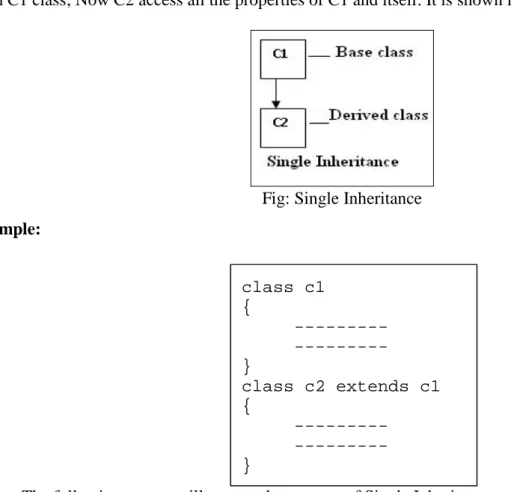
Single Inheritance
In Single Inheritance single base class is derived to a single derived class. For example C2 class is derived
from C1 class; Now C2 access all the properties of C1 and itself. It is shown in below.
Fig: Single Inheritance
Example:
The following program illustrates the concept of Single Inheritance.
Aim: Program to find the area of the room and the volume of a bed room. Program
class Room // Base class
{
float len, bre;
void getlb(float x, float y) class c1 {
---}
class c2 extends c1 {
{
len=x;
bre=y;
}
void roomArea()
{
System.out.println("Area of the room is: "+(len*bre));
}
}
class BedRoom extends Room // Derived class
{
float hei;
void readVol(float z)
{
hei=z;
}
void volume()
{
// Acquiring base class (Room) members from derived class (BedRoom)
System.out.println("Volume of the Bed room is: "+(len*bre*hei));
}
}
class InheritTest
{
public static void main(String args[])
{
BedRoom r1=new BedRoom(); // creating object for derived class
r1.getlb(12.2f,15.2f); // Base class method
r1.roomArea(); // Base class method
r1.readVol(10.3f); // Derived class method
r1.volume(); // Derived class method
}
}
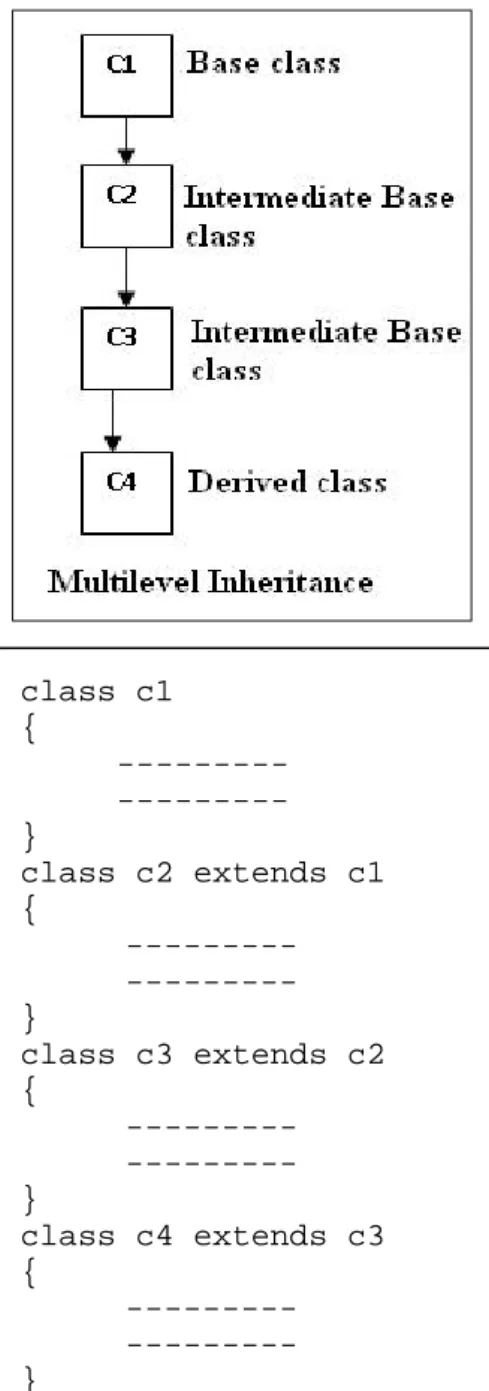
Multilevel Inheritance
Multiple Inheritance contains one base class and one derived class and multiple intermediate base classes.(
An intermediate base class is one, in one context it acts as a derived class, in another context the same class acts
as a base class).
For example C2 class is derived from C1, C3 class is derived C2, and C4 class is derived C3; Now C2
access C1 class members and itself only, C3 access C2 and C1 class members and itself only, and C4 can access
C3,C2,C1 class members and itself only. It is shown in below.
Fig: Multilevel Inheritance
Example:
class c1 {
---}
class c2 extends c1 {
---}
class c3 extends c2 {
---}
class c4 extends c3 {
Hierarchical Inheritance
Hierarchical Inheritance contains a single base class and multiple derived classes. For example C2, C3,
C4, classes are derived from C1 class; Now C2, C3, C4 classes can access C1 class members and itself only. It is
shown in below.
Fig: Hierarchical Inheritance
Example:
Multiple Inheritance
Multiple Inheritance contains multiple base classes and a single derived class. For example C4 class is
derived from C1, C2, and C3 Base classes; Now C4 can access C1, C2, C3 members and itself. It is shown in
below.
class c1 {
---}
class c2 extends c1 {
---}
class c3 extends c1 {
---}
class c4 extends c1 {
Fig: Multiple Inheritance
The concept of multiple inheritance is not supported in java directly but it can be supported through the
concept of interfaces. Because if class C1 and C2 contains some variable, Now from which class the same variable
is Inherited to C4 class. It leads to confusion.
super keyword
Subclass Constructor (‘super’ keyword)
A Subclass constructor is used to construct the instance variables of both the subclass and the super class.
The subclass constructor uses the keyword super to invoke the constructor method of the super class. The super
keyword is used subject to the following conditions.
super may only be used within a subclass constructor method.
The call to super class constructor must appear as the first statement within the subclass
constructor.
The parameters in the super call must match the order and type of the instance variables
declared in the super class.
The following program illustrates the concept of super keyword
class Base
{
int a;
Base(int x)// Base class constructor
{
a=x;
}
void display()
{
System.out.println("The value of a at Base class : " + a);
}
class Derived extends Base // Extending Base class to Derived class
{
int b;
Derived(int x, int y)// Derived class constructor
{
super(x); // passing values to base class constructor
b=y;
}
void display1()
{
System.out.println("The value of a at Derived class is: " + a);
System.out.println("The value of b at Derived class is: " + b);
}
}
class SuperConstructor
{
public static void main(String args[])
{
Derived s1=new Derived(1,2);// Derived class constructor
s1.display( );
s1.display1( );
}
}
Output:
this keyword
this is a keyword that refers to the object of the class where it is used. In other words, this refers to the
The following program illustrates about this keyword.
class ThisCheck
{
int a,b;
void getab(int a,int b)
{
this.a =a;//Here this.a is instance variable,a is formal variable
this.b =b;//Here this.b is instance variable,b is formal variable
this. display();// call present class method
}
void display()
{
System.out.println("Instance variable values:"+ this.a + " " +this.b);
}
public static void main(String ar[])
{
ThisCheck tc = new ThisCheck();
tc.getab(1,2);
}
}
Output:
Method Overriding
The process of redefining the same method for many numbers of implementations is called as method
overriding.
The method overriding is possible by defining a method in the sub class that has the same name, same
arguments and same return type as a method in the super class. When that method is called, the method defined
in the subclass is invoked and executed instead of one in the super class.
The following program illustrates about Method Overriding
{
int a,b;
Base(int x)// Base class constructor
{
a=b=x;
}
void display() // Method defined
{
System.out.println("The Addition at base class: " + (a+b));
}
}
class Derived extends Base
{
int b;
Derived(int x, int y)
{
super(x); // passing values to base class constructor
b=y;
}
void display() // Method defined again
{
System.out.println("The Subtraction value at base class: "+(a-b));
}
}
class MethodOverridding
{
public static void main(String args[])
{
Derived s1=new Derived(1,2);
s1.display( );// Always Access Derived class method only
}
}
final variables, final methods and final classes
final Variables and Methods
All methods and variables can be overridden by default in subclasses. If we wish to prevent the subclasses
from overriding the members of the super class, we can declare them as final using the keyword final as a
modifier.
Syntax:
For example;
final int size=100;
final void showStatus()
{
---}
Making a method as final ensures that the functionality in this method will never be altered in any way.
Similarly, the value of a final variable can never be changed.
Example:
class Test
{
final int size=100;
size=200; // Error because final variables cannot be modifiable
final void showStatus()
{
final type <variable-name> = <value>;
final type <method-name>()
{
size = 200; // Error because final variables cannot be modifiable
---}
}
class Test1 extends Test
{
void showStatus() // Error because final methods cannot be overridden
{
---}
}
Final classSometimes we may like to prevent a class being further subclasses for security reasons. A class that cannot
be sub-classed is called a final class. i.e. If we don`t want to give features of base class to derived class then the
define the base class with final. This is achieved in java using the keyword final.
Syntax:
Example:
final class Personal
{
int idno;
int pinno;
String pwd;
---}
class Others extends Personal // Error
// Because final classes cannot be inheritable
final class <class-name>
{
{
---}
Once the class is final, it never participates in inheritance process. In other words final classes cannot be
extended or inheritable.
Note:
Final variable values cannot be modified.
Final methods cannot be overridden.
Final classes cannot be inheritable.
Abstract Methods and Abstract Classes
Abstract Method or Undefined methodAn abstract method is one which does not contain any definition/body but it contains only
prototype/declaration.
In order to make undefined methods as abstract methods, we need to write abstract keyword before the
method prototype.
Syntax for abstract method
When we are declare a method as an abstract method, that means, we can indicate that a method must
always be redefined in a subclass, thus making overriding compulsory.
Example:
abstract void sum();
abstract void sum(int x, int y);
abstract classIf a class is containing one or more abstract methods then that class should also be declared as an abstract
class.
Syntax for abstract class
abstract return_type <method_name> ( list_args);
abstract class <class-name>
{
abstract return_type <method_name> ( list_args);
Example:
abstract class OPerationsDemo
{
abstract void sum();
abstract void mul();
}
Here, the class OPerationsDemo is an abstract class whose object is cannot be created directly but we can
create indirectly.
Methods with Varargs (
Passing variable number of arguments for a method):
Varargs represents variable length arguments in methods, which is one of the feature introduced by J2SE
5.0.
The varargs allows us to declare a method with the unspecified number of parameters for a given
argument. The varargs is identified by the type of an argument followed by the ellipsis (…) and the name of a
variable.
Varagrs takes the following form:
In the above syntax, the method contains an argument called varargs in which type is the return type of
the argument, ellipses(…) is the key to varargs and arguments is the name of the variable.
The following program illustrates the use of varargs in java.
class Varargs
{
void getab(String ... s) // Varargs
{
for(String name : s) // Enhanced for loop
{
System.out.println("Hello " +name);
}
}
<access specifier> <static> void <method_name> (type … arguments) {
public static void main(String ar[])
{
Details d= new Details();
d.getab("VISHNU","BVRICE","2", "MECS-A","JAVA");
}
}
Output:
Dynamic Method Dispatch
Dynamic Method Dispatch is an important mechanism in Java that is used to implement runtime
polymorphism. In this mechanism, method overriding is resolved at runtime instead of compile time. That is the
chance of version of overridden method to be executed in response to method call is done at runtime.
The following programs illustrates about Dynamic Method Dispatch.
class Parent
{
void get()
{
System.out.println("\n Parent class get method");
}
}
class Child extends Parent
{
void get()
{
System.out.println("\n Child class get method");
}
}
{
public static void main(String ar[])
{
Parent P= new Child ();
// Child’s object reference assigned Parent type reference variable
P.get();
// Child’s version of the method will be called at runtime }
}
Output:
In the above program, d.get ( ) call invokes the Child class method get( ) and not the Patent class get( )
method irrespective of the fact that P is a Parent type variable. Thus, in dynamic method dispatch, the type of
variable is irrelevant while choosing particular overridden method. Instead it depends on the type of object being
referred by the reference variable.
Visibility Control or Access Specifies
Sometimes it may be necessary to restrict the access to certain variables and methods from outside the
class in Inheritance. For example, we may not like the object of a class directly alter the value of a variable or
method access. We can achieve this in java by applying Visibility Modifiers to the instance variables and methods.
The visibility modifiers are also known as Access Modifiers.
Java provides three types of visibility modifiers: public, private and protected. They provide different
levels of protection.
public AccessIn this access any variable or method is visible to the entire class in which it is defined. If we want to
make it visible to all the classes outside this class, simply declare the variable or method as public.
Example:
public int rgno;
public void disp( ) { ………… }
A variable or method declared as public has the widest possible visibility and accessible everywhere.
When no access modifier is specified to the variables or methods, the member defaults to limited version
of public accessibility known as friendly.
The difference between public access and friendly is that the public modifier makes fields visible in
classes, regardless of their packages while the friendly access makes fields visible only in the same package, but
not in the other packages. (A package is a group of related classes stored separately).
Example:
int rgno;
void disp( ) { ………… }
protected AccessThe visibility level of protected level is lies in between the public access and friendly access. The
protected modifier makes the fields visible not only to all the classes and subclasses in the same package but also
to subclasses in other packages. Non sub classes in other packages cannot access the protected members.
Example:
protected int rgno;
protected void disp( ) { ………… }
private Accessprivate fields enjoy the highest degree of protection. They are accessible only with their own class. They
cannot be inherited by subclasses and therefore not accessible in subclasses.
A method declared as private behaves like a method declared as final. It prevents the method from being
sub classed.
Example:
private int rgno;
private void disp( ) { ………… }
Finalizer Method
Java supports a concept called finalization, which is just opposite to initialization. We know that java
runtime is an automatic garbage collecting system. It automatically frees up the memory resources used by the
objects. But objects may hold other non-object resources such as file descriptor or windows system fonts. The
garbage collector cannot free these resources.
In order to free these resources we must use a finalizer method. This method is simply finalize()and can
be added to any class. Java calls that method whenever it is about to reclaim the space for the object.
Syntax:
protected void finalize() {