PremierWave
Embedded System on Module
Integration Guide
Intellectual Property
© 2015 Lantronix, Inc. All rights reserved. No part of the contents of this book may be transmitted or reproduced in any form or by any means without the written permission of Lantronix. Printed in the United States of America.
Lantronix and PremierWave are registered trademarks of Lantronix, Inc. in the United States and other countries. U.S. patents 7,309,260; 7,698,405; 8,024,446; 8,219,661; 8,504,740. Windows is a trademark of Microsoft Corporation. Wi-Fi is a trademark of Wi-Fi Alliance Corporation. All other trademarks and trade names are the property of their respective holders.
Contacts
Lantronix Corporate Headquarters
167 Technology Drive Irvine, CA 92618, USA Phone: 949-453-3990 Fax: 949-453-3995
Technical Support
Online: www.lantronix.com/support
Sales Offices
For a current list of our domestic and international sales offices, go to the Lantronix web site at www.lantronix.com/about/contact.
Disclaimer
All information contained herein is provided “AS IS.” Lantronix undertakes no obligation to update the information in this publication. Lantronix does not make, and specifically disclaims, all warranties of any kind (express, implied or otherwise) regarding title, non-infringement, fitness, quality, accuracy, completeness, usefulness, suitability or performance of the information provided herein. Lantronix shall have no liability whatsoever to any user for any damages, losses and causes of action (whether in contract or in tort or otherwise) in connection with the user’s access or usage of any of the information or content contained herein. The information and specifications contained in this document are subject to change without notice.
This equipment has been tested and found to comply with the limits for a Class B digital device, pursuant to Part 15 of the FCC Rules. These limits are designed to provide reasonable protection against harmful interference in a residential installation. This
equipment generates, uses, and can radiate radio frequency energy and, if not installed and used in accordance with the instructions, may cause harmful interference to radio
communications. However, there is no guarantee that interference will not occur in a
particular installation. If this equipment does cause harmful interference to radio or television reception, which can be determined by turning the equipment off and on, the user is
encouraged to try to correct the interference by one of the following measures:
Reorient or relocate the receiving antenna.
Increase the separation between the equipment and receiver.
Connect the equipment into an outlet on a circuit different from that to which the receiver is connected.
This device complies with Part 15 of the FCC Rules. Operation is subject to the following two conditions: (1) This device may not cause harmful interference, and (2) this device must accept any interference received, including interference that may cause undesired operation. This device is intended only for OEM Integrators. The OEM integrator should be aware of the following important issues.
Labeling of the End Product
The label on the end product incorporating the Lantronix® PremierWave® EN embedded system on module must clearly state that it contains an FCC-approved RF module. Canada and Japan also require a similar statement.
For example, “This product contains RF transmitter ID # (put FCC, IC, and/or Japan module grant numbers here).” The label must include the ID numbers for the regions where the end product is installed. The grant numbers are below.
PremierWave FCC ID number: R68PEN
PremierWave IC ID number: 3867A-PEN
PremierWave Japan ID numbers: 006WWC0244, 006XWA0019, 006YWA0009
RSS-GEN Sections 7.1.4 and 7.1.5 Statement for Devices with Detachable Antennas
This device has been designed to operate with the antennas listed in the Certificate and that has a maximum gain of 5 dBi. Antennas not included in this list or having a gain greater than 5 dBi are strictly prohibited for use with this device, unless system level FCC approval is gained. The required antenna impedance is 50 ohms.
To reduce potential radio interference to other users, the antenna type and its gain should be so chosen that the equivalent isotropically radiated power (EIRP) is not more than that required for successful communication.
Integration Notes:
This module is authorized under limited module approval specified to mobile host equipment. So, the antenna must be installed such that 20cm is maintained between the antenna and users.
The transmitter module may not be co-located with any other transmitter or antenna. As long as the two conditions above are met, further transmitter testing will not be
required. However, the OEM integrator is still responsible for testing their end product for any additional compliance requirements required with this module installed (for example, digital device emission, PC peripheral requirements, etc.)
In the event that these conditions cannot be met (for example certain laptop
configurations, general purpose PCMCIA or similar cards, or co-location with another transmitter) and obtaining a separate FCC authorization will be required, then the FCC authorization is no longer considered valid and the FCC ID cannot be used on the final product (including the transmitter).
Changes or modifications to this device not explicitly approved by Lantronix will void the user's authority to operate this device.
Revision History
Date Rev. Comments
January 2011 A Initial Draft
February 2011 B Added a zoom top assembly diagram.
July 2011 C Added mounting requirements and notes for the EN module clip. August 2011 D Updated connector and tolerance information, the mechanical
dimension diagrams and the evaluation board power supply circuitry diagram.
September 2011 E Added Power Supply information with a new diagram and specified information about general purpose IO signals.
October 2011 F Updated end product labeling information.
March 2012 G Updated information on maximum input leakage current and module initial power up sequence.
July 2014 H Added content pertaining to the PremierWave SE1000 module and updated images and input signal information.
Table of Contents
Intellectual Property _____________________________________________________ 2 Contacts ______________________________________________________________ 2 Disclaimer ____________________________________________________________ 2 Revision History ________________________________________________________ 4
1: Introduction
6
About the Integration Guide _______________________________________________ 6 Additional Documentation ________________________________________________ 6
2: Description and Specifications
7
PremierWave EN Block Diagram ___________________________________________ 8 PremierWave Connector Pin Assignments and Descriptions _____________________ 8 Mating Connector ______________________________________________________ 11 Module Radio and Antenna Connection Options ______________________________ 11 External Antennas _____________________________________________________ 11 Antenna Placement ____________________________________________________ 12 WLAN LED ___________________________________________________________ 12 Ethernet Input/Output ___________________________________________________ 13 Serial Input/Output _____________________________________________________ 15 Sample Layouts for RS-485 Connectivity ___________________________________ 16 USB Host Ports _______________________________________________________ 17 USB Device Port ______________________________________________________ 19 General Purpose IO ____________________________________________________ 20 Serial Debug Port ______________________________________________________ 21 Power Supply Requirements _____________________________________________ 21 Module Initial Power Up Sequence ________________________________________ 22 Module Power Down State ______________________________________________ 23 Recommended Operating Conditions ______________________________________ 23 Wireless Specifications _________________________________________________ 24 Dimensions __________________________________________________________ 24 Mounting Instructions ___________________________________________________ 25 Product Information Labels ______________________________________________ 25
A:
Compliance
27
Compliance Information Emission/Susceptibility ______________________________ 27 Safety _______________________________________________________________ 27
1: Introduction
About the Integration Guide
This guide provides the information needed to integrate the Lantronix® PremierWave® EN and PremierWave SE1000 systems on module within another product. The intended audiences are the engineers responsible for integrating a PremierWave system on module into their product.
Note: This integration guide supports PremierWave system on module part numbers PEN100100A-01, PEN10010SA-01, PEN10010NA-01, PEN10010NASA-01,
PWSE1000100B, PWSE1000200B, and PWSE1000200S.
Additional Documentation
For supporting product documentation, or the most current version of this document, please visit the Lantronix Web site at www.lantronix.com/support/documentation.
Document Description
PremierWave EN Embedded System on Module User Guide
Provides information needed to configure, use, and update the PremierWave EN module firmware.
PremierWave SE1000 Embedded System on Module User Guide
Provides information needed to configure, use, and update the PremierWave SE1000 module firmware.
PremierWave EN Embedded System on Module Command Reference
Lists and explains PremierWave EN command line and XML commands.
PremierWave SE1000 Embedded System on Module Command Reference
Lists and explains PremierWave SE1000 command line and XML commands.
PremierWave Embedded System on Module Evaluation Board Quick Start Guide
Briefly explains how to connect the PremierWave and assign an IP address.
PremierWave Embedded System on Module Evaluation Board User Guide
Provides information needed to use the PremierWave on the evaluation board.
2: Description and Specifications
The PremierWave EN and the PremierWave SE1000 embedded system on modules deliver a new dimension of Ethernet and Wi-Fi networking with the highest levels of security to virtually any electronic product. It provides affordable connectivity in a compact form factor, enabling OEMs to add Wi-Fi or wired Ethernet networking to their products on a single PCB design.
With a choice of flexible, media-independent modules ranging from Ethernet, Wi-Fi and ultra-secure Wi-Fi, the PremierWave EN takes the complexity out of RF design and networking. OEMs can focus on their core competencies while minimizing engineering risk, shortening development time and reducing development cost.
The PremierWave SE1000 module is a version of the PremierWave EN system on module but without any Wi-Fi networking capabilities.
The PremierWave EN system on module has a dedicated 32-bit processor module running at 400 MHz and features 32 kilobytes (KB) data cache, 32 KB instruction cache, embedded 64 KB ROM, 16 KB SRAM and a memory management unit. The system on module includes 64 megabytes (MB) of SDRAM and 64 MB of NAND flash.
The PremierWave SE1000 system on module is available with 64 MB of SDRAM and 64 MB of NAND Flash. There is also an option for 256 MB of NAND Flash available.
With its combination of high performance CPU, ample memory, variety of serial interface options (Serial, I2C, High Speed SPI, USB 2.0) and a Linux operating system, the
PremierWave system on module can be designed as the primary host processor, for most demanding embedded applications.
The PremierWave system on modules offer an unmatched portfolio of security technologies; the PremierWave EN goes far beyond compliance with the popular 802.11i, WPA and WPA2 wireless security specifications. It ensures data integrity and privacy for highly sensitive requirements, such as medical or financial applications.
PremierWave EN Block Diagram
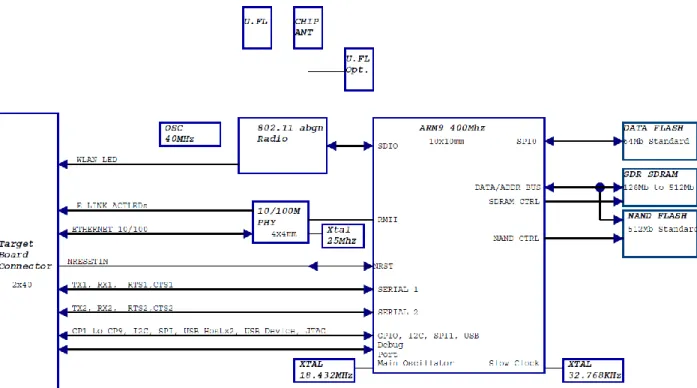
The following drawing is a block diagram of the PremierWave EN module showing the relationships of the components.
Note: The 802.11abgn radio block is not installed on the PremierWave SE1000 system on module.
Figure 2-1 PremierWave Block Diagram
PremierWave Connector Pin Assignments and Descriptions
All IO signals are 3.3V +/-10% tolerant, unless otherwise stated.Table 2-1 PremierWave Connector Pins and Descriptions
Pin# Pin Name Dir Function Name
1 GND Ground.
Connect to unit signal ground. 2 NRESETIN I Reset (Active Low)
Drive low with Open Drain, Signal pulled up internally, Do not Drive high. May be left floating.
3 HDPB I/O USB Host Port B +
4 NRSTTODFLT I Reset Configuration to Defaults (Active Low)
2: Description and Specifications
Pin# Pin Name Dir Function Name
6 TX1 O UART 1 Transmit
7 GND
8 RTS1 O UART 1 Request To Send
9 S3V3 3.3V Power Input
10 RX1 I UART 1 Receive
11 S3V3 3.3V Power Input
12 CTS1 I UART1 Clear To Send
13 GND
14 CP1 I/O I/O Configurable Pin 1
15 S3V3 3.3V Power Input
16 CP2 I/O I/O Configurable Pin 2
17 S3V3 3.3V Power Input
18 CP3 I/O I/O Configurable Pin 3
19 GND
20 CP4 I/O I/O Configurable Pin 4 21 E_SPEED O Ethernet Link LED
22 GND
23 E_LNKACT O Ethernet Activity LED
24 TX2 O UART 2 Transmit
25 W_LINKLED O Wireless LAN Status LED
26 RTS2 O UART 2 Request To Send
27 CP6 I/O I/O Configurable Pin 6
28 RX2 I UART 2 Receive
29 RSVD I Reserved (DO NOT CONNECT)
30 CTS2 I UART 2 Clear To Send
31 I2CSCL I/O I2C Clock
32 CP5 I/O I/O Configurable Pin 5
33 I2SDA I/O I2C Data
34 DBTXD O Debug UART Tx
35 GND
36 DBRXD I Debug UART Rx
37 NSPI1_IRQ I/O SPI IRQ
38 CP8 I/O I/O Configurable Pin 8 39 SPI1_MISO I/O SPI Master In Slave Out
40 GND
41 NSPI1_CS I/O SPI Chip Select 42 CP9 I/O I/O Configurable Pin 9 43 SPI1_MOSI I/O SPI Master Out Slave In 44 CP7 I/O I/O Configurable Pin 7
Pin# Pin Name Dir Function Name
45 SPI1_CLK I/O SPI Clock
46 WKUP I CPU Wakeup
Drive low with Open Drain, Signal pulled up internally, Do not Drive high
47 GND
48 S3V3 3.3V Power Input
49 DDP I/O USB Device Port +
50 S3V3 3.3V Power Input
51 DDM I/O USB Device Port -
52 S3V3 3.3V Power Input
53 GND
54 GND
55 HDPA I/O USB Host Port A +
56 ICE_NTRST O JTAG/Debug Signal Pins 57 HDMA I/O USB Host Port A -
58 TDI I JTAG/Debug Signal Pins
59 GND
60 GND
61 GND
62 TMS I JTAG/Debug Signal Pins
63 ERX- I Ethernet Receive Data -
64 TCK I JTAG/Debug Signal Pins
65 ERX+ I Ethernet Receive Data +
66 GND
67 GND
68 ICE_RTCK I JTAG/Debug Signal Pins
69 RXCT I Ethernet Receive Data Center Tap
70 TDO O JTAG/Debug Signal Pins
71 TXCT I Ethernet Transmit Data Center Tap
72 GND
73 GND
74 ICE_NRST O JTAG/Debug Signal Pins
Use a buffer on this signal to disable external logic inputs when the module is in initial power up or Shut Down mode. See
Module Initial Power Up Sequence below. 75 ETX- O Ethernet Transmit Data -
76 GND
77 ETX+ O Ethernet Transmit Data +
78 S3V3 3.3V Power Input
79 GND
2: Description and Specifications
Mating Connector
The mating connector for the PremierWave system on module is Hirose part number DF40C (2.0)-80DS-0.4V (51). Special care must be taken when mating and unmating the
PremierWave module to the mating connector. Refer to the Hirose DF40 data sheet below for proper connector mating and unmating, along with the proper connector footprint. The mating connector data sheet is available for download at:
https://www.hirose-connectors.com/connectors/H204ProductListCompare.aspx?clprm=06844132651&mode=% EF%BC%90%EF%BC%91
Module Radio and Antenna Connection Options
The PremierWave EN module supports connectivity with two antenna ports for single stream diversity. The unit can be operated with diversity enabled or in single antenna mode using either antenna port. The PremierWave EN module has two options for antenna connections. SKU 1 may be operated in single antenna mode without an external antenna using the on-board chip antenna.
Table 2-2 PremierWave Antenna SKU options
PremierWave SKU options Antenna Port 1 Connection
Antenna Port 2 Connection
SKU 1 with Chip Antenna P/N PEN100100A-01 bulk P/N PEN10010SA-01 sample
Internal Chip antenna U.FL for external antenna
SKU 2 without Chip Antenna P/N PEN10010NA-01 bulk P/N PEN10010NASA-01 sample
U.FL for external antenna U.FL for external antenna
External Antennas
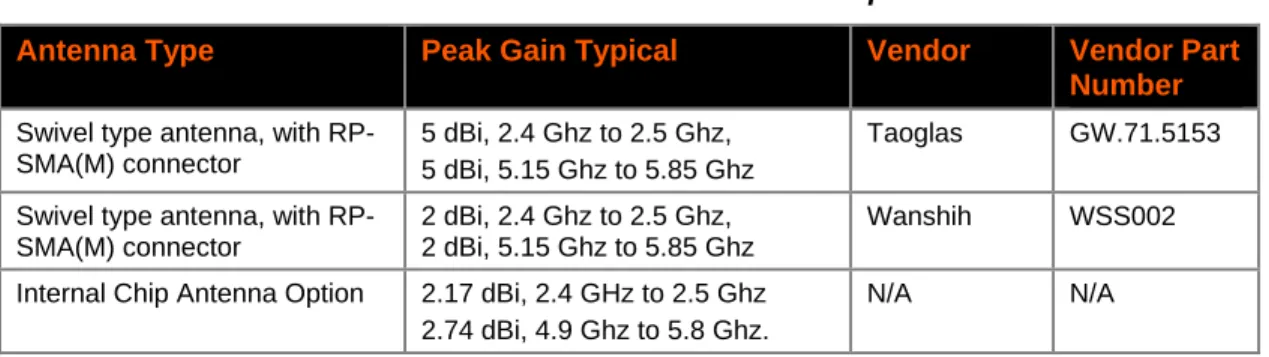
The PremierWave EN module has been certified using the external antennas listed below in addition to the internal antenna provide on the module. Per FCC guidelines, the
PremierWave certification remains valid if using an antenna similar to the antennas below or the internal chip antenna. If using an antenna similar to one of the antennas below, but from a different manufacturer part number the antenna gain must be equal to or less than specified in the table. Consult with your certification lab for more details.
Table 2-3 PremierWave External Antenna Options
Antenna Type Peak Gain Typical Vendor Vendor Part Number
Swivel type antenna, with RP-SMA(M) connector
5 dBi, 2.4 Ghz to 2.5 Ghz, 5 dBi, 5.15 Ghz to 5.85 Ghz
Taoglas GW.71.5153
Swivel type antenna, with RP-SMA(M) connector
2 dBi, 2.4 Ghz to 2.5 Ghz, 2 dBi, 5.15 Ghz to 5.85 Ghz
Wanshih WSS002 Internal Chip Antenna Option 2.17 dBi, 2.4 GHz to 2.5 Ghz
2.74 dBi, 4.9 Ghz to 5.8 Ghz.
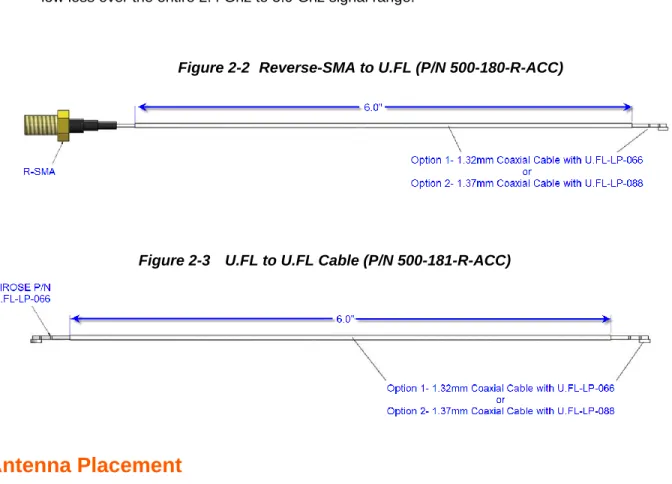
Both the U.FL to Reverse SMA cable (Lantronix part number 500-180-R-ACC) and the U.FL to U.FL cable (Lantronix part number 500-181-R-ACC) can be purchased separately as an accessory from either Lantronix or an RF cable manufacturer. External antennas can be purchased from the antenna vendor. Components for cable design should be selected for low loss over the entire 2.4 Ghz to 5.9 Ghz signal range.
Figure 2-2 Reverse-SMA to U.FL (P/N 500-180-R-ACC)
Figure 2-3 U.FL to U.FL Cable (P/N 500-181-R-ACC)
Antenna Placement
The PremierWave EN module has an option for an on-board chip antenna. When designing the PremierWave EN system on module to a mating board, it is important to consider the final installation of the unit and its location with respect to connecting access points. The
PremierWave EN module should be placed such that the chip antenna has as clear as possible path to the connecting access point for maximum range. Avoid placing the PremierWave module such that the on-board chip antenna is blocked by metal walls or ground planes of adjacent circuit boards. When using external antennas connected to the U.FL ports the same considerations apply.
WLAN LED
Pin 25 on the PremierWave connector is driven low when the radio has been enabled by software. This pin may be used to drive an LED for WLAN status. Connect pin 25 to the cathode of an LED through a 220 ohm resistor. Connect the anode of the LED to 3.3V.
2: Description and Specifications
Ethernet Input/Output
The unit provides a 10/100 Mbps Ethernet interface for connection to an external network through external magnetics and an external RJ45. Figure 2-4 below shows the Ethernet connections from the Lantronix Evaluation board to a 10/100 Ethernet RJ45 Jack with Magnetics, J5 in the figure. The RJ45 Magnetic Jack on the evaluation board is Belfuse part number 08B0-1D1T-06-F.
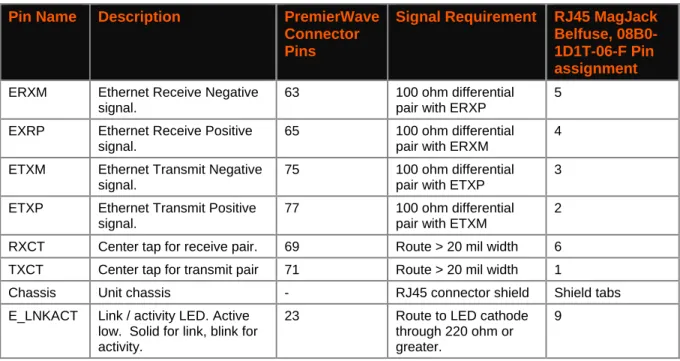
The Ethernet differential pair signals, ERXM/ERXP and ETXM/ETXP should be routed as 100-ohm differential pairs on a layer next to the signal ground plane. The use of vias on these signals should be minimized. Center tap signals RXCT and TXCT should be routed with at least 20 mil trace thickness. The area underneath the RJ45 magnetic jack should be void of all signals and planes. The connector shield should be connected to chassis. It is recommended that 1206 resistor pads from chassis ground to signal ground be placed next to each of the shield tabs. The resistor pads allow for 0 ohm jumper, ferrite beads, or decoupling caps to be installed as needed for EMI/EMC improvement.
The Ethernet LED signals should be routed to discrete LEDs or to the LED pins on the RJ45 through 220 ohm or larger resistors. The LED signals are active low.
Also shown in the figure is an optional active choke that can be used to improve ESD, EFT, and EMI/EMC performance in harsh environments. The device is shown as U22 in the figure and is Akros part number AS1602. This device features route through pin assignments allowing for the Ethernet differential signal pairs to be routed without altering the trace
impedance or adding vias. Due to this routing the device could be installed or depopulated as needed. Lantronix has performed all certification to FCC Class B without U22 populated. The Ethernet signals may be left unconnected if unused.
See the Lantronix app note, “How to Connect a Lantronix Embedded Module to a Wired Ethernet Port” for more details on Ethernet connection and routing,
http://www.lantronix.com/pdf/appnotes/Connect-LTRX-Embed-Module-to-Wired-Ethernet_AN.pdf.
Table 2-4 Ethernet Port Signals
Pin Name Description PremierWave Connector Pins
Signal Requirement RJ45 MagJack Belfuse, 08B0-1D1T-06-F Pin assignment
ERXM Ethernet Receive Negative signal.
63 100 ohm differential pair with ERXP
5 EXRP Ethernet Receive Positive
signal.
65 100 ohm differential pair with ERXM
4 ETXM Ethernet Transmit Negative
signal.
75 100 ohm differential pair with ETXP
3 ETXP Ethernet Transmit Positive
signal.
77 100 ohm differential pair with ETXM
2 RXCT Center tap for receive pair. 69 Route > 20 mil width 6 TXCT Center tap for transmit pair 71 Route > 20 mil width 1
Chassis Unit chassis - RJ45 connector shield Shield tabs E_LNKACT Link / activity LED. Active
low. Solid for link, blink for activity.
23 Route to LED cathode through 220 ohm or greater.
Pin Name Description PremierWave Connector Pins
Signal Requirement RJ45 MagJack Belfuse, 08B0-1D1T-06-F Pin assignment
E_SPEED Link Speed Active low for 100Mbps, Off (high) for 10Mbps.
21 Route to LED cathode through 220 ohm or greater.
7
3V3 3.3 V power 3V3 3.3V power, connect to
LED anodes.
8, 10
2: Description and Specifications
Serial Input/Output
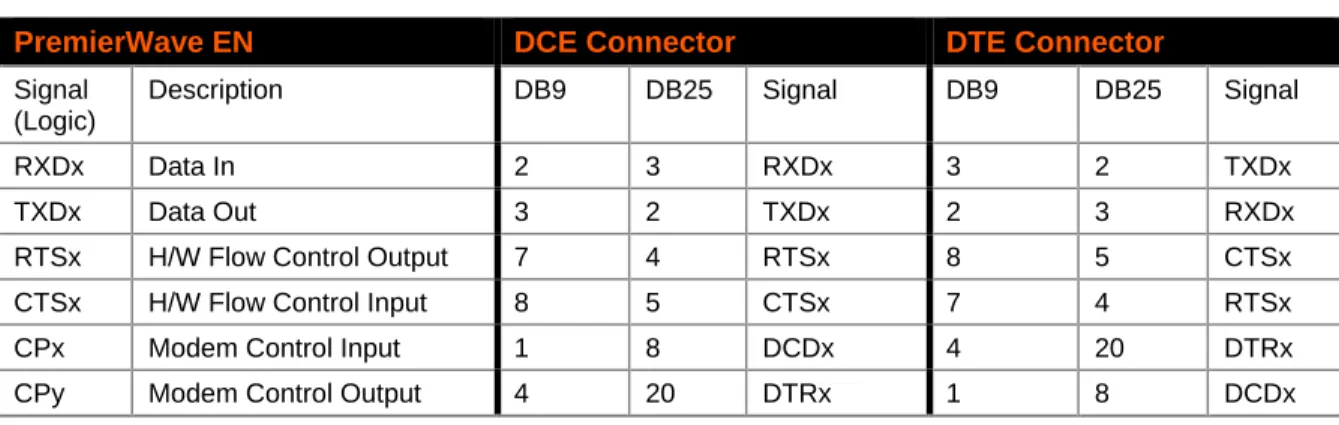
The unit has up to three serial ports compatible with RS232 serial standards at data rates up to 921 Kbps. The serial I/O signals are 3.3V CMOS logic level tolerant. Serial signals connect to the OEM CPU/UART. For evaluation and prototype work, it is convenient to have an external RS-232 interface that can connect to the serial port on a PC. The PremierWave evaluation board has RS-232/422/485 transceivers to implement this external interface. If desired, use the CPs to create a DTE or DCE-style interface using any available CPs. To create these interfaces, connect the signals according to the tables below. These pins may be left unconnected if unused.
It is recommended that all external logic input signals be tristated or driven low during the initial boot sequence due to the internal power sequencing. Pin 74 of the PremierWave module can be used to disable external drivers. It is recommended that a buffer be placed on this signal. When Pin 74 is low the module is in its initial power up sequence or in the module power down state described below.
Note: CPx, and CPy are any of the available CPs.
Table 2-5 PremierWave UART Ports
UART Signal Description PremierWave pin number
TXD1 UART1 Transmit Out 6
RXD1 UART1 Receive IN 10
RTS1 UART1 Request to Send Out 8
CTS1 UART1 Clear to Send In 12
TXD2 UART2 Transmit Out 24
RXD2 UART2 Receive IN 28
RTS2 UART2 Request to Send Out 26
CTS2 UART2 Clear to Send In 30
TXD3 CP6/UART3 Transmit Out 27
RXD3 CP5/UART3 Receive IN 32
RTS3 CP8/UART3 Request to Send Out 38
CTS3 CP9/UART3 Clear to Send In 42
Table 2-6 RS232 Connections
PremierWave EN DCE Connector DTE Connector
Signal (Logic)
Description DB9 DB25 Signal DB9 DB25 Signal
RXDx Data In 2 3 RXDx 3 2 TXDx
TXDx Data Out 3 2 TXDx 2 3 RXDx
RTSx H/W Flow Control Output 7 4 RTSx 8 5 CTSx
CTSx H/W Flow Control Input 8 5 CTSx 7 4 RTSx
CPx Modem Control Input 1 8 DCDx 4 20 DTRx
Table 2-7 RS422/485 Connections
Premier Wave EN Signal (logic)
Description RS485 Signal DB25 4 Wire DB25 2 Wire DB9 4 wire DB9 2 wire
TXDx Data Out TX+485 14 14 7 7
TXDx Data Out TX-485 15 15 3 3
RXDx Data In RX+485 21 14 2 7
RXDx Data In RX-485 22 15 8 3
RTSx TX Enable CPx RS485 Select CPy RS485 2-wire
Sample Layouts for RS-485 Connectivity
Figure 2-5 Combined RS-232/422 Transceiver
Figure 2-6 Separate RS-232/422 Transceivers PremierWave EN TXD1 RXD1 RTS1 CPx CPy RS232/422/485 Xcvr TXin RXout TX Data Out
RX Data In 485 TX Enable
RS485/232 Select 2 Wire Select
TX+ RS485/232 Select 7 3 DB9 Connector RS485 2-Wire 2 8 RX- TXD/TX-RXD/RX+ ICE_NRST ENABLE PremierWave EN TXD1 RXD1 RTS1 CPx CPy RS232 Xcvr TXin RXout RS422/485 Xcvr TX Data Out
RX Data In 485 TX Enable RS485/232 Select
2 Wire Select
TX RX RS232 EN 3 2 14 15 21 22 DB25 Connector TX+ TX-RX+ RX-ICE_NRST
2: Description and Specifications
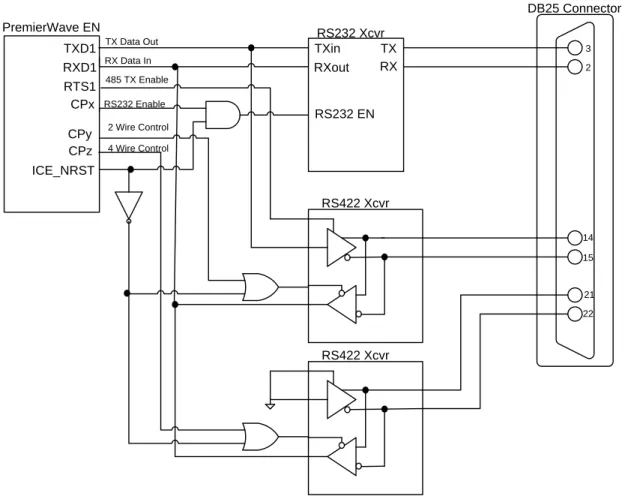
Figure 2-7 Separate RS-422 Transceivers for 2-Wire and 4-Wire Setups
PremierWave EN TXD1 RXD1 RTS1 CPx CPy
RS232 Xcvr TXin RXout
RS422 Xcvr TX Data Out
RX Data In 485 TX Enable
RS232 Enable
2 Wire Control
TX RX
RS232 EN
3 2
14 15
21 22 DB25 Connector
CPz 4 Wire Control
RS422 Xcvr ICE_NRST
USB Host Ports
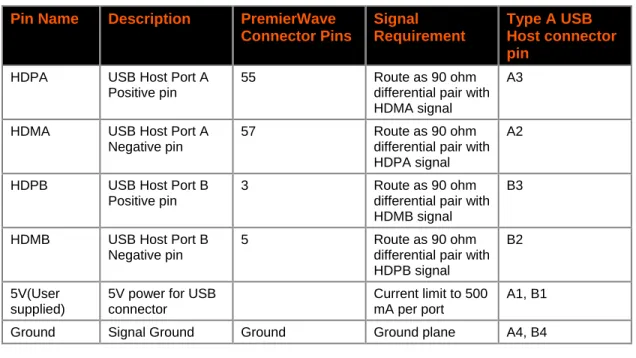
The PremierWave module has two USB 2.0 Full Speed Host port interfaces for connection to downstream USB devices. Each port consists of a differential pair, signals HDPA/HDMA and HDPB/HDMB. These signals should be routed as 90 ohm differential pairs on a signal layer next to the signal ground plane. The use of vias should be minimized on these signals. The USB signals can be connected to a USB Type A dual USB port as shown in Figure 2-8 or directly to an IC with a USB device port. If connecting to an external port that is user
accessible it is recommended to add a TVS diode array to the signal nets for ESD protection. The ESD array shown in the figure is of type Semtech RCLAMP0502A. This device features through pin routing to minimize trace impedance changes and simplify routing. The footprint for the TVS array can be added to the PCB and the part can be depopulated if it is not needed. If connecting to an off board device that needs power add a USB power switch to current limit the 5V power connection at the connector. USB requires that each port be limited to 500 mA maximum sustained current. The schematic below shows how to connect 5V to a USB host connector using a TI, TPS2052 Power Distribution Switch. The USB host port 5V power is not provided by the PremierWave module. If the USB host ports are unused their pins may be left unconnected.
Table 2-8 USB Host Port Signals
Pin Name Description PremierWave Connector Pins
Signal Requirement
Type A USB Host connector pin
HDPA USB Host Port A Positive pin
55 Route as 90 ohm
differential pair with HDMA signal
A3
HDMA USB Host Port A Negative pin
57 Route as 90 ohm
differential pair with HDPA signal
A2
HDPB USB Host Port B Positive pin
3 Route as 90 ohm
differential pair with HDMB signal
B3
HDMB USB Host Port B Negative pin
5 Route as 90 ohm
differential pair with HDPB signal
B2
5V(User supplied)
5V power for USB connector
Current limit to 500 mA per port
A1, B1 Ground Signal Ground Ground Ground plane A4, B4
2: Description and Specifications
USB Device Port
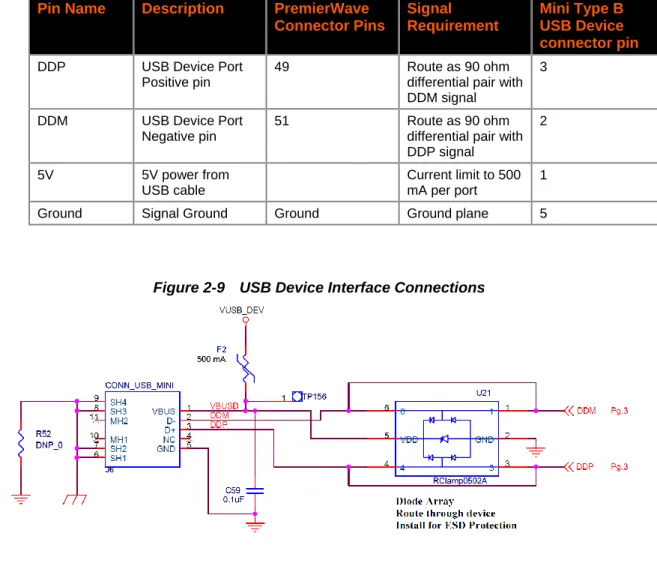
The PremierWave module has one USB 2.0 Full Speed Device port interface for connection to an upstream USB device. The port consists of a differential pair, signals DDP and DDM. These signals should be routed as a 90 ohm differential pair on a signal layer next to the signal ground plane. The use of vias should be minimized on these signals. The USB signals can be connected to a USB Mini Type B USB port as shown in Figure 2-9 or directly to an IC with a USB host port. If connecting to an external port that is user accessible it is recommended to add a TVS diode array to the signal nets for ESD protection. The ESD array shown in the figure is of type Semtech RCLAMP0502A. This device features through pin routing to minimize trace impedance changes and simplify routing. The footprint for the TVS array can be added to the PCB and the part can be depopulated if it is not needed. It is recommended that the power drawn off the USB Mini Type B connector be limited to less than 500mA per USB requirements. The peak current of the PremierWave EN module with wireless enabled is greater than 500 mA at 3.3V. It is not recommended to power the PremierWave module with a regulator connected to the USB device port input power if wireless transmission will be used. The USB device port power is sufficient to power the PremierWave NR module. If the USB device port is unused the DDP and DDM pins may be left unconnected.
Table 2-9 USB Host Port Signals
Pin Name Description PremierWave Connector Pins
Signal Requirement
Mini Type B USB Device connector pin
DDP USB Device Port Positive pin
49 Route as 90 ohm
differential pair with DDM signal
3
DDM USB Device Port Negative pin
51 Route as 90 ohm
differential pair with DDP signal
2
5V 5V power from
USB cable
Current limit to 500 mA per port
1
Ground Signal Ground Ground Ground plane 5
General Purpose IO
Many of the IO signals on the PremierWave can be used as software configurable I/O pins. The table below shows all the pins that can be used as configurable IO along with their default function. All general purpose IO pins should be left floating if unused. All pins are 3.3V + 10% tolerant.
Table 2-10 General Purpose IO Pins
Pin# Pin Name Default Function Alternate Function
Internal Pull up
6 TX1 UART 1 TX (Out) I/O Configurable Pin 100K
8 RTS1 UART 1 RTS (Out) I/O Configurable Pin 100K
10 RX1 UART 1 RX (In) I/O Configurable Pin 100K
12 CTS1 UART1 CTS (In) I/O Configurable Pin 100K
24 TX2 UART 2 TX (Out) I/O Configurable Pin 100K
26 RTS2 UART 2 RTS (Out) I/O Configurable Pin 100K
27 CP6 I/O Configurable Pin 6 UART3 TX (Out) *note 1
28 RX2 UART 2 RX (In) I/O Configurable Pin 100K
30 CTS2 UART 2 CTS (In) I/O Configurable Pin 100K
31 I2CSCL I2C Clock (driven by master) I/O Configurable Pin 10K
32 CP5 I/O Configurable Pin 5 UART3 RX (In) *note 1
33 I2SDA I2C Data (I/O) I/O Configurable Pin 10K
37 NSPI1_IRQ SPI IRQ (driven by slave) I/O Configurable Pin 10K 38 CP8 I/O Configurable Pin 8 UART3 RTS (Out) *note 1 39 SPI1_MISO SPI Master In Slave Out I/O Configurable Pin 10K 41 NSPI1_CS SPI Chip Select I/O Configurable Pin 470K 42 CP9 I/O Configurable Pin 9 UART3 CTS (In) *note 1 43 SPI1_MOSI SPI Master Out Slave In I/O Configurable Pin 10K
44 CP7 I/O Configurable Pin 7 *note 1
45 SPI1_CLK SPI Clock (driven by master) I/O Configurable Pin *note 1
The SPI and I2C interfaces can be configured as Master or Slave. See the PremierWave EN User Guide for configuration register programming and more info.
Note 1: These pins have internal pull ups with values between 40K and 190K. The pull ups can be enabled or disabled by software. The default state is Pull Up Enabled. See the User Guide for more info.
2: Description and Specifications
Serial Debug Port
The PremierWave has an additional logic level serial port that can be used for debug, loading, and monitoring the unit boot status. Pin 34 is the debug port TX (output) pin and Pin 36 is the debug port RX (Input). These pins are 3.3V logic level tolerant. The default baud rate for these pins is 115200 baud. These pins can be connected to a serial transceiver or to a serial to USB converter device for connection to PC without a standard serial port. The Lantronix PremierWave evaluation board connects the debug port to an FTDI FT232RQ serial to USB converter IC. See the figure below for the connection to the FTDI device. The USB signal routing is similar to the routing above in the USB device port section.
Figure 2-10 Serial Debug Port
Power Supply Requirements
The PremierWave EN module uses up to 600 mA during normal operation. In addition, there are power in rush currents of approximately 2A that occur at various stages of the power up, boot sequence, and wake up from shutdown mode. These in rush currents are due to internal power rails turning on. The duration of the inrush is less than 750us. The
PremierWave evaluation board uses the TI TPS54140DGQ to power the 3.3V input to the PremierWave module. We also recommend a minimum of 220 uF capacitance on the 3.3V rail. Additional capacitance can be added, however, sufficient time should be allowed on power cycles for the 3.3V input voltage to reach 0.5V prior to re-applying power. We recommend that the power supply rise to 3.13V in less than 1ms.
It is recommended that all logic IO signals be tristated or driven low when the EN module is powered off or in its initial power up sequence. Please see Module Initial Power Up Sequence below.
For applications requiring USB host port functionality it is recommended that at least 500mA current be provided for each external host port. The PremierWave Evaluation board uses the National LM22680 regulator to provide power for the two evaluation board USB host ports. The figure below shows the power supply circuitry used on the PremierWave evaluation board. The full evaluation board schematic is in the PremierWave Evaluation Board User Guide.
Figure 2-11 PremierWave Evaluation Board Power Supply Circuitry
Note: Components in the same circuit shall be placed close together in the manner as drawn in the schematic, except where noted otherwise.
Module Initial Power Up Sequence
The PremierWave module incorporates internal power sequencing to allow the various internal components to boot properly. When 3.3V is initially applied to the unit, the reset signal on pin 2 should be left floating. Once the unit has booted properly, pin 2 can be driven low with an open drain circuit to reset the module when desired. It is recommended that all external logic IO signals be tristated or driven low during the initial boot sequence due to the internal power sequencing. Pin 74 of the PremierWave module can be used to disable external drivers. It is recommended that a buffer be placed on this signal. When Pin 74 is low the module is in its initial power up sequence or in the module power down state described below. Use of external pull-ups on logic IO signals is not recommended as the logic IO signals are pulled up to an internally sequenced rail. The internal logic signals will be off until the power up sequence is complete. The power up sequence may take
2: Description and Specifications
Module Power Down State
The PremierWave module includes an option for driving the unit into a low current, sub 200uA state, if the unit is not going to be active for some time. Recovery from this state can be made from either an internal RTC event or by toggling the Wakeup signal, pin 46. The wakeup signal should be driven with an open drain source with no external pullup. The signal is pulled up internally on the PremierWave module. Recovery from the shutdown state requires a full module boot cycle. All external logic IO signals should be tristated or driven low while the unit is in the shutdown state. Use of external pull-ups is not recommended. The external reset on pin 2 should be left floating. As described in the Initial power up sequence section, a buffer should be placed on pin 74, the output of which can be used to disable external logic signals when the unit is in shutdown or initial power up.
See the PremierWave EN User Guide for more information about entering the Shutdown state.
Recommended Operating Conditions
Table 2-11 Recommended Operating Conditions
Symbol Parameter Min Typical Max Units
Vcc Supply voltage (typical 3.3) (+/-5%) 3.14 3.3 3.46 V
VIL Low Level Input Voltage 0.3 0.8 V
VIH High Level Input Voltage 2.0 3.6 V
VOL Low Level Output Voltage 0.4 V
VOH High Level Output Voltage 2.6 V
II Total Unit Input Leakage Current, in shutdown mode
200 µA ICC (PW EN) Supply Current AVG (WLAN Assoc 5Ghz,
No Ethernet link )
302 mA
ICC (PW EN) Supply Current AVG (WLAN activity 5Ghz, low duty cycle, No Ethernet link)
331 mA
ICC (PW EN) Supply Current AVG (WLAN activity 5Ghz, high duty cycle, Ethernet linked)
491 mA
ICC (PW EN) Supply Current (WLAN TX surge, 5Ghz, Ethernet linked)
577 mA
ICC (PW EN) Supply Current AVG (Ethernet Linked, WLAN not associated)
154 mA
ICC (PW EN) Supply Current AVG(Ethernet high duty cycle, WLAN not associated)
199 mA
ICC
(PW SE1000)
Supply Current AVG (Ethernet Linked) 131 mA
ICC (PW EN) Supply Current AVG(Ethernet high duty cycle)
Wireless Specifications
Table 2-12 Wireless Specifications
Wireless Standard
Channel
Frequency Range
Transmit Power (Typical) Receive Sensitivity (Typical)
802.11 b/g/n 2.412 – 2.484 GHz 17 dBm for 802.11b DSSS 17 dBm for 802.11b CCK 15 dBm for 802.11g/n OFDM
-71.0 dBm (<10% PER) @65Mbps -74.0 dBm (<10% PER) @54Mbps -94.0 dBm (<8% PER) @1Mbps 802.11 a/n 4.900 – 5.925 GHz 12 dBm -69.0 dBm (<10% PER) @65Mbps
-72.0 dBm (<10% PER) @54Mbps -88.0 dBm (<10% PER) @6Mbps
Dimensions
Figure 2-12 Mechanical Dimensions
2: Description and Specifications
Figure 2-13 Pin Locations of PremierWave Module (Top View)
Note: The recommended mounting diagram above assumes that both male and female I/O connectors are placed with an angular tolerance of ±0.35° or better. If this tolerance cannot be held on the customer’s PCBA, a larger slot and component keepout should be used to accommodate.
Mounting Instructions
The PremierWave module should be mounted with hardware that maintains a 2mm height. Lantronix can provide this hardware as part number 120-093-R. The mated height of the interface connector is 2mm. If custom hardware is made, it must maintain the mounting height of 2mm to ensure the interface connector is properly seated.
If the PremierWave module will be subjected to drops, or significant shock and vibration, additional methods of securing the module are recommended. Any additional securing mechanism should prevent the interface connector from disconnecting. The design of this mechanism may change depending on the customer enclosure, PCB and weight of the system.
Product Information Labels
Figure 2-15 PremierWave SE1000 Product Label
A: Compliance
Compliance Information Emission/Susceptibility
(According to ISO/IEC Guide 17050-1, 17050-2 and EN 45014) Manufacturer’s Name & Address:Lantronix 167 Technology Drive, Irvine, CA 92618 USA Declares that the following product:
Product Name Model: PremierWave® EN Embedded Device Server, and PremierWave® SE1000 Embedded Device Server*
*Note: Wireless standards are not applicable to the PremierWave SE1000 device server. Conforms to the following standards or other normative documents:
FCC Part 15.247/15.407 Class B
RSS-210
RSS-Gen Issue 2
ICES-003 Issue 4
ETSI EN 301 489-1 V1.8.1
ETSI EN 301 489-17 V2.1.1
ETSI EN 300 328 V1.8.1
ETSI EN 301 893 V1.7.1
Japan Article 2, Section 1, No. 19
Japan Article 2, Section 1, No. 19-3
Japan Article 2, Section 1, No. 19-3-2
EN 60950-1, Second Edition
CSA 22.2, No. 60950-1-07, Second Edition
Safety
Low Voltage Directive (2006/95/EC),
IEC/EN 60950-1, Second Edition
UL 60950-1, Second Edition
CAN/CSA-C22.2 No. 60950-1-07, Second Edition
Table A-1 Soldering Profiles and Washing Notification
Process Product Reflow Soldering [Profile]
Wave Soldering [Profile]
Hand Soldering [Profile]
Washing
PremierWave® EN PremierWave® SE1000
Not Applicable Not Applicable Not Applicable Not Compatible1 1 - Washing is a process to remove manufacturing process contaminants, typically after soldering. Washing enclosed products can force outside contaminants to become trapped inside product and affect product function.
Manufacturer’s Contact
Lantronix, Inc.
167 Technology Drive Irvine, CA 92618 USA Tel: 949-453-3990
Table A-2 PremierWave Regulatory Domains
REGION: US/CANADA JAPAN EUROPEAN UNION WORLDWIDE
Frequenc
y Channel
Scan Type Adhoc Permitted Scan Type Adhoc Permitted Scan Type Adhoc
Permitted Scan Type
Adhoc Permitted
2.4 GHz Band
2412 1 Active Yes Active Yes Active Yes Passive Yes 2417 2 Active Yes Active Yes Active Yes Passive Yes
2422 3 Active Yes Active Yes Active Yes Passive Yes 2427 4 Active Yes Active Yes Active Yes Passive Yes
2432 5 Active Yes Active Yes Active Yes Passive Yes
2437 6 Active Yes Active Yes Active Yes Passive Yes 2442 7 Active Yes Active Yes Active Yes Passive Yes
2447 8 Active Yes Active Yes Active Yes Passive Yes 2452 9 Active Yes Active Yes Active Yes Passive Yes
2457 10 Active Yes Active Yes Active Yes Passive Yes
2462 11 Active Yes Active Yes Active Yes Passive Yes 2467 12 N/A N/A Active Yes Active Yes Passive Yes
2472 13 N/A N/A Active Yes Active Yes Passive Yes 2484 14 N/A N/A Active Yes N/A N/A Passive Yes
5 GHz Band
5180 36 Active Yes Active Yes Active Yes Passive Yes 5200 40 Active Yes Active Yes Active Yes Passive Yes
5220 44 Active Yes Active Yes Active Yes Passive Yes
5240 48 Active Yes Active Yes Active Yes Passive Yes 5260 52 Passive No Passive No Passive No Passive No
5280 56 Passive No Passive No Passive No Passive No 5300 60 Passive No Passive No Passive No Passive No
5320 64 Passive No Passive No Passive No Passive No
5500 100 Passive No Passive No Passive No Passive No 5520 104 Passive No Passive No Passive No Passive No
5540 108 Passive No Passive No Passive No Passive No 5560 112 Passive No Passive No Passive No Passive No
5580 116 Passive No Passive No Passive No Passive No
5600 120 N/A N/A Passive No Passive No Passive No 5620 124 N/A N/A Passive No Passive No Passive No
5640 128 N/A N/A Passive No Passive No Passive No 5660 132 Passive No Passive No Passive No Passive No
5680 136 Passive No Passive No Passive No Passive No 5700 140 Passive No Passive No Passive No Passive No
5745 149 Active Yes N/A N/A N/A N/A Passive Yes
5765 153 Active Yes N/A N/A N/A N/A Passive Yes 5785 157 Active Yes N/A N/A N/A N/A Passive Yes
5805 161 Active Yes N/A N/A N/A N/A Passive Yes 5825 165 Active Yes N/A N/A N/A N/A Passive Yes
Note: The PremierWave EN does not support 40Mhz bandwidth channels. Country codes are not available to the end user. Last updated for Ganges driver version 3.2.12.
B: Warranty
For details on the Lantronix warranty replacement policy, please go to our web site at www.lantronix.com/support/warranty.