SMART DRIVE
ELECTRONIC WASHING MACHINE
MODEL GWL03US
120 Volt 60 Hz
Fisher & Paykel Appliances Inc
27 Hubble, Irvine, California, CA92618, USA, Ph: 949 790 8900, Fax: 949 790 8911
C O N T E N T S
SMART DRIVE ELECTRONIC WASHING MACHINE...1
1.0 SPECIFICATIONS...6
FINISH ...6
DIMENSIONS...6
2.0 UNPACKING...8
3.0 INSTALLATION ...8
HOT WATER TEMPERATURE...9
DRAINING ...9
4.0 INTRODUCTION ...10
5.1 ELECTRONICS SYSTEMS ...10
5.1.1 MOTOR...11
5.1.2 ROTOR POSITION SENSOR MODULE ...11
5.1.3 MOTOR CONTROLLER MODULE ...12
5.1.4 DISPLAY MODULE ...12
5.1.5 PRESSURE SENSOR ...12
5.1.6 INLET CHAMBER...12
5.1.7 WATER VALVES ...13
5.2 MECHANICAL SYSTEM...14
5.2.1 DIRECT DRIVE...14
5.2.2 FLOATING BASKET...14
5.2.3 AUTOMATIC WATER LEVEL SYSTEM...15
5.2.4 DRAIN PUMP...15
5.2.5 LID SWITCH ...16
5.2.6 LINT REMOVAL SYSTEM...16
6.0 OPTION ADJUSTMENT MODE...17
6.1 WASH WATER TEMPERATURE ...18
METHOD OF SETTINGS THE WASH TEMPERATURE ...18
WATER TEMPERATURE SETTINGS...18
EXAMPLE OF ADJUSTING WASH TEMPERATURE ...19
6.2 RINSE OPTIONS...21
METHOD OF SELECTING RINSE OPTIONS...21
6.3 END OF CYCLE WARNING BEEPS ...22
METHOD OF ADJUSTING THE NUMBER OF END OF CYCLE WARNING BEEPS ...22
6.4 VOLUME OF WATER USED IN THE WATER SAVER OPTION ...23
6.5 OUT OF BALANCE RECOVERY ...23
TO PROGRAM THE AUTOMATIC OUT OF BALANCE RECOVERY...23
6.6 AUTO WATER LEVEL ADJUSTMENT ...24
7.0 OPERATION / USE & CARE ...25
7.1 WASH CYCLES...25
7.1.1 WASH CYCLE TIMES ...25
7.1.2 AGITATOR PROFILE COMPARISONS ...26
7.1.3 CUSTOMIZING THE WASH CYCLES...26
7.2 FAVORITE CYCLE ...26
PROGRAMMING THE FAVORITE CYCLE ...26
7.3 WATER SAVER OPTION ...27
AMOUNT OF WATER USED IN THE WATER SAVER RINSE ...27
TO USE DELAY START ...28
7.7 FABRIC SOFTENER DISPENSER ...29
7.8 USER FAULTS...30
8.0 DEMONSTRATION MODE ...31
TO SELECT DEMONSTRATION MODE ...31
9.0 DIAGNOSTIC MODE ...32
TO SELECT DIAGNOSTIC MODE ...32
9.1 LED TEST...32
9.2 SWITCH TEST ...32
9.2.1 LID SWITCH ...32
9.2.2 OUT OF BALANCE SWITCH...32
9.2.3 LOCATION SWITCH ...33
9.3 DRAIN PUMP TEST ...33
9.4 WATER VALVE TEST...33
9.5 RE-START FEATURE ...33
9.6 RE-CYCLE FEATURE...34
9.7 DATA DISPLAYS...34
TO SELECT DATA DISPLAYS...34
10.0 FAULT MODE...35
10.1 BINARY CODE ...35
EXAMPLES USING THE DATA DISPLAYS...35
10.2 FAULT CODE DESCRIPTIONS ...36
1. (00000 001) MOTOR CONTROL MODULE FAULT ...36
2. (00000 010) MOTOR CONTROL MODULE FAULT ...36
3. (00000 011) MOTOR CONTROL MODULE FAULT ...36
6. (00000 110) MOTOR CONTROL MODULE FAULT ...36
7. (00000 111) DISPLAY MODULE FAULT...36
9. (00001 001) LOCATION SWITCH ERROR ...36
10. (00001 010) TEMPERATURE SENSOR ERROR...37
11. (00001 011) PRESSURE SENSOR FAULT...37
12. (00001 100) FLOOD PROTECTION ERROR ...37
36. (00100 100) WATER LEAK FAULT...37
37. (00100 101) PUMP BLOCKED ERROR ...37
38. (00100 110) PRESSURE SENSOR FAULT...38
39. (00100 111) PRESSURE TUBE FAULT ...38
40. (00101 000) BASKET DIS-ENGAGE FAULT...38
41. (00101 001) TEMPERATURE SENSOR FAULT ...39
43. (00101011) OUT OF BALANCE SWITCH FAULT ...39
44. (00101 100) WATER IN TUB DURING SPIN...39
47. (00101 111) BASKET DIS-ENGAGE FAULT...39
48. (00110 000) HOT AND COLD VALVE FAULTY ...40
49. (00110 001) COLD VALVE FAULTY ...40
50. (00110 010) HOT VALVE FAULTY ...40
81 - 95. (0101X XXX)...40
104. (01101000) ...40
106. (01101 010) DISPLAY TO MOTOR CONTROL MODULE COMMUNICATIONS ERRORS...40
105. (01101 001) DISPLAY TO MOTOR CONTROL MODULE COMMUNICATIONS TIME-OUT ERROR...40
132. (10000 100) SINGLE CURRENT TRIP ...41
133. (10000 101) REPETITIVE CURRENT TRIP ...41
136. (10001 000) MOTOR STALL...42
160. (10100 000) BASKET ENGAGED...42
10.3 MOTOR CONTROLLER VOLTAGE CHECK...43
10.4 DIAGNOSTIC FLOW CHART...44
11.0 REMOVING AND REFITTING OF ELESTRONIC MODULES ...45
11.1 ESD PRECAUTIONS ...45
11.2 CONNECTORS...46
11.2.1 EASY OFF CONNECTORS...46
11.2.2 EDGE CONNECTOR ...46
11.2.3 OTHER CONNECTORS ...46
11.3 ACCESS TO CONSOLE AREA ...47
11.4 DISPLAY MODULE ...47
11.5 MOTOR CONTROLLER MODULE ...48
11.6 INLET CHAMBER & WATER VALVES...49
11.7 ROTOR POSITION SENSOR ...49
11.8 DIAGNOSTIC TEST ...50
11.9 LID SWITCH ...50
12.0 MECHANICAL DISASSEMBLY & REASSEMBLY ...51
12.1 BEARING REPLACEMENT KIT...51
12.2 MECHANICAL DISASSEMBLY PROCEDURE ...52
12.3 MECHANICAL REASSEMBLY PROCEDURE ...63
13.0 SELECTED ARES OF SERVICE ...71
13.1 PUMP BLOCKAGE...71
13.2 COMPLETE PUMP FAILURE – BURNT OUT...72
1.0 SPECIFICATIONS
FINISH
Cabinet Prepaint (Polyester) Lid Polypropylene
Console Polypropylene
Basket stainless steel (grade 430T) Tub Polypropylene
Agitator Polypropylene Cover Polypropylene Touch Panel Polypropylene
DIMENSIONS
Height Floor to Lid
Lid closed 35 ½“ – 36½ “ (900mm – 930mm)
Lid open Add 18” (460mm)
Height Floor to Console
39 ½ “- 40 ½” (1000mm – 1030mm)
Width 25 ½” (650mm)
Depth 25 ½” (650mm)
Inlet Hose
Length 43” (1090mm)
Weight
Packed 126 lbs (57.3 kg)
Unpacked 112 lbs (55.3 kg)
Capacity (Full Load)
Dry weight 15.4 lbs (7 kg)
Water consumption per fill
(approx. figure for high water level)
High Medium high Medium Medium low Low
24 US gals 20 US gals 16 US gals 13 US gals 8 /us gals
90 litres 75 litres 60 litres 45 litres 32 litres
Water consumption per cycle
(approx. figures for high water level)
Water fill temp (Factory Settings)
Hot 120oF (49oC)
Hot/Warm 105oF (40oC)
Warm 95oF (35oC)
Warm/Cold 85oF (29oC)
Cold as per cold water supply temperature.
Recommended inlet hot water temperature not to exceed 150oF (65oC)
Wash Motor
Electronically commutated direct drive DC Motor
Motor Resistance per winding
6.1 ohms @ 68oF (20oC)
Pump Motor
120V AC, 60Hz Thermal cut out fitted
Flow Rate 5.8 gal/min. (22 l/min.)
Pump motor resistance 6.5 ohms + 5%
Water Valves
12 Volts DC Resistance 15 ohms
Cold Valve Proportional 15 ohms
Operating pressure Max 150 psi (1034 kPa)
Min 3 psi (20kPa)
Basket Speed
Fast Spin 1,000 rpm
Medium Spin 700 rpm
Slow 300 rpm
Stir Speed 25 rpm
Fabric Softener Dispenser
Dosage (75cc)
Electric Supply
120V AC 60Hz
Max Current
2.0 UNPACKING
1. Remove the outer packing, leave the washer standing upright on the cardboard bottom.
2. Lift the lid and remove the cardboard shipping pack from under the lid.
3. Remove the hoses and accessories.
4. Rotate the agitator anti-clockwise for 3 revolutions to unscrew the red shipping restraint from the base of the washer. (The wash basket will then be free to move from side to side).
5. The cardboard bottom packer is now free to be
removed from the washer. Tilt the washer and check that the red shipping restraint has come away with the
cardboard bottom. Keep the shipping pack and shipping restraint in case they are required for future transit.
3.0 INSTALLATION
1. Uncoil the cord set.
2. Remove the ribbed drain hose from the fixture on the left hand side of the rear panel by carefully pulling the exposed part of the hose downwards and outwards. 3. Connect the drain hose to the laundry tub or
standpipe. The hose guide, included in the accessory kit, is to guide the hose over the laundry tub or standpipe. The hose must not extend beyond the hose guide more than 1” (25mm). If necessary the drain hose can be trimmed to length.
4. Place the sealing washers (from the accessory kit) into the elbow ends of the plastic inlet hoses and connect to the washer inlet valves. The inlet valves are marked on the rear of the washer.
H = hot C = cold
NOTE: The elbow end of the hose has a non standard thread and must be connected to the washer water inlet valves only.
5. Place the screened sealing washers (from the
accessory kit) into the straight end of the inlet hoses and connect to the faucets.
Turn on the water and check the hose connections for leaks.
6. Move the washer into its final position. We suggest a minimum clearance of ¾ “ (20mm) either side of the washer for ease of installation. Make sure there are no kinks in the hoses.
7. It is IMPORTANT to level the washer. The rubber inserts (from the accessory kit) must be fitted into adjustable feet on the base of the washer. Adjust the levelling feet by unscrew/screwing so that the stainless steel basket sits in the cover opening slightly forward of the center.
8. Make sure the washer is firm on all levelling feet. 9. Plug the cord set into the wall socket.
HOT WATER TEMPERATURE
L The hot water should not exceed 150oF (65oC).
Water at excessively high temperatures will cause damage to the washer.
L The cold water should not exceed 95oF (35oC).
DRAINING
L Draining must comply with the local codes.
L In multi-storey apartments or an upper floor, the washer should be installed on a drained floor.
4.0 INTRODUCTION
The washer design has a number of unique features not found on any other washer. These will be explained in the following sections.
5.1 ELECTRONICS SYSTEMS
The washer electronics consists of 4 main parts: a) Motor
b) Rotor Position Sensor c) Motor Controller Module d) Display Module
e) Pressure Sensor f) Inlet Chamber
5.1.1 MOTOR
The motor is a 3 phase, 42 pole, DC brushless motor. Rotation of the motor is controlled by a microprocessor located in the Motor Controller Module.
The Motor consists of a STATOR (stationary part) and ROTOR (rotating part).
5.1.2 ROTOR POSITION SENSOR MODULE
Fitted to the Stator is the Rotor Position Sensor Module. This detects the position of the rotor and feeds a signal back to the Motor Controller Module.
5.1.3 MOTOR CONTROLLER MODULE
The Motor Controller Module contains the circuits needed to control the water valves, pump and the main motor. It contains a microprocessor that controls these functions as well as accepting signals from the Rotor Position Sensor and Display Module. The Motor Controller Module and Display Module are continuously communicating with each other, passing information back and forth on the required wash actions and diagnostic data.
5.1.4 DISPLAY MODULE
The Display Module contains a second microprocessor. The Display Module takes the inputs from the front panel (i.e. user settings) and sends a command to the Motor Controller Module. It also controls the output to the LED’s and beeper.
5.1.5 PRESSURE SENSOR
The Pressure sensor is located inside the Motor Controller Module. Unlike normal pressure
switches it does not contain contacts, but an electronic circuit that continuously measures the water level. The pressure sensor cannot be removed from the Motor Controller for servicing.
5.1.6 INLET CHAMBER
The inlet chamber serves two purposes;
a) As a reservoir for the cooling water. The electronics in the Motor Controller Module are cooled by water. The inlet Chamber is connected to an aluminium heatsink, which is part of the Motor Controller Module. During the fill cycles, water flows through one side of the inlet chamber, through one side of the heatsink back on the other side through the second chamber of the inlet chamber and then into the tub.
Note: Should the electronics become too hot, the cold valve will be turned on to fill the heatsink with cold water. Therefore, a small quantity of water may be discharged into the basket during the cycle. This is normal and not a fault.
b) To mix the incoming hot and cold water. This is part of the automatic wash water temperature system. For this to work effectively the incoming water has to be mixed before entering the Motor Controller Module. The water temperature is measured by a device located within the Motor Controller Module. The water valves are then controlled to maintain the correct water
5.1.7 WATER VALVES
The washer is fitted with an automatic water temperature fill system. The electronics control the water valves so that a constant water temperature is achieved in the tub irrespective of the temperatures and pressures of the household hot and cold water systems. This system will also compensate for changes in pressure and temperature during the washer’s fill cycle.
To achieve this the cold valve is a special type of valve called a proportional water valve. Unlike conventional water valves which are either fully on or fully off, the proportional water valve can be controlled so that it can turn on at any water flow rate between fully on and fully off. The hot water is controlled by using a conventional type of water valve.
It is important that the correct water valve is fitted should they ever need replacement. The valves can be identified by the following features:
Proportional Valve Standard Valve
Filter colour – White Filter colour – Red
Shape of water valve plunger.
Has no stand offs Has four stand offs visible from outlet nozzle
5.2 MECHANICAL SYSTEM
5.2.1 DIRECT DRIVE
In this washer the motor shaft is connected directly to the agitator. The DIRECT DRIVE motor has eliminated the need for pulleys, belts, gearboxes and other electro-mechanical items used in other designs. The single shaft design also reduces the number of seals.
5.2.2 FLOATING BASKET
During spin, the agitator and basket have to be coupled together and turn as a single unit, whilst in agitate the agitator and basket have to be free to rotate independently.
The washer basket is free to move in a vertical direction. At the base of the basket is a flotation chamber. As the water level increases the basket floats and disengages the driven spline from the drive spline. This agitator is now decoupled from the basket and can move freely in both directions. When the water is draining from the washer the basket settles back down onto the drive spline and re-engages the driven spline. The agitator and basket are now coupled together and turn as one unit.
Detection of Basket Float Off Point
During fill the basket rotates to ensure that the clothes are evenly saturated with water. Whilst the tub is filling, the agitator will occasional stop and commence a number of special agitate actions. During these actions the washer determines if the basket has floated. If it has, the microprocessor can now determine the correct water level and will continue filling to that level. If the basket has not floated off, the washer will continue filling and check again later.
Note: The water level at which the basket floats off is not necessarily the same as the final water level.
Detection of Basket Re-Engagement
After the washer has pumped out the water, the basket will sink down and re-engage onto the drive spline. To ensure the basket has re-engaged correctly, the washer will carry out a basket re-engage test. This test consists of a series of short agitate strokes before the spin cycle starts. A sound may be heard as the basket re-engages.
5.2.3 AUTOMATIC WATER LEVEL SYSTEM
The floating basket is also used to detect correct water level for the clothes load in the washer. The point at which the basket starts to float is determined by the load size. The greater the load, the more water is needed before the basket will float. By detecting the point at which the basket floats, the microprocessor can determine the correct water level.
If the operator has manually chosen a level that is too low for the load, the washer will override that choice and fill to the correct level. If the operator has chosen a level that is higher than necessary, the washer will still fill to the operator’s chosen level.
5.2.4 DRAIN PUMP
The drain pump motor is attached directly to the base of the tub. The pump housing is an integral part of the tub. This eliminates tub to pump hoses and the accompanying seals, clips etc. The pump is accessible by removing the inspection hatch on the front of the washer. It is also accessible for cleaning from the top by removing the agitator and basket.
5.2.5 LID SWITCH
Lid opening and closing is detected by a reed switch located under the right hand side of the cover, approx. 5” (125mm) from the front. The reed switch is activated by a magnet which is moulded into the lid. A protrusion can be seen on the underside of the lid where the magnet is located. If the lid is raised the washer will stop and go into PAUSE. To start the washer again close the lid, and push the START/PAUSE button.
The washer should turn of when the lid is opened no more than 2” (50mm) and restart at least ½ “ (12mm) before the lid is closed.
5.2.6 LINT REMOVAL SYSTEM
As a result of the agitator action, lint and wash water are sucked into the agitator stem and down to the base of the agitator, where they are directed into the cavity between the basket and tub. The extruded holes in the basket are shaped to allow the wash water to flow back into the tub, but prevent the lint from following.
The lint then floats to the surface of the water, between the basket and tub and remains there until it is flushed out the drain at the end of the wash cycle.
6.0 OPTION ADJUSTMENT MODE
The owner can customise the washer to there own preference. This is done in the OPTION ADJUSTMENT MODE.
The features that can be adjustedare:
a) Wash Water Temperature
b) Rinse Options
c) End of Cycle Warning Beeps
d) Volume of water used in the Water Saver Option
e) Auto Water Level Adjustment
To Select the OPTION ADJUSTMENT MODE
1. Press and hold down the START/PAUSE button, then press the POWER button.
Two quick beeps will sound and the LED’s on the front panel will change.
The controls and LED’s on the front panel will now serve different functions from normal.
2. The washer can now be programmed to suit the owner’s preference. 3. To return the washer to normal operation, press the POWER button.
6.1 WASH WATER TEMPERATURE
The water temperature of each of the wash temperature settings can be changed.
METHOD OF SETTINGS THE WASH TEMPERATURE
1. Select the OPTION ADJUSTMENT MODE by pressing and holding down the
START/PAUSE button, then pressing the POWER button.
2. Use WASH TEMPERATURE buttons and LED’s to select the temperature setting to be adjusted, ie. Cold, Cold/Warm, Warm, Warm/Hot, or Hot.
3. Use the ADVANCE button and WASH PROGRESS LED’s to increase or decrease the
temperature. Each time the ADVANCE button is pressed, the WASH PROGRESS LED’s
will advance one position to the right. This increases the temperature by approximately 2oF (1oC). (See Table 2 for the approximate temperatures for each of the settings).
4. Select the next temperature range to be changed with the WASH TEMPERATURE buttons
and repeat Step 3. Each Temperature range can be adjusted using this method. 5. To return the washer to Normal operation, press the POWER button.
NOTES
1. Do not use the household water faucets or water heater controls to vary the wash temperature. The automatic water temperature control system will compensate for variations in household water temperature and pressure. Adjusting the water pressure or the water heater temperature, WILL NOT alter the wash temperature.
2. If the washer is used in an installation where only a cold water supply is available, then the cold temperature range must be selected and the “cold water only” setting must be chosen in the Option Adjustment mode. Refer Table 2. A blanking cap must be fitted to the hot inlet valve. If the temperature is set at any other level, the washer will expect hot water when filling. As it will not detect any hot water, it will eventually display the USER FAULT (see USER FAULT) that there is no hot water.
3. We recommend that the hot water temperature setting on the household water heater does not exceed 150oF (65oC) for personal safety and washer reliability.
4. If the temperature of the cold water supply is warmer than the selected temperature, a cold water user warning will sound because the washer will be unable to control the water temperature to the required temperature. To correct this re-adjust the cold temperature to cold only setting or a temperature that is above the cold water supply.
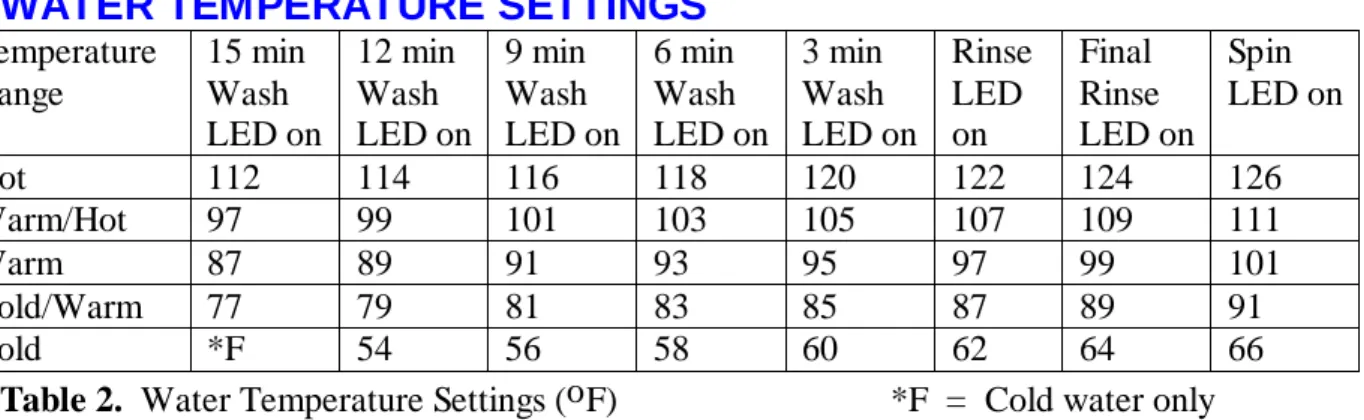
WATER TEMPERATURE SETTINGS
Temperature Range 15 min Wash LED on 12 min Wash LED on 9 min Wash LED on 6 min Wash LED on 3 min Wash LED on Rinse LED on Final Rinse LED on Spin LED on
Hot 112 114 116 118 120 122 124 126
Warm/Hot 97 99 101 103 105 107 109 111
Warm 87 89 91 93 95 97 99 101
Cold/Warm 77 79 81 83 85 87 89 91
Cold *F 54 56 58 60 62 64 66
EXAMPLE OF ADJUSTING WASH TEMPERATURE
Adjust Warm/Hot temperature to 109oF (43oC).
1. To select the OPTION ADJUSTMENT MODE by pressing and holding down the
START/PAUSE button, then press the POWER button.
2. To select the WARM/HOT temperature. Press the WASH TEMPERATURE UP button
3. Press the ADVANCE button twice. The final Rinse LED will be on. This is the 109oF LED as shown on Table 2.
6.2 RINSE OPTIONS
The washer may be used in a large number of different installations. To cater for these variations the Rinse type can be changed.
First Rinse Description Comments
RINSE OPTION (1)
Spray Rinse Clothes have water sprayed
over them as they are spinning.
Factory Setting. Gives the best performance for suds removal and water usage In areas where the water supply contains solid contaminates, ie bores, the spray rinse action can result in these contaminates being deposited on the fabrics. In this case it would be better to use Option (2) or (3).
RINSE OPTION (2)
Spin only Clothes are spun only to
remove excess water & suds.
Does not give as good a suds removal as Option (1) but uses lass water than Option (3) RINSE
OPTION (3)
Deep Rinse Tub is fill with water and then
agitated.
Gives better suds removal but increases water usage. The second rinse is always a deep rinse. This is followed by a spin cycle.
METHOD OF SELECTING RINSE OPTIONS
1. Select the OPTION ADJUSTMENT MODE by pressing and holding down the
START/PAUSE button, then pressing the POWER button. 2. Press the SPIN SPEED buttons to select Rinse options.
Hold LED ON OPTION (1) – Factory Setting
Slow LED ON OPTION (2)
Medium LED ON OPTION (3)
6.3 END OF CYCLE WARNING BEEPS
The washer finishes each cycle by sounding a series of warning beeps. In some circumstances the user may wish to increase the number of beeps or eliminate them altogether.
METHOD OF ADJUSTING THE NUMBER OF END OF CYCLE WARNING
BEEPS
1. Select the OPTION ADJUSTMENT MODE by pressing and holding down the
START/PAUSE button, then pressing the POWER button.
2. Use the WASH OPTIONS button and LED’s to select the required option. Pressing the
WASH OPTIONS button will cause the LED’s to change.
Time saver LED ON 15 beeps
Soak LED ON 5 beeps – Factory Setting
Water Saver LED ON 0 beeps
6.4 VOLUME OF WATER USED IN THE WATER SAVER
OPTION
You can increase or decrease the volume of water used during the Water Saver option.
1. Select the OPTION ADJUSTMENT MODE by pressing and holding down the
START/PAUSE button, then pressing the POWER button.
2. Use the WATER LEVEL buttons to select the water volume.
HIGH LED ON more water
MED. LED ON normal – Factory Setting
LOW LED ON less water
3. Press POWER button to return to normal operation.
6.5 OUT OF BALANCE RECOVERY
If the washer senses an unbalanced load it will stop and give a short burst of beeps every five seconds and the RINSE or SPIN LED will flash. As well as the current SPIN SPEED LED. The load must be redistributed and the washer restarted manually.
The washer can also be programmed to automatically correct an out of balance load. If it detects an unbalanced load, it will fill with water and agitate for a number of minutes. This will redistribute the load before the washer tries to spin up again. If this action does not clear the out of balance load after a few attempts the washer will stop.
TO PROGRAM THE AUTOMATIC OUT OF BALANCE RECOVERY
1. Select the OPTION ADJUSTMENT MODE by pressing and holding down the
START/PAUSE button, then pressing the POWER button.
2. Use the HEAVY DUTY button to select the Out of Balance recovery option.
HEAVY DUTY LED ON automatic
HEAVY DUTY LED OFF stops and sounds warning
6.6 AUTO WATER LEVEL ADJUSTMENT
If the user is not satisfied with the level that the washer fills to on automatic water level, the washer can be programmed so that there will be a greater chance of the washer selecting a higher water level.
1. Select the OPTION ADJUSTMENT MODE by pressing and holding down the
START/PAUSE button, then pressing the POWER button.
2. Use the CYCLE buttons to increase or decrease the amount of water selected.
FAVORITE LED on less water
PERM. PRESS LED on normal level – Factory Setting
WOOL LED on more water +
DELICATE LED on more water ++
REGULAR LED on more water +++
7.0 OPERATION / USE & CARE
7.1 WASH CYCLES
The washer has a number of wash cycles and features. The following is an explanation of each cycle and feature.
7.1.1 WASH CYCLE TIMES
Wash Progress Regular Heavy Duty Delicate Permanent Press Wool
Fill Varies Varies Varies Varies Varies
Agitate 12 mins. 15 mins. 6 mins. 9 mins. 6 mins.
Drain Varies Varies Varies Varies Varies
Spray 3-5 mins. 3-5 mins. 1 min. 1 min. 3-5 mins.
Rinse *1 Spray Rinse Spray Rinse Deep Rinse Deep Rinse Spray Rinse
Fill Varies Varies Varies Varies Varies
Final Rinse 2 mins. 2 mins; 1 min. 1 min. 2 mins.
(Agitate)
Drain Varies Varies Varies Varies Varies
Spin 6 mins. 6 mins. 4 mins. 2 mins. 6 mins.
Wash Cycles – Normal Wash
Wash Progress Regular Heavy Duty Delicate Permanent Press Wool
Fill Varies Varies Varies Varies Varies
Agitate 6 mins. 6 mins. 3 mins. 6 mins. 3 mins.
Drain Varies Varies Varies Varies Varies
Spray 2 ½ - 4 ½
mins.
2 ½ - 4 ½ mins.
1 min. 1 min. 2 ½ - 4 ½
mins.
Rinse *1 Spray Rinse Spray Rinse Deep Rinse Deep Rinse Spray Rinse
Fill Varies Varies Varies Varies Varies
Final Rinse
(Agitate) 1 min. 1 min. 1 min. 1 min. 1 min.
Drain Varies Varies Varies Varies Varies
Spin 3 mins. 3 mins. 2 mins. 1 min. 3 mins.
Wash Cycles – Time Saver Option *1 Spray Rinse times are wash load dependent.
7.1.2 AGITATOR PROFILE COMPARISONS
The washer has 15 different agitate actions. This type of action used depends on the wash cycle and water level.
Water level Regular Cycle Heavy Duty Cycle Delicate Cycle Permanent Cycle Wool Cycle
High Action 10 Action 15 Action 5 Action 10 Action 5
High/Med. Action 9 Action 14 Action 4 Action 9 Action 4
Medium Action 8 Action 13 Action 3 Action 8 Action 3
Med./Low Action 7 Action 12 Action 2 Action 7 Action 2
Low Action 6 Action 11 Action 1 Action 6 Action 1
Agitate Profiles
7.1.3 CUSTOMIZING THE WASH CYCLES.
Each wash cycle can be programmed to suit the users preference. For instance, the user may want to set the Regular cycle to cold wash or set Heavy Duty to include a soak.
TO CUSTOMIZE THE WASH CYCLE
1. Press the wash cycle button you wish to customise and hold down button. The washer will beep and the wash cycle LED will flash.
2. Select your wash options using the normal buttons.
3. Press the wash cycle button again to store your customised cycle in memory.
NOTE:
• Wash cycles can not be set to start at the rinse or spin stage.
• It is not possible to extend the wash times of the Heavy Duty and Wool cycles.
7.2 FAVORITE CYCLE
The user may have a particular combination of wash cycle settings that are used frequently. It is possible to program this favourite setting into the memory.
PROGRAMMING THE FAVORITE CYCLE
1. Hold down the FAVORITE button until beeps are heard and the FAVORITE LED starts to
flash.
2. Select the preferred wash cycle and other options using the normal buttons.
3. Press the FAVORITE button again. The FAVORITE LED will stop flashing. The
FAVORITE CYCLE is now programmed. It can be changed again at any time by repeating the above steps.
7.3 WATER SAVER OPTION
The WATER SAVER option can be used to minimise the amount of water used during a Regular or Heavy Duty wash cycle. When Water Saver is selected the washer will replace the normal rinse
cycles with a SHOWER RINSE. SHOWER RINSE alternately sprays the clothes with water and
spins them to remove the sudsy water. The washer does not do a deep rinse.
Note:
• The Water Saver option should not be used if a fabric softener is used. Fabric Softener is dispensed during the deep rinse stage. The Water Saver option does not use a deep rinse, hence the fabric softener will not be dispensed correctly.
• There are some loads that may not suit being washed using the Water Saver option. E.g. loads that have a lot of sand, sawdust, etc in them, or garments where the colour still runs from them. • Water Saver is only available on the Regular and Heavy Duty cycles. The washer will not
allow selection of Water saver in the Wool, Delicate or Permanent Press cycle.
AMOUNT OF WATER USED IN THE WATER SAVER RINSE
MODEL SHOWER RINSE SPRAY & DEEP RINSE
GWL03US 16 US gals
60 Litres
30 US gals 115 Litres Approximate figures for high water level, rinse cycle only.
7.4 MANUAL WATER LEVEL SELECTION
Five water levels can be selected. The agitator has markings on its stem that help to select the correct water level. Use the mark nearest to the top of the clothes. These markings however do not correspond to the washer will fill to.
The washer may add water during agitation. This is to maintain the water level due to the release of air trapped in the garments.
7.5 AUTOMATIC WATER LEVEL
The Automatic Water Level System will automatically select one of the 5 preset water levels. During fill the washer will stop at each level and perform a number of special agitate strokes. These sense the load and determine if the correct water has been reached. If not, the washer continues to the next level and checks again.
When washing an unusual load e.g. large bulky garments, pillows, we recommend that the water level is manually selected.
The water level the washer selects can be adjusted refer instructions AUTO WATER FILL LEVEL ADJUSTMENT.
7.6 DELAY START
In this mode the washer will start after the appropriate delay time. The flashing of the wash
progress LED will stop when the DELAY START is selected.
TO USE DELAY START
1. Select your wash cycle and options.
2. Press the DELAY START button until the preferred time delay has been selected on the DELAY START LED’s.
If there is a power cut during the delay period and the time remaining is between 9 - 6 hrs the delay start will revert back to 9 hours
6 –3 hrs the delay start will revert back to 6 hours 3 – 1 hrs the delay start will revert back to 3 hours
1 – 0 hr the delay start will revert back to 1 hour
7.7 FABRIC SOFTENER DISPENSER
The fabric softener goes into the dispenser on the top of the agitator. The dispenser is designed to
automatically deliver softener into the final rinse. This occurs on the Heavy Duty, Regular and Wool Cycles.
1. Fabric softener remains in the dispenser cup during the fill, agitate and drain phase of the was program.
2. During the first phase of the spray rinse it is centrifuged out of the cup into the body of the dispenser.
3. The fabric softener is held hard up against the sides of the dispenser body by centrifugal force throughout the spray rinse.
4. At the end of the spray rinse the softener drains out of the dispenser, down the center of the agitator where it is dissolved in the incoming deep rinse water.
For the Delicate and Permanent Press cycles the fabric softener remains in the dispenser cup throughout the wash and first deep rinse. The washer then spins to release the fabric softener, delivering it down the agitator stem as the washer fills for the final rinse.
NOTE
Fabric Softener can not be used on the Regular and Heavy Duty cycles if the Water Saver option has been selected.
7.8 USER FAULTS
There are a number of faults caused by incorrect installation or operation which the washer can detect and sound a warning. These faults can be corrected by the user.
The washer signals these faults by flashing an LED and sounding the beeper.
WASHER IS GIVING A SHORT BURST OF BEEPS AND
POSSIBLE SOLUTIONS
Hot water temperature LED is flashing 1. The hot faucet has not been turned on.
2. The hot water temperature is not sufficient to maintain the wash temperature selected.
3. The hot and cold faucets have been connected the wrong way around. Cold water temperature LED is flashing.
Water will be PAUSED
1. The cold faucet has not been turned on.
2. The hot and cold faucets have been connected the wrong way around 3. Cold water supply temperature is
above requested temp. Both Hot and Cold water LED’s are
flashing
1. The hot and cold faucets have not been turned on.
2. The hoses are not connected.
3. The household water supply is turned off.
4. Check drain hose is installed correctly and it is not syphoning.
High water level LED is flashing. 1. The washer is overloaded and can not
agitate. Remove some clothes from the washer until the remaining clothes can move freely.
Your selected wash cycle, wash option and wash progress LED’s are flashing.
1. The power supply has been cut or has fluctuated. The LED’s will flash for 10 seconds after the power is restored and then the washer will continue with the wash cycle.
First rinse or final spin LED is flashing and current speed LED is displayed.
The wash load is out of balance. The washer has tired Out of Balance retrieval routine (if selected) but the load is still out of balance. Manually redistribute the load.
8.0 DEMONSTRATION MODE
This feature is designed for in store demonstration purposes. The washer can draw attention to itself with flashing LED’s. In this mode, rotation of the basket can not occur.
TO SELECT DEMONSTRATION MODE
1. Press and hold down the ADVANCE button, then press the POWER button.
During the DEMONSTRATION MODE the LED’s will be flashing on/off in a particular
sequence.
2. Press the POWER button to show the normal user features and displays.
However if the START/PAUSE button is pressed, the washer will sound a warning and will not start rotation. This prevents the washer from being started when it is on display in a retail shop floor.
3. Press the POWER button to return to the demonstration display.
4. To return the washer to normal operation, the electric supply must be switched off or the plug removed from the electric socket.
9.0 DIAGNOSTIC MODE
The washer is fitted with a diagnostic system designed to help the serviceman test the washer and obtain information that will assist in locating a fault.
TO SELECT DIAGNOSTIC MODE
1. Press and hold down the WASH TEMPERATURE DOWN button, then press the POWER
button.
9.1 LED TEST
The display will change to DIAGNOSTIC MODE. All the LED’s will illuminate for 5 seconds,
then the washer will advance to the DATA DISPLAY MODE (High water level LED on ).
Press the ADVANCE button to turn the high water level LED off. The washer is now displaying the SWITCH TEST MODE.
9.2 SWITCH TEST
Allows the checking of the lid switch, Out of Balance switch and Location switch. The water valves and pump can also be switched on during this mode.
9.2.1 LID SWITCH
With the lid closed the 12 minute wash LED should be off. If the lid is open, the 12 minute wash LED will be on.
9.2.2 OUT OF BALANCE SWITCH
Activating the Out of Balance lever located under the cover will cause the 6 minute Wash LED to turn on. The Out of Balance lever can be activated by moving the basket assembly towards the right hand rear corner of the cabinet. It will take up to 1 second for the LED to respond after the Out of Balance lever has been activated.
9.2.3 LOCATION SWITCH
The Location switch is inside the Display Module. It is activated automatically by a plastic pillar moulded into the console.
(a) When the Display Module is correctly fitted to the console, the switch is activated, and the SPIN LED will be ON when the SWITCH TEST MODE is selected.
(b) If the Display Module is not correctly fitted in the console, the switch is not activated and the 3 minute wash LED is illuminated.
(c) When the Display Module is moved for service, the Location switch is deactivated. During this time the information in the memory can not be erased.
9.3 DRAIN PUMP TEST
The REGULAR Cycle button turns the drain pump on or off. The REGULAR LED will turn on when the pump is on. This test feature can be used to drain the tub.
9.4 WATER VALVE TEST
Press the WASH TEMPERATURE DOWN button to turn the Cold Water Valve ON. The COLD
WATER LED will turn on.
Press the WASH TEMPERATURE UP button to turn the Hot Water Valve ON. The HOT
WATER LED will turn on.
9.5 RE-START FEATURE
WATER LEVEL DOWN button turns the RE-START feature on/off.
LOW WATER LEVEL LED ON = RE-START ON – Factory setting
LOW WATER LEVEL LED OFF = RE-START OFF.
1. If a fault occurs in the washer, the diagnostic system will detect it. However, instead of displaying a fault code immediately, the washer will try to RE-START.
2. If the fault was only of temporary nature, the washer will re-start.
3. If there is a continuous fault the washer will try to RE-START a number of times. This process could take up to 8 minutes depending on the type of fault. After this, if the washer still can not restart, the fault code is displayed and the washer will beep continuously.
The washer leaves the factory with the RE-START feature turned on.
When the washer is being serviced it is more convenient to turn the RE-START feature off. This will allow any fault in the system to show up immediately.
Whether the RE-START feature is on or off can be easily identified. If the green wash progress LED’s are flashing when the washer is first turned on the RE-START feature is off.
NOTE – This feature is designed as a service aid only and should be left ON in the customer’s home. To return to normal operation, and to reset the RE-START feature to the factory setting, switch the washer off at the wall or disconnect from the electric supply.
9.6 RE-CYCLE FEATURE
WATER LEVEL UP button turns the RE-CYCLE feature on/off.
MEDIUM WATER LEVEL LED ON - RECYCLE ON
MEDIUM WATER LEVEL LED OFF - RE-CYCLE OFF (Factory setting).
At the end of servicing, the washer may require an extended test where the washer can be left to complete a number of wash cycles. By turning on the RE-CYCLE feature the washer will continuously repeat the favourite wash cycle.
When the RE-CYCLE feature is turned ON the orange/red wash progress LED’s flash when the
washer is first turned on.
NOTE – This feature is designed as a service aid only and should be OFF in the customer’s home. To return to normal operation, and to return the re-cycle feature to the factory setting, switch the washer off at the wall or disconnect from the electric supply.
9.7 DATA DISPLAYS
It is possible to obtain information about the last fault that occurred in the washer. This information
is stored in the memory, and can be recalled in the DIAGNOSTIC MODE using DATA
DISPLAYS.
TO SELECT DATA DISPLAYS
1. Select the DIAGNOSTIC MODE by pressing and holding down the WASH
TEMPERATURE DOWN button and then pressing the POWER button.
2. The HIGH WATER LEVEL LED will be on. This indicates that you are in DATA DISPLAY
MODE.
The SPIN SPEED buttons and LED’s are used to select the type of data to be displayed. The WASH PROGRESS LED’s are used to display the data.
High water level LED ON - DATA DISPLAY MODE
High water level LED OFF - SWITCH TEST MODE
3. Press the SPIN SPEED UP buttons until the SPIN SPEED SLOW LED and HOLD LED are
on.
The pattern of the WASH PROGRESS LED’s represent a unique fault code. These codes are
explained in more detail in Section 10.2.
If the washer develops a fault the washers Diagnostic system will display these fault codes automatically.
10.0 FAULT MODE
10.1 BINARY CODE
The Fault Codes are displayed using a BINARY NUMBERING SYSTEM. By using this system each unique fault code can be given a number. Each fault code is listed under this number in the
FAULT CODE DESCRIPTIONS Section.
Each LED represents a certain number (see above). If the LED is ON the number it represents can be added together with the number from other LED’s that are also ON.
EXAMPLES USING THE DATA DISPLAYS
1. Press the SPIN SPEED UP button until the HOLD and SLOW SPIN LED’s turn on. The
WASH PROGRESS LED’s are displaying the FAULT CODE at last fault.
•
Indicates the LED is ON
Ο
Indicates the LED is OFFThis pattern of LED’s can also be written as 00110 001. The 1 = LED ON, 0 = LED OFF. This is Binary Count 32 + 16 + 1 = 49. Fault Code #49 is a COLD WATER VALVE FAULT.
2. Use the ADVANCE button to switch between Data Displays and Switch Test mode.
OR
10.2 FAULT CODE DESCRIPTIONS
Failures in operation are diagnosed by the washer. It will shut down the washer and display a fault code on the CYCLE PROGRESS LED’s whilst continuously beeping.
If a fault condition has occurred, first remove the power plug from the wall socket for at least 15 seconds, and then insert it again.
Operate the washer in the mode in which the failure occurred and if the condition recurs, repair by parts replacement as described below.
1. (00000 001) MOTOR CONTROL MODULE FAULT
The Motor Controller Module has found a memory error.
Action
Replace Motor Control Module.
2. (00000 010) MOTOR CONTROL MODULE FAULT
An error has been encountered when trying to read the pressure sensor.
Action
Replace Motor Control Module.
3. (00000 011) MOTOR CONTROL MODULE FAULT
The Motor Controller Module has found a memory error.
Action
Replace Motor Control Module.
6. (00000 110) MOTOR CONTROL MODULE FAULT
The Motor Control Module has received an incorrect signal from the pressure sensor.
Action
Replace Motor Control Module.
7. (00000 111) DISPLAY MODULE FAULT
The Display Module has found a memory fault.
Action
Replace Display Module.
9. (00001 001) LOCATION SWITCH ERROR
The Display location switch setting does not match that stored in the memory.
Action
1 If the Display Module has just been inserted into a console housing, then check that the two plungers accurately locate onto the console housing. If this fault has appeared during normal operation of the washer replace Display Module.
2 If the Motor Control Module has been changed the memory will have to be reset. This can be
done by entering and exiting the Option Adjustment mode. Push and hold START/PAUSE
10. (00001 010) TEMPERATURE SENSOR ERROR
The temperature sensor may be open circuit or the ambient temperature is below 180F (-10oC).
Action
Change the Motor Control Module.
11. (00001 011) PRESSURE SENSOR FAULT
While measuring the water level the Motor Control has detected a negative pressure. This may have been caused by reconnecting the pressure tube to the pressure sensor while the tub has been partly filled with water.
Action
1. Check tub is fully pumped out. Remove pressure tube from pressure sensor, clear pressure tube of any water and reconnect tube.
2. Replace the Motor Control Module.
12. (00001 100) FLOOD PROTECTION ERROR
The Motor Control Module has found the water level to be above the flood level and tried to pump the excess water out (under extremely high flow rate conditions the washer may overfill during the "top-up" routine in agitate). After pumping for 30 seconds, it has been unable to lower the water level below the flood level.
Action
1. If the water valves are on continuously, check that the water valves turn off mechanically (remove power from washer).
2. If water valves are being driven on electrically, replace Motor Control Module. 3. Check pump for blockage and hose for correct height and kinking.
36. (00100 100) WATER LEAK FAULT
The Motor Control Module has needed to top up the water level more than 4 times during agitate. This is excessive as normally only one or two top ups are required to replace the air that has escaped from a full load during agitate.
Action
1. Check the height of the drain hose standpipe is min 33 ½" (850mm)
2. Check hose guide is fitted and check hose does not protrude more than 1" (25mm) beyond guide.
3. Check pressure tube connection on tub and Motor Control Module.
4. Check that the drive shaft seal and the pump housing seal have not developed a leak, by looking through the front inspection cover.
5. Replace Motor Control Module.
37. (00100 101) PUMP BLOCKED ERROR
While draining, the water level reading from the pressure sensor has not changed for over 30 seconds.
Action
1. Check that the drain hose has not been kinked, squashed or blocked in any way.
2. Check length of drain hose. A 39" (1000mm) extension hose of the same diameter fitted to the existing drain hose is the maximum allowable length.
3. If tub empty of water, remove pump from tub via the inspection hatch and check that it is not blocked.
4. If tub contains water, attempt to rotate the pump by turning the pump fan. This may clear a blocked pump. If this does not clear the blockage, then service pump from the top of the washer by removing the cover and basket.
5. Check for open circuit windings in the pump. (Note: Pumps are fitted with a thermal cut-out which will reset on cooling).
6. Check Pump Harness is connected correctly to pump.
7. Check continuity of pump harness.
8. Activate Pump by operating the washer in spin mode. Check Pump is rotating by viewing
through the inspection hatch. If not operating and Primary and Secondary checks have been performed then replace Motor Control Module.
38. (00100 110) PRESSURE SENSOR FAULT
The Motor Control Module has recorded a water level of empty while it is agitating. The water level must have been greater than empty for the washer to enter the agitate mode initially.
Action
1. Check that the pressure tube is connected or has not been cut or damaged.
2. Replace the Motor Control Module if the pressure tube shows no sign of being faulty.
39. (00100 111) PRESSURE TUBE FAULT
The probable cause of this fault is that the pressure tube has become blocked or kinked or has fallen off completely. Alternatively the pressure sensor may be faulty.
Action
1. Check that the pressure tube is intact and not blocked with water, dirt or kinked.
2. Replace Motor Control Module.
40. (00101 000) BASKET DIS-ENGAGE FAULT
While carrying out a basket check, the Motor Control Module has found that the basket is not engaged even though the pressure sensor indicates that the tub is empty. The Motor Control Module continues to check for 2 minutes after which time it displays this fault.
Action
1. Check that there are no clothes or other foreign objects preventing the clutch from re-engaging.
3. Next check that the pressure tube has not come off and that it is not kinked.
4. Replace Motor Control Module
41. (00101 001) TEMPERATURE SENSOR FAULT
The temperature sensor is measuring temperatures above 230oF (110oC).
Action
1. Replace the Motor Controller Module.
43. (00101011) OUT OF BALANCE SWITCH FAULT
The Motor Control Module has found that the signal returning from the out of balance switch indicates that the switch is permanently on or the harness is disconnected.
Action
1. Check that the out of balance switch is free to move.
2. Check switch operates correctly when activated. Replace switch if suspect.
3. Check the harness to the switch is connected correctly. The terminals should be connected to the normally closed position.
4. Replace Motor Control Module.
44. (00101 100) WATER IN TUB DURING SPIN
The Motor Controller has sensed a water level in the tub during spin.
Action
1. Check that the drain hose is not kinked, squashed or blocked.
2. Check length of drain hose. A 39" (1000mm) extension hose of the same diameter fitted to the existing drain hose is the maximum allowable length.
3. If tub empty of water, remove pump from tub via the inspection hatch and check that it is not blocked.
4. If tub contains water, attempt to rotate the pump by turning the pump fan. This may clear a blocked pump. If this does not clear the blockage, then service pump from the top of the washer by removing the cover and basket.
5. Check for open circuit windings in the pump. (NOTE: Pumps are fitted with a thermal cut-out which will reset on cooling).
6. Replace Motor Control Module.
47. (00101 111) BASKET DIS-ENGAGE FAULT
While carrying out a basket check, the Motor Control Module has found that the basket is not engaged even though the pressure sensor indicates that the tub is empty. The Motor Control Module continues to check for 2 minutes. During this time the Module has not been able to determine a valid basket status and so displays this fault. This fault differs from fault 40 in that a valid basket status could not be determined.
Action
1. Check that there are no clothes or other foreign objects preventing the clutch from re-engaging. 2. Next check that the pressure tube has not come off and that it is not kinked.
3. Replace Motor Control Module.
48. (00110 000) HOT AND COLD VALVE FAULTY
The Motor Control Module diagnostic circuit has deducted that both the hot and cold valve are faulty.
Action
1. Check valve harnesses are correctly fastened to valves. 2. Check valve coils are not faulty (open circuit).
3. Replace the Motor Control Module.
49. (00110 001) COLD VALVE FAULTY
The Motor Control Module diagnostic circuit has deducted that the cold valve is faulty. See fault 48 for service procedure.
50. (00110 010) HOT VALVE FAULTY
The Motor Control Module diagnostic circuit has deducted that the hot valve is faulty. See fault 48 for service procedure.
81 - 95. (0101X XXX)
104. (01101000)
106. (01101 010) DISPLAY TO MOTOR CONTROL MODULE
COMMUNICATIONS ERRORS
The Display Module detects an error in the communications between the Display Module and the Motor Control Module.
Action
1. Replace Display Module.
2. Replace Motor Control Module. If the new Motor Control Module corrects the fault, refit the original Display Module.
105. (01101 001) DISPLAY TO MOTOR CONTROL MODULE
COMMUNICATIONS TIME-OUT ERROR
The Display Module has lost communication with the Motor Control Module.
Action
1. Replace Display Module.
2. Replace Motor Control Module. If the new motor control Module corrects the fault, refit the original display Module.
107. (01101 011) MOTOR CONTROL MODULE RESET ERROR
The Display Module has detected that the Motor Control Module has reset when it should not have. This can be due to a Motor Control Module supply disturbance or microprocessor failure.
Action
Replace Motor Control Module.
130. (10000 010) SINGLE ROTOR POSITION SENSOR ERROR
The Motor Controller has found an error in the signal received from the Rotor Position Sensor.
Action
1. Check for corrosion on the edge connector of the Rotor Position Sensor and the Motor Control Module connector.
2. Check the contacts on the rotor positional sensor end of the hall harness to see if any have been damaged. (Each set of contacts in the socket has two wipers. If the distance between these wipers varies between different contacts, replace the rotor positional sensor harness). 3. Check the Rotor Position Sensor with the R.P.S. tester. (See Section 11.7 ) Replace if faulty.
4. Replace Motor Control Module.
131. (10000 011) REPETITIVE ROTOR POSITION SENSOR ERROR
This fault is similar to fault number 130 above but differs slightly in that it is a continuous condition. See fault 130 for service procedure.
132. (10000 100) SINGLE CURRENT TRIP
The Motor Controller has detected excess current in the motor. This fault has occurred momentarily.
Action
1. Measure/check the motor harness connectors and motor for shorts. This can be done by taking a resistance measurement between phases of the motor harness at the Motor Control Module end. Nominal resistance should be around 12.2 ohm.
2. Check the Rotor Positional Sensor and associated harness for water, mechanical damage or corrosion.
3. If all the above show no signs of fault then replace the Motor Control Module. Also check for water leaks from the cooling chamber or valves that could possibly come in contact with the Motor Controller and fix the leak before replacing with new Motor Control Module.
133. (10000 101) REPETITIVE CURRENT TRIP
The Motor Controller has detected excess current in the motor. This fault is a more severe occurrence than Fault Number 132 but has identical fault sources and fault service procedure.
136. (10001 000) MOTOR STALL
The Motor Controller has been unable to start the motor.
Action
1. Measure/check the motor harness connectors and motor for discontinuity. This can be done by taking a resistance measurement between phases of the motor harness at the Motor Control Module end. Nominal resistance should be around 12.2 ohm.
2. Check free rotation of the agitator and basket by rotating by hand. Bearings and seals may be seized.
3. Check the Rotor Position Sensor and associated harness for water, mechanical damage or corrosion.
4. If the primary and secondary checks pass inspection then replace the Motor Control Module.
160. (10100 000) BASKET ENGAGED
The basket has re-engaged during agitate.
Action
1. Check that the rotating basket assembly is not jammed to the agitator with any foreign object that may be caught under the agitator skirt.
2. Check that the clutch teeth are not locked together with dirt, lint, etc.
3. Make sure the basket is not over-loaded with too many clothes for any particular water level. 4. If none of the above appear to be at fault, then check the air bell at the bottom of the basket
for leaks.
5. If the washer is empty of water at fault it is possible that the pump circuit is faulty and has caused a pump out during wash. This would cause the basket to re-engage during agitate and the Motor Control Module to display this fault. Replace Motor Control Module.
11.0 REMOVING AND REFITTING OF ELESTRONIC MODULES
CAUTION
CERTAIN INTERNAL PARTS ARE INTENTIONALLY NOT
GROUNDED AND MAY REPRESENT A RISK OF ELECTRIC
SHOCK ONLY DURING SERVICING. DO NOT CONTACT THE
FOLLOWING PARTS WHILE THE WASHER IS ENERGISED:
WATER VALVE BRACKETS, PUMP MOUNTING BRACKET,
BOTTOM PANEL.
ALL TERMINALS AND INTERNAL PARTS SHOULD BE TREATED
AS LIVE.
TO REDUCE THE RISL OF ELECTRIC SHOCK DISCONNECT THE
POWER SUPPLY CORD BEFORE SERVICING. THE WASHER
POWER BUTTON DOES NOT ISOLATE THE SUPPLY VOLTAGE
FROM THE WASHER.
IMPORTANT – RECONNECT ALL GROUNDED DEVICES IF
GROUNDING WIRES, SCREWS OR CLIPS USED TO COMPLETE A
PATH TO GROUND ARE REMOVED FOR SERVICE, THEY MUST
BE RETURNED TO THEIR ORIGINAL POSITION AND PROPERLY
FASTENED.
11.1 ESD PRECAUTIONS
An anti-static wrist strap must be used when handling the electronic Modules and the Rotor Position Sensor. Clip the strap to a suitable ground connection.
Modules removed from the washer for return must be protected from possible electrostatic damage (ESD) while in transit by the use of the specialised packaging in which they were received.
11.2 CONNECTORS
11.2.1 EASY OFF CONNECTORS
The Motor, Water Valves and Out of Balance Switch use easy off connectors. These types of connectors require low insertion and removal force provided they are removed by gripping the insulator housing.
DO NOT try to remove these connectors by pulling on the wire. This can result in damage to the lead and connector.
11.2.2 EDGE CONNECTOR
The Rotor Position Sensor is fitted with an edge connector.
Remove this connector by gripping the plastic housing and gently easing the connector out. DO NOT pull by the wires.
11.2.3 OTHER CONNECTORS
Motor/Pump Connectors, Rotor Position Sensor, Display and Out of Balance Harness connections are fitted with polarised connectors. Care should be taken to insert these in the correct way.
11.3 ACCESS TO CONSOLE AREA
1. Remove 2 screws from the rear of the console.
2. The console can now be raised for access to the Motor Controller Module, Display Module, Inlet Chamber and associated wiring.
11.4 DISPLAY MODULE
1. Connect a Static wrist strap to ground.
2. Unplug the 3 way wiring harness (A) from the Motor Controller Module.
3. Unscrew the 3 screws holding the DISPLAY MODULE to the console.
4. Remove the DISPLAY MODULE from the console.
Do not poke any tools or instruments into either Module as damage to the electronic components could result.
NOTE:
Any Modules removed from the washer for return must be protected from electrostatic damage. Use the packaging from the modules to return the faulty modules.
11.5 MOTOR CONTROLLER MODULE
If possible, record the user’s preferred options before removing the MOTOR CONTROLLER MODULE. This will allow you to return the machine to the users original programming. 1. Connect an anti-static wrist strap to ground.
2. Unplug the harnesses
(A) Display Module
(B) Water Valves
(C) Power Plug
(D) Pump ground and Cord ground
(E) Rotor Position Sensor Harness
(F) Out of Balance and Lid Reed Switch Plug
(G) Motor/Pump Harness
(H) Pressure Tube
3. Ensure the anti-static wrist strap is still connected to ground.
4. Remove the screw locating the Motor Controller Module to the cover.
5. Lift the Motor Controller Module up at the pressure sensor end and ease away from the inlet chamber. When the Motor Controller Module is separated, a small quantity of water will discharge from the Inlet Chamber and heatsink. This must be dried off before refitting.
Note: When reassembling ensure console area is dry. For easy assembly lubricate the sealing grommets with soapy water or liquid detergent.
6. Connect the Display Module.
7. Refit Console.
8. Select the OPTION ADJUSTMENT Mode. By doing this, the new position of the Location
11.6 INLET CHAMBER & WATER VALVES
1. Remove Motor Controller. Refer 11.5.
2. Turn off faucets and remove inlet hoses. Take care not to spray water into console area. 3. Remove the two screws located between the inlet valves and remove the screw from the top os
the inlet chamber.
4. Lift the inlet chamber and remove water valves.
5. Reassemble in reverse order. For ease of assembly lubricate the seals with soapy water. 6. When refitting the water valves ensure proportional cold valve is fitted in its correct place as
marked on top of the inlet chamber.
11.7 ROTOR POSITION SENSOR
This device must be treated with care. Use ESD precautions at all times. Connect an anti-static wrist strap to ground.
Do not remove the printed circuit board from the plastic housing.
Do not use a multi-meter to check the resistance of the sensors. This may result in damage. To test the rotor position sensor use a R.P.S. tester part number 502105.
1. Refer Section 13.3 for motor removal.
2. Unclip the rotor position sensor Module from the stator and slide it out.
3. When fitting, line up the arrows on the Rotor Position Sensor and Stator. Slide the Rotor Position Sensor into the Stator poles until the clip locks into the notch on the other side of the Stator. Refer diagram Section 11.7.
4. To refit motor, refer Section 13.3.
11.8 DIAGNOSTIC TEST
IMPORTANT
After replacement of an electronic component, carry out the following diagnostic functional tests.
1. Enter OPTION ADJUSTMENT Mode to program new Location switch setting into memory.
2. Select the Diagnostic mode. Check LED’s, Lid switch, Out of Balance switch, Location switch, Pump test and Water valve test.
3. If the Re-start or Re-cycle features have been used during the servicing procedure, return these to the standard factory settings. This can be achieved by unplugging the washer at the wall. 4. Functional Test. Check basic washer functions, ie fill, agitate, pump out and spin, by running a
short cycle.
11.9 LID SWITCH
1. Remove Motor Controller Module.
2. Disconnect the wiring from the Out of Balance switch.
3. Remove the lid assembly.
4. Remove the 2 rubber buffers and screws from the front of the cover. 5. Release the cover retaining clips at the rear of the cabinet.
6. Tilt the cover back and rest against a wall. The cover is not self supporting on the retaining clips.
7. Unclip the reed switch and wiring from retention features in cover.
12.0 MECHANICAL DISASSEMBLY & REASSEMBLY
12.2 MECHANICAL DISASSEMBLY PROCEDURE
1. Isolate from the power supply.
2. To remove the lid, open it to the upright position and lift it clear.
3. Remove the 2 screws from the rear of the console. Raise the console for access to the Motor Controller Module, Display Module, Inlet Chamber, Water Valves and associated wiring. An anti-static wrist strap must be used when handling electronic Modules and the Rotor Position Sensor. Clip the strap to a ground connection.
When removing the cover, the rear clips must be released from the back of the cabinet and the cover lifted upwards first.
5. Disconnect Display Module plug (A). Disconnect the motor/pump harness plug (B), Rotor Position Sensor plug (C). Remove the pump ground lead (D). Remove the power plug (E). Remove the rubber bungs from the back of the cord set clamp screw holes, undo the 2 screws which are holding the cord clamp. Feed the ground wire and plug through the cord set clamp opening.
NOTE: DO NOT REMOVE THE GROUND CLIP FROM THE CABINET
6. Remove the two rubber lid buffers and screws from the front of the cover. Release the retaining clips at rear of cabinet using a flat bladed screwdriver. Lift the cover clear, feeding wiring through the opening in the corner of the cover.
Note: The cover cannot be hinged back without first releasing the rear clips from the cabinet and lifting at the same time.
7. Unclip the bias spring from the front left suspension rod. Unclip the neck ring from the top of the tub.
8. Remove the fabric softener dispenser, unscrew the agitator retaining nut and remove the agitator.
The basket may now be lifted clear. (If the basket is not easy to lift clear, then remove the three driven spline retaining screws and remove the driven spline. Then pull the drive spline off the shaft and lift out the basket).
10.Feed the drain hose inside the cabinet. Clip the drain hose fixture over the tub with the attached hook.
12.The tub can be lifted clear of the cabinet. Drain the water from the tub, then invert the tub, enabling servicing of the motor and pump. Alternatively lay the cabinet on its back, on
protective material, and slide the tub assembly out, but note that approximately ¼ gal (1 litre) of water must be removed from the pump sump before laying the cabinet on its back.
13.Unscrew the rotor by using a 5/8 “ (16mm) socket. Lift the rotor clear, and place in a plastic bag.
WARNING: Before removing the rotor, have a plastic bag or suitable clean container to place the rotor in to avoid contamination. The rotor has strong magnets and can attract metal objects which can damage the motor when reassembled.
14.Unscrew the 4 bolts securing the stator to the tub using a 3/8 “ (10mm) socket. 15.Lift the stator clear of the shaft, turn over. Unclip the wiring.
Note: When placing the stator on a work bench, ensure the Rotor Position Sensor connections are facing upwards or damage can result.
16.The motor shield can now be lifted off the base of the tub.
17.To remove the pump, release the pump retaining clip. Turn the pump anti-clockwise, lift it clear and disconnect the wiring terminals.
18.Remove the two screws securing the wiring duct to the tub. 19.Remove the drain hose clamp.