Version 3.0 Highlights
Contents
Abstract ...2
Active Network Management ...3
Accounting ... 3
Live Connections Report ... 3
Load balancing ... 3
Exporting log records to Informix database... 6
Across-the Board Client-Server Architecture...6
X/Motif Graphical User Interface ... 7
Content Security ...7
Web (HTTP) support ... 8
Mail (SMTP) support ... 9
FTP support... 10
Anti-Virus support ... 10
Enhanced Authentication and Encryption ...11
Transparent Authentication Servers... 11
Radius and Digital Pathways support for Authentication servers ... 11
IPSec and SKIP support... 11
Address Translation ...13
Automatic Rule Generation ... 13
Graphical User Interface ... 13
Support for New Services ...14
High Availability and Synchronization of Firewall Modules...14
Miscellaneous ...15
Abstract
FireWall-1 is a fully integrated multi-platform enterprise-wide security solution. Version 3.0 extends FireWall-1’s rich feature set by adding these features: • Active Network Management
Completely integrated with network security, this feature provides complete real-time control of the network configuration, including accounting, live connections monitoring, load balancing and exporting log records to an Informix database.
• Across-the Board Client-Server Architecture
The addition of X/Motif Client GUI extends the FireWall-1 Client-Server architecture to all supported Unix platforms.
• Content Security
This feature provides the Security Manager with finely tuned control tools for Web, Mail and FTP connections, including Anti-Virus checking for transferred files, access control for specific network resources (e.g. URLs, files etc.) and SMTP commands. The new level of security is integrated with the familiar FireWall-1 features, defined through the Security Policy and monitored via the Log Viewer to enable full auditing capabilities.
• Enhanced Encryption and Authentication
Transparent authentication and support for state-of-the-art encryption and authentication standards (IPSec, SKIP, and RADIUS) maintain FireWall-1’s pre-eminent position at the forefront of network management and security technology.
• Support for New Services
Support for SQL*Net, CoolTalk and Microsoft NetMeeting further extends FireWall-1’s impressive list of over 120 out-of-box supported services.
• High Availability and Synchronization of Firewall Modules Starting with Version 3.0, different FireWall Modules running on
different machines can share state information and mutually update each other. In addition, a synchronized FireWall can take over from another FireWall that has gone down.
• Automatic Generation of Address Translation Rules
A new GUI for Address Translation greatly simplifies the generation and maintenance of Address Translation rule.
Active Network Management
Version 3.0 introduces new kind of service: As an integral part of the Security Policy, the Security Manager can now use the FireWall-1 to monitor and even to control the network activity, not only of security aspects but also of other network management aspects.
Accounting
FireWall-1 Version 3.0 introduces an accounting module that exploits
FireWall-1’s technology to enable the Security Manager to monitor accounting data on selected connections.
The Security Manager can specify an accounting log for a rule (see Figure 3 on page 6 for an example of a rule that specifies accounting). An accounting log entry, which includes — in addition to the usual fields — the connection’s duration, as well as the number of bytes and packets transferred, is then generated for each connection handled by the rule.
The accounting log records are generated when the monitored connection ends, and are written to the regular log file, so they can be viewed in the Log Viewer. In addition, when running the Log Viewer to show the live connections (see below), the Live Connections Report can be used to monitor ongoing connections.
Live Connections Report
Version 3.0 enhances FireWall-monitoring abilities by adding the ability to view, using the Log Viewer, all the connections currently active through the Firewall Modules. The live connections are stored and handled in the same way as ordinary log records, but in a special file that is continuously updated as connections start and end. In this way, all the standard Log Viewer features: selection, search engine etc. - can be used to monitor current network activity. When using the accounting option, the connection accounting data (time elapsed, bytes and packets transferred) are continuously updated, so the Security Manager can monitor not only the fact of the connection but also its activity.
Load balancing
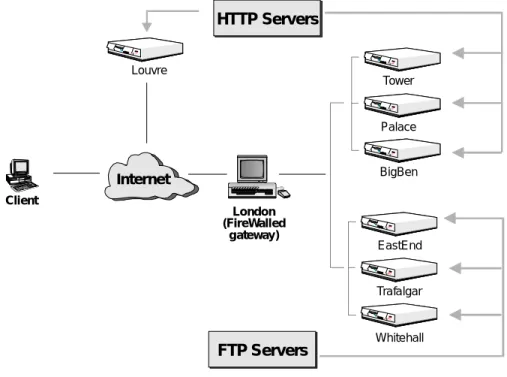
Version 3.0 offers enhanced features for Active Network Management by providing the capability to balance the load on network servers as an integrated part of the Security Policy. The Security Manager uses the standard GUI tools to define ”logical network objects,” which include all the objects capable of
London (FireWalled
gateway) Client
HTTP Servers
FTP Servers
Louvre
Palace BigBen Tower
Trafalgar Whitehall EastEnd
Internet
Figure 1. Load Balancing
The manager can then define a rule instructing FireWall-1 to direct different connections of that type to different elements of the logical network object, according to a selected algorithm, thus balancing the service load between the logical network object’s elements.
Load Balancing
The available load balancing algorithms are: • server load
For HTTP, FireWall-1 queries the servers to determine which is best able to handle the new connection.
For other services, FireWall-1 assigns a server based on its knowledge of the live connections through the monitored FireWalls.
• round trip
FireWall-1 determines the round-trip times between the FireWall and each of the servers, and chooses the server with the shortest round trip time.
This method will not give optimum results for HTTP if some of the HTTP servers are not behind the FireWall.
• round robin
FireWall-1 simply assigns the next server in the list.
• random
FireWall-1 assigns a server at random.
• domain
FireWall-1 assigns the “closest” server, based on domain names.
Load Measuring
CheckPoint provides a sample load measuring application, as well as an API for users who wish to write their own, for installation on servers that are not FireWalled. The application is a service running on the port number specified in the load_service_port property (defined in objects.C) and returns
information about the server’s load to FireWall-1.
Rule Base
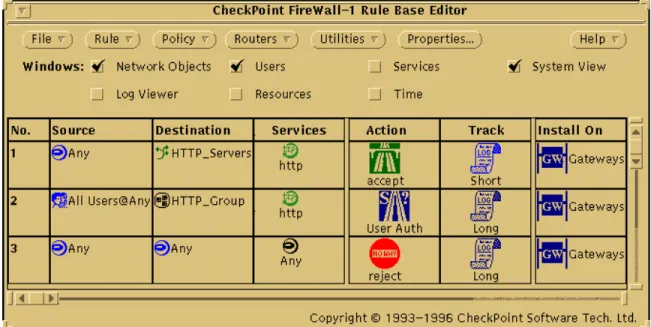
In a rule where the Destination is a Logical Server, the action refers to the connection between the FireWall and the client (which serves to redirect the client to the proper server), and must be either Accept of Encrypt. There must be a different rule that allows the connection between the client and the server. That rule can specify another action, for example, User Authentication.
Figure 3. Using Logical Servers in a Rule
Exporting log records to Informix database
Version 3.0 enables log records to be exported to an Informix database, allowing the user to use any external tool for searching and retrieving from the log database.
Across-the Board Client-Server Architecture
Version 3.0 completes the Client-Server architecture introduced in version 2.1, by adding an X/Motif client software, making the Client-Server architecture available for all supported Unix platforms.
The new FireWall-1 management architecture separates the management process into a Client-Server model: the client software can run on any
FireWall-1 supported platform (except for Bay Network routers). It also runs on Windows 95 platforms, enabling the Security Manager to configure and
monitor network activity from a desktop machine. FireWall-1 allows multi-client configurations in which the monitoring tool can run on different sites, while the Security Policy editor, from which the FireWall Modules are controlled, runs on a central host.
The server software runs on any FireWall-1 supported platform, and is responsible for storing the network configuration files, databases, name
resolution, as well as for controlling the managed FireWall Modules and storing their log records.
Both client and server, as well as the FireWall module itself (which enforces the Security Policy) can all run on one gateway, or be divided among different machines. For example, a Unix machine’s powerful routing capabilities can be exploited by having it run the FireWall module, while an easy-to-use Windows 95 machine is used for running the FireWall-1 Graphical User Interface (GUI).
The supported platforms for FireWall-1 Version 3.0 are: • SunOS4 4.1.3 and 4.1.4
• Solaris2 2.3 and above (SPARC and x86) • HP-UX 9 and 10
• Windows NT 3.51 and 4.0, both Server and Workstation
• Bay Networks Routers (not including Encryption, NAT and User Authentication features)
The Client-Server GUI allows the Security Manager to define different access levels for the FireWall-1 administrators. Security Policy activities are logged, improving the auditing capabilities.
In addition to the new Client-Server architecture, Version 3.0 continues to provide a standalone OpenLook GUI for Unix platforms.
X/Motif Graphical User Interface
The Windows Graphical User Interface, introduced in Version 2.1 for Windows 95 and Windows NT, is available in version 3.0 for Unix machines running X/Motif.
The new GUI is identical to the Windows GUI and includes the Security Policy Editor, the Log Viewer and the System Status View. These applications
comprise the client side of the Client-Server architecture of FireWall-1’s Control Module.
Content Security
Version 3.0 introduces a new level of network security: content security. This feature extends the decision process’ range of data inspection to the highest level of the service’s protocol, achieving highly tuned access control to network resources.
Version 3.0 provide content security for HTTP, SMTP and FTP, using the Firewall-1 authentication servers. For each connection established through the FireWall-1 authentication servers, the Security Manager is able to control specific access according to fields that belong to the specific service: URLs, filenames, ftp PUT/GET commands, type of requests and more.
A major security enhancement enabled by the Content Security feature is Anti-Virus checking for files transferred. The Anti-Virus option will be fully integrated with all FireWall-1 features.
Content Security is enabled by the introduction of a new type of FireWall-1 object: resources. A resource is a user-defined list of attributes, based on an existing service, and can be viewed as a refinement of a service definition. For example, a Security Manager might define a URI resource whose attributes are a list of URLs and the HTTP and FTP schemes. The service/resource can be used in the Rule Base in exactly the same way a service can be used, and the standard logging and alerting methods are available to provide monitoring of
Web (HTTP) support
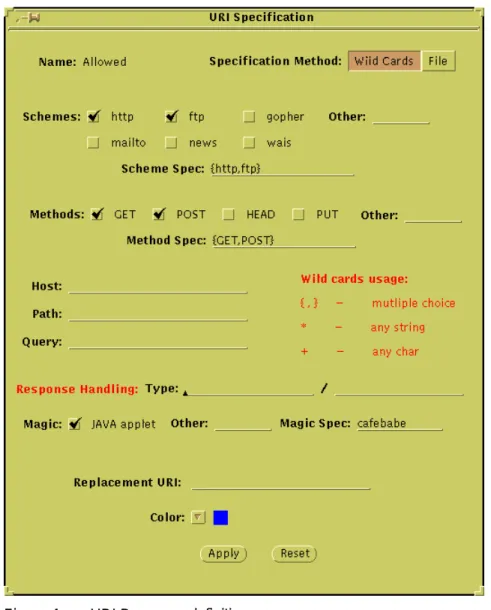
URI resources can define schemes (HTTP, FTP, GOPHER etc.), methods (GET, POST, etc.), hosts (for example, “*.com”), paths and queries. Alternatively, a file containing a list of IP addresses and servers can be specified.
Figure 4. URI Resource definition
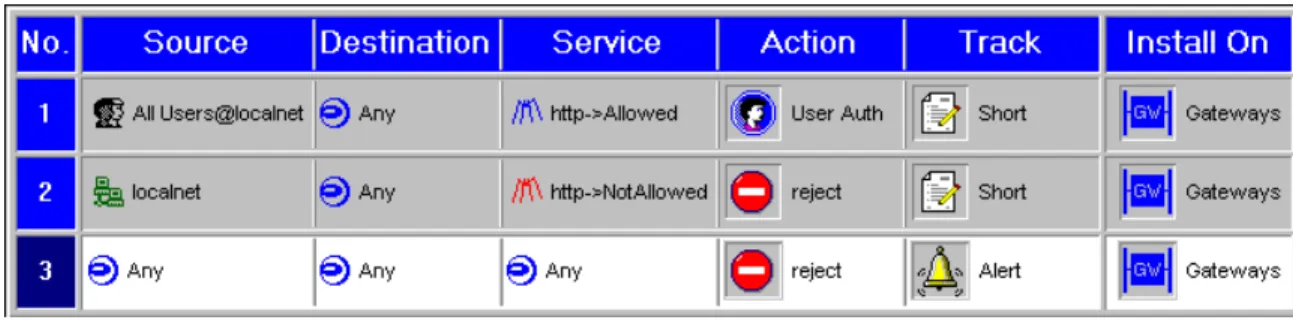
For example, suppose the Security Administrator defines two URI resources: • Allowed — HTTP and FTP schemes, GET and POST methods
Then the following rules prevent local users from accessing the NotAllowed resource, and allow users access to the Allowed resource after authentication.
Figure 5. URI ina Rule Base
In addition, the Security Administrator can define how to handle responses to allowed resources, for example, that JAVA applets not be allowed even on resources that are allowed. A customizable replacement URL, for example a page containing a standardized error message, can be displayed when access to a response is denied.
Mail (SMTP) support
The SMTP protocol, designed to provide maximum connectivity between people all over the Internet, and enhanced to support not only E-mails but file attachments, poses a challenge to the Security Manager who wants to maintain connectivity but keep intruders out of the internal networks.
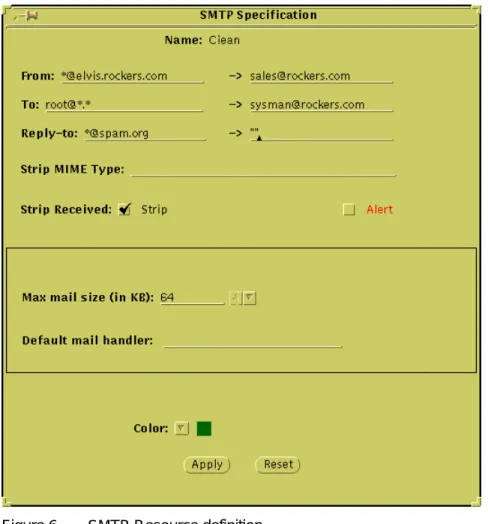
FireWall-1 Version 3.0 offers an SMTP server that provides highly granular control over SMTP connections. By defining SMTP resources, the Security Administrator can:
• hide outgoing mail’s From address behind a standard generic address that conceals internal network structure and real internal users
• redirect mail sent to given To addresses (for example, root) • drop mail from given addresses
• strip attachments of given types from mail
• strip the Received information from outgoing mail, in order to conceal internal network structure
Figure 6. SMTP Resource definition
For example, in the definition in Figure 6 (page 10), the following attributes are defined:
• all users’s outgoing mail appears as though it came from a single user, while the names of internal mail servers are hidden
• mail sent to root is redirected to another user • all mail from spam.org is dropped
• received information is stripped from outgoing mail • mail message size is restricted to 64KB
FTP support
FTP is the most popular protocol for file transfer over the Internet. FTP Resources can specify specific FTP commands (PUT/GET), file name restrictions, and invoke Anti-Virus checking for files.
Anti-Virus support
The integration of Anti-Virus inspection into FireWall-1 considerably reduces the vulnerability of protected hosts. Version 3.0 provides this feature as an integral component of the Content Security feature.
Using an integrated Cheyenne Anti-Virus module, the Anti-Virus option examines all files transferred. This option’s configuration (which files to check, how to handle infected files) will be integrated into the Security Policy. All FireWall-1 auditing tools are available for logging and alerting when these files are encountered.
Enhanced Authentication and Encryption
In addition to the content security provided in Version 3.0 for the
authentication servers, there are other improvements and add-ons to the user authentication level provided by FireWall-1 authentication servers. This
includes transparent user authentication servers as well as support for RADIUS and Digital Pathways protocol authentication schemes.
Transparent Authentication Servers
The existing Firewall-1 software offers user-level authentication servers for TELNET, FTP and HTTP. To use these servers, the user must first connect to the server running on the FireWalled gateway, authenticate himself or herself, and then specify the final destination to which the connection should be forwarded. Version 3.0 omits the complexity this method imposes on the user. Instead, the user can go directly to the final destination. The FireWalled gateway, located between the user and the destination, intercepts the connection, recognizes that it requires user-level authentication, and initiates an authentication session with the client. If this session is successful, the connection is safely forwarded to its final destination.
Although this feature does not provide new options to the Security Manager, it does make the use of the authentication servers much more transparent and simpler for users.
Radius and Digital Pathways support for Authentication servers
The various authentication servers in Firewall-1 can authenticate a user with different methods: SecurID smart cards, S/Key one-time passwords system, Internal (Firewall-1) password and Operating System password.
Version 3.0 enhances this list by adding support for RADIUS - a standard protocol for Client-Server authentication. Using Firewall-1 you can now integrate your system with any Radius-compatible authentication servers: Enigma Logic, CryptoCard and others. Moreover, version 3.0 supports the Digital Pathways authentication scheme.
IPSec and SKIP support
Keeping FireWall-1 at the edge of state of the art encryption technology, Version 3.0 supports the IPSec and SKIP standards.
The IPSec forum, a sub-committee of IETF, has published standards describing general framework for IP layer encryption and authentication. These standards describe the use of DES and Triple DES for encryption and MD5 and SHA for authentication. FireWall-1 Version 3.0 supports these standards.
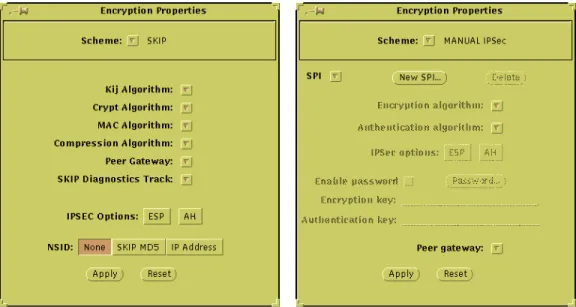
SKIP (Simple Key Management for IP) is a key management protocol which defines the way in which encryption and authentication keys can be securely shared between two parties. The SKIP protocol was developed by Sun Microsystems and is now supported in Version 3.0 of FireWall-1. Supporting IPSEC and SKIP standards enables FireWall-1 users to communicate in secured encrypted channels with networks that do not necessarily run FireWall-1 software on their gateways.
Implementation
In the Encryption Rule Properties window, the user can now specify SKIP or Manual IPSec as the encryption schemes:
Address Translation
Automatic Rule Generation
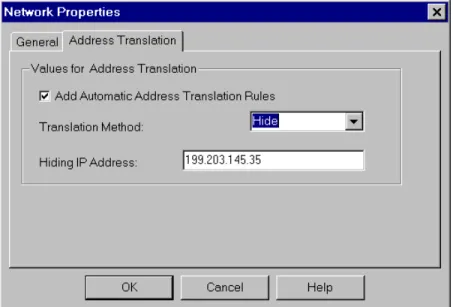
Address Translation rules can now be generated automatically on all platforms.
Figure 8. Automatic Generation of Address Translation for Network
Graphical User Interface
Windows and X/Motif GUI users can now define Address Translation rules using the familiar Rule Base paradigm.
Support for New Services
Exploiting the flexibility of the Stateful Multi-Layer Inspection technology, FireWall-1 Version 3.0 adds new services to the built-in list of supported services including the following non-trivial services:
• SQL*Net
• CoolTalk — Netscape 3.0 (Atlas) add-on for transferring audio • Net Meeting — Microsoft conferencing standard
High Availability and Synchronization of Firewall Modules
FireWall-1 provides state-full inspection code even for stateless protocols like UDP, RPC etc. To do this, the Firewall Module creates a virtual state for such connections, and updates this state according to the data transferred.
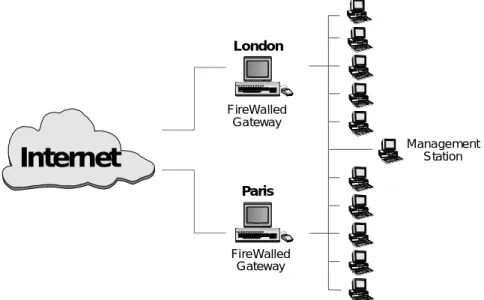
Starting with Version 3.0, different FireWall modules running on different machines can share this information and can mutually update each other with the different connections’ state.
Two immediate benefits are provided by this option: • High Availability
When one of the FireWalled gateways stops functioning and another one takes its place, the second FireWalled gateway has the updated state of the connections, so the connections can be maintained.
• Different Routes for Connections
The IP protocol supports a network configuration in which all packets sent from host A to host B are routed through gateway C, but all packets sent from host B to host A are routed through gateway D. Such a
configuration was not previously supported by FireWall-1, because of the need to maintain the connection’s updated state, but can now be
FireWalled Gateway
Internet
Paris
FireWalled Gateway
Management Station
London
Figure 10. Two FireWalls in Synchronized Configuration
Implementation
The text file sync.conf (in $FWDIR/conf) lists the other FireWall Modules which this FireWall Module exchanges state information. A control path must be established between all the FireWall Modules (using the fw putkey command).
When one FireWall Module goes down, the other FireWall Modules take over after the routing is re-configured.
Restrictions
There are likely to be problems with connections between two synchronized FireWall Modules. For example, encrypted connections between two
synchronized FireWall Modules do not function properly.
The SKIP key management protocol cannot be used on a synchronized FireWalled gateway.
Miscellaneous
Installation and Configuration Improvements
Adapting itself to the growing complexity of the different Firewall-1 modules, the installation and configuration process has been simplified and improved in Version 3.0.
A new configuration script enables users to reconfigure FireWall-1 without re-running the installation script.