Active Directory/LDAP integration with
SubDomains
June 20, 2006
In This Document:
Overview
This document covers the integration of sub-domains with Microsoft Active Directory and LDAP.
Overview page 1
Sample Domain Structure page 2 Special Considerations page 3 Configuring MS Active Directory page 4
Active Directory/LDAP integration with SubDomains. Last Update — June 20, 2006 2
Sample Domain Structure
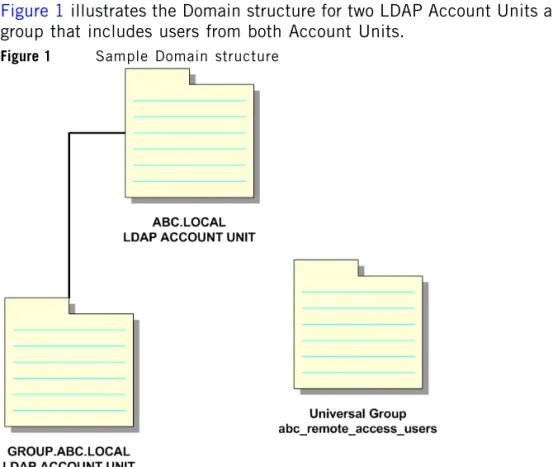
Figure 1 illustrates the Domain structure for two LDAP Account Units and a single User group that includes users from both Account Units.
Figure 1 Sample Domain structure
From SmartDashboard, users in both groups can be viewed, but authentication fails for users in the subdomain GROUP.ABC.LOCAL until a Global Group is created in
GROUP.ABC.LOCAL.
The subdomain requires special configuration steps to allow proper LDAP
authentication for all users from both Account Units. Briefly, all relevant users should be added to a group called abc_remote_access_users and proper rule added to rulebase in security policy.
Special Considerations
Special Considerations
When configuring MS Active Directory with subdomains:
• Each AD subdomain must be defined as a Global Catalog. Active Directory has a global catalog which contains a partial replica of all objects in the directory. The attributes in the global catalog are those most frequently used in search operations, user's first and last names, login names, etc. It allows users to find objects without knowing the domain by searching the entire forest.
Global catalog allows searches on the entire forest as well as the schema and configuration containers. It contains a small subset of properties on each object. To search a global catalog, a domain controllerthat contains a global catalog must be available. Global catalogs are read-only.
• Groups in main domain must be defined as a Universal group.
A Universal group can contain Accounts from any domain in the same forest, global groups from any domain in same forest, or other Universal groups from any domain in same forest.
• Microsoft's Certificate Server must be installed on all domains. This is required for SSL communication between the Active Directory Server and the Check Point SmartCenter Server/ Management Server.
• SSL communication must be enabled between FireWall-1 and Active Directory. • Each domain must be defined a separate account unit.
• An External Group for the main domain's universal group must be defined on each subdomain's account unit — actually on each users contained domain's account unit.
• A user-authentication rule must be duplicated for each external group definition (for each users contained in a subdomain).
Active Directory/LDAP integration with SubDomains. Last Update — June 20, 2006 4
Configuring MS Active Directory
To configure MS Active Directory with subdomains: 1. Define each AD subdomain as a Global Catalog:
a. Select Start > Programs > Administrative Tools > Active Directory Sites and Services.
Configuring MS Active Directory
b. Open Properties window for NTDS Settings and enable the Global Catalog option.
c. Click OK.
Active Directory/LDAP integration with SubDomains. Last Update — June 20, 2006 6 a. Select New > Group.
Configuring MS Active Directory
c. Click OK.
3. Install Microsoft's Certificate Server on all domains:
a. Select Start > Settings > Control Panel > Add/Remove Components > Add/Remove Windows Components.
Active Directory/LDAP integration with SubDomains. Last Update — June 20, 2006 8 c. Select Enterprise Root CA for main domain and Subordinate CA for subdomains.
d. Fill in the CA Identifying Information fields. Note - This is the information that will be part of your certificate.
Configuring MS Active Directory
e. Take the Data Storage Location defaults.
Active Directory/LDAP integration with SubDomains. Last Update — June 20, 2006 10 4. For the main domain and subdomains, enable SSL communication between
FireWall-1 and Active Directory:
a. Select Start > Programs > Administrative Tools > Domain Security Policy.
b. Browse to Security Settings > Public Key Policies > Automatic Certificate Request Settings. Right click and select New Automatic Certificate Request.
Configuring MS Active Directory
c. Select Domain Controller from window, and select your CA.
5. Define Account Units:
Each domain must be defined a separate account unit. For example: a separate account unit for Europe.GCN.LOCAL is Europe_AU.
6. Define External group:
External group for main domain's universal group must be defined on each subdomain's account unit (actually on each users contained domain's account unit):
Active Directory/LDAP integration with SubDomains. Last Update — June 20, 2006 12 7. Duplicate user authentication rules
In the the FireWall-1 Rulebase, duplicate a user-authentication rule for each external group definition (for each user contained in a subdomain).
For example:
• On the Europe_AU account unit, the Europe_GR external group was defined. • On the Ro_Europe_AU account, the Ro_Europe_GR external group (both them
on the basis of main domain's universal group) was defined.