ISSN 1479-4403 1 ©ACPIL
Platform for Delivering an Engineering Course
Jacek Uziak
1, M. Tunde Oladiran
2, Edmund Lorencowicz
3and Kurt Becker
41Department of Mechanical Engineering, University of Botswana, Gaborone, Botswana
2Department of Mechanical & Energy Engineering, Botswana International University of Science & Technology, Palapye, Botswana
3Department of Machinery Exploitation and Management of Production Processes, University of Life Sciences, Lublin, Poland
4Department of Engineering Education, Utah State University, Logan, USA [email protected]
[email protected] [email protected]
Abstract: The use of Information Technology (IT) has been growing over the years in various human endeavours. It has also been adopted in education sector for teaching and learning. Various studies have been conducted to assess the effectiveness and acceptance of e-learning strategy by students. In particular, the current research is an attempt to obtain students’ and instructor’s perspective on the use of Blackboard software. The technology is a course management system used in a blended learning mode to deliver a third year mechanical engineering course at the University of Botswana (UB). In terms of students’ views, the study covered a period of nine years and the questionnaire survey was administered to each succeeding cohort of students. Whereas in terms of the instructor’s perspective the motivation and the challenges faced during the years of use of the platform were described. Results indicate that students were generally comfortable with the use of Blackboard as they highly embraced it. Students indicate that their performance improved and communication with instructor was enhanced significantly. The respondents also recommended that Blackboard should be used in other courses in their programme of study. The instructor considered the time factor the most vital challenge related to the use of the platform. However, despite the challenges the application of the learning platform and the development of its material was a positive experience for the instructor and well received by the students.
Keywords: Information Communication Technology, e-learning, Course Management Systems, Students Perspective, Instructor Perspective
1.
Introduction
Information Technology (IT) has become part of human activity in social, economic and industrial enterprises, and education is no exception. Information technology significantly impacts learning among university students as they use it in their program courses. Information technology is widely used by engineering professionals, engineering educators and engineering researchers and they use it on a daily basis in their professional practice. As such, there is no technological barrier for engineering lecturers to employ technology for course delivery.
Today, education uses learning management systems (LMS) which are specially designed platforms to facilitate distance learning (Wael and Morsi, 2005). Such platforms are also used for delivery and tracking of blended learning, i.e. a combination of traditional (face-to-face) and on-line resources. E-learning however is not a simple application of IT in education but a case of expanding learning possibilities and a new frontier in education. In order for e-learning courses to promote value, creating processes both for learners and teachers requires enormous effort and commitment (Uziak and Oladiran, 2012). The complexity of learning, as a cognitive and knowledge oriented process, makes the establishment of effective e-learning platform using IT more difficult. Actually, e-learning challenges the way teaching is done. It requires much more effort for equivalent or improved learning outcomes in comparison to traditional learning; it requires joint efforts from lecturers and students.
2.
Learning systems
Learning Management Systems (LMS) are an increasingly important part of academic systems in higher education. They are used in many forms of e-learning from courses introducing minimal element of Web facilitation to full online courses.
There are several course management systems, such as Blackboard, Blackboard Vista (formerly WebCT), Desire2Learn, Questionmark Perception, I-Assessor Moodle. All of them promote teaching and learning activities in a ‘seamless environment’ (Burrell-Ihlow, 2009; Ullman and Rabinowitz, 2004). They combine functions; distribute information to learners; enable communication with the students via discussions, announcements, email, real-time chat sessions, and an interactive whiteboard; enable on-line assessment (evaluation of the students by means of quizzes and assignments); promote student self-evaluation through self-tests and progress tracking; tracking of students' use of the learning materials; and facilitate course administration. These virtual environments enable learners to collaborate on projects and share information (Heo, 2009; Lansari, Tubaishat and Al-Rawi, 2010). They basically provide "all-in-one" software packages which enable several functions apart from providing students with course materials.
Course management systems are also used for delivery and tracking in blended learning, i.e. a combination of traditional (face-to-face) and on-line resources. The aim of those different modes of delivery is to complement each other and create the most efficient and effective learning environment. Bath and Bourke (2010) argue that blended learning achieves better student experiences and outcomes, and more efficient teaching and course management practices.
Despite the type and sophistication of learning platforms used, it is still the instructor who plays the most important role if the students are to learn effectively, retain the knowledge and practice the skills imbibed during the process. The platform must be accepted by students in order for them to feel comfortable in using it and not being threatened by the level of difficulty or complexity.
3.
Blackboard
Blackboard is one of the premier on-line LMS. It is a flexible “all-in-one” system, which has been selected as appropriate for student learning for the following reasons (Bradford et al., 2006-2007; Watson and Watson, 2007).
• It is a good medium for communication and exchange of information.
• It provides good peer support and peer coaching – contributes to enhancing peer learning. • It is used as a tool that facilitates student - centred and student – led learning.
• It promotes lifelong learning and active engagement concepts. • It exposes students to modern technology and
• It provides additional resources to teaching and learning.
Blackboard has proven to be a successful LMS. Despite occasional statements about instructors’ facing difficulties in the system due to low background knowledge in technology (Zaki and El Zawaidy, 2014) it is user friendly and easy to use (Lin, Persada and Nadlifatin, 2014). Blackboard is especially useful in terms of accessibility of unit materials (Heirdsfield et al., 2011). Students also value the connections made with other students although learners indicated that they needed more interactive and communicative functions and activities (Liaw, 2008).
Evident indicates that instructors mainly use Blackboard as a tool for enhancement purposes, rather than an advanced level that requires transformation of teaching and learning methods and tasks (Nkonki and Ntlabathi, 2016). It also supports the view that instructors could use learning management systems more creatively and consistently as part of their pedagogy (Heirdsfield et al., 2011).
Blackboard technology was introduced at the University of Botswana (UB) in 2002. The rationale was to expand access to academic programmes and to enrich the quality of instruction. Originally, WebCT and Blackboard were considered to be the right LMS in the UB context mainly due to its flexibility, and ease of installation and use. The features which were most relevant for selecting Blackboard included the following:
• an easy way to manage and to put course content on-line • access control (password protection)
• tracking of student progress
• grade maintenance and distribution as a method to keep assessment on-line
4.
Context
Data was collected over a period of nine academic years from 2007/08 to 2015/16 from the students registered for a course of Mechanics of Machines offered in Year 3, semester 2 of the BEng Mechanical Engineering programme at the University of Botswana. The course was delivered using a blended mode consisting of the traditional method of lectures, tutorials and labs (with the application of PowerPoint for lecture delivery) as well as Blackboard, which was used for all elements of teaching including provision of teaching material and communication with students. It was also used by the students to submit all (apart from tests) elements of the continuous assessment (assignments, projects, lab reports).
The Blackboard material for students was grouped in topics as per lecture delivered. The material for each lecture included lecture notes, PowerPoint Presentation (in pdf format), summary, examples with solutions, a list of problems (with answers but not solutions) and self-test (in the form of multiple choice questions). In the majority of topics extra material was provided such as video clips from software on performance or behaviour of engineering materials. Access to the lecture material was monitored on a weekly basis. The Blackboard material was constantly developed, updated and improved.
The results presented show students and instructor perspective towards use of LMS as a technology enhancing learning and teaching tool. Data was gathered for a period of 9 years and were concerned with students’ general use of IT, application, comfort and time spent, and learning experience with LMS.
During all 9 years the course was taught by one instructor who started as a complete novice in the use of any LMS. The instructor received less than an hour of training and no assistance in the any element of preparing or placing material on the Blackboard. The instructor perspective demonstrates a personal experience in the application of the technology in terms of meeting general objectives of its application and challenges faced.
The original inspiration to start using the Blackboard was one of curiosity on the part of the instructor and the attempt was treated as an experiment. Although the ‘rumors’ heard on the academic grapevine about the convenience of the platform in administrating a course was also a motivation. There was also a hope that the interaction between the students and the instructor would become more open. At first, the general attitude of the students attending the course was not well received with the students hardly asking any questions or expressing their opinions or wishes. The instructor never considered it as a special problem related to his particular teaching approach or his personality. In general, the students at UB, or at least Faculty of Engineering and Technology, are not very active participants in the classes or even less vigorous in seeking help of the instructor outside of the class.
The original administration of the course involved document and resource delivery to the students. That mainly included the course syllabus, teaching plan and assessment plan. The resources covered the pdf versions of the lectures and tutorial sheets. There was never an intention to replace the face to face delivery mode but rather to augment it with extra resources. The blended method was largely unknown to the instructor at the beginning of the experiment. The course however developed with years gradually covering more features available in the platform (Table 1).
Table 1: Course Development
Year 1 Year 2 Year 3 Year 4 Year 5 Years 6-9
• Course Information • Course Material
(Lectures & Tutorial Sheets)
• Announcements • Online Calendar • Discussion Forum
• Video Clips • Links to online
resources • Mail Communication • Online Submission of Assessment Elements • Posting of Marks
• Assessment Elements Created using the Platform (Assignments & Essay Questions) •Self-Assessment Elements (Tests, Quizzes, Question Pools) •Surveys
The first year was used to ask the students opinions on the application of LMS. The students’ views were sought regularly through the years and the application of the system gradually went beyond simple administration of the course.
Discussion forums however, never became very popular between the students. They may have exchanged ideas and opinions between themselves using other media but they certainly preferred to use Blackboard mail to communicate with the instructor. That naturally led to the application of Blackboard in providing students with announcements regarding the course. Although, it constitutes the management part of the LMS application, it was not originally used mainly due to the concern of students’ access to the system from outside the campus. It proved to be no problem and, together with the online calendar indicating salient dates for the course, the announcement gradually turned out to be one of the fundamental uses of the platform.
The elements of the Blackboard (Table 1), such as course administration (posting the teaching and assessment plans, announcements, and online calendar), course content material (with lectures, tutorial sheets and links to extra online sources including video clips enabling visualization of some difficult topics) and mail direct communication between the students and the instructor were fully operational and developed by the end of the third year of the implementation of the platform.
The development of the course was triggered by problems related to the students’ submission of some elements of continuous assessment. Normally, students would submit their project reports, lab reports and assignments by putting hard copies into the instructor’s mail box (pigeon hole). That was always a contentious issue due to possible meddling with such submissions as there was free access to instructor’s mail box. Some students complained about other students removing and/or copying their submission, and there was always some discussion about keeping the deadline. The submission via Blackboard removed such problems. It also enabled individualized feedback in the form of the comments provided to the students with confidence.
Additional benefit of requesting students to submit their work in the electronic form was the idea that their submission should constitute one file combined of text, figures/photos, graphs, drawings etc. It was noticed that the hard copy submission was most of the time a mélange made by smart photocopying to enclose graphic elements into the text. The electronic submission forced the students to embed graphic elements into the word processed text. The free hand sketches or other hand drawn graphics (such as velocity and acceleration diagrams for instance) had to be scanned and included in the text file. Basically, the submission required student work to look like a professional engineering report.
Although students were encouraged to submit their work in the non-editable form (like a pdf format) some reports were always submitted as text file which allowed to look at the formatting. That was an eye opener in some cases indicating the inability of students to properly edit the text. The use of the spacebar (instead of tab or instead of center the text), end of the line key, end of the page and other fundamental editing functions, in addition to more complex feature like referencing or table of content etc., was in most of the cases unacceptable for engineering students. Although, marking did not include the editing part of the submission, comments were passed to the students.
The marking of electronically submitted elements of continuous assessment naturally extended to actually creating assessment elements in the platform with due dates, late submissions indicator and finally posting marks for the students. Although students appreciated the transparency in which the created assessment requested them to submit the assignments and the reminders associated with them, they expressed reservations with impersonal treatment of the submissions and especially maintaining due dates and, more significantly, cut off dates. The old form of submission via the mail box always created ‘natural’ flexibility with the deadlines. Technical issues, especially in the first few years of using the Blackboard platform, undeniably created obstacles in smooth use of the system. That was a concern of students especially with the deadlines for submission, however such hindrances were always resolved by the instructor extending the submission period if the system was not functioning properly during the deadline.
Publishing the marks for submitted assessments only unsurprisingly extended to announcing marks for other elements of assessment such as tests and quizzes. That proved to be very popular among students and less enjoyable for the instructor. That was due to a general and fundamental glitch or lack of technical adjustment as the general Academic Students Administration System(ASAS) (and even previously used ITS system) were
not linked to Blackboard. That is a serious problem adding enormous time demand on instructors who wanted to keep students’ marks up to date on both systems, as that can only be done manually.
The final step in the developing of the course material was online quizzes which were introduced in the last 4 years. They were intended at students’ self-assessment and were never used as actual elements of continuous assessment for the course. Those multiple choice assessment tools became very popular among students despite the fact that multiple choice questions were never used in tests or final exams.
5.
Methodology
As mentioned before, the results presented in this paper are based on nine years’ surveys carried out on the application of Blackboard technology in one course (Mechanics of Machines) offered in Year 3, semester 2 of BEng Mechanical Engineering programme at the University of Botswana. The questionnaire was administrated at the end of the course in academic years from 2007/08 to 2015/16. In total, 275 students (out of 281 students registered for the course, i.e. response rate of 98%) completed the questionnaire in the years under study. The number of students changed between the minimum of 15 to a maximum of 46 through the years with the average size of the class of 31 students (Table 2).
Table 2: Number of Students Registered for the Course
Year Academic Year Number of Students
1 2007/08 40
2 2008/09 39
3 2009/10 22
4 2010/11 15
5 2011/12 23
6 2012/13 23
7 2013/14 24
8 2014/15 43
9 2015/16 46
Total: 275 & Average: 31
A structured questionnaire with 45 items was designed and administered at the end of each semester. The principal research question was to establish the engineering students’ opinions about the use of Blackboard in the learning process. The questionnaire covered issues such as Blackboard as a learning tool, its efficiency and effectiveness, and Blackboard as a tool for interaction between the students themselves and also between students and the instructor. There were also preliminary questions regarding students’ general use of IT and its application in learning. Additional questions covered students’ preference in course delivery. The questions were converted into statements and the questionnaire was created using Likert items seeking students’ evaluation. The whole questionnaire was thoroughly discussed within the research group and also with several colleagues who were asked to make a critical review.
As with any self-reported survey, it is not possible to verify if the students completed the questionnaire honestly and accurately. The honesty issue was not addressed directly but the questionnaire was anonymous hence the responses did not influence the final marks that students obtained in the course. The students were also briefed on the purpose of the survey and how it could improve the use of Blackboard. Pre-testing of the questionnaire was carried out to identify and remove any ambiguities in the statements and also to ensure that respondents understood the purpose of the study.
6.
Results
6.1 General use of IT
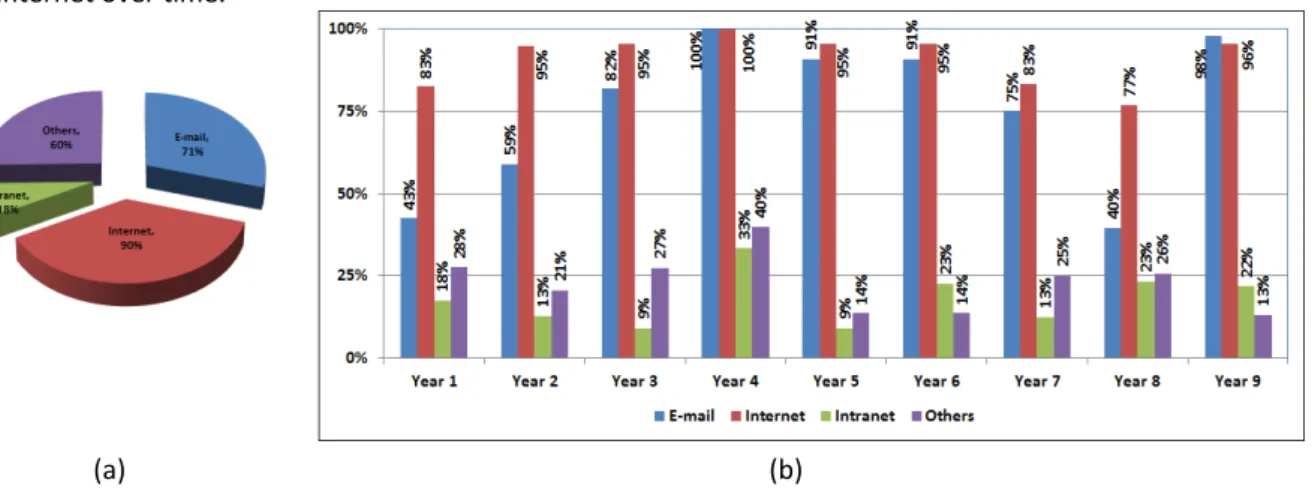
The first point which the survey tried to clarify was the general use of IT and whether it is used for learning. In that respect the students were asked what type of IT they use in the learning process. As expected, internet dominated the scene, with 90% of the students using it for learning (Figure 1). There was also a very high percentage for e-mail, which, from discussions with the students, was used for communication with fellow students and with instructors. There was a relatively low use of intranet and this did not really increase through the years. That is despite the fact the learning platform and general students’ administrative system was available via the University’s intranet. The reasonable explanation is that the students did not understand the term intranet. There was not much difference in use of IT throughout the years. However, there was a
surprising dip in all applications during academic years 2013/14 and 2014/15, which cannot be due to technical issues related to availability of the technology for students in the Faculty. The other IT applications used by students included Facebook, Twitter, What’s up, etc.
A majority of students used internet for information search related to the learning either ‘Very Often’ or ‘Often’ (Figure 2). Although the results varied between years they remained constantly affirmative on the use of internet over time.
Figure 1: General use of information technology
Students were satisfied with their skills on using the internet; they professed to be skilled (69%), comfortable (74%) and efficient (68%) in searching for information on-line (Figure 3a). Figure 3b shows that the majority of students confirmed that on-line searching helped them to do assignments quickly and efficiently (57%) and that in general it improves their quality of work (59%). However, in both of the above aspects there were also a lot of neutral answers (36% and 32%, respectively).
Figure 2: Respondents use of the Internet search for information
Figure 3: Application and comfort of using the Internet
(a) (b)
6.2 Application of Blackboard
Almost immediately after the first few weeks using LMS it became apparent that the communication part of the software was extremely useful. It started to work as a real platform for interaction, mainly between the instructor and the students. Students became more active in asking questions, especially on the open boards where they did not need to post their names. However, even direct communication with the students enhanced. The students started asking particular questions regarding topics covered showing some interest going beyond the prescribed syllabus. That was mainly manifested in request to some internet links, video clips and other material related to the course. Those requests gave the direction for the development of the material to be posted on the Blackboard.
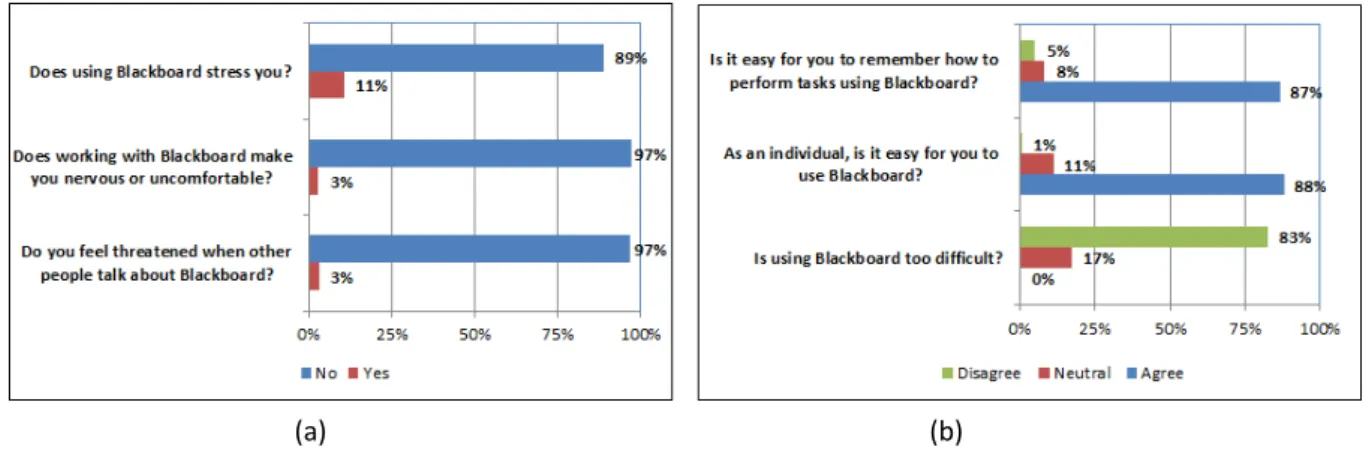
Figure 4: Blackboard application and comfort
As indicated in Figure 4a, students were generally comfortable with Blackboard as a learning tool; they did not feel any stress related to using it (89%), it did not make them nervous (97%) and they did not feel threatened when other people talked about that technology (97%). They were also pleased with the general ease of use of the platform (Figure 4b)
Figure 5: Time spent on using Blackboard
Time which students spent using the Blackboard increased steadily over the last 4 years of the research, reaching an average of 10 hrs/week, and maximum of 18 hrs/week (Figure 5).
Have you worked steadily throughout the semester on the Blackboard material?
Have you used the Blackboard material mainly before some assessments (tests, quizzes etc.)?
(a) (b)
Figure 6: Use of Blackboard
Students admitted that they did not always work through the teaching material regularly throughout the semester but rather before assessment such as tests or quizzes (Figure 6). However, the percentage of students who worked systematically steadily increased from 35% to 76% through the years (Figure 6a). There were a large number of students, who used the material available on Blackboard mainly before assessments (Figure 6b). It is difficult to see any correlation between those changes and the course development (Table 1). The change in working systematically throughout the semester may be attributed to students’ prior experience.
6.3 Blackboard as a learning tool
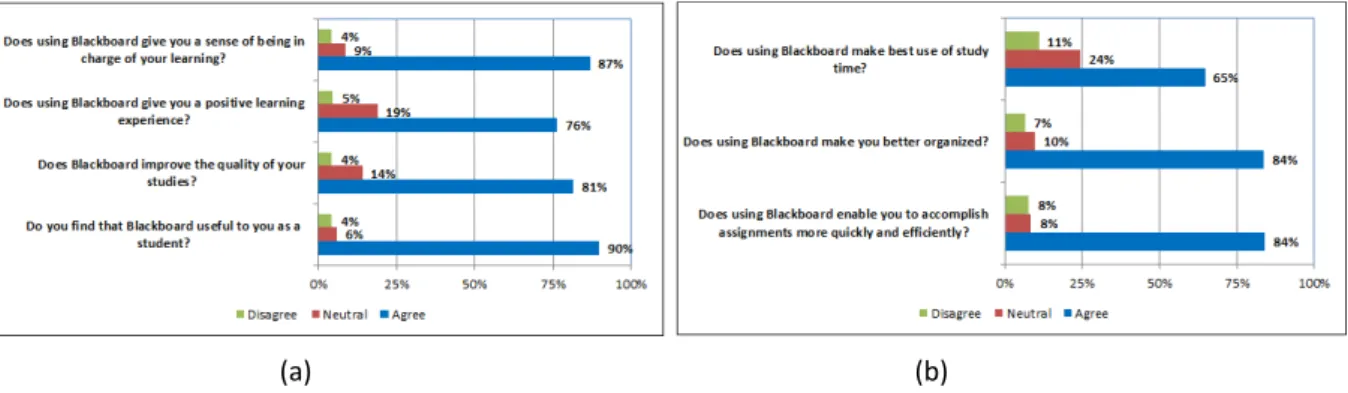
The students thought that the use of Blackboard provides them with a positive learning experience (76%) giving them a sense of being in charge of their learning (87%) – Figure 7a. Answers also clearly indicated that Blackboard improved students’ quality of studies (81%) and was useful in the learning process (90%). The platform also gave students the ability to organize themselves better (84%), to make best use of their time (65%) and to accomplish assignments quicker and more efficiently (84%) – Figure 7b.
Figure 7: Learning experiences of using Blackboard
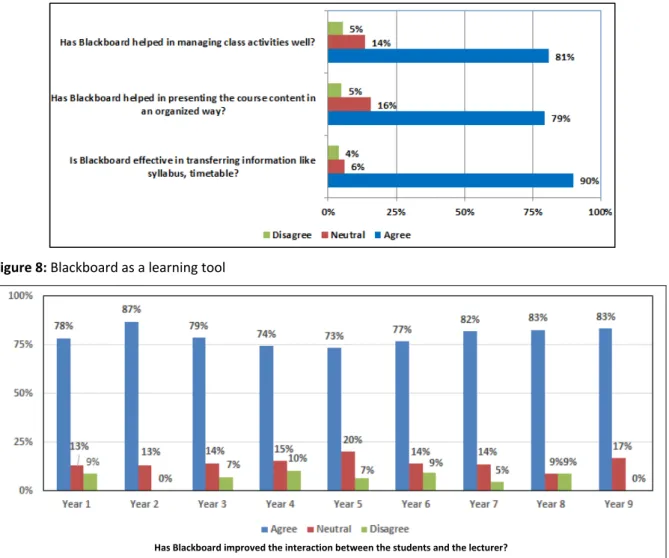
Figures 8 show students responses on the effectiveness of using Blackboard. For example, they positively rated it in managing class activities (81%). Blackboard helped to present the course content in an organized way (79%), whereas 87.5% of students appreciated its effectiveness in terms of transferring the information from the syllabus, timetable etc. The platform increased the communication between the students and the lecturer (79%) and; from discussions with students this was mainly due to students receiving individual notification and the possibility of always easily checking the relevant deadlines on the Blackboard.
Figure 8: Blackboard as a learning tool
Has Blackboard improved the interaction between the students and the lecturer? Figure 9: Interaction between students and instructor
One of the questions in the survey requested students to assess whether the learning platform improved the interaction with the instructor. The students’ observation on that aspect was always positive (Figure 9), however it is worth noting that the percentage of negative answers reduced in the last two years. The introduction of the mail communication in year three did not have much effect on the students’ opinion. However, the use of the online calendar, discussion forum and providing announcements about the course in year 2 made a big impact.
Has Blackboard helped you to learn and understand course material? Figure 10: Facilitation of learning and understanding of course material
Blackboard was very useful in facilitating learning and understanding of the course material. The students’ assessment increased steadily in the first years of use of the platform taking a substantial dip in the fifth year
and recovering gradually reaching the highest level of 91% in the last year (Figure 10). The sudden decline in the fifth year could be attributed to the introduction of elements of assessment created using the platform (Table 1). Although, not really related to the facilitation, introduction of unusual assessment may have negative impact on students’ learning. The introduction of video clips and links to online resources in year three significantly improved students’ opinion.
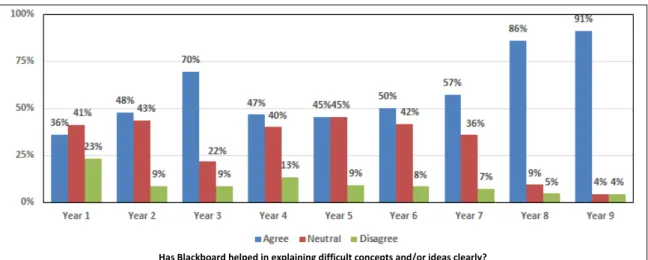
Similar trend, although with smaller decline in the fifth year, was observed in Blackboard as a tool to help in explaining difficult concepts (Figure 11). The students’ opinion recovered massively in the last two years. Again, a big improvement in that aspect of the application of the platform was observed in the second year after introduction of video clips and links to online resources.
Has Blackboard helped in explaining difficult concepts and/or ideas clearly? Figure 11: Assistance in explaining difficult concepts
In terms of generating interest in the course, one again the visual aids and information about online resources in year two made an impact on students’ views (Figure 12). The fifth year observed again a decline.
Has Blackboard helped in generating interest (of the class) in the course? Figure 12: Generating interest in the course
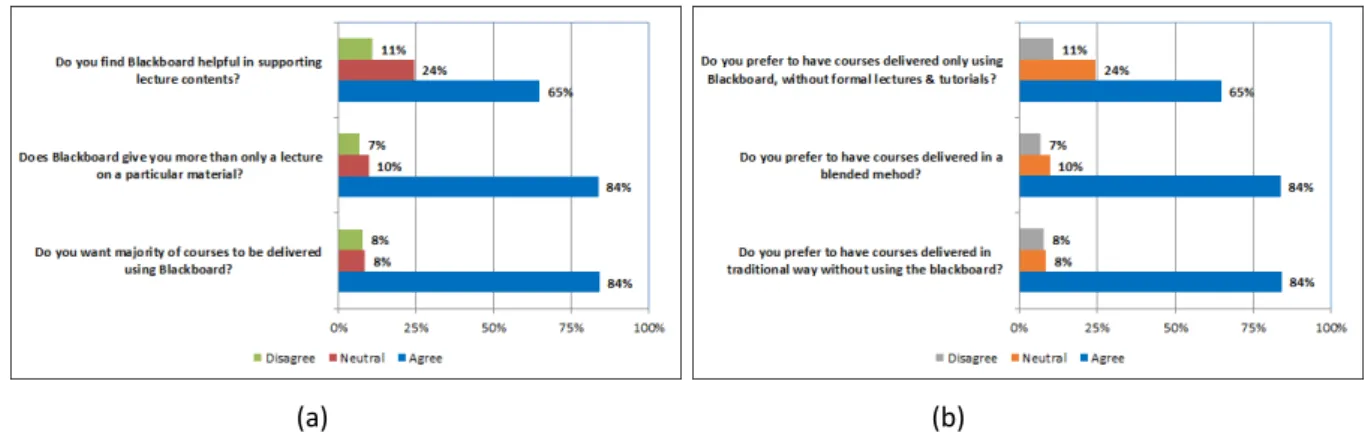
Students considered Blackboard as helpful in supporting delivery of the course material (65%) giving them more than only a lecture (84%) and students wanted more courses to be delivered with the use of the learning platform (84%) – Figure 13a. Students however showed slight confusion in terms of their preferences in the course delivery; as shown in Figure 13b, the same percentage of students wanted the courses to be delivered in blended method and in traditional way (84%).
Figure 13: Blackboard as a support for delivery of lectures
Students had no doubt regarding the overall effectiveness of Blackboard; a great majority assess it as high or very high (Excellent – 19%, Good – 28% and Above Average – 40%) – Figure 14a. They viewed it highly in its role as being a new challenge (65%), broadening their horizon (84%) and also, fortunately or not, influencing their class attendance (84%) – Figure 14b.
Figure 14: Overall effectiveness of Blackboard
7.
Instructor’s Perspective
Despite the general aim to change the university system from teaching to learning, in terms of the preparation of the learning platform, the instructor remains the main actor on the stage. Instructor’s motivation, attitude, acceptance, experience, innovation are the main issues related to the success of the use of the learning platform. Such issues have been studied and reported upon by several authors (Woods, Baker and Hopper, 2004; Almarashdeh, et al., 2011; Alshammari, Ali and Rosli, 2016). The current study extends on the practical experiences of the instructor over the extended period of 9 years when using the learning platform.
7.1 Meeting the Objectives
The sole objective of the introduction of the LMS in the course was to improve the course administration, and improve the communication between the instructor and the students. The results exceeded the expectations. In fact, the communication which was the minor objective gradually became the major one, with great success acknowledged by both students and the instructor.
The use of the platform helped others, typical for such course objectives, for example, imparting students with knowledge about motion and forces, or enable students to apply fundamental principles of mechanics to machines, engines, linkages. However, quite unexpectedly was the objective of improvement in the use of computer technology. It has to be admitted that the computer skills improved were not of the highest level, though still important and useful for engineers.
Although it would be difficult to claim that obtaining feedback on the course is a valid objective, though receiving such feedback from the students is a valid and important element in the process of improving the course and teaching. The feedback obtained was not only anonymous, covering both course content and course delivery, but was also constant and continuous. That allowed the instructor to actually react to the
(a) (b)
feedback, more or less, in live time, a feature not necessarily available in typical and loved by administration students’ assessment of staff and course, done normally sometime at the end of the semester.
What can be considered as a disappointment in terms of objectives was a failure to improve communication between the students. Student-to-student interaction, apart from the one forced by the instructor by giving groups projects of assignments, was not visibly improved. As far as the instructor can assess there was no community of learners created in the course.
7.2 Challenges Faced
The challenges can be classified depending in a few categories depending on the issues and subjects.
Students’ Readiness and Willingness
It appeared from the start of the using the platform that there is no barrier in students’ readiness to use the technology. As also reported by students (Figure 4) there was no problem with navigating through the course material or achieving what the students wanted to accomplish. They were also happy to use the platform with several possible reasons. The fundamental reason may be a pragmatic one related to the fact that students had access to all material related to the course in one place. Even if they missed a lecture or tutorial, the material was easily available at any time. Content was prepared as for lectures, that means in portions or segments which were manageable from the time perspective but also showing the natural flow of logical progression in the course material. The content was presented not only in the form of written text but also some visual elements and/or links to external sources and access to latest materials.
Traditional, hard-core engineering courses, normally follow the usual way of delivery with only classroom face-to-face contact. The application of the LMS in the course gave students some extra appeal to keep them attracted to the course and its material.
Instructor’s Readiness and Willingness
The course instructor, although originally not familiar with any learning platform, was well conversant with computer technology. He had years of experience in use of old mainframe computers, personal computers and also programming in different languages. It can be probably assumed that he had more than average level of computing skills.
Despite his years of experience in a traditional learning system, the instructor’s attitude towards application of technology in teaching was very positive. He wanted to try something new, not only to attract students to the course and its content, but also to improve the general attitude of students who informally, and quite reluctantly, admitted the jealousy towards electrical and computer engineering students always using computers in their classes. The improvement in communication with the students was also a major factor. The interaction with students both inside the classroom as well as outside was not fulfilling the instructor’s desire of more interactive style.
Organization Factors
Despite no formal motivators employed by the University of Botswana the organization did provide the students and staff with WebCT/Blackboard platform for general use. The instructors were encouraged to apply the technology which, however, did not translate, at least in the infant stages of the application of the platform, into enough training or support. Despite the ‘encouragement’ there was no push from the organization to make any changes, adjustments or alignments of the curricula with introduced technology. A missing element in the early stages was lack of instructional design specialists and trained assistants.
Technology Factors
Technology alignment, system quality and service support may be a major hindrance to the employment of any learning technology. Unfortunately, that was also the case, at least originally, with the use of WebCT/Blackboard at UB. The network failures, internet breakdowns, general unreliability of the access to the system, and also the countrywide power failures and interruptions, although may be typical for an African country, were indeed the major problems, both for students and the instructor. Students’ complaints were mainly related to the problems with on-time submission of assessment elements. They actually almost never complaint about problems with access to the Blackboard material claiming that could be done anytime. Instructor’s frustrations had many sides. The breakdowns in the access to the platform, whatever the reason
may be, was especially painful when happened during the process of adding the material or, even more dramatic, when marking the assignments or entering the marks.
The students’ grading system constitutes even now a serious problem still unresolved. Until now, the Blackboard is not linked to the student record system. Both, previously used Integrated Tertiary Software (ITS), and currently used Academic Students Administration System (ASAS), were not linked to the database of Blackboard. That creates a lot of trouble and requires a lot of time consuming actions. It extends not only to the need to double entering of marks (into Blackboard and separately into student record system) but also to simple registering students into the platform. It has to be done, more or less manually, by platform administrators on the basis of a list of registered students for the course which has to be downloaded by the instructor and sent by e-mail. Any change in the registration records is not reflected in the Blackboard and has to be adjusted. With students adding and dropping the courses, late registration (also due to sponsorship problems) lack of automatic synchronization of Blackboard with the ASAS is a vital obstruction.
Time Factor
The potential benefit of using the learning platform in blended delivery of the course is cost-effectiveness, adaptation to changing circumstances, timely content, open-access at any time, and quick feedback from the students. However, for an instructor the so called ‘cost-effectiveness’ depends mainly on his own time devoted to the preparation of the material, course administration, assessment, and communication with the students. In the organization where it is expected that the course development will be done by the academic staff in its own time with little institutional help or resources, it is only the intrinsic motive and personal need of the staff which may inspire them to use learning platform.
The original idea that the platform would be useful if course administration proved to be the correct one and actually did not require any extra time, once learned how to put files into the system. As mentioned above, the secondary motive of improving communication with the students upheld as well but created a demand on the instructor’s time. The demand on the communication with students was ‘self-inflicted’ and therefore, to some extent, welcomed. Also, several questions and requests from students were similar not really creating a backlog.
However, the time spent on the preparation of the material was seriously challenging. As the course material was to augment the material delivered it normally consisted of the lecture delivered in class plus some extra and at least somewhat different to the one presented in the classroom. The most time consuming element of the course were tests. They were multiple-choice tests introduced for the self-assessment of students. Since such tests were never used in the course they had to be created from scratch, which involved also some pre-testing.
In general, although the instructor did not keep tabs on the time spent it can be said that the time demand on the Blackboard experience was certainly at least triple in comparison to preparation for traditionally delivered class.
Keeping with the pace
One of the fundamental challenges in using the LMS platform for the instructor is keeping up with the pace of the course. The ‘course’ includes all the demands from students and the demands from the course itself, i.e. the need, create new material, to update the material, to introduce new features to keep students’ attention and to make the fabric of the course useful and attractive. The preparation of the on-line tests was not only the most time consuming and demanding elements of the course but it was also the most demanding to keep it at high enough level and at the same time not to discourage the users. The survey administered did not ask about that feature of the platform, as it was introduced as the last one, however from the discussions with students and their on-line input it appears that they highly valued that form of self-testing.
8.
Conclusions
The paper presented the students and the instructors’ experiences on the application of Blackboard as the learning management system. In terms of students’ views, the study surveyed a cohort of third year mechanical engineering students to obtain insight of the general use of information technology for learning
and their perceptions about the use of Blackboard platform, whereas the instructor presented challenges faced during the years of use of the platform.
Students reported high use of general application of IT, 90% used internet for some elements of learning. Over 70% of students also used e-mail as a way of communication with fellow students and also with instructors. There was not much difference in the use of IT throughout the years.
It terms of application of Blackboard, results from the study were consistent with previous research findings for courses other than engineering discipline (Goolkasian, Wallendael and Gaultney, 2003; Warren and Holloman, 2005; Yip, 2004). Therefore, it seems that students in general did indeed possess positive attitudes toward the use of e-learning software like Blackboard. The students in the current study were very open to the new technology. They considered it as a useful but still only additional tool in the delivery of courses. They reported that course material placed on Blackboard was a valuable supplement to traditional classroom lecture approaches.
Positive attitudes towards Blackboard were also demonstrated in students' responses to questions about their general viewpoint toward the new technology. Students highlighted the effectiveness of Blackboard in managing class activities (81%), in terms of transferring the information from the syllabus, timetable etc. (87.5%) and also helped to present the course content in an organized way (79%).
Time spent using the Blackboard increased through the years of study. That increase can be contributed to gradual development of the course in terms on features available for the students. Students were forced to use the platform as the submission of assessment elements and the assessment itself was increasingly moving towards online. The time spent was also more regular, as students increased systematic work on the material through the semester, although they steel admitted to use it more often before assessments.
There was a correlation between students’ opinion on some aspects of the use of technology and the development in the course material/features. The learning platform improved the communication between the students and instructor. However, it was not the mail but rather use of online calendar, discussion forum and providing announcements about the course online. Blackboard was also considered by students to be a great help in understanding course material, explaining difficult concepts and generating interest in the course. The introduction of video clips and links to online resources in year three significantly improved students’ opinion in the above aspect of application of the technology. However, there was a considerable drop in all of the above aspects in the fifth year of the application. Although, there may have been other reasons for such tendency it can be attributed to the introduction of assessment elements created using the platform. An unusual assessment may have negative impact on students’ learning, although the situation improved in the following years reaching the highest values at the end of the period.
Students were well aware of the advantages of using e-learning platform, which provided more material which could be accessed at any time and could be studied at one's own pace. They were of the opinion that blended approach and the use of the learning platform should be adopted in other courses. Surprisingly, students did not express a clear preference on the mode of course delivery.
Overall, it can be concluded that students embraced the use of Blackboard as it provides additional material in course delivery.
The original instructor’s motivation for the introduction of the learning platform in administration of the course was discussed showing the gradual development of the course. The platform was not only to help in the course administration but also improve the unsatisfactory communication with the students. It proved that the results exceeded the expectations. In fact, the communication which was the minor objective gradually became the major one, with great success acknowledged by both students and the instructor. However, the communication between the students, as visible by the instructor, was only limited to interactions related to groups’ assessments within the course.
There was no problem in terms of both students and instructor readiness and willingness in application of the platform. Students considered it as a welcome novelty and the instructor voluntarily entered the challenge anticipating learning and teaching benefits. There was no technology barrier for any user despite almost no
training in use of the platform. The only challenges in terms of technology were related to frequent network and power failure. The organizational challenges were mainly the lack of instructional design specialists and trained assistants. The major obstacle in terms of technology was lack of the link between the platform and the student record system, which created a lot of trouble with students’ lists and recording of their marks.
The instructor considered the time factor the most vital challenge related to the use of the platform. The basic use of the platform for the course administration did not require any extra time. However, the time spent on the preparation of the material was seriously demanding. The further development of the course involved even more time required for the preparation of certain features (for instance on-line tests) and time required to update the material, communicate with students, introduction of more attractive elements to keep students engaged.
Despite the challenges, the application of the learning platform and the development of its material was a positive experience for the instructor and well received by the students.
References
Almarashdeh, I., Sahari, N., Zin, N. and Alsmadi, M., 2011. Acceptance of learning management system: A comparison between distance learners and instructors. Advances in Information Sciences and Service Sciences, 3(5), pp.1-9. Alshammari, S.H., Ali, M.B. and Rosli, M.C., 2016. The influences of technical support, self-efficacy and instructional design
on the usage and acceptance of LMS: A comprehensive review. Turkish Online Journal of Educational Technology, 15(2), pp.116-125.
Bath, D. and Bourke, J., 2010. Getting started with blended learning. [pdf] Griffith University. Available at
https://www.griffith.edu.au/__data/assets/pdf_file/0004/267178/Getting_started_with_blended_learning_guide.pd f [Accessed 20 September 2016].
Block, H., 1999. The E-Bang theory: Education industry overview. Illuminismo, 2.
Bradford, P., Porciello, M., Balkon, N. and Backus, D., 2006-2007. The Blackboard Learning System: The be all and end all in educational instruction? Journal of Educational Technology Systems, 35(3), pp.301-314.
Burrell-Ihlow, M., 2009. An investigation of teaching and learning: Using course management software (CMS) in a typically face-to-face course. International Journal on E-Learning, 8(1), pp.5-16.
Goolkasian, P., Wallendael, L.V. and Gaultney, J.F., 2003. Evaluation of a website in cognitive science. Teaching of Psychology, 25, pp.266-269.
Heirdsfield, A., Walker, S., Tambyah, M. and Beutel, D., 2011. Blackboard as an online learning environment: What do teacher education students and staff think? Australian Journal of Teacher Education, 36(7), pp.1-16.
Heo, M., 2009. Design considerations for today’s online learners: A study of personalized, relationship-based social awareness information. International Journal on E-Learning, 8(3), pp.293-311.
Lansari, A., Tubaishat, A. and Al-Rawi, A., 2010. Using a learning management system to foster independent learning in an outcome-based university: A gulf perspective. Proceedings of Issues in Informing Science and Information Technology, [online] Available at <http://iisit.org/Vol7/IISITv7p073-087Lansari733.pdf> [Accessed 12 August 2016].
Liaw, S., 2008. Investigating students’ perceived satisfaction, behavioral intention, and effectiveness of e-learning: A case study of the Blackboard system. Computers & Education, 51, pp.864–873.
Lin, S-C., Persada, S.F. and Nadlifatin, R., 2014. A study of student behavior in accepting the blackboard learning system: a Technology Acceptance Model (TAM) approach. Proceedings of the 2014 IEEE 18th International Conference on Computer Supported Cooperative Work in Design, pp.457-462, [online] Available at
<http://ieeexplore.ieee.org/document/6846888/> [Accessed 29 June 2017].
Nkonki, V. and Ntlabathi, S., 2016. The forms and functions of teaching and learning innovations on blackboard: substantial or superficial? The Electronic Journal of e-Learning, 14(4), pp.258-265.
Ullman, C. and Rabinowitz, M., 2004. Course management systems and the reinvention of instruction. THE Journal, [online] Available at <www.thejournal.com/articles/17014> [Accessed 15 August 2016].
Uziak J. and Oladiran, M.T. 2012. Blackboard as a tool for peer learning and interaction for engineering students. Advanced Materials Research, 36, pp.591-599.
Wael, I. and Morsi, R., 2005. Online engineering education: A comprehensive review. 2005 American Society for Engineering Education Conference, Portland, OR, USA.
Warren, L.L. and Holloman, H., 2005. On-line instruction: Are the outcomes the same? Journal of Instructional Psychology, 32(2), pp.148-151.
Watson, W.R and Watson, S.L., 2007. An argument for clarity: What are Learning Management Systems, what are they not, and what should they become? TechTrends, 51(2), pp.28-34.
Woods, R., Baker, J.D and Hopper, D., 2004. Hybrid structures: Faculty use and perception of web-based courseware as a supplement to face-to-face instruction. Internet and Higher Education, 7, pp.281–297
Yip, M., 2004. Using WebCT to teach courses online. British Journal of Educational Technology, 25(4), pp.497-501.
Zaki, H. A. and El Zawaidy, H., 2014. Using Blackboard in online learning at Saudi universities: Faculty member’s perceptions and existing obstacles. The International Journal of Interdisciplinary Educational Studies, 3(7), pp.141-150.
ISSN 1479-4403 16 ©ACPIL
Literacy iPad Application to Support Letter-Sound Learning
Sophie McKenzie
1, Aaron Spence
1and Maria Nicholas
21Deakin University, School of Information Technology, Geelong Waurn Ponds, Australia 2Deakin University, School of Education, Geelong Waurn Ponds, Australia
Abstract: This paper explores the design, development and evaluation of an early childhood literacy iPad application, focusing on the English Alphabet, called ‘A to Z Safari’ trialled in Australian classrooms. A to Z Safari was designed to assist students in the early years of schooling with learning the alphabet and building on their knowledge of letter-sounds. This paper details the process that led to the design and development of A to Z Safari and evaluates the success of the application (also known as 'app'), using the Technology Acceptance Model (TAM), from a classroom trial in 2015. Quantitative data from the app statistics gathered on student use, and qualitative interviews with classroom teachers explores how students and teachers received A to Z Safari. It was found that the design of A to Z Safari exhibited ease of use and usefulness for the target cohort in regards to gameplay and teacher support, however a number of updates need to be made to the app’s functionality to satisfy future, larger scale use. Suggestions for those designing similar apps for use in classroom environments have been provided.
Keywords: Games, literacy, digital application, design, phonics, iPad
1.
Introduction
Digital devices are common both in-class and out-of-class time across Australian elementary schools with many young learners preferring the digital format (Lynch and Redpath, 2012, Stern, 2014, Flewitt et al., 2014). When implemented effectively, digital devices can provide a highly stimulating, motivational and engaging environment for students, with apps designed to support children’s literacy demonstrating positive outcomes (Reid and Ostashewski, 2011, Flewitt et al., 2014). Developing and promoting digital literacies in the early years of schooling has continued to gather interest as smart phones and tablets become pervasive in both the home and school. When considering an early-years multimodal app, designed to support the learning of letter-sound associations, a review of the Apple AppStore showed a number of relevant apps; in particular Oz Phonics (DSP Learning Pty Ltd, 2012) and Montessori (Edoki Academy, 2014). With such a plethora of apps to choose from, it is more than availability alone that will determine whether a particular app will be selected and used by teachers and parents. Two important factors that determine the selection of an app for use in classrooms are whether the app will be effective in assisting users to achieve their learning outcomes, while facilitating high levels of engagement at the same time (Furió et al., 2013, Lynch and Redpath, 2012). This critical intersection requires solid foundations in educational theory and game design to offer an experience that can satisfy the need of both students and teachers. In an effort to push the boundaries of early childhood literacy educational techniques, we developed the app A to Z Safari to provide an educationally sound, game based learning experience for 5 to 7 year old children to learn the English alphabet. The aim of our research was to evaluate both the learning and usability outcomes of A to Z Safari from a small trial intervention conducted within an Australian elementary school. In addition, this research explores the design and development of A to Z Safari to demonstrate how usability was considered at every stage. Further research that presents the learning outcomes from students’ use of A to Z Safari can be found in Nicholas et al. (2017).
2.
Computer based literacy applications for early years of schooling
Digital devices allow users to engage with and create texts using more than one mode of communication, whether it be through sound, visuals, movement and/or layout. According to Kress and Leeuwen (2001), users of multimodal texts are facilitated to engage in meaning making via the four domains through which the text is created (Figure 1).
Figure 1: Kress and Van Leeuwen’s (2001) four domains - the multimodal text
Though all four domains are interrelated and critical, the ‘discourse’ domain is the quadrant that most directly influences the design, production and distribution/promotion of a multimodal app that seeks to support users to acquire new knowledge. Kress and Leeuwen (2001) define discourse as “socially constructed knowledge of (some aspect of) reality”. Supporters of socio-constructivist theories postulate that knowledge is socially constructed through interactions with others, which in turn have been influenced by an accumulation of social actions over time (Dewey, 1938). Interacting with the multimodal texts found within an educational app created by a team of ‘others’, is an avenue through which users can engage in the social construction of knowledge.
When creating a multimodal text such as an educational phonics app, Kress and Leeuwen’s (2001) description of the discourse domain suggests that it is critical that the most accepted and/or sound discourse be associated with the presentation of letter-sounds (Kress and Leeuwen, 2001). The educational discourse that informed the design of A to Z Safari was drawn from two disciplines: research into the development of reading skills, and that of memory retention. The importance of learning letter-sound associations in the early stages of a child’s reading development informed our choice to focus on letter-sound associations for our app’s design (Australian Government, 2005, Burgess and Lonigan, 1998, Melby-Lervåg et al., 2012, National Early Literacy Panel, 2008, National Reading Panel, 2000, Rieben and Perfetti, 2013, Perfetti et al., 1987, Pfost et al., 2013, Stanovich, 1986). Dual coding theory (Kuo and Hooper, 2004, Sadoski and Paivio, 2013, Paivio and Csapo, 1973) informed our choice to use both illustrations and language to facilitate the learning of letter-sound associations when designing our app. Dual coding theory shows that memory retention is more effective when a learner uses different types of information concurrently, to facilitate recall. This theory contends that target content is more readily stored in memory and retrievable when images and language are used together, rather than relying on one source of information to aid recall on its own
Our focus on dual coding theory was further enhanced by research that has found that images are more effective in aiding the recall of letter-sound associations when the connection between the image and target memory is more concrete. For example when the letter ‘s’ is superimposed over an illustration of a snake that was crafted to take on the shape of the letter ‘s’, this highlights that the initial sound in the word ‘snake’ makes the sound associated with the letter symbol ‘s’ (Agramonte and Belfiore, 2002, de Graaff et al., 2007, de Graaff et al., 2009, Dilorenzo et al., 2011, Ehri et al., 1984, Fulk et al., 1997, Hoogeveen et al., 1989, Manalo et al., 2013, Sener and Belfiore, 2005, Shmidman and Ehri, 2010). This was further supported by research into memory ‘interference’, a theory that contends that other memories can interrupt the successful retrieval of sought after memories (Kline, 1921, Danker et al., 2011, Van Dyke and Johns, 2012, Rutledge-Taylor et al., 2014) To minimise interference, more concrete, chain-type mnemonics are needed to lead the learner to the sought after memory (Bellezza, 1981, Levin, 1993). This was illustrated above, where the shape of the snake was crafted to take on the form of the letter ‘s’, so that the learner is not led to associate a snake with the letter ‘l’ for example, given that a snake can resemble the letter ‘l’ when laid out straight. Such communion of image and language would ensure that an app designed to facilitate learning based on the conclusions above will have positive outcomes for its users. The combination of image and language has been illustrated in Nicholas et al. (2017) which tested literacy theories used in A to Z Safari’s design.
discourse design
In addition to the educational theories outlined above and detailed in Nicholas et al. (2017) the functional design of A to Z Safari also required careful consideration of design characteristics (affordances) so as to appeal to the target audience.
3.
Design affordances and development considerations of digital applications for early
school years
Modern tablets and smartphones are becoming increasingly powerful in terms of their processing, memory, and storage capabilities, allowing for sophisticated delivery of a range of digital content (e.g. games, news, and social media). When students use a tablet, they interact with the device through a series of taps, swipes, and pinch-zooms. A review of relevant literature informed the ways in which an app can be best integrated into the classroom environment, as well as providing an effective platform for delivery of the learning material. It has been recommended that the following be considered when designing an app for the early school years:
1. Interface interaction-based recommendations: Minimization of interface distractors or creation of what Stern (2014) argued as ‘an interface economy’. When constructing a system of feedback that supports different interaction needs, an app needs clear, immediate and rewarding feedback in both visual, aural and oral forms for young learners (Flewitt et al., 2014, Reid and Ostashewski, 2011). Continued motivation should allow students to ‘undo’ or ‘retry’ attempts (Flewitt et al., 2014). Furthermore, removal of social media content and complicated controls allows the app and the learner to focus on the primary content.
2. Subject/Content-based recommendations: Apps used for learning should include visual and interactive elements that are enjoyed by students. To facilitate an engaging and interactive learning experience, video, images and sound elements should be provided, relevant to the target audience (Stern, 2014). Furthermore, Stern (2014) argued that an app should provide a clear integration of resources that assist learning (for example a glossary). In the classroom, devices should not be considered as personal, but rather reflective of use in the classroom situation. Reid and Ostashewski (2011) echo this on a larger scale acknowledging that digital device use in the classroom can result in many management issues. Central to digital device use, however in particular with younger target audiences is the provision of a safe and secure environment particularly in regards to Internet use and access (Mifsud, 2002, Henderson and Yeow, 2012, Livingstone and Smith, 2014).
3. Understanding/Learning-based recommendations: Flewitt (2014) asserted that an app has the potential to support independent learning, concentration, enriched communication and creative collaboration. The evaluation of early-school language apps as completed by the Department of Education and Training (2016) demonstrates a number of ways in which kindergarten and early school age children can have their learning supported while using apps. Learning recommendations include the provision of aural, visual and oral media assets to support varying learning methods as well as personalized learning pathways that offers individualized support of student activities. They also recommend that apps should also support students to develop a variety of foundational skills.
4. Language/Literacy-based recommendations: In addition to the above, the Department of Education and Training (2016) outlined a number of ways in which kindergarten and early school children can have their literacy needs supported while using apps. Literacy recommendations include the use of play based learning to support early language learning and using repetition for students to develop their literacy skills through oral and aural means.
Across all recommendations, multimedia is promoted as a key component through which to deliver content via apps, providing a detailed audio and visually interactive experience for users. However, consideration must be given to the type of multimedia being presented, what mode/s will be used (e.g. audio, visual), and how the various modes are combined to convey content. The targeted hardware (Apple iPad) presents constraints for presentation of multimedia (Furió et al., 2013), which need to be considered during design.
In addition to the above recommendations, factors such as usefulness and ease of use should also be taken into consideration when designing technology interventions for the classroom. The Technology Acceptance Model (TAM) considers mediating factors of usefulness and ease of use in relation to system characteristics and the probability of system use. Usefulness is defined as the degree to which a person believes that using a particular system would be useful to enhance his or her job performance (Davis et al., 1989). Ease of use is defined as the degree to which a person believes that using a particular system would be easy to use and/or
free of effort (Davis et al., 1989). The above design recommendations and TAM evaluation metrics were considered during development of A to Z Safari.
4.
Design of early childhood literacy application A to Z Safari
A to Z Safari was designed and developed in 2014 to support young children to learn the 26 most common letter-sound associations of the English alphabet. The app also provides teachers with a tool that can support the review and assessment of student learning. A small team comprising of two programmers, a games designer, two graphic artists and two educational consultants worked within an informed research and development framework to ensure a quality and rigorous implementation. The development of a theoretical framework based upon research into children’s early reading development and research into factors that aid or hinder the recall of target memories informed app design (Nicholas et al., 2017). In addition, age of intended audience (i.e. 5 to 7 years olds) and intended context (independent classroom use) was considered during the app’s design (Reid and Ostashewski, 2011, Watlington, 2011), which included design considerations that would be suitable for display and use on a small screen (Stern, 2014). In addition to the research and development framework, numerous considerations were also taken into account in regards to the hardware requirements needed to deliver the app via our target device, Apple iPads.
A to Z Safari was designed to guide students through self-directed tasks that would support the learning of letter-sound associations. In the design of A to Z Safari, the intention was to create an app that could be used independently by young children in the classroom so that teachers might be free to devote their time to tasks that encourage students to engage in higher order thinking processes. The decision to create an app was informed by the potential that software programs can support independent, self-paced learning of content knowledge that is closed in nature i.e. answers can only be correct or incorrect (Jones, 2009, Kirriemuir and McFarlane, 2006, Busch et al., 2015, Marchetti and Valente, 2015).
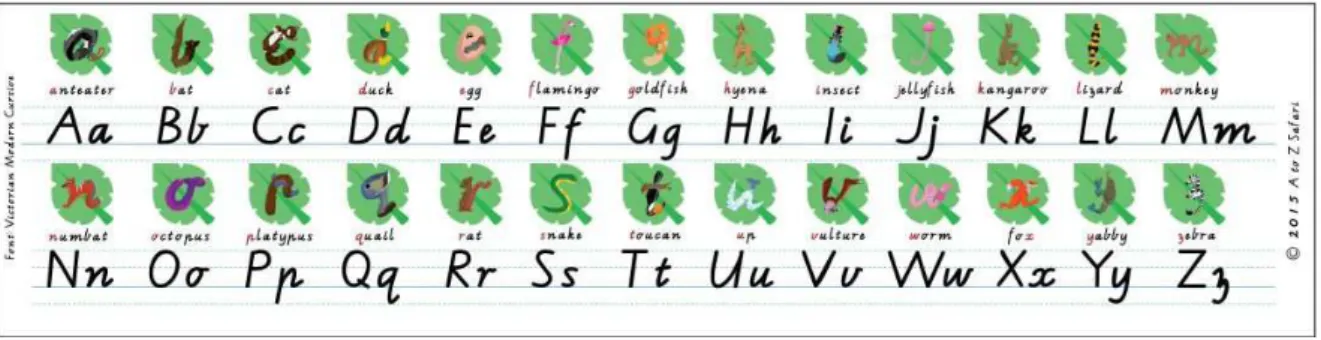
In the design of A to Z Safari, images were created in the shape (form-taking) of the letter that they were to be associated with (e.g. a flamingo in the shape of the letter ‘f’, see Figure 2), so that a more concrete link could be forged between corresponding illustrations, letter-sounds and letter symbols, reflective of research into dual coding theory (see section 2). The form-taking designs shown in Figure 2 intentionally deviated from more traditional alphabet picture cues (e.g. using an image of a flamingo in a more natural pose as a reminder that the first sound in the word ‘flamingo’ is to be associated with the letter symbol ‘f’), which is commonly used in classrooms to assist students to learn and recall letter-sound associations. Our form-taking design was chosen to reflect the theory that creating more concrete links between images and letters, by presenting illustrations (e.g. of animals) in a form-taking shape, can better assist students to remember the associated letter symbol over traditional alphabet picture cues. Figure 2 shows the alphabet chart used in A to Z Safari (Nicholas et al., 2017).
Figure 2: Alphabet Chart of A to Z Safari
The Apple iPad (generation 2 or higher) was chosen to house the A to Z Safari app due to its widespread use in Australian primary schools (Etherington, 2013, Apple Press Info, 2013). The widespread use implies that our intended audience, primary school aged children, would be already familiar with Apple iPads, an important consideration to the adoption of a new technology in the classroom (Lynch and Redpath, 2012). The development environment for the iPad is also well supported with a mature, well-established development toolset along with easy access to well-established communities of support. During development and subsequent testing of A to Z Safari, the development team used Xcode 5, targeting iOS 8, the iPad 2, and the iPad Mini 2.
To facilitate interaction with the form-taking illustrations designed for A to Z Safari (Figure 2), the app offered users two categories of games: match (Figure 3) and memory (Figure 4). Within each category, users could select from five levels that allowed them to interact with the letter 'leaf' tiles (Figure 2) in different ways. Table 1 describes each level, available within both game categories, in A to Z Safari. Within each level, users were presented with activities that were associated with all 26 letters that queried their competency.
Table 1: Description of A to Z Safari Game Levels
Level Match and memory game description
Level 1 Users are presented with spoken words (for example 'cat'), required to partner with letter tiles.
Level 2 Users are presented with spoken letter-sounds (for example /s/), required to partner with letter tiles.
Level 3 Users are presented with written letters, required to partner with letter tiles (Figure 3)
Level 4 Users are presented with spoken letter-sounds (for example /s/), required to partner with letter symbols written in plain font (not letter tiles)
Level 5 Users are presented written letters, in a different font than previously used, required to partner with letters written in plain font (not letter tiles)
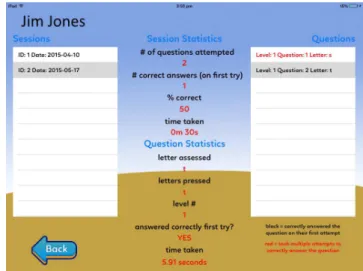
A to Z Safari also consisted of a welcome screen (Figure 5) and a teacher/administration area (Figures 6 and 7) where the classroom teacher can setup a class list and begin or end ‘assessment sessions’ to enabled the gathering of user statistics (see section 4.1). The assessment sessions support the match games.
Figure 3: Example of a Match game in A to Z Safari
When approaching the design of A to Z Safari it was important to build a visually appealing, flexible, yet easy to use app framework based on interaction, content, learning and literacy recommendations. In A to Z Safari, ‘interface economy’ (Stern, 2014) was established via a combination of audio and visual elements that prompt the user to explore the games. To ensure a clear introduction to the content the landing screen was purposefully designed with bright colours and large buttons to allow players to engage with the games. With each interaction, A to Z Safari rewards users with positive audio feedback and details their progress via appropriate visual feedback. Influenced by Flewitt et al. (2014), A to Z Safari encouraged players to ‘try again’ if they cannot provide the correct answer, minimising negative feedback to maintain player motivation.
4.1 Data analytics
A to Z Safari allowed classroom teachers to enter the name, age, and gender of each student within their classroom, stored behind a password protected 'teacher' area. User statistics were stored in one device (normally the teacher’s) and not shared across other devices. A database was required to store these user statistics, with SQLite 3 chosen due to being lightweight, and able to run natively within any iOS app as it is included within the iOS API. As advised by Stern (2014) and Reid and Ostahewski (2001), to provide a high level of security and to constrain data management issues, only the teacher area had the ability to email user statistics to an outside source. Once the teacher had logged a student’s details in the app the teacher could give the device to the child in this ‘assessment’ mode to play the match game. While in assessment mode, students could complete up to five levels of the match game to test their letter-sound competency. During each level A to Z Safari tracks students’ progress on: number of questions played, letters assessed, number of incorrect answers, number of correct answers, which letters were selected in error, and more.
Figure 6: Example of the teacher administration section of A to Z Safari