Security of Interactive and
Automated Access Management
Using Secure Shell (SSH)
Tatu Ylonen
Paul Turner
Karen Scarfone
Murugiah Souppaya
This publication is available free of charge from:
Security of Interactive and
Automated Access Management
Using Secure Shell (SSH)
Tatu Ylonen
SSH Communications Security
Helsinki, Finland
Paul Turner
Venafi
Salt Lake City, UT
Karen Scarfone
Scarfone Cybersecurity
Clifton, VA
Murugiah Souppaya
Computer Security Division
Information Technology Laboratory
This publication is available free of charge from:
http://dx.doi.org/10.6028/NIST.IR.7966
October 2015
U.S. Department of Commerce
Penny Pritzker, Secretary
National Institute of Standards and Technology
National Institute of Standards and Technology Internal Report 7966 50 pages (October 2015)
This publication is available free of charge from: http://dx.doi.org/10.6028/NIST.IR.7966
Comments on this publication may be submitted to:
National Institute of Standards and Technology
Attn: Computer Security Division, Information Technology Laboratory 100 Bureau Drive (Mail Stop 8930) Gaithersburg, MD 20899-8930
Certain commercial entities, equipment, or materials may be identified in this document in order to describe an experimental procedure or concept adequately. Such identification is not intended to imply recommendation or endorsement by NIST, nor is it intended to imply that the entities, materials, or equipment are necessarily the best available for the purpose.
There may be references in this publication to other publications currently under development by NIST in accordance with its assigned statutory responsibilities. The information in this publication, including concepts and methodologies, may be used by Federal agencies even before the completion of such companion
publications. Thus, until each publication is completed, current requirements, guidelines, and procedures, where they exist, remain operative. For planning and transition purposes, Federal agencies may wish to closely follow the development of these new publications by NIST.
Organizations are encouraged to review all draft publications during public comment periods and provide feedback to NIST. All NIST Computer Security Division publications, other than the ones noted above, are available at http://csrc.nist.gov/publications.
Reports on Computer Systems Technology
The Information Technology Laboratory (ITL) at the National Institute of Standards and Technology (NIST) promotes the U.S. economy and public welfare by providing technical leadership for the Nation’s measurement and standards infrastructure. ITL develops tests, test methods, reference data, proof of concept implementations, and technical analyses to advance the development and productive use of information technology. ITL’s responsibilities include the development of management, administrative, technical, and physical standards and guidelines for the cost-effective security and privacy of other than national security-related information in Federal information systems.
Abstract
Users and hosts must be able to access other hosts in an interactive or automated fashion, often with very high privileges. This is necessary for a variety of reasons, including file transfers, disaster recovery, privileged access management, software and patch management, and dynamic cloud provisioning. Accessing other hosts is often accomplished using the Secure Shell (SSH) protocol. The SSH protocol supports several mechanisms for interactive and automated authentication. Management of this access requires proper provisioning, termination, and monitoring processes. However, the security of SSH key-based access has been largely ignored to date. This publication assists organizations in understanding the basics of SSH interactive and automated access management in an enterprise, focusing on the
management of SSH user keys.
Keywords
access control; authentication; automated access management; device authentication; interactive access management; Secure Shell (SSH); user authentication
Acknowledgments
The authors wish to thank their colleagues who reviewed drafts of this document and contributed to its technical content.
Trademark Information
Table of Contents
1. Introduction ... 1
1.1 Purpose and Scope ... 1
1.2 Audience ... 1
1.3 Document Structure ... 1
2. The Basics of Access Management and Automated Access Management ... 2
3. The Basics of SSH ... 3
3.1 Protocol Basics... 3
3.2 Common SSH Use Cases ... 3
3.3 Server Authentication ... 4
3.4 Client Authentication ... 5
3.4.1 Password Authentication ... 5
3.4.2 Host-Based Authentication ... 7
3.4.3 Kerberos Authentication ... 7
3.4.4 Public Key Authentication ... 9
3.4.5 User Authentication Summary ...11
4. Vulnerabilities in SSH-Based Access ...12
4.1 Vulnerable SSH Implementation ... 13
4.2 Improperly Configured Access Controls ... 13
4.3 Stolen, Leaked, Derived, and Unterminated Keys ... 13
4.4 Backdoor Keys ... 13
4.5 Unintended Usage ... 14
4.6 Pivoting ... 14
4.7 Lack of Knowledge and Human Errors ... 14
5. Recommended Practices for Management ...15
5.1 SSH Security Policies and Procedures ... 15
5.1.1 Secure SSH Implementation ...15
5.1.2 SSH Identity and Authorized Keys ...16
5.2 SSH Key-Based Access Provisioning, Life Cycle, and Termination Processes ... 17
5.3 Establish Continuous Monitoring and Audit Processes ... 19
5.4 Inventory and Remediate Existing SSH Servers, Keys, and Trust Relationships ... 20
5.5 Automate Processes ... 21
5.6 Educate Executive Management ... 22
6. SSH-Based Access Management Planning and Implementation ...23
6.1 Identify Needs ... 23
6.2 Design the Solution ... 24
6.3 Implement and Test Prototype ... 25
6.4 Deploy the Solution ... 26
6.5 Manage the Solution ... 26
7. Solution Planning and Deployment ...28
Appendix A— NIST SP 800-53 Controls Mapping ...29
Appendix B— Cybersecurity Framework Subcategory Mapping ...34
Appendix D— Acronyms and Abbreviations ...40 Appendix E— Glossary ...41 Appendix F— References ...44
1.
Introduction
1.1 Purpose and Scope
The purpose of this document is to assist organizations in understanding the basics of Secure Shell (SSH) and SSH access management in an enterprise, focusing on the management of SSH user keys.
1.2 Audience
This document is for security managers, engineers, administrators, and others who are responsible for planning, acquiring, testing, implementing, and maintaining SSH solutions. Portions of the document may be of interest to executives and SSH users.
1.3 Document Structure
The remainder of this document is organized into the following sections and appendices: Section 2 discusses the basics of access management and automated access management. Section 3 examines the basics of SSH.
Section 4 describes the primary categories of vulnerabilities in SSH user key management. Section 5 lists recommended practices for SSH-based access management.
Section 6 explains planning and implementation processes for SSH-based access management. Section 7 discusses solution planning and deployment.
Appendix A provides a mapping to NIST Special Publication (SP) 800-53 Revision 4 security controls.1
Appendix B provides a mapping to Cybersecurity Framework Version 1.0 subcategories. Appendix C lists criteria for selecting and procuring tools for managing SSH keys. Appendix D defines selected acronyms and abbreviations used in the document. Appendix E defines selected terms used in the document.
Appendix F lists references.
1 NIST SP 800-53 Revision 4, Security and Privacy Controls for Federal Information Systems and Organizations, April 2013 (updated 1-22-2015), http://dx.doi.org/10.6028/NIST.SP.800-53r4
2.
The Basics of Access Management and Automated Access Management
Controlling access to information systems is critical for information security. Access controls exist on many levels and use many technologies. The levels include physical restrictions on access to hardware; logical controls for accessing network interfaces, hardware management ports on servers, virtualization hypervisors, operating system (OS) user accounts, and information through database systems; and logical controls implemented by applications.Information security (confidentiality, integrity, and availability) is compromised if controls at any of these levels fail. Breaches at different levels have different implications. Generally, a breach at the hardware, hypervisor, or OS level is more serious than a breach at the application level. For example, breaking into a database account on a server may permit reading, modifying, and destroying any data in a database, bypassing normal database-level controls. Breaking into a “root” (administrator) account generally permits doing this to all data on all accounts on the system, plus installing deeply hidden backdoors, modifying the operating system, corrupting data, or rendering the system unbootable.
Most operating systems use user accounts as the primary unit of access control. In this document, a user account means an OS level user account unless otherwise specified. User accounts correspond to people (including system administrators) and service accounts are used for running application software or are used internally by the OS. It is worth noting that many applications implement their own user accounts that do not correspond to OS level user accounts (they essentially share the service account of the application); however, such application-level accounts are generally beyond the scope of this document. User accounts may be stored in a centralized repository (e.g., Active Directory [AD] or Lightweight Directory Access Protocol [LDAP]) or may be configured locally on a system. A user account defined locally is generally distinct on each system (separate password, separate home directory, etc.), even if the same account name is used on multiple computers, while user accounts defined in a centralized repository are often available on more than one computer and share the same home directory (on a networked file system). Service accounts are very commonly local accounts, and accounts for people are often stored in a directory.
In a very real sense, access control is the essence of information security. Other security technologies primarily exist to implement and enforce access controls, make it harder to analyze and attack access control systems, limit the impact of actual breaches, evaluate the current state of protections, detect suspicious activity, counteract undesired activity, or help analyze what happened after the fact. The critical balance in information security is between the need to grant access and the need to limit access. Consequently, access must be provisioned (based on proper justification for that level of access) and it must be eventually terminated (e.g., when an employee leaves the role that justified the access, when a client system or application requiring automated access is decommissioned).
Access to hosts has become increasingly automated. Examples of this automation include file transfers, disaster recovery, privileged access management, software and patch management, and dynamic cloud provisioning. This automation involves transferring data and executing commands, such as having hosts reconfigure other hosts. Thus, hosts must access other hosts, often with very high privileges.
Unfortunately, there has been little planning and oversight of automated and interactive machine-to-machine access control. Instead, such access has been added and configured on an ad hoc basis by system administrators, vendors, and integrators as part of other projects, without formal access control lifecycle management (e.g., standardized provisioning and termination processes, access token management (e.g., periodic password changes)). This publication explores the field of SSH-based access management, with a strong focus on security issues and how to best address them.
3.
The Basics of SSH
Secure Shell (SSH) is a protocol for securely logging into a remote host and executing commands on that host (e.g., administrative commands). What distinguishes the SSH protocol from earlier remote
administration protocols, such as telnet, remote shell (rsh), remote login (rlogin), and remote copy (rcp), is its built-in support for robust security features such as secure user and device authentication and transmission encryption. SSH has almost completely taken the place of these insecure remote administration protocols.
Today, SSH software is natively included and used as the primary remote administration mechanism for many operating systems and devices, including Linux, Unix, routers, firewalls, network appliances, security appliances, and other systems. It is also embedded behind the scenes into a wide variety of Information Technology (IT), networking, and security technologies, including file transfer, systems management, identity management, and privileged access management. In addition to manually remotely connecting to and managing hosts and devices, SSH is used for integrating hosts and automating their operation.
This section examines the basics of Secure Shell (SSH) version 2.0. First, Section 3.1 explores SSH protocol basics. Next, Section 3.2 discusses the most common use cases for SSH, including the use case scenario of interest in this publication: user and automated access. Section 3.3 examines SSH server authentication, while Section 3.4 details SSH client authentication.
3.1 Protocol Basics
The SSH protocol has a typical client/server architecture. An SSH client application on host A initiates a connection to an SSH server application on host B. These two hosts negotiate encryption algorithms for their transmissions, then establish a session key and perform device authentication for the server host (host B)2, and finally send client (or user) authentication credentials (e.g., username and password) to the
server. Assuming that this authentication succeeds, an SSH connection is said to be established between the hosts, ready for use.
The current version of the SSH protocol is 2.0. Earlier versions of the protocol have serious known vulnerabilities that preclude their use. For more information on the formal definition of the SSH protocol version 2.0, see [RFC4251], [RFC4252], [RFC4253], and[RFC4254]. All references to the SSH protocol in this publication are to version 2.0 unless explicitly stated otherwise.
3.2 Common SSH Use Cases
There are three common use cases for SSH:
Interactive use. SSH is used for managing and configuring Unix and Linux computers, networking equipment, and various other types of hosts remotely. SSH is also used for running applications remotely (particularly text-based legacy applications).
File transfers. SSH is used as the foundation of the Secure Copy (scp) and Secure File Transfer Protocol (SFTP) protocols. These protocols are used to transfer files between hosts while leveraging the security capabilities built into SSH.
Point-to-point tunneling. SSH can be used to implement a virtual private network (VPN) tunnel to protect data transmitted between two hosts. One or both of these hosts may be acting as a gateway for other hosts behind it.
This publication covers all of these use cases in the context of user and automated access. Automated access refers to accessing a host from another host in an automated fashion (without human intervention). SSH is frequently used for automated access for a variety of purposes, including managing large IT environments, integrating applications, and provisioning virtual machines in cloud services.
Automated access is commonly used with functional accounts, system accounts, service accounts, and other non-interactive user accounts (sometimes also called non-user accounts). Such accounts are used by operating systems, server applications (e.g., databases), and other applications for running processes. Automated access is also frequently used for file transfer functions.
Automated access may be unrestricted, allowing any commands to be executed, or may be limited to specific commands or operations, such as file transfers (perhaps limited to a specific directory).
Organizations should limit automated access so that only the necessary commands can be executed and only the necessary resources can be engaged.
3.3 Server Authentication
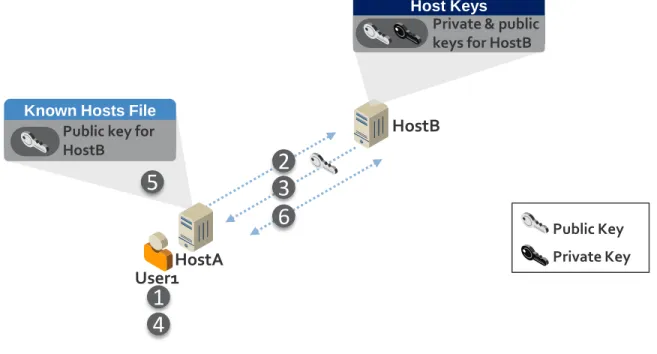
The confidentiality and integrity of SSH rely on strong authentication of both the SSH server and client. Authentication of the SSH server by the client is performed with public key cryptography via public keys explicitly trusted by the client or certificates issued by a certification authority—public keys are more commonly used than certificates.3
Figure 3-1: Process for Initially Trusting an SSH Server’s Public Key
3 X.509v3 compliant host certificates are a useful alternative for host keys in large environments and make host key rotation much easier.
HostB
Public Key Private Key
Host Keys
Private & public keys for HostB
Known Hosts File
Public key for HostB User1
6
3
2
1
5
HostA4
Figure 3-1 illustrates the process for initially trusting an SSH server’s public key: 1. User1 initiates its first login to HostB.
2. HostA connects to HostB.
3. HostB sends its public key to HostA.4
4. The public key sent by HostB is displayed for User1. User1 verifies that it is the correct public key for HostB by comparing it against the value received via a different communication channel. 5. HostA stores HostB’s public key in User1’s known hosts file along with the name of HostB in
order to authenticate HostB during future connections without prompting the user to verify that the key is the correct public key for HostB.
6. HostA authenticates HostB using HostB’s public key and establishes an encrypted connection with HostB.
Note: If the User1 account is being used by an automated process, the user who reviews the public key on first connection is typically the administrator for the automated process. To avoid this process, the
administrator can prepopulate the known hosts file with HostB’s public key.
Care must be taken by users and administrators in ensuring that the correct public keys for each server are trusted as known host keys to prevent man-in-the-middle attacks. In addition, a man-in-the-middle attack can also be launched if the attacker is able to get a copy of the server’s private key. Wherever possible, users should have limited ability to change known host key configurations. In addition, known hosts files should be hashed to minimize information available to potential attackers.
3.4 Client Authentication
Client authentication refers to the authentication of interactive users (administrators and other users) or automated processes operating on SSH clients. Authentication occurs for a particular account on the server.
The SSH protocol supports several mechanisms for authenticating users, including passwords, host-based authentication, Kerberos, and public key authentication. All these authentication methods fundamentally rely on some secret information, and when used for automated access, this secret information must be stored locally or be otherwise accessible. One or more client authentication methods can be enabled on each SSH server. Each authentication method features pros and cons for security and flexibility—these pros/cons are often different for interactive users and automated process. Organizations must carefully evaluate and select the client authentication method(s) that are approved for use in their environment, disabling others. This section briefly discusses these forms of client authentication, focusing on their relevancy and appropriateness for interactive users and automated processes.
3.4.1 Password Authentication
There are two kinds of password authentication mechanisms in SSH: basic password authentication and keyboard-interactive authentication. Basic password authentication is a legacy method defined by the SSH protocol standards. Keyboard-interactive authentication is used in most modern environments, and can support challenge-response authentication and one-time passwords in addition to traditional password authentication. LDAP may be used in lieu of local credential databases (e.g., password files) to reduce the number of passwords users must remember and manage. With both password and keyboard-interactive
4 An SSH server may have more than one public/private key pair if multiple algorithms (e.g., RSA, DSA, ECDSA) are supported on the server.
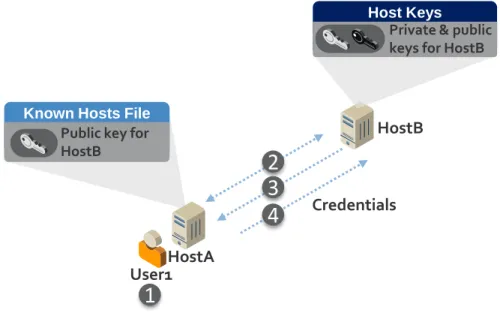
authentication, usernames, passwords, and challenge responses are sent from the client (HostA) to the server (HostB) across the encrypted SSH connection. This protects the credentials in transit across the network but they are still subject to compromise in a man-in-the-middle attack. Password authentication is more commonly used for interactive users, but less commonly for automated access, although it is sometimes seen with hard-coded passwords in scripts and management systems.
Figure 3-2: Password Authentication Process Figure 3-2 illustrates the password authentication process:
1. User1 initiates a login to HostB.
2. HostA authenticates HostB using the HostB public key stored in User1’s known hosts file and establishes an encrypted connection with HostB.5
3. User1 is prompted for a username and password and potentially other credentials (for keyboard-interactive authentication) required by HostB.
4. The credentials are sent to HostB over the encrypted connection. HostB authenticates User1 by verifying the credentials provided by User1.
For interactive users, password authentication provides users mobility, as they can enter their password anywhere from which they have SSH access. However, if interactive users are required to remember and manage different passwords for multiple systems, it can create administrative and security challenges. Password authentication is generally not recommended for automated processes because it doesn’t provide the level of access control available with other authentication methods, especially public key authentication.
If password authentication is used for interactive users or automated access, the passwords should be rotated frequently in accordance with the server organization’s password policy (which should also contain requirements such as minimum password length, minimum password complexity, etc.)
5 This step is described above in Server Authentication. It is included here to promote understanding of when server authentication occurs during the password authentication process.
Known Hosts File
Public key for HostB
Host Keys
HostB
HostA
Private & public keys for HostB
Credentials User1
1
4
3
2
3.4.2 Host-Based Authentication
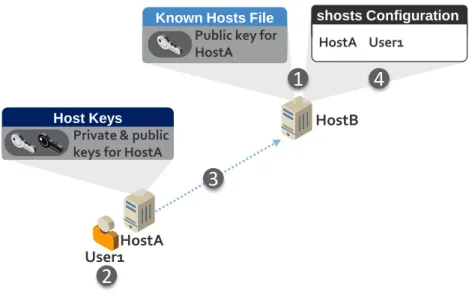
Host-based authentication uses a server host's (HostA) host key—the key typically used by clients to verify the server’s identity—to authenticate that server (HostA) to another server (HostB) and to vouch for the identity of the user (User1) on the client side server (HostA). A configuration file (.shosts) can be used with any user account on the destination server (HostB) to specify which users on which hosts can log into that account without further authentication.
Figure 3-3: Host-Based Authentication Figure 3-3 illustrates host-based authentication:
1. The administrator for HostB places the public key for HostA in the known hosts file on HostB and configures the shosts (e.g. ~/.shosts or shosts.equiv) to allow User1 to authenticate from HostA.
2. User1 starts to login to HostB.
3. HostA authenticates to HostB using the host key for HostA.
4. HostB confirms in the shosts configuration that User1 is authorized to access the target account on HostB from HostA.
Host-based authentication does not permit configuring command restrictions—limits on what can be done on the destination server when accessed. Because of this, it is not recommended for automated access. Host-based authentication is not recommended for interactive users because it does not present an interactive login, which is not generally considered a good practice, especially for accounts with elevated privileges.
3.4.3 Kerberos Authentication
Kerberos (usually together with an LDAP-based directory, such as Active Directory) implements single sign-on within a Windows domain or Kerberos realm, and allows user accounts and credentials to be stored in a centralized directory. A user authenticates to the directory and then is able to access any account with the same name on SSH-based machines that are joined to the same domain or realm. On one hand, this can be beneficial for single sign-on and a single point for managing user accounts, including
Known Hosts File
Host A
A
HostB
Host Key B Public key for HostA
shosts Configuration
HostA User1
Host Keys
Private & public keys for HostA
HostA
3
User1
2
the ability to disable the account centrally and remove all access. On the other hand, such single sign-on implies that once a user has authenticated to an account using Kerberos, it is possible to log in to any other server that has the same account name and is in the same domain (with Kerberos authentication enabled) without further authentication. This can easily create lots of unwanted implicit trust
relationships. Another concern is that currently widely used SSH implementations do not support command restrictions for Kerberos.
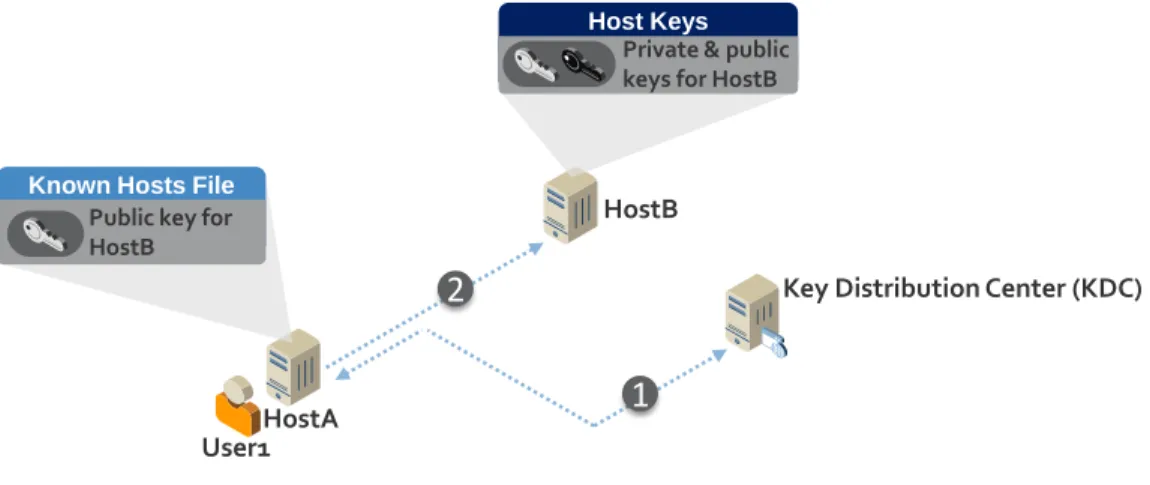
Figure 3-4: Kerberos Authentication Figure 3-4 illustrates Kerberos authentication with SSH:
1. User1 authenticates to the Kerberos Key Distribution Center (KDC) and receives a ticket, which HostA stores for future authentications.
2. User1 goes to connect to HostB. HostA provides the ticket to HostB, which it uses to authenticate User1.
Kerberos includes a user’s IP address(es) within authentication tickets to ensure that these tickets cannot be copied and reused by an attacker on another system. This feature of Kerberos prevents SSH man-in-the-middle attacks. However, in environments where network address translation (NAT) firewalls are used, access will be denied when attempting to access a host on the other side of a firewall. In order to enable access across NAT firewalls, Kerberos must be configured to allow tickets that do not include IP addresses, which opens the vulnerability of tickets to being copied and reused.
To facilitate authentication for automated processes, many SSH Kerberos implementations provide the option for credentials to be stored in a file on the client called a keytab file. This enables automated logon without user intervention. Access to keytab files should be restricted to prevent credentials from being compromised and used for unauthorized access from the same system or a different system.
For interactive users, Kerberos is best suited for environments where users require access to several servers, because it provides more secure authentication than password authentication, single sign-on for users, and single point of account management (enabling/disabling, etc.). However, controls must be put in place to limit implicit access and ensure that users only have intended access.
Automated processes should generally have limited, explicit access to a limited number of specific hosts. The exception may be management systems that require automated access to a large number of hosts. In
HostB
Key Distribution Center (KDC)
Host Keys
Private & public keys for HostB
Known Hosts File
Public key for HostB
1
HostA User1
practice, Kerberos is rarely used for automated processes and is not recommended due to the risks of implicit access and the lack of command restrictions.
3.4.4 Public Key Authentication
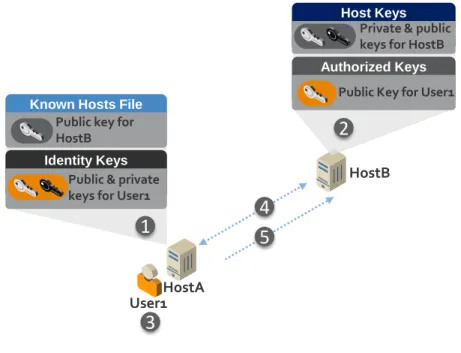
Public key authentication in SSH uses user keys or certificates to authenticate a connection – with user keys being the most commonly used method. Such keys can be configured for both interactive users and automated processes, and they authorize the user or process to access a user account in an information system. An interactive user or automated process on an SSH client (HostA) has a user key called an identity key, typically an RSA or DSA private key, and the server (HostB) must have the corresponding public key configured as an authorized key for a user account to which access will be provided. Any user or process in possession of the identity key is then allowed to log into that user account on the server and perform actions under the privileges configured for the account.
Figure 3-5: Public Key Authentication Figure 3-5 illustrates SSH public key authentication:
1. User1 or an administrator generates an identity key (and corresponding public key) for User1. 2. The HostB administrator stores User1’s public key as an authorized key in the User1 account on
HostB.
3. User1 starts to login to HostB.
4. HostA connects to HostB and attempts to authenticate User1 to HostB using User1’s identity key. 5. HostB authenticates User1 using the authorized key stored in User1’s account on HostB.
Many SSH implementations support configuring restrictions for authorized keys. These may be used for limiting what can be done on the server using the key (command restrictions) and for limiting the IP addresses from which the key can be used (source restrictions).
HostB
Host Keys Private & public keys for HostB
Known Hosts File Public key for HostB
Authorized Keys Public Key for User1
Identity Keys Public & private keys for User1
1
2
4
5
3
HostA User1Figure 3-6: Public Key Authentication with Source and Command Restrictions Figure 3-6 illustrates public key authentication with source and command restrictions:
1. The administrator for HostB configures the authorized key for User1 to only allow authentication to HostB from address 1.2.3.4 and run the date command once authenticated.
2. User1 authenticates to HostB from HostA (IP address 1.2.3.4).
3. HostB executes the date command and then terminates User1’s connection.
An important advantage of public key authentication is that it does not create implicit trust relationships, only expressly defined trust relationships, and the permitted access can be reliably determined by
inspecting the destination host.6 This is very important for being able to clearly determine and audit who
can access each system and account. However, if the deployment of authorized keys is not controlled and tracked, users can create unauthorized trust relationships and access that can be exploited.
For interactive users, the identity key is usually stored on a smartcard or in a passphrase-protected file on a client device. If the identity key is protected by a passphrase, it is encrypted by a key derived from the passphrase. When SSH user keys are used for automated access, however, the identity key is usually stored as an unencrypted file (with no passphrase) in the file system.7 Given that the files grant access to
servers, they contain sensitive data.
Public key authentication is the recommended authentication mechanism for automated access with SSH due to the command and source restrictions that are available and the ability to more readily prevent implicit trust. Public key authentication is by far the most frequently used method of SSH automated access as of this writing.
6 An exception is OpenSSH's proprietary certificate authentication, which does not allow reliably auditing who can access a host by inspecting just that host. There is no hardened Certificate Authority solution for OpenSSH, and most environments have no systematic tracking or directory of issued OpenSSH certificates. Thus if the host trusts an OpenSSH certificate signing key, it is often not possible to reliably determine who is able to access the host.
7 There is no one present to supply the passphrase for decrypting the identity key for automated access by processes. Hard-coding the passphrase in scripts would provide little additional security (see also NIST SP 800-53 IA-5(7)), and obtaining it from a vault in a script would also provide limited additional security and would be quite a maintenance burden.
HostB
Host Keys Private & public keys for HostB
Known Hosts File Public key for HostB
Authorized Keys Public Key for User1 From= “1.2.3.4” Command = “date”
Identity Keys Public & private keys for User1
1
2
3
Mon Dec 22 06:07:11 MST 2014HostA (1.2.3.4) User1
3.4.5 User Authentication Summary
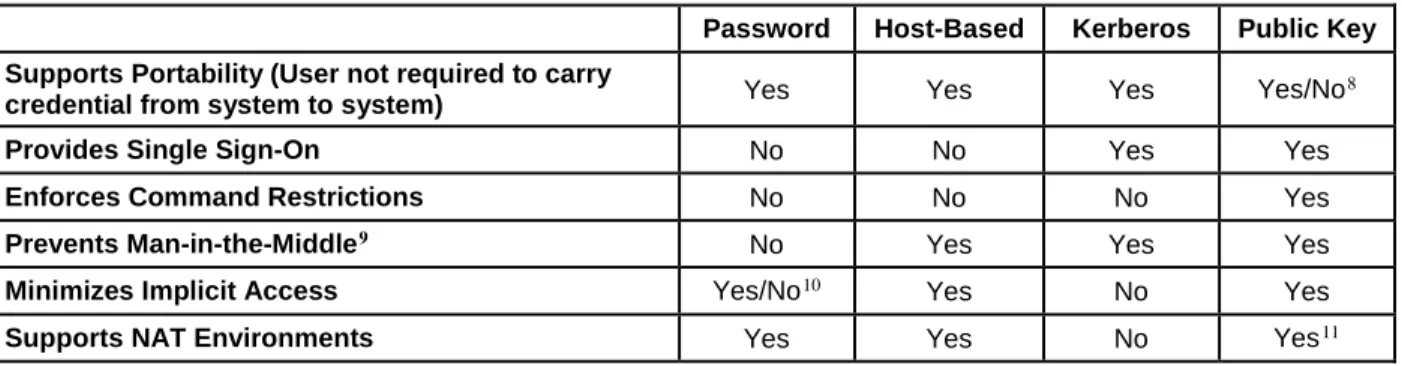
There are many considerations to take into account when selecting authentication methods for SSH across an enterprise. Table 3-1 summarizes the major security and operational considerations for the user
authentication methods described in this section in commonly used SSH implementations. Generally, the goal should be to select a single method for all authentications or one method for all interactive users and one for all automated processes. However, this is not always possible based on the options available in deployed SSH systems and software.
For automated processes, public key authentication is the recommended method based on its additional security features. For interactive users, public key authentication with smartcards provides the best security. For file-based public key authentication with interactive users, if passphrase strength for
interactive user identity keys stored in files (instead of smartcards) cannot be enforced, weak passphrases may put identity keys at risk of compromise. In these cases, password or Kerberos authentication, where password strength can be enforced, may provide higher security. The use of keytab files with Kerberos for interactive users is not recommended.
If multiple authentication methods will be enabled, it is critical to put controls in place to prevent
unintended access. For example, if Kerberos is selected for interactive users and public key authentication for automated processes, it is critical to ensure that the names of system accounts for automated processes are not the same as accounts in the central directory. And, conversely, it is also critical that users be prevented from configuring authorized keys that would allow them circumvent controls enforced via Kerberos.
Table 3-1: Comparing Authentication Methods
Password Host-Based Kerberos Public Key
Supports Portability (User not required to carry
credential from system to system) Yes Yes Yes Yes/No
8
Provides Single Sign-On No No Yes Yes
Enforces Command Restrictions No No No Yes
Prevents Man-in-the-Middle9 No Yes Yes Yes
Minimizes Implicit Access Yes/No10 Yes No Yes
Supports NAT Environments Yes Yes No Yes11
8 If the identity key for an interactive user is stored on a smartcard, the user can easily and securely carry it from system to system. If it is stored in a passphrase-protected file, the user must copy the file to each client from which he or she accesses SSH servers.
9 This assumes that best practices are being followed. For example, if the server’s public key is not properly validated, a man-in-the-middle attack is possible with any authentication method.
10 When password or keyboard-interactive authentication is used with LDAP, implicit access can occur when an account on a host unexpectedly has the same name as an account in the LDAP directory.
4.
Vulnerabilities in SSH-Based Access
Because SSH is the primary secure access method used for administration and automated processes on mission critical systems, its security is crucial. The systems managed via SSH include Unix and Linux systems, routers, firewalls, security appliances, Unix partitions on mainframes, and other network devices. The privileges granted to users and automated processes via SSH are typically elevated—often root level—privileges.12 A number of vulnerabilities arise—both for users and automated processes—if
proper provisioning, termination, and monitoring processes are not implemented.
The security of SSH-based automated access, and even interactive access, has been largely ignored to date. Many organizations don't even know how many SSH keys they have configured to grant access to their information systems or who has copies of those keys. The accounts associated with these keys often grant far more access than is actually needed, such as allowing execution of any command or transfer of files to any directory. Also, in many organizations, system administrators configure new keys without any approvals or coordination, and may use them to circumvent auditing of privileged access and
maintenance. Some large enterprises have hundreds of thousands or even millions of SSH user keys on their systems for automated access, which often provide many more entry points onto servers than the interactive user accounts do. Also, a sizable percentage of these keys typically grant access to
administrative/root accounts or sensitive accounts, such as those storing database files or critical software. SSH is also often used for communications with other organizations, external systems, or independent users. A closely related issue is the trust relationships that these keys establish within and between systems, even between organizations. Some of these trust relationships may be undesirable or violate policies, such as leading from development and test systems into production systems, or crossing from a low-impact system to a high-impact system without requiring any additional authentication. Most importantly, SSH key-based trust relationships can enable an attacker who compromises one system to quickly move (or pivot) from one system to another and spread through an organization—individual trust relationships often collectively form webs of trust across an organization’s systems.
Although the security implications of poor SSH key management have been known for some time, the scope of the problem for automated access has not been widely understood or acknowledged. For
example, most organizations do not have SSH key management or SSH-based automated access as part of their assessment programs, even though for many organizations SSH-based automated access has already become central to their identity and access management operations.
This section describes the primary categories of vulnerabilities in SSH-based interactive and automated access—with a particular focus on user keys used to grant access in public key authentication. The recommendations presented in subsequent sections of this document are intended to address these vulnerabilities. The categories of vulnerabilities described in this section are as follows:
Vulnerable SSH implementation Improperly configured access controls
Stolen, leaked, derived, and unterminated SSH user keys Backdoors (unaudited user keys)
Unintended usage of user keys
12 Although access to root accounts via SSH is generally not allowed, administrators will leverage sudo and other tools to elevate their privileges for many operations once logged in via SSH.
Pivoting
Lack of knowledge and human errors
4.1 Vulnerable SSH Implementation
An SSH server or client implementation could have vulnerabilities that allow it to be exploited in order to gain unauthorized access to communications or systems. These vulnerabilities could be any of the
following types:
Software flaws in the SSH implementation (i.e., coding errors)
Configuration weaknesses (for example, allowing the use of weak encryption algorithms) Protocol weaknesses (for example, supporting the use of SSH version 1)
4.2 Improperly Configured Access Controls
In its role of enabling administration of systems via elevated privileges—including root—SSH is highly susceptible to enabling unauthorized access due to improperly configured access controls. Most SSH implementations provide a broad number of options for configuring and controlling access, some of which are provided by the SSH software and others through components with which the SSH software integrates, including the underlying OS, pluggable authentication module (PAM), Kerberos, and other security components. Although powerful, improperly configured access controls can inadvertently enable SSH access directly to the root account, unauthorized access to other accounts due to implicit access enabled via Kerberos, the ability to elevate privileges by manipulating the environment, and other access-based vulnerabilities. An administrator may, for example, properly configure SSH but incorrectly configure PAM or not sufficiently limit permissions at the OS for the account being accessed.
Furthermore, each OS, appliance, device, or application that supports SSH features different options and methods for controlling access, further complicating efforts to ensure security.
4.3 Stolen, Leaked, Derived, and Unterminated Keys
Stolen, leaked, derived, and unterminated identity keys pose a similar problem to stolen, leaked, derived, and unterminated interactive user account credentials. Anyone who may have obtained a copy of an identity key—by copying it from a host, by accessing a backup, by having malware harvest keys, by performing factoring to derive a key, etc.—may use that key to attempt to gain unauthorized access to a user account on one or more servers in the organization. Once access to a user account has been gained, it is generally possible to access and modify any data for that user account—including reading and
modifying the memory of processes running under that user account, and modifying any executable programs owned by that user account.
4.4 Backdoor Keys
Many organizations mandate that all privileged access to their servers take place through a privileged access management system that records all actions performed. Unfortunately, SSH public key authentication can be used to create a “backdoor” that bypasses the privileged access management system. This is done as easily as generating a new key pair and adding a new authorized key to an authorized keys file; authorized keys files are often not audited, so an added key may remain unnoticed for years. The corresponding identity key can then be used to log into the server using any SSH client without the privileged access management system recording the ensuing activity.
4.5 Unintended Usage
Users may, intentionally or unintentionally, use identity keys for purposes for which they were not intended. An example is using an identity key that was only intended to be used for automated file transfers to tunnel traffic (thus concealing it from network security controls).
4.6 Pivoting
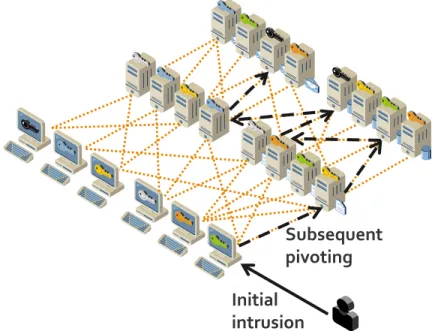
Malware can be engineered to use SSH keys to spread when automated access is allowed. The mesh of interactive and automated access relationships is so dense in many cases that it is likely that an attack can spread (pivot) to most servers in an organization after penetrating the first few servers, especially if other attack vectors are used to escalate privileges. See Figure 4-1 for an illustration of pivoting.
Figure 4-1: Pivoting Enabled by Chained SSH Trust Relationships
4.7 Lack of Knowledge and Human Errors
One of the greatest ongoing challenges to the security of SSH-based systems is the potential for human error due to the complexity of SSH management and the lack of knowledge many administrators have regarding secure SSH configuration and management. An authorized key may inadvertently be deployed incorrectly on a host, such as to a root account instead of a regular user account, thus granting
unnecessary privileges. People are known to make human errors when manually setting up new trust relationships. Such errors can go undetected for years. Also, some key setups involve thousands of hosts, and while it is easy to miss one or more hosts when copying an authorized key to so many hosts
manually, debugging such errors can be very time consuming. Also, when manually fixing problems, administrators are likely to just copy the missing keys to the proper accounts without, for example, checking whether they have accidentally been copied to the root account.
Initial
intrusion
Subsequent
pivoting
5.
Recommended Practices for Management
Effectively securing SSH access consists of defining clear policies and implementing management, operational, and technical security control processes to address already deployed SSH systems, privileges, and user keys, and ensure that new SSH systems and user keys are properly deployed and tracked. The objective of management is to improve security as economically as possible by following the NIST SP 800-5313 recommended practices for access control with respect to interactive and automated access using
SSH.
Operational processes can be optimized by automating SSH user key setups and removals and related approval, documentation, monitoring, and audit processes. In particular, it is possible to integrate a key management system with a ticketing or change tracking system. If requests for provisioning interactive or automated access are made using a predefined template, a key management system can automatically do the provisioning once the request has been approved, thus reducing labor. Certain provisioning requests may touch thousands of hosts, and some organizations are known to use person-years annually on manual provisioning.
An SSH access management project may also include either selection and acquisition of software tools to aid in the process or development of automatically or manually executed scripts.
5.1 SSH Security Policies and Procedures
Policies and procedures play a critical role in SSH security by establishing consistent baseline requirements across the diverse systems and environments where SSH is deployed, including rapidly evolving cloud environments. The definition of policies should clearly spell out roles and responsibilities in order to prevent misunderstandings that result in security lapses and to ensure accountability. It is critical to educate all SSH stakeholders (system administrators, security professionals, business application owners, etc.) on SSH security policies and processes.
5.1.1 Secure SSH Implementation
Although the hardening of SSH implementations is outside the scope of this document, it is worth noting a few areas where policies and procedures should be defined to mitigate the significant vulnerabilities that can emerge due to poor implementation and management. Other NIST publications and industry
standards should be consulted as references for defining policies in the following areas: Only enabling SSH server functionality on systems where it is absolutely required. Keeping SSH server and client implementations fully up to date across all systems.
Hardening SSH server and client implementations, including disabling SSH v1 protocol, disabling unapproved authentication methods, preventing implicit access by limiting SSH accessible accounts and groups (including root), disabling port forwarding, limiting access to environment variables, using approved ciphers, properly configuring supporting subsystems (e.g., PAM), and enforcing SSH inactivity timeouts.14
13 http://dx.doi.org/10.6028/NIST.SP.800-53r4
14 Unfortunately, it is not always possible to harden SSH implementations (e.g., on appliances and embedded devices). In these cases, compensating controls can be used to mitigate the vulnerabilities, such as implementing virtual private network (VPN) tunnels to encapsulate the potentially vulnerable SSH traffic.
Enforcing least privileged access for all SSH-accessible accounts and groups, especially for automated processes and remote access.
5.1.2 SSH Identity and Authorized Keys
SSH user keys are security-sensitive configuration information for SSH clients and servers, and their misconfiguration, improper disclosure, or modification may expose servers, applications, and information to unintended access or vulnerabilities. The following policies and procedures are recommended:
Minimum Key Lengths and Approved Algorithms: To prevent factoring by an attacker, user keys must conform to organizational standards for minimum key lengths used with approved algorithms. NIST SP 800-131A15 currently provides recommendations for minimum key lengths that are
considered secure in conjunction with various algorithms. Updates to NIST SP 800-131A should be monitored to ensure that the latest recommendations for key lengths are being followed. Note that some older SSH implementations may not support the key lengths recommended by NIST SP 800-131A. Clear criteria should be defined for exceptions where the use of smaller key lengths is allowed. Cryptoperiods (Maximum Key Lifetime): To minimize the risk of key compromise due to
administrative turnover or improper key management by users, the maximum time (cryptoperiod) that an identity key may be used before replacement with a new key should be specified. NIST SP 800-5716 provides recommended cryptoperiods for public/private authentication keys. Cryptoperiod
policies may take into account the potential for compromise based on types of use, including identity keys used for users versus automated processes, the criticality of systems that are being accessed, the environment where identity keys are stored (e.g., mobile laptops versus smartcard), and whether the keys are used in connections that span outside the organization.
Identity Key Access Control: To prevent compromise of a key by an authorized user, access controls on identity keys should be configured to restrict access to the interactive user or automated process to which they have been assigned. For automated processes, policies should define guidelines for assigning access to administrative staff responsible for managing identity keys.
Identity Key Passphrases: To protect against compromise, identity keys assigned to interactive users should be protected by a passphrase. Standards for passphrase strength and changing passphrases each time a key is replaced (at the end of the cryptoperiod) should be defined. Identity Key Duplication: Identity keys should not be duplicated (copied to other systems) for
interactive users and automated processes. If duplication is allowed for interactive users, guidelines should be provided for the acceptable locations where keys can be copied and used.
Authorized Key Access Controls: Access controls on authorized keys should ensure that non-superusers cannot install new authorized keys for user accounts they use. Such new authorized keys can create backdoors, bypass privileged access auditing systems, grant permanent access, or grant access to others, without regards to controls on non-local access and authorization boundaries. In practice this means “locking down keys”, i.e., moving authorized keys to superuser-owned locations that are not writable to non-superusers. It is strongly recommended that authorized keys be moved to protected locations where ordinary users cannot add new or change existing keys, as well as
configuring SSH servers to only look for keys from those locations. This is necessary for the following reasons:
o Maintaining control of who can access what information
15 http://csrc.nist.gov/publications/nistpubs/800-131A/sp800-131A.pdf 16 http://csrc.nist.gov/publications/PubsSPs.html
o Properly identifying users accessing the system
o Preventing a user from accessing the system after his/her account is terminated
o Ensuring that users cannot bypass privileged access systems
o Controlling remote access
o Enforcing authorization boundaries
Authorized Key Command Restrictions: Authorized keys used for automated processes should be configured with command restrictions unless special approval is given. Command restrictions are particularly important for keys used for authorizing remote file transfers to avoid accidentally permitting remote terminal access and remote execution of commands. For interactive users, command restrictions used in conjunction with scripts may be used to limit the commands available to users.
Authorized Key Source Restrictions: Authorized keys used for automated processes should be configured with source restrictions unless special approval is given, i.e., restrictions on the client IP addresses from which the keys can be used. This prevents an attacker who compromises an identity key from using it elsewhere on the network. Source and command restrictions are a particularly important consideration for SSH connections that allow access from outside the organization.
Replacement on Compromise or Reassignment: SSH keys should be changed when a compromise is suspected. In addition, identity keys used for automated processes should be changed prior to cryptoperiod expiration whenever an administrator responsible for managing the keys for one or more automated processes has been reassigned or terminated.
Usage Logging: All SSH servers should be configured to log key fingerprints for access based on SSH authorized keys. This is necessary for performing the log analysis needed for continuous monitoring and forensic investigations.
Pivot Prevention: Accounts should not be configured with both incoming and outgoing identity key-based trust relationships unless expressly needed (for example, an approved jump server). For example, if an authorized key for IdentityKey1 is configured for account User1 on Server1 and that same account has another identity key enabling it to authenticate to account User1 on Server2, an attacker who gains access to IdentityKey1 can now pivot from Server1 to Server2. Incoming and outgoing trust relationships on a server should be configured in separate accounts to prevent pivoting. If an organization has needs for limited pivoting, these implementations should be approved on a case-by-case basis.
No Environment Crossing: SSH trust relationships should not cross release environment (dev, QA, prod) in order to prevent a compromise in a “lower” development or QA environment spreading to production environments.
5.2 SSH Key-Based Access Provisioning, Life Cycle, and Termination Processes
Provisioning and configuring access to an account for interactive users and automated processes should be a judged decision, balancing the need for access against the risks, and should include consideration of the level of access required. It is not acceptable for any user or system administrator to grant user account access to other users or processes without proper approval.
In a controlled provisioning and life cycle process, provisioning interactive or automated access requires the phases depicted in Figure 5-1:
Figure 5-1: Controlled Provisioning and Life Cycle Process
Request: Submitting a request for establishing access to one or more accounts on one or more servers together with justification for the access. The request for automated access should specify the
command that is authorized to be executed (or in exceptional cases, interactive command line access). Furthermore, a request should identify the business process, application, or information system that the request relates to and the owner/responsible person for the trust relationship if not the owner of the business process, application, or information system. The request should also specify the source account(s) and host(s) from which access is allowed or the key to be used for access. Ideally, an existing change control system is used for submitting a filled request template.
Approval: Reviewing and approving the request based on consideration of security impact,
destination account and server, authorization boundary crossing, and remote access considerations. Ideally, the change control system is used for approving the change in large enterprises or other organizations that need centralized, automated mechanisms for managing keys. The request should, at a minimum, be reviewed and approved by the official responsible for the security of the information system to which it grants access. Access grants create connections between systems and may need to be documented in security policies, plans, or architecture documents as system interconnections. Access grant approvals should be recorded in a protected database to enable them to be used for continuous monitoring and audits. A controlled process with proper documentation of approvals is necessary for being able to detect access grants by unauthorized users (e.g., unapproved authorized keys) during continuous monitoring. Without documented approvals, it will not be possible to audit that all existing authorized keys have been approved. Documenting why each key is authorized is also important for being able to remove keys when no longer needed to properly terminate access.
Provisioning: Implementing the request, creating a key pair if needed, and configuring the authorized key(s) and identity key(s). SSH key-based access provisioning should be limited to authorized
individuals; ideally, it is performed by a central team that ensures consistent management across all systems. To improve efficiency and reduce errors, the implementation takes place automatically to reduce resources, reduce the need for privileged access, and eliminate manual configuration errors. Usage Logging: Logging usage to facilitate reauthorizations (e.g., accounts and authorized keys that
are not used for a long period of time should likely not be reauthorized), forensic investigations, and audits. Logs should be retained for a sufficient amount of time to enable forensic or operational investigations at a later date. Log files should be safeguarded because they may contain sensitive
Terminate Access Logged Usage
Provision Access Review &Approve
information. For more information on logging, see NIST SP 800-92, Guide to Computer Security Log Management.17
Review and Reauthorization: Regular reviews and reauthorization of SSH key-based access by individuals responsible for the security of systems and data being accessed. An organization should define policy on how often approvals need to be revalidated for each information system, taking into account the impact level of the system and the level of access granted (e.g., whether the access is to a privileged account, whether execution of arbitrary commands is permitted). Ideally, in a centrally managed system the revalidation process should be continuously monitored and reflect the immediate need for individuals and systems to have access to the required resources. To facilitate a holistic review of access to servers and applications, the review of entitlements granted via authorized key-based trust relationships should be integrated with existing privileged access management reviews. Termination: Terminating access for automated processes when an application is decommissioned or
the automated trust relationship is no longer required by the application. Access for interactive users should be terminated when a person leaves the organization or changes roles.
5.3 Establish Continuous Monitoring and Audit Processes
The purpose of continuous monitoring is to ensure that the processes for provisioning, life cycle management, and termination are followed and enforced. It is also important for detecting unauthorized access that may have been illicitly provisioned by attackers as a backdoor into systems. Unauthorized and misconfigured SSH user keys should be detected. For example, anyone or anything (including malware) with access to a superuser account can technically configure new authenticators granting access to any account.
One approach is to periodically discover all configured authorized keys for all user accounts on all servers, check for each authorized key whether there is a corresponding valid approval (and that the key has the same access restrictions, such as command restriction, as in the approval), and generate alerts whenever the configured access does not have a matching approval. In other words, this involves establishing a baseline and whitelisting that baseline to detect any deviations from the accepted baseline. Ideally, SSH client configurations are also analyzed, and any configured identity keys are checked against approvals to ensure that the private key corresponding to each approved authorization is not found from any unauthorized locations.
Log data generated by an information system should be analyzed to 1) detect configured SSH user keys that are not being used and propose them for removal to eliminate unnecessary access grants (many of these keys likely belong to users who have left the organization); 2) detect and monitor connections from remote locations and connections crossing authorization boundaries and ensure that they are properly approved; 3) detect connections using an authorized key from hosts from which connections have not been authorized (such connections would typically involve leaked credentials and warrant immediate key rotation); and 4) identify keys that are used from outside the managed environment as “external keys” requiring manual rotation. Ideally, such log data analysis integrates with an existing SIEM or other log data collection system used by the organization.
Furthermore, continuous monitoring should ensure that remote access and non-local maintenance (including privileged access) using SSH user keys is properly audited, and that SSH/SFTP file transfers using SSH user keys and crossing a security zone boundary are properly audited and content-checked and
are not used for unintended purposes (such as executing commands or transferring files in the wrong direction).
Auditing of SSH user keys serves risk analysis and ensures that the provisioning, life cycle management, and termination processes as well as continuous monitoring are working properly. A comprehensive audit of SSH user keys for risk analysis purposes should be performed by all organizations that use SSH or SFTP protocols (including within file transfer products or for network device or hardware/BIOS-level configuration). Audits for ensuring the functioning of processes, on the other hand, can use representative sampling and condition detection tests to gain sufficient confidence that the processes are functioning.
5.4 Inventory and Remediate Existing SSH Servers, Keys, and Trust Relationships
Many organizations have thousands of untracked identity keys, authorized keys, and corresponding trust relationships granting access across a large number of mission critical systems. Existing legacy keys pose a substantial security risk and make risk analysis difficult if they are not understood. An inventory of the location of all existing SSH keys and an inventory of trust relationships must be created and evaluated against defined policies. The inventory should include the locations (host and account) of all identity and authorized keys and authorized key restrictions (e.g., source and command restrictions).
Remediation is also necessary for compliance. NIST SP 800-53 requires identifying authorized users and their access rights, understanding and properly authorizing connections between information systems, applying the principle of least privilege, and managing authorized keys, among other requirements. An inventory and remediation project typically consists of:
Mapping all trust relationships that result from deployed identity and authorized keys and requiring review and approval from their owners (including description of the purpose of the key or other justification for the existence of the key). Trust relationships created by public key authentication must be reviewed and evaluated based on the potential for chains of trust relationships coming in and out of systems to be used to pivot. Source and command restriction information should be included to enable evaluation of proper access controls and restrictions. Any keys for which such approval is not deemed appropriate (such keys may be backdoors and may have been left behind by attackers) should be removed. Ideally, trust relationship information can be imported into existing privilege access management systems for review through standard processes.
Adding command and source restrictions to authorized keys wherever possible
Identifying and removing any orphan authorized keys for which a corresponding identity key has not been found, as they may represent backdoor keys which can be used for nefarious purposes
Identifying and remediating any duplicated identity keys
Ensuring all identity keys used by interactive users are protected with a passphrase Replacing all keys that do not comply with key length and algorithm policies Enforcing the SSH identity key provisioning process
Locking down keys by moving them to root-owned locations (this is needed to produce a stable state for the later steps)
Assigning owners (e.g., application, business process owner) for all keys granting access to servers (e.g., based on the server and account they grant access to, possibly automatically using information from a suitable configuration database)
Monitoring log data for several months to determine which keys are not being used, proposing such keys for removal to their owners, and removing any unused keys that are not specifically approved for keeping (the monitoring period should usually be 6 to 12 months to ensure all active keys are used; the monitoring period should include testing of disaster recovery systems and other processes that may utilize keys)
Analyzing which keys grant access across authorization boundaries or other defined boundaries (e.g., development/test to production systems, between information systems, remote access) and either categorically removing authorized keys granting such access or obtaining required approvals for such access
Analyzing which keys are external keys, i.e., used with hosts outside the managed environment Rotating (i.e., changing) all identity keys and corresponding public keys (external keys may need
manual handling and coordination with administrators of the external hosts with which they are used) Onboarding all relevant hosts into a system for managing SSH keys
During the remediation project, relevant SSH configurations should be backed up before making a change so that the change can be quickly rolled back in case something breaks.
A key remediation project can be a sizable effort, but it is critical for security and compliance. Note that it is generally considered infeasible to maintain a 100% inventory of all SSH identity keys because they are such small files that can be stored anywhere, even on paper (they are small enough to be typed in). The real goal is to keep an inventory of all authorized keys and to the extent possible, the corresponding identity keys.
5.5 Automate Processes
The automation of the processes involved in the management of SSH key-based access can significantly improve security, efficiency, and availability. This includes the following processes:
Inventory: Manual discovery and inventory of all SSH identity and authorized keys (along with corresponding restrictions) and mapping of all resulting trust relationships is practically impossible. To accurately complete an SSH key inventory across an enterprise, or even a single department, automation of some sort is essentially a requirement. Initial identification of all SSH servers to start the process of key discoveries can be performed by leveraging existing vulnerability scanning systems.
SSH Key-Based Access Review: Automatically importing trust relationship data into an existing privilege access management system for review leverages existing processes and facilitates an accurate review and tracking of approvals for access granted through SSH keys.
Provisioning: System administrators in many organizations spend a substantial amount of time configuring and managing SSH user keys. Many organizations already use a ticketing or change control system for approving changes to their IT systems. Provisioning interactive or automated access using SSH is most naturally performed using the same system used for approving other IT changes or other access. Ideally, a special template is used for filling a request for interactive or automated access, and once approved, the request is automatically picked up by a key management system and implemented on all affected hosts. Such automation eliminates the manual steps for setting up keys, eliminates the need for manual root access for installing the keys, reduces the amount of privileged administrative access that needs to be audited and reviewed, eliminates configuration errors due to incorrectly implemented requests, and ensures that the approval template remains available for future reference and for use in continuous monitoring and audits.
Continuous Monitoring: Automation is also a virtual necessity for any continuous monitoring process.
Audit: A system that can provide central reporting and analysis tools across the inventory can reduce the time necessary to prepare the data required for audits and make it easier for auditors to verify proper implementation and identify exceptions.
5.6 Educate Executive Management
Many executives are not aware of the central role SSH keys play in the secure management and operation of mission critical infrastructure and the significant breaches that can occur if they are exploited. Without sufficient executive education for both security and operationally focused executives, SSH key
management initiatives can get derailed by other seemingly higher priorities, leaving an organization vulnerable. To ensure the proper level of priority is placed on the implementing and sustaining SSH key management, it is important that executives understand the systems on which SSH is used, the levels of access granted to users and automated processes via SSH, the risks and potential impacts of an SSH-based breach (including pivoting), and the basic steps needed to implement an SSH key management program (as outlined in this document).